

Page 1
http://www.monomachines.com
http://www.monomachines.com
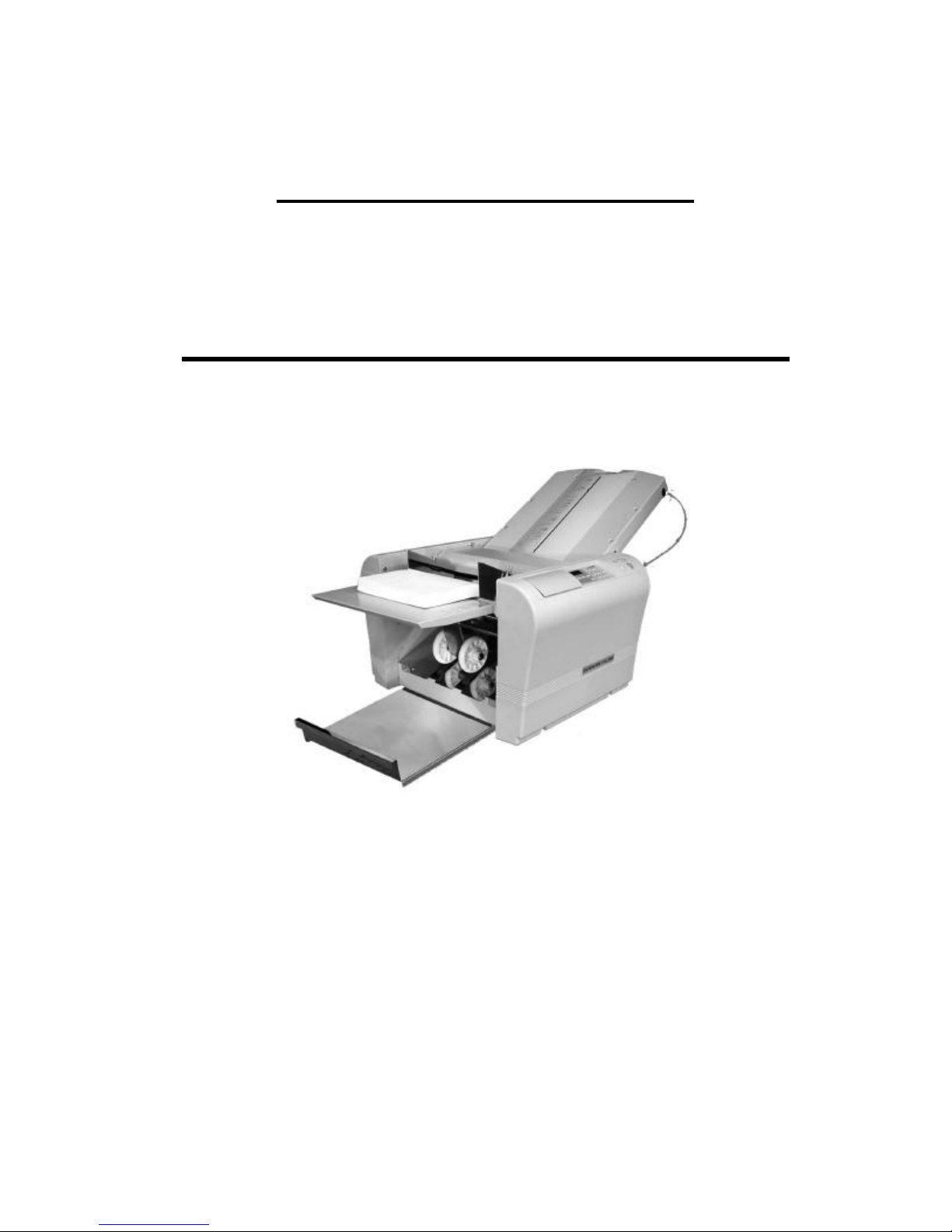
OPERATION MANUAL
For
Paper Folders MBM 306A & F-45N
A PRODUCT OF
MBM
CORPORATION
The Leader in Paper Handling Equipment
1-800-223-2508
www.mbmcorp.com
-0-
Page 2
Safety Instructions
endangering situation that may occur.
wer plug out of or put it in the electric outlet using a wet hand.
http://www.monomachines.com
http://www.monomachines.com
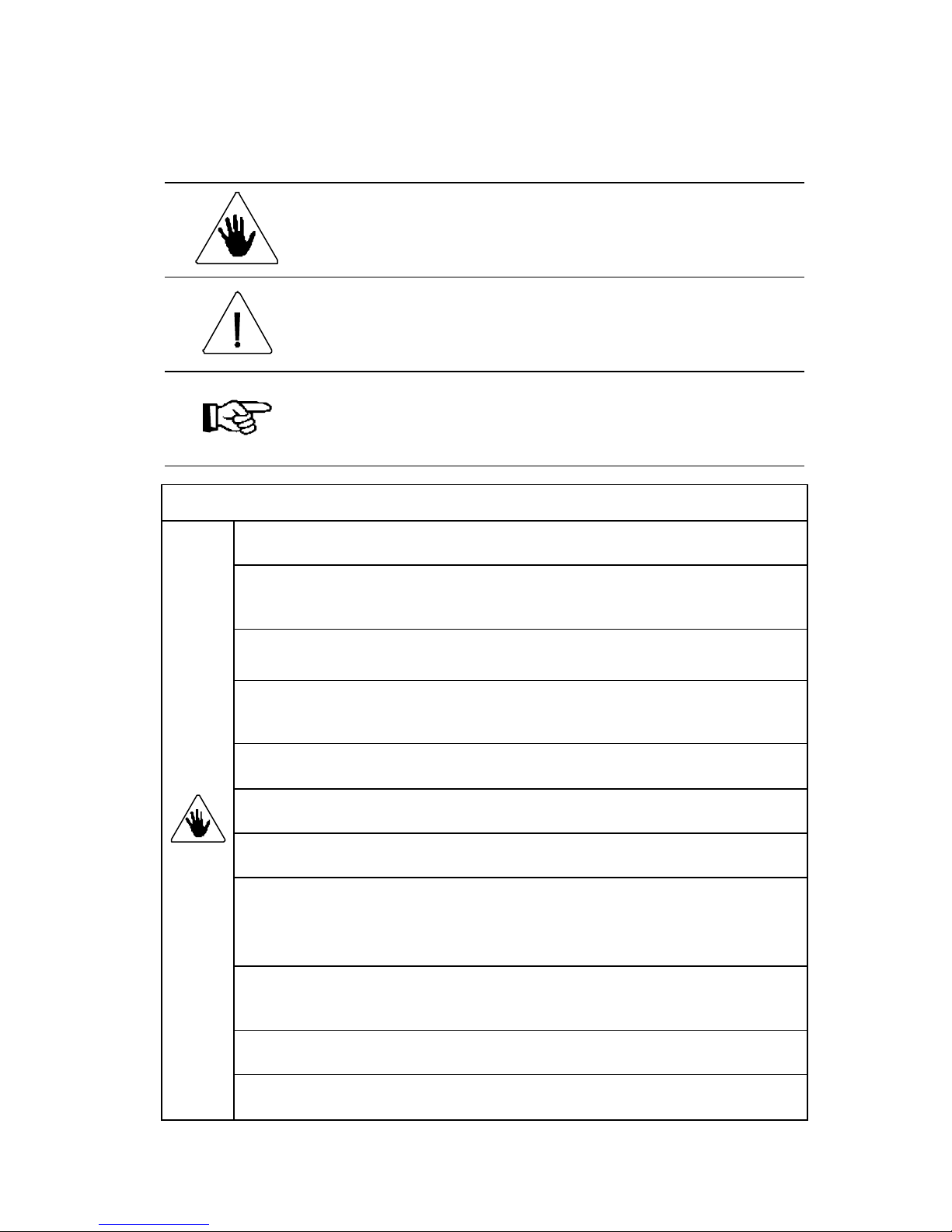
Definition of Symbols and Notes
In this manual following names and signs stand for possible dangers.
Danger
This Symbol stands for immediate danger threatening the life and health
of persons. Disregarding these instructions may cause severe damage to
health and even serious injuries.
Caution
This symbol stands for an
Disregarding these instructions may lead to slight injuries or damage to
property.
Note
This symbol stands for notes, operational hints and other useful
information. They are convenient for exploiting the machine’s
functional abilities.
Danger
Make sure that the machine is electrically grounded. This prevents an electric shock
when there is a leak of electricity.
Use the machine at 110 VAC with a frequency of 60Hz. A fire may start or the
machine may break down if a higher or lower voltage is used, or if an electric current
with a frequency that is not within the range of frequency stated above.
Do not place any object on this machine. A fire may start or electricity may leak if water
or a foreign object enters inside the machine.
Handle the power cord with care. A fire may start or an electric shock may be caused if
the cord is damaged, broken, or processed, if a heavy object is placed on the cord, or if the
cord is bent forcibly.
Do not pull the po
Otherwise, an electric shock may be caused.
Do not remove the cover of this machine. Otherwise, an electric shock or injury may be
caused.
Do not remodel this machine. Otherwise, a fire may break out or an electric shock may be
caused.
If the machine is used when it is in an abnormal condition, such as generating heat,
emitting smoke, and giving out a strange smell, a fire may break out or an electric shock
may be caused. Turn off the power switch immediately and then pull the
Power plug out of the electric outlet. Afterward, consult with your dealer.
If abnormalities such as the power cord generating heat and giving out a strange smell are
found, turn off the power switch immediately and then pull the power plug out of the
electric outlet. Afterward, consult your dealer.
If a foreign object enters into the machine, turn off the power switch first and then pull the
power plug out of the electric outlet. Afterward, consult your deal er.
If thunder approaches, pull the power cord out of the electric outlet to prevent a fire or
breakdown caused by the falling of a thunderbolt.
-1-
Page 3
Caution
Do not put the machine on an unstable place such as a shaky stand and a slant floor.
t first when moving this machine.
http://www.monomachines.com
http://www.monomachines.com
Do not let hairs, a necktie, or necklace hang above the drive of the machine. Doing so
may cause an injury.
Doing so may cause the machine to drop or fall down, causing an injury.
Do not put the machine in a moist or dusty place. Doing so may start a fire or cause
an electric shock.
Be sure to pull out the power cord while holding the plug. If the power plug is pulled
out while holding the cord, a fire may break out or an electric shock may be caused.
Be sure to pull the power plug out of the electric outle
Otherwise, the cord may be damaged, causing a fire or an electric shock.
Be sure to pull the power plug out of the electric outlet for safety purposes when this
machine is not used for consecutive holidays or for other reasons.
- 2-
Page 4

Introduction
http://www.monomachines.com
http://www.monomachines.com
Thank you very much for purchasing the Paper Folder 306A/F-45N. This machine
enables users to achieve greater efficiency in clerical work by releasing them from
paper-folding work that has manually been performed in the past. Please read this
Operation Manual carefully before using this machine.
This Operation Manual is good for both 306A/F-45N.
The explanation for functions of 306A is mentioned using italic type letters.
Contents
Safety Instructions .............................................................................................................1
Introduction........................................................................................................................3
Contents .............................................................................................................................3
(1) Specification .................................................................................................................4
(2) Accessories...................................................................................................................5
(3) Part Names ...................................................................................................................6
(4) Designation and Functions of Operation Panel............................................................7
(5) Indication of the Counter .............................................................................................8
(A) Addition Counting...............................................................................................8
(B) Batch Counting ....................................................................................................8
(6) Set -Up .........................................................................................................................9
(7) Directions on Use ....................................................................................................... 11
(A) Standard Folding of Standard-size Paper .......................................................... 11
(B) Manually Setting Standard Folding of Non -Standard-size Paper .....................13
(C) Cross Folding .................................................................................................... 15
(8) Adjustments ................................................................................................................16
(A) Skew Adjustments .............................................................................................16
(B) Fine Adjustments ............................................................................................... 16
Fine Adjustments for Table 1...............................................................................17
Fine Adjustments for Table 2...............................................................................18
(9) Storage........................................................................................................................19
(A) Memory............................................................................................................. 19
(B) Cancellation of Memory....................................................................................20
(C) Cancellation of Total Memory........................................................................... 20
- 3-
Page 5
(1) Specifications
http://www.monomachines.com
http://www.monomachines.com
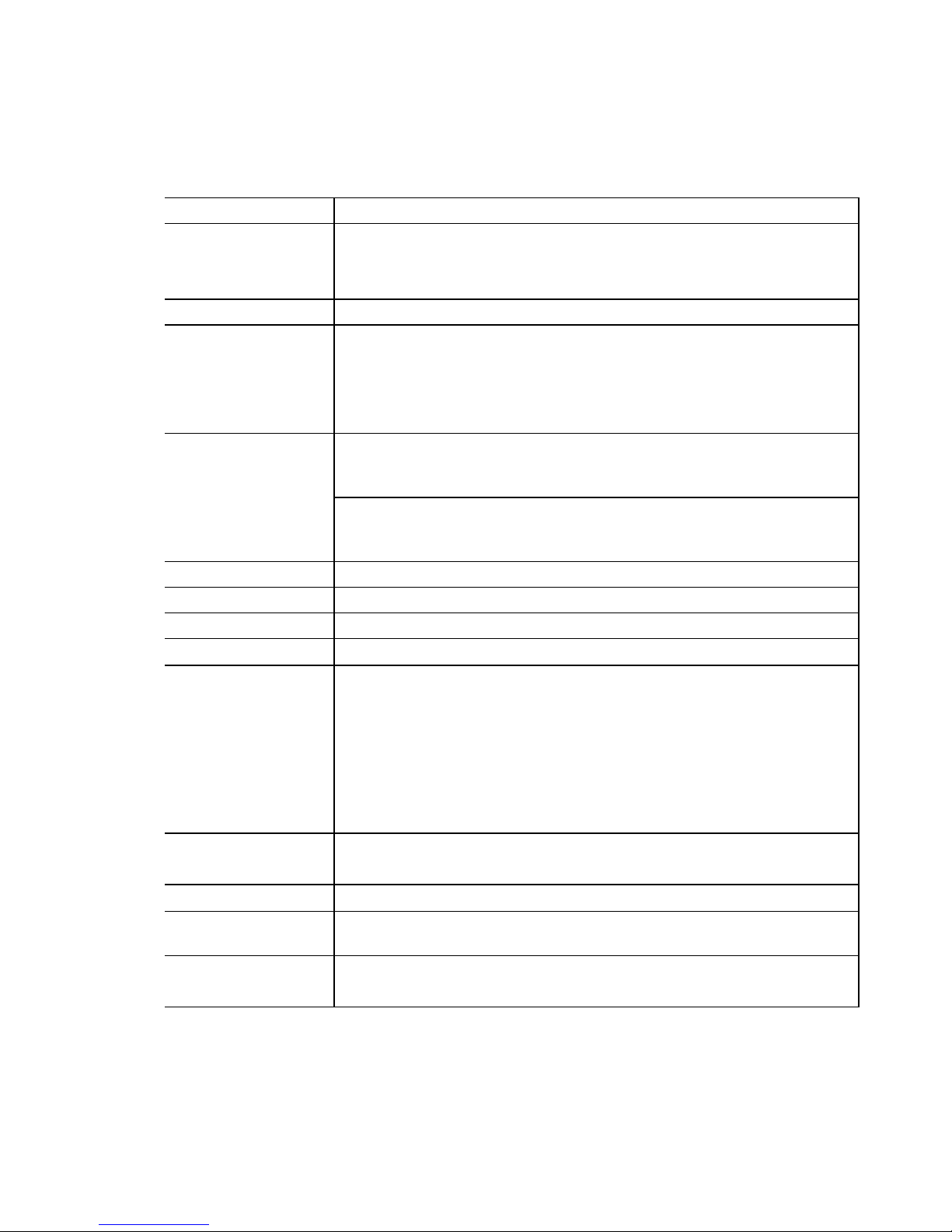
Model: 306A/F-45N
Paper sizes: 3.5 ” x 5.0” to 11 ” x 17”
Paper weight: 45 to 105g/m
3.5 ” X 5.0” size is for SINGLE fold only.
5 ” x 7.2” size cannot be folded into GATE.
2
(up to 152g/m2 for single fold) 14 to 70 lb bond
Paper quality:
Fold types:
Fold dimensions:
Paper feed system: Three -roller friction feed system
Maximum capacity: 500 sheets (20 lb bond)
Folding speed: 3700 to 11520 sheets per hour (single fold using Letter size paper)
Control system: Automatic setting by a built-in microcomputer
Additional functions: Skew correction device
Noise
Power consumption:
Power source: 110-120 VAC/60Hz
Dimensions:
Net weight:
Option:
Woody paper, high -quality paper, high -quality paper for stencil printing,
medium-quality paper
Single, gate, letter, zigzag, double parallel, and fold-out.
In addition , irregular folding and cross folding using double fold are
available.
Maximum fold dimensions
Table 1: 12.6 ” (zigzag, double parallel, and fold-out)
Table 2: 8.5” (single, gate, and letter)
Minimum fold dimensions
Table 1: 2.0” (gate a nd letter)
Table 2: 1.6” (single, zigzag, double parallel, and fold -out)
Paper jam detector
Four-digit counter with addition/subtraction modes
Automatic paper size detector (Letter, Legal & Ledger sizes)
Memory function : 6 kinds
Auxiliary paper guide for cross fold
Perforating Option
80dB
75W, 0.7A
34.25 ” · 20.9 ” · 20.5 ” (during use)
26” · 20.9” · 20.5 ” (during storage)
74 lb Shipping Weight: 86 lb
Perforator table assembly with a 2-mm or 4 -mm perforation cutter
- 4-
Page 6
(2) Accessories
http://www.monomachines.com
http://www.monomachines.com
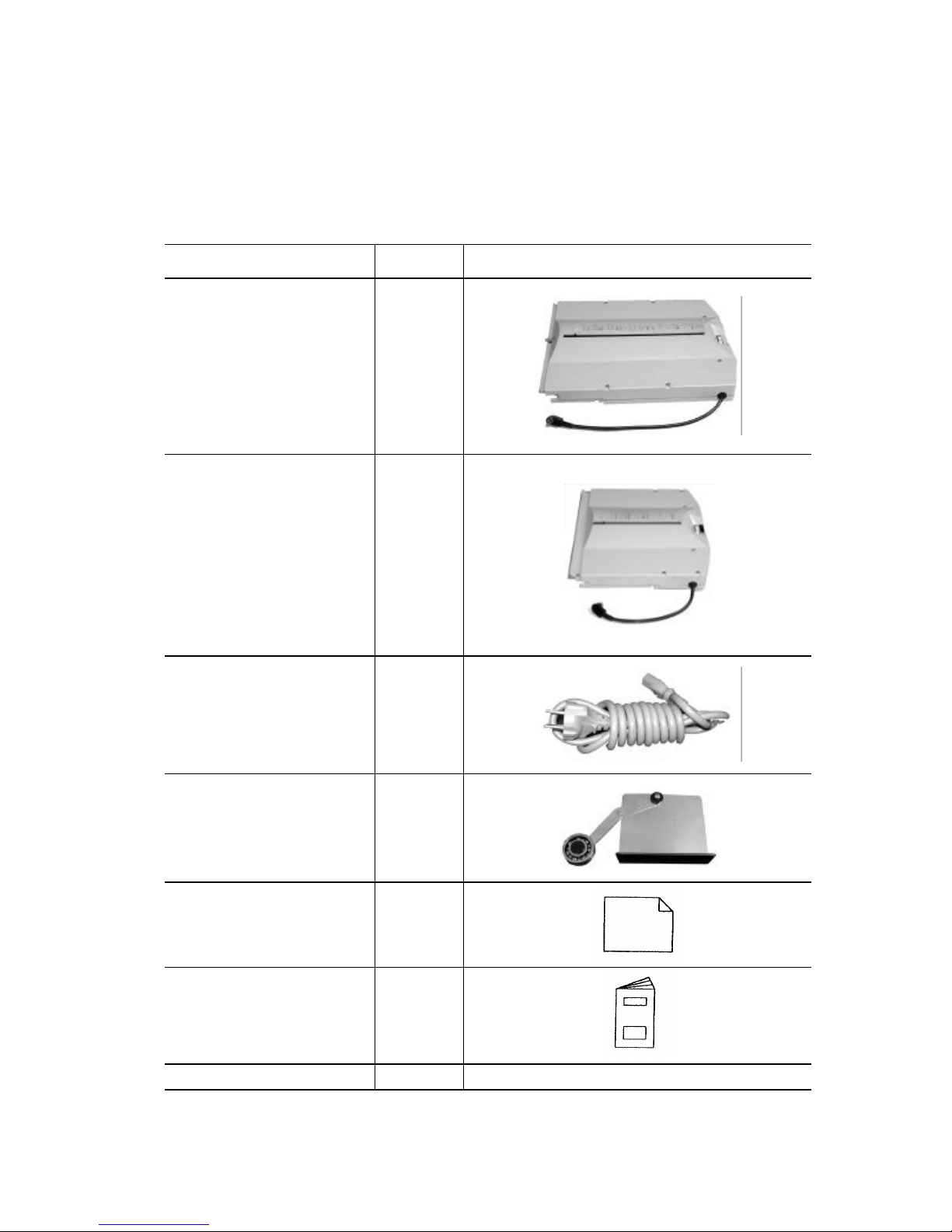
Make sure that the following accessories are included in the package after opening it.
Contact your dealer immediately if there are missing accessor ies.
Accessories Number Figure
Table 1 1
Table 2 1
Power cord 1
Paper support feed guide
(right and left)
Machine cover 1
Operation Manual 1
Paper Eject Roller 1
Right 1
Left 1
- 5-
Page 7
(3) Part Names
http://www.monomachines.com
http://www.monomachines.com
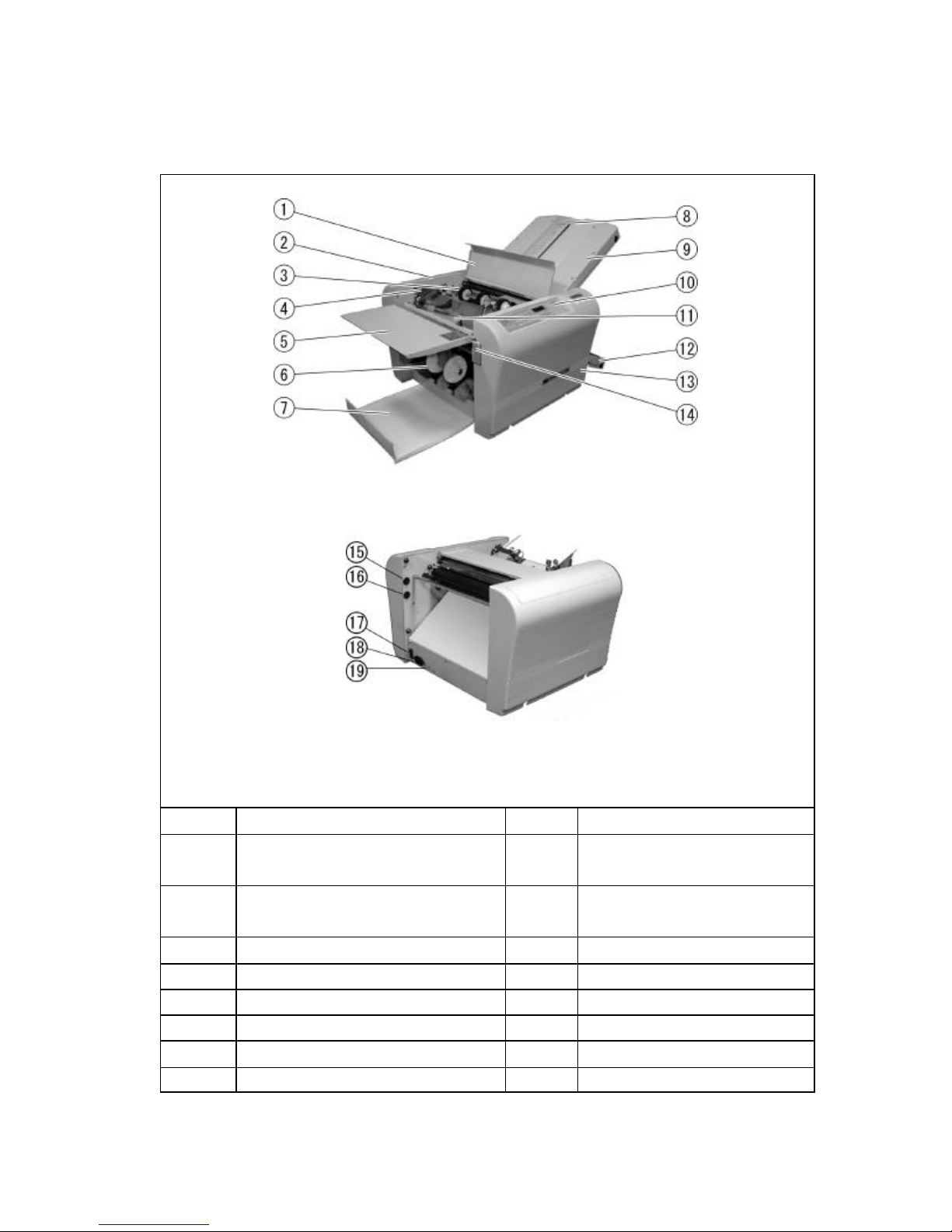
Number Name Number Name
1
2
3
4
5
6
Roller cover
Left side cover
Paper feed roller
Paper guide
11
12
13
14
Auxiliary feed table 15 Table 1 socket
Paper eject roller 16 Table 2 socket
Paper feed table
Table 2
Right side cover
Paper feed table lever (306A only)
7
8
9
10
Paper ejection table 17 Power switch
Stopper fine adjustment knob 18 Inlet
Table 1 19 Circuit breaker
Control panel
- 6-
Page 8
(4) Operation Panel And Functions
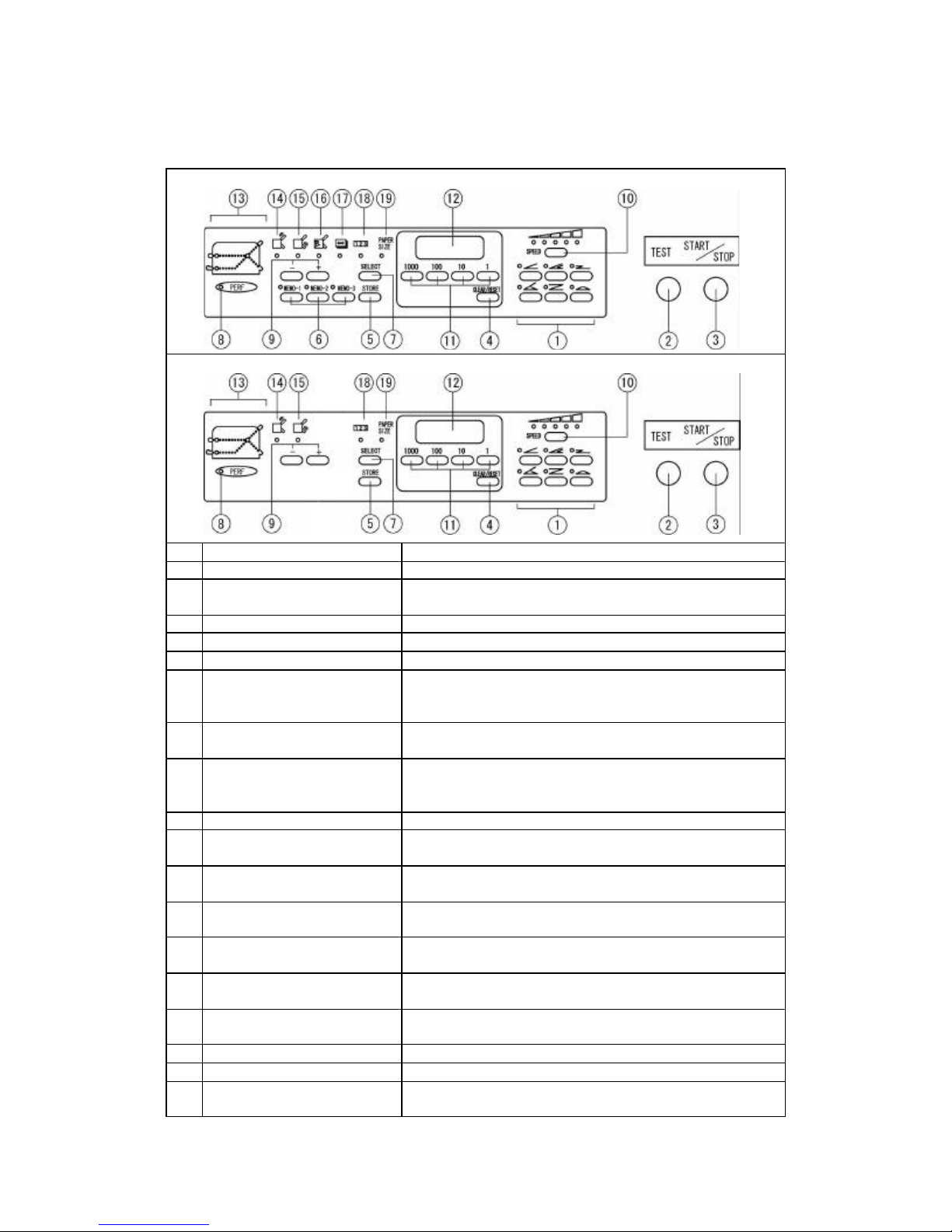
Test folds two sheets without counting.
It lights when pa
It lights when the position of stopper of Table 1 is
It lights when the position of stop
It lights when the position of the paper ejection roller
It is on when paper length is input (only for F
It lights when reduction is indicated on the counter.
It lights when paper size is indicated.
http://www.monomachines.com
http://www.monomachines.com
F-45N
No. Designation/Indication Function
1
2
3
4 Clear/Reset key Clears counter indication and resets error.
5
6
7 Select key
8 Perforation mode lamp
9 + /? key
10
11
12
13
14
15
16
17 Paper length input mode lamp
18
19
Fold type key Six folding types can be input and stored.
Paper size input mode
put mode lamp
Operation, if pushed again the machine stops.
. (Only for F-45N)
Used for selecting the indication of the counter,
the position of the stopper stud of Table 1 and 2,
the position of paper eject roller, paper length.
It lights when the optional perforating unit is
Used for adjusting the position of the stopper of Table
1 and 2, the position of paper ejection roller, paper
length
Used for inputting a number of sheets to be folded
and the length of non-standard-size paper
Shows the number of sheets, the position of the
stopper pin of Table 1 and 2, and paper size.
Only for F-45N)
eed.
per stock runs short, or indicates the
per of Table 2 is
-45N)
-7-
Page 9
(5) Indication of the Counter
http://www.monomachines.com
http://www.monomachines.com
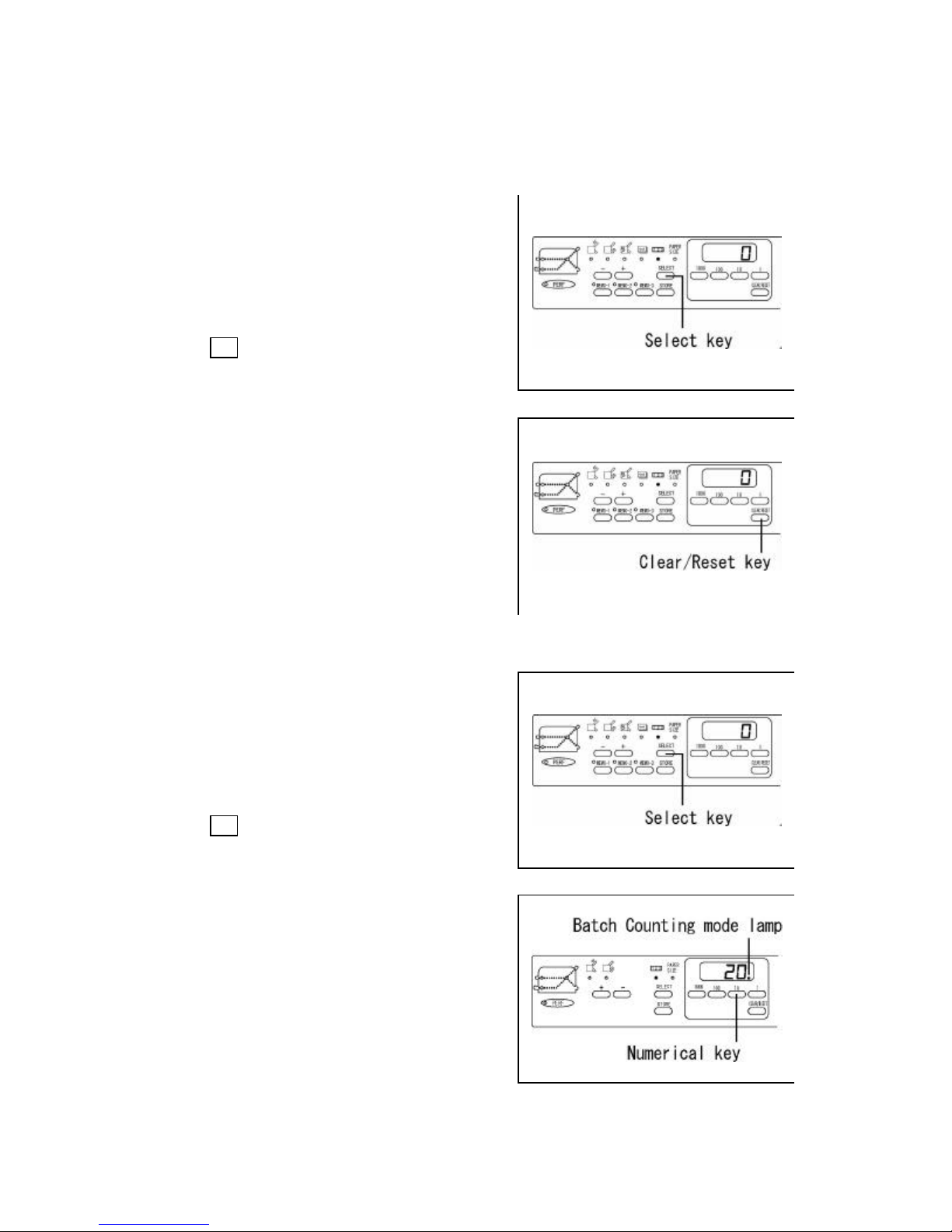
(A) Addition Counter
The number indicated on the counter increases by one
each tim e a sheet of paper is folded.
Press the Select key and select the Counter Input Mode
Lamp 123.
Press the Clear/Reset key and reset the number to zero
(0).
(B) Subtraction Counter
The number indicated on the counter decrease by one
each time a sheet of paper is folded .
Press the Select key and select the Counter Input Mode
Lamp 123.
Input the desired number using the Numerical keys.
(20 is input in this case)
Subtraction Mode Lamp will light.
-8-
Page 10
(6) Set-Up
http://www.monomachines.com
http://www.monomachines.com
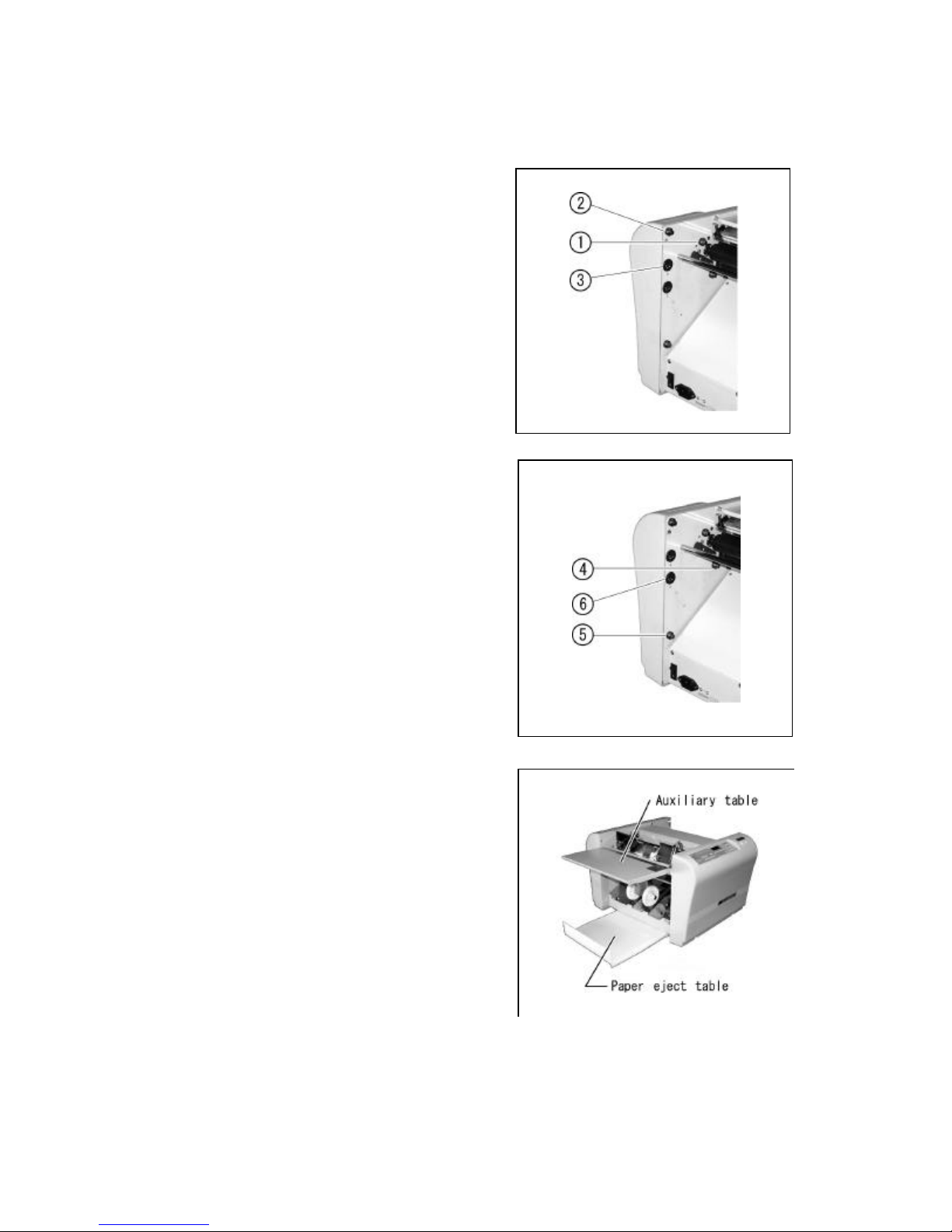
Install Table 1 and 2 at the machine .
Insert the front notched part of Table 1 into the stud 1
of the machine and drop its rear notched part on the
stud 2. Insert the plug into the connector 3.
Caution:
The connector has its direction.
Insertion by force may cause trouble.
Insert the front notched part of Table 2 into the stud 4
of the machine and drop its rear notched part on the
stud 5. Insert the plug into the connector 6.
Caution:
The connector has its direction.
Insertion by force may cause trouble.
Pull the paper eject table out and set it while lifting the
auxiliary table to set it in position.
-9-
Page 11
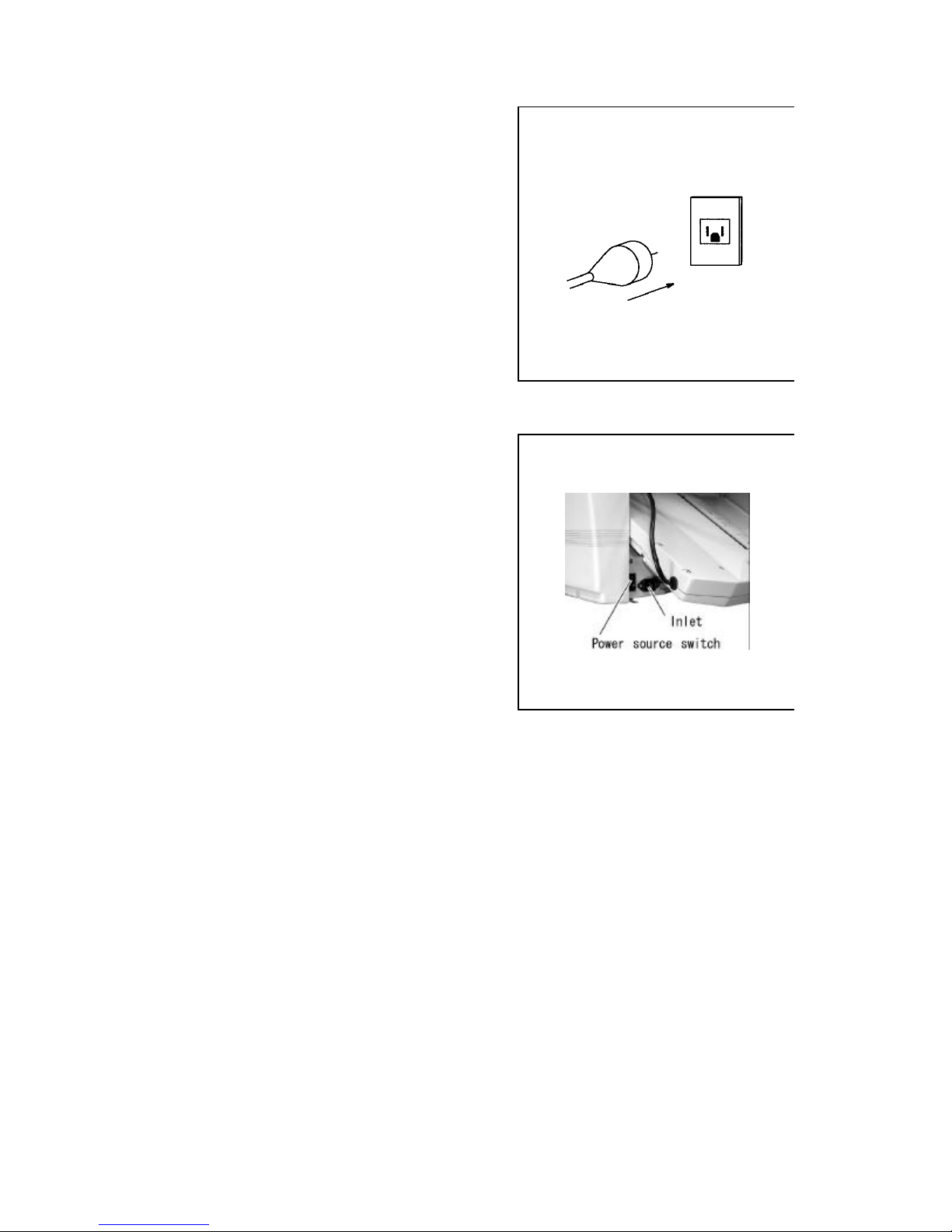
Insert the power cord into the outlet.
http://www.monomachines.com
http://www.monomachines.com
Caution:
Do not use any power cord other than provided as an
accessory.
The shape of outlet differs according to the country.
Insert the power cord into the inlet.
When the power switch is on, the stoppers of Table 1
and 2 move to the origin . (zero position)
- 10-
Page 12
(7) Directions for Use
http://www.monomachines.com
http://www.monomachines.com
(A) Standard folding of standard-size paper
•F-45N
How to perform standard folding of
standard- paper
After the power switch is on…
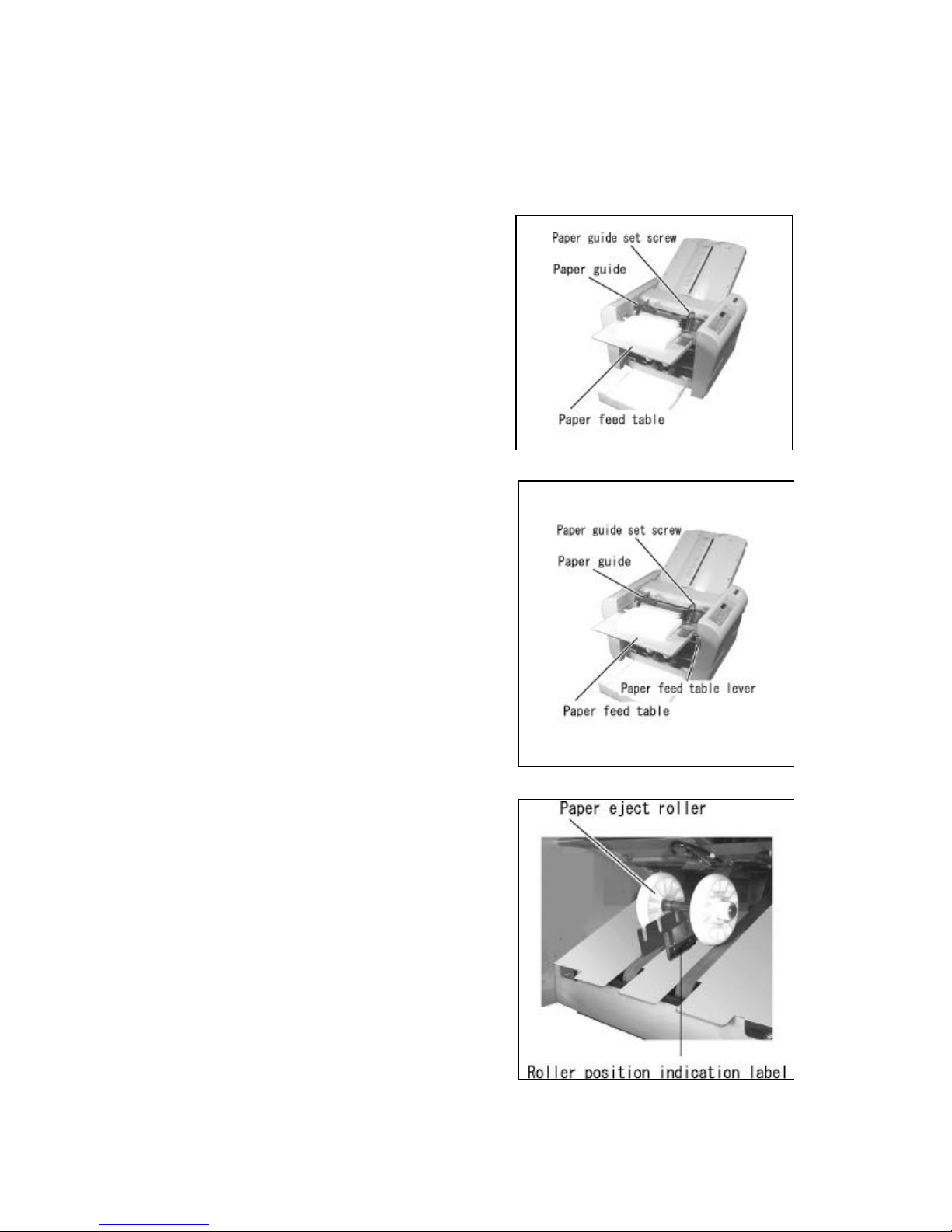
Set the standard -size paper. Loosen the paper guide
setscrew and set the paper guide to fit the width of the
paper.
Place the paper on the paper feed table with its printed side
facing up (its printed side down in case of fold -out) after
neatly arranging it.
Make the paper guide closely contact the paper, and
tighten the setscrew.
< to next page>
•306A
How to perform standard folding of standard-paper
After the pow er is on …
Raise the paper feed table lever.
Set the standard-size paper. Loosen the paper guide
setscrew and set the paper guide to fit the width of the
paper.
Stack the paper on the paper feed table with its printed side
facing up (its printed side down in case of fold -out) after
neatly arranging it.
Make sure the paper guide closely contact the paper,
and tighten the setscrew.
Lower the paper feed table lever.
< to next page>
Setting the paper ejection roller (306A only):
Move the paper ejection roller to the position that fits
the size of paper being used.
-11-
Page 13
Selecting a folding type:
selected.
http://www.monomachines.com
http://www.monomachines.com
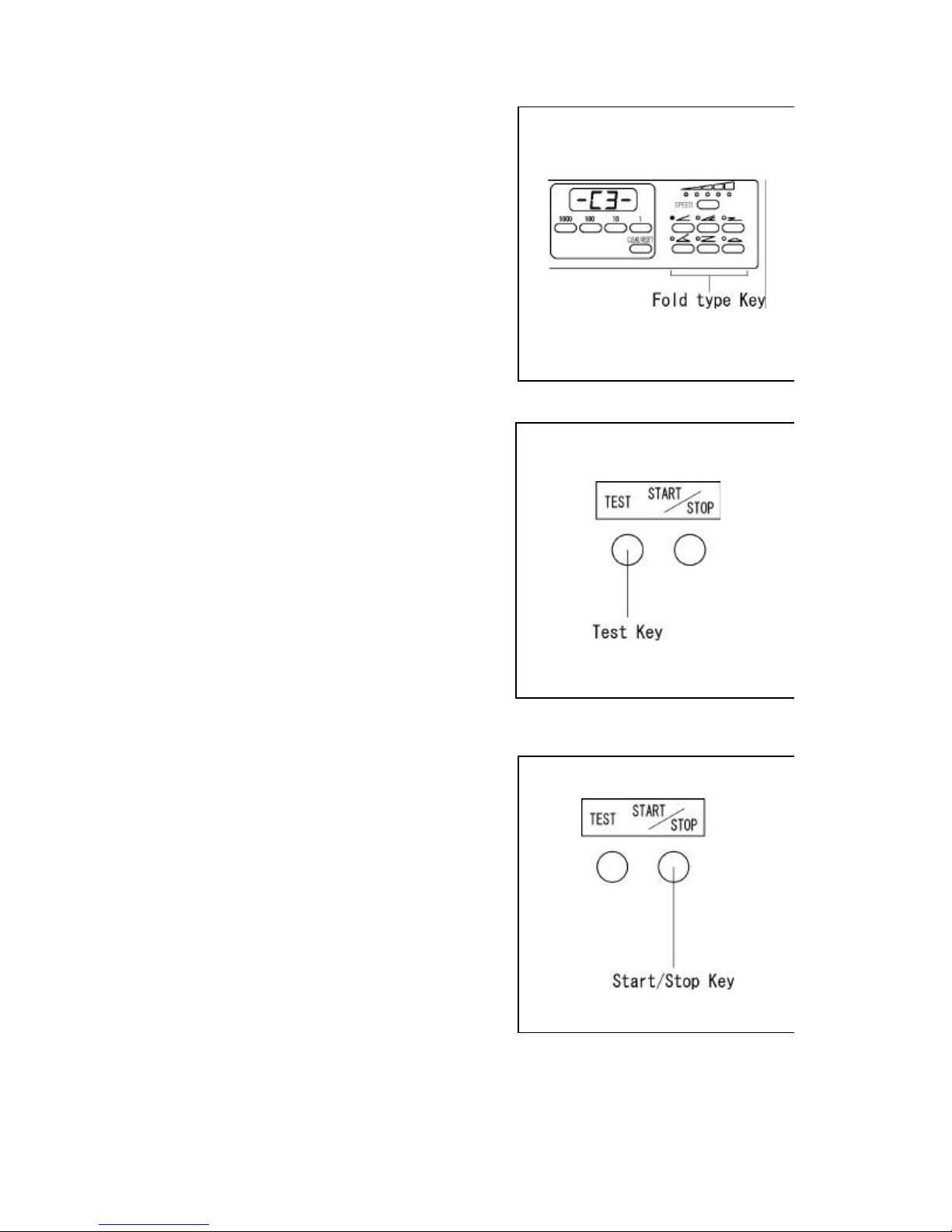
One of the six folding types (Single, Gate, Letter,
Zigzag, Double Pa rallel, and Fold-out) can be
Press the desired fold type key.
Example:
Single folding using letter s ize paper.
Letter size (11” length) – C1
Legal size (14” length) – C2
Ledger size (17” length) – C3
Test folding:
If the Test key is pressed, two sheets will be folded
while not affecting the indication of the counter.
Check if the second sheet of paper has been folded
correctly.
To correct skews refer to Adjustment on page 16
Caution:
In case the stopper fine adjustment knob is moved,
make sure to press TEST key for confirmation before
START key is pressed. Otherwise, fine adjustment
will not be recognized.
Continuous folding:
When the Start/Stop key is pressed, the machine will
continuously fold the paper.
When the Start/Stop key is pressed while the machine
is in operation, the machine will stop the operation, but
addition on the counter will continue. If you wish to
fold only the number of sheet desired, refer to
subtraction counter function.
- 12-
Page 14
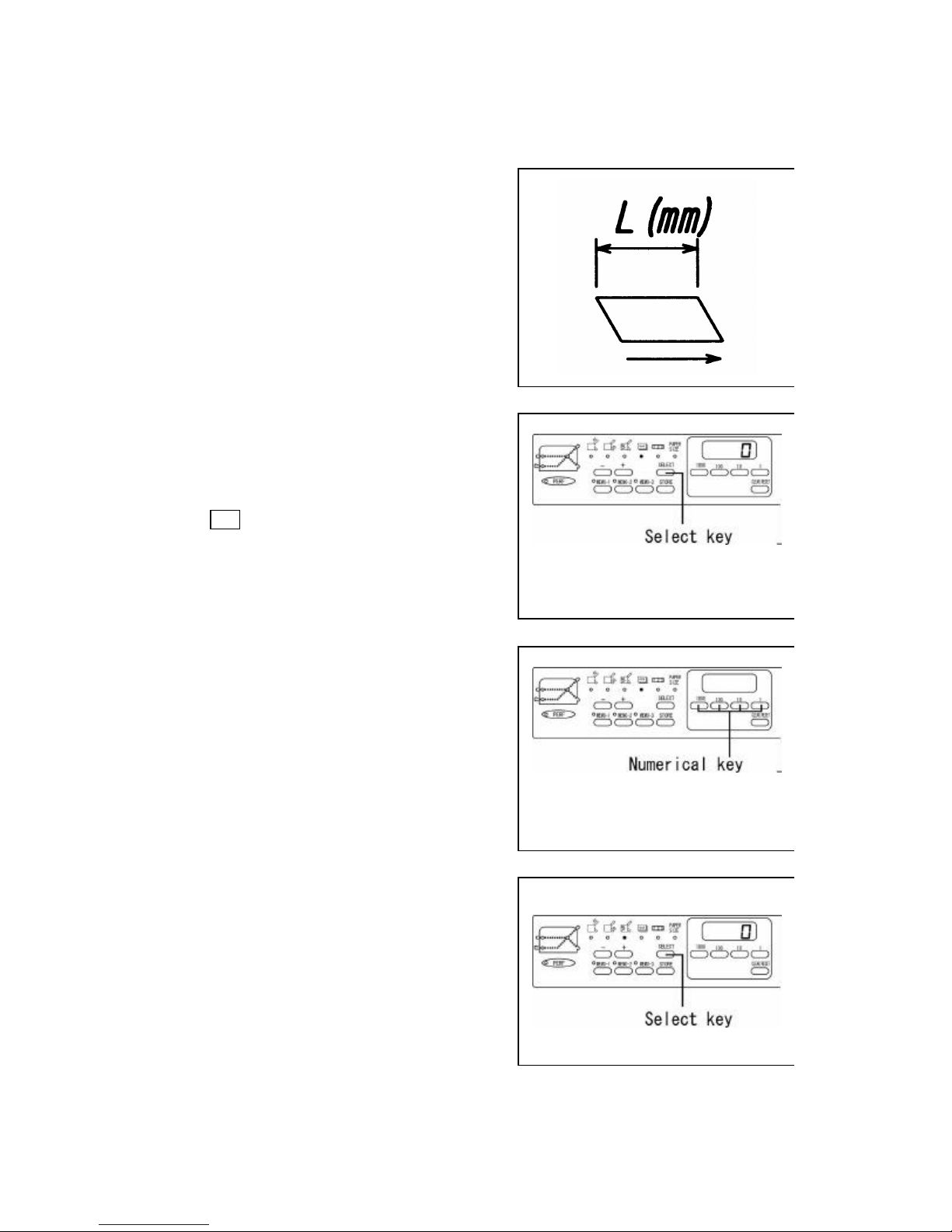
(B) Standard Folding of Non-standard -size Paper
http://www.monomachines.com
http://www.monomachines.com
Determine the Paper Length
Measure the paper length.
The arrow indicates the direction of paper feeding.
Press the Select key and select the Paper Length Input
Mode.ÑÒ
(F-45N)
Input the paper length using the Numerical keys.
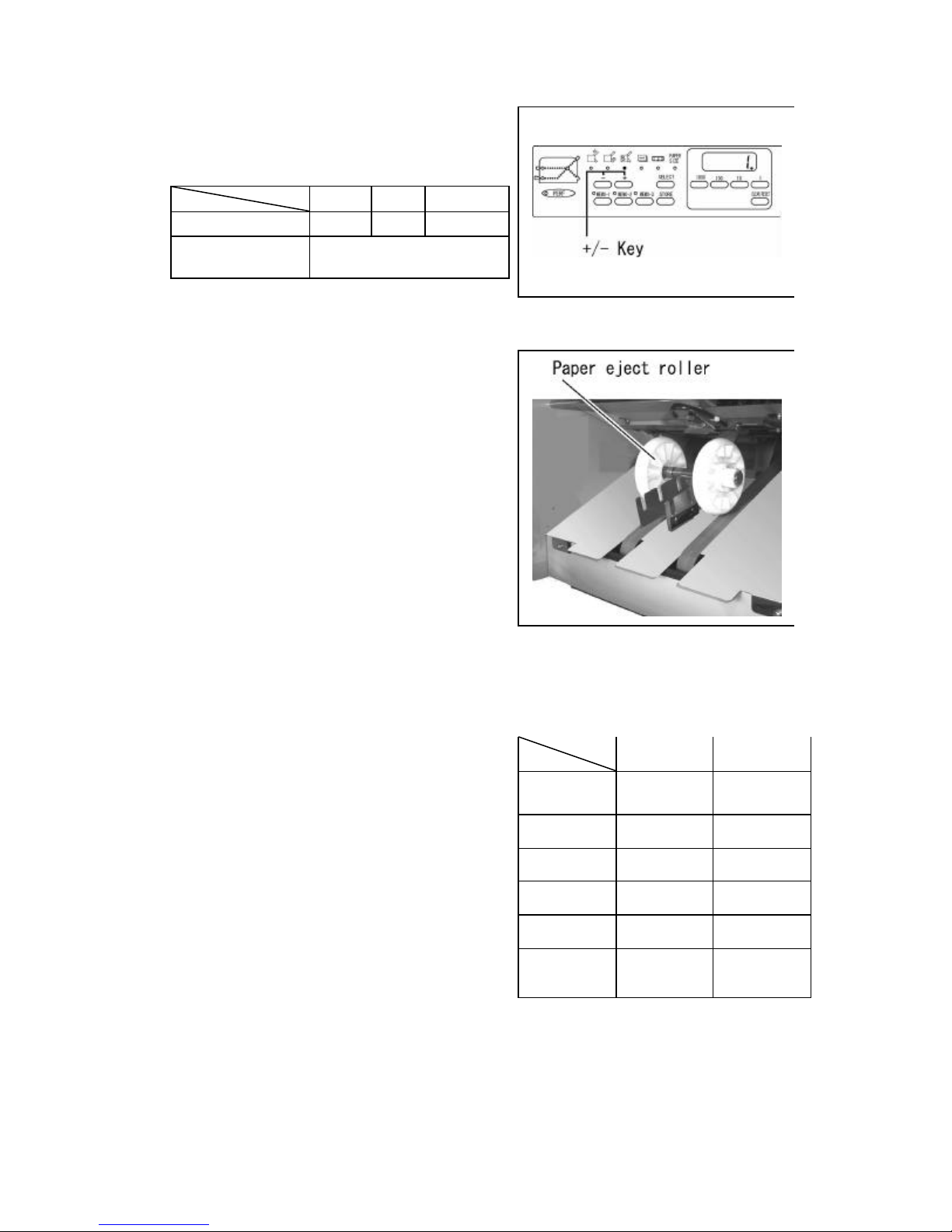
Setting the paper eject roller.
•F-45N
Select the paper ejection roller move mode using the
Select key.
- 13-
(F-45N)
Page 15
http://www.monomachines.com
http://www.monomachines.com
Set the designated position using the + /- key.
Indication
Standard-size paper C1 C2 C3
Non-standard-size
paper
1 2 3
Setting the designated position
Setting the paper ejection roller:
•306A
It moves to the position to fit the paper size.
Advice:
Concerning positioning of the paper size and the paper
ejection roller, refer to “Roller position indication”
seal. If ejection is not performed properly, set at a
different position.
Note:
Calculate the position of the table 1 and table 2 stopper
in relation to the measurement value L on page 13.
Example:
In the case of performing the zigzag fold using sheets
of paper 300mm in length:
Table 1 = 300 × (2 / 3) = 200mm
Table 2 = 300 × (1 / 3) = 100mm
Fold-Stopper Position Chart
Table 1 Table 2
Original
SINGLE
LETTER 1/3 1/3
ZIGZAG 2/3 1/3
DOUBLE 1/2 1/4
PARALLEL
FOLD-OUT
GATE 1/4 1/2
position
3/4 1/4
1/2
- 14-
Page 16
(C) Cross Folding
http://www.monomachines.com
http://www.monomachines.com
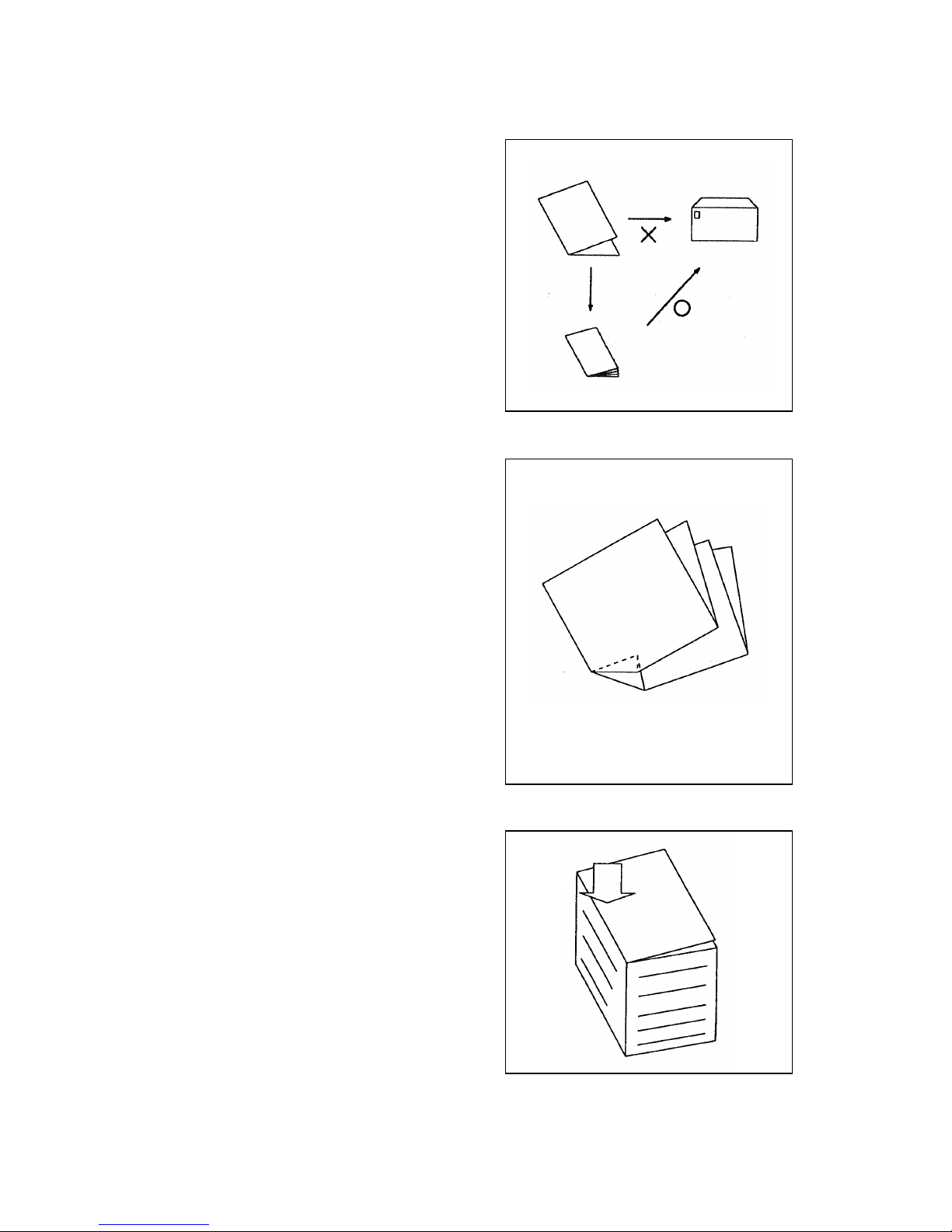
Cross folding refers to performing the double parallel,
letter, or other types of folds for the sheets of paper
already folded in the single fold.
Cross fold ing can be used if, for example, a sheet of
ledger size paper folded using the double parallel
folding method is still too large to be enclosed in
envelope.
Note:
The maximum weight of paper that can be used for
cross folding is 28lb bond.
This requirement, however, varies according to the
following conditions:
Paper type; Paper size;
Whether grains run lengthways or sideways;
Temperature and relative humidity;
Printing condition.
The folding position may be displaced to a greater
extent than when the paper is folded using a regular
fold method, or a corner of the folded paper may be
folded inside as indicated in the figure. These,
however, do not mean that the machine has
malfunctioned.
Note:
1.) Move the paper feed rollers on both sides to
proper position in advance so that all of the
rollers can feed paper stock.
Flatten the crease hard using the hand. Do
2.)
not stack too many sheets of paper on the
feed table.
Use paper support guide(s) to 15 help hold
3.)
paper down
- 15-
Page 17
(8) Adjustment
http://www.monomachines.com
http://www.monomachines.com
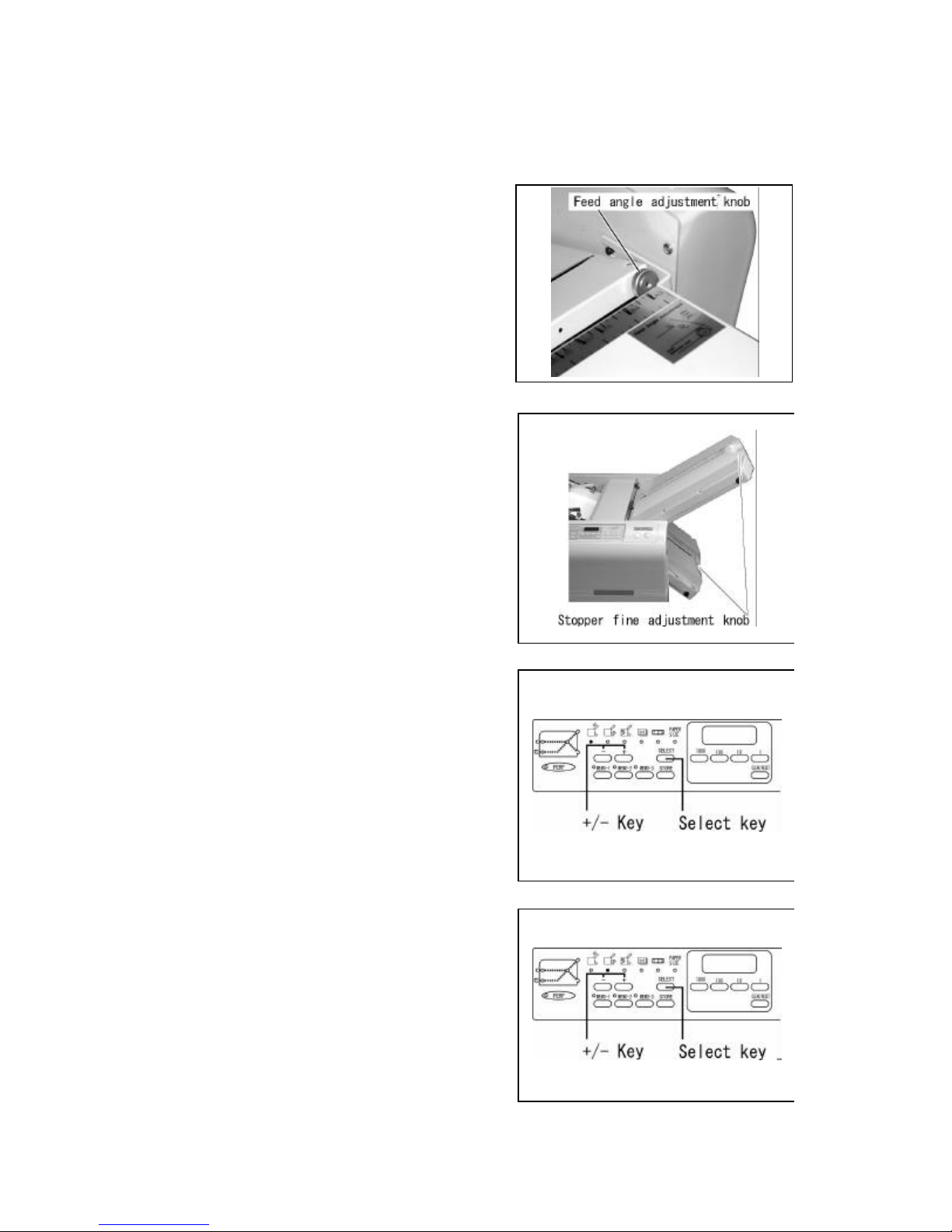
(A) Skew Adjustment
If the folding position is slanted because the edges of
the paper are slanted or for other reasons, it can be
adjusted using the skew adjustment knob.
(B) Fine Adjustment
Move the stopper using the stopper fine adjustment
knob.
Caution: In case the fine adjustment knob is moved,
when the Test key is pressed, the machine will continue
to fold, when the Start/Stop key is pressed, the machine
will start to fold after the stopper is returned to the
previous position
Note:
When the stopper is moved largely, it will be
convenient to use the + /- key.
Adjusting Table 1
Press the Select key and select the Table 1 Stopper
Move Mode.
Press the + /- key and move the stopper to the
desired position.
Adjusting table 2
Press the Select key and select the Table 2 Stopper
Move Mode.
Press the + /- key and move the stopper to the
desired position.
- 16-
Page 18
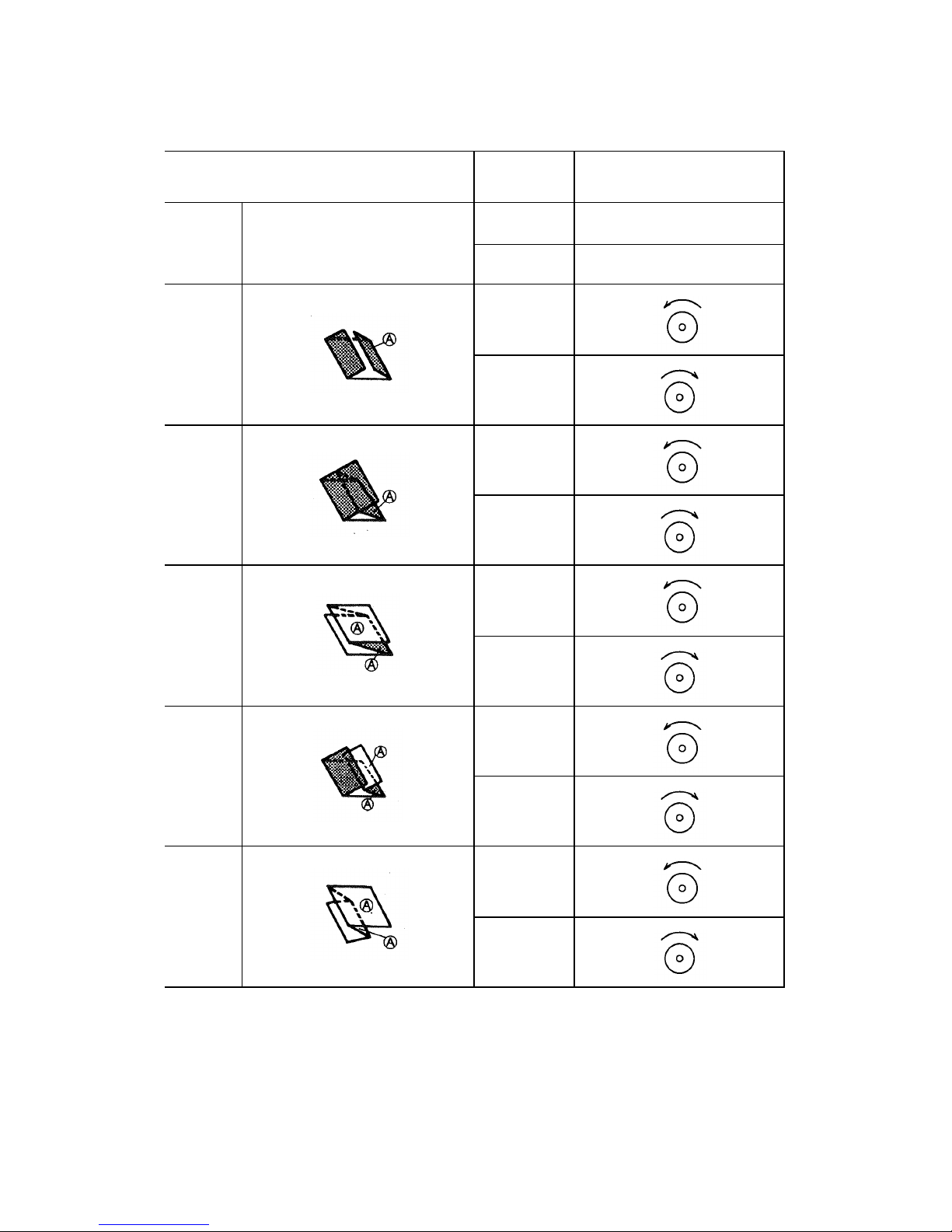
Fine Adjustment for Table 1
Direction to turn the Table 1
http://www.monomachines.com
http://www.monomachines.com
Single
fold
Gate fold
Letter
fold
Zigzag
fold
Fold t ype Folded (A)
Table 1 is not used
Long
Short
Long
Short
Long
Short
fine adjustment knob
Double
parallel
fold
Fold-out
Fold
Long
Short
Long
- 17-
Short
Page 19
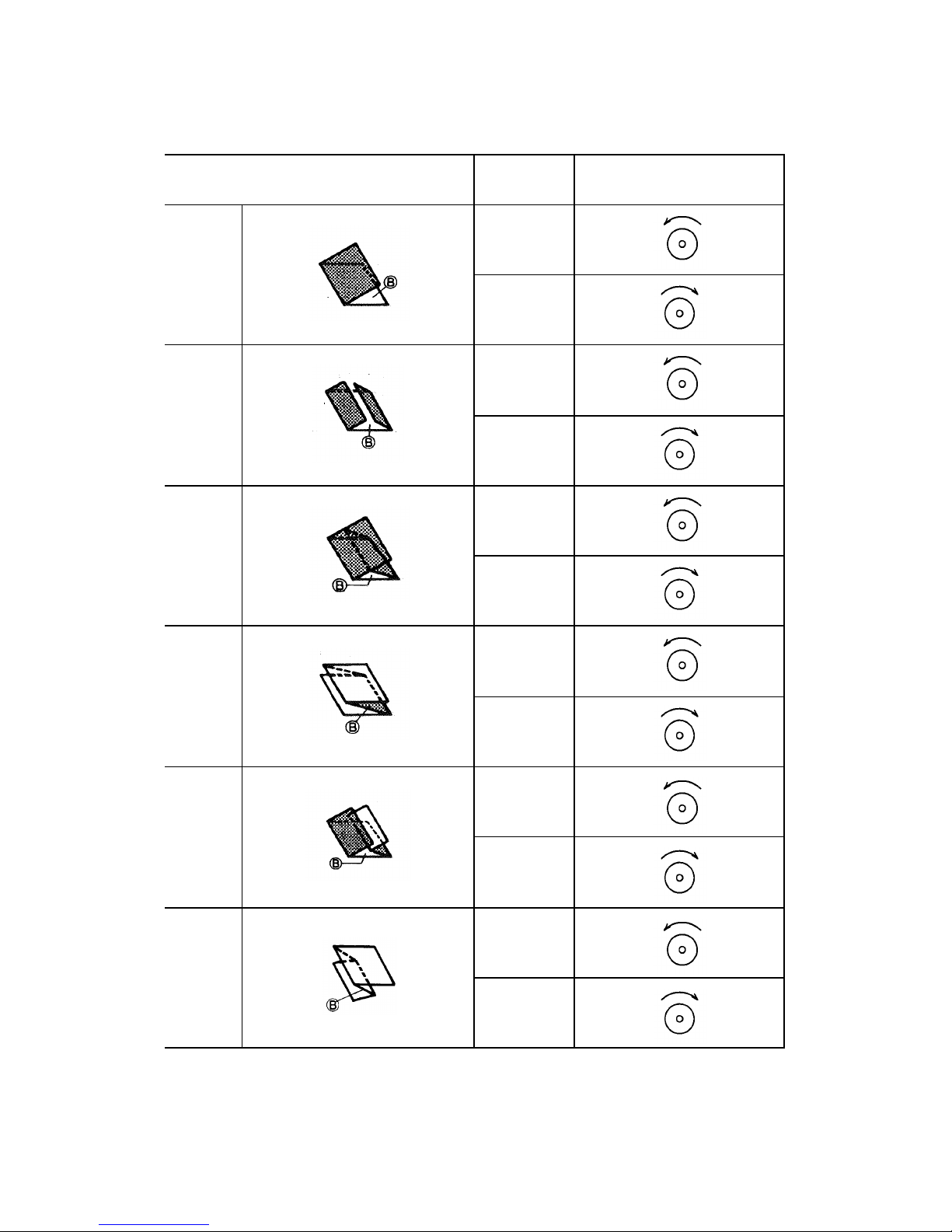
Fine Adjustment for Table 2
Direction to turn the Table 2
http://www.monomachines.com
http://www.monomachines.com
Single
fold
Gate fold
Letter
fold
Fold type Folded (B)
Long
Short
Long
Short
Long
Short
fine adjustment knob
Zigzag
fold
Double
parallel
fold
Fold-out
fold
Long
Short
Long
Short
Long
Short
- 18-
Page 20
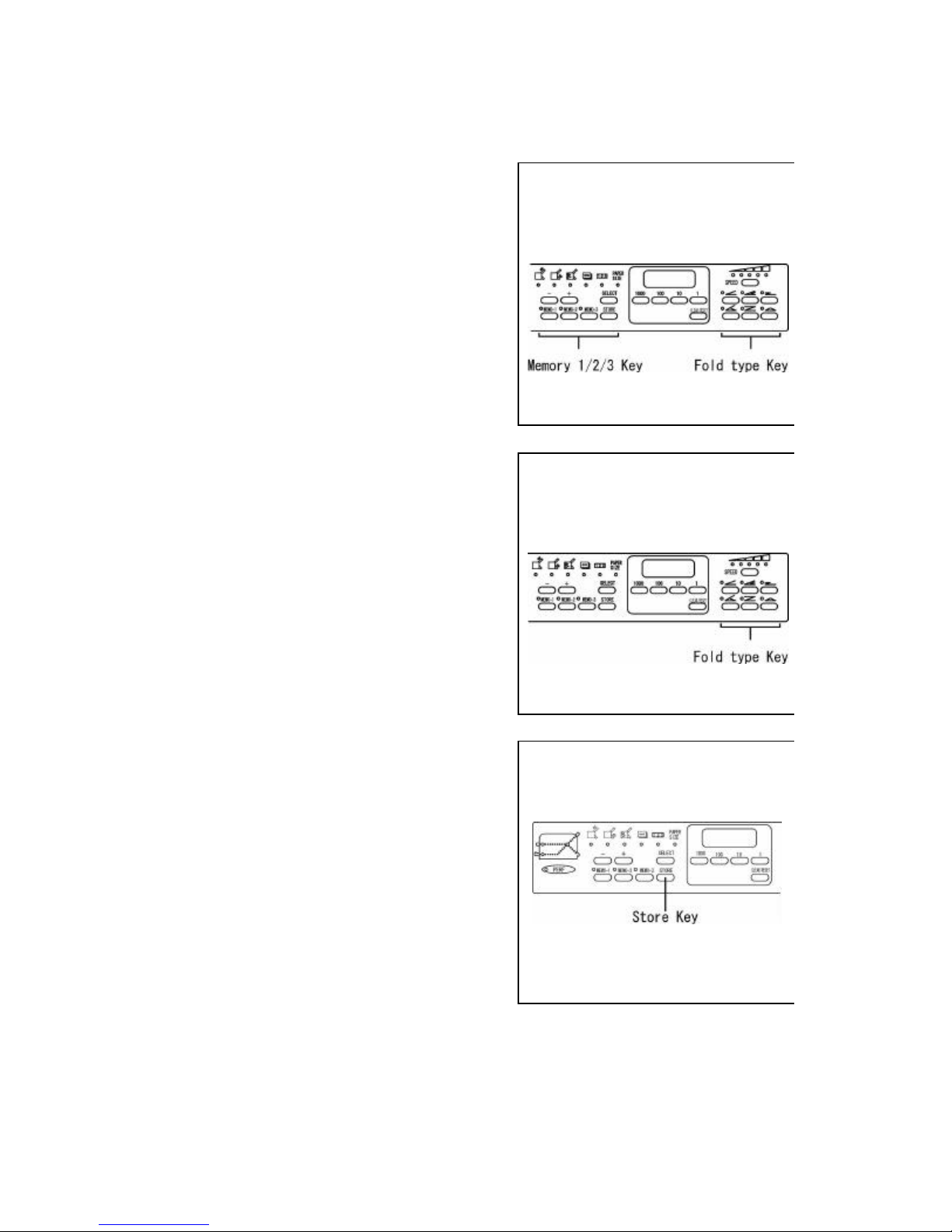
(9) Memory
http://www.monomachines.com
http://www.monomachines.com
(A) Storage
•F-45N
Storage of Non-standard folds can be input in the
Memory 1/2/3 key s and the Fold type keys.
What is stored is the positions of the Table 1 and 2
stoppers, the position of the ejection roller and folding
speed.
•306A
Storage of Non -standard folds can be input in the Fold
type keys.
What can be stored is the position of the Table 1 and 2
stoppers and folding speed.
Select the key in which the storage will be input.
Keep pressing the Store key and release immediately
when the alarm rings once.
The lamp of the key in which the storage has been
input will flash.
- 19-
Page 21
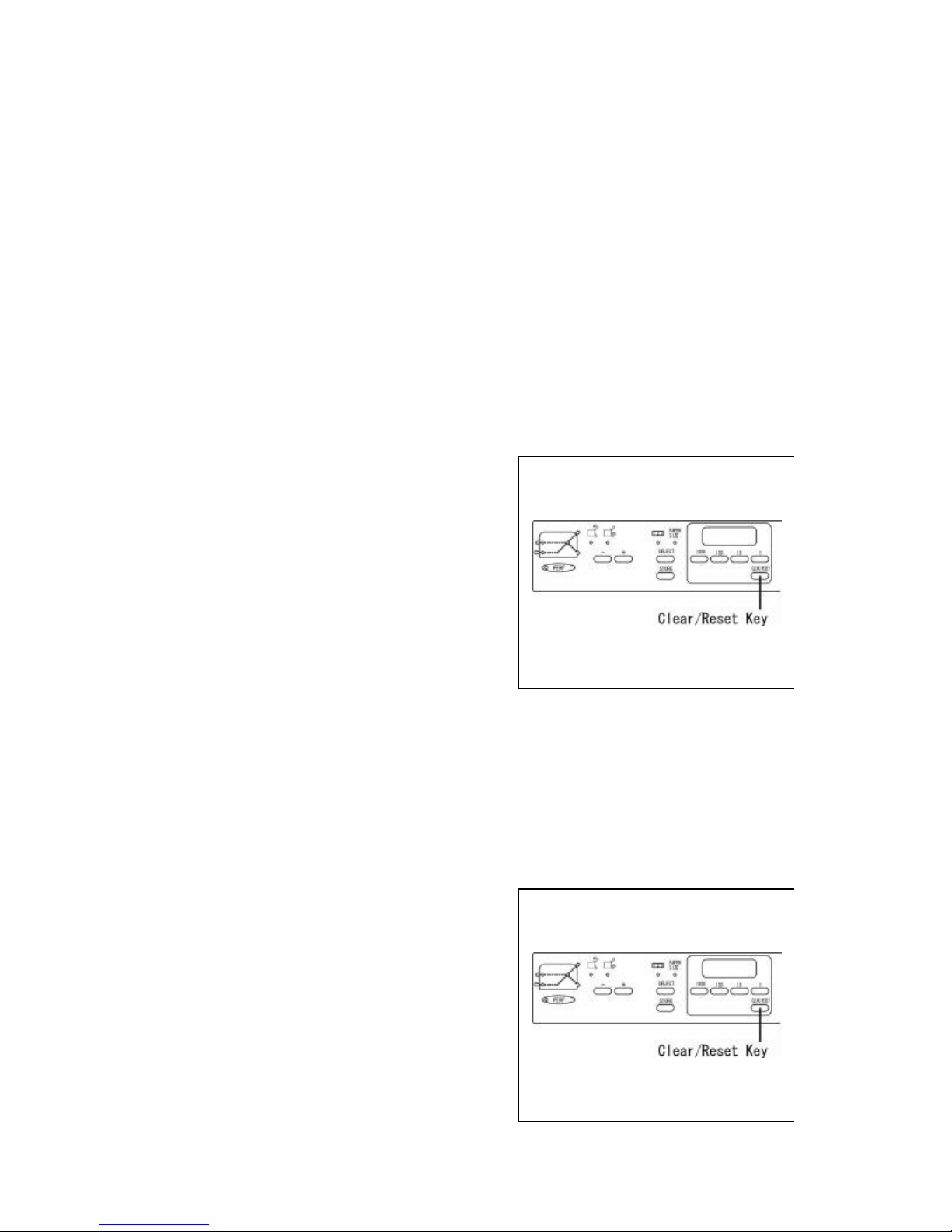
(B) Cancellation of Memory
http://www.monomachines.com
http://www.monomachines.com
Cancel the storage input in the memory 1/2/3 keys and the fold type keys
Important:
The machine will be enabled to perform standard folding set by the manufacturer.
Select the key in which the memory is to be cancelled.
Important:
The lamp of the key in which the storage is input flashes.
Keep pressing the Clear/Reset key and release
immediately when the alarm rings once.
The lamp of the key in which the storage has been
cancelled will light.
(C) Cancellation of total memory
Cancel all storage input in all the keys.
Important:
The machine will be enabled to perform standard folding set by the manufacturer.
Keep pressing the Clear/Reset key and release
immediately when the alarm rings twice.
The lamp for the key of which the storage has been
cancelled will light.
- 20-
Page 22

http://www.monomachines.com
http://www.monomachines.com
MBM Corporation
- 21-
 Loading...