

Page 1

Video/Audio Distributor
Quick Start Guide
PP-06/PP-12
Page 2

Video/Audio Distributor·Quick Start Guide
i
Quick Start Guide
This quick start guide is intended for users of video/audio distributor.
Disclaimer
REGARDING TO THE PRODUCT WITH INTERNET ACCESS, THE USE OF PRODUCT SHALL BE WHOLLY
AT YOUR OWN RISKS. OUR COMPANY SHALL NOT TAKE ANY RESPONSIBILITES FOR ABNORMAL
OPERATION, PRIVACY LEAKAGE OR OTHER DAMAGES RESULTING FROM CYBER ATTACK, HACKER
ATTACK, VIRUS INSPECTION, OR OTHER INTERNET SECURITY RISKS; HOWEVER, OUR COMPANY WILL
PROVIDE TIMELY TECHNICAL SUPPORT IF REQUIRED.
SURVEILLANCE LAWS VARY BY JURISDICTION. PLEASE CHECK ALL RELEVANT LAWS IN YOUR
JURISDICTION BEFORE USING THIS PRODUCT IN ORDER TO ENSURE THAT YOUR USE CONFORMS
THE APPLICABLE LAW. OUR COMPANY SHALL NOT BE LIABLE IN THE EVENT THAT THIS PRODUCT IS
USED WITH ILLEGITIMATE PURPOSES.
IN THE EVENT OF ANY CONFLICTS BETWEEN THIS MANUAL AND THE APPLICABLE LAW, THE LATER
PREVAILS.
Support
Should you have any questions, please do not hesitate to contact your local dealer.
Page 3
Video/Audio Distributor·Quick Start Guide
ii
Regulatory Information
FCC Information
Please take attention that changes or modification not expressly approved by the party
responsible for compliance could void the user’s authority to operate the equipment.
FCC compliance: This equipment has been tested and found to comply with the limits
for a Class B digital device, pursuant to part 15 of the FCC Rules. These limits are
designed to provide reasonable protection against harmful interference in a residential
installation. This equipment generates, uses and can radiate radio frequency energy and,
if not installed and used in accordance with the instructions, may cause harmful
interference to radio communications. However, there is no guarantee that interference
will not occur in a particular installation. If this equipment does cause harmful
interference to radio or television reception, which can be determined by turning the
equipment off and on, the user is encouraged to try to correct the interference by one
or more of the following measures:
—Reorient or relocate the receiving antenna.
—Increase the separation between the equipment and receiver.
—Connect the equipment into an outlet on a circuit different from that to which the
receiver is connected.
—Consult the dealer or an experienced radio/TV technician for help.
FCC Conditions
This device complies with part 15 of the FCC Rules. Operation is subject to the following
two conditions:
1. This device may not cause harmful interference.
2. This device must accept any interference received, including interference that may
cause undesired operation.
EU Conformity Statement
This product and - if applicable - the supplied accessories too are
marked with "CE" and comply therefore with the applicable harmonized
European standards listed under the EMC Directive 2004/108/EC, the
LVD Directive 2006/95/EC, the RoHS Directive 2011/65/EU.
2012/19/EU (WEEE directive): Products marked with this symbol cannot
be disposed of as unsorted municipal waste in the European Union. For
proper recycling, return this product to your local supplier upon the
purchase of equivalent new equipment, or dispose of it at designated
collection points. For more information see: www.recyclethis.info
Page 4

Video/Audio Distributor·Quick Start Guide
iii
2006/66/EC (battery directive): This product contains a battery that
cannot be disposed of as unsorted municipal waste in the European
Union. See the product documentation for specific battery information.
The battery is marked with this symbol, which may include lettering to
indicate cadmium (Cd), lead (Pb), or mercury (Hg). For proper recycling,
return the battery to your supplier or to a designated collection point.
For more information see: www.recyclethis.info
Industry Canada ICES-003 Compliance
This device meets the CAN ICES-3 (B)/NMB-3(B) standards requirements.
Page 5
Video/Audio Distributor·Quick Start Guide
iv
Safety Instruction
These instructions are intended to ensure that user can use the product correctly to
avoid danger or property loss.
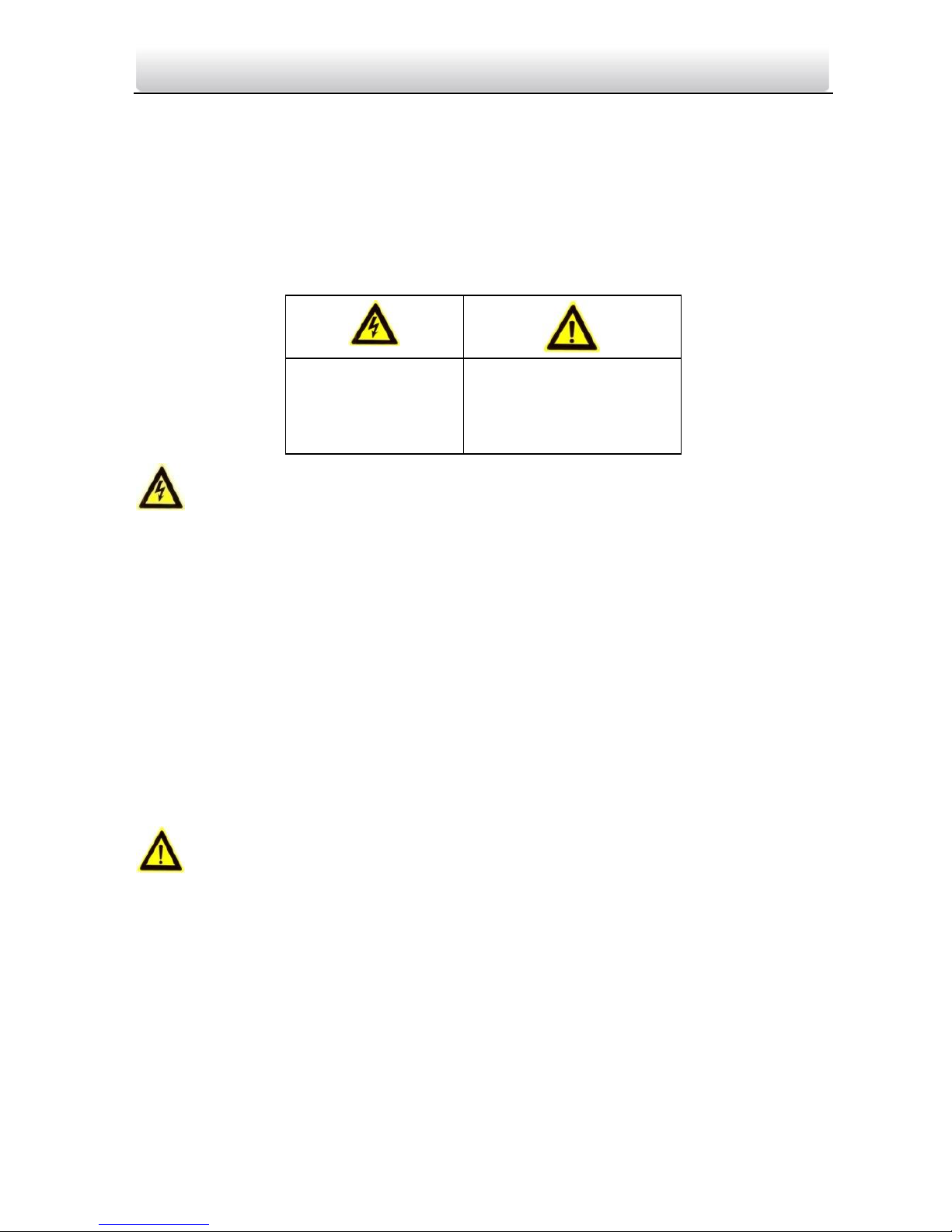
The precaution measure is divided into Warnings and Cautions:
Warnings: Neglecting any of the warnings may cause serious injury or death.
Cautions: Neglecting any of the cautions may cause injury or equipment damage.
Warnings
All the electronic operation should be strictly compliance with the electrical safety regulations, fire prevention
regulations and other related regulations in your local region.
Please use the power adapter, which is provided by normal company. The power consumption cannot be less
than the required value.
Do not connect several devices to one power adapter as adapter overload may cause over-heat or fire
hazard.
Please make sure that the power has been disconnected before you wire, install or dismantle the device.
When the product is installed on wall or ceiling, the device shall be firmly fixed.
If smoke, odors or noise rise from the device, turn off the power at once and unplug the power cable, and
then please contact the service center.
If the product does not work properly, please contact your dealer or the nearest service center. Never attempt
to disassemble the device yourself. (We shall not assume any responsibility for problems caused by
unauthorized repair or maintenance.)
Cautions
Do not drop the device or subject it to physical shock, and do not expose it to high electromagnetism
radiation. Avoid the equipment installation on vibrations surface or places subject to shock (ignorance can
cause equipment damage).
Do not place the device in extremely hot (refer to the specification of the device for the detailed operating
temperature), cold, dusty or damp locations, and do not expose it to high electromagnetic radiation.
The device cover for indoor use shall be kept from rain and moisture.
Exposing the equipment to direct sun light, low ventilation or heat source such as heater or radiator is
forbidden (ignorance can cause fire danger).
Do not aim the device at the sun or extra bright places. A blooming or smear may occur otherwise (which is
not a malfunction however), and affecting the endurance of sensor at the same time.
Warnings Follow
these safeguards to
prevent serious
injury or death.
Cautions Follow these
precautions to prevent
potential injury or
material damage.
Page 6

Video/Audio Distributor·Quick Start Guide
v
Please use the provided glove when open up the device cover, avoid direct contact with the device cover,
because the acidic sweat of the fingers may erode the surface coating of the device cover.
Please use a soft and dry cloth when clean inside and outside surfaces of the device cover, do not use alkaline
detergents.
Please keep all wrappers after unpack them for future use. In case of any failure occurred, you need to return
the device to the factory with the original wrapper. Transportation without the original wrapper may result in
damage on the device and lead to additional costs.
Improper use or replacement of the battery may result in hazard of explosion. Replace with the same or
equivalent type only. Dispose of used batteries according to the instructions provided by the battery
manufacturer.
Page 7

Video/Audio Distributor·Quick Start Guide
vi
Table of Contents
1 Overview ...................................................................................................... 1
1.1 Introduction ............................................................................................................................. 1
1.2 Main Features ........................................................................................................................... 1
2 Appearance .................................................................................................. 2
2.1 Appearance of Type I Model ..................................................................................................... 2
2.2 Appearance of Type II Model .................................................................................................... 2
3 Interfaces Description .................................................................................. 4
3.1 Interfaces of Type I Model ........................................................................................................ 4
3.2 Interfaces of Type II Model ....................................................................................................... 4
4 Typical Application ....................................................................................... 6
5 Installation (Wall Mounting) ........................................................................ 7
Appendix ........................................................................................................ 8
Spectification of Type I Model ........................................................................................................ 8
Spectification of Type II Model ....................................................................................................... 8
Page 8

Video/Audio Distributor·Quick Start Guide
1
1 Overview
1.1 Introduction
The video/audio distributor supports network cable power supply, and has a built-in
voltage-stabilized power. The type I model has eight 10/100M LAN interfaces, six of
which support powering over network cables, and the type II model has sixteen
10M/100M LAN interfaces, twelve of which support powering over network cables. The
video/audio distributor is suitable for internet connection of all-digital video intercom in
residence communities.
1.2 Main Features
Built-in DC 24V voltage-stabilized switching mode power supply
Eight RJ-45 interfaces, including six adaptive 10/100M LAN interfaces supporting
network cable powering and two adaptive 10/100M cascading LAN interfaces (Type I
Model)
Sixteen RJ-45 interfaces, including twelve adaptive 10M/100M LAN interfaces supporting network cable
powering and four adaptive 10M/100M cascading LAN interfaces (Type II Model)
IEEE802.3, IEEE802.3u, IEEE802.3x
Storing and forwarding function
VLAN technique
Over 1,000,000 h mean time between failure
Operating temperature range: from -30° C to 70° C
Suitable for wall mounting (optional)
Page 9
Video/Audio Distributor·Quick Start Guide
2
2 Appearance
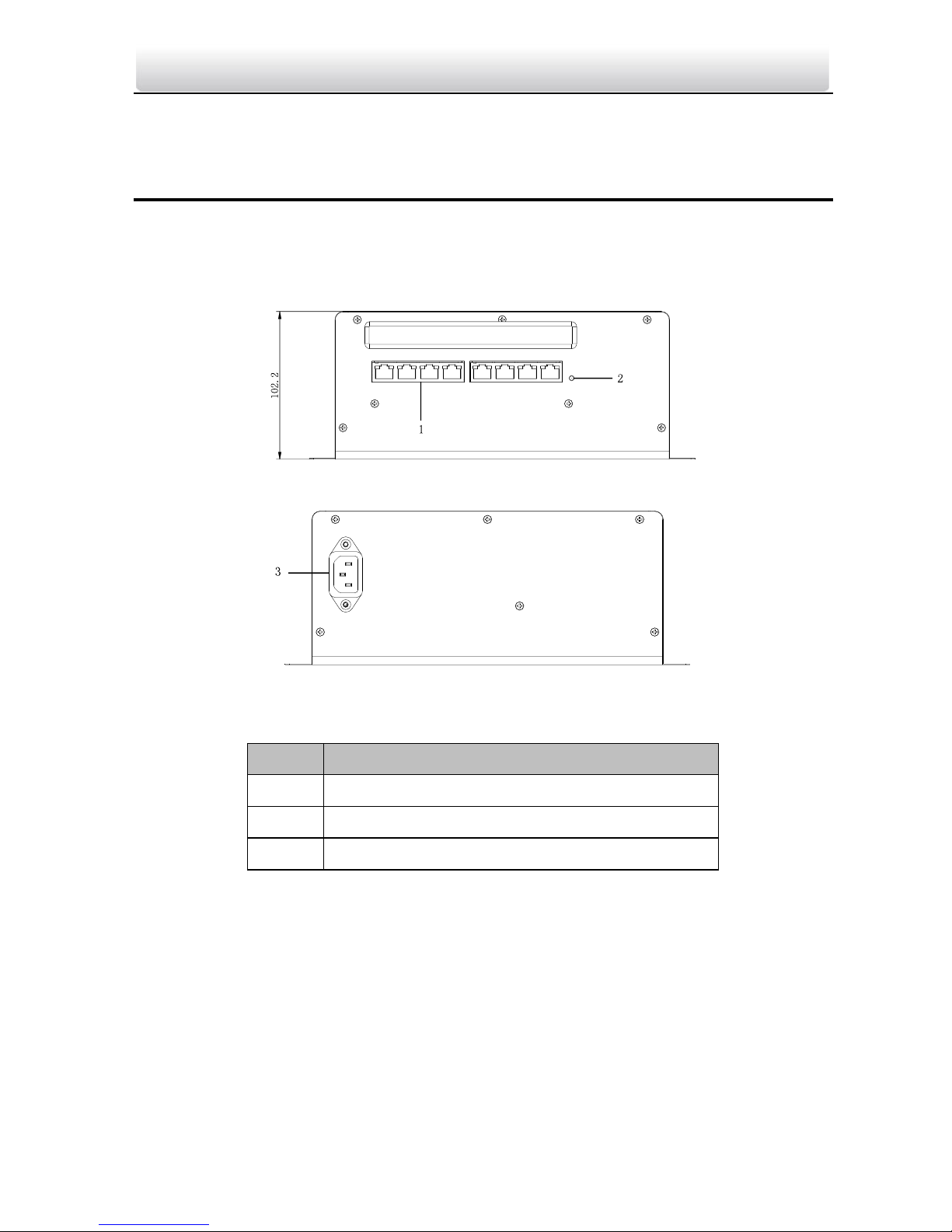
2.1 Appearance of Type I Model
Figure 2-1 Front Panel
Figure 2-2 Rear Panel
Table 2-1 Description
No.
Description
1
8 RJ-45 interfaces
2
Power Indicator
3
AC 220V, Power Socket
2.2 Appearance of Type II Model
Page 10
Video/Audio Distributor·Quick Start Guide
3
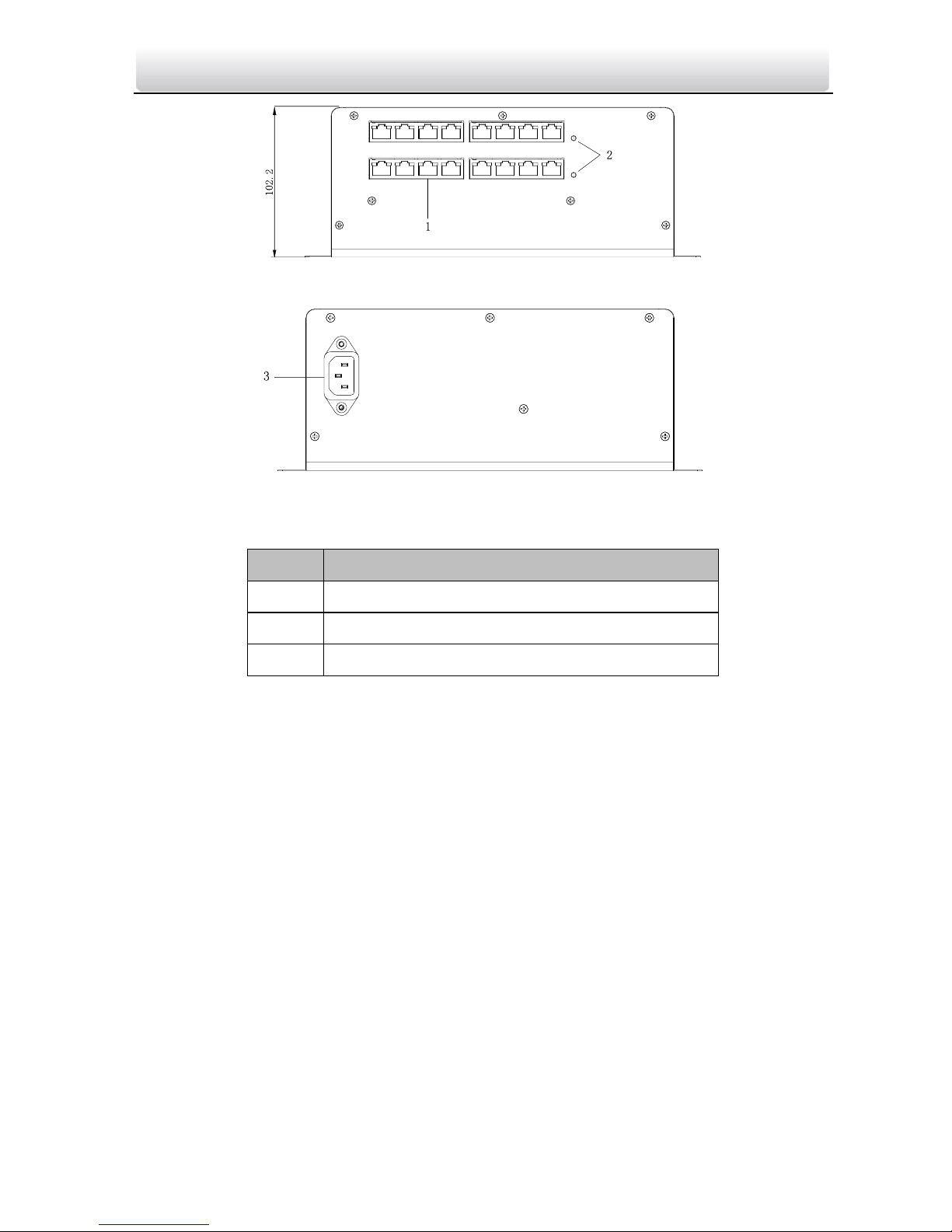
Figure 2-3 Front Panel
Figure 2-4 Rear Panel
Table 2-2 Description
No.
Description
1
16 RJ-45 interfaces
2
Power Indicators
3
AC 220V, Power Socket
Page 11
Video/Audio Distributor·Quick Start Guide
4
3 Interfaces Description
3.1 Interfaces of Type I Model
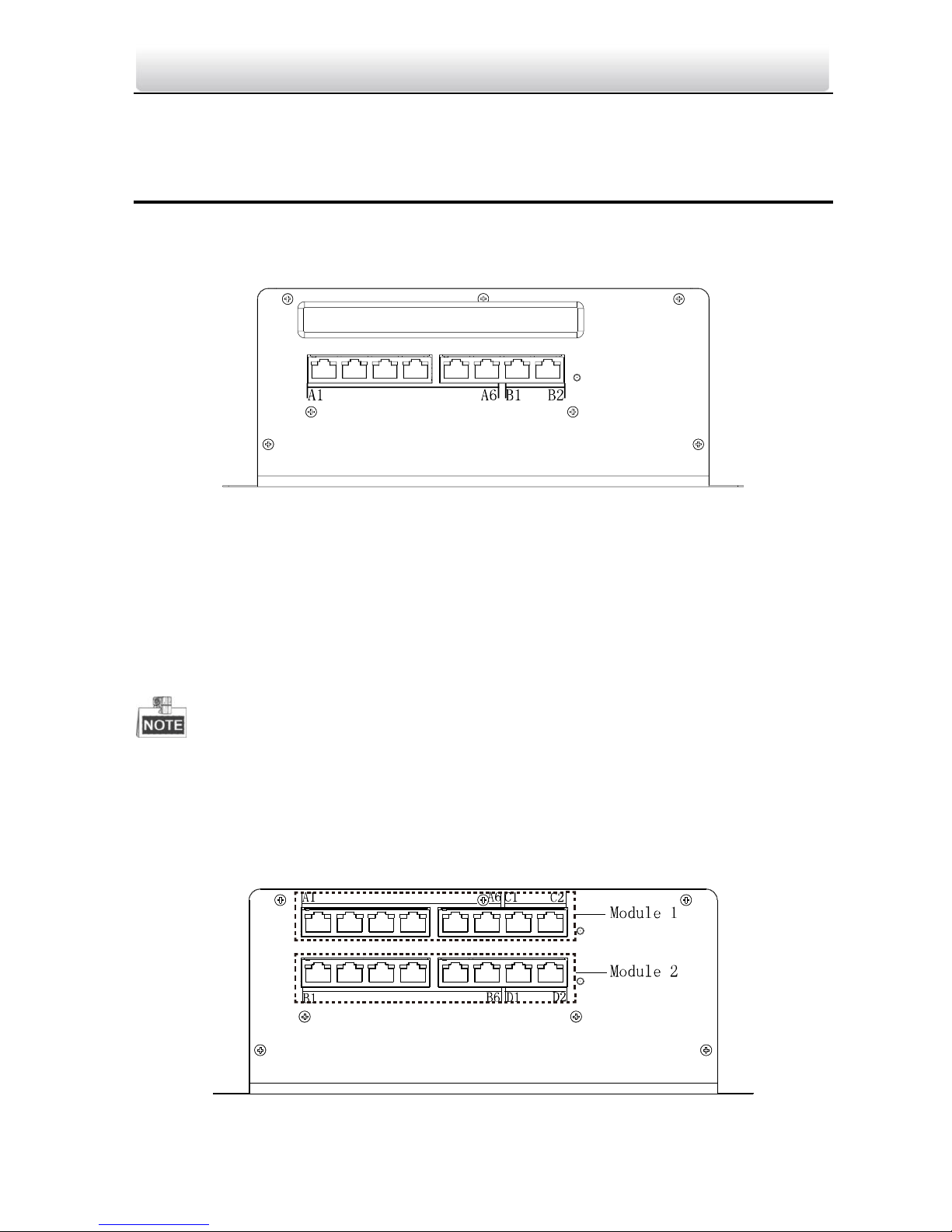
Figure 3-5 Interface of Type I Model
Interfaces B1 and B2 can be connected to a distributor with a network cable. Interfaces
A1, A2, A3, A4, A5, and A6 are device interfaces. Only video intercom devices supporting
Power over Network Cable can be connected to device interfaces.
Only when interface B1 or B2 is connected to a distributor with a network cable, can
device interfaces connect to the network normally.
Do not connect any device interfaces (A1, A2, A3, A4, A5, or A6) to a distributor.
Device interfaces (A1, A2, A3, A4, A5, and A6) cannot be interconnected directly.
3.2 Interfaces of Type II Model
Figure 3-6 Interfaces of Type II Model
Page 12

Video/Audio Distributor·Quick Start Guide
5
Interfaces C1, C2, D1, and D2 can be connected to a distributor with a network cable.
Interfaces A1, A2, A3, A4, A5, A6, B1, B2, B3, B4, B5, and B6 are device interfaces. Only
video intercom devices supporting Power over Network Cable can be connected to
device interfaces.
Both module 1 and module 2 are independent modules. When interface C1 or C2 is
connected to a distributor with a network cable, only devices connected to interfaces on
the module 1 can connect to the network normally. When interface D1 or D2 is
connected to a distributor with a network cable, only devices connected to interfaces on
the module 2 can connect to the network normally.
If you want to use module 1 and module 2 simultaneously, you can connect interface C2
or D2 to a distributor, and directly connect interface C1 with D1 with a network cable.
Do not connect any device interfaces (A1, A2, A3, A4, A5, A6, B1, B2, B3, B4, B5, or B6) to a distributor.
Device interfaces (A1, A2, A3, A4, A5, A6, B1, B2, B3, B4, B5, and B6) cannot be interconnected directly.
Page 13
Video/Audio Distributor·Quick Start Guide
6
4 Typical Application
Switch
Client Software
Center Master Station
(Master Station)
Network Cable
Optical Fiber
Resident 2
Resident 1
Door Station
Resident 2
Resident 1
Resident 2
Resident 1
Building
IPC
Video/Audio
Distributor
Master Station
in Guard's Room
Outer Door Station
Estate LAN
Switch
Indoor
Extension 1
Indoor
Extension 2
Resident 2
Resident 1
Video/Audio
Distributor
One Resident
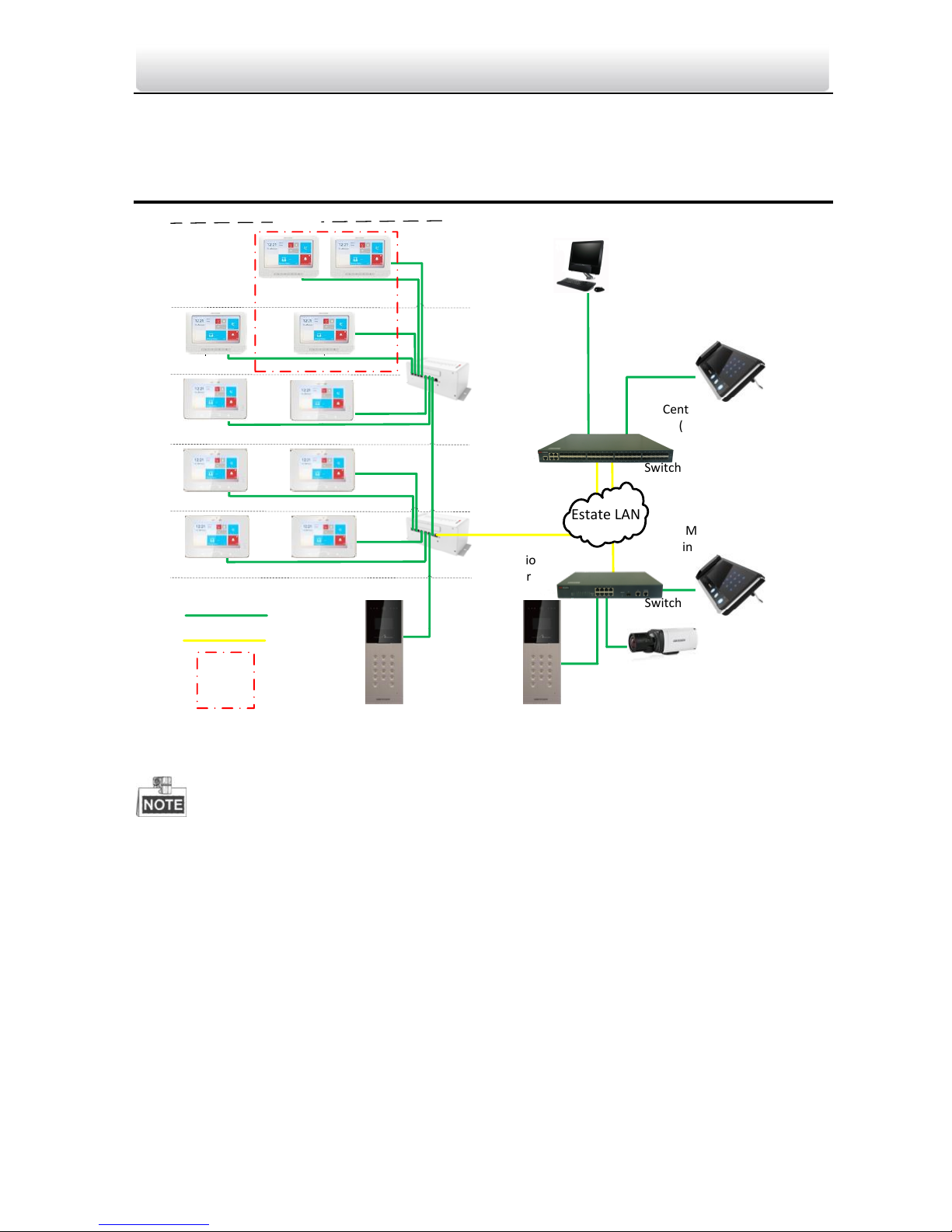
Figure 4-7 Typical Application of Video/Audio Distributor
Indoor extensions in a resident are in the same LAN with other devices in a video
intercom system.
Page 14
Video/Audio Distributor·Quick Start Guide
7
5 Installation (Wall Mounting)
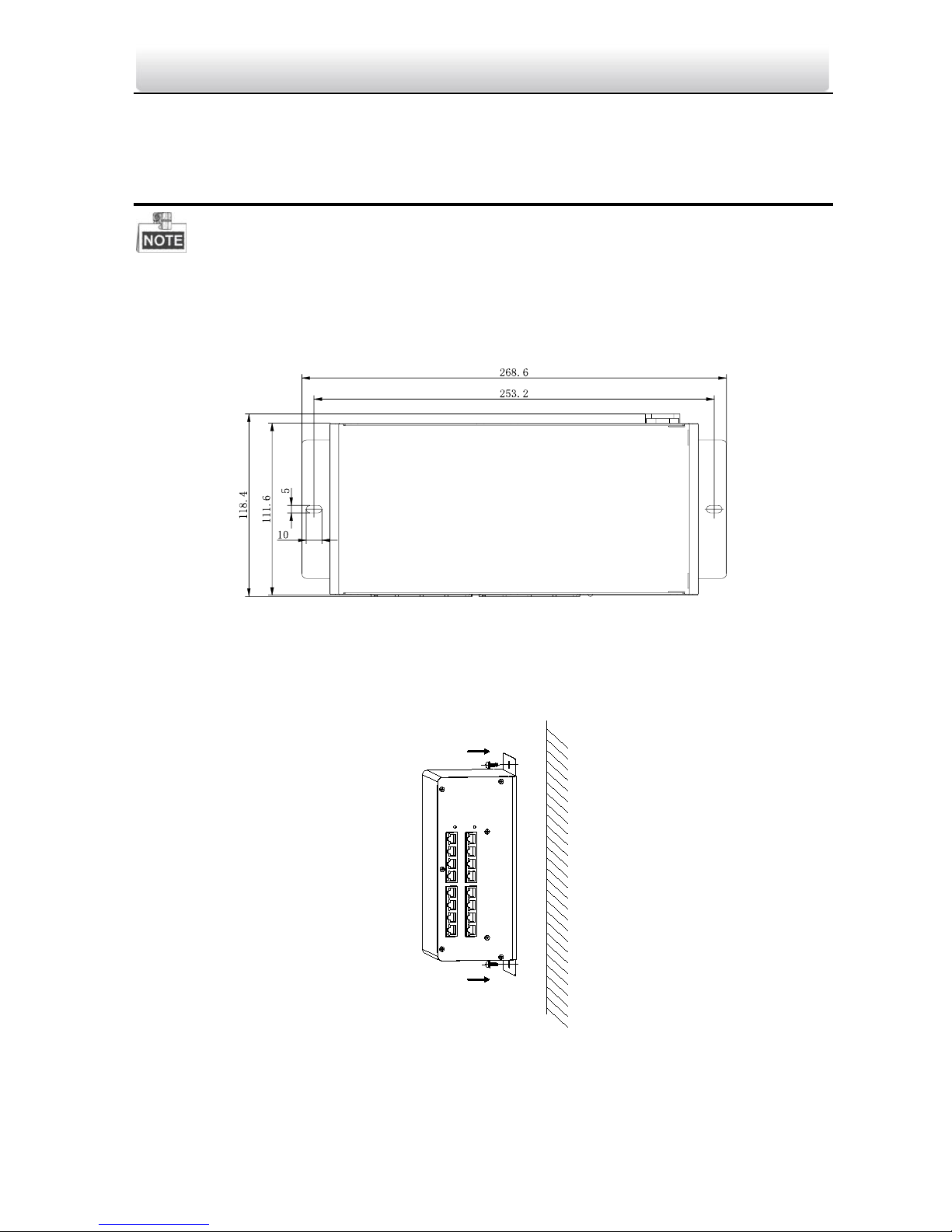
The video/audio distributor can be put on the desk or be installed onto the wall.
Here we take the installation of type II model as example.
Please refer to the bottom panel of the video/audio distributor.
Figure 5-8 Dimensions of Bottom Panel
Steps:
1. Take the video/audio distributor and screws from the packing box.
2. Attach the bottom panel of the distributor to the wall.
Figure 5-9 Install the Video/Audio Distributor
3. Insert 2 screws into the screw holes to fix the distributor onto the wall.
Page 15
Video/Audio Distributor·Quick Start Guide
8
Appendix
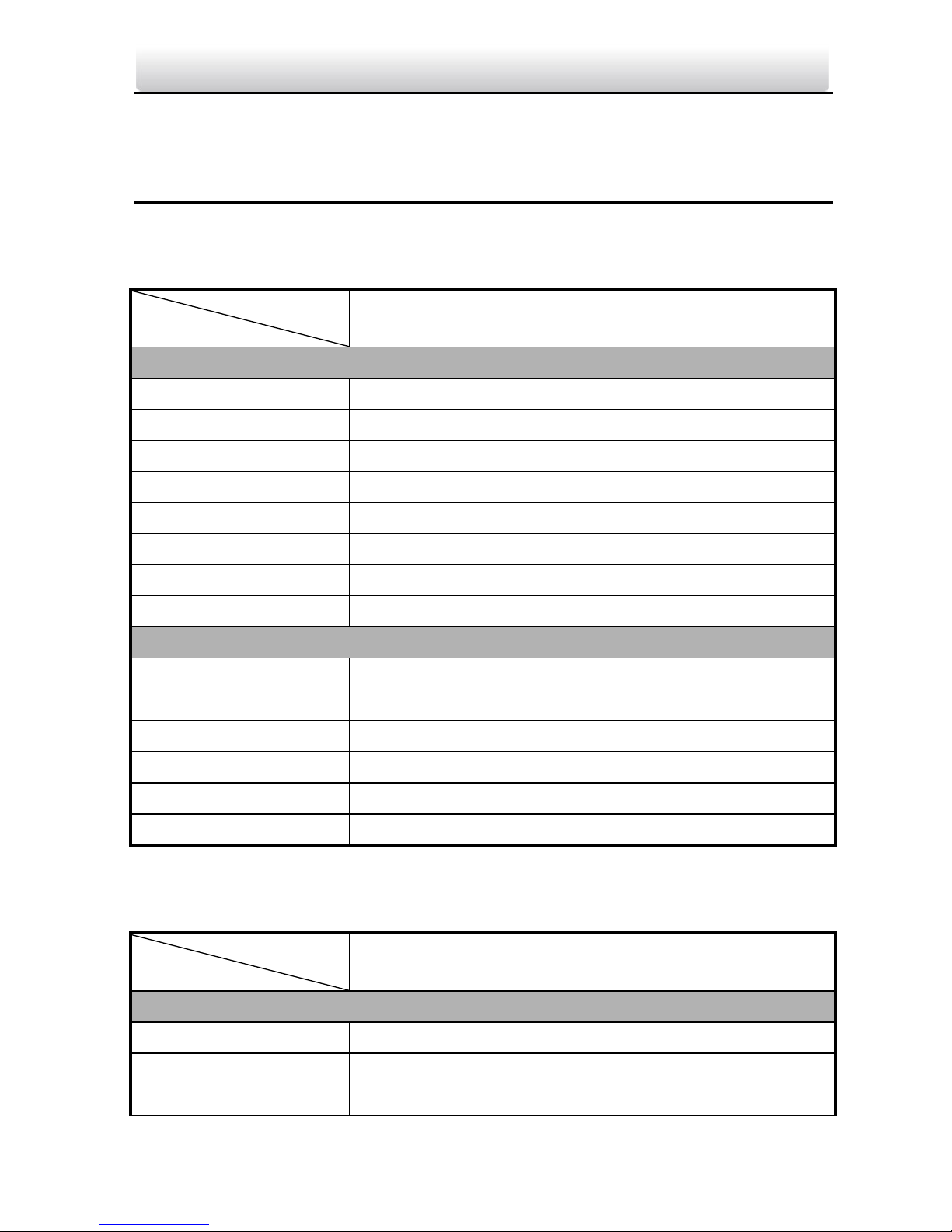
Spectification of Type I Model
Model
Parameters
Type I
Network Parameters
Interface Number
Sixteen 10M/100M Interfaces
Interface Type
RJ-45, Full/Half-Duplex, MDI/MDI-X Self-Adaptive
Standard
IEEE802.3, IEEE802.3u, IEEE802.3x
Processing Type
Storing and Forwarding
Flow Control
IEEE802.3x (Full-Duplex), Back Pressure (Half-Duplex)
Priority Queue
Four
MAC Address List
8K
Internal Buffer
1 Mbit
Other Parameters
Power Supply
AC 220V
Power Consumption
<3 W
Working Temperature
-30° C to 70° C (-22° F to 158° F)
Working Humidity
5% to 95%, No Condensation
Dimension (L x W x H)
275.2 mm x 92 mm x 102.2 mm (10.8" × 3.6" × 4.0")
Certification
FCC, IC, CE, C-TICK, ROHS, REACH, WEEE
Spectification of Type II Model
Model
Parameters
Type II
Network Parameters
Interface Number
Sixteen 10M/100M Interfaces
Interface Type
RJ-45, Full/Half-Duplex, MDI/MDI-X Self-Adaptive
Standard
IEEE802.3, IEEE802.3u, IEEE802.3x
Page 16
Video/Audio Distributor·Quick Start Guide
9
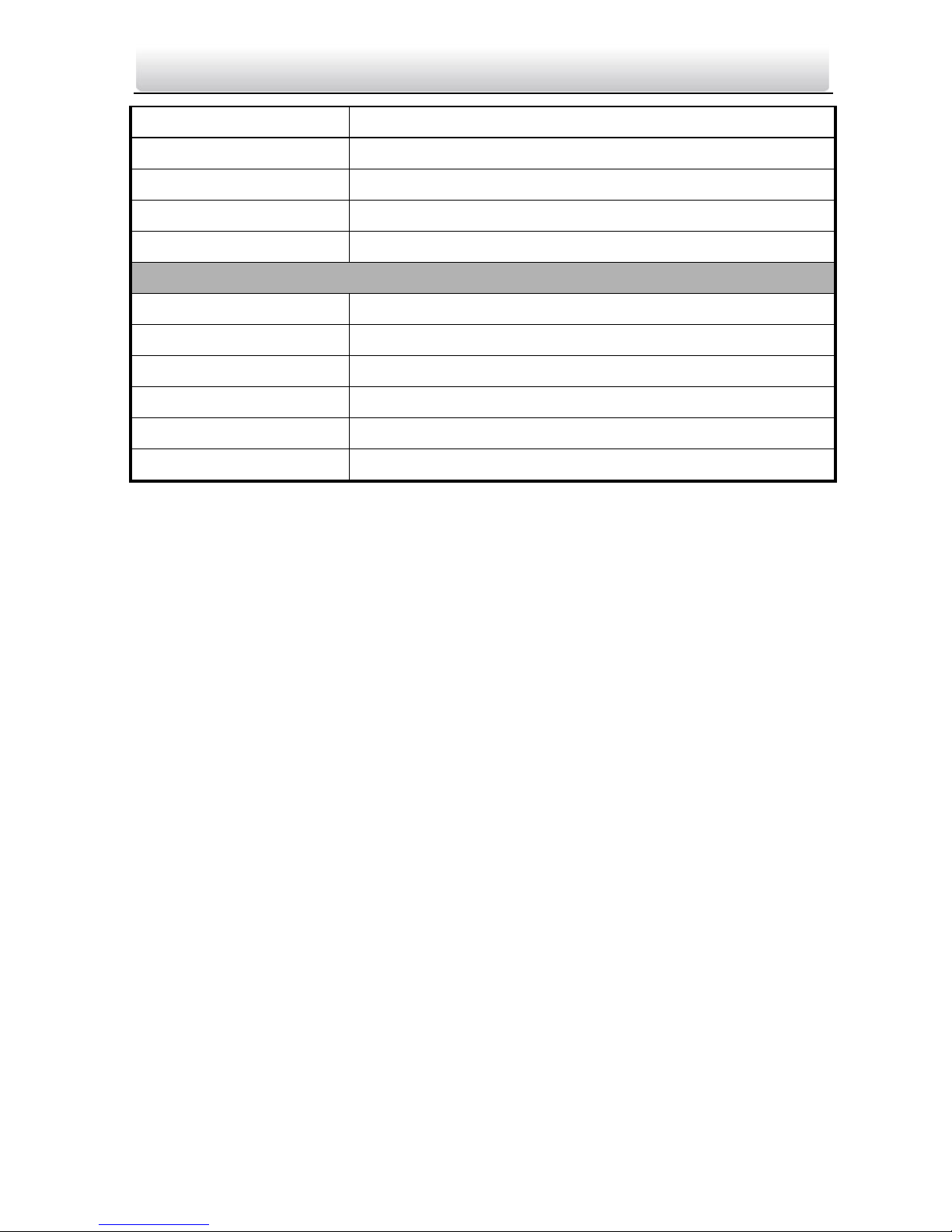
Processing Type
Storing and Forwarding
Flow Control
IEEE802.3x (Full-Duplex), Back Pressure (Half-Duplex)
Priority Queue
Four
MAC Address List
8K
Internal Buffer
1 Mbit
Other Parameters
Power Supply
AC 220V
Power Consumption
<6 W
Working Temperature
-30° C to 70° C (-22° F to 158° F)
Working Humidity
5% to 95%, No Condensation
Dimension (L x W x H)
275.2 mm x 92 mm x 102.2 mm (10.8" × 3.6" × 4.0")
Certification
FCC, IC, CE, C-TICK, ROHS, REACH, WEEE
 Loading...