

Page 1

OPERATOR’S MANUAL MAYBACH
OPERATOR’S MANUAL
Grafik in der Größe 216x79 mm
in den Grafikrahmen importieren!
Page 2

Order No. 6515 4416 13 Part No. 240 584 62 81 USA Edition A 2005
OPERATOR’S MANUAL MAYBACH
Page 3

Maybach 57
Maybach 62
Page 4

Our company congratulates you on the
purchase of your new Maybach.
Your selection of our product is a demonstration of your trust in Maybach
Manufaktur. Furthermore, it exemplifies
your desire to own an automobile that
will be as easy as possible to operate and
provide years of service.
Your Maybach represents the efforts of
many skilled engineers and craftsmen.
To help assure your driving pleasure and
also the safety of you and your passengers, we ask you to make a small investment of your time:
Please read this manual carefully,
then return it to your vehicle where it
will be handy for your reference.
Please follow the recommendations
contained in this manual. They are
designed to acquaint you with the
operation of your Maybach.
Please pay attention to the warnings
and cautions contained in this manual. They are designed to help improve
the safety of the vehicle operator and
occupants.
Should you have any questions,
please contact your Maybach Studio
MRM (Maybach Relationship
Manager) or call us at
1-866-FOR-MAYBach (in the USA) or
1-888-881-6611 (in Canada).
We extend our best wishes for many
miles of safe, pleasurable driving.
Mercedes-Benz USA, LLC
A DaimlerChrysler Company
Page 5

Introduction . . . . . . . . . . . . . . . . . . . . . 9
Product information. . . . . . . . . . . . . . . 9
Operator’s Manual . . . . . . . . . . . . . . . 10
Service and warranty information 10
Important notice for California
retail buyers and lessees of
Maybach automobiles . . . . . . . . . 11
Maintenance . . . . . . . . . . . . . . . . . 12
Roadside Assistance . . . . . . . . . . . 12
Change of address or ownership. 12
Operating your vehicle outside
the USA or Canada . . . . . . . . . . . . 13
Where to find it . . . . . . . . . . . . . . . . . 14
Symbols . . . . . . . . . . . . . . . . . . . . . . . . 15
Operating safety. . . . . . . . . . . . . . . . . 16
Proper use of the vehicle . . . . . . . 16
Problems with your vehicle . . . . . . . . 17
Reporting safety defects . . . . . . . . . . 18
Reporting safety defects . . . . . . . 18
Vehicle data recording. . . . . . . . . . . . 19
Information regarding electronic
recording devices . . . . . . . . . . . . . 19
At a glance . . . . . . . . . . . . . . . . . . . . . . 21
Cockpit . . . . . . . . . . . . . . . . . . . . . . . . . 22
Instrument cluster . . . . . . . . . . . . . . . . 24
Multifunction steering wheel . . . . . . . 26
Front center console . . . . . . . . . . . . . . 27
Upper part . . . . . . . . . . . . . . . . . . . 27
Lower part . . . . . . . . . . . . . . . . . . . 28
Overhead control panel . . . . . . . . . . . 30
Driver’s door control panel . . . . . . . . . 31
Rear passenger compartment. . . . . . . 32
Maybach 57 . . . . . . . . . . . . . . . . . . 32
Maybach 62 without partition* . . 34
Maybach 62 with partition* . . . . . 36
Rear seats . . . . . . . . . . . . . . . . . . . . . . . 38
Maybach 57 . . . . . . . . . . . . . . . . . . 38
Maybach 62 . . . . . . . . . . . . . . . . . . 40
Contents
Rear 3-place seat . . . . . . . . . . . . . . . . . 42
Maybach 57 with
rear center seat* . . . . . . . . . . . . . . 42
Maybach 62 with
rear center seat* . . . . . . . . . . . . . . 44
Rear center console. . . . . . . . . . . . . . . 46
Maybach 57 . . . . . . . . . . . . . . . . . . 46
Maybach 62 with power
tilt/sliding sunroof . . . . . . . . . . . . . 47
Maybach 62 with
electrotransparent roof*. . . . . . . . 48
Rear door control panel . . . . . . . . . . . 49
Maybach 57 . . . . . . . . . . . . . . . . . . 49
Maybach 62 . . . . . . . . . . . . . . . . . . 50
3
Page 6

Contents
Getting started . . . . . . . . . . . . . . . . . . 51
Unlocking . . . . . . . . . . . . . . . . . . . . . . 52
Unlocking with the SmartKey . . . 52
Unlocking with KEYLESS-GO** . . 53
Starter switch positions. . . . . . . . . 54
Adjusting. . . . . . . . . . . . . . . . . . . . . . . 57
Seats . . . . . . . . . . . . . . . . . . . . . . . 57
Steering wheel . . . . . . . . . . . . . . . 60
Mirrors . . . . . . . . . . . . . . . . . . . . . . 61
Driving . . . . . . . . . . . . . . . . . . . . . . . . . 63
Fastening the seat belts . . . . . . . . 63
Starting the engine. . . . . . . . . . . . 65
Parking brake . . . . . . . . . . . . . . . . 68
Driving . . . . . . . . . . . . . . . . . . . . . . 68
Switching on headlamps. . . . . . . . 70
Turn signals . . . . . . . . . . . . . . . . . . 71
Windshield wipers. . . . . . . . . . . . . 71
Problems while driving. . . . . . . . . 73
Parking and locking . . . . . . . . . . . . . . 74
Parking brake . . . . . . . . . . . . . . . . 74
Switching off headlamps . . . . . . . 75
Turning off the engine. . . . . . . . . 75
Locking . . . . . . . . . . . . . . . . . . . . . 76
Safety and Security . . . . . . . . . . . . . . . 77
Occupant safety . . . . . . . . . . . . . . . . . . 78
Airbags . . . . . . . . . . . . . . . . . . . . . . 79
Seat belts. . . . . . . . . . . . . . . . . . . . . 84
Children in the vehicle . . . . . . . . . . 87
Override switch for rear
passenger compartment . . . . . . . . 94
Panic alarm . . . . . . . . . . . . . . . . . . . . . . 95
Activating . . . . . . . . . . . . . . . . . . . . 95
Deactivating . . . . . . . . . . . . . . . . . . 95
Driving safety systems . . . . . . . . . . . . . 96
ABS . . . . . . . . . . . . . . . . . . . . . . . . . 96
BAS . . . . . . . . . . . . . . . . . . . . . . . . . 97
ESP . . . . . . . . . . . . . . . . . . . . . . . . . . 98
The SBC brake system. . . . . . . . . . 101
Anti-theft systems . . . . . . . . . . . . . . . 104
Immobilizer. . . . . . . . . . . . . . . . . . 104
Anti-theft alarm system . . . . . . . . 104
Tow-away alarm. . . . . . . . . . . . . . 106
Controls in detail. . . . . . . . . . . . . . . . 107
Locking and unlocking . . . . . . . . . . . 108
SmartKey . . . . . . . . . . . . . . . . . . . 108
SmartKey with KEYLESS-GO** . . 111
Opening the doors
from the inside. . . . . . . . . . . . . . . 117
Closing the rear doors
automatically from
the inside (Maybach 62) . . . . . . . 117
Opening the trunk. . . . . . . . . . . . 118
Closing the trunk . . . . . . . . . . . . . 119
Trunk lid emergency release . . . . 123
Power closing assist for
doors and trunk lid . . . . . . . . . . . 124
Automatic central locking. . . . . . 124
Locking and unlocking
from the inside. . . . . . . . . . . . . . . 125
4
Page 7

Contents
Seats . . . . . . . . . . . . . . . . . . . . . . . . . 127
Easy-entry/exit feature . . . . . . . . 127
Rear seats . . . . . . . . . . . . . . . . . . 129
Setting front passenger seat
position from rear. . . . . . . . . . . . 135
Multicontour seats . . . . . . . . . . . 136
Seat heating . . . . . . . . . . . . . . . . 138
Seat ventilation*. . . . . . . . . . . . . 139
Memory function . . . . . . . . . . . . . . . 140
Storing positions in memory . . . 141
Recalling positions from memory 141
Storing exterior rear view mirror
parking position . . . . . . . . . . . . . 142
Lighting. . . . . . . . . . . . . . . . . . . . . . . 143
Exterior lamp switch. . . . . . . . . . 143
Combination switch . . . . . . . . . . 147
Hazard warning flasher . . . . . . . 147
Interior lighting in the front . . . 148
Interior lighting in the rear . . . . 150
Instrument cluster . . . . . . . . . . . . . . . 153
Instrument cluster illumination. . 153
Coolant temperature gauge . . . . 154
Trip odometer . . . . . . . . . . . . . . . 154
Tachometer. . . . . . . . . . . . . . . . . . 155
Outside temperature indicator . . 155
Speedometer . . . . . . . . . . . . . . . . 156
Clock . . . . . . . . . . . . . . . . . . . . . . . 156
Control system . . . . . . . . . . . . . . . . . . 157
Multifunction display. . . . . . . . . . 157
Multifunction steering wheel . . . 158
Menus . . . . . . . . . . . . . . . . . . . . . . 160
Standard display menu . . . . . . . . 162
Audio menu . . . . . . . . . . . . . . . . . 163
Telephone menu . . . . . . . . . . . . . 165
Navigation menu . . . . . . . . . . . . . 168
Distronic** menu . . . . . . . . . . . . . 168
Trip computer menu . . . . . . . . . . 169
Vehicle status message
memory menu . . . . . . . . . . . . . . . 171
Settings menu. . . . . . . . . . . . . . . . 172
Automatic transmission . . . . . . . . . . 185
One-touch gearshifting. . . . . . . . 186
Gear ranges . . . . . . . . . . . . . . . . . 187
Gear selector lever position . . . . 188
Automatic shift program . . . . . . 189
Driving tips. . . . . . . . . . . . . . . . . . 190
Emergency operation
(Limp Home Mode) . . . . . . . . . . . 191
Good visibility . . . . . . . . . . . . . . . . . . 192
Headlamp cleaning system . . . . . 192
Rear view mirrors. . . . . . . . . . . . . 192
Sun visors . . . . . . . . . . . . . . . . . . . 197
Rear window defroster . . . . . . . . 198
Automatic climate control . . . . . . . . 199
Cockpit . . . . . . . . . . . . . . . . . . . . . 200
Rear passenger compartment. . . 210
Solar panel* . . . . . . . . . . . . . . . . . 217
5
Page 8

Contents
Power windows. . . . . . . . . . . . . . . . . 218
Opening and closing
the windows . . . . . . . . . . . . . . . . 218
Synchronizing power windows . 220
Summer opening feature . . . . . . 220
Convenience closing feature . . . 221
Power tilt/sliding sunroof. . . . . . . . . 222
Opening and closing
the power tilt/sliding sunroof
(Maybach 57). . . . . . . . . . . . . . . . 222
Synchronizing
the power tilt/sliding sunroof
(Maybach 57). . . . . . . . . . . . . . . . 224
Opening and closing
the power tilt/sliding sunroof
(Maybach 62). . . . . . . . . . . . . . . . 225
Synchronizing
the power tilt/sliding sunroof
(Maybach 62). . . . . . . . . . . . . . . . 229
Electrotransparent roof* . . . . . . . . . 230
Operating the
electrotransparent roof . . . . . . . 230
Driving systems. . . . . . . . . . . . . . . . . . 233
Cruise control . . . . . . . . . . . . . . . . 233
Distronic** . . . . . . . . . . . . . . . . . . 236
Airmatic DC (Dual Control) . . . . . 247
Parktronic (Parking assist) . . . . . . 251
Loading. . . . . . . . . . . . . . . . . . . . . . . . 256
Cargo tie-down hooks . . . . . . . . . 256
Loading instructions. . . . . . . . . . . 256
Useful features . . . . . . . . . . . . . . . . . . 257
Vanity mirrors . . . . . . . . . . . . . . . . 257
Storage compartments. . . . . . . . . 258
Umbrella . . . . . . . . . . . . . . . . . . . . 268
Cup holders. . . . . . . . . . . . . . . . . . 269
Ashtrays. . . . . . . . . . . . . . . . . . . . . 272
Cigarette lighters . . . . . . . . . . . . . 273
Non-smokers package* . . . . . . . . 274
Folding table*
(standardonMaybach62;
optional on Maybach 57) . . . . . . . 275
Refrigerator**
in rear center console. . . . . . . . . . 277
12-V socket . . . . . . . . . . . . . . . . . . 278
Battery charge maintenance
socket . . . . . . . . . . . . . . . . . . . . . . 279
Rear window curtain . . . . . . . . . . 280
Rear side window curtains* . . . . 281
Partition* . . . . . . . . . . . . . . . . . . . 284
Two-way intercom*
(Maybach 62: standard
with partition*) . . . . . . . . . . . . . . 287
External communication
(special order equipment). . . . . . 288
Telephone . . . . . . . . . . . . . . . . . . 289
Tele Aid . . . . . . . . . . . . . . . . . . . . 294
Garage door opener . . . . . . . . . . 304
Infrared reflecting windshield . . 308
Heated steering wheel . . . . . . . . 308
Pocket PC remote control* . . . . . . . . 309
Pocket PC holder . . . . . . . . . . . . . 310
Pocket PC 1. . . . . . . . . . . . . . . . . . 312
Pocket PC 2. . . . . . . . . . . . . . . . . . 315
Display . . . . . . . . . . . . . . . . . . . . . 317
Operation via main menu
function buttons and
navigation button . . . . . . . . . . . . 318
Operation via touch-screen. . . . . 320
Pocket PC troubleshooting . . . . . 339
6
Page 9

Contents
Operation . . . . . . . . . . . . . . . . . . . . . 341
The first 1000 miles (1500 km). . . . . 342
Driving instructions . . . . . . . . . . . . . 343
Drive sensibly – save fuel . . . . . . 343
Drinking and driving . . . . . . . . . 343
Pedals. . . . . . . . . . . . . . . . . . . . . . 343
Power assistance . . . . . . . . . . . . . 343
Brakes . . . . . . . . . . . . . . . . . . . . . 344
Driving off. . . . . . . . . . . . . . . . . . 345
Parking . . . . . . . . . . . . . . . . . . . . 345
Tires . . . . . . . . . . . . . . . . . . . . . . . 346
Hydroplaning . . . . . . . . . . . . . . . 346
Tire traction. . . . . . . . . . . . . . . . . 347
Tire speed rating. . . . . . . . . . . . . 347
Winter driving instructions . . . . 348
Standing water . . . . . . . . . . . . . . 349
Passenger compartment. . . . . . . 349
Driving abroad . . . . . . . . . . . . . . 349
Control and operation of
radio transmitters . . . . . . . . . . . . 349
Catalytic converter . . . . . . . . . . . 350
Emission control . . . . . . . . . . . . . 350
Coolant temperature . . . . . . . . . 351
At the gas station . . . . . . . . . . . . . . . 352
Refueling . . . . . . . . . . . . . . . . . . . 352
Check regularly and before
a long trip. . . . . . . . . . . . . . . . . . . 354
Engine compartment. . . . . . . . . . . . . 355
Hood . . . . . . . . . . . . . . . . . . . . . . . 355
Engine oil . . . . . . . . . . . . . . . . . . . 356
Transmission fluid level . . . . . . . . 359
Coolant level. . . . . . . . . . . . . . . . . 360
Batteries . . . . . . . . . . . . . . . . . . . . 361
Windshield washer and
headlamp cleaning system . . . . . 362
Tires and wheels . . . . . . . . . . . . . . . . 363
Important guidelines . . . . . . . . . . 363
Life of tires . . . . . . . . . . . . . . . . . . 364
Direction of rotation . . . . . . . . . . 364
Checking tire pressure . . . . . . . . . 364
Rotating tires . . . . . . . . . . . . . . . . 370
Winter driving . . . . . . . . . . . . . . . . . . 371
Tire speed rating
for winter tires . . . . . . . . . . . . . . . 371
Winter tires. . . . . . . . . . . . . . . . . . 372
Snow chains . . . . . . . . . . . . . . . . . 372
Maintenance . . . . . . . . . . . . . . . . . . . 373
Clearing the maintenance
service indicator. . . . . . . . . . . . . . 373
Maintenance service
term exceeded . . . . . . . . . . . . . . . 373
Calling up the maintenance
service indicator. . . . . . . . . . . . . . 374
Resetting the maintenance
service indicator. . . . . . . . . . . . . . 374
Vehicle care . . . . . . . . . . . . . . . . . . . . 375
Cleaning and care of vehicle. . . . 375
Practical hints . . . . . . . . . . . . . . . . . . 383
What to do if … . . . . . . . . . . . . . . . . 384
Lamps in instrument cluster . . . . 384
Lamp in center console . . . . . . . . 390
Vehicle status messages
in the multifunction display . . . . 391
Where will I find ...? . . . . . . . . . . . . . 422
First aid kit . . . . . . . . . . . . . . . . . . 422
Vehicle jack, vehicle tool kit,
luggage bowl, spare wheel. . . . . 422
7
Page 10

Contents
Unlocking/locking
in an emergency . . . . . . . . . . . . . . . . 423
Unlocking the vehicle . . . . . . . . . 423
Locking the vehicle . . . . . . . . . . . 424
Opening/closing in an emergency . . 425
Power tilt/sliding sunroof
(Maybach 57). . . . . . . . . . . . . . . . 425
Power tilt/sliding sunroof
(Maybach 62). . . . . . . . . . . . . . . . 426
Pocket PC*. . . . . . . . . . . . . . . . . . . . . 427
Installing the memory card. . . . . 427
Resetting the Pocket PC . . . . . . . 427
Replacing SmartKey batteries . . . . . 428
Replacing bulbs. . . . . . . . . . . . . . . . . 430
Bulbs . . . . . . . . . . . . . . . . . . . . . . 430
Replacing bulbs
for front lamps . . . . . . . . . . . . . . 432
License plate lamp . . . . . . . . . . . 433
Replacing wiper blades . . . . . . . . . . 434
Removing wiper blades . . . . . . . 434
Installing wiper blades . . . . . . . . 435
Flat tire . . . . . . . . . . . . . . . . . . . . . . . 436
Preparing the vehicle . . . . . . . . . 436
Mounting the spare wheel. . . . . 436
Batteries . . . . . . . . . . . . . . . . . . . . . . . 441
Disconnecting the batteries. . . . . 443
Charging and reinstalling
the batteries . . . . . . . . . . . . . . . . . 443
Reconnecting the batteries . . . . . 444
Jump starting . . . . . . . . . . . . . . . . . . . 445
Towing the vehicle. . . . . . . . . . . . . . . 447
Installing towing eye bolt . . . . . . 449
Fuses . . . . . . . . . . . . . . . . . . . . . . . . . . 450
Aids for replacing fuses . . . . . . . . 451
Fuse boxes in engine
compartment . . . . . . . . . . . . . . . . 451
Fuse box in passenger
compartment . . . . . . . . . . . . . . . . 452
Fuse box in the trunk . . . . . . . . . . 452
Technical data . . . . . . . . . . . . . . . . . . 453
Parts service . . . . . . . . . . . . . . . . . . . . 454
Warranty coverage. . . . . . . . . . . . . . . 455
Loss of Service and Warranty
Information Booklet. . . . . . . . . . . 455
Identification labels . . . . . . . . . . . . . . 456
Layout of poly-V-belt drive . . . . . . . . 457
Engine. . . . . . . . . . . . . . . . . . . . . . . . . 458
Rims and tires. . . . . . . . . . . . . . . . . . . 459
Same size tires . . . . . . . . . . . . . . . 460
Spare wheel . . . . . . . . . . . . . . . . . 460
Electrical system. . . . . . . . . . . . . . . . . 461
Main dimensions . . . . . . . . . . . . . . . . 462
Weights . . . . . . . . . . . . . . . . . . . . . . . 463
Fuels, coolants, lubricants, etc. . . . . . 464
Capacities . . . . . . . . . . . . . . . . . . . 464
Engine oils . . . . . . . . . . . . . . . . . . 465
Engine oil additives . . . . . . . . . . . 465
Air conditioning refrigerant . . . . 465
Brake fluid . . . . . . . . . . . . . . . . . . 466
Premium unleaded gasoline . . . . 466
Fuel requirements . . . . . . . . . . . . 466
Gasoline additives . . . . . . . . . . . . 467
Coolants . . . . . . . . . . . . . . . . . . . . 467
Windshield and headlamp
washer system . . . . . . . . . . . . . . . 469
Consumer information . . . . . . . . . . . 470
Uniform tire quality grading. . . . 470
Technical terms . . . . . . . . . . . . . . . . . 471
Index. . . . . . . . . . . . . . . . . . . . . . . . . . 477
8
Page 11

Product information
Please observe the following in your own
best interest:
We recommend using genuine parts as
well as conversion parts and accessories
explicitly approved for use on Maybach
vehicles and your model.
We have tested these parts to determine
their reliability, safety and special suitability for Maybach vehicles.
We are unable to make an assessment
for other products and therefore cannot
be held responsible for them, even if in
individual cases an official approval or
authorization by governmental or other
agencies should exist. Use of such parts
and accessories could adversely affect
the safety, performance or reliability of
your vehicle. Please do not use them.
Introduction
Product information
Genuine parts as well as conversion parts
and accessories approved by us for use
on Maybach vehicles are available at
your authorized Maybach Studio where
you will receive comprehensive information, also on permissible technical modifications, and where proper installation
will be performed.
9
Page 12

Introduction
Operator’s Manual
This Operator’s Manual contains a great
deal of useful information. We urge you
to read it carefully and familiarize yourself with the vehicle before driving.
For your own safety and longer service
life of the vehicle, we urge you to follow
the instructions and warnings contained
in this manual. Ignoring them could result in damage to the vehicle or personal
injury to you or others. Vehicle damage
caused by failure to follow instructions is
not covered by the Maybach Limited
Warranty.
Your vehicle may have some or all of the
equipment described in this manual.
Therefore, you may find explanations for
optional equipment not installed in your
vehicle. If you have any questions about
the operation of any equipment, your
authorized Maybach Studio will be glad
to demonstrate the proper procedures.
We continuously strive to improve our
product, and ask for your understanding
that we reserve the right to make changes in design and equipment. Therefore,
information, illustrations and descriptions in this Operator’s Manual might
differ from your vehicle.
Optional equipment is also described in
this manual, including operating instructions wherever necessary. Since they are
special-order items, the descriptions and
illustrations herein may vary slightly
from the actual equipment of your vehicle.
If there are any equipment details that
are not shown or described in this Operator’s Manual, your authorized Maybach
Studio will be glad to inform you of correct care and operating procedures.
The Operator’s Manual and Maintenance Booklet are important documents
and should be kept with the vehicle.
Service and warranty information
The Service and Warranty Information
Booklet contains detailed information
about the warranties covering your
Maybach, including:
New Car Limited Warranty
Emission System Warranty
California, Maine, Massachusetts,
and Vermont Emission Control Sys-
tem Warranty
(California, Maine, Massachusetts,
and Vermont only)
State Warranty Enforcement Laws
(Lemon Laws)
10
Page 13

Introduction
Operator’s Manual
Important notice for California retail buyers and lessees of Maybach automobiles
Under California law you may be entitled
to a replacement of your vehicle or a refund of the purchase price or lease price,
if Mercedes-Benz USA, LLC and/or its authorized repair or service facilities fail to
fix one or more substantial defects or
malfunctions in the vehicle that are covered by its express warranty after a reasonable number of repair attempts.
During the period of 18 months from
original delivery of the vehicle or the accumulation of 18000 miles (approximately 29000 km) on the odometer of
the vehicle, whichever occurs first, a reasonable number of repair attempts is
presumed for a retail buyer or lessee if
one or more of the following occurs:
(1) the same substantial defect or mal-
function results in a condition that is
likely to cause death or serious bodily
injury if the vehicle is driven, that defect or malfunction has been subject
to repair two or more times, and you
have directly notified Mercedes-Benz
USA, LLC in writing of the need for its
repair,
(2) the same substantial defect or mal-
function of a less serious nature than
category (1) has been subject to repair four or more times and you have
directly notified us in writing of the
need for its repair, or
(3) the vehicle is out of service by reason
of repair of the same or different substantial defects or malfunctions for a
cumulative total of more than
30 calender days.
Written notification should be sent to us,
not a Maybach Studio, at Maybach
Assistance Center, Mercedes-Benz USA,
LLC, Three Paragon Drive, Montvale,
NJ 07645.
11
Page 14

Introduction
Operator’s Manual
Maintenance Roadside Assistance Change of address or ownership
The Maintenance Booklet describes all
the necessary maintenance work which
should be performed at regular intervals.
Always have the Maintenance Booklet
with you when you take the vehicle to
your authorized Maybach Studio for service. The service advisor will record each
service in the booklet for you.
The Maybach Roadside Assistance Program provides factory trained technical
help in the event of a breakdown. Calls
to the toll-free Roadside Assistance number
1-866-FOR-MAYBach (in the USA)
1-888-881-6611 (in Canada)
will be answered by Maybach Assistance
Representatives 24 hours a day, 365 days
a year.
For additional information refer to the
Maybach Roadside Assistance Program
brochure in your glove box.
If you change your address, be sure to
send in the "Change of Address Notice"
found in the Service and Warranty Information Booklet, or simply call the
Maybach Assistance Center at
1-866-FOR-MAYBach (in the USA) or
1-888-881-6611 (in Canada). It is in your
own interest that we can contact you
should the need arise.
If you sell your Maybach, please leave all
literature with the vehicle to make it
available to the next operator.
If you bought this vehicle used, be sure
to send in the "Notice of Purchase of
Used Car" found in the Service and Warranty Information Booklet, or call the
Maybach Assistance Center at
1-866-FOR-MAYBach (in the USA) or
1-888-881-6611 (in Canada).
12
Page 15

Introduction
Operator’s Manual
Operating your vehicle outside the USA or Canada
If you plan to operate your vehicle in foreign countries, please be aware that:
Service facilities or replacement parts
may not be readily available.
Unleaded gasoline for vehicles with
catalytic converters may not be available; the use of leaded fuels will damage the catalysts.
Gasoline may have a considerably
lower octane rating, and improper
fuel can cause engine damage.
Certain Maybach models are available
for delivery in Europe under our European Delivery Program. For details, consult
an authorized Maybach Studio or write
to:
In the USA:
Mercedes-Benz USA, LLC
European Delivery Department
One Mercedes Drive
Montvale, NJ 07645-0350
In Canada:
Mercedes-Benz Canada, Inc.
European Delivery Department
98 Vanderhoof Avenue
Toronto, Ontario M4G 4C9
13
Page 16

Introduction
Where to find it
This Operator’s Manual is designed to
provide comprehensive support information for you, the vehicle operator. Each
section has its own reference color so you
can find information quickly.
At a glance
Here you will find an overview of all the
controls that can be operated in the vehicle’s interior.
Getting started
Here you will find all the information
you need for your first drive.
Safety and Security
Here you will find descriptions of the
safety and security features of your Maybach.
Controls in detail
Here you will find detailed information
about the equipment installed in your
vehicle. This section expands on the
"Getting started" section and also describes technical innovations.
Operation
Here you will find all the information
you need for the proper operation of
your Maybach.
Practical hints
This section provides fast assistance for
dealing with problems you may encounter.
Technical data
All important technical data for your
Maybach can be found in this section.
Indexes
The glossary provides explanations of
the most important technical terms.
The table of contents and the index are
designed to help you find information
quickly and easily.
The following publications are part of
your vehicle documentation:
this Operator’s Manual
the Maintenance Booklet
Separate operating instructions will be
provided as required depending on the
equipment options installed in your vehicle.
14
Page 17

Symbols
The following symbols are found in this
Operator’s Manual:
* Optional equipment is identified
with an asterisk. Since standard
equipment varies between models,
the descriptions and illustrations in
this manual may differ slightly from
the actual equipment of your Maybach.
** Two asterisks designates standard
equipment which the purchaser of
the vehicle had the option to delete
at the time the vehicle was ordered.
Warning! G
Warning notices draw your attention to
hazards that may endanger your health or
life, or the health or life of others.
!
Highlights hazards that may result in
damage to your vehicle.
i
Helpful hints or further information
you may find useful.
Introduction
Symbols
This symbol points to instructions for
you to follow.
A number of these symbols appear-
ing in succession indicates a multiplestep procedure.
page This symbol tells you where to
look for further information
on a topic.
-> In the glossary of technical
DISPLAY
This continuation symbol
marks an interrupted procedure which will be continued
on the next page.
terms, this symbol is used to indicate cross-references to term
definitions.
Words appearing in the multifunction display are printed in
the type shown here.
15
Page 18

Introduction
Operating safety
Warning! G
Work improperly carried out on electronic
components and associated software
could cause them to cease functioning. Because the vehicle’s electronic components
are interconnected, any modifications
made may produce an undesired effect on
other systems. Electronic malfunctions
could seriously impair the operating safety
of your vehicle.
See an authorized Maybach Studio for repairs or modifications to electronic components.
Other improper work or modifications on
the vehicle could also have a negative impact on the operating safety of the vehicle.
Some safety systems only function while
the engine is running. You should therefore never turn off the engine while driving.
Warning! G
Heavy blows against the vehicle underbody or tires/wheels, for example when
running over an obstacle, road debris or a
pothole, may cause serious damage and
impair the operating safety of your vehicle. If you feel a sudden significant vibration or ride disturbance, or you suspect
that damage to your vehicle has occurred,
you should turn on your hazard warning
flashers, carefully slow down, and drive
with caution to an area which is a safe distance from the road.
Inspect the vehicle underbody and tires/
wheels for possible damage. If the vehicle
appears unsafe, have it towed to the nearest authorized Maybach Studio or other
qualified maintenance or repair facility for
further inspection or repairs.
Proper use of the vehicle
Proper use of the vehicle requires that
you are familiar with the following information and rules:
the safety precautions in this manual
the "Technical data" section in this
manual
traffic rules and regulations
motor vehicle laws and safety stan-
dards
Warning! G
Various warning labels are attached to
your vehicle. These warning labels are intended to make you and others aware of
various risks. You should not remove any
of these warning labels unless explicitly instructed to do so by information on the label itself. Removal of any of these labels
may cause you and others to be unaware
of certain risks which may result in an accident and/or personal injury.
16
Page 19

Introduction
Problems with your vehicle
Problems with your vehicle
If you should experience a problem with your vehicle, particularly one that you believe may affect its safe operation, we urge
you to immediately contact your Maybach Relationship Manager at an authorized Maybach Studio to have the problem diagnosed and corrected if required. If the matter is not handled to your satisfaction, please discuss the problem with the Maybach
Studio management, or if necessary contact us at one of the following addresses:
In the USA:
Maybach Assistance Center
Mercedes-Benz USA, LLC
Three Paragon Drive
Montvale, NJ 07645
In Canada:
Customer Relations Department
Mercedes-Benz Canada, Inc.
98 Vanderhoof Avenue
Toronto, Ontario M4G 4C9
17
Page 20

Introduction
Reporting safety defects
For the USA only:
The following text is published as required of manufacturers under Title 49, Code of U.S. Federal Regulations, Part 575 pursuant
to the "National Traffic and Motor Vehicle Safety Act of 1966".
Reporting safety defects
If you believe that your vehicle has a defect which could cause a crash or could cause injury or death, you should immediately
inform the National Highway Traffic Safety Administration (NHTSA) in addition to notifying Mercedes-Benz USA, LLC.
If NHTSA receives similar complaints, it may open an investigation, and if it finds that a safety defect exists in a group of vehicles,
it may order a recall and remedy campaign. However, NHTSA cannot become involved in individual problems between you, your
Maybach Studio, the Maybach Assistance Center, or Mercedes-Benz USA, LLC.
To contact NHTSA, you may either call the Auto Safety Hotline toll-free at 1-888-327-4236 (or 366-0123 in Washington, D.C. area)
or write to: NHTSA, U.S. Department of Transportation, Washington, D.C. 20590. You can also obtain other information about
motor vehicle safety from the Hotline.
18
Page 21

Introduction
Vehicle data recording
Vehicle data recording
Information regarding electronic recording devices
(Including notice pursuant to California Code § 9951)
Please note that your vehicle is equipped with devices that can record vehicle systems data and, if equipped with the Tele Aid
system, may transmit some data in certain accidents.
This information helps, for example, to diagnose vehicle systems after a collision and to continuously improve vehicle safety.
DaimlerChrysler may access the information and share it with others
for safety research or vehicle diagnosis purposes
with the consent of the vehicle owner or lessee
in response to an official request by law enforcement or other government agency
for use in dispute resolution involving DaimlerChrysler, its affiliates or sales/service organization and/or
as otherwise required or permitted by law.
Please check the Tele Aid subscription service agreement for details regarding the information that may be recorded or transmitted via that system.
19
Page 22

20
Page 23
At a glance
Cockpit
Instrument cluster
Multifunction steering wheel
Front center console
Overhead control panel
Driver’s door control panel
Rear passenger compartment
Rear seats
Rear 3-place seat
Rear center console
Rear door control panel
21
Page 24
At a glance
Cockpit
22
Page 25

At a glance
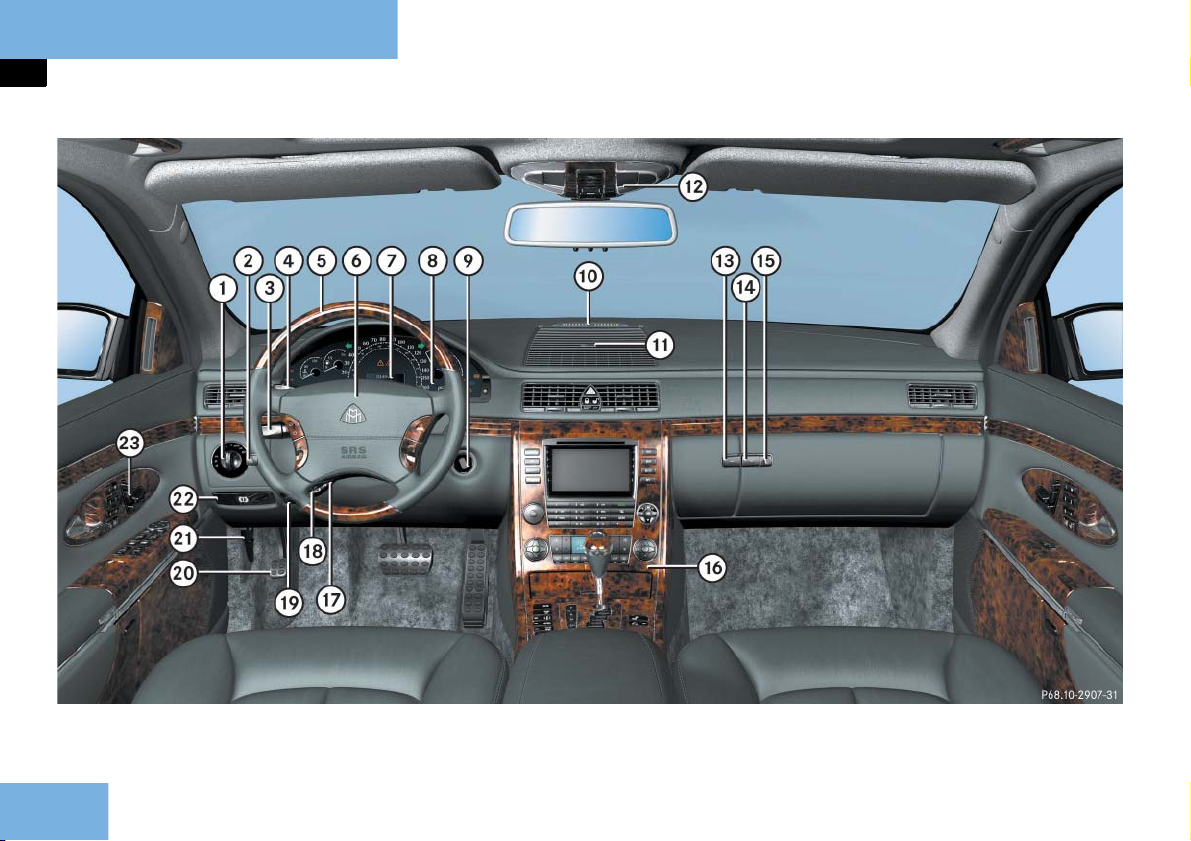
Cockpit
Item Page
1 Exterior lamp switch 70,
143
2 Headlamp washer button 192
3 Combination switch
High beam
Turn signals
Windshield wipers
70
71
71
4 Cruise control lever
Cruise control
Distronic**
5 Multifunction steering
wheel
233
236
60,
158
6 Horn
7 Instrument cluster 24,
153
Item Page
8 Lever for voice control sys-
tem, see separate operating instructions
9 Starter switch 54
a Front Parktronic warning
254
indicator
b Air vent grille with storage
258
box
c Overhead control panel 30
d Compartment for front
telephone
The Roadside Assistance
260
290
298
button • and the Information button ¡ are located in the compartment
for front telephone.
Item Page
e Glove box lid release 259
f Glove box lock 259
g Front center console 27
h Steering wheel adjustment
60
stalk
j Heated steering wheel
308
switch
k Remote trunk lid switch 119
l Parking brake pedal 74
m Hood lock release 355
n Parking brake release 74
o Door control panel 31
23
Page 26
At a glance
Instrument cluster
24
Page 27

At a glance
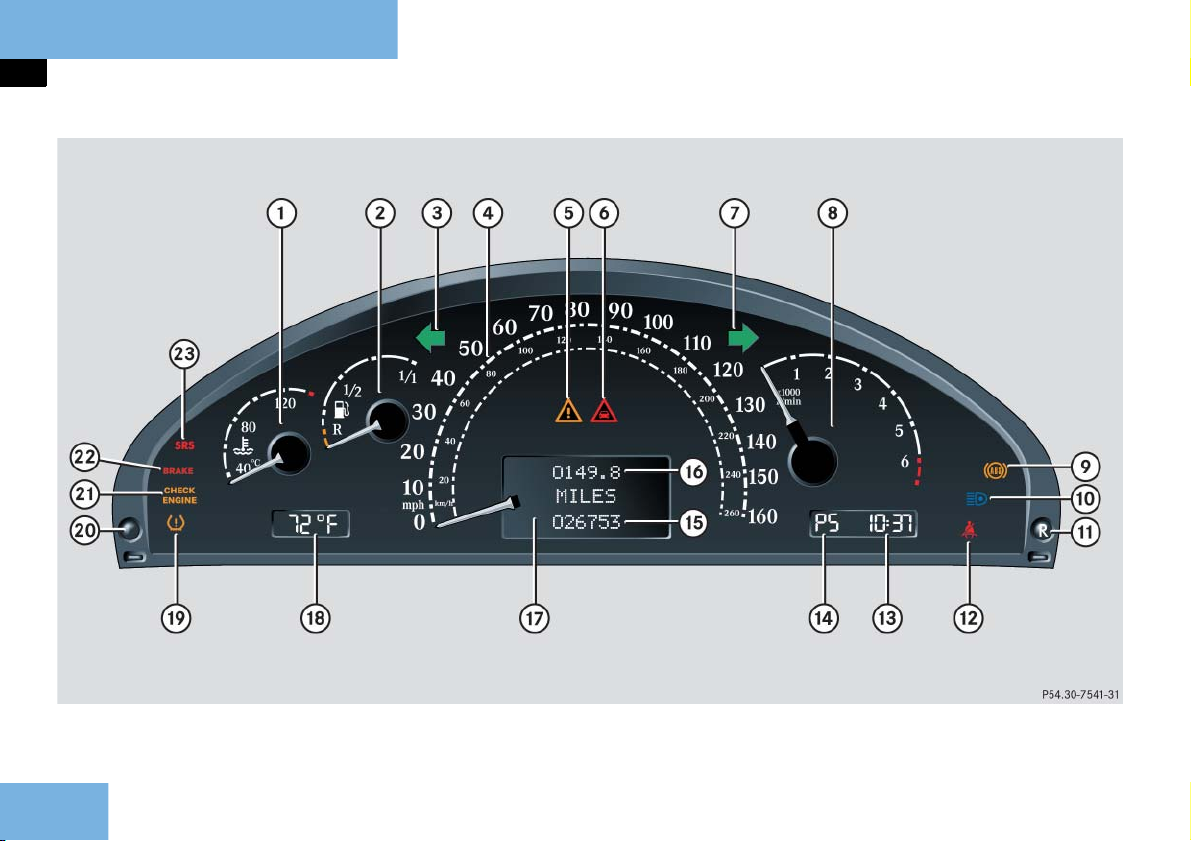
Instrument cluster
Item Page
1 Coolant temperature
gauge
2 Fuel gauge with fuel
reserve warning lamp
3 L Left turn signal indi-
cator lamp
4 Speedometer 156
5 v Antilock Brake Sys-
tem (ABS)/Electronic
Stability Program
(ESP) warning lamp
6 l Distance warning
lamp
1
7 K Right turn signal in-
dicator lamp
8 Tachometer 154
1 Vehicles without Distronic**: Warning lamp
without function. It illuminates when the ignition is on. It should go out when the engine is
running.
154
389
71
384
385
71
Item Page
9 - Antilock Brake Sys-
385
tem (ABS) indicator
lamp
a A High beam head-
147
lamp indicator lamp
b J Reset button
c < Seat belt telltale 386
d Digital clock
(see COMAND and RearCabin Audiovisual System
operating instructions)
e Gear selector lever position
185
and program mode
f Main odometer 157
g Trip odometer 157
h Multifunction display 157
j Outside temperature indi-
155
cator
Item Page
k H Tire pressure warn-
ing lamp
l Knob for instrument cluster
illumination
m ? Engine malfunction
indicator lamp, USA
only
± Engine malfunction
indicator lamp, Canada only
n ; Brake warning lamp,
USA only
3 Brake warning lamp,
Canada only
o 1 Supplemental
Restraint System
(SRS) indicator lamp
389
153
389
389
388
388
387
25
Page 28
At a glance
Multifunction steering wheel
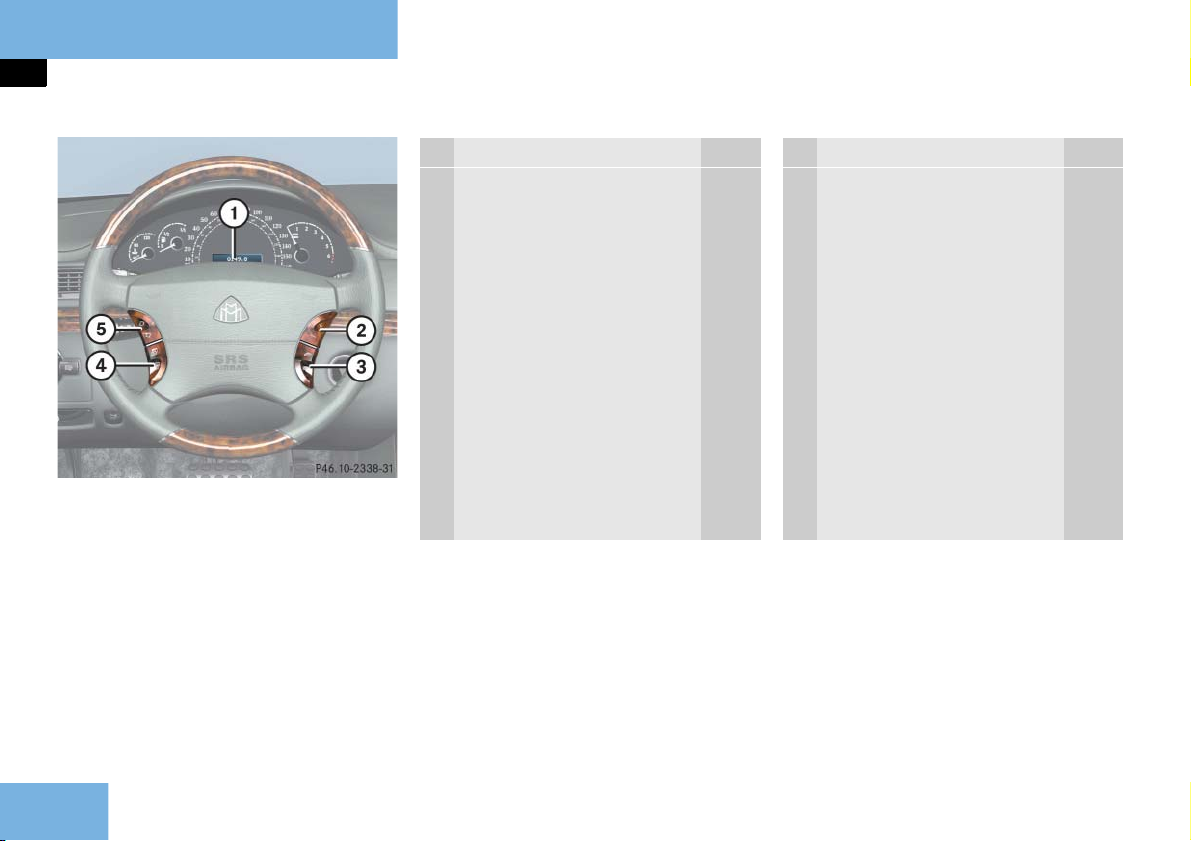
Item Page
1 Multifunction display 157
Operating control system 158
2 Selecting the submenu or
setting the volume:
Press button
æ up/to increase
ç down/to decrease
3 Telephone:
Press button
s to take a call
to dial a call
t to end a call
to reject an
incoming call
Item Page
4 Menu systems:
Press button
è for next menu
ÿ for previous menu
5 Moving within a menu:
Press button
j for next display
k for previous display
26
Page 29
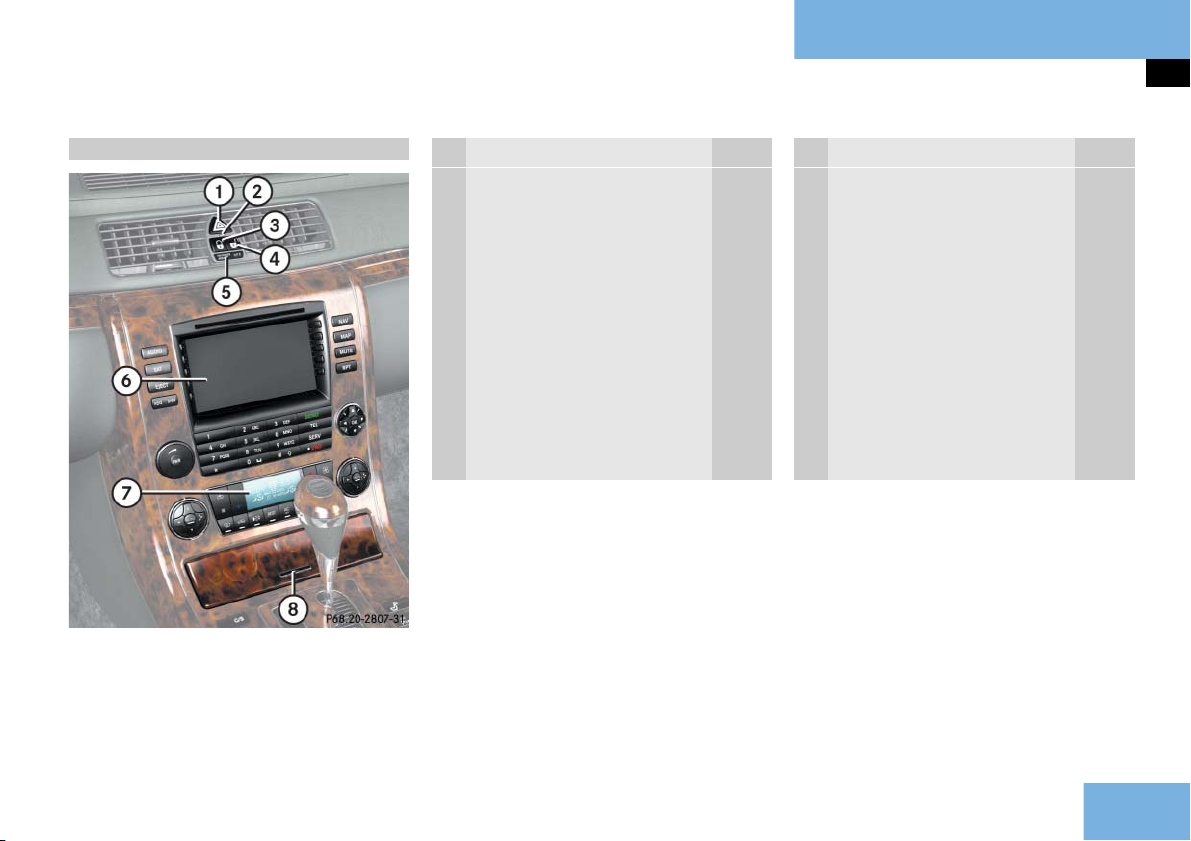
Front center console
At a glance
Front center console
Upper part
Item Page
1 Hazard warning flasher on/
off switch
2 Anti-theft alarm system in-
dicator lamp
3 Central locking switch 125
4 Central unlocking switch 125
5 PASSENGER AIRBAG OFF in-
dicator lamp
6 COMAND (see separate CO-
MAND and Rear-Cabin Audiovisual System operating
instructions)
147
105
89
Item Page
7 Automatic climate control 199
8 Chrome label for opening
cover of:
Cup holders 269
Switch for opening/clos-
ing rear window curtain
Switch for opening/clos-
ing rear side window
curtains*
280
281
27
Page 30
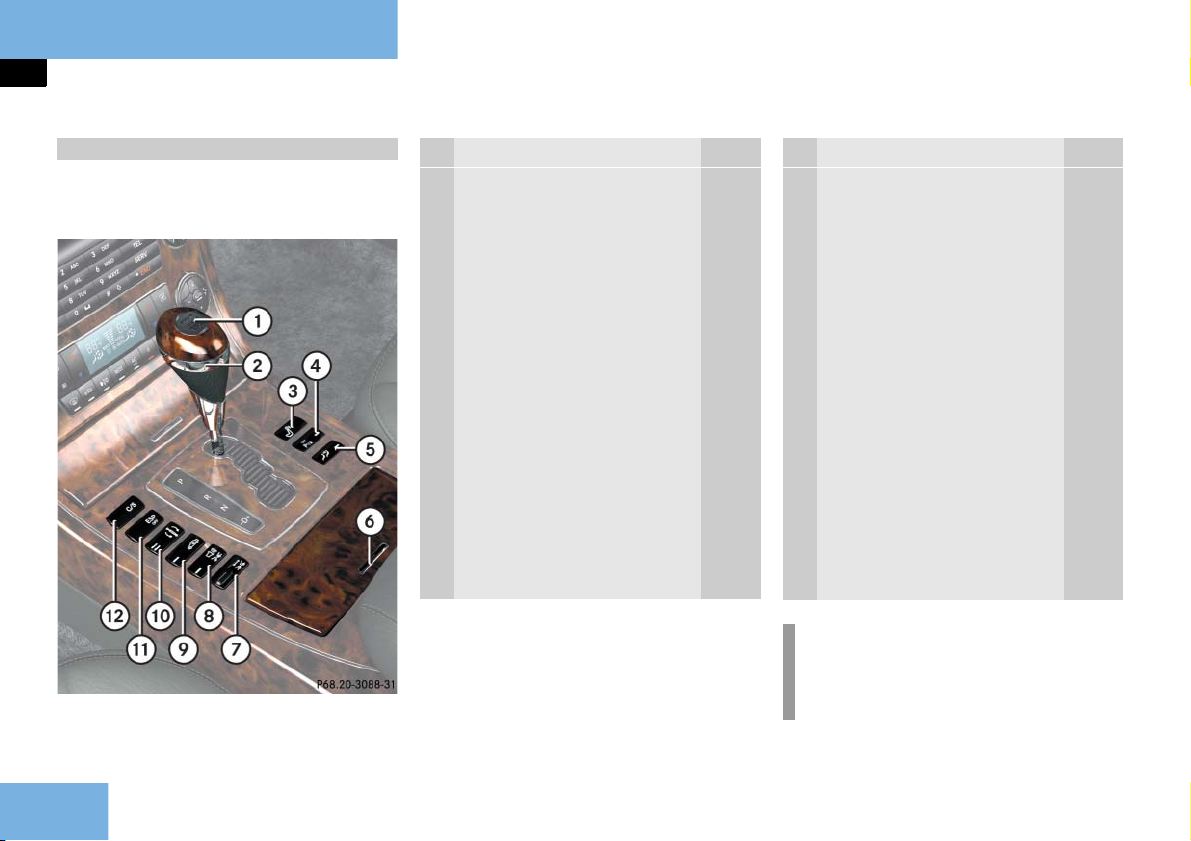
At a glance
Front center console
Lower part
Maybach 57 and Maybach 62 without
partition*
Item Page
1 KEYLESS-GO** start/stop
button
2 Gear selector lever for au-
tomatic transmission
3 Button for retracting/ex-
tending rear seat head restraints
4 Parking assist (Parktronic
system) deactivation button
5 Two-way intercom* on/off
button
55,
66
66
133
255
287
Item Page
6 Chrome label for opening
cover of:
Ashtray 272
Lighter 273
Storage compartment* 274
7 Thumbwheel for setting
distance in Distronic**
8 Distance warning func-
tion** on/off button
9 Level control button 249
a Airmatic DC button 248
b Electronic Stability Program
(ESP) control switch
c Program mode selector
switch for automatic transmission
243
243
100
189
i
Depending on equipment, the arrangement of switches and buttons
may vary.
28
Page 31

At a glance
Front center console
Maybach 62 with partition*
Item Page
1 KEYLESS-GO** start/stop
button
2 Gear selector lever for au-
tomatic transmission
3 Button for retracting/ex-
tending rear seat head restraints
4 Parking assist (Parktronic
system) deactivation button
5 Two-way intercom on/off
button
6 Switch for opening/closing
partition* curtain
7 Partition* opening/closing
switch
55,
66
66
133
255
287
285
284
Item Page
7 Chrome label for opening
cover of:
Ashtray 272
Lighter 273
Storage compartment* 274
9 Thumbwheel for setting
distance in Distronic**
a Distance warning func-
tion** on/off button
b Level control button 249
c Airmatic DC button 248
d Electronic Stability Program
(ESP) control switch
e Program mode selector
switch for automatic transmission
243
243
100
189
i
Depending on equipment, the arrangement of switches and buttons
may vary.
29
Page 32

At a glance
Overhead control panel
Item Page
1 Left reading lamp on/off 148
2 Rear interior lighting on/off 148
3 Interior lighting control 148
4 Right reading lamp on/off 148
5 Front interior lighting on/
off
6 Tow-away alarm button 106
7 Rear view mirror 61,
8 Garage door opener 304
148
192
Item Page
9 Automatic antiglare func-
tion on/off
a Tele Aid (emergency call
system) button
b Switch for opening/closing
power tilt/sliding sunroof
(Maybach 57)
Switch for opening/closing
power tilt/sliding sunroof
(Maybach 62)
Switch for operating
electrotransparent roof*
screen
192
294
222
225
230
30
Page 33

Driver’s door control panel
At a glance
Driver’s door control panel
Item Page
1 Door handle 117
2 Memory function (for stor-
ing seat, mirror and steering wheel settings)
3 Seat adjustment 57
4 Button for folding exterior
mirrors in and out
5 Exterior mirror adjustment 61
6 Switches for opening/clos-
ing front door windows
142
195
218
Item Page
7 Override switch for rear
passenger compartment
8 Switches for opening/clos-
ing rear door windows
9 Button for opening storage
compartment
a Handle for opening storage
compartment
b Seat ventilation* 139
c Seat heating 138
94
218
261
261
31
Page 34

At a glance
Rear passenger compartment
Maybach 57
32
Page 35

At a glance
Rear passenger compartment
Item Page
1 Vanity mirror, left 257
2 Speedometer 156
3 Clock (see COMAND and
Rear-Cabin Audiovisual System operating instructions)
156
Item Page
4 Outside temperature
gauge
5 Vanity mirror, right 257
6 Video monitor, right (see
COMAND and Rear-Cabin
Audiovisual System operating instructions)
155
Item Page
7 Automatic climate control
panel
8 Button for opening storage
compartment/drawer
9 Video monitor, left (see CO-
MAND and Rear-Cabin Audiovisual System operating
instructions)
214
263
33
Page 36

At a glance
Rear passenger compartment
Maybach 62 without partition*
34
Page 37

At a glance
Rear passenger compartment
Item Page
1 Vanity mirror, left 257
2 Speedometer 156
3 Clock (see COMAND and
Rear-Cabin Audiovisual System operating instructions)
4 Outside temperature
gauge
156
155
Item Page
5 Vanity mirror, right 257
6 Video monitor, right (see
COMAND and Rear-Cabin
Audiovisual System operating instructions)
7 Button for opening upper
storage compartment
264
Item Page
8 Automatic climate control
panel
9 Button for opening storage
compartment/drawer
a Video monitor, left (see CO-
MAND and Rear-Cabin Audiovisual System operating
instructions)
214
263
35
Page 38

At a glance
Rear passenger compartment
Maybach 62 with partition*
36
Page 39

At a glance
Rear passenger compartment
Item Page
1 Vanity mirror, left 257
2 Speedometer 156
3 Clock (see COMAND and
Rear-Cabin Audiovisual System operating instructions)
4 Outside temperature
gauge
156
155
Item Page
5 Vanity mirror, right 257
6 Video monitor, right (see
COMAND and Rear-Cabin
Audiovisual System operating instructions)
7 Button for opening upper
storage compartment
8 Storage pocket, right 265
264
Item Page
9 Automatic climate control
panel
a Button for opening storage
compartment/drawer
b Storage pocket, left 265
c Video monitor, left (see CO-
MAND and Rear-Cabin Audiovisual System operating
instructions)
214
263
37
Page 40

At a glance
Rear seats
Maybach 57
38
Page 41

At a glance
Rear seats
Item Page
1 Rear Parktronic warning in-
dicator
2 Button for opening upper
storage compartment with
insert for two champagne
flutes
3 Chrome label for opening
DVD player, AUX sockets
and headphone jacks (see
COMAND and Rear-Cabin
Audiovisual System operating instructions)
4 Chrome label for opening
CD changer compartment
(see COMAND and RearCabin Audiovisual System
operating instructions)
253
266
266
266
v
Item Page
5 Chrome label for opening
middle storage compartment
6 Door control panel, left 49
7 Handle for opening left
door storage compartment
for headphones
8 Handle for opening left
door storage compartment
9 Center armrest with
Storage compartment
for telephone
Storage compartment
underneath
Refrigerator** under-
neath
266
261
261
291
266
277
Item Page
a Rear center console 46
b Rear-cabin beverage holder 269
c 12-V socket 278
d Adjustment switch for left
136
multicontour seat
e Folding table* 275
f Folding table* 275
g Adjustment switch for right
136
multicontour seat
h Handle for opening right
261
door storage compartment
j Handle for opening right
261
door storage compartment
for headphones
k Door control panel, right 49
39
Page 42

At a glance
Rear seats
Maybach 62
40
Page 43

Item Page
1 Rear Parktronic warning in-
dicator
2 Button for opening upper
storage compartment with
insert for two champagne
flutes
3 Chrome label for opening
DVD player, AUX sockets
and headphone jacks (see
COMAND and Rear-Cabin
Audiovisual System operating instructions)
4 Chrome label for opening
CD changer compartment
(see COMAND and RearCabin Audiovisual System
operating instructions)
5 Chrome label for opening
middle storage compartment
253
266
266
266
266
Item Page
6 Door control panel, left 49
7 Handle for opening left
261
door storage compartment
for headphones
8 Handle for opening left
261
door storage compartment
9 Button for opening storage
262
compartment
a Storage compartment 262
b Adjustment switch for left
136
multicontour seat
c Center armrest with
Storage compartment
291
for telephone
Storage compartment
266
underneath
Refrigerator** under-
277
neath
At a glance
Rear seats
Item Page
d Rear center console 46
e Rear-cabin beverage holder 269
f 12-V socket 278
g Folding table 275
h Folding table 275
j Adjustment switch for right
multicontour seat
k Handle for opening right
door storage compartment
for headphones
l Handle for opening right
door storage compartment
m Button for opening storage
compartment
n Storage compartment 262
o Door control panel, right 49
136
261
261
262
41
Page 44

At a glance
Rear 3-place seat
Maybach 57 with rear center seat*
42
Page 45

At a glance
Rear 3-place seat
Item Page
1 Rear Parktronic warning in-
dicator
2 Rear center backrest
DVD player compart-
ment, CD changer compartment, AUX sockets
and headphone jacks located behind backrest
(see COMAND and RearCabin Audiovisual System operating instructions)
Storage compartment
between the rear outer
seats located behind
backrest
Center armrest with
storage compartment
for telephone (backrest
folded down)
253
267
267
291
v
Item Page
3 Door control panel, left 49
4 Handle for opening left
door storage compartment
for headphones
5 Handle for opening left
door storage compartment
for ashtray
6 Cup holder 270
7 Adjustment switch for left
multicontour seat
8 12-V socket 278
261
261
136
Item Page
9 Switch for rear center seat
134
head restraints
a Cup holder 270
b Adjustment switch for right
136
multicontour seat
c Handle for opening right
261
door storage compartment
for ashtray
d Handle for opening right
261
door storage compartment
for headphones
e Door control panel, right 49
43
Page 46

At a glance
Rear 3-place seat
Maybach 62 with rear center seat*
44
Page 47

At a glance
Rear 3-place seat
Item Page
1 Rear Parktronic warning in-
dicator
2 Rear center backrest
DVD player compart-
ment, CD changer compartment, AUX sockets
and headphone jacks located behind backrest
(see COMAND and RearCabin Audiovisual System operating instructions)
Storage compartment
between the rear outer
seats located behind
backrest
Center armrest with
storage compartment
for telephone (backrest
folded down)
253
267
267
291
Item Page
3 Door control panel, left 49
4 Handle for opening left
door storage compartment
for headphones
5 Handle for opening left
door storage compartment
for ashtray
6 Adjustment switch for left
multicontour seat
7 Button for opening storage
compartment
8 Storage compartment 262
9 Cup holder 270
a 12-V socket 278
261
261
136
262
Item Page
b Switch for rear center seat
head restraints
c Cup holder 270
d Adjustment switch for right
multicontour seat
e Handle for opening right
door storage compartment
for headphones
f Handle for opening right
door storage compartment
for ashtray
g Button for opening storage
compartment
h Storage compartment 262
j Door control panel, right 49
134
136
261
261
262
45
Page 48

At a glance
Rear center console
Maybach 57
Item Page
1 Left reading lamp on/off 150
2 Tele Aid (emergency call
system) button
3 Right reading lamp on/off 150
4 Ambient lighting on/off 150
Rear interior lamps on/off 150
5 Thumbwheel for dimming
ambient lighting
6 Two-way intercom* volume
thumbwheel
7 Cover of compartment
with:
Ashtray 272
Lighter 274
Storage compartment* 274
294
150
287
Item Page
8 Switch for opening/closing
rear right-side window curtain*
9 Switch for opening/closing
rear window curtain
a Switch for opening/closing
rear left-side window curtain*
b Two-way intercom*
on/off button
c Rear interior lamps on/off 150
Switch for opening/closing
rear window curtain
d Central unlocking switch 125
e Central locking switch 125
281
280
281
287
280
i
Depending on equipment, the arrangement of switches and buttons
may vary.
46
Page 49

At a glance
Rear center console
Maybach 62 with power tilt/sliding sunroof
i
Depending on equipment, the arrangement of switches and buttons
may vary.
Item Page
1 Left reading lamp on/off 151
2 Tele Aid (emergency call
system) button
3 Right reading lamp on/off 151
4 Ambient lighting on/off 151
5 Headliner lamps and pillar
uplights on/off
6 Thumbwheel for dimming
ambient lighting and headliner lamps and pillar uplights
7 Two-way intercom* volume
thumbwheel
8 Cover of compartment
with:
Ashtray 272
Lighter 274
Storage compartment* 274
9 Switch for opening/closing
power tilt/sliding sunroof
294
151
151
287
227
Item Page
a Switch for raising/lowering
power tilt/sliding sunroof
b Switch for opening/closing
rear right-side window curtain*
c Switch for opening/closing
rear window curtain
d Switch for opening/closing
rear left-side window curtain*
e Switch for opening/closing
partition*
f Switch for opening/closing
partition* curtain
g Two-way intercom*
on/off button
h Rear interior lamps on/off 151
j Central unlocking switch 125
k Central locking switch 125
227
281
280
281
284
284
287
47
Page 50

At a glance
Rear center console
Maybach 62 with electrotransparent roof*
i
Depending on equipment, the arrangement of switches and buttons
may vary.
Item Page
1 Left reading lamp on/off 151
2 Tele Aid (emergency call
system) button
3 Right reading lamp on/off 151
4 Ambient lighting on/off 151
5 Roof lighting on/off 151
6 Thumbwheel for dimming
ambient lighting or roof
lighting
7 Two-way intercom* volume
thumbwheel
8 Cover of compartment
with:
Ashtray 272
Lighter 274
Storage compartment* 274
9 Switch for opening/closing
electrotransparent roof*
screen
294
151
287
232
Item Page
a Switch for making elec-
trotransparent roof*
opaque/transparent
b Switch for opening/closing
rear right-side window curtain*
c Switch for opening/closing
rear window curtain
d Switch for opening/closing
rear left-side window curtain*
e Switch for opening/closing
partition*
f Switch for opening/closing
partition* curtain
g Two-way intercom*
on/off button
h Rear interior lamps on/off 151
j Central unlocking switch 125
k Central locking switch 125
232
281
280
281
284
284
287
48
Page 51

Rear door control panel
At a glance
Rear door control panel
Maybach 57
Item Page
1 Adjustment switch for right
front passenger seat
2 Adjustment switch for right
rear seat
1
1
3 Memory button for storing
135
135
142
rear seat positions
4 Door handle 117
5 Seat ventilation* 139
6 Seat heating 138
7 Seat adjustment 130
8 Switches for opening/clos-
218
ing rear door window
1 These switches are located on the right rear pas-
senger side only.
49
Page 52

At a glance
Rear door control panel
Maybach 62
Item Page
1 Adjustment switch for right
front passenger seat
2 Adjustment switch for right
rear seat
1
1
3 Memory button for storing
135
135
142
rear seat positions
4 Door handle 117
5 Switch for moving seat to
132
fully reclined position
6 Seat ventilation* 139
7 Seat heating 138
8 Switch for moving seat to
132
to upright position
9 Seat adjustment 132
a Switches for opening/clos-
218
ing rear door window
1 These switches are located on the right rear pas-
senger side only.
50
Page 53

Getting started
Unlocking
Adjusting
Driving
Parking and locking
51
Page 54

Getting started
Unlocking
The "Getting started" section provides
an overview of the vehicle's most basic
functions.
If you are already familiar with the basic
functions described here, the "Controls
in detail" section will provide you with
further information. The corresponding
page references are located at the end of
each segment.
Unlocking with the SmartKey
SmartKey with remote control
1 Â Panic button ( page 95)
2 Š
3 Œ
4 ‹
Unlock button for trunk lid
Unlock button
Lock button
Warning! G
When leaving the vehicle, always remove
the SmartKey from the starter switch, take
it with you, and lock the vehicle. Do not
leave children unattended in the vehicle,
or with access to an unlocked vehicle. Unsupervised use of vehicle equipment may
cause an accident and/or serious personal
injury.
Press unlock button Πon the
SmartKey.
All turn signal lamps flash once. The
vehicle unlocks. The locking knobs in
the doors move up. The anti-theft
alarm system is disarmed.
i
The SBC brake system is activated
page 101).
(
Get in the vehicle and insert the
SmartKey in the starter switch.
For more information, see "SmartKey"
page 108).
(
52
Page 55

Getting started
Unlocking
Unlocking with KEYLESS-GO**
With KEYLESS-GO you can open and start
your vehicle without using the buttons
on the SmartKey.
i
To unlock the vehicle, the SmartKey
with KEYLESS-GO must be outside the
vehicle, no further than approximately 3 feet (1 meter) away from the
door.
Warning! G
When leaving the vehicle, always take the
SmartKey with KEYLESS-GO with you, and
lock the vehicle. Do not leave children unattended in the vehicle, or with access to
an unlocked vehicle. Unsupervised use of
vehicle equipment may cause an accident
and/or serious personal injury.
Grasp the outside door handle.
All turn signal lamps flash once. The
vehicle unlocks. The locking knobs in
the doors move up. The anti-theft
alarm system is disarmed.
i
The SBC brake system is activated
page 101).
(
Get in the vehicle.
For more information, see "SmartKey
with KEYLESS-GO**" ( page 111).
53
Page 56

Getting started
Unlocking
Starter switch positions
Warning! G
When leaving the vehicle, always remove
the SmartKey or SmartKey with
KEYLESS-GO from the starter switch, take
it with you, and lock the vehicle. Do not
leave children unattended in the vehicle,
or with access to an unlocked vehicle. Unsupervised use of vehicle equipment may
cause an accident and/or serious personal
injury.
SmartKey
Starter switch
0 For removing SmartKey
1 Power supply to some electrical con-
sumers, such as seat adjustment
2 Ignition (power supply for all electri-
cal consumers) and driving position.
All lamps in the instrument cluster
come on. If a lamp in the instrument
cluster fails to come on when the ignition is switched on, have it checked
and replaced if necessary. If a lamp in
the instrument cluster remains on after starting the engine or comes on
while driving, refer to "Lamps in instrument cluster" (
page 384).
3 Starting position
i
When you switch on the ignition, the
indicator and warning lamps in the
instrument cluster come on. This indicates that the respective systems are
operational. They should go out
when the engine is running.
i
The SmartKey can only be removed
from the starter switch with the gear
selector lever in position P.
!
If the SmartKey can still not be
turned, the battery may not be sufficiently charged.
Check the starter battery and
charge it if necessary
( page 441).
Get a jump start ( page 445).
To prevent accelerated battery discharge or a completely discharged
battery, always remove the SmartKey
from the starter switch.
For information on starting the engine
using the SmartKey, see "Starting with
the SmartKey" (
page 66).
54
Page 57

Getting started
Unlocking
SmartKey with KEYLESS-GO
Pressing the KEYLESS-GO start/stop button on the gear selector lever corresponds to turning the SmartKey to the
various starter switch positions.
If you firmly depress the brake pedal during pressing KEYLESS-GO start/stop button, the engine starts automatically.
i
The function of the SmartKey overrules the KEYLESS-GO function.
KEYLESS-GO start/stop button
1 USA only
2 Canada only
The SmartKey with KEYLESS-GO must be
located in the vehicle.
Make sure the gear selector lever is
set to P.
Do not depress the brake pedal.
Position 0
Before you press the KEYLESS-GO start/
stop button, the vehicle's on-board electronics have status 0 (as with SmartKey
removed).
55
Page 58

Getting started
Unlocking
Position 1
Press KEYLESS-GO start/stop
button 1 once.
This supplies power to some electrical
consumers, such as seat adjustment.
i
If you now press the KEYLESS-GO
start/stop button
once again, the ignition
(position 2) is switched on
twice, the power supply is again
switched off
Ignition (or position 2)
Press KEYLESS-GO start/stop
button 1 twice.
All lamps in the instrument cluster
come on. If a lamp in the instrument
cluster fails to come on when the ignition is switched on, have it checked
and replaced if necessary. If a lamp in
the instrument cluster remains on after starting the engine or comes on
while driving, refer to "Lamps in instrument cluster" (
page 384).
i
If you now press the KEYLESS-GO
start/stop button once, the power
supply is again switched off.
i
When you switch on the ignition, the
indicator and warning lamps in the
instrument cluster come on. This indicates that the respective systems are
operational. They should go out
when the engine is running.
For information on starting the engine
using the KEYLESS-GO start/stop button,
see "Starting with KEYLESS-GO**"
page 66).
(
56
Page 59

Adjusting
Getting started
Adjusting
Warning! G
All seat, head restraint, steering wheel,
and rear view mirror adjustments, as well
as fastening of seat belts, must be done before the vehicle is put into motion.
Seats
Warning! G
Do not adjust the driver's seat while driving. Adjusting the seat while driving could
cause the driver to lose control of the vehicle.
Never ride in a moving vehicle with the
seat back in an excessively reclined position as this can be dangerous. You could
slide under the seat belt in a collision. If
you slide under it, the belt would apply
force at the abdomen or neck. That could
cause serious or fatal injuries. The seat
backrest and seat belts provide the best restraint when the wearer is in a nearly upright position and belts are properly
positioned on the body.
Only the reclining seat (in Maybach 62 rear
cabin) can be used in a reclined position
with seat belts properly fastened while the
vehicle is in motion. The reclining seat in
the Maybach 62 rear cabin includes a belt
system and kinematic electronic controls
that are designed to maintain proper support and restraint-system effectiveness in
all seat settings in the event of a collision
or similar situation.
Your seat must be adjusted so that you can
correctly fasten your seat belt ( page 63).
Never place hands under the seat or near
any moving parts while a seat is being adjusted.
Warning! G
When leaving the vehicle, always remove
the SmartKey or SmartKey with
KEYLESS-GO** from the starter switch,
take it with you, and lock the vehicle.
Even with the SmartKey or the SmartKey
with KEYLESS-GO** removed from the
starter switch or the SmartKey with
KEYLESS-GO** removed from the vehicle,
the power seats can be operated when the
respective door is open. Therefore, do not
leave children unattended in the vehicle,
or with access to an unlocked vehicle. Unsupervised use of vehicle equipment may
cause an accident and/or serious personal
injury.
57
Page 60

Getting started
Adjusting
Warning! G
Children 12 years old and under must never ride in the front seat, except in a
Maybach authorized BabySmart
patible child seat, which operates with the
BabySmart
cle to deactivate the passenger front airbag when it is properly installed.
Otherwise they will be struck by the airbag
when it inflates in a crash. If this happens,
serious or fatal injury will result.
According to accident statistics, children
are safer when properly restrained in the
rear seating positions than in the front
seating positions. Infants and small children must ride in back seats and be seated
in an appropriate infant or child restraint
system, which is properly secured with the
vehicle's seat belt and top tether strap, or
secured via lower anchors and top tether
strap, fully in accordance with the child
seat manufacturer's instructions.
1 BabySmartTM is a trademark of Siemens
Automotive Corp.
TM
system installed in the vehi-
TM1
com-
A child's risk of serious or fatal injuries is
significantly increased if the child restraints are not properly secured in the vehicle and the child is not properly secured
in the child restraint.
Seat adjustment
The seat adjustment switches are located
on each door.
1 Seat fore and aft adjustment
2 Seat height
3 Seat cushion tilt
4 Seat backrest tilt
5 Seat cushion depth
6 Head restraint height
Switch on ignition ( page 54).
or
Open the respective door.
Seat fore and aft adjustment
Press switch forward or backward in
direction of arrow 1.
Adjust to a comfortable seating position that still allows you to reach the
accelerator/brake pedal safely. The
position should be as far to the rear
as possible, corresponding to the
driver's ability to properly operate
the controls.
i
When moving the seat, be sure that
there are no items in the footwell or
behind the seats. Otherwise you
could damage the seats.
The memory function (
lets you store settings for the seat positions together with the settings for
the steering wheel and rear view mirrors.
page 140)
58
Page 61

Getting started
Adjusting
Seat height
Press switch up or down in direction
of arrow 2.
Seat cushion tilt
Press switch up or down in direction
of arrow 3 until your upper legs are
lightly supported.
Seat backrest tilt
Press switch forward or backward in
direction of arrow 4 until your arms
are slightly angled when holding the
steering wheel.
Seat cushion depth
Press switch forward or backward in
direction of arrow 5 until your legs
are supported comfortably.
Head restraint height
Press switch up or down in direction
of arrow 6.
i
Adjust the head restraint in such a
way that it is as close to the head as
possible.
Warning! G
For your protection, drive only with properly positioned head restraints.
Adjust head restraint so that the center of
the head restraint supports the back of the
head at eye level. This will reduce the potential for injury to the head and neck in
the event of an accident or similar situation.
Do not drive the vehicle without the seat
head restraints. Head restraints are intended to help reduce injuries during an accident.
Head restraint tilt
Manually adjust the angle of the head
restraint.
Push or pull on the lower edge of the
head restraint cushion.
i
Adjust the head restraint in such a
way that it is as close to the head as
possible.
For more information, see "Seats"
(
page 127).
59
Page 62

Getting started
Adjusting
Steering wheel
Warning! G
Do not adjust the steering wheel while
driving. Adjusting the steering wheel
while driving could cause the driver to lose
control of the vehicle.
When leaving the vehicle, always remove
the SmartKey or SmartKey with
KEYLESS-GO** from the starter switch,
take it with you, and lock the vehicle.
Even with the SmartKey or SmartKey with
KEYLESS-GO** removed from the starter
switch or the SmartKey with
KEYLESS-GO** removed from the vehicle,
the steering wheel adjustment feature can
be operated when the driver’s door is
open. Therefore, do not leave children unattended in the vehicle, or with access to
an unlocked vehicle. Unsupervised use of
vehicle equipment may cause an accident
and/or serious personal injury.
Steering wheel adjustment
The stalk is located on the lower lefthand side of the steering wheel.
1 Adjusting steering column, in or out
2 Adjusting steering column, up or
down
Switch on ignition ( page 54).
or
Open the driver's door.
Adjusting steering column in or out
Move stalk forward or backward in
direction of arrow 1 until a comfortable steering wheel position is
reached with your arms slightly bent
at the elbow.
Adjusting steering column up or down
Move the stalk up or down in direc-
tion of arrow 2.
Make sure your legs can move freely
and that all of the displays (including
malfunction and indicator lamps) on
the instrument cluster are clearly visible.
i
The memory function ( page 140)
lets you store settings for the steering
wheel together with settings for the
rear view mirrors and seat positions.
For more information, see "Heated
steering wheel" (
page 308).
60
Page 63

Getting started
Adjusting
Mirrors
Adjust the interior and exterior rear view
mirrors before driving so that you have a
good view of the road and traffic conditions.
Warning! G
In the case of an accident liquid electrolyte
may escape the mirror housing if the mirror glass breaks.
Electrolyte has an irritating effect. Do not
allow the liquid to come into contact with
eyes, skin, clothing, or respiratory system.
In case it does, immediately flush affected
area with water, and seek medical help if
necessary.
!
Electrolyte drops coming into contact
with the vehicle paint finish can only
be completely removed while in their
liquid state and by applying plenty of
water.
Interior rear view mirror
Manually adjust the interior rear view
mirror.
For more information, see "Rear view
mirrors" (
page 192).
Exterior rear view mirror
Warning! G
Exercise care when using the passengerside exterior rear view mirror. The mirror
surface is convex (outwardly curved surface for a wider field of view). Objects in
mirror are closer than they appear. Check
your interior rear view mirror or glance
over your shoulder before changing lanes.
61
Page 64

Getting started
Adjusting
The buttons are located on the driver's
door.
1 Driver's side exterior rear view mirror
button
2 Passenger-side exterior rear view mir-
ror button
3 Adjustment button
Switch on ignition ( page 54).
Press button 1 for the driver’s side
exterior rear view mirror or button 2
for the passenger-side exterior rear
view mirror.
Push adjustment button 3 up or
down, left or right according to the
desired setting.
!
For information on how to reposition
the exterior mirror housing when it
was forcibly pushed forward (hit
from the rear) or forcibly pushed
rearward (hit from the front), see
"Folding the exterior mirrors in and
out manually" (
page 196).
i
The memory function ( page 140)
lets you save the rear-view mirror settings together with the settings for
the steering wheel and seat positions.
i
At low ambient temperatures, the exterior rear view mirrors will be heated automatically.
For more information, see "Rear view
mirrors" (
page 192).
62
Page 65

Driving
Getting started
Driving
Warning! G
Do not lay any objects in the driver's footwell. Be careful that floor mats or carpets
in the driver's footwell have sufficient
clearance for the pedals.
During sudden driving or braking maneuvers the objects could get caught between
the pedals. You could then no longer
brake or accelerate.
Fastening the seat belts
Warning! G
Due to the considerably larger interior
compared to other vehicles, for occupants
in the rear of the vehicle not properly
wearing their seat belts, the risk of injury
in an accident is significantly increased.
They are much more likely to be thrown
around in the vehicle in slight frontal impacts or even during emergency braking
maneuvers.
Always fasten your seat belt before driving
off. Always make sure your passengers are
properly restrained, even those sitting in
the rear and pregnant women.
Failure to wear and properly fasten and
position your seat belt greatly increases
your risk of injuries and their likely severity
in an accident. You and your passengers
should always wear seat belts.
If you are ever in an accident, your injuries
can be considerably more severe without
your seat belt properly buckled. Without
your seat belt buckled, you are much more
likely to hit the interior of the vehicle or be
ejected from it. You can be seriously injured or killed.
In the same crash, the possibility of injury
or death is lessened if you are wearing
your seat belt. The airbags can only protect
as expected if the occupants are using their
seat belts
( page 78).
Warning! G
Children 12 years old and under must never ride in the front seat, except in a
Maybach authorized BabySmart
patible child seat, which operates with the
BabySmart
1 BabySmartTM is a trademark of Siemens
Automotive Corp.
TM
system installed in the vehi-
TM1
com-
cle to deactivate the front passenger airbag when it is properly installed. Otherwise they will be struck by the airbag when
it inflates in a crash. If this happens, serious
or fatal injury will result.
According to accident statistics, children
are safer when properly restrained in the
rear seating positions than in the front
seating positions. Infants and small children must ride in back seats and be seated
in an appropriate infant or child restraint
system, which is properly secured with the
vehicle's seat belt and top tether strap, or
secured via lower anchors and top tether
strap, fully in accordance with the child
seat manufacturer's instructions.
A child's risk of serious or fatal injuries is
significantly increased if the child restraints are not properly secured in the vehicle and the child is not properly secured
in the child restraint.
Warning! G
Never let more people ride in the vehicle
than there are seat belts available. Be sure
everyone riding in the vehicle is correctly
restrained with a separate seat belt.
63
Page 66

Getting started
Driving
Warning! G
Never ride in a moving vehicle with the
seat backrest in an excessively reclined position as this can be dangerous. You could
slide under the seat belt in a collision. If
you slide under it, the belt would apply
force at the abdomen or neck. That could
cause serious or even fatal injuries. The
seat backrest and seat belt provide the
best restraint when the wearer is in a nearly upright position and the belt is properly
positioned on the body.
Only the reclining seat (in Maybach 62 rear
cabin) can be used in a reclined position
with seat belts properly fastened while the
vehicle is in motion. The reclining seat in
the Maybach 62 rear cabin includes a belt
system and kinematic electronic controls
that are designed to maintain proper support and restraint-system effectiveness in
all seat settings in the event of a collision
or similar situation.
Keep the door storage compartments
closed while the vehicle is in motion. Failure to do so may cause the seat belt to
catch at the rear and prevent proper positioning of the seat belt.
Warning! G
Read and observe the additional warning
notices printed in the "Safety and Security" section
( page 82).
1 Seat belt outlet
2 Latch plate
3 Buckle
4 Release button
Pull the seat belt smoothly from the
seat belt outlet 1.
Place the shoulder portion of the belt
across the top of your shoulder and
the lap portion across your hips.
Push latch plate 2 into buckle 3 un-
til it clicks.
If necessary, tighten the lap portion
to a snug fit by pulling shoulder portion up.
Proper use of seat belts:
Do not twist the belt when fastening.
Adjust seat belt so that the shoulder
portion is located as close as possible
to the middle of the shoulder (it
should not touch the neck or pass under the arm).
Position the lap belt as low as possi-
ble on your hips (over hip joint) and
not across the abdomen.
Place the seat backrest in a nearly up-
right position.
Never use a seat belt for more than
one person at a time.
64
Page 67

Getting started
Driving
Do not fasten a seat belt around a
person and another object at the
same time. When using a seat belt to
secure infant or toddler restraints or
children in booster seats, always follow the child seat manufacturer's instructions.
Check your seat belt during travel to
make sure it is properly positioned.
Make sure the seat belt is always fit-
ted snugly. You should avoid wearing
bulky clothing, such as winter coats,
when traveling in the vehicle. Place
the seat backrest in a nearly upright
position.
Warning! G
Do not pass belts over sharp edges. They
could tear.
Do not allow the belt to get caught in the
door or in the seat adjustment mechanism.
This could damage the belt.
Never attempt to make modifications to
seat belts. This could impair the effectiveness of the belts.
Do not bleach or dye seat belts as this may
severely weaken them. In a crash they may
not be able to provide adequate protection.
Damaged seat belts or belts that were
highly stressed in an accident must be replaced. Contact an authorized Maybach
Studio.
Starting the engine
Warning! G
Inhalation of exhaust gas is hazardous to
your health. All exhaust gas contains carbon monoxide, and inhaling it can cause
unconsciousness and lead to death.
Do not run the engine in confined areas
(such as a garage) which are not properly
ventilated. If you think that exhaust gas
fumes are entering the vehicle while driving, have the cause determined and corrected immediately. If you must drive
under these conditions, drive with at least
one window fully open.
65
Page 68

Getting started
Driving
Automatic transmission
Gearshift pattern for automatic transmission
P Park position with gear selector lever
lock
R Reverse gear
N Neutral
D Drive position
For more information, see "Automatic
transmission" (
page 185).
Starting with the SmartKey
Make sure the gear selector lever is
set to P.
Do not depress the accelerator.
Turn the SmartKey in the starter
switch to position 3 and hold until
the engine starts ( page 54).
i
You can also use the "touch-start"
function. Turn the SmartKey to position 3 and release it again immediately. The engine then starts
automatically.
Firmly depress the brake pedal.
The gear selector lever lock is released.
For more information, see "Turning off
the engine with the SmartKey"
page 75).
(
Starting with KEYLESS-GO**
You can start your vehicle without a
SmartKey using the KEYLESS-GO start/
stop button on the gear selector lever.
In order to start the engine with the
SmartKey with KEYLESS-GO:
The SmartKey with KEYLESS-GO must
be located in the vehicle.
All the doors must be closed.
KEYLESS-GO start/stop button
1 USA only
2 Canada only
66
Page 69

Getting started
Driving
i
If the SmartKey’s battery is discharged, you cannot start the vehicle
using the KEYLESS-GO function. Use
the SmartKey instead.
Make sure the gear selector lever is
set to P.
Do not depress the accelerator.
Firmly depress the brake pedal during
the starting procedure.
The gear selector lever lock is released.
Press KEYLESS-GO start/stop
button 1 once.
The engine starts automatically.
For more information, see "Turning off
the engine with KEYLESS-GO**"
page 75).
(
Starting difficulties
If the engine does not start as described,
carry out the following steps:
If you are starting the engine with
the SmartKey, turn SmartKey in starter switch to position 0 and repeat
starting procedure.
If you are starting the engine with
KEYLESS-GO**, close any doors that
may be open to allow for better detection of the SmartKey with
KEYLESS-GO**.
or
Start the engine with the SmartKey as
radio signals from another source
may be interfering with the SmartKey
with KEYLESS-GO**.
Repeat the starting procedure
page 65). Remember that extend-
(
ed starting attempts can drain the
battery.
Get a jump start ( page 445).
If the engine does not start after several
starting attempts, there could be a malfunction in the engine electronics or in
the fuel supply system.
Notify an authorized Maybach
Studio.
67
Page 70

Getting started
Driving
Parking brake
1 Parking brake release handle
2 Parking brake pedal
Warning! G
When leaving the vehicle, always remove
the SmartKey or SmartKey with
KEYLESS-GO** from the starter switch,
take it with you, and lock the vehicle. Do
not leave children unattended in the vehicle, or with access to an unlocked vehicle.
Children could release the parking brake,
which could result in an accident and/or serious injury.
Release the parking brake by pulling
on handle 1.
The warning lamp ; (USA only) or
3 (Canada only) in the instrument
cluster goes out.
Driving
Firmly depress brake pedal.
The gear selector lever lock is released.
Move gear selector lever in position D
or R.
Warning! G
It is dangerous to shift the gear selector lever out of P or N if the engine speed is
higher than idle speed. If your foot is not
firmly on the brake pedal, the vehicle
could accelerate quickly forward or in reverse. You could lose control of the vehicle
and hit someone or something. Only shift
into gear when the engine is idling normally and when your right foot is firmly on
the brake pedal.
68
Page 71

Getting started
Driving
!
In order to avoid damaging the transmission,
wait for the gear selection process
to complete before setting the vehicle in motion
place the gear selector lever in
position R only when the vehicle is
stopped.
Release the brake pedal.
Carefully depress the accelerator ped-
al.
Once the vehicle is in motion, the automatic central locking system engages and the locking knobs move
down.
!
If you hear a warning signal when
driving off, you have forgotten to release the parking brake.
Release the parking brake.
!
Do not run cold engine at high engine speeds. Running a cold engine at
high engine speeds may shorten the
service life of the engine.
i
You can open a locked door from the
inside. Open door only when conditions are safe to do so.
You can deactivate the automatic
locking using the control system
page 181).
(
!
Simultaneously depressing the accelerator pedal and applying the brake
reduces engine performance and
causes premature brake and
drivetrain wear.
Warning! G
On slippery road surfaces, never downshift
in order to obtain braking action. This
could result in drive wheel slip and reduced vehicle control. Your vehicle’s ABS
will not prevent this type of loss of control.
For more information, see "Driving instructions" ( page 343).
69
Page 72

Getting started
Driving
Switching on headlamps
Low beam headlamps
The exterior lamp switch is located on
the dashboard to the left of the steering
wheel.
Exterior lamp switch
1 Off
2 Low beam headlamps on
Turn exterior lamp switch to
position B.
The green indicator lamp C in the
exterior lamp switch comes on.
i
The green indicator lamp C in the
exterior lamp switch always comes on
when the lights have been switched
on.
High beam
The combination switch is located on the
left of the steering column.
Combination switch
1 High beam
2 High beam flasher
Push combination switch in direction
of arrow 1.
The high beam headlamp indicator
lamp A in the instrument cluster
comes on (
For more information, see "Lighting"
( page 143).
page 24).
70
Page 73

Getting started
Driving
Turn signals i
The combination switch is located on the
left of the steering column.
Windshield wipers
The combination switch is located on the
left of the steering column.
Combination switch
1 Turn signal, right
2 Turn signal, left
Press combination switch up 1 or
down 2.
The corresponding turn signal indicator lamp L or K flashes in the
instrument cluster (
The combination switch resets automatically after major steering wheel movements.
page 24).
Combination switch
1 Single wipe
2 Switching on windshield wipers
Switch on ignition ( page 54).
To signal minor directional changes,
e.g. passing or changing lanes, move
combination switch to point of resistance only and release. The turn signal flashes three times.
Switching on windshield wipers
Turn the combination switch to the
desired position depending on the intensity of the rain.
0 Windshield wipers off
I Intermittent wiping
II Normal wiper speed
III Fast wiper speed
i
Intermittent wiping interval is dependent on wetness of windshield. After
the initial wipe, pauses between
wipes are automatically controlled by
the rain sensor.
71
Page 74

Getting started
Driving
!
Do not leave windshield wipers in intermittent setting when vehicle is
taken to an automatic car wash or
during windshield cleaning. Wipers
will operate in the presence of water
sprayed on the windshield, and wipers may be damaged as a result.
The switch should not be left in intermittent setting as the wipers will
wipe the windshield once every time
the engine is started. Dust that accumulates on the windshield might
scratch the glass and/or damage the
wiper blades when wiping occurs on
a dry windshield.
Intermittent wiping
Set the wiper switch to position I.
i
Intermittent wiping is interrupted
when the vehicle is at a standstill and
a front door is opened.
Single wipe
Press switch briefly in direction of
arrow 1.
The windshield wipers wipe one time
without washer fluid.
Wiping with windshield washer fluid
Push switch in direction of arrow 1
past the resistance point.
The windshield wiper operates with
washer fluid.
For information on filling up the washer
reservoir, see "Windshield washer and
headlamp cleaning system"
page 362).
(
!
If anything blocks the windshield
wipers (leaves, snow, etc.), switch
them off immediately.
For safety reasons,
turn off the engine by turning
the SmartKey to position 0 and
withdraw SmartKey from
starter switch.
or
turn off the engine by pressing
the KEYLESS-GO** start/stop
button ( page 55) and open
the driver’s door (with the
driver’s door open, starter
switch is in position 0, same as
with SmartKey removed from
starter switch)
before attempting to remove any
blockage.
Remove blockage.
Turn the windshield wipers on
again.
If windshield wipers fail to function
at all in switch position I:
Set the combination switch to the
next highest wiper speed.
Have the windshield wipers
checked at the nearest authorized
Maybach Studio.
72
Page 75

Getting started
Driving
Problems while driving
The engine runs erratically and misfires
An ignition cable may be damaged.
The engine electronics may not be
operating properly.
Unburned gasoline may have entered
the catalytic converter and damaged
it.
Give very little gas.
Have the problem repaired by an au-
thorized Maybach Studio as soon as
possible.
The coolant temperature is above 248°F
(120°C)
The coolant is too hot and is no longer
cooling the engine.
Stop the vehicle as soon as possible
and turn off the engine. Allow engine and coolant to cool.
Check the coolant level and add cool-
ant if necessary (
If problem persists, call
page 360).
1-866-FOR-MAYBach (in the USA) or
1-888-881-6611 (in Canada).
In case of accident
If the vehicle is leaking gasoline:
Do not start the engine under any cir-
cumstances.
Notify local fire and/or police author-
ities.
If the extent of the damage cannot be
determined:
Notify an authorized Maybach
Studio.
If no damage can be determined on the
major assemblies
fuel system
engine mount:
Start the engine in the usual manner.
73
Page 76

Getting started
Parking and locking
You have now completed your first drive.
You have properly stopped and parked
your vehicle. End your drive as follows.
Warning! G
Wait until the vehicle is stationary before
removing the SmartKey from the starter
switch. The vehicle cannot be steered
when the SmartKey is removed.
Warning! G
With the engine not running, there is no
power assistance for the brake and steering systems. In this case, it is important to
keep in mind that a considerably higher
degree of effort is necessary to brake or
steer the vehicle.
Warning! G
Do not park this vehicle in areas where
combustible materials such as grass, hay or
leaves can come into contact with the hot
exhaust system, as these materials could be
ignited and cause a vehicle fire.
To reduce the risk of personal injury as a
result of inadvertent vehicle movement,
before turning off the engine and leaving
the vehicle always:
Keep right foot firmly on brake pedal.
Firmly depress parking brake pedal.
Move the gear selector lever to posi-
tion P.
Slowly release brake pedal.
When parked on an incline, turn front
wheels towards the road curb.
Turn the SmartKey in the starter switch
to position 0 and remove the SmartKey
from the starter switch, or press
KEYLESS-GO** start/stop button
( page 55).
Take the SmartKey or the SmartKey
with KEYLESS-GO** with you and lock
vehicle when leaving.
Parking brake
1 Parking brake release handle
2 Parking brake pedal
Step firmly on parking brake 2.
When the engine is running, the
warning lamp ; (USA only) or
3 (Canada only) in the instrument
cluster will be illuminated.
74
Page 77

Getting started
Parking and locking
Warning! G
When leaving the vehicle, always remove
the SmartKey or SmartKey with
KEYLESS-GO** from the starter switch,
take it with you, and lock the vehicle. Do
not leave children unattended in the vehicle, or with access to an unlocked vehicle.
Children could release the parking brake
and/or move the gear selector lever from
position P, either of which could result in
an accident and/or serious injury.
Warning! G
Getting out of your vehicle with the gear
selector lever not fully engaged in
position P is dangerous. Also, when parked
on an incline, position P alone may not
prevent your vehicle from moving, possibly
hitting people or objects.
Always set the parking brake in addition to
shifting to position P
When parked on an incline, turn front
wheels towards the road curb.
( page 66).
Switching off headlamps
Turn the exterior lamp switch to M
page 70).
(
For more information, see "Lighting"
( page 143).
Turning off the engine
Place the gear selector lever in
position P.
i
Always set the parking brake in addition to shifting to position P.
On slopes, turn the front wheels towards the curb.
Turning off the engine with the
SmartKey
Turn the SmartKey in the starter
switch to position 0 and remove it.
The immobilizer is activated.
Press the seat belt release button
page 64).
(
i
The SmartKey can only be removed
from the starter switch with the gear
selector lever in position P.
i
With the SmartKey removed and the
driver’s door open, a warning sounds
if the vehicle’s exterior lamps are not
switched off.
Turning off the engine with
KEYLESS-GO**
Place the gear selector lever in P.
Press the KEYLESS-GO start/stop but-
page 55) until the engine
ton (
shuts off.
With the driver’s door closed, the
starter switch is now in position 1.
With the driver‘s door open, the
starter switch is set to position 0,
same as SmartKey removed from the
starter switch. The immobilizer is activated.
Press the seat belt release button
page 64).
(
75
Page 78

Getting started
Parking and locking
!
If you hear a warning signal, you
have either
forgotten to switch off the vehi-
cle’s exterior lamps, or
tried to turn off the engine while
the gear selector lever is not in P.
Turn off the lights or place the gear
selector lever in P.
Locking
Warning! G
To prevent possible personal injury, always
keep hands and fingers away from the
door openings when closing the doors. Be
especially careful when small children are
around.
Before closing doors, make sure there is no
possibility of someone getting caught in a
door during closing.
Warning! G
When leaving the vehicle, always remove
the SmartKey or SmartKey with
KEYLESS-GO** from the starter switch,
take it with you, and lock the vehicle. Do
not leave children unattended in the vehicle, or with access to an unlocked vehicle.
Unsupervised use of vehicle equipment
may cause an accident and/or serious personal injury.
Locking with the SmartKey
After exiting the vehicle press lock
button ‹ on the SmartKey
( page 52).
The turn signal indicators come on
briefly. The vehicle locks. The locking
knobs in the doors move down. The
anti-theft alarm system is armed.
For more information, see "SmartKey"
page 108).
(
Locking with KEYLESS-GO**
1 Lock button on the door handle
After exiting the vehicle, press lock
button 1 on the outside door handle
or on the trunk lid (
page 121).
The turn signal indicators come on
briefly. The vehicle locks. The locking
knobs in the doors move down. The
anti-theft alarm system is armed.
For more information, see "SmartKey
with KEYLESS-GO**" (
page 111).
76
Page 79

Safety and Security
Occupant safety
Panic alarm
Driving safety systems
Anti-theft systems
77
Page 80

Safety and Security
Occupant safety
In this section you will learn the most important facts about the restraint systems
of the vehicle.
The restraint systems are:
Airbags
Seat belts
Emergency tensioning device
Child seats
Child seat recognition
Lower anchors and tethers for chil-
dren (LATCH)
As independent systems, their protective
effects work in conjunction with each
other.
i
For information on infants and children traveling with you in the vehicle
and restraint systems for infants and
children, see "Children in the vehicle"
( page 87).
The 1 indicator lamp in the instrument cluster comes on
for about four seconds when you
turn the SmartKey in the starter
switch to position 1 or press the
KEYLESS-GO** start/stop button
( page 55) once. It then goes out
briefly, comes on again and remains
lit until you start the engine.
for about four seconds when you
start the engine by turning the
SmartKey or pressing the
KEYLESS-GO** start/stop button.
i
The 1 indicator lamp comes on
and remains lit if the SmartKey is
turned to position 2 and left there or
the KEYLESS-GO** start/stop button
is pressed twice. The indicator lamp
will go out when you start the engine.
The restraint systems are fully operational if the 1 indicator lamp is not lit
when the engine is running.
A malfunction in the system has been
detected if the 1 indicator lamp:
fails to go out after approximately
four seconds.
does not come on at all.
comes on after the engine was start-
ed or while driving.
For safety reasons, we strongly recommend that you visit an authorized
Maybach Studio immediately to have the
system checked.
For more information on SRS, see "Practical hints" (
page 387).
78
Page 81

Safety and Security
Occupant safety
Warning! G
In the event that the 1 indicator lamp
comes on during driving or does not come
on at all, the SRS self-check has detected a
malfunction. For your safety, we strongly
recommend that you visit an authorized
Maybach Studio immediately to have the
system checked; otherwise the SRS may not
be activated when needed in an accident,
which could result in serious or fatal injury,
or it might deploy unexpectedly and unnecessarily which could also result in
injury.
In addition, improper repair work on
the SRS creates a risk of rendering the SRS
inoperative or causing unintended airbag
deployment. Work on the SRS must therefore only be performed by qualified technicians. Contact an authorized Maybach
Studio.
Airbags
Warning! G
Airbags are designed to reduce the potential of injury and fatality in certain frontal
impacts (front airbags), side impacts (side
impact airbags and head protection window curtain airbags) or rollovers (head
protection window curtain airbags). However, no system available today can totally
eliminate injuries and fatalities.
The activation of the airbags temporarily
releases a small amount of dust from the
airbags. This dust, however, is neither injurious to your health, nor does it indicate a
fire in the vehicle. The dust might cause
some temporary breathing difficulty for
people with asthma or other breathing
trouble. To avoid this, you may wish to get
out of the vehicle as soon as it is safe to do
so. If you have any breathing difficulty but
cannot get out of the vehicle after the airbag inflates, then get fresh air by opening
a window or door.
Warning! G
To reduce the risk of injury when the front
airbags inflate, it is very important for the
driver and front passenger to always be in
a properly seated position and to wear
your seat belts.
For maximum protection in the event of a
collision always be in normal seated position with your back against the seat backrest. Fasten your seat belt and make sure it
is properly positioned on your body.
Since the airbag inflates with considerable
speed and force, a proper seating and
hands on steering wheel position will help
to keep you at a safe distance from the airbag. Occupants who are unbelted, out of
position or too close to the airbag can be
seriously injured by an airbag as it inflates
with great force in the blink of an eye:
Sit properly belted in a nearly upright
position with your back against the
seat backrest.
79
Page 82

Safety and Security
Occupant safety
Adjust the driver seat as far as possible
rearward, still permitting proper operation of vehicle controls. The distance
from the center of the driver’s breastbone to the center of the airbag cover
on the steering wheel must be at least
10 in (25 cm) or more. You should be
able to accomplish this by a combination of adjustments to the seat and
steering wheel. If you have any problems, please see an authorized
Maybach Studio.
Do not lean with your head or chest
close to the steering wheel or dashboard.
Keep hands on the outside of steering
wheel rim. Placing hands and arms inside the rim can increase the risk and
potential severity of hand/arm injury
when driver front airbag inflates.
Adjust the front passenger seat as far
as possible rearward from the dashboard when the seat is occupied.
Occupants, especially children, should
never lean their heads in the area of
the door where the side airbag inflates. This could result in serious injuries or death should the airbag be
triggered. Always sit nearly upright,
properly use the seat belts and appropriate size infant or child restraint system.
Children 12 years old and under must
never ride in the front seat, except in a
Maybach authorized BabySmart
compatible child seat, which operates
with the BabySmart
in the vehicle to deactivate the passenger front airbag when it is properly installed. Otherwise they will be struck
by the airbag when it inflates in a
crash. If this happens, serious or fatal
injury will result.
Failure to follow these instructions can result in severe injuries to you or other occupants.
If you sell your vehicle, it is important that
you make the buyer aware of this safety information. Be sure to give the buyer this
Operator's Manual.
1 BabySmartTM is a trademark of Siemens
Automotive Corp.
TM
system installed
TM1
Warning! G
Accident research shows that the safest
place for children in an automobile is in
the rear seat. Should you choose to place a
child 12 years old or under in the front passenger seat of your vehicle, you must properly use a BabySmart
which will turn off the passenger front airbag. BabySmart
off any side impact airbag.
It should be noted that with respect to
both front and rear side impact airbags
there is a possibility for a side airbag related injury if occupants, especially children,
are not properly seated or restrained when
next to a side airbag which needs to deploy rapidly in a side impact in order to do
its job.
To help avoid the possibility of injury,
please follow these guidelines:
(1) Occupants, especially children, should
never place their bodies or lean their
heads in the area of the door where
the side airbag inflates. This could result in serious injuries or death should
the side airbag be activated.
TM
child restraint
TM
will not, however, turn
80
Page 83

Safety and Security
Occupant safety
(2) Always sit nearly upright, properly use
the seat belts and use an appropriately
sized infant or child restraint system
for all children 12 years old or under.
(3) Always wear seat belts properly.
If you believe that, even with the use of
these guidelines, it would be safer for your
rear seat occupants to have both rear seat
mounted side airbags deactivated, then
deactivation can be accomplished upon
your written request to do so at an authorized Maybach Studio at an additional
cost.
Please contact your local authorized
Maybach Studio or call our Maybach
Assistance Center at
1-866-FOR-MAYBach (in the USA), or
1-888-881-6611 (in Canada).
i
Airbags are designed to activate only
in certain frontal impacts (front airbags), side impacts (side impact and
head protection window curtain airbags) which exceed preset thresholds
and in certain rollovers (head protection window curtain airbags). Only
during these events will they provide
their supplemental protection.
The driver and passengers should always wear their seat belts. Otherwise
it is not possible for airbags to provide their supplemental protection.
In case of other types of impacts and
impacts below airbag deployment
thresholds, airbags will not be activated. The driver and passenger will then
be protected to the extent possible by
a properly fastened seat belt. A properly fastened seat belt is also needed
to provide the best possible protection in a rollover.
We caution you not to rely on the
presence of the airbags in order to
avoid wearing your seat belt.
Your vehicle was originally equipped
with airbags that are designed to activate in certain impacts exceeding a
preset threshold to reduce the potential and severity of injury. It is important for your safety and the safety of
your passengers that you replace deployed airbags and repair any malfunctioning airbags to make sure the
vehicle will continue to provide supplemental crash protection for occupants.
81
Page 84

Safety and Security
Occupant safety
Safety guidelines for the seat belt, emergency tensioning device and airbag
Warning! G
Damaged seat belts or belts that were
highly stressed in an accident must be
replaced and their anchoring points
must also be checked. Use only belts installed or supplied by an authorized
Maybach Studio.
Airbags and emergency tensioning
devices (ETDs) are designed to function on a one-time-only basis. An airbag or ETD that was activated must be
replaced.
No modifications of any kind may be
made to any components or wiring of
the SRS. This includes changing or removing any component or part of the
SRS, the installation of additional trim
material, seat covers, badges etc. over
the steering wheel hub, passenger
front airbag cover, door trim panels, or
door frame trims, and installation of
additional electrical/electronic equipment on or near SRS components and
wiring.
Keep area between airbags and occupants free from objects (e.g. packages,
purses, umbrellas, etc.).
Do not pass belts over sharp edges.
They could tear.
Do not make any modification that
could change the effectiveness of the
belts.
Do not bleach or dye seat belts as this
may severely weaken them. In a crash
they may not be able to provide adequate protection.
Do not hang items such as coat hang-
ers from the coat hooks or handles
over the door. These items may turn
into projectiles and cause head and
other injuries when curtain airbag is
deployed.
Never place your feet on the instru-
ment panel, dashboard, or on the seat.
Always keep both feet on the floor in
front of the seat.
Airbag system components will be hot
after an air bag has inflated. Do not
touch.
In addition, improper repair work on
the SRS creates a risk of rendering
the SRS inoperative or causing unintended airbag deployment. Work on
the SRS must therefore only be performed by qualified technicians. Contact an authorized Maybach Studio.
For your protection and the protection
of others, when scrapping the airbag
unit or emergency tensioning device,
our safety instructions must be followed. These instructions are available
from your authorized Maybach Studio.
Given the considerable deployment
speed and the textile structure of the
airbags, there is the possibility of abrasions or other injuries resulting from
airbag deployment.
When you sell your vehicle, we strongly
urge you to give notice to the subsequent owner that it is equipped with an
SRS by alerting them to the applicable
section in the Operator’s Manual.
82
Page 85

Warning! G
Only use seat covers which have been tested and approved by us for use on Maybach
vehicles. Using other seat covers may interfere with or prevent the deployment of
the side impact airbags. Contact an authorized Maybach Studio for availability.
Front airbags
Driver and front passenger airbags are
deployed:
in the event of a frontal impact
if impact exceeds a preset deploy-
ment threshold
The airbags will not deploy in impacts
which do not exceed the system’s deployment thresholds. You will then be protected by the fastened seat belts.
The passenger front airbag will only be
deployed if:
the front passenger seat is occupied
the PASSENGER AIRBAG OFF indica-
tor lamp in the center console is not
lit ( page 89)
the impact exceeds a preset deploy-
ment threshold
1 Driver airbag
2 Passenger airbag
!
Do not place objects heavier than
20 lbs (9 kg) on the front passenger
seat. This could cause the front or side
impact airbag on the front passenger
side to deploy in a crash which exceeds the system's deployment
threshold.
Safety and Security
Occupant safety
Side impact airbags
The side impact airbags are deployed:
in impacts exceeding a preset deploy-
ment threshold
on the impacted side of the vehicle
The side impact airbags are not deployed
in impacts which do not exceed the system’s deployment threshold.
The front passenger side impact airbag
will only deploy if the system senses that
the front passenger seat is occupied.
1 Front side impact airbags
2 Rear side impact airbags
83
Page 86

Safety and Security
Occupant safety
Window curtain airbags
The side window curtain airbags are deployed:
in impacts exceeding a preset deploy-
ment threshold
on the impacted side of the vehicle
in certain vehicle rollovers
1 Front window curtain airbag
2 Rear window curtain airbag
The window curtain airbags fill up the
area between the A and C pillars (see arrows).
Seat belts
When the engine is started, the seat belt
telltale < illuminates to remind you
and your passengers to fasten your seat
belts. If the driver’s seat belt is not fastened before the engine is started, the
seat belt telltale < illuminates and a
warning chime sounds for approximately
six seconds when the engine is started.
The use of seat belts and infant and child
restraint systems is required by law in
all 50 states, the District of Columbia,
the U.S. territories and all Canadian
provinces. Even where this is not the
case, all vehicle occupants should have
their seat belts fastened at all times
when driving or riding in the vehicle.
For more information on fastening seat
belts, see "Getting started" (
page 63).
i
For information on infants and children traveling with you in the vehicle
and restraint systems for infants and
children, see "Children in the vehicle"
page 87).
(
Warning! G
Due to the considerably larger interior
compared to other vehicles, for occupants
in the rear of the vehicle not properly
wearing their seat belts, the risk of injury
in an accident is significantly increased.
They are much more likely to be thrown
around in the vehicle in slight frontal impacts or even during emergency braking
maneuvers.
Always fasten your seat belt before driving
off. Always make sure your passengers are
properly restrained, even those sitting in
the rear and pregnant women.
Failure to wear and properly fasten and
position your seat belt greatly increases
your risk of injuries and their likely severity
in an accident. You and your passengers
should always wear seat belts.
If you are ever in an accident, your injuries
can be considerably more severe without
your seat belt properly buckled. Without
your seat belt buckled, you are much more
likely to hit the interior of the vehicle or be
ejected from it. You can be seriously injured or killed.
84
Page 87

Safety and Security
Occupant safety
In the same crash, the possibility of injury
or death is lessened if you are properly
wearing your seat belt. Airbags can only
protect as they are designed if the occupants are properly wearing their seat belts.
Warning! G
Never ride in a moving vehicle with the
seat backrest in an excessively reclined position as this can be dangerous. You could
slide under the seat belt in a collision. If
you slide under it, the belt would apply
force at the abdomen or neck. That could
cause serious or even fatal injuries. The
seat backrest and seat belt provide the
best restraint when the wearer is in a nearly upright position and the belt is properly
positioned on the body.
Only the reclining seat (in Maybach 62 rear
cabin) can be used in a reclined position
with seat belts properly fastened while the
vehicle is in motion. The reclining seat in
the Maybach 62 rear cabin includes a belt
system and kinematic electronic controls
that are designed to maintain proper support and restraint-system effectiveness in
all seat settings in the event of a collision
or similar situation.
Keep the door storage compartments
closed while the vehicle is in motion. Failure to do so may cause the seat belt to
catch at the rear and prevent proper positioning of the seat belt.
Warning! G
Never let more people ride in the vehicle
than there are seat belts available. Be sure
everyone riding in the vehicle is correctly
restrained with a separate seat belt.
Never use a seat belt for more than one
person at a time.
Warning! G
Damaged seat belts or belts that were
highly stressed in an accident must be replaced and their anchoring points must
also be checked.
Only use seat belts which have been approved for Maybach vehicles.
Do not make any modifications to the seat
belts. This can lead to unintended activation or to failure.
Do not bleach or dye seat belts as this may
severely weaken them. In a crash, they may
not be able to provide adequate protection.
Have all work carried out only by qualified
technicians. Contact an authorized
Maybach Studio.
85
Page 88

Safety and Security
Occupant safety
Warning! G
USE SEAT BELTS PROPERLY
Seat belts can only work when used
properly. Never wear seat belts in any
other way than as described in this section, as that could result in serious injuries in case of an accident.
Each occupant should wear their seat
belt at all times, because seat belts
help reduce the likelihood of and potential severity of injuries in accidents,
including rollovers. The integrated restraint system includes SRS (driver airbag, passenger front airbag, side
impact airbags, head protection window curtain airbags for side windows),
ETD (seat belt emergency tensioning
device), and front seat knee bolsters.
The system is designed to enhance the
protection offered to properly belted
occupants in certain frontal (front airbags and ETD) and side (side impact,
window curtain airbags and ETD) impacts which exceed preset deployment
thresholds and in certain rollovers
(window curtain airbags).
Never wear the shoulder belt under
your arm, against your neck or off your
shoulder. In a crash, your body would
move too far forward. That would increase the chance of head and neck injuries. The belt would also apply too
much force to the ribs or abdomen,
which could severely injure internal organs such as your liver or spleen.
Never wear belts over rigid or break-
able objects in or on your clothing,
such as eyeglasses, pens, keys, etc., as
these might cause injuries.
Position the lap belt as low as possible
on your hips and not across the abdomen. If the belt is positioned across
your abdomen, it could cause serious
injuries in a crash.
Never use a seat belt for more than
one person at a time. Do not fasten a
seat belt around a person and another
person or other objects.
Belts should not be worn twisted. In a
crash, you wouldn’t have the full width
of the belt to manage impact forces.
The twisted belt against your body
could cause injuries.
Pregnant women should also use a lap-
shoulder belt. The lap belt portion
should be positioned as low as possible
on the hips to avoid any possible pressure on the abdomen.
Never place your feet on the instru-
ment panel, dashboard or on the seat.
Always keep both feet on the floor in
front of the seat.
Emergency tensioning device (ETD), seat
belt force limiter
The seat belts for the front and rear outer seats are equipped with emergency
tensioning devices and belt force limiters.
The ETD is designed to activate in the following cases when:
in frontal or rear-end impacts exceed-
ing a preset severity level
in certain vehicle rollovers
if the restraint systems are operation-
al and functioning correctly.
See 1 indicator lamp ( page 78)
86
Page 89

Safety and Security
Occupant safety
In an impact, emergency tensioning devices remove slack from the belts in such
a way that the seat belts fit more snugly
against the body. Belt force limiters reduce the force exerted by the seat belts
on occupants during a crash.
i
The ETDs for the front seats will only
activate if the respective front seat
belt is fastened (latch plate properly
inserted into buckle).
The ETDs for the rear outer seats will
activate with or without the respective seat belt fastened.
Warning! G
An emergency tensioning device (ETD)
that was activated must be replaced.
When disposing of the emergency tensioning device, our safety instructions must be
followed. These are available at your authorized Maybach Studio.
!
Do not place objects heavier than
20 lbs (9 kg) on the front passenger
seat. This could cause the front or side
impact airbag on the front passenger
side to deploy in a crash which exceeds the system's deployment
threshold.
Automatic comfort-fit feature seat belt
An automatic comfort-fit feature for
front seats reduces the retracting force
of the seat belts when they are in normal
use.
Children in the vehicle
If an infant or child is traveling with you
in the vehicle:
Secure the child using an infant or
child restraint appropriate to the age
and size of the child.
Make sure the infant or child is prop-
erly secured at all times while the vehicle is in motion.
Infant and child restraint seats and information on choosing an appropriate restraint system can be obtained from any
Maybach Studio.
Infant and child restraint systems
TM1
Use only a BabySmart
compatible
child restraint for the front passenger
seat in this vehicle.
We recommend all infants and children
be properly restrained at all times while
the vehicle is in motion.
All lap-shoulder belts except the driver’s
seat belt have special seat belt retractors
for secure fastening of child restraints.
To fasten a child restraint, follow child
restraint instructions for mounting. Then
pull the shoulder belt out completely
and let it retract. During seat belt retraction, a ratcheting sound can be heard to
indicate that the special seat belt retractor is activated. The belt is now locked.
Push down on child restraint to take up
any slack.
1 BabySmartTM is a trademark of Siemens
Automotive Corp.
87
Page 90

Safety and Security
Occupant safety
To deactivate, release seat belt buckle
and let seat belt retract completely. The
seat belt can again be used in the usual
manner.
i
For more information on child seats
with mounting fittings for tether anchorages (
For information on LATCH-type child
seat mounts ( page 92).
Warning! G
Never release the seat belt buckle while
the vehicle is in motion, since the special
seat belt retractor will be deactivated.
!
The use of infant or child restraints is
required by law in all 50 states, the
District of Columbia, the U.S. territories and all Canadian provinces.
Infants and small children should be
seated in an appropriate infant or
child restraint system properly se-
page 91).
cured by a lap-shoulder belt or, if so
equipped, a child restraint lower anchorage system that complies with
U.S. Federal Motor Vehicle Safety
Standards 213 and 225 and Canadian
Motor Vehicle Safety Standards 213
and 210.2.
A statement by the child restraint
manufacturer of compliance with this
standard can be found on the instruction label on the restraint and in the
instruction manual provided with the
restraint.
When using any infant or child restraint system, be sure to carefully
read and follow all manufacturer’s instructions for installation and use.
Please read and observe warning labels affixed to inside of vehicle and to
infant or child restraints.
Warning! G
Children 12 years old and under must never ride in the front seat, except in a
Maybach authorized BabySmart
patible child seat, which operates with the
BabySmart
cle to deactivate the passenger front airbag when it is properly installed.
Otherwise they will be struck by the airbag
when it inflates in a crash. If this happens,
serious or fatal injury will result.
According to accident statistics, children
are safer when properly restrained in the
rear seating positions than in the front
seating positions. Infants and small children must ride in back seats and be seated
in an appropriate infant or child restraint
system, which is properly secured with the
vehicle’s seat belt and top tether strap, or
secured via lower anchors and top tether
strap, fully in accordance with the child
seat manufacturer’s instructions.
1 BabySmartTM is a trademark of Siemens
Automotive Corp.
TM
system installed in the vehi-
TM1
com-
88
Page 91

Warning! G
Infants and small children should never
share a seat belt with another occupant.
During an accident, they could be crushed
between the occupant and seat belt.
Children too big for child restraint systems
must ride in back seats using regular seat
belts. Position shoulder belt across chest
and shoulder, not face or neck. A booster
seat may be necessary to achieve proper
belt positioning for children from 41 lbs
until they reach a height where a lap/
shoulder belt fits properly without a booster.
A child’s risk of serious or fatal injuries is
significantly increased if the child restraints are not properly secured in the vehicle and the child is not properly secured
in the child restraint.
When the child restraint is not in use, remove it from the vehicle or secure it with
the seat belt to prevent the child restraint
from becoming a projectile in the event of
an accident.
Do not leave children unattended in the
vehicle; even if the children are secured in
a child restraint system. Unsupervised children in a child restraint system may use vehicle equipment and may cause serious
personal injury.
BabySmartTM airbag deactivation system
The PASSENGER AIRBAG OFF indicator
lamp is located on the upper part of the
front center console.
1 PASSENGER AIRBAG OFF indicator
lamp
Safety and Security
Occupant safety
TM
Special BabySmart
seats, designed for use with the Maybach
system and available at any authorized
Maybach Studio are required for use
with the BabySmart
tion system. With the special child seat
properly installed, the passenger front
airbag will not deploy.
The PASSENGER AIRBAG OFF indicator
lamp 1 located on the upper part of the
front center console will be illuminated,
except with the SmartKey removed or in
starter switch position 0.
compatible child
TM
airbag deactiva-
i
The system does not deactivate the
side impact airbag, the window curtain airbag and the emergency tensioning device.
89
Page 92

Safety and Security
Occupant safety
Self-test BabySmart
TM1
without special
child seat installed
After turning the SmartKey in the starter
switch to position 1 or 2 or the
KEYLESS-GO** start/stop button
page 55) is pressed once or twice,
(
PASSENGER AIRBAG OFF indicator
lamp 1 located on the upper part of the
front center console comes on for approximately six seconds and then goes
out.
If the indicator lamp should not come on
or is continuously lit, the system is not
functioning. You must see an authorized
Maybach Studio before seating any child
on the front passenger seat.
For more information on PASSENGER
AIRBAG OFF indicator lamp, see "Practical hints" (
1 BabySmartTM is a trademark of Siemens
Automotive Corp.
page 390).
Warning! G
The BabySmartTM airbag deactivation system will ONLY work with a special child
seat designed to operate with it. It will not
work with child seats which are not
BabySmart
Never place anything between seat cushion and child seat (e.g. pillow), since it reduces the effectiveness of the deactivation
system. The bottom of the child seat must
make full contact with the passenger seat
cushion. An incorrectly mounted child seat
could cause injuries to the child in case of
an accident, instead of protecting the
child.
Follow the manufacturer’s instructions for
installation of special child seats.
TM
compatible.
Warning! G
When using a BabySmartTM compatible
child seat on the front passenger seat, the
passenger front airbag will not deploy only
if the PASSENGER AIRBAG OFF indicator
lamp remains illuminated.
Please be sure to check the indicator every
time you use the special system child seat.
Should the light go out while the restraint
is installed, please check installation. If the
light remains out, do not use the
BabySmart
dren on the front passenger seat until the
system has been repaired.
TM
restraint to transport chil-
Warning! G
Do not place powered-on laptops, cell
phones and like electronic devices on the
front passenger seat. Signals from such devices may interfere with the BabySmart
system. Such signal interference may cause
the PASSENGER AIRBAG OFF indicator
lamp not to come on during self-test or be
continuously lit, indicating that the system
is not functioning.
TM
90
Page 93

Safety and Security
Occupant safety
Installing infant and child restraint systems
This vehicle is equipped with tether anchorages for a top tether strap at each of
the rear seating positions.
1 Cover of top anchorage ring
Bring the rear seat backrest to a fully
upright position.
Open cover 1 to access anchorage
ring.
Guide tether strap between head re-
straints and top of seat back.
Head restraint must be positioned such
that the top tether strap can pass freely
between the head restraint and top of
seat back.
Make sure the tether strap is not
twisted.
2 Hook
3 Anchorage ring
Securely fasten hook 2, which is part
of the tether strap, to anchorage
ring 3.
i
For safety, please make sure the hook
has attached to the ring beyond the
safety catch, as illustrated.
Once the top tether anchorage hook is
attached, the child restraint itself can be
secured. Tighten the top tether strap according to the child restraint manufacturer's instructions.
Close cover after removing the tether
strap.
Warning! G
Never adjust the rear seat position after installing the child restraint. Adjusting the
rear seat position after installing the child
restraint could damage the child restraint
and/or introduce undesirable slack into the
webbing and loosen or misposition the
child restraint, lessening the effectiveness
of the child restraint and thus increasing
the chance or severity of injury in an accident.
91
Page 94

Safety and Security
Occupant safety
Child seat anchors – LATCH-type
This vehicle is equipped with two LATCH
ower Anchors and Tethers for
(L
CH
ildren) type anchors (at each of the
outer rear seats) for the installation a
LATCH child seat with the matching anchor fittings.
If you have not installed a child seat, the
LATCH anchors can be folded back between the seat cushion and seat backrest.
1 Indicates the position of the anchors
2 Release button
3 Anchor
Installing
Bring the rear seat backrest to a fully
upright position.
Adjust the seat angle to the lowest
possible position.
Fold out anchors 3 until they en-
gage.
Install the child seat restraint. Please
refer to the manufacturer’s installation instructions.
i
When the anchors are folded out,
seat adjustment is limited to:
seat, aft
seat cushion tilt, down
head restraint height, up
head restraint tilt, backwards
i
The child seat must be firmly attached in the right and left side anchors.
Warning! G
Never adjust the rear seat position after installing the child restraint. Adjusting the
rear seat position after installing the child
restraint could damage the child restraint
and/or introduce undesirable slack into the
webbing and loosen or misposition the
child restraint, lessening the effectiveness
of the child restraint and thus increasing
the chance or severity of injury in an accident.
92
Page 95

Removing
Remove the child seat.
Press release button 2 and fold in
anchors 3 until they engage.
!
Vehicles with a rear center seat*:
Make sure the seat belt for the center
seat can operate freely with a child
seat installed.
i
Non-LATCH type child seats may also
be used and can be installed using
the vehicle’s seat belt system. Install
child seat according to the manufacturer’s instructions.
Safety and Security
Occupant safety
Warning! G
Children too big for child restraint systems
must ride in back seats using regular seat
belts. Position shoulder belt across chest
and shoulder, not face or neck. A booster
seat may be necessary to achieve proper
belt positioning for children from 41 lbs
until they reach a height where a lap/
shoulder belt fits properly without a booster.
Install child seat according to manufacturer’s instructions.
The child seat must be firmly attached in
the right and left side anchors 3.
An incorrectly mounted child seat may
come loose during an accident which could
result in serious injury or death to your
child.
Damaged or impact damaged child seats
or child seat mounting fittings must be replaced.
Do not leave children unattended in the
vehicle, even if the children are secured in
a child restraint system.
93
Page 96

Safety and Security
Occupant safety
Override switch for rear passenger compartment
You can disable select functions in the
rear passenger compartment for added
safety (for instance when you have children riding in the rear passenger compartment).
You can disable the following functions
in the rear passenger compartment:
rear door window operation
page 218)
(
cigarette lighter in the rear
(
page 274)
adjusting the front passenger seat
position from the rear (
12-V socket in the rear center console
page 278)
(
closing the partition* from the rear
(
page 284)
page 135)
The override switch is located in the driver’s door.
1 Deactivating override switch
2 Activating override switch
Activating override switch
Press switch 2.
The functions in the rear are disabled.
i
The rear door windows can still be operated with the switches located in
the driver’s door.
Deactivating override switch
Press switch 1.
The functions in the rear are enabled
again.
Warning! G
Activate the override switch when children
are riding in the back seats of the vehicle.
The children may otherwise injure themselves, e.g. by becoming trapped in the
window opening.
When leaving the vehicle, always remove
the SmartKey or SmartKey with
KEYLESS-GO** from the starter switch,
take it with you, and lock the vehicle. Do
not leave children unattended in the vehicle, or with access to an unlocked vehicle.
Unsupervised use of vehicle equipment can
cause an accident and/or serious personal
injury.
For information, see "Power windows"
page 218).
(
94
Page 97

Panic alarm
An audible alarm and flashing exterior
lamps will operate for approximately
2½ minutes.
1 Â Panic button
Activating
Press and hold button 1 for at least
one second.
Deactivating
Press button 1 again.
or
Insert the SmartKey in the starter
switch.
Safety and Security
Panic alarm
i
For operation in the USA only: This
device complies with Part 15 of the
FCC Rules. Operation is subject to the
following two conditions:
(1) This device may not cause harmful
interference, and
(2) this device must accept any inter-
ference received, including interference that may cause undesired
operation.
Any unauthorized modification to
this device could void the user’s authority to operate the equipment.
95
Page 98

Safety and Security
Driving safety systems
In this section you will find information
on the following driving safety systems:
ABS (Antilock Brake System)
BAS (Brake Assist System)
ESP (Electronic Stability Program)
SBC (Sensotronic Brake Control)
i
In winter operation, the maximum effectiveness of the ABS, BAS, ESP and
SBC is only achieved with winter tires
(M + S tires), or snow chains as required.
I
Warning! G
The following factors increase the risk of
accidents:
Excessive speed, especially in turns
Wet and slippery road surfaces
Following another vehicle too closely
The ABS, BAS, ESP and SBC cannot reduce
this risk.
Always adjust your driving style to the prevailing road and weather conditions.
ABS
Warning! G
Do not pump the brake pedal. Use firm,
steady brake pedal pressure instead.
Pumping the brake pedal defeats the purpose of the ABS and significantly reduces
braking effectiveness.
The ABS regulates the brake pressure so
that the wheels do not lock during braking. This allows you to maintain the ability to steer your vehicle.
The ABS is functional above a speed of
approximately 5 mph (8 km/h) independent of road surface conditions.
On slippery road surfaces, the ABS will
respond even to light brake pressure.
96
Page 99

Safety and Security
Driving safety systems
Continuous steady brake pedal pressure
yields the advantages provided by
the ABS, namely braking power and the
ability to steer the vehicle.
If the ABS activates during braking, the
ABS/ESP warning lamp v in the instrument cluster dial flashes. Because of
the SBC brake system, you will not feel
any pulsation in the brake pedal.
Warning! G
The ABS cannot prevent the natural laws
of physics from acting on the vehicle, nor
can it increase braking or steering efficien-
cy beyond that afforded by the condition
of the vehicle brakes and tires or the trac-
tion afforded. The ABS cannot prevent ac-
cidents, including those resulting from
excessive speed in turns, following another
vehicle too closely, or hydroplaning. Only a
safe, attentive, and skillful driver can pre-
vent accidents. The capabilities of an ABS
equipped vehicle must never be exploited
in a reckless or dangerous manner which
could jeopardize the user’s safety or the
safety of others.
ABS control
The - indicator lamp in the instrument cluster comes on when you switch
on ignition. It goes out when the engine
is running.
For more information on ABS, see "Practical hints" (
page 384).
BAS
The Brake Assist System (BAS) operates in
emergency situations. If you apply the
brakes very quickly, the BAS automatically provides full brake boost, thereby potentially reducing the braking distance.
Apply continuous full braking pres-
sure until the emergency braking situation is over.
The ABS will prevent the wheels from
locking.
When you release the brake pedal, the
brakes function again as normal.
The BAS is then deactivated.
Warning! G
If the BAS is malfunctioning, the brake system is still functioning normally, but without the additional brake boost available
that BAS would normally provide in an
emergency braking maneuver. Therefore,
the braking distance may increase.
Warning! G
The BAS cannot prevent the natural laws
of physics from acting on the vehicle, nor
can it increase braking efficiency beyond
that afforded by the condition of the vehicle brakes and tires or the traction. The
BAS cannot prevent accidents, including
those resulting from excessive speed in
turns, following another vehicle too closely, or hydroplaning. Only a safe, attentive,
and skillful driver can prevent accidents.
The capabilities of a BAS equipped vehicle
must never be exploited in a reckless or
dangerous manner which could jeopardize
the user’s safety or the safety of others.
97
Page 100

Safety and Security
Driving safety systems
ESP
The Electronic Stability Program (ESP) is
operational as soon as the engine is running and monitors the vehicle's traction
(force of adhesive friction between the
tires and the road surface) and handling.
The ESP recognizes when a wheel is spinning or if the vehicle starts to skid. By applying brakes to the appropriate wheel
and by limiting engine output, the ESP
works to stabilize the vehicle. The ESP is
especially useful while driving off and on
wet or slippery road surfaces. The ESP
also stabilizes the vehicle during braking
maneuvers.
The ABS/ESP warning lamp v in the
instrument cluster flashes when the ESP
is engaged.
The ABS/ESP warning lamp v in the
instrument cluster comes on when you
switch on ignition. It goes out when the
engine is running.
Warning! G
Never switch off the ESP when you see the
ABS/ ESP warning lamp
the instrument cluster. In this case proceed
as follows:
While driving off, apply as little throt-
tle as possible
While driving, ease up on the accelera-
tor
Adapt your speed and driving style to
the prevailing road conditions
Failure to observe these guidelines could
cause the vehicle to skid.
The ESP cannot prevent accidents resulting
from excessive speed.
v flashing in
Warning! G
The ESP cannot prevent the natural laws of
physics from acting on the vehicle, nor can
it increase the traction afforded. The ESP
cannot prevent accidents, including those
resulting from excessive speed in turns, or
hydroplaning. Only a safe, attentive, and
skillful driver can prevent accidents. The
capabilities of an ESP equipped vehicle
must never be exploited in a reckless or
dangerous manner which could jeopardize
the user’s safety or the safety of others.
i
The ESP will only function properly if
you use wheels of the recommended
tire size ( page 459).
98
 Loading...