

Page 1
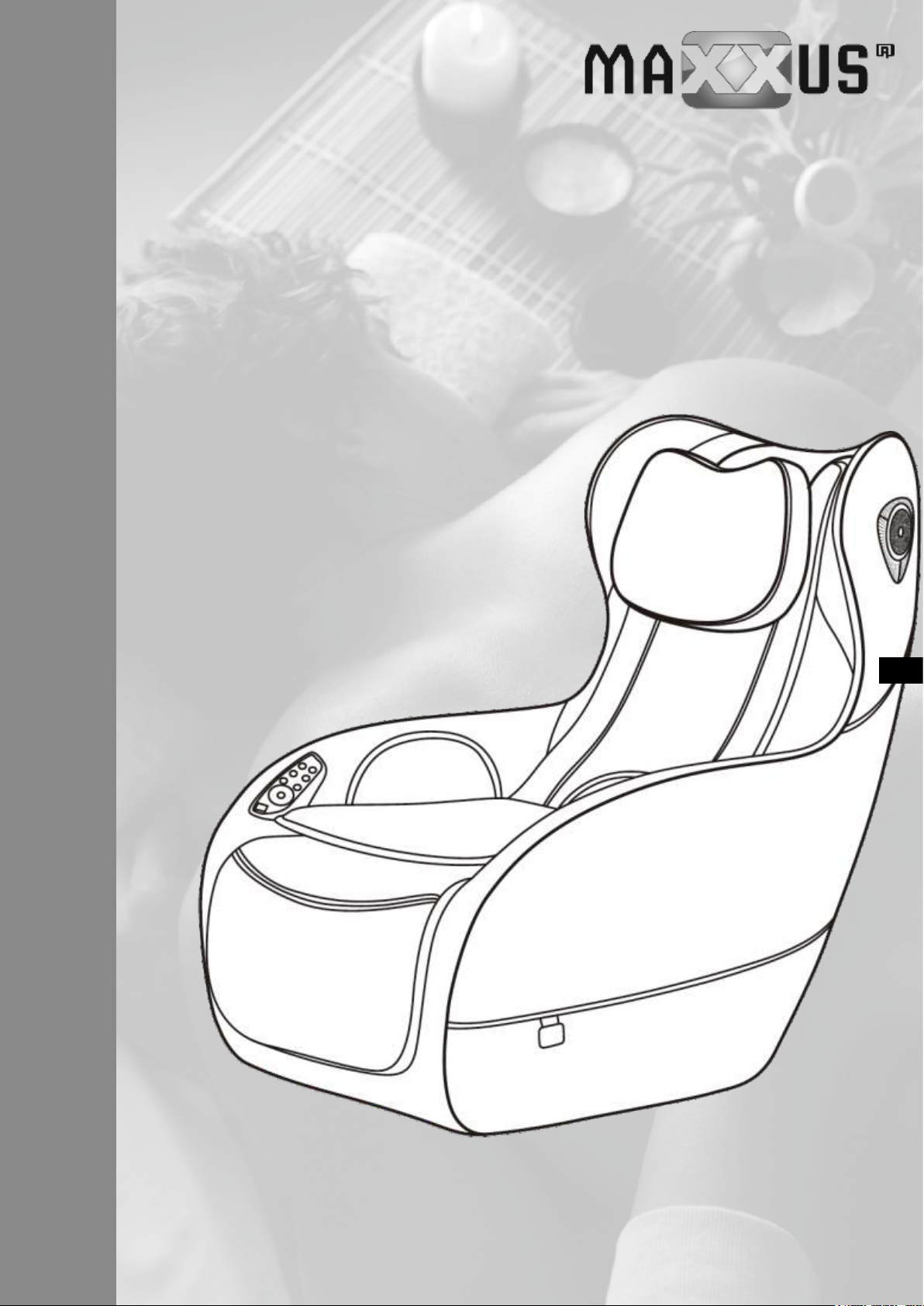
Massage Chair
MX 7.1
ENG
INSTALLATION & OPERATING MANUAL
Page 2
Index
Index 2
Safety & Maintenance 3 – 5
Description of Parts 6
Operation 7 – 9
Setting Up & Transporting the Device 10
Exploded Drawing 11 – 12
Parts List 13
Warranty 14
Service Contract 15
© 2019 MAXXUS Group GmbH & Co. KG
All rights reserved / All rights reserved
This publication may not be reproduced, stored in a retrieval system, or transmitted in whole or in part, in any form or by any
means, electronic, mechanical, photocopying, recording, or otherwise without the prior written permission of Maxxus Group
GmbH & Co. KG.
Errors, colour and technical modication subject to change, reproduction as well as electronic duplication only with written
permission of MAXXUS Group GmbH & Co. KG.
2
Page 3
Safety and Maintenance
1. Important Safety Instructions
− Keep children away from all moving parts of the chair.
− Connect the device to an earthed electrical socket
− Remove the electrical plug from the socket after use and before cleaning to avoid
personal injury or damage to the device.
− Only use the chair as instructed in this operating instruction manual.
− Do not use any additional parts or components which are not included in this scope
of delivery.
− Never use this device outside or on a balcony or terrace.
− Please read the operating instructions carefully before using the device.
− All types of use which are not described in this manual are prohibited
− Es empehlt sich, das Gerät nicht länger als 20 Minuten pro Massage zu nutzen.
− Please do not use this device if:
− the leather is torn or damaged.
− any of the covers are broken or damaged
− the heating or ventilation vent is covered up or blocked.
− If you have consumed excessive alcohol or you are feeling sick or unwell
− Wait for at least an hour after a big meal before using the device.
− Do not fall asleep on the chair during a massage.
− To avoid injury, do not turn the massage function up too high.
2. Installation Location
− Please do not use the device:
− In rooms with high temperatures and/or in rooms with a high humidity.
− When the room temperature varies rapidly or quickly
− In very dusty rooms
− In any location where there is not enough space for the necessary ventilation.
ENG
3
Page 4
Safety and Maintenance
3. Personal Conditions
− If you suer from any of the following ailments or illnesses, we advise against using
this device:
− Osteoporosis
− Heart problems or heart disease
− If you have a pacemaker or any other electronic medical device
− High temperature or fever
− Any open wounds
− Skin diseases
− During pregnancy or menstruation
− If your doctor has ordered you to rest, we also advise not to use this device.
− Children under the age of 14 years should not be allowed to use this chair without
supervision.
− Do not use this device if your body is wet or damp.
4. General Safety Instructions
− Check the electrical supply voltage before turning the device on for the rst time.
− Do not remove the electrical plug from the socket with wet hands
− Keep water or any other liquids away and avoid them getting into the device
− Do not damage any cables and do not exchange any circuits on this product.
− Do not use wet or damp cloths or similar to clean electrical components like switch-
es or electrical plugs.
− Keep away from the device during a power cut to avoid being injured when the
electricity goes back on.
− Please stop using the device immediately if any kind of malfunction occurs.
− Also stop using the device if you start to feel unwell.
− If the electrical cable is damaged, remove the plug from the socket and contact the
supplier or another qualied electrical technician for a replacement.
− Children must be supervised when they are near the unit.
− The device is not suitable for use by persons with diminished physical, sensory or
mental abilities. It is also not suitable to be used by inexperienced or unknowledgeable persons (eg children) without supervision.
4
Page 5
Safety and Maintenance
5. Service and Maintenance
− The maintenance of the device may only be carried out by qualied personnel.
Please do not disassemble or try to maintain the device yourself. Exceptions are
only small maintenance works or repairs under the instruction of a technician of the
supplier.
− Do not forget to turn o the power to the device at the mains after use.
− Do not use the device if the electrical plug is loose in the socket.
− If the chair is not to be used for a long period of time, roll up the cable and store it in
a dry and dust-free place.
− Do not expose the device to high temperatures or long periods of direct sunlight.
− If the electrical cable is damaged, remove the plug from the socket and contact the
supplier or another qualied electrical technician for a replacement
− Please clean the device with a dry cloth. Do not ever use thinner, mineral spirits, or
alcohol for cleaning.
− All mechanical components of the chair are designed so that no special mainte-
nance is required.
− Avoid contact with sharp objects with the chair.
− Please do not push or pull the chair over uneven ground. The chair must always be
lifted to be transported.
− Please use the device with enough time intervals between each application. Do not
have the device in constant use.
6. Commonly Alleged Malfunctions
− It is normal for the electronic motors to make buzzing noises during operation.
− If the control unit does not operate, please check rst if the electrical plug is correct-
ly plugged into the socket and it is turned on at the mains.
− The device will switch o automatically when the set program has come to an end.
− If the device runs too long, the chair temperature protection system will switch o
automatically.
− If the device switches o automatically, it should be possible to switch it on again for
use after approximately 30 minutes
ENG
5
Page 6
Description of Parts
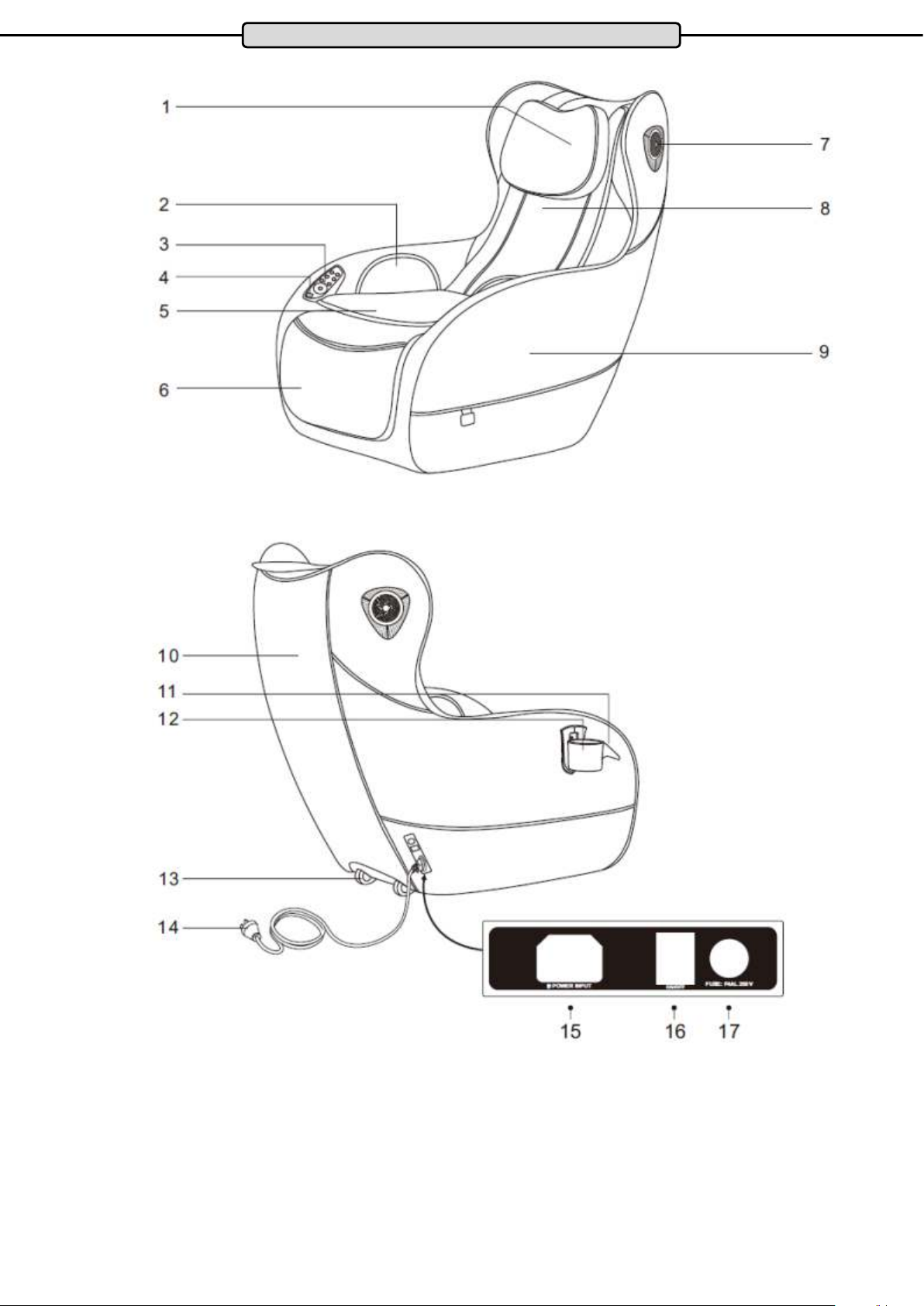
1. Headrests
2. Air Cushion
3. Control Panel
4. USB Charging Point
5. Seat Cushion
6. Leg Rest
7. Bluetooth speaker
8. Back Rest
9. Side Panel
10. Back Cover
11. Cup Holder
12. Cup Holder
6
13. Transport Rollers
14. Mains Cable
15. Mains Connection
16. Power Switch
17. Fuse
Page 7
Operation
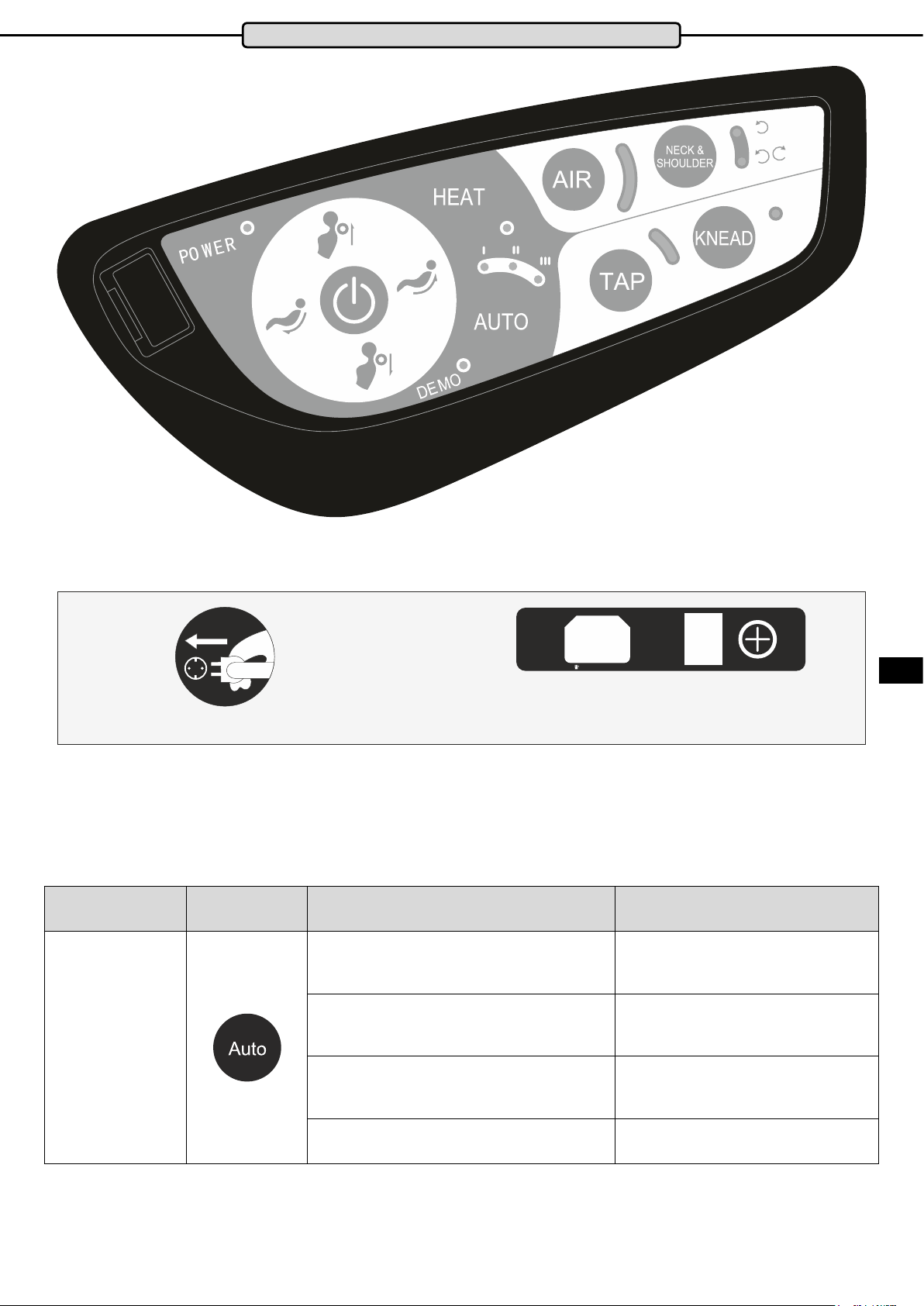
1. Switch on
POWER INPUT
Connect the power cable to the armchair and a power outlet. Switch on the massage chair with the ON / OFF button.
ON/OFF
FUSE: T4AL 250V
2. Start Massage
1 Press the red button to start the massage.
2 The AUTO I program starts automatically. You can select other programs.
A) AUTO Massage Mode
Button Symbol Massage Features Display
Auto I: Full body massage
Auto II: Neck & Back Massage
Auto massage
AUTO
I
AUTO
II
ENG
Auto III: Waist, Buttocks and Thighs
AUTO
III
Demo: 5-minute trial massage DEMO
7
Page 8
B) Manual Massage
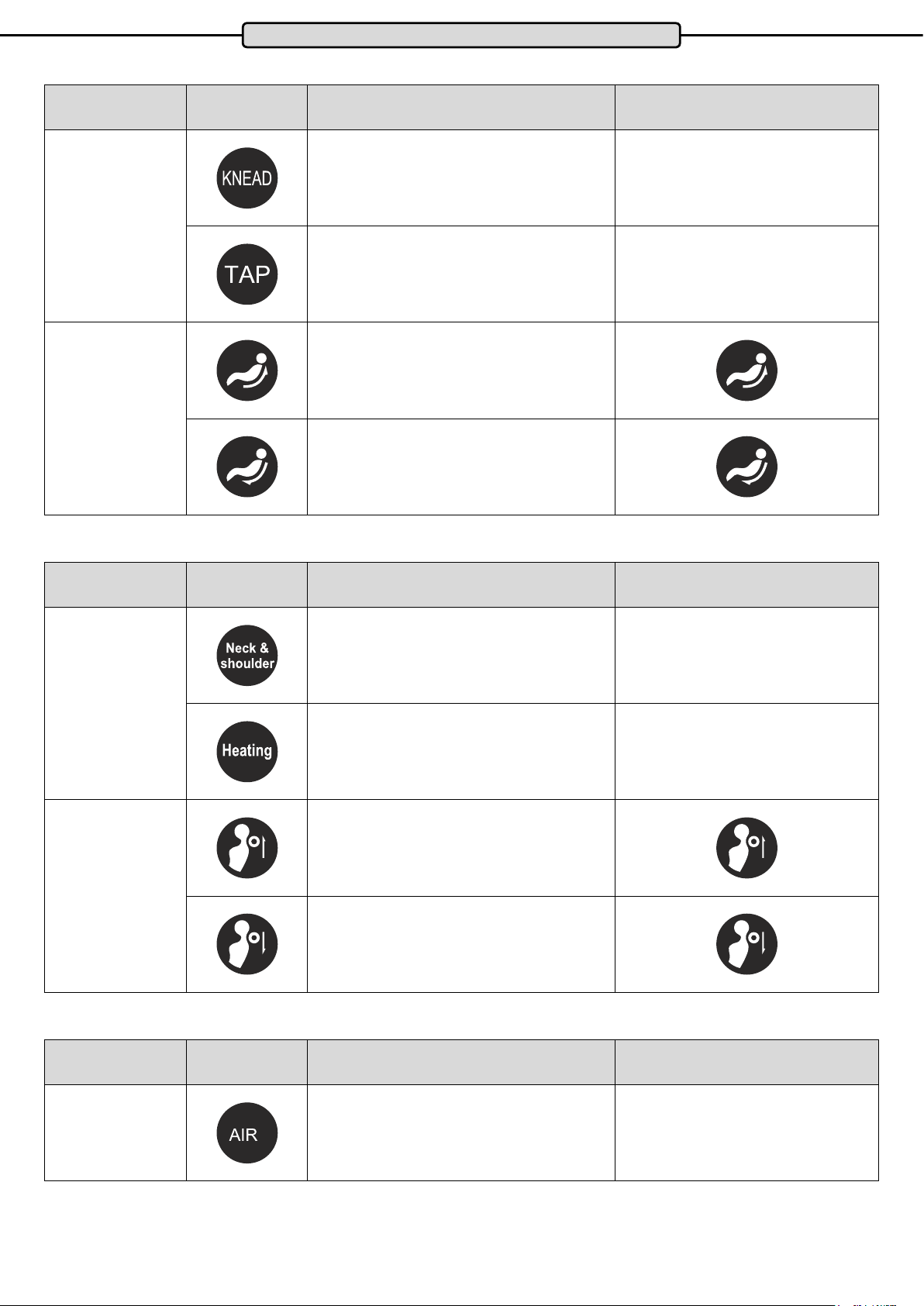
Button Symbol Massage Features Display
Operation
Function
Adjustment of the
massage position
C) Neck and Shoulder Massage
Button Symbol Massage Features Display
Press this button to start or end the kneading
massage
Press this button to start or end the tapping
massage
3 levels optional: easy, medium and intensive
Massage moves up
Massage moves down
KNEAD
TAP
Function
Adjustment of the
massage position
D) Air Pressure Massage in the Seat Area
Button Symbol Massage Features Display
2-way & 1-way
Kneading massage
Button for switching the heating function
on and o
Massage rollers move up
Massage rollers move down
Neck &
shoulder
HEAT
Air pressure
Air pressure massage in the seat area in
3 intensity levels: easy, medium, intense
8
AIR
Page 9
Operation
3. Bluetooth speakers
1. Turn on the massage chair using the ON / OFF button.
2. Turn on Bluetooth device search on your SmartPhone or tablet PC
3. Once the device “IMCM-0066” * is displayed, connect.
4. Enter the password “0000” or “1234” and conrm.
5. You can play the music from your smartphone or tablet PC.
* Note: The device name may dier for each model, “IMCM” is always displayed, but the number may change,
e.g.”-0061”
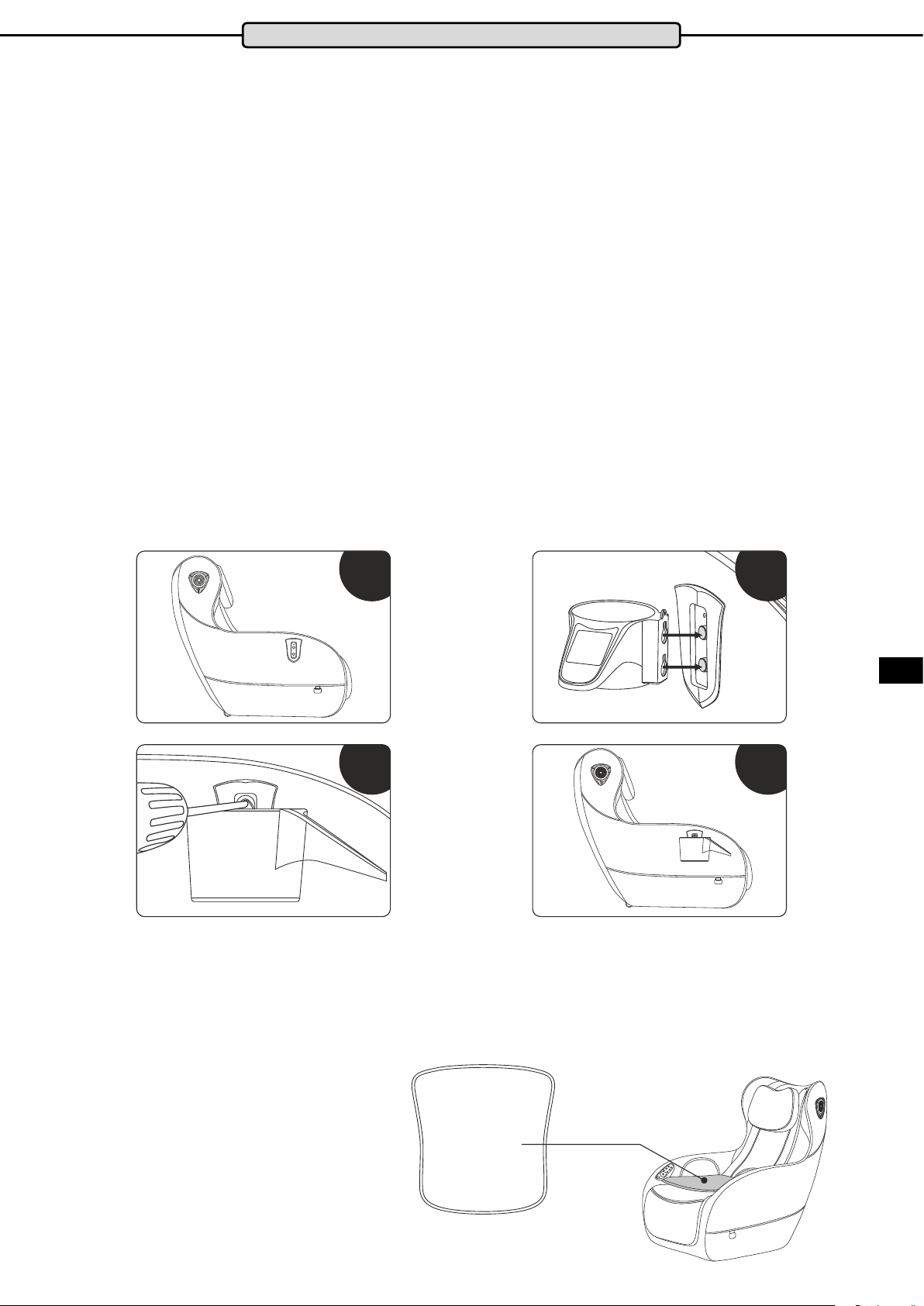
4. Assembly of the Cup Holder
After you have unpacked the armchair and set it up, proceed as follows:
Fig1: The position for the cup holder.
Fig2: Attach the cup holder.
Fig3: Fix the cup holder with the enclosed screws.
Fig4: Check that the cup holder is secure.
Fig1 Fig2
Fig3
If the massage is too intense for you, you can reduce the intensity by using the extra
cushion.
ENG
Fig4
9
Page 10
Setting Up & Transporting the Device
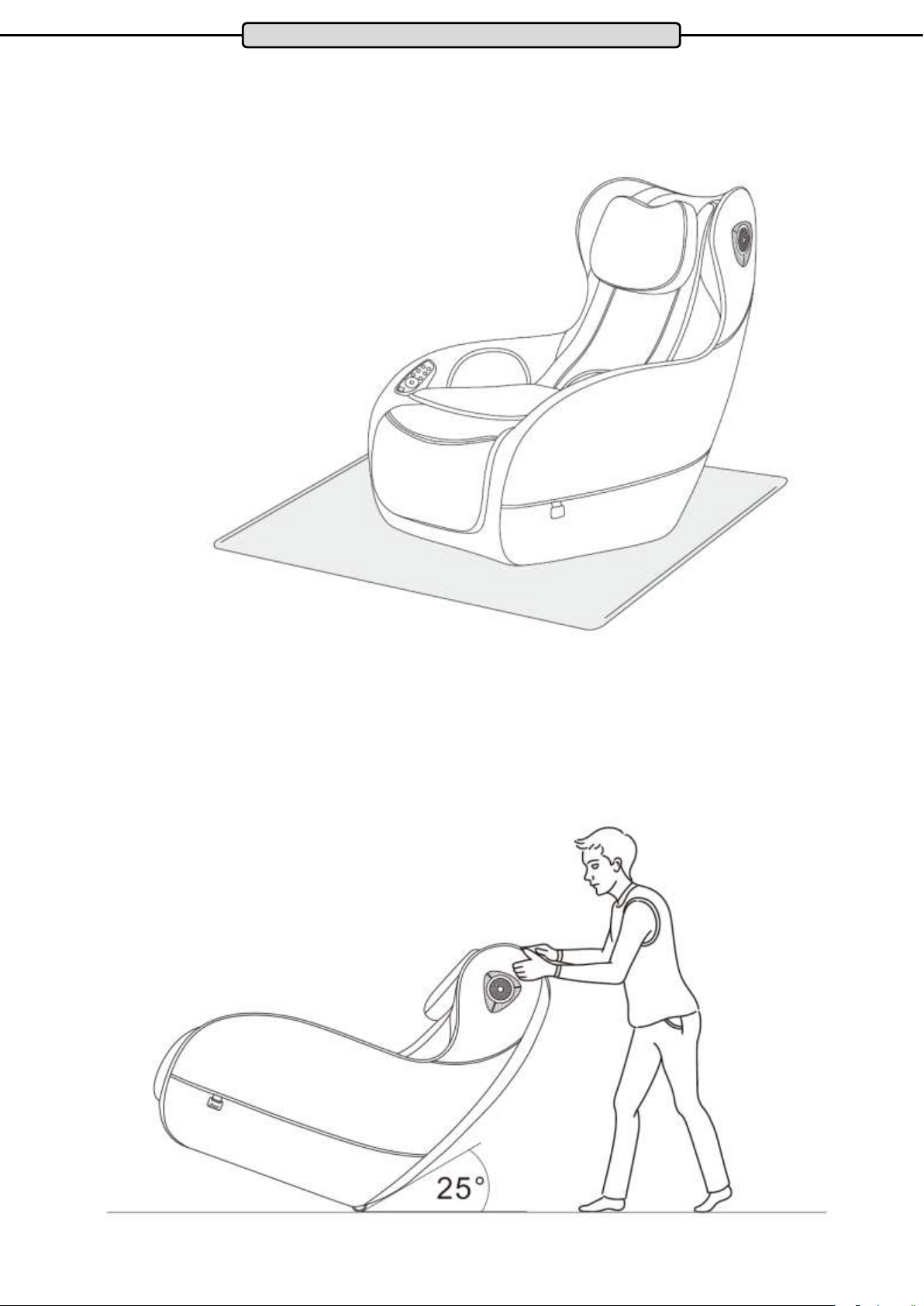
Setting up your massage chair:
Please observe the warnings in this manual with regard to the installation
site. Please take care not to place the chair directly on surfaces such as
laminate or parquet, place carpet or a protective mat under the chair to avoid
pressure points.
Move your massage chair
Before moving, please unplug the power plug!
To move the chair, rst make sure that all cables are suciently clear of the
oor. Tilt the chair backwards until the centre of gravity of the chair lies direct-
ly over the transport rollers so you can move the chair easily.
10
Page 11
Exploded Drawing
ENG
11
Page 12
Exploded Drawing
12
Page 13
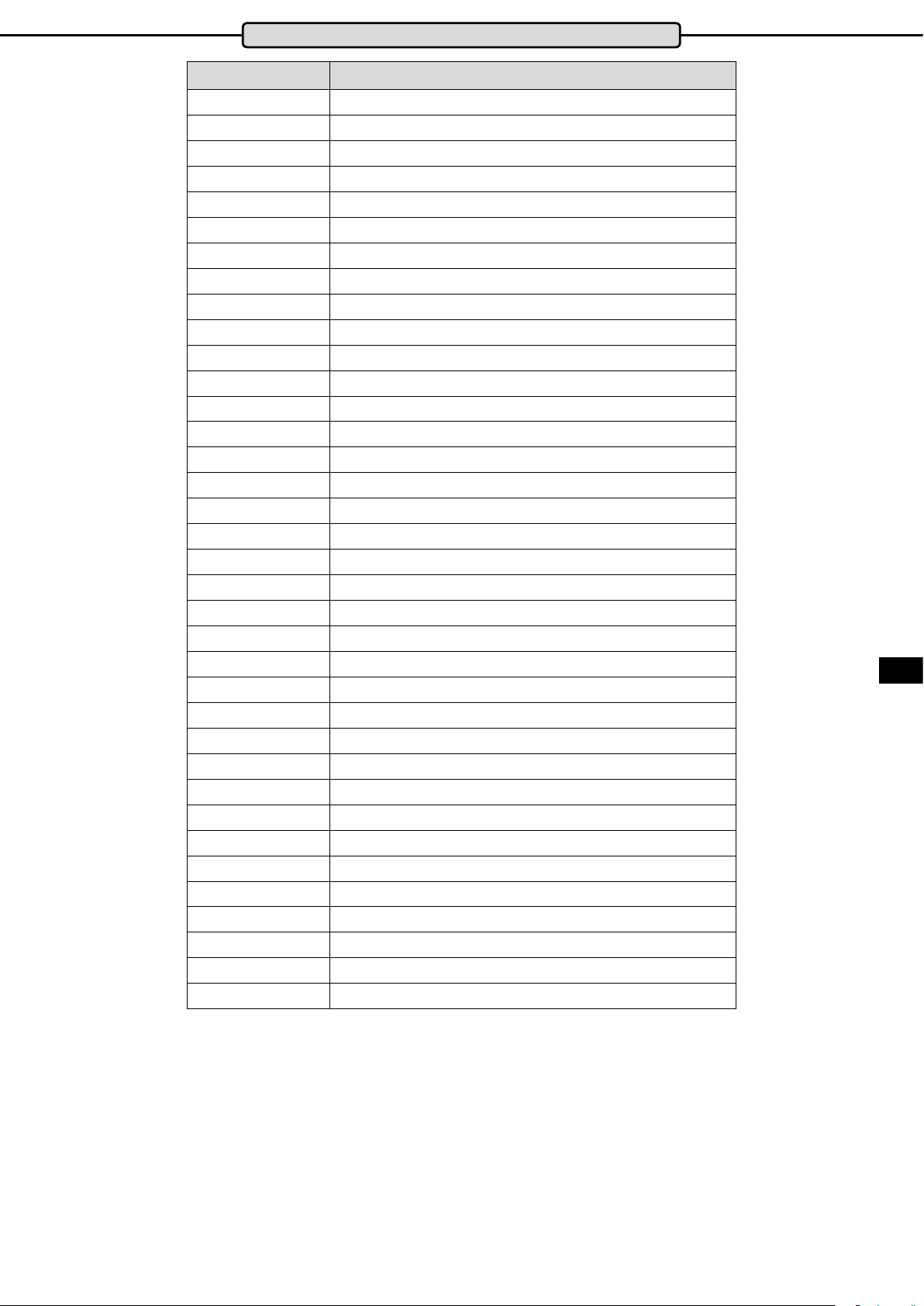
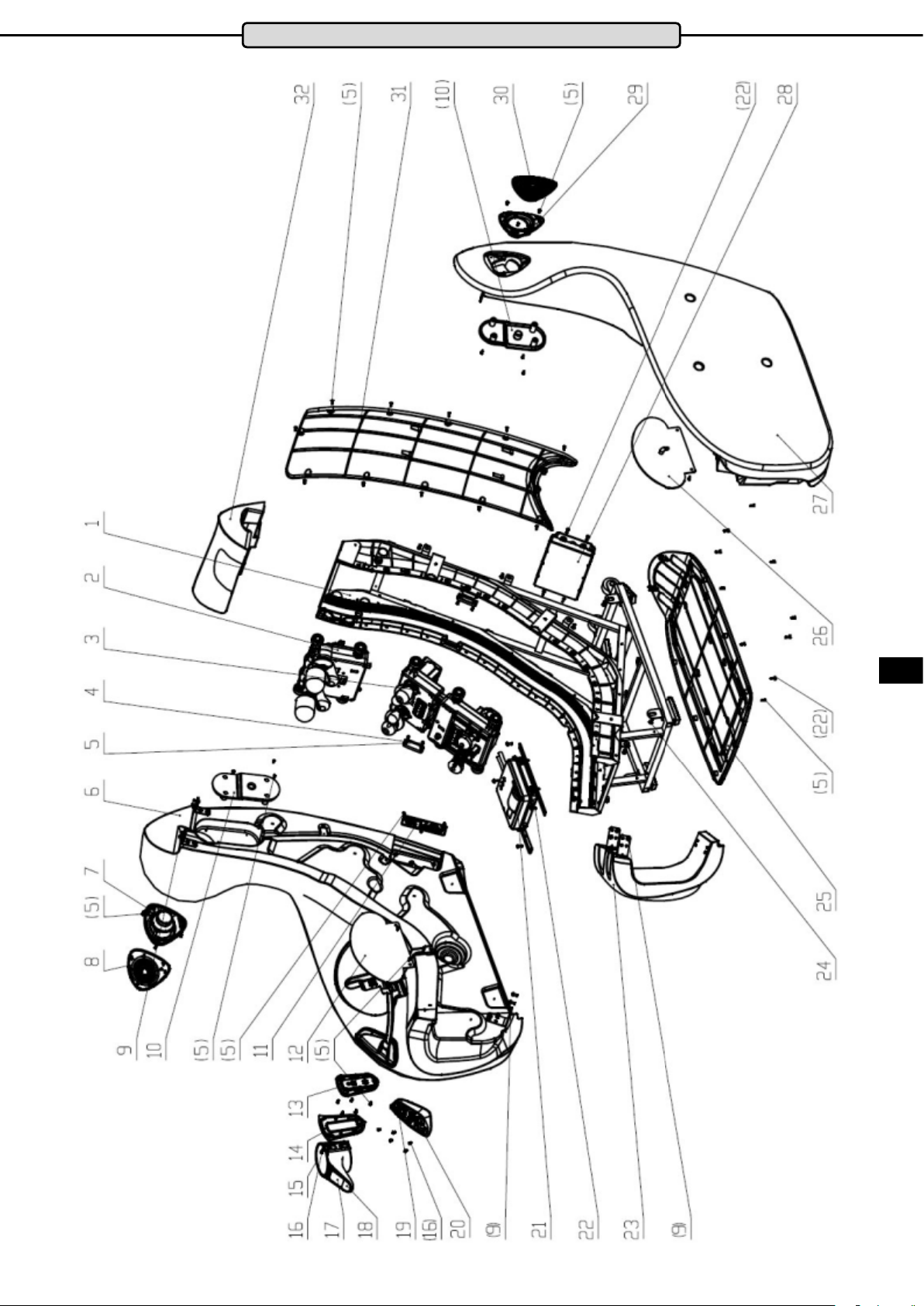
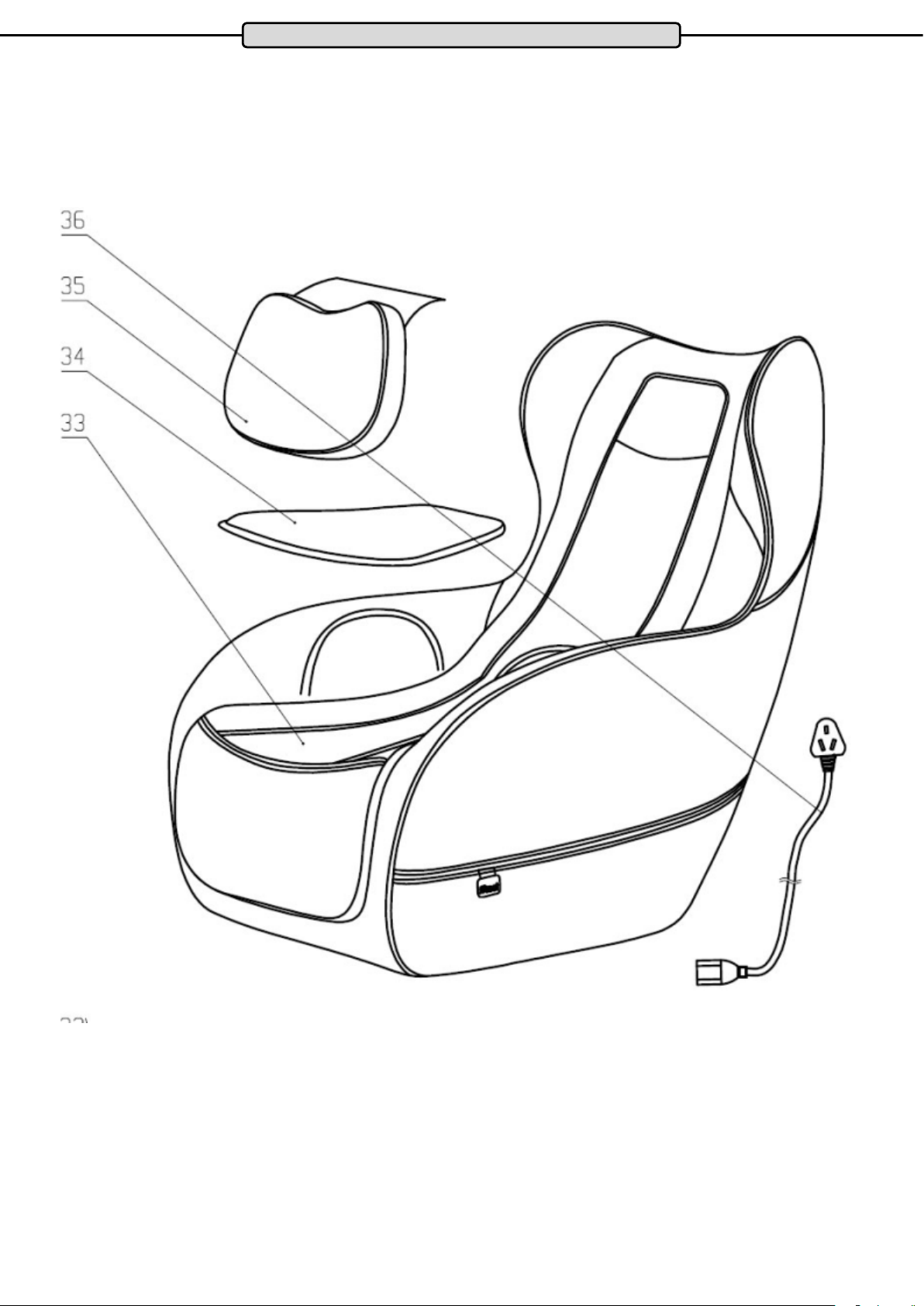
Parts List
Part Number Description
1 Frame components
2 Neck movement
3 Double robot
4 Plastic Rail Patch
5 Pan head tapping screw
6 Right armrest assembly
7 Speaker inner cover left components
8 Speaker cover left
9 Cross recessed pan head screws
10 Speaker cover
1 Power switch components
12 Buttock Airbag
13 Cup holder
14 Cup holder support frame trim
15 Cup holder
16 Pan head tapping screw
17 QR code sticker
18 Cup holder sticker
19 Hand control panel components
20 Hand control panel sticker
21 Air pump silencer box components
22 Cross recessed pan head tapping screws
23 Front rail components
24 Cross recessed pan head screws
25 Chassis
26 buttock Airbag
27 Left armres components
28 Drive box components
29 Speaker inner cover left assembly
30 Speaker cover left
31 Rear cover
32 Upper rail
33 Leather case components
34 Cushion components
35 Head components
36 power cable
ENG
13
Page 14
Warranty*
For MAXXUS® Support Team to help you as quickly as possible with service, we will require certain information
about your tness device and about you. To nd the exact spare parts required, we will need the product name,
date of purchase and serial number.
If necessary, please ll out completely the Repairs Contract/Damage Report form attached to this User Manual
and send it to us by post or by fax.
Areas of Application & Warranty Periods
Depending on the model, tness devices from MAXXUS® are suitable for use in dierent areas. Find the appropriate area of use for your tness device from the “Technical Data” in this User Manual.
Home Use:
Exclusively for private use
Warranty Period: 2 Years
Semi-Professional Use:
Use under instruction in hotels, physiotherapy practices, etc.
Use in a tness studio or similar establishment is hereby excluded!
Warranty Period: 1 Year
Professional Use:
Use in a tness studio or similar establishment under supervision by trained personnel.
Warranty Period: 1 Year
Use of your training device in an area which is not suitable for your device will cause immediate expiry of its
guarantee and cancel your right to claim warranty!
Sole private use and warranty period of 2 years assumes that the purchase invoice is made out to the end user.
Proof of Purchase and Serial Number
To claim your right to service works within the warranty period we will in each case require proof of purchase.
Keep your proof or purchase or purchase invoice in a safe place and in warranty cases send us a copy together
with your Repairs Contract/Damage Notication. This will ensure that we can process the service work as quickly as possible. So that we can identify which model version requires to be serviced correctly, we will require;
Product Name, Serial Number and Date of Purchase.
Terms and Conditions of Warranty:
The warranty period for your training device starts on the date of purchase and applies solely to products which
were purchased directly from the MAXXUS Group GmbH & Co KG or one of the MAXXUS Group GmbH & Co
KG direct and authorised distribution partners.
The warranty covers defects caused by production or material faults and only apply to devices purchased in
Germany. The warranty does not apply to damages or defects caused by culpable improper use, negligent
or purposeful destruction, lack or failure to carry out maintenance and/or cleaning measures, force majeure,
operational causes and to normal wear and tear, damages caused by penetration of liquids, damage caused by
repairs or modications made with spare parts from a dierent supplier. The warranty also does not apply for
damages due to faulty assembly or damages which occur because of faulty assembly. Certain component parts
will wear out during use or from normal wear and tear. This includes for example:
▪ Ball bearings ▪ Bearing bushings ▪ Bearings ▪ Drive belts ▪ Rollers
▪ Switches and push-buttons ▪ Treadmill belts (bands) ▪ Treadmill decks (running deck)
Signs of wear and tear on wearing parts are not items covered under the warranty.
For assistance with warranty service or warranty repair enquiries for devices not in Germany, please contact our
Service Department at MAXXUS Group GmbH & Co KGM by sending an Email to: [email protected] and we
will be happy to help.
Service Outside the Warranty and Ordering Spare Parts
The MAXXUS® Service Team is happy to be of assistance to help solve any problems with faults which may
arise following expiry of the warranty period, or in cases of defects arising which are not covered by the
warranty.
In this case please contact us by email direct to:
Orders for Spare Parts or Worn Parts should be sent along with information on the Product Name, spare part
description and number and the quantity required to:
Please be informed that additional xing materials such as screws, bolts, washers etc are not included in the
scope of delivery for individual spare parts. These should be ordered separately.
*Version: June/2016
14
Page 15
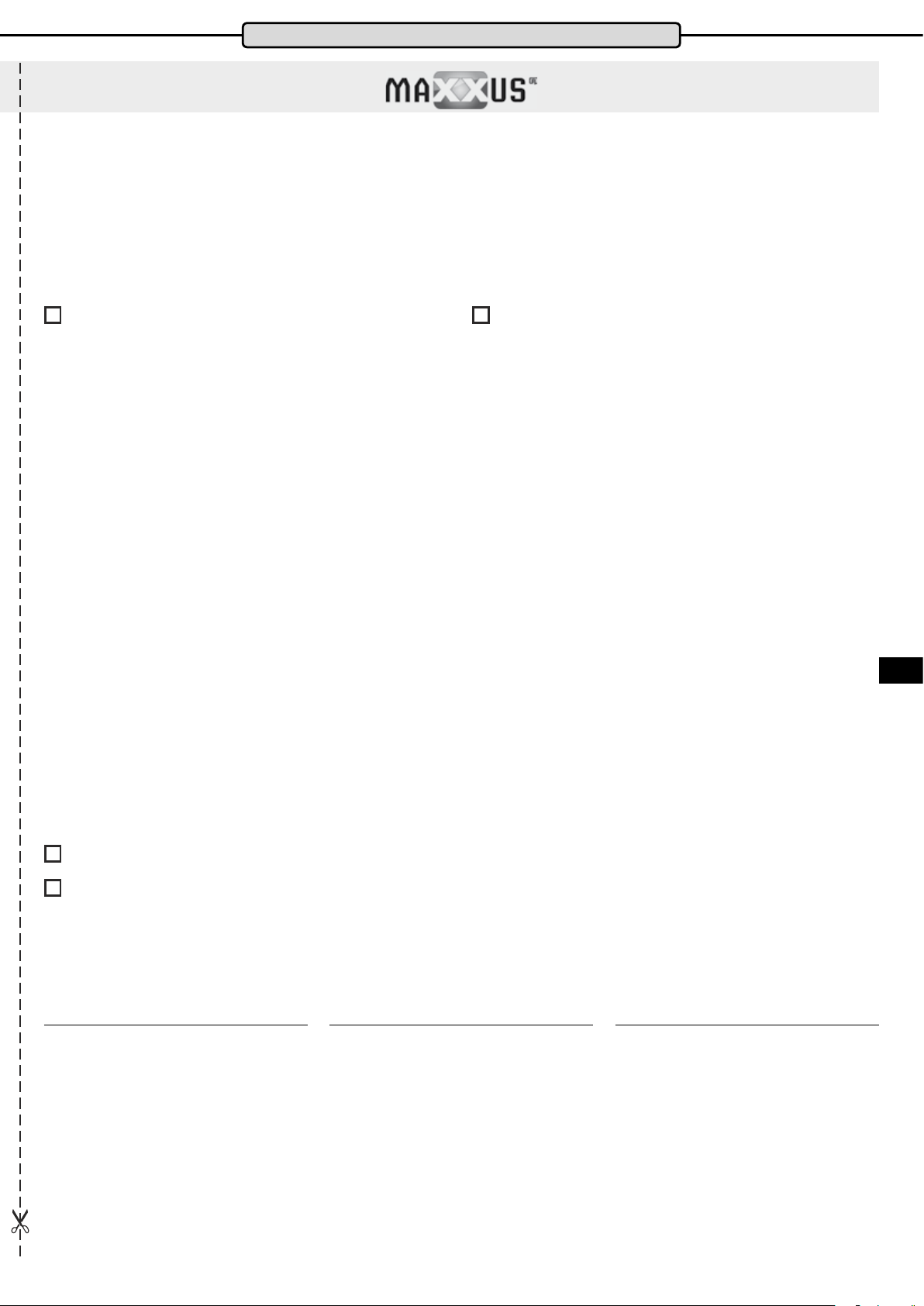
Service Contract
Device Details
Product Name: MX 7.1
Serial Number: _______________________________________
Date of Purchase: _____________________________________
Accessories: _________________________________________
Type of Use:
Private Use
Personal Details
Company: ___________________________________________
First Name: __________________________________________
Street: ______________________________________________
Post Code / Town/City: _________________________________
E-Mail: _____________________________________________
Fax. No.*: ___________________________________________
* The elds marked with an asterisk are optional. The remaining elds are mandatory elds that must be completed.
Fault Description
Please enter a short description of the error as precisely as possible below:
(For example, when, where and how does the error occur? Frequency, after which period, at what Use, etc ....)
Product Group: Massage Chair
Invoice Number: ______________________________________
Where Purchased: ____________________________________
________________________________________________
Commercial Use
Contact Person: _______________________________________
Second Name: ________________________________________
House Number: _______________________________________
Country: _____________________________________________
Tel.No.: _____________________________________________
Mobile No.*: __________________________________________
A copy of the proof of purchase / invoice / receipt is attached.
I accept the General Terms and Conditions of MAXXUS® Group GmbH & Co. KG.
I hereby instruct the company MAXXUS® Group GmbH & Co. KG to repair the above defects. In Warranty cases I will not be charged
for the cost. The costs for repairs which are excluded from liability for defects in quality will be charged to me and must be settled
immediately. In cases of repairs carried out on site, our sta are entitled to collect payment. This agreement is conrmed with here with
my signature.
Date Location Signature
Please be aware that contracts can only be processed if this form has been completed in full. Be sure to attach a copy of your purchase
invoice. Send the fully completed Service Contract to:
ENG
Post*: Maxxus Group GmbH & Co KG, Service Department, Zeppelinstr. 2, 64331 Weiterstadt
Fax: +49 (0) 6151 39735 400
E-Mail**: [email protected]
* Please stamp with sucient postage – letters which are not sent postage paid will unfortunately not be accepted.
** Submission by E-Mail is only possible as a scanned document with original signature.
You are welcome to use our online form “Service Contract” which you will nd under the “Service” section at www.maxxus.com
15
Page 16

Maxxus Group GmbH & Co. KG
Zeppelinstr. 2
D-64331 Weiterstadt
Germany
E-Mail: [email protected]
www.maxxus.com
 Loading...