

Page 1

Page 2

Caution
Caution: Please read the user manual carefully
and use the product correctly based on the user
manual so that you can be familiar with the product
more conveniently and quickly!
Page 3

Output voltage: 12V
Peak capacity: 30000mAH
Dimensions: 325×265×80mm
Input charging ports: 6mm-15V, up to 1A/12V
Auto-12V, up to 1.5A
Output ports: USB-5V 2.1A,5V/2.1A
Auto jump starter- 12V
Electronic- 12/16/19V- 3.5A/3.5A/ 3.5A
Charge mode: CC/ CV 15V 1A
Start Current: 400A
Peak Current: 800A
Cycle life: 3000 cycles @ 80 depth of discharge
Application temperature range: -20℃ to +60℃. Cell performance may
degrade at low temperature.
Charging times- Wall Charger: 3 - 4 hours
General Information
Technical Specifications
This product is capable of starting most 12V gasoline engines up to 8.0L Pet rol
and 6. 0 L D iesel , this includes 4 and 6 cylinder engines and inlines. It can also
be additional power pack for your electronic devices. It has 1 car battery clamp
socket (12V), 2 USB outputs (5V/ 2.1A), 1 DC5.5 output (12V,16V,19V) and
a flashlight. With the LED display, you can read the status clearly and easily.
Page 4

Please read this entire manual before attempting to use the product.
Warning
Safety Information
1. Do not damage, drop or crush this item. Do not attempt to use this item or
battery charger that has been dropped, punctured, run over or damaged in any
way.
2. Do not charge this item in wet conditions (rain, snow, damp). Do not use this
product in explosive environments (dust, gaseous flumes, or flammable
materials).
3. Do not burn or incinerate this product. It may explode, causing personal
injury or damage. Toxic fumes and other potentially harmful materials are
created when the battery is burned.
4. Do not disassemble this product. It may result in risk of fire, electric shock or
exposure to battery chemicals.
5. Do not insert foreign objects into ANY input or output ports. This item may
short circuit. Any metal that comes in contact with the jumper cable port may
short circuit. Short circuiting this product will damage the battery and may
cause personal injury or fire.
6. This is a Lithium ion battery. In the unlikely event that this product leaks
battery chemicals, do not allow contact with skin, eyes or mouth as it may
cause persona injury or burns. If skin is exposed to battery chemicals, wash
with soap and water and rinse with vinegar. If your eyes come in contact with
battery chemicals, immediately flush with water and then see a medical
professionals.
7. When recharging this item, make sure the area is well ventilated. Please do
not smoke or allow open flames near a charging battery.
8. Never jump start a frozen battery.
9. Never reversely connect the red & black clamps when the original car
battery has been removed, or the car might be compromised.
10. Please keep the product away from and our of reach of children.
11. Sore this unit in a cool dry location. Do not expose the product to
temperatures over 70℃ or below - 30℃.
Page 5
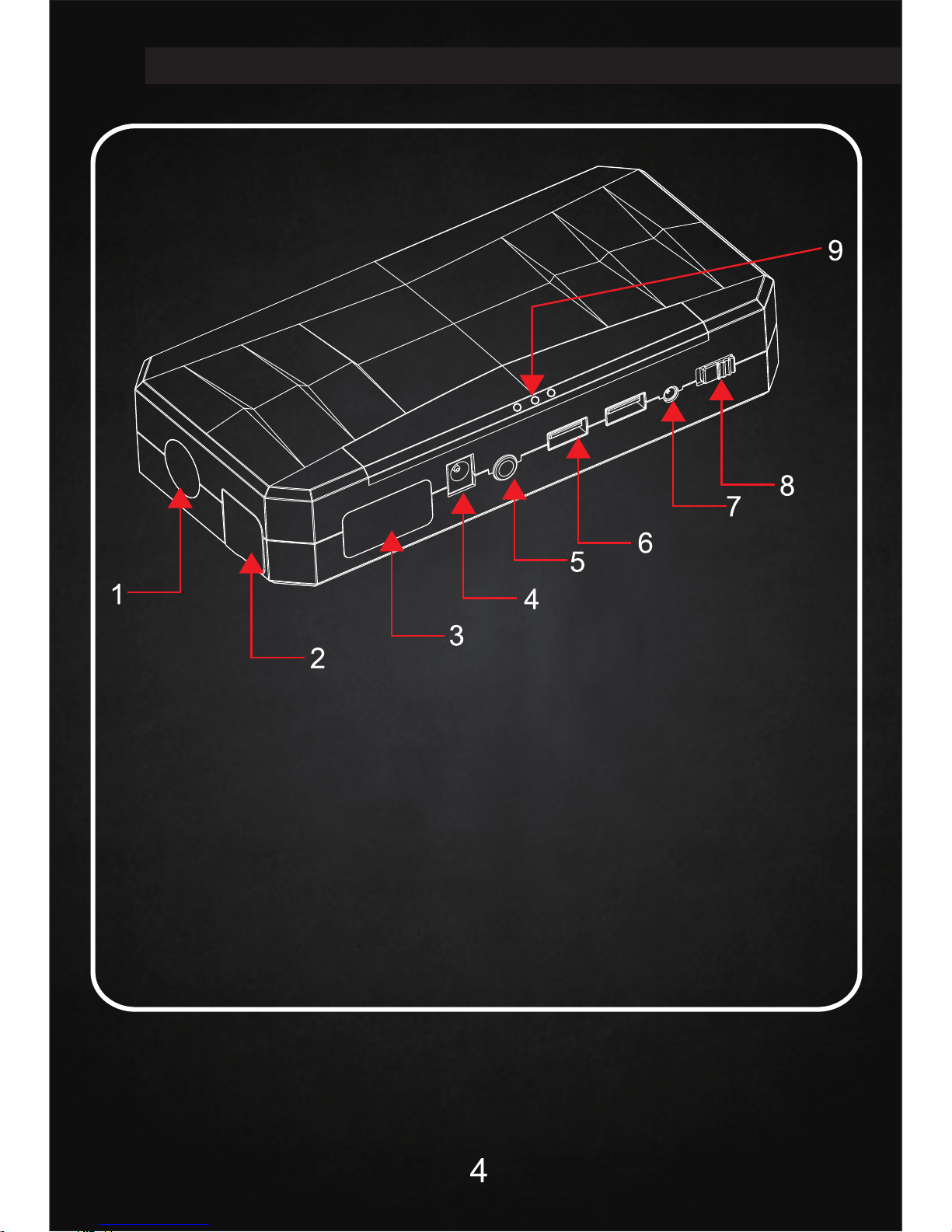
Product Features
IV
1.Flashlight
2.Battery terminal socket for the car start
3.LED display
4.12/16/19V-3.5A/3.5A/3.5A Outlet
5.Push button
6.5V-2.1A Output
7.15V/1A Input
8.Power ON/OFF
9.Emergency malfunctioning indicator
Page 6
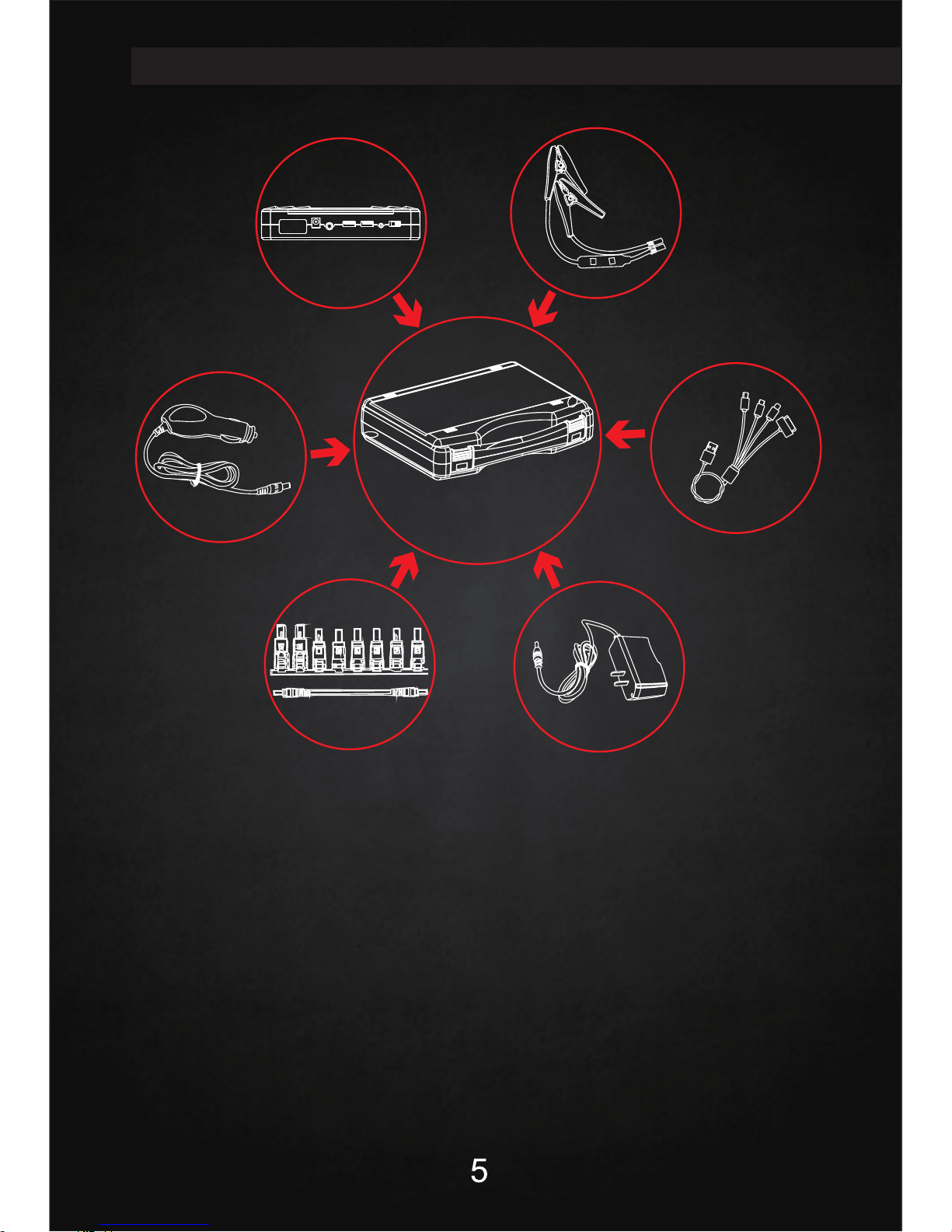
Package Contents
V
Function on Smart Battery Cable (Optional)
1) Reverse polarity connection: Solid Red LED with fast 2 short beep.
2) Short-circuit protection: Solid Red LED with long beep (Beeping as 3.3Hz
Frequency).
3) Over-heat protection: Solid red LED with Long beep (Beeping as 2Hz
Frequency).
4) Over-discharging protection: Solid red LED with fast 2 short beep.
5) Green/Red LED flashing: Searching for status of connection.
6) Green Led: Correct connection after one beep
In car charger
Battery Cable
4in1 cellphone adapter
8in1 laptop adapter
Home charger
Packing box
Jump starter
Page 7
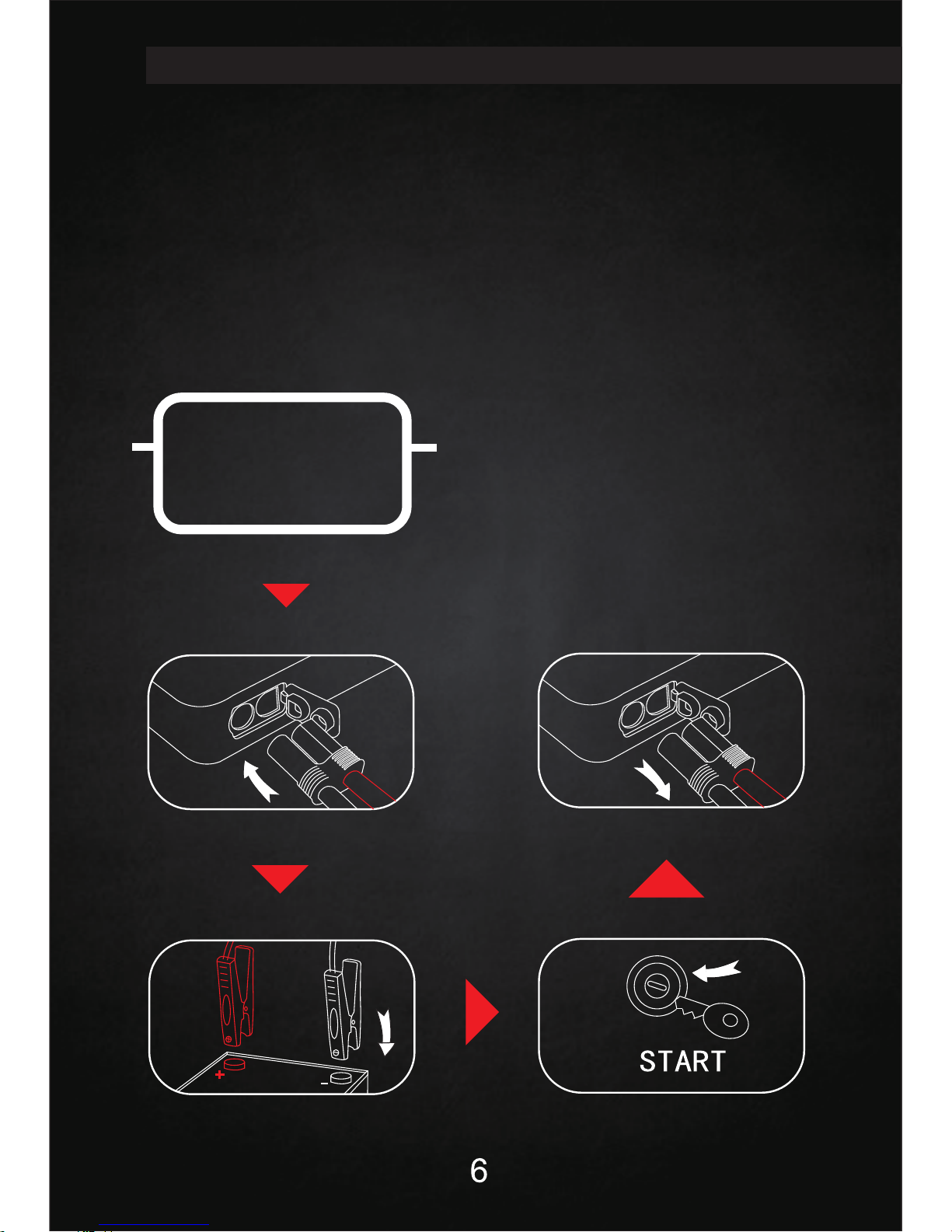
1. Jump Starting Vehicles
Before attempting to jump start your vehicle, please read your vehicle owners
manual to insure there are no specific steps needed.
DO NOT crank the engine for more than 4 continuous seconds while the unit is
connected to the battery. If the engine fails to crank or start, there may be a
problem other than a discharged battery.
Quick Guide
VI
Make sure ≧30% power
2nd step:
Insert the battery clamp to jump starter
4th step:
Car Start up
5th step:
Remove the battery clamp from
the jump starter and car battery
1st step:
3rd step:
Connect red clamp with “+” of
car battery, black clamp with “-”
30%
Page 8
7
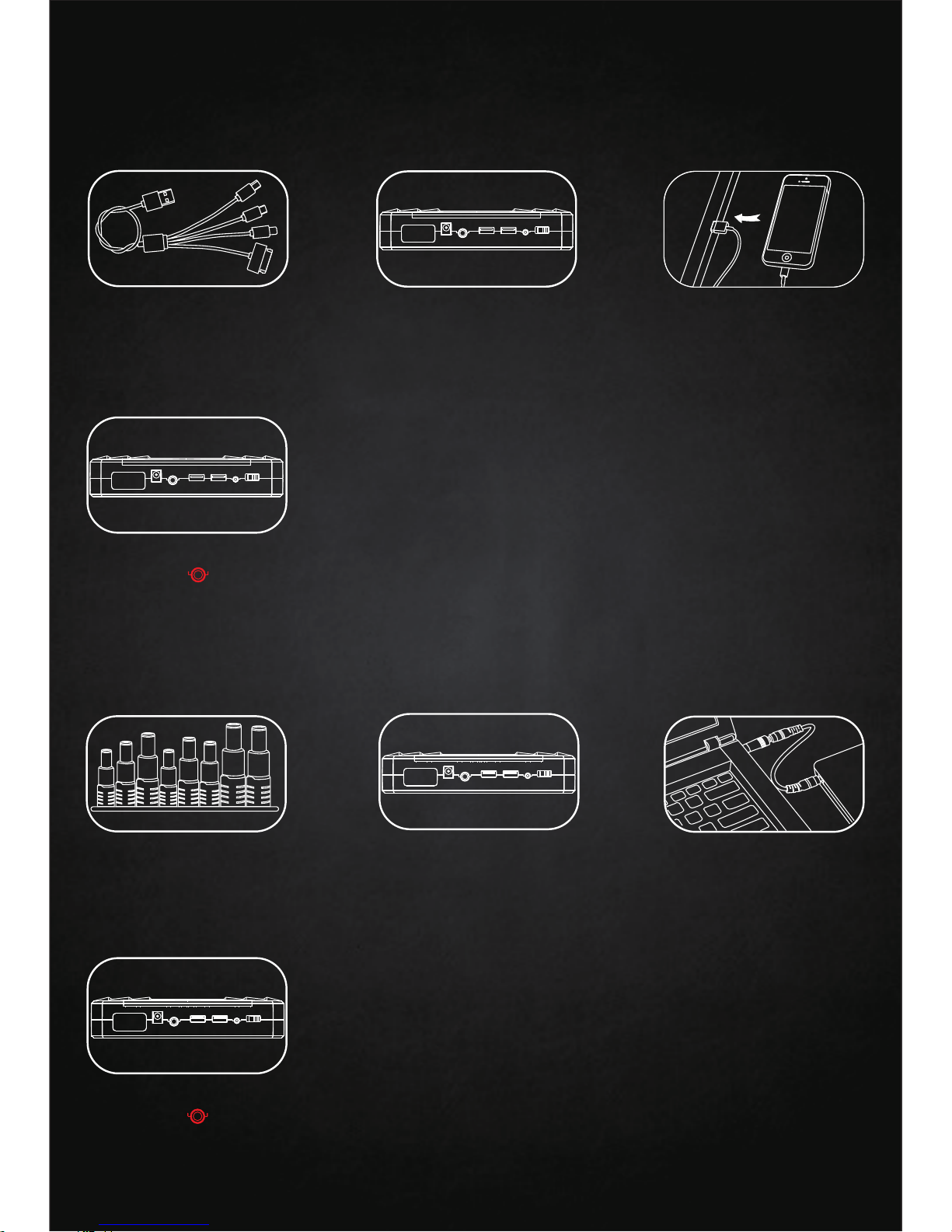
(1) For Cell Phones/Tablets
(2) For Laptops
Choose the suitable
connector to your laptop
Insert the laptop charging
cable into laptop outlet of
the jump starter
2. Charging Electronic Devices
2nd step:
Insert the other side of
charging cable into cell
phone table inlet
2nd step:
Insert the USB charging line
into 5V/ 2.1A output of the
jump starter
1st step:
Choose a s uitable cell
phone connector
3rd step:
1st step:
3rd step:
Insert the other end of the
laptop charging line into
your laptop
Switch to “ON”, afterwards
short press then your
device is under charging
4th step:
Switch to “ON”, afterwards
short press then your
device is under charging
4th step:
Lap top
5V/ 2.1A Out put
ON/ OFF
Pus h butto n
ON/ OFF
Pus h butto n
Page 9
8
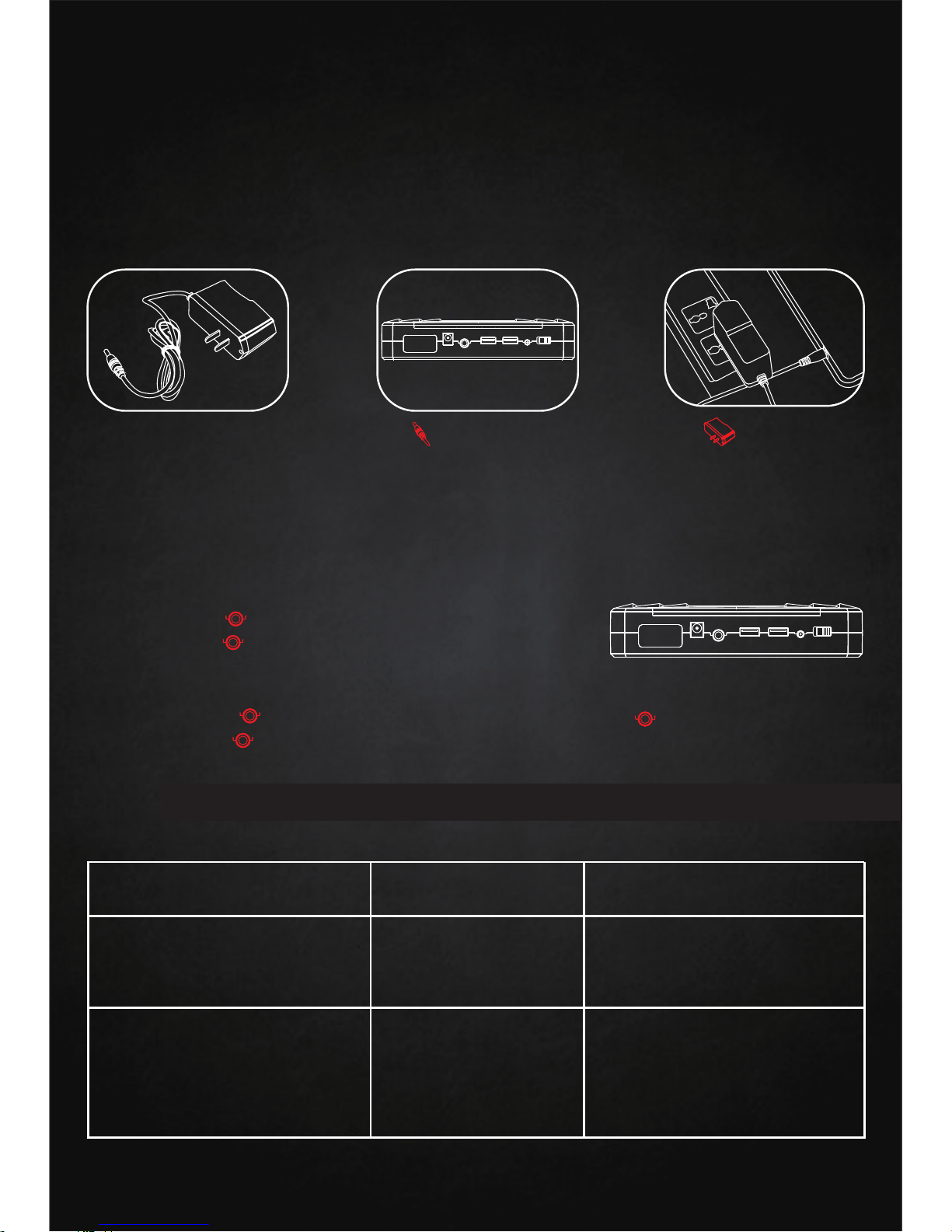
3. Self-charging
Choose the matched home
adapter
1st step:
2nd step:
3rd step:
Insert into 15V/1A input of
the jump starter
Plug into household
220V/110V socket, then
it’s under charging when
indication light f lickers
4. Flashlight Operation
(3) For PSP
See the steps in “ for Cell phones/Tablets”
(4) For Digital Cameras/DVD
See the steps in “ for Cell phones/Tablets”
15V /1A Inpu t
Problem
Cause
Solution
No response when
pressing the push button
Low voltage
protection of jump
start i s a ctivated
Charge the unit with home
charger or car charger to
deactivate the protection
Jump start shuts down
automatically when
charging multiple
electronics devices at
the same time
Over current
protection of jump
start is activated
Charge the electronic
devices separately with
different USB outlets, but
please keep the total
output current within 3.5A
Trouble Shooting
VII
(1) Emergency Light
Double press to activate the emergency light,
double press again to shut it off
(2) Flashlight
Press and hold for 3 seconds to start flashlight Press again to shift to SOS,
flashing Press again to turn off the flashlight
Pus h butto n
Page 10
9
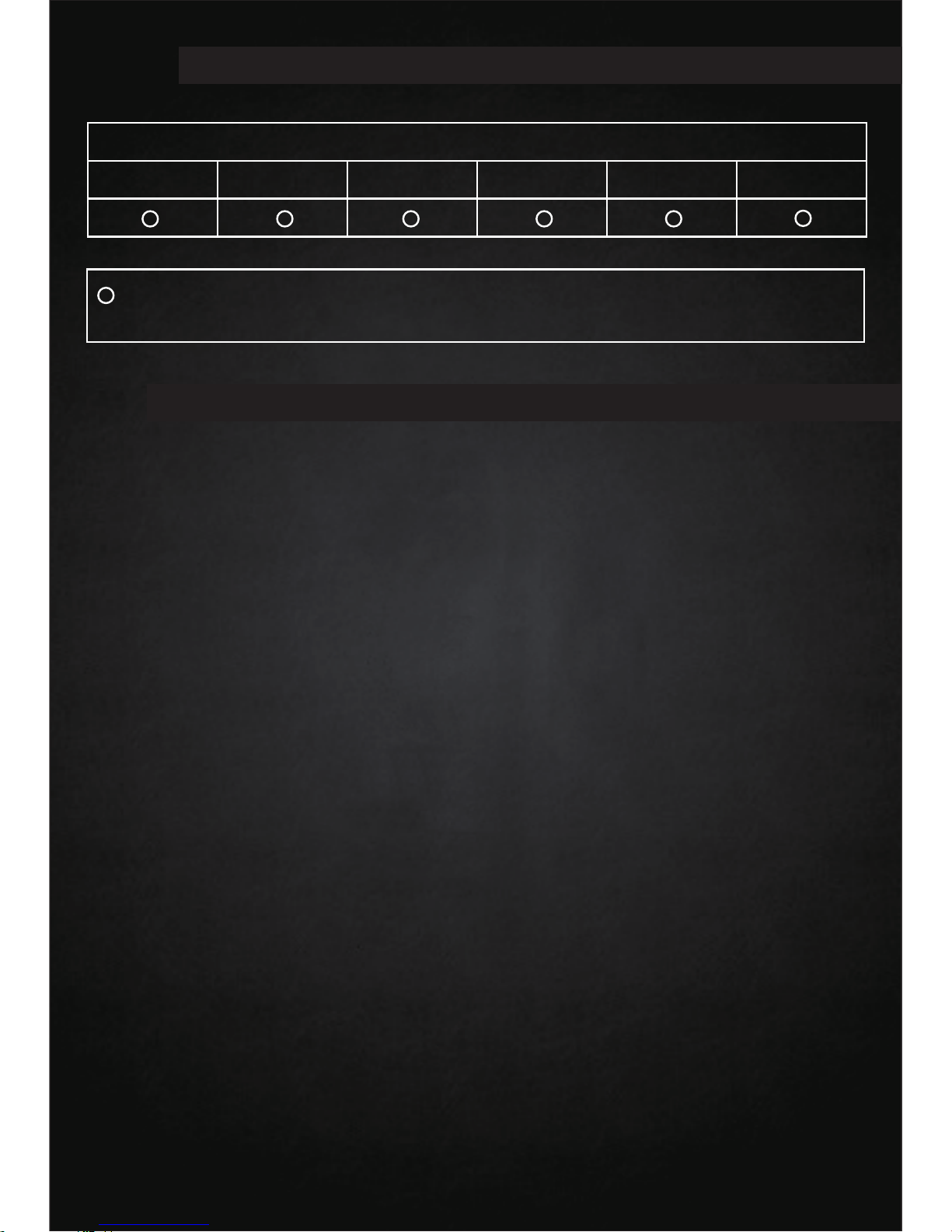
Composition and amount of toxic & harmful substances in Car Jump Starter
Pb
Hg
Cd
Cr(Vi)
PBB
PBDE
:indicating all homogeneous materials’ hazardous substances are below
the MCV limit specified in the Standard 2002/95/EC(RoHs)
1. Warranty Terms
Toxic & Harmful Substances
VIII
Warranty Information
IX
◎ We offer a limited warranty for this product against any defects in material
and workmanship for a period of 12 months from the d ate of p urchase by the
end user/c onsumer. The conditions of the warranty a re as follows:
◎ The warranty is o nly valid upon presentation of the original receipt (from
dealer/retailer) by the original purchaser with the product to be repaired o r
replaced
◎ The warranty is void if the s erial number, d ate of purchase and label has
been removed
◎ The warranty does not cover damage or product failure resulting from
normal wear and tear, physical abuse, improper installation, misuse,
modification or repairs by unauthorized third parties
◎ We d o not assume responsibility f or any loss o r damage incurred during
shipment or as a result of a force majeure
◎ We are n ot liable for any incidental or consequential damages arising from
the use or misuse of this product
◎ All warranty claims are limited to repair or replacement of the defective
product and at the sole discretion of us
◎ If we repair or replace the product, the product will be covered for the
remaining time of the o riginal warranty p eriod. Repair or replacement m ay
involve the use of reconditioned units which a re e quivalent in function.
Replaced part or product b ecomes the property o f us.
◎ Consumable components such as batteries are not covered by the warranty
Page 11
10
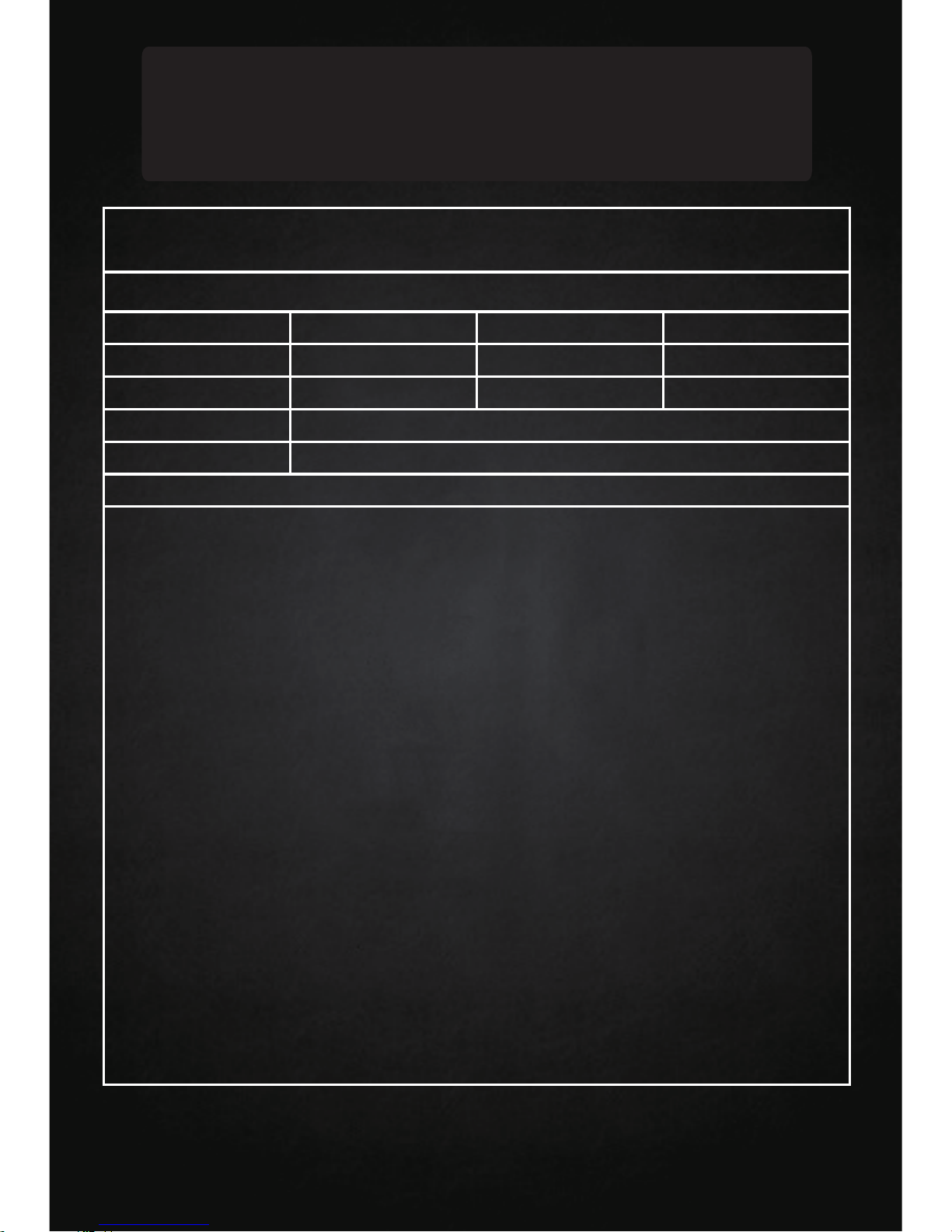
Warranty Card
Warranty Card
ONE YEAR LIMITED WARRANTY
Model
Purchase Date
Customer Name
Address
Seller
Serial NO.
Maintenance Date
Tel
Description of Product Anomalies
Page 12
Caution: please read the user manual carefully
 Loading...