

Page 1
USER GUIDE
Smart LED Speaker Light
MODEL NUMBER: 80041
After Sales Support
UK/N.IRELAND HELPLINE NO:
REP.IRELAND HELPLINE N
O
:
WEBSITE:
EMAIL:
01270 508538
1800 995 036
www.quesh.co.uk
*3rd Party App Required
Page 2

After Sales Support
UK/N.IRELAND HELPLINE NO:
REP.IRELAND HELPLINE N
O
:
WEBSITE:
EMAIL:
01270 508538
1800 995 036
www.quesh.co.uk
1.
2.
3.
4.
5.
6.
7.
8-10.
11.
12.
13.
Welcome Section
General Information & Safety Instructions
Contents & Features
Layout
Installing The Bulb
• Fittings
• Screw Cap
• Bayonet Cap
Disclaimer
• 3rd Party Software Disclaimer
Required App
• Finding The App
Bluetooth
®
• Pairing The Bulb
App Features
• Music
• Colour
• Manual (Colour)
• Auto (Colour)
• On/Off
• Timer
• Renaming The Bulb
Specications
FAQ
Contents
Page 3

Welcome Section
Congratulations!
You have made an excellent choice with the purchase of this quality
MAXTEK
®
product.
By doing so you now have the assurance and peace of mind which
comes from purchasing a product that has been manufactured to
the highest standards of performance and safety, supported by the
high quality standards of Quesh Ltd.
We want you to be completely satised with your purchase so this
MAXTEK® product is backed by a comprehensive manufacturer’s
3 year warranty and outstanding after sales service through our
dedicated helpline.
We hope you enjoy using this product for many years to come.
If you require technical support or in the unlikely event that your
purchase is faulty, please telephone our helpline for immediate
assistance. Faulty product claims made within the 3 year warranty
period will be repaired or replaced free of charge provided that you
have a satisfactory proof of purchase (keep your receipt safe).
This does not affect your statutory rights. However be aware that the
warranty will become null and void if the product is found to have
been deliberately damaged, misused and/or disassembled.
1
After Sales Support
UK/N.IRELAND HELPLINE NO:
REP.IRELAND HELPLINE N
O
:
WEBSITE:
EMAIL:
01270 508538
1800 995 036
www.quesh.co.uk
Page 4

After Sales Support
UK/N.IRELAND HELPLINE NO:
REP.IRELAND HELPLINE N
O
:
WEBSITE:
EMAIL:
01270 508538
1800 995 036
www.quesh.co.uk
2
General Information &
Safety Instructions
• Children should not be allowed to play with this product.
• Do not expose this speaker to damp or moist conditions.
• Avoid contact with any liquid which may leak into the product.
• Never attempt to open the speaker.
• The speaker should be protected in heat and freezing temperatures.
• Ensure that the speaker is stored in the correct environment and at the
correct temperatures.
• The speaker may become damaged if used incorrectly.
The full text of the EU declaration of conformity is available at: www.quesh.co.uk
This product may potentially trigger seizures
for people with photosensitive epilepsy
If you experience any of the following symptoms: dizziness, altered vision, eye
or muscle twitching, involuntary movements, loss of awareness, disorientation or
convulsions, IMMEDIATELY disable the ‘party mode’ light function and consult
your physician before using this mode.
The LED ‘Auto’ mode is disabled by turning the light off or through the app
STROBE EFFECT LIGHTING
Page 5

3
After Sales Support
UK/N.IRELAND HELPLINE NO:
REP.IRELAND HELPLINE N
O
:
WEBSITE:
EMAIL:
01270 508538
1800 995 036
www.quesh.co.uk
Contents & Features
Contents
1 x Smart LED Speaker Light
Features
• Bluetooth Version 4.1+EDR
• 7 colour LED
• Constant LED lighting
• Stream music from a compatible bluetooth device
• Sound interactive LED function
• Mono 3W speaker
• Wireless control via an app
Page 6
After Sales Support
UK/N.IRELAND HELPLINE NO:
REP.IRELAND HELPLINE N
O
:
WEBSITE:
EMAIL:
01270 508538
1800 995 036
www.quesh.co.uk
4
Fittings
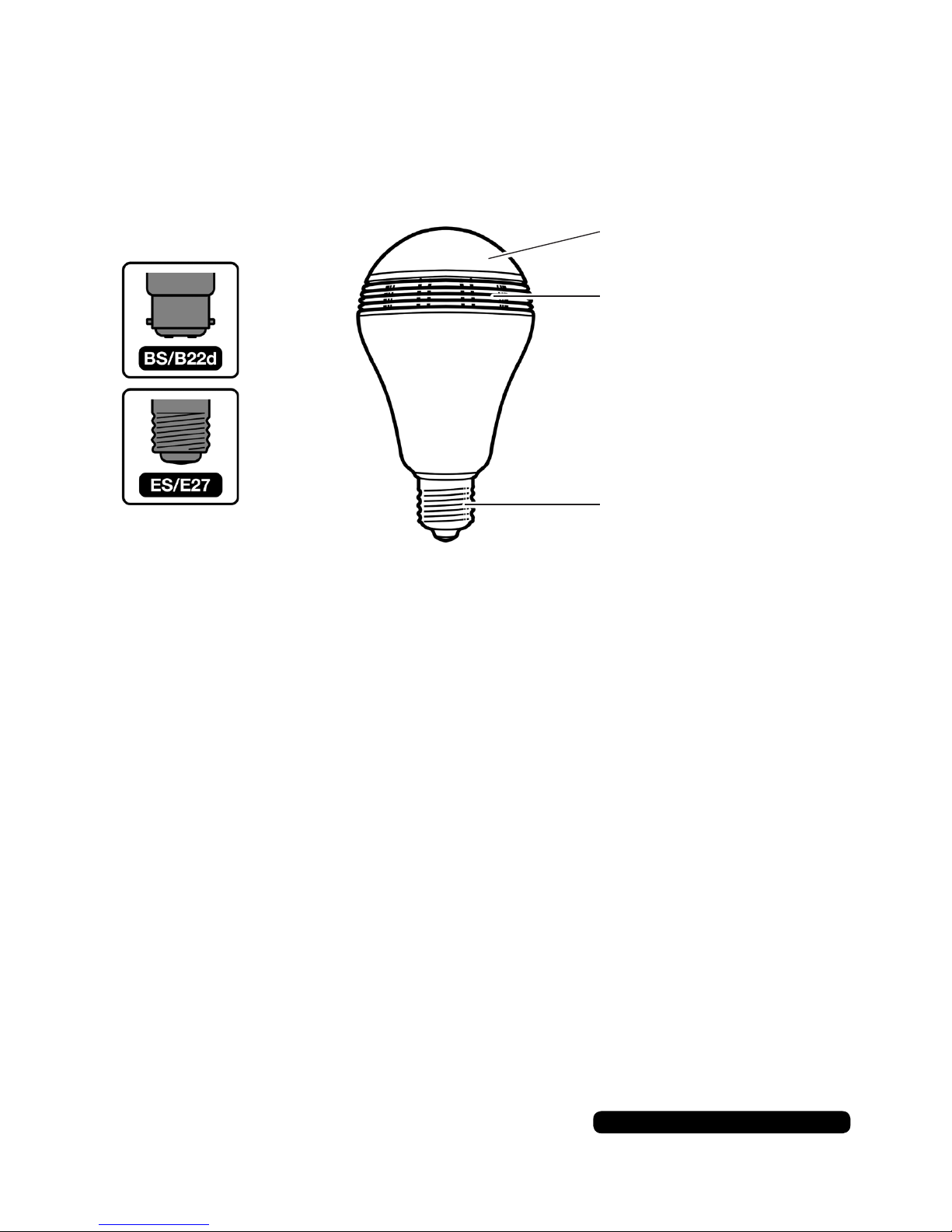
This product is available in two type of ttings:
• ES (E27) Screw Cap
• BS (B22d) Bayonet Cap
Screw Cap
Turn the light off at the wall. Insert the bulb in to the tting and twist
until nger tight.
Bayonet Cap
Turn the light off at the wall. Insert the bulb in to the tting, push the
bulb down on to the spring connectors and rotate clockwise so that
the pins lock into place. Once the bulb is in position release.
Installing The Bulb
Layout
LED Light
Speaker
ES (E27) Screw Cap /
BS (B22d) Bayonet Cap
Page 7

5
After Sales Support
UK/N.IRELAND HELPLINE NO:
REP.IRELAND HELPLINE N
O
:
WEBSITE:
EMAIL:
01270 508538
1800 995 036
www.quesh.co.uk
3rd Party Software Disclaimer
We may recommend use of software, information, products, or web
sites that are owned or operated by other companies. We offer or
facilitate this recommendation by hyperlinks or other methods to aid
your access to the third-party resource. While we endeavour to direct
you to helpful, trustworthy resources. We cannot endorse, approve
or guarantee software, information, products, or services provided
by a third-party resource or track changes within the resource.
Thus we are not responsible for the content or accuracy of any
third-party resource, any loss or any damage resulting from the use
of or for any failure of products or services provided from a third
party resource. We recommend these resources on an “as is”
basis. When you use a third party resource, you will be subject to its
terms and licenses. You should familiarize yourself with any license
or terms of use, the privacy policy and the security practices of the
third party resource, which will govern your use of that resource.
In no event shall we be liable to you or any third parties for any
special, punitive, incidental, indirect or consequential damages of
any kind. Further more in no event shall we also be held liable for any
damages whatsoever including, without limitation, those resulting
from loss of use, loss of data, loss of prots or any liability, arising
out of or in connection with the use of this third-party software.
Disclaimer
Page 8
After Sales Support
UK/N.IRELAND HELPLINE NO:
REP.IRELAND HELPLINE N
O
:
WEBSITE:
EMAIL:
01270 508538
1800 995 036
www.quesh.co.uk
6
Required App
Finding The App
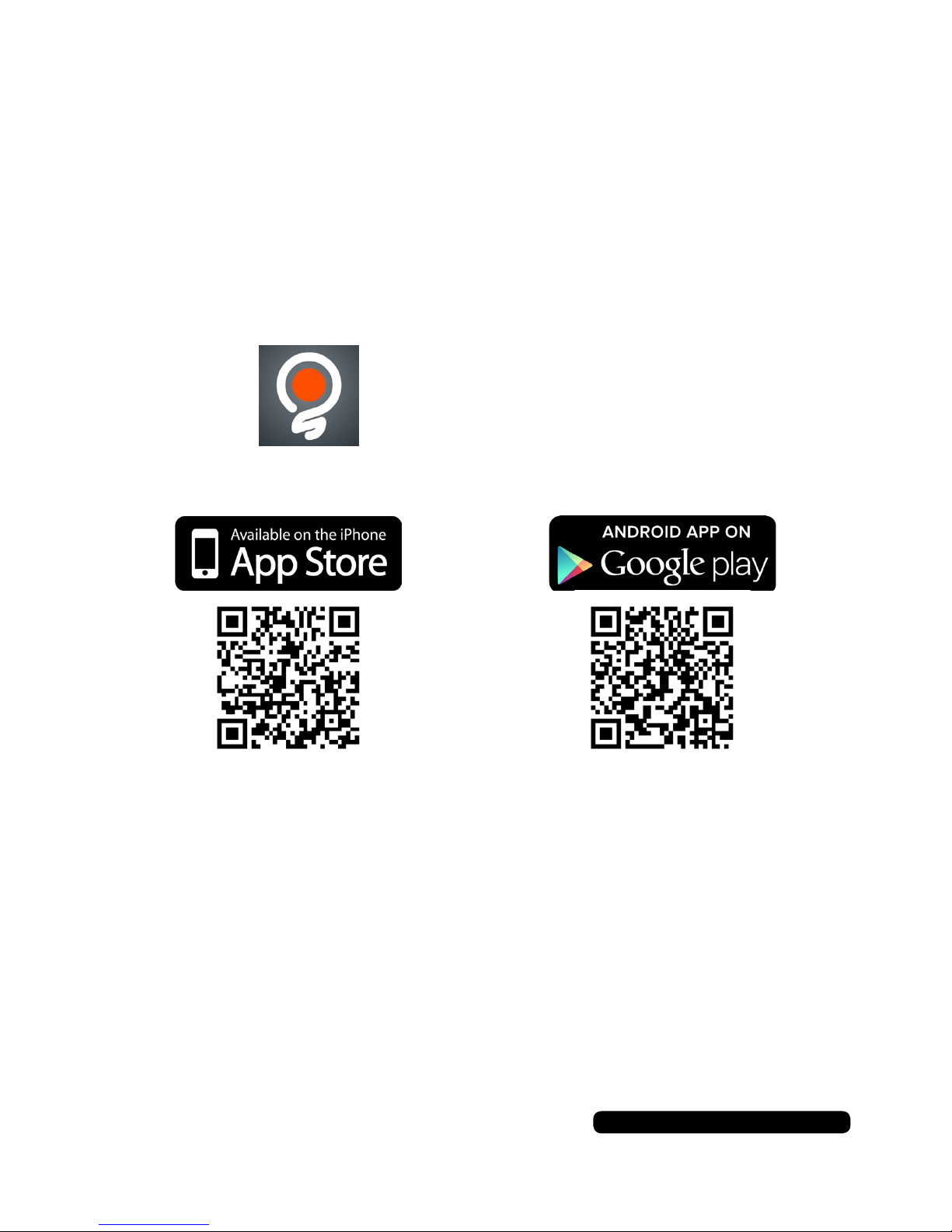
To use the Smart LED Speaker Light you will need to download and
install a 3rd party app to your smart phone and/or tablet. This is done
through the App or Play Store. You will need internet access to do
this.
Search on the App/Play Store for:
Switcher by Sharper Image
®
Alternatively you can scan the QR code:
Page 9
7
After Sales Support
UK/N.IRELAND HELPLINE NO:
REP.IRELAND HELPLINE N
O
:
WEBSITE:
EMAIL:
01270 508538
1800 995 036
www.quesh.co.uk
Bluetooth
®
Pairing The Bulb
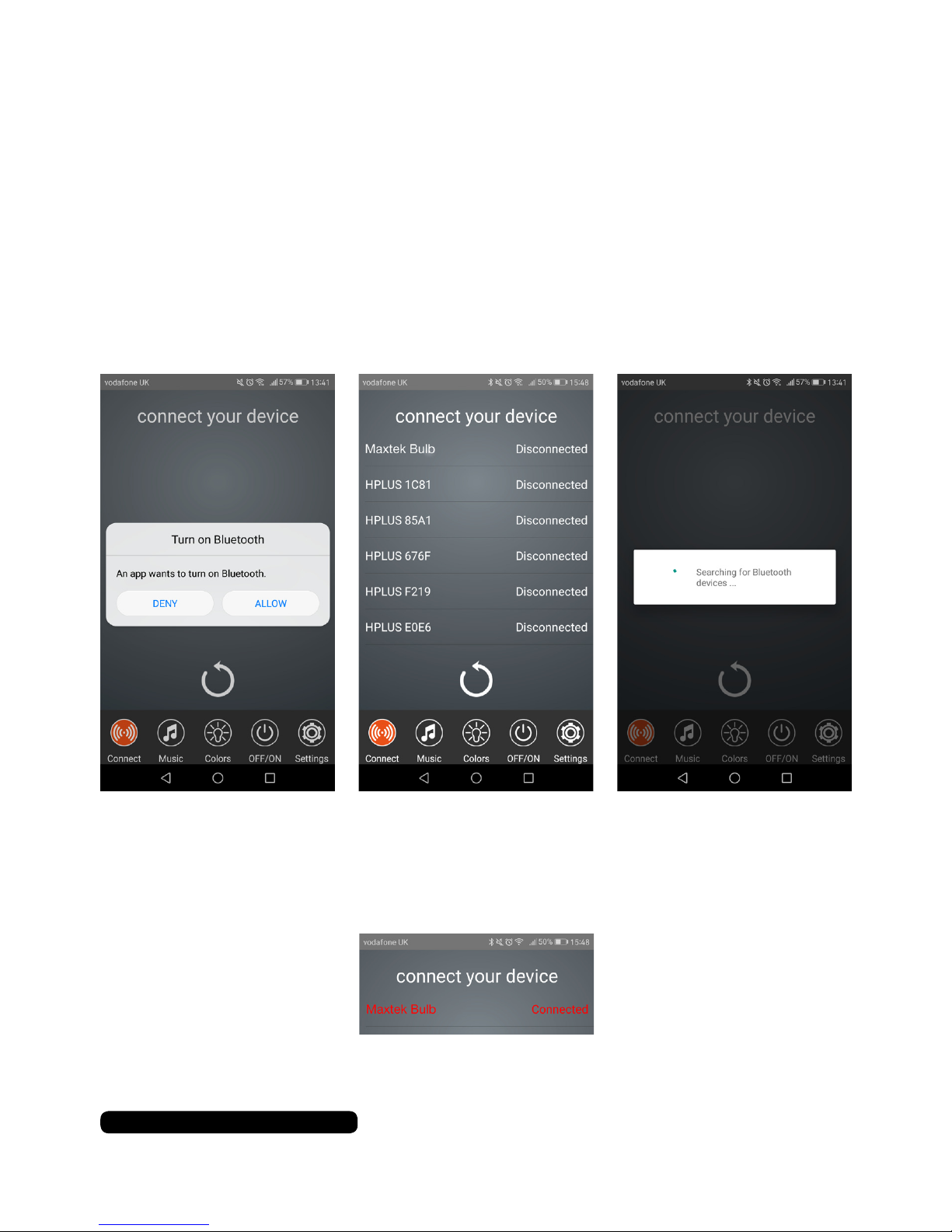
Turn the light on at the wall. The light should light up with the white
LED and a beep noise will conrm that the bluetooth is ready to pair.
Search on your smart phone’s available device list for
‘Maxtek Bulb (headset)’ in your bluetooth settings and add the bulb.
Once you are paired manually, open the ‘Switcher’ app and follow
the on screen prompts.
Select ‘Maxtek Bulb’ from the device list. There is no security on
the bulb so it will just pair with no further prompts. The listing of the
bulb with change to orange and state connected once paired.
You can now use the other features of the Smart LED Speaker Bulb.
Page 10
After Sales Support
UK/N.IRELAND HELPLINE NO:
REP.IRELAND HELPLINE N
O
:
WEBSITE:
EMAIL:
01270 508538
1800 995 036
www.quesh.co.uk
8
App Features
Music
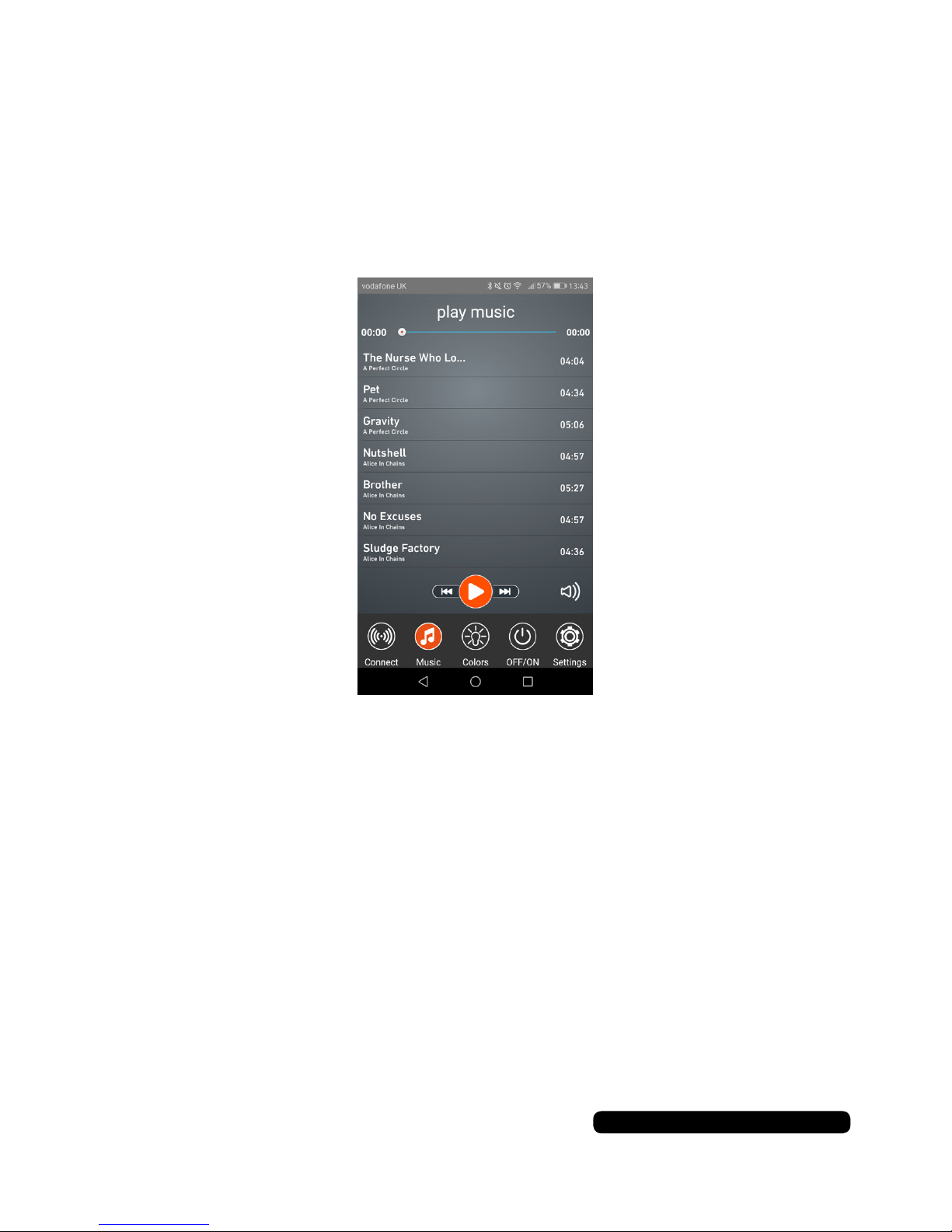
Touch the music icon at the bottom of the screen to access the
app’s player. Swipe up or down to cycle through the tracks
available on your smart phone.
Touch the track title to start the track playing. Use the standard
control icons to control the play/pause and skip forward/back.
Touch the speaker icon to raise or lower the volume.
Page 11
9
After Sales Support
UK/N.IRELAND HELPLINE NO:
REP.IRELAND HELPLINE N
O
:
WEBSITE:
EMAIL:
01270 508538
1800 995 036
www.quesh.co.uk
App Features
Colour
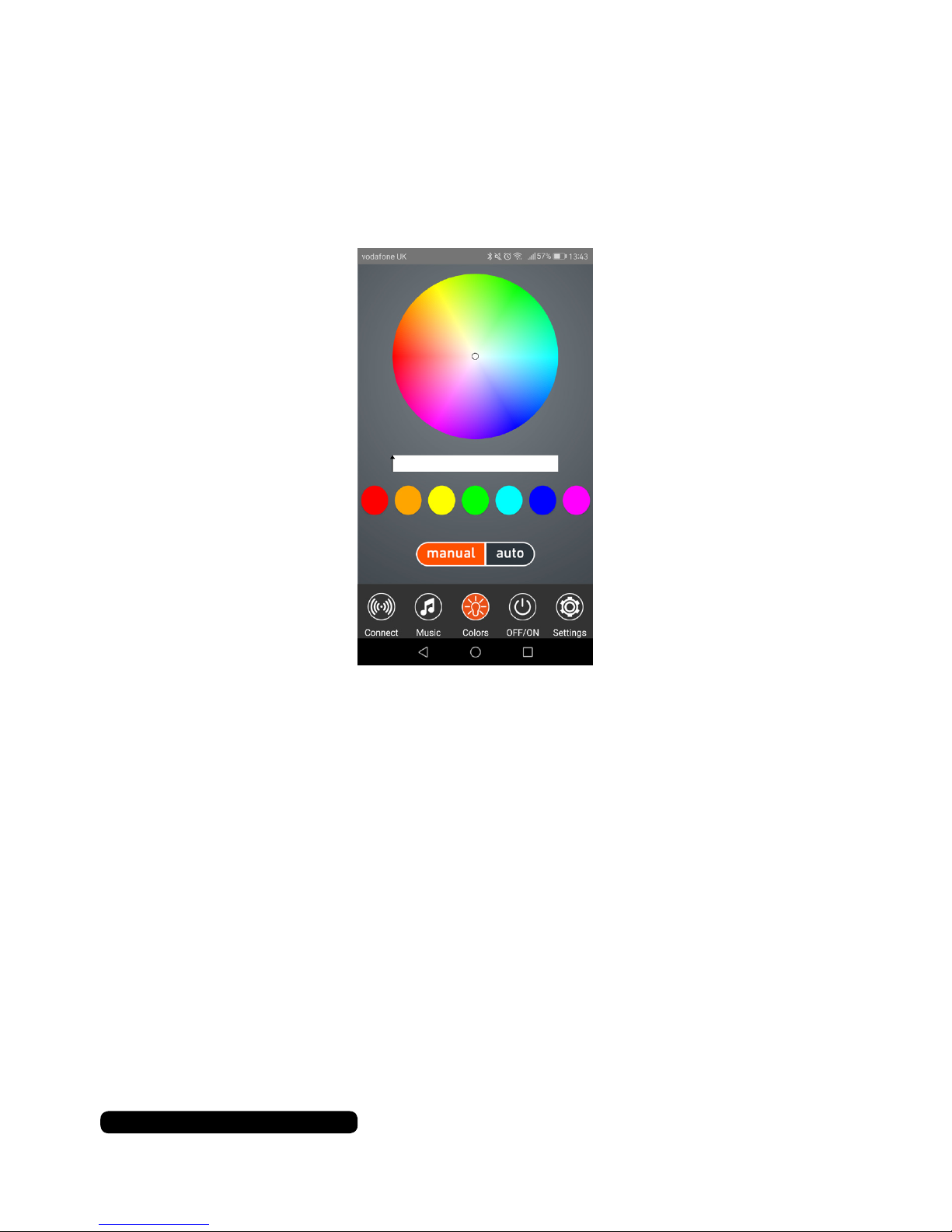
Touch the colour icon at the bottom of the screen to access the
app’s bulb colour control.
Manual (Colour)
Touch the circle and drag it around the colour wheel to change the
bulb to a custom colour.
The slide bar in the middle changes the intensity of the colour.
Touch the colour dots to change the bulb to the colour presets.
Auto (Colour)
If you select ‘auto’ the colour will change with the music played
through the app player.
Page 12
App Features
On/Off
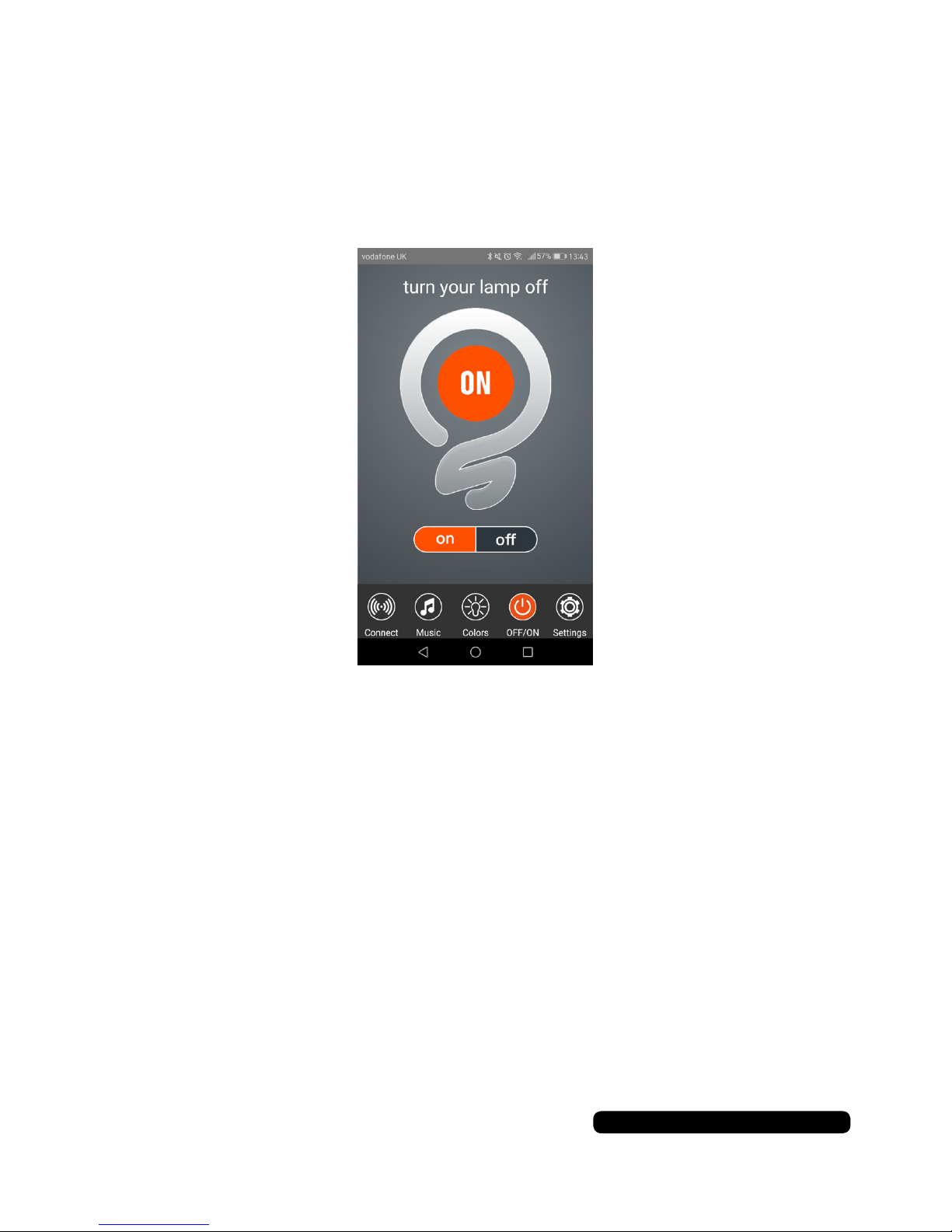
Touch the on/off icon at the bottom of the screen to access the
app’s bulb control feature.
You can turn on and of the white LED by touching either ‘ON’ or
‘OFF’ on the toggle bar.
After Sales Support
UK/N.IRELAND HELPLINE NO:
REP.IRELAND HELPLINE N
O
:
WEBSITE:
EMAIL:
01270 508538
1800 995 036
www.quesh.co.uk
10
Page 13
App Features
Timer
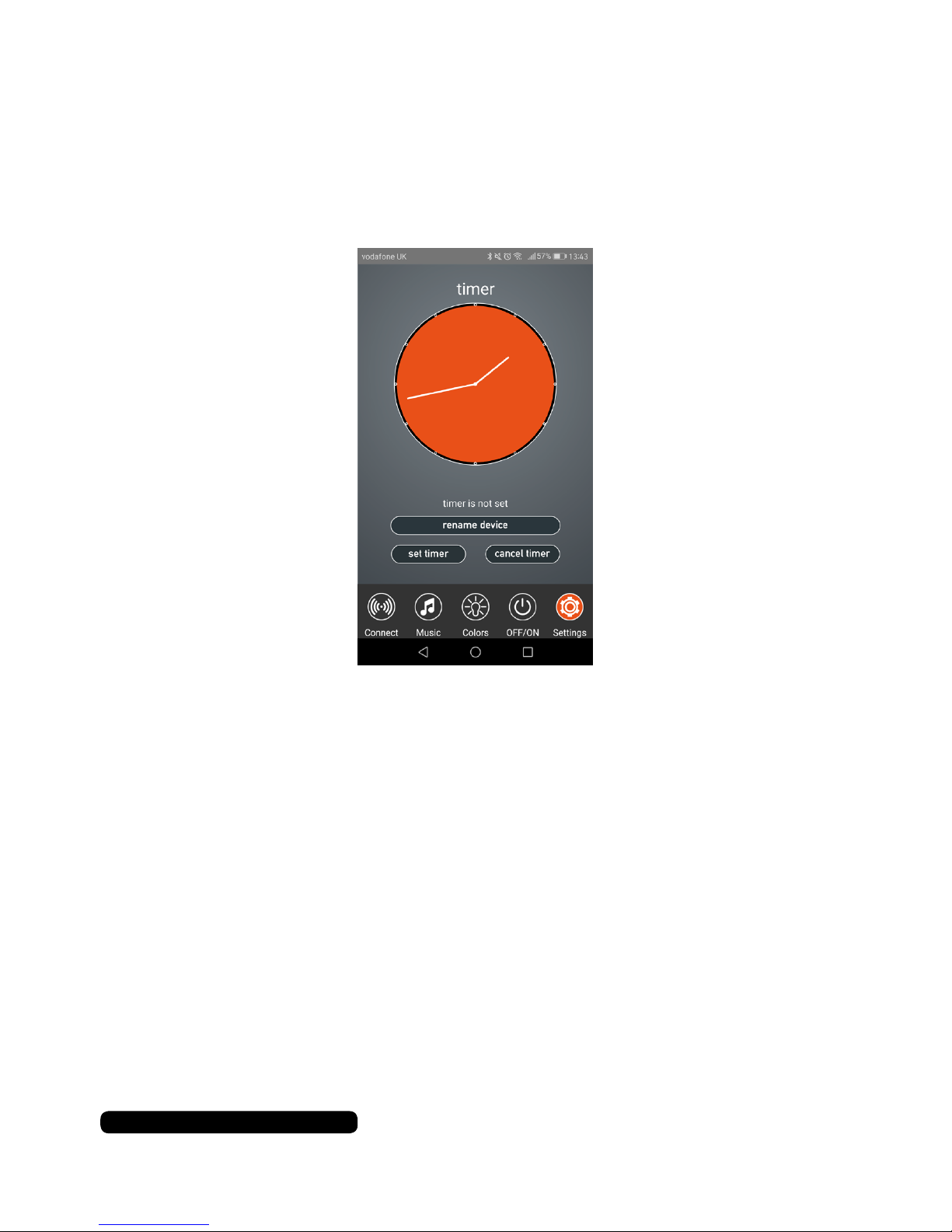
Touch the timer icon at the bottom of the screen to access the
app’s bulb timer feature.
Drag the hands of the clock face to select the time you would like
to turn off the bulb and touch ‘set timer’ to save and set it.
Touch ‘cancel timer’ to cancel the current set timer.
Renaming The Bulb
You can rename the bluetooth name of the bulb under the ‘timer’
option. Touch the name box and enter the desired name. Touch
‘Ok’ to conrm the new name. The name will be displayed under
the ‘connect’ tab of the app.
11
After Sales Support
UK/N.IRELAND HELPLINE NO:
REP.IRELAND HELPLINE N
O
:
WEBSITE:
EMAIL:
01270 508538
1800 995 036
www.quesh.co.uk
Page 14

Specification
80mm Diameter x 150mm
140g
E27/B22d
30,000 Hours (approximately)
B
110-240V
Up to 225 Lumen
Warm White (5500-6000°K)
65
3W
40mm
Mono
4.1
2.4GHz
Up to 10m
A2DP
General
Size:
Approx. Weight:
Fitting Type:
LED Life:
Efciency Rating:
Operating Voltage:
Brightness:
Main Light Output:
Colour Rendering Index:
Speaker Wattage:
Speaker Size:
Speaker Channels:
Bluetooth Version:
Bluetooth Frequency:
Bluetooth Range:
Bluetooth Protocol:
Smart LED Speaker Light
After Sales Support
UK/N.IRELAND HELPLINE NO:
REP.IRELAND HELPLINE N
O
:
WEBSITE:
EMAIL:
01270 508538
1800 995 036
www.quesh.co.uk
12
Quesh Ltd hereby declares that this Speaker is in compliance
with the essential requirements and other relevant
provisions of Directive 2014/53/EU RED.
Page 15
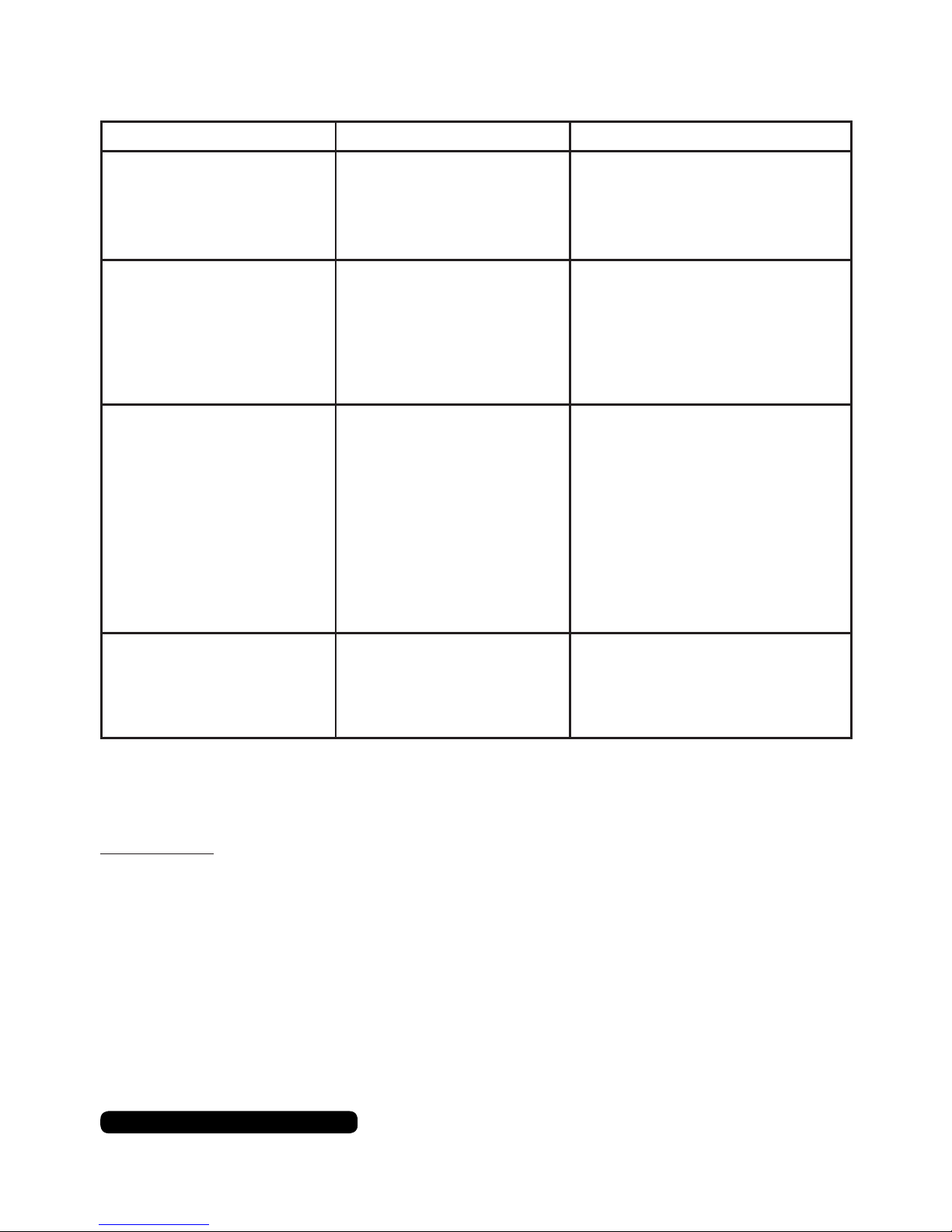
FAQ
Problem Cause Solution
Bluetooth dropping out after
a few minutes.
Full device cache.
Low Power.
Manually clear the device’s cache &
restart the device.
Turn the speaker off and
recharge them.
Stuttering/delay music. Too many processes running
on device.
Corrupt bluetooth prole.
Interference.
Close unused apps.
Unpair & delete bluetooth prole,
then re-pair device.
Use away from high powered
devices or strong RF signals.
No music No compatible music app.
A2DP is not available on your
device.
Speaker not paired.
No power.
Volume low.
Not Bluetooth 4 compatible.
Use a compatible music app.
None.
Check Bluetooth is on & the device
is connected.
Turn on the speaker.
Turn the volume up on device.
None.
Please note:
This item is not Windows Mobile OS compatible.
Budget smartphones may also experience connectivity issues.
13
After Sales Support
UK/N.IRELAND HELPLINE NO:
REP.IRELAND HELPLINE N
O
:
WEBSITE:
EMAIL:
01270 508538
1800 995 036
www.quesh.co.uk
No music, Lights Work The App has paired to
‘Maxtex Bulb (controller)’.
Manually pair the bulb through your
available devices list on your device
(not through the app) to
‘Maxtek Bulb (Headset)’.
Page 16

INTENTIONALLY LEFT BLANK
Page 17

INTENTIONALLY LEFT BLANK
Page 18
After Sales Support
UK/N.IRELAND HELPLINE NO:
REP.IRELAND HELPLINE N
O
:
WEBSITE:
EMAIL:
01270 508538
1800 995 036
www.quesh.co.uk
Warranty
This product is warranted to be free from defects in workmanship and parts for a period of 36 months
from the date of purchase. Defects that occur within this warranty period, under normal use and care,
will be repaired, replaced or refunded at our discretion, solely at our option with no charge for parts and
labour. The benets covered by this warranty are in addition to all rights and remedies in respect of the
product the consumer has under existing U.K. laws.
Proof of Purchase
This warranty is valid for the original purchase and is not transferable.
Please keep your purchase receipt as proof of purchase and as proof of the date of when the purchase
was made. The receipt must be presented with the warranty card when making a claim under this
warranty.
Service during the Warranty Period
Please ensure the product is properly packaged so as to ensure that no damage occurs in transit. Also
make sure that you have included a detailed explanation of the problem.
Extent of the Warranty
This warranty is limited to defects in workmanship or parts. All defective products or parts will be
repaired or replaced. This warranty does not extend to accessories.
Normal Wear and Tear
This warranty does not cover normal wear and tear of the product or parts.
Exclusions
This warranty does not cover the following:
• Any defect caused by accident, misuse, abuse, improper installation or operation, lack of reasonable
care, unauthorised modication, loss of parts, tampering or attempted repair by a person not
authorised by the distributor.
• Any product that has been damaged by lightning strike either directly or indirectly, or on a main’s
or vehicle outlet power surge or liquid ingress.
• Any product that has not been installed, operated or maintained in accordance with the
manufacturer’s operating instructions provided with the product.
• Any product that has been used for purposes other than domestic use.
• The product if it is located outside of the U.K. and Ireland
• Any damage caused by improper power input or improper cable connection.
This warranty does not affect your statutory rights.
Warranty Certificate
Page 19
After Sales Support
UK/N.IRELAND HELPLINE NO:
REP.IRELAND HELPLINE N
O
:
WEBSITE:
EMAIL:
01270 508538
1800 995 036
www.quesh.co.uk
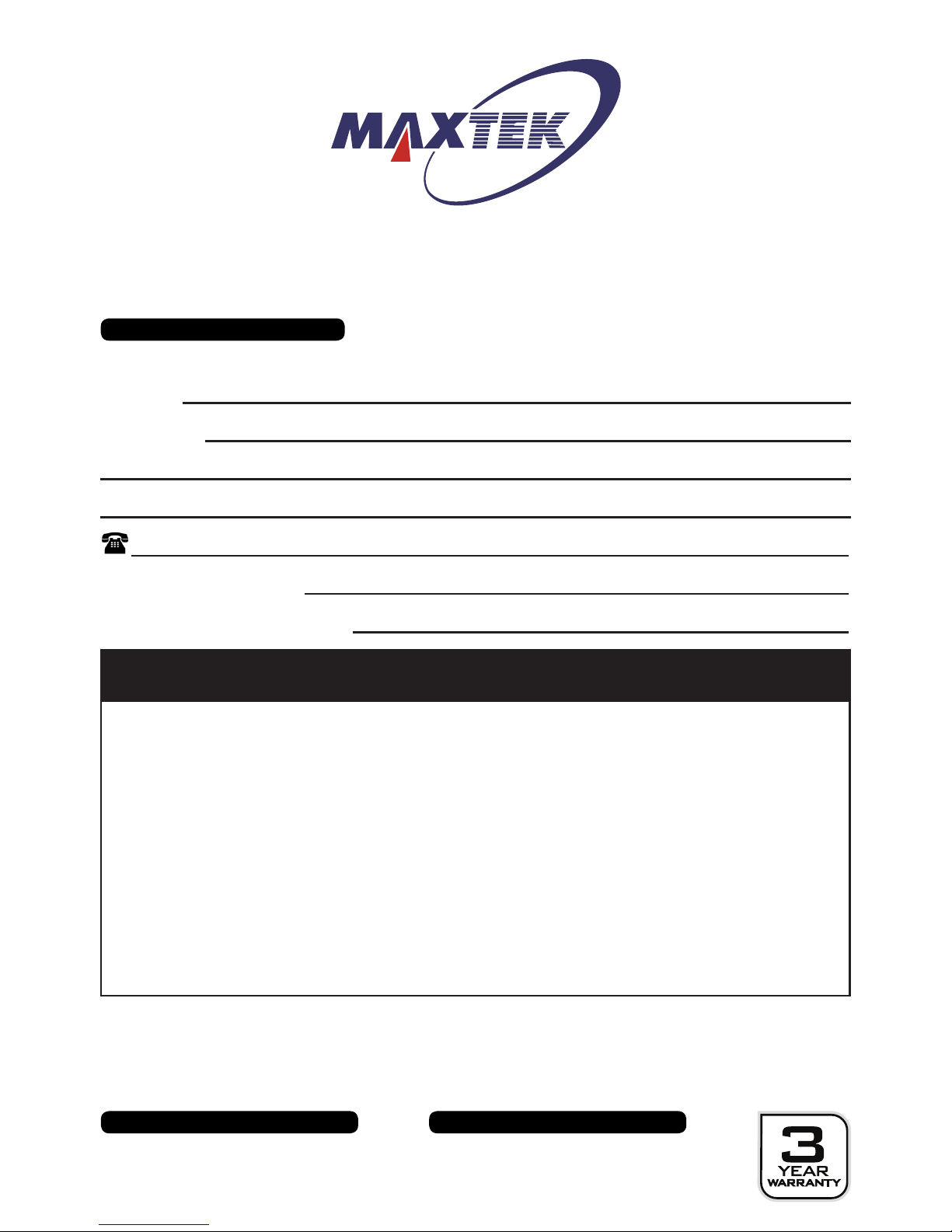
Warranty Card
Smart LED Speaker Light
Please keep your purchase receipt together with your warranty card
Fault Description:
Name:
Address:
Date of purchase:
Location of purchase:
We recommend that you attach a photocopy of your receipt, showing the date of purchase, to this
warranty card and keep it for your reference. In the event of a product fault, please call the After Sales
Support team. Please ensure that you have the product details (as shown on this card) to hand so that
the support team are able to respond as quickly and efciently as possible.
Model Number: 80041
Warranty Service Address
QUESH LTD,
B7, FIRST BUSINESS PARK
FIRST AVENUE, CREWE, CHESHIRE.
CW1 6BG
Page 20

 Loading...