

Page 1
www.maxsainnovations.com
battery-powered
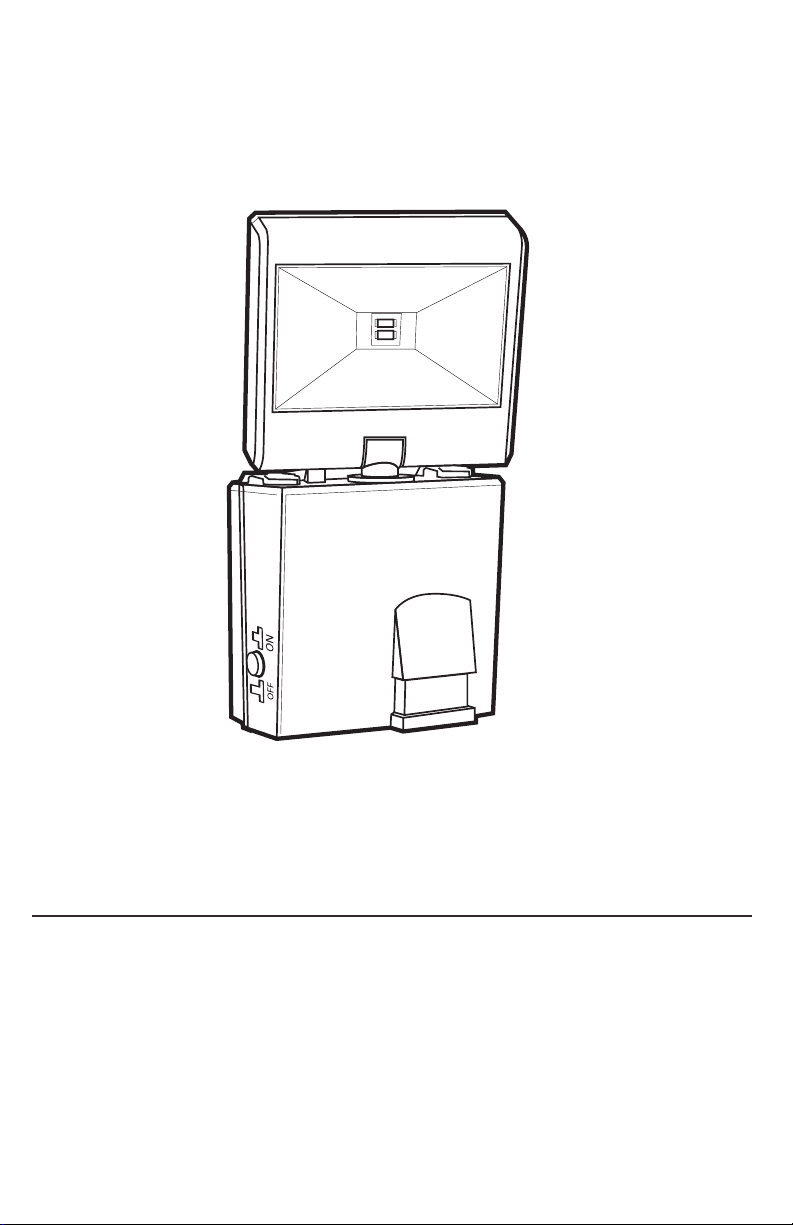
LED SECURITY SPOTLIGHT
Model #: 42111
ASSEMBLY & OPERATING INSTRUCTIONS
ABOUT YOUR BATTERY POWERED LED SECURITY SPOTLIGHT
The LED Security Spotlight is perfect for lighting porches, doorways, or around the exterior of your home or business.
The 2 super bright LEDs in the LED Security Spotlight have an estimated life of 30,000 hours so they should never
need changing.
This LED Security Spotlight has an adjustable TIME dial that allows light duration of up to 60 seconds after the last
detected motion. The LED Security Spotlight has a built-in motion sensor, which automatically turns on the light when
movement of a heat source (such as people, animals, or cars) is detected in the area. The light remains on while motion
continues to be detected in the area and turns off after a predetermined amount of time once the motion stops.
The LED Security Spotlight has a LUX setting which can be adjusted to control the functioning of the built-in photosensor
so that the light only turns on at night.
The LED Security Spotlight requires 3 AA batteries (not included). The shorter the time period used, the longer the
batteries will last. The spotlight may function irregularly or not at all at temperatures near or below freezing (20° F/-6°
C) due to the functionality of alkaline batteries. Normal operation will return when the temperature rises.
1
Page 2
v15.3
©2015 MAXSA Innovations, LLC. All Rights Reserved.
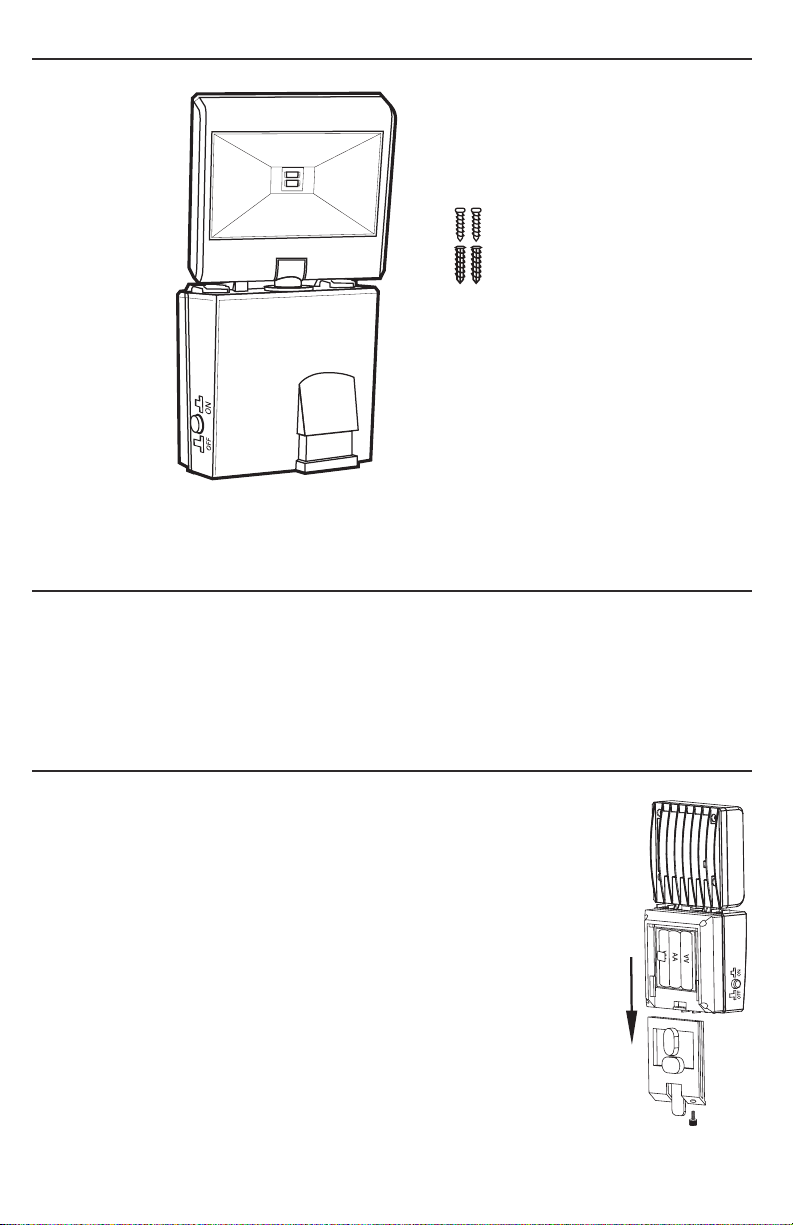
INCLUDED PARTS:
2 screws and
anchors for
mounting bracket
Adjustment dials are located on the underside of the main body. They are denoted by TIME and LUX stamps.
CHOOSING A LOCATION FOR YOUR LED SECURITY SPOTLIGHT
This LED Security Spotlight provides safety and security around your home. It is ideal for lighting up areas where
electricity is not available such as porches, driveways, carports outside, garages and entrance areas.
When deciding where to mount the light, keep in mind that the motion sensor has a horizontal field of vision of
120º at a distance of up to 26 feet when the surrounding temperature is 75°F. The outside temperature will
impact the detection distance. As temperatures get colder the motion sensor will become more sensitive and the
range of the motion sensor will increase.
INSTALLING OR REPLACING THE BATTERIES
When the charging ability of the batteries decrease, you can replace them with brand new
AA batteries. Follow the steps below when replacing the batteries.
1. First push the power button to turn the light off.
2. Remove the thumbscrew from the bottom of the LED Security Spotlight and slide the
light up and off of the mounting bracket.
3. Carefully remove the old batteries from the battery tray and replace with brand
new AA batteries. Ensure that the new batteries are plugged in with the correct
+/- polarity orientation. (WARNING: Installing the batteries in the opposite direction
could damage the unit.)
4. Slide the light back onto the mounting bracket and replace the thumbscrew.
NOTE: DO NOT DISPOSE OF BATTERIES IN GENERAL HOUSEHOLD TRASH OR INTO A
FIRE SINCE THE BATTERIES MAY EXPLODE. CONSULT YOUR LOCAL REGULATIONS
FOR CORRECT DISPOSAL OF BATTERIES. THE BATTERIES MAY ALSO BE RETURNED
TO MAXSA INNOVATIONS AT 8412 CATHEDRAL FOREST DRIVE, FAIRFAX STATION,
VA 22039. DO NOT TAKE APART THE BATTERIES SINCE THEY CONTAIN CORROSIVE
CHEMICALS.
NOTE: DO NOT MIX OLD AND NEW BATTERIES. DO NOT MIX ALKALINE, STANDARD
(CARBON-ZINC), OR RECHARGEABLE (NICKEL-CADMIUM) BATTERIES.
2
Page 3
www.maxsainnovations.com
HOW TO INSTALL YOUR LED SECURITY SPOTLIGHT
Tools Required For Install
You will need a drill and a Phillips-head screwdriver.
Mount the LED Security Spotlight onto a solid surface, using the two (2) wood/sheet metal screws supplied. You may
mount the LED Security Spotlight either vertically or horizontally.
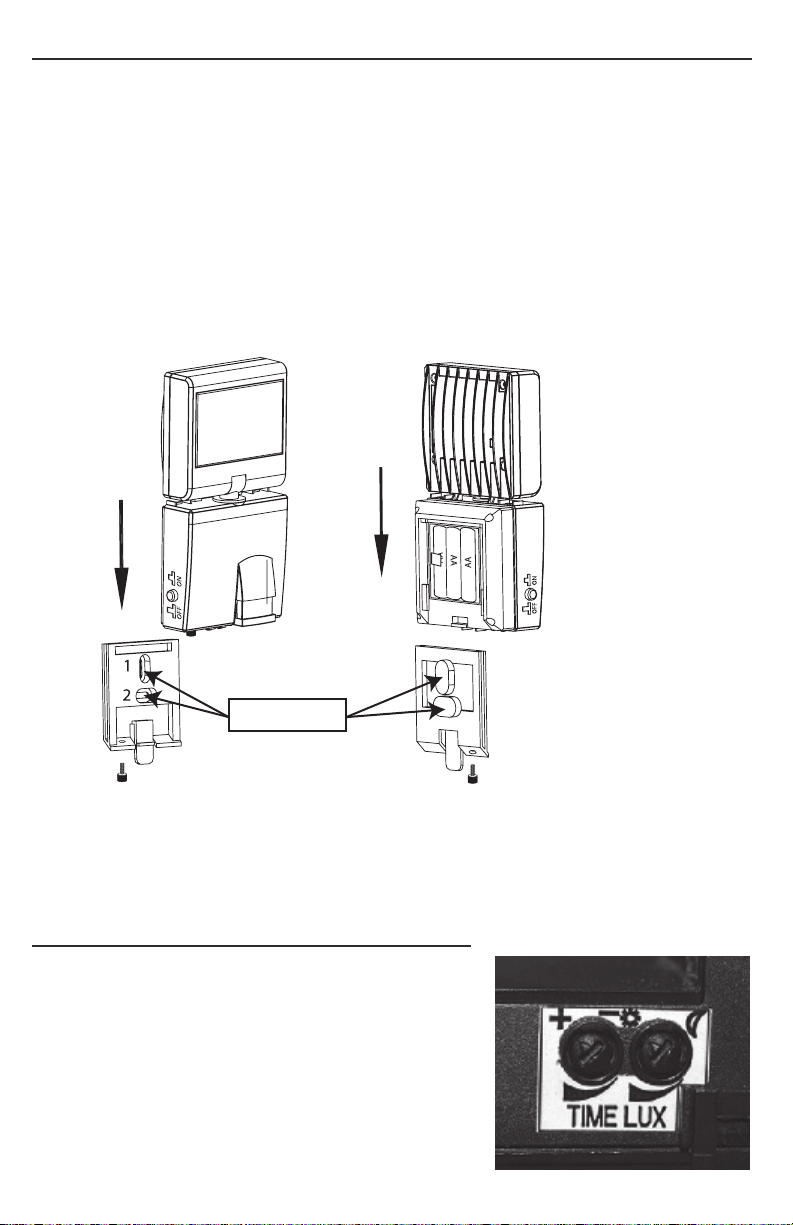
1. Remove the mounting bracket from the back of the light. Do this by removing the thumbscrew, then grabbing
the tab on the bottom of the mounting bracket and pulling it down and out of the light.
2. Align the mounting bracket on the wall and drill the first hole through the circular depression of the inside of the
mounting bracket and into the wall. This is depression number 1 in the image below.
3. Next, drill through the lower, oval depression on the mounting bracket and into the wall. This is depression
number 2 in the image below. Make sure your first hole in the mounting bracket is still lined up with the
associated hole in the mounting surface before drilling the second hole.
Raised areas for drilling
4. If drilling into cement, brick, or similar surfaces, put the mounting bracket down and use a slightly larger drill bit
to make the holes in the mounting surface larger. Insert the included anchors in the larger holes.
5. Align the mounting bracket on the wall and install the two screws using a screwdriver.
6. Slide the unit back over the mounting bracket and put the thumbscrew back in place.
OPERATING YOUR LED SECURITY SPOTLIGHT
After installing new batteries in your LED Security Spotlight, click the
button on the main body to turn the light ON.
When you do this, the light should activate immediately, regardless of
lighting conditions or motion. This is a test activation to show there is
power flowing from the batteries to the light. It should last roughly 30
seconds. After this test activation, the light will function based on the
dial settings mentioned below. Your LED Security Spotlight is now ready
for use.
3
Page 4

v15.3
©2015 MAXSA Innovations, LLC. All Rights Reserved.
On the bottom of the light body, there are 2 adjustment dials: TIME and LUX
The LED Security Spotlight has been factory preset as follows:
TIME - Set at 15 seconds.
LUX - Set for your LED Security Spotlight to activate at dusk when motion is detected.
If the above settings are not suitable for your application, then these may be adjusted as follows.
Time Period Adjustment
The time period control dial sets the duration that the LED Security Spotlight will remain illuminated after the last
detected motion. The time period has an adjustable range of 10 seconds to 60 seconds.
To decrease the time period, move the dial toward the ( – ) symbol.
To increase the time period, move the dial toward the ( + ) symbol.
Test the time period by triggering the motion sensor and measure the time period the light stays on. Adjust the TIME
control until the desired illumination duration is reached. A shorter TIME setting will conserve battery life. For best
results, use the shortest TIME setting for your location as possible.
Light Level Adjustment
The LUX dial controls the natural light level that triggers the LED Security Spotlight and prevents it from operating
during daylight hours. Your LED Security Spotlight comes preset for activation at dusk.
To adjust for activation before dusk, move the dial toward maximum ().
To adjust for activation after dusk, move the dial toward minimum (
).
SAFETY TIPS
Do not immerse the LED Security Spotlight in water or other liquid.
STORAGE
If you wish to store your light indoors for more than two or three days, turn the power switch to the OFF position
and remove the batteries to prevent damage to the batteries. Battery capacity may be reduced or damaged during
prolonged storage
MAINTENANCE TIPS
The LED lights in your LED Security Spotlight will last up to 30,000 hours and should never need replacement. When
the lights get too dim or stop working completely, it is time to replace the batteries. You can use any brand new
AA batteries. To keep your LED Security Spotlight looking its best, keep the lens free of dust and deposits by wiping
occasionally with a dry cloth or with warm soapy water.
Cold Weather Functionality
In temperatures below 20ºF, performance of the batteries may be reduced.
Normal performance will return when the temperature rises
4
Page 5
www.maxsainnovations.com
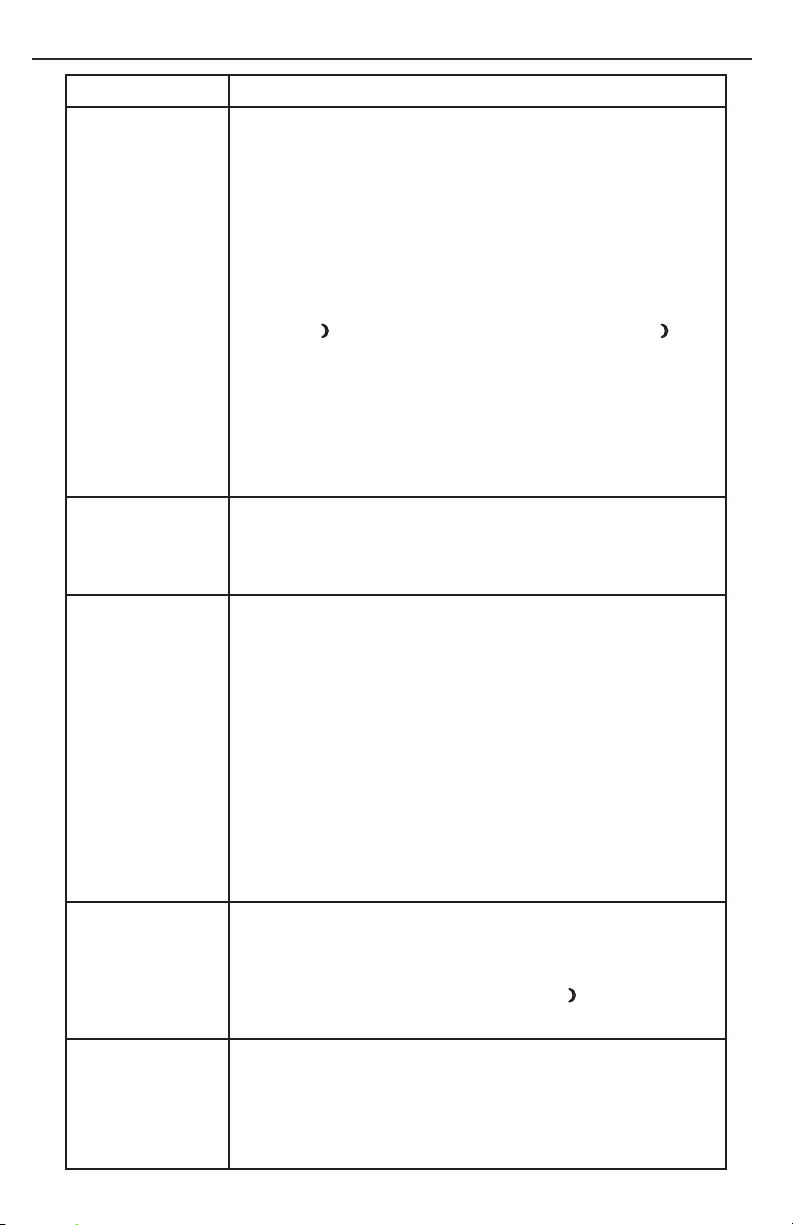
TROUBLESHOOTING
PROBLEM POSSIBLE SOLUTIONS
•Ensure that the power button on the main body is in the ON position
•Ensure that the LED Security Spotlight has been positioned so the motion
LED Security
Spotlight will not
switch on when
there is movement
in the detection
area.
sensor faces oncoming movement.
•Ensure that the batteries still have power.
•Check to see that the LUX control has not been set too far towards the
minimum (
cause the LED Security Spotlight to turn on only in complete darkness.
•Check to see that the motion sensor is not near night time light sources
such as street lights.
). Setting the LUX control too far towards minimum ( ) will
LED Security
Spotlight switches
on during the day
LED Security
Spotlight switches
on for no apparent
reason
LED Security
Spotlight quickly
flashes on and off.
LED Security
Spotlight is not as
bright as normal
•The LUX control may be set too far towards the maximum () position.
•Reposition the LED Security Spotlight so the motion sensor faces a
different direction.
•Moving trees, traffic, pets, or birds may be getting in the area of detection.
This may be unavoidable; however the sensor could be redirected to a
spot where this is less likely to occur.
•If there are reflective objects in the detection area such as windows,
water, or white walls, you may need to redirect or possibly reposition the
motion sensor.
•Test the motion sensor by covering it completely with cardboard and
waiting several minutes to make sure it does not detect motion. If the LED
Security Spotlight still switches on, please contact MAXSA for further
assistance.
•Battery charge may be low. See “Installing or Replacing the Batteries”
on Pg 2
•Move the LUX control more towards the minimum (
•Battery charge may be low. See “Installing or Replacing the Batteries”
on Pg 2
) position
5
Page 6

v15.3
©2015 MAXSA Innovations, LLC. All Rights Reserved.
ONE YEAR LIMITED WARRANTY
1 YEAR LIMITED WARRANTY: MAXSA Innovations, LLC warrants to the original consumer/purchaser that this
product shall be free of defects in material and workmanship under normal use and circumstances for a period of
one (1) year from the date of original purchase for use. When the original consumer/purchaser returns the product
pre-paid (consumer pays return shipping) to MAXSA Innovations, LLC, 8412 Cathedral Forest Drive, Fairfax Station,
VA 22039; USA within the warranty period, and if the product is defective, MAXSA Innovations, LLC will at its option
repair or replace such. This warranty shall constitute the sole liability of MAXSA Innovations, LLC concerning the
product. MAXSA Innovations, LLC expressly disclaims all other warranties INCLUDING, WITHOUT LIMITATION,
THE WARRANTIES OF MERCHANT ABILITY AND FITNESS FOR A PARTICULAR PURPOSE. NO PERSON, FIRM, OR
COPORATION IS AUTHORIZED TO ASSUME FOR MAXSA Innovations, LLC ANY OTHER LIABILITY IN CONNECTION
WITH THE SALE AND USE OF THE PRODUCT. MAXSA Innovations, LLC and agents and distributors will bear no liability
whatsoever for incidental or consequential damages or charges of any kind. Some states do not allow the reclusion
or limitation of incidental or consequential damages, so the above disclaimer regarding incidental or consequential
damages may not apply to you. This warranty is void if the product has been damaged or tampered with or if the
product or any such parts have been opened. In all cases of damage during shipment, a claim must be filed with the
shipping carrier and not with MAXSA Innovations, LLC. This warranty gives you specific legal rights; you may also have
other rights which vary from state to state.
SPECIFICATIONS
Power Source: Battery
Lumens:
Light Color:
Function:
Power Storage:
Light Duration:
Detection Angle:
Max Detection:
Weatherproof Rating:
100
6500K (Cool White or Daylight color)
Motion-Activated
3 1.5V AA batteries (not included)
10 - 60 seconds
120°
26 feet (~8 meters)
IP44
MADE IN CHINA
PLEASE SAVE THESE INSTRUCTIONS FOR FUTURE REFERENCE.
MAXSA Innovations, LLC.
8412 Cathedral Forest Dr
Fairfax station, VA 22039
Tel: 703-495-0661
6
www.maxsainnovations.com
 Loading...