

Page 1

D3.1 /
®
®
CCAP
Com
pliant
Pat. #s U.S. 6,842,348; 7,043,236;
Cdn. 2,404,840; 2,404,844
MNAC/MNDC Modular Power Supply
Installation & Operation Manual
™
Page 2

Although every effort has been taken to ensure the accuracy of this document it may be necessary, without notice, to make amendments or correct omissions.
Specications subject to change without notice.
SignalOn® Series, MAXNET®, HFC Enhance®, PCI Filters®, Q-Series® & FiberLinx® are registered trademarks of ATX in the United States and/or other countries. SMACSM is a
service mark of ATX in the United States and/or other countries. Products or features contained herein may be covered by one or more U.S. or foreign patents. Other non-ATX
product and company names in this manual are the property of their respective companies.
Page 3

TABLE OF CONTENTS
Page
1. PRODUCT DESCRIPTION ........................................................................................................................ 1-1
1.1. Technical Specications .................................................................................................................... 1-1
1.2. Functional Diagrams.......................................................................................................................... 1-2
2. INSTALLATION .........................................................................................................................................2-1
2.1. Product Inspection ............................................................................................................................. 2-1
2.2. Module Installation into the Active MAXNET® Chassis ...................................................................... 2-1
2.3. DC Redundant Powering of Active MAXNET® Chassis ..................................................................... 2-2
2.4. Module Power Requirements ............................................................................................................ 2-2
2.5. LED Indicator ..................................................................................................................................... 2-2
2.6. Voltage Monitor..................................................................................................................................2-2
3. MAINTENANCE & TROUBLESHOOTING ................................................................................................ 3-1
3.1. Maintenance ...................................................................................................................................... 3-1
3.2. Troubleshooting ................................................................................................................................. 3-1
4. SERVICE & SUPPORT ..............................................................................................................................4-1
4.1. Contact ATX Networks ....................................................................................................................... 4-1
4.2. Warranty Information ......................................................................................................................... 4-1
4.3. Safety ................................................................................................................................................ 4-1
i
Page 4

Index of Figures & Tables
Figures
#1 MNDC Power Supply Functional Diagram ................................................................... 1-2
#2 MNAC-110 Power Supply Functional Diagram ............................................................. 1-2
#3 MNAC-220 Power Supply Functional Diagram ............................................................ 1-2
#4 MNAC-110CM Power Supply with Current Monitoring Functional Diagram ................. 1-2
#5 MNAC-220CM Power Supply with Current Monitoring Functional Diagram ................. 1-2
#6 MNRPS Remote Power Supply Functional Diagram .................................................... 1-2
#7 MNRPS(CM) Remote Power Supply with Current Monitoring Functional Diagram ..... 1-2
#8 MNAC Front & Rear Panel ........................................................................................... 2-2
#9 MNDC Front & Rear Panel ........................................................................................... 2-2
#10 MNRPS Front & Rear Panel ......................................................................................... 2-2
Tables
#1 Ordering Information ..................................................................................................... 1-1
#2 Technical Specications ...............................................................................................1-1
#3 Rear Terminal Block Assignment ..................................................................................2-1
#4 Module Power Requirements ....................................................................................... 2-2
ii
Page 5
CHAPTER 1: PRODUCT DESCRIPTION
Part Number Description
MNDC -48 VDC to 24V, 3.6A True Load Sharing Redundant Power Supply
MNDCCM -48 VDC to 24V, 3.6A Power Supply with Current Monitor
PRODUCT DESCRIPTION
1. Product Description
The MNAC and MNDC are modular power supplies that supply the required +24 VDC to the MAXNET Active Chassis
backplane. This allows any MAXNET active module (AMP’s, RF Switch) to be installed in any remaining active chassis slot
to receive power. Both MNAC and MNDC have 24 VDC redundant powering capabilities, although only the MNDC provides
true load sharing. Installing two power supply modules into the chassis will maintain power to the backplane in the event that
one of them fails. Both the MNAC and the MNDC include a 24 VDC rear terminal block connection for the remote chassis
powering options. They are connected to the Active MAXNET Chassis through a hot-swapping backplane. The MNAC and
MNDC modules feature front panel LED power indication and +24 VDC backplane voltage monitor connections.
In addition to the standard powering modules, an optional current monitoring function is available in both the MNAC and
MNDC to provide remote indication (via the rear terminal block) of current uctuations caused by an active module failure.
The MNRPS is a module that supplies power to an Active MAXNET Chassis backplane from a remote 24 VDC source. It
features front panel LED power indication and +24 VDC backplane voltage monitor connections.
Please refer to the web page for up-to-date specications – atxnetworks.com
MNRPS 24V, 3.6A Remote Powering Unit
MNRPSCM 24V, 3.6A Remote Powering Unit with Current Monitoring
MNAC-110 110 VAC to 24V, 3.6A Diode or'd Redundant Power Supply
MNAC-110CM 110 VAC to 24V, 3.6A Power Supply with Current Monitor
MNAC-220 220 VAC to 24V, 3.6A Diode or'd Available (Consult ATX)
MNAC-220CM 220 VAC to 24V DC, 3.6A Power Supply with Current Monitor
Dimensions
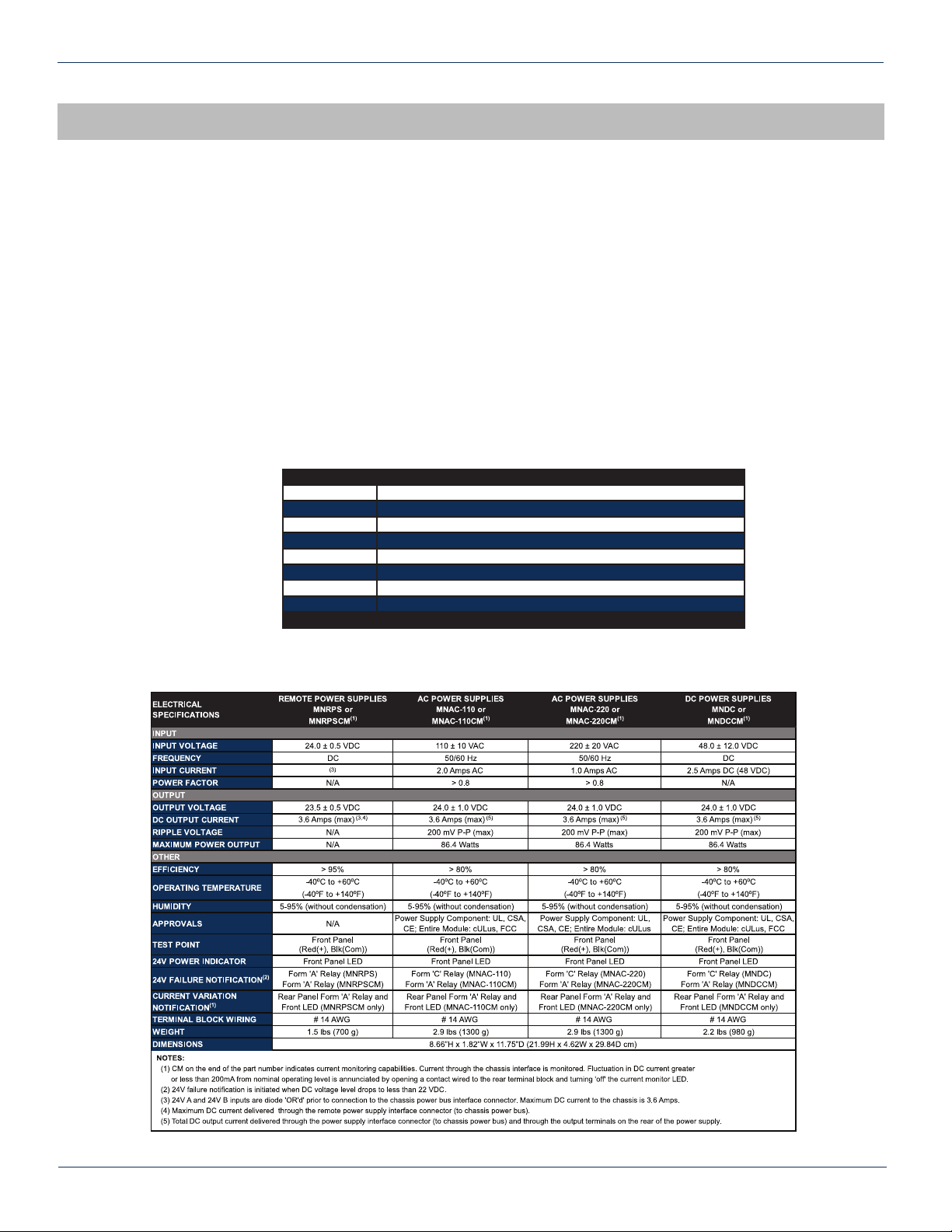
1.1. TechnicalSpecications
8.66”H x 1.82”W x 11.75”D (21.99H x 4.62W x 29.84D cm)
Table #1: Ordering Information
Table#2:TechnicalSpecications
MAXNET® – MNAC/MNDC Modular Power Supply – Installation & Operation Manual 1-1
Page 6

CHAPTER 1: PRODUCT DESCRIPTION
INPUT VOLTAGE: 110 ± 10 VOLTS AC
OUTPUT VOLTAGE: 24 ± 1.0 VOLTS DC
AC POWER
SUPPLY
MONITOR
LOGIC
F
F
2.5A
250V
6.3A
250V
110V
IN
24V
OUT
RLY
(ALARM)
PWR
+
-
+24V
BUS
TEST
(~ 24V)
T-DLY
FREQ: 50/60Hz
CURRENT: 2.0 AMPS AC
CURRENT: 3.6 AMPS DC
MNAC-110
I.T.E. POWER SUPPLY
E226099
5UA5
MNAC-220CM
INPUT VOLTAGE: 220 ± 20 VOLTS AC
OUTPUT VOLTAGE: 24 ± 1.0 VOLTS DC
FREQ: 50/60Hz
CURRENT: 1.0 AMPS AC
CURRENT: 3.6 AMPS DC
NO RLY
V ALARM
NO RLY
I ALARM
220V
IN
24V
OUT
AC POWER
SUPPLY
+24V
BUS
I SET
VOLTAGE
MONITOR
PWR
+
-
TEST
(~24V)
1.25A
250V
6.3A
250V
T-DLY
CURRENT
MONITOR
I SET
F F
I.T.E. POWER SUPPLY
E226099
5UA5
INPUT VOLTAGE: 110 ± 10 VOLTS AC
OUTPUT VOLTAGE: 24 ± 1.0 VOLTS DC
FREQ: 50/60Hz
CURRENT: 2.0 AMPS AC
CURRENT: 3.6 AMPS DC
NO RLY
V ALARM
NO RLY
I ALARM
110V
IN
24V
OUT
AC POWER
SUPPLY
+24V
BUS
I SET
VOLTAGE
MONITOR
PWR
+
-
TEST
(~24V)
2.5A
250V
6.3A
250V
T-DLY
CURRENT
MONITOR
I SET
F F
F F
I.T.E. POWER SUPPLY
E226099
5UA5
MNAC-110CM
1.2 Functional Diagrams
F F
5UA5
250V
4A
DC-DC
CONVERTER
6.3A
250V
T-DLY
INPUT VOLTAGE: -48 ± 12 VOLTS DC
CURRENT: 3.0 AMPS DC
OUTPUT VOLTAGE: 24 ± 1.0 VOLTS DC
CURRENT: 3.6 AMPS DC
MONITOR
LOGIC
48V
IN
24V
OUT
RLY
(ALARM)
I.T.E. POWER SUPPLY
E226099
Figure #1: MNDC Power Supply
Functional Diagram
(ALARM)
220V
IN
24V
OUT
RLY
+24V
BUS
PWR
+
TEST
(~ 24V)
-
MNDC
1.25A
250V
F
AC POWER
SUPPLY
F
6.3A
250V
T-DLY
MONITOR
LOGIC
+24V
BUS
+
-
PWR
TEST
(~ 24V)
INPUT VOLTAGE: 220 ± 20 VOLTS AC
FREQ: 50/60Hz
CURRENT: 1.0 AMPS AC
I.T.E. POWER SUPPLY
E226099
5UA5
OUTPUT VOLTAGE: 24 ± 1.0 VOLTS DC
CURRENT: 3.6 AMPS DC
MNAC-220
Figure #2: MNAC-110 Power Supply
Functional Diagram
Figure #4: MNAC-110CM Power Supply with
Current Monitoring Functional Diagram
+24V
BUS
24V
IN
24V
OUT
RLY
(ALARM)
1-2 MAXNET® – MNAC/MNDC Modular Power Supply – Installation & Operation Manual
INPUT VOLTAGE: 24 ± 1.0 VOLTS DC
CURRENT: 3.6 AMPS DC
Figure #6: MNRPS Remote Power Supply
Functional Diagram
F
6.3A
250V
MONITOR
LOGIC
OUTPUT VOLTAGE: 24 ± 1.0 VOLTS DC
CURRENT: 3.6 AMPS DC
+
-
PWR
TEST
(~ 24V)
MNRPS
Figure #3: MNAC-220 Power Supply
Functional Diagram
Figure #5: MNAC-220CM Power Supply with
Current Monitoring Functional Diagram
+24V
BUS
LOGIC
PWR
+
TEST
(
~ 24V)
-
I SET
SET
ADJ
MNRPSCM ONLY
NO RLY
(V ALARM)
+24V
IN A
+24V
IN B
NO RLY
(I ALARM)
INPUT VOLTAGE: 24 ± 1.0 VOLTS DC
CURRENT: 3.6 AMPS DC
6.3A
250V
VOLTAGE
MONITOR
LOGIC
F
CURRENT
MONITOR
OUTPUT VOLTAGE: 24 ± 1.0 VOLTS DC
CURRENT: 3.6 AMPS DC
MNRPS(CM)
Figure #7: MNRPS(CM) Remote Power Supply
with Current Monitoring Functional Diagram
Page 7

CHAPTER 2: INSTALLATION
INSTALLATION
2. Installation
2.1. Product Inspection
Carefully unpack the power supply module from the shipping box. If the box or power supply module is damaged, please
notify the freight company to make a damage claim. If you suspect that there is a problem with the power supply module that
may affect it’s safe operation, do not install such a suspect Power Supply into the Active MAXNET Chassis.
NOTE: This equipment is intended for installation in a RESTRICTED ACCESS LOCATION only.
NOTE: Not for use in a computer room as dened in the Standard for Protection of Electronic Computer/Data Processing
Equipment, ANSI/NFPA 75.
Rack Mounting Precautions
a) Elevated Operating Ambient - If installed in a closed or multi-unit rack assembly, the operating ambient temperature
of the rack environment may be greater than room ambient. Therefore, consideration should be given to installing
the equipment in an environment compatible with the maximum ambient temperature (35ºC) specied by the
manufacturer.
b) Reduced Air Flow - Installation of the equipment in a rack should be such that the amount of airow required for
safe operation of the equipment is not compromised.
c) Mechanical Loading - Mounting of the equipment in the rack should be such that a hazardous condition is not
achieved due to uneven mechanical loading.
d) Circuit Overloading - Consideration should be given to the connection of the equipment to the supply circuit
and the effect that overloading of the circuits might have on overcurrent protection and supply wiring. Appropriate
consideration of equipment nameplate ratings should be used when addressing this concern.
e) Reliable Earthing - Reliable earthing of rack-mounted equipment should be maintained. Particular attention should
be given to supply connections other than direct connections to the branch circuit (e.g. use of power strips).
2.2. Module Installation into the Active MAXNET® Chassis
Slide the MNAC or MNDC or MNRPS power supply module into an open slot in the Active MAXNET Chassis, until the module
seats into the chassis. Finger tighten the upper and lower knurled screws to lock the module into the chassis. If the power
supply is an MNAC module, connect an appropriate power cord (depending on the voltage rating used and the plug type
required at the installation site) to the MNAC’s IEC power inlet.
If the power supply is an MNDC module, use bus wire to connect the -48 VDC to the terminal block on the back of module
following the terminal block labeling (see Table 3 below). A disconnect device is required between the -48 VDC supply and
the MNDC power supply.
If the power supply is an MNRPS module, use bus wire to connect the +24 VDC to the terminal block on the back of module
following the terminal block labeling (see Table 3 below).
Table #3: Rear Terminal Block Assignment
MAXNET® – MNAC/MNDC Modular Power Supply – Installation & Operation Manual 2-1
Page 8

CHAPTER 2: INSTALLATION
Figure #8: MNAC Front &
Rear Panel
Figure #9: MNDC Front &
Rear Panel
2.3. DC Redundant Powering of Active MAXNET® Chassis
If more than one power supply is connected to the chassis, the extra power supply acts as a redundant source of power.
Using internal logic within the module (MNAC uses diode steering, MNDC uses load sharing logic) if the dominant power
supply in the chassis fails, the other power supply becomes the active supplier to the +24 VDC chassis backplane ensuring
that power is maintained to all active modules in the chassis.
2.4. Module Power Requirements
MODULE MNAC/MNDC QMN870/QMN1000 MNRS/MNRSD MNRSDAB
MAX CURRENT (AMPS) 3.6 0.42 0.07 0.07
Table #4: Module Power Requirements
2.5. LED Indicator
The MNAC and MNDC power supply module have an LED indicator. The LED veries, by lighting solid GREEN, that the
power supply is supplying +24 VDC to the Active MAXNET Chassis backplane.
2.6. Voltage Monitor
The MNAC and MNDC power supply module have test ports on the front panel. By connecting a DVM between the Pos
(RED) and Neg (Black) port, the chassis backplane +24 VDC level can be monitored.
Figure #10: MNRPS Front &
Rear Panel
2-2 MAXNET® – MNAC/MNDC Modular Power Supply – Installation & Operation Manual
Page 9

CHAPTER 3: MAINTENANCE & TROUBLESHOOTING
MAINTENANCE & TROUBLESHOOTING
3. Maintenance & Troubleshooting
3.1. Maintenance
Daily, ensure that the Power LED’s are on for all of the power and active modules.
3.2. Troubleshooting
The following guide will help the operator to diagnose problems in active modules or chassis’. If none of the items in this
section are of help, please contact ATX for Technical Support.
3.2.1. Module Will Not Fully Insert into Chassis
a) Remove the module and inspect it for damage or bent guide rails.
b) Inspect the chassis for bent metal or obstructions.
c) Be sure that the active module is inserted such that the left side is above an odd numbered slot and the right side is
above an even number slot.
d) Try the module in a different slot. Due to machinery tolerances, some modules may be more snug in some slot than
others. If the tolerances are unacceptable, contact ATX.
3.2.2. Module Power LED Off or Intermittent
Check the GREEN Power LED on each Power Supply module. If one is off or intermittent, then the chassis is not getting
correct power. Refer to the MNAC/MNDC Not Powering Chassis troubleshooting section. If power availability is not an issue
and other modules in the chassis are okay, the module itself is suspect. Continue.
Remove the suspect module and trade slot positions with another functioning module.
a) If the suspect module is okay and the previously good module fails, contact ATX and report a defective chassis.
b) If the suspect module fails and the previously good module is okay, contact ATX and report that the suspect module
is defective.
3.2.3. MNAC/MNDC Not Powering Chassis
NOTE: 220 VAC applied to an MNAC 110 will damage the module, but 110 VAC applied at an MNAC-220 will simply not turn
it ON.
a) Check the fuse continuity on the MNAC or MNDC module
b) Verify that the 110 VAC/220 VAC electrical outlet is active using a voltmeter and checking the circuit breaker (in the
case of the MNDC, insure that there is -48 VDC on the rear terminal block).
c) Verify that the IEC power cord is properly inserted into the receptacle on the rear of the module and properly
connected to a 110 VAC/220 VAC electrical outlet.
MAXNET® – MNAC/MNDC Modular Power Supply – Installation & Operation Manual 3-1
Page 10

CHAPTER 3: MAINTENANCE & TROUBLESHOOTING
This page left intentionally blank.
3-2 MAXNET® – MNAC/MNDC Modular Power Supply – Installation & Operation Manual
Page 11

CHAPTER 4: SERVICE & SUPPORT
SERVICE & SUPPORT
4. Service & Support
4.1. Contact ATX Networks
Please contact ATX Technical Support for assistance with any ATX products. Please contact ATX Customer Service to obtain
a valid RMA number for any ATX products that require service and are in or out-of-warranty before returning a failed module
to the factory.
RF & OPTICAL TECHNICAL SUPPORT
Tel: (905) 428-6068
Toll Free: (800) 565-7488 (USA & Canada only)
► Press *3 for Technical Support
► Then press 2 for RF & Optical Products (MAXNET, SignalOn, HFC Enhance, PCI Filters, Q-Series, FLEXNET,
SCN, SMAC, FiberLinx)
Email: rfsupport@atxnetworks.com
CUSTOMER SERVICE
ATX Networks
1-501 Clements Road West
Ajax, ON L1S 7H4 Canada
Tel: (905) 428-6068
Toll Free: (800) 565-7488 (USA & Canada only)
► Press *1 for Customer Service
Fax: (905) 427-1964
Toll Free Fax: (866) 427-1964 (USA & Canada only)
Web: www.atxnetworks.com
Email: support@atxnetworks.com
4.2. Warranty Information
All of ATX Networks’ products have a 1-year warranty that covers manufacturer’s defects or failures.
4.3. Safety
IMPORTANT! FOR YOUR PROTECTION, PLEASE READ THE FOLLOWING:
Water and Moisture: Care should be taken so that objects do not fall and liquids are not spilled into the enclosure
through openings.
Power Sources: The device should be connected to a power supply only of the type described in the operating instructions
or as marked on the device.
Grounding or Polarization: Precautions should be taken so that the grounding or polarization means of the device is
not defeated.
NOTE: When installing the MNAC or MNDC Power Supply, the GND bonding terminal #1 on the back of the MNAC or
MNDC Power Supply shall be connected to the chassis ground lug.
Power Cord Protection: Power supply cords should be routed so that they are not likely to be pinched by items placed upon
or against them, paying particular attention to cords at plugs, convenience receptacles, and the point where they exit from
the device.
Servicing: The user should not attempt to service the device beyond that described in the operating instructions. All other
servicing should be referred to qualied service personnel.
Fusing: If your device is equipped with a fused receptacle, replace only with the same type fuse. Refer to replacement text
on the unit for correct fuse type.
Recommended external fusing of the MNDC supply to be limited to 4 Amps.
MAXNET® – MNAC/MNDC Modular Power Supply – Installation & Operation Manual 4-1
Page 12

CHAPTER 4: SERVICE & SUPPORT
The MNAC-110 Power Supply receptacle fuse rating is 2.50 Amps 250 Volts slo blo.
The MNAC-220 Power Supply receptacle fuse rating is 1.25 Amps 250 Volts slo blo.
CAUTION:Forcontinuedprotectionagainsttheriskofre,replaceonlywiththesametypeandratingoffuse.
Power Supply Removal: Power (AC or DC) should be disconnected from the module before removing for replacement or
service. This is accomplished by removing the AC IEC plug for the MNAC unit and wires from the terminal block of the MNDC
unit. To remove a power supply module from the chassis, unscrew the two thumb screws on the front panel and pull back on
the module handle until the unit is clear of the chassis guide slot.
4-2 MAXNET® – MNAC/MNDC Modular Power Supply – Installation & Operation Manual
Page 13

This page left intentionally blank.
CHAPTER 4: SERVICE & SUPPORT
MAXNET® – MNAC/MNDC Modular Power Supply – Installation & Operation Manual 4-3
Page 14

1-501 Clements Road West, Ajax, ON L1S 7H4 Canada
Tel +1 (905) 428-6068 Toll Free +1 (800) 565-7488
Fax +1 (905) 427-1964 Toll Free Fax +1 (866) 427-1964
www.atxnetworks.com support@atxnetworks.com
Printed in Canada Rev. 04/17 (ANW0874)
 Loading...