

Page 1

300 lumen LED Lantern With Remote Control
User Manual
Model:MX1914
Page 2
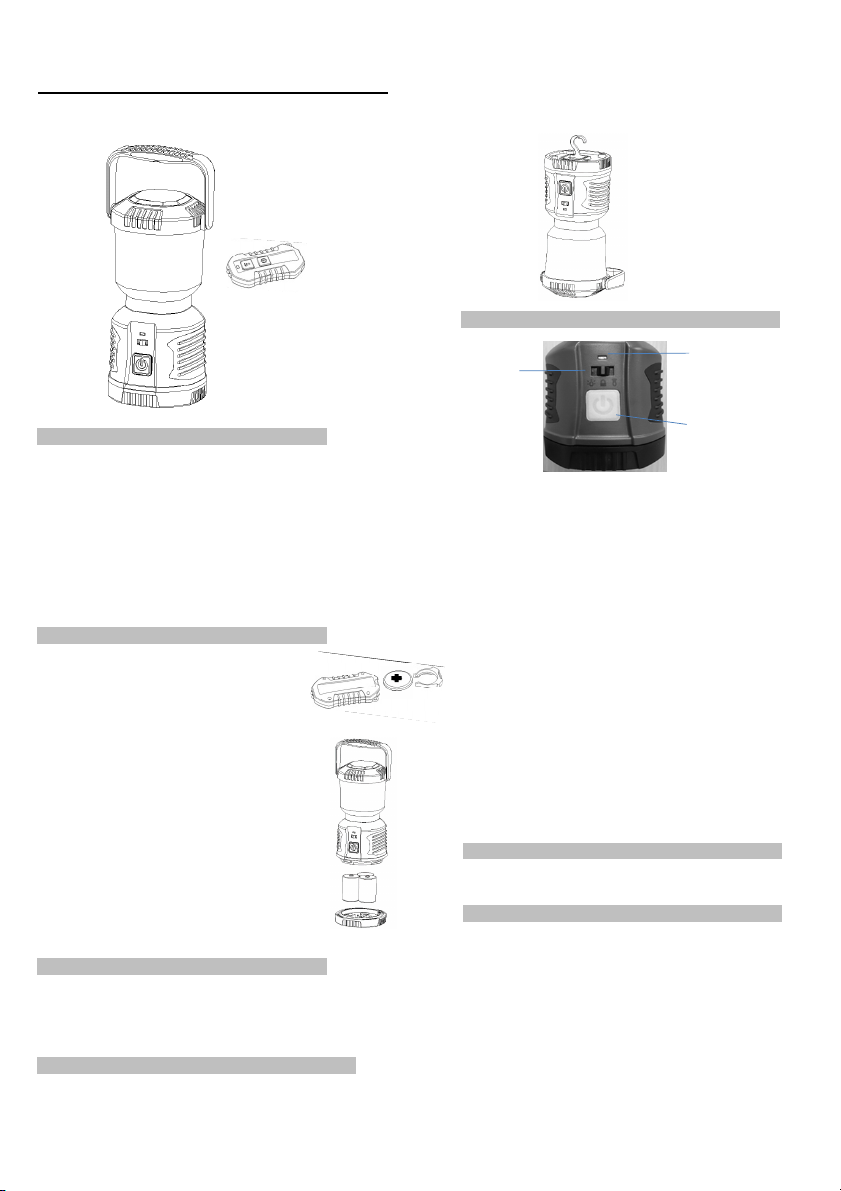
300 lumen LED Lantern With Remote Control
switch
itch Operation:
Sw
Operation
Remote control
indicator light
Features:
• Dual color LED's (twenty white LED's and four amber LED's)
• Rugged housing is IPX4 weather-resistant
• Glow in the dark handle, body ring and switch
• 4 light modes: white high, white low, amber high and amber low
• Battery capacity indication
• Manual or radio remote control operation
• Remote distance up to 35 feet
• Built-in recessed hook at lantern base for hanging as downlight
• Powered by three "D" size batteries(not included)
• Output 300 lumens with 48-300 hours run time
Battery Installation:
Remote control:
•(1) CR2032 batteries - 3V
• To install theA24:A33 batteries, open the battery cover.
• Install one CR2032 battery with the positive + side
facing up.
Lantern:
• (3) D size batteries
• To install the batteries, open the battery cover.
• Install three "D" size batteries in proper polarity.
• Improper installation of the batteries will damage
the light.
• Reinstall the battery cover.
To protect the environment, please recycle the
batteries. For more information about battery
cycling, please go to: www.batteryrecycling.com
re
WARNING:
Never mix fresh and used batteries.
Never mix different battery brands or chemistry types.
Always remove drained batteries immediately. Remove
batteries during long periods of storage.
Recessing Hook:
The lantern built-in recessed hook at lantern base
for hanging as downlight.
Mode change button
Manual control:
• Turn operation switch to left(LED bub icon) to st
control. Light will turn into white high mode. Change lighting
modes (white high, white low, amber high, amber low) by
pressing and releasing the mode change button.
• Turn off the light by pressing the mode change button for 5s or
turn operation switch to lock mode.
Remote control:
• Turn operation switch to right(Remote icon) to start the remote
control. Remote control indicator light will turn to blue. Change
lighting modes (white high, white low, amber high, amber low) by
pressing and releasing the mode change button on the remote
control.
• Turn off the light by pressing the mode change button on the
remote control for 5s or turn operation switch to lock mode.
• The remote control built-in two white LED lights, press the power
switch to turn on the light, release the power switch to turn off.
It is suggested to turn the operation switch to lock position after
you turn off your lantern and during transportation.
oubleshooting:
Tr
If the lantern fails to light:
• Check the batteries for proper installation.
If proper installation is confirmed replace batteries.
•
NOTE
FCC
:
This device complies with Part 15 of the FCC Rules.
Operation is sub
may not cause harmful interference, and (2) this device must accept any
interference received, including interference that may cause undesired
operation.
The manufacturer is not responsible for any radio or TV interference caused
by unauthorized modifications or change to this equipment. Such
modifications or change could void the user’s authority to operate the
equipment.
The device has been evaluated to meet general RF exposure requirement.
The device can be used in portable exposure condition without restriction.
Item No.: MX1914
Made in China
j
ect to the following two conditions: (1) this device
t the manual
ar
 Loading...