

Page 1
www.max.us.com
CONFORMS TO UL STD 325
UL CLASS - I, II, III, IV
CERTIFIED TO CAN/CSA STD
C22.2 NO. 247
High Traffic Commercial
Brushless DC Low Profile
Swing Gate Operator
4009963
Made in USA
MAX Phantom 2000
Installation and Owners Manual
Page 2

Page 3

Table of contents
Phantom 2000 Specifications
Important Safety Information
UL 325 Model Classifications
UL 325 Required Entrapment Protection
UL 325 Compliant Installation Requirements
Intended Use of Swing Gate Operator
Installation
Gate Operator Position
Recommended Gate Operator Layout
Single Gate Operator
Dual Gate Operators
Arm Position Options
Arm Connection to Gate
Optional Remote Power Supply Kit - MAX Magic Box
Solar Optional
Install Warning Signs
Entrapment Protection
In-Ground Loops
Wiring operator
Gate Operator System Overview
Input AC Power
Optional Remote Power Supply Kit - MAX Magic Box
Solar Power Connection - Optional
Operators to Matrix 1
Optional Key Switch to Operator(s)
Turn ON / OFF Operator Power
matrix 1
Matrix 1 Overview
Wiring Overview
Primary Gate - Open Left / Open Right
Close Timer
Selectable Gate Speed Control
Battery Back-Up Mode
Anti-Tailgate
Single Pass Anti-Tailgate
Radio Receiver
Radio Safety Pause
Gate in Motion Alarms
OBD Port Black Box
Maglock
Loop Detectors
In-Ground Loop Connection
ID Plug
Gate Tamper
UL Entrapment LEDs
Emergency Vehicle / Max Open Inputs
Gate Disable
Partial Open
UL Alarm / Alarm Reset Button
Gate Status Monitoring
OPEN / STOP / CLOSE Connection
CLOSING Photocell Connection
Gate Operators Communication LEDs
24V Power for Matrix 1
Battery in Use LED
Motor Motion LEDs
10
10
11
12
13
14
15
16-17
18
19
20
21
22
23
24
25
26
26
26
26
27
27
28
28
28
28
29
29
29
30
30
30
30
31
31
32
32
32
32
33
33
33
33
2
2
3
3
4
5
6
7
8
9
Adjustments
Open and Close Limits
Release Handle Clamp
Reverse Sensor (ERD)
Maintenance
Qualified gate operator technician
End user/Home owner
Phantom 2000 Wiring Schematics
Manual Release
Electronic Gate Open / Close
Audible Alarm
Replacement Parts List
Warranty
Phantom options / unique features
Gate Tamper Feature
36 Amp/Hr Phantom Battery Module - Optional
Gate Disable Feature
Event History Download
© 2014 Maximum Controls LLC.
All rights reserved. No part of this manual may be reproduced in any
means: graphics, electronics or mechanical, including photocopying
without the expressed written permission of the publisher. Materials
components and specifications are subject to change without notice.
34
35
36
37
37
38
39
40
40
41
42
43
43
44
44
1
Page 4

phantom 2000 specifications
UL 325 Class of Operation - Class I, II, III, IV
Gate Type - Vehicular Swing Gate
Max Gate Weight / Length - 2000lbs @ 15 ft or 1500 lbs @ 20 ft
90° Opening Time - 16 selectable speeds from approximately 11.5 sec to 20 sec depending on the weight and length of gate.
Cycles per Hour AC Input Power - Continuous
Battery Back-Up Cycles (Batteries fully charged):
- BC-7 Battery Module-7 Amp/Hr Batteries, approximately 450 cycles
- BC-36 Phantom Battery Module-36 Amp/Hr Batteries, approximately 2000 cycles
NOTE: The number of gate cycles using ONLY battery back-up power will vary
depending on the weight of the gate, the gate length, the operating condition of the gate
hardware, temperature and the amount of charge the batteries have at the beginning of
the battery power only operation.
Input AC Power - Switchable: 115VAC or 230VAC single phase
Motor - 24VDC Brushless (equivalent to 1 HP AC motor)
Operating Temperature - -4°F to 158°F (-20°C to 70°C)
Entrapment Protection:
- UL 325 Type A Inherent (ERD sensor)
- Input for UL 325 Type B1 (photocell) and B2 (sensing edge)
12 5/8”
22”
important safety information
WARNING – To reduce the risk of injury or death:
1. READ AND FOLLOW ALL INSTRUCTIONS.
18 3/4”
14 5/8”
2. Never let children operate or play with gate controls. Keep the remote control away from children.
3. Always keep people and objects away from the gate. NO ONE SHOULD CROSS THE PATH OF THE MOVING GATE.
4. Test the gate operator monthly. The gate MUST reverse on contact with a rigid object or stop when an object activates the
non-contact sensors. After adjusting the force or the limit of travel, retest the gate operator. Failure to adjust and retest the
gate operator properly can increase the risk of injury or death.
5. Use the emergency release only when the gate is not moving.
6. KEEP GATES PROPERLY MAINTAINED. Read the owner’s manual. Have a qualified service person make repairs to gate
hardware.
7. The entrance is for vehicles only. Pedestrians must use separate entrance.
8. SAVE THESE INSTRUCTIONS
2
Page 5
ul 325 model classifications
AUTHORIZED
PERSONNEL
ONLY
CLASS I
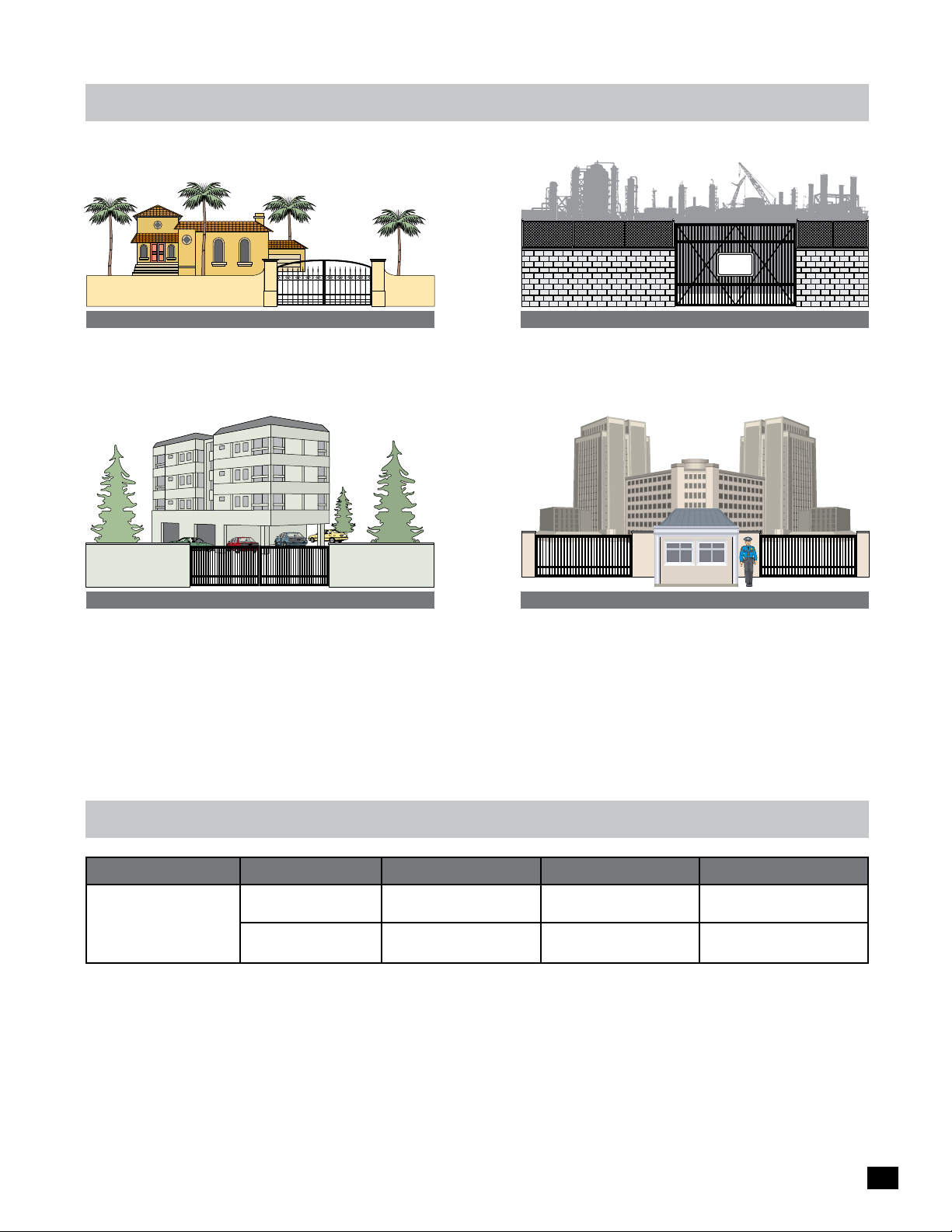
Residential Vehicular Gate Operator - A vehicular gate operator
(opener or system) intended for use in a home of one to four
single family dwellings, or a garage or parking area associated
therewith.
CLASS II
Commercial/General Access Vehicular Gate Operator - A
vehicular gate operator (opener or system) intended for use in
a commercial location or building such as a multi-family
housing unit (five or more single family units) hotel, garages,
retail store or other building servicing the general public.
CLASS III
Industrial/Limited Access Vehicular Gate Operator - A
vehicular gate operator (opener or system) intended for uses
in an industrial location, loading dock area or other location
not intended to service the general public.
SECURITY
CLASS IV
Restricted Access Vehicular Gate Operator - A vehicular gate
operator (opener or system) intended for use in a guarded
industrial location or buildings such as airport security area or
other restricted access locations not servicing the general
public, in which unauthorized access is prevented via
supervision by security personnel.
ul 325 required entrapment protection
Gate Type Protection Type Class I & II Class III Class IV
Primary
A, C A, B1, B2, C
Swing Gate
Secondary
The same type of device shall not be utilized for both the primary and the secondary entrapment protection means. Use of a single device to
cover both the opening and closing directions is in accordance with the requirement; however, a single device is not required to cover both
directions. A combination of one Type B1 for one direction and one Type B2 for the other direction is the equivalent of one device for the
purpose of complying with the requirements of either the primary or secondary entrapment protection areas.
A - Inherent entrapment protection system.
B1 - Provision for connection of a non-contact sensor
(photoelectric sensor or the equivalent).
B2 - Provision for connection of a contact sensor
(edge device or the equivalent).
A, B1, B2, C, D
C - Inherent adjustable clutch or pressure relief device.
D - Provision for connection of an actuating device
requiring continuous pressure to maintain opening
or closing motion of the gate.
E - An audio alarm.
A, B1, B2, C, D, E A, B1, B2, C, D, E
A, B1, B2, C, D
3
Page 6

ul 325 compliant
installation requirements
A Install the gate operator only when:
1 The operator is appropriate for the construction of the gate and the usage Class of the gate,
2 All exposed pinch points are eliminated or guarded.
B The operator is intended for installation only on gates used for vehicles. Pedestrians must be supplied with a separate access
opening. The pedestrian access opening shall be designed to promote pedestrian usage. Locate the gate such that persons
will not come in contact with the vehicular gate during the entire path of travel of the vehicular gate.
C The gate must be installed in a location so that enough clearance is supplied between the gate and adjacent structures when
opening and closing to reduce the risk of entrapment. Swinging gates shall not open into public access areas.
D The gate must be properly installed and work freely in both directions prior to the installation of the gate operator.
Do not over-tighten the operator clutch or pressure relief valve to compensate for a damaged gate.
E For gate operators utilizing Type D protection:
1 The gate operator controls must be placed so that the user has full view of the gate area when the gate is moving,
2 A gate operator shall additionally be provided with a placard that is marked in letters at least 1/4-in (6.4-mm) high with
the word “WARNING” and the following statement or the equivalent: “Moving Gate Has Potential of Inflicting Injury or
Death - Do Not Start Gate Unless Path is Clear”.
3 An automatic closing device (such as a timer, loop sensor, or similar device) shall not be employed, and
4 No other activation device shall be connected.
F Controls intended for user activation must be located at least ten feet (10’) away from any moving part of the gate and where
the user is prevented from reaching over, under, around or through the gate to operate the controls. Outdoor or easily
accessible controls shall have a security feature to prevent unauthorized use.
G The Stop and/or Reset button must be located in the line-of-sight of the gate. Activation of the reset control shall not cause
the operator to start.
H A minimum of two (2) WARNING SIGNS shall be installed, one on each side of the gate where easily visible.
I For gate operators utilizing a non-contact sensor:
1 See instructions on the placement of non-contact sensors for each Type of application,
2 Care shall be exercised to reduce the risk of nuisance tripping, such as when a vehicle, trips the sensor while the gate is
still moving, and
3 One or more non-contact sensors shall be located where the risk of entrapment or obstruction exists, such as the
perimeter reachable by a moving gate or barrier.
J For a gate operator utilizing a contact sensor:
1 One or more contact sensors shall be located where the risk of entrapment or obstruction exists, such as at the leading
edge, trailing edge, and post mounted both inside and outside of a vehicular horizontal slide gate.
2 One or more contact sensors shall be located at the bottom edge of a vehicular vertical lift gate.
3 One or more contact sensors shall be located at the pinch point of a vehicular vertical pivot gate.
4 A hardwired contact sensor shall be located and its wiring arranged so that the communication between the sensor and
the gate operator is not subjected to mechanical damage.
5 A wireless device such as one that transmits radio frequency (RF) signals to the gate operator for entrapment protection
functions shall be located where the transmission of the signals are not obstructed or impeded by building structures
natural landscaping or similar obstruction. A wireless device shall function under the intended end-use conditions.
6 One or more contact sensors shall be located on the inside and outside leading edge of a swing gate. Additionally, if the
bottom edge of a swing gate is greater than 6 inches (152 mm) above the ground at any point in its arc of travel, one or
more contact sensors shall be located on the bottom edge.
7 One or more contact sensors shall be located at the bottom edge of a vertical barrier (arm).
4
Page 7
intended use of
swing gate operator
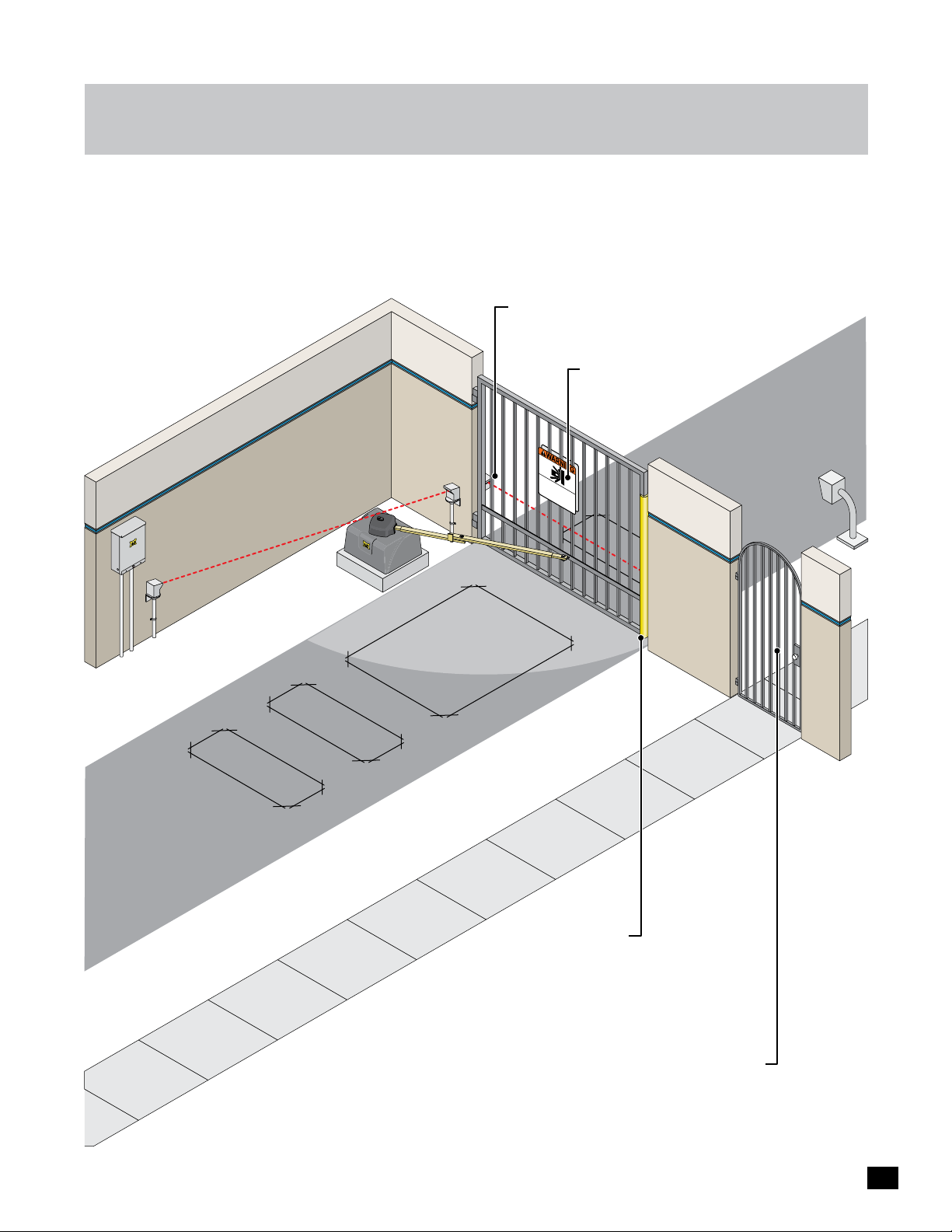
The operator is intended for use on a VEHICULAR swing gate ONLY. It is intended to be used WITH appropriate entrapment
protection safety devices and in-ground vehicle loop detection system.
Closing Gate Protection Photocell: Helps protect the gate operator
from accidentally closing on vehicles in the gate’s closing path.
Warning Signs: Should be installed
on both sides of gate area and
easily visible.
Moving Gate Can
Seriou
KEEP
without
C
s Injury o
LE
D
AR!
prior warning.
o not
in
Ga
the gat
let
t
Cause
e ma
children operat
T
hi
r Death
e area.
s
y
Pedes
entranc
m
ov
e at any
trians
e is
e
the gat
f
must
or
t
ime
ve
hic
us
e or play
e
le
separat
s
Entrapment Protection Photocell:
Helps guard against the opening
gate from entrapment.
onl
y
.
e
entrance.
In-Ground Loops:
Help protect the gate
operator from accidentally
opening and/or closing on
vehicles in the gate’s path.
Entrapment Area
Sensing Edge: Helps
protect the gate operator
from accidentally opening
and/or closing on vehicles
in the gate’s path.
Pedestrians MUST use a separate entrance.
The gate operator IS NOT intended to be
used on a PEDESTRIAN gate.
5
Page 8
installation
Read and understand this entire manual before installation. Check with the local building department prior to installing this gate
operator to comply with local building code requirements. The gate must be installed in a location so that enough clearance is
supplied between the gate and adjacent structures when opening and closing to reduce the risk of entrapment. Swinging gates
should not open into public access areas.
Gate Operator position
The gate must be properly installed and work freely in both directions prior to installation of the gate operator.
Closed Position
Gate Bracket Pivot Point
A
Hinge Pivot Point
Illustrations not to scale
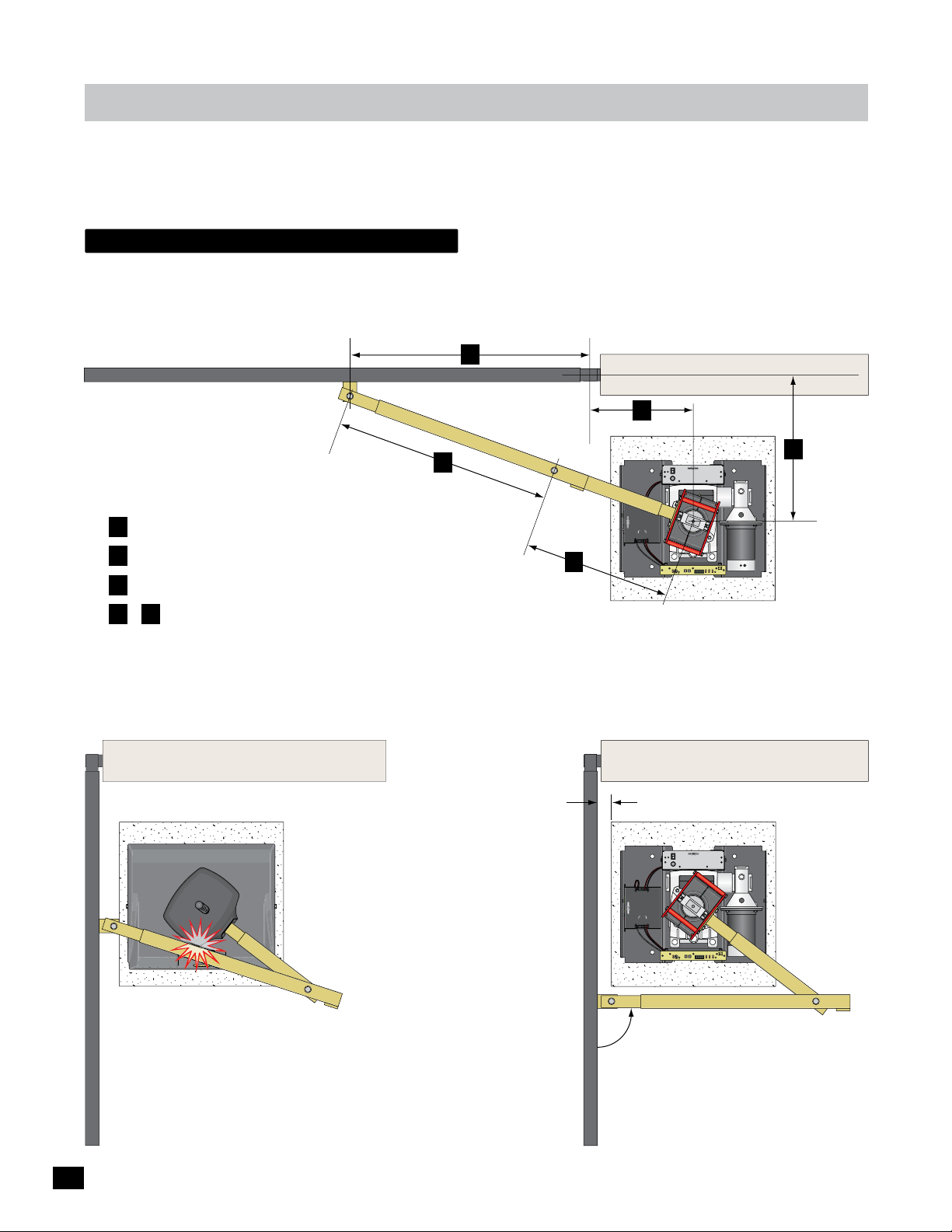
Measurement Guidelines
than “E”
A Should be at least 1/4 the gate length.
B 15” minimum for open gate clearance (2” thick gate).
C Distance “A” minus 17 inches (A - 17 = C).
D & E Arm should be 90° from gate when OPEN
and in the straight “locked” position when CLOSED.
Open Position
Hood
Locked Position
Long Arm
D
Longer
Arm
Pivot
Point
E
Shorter
than “D”
15” Min
Short Arm
www.max.us.com
Made in USA
www.max.us.com
Made in USA
B
AC
IN
POWER/SOLAR
BATTERY
IN
IN
CONTROLLER
TO MOTOR
BATTERY
POWER
PACK
IN
MC-100
Motor Controller
Sensitivity
MOTOR OVERLOAD
ERD
Min
2” Min
AC
IN
POWER/SOLAR
BATTERY
IN
IN
CONTROLLER
TO MOTOR
BATTERY
POWER
PACK
IN
ON
Made in USA
POWER
OFF
FUSE
7 AMP
GND
JOG
JOG
ERD
Photo
Cell
Matrix
Jog LT
Edge 1
Edge 2
Jog RT
RIGHT
LEFT
Edge 1
On Line
Limit SW
Edge 2
Max
INPUTS
On Line
Concrete Pad
ON
Made in USA
POWER
OFF
FUSE
7 AMP
MAX PS-24
POWER SUPPLY
UL
Entrap
Power
Photo
Cell
24” x 24”
MAX PS-24
POWER SUPPLY
C
Operator
Pivot
Point
Outside Property
Inside Property
MC-100
JOG
JOG
GND
ERD
Photo
Cell
DO NOT allow arm to touch
hood in gate’s OPEN position.
TOO MUCH STRESS is put on
the arm in this position during
gate operation.
Motor Controller
MOTOR OVERLOAD
2” Gate Frame
Preferred arm position is 90°
from open gate. See page 10
for arm position options and
connection to gate.
UL
Matrix
Jog LT
Edge 1
Edge 2
Jog RT
RIGHT
LEFT
Sensitivity
Edge 1
Entrap
On Line
Power
ERD
Photo
Limit SW
Edge 2
Max
Min
INPUTS
Cell
On Line
6
Page 9
W
A
R
N
I
N
G
installation
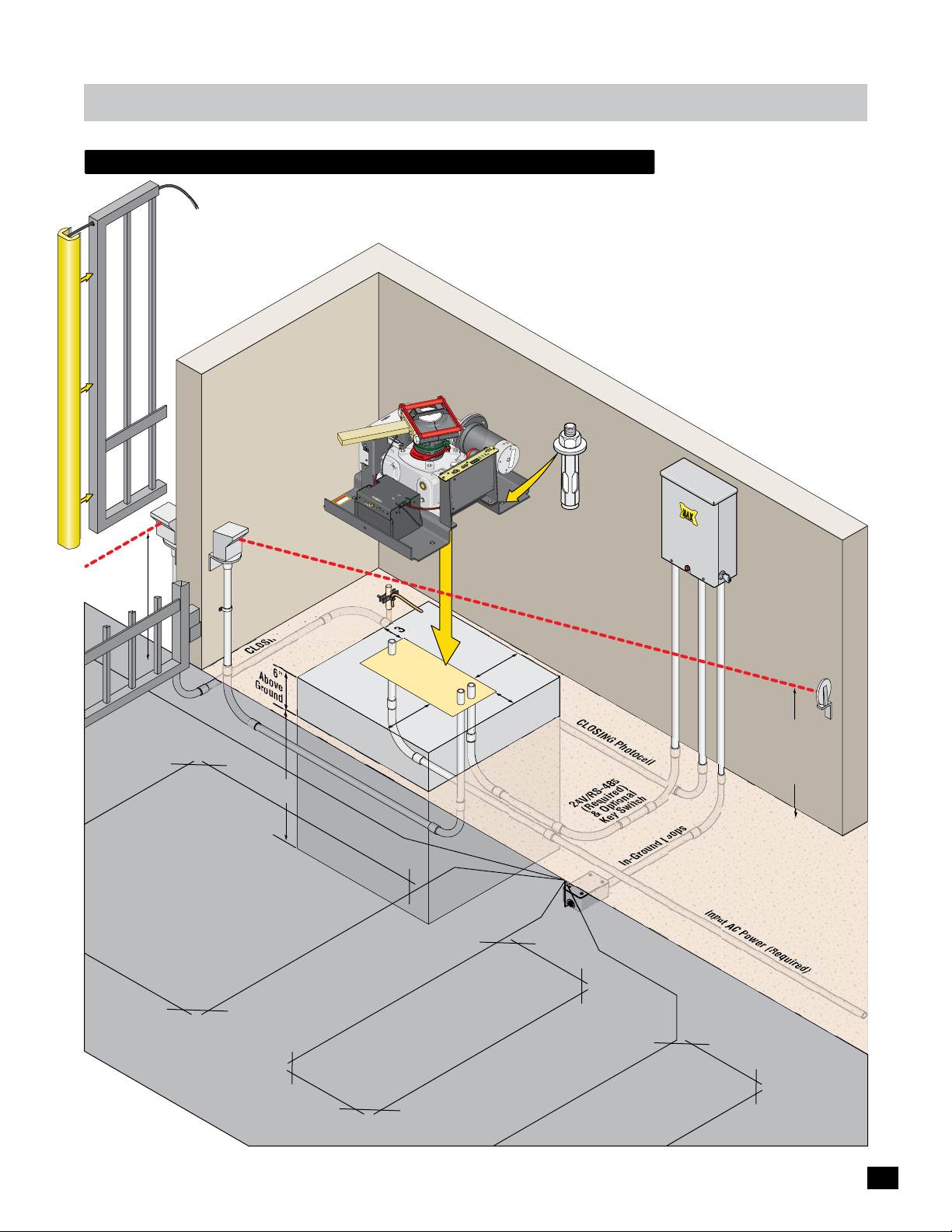
recommended Gate Operator layout
Use for VEHICULAR traffic ONLY. Pedestrians MUST use a separate entrance.
Install appropriate entrapment protection safety devices for the OPENING
direction and CLOSING direction of gate cycling. Install in-ground SAFETY
and CENTER loops. Install a GROUNDING ROD within 10 ft of
operator. An “Optional” EXIT loop can be installed if desired.
4
Y
L
P
P
U
S
X PS-2
A
R
E
M
W
PO
T
I
PEN
A
O
M
US
LI
in
e
d
a
D
M
T
I
M
CLOSE
LI
N
R
O
E
F
OW
OF
P
SE
P
U
F
M
A
7
C
A
N
I
V
5
1
1
o
r
t
n
o
100
C
C-
r
o
M
t
o
P
O
W
E
R
/
S
I
O
N
LA
R
B
A
TTE
RY
I
N
w
w
w
.
m
a
x
.
us
.
c
om
C
O
N
NG
r
o
ssis
f
NI
a
ti
h
d
R
c
c
ro
e
A
t
t
c
d
e
ro
n
W
n
p
u
n
o
g
r
o
n
g
c
i
o
tn
t
h
g
i
l
TR
B
n
M
a
o
t
a
t
e
de
ry
i
V
n
E
o
U
l
t
S
a
A
g
1
e
/2
F
O
N
/
O
MA
F
B
F
a
B
t
X
te
R
a
e
t
r
te
B
p
y
l
r
C
ac
y
B
-
M
e
a
7
o
t
t
d
e
u
r
l
y
T
e
E
S
T
B
a
t
B
t
e
a
ry
t
te
r
y
I
E
N
r
r
o
r
M
TO
M
P
O
O
TO
W
O
R
E
LL
I
R
N
ER
B
A
T
TERY
P
A
CK
r
e
w
Po
L
p
U
a
r
t
n
E
1
e
g
d
to
E
o
l
h
l
x
i
e
P
e
tr
C
n
a
i
l
L
o
M
l
2
t
n
o
e
O
Ce
g
2
d
Ph
e
E
g
1
d
W
e
E
S
g
e
D
d
it
n
i
N
E
L
m
i
G
T
L
n
R
O
g
o
LT
J
g
o
J
S
UT
P
N
I
OG
J
RIGHT
OG
T
J
F
E
L
y
D
x
it
a
R
iv
M
t
E
i
s
y
n
it
e
v
i
t
S
i
s
n
e
S
n
i
D
M
A
O
r
L
D
e
R
l
R
l
E
E
V
O
R
O
T
O
M
1/2
Support
un
R
ATE OPERATOR.
G
Sensing Edge
ount
M
Bar
wiring to
on end of gate.
I
l
lustration no
t
to s
cale
CLOSING
21” High
Photocell Beam
Support Bar
From Safety Loop
Center Loop
CLOSING Ph
6”
Above
G
round
24”
Min
otocell
24”x 24” Pad
OPENING Photocell
Secure gate operator
to concrete pad with
four
leeve anchors
ound
r
G
Rod
s
OPENING Photocell Beam
.
(4) 1/2” x 3” (min)
3.5”
8”x 17”
Conduit
8”
Area
8”
3.5”
CLOSING Photocell
ired)
24V/RS-485
(Requ
& Optional
Key Switch
In-Ground Loop
s
I
nput AC Power (Required)
Beam
Height
Just
Above
Gate
Operato
r
Safety Loop
Exit Loop
(Optional)
7
Page 10
installation
YES
NO
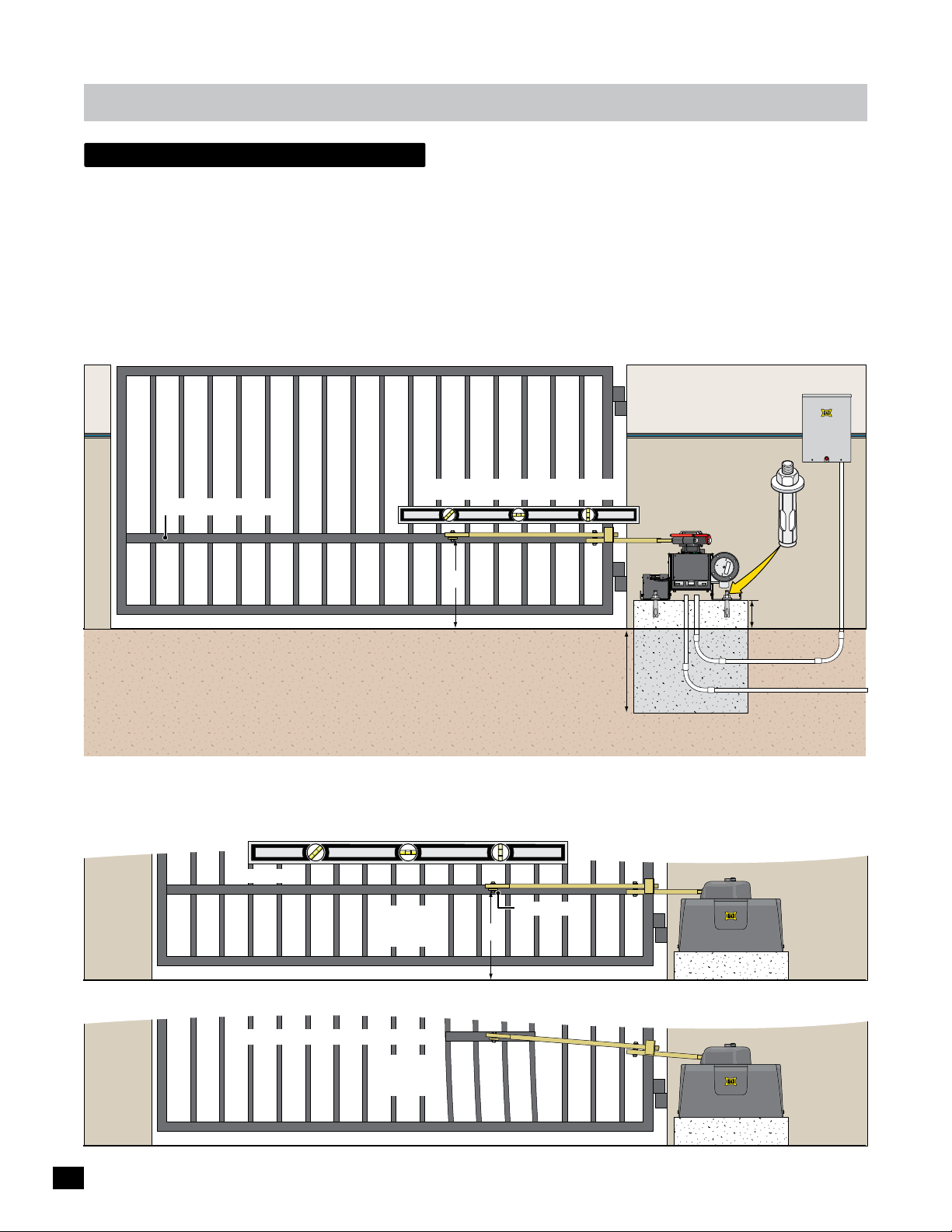
single Gate Operator
The gate must be properly installed and work freely in both directions prior to the installation of the gate operator.
See “Gate Operator Position” on page 6 for operator position.
Conduit Guidelines and Suggestions (See page 7)
• REQUIRED - AC input power wire to the GATE OPERATOR.
• REQUIRED - 24VDC/RS-485/Optional Key Switch wires from CONTROL BOX to GATE OPERATOR.
• OPENING cycle protection device wires (photocells) to the GATE OPERATOR. See page 14.
• CLOSING cycle protection device wires (photocells) to the CONTROL BOX. See page 14.
• In-ground loop wires to the CONTROL BOX. See page 15.
Control Box
Secure gate operator
to concrete pad with
Arm MUST be installed level.
Support Bar: See below
four (4) 1/2” x 3”
(min) sleeve anchors.
Illustration not to scale
1/2
19”
6” Above Ground
Ground Level
“Optional” Input Power Note:
24VDC low voltage power wires can be run
from a remote power supply (MAX Magic
Box) to power the gate operator if desired.
See page 11 for more information.
Check local building
codes in your area for
depth of concrete
before installation.
Concrete Depth Note: The heavier the gate, the deeper the concrete
pad should be. At least two feet recommended for heavier gate.
Concrete Pad
24VDC/RS-485/
Key Switch
Conduit
Input Power
Support Bar
A support bar should be installed at the gate bracket height across the ENTIRE gate to keep the gate pickets from bending.
Support Bar
Gate Bracket
YES
Support Bar Too High & Not Long Enough
19”
NO
8
Page 11
installation
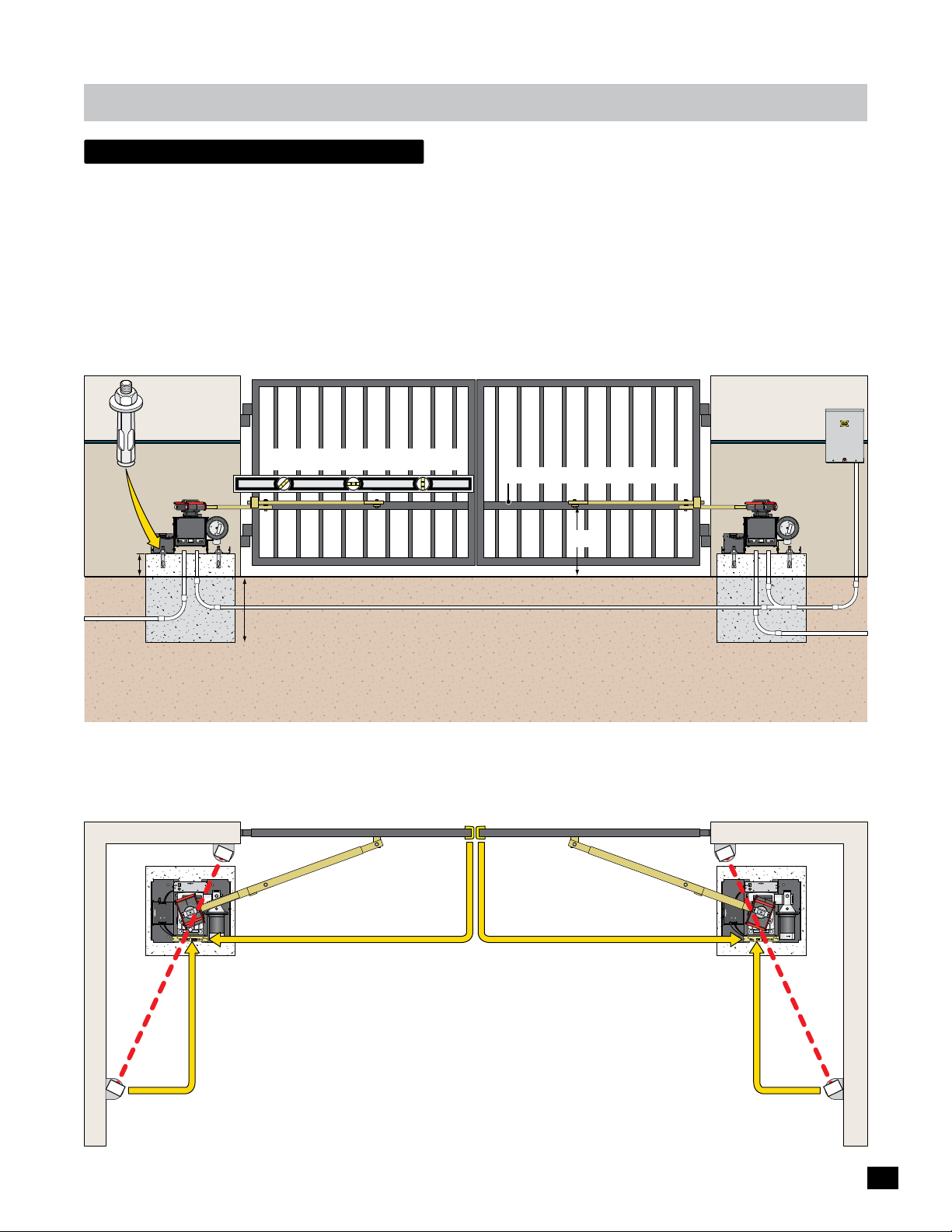
dual Gate Operators
The gates must be properly installed and work freely in both directions prior to the installation of the dual gate operators.
See “Gate Operator Position” on page 6 for operator positions.
Conduit Guidelines and Suggestions
• REQUIRED - Run AC input power wire to EACH gate operator.
• REQUIRED - Run 24VDC/RS-485/Optional Key Switch wires from PRIMARY operator to the CONTROL BOX.
Secure EACH gate
operator to concrete
pad with four (4)
1/2” x 3” (min)
sleeve anchors.
• REQUIRED - Run RS-485/Optional Key Switch wires from SECONDARY operator to the CONTROL BOX.
• Run UL 325 entrapment protection device conduits to EACH Corresponding GATE OPERATOR. (see below & page 14)
• Run the CLOSING cycle protection device conduit (photocells) to the CONTROL BOX. (page 14)
• Run in-ground loop wires to the CONTROL BOX. (page 15)
Illustration not to scale
1/2
Control Box
Arms MUST be installed level.
6” Above
Ground
Input
Power
Secondary
Support Bars: See bottom of page 8.
RS-485/Optional Key Switch to Control Box
Check local building codes in your area for
depth of concrete before installation.
Concrete Depth Note: The heavier the gates, the deeper the concrete
pads should be. At least two feet recommended for heavier gates.
19”
“Optional” Input Power Note:
24VDC low voltage power wires can be run from a remote
power supply (MAX Magic Boxes) to power the gate
operators if desired. See page 11 for more information.
Primary
24VDC/RS-485/
Key Switch
Conduit
Input
Power
Each entrapment protection device MUST be connected to corresponding gate operator.
Outside Property
Sensing Edges
Illustrations not to scale
www.max.us.com
BATTERY
IN
Made in USA
CONTROLLER
BATTERY
PACK
Primary
ON
AC
POWER
OFF
IN
FUSE
7 AMP
POWER/SOLAR
IN
TO MOTOR
POWER
IN
MC-100
ERD
Motor Controller
Sensitivity
MOTOR OVERLOAD
ERD
Max
Min
MAX PS-24
POWER SUPPLY
Made in USA
JOG
JOG
GND
Photo
Cell
UL
Matrix
Jog LT
Edge 1
Edge 2
Jog RT
RIGHT
LEFT
Edge 1
Entrap
On Line
Power
Photo
Limit SW
Edge 2
INPUTS
Cell
On Line
Entrapment Area
Secondary
ON
AC
Made in USA
POWER
OFF
IN
FUSE
7 AMP
www.max.us.com
POWER/SOLAR
BATTERY
IN
IN
Made in USA
CONTROLLER
TO MOTOR
BATTERY
POWER
PACK
IN
MC-100
JOG
JOG
GND
ERD
Motor Controller
Jog LT
Jog RT
RIGHT
LEFT
Sensitivity
MOTOR OVERLOAD
ERD
Max
Min
INPUTS
MAX PS-24
POWER SUPPLY
Photo
Cell
UL
Matrix
Edge 1
Edge 2
Edge 1
Entrap
On Line
Power
Photo
Limit SW
Edge 2
Cell
On Line
to Secondary Operator
to Secondary Operator
to Primary Operator
Entrapment Area
Photocell
(OPENING Cycle
ONLY)
Inside Property
to Primary Operator
Photocell
(OPENING Cycle
ONLY)
9
Page 12
installation
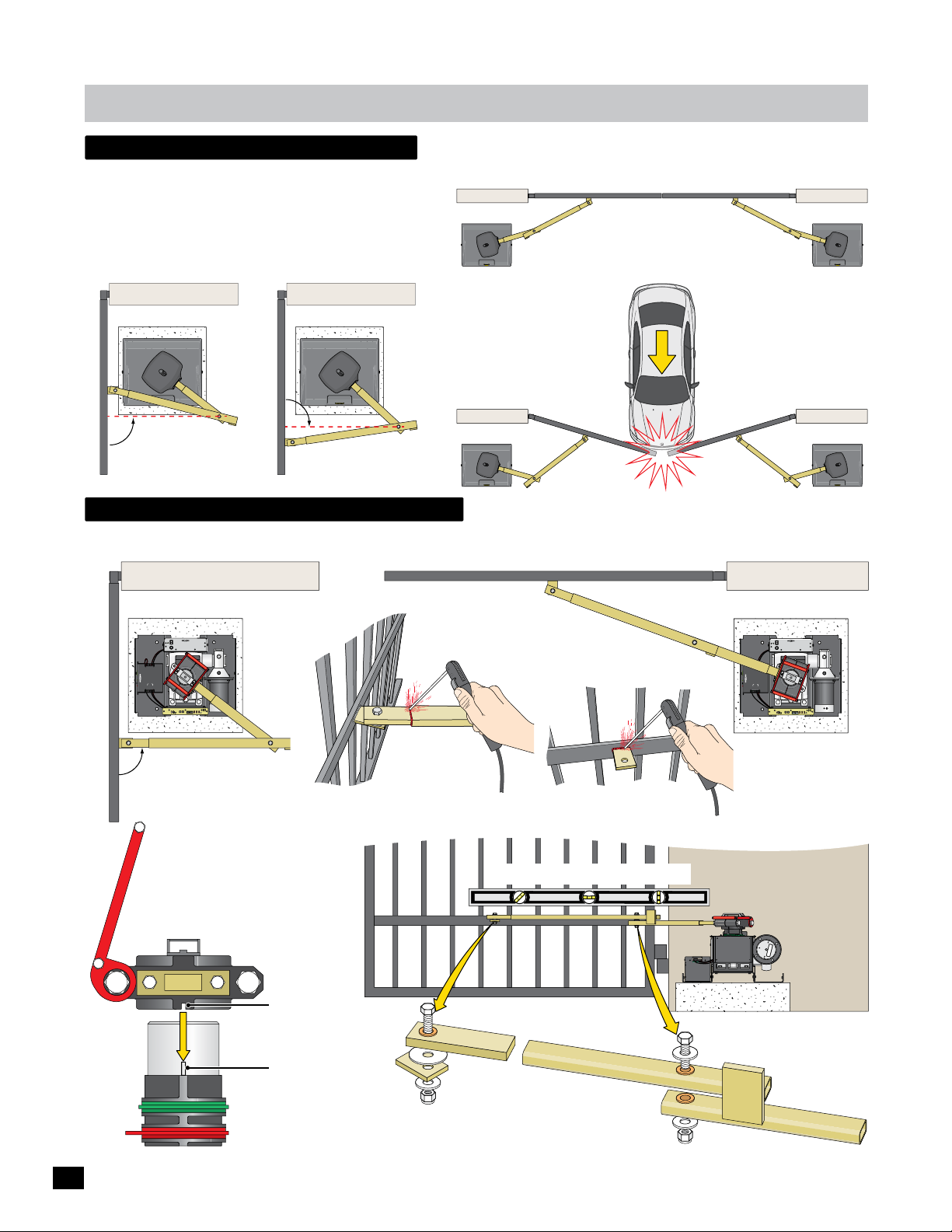
arm position options
Retro-Fit Arm Option
When replacing an existing gate operator, the arm may not be able
to conform to the preferred arm position (90° from gate in open
position). The positions illustrated below can be acceptable as long
as the gate operator cycles smoothly and there is NO gate hesitation
when gate starts cycling in either direction.
90°
Gate in Opened Position
arm connection to gate
After you’re satisfied testing the arm in the FULL OPEN and FULL CLOSED positions, weld gate bracket and arm.
90°
Gate in Opened Position
High Traffic Arm Option
Gates in Closed Position
Arms are NOT installed in LOCKED position.
If a vehicle tries to push gates
open, arms will give when NOT
in the locked position and allow
gates to move without damaging
the gate operators.
The tamper relay will be
activated for a few seconds
which will trigger a camera or
alarm system if desired.
Illustrations not to scale
MAX PS-24
ON
POWER SUPPLY
AC
Made in USA
POWER
OFF
IN
FUSE
7 AMP
www.max.us.com
POWER/SOLAR
BATTERY
IN
IN
Made in USA
CONTROLLER
TO MOTOR
BATTERY
POWER
PACK
IN
MC-100
JOG
JOG
GND
ERD
Photo
Cell
Motor Controller
UL
Matrix
Jog LT
Edge 1
Edge 2
Jog RT
RIGHT
LEFT
Sensitivity
Edge 1
Entrap
On Line
MOTOR OVERLOAD
Power
ERD
Photo
Limit SW
Edge 2
Max
Min
INPUTS
Cell
On Line
Full Open
Preferred arm position
is 90° from open gate.
Re-Attach Arm to Operator:
Limit pin MUST fit into slot in
bottom of release handle clamp
directly under the arm when
re-attaching arm to operator.
Release Handle Clamp
Arm
Slot
Full Closed
Locked Position
weld completely around arm tubing and gate bracket.
Arm MUST be installed level.
MAX PS-24
ON
POWER SUPPLY
AC
Made in USA
POWER
OFF
IN
FUSE
7 AMP
www.max.us.com
POWER/SOLAR
BATTERY
IN
IN
Made in USA
CONTROLLER
TO MOTOR
BATTERY
POWER
PACK
IN
MC-100
GND
JOG
JOG
ERD
Photo
Cell
Motor Controller
UL
Matrix
Jog LT
Edge 1
Edge 2
Jog RT
RIGHT
LEFT
Sensitivity
Edge 1
Entrap
On Line
MOTOR OVERLOAD
Power
ERD
Photo
Limit SW
Edge 2
Max
Min
INPUTS
Cell
On Line
10
Limit Tabs
Limit Pin
Gate Bracket
Assembly
Arm Elbow
Assembly
Page 13
installation
W
A
R
N
I
N
G
H
IGH
VOL
T
AG
E
W
A
R
N
I
N
G
optional remote power supply kit - max magic box
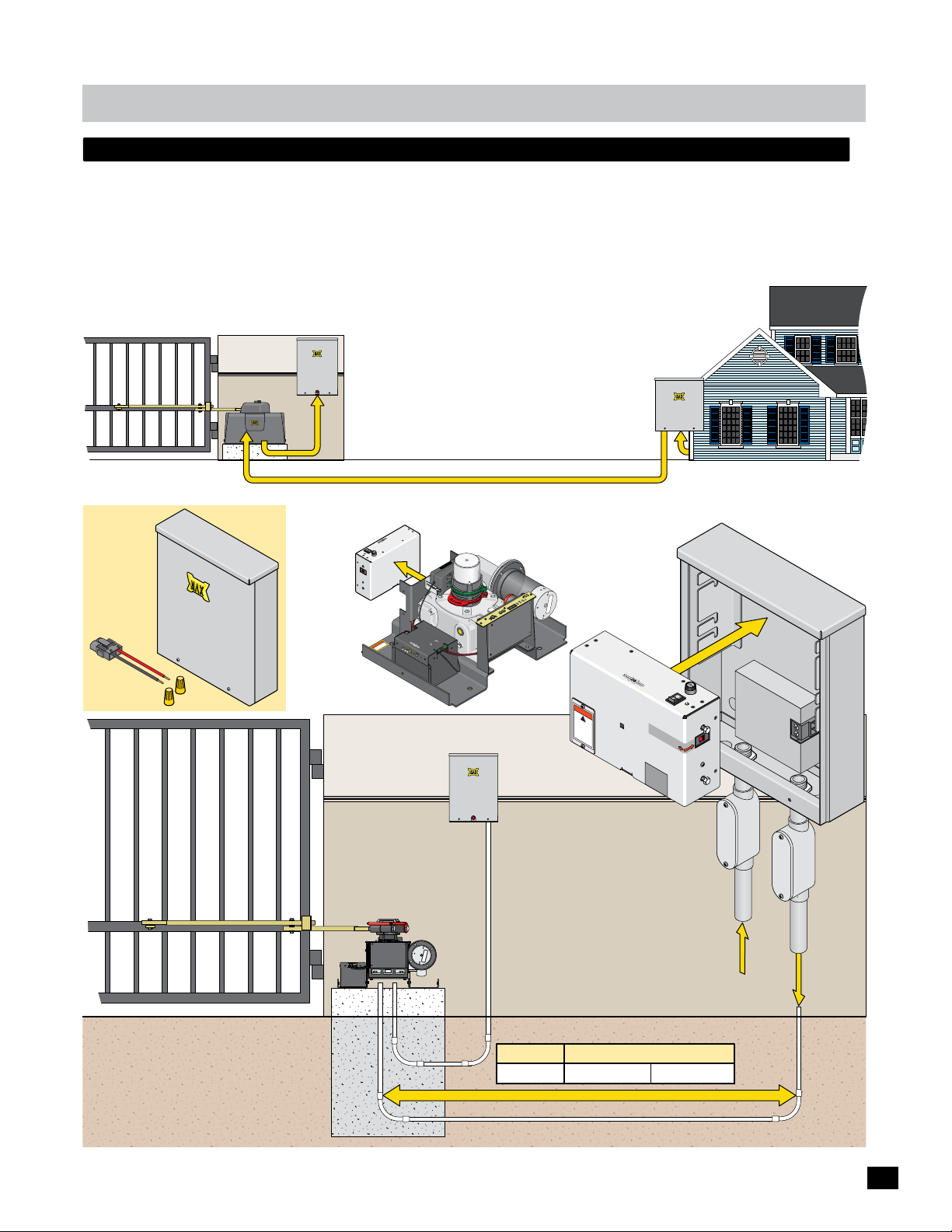
A remote power supply is for installations where it is too costly or difficult to trench a 115/230 VAC power line to the operator
but instead run a low voltage power line to the operator. A MAX Magic Box Kit (sold separately) is required to remotely install
the MAX PS-24 power supply.
Install the MAX Magic Box near the 115 VAC or 230 VAC input AC power source, up to 1000 ft away from gate operator.
Remove MAX PS-24 power supply from gate operator and place in MAX Magic Box. See page 19 for MAX Magic Box wiring
instructions.
NOTE: A MAX Magic Box kit is required for EACH gate operator when using dual gate operators.
Control Box
(Matrix 1)
MAX
Magic
Box Kit
Power/
Connector
S
o
la
r In
W
Nuts
Operator
MAX Magic Box
Near Power Source
Distance - See table below
2-Wires, 24VDC Low Voltage Power
4
Y
-2
L
S
P
P
UP
S
X
ER
MA
OW
P
A
US
n
i
e
d
Ma
ON
F
OWER
F
O
P
E
S
P
U
F
M
A
7
C
A
IN
V
5
1
1
w
w
w
.
m
a
x
.
u
G
s
i
N
r
s
I
n
o
s
f
o
N
a
i
t
h
d
R
c
c
o
r
e
A
t
t
d
o
ec
r
n
W
n
p
u
o
g
r
on
n
g
c
i
n
o
t
t
h
g
i
l
EN
T
I
OP
IM
L
D
E
S
T
I
O
L
IM
C
L
e
g
d
E
ix
r
e
t
a
in
l
L
o
M
l
t
n
Ce
O
ho
2
P
e
g
1
d
e
E
D
dg
N
E
im
G
L
RT
g
o
LT
J
g
o
J
S
UT
NP
I
G
O
J
RIGHT
G
O
J
FT
E
L
y
x
it
a
v
RD
M
ti
E
i
s
y
n
it
e
v
i
t
S
i
s
n
Se
in
D
M
A
O
D
RL
ler
R
l
E
E
o
r
OV
0
t
n
R
o
10
O
-
C
OT
r
o
M
MC
t
o
P
OW
E
R
/
S
I
O
N
L
AR
B
A
T
T
E
R
I
N
Y
s
.
c
o
m
C
O
Ba
M
tter
a
d
e
y
i
V
n
E
olta
U
S
g
A
1/
e
2
F
O
N/
OF
M
B
F
A
a
B
t
X
t
Re
a
e
t
r
t
B
p
y
e
l
r
C
a
y
ce
B
-
M
a
7
o
t
t
d
e
u
r
l
y
T
e
E
S
T
B
a
t
B
t
e
a
r
t
t
y
e
r
y
I
E
N
rro
r
M
T
O
M
N
P
O
T
OW
T
RO
O
R
E
L
I
R
N
L
E
R
B
A
T
T
P
E
A
R
C
Y
K
ire
Control Box
At MAX Magic Box
MAX PS-24
Power Supply
Removed from
r
e
w
o
P
L
p
U
tra
n
E
1
o
t
o
h
ll
e
P
C
2
e
g
d
E
W
e
it S
in
L
n
O
Operator
Y
PL
P
SU
S-24
P
OWER
MAX
WARNIN
G
!
HIG
VO
H
L
TA
disconnec
GE
power
se
t
before
rvicing
u
nit
P
A
S
U
in
e
d
Ma
Se
l
e
ct
115V
w
a
rra
VOID
i
f la
b
R
el is
E
MOVED
(Matrix 1)
At Gate
115/230 VAC Power Source
AMP
SE
7
FU
F
ER
OF
W
PO
ON
IN
AC
Input Vo
A
C
o
230V
r
ltage:
230VAC
nty
E
D
r
e
ut Pow
Inp
Conduit
not suppl
ied
Operator
24 VDC
To
Low Voltage
Operator
Ground Level
Conduit
Concrete Pad
24VDC/RS-485/
Optional Key Switch
Gate Weight Max Wire Distance - Wire Gauge
500 ft - 10AWG2000 lbs 1000 ft - 8AWG
24VDC Low Voltage Power
Input AC
Power
24VDC Low
Vo
ltage
Power
11
Page 14
installation
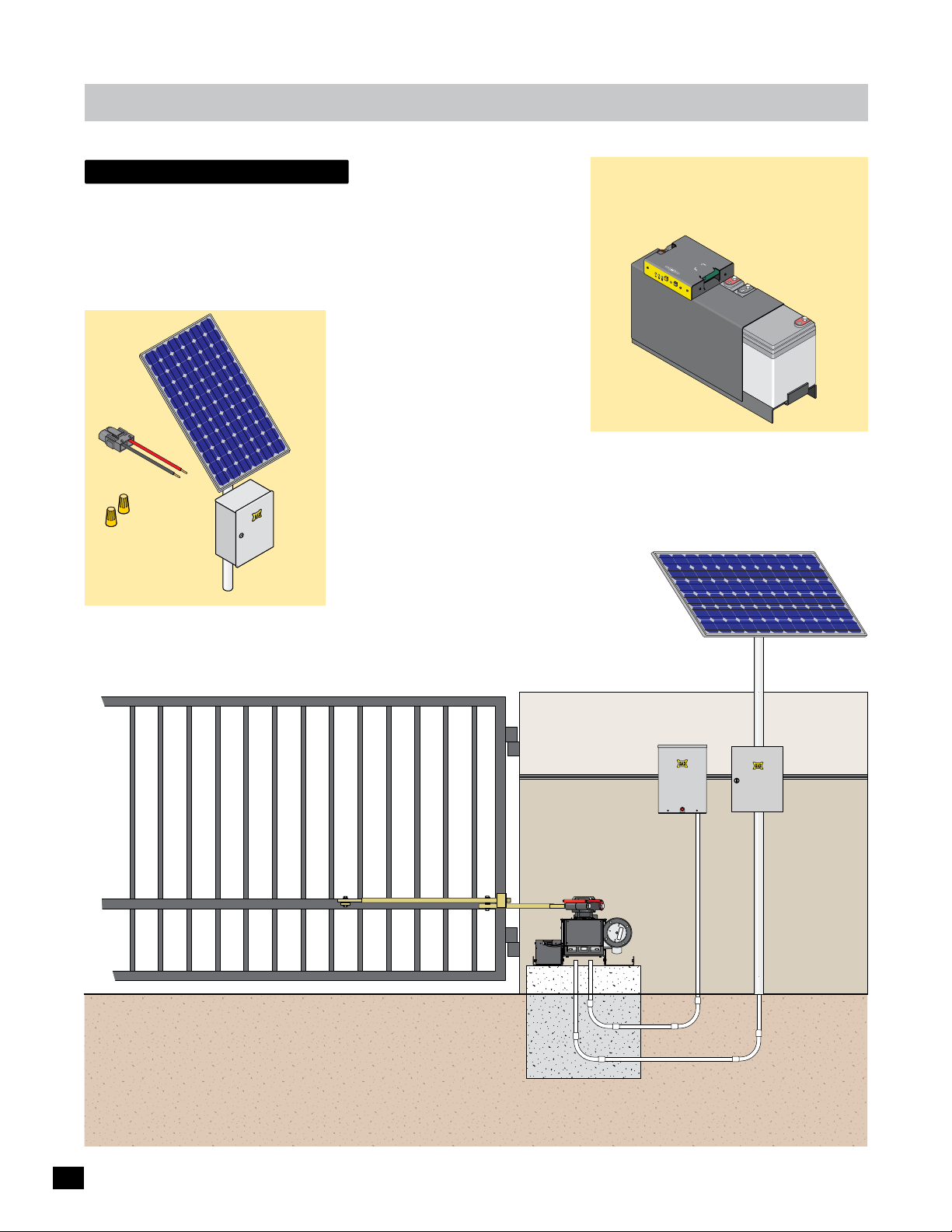
solar - Optional
Refer to Solar application guide.
MAX
Solar
Volt
Solar Panel
24
Power/Solar
Connector
In
Wire
Nut
s
MAX Solar Power Kit: MUST be used
when using solar power. Sold separately.
Power
c
ni
ro
Solar Panel
lect
E
Box
Kit
s
MAX BC-36 Phantom
w
w
w
.
m
ax
.
us
.
c
om
B
M
a
t
t
e
ry
V
E
o
l
t
a
g
1
e
/
2
F
O
N
/
O
B
a
t
t
e
MAX BC-36 Phantom
Battery Module
(36 Amp/Hr)
This OPTIONAL module replaces the MAX
BC-7 Battery Module in the operator. It can
be used when the operator is in a high traffic
cycling area (Approximately 2000 cycles
using only battery power). Sold separately.
Solar Panel: must be mounted facing
south. It must get full sunlight throughout
the day, NO shadow obstructions.
OPTIONAL
Battery Module
PO
WE
R/
B
S
A
TTER
IN
O
LA
I
N
Y
R
TO
C
O
M
N
POW
O
TR
TO
O
R
ER
LL
I
N
ER
ade
B
A
T
TERY
i
n U
P
A
CK
SA
M
FF
A
X
R
e
B
r
P
p
y
B
h
C
lac
a
at
-3
ntom
B
te
e
a
r
6
t
y
t
er
Modu
y
TE
S
l
T
e
B
at
B
t
e
at
r
t
y
er
y
I
Er
N
r
o
r
Operator
Control Box
MAX Solar Kit
Solar Panel
Electronics
Box
12
Page 15
installation
install warning signs
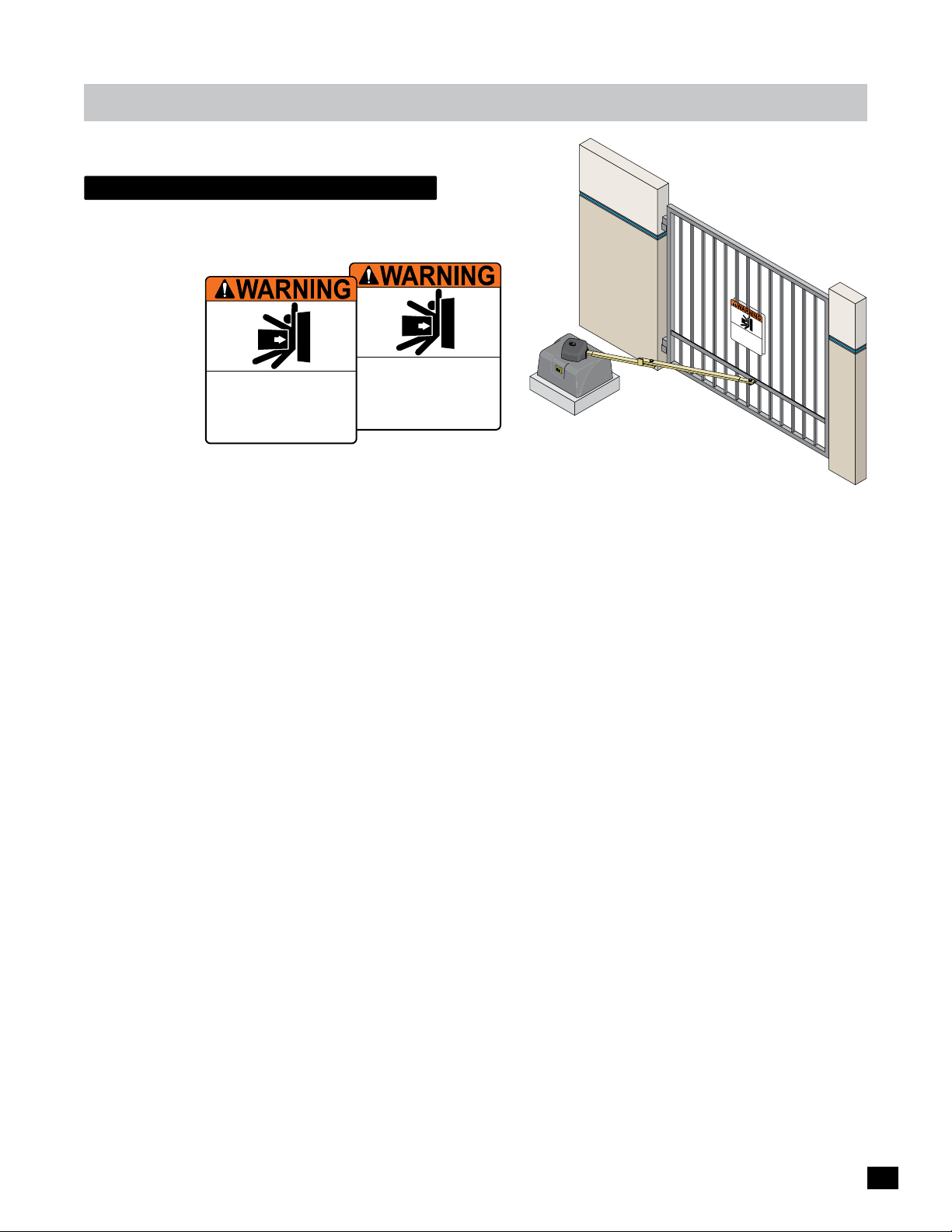
A minimum of two (2) WARNING SIGNS shall be installed,
one on each side of the gate where easily visible.
Moving Gate Can Cause
Moving Gate Can Cause
Serious Injury or Death
KEEP CLEAR! Gate may move at any time
without prior warning.
Do not let children operate the gate or play
in the gate area.
This entrance is for vehicles only.
Pedestrians must use separate entrance.
Serious Injury or Death
KEEP CLEAR! Gate may move at any time
without prior warning.
Do not let children operate the gate or play
in the gate area.
This entrance is for vehicles only.
Pedestrians must use separate entrance.
M
o
vi
Seri
ng
KEE
ou
G
w
P
at
i
t
C
s
ho
L
I
e Can Caus
EAR
u
D
t
n
p
o
j
r
!
n
i
u
o
in
o
r
Ga
t
w
ry or
t
l
h
e
a
t
e
e
t
r
c
n
g
Th
m
h
in
a
il
a
t
g
is
d
e
y
.
r
Pe
e
a
e
m
De
n
r
n
o
e
d
t
o
r
v
a
e
e
a
e
pe
.
s
n
a
t
a
c
r
r
ia
t
e
t
a
an
h
t
n
is
e
s
y
t
f
he
m
o
ti
r
us
me
ve
g
t
a
h
u
t
e
i
s
c
e
l
o
e
r
s
s
p
e
o
l
p
a
n
a
y
l
y
r
a
.
t
e
e
n
t
r
a
nc
e.
13
Page 16

installation
entrapment protection
Install photocells to help protect against entrapment during the OPENING cycle of the gate (secondary entrapment protection).
Install photocells to help protect vehicles during the CLOSING cycle of the gate.
Install sensing edge to help protect vehicles from a moving gate. See pages 17 & 25 for wiring instructions.
Top View
Photocell (CLOSING Cycle)
Beam: 5” or LESS from CLOSED gate.
SENSING EDGE
Mount on end of gate.
Dual Gate Operators NOTE: Run
EACH OPENING Cycle Photocells
conduit to each corresponding
GATE OPERATOR. See page 9.
Gate Closed
Outside Property
Inside Property
SENSING EDGE
Run wire to
GATE OPERATOR.
Run CLOSING Cycle conduit to CONTROL BOX.
Conduit
Gate OpenGate Open
If this dimension is less
than 16”, then secondary
entrapment protection is
REQUIRED in this area.
Illustrations not to scale
Run OPENING Cycle
photocell conduit to
GATE OPERATOR.
Area
Entrapment
Control Box
Side View
14
OPENING Cycle NOTE: Additional OPENING Cycle Photocells
can be installed anywhere needed. Run all additional
OPENING Cycle photocell’s conduit to the GATE OPERATOR.
CLOSING Cycle NOTE: Additional CLOSING Cycle Photocells
can be installed anywhere needed. Run all additional CLOSING
Cycle photocell’s conduit to the CONTROL BOX.
Photocell (CLOSING Cycle)
Beam Height:
21” Normal
27.5” Max.
Photocell
(OPENING Cycle)
Control Box
Photocell (OPENING Cycle)
Install just above gate operator.
Page 17

in-ground loops
T
Install in-ground loops to help
protect vehicles from a moving
gate. See pages 25 & 29 for
wiring instructions.
Outside Property
Illustration not to scale
Inside Property
Side View of
Saw Cut
Sealant
Backer Rod
1 1/2”
Typical
installation
4 ft
Safety
Loop
4 ft
4 ft
Center
Loop
4 ft
Refer to loop maunufacturer’s
instructions to determine specific
loop dimensions.
It is recommended that a
licenced installer perform
this work.
Control Box
Run in-ground
loops conduit to
CONTROL BOX.
Loop Wire
1/4” Saw Cut
Pavement
Safety Loops
Are placed on each side of the gate to prevent
the gate from closing on a vehicle in it’s path.
They will stop or reverse the cycling of the
gate while a vehicle is in or near the gate’s
pathway.
Center Loop
Will ONLY HOLD the gate in the Full Open
Position when a vehicle is on the center loop.
However, it WILL NOT stop or reverse the
gate once it starts to close.
Exit Loop
Automatically opens the gate for exiting
vehicles without having to use a radio
transmitter (remote control). The exit loop
can be placed a minimum of 4 feet away from
the safety loop or far enough away from the
gate so it has opened by the time the vehicle
approaches it.
Inside Property
Saw Cut
4 ft
EXIT LOOP
Lead Wires
SAFETY LOOP
4 ft
Safety
Loop
4 ft min.
Exit
Loop
CENTER LOOP
Safety loops need
to be wired in series.
Outside Property
SAFETY LOOP
4 ft
EXIT
CENTER
SAFETY
Loop lead wires are
twisted 6 twists per
foot minimum inside
conduit.
Matrix 1 Wiring
BATTERY
MATRIX 1
MADE in USA
AUTOMATIC OPEN/CLOSE CONTROLS
EXIT
CENTER
SAFETY
ID
PLUG
12VDC
GND
24VDC
GND
RADIO SIG.
RADIO GND
TAILGATE
MIN
CLOSE TIMER
FIRE DEPT
ANTI
OFF
BACK-UP MODE
LEAVE
OPEN
OFFON
MAX
PARTIAL
OPEN
POSITION
RECORDER
OBD PORT
BLACK BOX
GND
MAX OPEN
GND
PRIMARY
GATE
LEAVE
CLOSED
OPEN
OPEN
OPEN
RIGHT
LEFT
1 TIME
STRIKE
GND
OFF
SAFETYCENTEREXIT
MOTOR MOTION
OPEN
STOP CLOSE
REVERSE SENSITIVITY
MAX
GATE SPEED
MOTOR OVERLOAD
MIN
NO LIMIT SWITCH /
CLAMP SLIPPING
MAX
LIMIT
SWITCH
ON-LINE
MOTOR
ON-LINE
PRIMARY
SEC
GATE
GATE
PHOTOCELL
GND
KEYPAD / RDR
GND
(+)
GND
(-)
(+)
GND
(-)
MAGLOCK
DELAY
MAG
2Sec1.5Sec
LOCK
COM
NC
Tamper NO
GATE
COM
TAMPER
GND
Tamper IN
PHOTOCELL
UL
EDGE 1
ENTRAP
EDGE 2
ID PLUG
ERROR
UL ALARM 12V
ALARM RET
RESET
GND
OPEN
GATE
COM
STATUS
CLOSE
BATTERY
IN USE
POWER
24V
GND
OPEN
STOP
CLOSE
COM
GATE DISABLE
15
Page 18

W
A
R
N
I
N
G
Wiring operator
Check with local building department prior to installing any permanent wiring on this gate operator. Make sure all wiring
complies with local code requirements.
Gate Operator System Overview
1
MAX PS-24 Power Supply: AC power management for the
AC input power to the gate operator. See pages 18, 19 & 23.
Gate Operator
MAX PS
1
USA
in
e
d
Ma
N
O
OWER
FF
O
P
SE
FU
7 AMP
C
A
N
I
V
5
1
1
BA
IN
www.m
a
x
.u
s
.com
s
i
r
B
o
ss
f
ion
ha
ct
c
ct
ote
nd rod
WARNING
u
pr
nne
o
g
o
c
in
gr
o
tn
t
h
lig
M
att
ade
er
y
i
V
E
oltage
1/2
F
O
N
/
O
F
B
F
a
t
R
t
e
ry
B
8
POWE
R/
SOLAR
I
N
T
TER
Y
T
O
CONT
M
PO
OT
6
R
WE
OR
OLL
IN
ER
BATT
n USA
PACK
E
RY
MAX
B
a
e
ttery
B
p
lac
C-
M
e
a
7
o
t
t
d
e
u
r
l
y
T
e
E
S
T
B
a
tt
B
e
a
r
t
tery
y
I
E
N
rro
r
2
-24
LY
PP
U
S
OWER
P
4
3
er
Pow
L
p
U
a
r
t
n
E
1
e
g
o
t
Ed
l
ho
x
i
el
P
r
e
t
C
n
i
l
L
Ma
l
2
to
e
Ce
On
g
2
d
Pho
e
E
g
1
d
W
e
E
S
g
e
t
d
n
i
ND
E
L
mi
i
G
L
n
RT
O
g
LT
Jo
g
Jo
S
7
y
D
it
v
R
i
t
E
si
en
S
AD
O
er
RL
l
RD
l
E
o
r
OVE
t
00
n
OR
-1
T
Co
C
r
o
MO
M
t
o
M
R
T
U
P
IN
G
JO
5
RIGHT
G
T
JO
EF
L
x
a
M
ty
i
v
i
t
i
s
Sen
Min
2
Release Handle Clamp: Manually move the gate when
handle is raised. See page 35.
3
Audible Alarm: Sounds when there is a problem with cycling
the gate. Push the alarm reset button on the control box to
shut off alarm (see below). Alarm can sound every time
operator is cycled using ONLY battery back-up power when
turned ON, See page 32.
4
24VDC Brushless Motor (6 million cycles)
5
MAX MC-100 Motor Controller: Manages UL entrapment
protection devices and operator motor reversing ERD
sensitivity adjustment. See pages 17, 21, 22 & 25.
6
MAX BC-7 Battery Module: Battery Back-Up and DC power
management for the gate operator. See page 17.
7
Limit Tabs: Adjusts the OPEN and CLOSE gate positions.
See page 34.
8
Limit Switch Box: Contains the limit switches. Gate operator
will NOT function when limit switch box is not connected.
See page 34.
Control Box
16
M
A
TRI
X
1
MA
DE
B
in
AT
B
A
USA
T
C
E
K
R
-UP MO
Y
L
L
E
EA
A
DE
VE
V
C
E
LO
OPEN
S
ED
P
RI
O
M
P
AU
EN
A
1
R
GAT
TI
Y
T
M
E
O
E
M
OPE
A
T
N
LE
IC
F
T
A
E
NT
XI
O
O
TA
T
CE
NT
E
R
SA
FE
T
Y
ID
P
LU
G
1
2
V
DC
GN
D
A
2
4
V
DC
G
ND
RADIO SIG.
RADIO GND
P
I
P
E
ILGA
RIGH
N
E
N/
T
T
E
C
O
N
O
FF
MI
N
O
MAX
FF
C
L
OSE
T
IM
E
R
PAR
T
IA
O
PE
N
P
OSITIO
RE
C
ORDER
O
BD
B
P
LA
O
CK
FIRE DEPT
GND
MAX OPEN
GND
MA
LO
GL
S
O
DEL
E
XIT
L
N
RT
B
O
X
STRIKE
GND
C
OF
K
CO
F
AY
.
NTROL
5
Sec
C
2
Sec1
E
NTERE
MA
S
G
LOCK
S
A
FE
T
Y
COM
NC
GATE
T
A
M
Tamp
P
ER
e
r
NO
C
OM
GN
Tam
D
p
er
M
OTOR
MO
OP
E
N
MA
X
S
T
GAT
E
SP
R
MIN
EV
E
E
D
MA
X
LI
M
SW
IT
IT
O
N-LI
MO
KEYPAD / RDR
TO
O
PRI
N-LI
GND
MA
PHOTOCELL
R
G
Y
A
T
GND
E
(+)
GND
(-)
IN
P
UL
HO
T
OC
EL
TI
L
O
ENTR
N
AP
E
DG
E 1
E
DG
E
OP
2
I
D
C
P
L
L
OS
ER
UG
S
E
E
E
RR
SE
NSIT
OR
MOT
I
VI
U
O
T
L
R
Y
A
OV
L
E
A
R
NO
RM
LO
AL
L
AD
I
MI
ARM R
1
C
T
L
2
SWITC
AM
V
P
SL
ET
H
RESET
I
P
/
PI
NG
GN
GAT
D
E
CH
S
T
AT
N
E
US
R
OP
N
E
E
N
C
OM
C
S
E
L
C
OS
G
A
TE
E
(+)
B
AT
GND
T
(-)
E
RY
IN
USE
OPEN
STOP
CLOSE
P
COM
OWE
GATE DISABLE
R
24V
GND
A
Matrix 1: Manages control panel operations. Manages
inputs/outputs, loops and reports problems with gate
operator. See Matrix 1 Section starting on page 24.
B
Alarm Reset Button: Push to shut off alarm and/or reset
Matrix 1. See pages 25, 32 & 38.
C
Optional Electronic Gate Open/Close Key Switch:
Electronically move the gate open or closed by turning
removable key in the key switch if connected to operator(s).
See pages 22 & 40.
B
C
Page 19

Wiring operator
Gate Operator System Overview continued
MAX BC-7 Battery Module
R
POWE
IN
TTER
BA
TO MOTOR
NTROLLER
CO
OLAR
/S
IN
OWER
P
Y
TTER
IN
BA
www.max.us.com
Battery
E1
de in
Ma
4
ltage
Vo
F
/2
ON/OFF
Batte
3
IMPORTANT
connect to
before use
“BATTERY IN”
2
1
MAX MC-100 Motor Controller
MC-100
Motor Controller
MOTOR OVERLOAD
A
ERD
B
Optional Electronic
Open/Close
Key Switch,
See page 22.
OPENING Cycle
Entrapment
Photocells
ONLY.
24V
Power.
24V
PWR 24V -
ERD
Sensitivity
D
Max
Min
Sensitivity
C
Photocell (N.O.)
GND
24V
GND -
RS-485 (-) -
RS-485 (+) -
JOG
JOG
RIGHT
LEFT
E
GND
To Matrix 1
RS-485
ALARM
LIMIT
SWITCH
Jog LT
Jog RT
INPUTS
GND
F
BATTERY
PACK
Edge 1
Edge 2
MOTOR
INPUTS
Photo
G I K
Cell
Matrix
On Line
Limit SW
On Line
H J L
Edge 1
Y
ACK
P
MAX BC-7
Battery
6
USA
ry IN
Batte
Error
T
TES
ry
e
Batte
7
Replac
Battery
ry
5
UL
Edge 1
Entrap
Power
Photo
Edge 2
Cell
M
(N.O.)
GND
Edge 2
(N.O.)
Sensing Edges
POWER IN MOTOR
Modul
GND
1
BATTERY Plug: MUST be plugged into BATTERY IN port Before use.
POWER/SOLAR IN Port: MAX PS-24 Power Supply connection.
2
3
Battery Voltage LEDs: Show amount of battery power available.
LEDs are always ON when using AC power. Test battery button must be
pressed to show battery power when using battery power ONLY.
4
e
ON/OFF Battery Button:
IMPORTANT: Battery power automatically turns ON when MAX PS-24 Power
Supply AC POWER Switch is turned ON.
To turn OFF ALL POWER to operator:
1. Turn OFF AC POWER Switch on MAX PS-24 Power Supply.
Battery power remains ON.
2. WAIT for 15 seconds.
3. Press and HOLD (approx. 5 seconds) the YELLOW ON/OFF BATTERY
button until MAX BC-7 LEDs turn ON, then release button.
LEDs will turn OFF.
5
Replace Battery LED: Replace battery when lit.
6
TEST Battery Button: Press to show amount of battery power available when
using battery power ONLY (Battery voltage LEDs will light respectively).
Battery IN Error LED: Lights when there is a battery connection problem.
7
Make sure battery plug #1 is plugged into BATTERY IN port or there is no
damaged or loose wires.
A
MOTOR OVERLOAD LED: Excessive current being drawn by motor when lit.
B
ERD LED: ERD sensor has been activated when lit.
C
ERD Sensitivity Knob: 16 selectable sensitivity settings of ERD sensor.
D
ERD Sensitivity LED: MAX sensitivity reached when lit.
E
Jog LEFT/RIGHT Buttons:
Push and HOLD buttons accordingly to move the gate (release the button to
stop gate). WARNING: Avoid moving arm while using Jog buttons.
INPUTS:
F
Jog LT/RT: Connects to optional key switch on Control Box.
GND: Low Voltage Common connection.
Edge 1: Connects to a Sensing Edge. Multiple sensing edges can be
connected.
Edge 2: Connects to a second Sensing Edge. Multiple sensing edges can be
connected.
PHOTOCELL: Connects to a UL 325 Standard OPENING Cycle photocell
ONLY. Multiple OPENING Cycle photocells can be connected.
G
Matrix On Line LED: Gate operator is successfully communicating with
Matrix 1 when lit.
H
Limit SW On Line LED: Limit Switch Box is successfully communicating
with MC-100 Motor Controller when lit.
I
Edge 1 LED: Reversing Edge 1 input has been activated when lit.
Edge 2 LED: Reversing Edge 2 input has been activated when lit.
J
UL Entrap LED: Edge1/Edge2/Photocell input has been activated when lit.
K
Photocell LED: Photocell input has been activated when lit.
L
Power LED: Low voltage power is connected when lit.
M
www.max.us.com
DUAL GATE OPERATORS NOTE: Connect EACH photocell/reverse
edge to the corresponding gate operator. See page 9.
17
Page 20

WARNI
N
G
H
I
G
H
VO
LT
A
G
E
Wiring operator
WARNING
W
A
R
N
I
N
G
input ac power
Wire input AC power wire to the MAX PS-24 power supply as shown.
Choose either 115V or 230V setting on input AC power selector switch.
NOTE: AC power wire is required for EACH gate operator
when using dual gate operators.
CAUTION: MAKE SURE CIRCUIT
BREAKER IS OFF BEFORE WIRING
LY
PP
-24
MAX PS
MAX PS-24 Power Supply
POWER SU
DO NOT TURN POWER
ON AT THIS TIME.
A
US
in
e
ad
M
7 AMP
FUSE
F
ER
OF
OW
N
P
O
N
I
AC
7 Amp Fuse
Input AC Power Options
Single Phase 115VAC Only
115VAC
115V
Set to 115V
115 OR 230VAC
Power Wire
Single Phase 230VAC Only
230VAC
230V
Set to 230V
NOTE: Consult city codes for AC line wiring.
Beware of existing underground services.
DANGER
HIGH VOLTAGE!
Line (Black)
Neutral (White)
Chassis (Green)
IMPORTANT NOTE: Make sure there are NO exposed
bare wires at the power terminal connection.
WARN
V
di
power be
s
er
HIGH
O
LTAGE
sc
onnect
vicing uni
ING
!
f
or
e
t
S
el
ect
115VA
Inp
C
or 230V
ut Volta
ge:
A
C
230V
Input AC Power
Selector Switch
CAUTION: If power
selector switch is set
warranty
Power Terminal
VOIDED
if label is
REMOVED
Line (Black)
Neutral (White)
Chassis (Green)
for 115V but input
power is actually 230 V,
7 Amp Fuse will blow.
Operator MUST be Properly GROUNDED
LY
S-24
P
P
UP
X
A
R S
E
M
OW
P
A
S
U
n
i
e
d
a
M
R
ON
E
W
OFF
PO
E
US
F
MP
A
7
C
A
N
I
V
5
1
1
D
ER
nsi
e
S
D
A
O
r
L
D
e
R
l
R
l
E
E
V
o
r
O
t
00
n
R
o
O
-1
T
C
C
r
o
MO
M
t
o
P
O
W
E
R
/
S
IN
O
L
A
R
B
A
T
T
E
RY
IN
w
w
w
.
m
a
x
.
u
s
.
c
o
m
T
O
C
O
M
N
P
O
T
O
T
R
W
O
O
R
LLE
I
s
i
NG
r
s
I
n
o
f
o
as
i
t
h
RN
c
c
od
r
e
A
t
t
c
d
o
n
W
pr
u
nne
o
g
r
o
n
g
c
i
n
o
t
t
h
g
i
l
N
R
Ba
M
t
a
t
B
e
d
A
r
e
y
T
T
i
V
n
E
P
E
ol
A
RY
U
t
CK
S
a
A
ge
1/
2
F
O
N
/
O
M
F
Ba
F
A
Batte
t
X
t
R
e
e
ry
B
p
la
r
C
y
c
Ba
-7
M
e
od
tt
e
u
r
l
y
TE
e
ST
Ba
t
Batte
t
e
r
y
r
y
I
Er
N
r
o
r
M
E
R
OG
T
J
F
E
L
y
t
x
i
a
v
M
ti
ty
i
v
i
t
i
s
n
Se
n
i
M
RT
LT
g
o
J
OG
J
GHT
RI
Ground
er
ow
P
L
p
U
ra
t
n
E
1
Edge
l
hoto
l
x
e
P
tri
C
ne
a
l
Li
o
M
l
2
t
e
o
On
C
h
2
P
e
Edge
g
1
d
W
e
E
S
g
D
t
d
i
ne
i
N
E
L
m
G
Li
On
g
o
J
S
T
U
INP
Conduit Tunnel
Chassis
Proper grounding of this gate operator is a
requirement for LIGHTNING PROTECTION in
lightning prone areas. To be effective, ground
connections should be made with a minimum
12 AWG, 600 volt insulated wire to a ground
point within 10 feet of the gate operator. The
Ground Rod
within 10 ft
of operator
ground point must be at an electrical panel, a metallic cold water pipe that
runs in the earth, or a grounding rod.
Chassis Ground
TWO Chassis
Grounds are located
inside either end of
the conduit tunnel.
WARNING
connect chassis
to ground rod for
lightning protection
18
Page 21

Wiring operator
W
AR
N
I
NG
HI
G
H
VO
LT
AG
E
optional remote power supply kit - max magic box
A MAX Magic Box Kit (sold separately) is required to remotely install the MAX PS-24 Power Supply from the gate operator.
Remove MAX PS-24 power supply from gate operator and install in MAX Magic Box, plug in power supply to PS-24 connector.
Wire input AC power to the MAX PS-24 Power Supply (See page 18 for wiring).
Choose either 115V or 230V setting on input AC power selector switch. Run 24V low voltage wires (not included) from the MAX
Magic Box connection and wire to POWER/SOLAR IN connector (Polarity Matters!). Plug connector into POWER/SOLAR IN
port on the gate operator’s MAX BC-7 battery module.
NOTE: A MAX Magic Box kit is required for EACH gate operator
At MAX Magic Box
when using dual gate operators.
DO NOT TURN POWER
ON AT THIS TIME.
Y
L
PP
SU
ER
W
PO
MAX PS-24
MAX PS-24 Power Supply
removed from operator
WAR
NI
NG
!
HI
G
VOLTAG
H
dis
conn
p
E
owe
ect
s
r
e
b
r
vic
ef
o
in
re
g
uni
t
Connect Input
AC Power wire
(See page 18 for
wiring)
USA
n
i
e
d
Ma
R
E
N
O
Sel
ect I
115VAC or 230V
nput
V
warrant
VOIDED
y
i
f
l
abel i
REMOV
s
Input AC Power
ED
MP
A
7
FUSE
F
F
O
OW
P
IN
AC
230V
ol
ta
ge
:
AC
Input AC Power Selector Switch
CAUTION: If power selector switch is
set for 115V but input power is actually
230 V, 7 Amp Fuse will blow.
PS-24
Connector
Ground
Power In
From
PS-24
Input Power
GND
Pos +
24 VDC
To Operator
Low Voltage
24V
Wires
10 AWG
Minim
MAX Magic Box MUST
be Properly GROUNDED
um
IMPORTANT: MAX Magic Box and Gate
Operator MUST EACH be Properly GROUNDED.
Proper grounding is a requirement for
LIGHTNING PROTECTION in lightning prone
areas. To be effective, ground connections
should be made with a minimum 12 AWG, 600
volt insulated wire to a ground point within 10
feet of the MAX Magic Box and gate operator.
Ground Rod
within 10 ft
of Box
The ground point must be at an electrical panel,
DANGER
HIGH VOLTAGE!
115 VAC or
230 VAC
Input AC Power
NOTE: Consult city codes
for AC line wiring.
CAUTION: MAKE SURE CIRCUIT
BREAKER IS OFF BEFORE WIRING
POWER/SOLAR IN
a metallic cold water pipe that runs in the earth,
or a grounding rod.
NOTE: Beware of existing underground
services.
POWER/SOLAR IN
Connector
(Included in kit).
Port
LA
SO
/
R
E
IN
W
PO
MO
TO
CO
R
Y
R
E
T
IN
BAT
com
s.
u
.
.max
www
Ba
E1/2
R
WE
N
PO
I
Y
R
O
R
ER
T
LE
TT
L
O
ACK
BA
R
P
T
N
e
l
BC-7
u
d
Mo
AX
ry
M
e
t
t
Ba
A
S
U
in
Made
IN
y
r
e
Batt
or
Err
ST
TE
ry
e
t
t
age
Ba
ace
Volt
pl
e
y
F
r
R
ry
e
e
t
t
t
t
a
B
N/OFF
y
O
r
e
t
t
Ba
IMPORTANT NOTE: Maximum Control’s
remote power supply technology does NOT
utilize the battery power from the MAX BC-7 Battery
24V Low Voltage Wire in Conduit
Module during NORMAL gate operation. Battery power is
reserved for back-up power ONLY when an AC power failure
occurs. As a result, battery life is NOT shortened.
This low voltage system can CONTINUOUSLY cycle the gate during
NORMAL gate operation, perfect for high traffic gate applications.
Pos +
Polarity Matters!
GND
MAX BC-7
Battery Module
At Gate Operator
19
Page 22

Wiring operator
W
A
R
N
I
N
G
solar power connection - optional
Refer to Solar application guide.
NOTE: Cover solar panel from
sunlight BEFORE wiring plug to
solar panel to prevent a shock
from occurring.
Max Solar
Power Kit
(Sold separately)
Pos + Red
Polarity Matters!
GND Black
To MAX Solar
Power Kit
Connect to
POWER/SOLAR
IN
STANDARD MAX BC-7 Battery Module
(Approximately 450 cycles using only battery power)
IMPORTANT
connect to
before use
“BATTERY IN”
IN
POWER/SOLAR
IN
BATTERY
R
POWE
IN
TTERY
CK
BA
PA
TO MOTOR
NTROLLER
CO
MAX BC-7
Battery Module
USA
de in
Ma
om
Voltage
.max.us.c
www
F
Battery
1/2
ON/OFF
ry
E
Batte
IN
ry
Batte
Error
T
TES
ry
e
Batte
Replac
Battery
Connect to
POWER/SOLAR
OPTIONAL MAX BC-36 Phantom Battery Module
The OPTIONAL MAX BC-36 Phantom Battery Module is for high
traffic cycling areas (Approximately 2000 cycles using only
battery power). A BC-36 phantom module is needed for each
solar power kit used (One per gate operator when dual gate
operators have been installed).
It replaces the MAX BC-7 Battery module in the operator’s battery
position (see page 43). Operator cables reconnect to the same
plugs on the BC-36 as they did on the BC-7 battery module.
POW
E
R/SOLA
B
A
TTER
IN
I
N
Y
R
w
w
w
.
m
ax
.
us
.
com
TO
C
O
MO
N
P
TR
O
TO
W
O
R
ER
LLER
I
B
a
t
t
e
ry
IN
E
1/
MAX BC-36 Phantom
N
M
ade
B
A
TTER
i
Vo
n U
P
A
l
ta
CK
Y
SA
g
e
2
F
O
N
M
/
O
F
A
B
F
at
X
R
t
e
eplace
B
r
P
y
B
h
C
antom
at
-
B
ter
36
a
t
y
ter
Module
y
TES
T
B
at
B
t
er
at
t
y
e
r
y
I
E
N
r
r
o
r
Battery Module
(36 Amp/Hr)
Y
L
P
P
PS-24
U
S
R
E
MAX
W
O
P
SA
U
in
e
d
a
M
N
O
ER
F
OW
F
O
P
E
S
P
U
F
M
A
7
C
A
N
I
V
5
1
1
O
J
E
L
ty
D
i
ax
v
R
i
M
t
E
i
s
n
e
S
si
n
e
S
n
i
M
AD
O
r
D
RL
le
R
l
E
E
V
o
r
O
0
t
n
o
10
OR
-
T
C
C
O
r
o
M
M
t
o
M
is
NG
s
I
n
for
o
N
as
ti
h
d
R
c
c
ro
A
t
te
c
d
e
ro
n
W
n
n
g p
rou
o
n
g
c
i
tn
to
gh
i
l
er
w
o
P
p
UL
a
r
t
n
E
1
e
dg
o
E
l
hot
l
e
P
rix
e
C
n
at
i
L
o
M
ll
2
t
e
n
o
e
O
C
g
2
Ph
Ed
ge
1
d
W
E
S
ge
e
D
t
d
i
n
i
N
E
L
m
G
T
Li
n
R
O
g
LT
Jo
g
o
J
S
T
U
P
N
I
G
T
O
H
J
RIG
G
T
F
ty
i
v
i
t
20
Page 23

MA
GATE SP
N
CLA
MIN
ID
PLUG
Wiring operator
P
rimary/
Single
Operato
r
Primary/Single
Operator
Secondary
Operator
Bi-Parting Gates
operators to matrix 1
Unscrew MAX MC-100 motor controller from operator
to gain access to RS-485 connector. Schematics on page
38 of manual shows where all plugs are located to
re-install MAX MC-100 motor controller.
4
Y
-2
L
S
P
P
P
U
S
X
A
R
M
POWE
SA
U
n
i
de
a
M
R
ON
WE
F
O
F
O
P
E
S
P
U
F
M
A
7
C
A
N
I
V
5
1
1
24V
GND
BATTERY
MATRIX 1
BACK-UP MODE
LEAVE
MADE in USA
OPEN
AUTOMATIC OPEN/CLOSE CONTROLS
ANTI
TAILGATE
EXIT
OFFON
CENTER
SAFETY
MAX
MIN
OFF
CLOSE TIMER
PARTIAL
OPEN
ID
PLUG
BLACK BOX
PRIMARY
GATE
LEAVE
CLOSED
OPEN
1 TIME
MAX
MAX
GATE SPEED
MIN
PHOTOCELL
MAGLOCK
DELAY
OPEN
OPEN
LEFT
MOTOR MOTION
OPEN
PRIMARY
GATE
(+)
RIGHT
MOTOR
ON-LINE
GND
(-)
SAFETYCENTEREXIT
STOP CLOSE
REVERSE SENSITIVITY
MOTOR OVERLOAD
NO LIMIT SWITCH /
CLAMP SLIPPING
SEC
GATE
(+)
MAG
OFF
2Sec1.5Sec
LOCK
COM
NC
Tamper NO
GATE
COM
TAMPER
GND
Tamper IN
PHOTOCELL
UL
EDGE 1
ENTRAP
EDGE 2
ID PLUG
ERROR
UL ALARM 12V
ALARM RET
RESET
GND
OPEN
GATE
COM
STATUS
CLOSE
BATTERY
IN USE
POWER
24V
GND
CLOSE
COM
GATE DISABLE
GND
(-)
w
w
w
.
m
NO 24V
to Matrix 1
P
OW
E
R
/
S
I
OL
N
A
R
B
AT
T
E
R
I
N
Y
a
x
.
u
s
.
co
m
T
O
C
O
M
N
P
O
T
OW
T
RO
O
R
E
L
I
R
N
L
E
R
B
M
a
t
a
tery
B
d
ATT
e
i
V
n
E
P
E
olt
A
R
US
C
Y
a
K
A
ge
1/
2
F
Re
M
pl
ac
AX
Ba
e
Ba
t
t
t
t
e
BC-7
er
r
y
T
y
ES
Mo
T
B
dul
at
t
e
PWR
e
ry
I
N
Er
r
o
r
RM
A
AL
-) GND -
PWR 24V -
22 AWG Min. 3-conductor
twisted pair, shielded cable
3 Wires to Matrix 1
POWER IN
R
S
OTO
M
NPUT
I
Y
ER
T
K
C
AT
B
PA
T
I
H
LIM
ITC
W
S
Primary/
RS-485 (+) -
RS-485 (
S
er
D
OA
100
ntroll
RL
E
Co
MC-
r
RD
o
R OV
E
O
ot
OT
M
M
TOR
MO
Single
Operator
.max.us.
www
G
JO
T
RIGH
JOG
LEFT
D
ty
i
ER
v
i
it
ns
e
x
Ma
ity
v
iti
s
n
e
S
in
M
m
o
c
Jog LT
L
U
p
r
a
r
t
we
En
1
Po
ge
Ed
x
i
r
at
e
M
n
i
L
Cell
n
Photo
O
o
t
Edge 2
ho
P
l
l
GND
e
Edge 1
2
C
ge
Ed
Jog RT
W
S
t
i
e
m
n
i
Li
L
n
O
S
UT
INP
Connect 24V power wire from the
Primary/Single MAX MC-100 motor
controller to power Matrix 1.
Connect (3) three RS-485 wires from
the MAX MC-100 motor controller to
the Matrix 1 - PRIMARY GATE.
PRIMARY
GATE
24V Wire to Power Matrix 1
(+)
GND
22 AWG Min.
5-conductor
twisted pair,
shielded cable
5 Wires to Matrix 1
ALARM
LIMIT
BATTERY
SWITCH
PACK
GND -
PWR 24V -
RS-485 (-) -
Primary/Single
RS-485 (+) -
Operator
www.max.us.com
LIMIT
SWITCH
ON-LINE
MOTOR
ON-LINE
(-)
MOTOR
INPUTS
SEC
GATE
(+)
GND
(-)
POWER IN MOTOR
ALARM
LIMIT
BATTERY
MOTOR
POWER IN MOTOR
PACK
INPUTS
Connect (3) three RS-485 wires from the
SECONDARY operator’s MAX MC-100 motor
controller to the Matrix 1 - SEC GATE.
DO NOT connect PWR 24V.
NOTE: Primary/Single operator
closest to control box.
GND -
PWR 24V -
RS-485 (-) -
Secondary
RS-485 (+) -
Bi-Parting Gates
www.max.us.com
SWITCH
Operator
5 Wires to Matrix 13 Wires to Matrix 1
Control Box
Matrix 1
Primary/SingleSecondary
21
Page 24

Wiring operator
optional key switch to Operator(s)
The Optional Key Switch is independent of the Matrix 1
and allows the gate to be electronically moved open or
closed by turning the removable key in either direction if
you choose to connect the key switch.
Connect (3) three wires from the Key Switch at the
Control Box to the MAX MC-100 Motor Controller.
NOTE: Each operator is specifically wired to the Optional
Key Switch when installing dual gate operators if you
choose to connect the key switch. (see illustrations).
Secondary
MAX MC-100
Motor Controller
Photo
GND
Edge 1
Jog RT
INPUTS
Edge 2
Jog LT
Cell
Open
(Green)
OUTSIDE Property
INSIDE Property
Gnd
Gnd
Close
(White)
Key
Switch
Terminal
Primary/Single
MAX MC-100
Motor Controller
Photo
GND
Edge 1
Jog LT
Edge 2
Jog RT
INPUTS
PRIMARYSECONDARY
Cell
22 AWG Min.
3-conductor
OPEN LEFT
OPEN RIGHT
twisted pair,
shielded cable
Optional
Open/Close
Key Switch
-
-
4V
2
-
R
GND
-)
(
-
PW
)
+
(
485
-
5
48
A
RS
-
L
ARM
RS
L
IM
SW
IT
IT
C
H
B
A
TTER
P
A
CK
M
C
-1
0
Mo
0
tor
C
on
t
roll
er
MO
TO
R
O
VERLO
E
S
e
ns
AD
E
R
D
R
WER IN MOTO
O
P
R
O
T
S
T
O
U
M
P
N
I
CK
ATTERY
B
PA
T
I
H
M
LI
TC
WI
S
LARM
A
-
)
+
Secondary
-) -
(
485 (
5
-
8
S-
4
GND -
R
4V
2
PWR
RS-
MC-1
M
MAX MC-100
Motor Controller
Sen
D
ller
A
00
o
O
r
L
nt
R
o
VE
C
D
r
O
Min
R
R
E
to
O
o
T
MO
om
Mat
Cell
Photo
On
x.us.c
Edge 2
GND
Edge 1
ma
.
Jog RT
Jog LT
ww
w
RD
ty
E
vi
ti
si
x
a
M
vity
i
sit
n
e
S
mi
Li
On
OG
J
T
H
S
G
T
I
U
R
OG
P
J
N
I
T
EF
L
MAX MC-100
Motor Controller
RD
it
www.max.
iv
ity
J
O
G
L
EF
T
J
O
Ma
G
x
R
I
G
S
ensi
H
T
t
iv
it
y
Jog LT
UL
r
ap
r
we
Ent
1
Po
e
Edg
x
i
r
e
n
Li
o
t
o
h
P
l
l
e
2
C
e
Edg
SW
t
e
n
Li
u
s.com
GND
Jog RT
Edge 1
Edge 2
Photo
Cell
M
O
n
I
N
PUTS
L
i
m
O
n
Primary
at
r
ix
L
i
n
e
Ed
g
e
1
U
L
E
n
tra
p
i
t SW
L
in
E
e
d
ge
2
Ph
o
to
Ce
l
l
Y
M
OTOR
IN
P
UT
S
PO
WER I
N MOTOR
Po
w
er
Primary/Single
MAX MC-100
Motor Controller
OPEN LEFT
Primary/Single Open RIGHT
Secondary
MAX MC-100
Motor Controller
Jog LT
Jog RT
INPUTS
Gnd
Gnd
Close
(White)
Key
Switch
Terminal
Open
(Green)
Photo
Cell
GND
Edge 1
Jog RT
INPUTS
Edge 2
Jog LT
OUTSIDE Property
PRIMARY SECONDARY
INSIDE Property
OPEN RIGHT
Primary/Single Open LEFT
GND
Edge 1
Edge 2
Photo
Cell
22
Control Box
Key Switch
Primary/SingleSecondary
3 Wires to
Key Switch
3 Wires to Key Switch
Page 25

W
A
R
N
IN
G
H
I
G
H
V
O
L
T
A
G
E
Wiring operator
turn on/off operator power
Operator should have Input AC power wired to PS-24, 24V & RS-485 wired between Matrix 1 and MC-100 and “Optional” Key
Switch wired to MC-100. TURN POWER ON. Certain LEDs should normally turn ON accordingly:
PLY
UP
24
S
S-
P
POWER
MAX
MAX PS-24 Power Supply
WARNIN
G
!
HIG
VO
H
LTAGE
disconnec
power before
1
serv
t
icing unit
A
S
U
2
4
IMPOR
NT
TA
c
onnect to
“BATTER
3
Y IN”
befor
e
e us
ID
PLUG
12VDC
GND
24VDC
GND
MAX BC-7
Battery Module
R
A
OL
S
R/
E
N
I
OW
P
Y
ER
T
AT
N
I
B
Turn AC Power Switch ON
Battery power automatically turns ON.
in
e
d
Ma
MATRIX 1
MADE in USA
EXIT
CENTER
SAFETY
RADIO SIG.
ww.
w
E
S
7 AMP
FU
F
R
E
OF
W
PO
ON
N
I
C
A
A
Select Input Voltage:
115VAC or 230
VA
C
warranty
VOIDED
if label is
REMOVE
D
IT
M
LI
WIT
S
RM
LA
A
5 (+)
8
V
GND -
RS-4
RS-485 (-) -
PWR 24
BATTERY
BACK-UP MODE
LEAVE
CLOSED
LEAVE
OPEN
OPEN
1 TIME
AUTOMATIC OPEN/CLOSE CONTROLS
ANTI
TAILGATE
OFFON
MAX
MIN
OFF
CLOSE TIMER
PARTIAL
OPEN
POSITION
RECORDER
MAX
GATE SPEED
OBD PORT
BLACK BOX
MIN
MAX
G
F
PHOTOCELL
GND
STRIKE
GND
KEYPAD / RDR
GND
FIRE DEPT
GND
MAX OPEN
GND
RADIO GND
OWER
P
IN
Y
R
OR
R
OT
K
C
ATTE
A
B
P
TO M
ONTROLLE
C
A
US
n
i
ade
M
E
om
c
.
s
.u
ax
m
T
te
t
age
a
e
lt
B
c
la
Vo
y
F
y
Rep
r
er
te
t
F
att
a
2
B
B
OF
1/
/
y
ON
r
E
te
t
a
B
J
MAX PS-24 Power Supply
A
AC IN LED:
Normal - Turns ON.
230V
OR
OT
M
INP
Y
TER
K
T
C
A
B
PA
H
C
MAX MC-100
Motor Controller
ller
o
r
nt
MC-100
R
tor Co
O
OT
Mo
M
PRIMARY
GATE
OPEN
OPEN
RIGHT
LEFT
MOTOR MOTION
OPEN
STOP CLOSE
REVERSE SENSITIVITY
MOTOR OVERLOAD
NO LIMIT SWITCH /
LIMIT
SWITCH
ON-LINE
MOTOR
ON-LINE
PRIMARY
GATE
(+)
GND
(-)
-7
BC
u
Mod
y
r
MAX
te
t
a
B
K
N
I
y
r
te
t
a
r
B
o
r
r
E
T
S
y
r
Error - Not ON. Check AC power.
7 Amp Fuse blown. Replace fuse.
Input AC selector switch MUST be set to CORRECT input AC power.
OTOR
NM
I
POWER
UTS
www.max.us.com
G
JO
G
RIGHT
JO
LEFT
ty
i
ERD
v
nsiti
Se
x
Ma
vity
i
it
ns
Se
RLOAD
VE
n
O
Mi
RD
E
H
MAGLOCK
DELAY
MAG
2Sec1.5Sec
OFF
LOCK
COM
Tamper NO
GATE
SAFETYCENTEREXIT
CLAMP SLIPPING
SEC
GATE
(+)
GND
le
(-)
COM
TAMPER
Tamper IN
PHOTOCELL
UL
EDGE 1
ENTRAP
EDGE 2
ID PLUG
ERROR
UL ALARM 12V
ALARM RET
RESET
GATE
STATUS
CLOSE
BATTERY
I
IN USE
POWER
24V
GND
OPEN
STOP
CLOSE
COM
GATE DISABLE
E
MAX BC-7 Battery Module
J
BATTERY VOLTAGE LEDs:
Normal - 3 LEDs turn ON - Fully charged batteries.
Batteries need charging - LEDs will turn on in sequence until batteries are
fully charged. Batteries are NOT necessary when AC power is available.
K
BATTERY IN ERROR LED:
Normal - Not ON.
Error - Turns ON. Battery not plugged in to BATTERY IN port.
DO NOT CYCLE GATE OPERATOR
AT THIS TIME
MAX MC-100 Motor Controller
POWER LED:
B
Normal - Turns ON.
Error - Not ON. Check POWER IN plug on back of MC-100.
C
Matrix On-Line LED:
UL
r
C
Entrap
Powe
Edge 1
Matrix
Cell
Photo
On Line
o
Edge 2
Phot
GND
Jog RT
Jog LT
INPUT
B
Edge 1
Cell
Edge 2
Limit SW
On Line
S
D
Matrix 1
E
NC
GND
GND
OPEN
COM
F
G
H
I
Normal - Turns ON.
Error - Not ON. Check RS-485 wiring to Matrix 1.
D
Limit SW On-Line LED:
Normal - Turns ON.
Error - Not ON. Check LIMIT SWITCH plug.
POWER LED:
Normal - Turns ON.
Error - Not ON. Check 24V wiring from MC-100 Primary/Single.
Motor On-Line PRIMARY LED:
Normal - Turns ON.
Error - Not ON. Check RS-485 wiring to Primary/Single MC-100.
Limit SW On-Line PRIMARY LED:
Normal - Turns ON.
PRIMARY GATE OPEN RIGHT OPEN LEFT LED:
Normal - Turns ON either LED according to switch setting.
Error - Not ON. Check LIMIT SWITCH plug on back of MC-100.
BATTERY IN USE LED:
Normal - Not ON.
Error - Flashes on and off. Battery not plugged in to BATTERY IN port on
BC-7 Battery Module.
To turn OFF ALL POWER:
1. Turn OFF AC POWER Switch on MAX PS-24 Power Supply. Battery power remains ON.
2. WAIT for 15 seconds.
3. Press and HOLD (approx. 5 seconds) the YELLOW ON/OFF BATTERY button
until MAX BC-7 LEDs turn ON, then release button. LEDs will turn OFF.
23
Page 26

matrix 1 Overview
Battery Back-Up Mode - Page 26
1
Primary Gate - Page 26
2
Maglock - Page 29
3
Gate Tamper - Page 30
4
In-Ground Loop Connection - Page 29
5
Anti Tailgate - Page 27
6
Plug-In Loop Detectors - Page 29
7
UL Entrapment LEDs - Page 30
8
Close Timer - Page 26
9
ID Plug & ID Plug Error LED - Page 30
10
UL Alarm/Alarm Reset Button - Page 32
11
Radio Power - Page 28
12
Partial Open - Page 31
13
OBD Port Black Box - Page 28
14
Selectable Gate Speed Control - Page 26
15
16
ERD & Motor Overload LEDs - Page 33
17
Gate Status - Page 32
18
Radio Relay - Page 28
19
Emergency Vehicle/Max Open Inputs - Page 30
20
Normal Opening Devices - Page 25
21
Close Photocell - Page 32
22
Operators Communication LEDs - Page 21 & 33
OPEN/STOP/CLOSE Connection - Page 32
23
24
Gate Disable - Page 31
25
Matrix 1 Power - Page 21 & 33
26
Battery in Use - Page 33
matrix 1
MATRIX 1
MATRIX 1
MADE in USA
EXIT
CENTER
5
SAFETY
ID
10
PLUG
12VDC
GND
12
24VDC
GND
RADIO SIG.
18
BATTERY
BACK-UP MODE
LEAVE
1
CLOSED
LEAVE
OPEN
OPEN
1 TIME
AUTOMATIC OPEN/CLOSE CONTROLS
ANTI
TAILGATE
6
OFFON
9
MIN
MAX
OFF
CLOSE TIMER
PARTIAL
OPEN
13
POSITION
FIRE DEPT
RADIO GND
RECORDER
OBD PORT
BLACK BOX
14
GND
MAX OPEN
GND
STRIKE
GND
MAX
MIN
MAX
KEYPAD / RDR
GND
GATE SPEED
PHOTOCELL
PRIMARY
GATE
OPEN
LEFT
7
MOTOR MOTION
OPEN
15
PRIMARY
GATE
GND
(+)
2
OPEN
RIGHT
STOP CLOSE
REVERSE SENSITIVITY
MOTOR OVERLOAD
NO LIMIT SWITCH /
LIMIT
SWITCH
ON-LINE
MOTOR
ON-LINE
GND
(-)
2220 2119
SAFETYCENTEREXIT
CLAMP SLIPPING
SEC
GATE
(+)
GND
(-)
MAGLOCK
DELAY
OFF
OPEN
16
STOP
TAMPER
CLOSE
MAG
2Sec1.5Sec
LOCK
3
GATE
8
UL
ENTRAP
GATE
STATUS
COM
GATE DISABLE
2423 25
COM
Tamper NO
COM
4
GND
Tamper IN
PHOTOCELL
EDGE 1
EDGE 2
ID PLUG
ERROR
10
UL ALARM 12V
ALARM RET
RESET
GND
OPEN
17
CLOSE
BATTERY
IN USE
POWER
24V
GND
NC
11
COM
26
matrix 1
Gate in Motion Alarms - Page 28
A
Single Pass Anti-Tailgate - Page 27
B
Radio Safety Pause - Page 28
C
ON
Mode 0
OFF
A
ON
Mode 1
OFF
Gate in Motion Alarms
MATRIX 1 Back
OFF
B
When turned “ON”; After a vehicle clears the Safety Loop, a closing
ON
gate will PAUSE if a second vehicle attempts to tailgate. The second
vehicle must then back off the safety loop for the gate to continue
closing. A new radio signal will open the gate.
ON
Motion Alarm sounds before gate moves and continues until gate stops
Mode 0
OFF
Motion Alarms OFF
Beeper Alert sounds in Battery Back-Up Mode while gate is in motion
ON
Mode 1
Beeper Alert OFF
OFF
Radio Safety Pause
When turned "ON" a moving gate will pause if a radio input signal is
received. The next radio signal causes the gate to continue in the
original direction.
Single Pass Anti-Tailgate
OFF ON
C
MADE IN USAWWW.Max.US.com
24
Page 27

wiring Overview
Safety
In-Ground Loops
See page 29.
Safety
Loop
Exit
Loop
Normal
Opening
Device
Loo
Center
Loop
p
Safety Loops Wired in series
ID Plug:
See page 30
250 mA Max.
12 VDC
OR 24 VDC
Radio Power
3-Wire
Radio
PLUG
ID
12VDC
GND
24VDC
GND
matrix 1
Loop Detectors
See page 29.
MATRIX 1
MADE in USA
EXIT
CENTER
SAFETY
RADIO SIG.
BATTERY
BACK-UP MODE
LEAVE
CLOSED
LEAVE
OPEN
OPEN
1 TIME
AUTOMATIC OPEN/CLOSE CONTROLS
ANTI
TAILGATE
OFFON
MIN
MAX
OFF
CLOSE TIMER
PARTIAL
OPEN
POSITION
RECORDER
OBD PORT
BLACK BOX
STRIKE
GND
GND
MAX OPEN
GND
KEYPAD / RDR
FIRE DEPT
RADIO GND
MAX
MIN
MAX
PHOTOCELL
GND
EDI
Tel: 480.9
DE
F
5 =
O
=
Inc
=
D
L
ED
P
OWER
O
N
=
OFF=
D
ETEC
ON =
O
FF= N
2
Hz
L
oop
1 Fl
ash
2
F
las
3
F
lash
Both L
Cu
r
PWR L
Prev
PRIMARY
GATE
OPEN
LEFT
MOTOR MOTION
OPEN
GATE SPEED
PRIMARY
GATE
GND
(+)
ON
68.640
LECTOMETER
ptimum Sens
7
1
r
ease
ecrease Sens.
SW1
Sens.
.
O
N
I
O
NDICATO
O
N
O
O
FF
R
N
S
O
or
FF
mal Powe
N
o Po
SW
3
w
T
O
er
N
r
D
O
etect
FF
= Fail
o
SW4
D
Fla
etec
s
h
O
=
N
t
De
Faul
l
ay
O
N
T
t
im
OFF
= Open
ing
h
e
ON
s=
O
FF
Sho
Loop
e
O
s
rted Loo
SW
=
25%
6
O
ch
of
N
p
E
a
In
D’
n
g
OFF
d
s
e
u
Fl
ren
c
ta
a
=
t
s
nc
L
SW
hi
oo
e
n
ED
g
7
p
=
O
F
F
a
N
la
ul
io
shin
t
u
O
s
FF
L
g
o
=
op
=
SW
Fa
u
8
lt
O
N
O
FF
=
OPEN
RIGHT
STOP CLOSE
REVERSE SENSITIVITY
LIMIT
SWITCH
ON-LINE
MOTOR
ON-LINE
GND
(-)
O
N
1
2
34
5
2
3
4
5
S
W
6
2
7
N
Frequen
=
8
FF
Low
c
ON
= Medium
y
= Medi
O
FF
-Low
= Hi
um-High
gh
= Fail
Se
c
ure
Sa
S
W
f
e
5
O
N
O
= Pu
ut
OFF
p
ut
B
l
se
= B sam
on Entr
= Pu
FF
e
l
y
as
se
= Loop
A
on Ex
= 2 Second Delay
Faul
it
t
N
o
D
elay
=
N
or
mal
I
nfini
Presenc
te Presence
= Sensitivit
e
N
o Sensiti
y
Boos
v
t
i
ty Boos
t
SAFETYCENTEREXIT
MOTOR OVERLOAD
NO LIMIT SWITCH /
CLAMP SLIPPING
SEC
GATE
(+)
OPTIONS
6
7
8
0
LMA180
S
SEN
ETER
M
LECTO
F
DE
S
SEN
R
E
OW
P
T
I
DETEC
ED
T
RESE
MAGLOCK
DELAY
OFF
TAMPER
STATUS
OPEN
STOP
CLOSE
GND
(-)
Maglock Connection:
MAG
2Sec1.5Sec
LOCK
Tamper NO
GATE
Tamper IN
PHOTOCELL
UL
EDGE 1
ENTRAP
EDGE 2
ID PLUG
ERROR
UL ALARM 12V
ALARM RET
RESET
GATE
BATTERY
POWER
24V
GND
COM
GATE DISABLE
Must be specifically
wired,
See page 29.
COM
NC
COM
GND
UL LED Indicators ONLY.
See page 30.
ID Plug Error LED. See page 30
GND
OPEN
COM
CLOSE
IN USE
Control Box
Alarm Reset Button
Power
Gate Tamper:
See page 30.
See page 32
Gate Status:
See page 32.
Security
Camera
Motion
Sensor
Strobe Light
ATE OPE
G
GATE CLOSED
matrix 1
N
24V Power for Matrix 1 from
Primary/Single operator ONLY. See pages 17 & 33.
o
4-Wire
Radi
Key Switch
12 VDC OR 24 VDC
Photocell Power
Radio Receivers
See page 28.
Emergency/Security Devices
Emergency OPEN
(Overrides gate
disable switch)
See page 30.
MAX OPEN
(Overrides gate
disable switch)
Normal Opening Devices
Telephone Entry
Card Reader
Keypad
CLOSE Cycle Photocells ONLY.
See page 14 & 32.
IS NOT UL 325 entrapment protection type B1.
(N.O.)
(N.O.)
Dry Contact (N.O.)
Dry Contact
(N.O.)
Separate power
for Devices.
Photocell (N.O.)
Gate Disable
N
O
Switch or Timer
F
F
O
See page 31.
3-Button
Station
See page 32.
Normal
Opening
Device
MC-100 Motor Controller See page 17
MC-100
Motor Controller
MOTOR OVERLOAD
ERD
Sensitivity
ERD
Min
JOG
JOG
RIGHT
LEFT
Max
Sensitivity
Optional Key Switch
See page 22.
Control
Box
24V
RS-485
Primary/Single Operator
Connect to MC-100 motor controller.
See pages 21 & 33.
Security Device
Secondary Operator
Connect to MC-100
See pages 21 & 33.
Stop
SS
PRE
ESET
to R
Additional
RS-485
Reset Button
See page 32.
Security Device
GND
Photo
Cell
UL
Matrix
Jog LT
Edge 1
Edge 2
Jog RT
INPUTS
On Line
Limit SW
On Line
Edge 1
Entrap
Power
Photo
Edge 2
Cell
Photo Cell (N.O.)
GND
OPEN Cycle
Edge 1
Photocells
(N.O.)
GND
Edge 2
(N.O.)
GND
Reverse Edges: See page 14.
Connect to Edge 1 and/or Edge 2.
UL 325 entrapment protection type B2.
Optional
Control Box
Key Switch
See page 22.
UL 325
Entrapment
Protection
Type B1
See
page 14.
ONLY.
25
Page 28

matrix 1
CENTER
EXIT
CLOSE
ID
PLUG
C
R
S
Y
PRIMARY
LEAVE
OPEN
L
MADE in USA
OPEN
MAXM
OFF
MOTOR
SWITCH
O
O
N
O
G
ID
PLUG
EXIT
ANTI
TAILGATE
CLOSE TIME
I
PLUG
OFF
ON
C
GND
C
GND
OFF
S
Y
N
1 TIME
AUT
primary gate - open left / open right
Set the Primary/single gate operator with Primary Gate setting. Secondary operator will
automatically be set to the opposite opening direction as the primary gate operator when
using dual gates.
SECONDARY
OUTSIDE Property
PRIMARY
INSIDE Property
PRIMARY
GATE
OPEN
LEFT
OPEN
RIGHT
OPEN RIGHTOPEN LEFT
gate close timer
The Close Timer has 16 selectable settings for automatic gate close time.
Knob at OFF position: close timer OFF.
1st click clockwise - Knob at MIN position: 1/2 sec...
2nd click clockwise: 1 sec...
3rd click: 4 sec...
4th click: 8 sec...
5th click: 12 sec (4 sec increments for each successive click up to 60 sec MAX)
NOTE: 1/2 sec MIN position is recommended for High Traffic areas.
LED turns ON for
MAX setting ONLY
MAXMIN
OFF
CLOSE TIMER
MATRIX 1
BATTERY
BACK-UP MODE
CLOSED
CLOSED
LEAVE
MADE in USA
OPEN
AUTOMATIC OPEN/CLOSE CONTROLS
ANTI
TAILGATE
EXIT
CENTER
ENTE
SAFETY
AFET
CLOSE TIMER
PARTIAL
OPEN
ID
PLUG
POSITION
RECORDER
12VDC
GND
OBD PORT
BLACK BOX
24VDC
GND
FIRE DEPT
GND
MAX OPEN
GND
RADIO SIG.
RADIO GND
BATTERY
MATRIX 1
BACK-UP MODE
CLOSED
LEAVE
MADE in USA
OPEN
AUTOMATIC OPEN/CLOSE CONTROLS
ANTI
TAILGATE
EXIT
OFFON
CENTER
SAFETY
MIN
MAX
OFF
CLOSE TIMER
PARTIAL
OPEN
ID
PLUG
POSITION
RECORDER
12VDC
GND
OBD PORT
BLACK BOX
24VDC
GND
FIRE DEPT
GND
MAX OPEN
GND
RADIO SIG.
RADIO GND
PRIMARY
GATE
EAVE
LEAVE
OPEN
1 TIME
STRIKE
GND
KEYPAD / RDR
LEAVE
OPEN
1 TIME
STRIKE
GND
KEYPAD / RDR
MAGLOCK
DELAY
OPEN
OPEN
LEFT
MOTOR MOTION
OPEN
MAX
GATE SPEED
MIN
MAX
PRIMARY
GATE
PHOTOCELL
GND
GND
(+)
GND
PRIMARY
GATE
OPEN
LEFT
MOTOR MOTION
OPEN
MAX
GATE SPEED
MIN
MAX
PRIMARY
GATE
PHOTOCELL
GND
GND
(+)
GND
RIGHT
STOP CLOSE
REVERSE SENSITIVITY
MOTOR OVERLOAD
NO LIMIT SWITCH /
LIMIT
SWITCH
ON-LINE
MOTOR
ON-LINE
(-)
OPEN
RIGHT
STOP CLOSE
REVERSE SENSITIVITY
MOTOR OVERLOAD
NO LIMIT SWITCH /
LIMIT
SWITCH
ON-LINE
MOTOR
ON-LINE
(-)
SAFETYCENTEREXIT
CLAMP SLIPPING
SEC
GATE
(+)
SAFETYCENTEREXIT
CLAMP SLIPPING
SEC
GATE
(+)
MAG
OFF
2Sec1.5Sec
LOCK
COM
NC
Tamper NO
GATE
COM
TAMPER
GND
Tamper IN
PHOTOCELL
UL
EDGE 1
ENTRAP
EDGE 2
ID PLUG
ERROR
UL ALARM 12V
ALARM RET
RESET
GND
OPEN
GATE
COM
STATUS
CLOSE
BATTERY
IN USE
POWER
24V
GND
OPEN
STOP
CLOSE
COM
GATE DISABLE
GND
(-)
MAGLOCK
DELAY
MAG
OFF
2Sec1.5Sec
LOCK
COM
NC
Tamper NO
GATE
COM
TAMPER
GND
Tamper IN
PHOTOCELL
UL
EDGE 1
ENTRAP
EDGE 2
ID PLUG
ERROR
UL ALARM 12V
ALARM RET
RESET
GND
OPEN
GATE
COM
STATUS
CLOSE
BATTERY
IN USE
POWER
24V
GND
OPEN
STOP
CLOSE
COM
GATE DISABLE
GND
(-)
selectable gate speed control
The Gate Speed knob has 16 selectable settings to choose from. The
speed varies from approximately 11.5 sec to 20 sec depending on the
MOTOR MOTION
weight and length of the specific gate. Make sure gate speed is appro-
OPEN
priate for the size and length of the gate.
NOTE: The Auto Gate Sync feature provides synchronous opening and
closing between bi-parting gates.
MAX
GATE SPEED
MIN
MAX
STOP CLOSE
REVERSE SENSITIVITY
MOTOR OVERLOAD
NO LIMIT SWITCH /
CLAMP SLIPPING
LED turns ON for
battery back-up mode
MAX setting ONLY
The Battery Back-Up Mode setting will determine how the gate operator will function during
an AC power failure. Gate operator with a full battery charge should cycle a 2000 lbs gate
(battery power ONLY) approximately 450 times.
LEAVE OPEN - The gate operator will continue to cycle the gate normally until the
battery power can no longer cycle the gate. When this happens, the gate operator
will open the gate and leave it in the OPEN position until power is restored.
LEAVE CLOSED - The gate operator will continue to cycle the gate normally until
the battery power can no longer cycle the gate. When this happens, the gate will
close if not already in the CLOSE position, where it will remain until power is
restored. Enough battery power is retained for a LIMITED time to operate
emergency vehicle entry (Using opening devices connected to FIRE DEPT and/or
MAX OPEN inputs to FULLY open gate).
OPEN 1 TIME - The gate operator will automatically OPEN gate once and leave it
in the OPEN position until power is restored.
BATTERY
BACK-UP MODE
LEAVE
CLOSED
LEAVE
OPEN
OPEN
1 TIME
BATTERY
MATRIX 1
MADE in USA
AUTOMATIC OPEN/CLOSE CONTROLS
EXIT
ID
PLUG
12VDC
GND
24VDC
GND
ND
ADI
RADIO SIG.
RADIO GND
MATRIX 1
AUTOMATIC OPEN/CLOSE CONTROLS
SAFETY
AFET
ID
D
PLUG
12VDC
12VD
GND
24VDC
24VD
GND
RADIO SIG.
RADIO GND
TAILGATE
MIN
CLOSE TIMER
IRE DEPT
FIRE DEPT
TAILGATE
MIN
CLOSE TIMER
FIRE DEPT
ANTI
IN
OFF
ANTI
IN
OFF
BACK-UP MODE
LEAVE
OPEN
OFFON
MAX
PARTIAL
OPEN
POSITION
RECORDER
OBD PORT
BLACK BOX
PE
ND
GND
MAX OPEN
GND
MAX
BATTERY
BACK-UP MODE
LEAVE
OPEN
OFFON
MAX
AX
PARTIAL
OPEN
POSITION
RECORDER
OBD PORT
BLACK BOX
GND
MAX OPEN
GND
PRIMARY
GATE
LEAVE
CLOSED
OPEN
1 TIME
STRIKE
GND
KEYPAD / RDR
LEAVE
CLOSED
OPE
OPEN
1 TIME
STRIKE
GND
KEYPAD / RDR
MAGLOCK
DELAY
OPEN
OPEN
LEFT
MOTOR MOTION
OPEN
MAX
GATE SPEED
MIN
MAX
PRIMARY
GATE
PHOTOCELL
GND
GND
(+)
GND
PRIMARY
GATE
OPEN
LEFT
MOTOR MOTION
OPEN
MAX
GATE SPEED
MIN
MAX
PRIMARY
GATE
PHOTOCELL
GND
GND
(+)
GND
RIGHT
STOP CLOSE
REVERSE SENSITIVITY
MOTOR OVERLOAD
NO LIMIT SWITCH /
LIMIT
SWITCH
N-LINE
ON-LINE
MOTOR
ON-LINE
(-)
OPEN
RIGHT
STOP CLOSE
REVERSE SENSITIVITY
MOTOR OVERLOAD
NO LIMIT SWITCH /
LIMIT
SWITCH
ON-LINE
MOTOR
ON-LINE
(-)
SAFETYCENTEREXIT
CLAMP SLIPPING
SEC
GATE
(+)
SAFETYCENTEREXIT
CLAMP SLIPPING
SEC
GATE
(+)
MAG
2Sec1.5Sec
OFF
LOCK
COM
NC
Tamper NO
GATE
COM
TAMPER
GND
Tamper IN
PHOTOCELL
UL
EDGE 1
ENTRAP
EDGE 2
ID PLUG
ERROR
UL ALARM 12V
ALARM RET
RESET
GND
OPEN
GATE
COM
STATUS
CLOSE
BATTERY
IN USE
POWER
24V
GND
OPEN
STOP
CLOSE
COM
GATE DISABLE
GND
(-)
MAGLOCK
DELAY
MAG
OFF
2Sec1.5Sec
LOCK
COM
NC
Tamper NO
GATE
COM
TAMPER
GND
Tamper IN
PHOTOCELL
UL
EDGE 1
ENTRAP
EDGE 2
ID PLUG
ERROR
UL ALARM 12V
ALARM RET
RESET
GND
OPEN
GATE
COM
STATUS
CLOSE
BATTERY
IN USE
POWER
24V
GND
OPEN
STOP
CLOSE
COM
GATE DISABLE
GND
(-)
FIRE DEPT/MAX OPEN Inputs
26
Page 29

matrix 1
Y
- Gate Pauses -
anti tailgate
Turned OFF - Close timer will close the gate. If an in-ground safety or exit loop
gets activated during the close cycle, gate will REVERSE to the open position.
Turned ON - (In-ground loops required) Gate will close after all the in-ground
loops have been cleared no matter how long the close timer is set for. If an
in-ground safety loop gets activated during the close cycle, gate will REVERSE
to the open position.
Single pass anti-tailgate
Turned ON - (In-ground loops required) Gate will close after all the in-ground
loops have been cleared no matter how long the close timer is set for. When an
in-ground safety loop gets activated during the close cycle, gate will PAUSE and
NOT reopen. When loop is cleared, gate will continue to close preventing
UNAUTHORIZED entry.
1
ANTI
TAILGATE
OFFON
LED stays ON
when Anti Tailgate
is ON
OFF
ON
BATTERY
MATRIX 1
BACK-UP MODE
LEAVE
CLOSED
LEAVE
MADE in USA
OPEN
AUTOMATIC OPEN/CLOSE CONTROLS
ANTI
TAILGATE
EXIT
OFFON
CENTER
SAFETY
SAFET
MIN
MAX
OFF
CLOSE TIMER
PARTIAL
OPEN
ID
PLUG
POSITION
RECORDER
12VDC
GND
OBD PORT
BLACK BOX
24VDC
GND
STRIKE
FIRE DEPT
GND
MAX OPEN
GND
RADIO SIG.
RADIO GND
MATRIX 1 Back
OFF
ON
Mode 0
ON
OFF
ON
Mode 1
OFF
Gate in Motion Alarms
ON
Motion Alarm sounds before gate moves and continues until gate stops
Mode 0
OFF
Motion Alarms OFF
ON
Beeper Alert sounds in Battery Back-Up Mode while gate is in motion
Mode 1
OFF
Beeper Alert OFF
PRIMARY
GATE
MAGLOCK
DELAY
OPEN
OPEN
OPEN
RIGHT
LEFT
1 TIME
GND
OFF
2Sec1.5Sec
SAFETYCENTEREXIT
TAMPER
UL
ENTRAP
MOTOR MOTION
OPEN
STOP CLOSE
REVERSE SENSITIVITY
MAX
GATE SPEED
MOTOR OVERLOAD
MIN
NO LIMIT SWITCH /
STATUS
CLAMP SLIPPING
MAX
LIMIT
SWITCH
ON-LINE
MOTOR
ON-LINE
PRIMARY
SEC
GATE
GATE
PHOTOCELL
GND
KEYPAD / RDR
GND
OPEN
STOP
CLOSE
(+)
GND
(-)
(+)
GND
(-)
Single Pass Anti-Tailgate
When turned “ON”; After a vehicle clears the Safety Loop, a closing
gate will PAUSE if a second vehicle attempts to tailgate. The second
vehicle must then back off the safety loop for the gate to continue
closing. A new radio signal will open the gate.
Radio Safety Pause
When turned "ON" a moving gate will pause if a radio input signal is
received. The next radio signal causes the gate to continue in the
original direction.
OFF ON
MADE IN USAWWW.Max.US.com
MAG
LOCK
COM
NC
Tamper NO
GATE
COM
GND
Tamper IN
PHOTOCELL
EDGE 1
EDGE 2
ID PLUG
ERROR
UL ALARM 12V
ALARM RET
RESET
GND
OPEN
GATE
COM
CLOSE
BATTERY
IN USE
POWER
24V
GND
COM
GATE DISABLE
UNAUTHORIZED Vehicle Approaches
NO VALID open command is given.
Vehicle is attempting to activate safety loop
before the gate’s close cycle is complete,
expecting gate to reopen.
Property
2
SAFETY LOOP
OUTSIDE
SAFETY LOOP
CENTER LOOP
Property
INSIDE
CENTER LOOP
- Gate Pauses -
SAFETY LOOP
AUTHORIZED Vehicle
VALID open command was given.
When last Safety Loop is cleared, gate will close.
NOTE: If a VALID open command is received at this
point, gate will stop and reopen.
SAFETY LOOP
UNAUTHORIZED Vehicle
NO VALID open command.
Safety Loop gets activated and PAUSES the closing gate.
Gate will NOT reopen. Vehicle MUST back up for loop to
clear, then gate continues to close. NO unauthorized entry.
27
Page 30

matrix 1
Mo
Motion Alarms
O
OFFON
OFF
1
Motion Alarm sounds before gate m
larms OFF
attery Back-Up Mode while gate
clos
Radio Safety Pause
O
Mode 1
Beeper
I
PLUG
24VD
GND
CLOSE
POS
RECO
R
ID
PLUG
P
O
CE
S
C
GND
C
GND
radio receiver
Connect a 3-wire or 4-wire radio receiver to Matrix 1.
Choose 12V or 24V, 250 ma max. power.
CLOSE TIMER ON - Each time the remote button
is pressed during the Close Timer countdown
(gate is open) causes the timer to reset and
begin again. When close timer countdown is
complete, gate will close.
CLOSE TIMER OFF - Sequence when
pressing remote button:
Press One Time - gate OPENS . . .
Press Again - gate STOPS . . .
Press Again - gate CLOSES . . .
Press Again - gate STOPS . . .
Sequence repeats when button is
pressed again.
Radio safety pause
Choose 12 VDC
OR 24 VDC
Removable
Terminal
(250 mA Max.)
MA
TRIX
1
MA
D
BATT
E
BACK-U
i
n
U
SA
ER
Y
P
MODE
LE
LEAVE
AV
CL
E
O
O
PE
SE
N
D
PRIMAR
O
PE
AU
N
1
GA
T
Y
I
TOMA
ME
TE
OPE
TIC OPEN/C
N
L
E
F
T
A
EX
N
OP
I
T
TI
T
AILG
E
R
N
IGHT
AT
E
O
MAGL
L
N
OSE C
EX
O
O
Radio
Position
CE
N
T
ER
SAFETY
ID
P
L
UG
12
VD
C
GND
24
VD
C
G
N
D
RADIO SIG.
RADIO GND
DELA
F
C
F
I
O
K
T
F
F
ONTROLS
Y
c
CENTER
2S
e
c1.5Se
MAG
L
OCK
SAFETY
M
A
X
O
M
F
F
CLOSE TIMER
IN
PA
R
T
I
A
OPE
L
N
POSITION
RECORDE
R
OB
D
B
P
LA
OR
C
T
K BO
X
FIRE DEPT
GND
MAX OPEN
GND
STRIKE
GND
KEYPAD / RDR
COM
NC
GA
TE
T
AMP
Ta
mp
E
R
e
r
NO
COM
GND
Ta
mp
er
IN
MOTOR
PHO
UL
T
OCE
MOT
L
I
L
ON
ENTR
AP
E
DGE
O
P
1
EN
MAX
E
DGE
STOP
GA
2
TE S
I
D
R
CLOSE
M
EV
PEED
PL
IN
E
R
UG
S
E
E
M
RRO
SEN
A
X
SI
M
R
TI
O
VI
UL
TO
TY
R
AL
O
VE
A
R
N
RM 1
L
O
AL
O
LI
AD
M
ARM RET
C
IT SW
LAMP SL
2
V
I
T
CH
RE
I
P
/
P
SE
I
N
G
LIMIT
T
GND
SWIT
G
A
T
ON-
E
C
ST
H
LINE
ATUS
M
O
T
O
PR
O
N-
GND
R
I
M
O
LINE
A
P
PHOTOCELL
R
G
E
Y
ATE
N
GND
COM
(+)
CLOSE
SE
C
GND
G
A
(-)
TE
(+)
BAT
GND
TE
(-)
RY
I
N
OPEN
US
STOP
E
CLOSE
P
COM
O
WE
GATE DISABLE
R
24V
GND
NOTE: Use a drain hole in bottom of control
box to expose wire antenna of receiver.
12VDC
GND
24VDC
GND
3-Wire
R
4-Wire
Radio
MATRIX 1
BATTERY
PRIMARY
BACK-UP MODE
GATE
LEAVE
CLOSED
OPEN
LEAVE
MADE in USA
1 TIME
OPEN
AUTOMATIC OPEN/CLOSE CONTROLS
ANTI
TAILGATE
EXIT
OFFON
CENTER
SAFETY
MIN
MAX
OFF
CLOSE TIMER
PARTIAL
OPEN
ID
D
PLUG
POSITION
RECORDER
12VDC
GND
OBD PORT
BLACK BOX
24VDC
GND
STRIKE
GND
FIRE DEPT
GND
MAX OPEN
GND
RADIO SIG.
RADIO GND
dio
a
Receiver Input
MAGLOCK
DELAY
OPEN
OPEN
LEFT
MOTOR MOTION
OPEN
MAX
GATE SPEED
MIN
MAX
PRIMARY
GATE
PHOTOCELL
GND
KEYPAD / RDR
GND
(+)
RIGHT
LIMIT
SWITCH
ON-LINE
MOTOR
ON-LINE
GND
(-)
SAFETYCENTEREXIT
STOP CLOSE
REVERSE SENSITIVITY
MOTOR OVERLOAD
NO LIMIT SWITCH /
CLAMP SLIPPING
SEC
GATE
(+)
MAG
OFF
2Sec1.5Sec
LOCK
COM
NC
Tamper NO
GATE
COM
TAMPER
GND
Tamper IN
PHOTOCELL
UL
EDGE 1
ENTRAP
EDGE 2
ID PLUG
ERROR
UL ALARM 12V
ALARM RET
RESET
GND
OPEN
GATE
COM
STATUS
CLOSE
BATTERY
IN USE
POWER
24V
GND
OPEN
STOP
CLOSE
COM
GATE DISABLE
GND
(-)
MATRIX 1 Back
Turned ON - The radio transmitter (remote control) can PAUSE a MOVING
gate by pressing the remote button. Pressing the remote button again will
cause the gate to CONTINUE in the SAME direction. This process can be
repeated as many times as desired.
gate in motion alarms
MODE 0 - Turned ON - Alarm will sound BEFORE and DURING gate cycle
to alert surrounding area.
NOTE: A strobe light can be connected to UL ALARM connection that will
flash ON and OFF when the alarm is sounding. See page 32.
MODE 1 - Turned ON - Alarm will beep when using ONLY battery power
DURING gate cycling. This brings to attention that only battery power is
being used and NOT normal AC power.
obd port black box
On Board Diagnostics (OBD) port will download a simple .txt file to troubleshoot gate operator errors and to view normal transaction logs.
Plug a USB flash drive into port. LED will flash while file is downloading.
When LED stops flashing, remove flash drive and plug it into any computer
with an available USB port and simple text reader software (typical).
The operator’s event history is stored as a simple .txt file. Contained in
the file is a log of the most recent 1000 events. Quickly identify and
diagnose a complex or intermittent problem. The file can even be
e-mailed to the factory for on site diagnosis if necessary. The files will
be stored as an ongoing event history of the transactions that occur at
the gate operator.
OFF
ON
ON
Mode 0
OFF
ON
Mode 1
OFF
OBD PORT
BLACK BOX
USB Flash Drive
OFF
ON
Mode 0
ON
OFF
ON
Mode 1
Mode
OFF
Gate in Motion Alarms
ON
Motion Alarm sounds before gate moves and continues until gate stops
Mode 0
OFF
Motion Alarms OFF
ON
Beeper Alert sounds in Battery Back-Up Mode while gate is in motion
Mode 1
FF
OFF
Beeper Alert OFF
Single Pass Anti-Tailgate
When turned “ON”; After a vehicle clears the Safety Loop, a closing
gate will PAUSE if a second vehicle attempts to tailgate. The second
vehicle must then back off the safety loop for the gate to continue
closing. A new radio signal will open the gate.
Radio Safety Pause
When turned "ON" a moving gate will pause if a radio input signal is
received. The next radio signal causes the gate to continue in the
original direction.
OFF ON
MATRIX 1 Back
ON
Mode 0
OFF
ON
Mode 1
OFF
Gate in Motion Alarms
Mode 0
Mode 1
BATTERY
MATRIX 1
BACK-UP MODE
LEAVE
MADE in USA
OPEN
AUTOMATIC OPEN/CLOSE CONTROLS
ANTI
TAILGATE
EXIT
OFFON
CENTER
SAFETY
AFETY
MIN
MAX
OFF
CLOSE TIMER
PARTIAL
OPEN
ID
PLUG
POSITION
RECORDER
12VDC
12VD
GND
OBD PORT
24VDC
24VD
GND
FIRE DEPT
GND
MAX OPEN
RADIO SIG.
RADIO GND
OFF
ON
ON
Motion Alarm sounds before gate moves and continues until gate stops
OFF
Motion Alarms OFF
Beeper Alert sounds in Battery Back-Up Mode while gate is in motion
ON
Beeper Alert OFF
OFF
LEAVE
CLOSED
ITION
RDE
STRIKE
GND
Single Pass Anti-Tailgate
When turned “ON”; After a vehicle clears the Safety Loop, a closing
gate will PAUSE if a second vehicle attempts to tailgate. The second
vehicle must then back off the safety loop for the gate to continue
closing. A new radio signal will open the gate.
Radio Safety Pause
When turned "ON" a moving gate will pause if a radio input signal is
received. The next radio signal causes the gate to continue in the
original direction.
OPEN
1 TIME
GND
KEYPAD / RDR
OFF ON
PRIMARY
GATE
MAGLOCK
DELAY
OPEN
OPEN
RIGHT
LEFT
OFF
SAFETYCENTEREXIT
TAMPER
MOTOR MOTION
OPEN
STOP CLOSE
REVERSE SENSITIVITY
MAX
GATE SPEED
MOTOR OVERLOAD
MIN
NO LIMIT SWITCH /
STATUS
CLAMP SLIPPING
MAX
LIMIT
SWITCH
ON-LINE
MOTOR
ON-LINE
PRIMARY
SEC
GATE
GATE
PHOTOCELL
GND
GND
OPEN
STOP
CLOSE
(+)
GND
(-)
(+)
GND
(-)
NOTE: See page 44 for
more information about
this unique feature.
MADE IN USAWWW.Max.US.com
MADE IN USAWWW.Max.US.com
MAG
2Sec1.5Sec
LOCK
COM
NC
Tamper NO
GATE
COM
GND
Tamper IN
PHOTOCELL
UL
EDGE 1
ENTRAP
EDGE 2
ID PLUG
ERROR
UL ALARM 12V
ALARM RET
RESET
GND
OPEN
GATE
COM
CLOSE
BATTERY
IN USE
POWER
24V
GND
COM
GATE DISABLE
28
Page 31

PRIMARY
CLOSE TIMER
MAX
MIN
O
Y
matrix 1
OPEN
GATE SPE
STOP
MOTOR MOTION
MIN
CENTER
E
A
OFFONC
R
T
RENO
maglock
Maglock MUST be connected as shown.
MAGLOCK DELAY: You MUST select a time
delay when using a maglock.
Maglock power disengages 1.5 sec or
2 sec before gate starts opening.
MAGLOCK LED (Monitors Maglock):
MAGLOCK
DELAY
OFF 2Sec1.5Sec
MAG
LOCK
COM
Tamper NO
COM
GND
Tamper IN
NC
ON - Locked OFF - Unlocked
Flashing - Problem with Maglock
Loop Detectors
Matrix 1 will accept third party loop detectors in the 3 ports. Each loop detector has a
corresponding in-ground loop that must be connected for the loop system to operate
(see below). Power down Matrix 1 BEFORE connecting loop detectors. Refer to your
chosen loop detector’s instruction sheet for specific information about loop detector.
Plug-In Loop Detectors
RENO
A&
E
EXT=
SW 8
0
SE
SW 7
C
OF
2
D
F
S
LY
E
OF
C
=
SW 6
OF
F
5
0 SEC
F
SE
SW 5
ON
C
O
OF
1
2
N
0
BOOST
SEC
F
S
OF
E
OF
SW 4 OFFON
M
ODE
SW 3 O
F
AIL SEC
FR
E
Q=
SW 2
LO
SW 1
ON
MODEL H2
ON
VE
HI
CL
E DETECTO
8-
30 VD
DS
P
-4
0
Diablo
Cont
Stu
ck in traff
Gree
n
-
S
te
F
a
R
e
d
S
low
De
7
t
o
3
0
Vo
l
C
F
O
OF
F
5
N
F
SE
O
ON
C
N
O
ON
1
N
0
SE
OFF
C
ON
O
N
UR
OF
E
F
W
FAIL
NO
R
SAF
M
O
ME
E
N
F
FON
OF
DH
OFF
F
IG
O
H
N
O
F
F
SE
O
N
F
SI
C
R
F
0
T
I
VI
3
T
L
Y
O
W
NOR
7
M
HI
G
H
V
E
HI
C
L
E
DE
TE
C
T
OR
rols,
Inc.
ic f
o
r
o
ver 3
7
years!
Ind
ic
a
to
a
r
d
s
y
in
s
t b
d
ica
l
ink
te
- Short
s
b
lin
p
t
ow
e
k
c
t
- Open
e
e
In
r
d
d
l
ic
o
ator
o
p
l
oo
p
ts AC
o
r
D
C
2
0
m
a
max.
Reno
Loop Detector
(Plug-In)
Diablo
Loop Detector
(Plug-In)
P
OWE
R
DE
T
E
C
T
FAIL
12345678
ON
OWER
P
CT
E
T
DE
.
c
Low Current Draw
o
l
n
I
b
,
a
i
s
l
D
o
r
t
on
C
ET
S
E
R
40
DSP -
Loop Detector
EDI
(Plug-In)
EDI
Loop Detector
(Plug-In)
EDI
Te
l: 480.968.6407
DEF
LECTOME
5 =
Optimum
=
Incr
=
e
ase Sens
Decrea
LED INDICATORS
se Sens
PO
WE
ON
R
= Normal P
OFF=
DE
No
T
Powe
EC
ON
T
= Detect
OFF=
2
No
Hz Fl
Detect
L
ash=Dela
oo
p Fault
1
Flash =
2
F
lashes= Sh
Open Lo
3 Flashes=25% chang
Both LED’s Flas
of Indu
Cu
r
re
PWR
n
t Loop Faul
L
Pr
ED
evious Lo
Flashing
EDI
Tel: 480.968.6407
DEFLECTO
5 = Optim
ME
=
Increase Sens.
um
=
De
c
r
ease Sens.
LE
D IN
POWE
DICA
ON
R
=
OFF=
Nor
mal Po
DETEC
No
Power
ON
T
=
OFF=
Detec
2 Hz Fl
No
t
De
Loop Fault
a
t
s
h=
Delay
1 Flash = Open L
2
F
lashes
3 Fl
=
a
Sho
s
h
e
s=25%
B
ot
h
of
LE
Indu
D’
Cu
s Flas
rrent
P
WR
Loop
LED
P
revious
Fl
as
Loop
O
N
1
2
3
4
5
6
7
8
ON
1
T
ER
2
S
ens.
3
S
W1
4
ON
5
.
SW2 Frequenc
LMA180
6
ON
ON
.
7
=
OFF
8
OF
SENS
Low
F
OFF
ON
=
y
Me
=
S
diu
OFF
W3
M
ower
m
ed
ON
-L
=
ium-H
r
Hi
ow
OFF
g
= Fail Secu
h
i
gh
= Fa
SW4
il Saf
ON
re
SW5 Output
e
ON
y
ON
Ti
m
=
OFF
in
OFF
g
Puls
LECTOME
OFF
B
ON
=
DEF
e
B
on
=
or
sa
o
S
ted Lo
p
OFF
W6
Ent
m
Puls
e as
ry
ON
op
=
SENS
e
Loo
on
A
OFF
= 2 Seco
e
p Fa
Exit
ct
a
nc
= No De
S
ult
h
W7
ing=
e
n
d De
ON
l
ay
t
lay
OFF
POWE
= No
=
o
p
r
=
S
mal
F
W8
aul
Infinit
P
ON
t
re
DETECT
e Pr
s
enc
OFF
=
es
S
e
e
enc
ns
= No
it
e
iv
it
S
y
e
B
ns
o
it
os
iv
t
ity
Bo
os
t
O
N
1
2
3
4
56
7
8
O
N
1
TER
2
Se
3
ns
SW1
.
4
ON
5
S
LMA1800-L
W2 Frequency
6
ON
O
7
N = Low
OF
T
8
OFF = Medium-Low
ORS
SENS
F
OF
ON
F
SW
=
OFF
Me
3
w
ON
=
di
er
um-Hi
High
OF
=
Fail Secure
F
gh
=
SW4
Fail Saf
ect
ON
S
W5 O
e
ON
ON = Pulse on En
Ti
ming
utput B
OF
OFF = B
F
OF
ON
DEFLECTOMET
F
oo
sa
rted L
SW
S
=
p
OFF
m
Pul
6
e
tr
oo
O
=
y
as
se
c
N
SEN
p
h
L
o
an
A
o
n
=
ge
O
o
p
Exi
FF
2
c
Fault
t
ance
Secon
t
=
S
h
W
ing=
N
7
o
d
O
Fault
D
D
N
W
e
e
la
la
hing
=
O
y
PO
y
FF
Nor
=
=
S
m
Fa
W
al
In
ult
8
fi
P
O
n
r
N
it
e
DETECT
e
s
e
=
P
O
nc
r
FF
ese
S
e
e
ns
=
nce
itiv
No
it
S
y
e
B
n
o
s
o
iti
s
v
t
i
ty
B
o
o
s
t
External Loop Detectors
Third party external loop detectors can be used if
desired with the MAX External Loop Detector Cable
Adapter. (1) One is included with the operator but
more can be purchased if needed.
OPTIONS
0
ER
T
R
DI
E
ET
ES
R
OPTIONS
P
ER
ER
I
ED
RESET
External
Loop
Detector
Connect desired loop detector
to appropriate loop port
OPEN/CLOSE CONTROLS
l
Power
na
mi
r
Te
Wire to
back of
detector
MAX External Loop
Detector Cable Adapter
In-ground loop connection
Connect each in-ground loop wires to the appropriate input. Lead wires
Removable Terminal
should be twisted together 6 twists per foot minimum.
See page 15 for in-ground loop installation.
Safety loop wires must be wired in series.
Each LED will light when the corresponding
loop detector get activated by a vehicle
passing over its in-ground loop.
LEDs will flash when there is an error with
the corresponding loop detector.
Inside Property
EXIT LOOP
SAFETY LOOP
CENTER LOOP
Safety loops need
to be wired in series.
Lead
Wires
Outside Property
SAFETY LOOP
Pos
Neg
Pos
Neg
SAFETYCENTEREXIT
+
-
Maglock
+
-
Maglock
Power
EXIT
CENTER
SAFETY
MATRIX 1
MADE in USA
EXIT
CENTER
SAFETY
SAFET
ID
PLUG
12VDC
GND
24VDC
GND
RADIO SIG.
MATRIX 1
MADE in USA
EXIT
CENTER
ENTE
SAFETY
ID
PLUG
ON
RADIO SIG.
1
2
3
4
5
6
DI
80.968.6407
TO
u
m
re
a
s
e
r
e
a
s
C
R
rm
P
o
T
De
t
ec
Det
a
s
h
=Dela
=
Open
e
s
=
Sh
es
=
25
o
f
D
’
s
Flas
nt L
o
op F
ED
Fla
o
us
L
oo
7
8
O
N
M
E
1
TER
2
S
ens.
1
3
SW1 SW2 Frequ
S
A
e
4
n
s
e
ON
M
5
.
Se
L
6
ns
ON
ON
.
7
AT
OF
= L
8
OF
O
SENS
F
RS
enc
F
o
OF
w
ON
=
y
F
M
al
e
SW3
=
di
OF
P
M
u
ow
F
m
w
e
ON
d
e
er
-L
=
i
r
u
H
ow
m
i
OF
g
=
-Hi
h
F
F
a
g
t
i
h
=
l
SW4
S
Fai
ec
e
u
ON
l
c
r
SW5 Output
S
e
t
a
f
e
ON
y
ON
T
OM
i
m
T
OFF
i
C
=
n
OF
E
g
Pu
L
F
OFF
B
l
s
ON
=
DEF
e
Lo
B s
o
o
op
n
r
SW6
S
t
=
a
OF
e
E
m
d
Pu
n
F
%
L
e
t
EN
ry
oo
l
ON
ch
s
a
=
S
e
p
s
L
o
an
A
Induc
o
n
g
OF
op
=
e
E
2
xi
F
Fau
ta
S
t
nce
=
SW7
ec
hing
l
R
t
No
o
n
E
=
d
ON
D
De
aul
e
l
OW
s
a
t
l
hing=
a
OFF
P
y
=
y
No
p
rm
=
SW8
Fa
a
I
n
u
l
TECT
f
l
Prese
i
ON
t
ni
DE
t
ED
e
Pr
OF
=
n
c
e
S
F
e
s
e
e
n
=
n
s
c
i
No
t
e
i
v
i
t
S
y
e
B
n
o
s
o
i
t
st
i
v
i
t
y
B
oo
R
s
t
E
T
el:
4
DEFL
5
EC
=
Optim
=
I
n
c
=
D
ec
LED
I
PO
NDI
WE
ON
=
OF
No
F
=
DETEC
No
ON
=
OF
F= No
2
H
z
Fl
Loop Fault
1 Fl
ash
2
F
l
a
s
3
h
Flas
h
B
oth
LE
C
ur
r
P
e
WR
L
P
r
e
v
i
Power Terminal
MATRIX 1
MADE in USA
EXIT
CENTER
SAFETY
ID
PLUG
12VDC
GND
24VDC
GND
RADIO SIG.
BATTERY
PRIMARY
BACK-UP MODE
GATE
LEAVE
CLOSED
LEAVE
OPEN
OPEN
1 TIME
AUTOMATIC OPEN/CLOSE CONTROLS
ANTI
TAILGATE
OFFON
MAX
MIN
FF
OFF
CLOSE TIMER
PARTIAL
OPEN
POSITION
RECORDER
OBD PORT
BLACK BOX
STRIKE
GND
FIRE DEPT
GND
MAX OPEN
GND
RADIO GND
BATTERY
BACK-UP MODE
LEAVE
CLOSED
LEAVE
OPEN
OPEN
1 TIME
AUTOMATIC OPEN/CLOSE CONTROLS
ANTI
NTI
XIT
TAILGATE
TAILGATE
OFFON
MAX
MIN
OFF
CLOSE TIMER
STRIKE
GND
FIRE DEPT
GND
MAX OPEN
GND
RADIO GND
OPTIONS
MAGLOCK
OPEN
OPEN
RIGHT
LEFT
OFF
SAFETYCENTEREXIT
MOTOR MOTION
OPEN
STOP CLOSE
REVERSE SENSITIVITY
MAX
GATE SPEED
MOTOR OVERLOAD
MIN
NO LIMIT SWITCH /
CLAMP SLIPPING
MAX
LIMIT
SWITCH
ON-LINE
MOTOR
ON-LINE
PRIMARY
SEC
GATE
GATE
PHOTOCELL
GND
KEYPAD / RDR
GND
(+)
GND
(-)
(+)
GND
(-)
PRIMARY
GATE
MAGLOCK
OPEN
OPEN
RIGHT
LEFT
OFF
SAFETYCENTEREXIT
MOTOR MOTION
OPEN
STOP CLOSE
REVERSE SENSITIVITY
MAX
MAX
GATE SPEED
MOTOR OVERLOAD
MIN
NO LIMIT SWITCH /
CLAMP SLIPPING
MAX
LIMIT
SWITCH
ON-LINE
MOTOR
ON-LINE
PRIMARY
SEC
GATE
GATE
PHOTOCELL
GND
KEYPAD / RDR
GND
(+)
GND
(-)
(+)
GND
(-)
800
R
E
T
E
Plug-In Loop Detector
I
T
SE
E
Com, Gnd (Black)
Loop Detect
Output (White)
Power 15 VDC (Red)
BATTERY
PRIMARY
BACK-UP MODE
GATE
LEAVE
CLOSED
LEAVE
OPEN
OPEN
1 TIME
AUTOMATIC OPEN/CLOSE CONTROLS
ANTI
TAILGATE
OFFON
MIN
MAX
OFF
CLOSE TIMER
PARTIAL
OPEN
POSITION
RECORDER
OBD PORT
BLACK BOX
STRIKE
GND
FIRE DEPT
GND
MAX OPEN
GND
RADIO GND
MAGLOCK
OPEN
OPEN
RIGHT
LEFT
OFF
SAFETYCENTEREXIT
MOTOR MOTION
OPEN
STOP CLOSE
REVERSE SENSITIVITY
MAX
GATE SPEED
MOTOR OVERLOAD
MIN
NO LIMIT SWITCH /
CLAMP SLIPPING
MAX
LIMIT
SWITCH
ON-LINE
MOTOR
ON-LINE
PRIMARY
SEC
GATE
GATE
PHOTOCELL
GND
KEYPAD / RDR
GND
(+)
GND
(-)
(+)
GND
(-)
DELAY
MAG
2Sec1.5Sec
LOCK
COM
NC
Tamper NO
GATE
COM
TAMPER
GND
Tamper IN
PHOTOCELL
UL
EDGE 1
ENTRAP
EDGE 2
ID PLUG
ERROR
UL ALARM 12V
ALARM RET
RESET
GND
OPEN
GATE
COM
STATUS
CLOSE
BATTERY
IN USE
POWER
24V
GND
OPEN
STOP
CLOSE
COM
GATE DISABLE
DELAY
MAG
2Sec1.5Sec
LOCK
COM
NC
Tamper NO
GATE
COM
TAMPER
GND
Tamper IN
PHOTOCELL
UL
EDGE 1
ENTRAP
EDGE 2
ID PLUG
ERROR
UL ALARM 12V
ALARM RET
RESET
GND
OPEN
GATE
COM
STATUS
CLOSE
BATTERY
IN USE
POWER
24V
GND
OPEN
STOP
CLOSE
COM
GATE DISABLE
DELAY
MAG
2Sec1.5Sec
LOCK
COM
NC
Tamper NO
GATE
COM
TAMPER
GND
Tamper IN
PHOTOCELL
UL
EDGE 1
ENTRAP
EDGE 2
ID PLUG
ERROR
UL ALARM 12V
ALARM RET
RESET
GND
OPEN
GATE
COM
STATUS
CLOSE
BATTERY
IN USE
POWER
24V
GND
OPEN
STOP
CLOSE
COM
GATE DISABLE
29
Page 32

EX
ANTI
AU
EDGE 2
ENTRAP
ER
matrix 1
SAFETY
C
EXIT
ANTI
TAILGATE
AUTOMATIC OPEN/
Tam
MAX
GATE SP
STOP
CLOSE
REVERSE SEN
ND
C
GNDEDMOTOR OVERLOAD
NO LIMIT SWIT
CLAM
PARTIAL
ID
PLUG
CGND
I
UG
PARTIAL
OPEN
CLOS
M
PHOTOC
MIN
F
SAFETY
C
EXIT
TAILGATE
OFFON
id plug
AN ID Plug comes standard on Matrix 1. It identifies the type
of gate operator and MUST be plugged in or the Matrix 1 WILL
NOT function.
ID PLUG ERROR LED: Will light when ID PLUG is missing.
Low Profile Swing
ID Plug
SWING
LOW PROFILE
ID PLUG
ERROR
ID
PLUG
MATRIX 1
BATTERY
BACK-UP MODE
LEAVE
MADE in USA
OPEN
AUTOMATIC OPEN/CLOSE CONTROLS
ANTI
TAILGATE
TAILGATE
SAFETY
MIN
OFF
CLOSE TIMER
PARTIAL
OPEN
ID
PLUG
POSITION
RECORDER
12VDC
GND
OBD PORT
BLACK BOX
24VDC
GND
FIRE DEPT
GND
MAX OPEN
RADIO SIG.
RADIO GND
PRIMARY
GATE
LEAVE
CLOSED
OPEN
1 TIME
STRIKE
GND
GND
MAGLOCK
DELAY
OPEN
OPEN
LEFT
OPEN
MAX
GATE SPEED
MIN
MAX
PRIMARY
GATE
PHOTOCELL
GND
KEYPAD / RDR
GND
(+)
ON-LINE
ON-LINE
GND
RIGHT
STOP CLOSE
REVERSE SENSITIVITY
MOTOR OVERLOAD
NO LIMIT SWITCH /
LIMIT
SWITCH
MOTOR
(-)
SAFETYCENTEREXIT
CLAMP SLIPPING
SEC
GATE
(+)
MAG
OFF
2Sec1.5Sec
LOCK
COM
NC
Tamper NO
GATE
COM
TAMPER
GND
Tamper IN
PHOTOCELL
EDGE 1
ENTRAP
EDGE 2
ID PLUG
ERROR
UL ALARM 12V
ALARM RET
RESET
GND
OPEN
GATE
COM
STATUS
CLOSE
BATTERY
IN USE
POWER
24V
GND
OPEN
STOP
CLOSE
COM
GATE DISABLE
GND
(-)
Gate Tamper
The GATE TAMPER can be used for various
functions such as turning a warning light, siren or
Existing
Building
Alarm
System
camera on when the gate is tampered with
(Vandalized Gate). The gate operator defines a
“Vandalized Gate” as UNAUTHORIZED movement
of the gate. This can occur if the red release
handle clamp is lifted and gate is manually moved
from the closed position or the gate is forced
open from the closed position without authorization.
TAMPER NO/Com Relay: Connect a warning light, siren, camera
or an existing alarm system to relay.
TAMPER IN/GND Input: Connect a sensor device to input. When
Tamper In/GND gets triggered, device that is wired to Tamper
relay (NO/Com) will activate.
UL entrapment LEDs
UL ENTRAPMENT LEDs will indicate when a OPENING DIRECTION
Photocell and/or Sensing Edge(s) have been activated. If alarm gets
triggered, press reset button on control box to turn alarm off.
NOTE: UL safety approved devices are wired to the MC-100 motor
controllers ONLY. DO NOT wire them to the Matrix 1.
REVERSE SENSITIVITY LED: Will light when the gate encounters an
obstruction triggering the ERD sensor.
Siren
Power
GATE
TAMPER
Warning
Light
Power
Tamper NO
COM
GND
Tamper IN
Motion
Sensor
PHOTOCELL
UL
ENTRAP
REVERSE SENSITIVITY
Security
Camera
EDGE 1
EDGE 2
BATTERY
MATRIX 1
MADE in USA
AUTOMATIC OPEN/CLOSE CONTROLS
EXIT
CENTER
SAFETY
CLOSE TIMER
ID
D
PLUG
PL
12VDC
GND
24VDC
GND
RADIO SIG.
RADIO GND
TAILGATE
ANTI
MIN
FIRE DEPT
BACK-UP MODE
LEAVE
OPEN
OFF
OF
E TIMER
RECORDER
GND
OFFON
MAX
POSITION
OBD PORT
BLACK BOX
AX
PARTIAL
MAX OPEN
PRIMARY
GATE
LEAVE
CLOSED
OPEN
1 TIME
OPEN
STRIKE
GND
GND
MAGLOCK
DELAY
OPEN
OPEN
LEFT
ENTER
MOTOR MOTION
OPEN
MAX
GATE SPEED
MIN
MAX
PRIMARY
GATE
PHOTOCELL
GND
KEYPAD / RDR
GND
(+)
ON-LINE
ON-LINE
GND
RIGHT
STOP CLOSE
REVERSE SENSITIVITY
MOTOR OVERLOAD
NO LIMIT SWITCH /
LIMIT
SWITCH
MOTOR
(-)
SAFETYCENTEREXIT
CLAMP SLIPPING
SEC
GATE
(+)
MAG
OFF
2Sec1.5Sec
LOCK
GATE
TAMPER
ENTRAP
GATE
STATUS
OPEN
STOP
CLOSE
COM
GATE DISABLE
GND
(-)
NOTE: See page 43 for
more information about
this unique feature.
PRIMARY
BATTERY
MATRIX 1
MADE in USA
AUTOMATIC OPEN/CLOSE CONTROLS
TAILGATE
EXIT
CENTER
SAFETY
CLOSE TIMER
ID
PLUG
12VDC
GND
24VDC
24VD
GND
RADIO SIG.
RADIO GND
ANTI
MIN
FIRE DEPT
BACK-UP MODE
LEAVE
OPEN
OFFON
MAX
OFF
PARTIAL
POSITION
GND
MAX OPEN
GATE
LEAVE
CLOSED
OPEN
1 TIME
OPEN
STRIKE
GND
GND
MAGLOCK
DELAY
OPEN
OPEN
LEFT
ENTER
MOTOR MOTION
OPEN
MAX
GATE SPEED
PRIMARY
GATE
PHOTOCELL
GND
KEYPAD / RDR
GND
(+)
ON-LINE
ON-LINE
GND
RIGHT
STOP CLOSE
REVERSE SENSITIVITY
MOTOR OVERLOAD
NO LIMIT SWITCH /
LIMIT
SWITCH
MOTOR
(-)
SAFETYCENTEREXIT
CLAMP SLIPPING
SEC
GATE
(+)
MAG
OFF
2Sec1.5Sec
LOCK
GATE
TAMPER
UL
ENTRAP
GATE
STATUS
OPEN
STOP
CLOSE
COM
GATE DISABLE
GND
(-)
Tamper NO
Tamper IN
PHOTOCELL
ID PLUG
UL ALARM 12V
ALARM RET
24V
Tamper NO
Tamper IN
PHOTOCELL
ID PLUG
UL ALARM 12V
ALARM RET
24V
COM
NC
COM
GND
EDGE 1
EDGE 2
ERROR
RESET
GND
OPEN
COM
CLOSE
BATTERY
IN USE
POWER
GND
COM
NC
COM
GND
EDGE 1
EDGE 2
ERROR
RESET
GND
OPEN
COM
CLOSE
BATTERY
IN USE
POWER
GND
emergency vehicle/max open inputs
FIRE DEPT lnput: Should be connected to a knox box device to allow
the proper authorities to gain emergency access when necessary. The
input will override the GATE DISABLE input and allow EMERGENCY
personnel FULL 24/7 access. Gate fully opens.
MAX OPEN Input: Can be connected to a key switch and used as an
ADDITIONAL input from the FIRE DEPT input. The input will override
the GATE DISABLE input and allow SECURITY personnel FULL 24/7
access. Gate fully opens.
Knox
Box
30
FIRE DEPT
GND
MAX OPEN
GND
Key
Switch
BATTERY
MATRIX 1
BACK-UP MODE
LEAVE
MADE in USA
OPEN
AUTOMATIC OPEN/CLOSE CONTROLS
ANTI
TAILGATE
EXIT
OFFON
CENTER
SAFETY
MIN
MAX
OFF
CLOSE TIMER
PARTIAL
OPEN
ID
PLUG
POSITION
RECORDER
12VDC
12VD
GND
OBD PORT
BLACK BOX
24VDC
GND
FIRE DEPT
GND
MAX OPEN
PRIMARY
GATE
LEAVE
CLOSED
OPEN
1 TIME
STRIKE
GND
GND
MAGLOCK
DELAY
OPEN
OPEN
LEFT
MOTOR MOTION
OPEN
MAX
GATE SPEED
MIN
MAX
PRIMARY
GATE
PHOTOCELL
GND
KEYPAD / RDR
GND
(+)
ON-LINE
ON-LINE
GND
RIGHT
STOP CLOSE
REVERSE SENSITIVITY
MOTOR OVERLOAD
NO LIMIT SWITCH /
LIMIT
SWITCH
MOTOR
(-)
SAFETYCENTEREXIT
CLAMP SLIPPING
SEC
GATE
(+)
MAG
OFF
2Sec1.5Sec
LOCK
COM
NC
Tamper NO
GATE
COM
TAMPER
GND
Tamper IN
PHOTOCELL
UL
EDGE 1
ENTRAP
EDGE 2
ID PLUG
ERROR
UL ALARM 12V
ALARM RET
RESET
GND
OPEN
GATE
COM
STATUS
CLOSE
BATTERY
IN USE
POWER
24V
GND
OPEN
STOP
CLOSE
COM
GATE DISABLE
GND
(-)
Page 33

matrix 1
STOP
ER
C
R
REVERSE SENSITIV
WITCH /
PING
M
OFF
ST
C
GND
OPEN
CLAMP SLIP
24VDC
GND
gate disable
PRIMARY
BATTERY
An ON/OFF switch or 7-Day timer devices can be connected to the GATE DISABLE
input. When these devices are turned ON, they will DISABLE normal opening
devices such as keypad, exit loop etc. The FIRE DEPT/ MAX OPEN and RADIO
inputs will remain enabled when GATE DISABLE has been turned ON. This is
useful when the gated area needs to be secured from ALL but emergency or
authorized vehicle entry. Some examples are: Residential home vacation period or
during closed hours of a business when no one can monitor the property.
When GATE DISABLE is turned ON: The operator will beep for 3 minutes
BEFORE arming itself. This allows time to turn ON GATE DISABLE and
leave the property before it is armed.
7-Day
Timer
GND
GATE DISABLE
ON/OFF
Switch
ON
FF
O
MATRIX 1
MADE in USA
AUTOMATIC OPEN/CLOSE CONTROLS
TAILGATE
EXIT
CENTER
ENTE
SAFETY
CLOSE TIMER
ID
PLUG
12VDC
12VD
GND
24VDC
GND
RADIO SIG.
RADIO GND
Enabled inputs when
GATE DISABLE is turned ON.
When FIRE DEPT/MAX OPEN gets activated: Gate opens and GATE TAMPER
relay will activate immediately.
When RADIO Input gets activated: Gate opens and GATE TAMPER relay will activate after 3 min. This allows time to turn OFF
GATE DISABLE or disarm an existing building alarm system if connected.
GATE
BACK-UP MODE
ANTI
MIN
FIRE DEPT
LEAVE
CLOSED
OPEN
LEAVE
1 TIME
OPEN
OFFON
MAX
AX
OFF
PARTIAL
OPEN
POSITION
RECORDER
OBD PORT
STRIKE
GND
KEYPAD / RDR
GND
MAX OPEN
GND
MAGLOCK
DELAY
OPEN
OPEN
LEFT
MOTOR MOTION
OPEN
MAX
GATE SPEED
MIN
MAX
PHOTOCELL
GND
GND
(+)
RIGHT
STOP CLOSE
REVERSE SENSITIVITY
MOTOR OVERLOAD
NO LIMIT SWITCH /
LIMIT
SWITCH
ON-LINE
SAFETYCENTEREXIT
CLAMP SLIPPING
MAG
OFF
2Sec1.5Sec
LOCK
COM
NC
Tamper NO
GATE
COM
TAMPER
GND
Tamper IN
PHOTOCELL
UL
EDGE 1
ENTRAP
EDGE 2
ID PLUG
ERROR
UL ALARM 12V
ALARM RET
RESET
GND
OPEN
GATE
COM
STATUS
CLOSE
BATTERY
IN USE
POWER
24V
GND
OPEN
STOP
CLOSE
COM
GATE DISABLE
NOTE: See page 44 for
more information about
this unique feature.
IMPORTANT: It is NOT recommended activating the GATE DISABLE device while persons are present inside the property.
partial open
PRIMARY
BATTERY
A gate can set to partially open by recording the PARTIAL OPEN gate cycle. LED will stay lit
when PARTIAL OPEN is ON.
IMPORTANT: Limit switches MUST be learned BEFORE Partial Open can be recorded.
PARTIAL
To RECORD PARTIAL OPEN:
OPEN
1. With gate in CLOSED position, press and release PARTIAL OPEN
button to START recording. Blue LED starts flashing.
POSITION
RECORDER
2. Press 3-button station OPEN button to start gate’s open cycle.
3. Press 3-button station STOP button when gate is in desired partial open position (Beyond center loop).
4.
Press PARTIAL OPEN button AGAIN to STOP recording. Blue LED stops flashing,
open position has been recorded. LED remains ON.
To ERASE PARTIAL OPEN recording:
Press and HOLD PARTIAL OPEN button for 5 sec. LED turns OFF.
MOTOR MOTION
OPEN STOP CLOSE
CENTER LOOP
MATRIX 1
MADE in USA
AUTOMATIC OPEN/CLOSE CONTROLS
TAILGATE
EXIT
CENTER
SAFETY
CLOSE TIMER
ID
PLUG
12VDC
GND
24VDC
GND
RADIO SIG.
RADIO GND
ANTI
MIN
BACK-UP MODE
LEAVE
OPEN
OFFON
MAX
OFF
PARTIAL
POSITION
RECORDER
OBD PORT
BLACK BOX
GND
MAX OPEN
GATE
LEAVE
CLOSED
OPEN
1 TIME
OPEN
STRIKE
GND
KEYPAD / RDR
GND
MAGLOCK
DELAY
OPEN
OPEN
RIGHT
LEFT
OFF
SAFETYCENTEREXIT
TAMPER
MOTOR MOTION
OPEN
STOP CLOSE
REVERSE SENSITIVITY
MAX
GATE SPEED
MOTOR OVERLOAD
NO LIMIT SWITCH /
STATUS
CLAMP SLIPPING
LIMIT
SWITCH
ON-LINE
MOTOR
ON-LINE
PRIMARY
SEC
GATE
GATE
PHOTOCELL
GND
GND
OPEN
STOP
CLOSE
(+)
GND
(-)
(+)
GND
(-)
MAG
2Sec1.5Sec
LOCK
COM
NC
Tamper NO
GATE
COM
GND
Tamper IN
PHOTOCELL
UL
EDGE 1
ENTRAP
EDGE 2
ID PLUG
ERROR
UL ALARM 12V
ALARM RET
RESET
GND
OPEN
GATE
COM
CLOSE
BATTERY
IN USE
POWER
24V
GND
COM
GATE DISABLE
CAUTION: Gates partial OPEN
position MUST be outside the
NOTE: The FIRE DEPT and/or MAX
OPEN connected devices will always
Center Loop when in-ground
loops have been installed.
FULLY open gates even when the
partial open is being used.
31
Page 34

matrix 1
ID PLUG
ERROR
ENTRAP
G
OPEN
STOPCLOS
UL
ALAR
RESET
GND
CLOS
PARTIAL
OPEN
C
R
MAX
MIN
OFF
S
POS
RECO
RIDPLUG
CL
O
T
BLACK BOX
M
12VDC
STATUS
OPEN
MAX
REVERSE
MOTOR OVERL
N
/
C
G
CLOSE TIME
PARTIAL
O
SAFETY
GN
E
D
P
24VD
GND
UL alarm / Alarm Reset button
A UL ALARM (strobe light) can be connected. It will turn ON
when the GATE IN MOTION - Mode 0 and/or Mode 1 are
UL ALARM 12V
turned ON (see page 28).
Press RESET BUTTON to turn OFF
activated strobe light.
Press RESET BUTTON to turn OFF
an activated alarm.
Factory Wired
Reset Button
gate status monitoring
GATE STATUS LEDs will turn ON when gate is in the OPEN or
GATE
STATUS
CLOSED position.
Connect a gate monitoring device to GATE STATUS relays to
show if gate is in the OPEN or CLOSED position.
OPEN/COM Relay: Activates momentarily (1 sec) when gate gets
to the OPEN position.
CLOSE/COM Relay: Activates when gate gets to the CLOSED
Monitoring Device
in Remote Location
position.
ALARM RET
RESET
GND
Strobe
Light
OPEN
COM
CLOSE
Remote Gate
GA
G
TE OPEN
A
TE CLOS
BATTERY
MATRIX 1
MADE in USA
AUTOMATIC OPEN/CLOSE CONTROLS
SAFETY
CLOSE TIMER
12VDC
GND
24VDC
GND
RADIO SIG.
RADIO GND
MATRIX 1
MADE in USA
AUTOMATIC OPEN/CLOSE CONTROLS
EXIT
CENTER
ENTE
SAFETY
AFETY
CLOSE TIMER
ID
PLUG
12VDC
GND
24VDC
GND
ED
RADIO SIG.
RADIO GND
TAILGATE
TAILGATE
ANTI
MIN
FIRE DEPT
ANTI
MIN
FIRE DEPT
BACK-UP MODE
LEAVE
OPEN
OFF
RECORDER
GND
BACK-UP MODE
LEAVE
OPEN
OFF
E TIMER
RECORDER
GND
OFF
MAX
POSITION
OBD PORT
BLACK BOX
OFFON
MAX
POSITION
OBD PORT
BLACK BOX
MAX OPEN
PARTIAL
BD POR
MAX OPEN
PRIMARY
GATE
LEAVE
CLOSED
OPEN
1 TIME
STRIKE
GND
GND
BATTERY
LEAVE
CLOSED
OPEN
1 TIME
OPEN
ITION
RDE
STRIKE
GND
GND
MAGLOCK
DELAY
OPEN
OPEN
LEFT
MOTOR MOTION
OPEN
MAX
GATE SPEED
MIN
MAX
PRIMARY
GATE
PHOTOCELL
GND
KEYPAD / RDR
GND
(+)
PRIMARY
GATE
OPEN
LEFT
OPEN
MAX
MAX
MIN
IN
MAX
PRIMARY
GATE
PHOTOCELL
GND
KEYPAD / RDR
GND
(+)
RIGHT
LIMIT
SWITCH
ON-LINE
MOTOR
ON-LINE
GND
(-)
OPEN
RIGHT
LIMIT
SWITCH
ON-LINE
MOTOR
ON-LINE
GND
(-)
SAFETYCENTEREXIT
STOP CLOSE
REVERSE SENSITIVITY
MOTOR OVERLOAD
NO LIMIT SWITCH /
CLAMP SLIPPING
SEC
GATE
(+)
SAFETYCENTEREXIT
SEC
GATE
(+)
MAG
OFF
2Sec1.5Sec
LOCK
COM
NC
Tamper NO
GATE
COM
TAMPER
GND
Tamper IN
PHOTOCELL
UL
EDGE 1
ENTRAP
EDGE 2
ID PLUG
ERROR
UL ALARM 12V
ALARM RET
RESET
E
GND
OPEN
GATE
COM
STATUS
CLOSE
BATTERY
IN USE
POWER
24V
GND
OPEN
STOP
CLOSE
COM
GATE DISABLE
GND
(-)
MAGLOCK
DELAY
MAG
OFF
2Sec1.5Sec
LOCK
COM
NC
Tamper NO
GATE
COM
TAMPER
GND
Tamper IN
PHOTOCELL
UL
EDGE 1
ENTRAP
EDGE 2
ID PLUG
ERROR
UL ALARM 12V
ALARM RET
RESET
GND
OPEN
GATE
COM
STATUS
CLOSE
BATTERY
IN USE
POWER
24V
GND
OPEN
STOP
CLOSE
COM
GATE DISABLE
GND
(-)
open / stop / close Connection
The OPEN/STOP/CLOSE inputs will allow a standard 4-wire
3-Button Station or an additional External RESET Button to be
connected.
Corresponding LEDs will light when each button is activated.
OPEN
STOP
3-Button
Station
CLOSE
Com
closing photocell connection
The PHOTOCELL input will allow a CLOSING DIRECTION PHOTOCELL to
be connected. 12V or 24V power can be supplied for the photocells.
NOTE: This input is NOT UL SAFETY PHOTOCELL. ALL UL inputs MUST
be made at the MAX MC-100 motor controller on the gate operator.
INSIDE Property
CLOSING
GATE
DIRECTION
OUTSIDE Property
12V or 24V
Photocells
OPEN
STOP
CLOSE
COM
GATE DISABLE
STOP
Com
Additional External
Reset Button
Choose 12 VDC OR 24 VDC
(250 mA Max.)
Power
GND
N.O.
GND
PHOTOCELL
to RESET
12VDC
GND
24VDC
GND
GND
MATRIX 1
MADE in USA
AUTOMATIC OPEN/CLOSE CONTROLS
TAILGATE
EXIT
CENTER
SAFETY
CLOSE TIMER
ID
PLUG
12VDC
GND
24VDC
GND
S
S
PRE
RADIO SIG.
RADIO GND
MATRIX 1
MADE in USA
AUTOMATIC OPEN/CLOSE CONTROLS
TAILGATE
EXIT
CENTER
SAFETY
CLOSE TIMER
ID
D
PLUG
LUG
12VDC
GND
24VDC
GND
RADIO SIG.
RADIO GND
ANTI
MIN
FIRE DEPT
ANTI
MIN
FIRE DEPT
BACK-UP MODE
LEAVE
OPEN
OFFON
MAX
OFF
PARTIAL
POSITION
RECORDER
OBD PORT
BLACK BOX
GND
MAX OPEN
BACK-UP MODE
LEAVE
OPEN
OFFON
MAX
OFF
PARTIAL
POSITION
RECORDER
OBD PORT
BLACK BOX
GND
MAX OPEN
GATE
LEAVE
CLOSED
OPEN
1 TIME
PEN
OPEN
NDN
TRIK
STRIKE
GND
GND
BATTERY
LEAVE
CLOSED
OPEN
1 TIME
OPEN
STRIKE
GND
GND
MAGLOCK
DELAY
OPEN
OPEN
LEFT
MOTOR MOTION
OPEN
MAX
GATE SPEED
MIN
MAX
PRIMARY
GATE
PHOTOCELL
KEYPAD / RDR
GND
PRIMARY
GATE
OPEN
LEFT
MOTOR MOTION
OPEN
MAX
GATE SPEED
MIN
MAX
PRIMARY
GATE
PHOTOCELL
GND
KEYPAD / RDR
GND
(+)
RIGHT
LIMIT
SWITCH
ON-LINE
MOTOR
ON-LINE
OPEN
RIGHT
LIMIT
SWITCH
ON-LINE
MOTOR
ON-LINE
GND
(-)
SAFETYCENTEREXIT
STOP CLOSE
REVERSE SENSITIVITY
MOTOR OVERLOAD
NO LIMIT SWITCH /
O LIMIT SWITCH
CLAMP SLIPPING
LAMP SLIPPIN
SEC
GATE
(+)
SAFETYCENTEREXIT
STOP CLOSE
REVERSE SENSITIVITY
MOTOR OVERLOAD
NO LIMIT SWITCH /
CLAMP SLIPPING
SEC
GATE
(+)
MAG
OFF
2Sec1.5Sec
LOCK
COM
NC
Tamper NO
GATE
COM
TAMPER
GND
Tamper IN
PHOTOCELL
UL
EDGE 1
ENTRAP
EDGE 2
ID PLUG
ERROR
UL ALARM 12V
ALARM RET
RESET
GND
OPEN
GATE
COM
STATUS
CLOSE
BATTERY
IN USE
POWER
24V
GND
OPEN
STOP
CLOSE
COM
GATE DISABLE
GND
(-)
MAGLOCK
DELAY
MAG
OFF
2Sec1.5Sec
LOCK
COM
NC
Tamper NO
GATE
COM
TAMPER
GND
Tamper IN
PHOTOCELL
UL
EDGE 1
ENTRAP
EDGE 2
ID PLUG
ERROR
UL ALARM 12V
ALARM RET
RESET
GND
OPEN
GATE
COM
STATUS
CLOSE
BATTERY
IN USE
POWER
24V
GND
OPEN
STOP
CLOSE
COM
GATE DISABLE
GND
(-)
PRIMARY
BATTERY
Additional CLOSING Cycle
Photocells can be connected.
32
Page 35

Secondary
MC-100
Primary/Single
MC-100
Primary/Single
MC-100
matrix 1
O
MAX
G
D
NO LIM
CLAMP S
M
MAX
CLOSE TIME
POS
RECO
R
ID
PLUG
PARTIAL
O
OBD PORT
MIN
O
S
PLUG
MIN
MAX
OPEN
STOPCLOSE
MOTO
R
MOTOR OVERLOAD
T SWITCH /
GATE
S
US
OPEN
STOPCLOSE
CLOS
C
CLOSE
PARTIAL
O
C
R
TOR OVERLOAD
OFF
S
G
S
US
LIM
SWITCH
O
C
GND
CLOS
PARTIAL
O
MOT
CEN
MAX
MIN
OFF
CLAMP
OBD PORT
BLAC
M
C
GND
MAX
gate operators communication leds
PRIMARY/SINGLE operator to the PRIMARY GATE (+, GND, -).
SECONDARY operator to the SEC GATE (+, GND, -). See page 21.
LIMIT SWITCH ON-LINE LEDs: will light for
each gate operator’s limit switch that the
Matrix 1 is successfully communicating with.
PRIMARY
GATE
(+)
GND
LIMIT
SWITCH
ON-LINE
MOTOR
ON-LINE
(-)
GATE
(+)
SEC
MOTOR ON-LINE LEDs: will light for each gate
operator’s MC-100 Motor Controller that the
Matrix 1 is successfully communicating with.
RS-485RS-485
ALARM
LIMIT
BATTERY
MOTOR
SWITCH
GND -
PWR 24V -
Primary/Single
RS-485 (-) -
RS-485 (+) -
POWER IN MOTOR
PACK
INPUTS
MC-100
www.max.us.com
24V power for matrix 1
Connect 24VDC POWER from PRIMARY/SINGLE operator
ONLY. See page 21.
POWER LED: Will light when 24V low voltage power is
connected.
NOTE: DO NOT power any external devices using this
connection. This power is reserved for Matrix 1 ONLY.
24V
ALARM
LIMIT
BATTERY
GND -
PWR 24V -
SWITCH
Primary/Single
RS-485 (-) -
RS-485 (+) -
MC-100
www.max.us.com
PACK
MOTOR
INPUTS
POWER
24V
POWER IN MOTOR
GND
GND
(-)
GND -
PWR 24V -
RS-485 (-) -
MATRIX 1
MADE in USA
AUTOMATIC OPEN/CLOSE CONTROLS
ANTI
TAILGATE
EXIT
CENTER
SAFETY
AFETY
MIN
OFF
CLOSE TIMER
ID
PLUG
12VDC
GND
24VDC
GND
FIRE DEPT
RADIO SIG.
RADIO GND
ALARM
LIMIT
SWITCH
Secondary
RS-485 (+) -
MC-100
www.max.us.com
MATRIX 1
MADE in USA
AUTOMATIC OPEN/CLOSE CONTROLS
ANTI
TAILGATE
PLUG
GND
24VDC
GND
FIRE DEPT
GND
RADIO SIG.
RADIO GND
BATTERY
BACK-UP MODE
LEAVE
OPEN
OFFON
MAX
PARTIAL
OPEN
POSITION
RECORDER
OBD PORT
BLACK BOX
MAX OPEN
BATTERY
BACK-UP MODE
LEAVE
OPEN
OFFON
MAX OPEN
PRIMARY
GATE
LEAVE
CLOSED
OPEN
1 TIME
PEN
ITION
RDE
BATTERY
PACK
LEAVE
CLOSED
OPEN
1 TIME
STRIKE
GND
GND
MAX
MIN
MAX
KEYPAD / RDR
GND
MOTOR
INPUTS
MAX
MIN
MAX
KEYPAD / RDR
GND
OPEN
LEFT
MOTOR MOTION
OPEN
ATE SPEE
GATE SPEED
IN
PRIMARY
GATE
PHOTOCELL
GND
(+)
GND
POWER IN MOTOR
PRIMARY
GATE
OPEN
LEFT
MOTOR MOTION
OPEN
GATE SPEED
GATE
PHOTOCELL
GND
(+)
GND
OPEN
RIGHT
STOP CLOSE
REVERSE SENSITIVITY
LIMIT
SWITCH
ON-LINE
MOTOR
ON-LINE
(-)
OPEN
RIGHT
STOP CLOSE
REVERSE SENSITIVITY
EVERSE SENSITIVITY
(-)
SAFETYCENTEREXIT
MOTOR OVERLOAD
NO LIMIT SWITCH /
CLAMP SLIPPING
SEC
GATE
(+)
SAFETYCENTEREXIT
MOTOR OVERLOAD
NO LIMIT SWITCH /
CLAMP SLIPPING
MAGLOCK
DELAY
MAG
OFF
2Sec1.5Sec
LOCK
COM
NC
Tamper NO
GATE
COM
TAMPER
GND
Tamper IN
PHOTOCELL
UL
EDGE 1
ENTRAP
EDGE 2
ID PLUG
ERROR
UL ALARM 12V
ALARM RET
RESET
GND
OPEN
GATE
COM
STATUS
CLOSE
BATTERY
IN USE
POWER
24V
GND
OPEN
STOP
CLOSE
COM
GATE DISABLE
GND
(-)
MAGLOCK
DELAY
MAG
2Sec1.5Sec
OFF
LOCK
COM
NC
Tamper NO
GATE
COM
TAMPER
GND
Tamper IN
PHOTOCELL
UL
EDGE 1
ENTRAP
EDGE 2
ID PLUG
ERROR
UL ALARM 12V
ALARM RET
RESET
GND
OPEN
GATE
COM
STATUS
TAT
CLOSE
POWER
24V
GND
battery in use led
BATTERY IN USE LED will light when operator is using ONLY battery
back-up power. The GATE IN MOTION Alarm can be set up to sound alarm
when operator is using ONLY battery power DURING gate cycling. This
brings to attention that only battery power is being used and NOT normal
AC power. See page 28.
BATTERY
IN USE
POWER
LED Flashing NOTE: BATTERY IN USE and POWER LEDs flash together
when the battery is not plugged into the BATTERY IN port of the MAX BC-7
Battery Module. Make sure battery plug is correctly installed and there is no
damaged or loose wires.
motor motion leds
REVERSE SENSITIVITY LED: Will light when the gate encounters an obstruction triggering
the ERD sensor.
MOTOR OVERLOAD LED: Will light when excessive current is being drawn
by motor caused by damaged gate hardware or gate is too heavy.
NO LIMIT SWITCH/CLAMP SLIPPING LED: Will light when either limit switch
REVERSE SENSITIVITY
MOTOR OVERLOAD
NO LIMIT SWITCH /
CLAMP SLIPPING
does NOT activate from it’s learned positions.
NO LIMIT SWITCH/CLAMP SLIPPING LED: Will light when the release handle clamp is
slipping on the output shaft. The learned gate OPEN and CLOSE positions will NOT be correct
when the limit tabs keep changing position.
BATTERY
MATRIX 1
BACK-UP MODE
LEAVE
MADE in USA
OPEN
AUTOMATIC OPEN/CLOSE CONTROLS
ANTI
TAILGATE
EXIT
OFFON
CENTER
SAFETY
AFETY
MIN
MAX
AX
IN
OFF
CLOSE TIMER
E TIMER
PARTIAL
OPEN
ID
PLUG
POSITION
RECORDER
12VDC
GND
OBD PORT
BLACK BOX
24VDC
24VD
GND
FIRE DEPT
GND
MAX OPEN
RADIO SIG.
RADIO GND
BATTERY
MATRIX 1
BACK-UP MODE
LEAVE
MADE in USA
OPEN
AUTOMATIC OPEN/CLOSE CONTROLS
ANTI
TAILGATE
EXIT
OFFON
CENTER
SAFETY
SAFETY
MIN
MAX
OFF
CLOSE TIMER
E TIMER
PARTIAL
OPEN
ID
PLUG
POSITION
RECORDER
12VDC
12VD
GND
OBD PORT
BLACK BOX
24VDC
GND
FIRE DEPT
GND
MAX OPEN
RADIO SIG.
RADIO GND
PRIMARY
GATE
LEAVE
CLOSED
OPEN
1 TIME
PEN
STRIKE
GND
GND
LEAVE
CLOSED
OPEN
1 TIME
PEN
K BOX
STRIKE
GND
GND
MAGLOCK
DELAY
OPEN
OPEN
LEFT
MOTOR MOTION
OPEN
MAX
GATE SPEED
MIN
MAX
PRIMARY
GATE
PHOTOCELL
GND
KEYPAD / RDR
GND
(+)
PRIMARY
GATE
OPEN
LEFT
MOTOR MOTION
OPEN
MAX
GATE SPEED
MIN
IN
MAX
PRIMARY
GATE
PHOTOCELL
GND
KEYPAD / RDR
GND
(+)
RIGHT
LIMIT
SWITCH
N-LINE
ON-LINE
MOTOR
ON-LINE
GND
(-)
OPEN
RIGHT
LIMIT
SWITCH
ON-LINE
MOTOR
ON-LINE
GND
(-)
SAFETYCENTEREXIT
STOP CLOSE
REVERSE SENSITIVITY
EVERSE SENSITIVITY
MOTOR OVERLOAD
NO LIMIT SWITCH /
CLAMP SLIPPING
SEC
GATE
(+)
SAFETYCENTEREXIT
STOP CLOSE
REVERSE SENSITIVITY
MOTOR OVERLOAD
NO LIMIT SWITCH /
CLAMP SLIPPING
SEC
GATE
(+)
MAG
OFF
2Sec1.5Sec
LOCK
COM
NC
Tamper NO
GATE
COM
TAMPER
GND
Tamper IN
PHOTOCELL
UL
EDGE 1
ENTRAP
EDGE 2
ID PLUG
ERROR
UL ALARM 12V
ALARM RET
RESET
GND
OPEN
GATE
ATE
COM
STATUS
TAT
CLOSE
BATTERY
IN USE
POWER
24V
GND
OPEN
STOP
CLOSE
COM
GATE DISABLE
GND
(-)
MAGLOCK
DELAY
MAG
OFF
2Sec1.5Sec
LOCK
COM
NC
Tamper NO
GATE
COM
TAMPER
GND
Tamper IN
PHOTOCELL
UL
EDGE 1
ENTRAP
EDGE 2
ID PLUG
ERROR
UL ALARM 12V
ALARM RET
RESET
GND
OPEN
GATE
COM
STATUS
CLOSE
BATTERY
IN USE
POWER
24V
GND
OPEN
STOP
CLOSE
COM
GATE DISABLE
GND
(-)
33
Page 36

Adjustments
open and close limits
The limit tabs need to be set BEFORE the gate can be cycled or DAMAGE could occur.
IMPORTANT: Manually Release arm and move the
gate to the desired OPEN and CLOSED positions to
adjust the limit tabs. Make sure power is ON.
24
Y
S
P
SUPPL
X
A
R
M
WE
PO
SA
U
n
i
e
d
Ma
ON
ER
F
OW
OF
P
P
FUSE
AM
7
AC
IN
V
5
1
1
PO
W
ER
/
S
I
O
N
L
AR
BATT
ERY
I
N
w
ww.
m
ax.u
s
.
c
o
m
T
O
C
O
MOT
N
P
T
O
R
WE
O
O
R
L
I
R
N
L
E
Ba
t
E
R
Ma
ter
BA
d
e
y
T
T
i
V
n
P
E
oltage
AC
R
U
Y
S
K
A
1/
2
F
O
N/OF
Batt
F
Repl
e
r
y
M
a
AX BC-7
ce
Batter
B
a
tt
er
y
T
y
EST
Mo
Batt
d
ul
e
PWR
er
y
IN
Er
r
or
D
T
R
g
LT
g
o
J
OG
J
RIGHT
OG
T
J
F
E
L
y
t
D
i
v
R
ti
E
i
s
n
e
S
x
a
M
n
i
M
r
e
RLOAD
RD
ll
E
o
r
0
OVE
t
on
10
OR
-
T
C
O
r
M
MC
to
o
M
ADJUST LIMITS:
Manually Release Arm
1. Move gate to OPEN position.
2. Loosen open limit tab screw.
3. Rotate open limit tab until open
LED lights.
4. Tighten open limit tab screw.
5. Move gate to CLOSED position.
6. Loosen closed limit tab screw.
7. Rotate closed limit tab until closed
LED lights.
8. Tighten closed limit tab screw.
er
w
Po
L
p
U
a
tr
n
E
1
e
g
d
to
E
o
l
h
l
x
i
e
P
e
tr
C
n
i
l
L
o
Ma
l
2
t
e
n
o
e
C
O
g
h
2
d
P
e
E
g
1
d
W
e
E
S
t
dg
ne
i
N
E
L
mi
i
G
L
n
O
o
J
S
UT
NP
I
LED
lights
s
t
h
g
i
l
D
E
L
l
i
t
n
u
b
a
T
t
i
m
i
L
e
t
a
t
o
R
Arm in CLOSED
Opens RIGHT
Limit
Tab Screw
Breather Pin
CLOSED
LIMIT
position
Operator
CAUTI
REMOVE
BEFORE
OPERATION
OPEN
LIMIT
ON
IMPORTANT:
Remove breather
pin from gear
reducer BEFORE
cycling operator.
EXAMPLE:
CLOSED Limit
switch contact
point.
OPEN Limit
switch contact
point.
IMPORTANT: Manually Secure Arm (see page 35)
Cycle the gate OPEN and CLOSED after the limit
tabs have been set AND the arm is SECURE.
Operator will cycle slowly to LEARN the open and
closed gate positions. After the operator learns
the gate positions, it will cycle at the GATE SPEED
selected for normal operation.
“Fine Tune” Limits Adjustment
MC-100
Motor Controller
Push and HOLD the JOG LEFT or JOG RIGHT
buttons accordingly on the MAX MC-100 motor
controller to move the gate (release the button to
stop gate). This allows gate to be moved back and
fourth without leaving the operator to “fine tune”
the open and close gate positions if desired.
WARNING: Avoid the moving arm while “Fine Tune” adjusting.
MOTOR OVERLOAD
ERD
Sensitivity
ERD
Min
JOG
JOG
LEFT
Max
Sensitivity
GND
Photo
Cell
UL
Matrix
Jog LT
Edge 1
Edge 2
Jog RT
RIGHT
INPUTS
On Line
Limit SW
On Line
Edge 1
Entrap
Power
Photo
Edge 2
Cell
IMPORTANT: LEDs MUST light up when gate
reaches OPEN and CLOSE positions or operator
WILL NOT learn gate positions. If gate positions
are not learned, gate cycling speed will remain
slow during normal operation.
Approximate OPEN and CLOSED
limit tab positions.
CLOSED LED
CLOSED Tab
Arm Closed Position
Activated
Position
OPEN LED
OPEN Tab
Activated
Position
Arm Open Position
A
r
m
O
p
e
n
o
i
t
c
e
r
i
D
n
g
i
n
Open LEFT
Arm Closed Position
OPEN LED
A
r
m
O
p
e
n
i
D
g
i
n
CLOSED LED
CLOSED Tab
Activated
Position
OPEN Tab
Activated
Position
Arm Open Position
n
o
i
t
c
e
r
Open RIGHT
LED Indicators
PEN
O
LIMIT
T
I
CLOSED
LIM
Open Limit Switch
Limit Switch
Closed
Limit
Switch Box
34
Page 37

Adjustments
release handle clamp
Adjustment:
Tighten the Adjustment bolt until desired result is achieved.
The release handle clamp has been factory adjusted and
SHOULD NOT need any adjustment.
IMPORTANT: The red handle MUST BE FIRMLY secure in the
HORIZONTAL position.
IMPORTANT: The arm MUST NOT slip
when the gate is cycling or the gate OPEN
and CLOSE limit positions will NOT be
LEARNED. Gate speed will remain slow if
gate positions are NOT learned.
NO
factory set bolt
DO NOT adjust
Release Handle Clamp MUST be
HORIZONTAL when FIRMLY secured.
Adjustment
Bolt
lt
bo
t
ip
r
us
j
g
ad
irm
f
for
Re-Attach to Operator:
Limit pin MUST fit into slot in bottom of
release handle clamp directly under the
Release Handle Clamp
arm when reattaching arm to operator.
Arm
Limit Pin
Limit Tabs
Slot
After Release Handle Clamp is in the SECURE HORIZONTAL
position:
Pull the arm. NO slippage should occur.
If it does, readjust.
NOTE: When limit tabs are already set and the release handle is put
back in the secure position but the gate is NOT in the full open or close
position, the operator will automatically re-align the gate’s open and
close tabs. No readjustment is necessary.
35
Page 38

Adjustments
STOP Gate
Half-way
CLOSE Gate
x
sitiv
Sensiti
a
Sensit
M
reverse sensor (erd)
The Phantom 2000 is equipped with an ERD Sensor - Electronic Reversing Device (Type A) that functions as the primary
entrapment protection according to UL 325 standards. The gate will reverse direction after encountering an obstruction in
either the OPEN or CLOSE gate cycle.
When the gate encounters an obstruction during the CLOSE cycle, it will reverse to the open position and PAUSE the gate. An
input command (press remote button or exit loop) is needed BEFORE the gate will reset and close again.
When the gate encounters an obstruction during the OPEN cycle, it will reverse approximately 6 inches and PAUSE the gate. An
input command (press remote button or exit loop) is needed BEFORE the gate will reset and open again.
For the ERD Sensitivity to function correctly:
• THE RELEASE HANDLE CLAMP MUST NOT SLIP when the gate encounters an obstruction.
4
2
S-
P
SUPPLY
X
R
E
MA
W
O
P
USA
n
i
e
d
Ma
R
ON
E
F
OW
OF
P
E
S
P
FU
M
A
7
AC
N
I
V
5
1
1
PO
W
E
R
/
S
I
O
N
L
AR
B
AT
TE
RY
I
N
w
w
w.m
a
x.
u
s.co
m
T
O
CO
M
N
P
O
T
O
T
R
W
O
O
R
E
LL
I
R
N
E
Ba
t
E
R
M
ad
t
B
e
AT
ry
e
TER
i
Vo
n
P
AC
U
l
t
Y
SA
a
K
g
1
e
/2
F
O
N
/
OF
Ba
F
tt
Rep
e
r
y
MAX BC
la
c
Ba
e
Ba
tt
tt
e
e
ry
ry
T
E
-7
M
ST
o
Ba
d
u
tt
le
Ba
e
r
tt
y
e
ry
IN
E
r
ro
r
IMPORTANT: When satisfied
with ERD adjustment, cycle the
gate 3 or 4 times to make sure
that the ERD sensor does not
falsely trigger during normal
gate operation. Readjust if this
happens.
• Limit switches must be learned BEFORE adjusting the ERD Sensitivity.
MC-100
Motor Controller
MOTOR OVERLOAD
r
e
w
Po
L
U
ap
r
t
n
E
1
e
g
d
to
E
l
ho
x
i
el
P
C
ne
atr
i
l
L
o
M
l
2
t
n
o
e
Ce
O
g
2
d
Ph
e
E
g
1
d
e
E
SW
g
e
D
t
d
i
n
i
E
L
m
i
GN
L
n
RT
O
g
T
o
L
J
g
o
J
S
T
PU
N
I
JOG
GHT
RI
G
T
JO
EF
L
D
vity
R
i
t
E
i
s
n
Se
x
Ma
n
i
D
M
A
LO
D
er
l
R
E
ol
VER
r
0
O
0
nt
R
o
O
-1
T
C
O
or
M
MC
t
o
M
ERD
Sensitivity
ERD
Min
Sensitivity
JOG
JOG
RIGHT
LEFT
Max
GND
Photo
Cell
Jog RT
INPUTS
Edge 1
Edge 2
Matrix
On Line
Limit SW
On Line
Jog LT
MC-100 motor controller
Adjust ERD Sensitivity
ERD
Sensitivity
Min
ERD
Sensitivity
Min
1. Turn knob clockwise
until blue LED lights up
(Max sensitivity reached,
Max
position 1) . . .
Sensitivity
2. Turn knob counter-clockwise to reduce sensitivity
during testing as needed
(LED will turn OFF at any
Max
position but 1).
Sensitivity
16 selectable positions
NO mechanical hard stop on knob
Sensitivity
12
13
Edge 1
Edge 2
ERD
14
UL
Entrap
Photo
Cell
15
Power
4
3
2
1-Max
16-Min
LED lights up
1 2
STOP Gate
Half-way
Position gate half-way open and STOP gate.
This gate position will put the most amount of
resistance on the ERD sensor when gate cycles.
CLOSE gate. If ERD sensor triggers, reduce
sensitivity. If sensor does NOT trigger,
sensitivity is set correctly.
Test ERD Sensitivity
Allow the gate to strike an immobile object while OPENING and CLOSING. The gate MUST reverse
direction after striking the object. If it does not, increase the ERD Sensitivity. Repeat this process
until the correct sensitivity is set. If alarm sounds while preforming this procedure, press alarm
reset button on control box.
NOTE: When solid gates are installed in unusually high wind areas, ERD sensor can be set to Min (position 16) to keep the
gate cycling normally in such extreme conditions.
CAUTION: Minimum sensitivity setting (position 16) results in gate exerting MAXIMUM force before reversing direction.
36
CLOSE Gate
Alarm Reset
Button
Page 39

maintenance
qualified gate operator technician
Maintenance and repair of the gate operator must be preformed by a qualified professional gate operator technician.
The following services need to be periodically performed:
• Check and adjust the gate operator’s force, speed, and sensitivity.
• Make sure all power (AC/DC) connections are corrosion free.
• Check all batteries for proper voltage.
• Check the incoming line voltage and confirm it is within 10% of its rating (115 or 230 volts).
• Verify battery backup functionality by turning off the power source (115 VAC and 230 VAC). Restore power after
testing.
• Cycle gate system and lubricate with heavy-duty, high-performance lubricant where needed.
• Test all contact and non-contact sensors, in-ground vehicle loop detectors, keypad, telephone entry system or any other access
control devices that are used to control the gate operator.
• Test the manual release feature.
MAKE SURE END USER/HOME OWNER KNOWS HOW TO PROPERLY REMOVE GATE OPERATOR FROM SERVICE AND WHO TO
CONTACT FOR PROFESSIONAL ASSISTANCE.
Date Installed:
Installer/Company Name:
Operator
Phone Number:
end user / homeowner
Any repairs and modifications must be preformed by a qualified professional gate operator technician. If the gate or gate
operator ever malfunctions, end user/home owner needs to immediately remove the gate operator from service (manually
position gate (see manual release) in a desired prolonged position and turn ALL power OFF to the gate operator). End
user/home owner must call a qualified professional gate operator technician for any repairs and modifications.
The gate operator is virtually maintenance free to an end user/home owner, minimal maintenance is recommended to ensure
reliable operation.
End user/home owner:
• Scheduled maintenance should be performed approximately every six months by a qualified professional gate operator
technician, or when unusual noises are heard from the gate hinges and/or gate operator arm.
• DO NOT remove the operator cover to perform any normal maintenance.
• Lubricate gate hinges and gate operator arm periodically with heavy-duty, high-performance lubricant and clean up all excess
lubricant.
• Make sure there are no vehicles or pedestrians in the path of the gate while performing maintenance.
• Make sure the person performing maintenance is the only person in control of all control devices in order to avoid possible
involuntary activation of the gate operator. Gate operator MUST be removed from service while maintenance is performed.
• Keep any water from landscape watering hoses or sprinkler systems away from the gate and gate operator area.
• Keep the area around the gate and gate operator as clean as possible.
• Keep any debris away from the gate’s swinging path.
• Test periodically (use caution) all safety sensors, in-ground vehicle loop detectors, keypad, telephone entry system or any
other access control devices that are used to control the gate operator. Make sure everything is working properly.
• Solar panel must be cleaned periodically if solar power is being used.
Serial Number:
37
Page 40

Maintenance
phantom 2000 wiring schematic
Solar Panel 24V
MATRIX 1
ID
PLUG
12VDC
GND
24VDC
GND
BATTERY
BACK-UP MODE
LEAVE
CLOSED
LEAVE
MADE in USA
OPEN
AUTOMATIC OPEN/CLOSE CONTROLS
ANTI
TAILGATE
EXIT
OFFON
CENTER
SAFETY
MIN
MAX
OFF
CLOSE TIMER
PARTIAL
OPEN
POSITION
RECORDER
OBD PORT
BLACK BOX
FIRE DEPT
GND
MAX OPEN
GND
RADIO SIG.
RADIO GND
STRIKE
OPEN
1 TIME
GND
KEYPAD / RDR
OPEN
LEFT
OPEN
MAX
GATE SPEED
MIN
MAX
PHOTOCELL
GND
GND
Reset
Button
PRIMARY
GATE
MOTOR MOTION
SWITCH
ON-LINE
ON-LINE
PRIMARY
GATE
(+)
GND
OPEN
RIGHT
SAFETYCENTEREXIT
STOP CLOSE
REVERSE SENSITIVITY
MOTOR OVERLOAD
NO LIMIT SWITCH /
CLAMP SLIPPING
LIMIT
MOTOR
SEC
GATE
(-)
(+)
MAGLOCK
DELAY
MAG
2Sec1.5Sec
OFF
LOCK
COM
NC
Tamper NO
GATE
COM
TAMPER
GND
Tamper IN
PHOTOCELL
UL
EDGE 1
ENTRAP
EDGE 2
ID PLUG
ERROR
UL ALARM 12V
ALARM RET
RESET
GND
OPEN
GATE
COM
STATUS
CLOSE
BATTERY
IN USE
POWER
24V
OPEN
GND
(-)
GND
STOP
CLOSE
COM
GATE DISABLE
www.max.us.com
Made in USA
Solar
Panel
Electronics
Box
BATTERY
IN
IN
CONTROLLER
TO MOTOR
BATTERY
PACK
IN
“Optional”
MAX Solar
Power Kit
to POWER/SOLAR IN
ON
AC
POWER
OFF
IN
FUSE
7 AMP
POWER/SOLAR
POWER
Input AC Power
115VAC or 230VAC
White
Black
MAX PS-24
Made in USA
POWER SUPPLY
Green
Optional
Open/Close
Key Switch
38
5-Pin
ALARM
GND -
PWR 24V -
RS-485 (-) -
RS-485 (+) -
Motor Controller
MC-100
Motor Controller
MOTOR OVERLOAD
Optional - Connects to Jog LT, Jog RT and GND
ERD
Sensitivity
ERD
Min
Sensitivity
LEFT
Max
3-Pin
4-Pin
LIMIT
BATTERY
SWITCH
MOTOR
PACK
INPUTS
MAX MC-100
Top View
www.max.us.com
JOG
JOG
RIGHT
GND
Jog LT
Jog RT
INPUTS
3-Pin
2-Pin
6-Pin
POWER IN MOTOR
Photo
Cell
UL
Matrix
Edge 1
Edge 2
Edge 1
Entrap
On Line
Photo
Limit SW
Edge 2
Cell
On Line
MAX MC-100
Motor Controller
Front View
Power
Page 41

maintenance
WARNING
manual gate release
Make sure ALL power is OFF to operator.
1
Hood
Unlock or unlatch
2
hood and remove it.
Removable Key
Factory Installed Lock
OR
WARNING
Pinch Point
NEVER grasp the
arm to move gate!
Optional Non-Lockable Latch
Arm
Pull red handle up
3
and move gate.
DO NOT Lift Arm
OFF of Operator
Arm
adjust bolt
for firm grip
ALWAYS grasp gate to move it.
39
Page 42

maintenance
electronic gate open / close
The OPTIONAL key switch can open or close the gate electronically if the switch
has been wired to the gate operator.
Insert key on control box, turn and HOLD (in either direction) to MOVE gate.
CAUTION: Keep pedestrians and vehicles clear of the gate while it is moving.
audible alarm
If the Alarm Sounds During Normal Gate Operation: When the gate encounters TWO consecutive
obstructions before completing a gate cycle, the alarm will sound and the gate will PAUSE in the
position where the second obstruction occurred. CHECK THE GATE AREA FOR ANY PROBLEMS
BEFORE pressing the alarm reset button on the control box to shut off the alarm and reset the gate.
NOTE: Alarm will automatically shut-off after five minutes but will not allow gate to operate until the
alarm reset button is pressed.
Some reasons why the alarm sounds:
• HINGES are TOO TIGHT or BROKEN, gate CANNOT move freely.
• Gate is STUCK or BENT in an awkward position.
OUTSIDE Property
A FOREIGN OBJECT is on the gate
•
frame while the gate is moving.
The gate is TOO HEAVY.
•
Alarm Reset
Button
INSIDE Property
• The gate operator tries to close the
gate but gate gets CAUGHT on an
object and cannot move.
40
Moving Vehicle is Entering
Gate is Closing
• The moving gate gets PUSHED by a moving VEHICLE.
Page 43

maintenance
replacement parts list
Item
1
2
3
4
5
6
7
8
9
10
11
12
13
14
15
16
17
18
Camlock Assembly with cover and key
Plastic Hood
Hood Latch Bracket
Output Clamp Assembly
Operator cover with nameplate
Swing arm T-Bar
Output collar and rings
Output Shaft
7Ahr Battery Module
Limit Switch Assembly
Power Supply Assembly
900:1 Double Gear Box
DC Brushless Motor
Motor Controller Assembly
External Control Box Cabinet
Matrix 1 Control Board Assembly
Swing Arm Assembly
Rotary Knob Actuator
Description
1
2
3
4
5
6
16
17
15
14
13
7
8
9
10
12
11
41
Page 44

phantom 2000 warranty
Maximum Controls LLC (“Manufacture”) warrants the original purchaser of this
product, for the purpose to which this product is originally installed, that the product is
free from defect in materials and/or workmanship for a period of 8 years for the
Brushless DC Motor and cover, 5 years for everything else with the exception of the
batteries which are limited to a 1 year warranty. The performance of this product is
dependent on compliance to the instructions, maintenance, operation, and testing
clearly outlined in the user manual. Failure to comply completely with those instructions
will void this warranty in its entirety. This warranty does not cover damage to the
product caused by vandalism, water damage, direct hit lightning strike, or installation
errors. This warranty does not include any labor charges that might be needed to
troubleshoot, replace, or repair a problem.
If, during the limited warranty period, one of the components exhibits a defect in
material and/or workmanship, please call 949-699-0220 before dismantling the product.
Shipping instructions and an RMA (Return Material Authorization) Number will be
issued by the factory service center when contacted. Do not send any product in for
service without an RMA number. Shipping charges to and from the factory service
center for warranty repairs are the responsibility of the customer. Repair or replacement
of any warranty items is made at the sole discretion of the Manufacturer.
ALL IMPLIED WARRANTIES FOR THE PRODUCT, INCLUDING BUT NOT LIMITED TO
ANY WARRANTIES OF MERCHANTABILITY AND SUITABILITY FOR A PARTICULAR
PURPOSE, ARE LIMITED TO 8 YEARS FOR THE BRUSHLESS MOTOR DC AND COVER,
5 YEARS FOR EVERYTHING ELSE WITH THE EXCEPTION OF THE BATTERIES WHICH
ARE 1 YEAR. NO IMPLIED WARRANTIES WILL EXTEND BEYOND THE WARRANTIES
LISTED ABOVE. Some states do not allow limitations on how long an implied warranty
last so this limitation might not apply to you.
This Limited warranty does not cover any problems with or relating to, the gate, the gate
hardware, including but not limited to hinges, rollers, brackets, entry devices etc. Any
service call that determines the cause of a problem to be external to the product could
result in a fee. Under no circumstances shall the manufacture be liable for
consequential, incidental or special damages arising in connection with the use, or
inability to use, this product. Under no circumstances will the Manufacture’s liability for
breach of warranty, breach of contract, negligence or strict liability exceed the cost of
the product covered other liability in connection with the sale of this product.
42
Page 45

phantom options / unique Features
WA
RN
IN
G
“Like NO other Gate Operator in the World”
gate tamper feature
The GATE TAMPER feature will activate the relay when a number of security circumstances occur, making illegal entry almost
impossible when the gate operator is connected to a existing building/home alarm system. The GATE TAMPER relay will activate
when:
The gate is PHYSICALLY moved from the
closed position with EXTREME force.
The red release handle clamp is lifted and
the gate is pushed open from the closed
position without authorization.
The FIRE switch is turned ONLY if
the GATE DISABLE has been turned ON.
max BC-36 phantom battery module - optional
P
OW
ER
/S
B
A
T
IN
OLAR
T
E
R
I
N
Y
w
w
w
.
m
a
x
.
u
s
.
co
m
T
O
C
ON
M
P
O
T
OW
T
R
O
OL
R
E
I
R
N
L
E
R
B
Mad
at
te
B
A
r
e
y
T
T
i
Vo
E
n U
P
E
A
R
l
ta
C
Y
S
K
g
A
1/2
e
F
O
N
MA
/
O
F
Ba
F
X
tt
R
BC
e
e
r
P
p
y
B
h
l
a
a
a
-
c
n
tt
Ba
e
3
t
e
o
r
6
tte
m
y
M
r
y
T
o
E
d
S
u
le
T
B
a
tt
B
e
a
r
tt
y
e
r
y
IN
E
r
r
o
r
Maximum Controls offers a MAX BC-36 Phantom Battery Module that replaces the
standard MAX BC-7 Battery Module when more battery power ONLY will be used.
This can be used with the OPTIONAL MAX solar power kit for the gate operator.
Two 12 volt 36 Amp/Hr batteries supply plenty of power to operate up to 2000 gate
cycles a day using only battery power. (your performance might vary)
4
-2
LY
S
P
P
P
U
S
AX
M
WER
O
P
A
S
n U
i
Made
N
R
O
E
W
O
FF
O
P
E
S
P
U
F
M
A
7
C
A
IN
V
5
1
1
y
t
D
vi
R
ti
E
si
en
S
D
A
O
r
L
D
R
le
l
E
ER
V
ro
O
0
t
0
n
R
o
O
-1
T
C
C
O
r
o
M
M
t
o
M
is
r
s
ING
n
o
s
f
o
N
a
i
t
h
d
R
c
c
o
r
e
t
t
c
d
o
e
r
n
WA
n
p
u
n
o
r
o
g
c
ing
n
o
t
t
h
g
li
r
we
o
P
L
p
U
a
tr
n
E
1
e
g
d
to
E
o
l
h
x
i
el
P
r
e
C
n
at
i
l
L
o
M
l
2
e
n
ot
e
C
O
g
h
2
d
P
E
ge
1
d
E
SW
ge
e
D
t
d
i
n
i
N
E
L
m
i
G
T
L
n
R
O
g
T
o
L
J
g
o
J
S
T
U
P
IN
G
T
O
H
J
IG
R
G
O
T
J
F
E
L
x
Ma
y
t
i
v
i
t
nsi
e
S
n
Mi
43
Page 46

N
RECORDER
OPEN
STOP
CLOS
U
ALARM RET
IN US
SWITCH
phantom options / unique Features
“Like NO other Gate Operator in the World”
Gate disable feature
This unique GATE DISABLE feature is useful when the gated area needs to be secured from ALL but emergency and/or authorized vehicle entry. Some examples are:
• Residential home vacation period.
• During closed hours of a business.
The GATE DISABLE feature will allow the FIRE DEPT/MAX and
RADIO inputs to operate but nothing else. It helps with some
major security problems that can occur when no one is
available to monitor the property.
GATE DISABLE
prevents breaking into
a keypad box and
trying to trigger the
wires to get the gate
to open.
l
Meta
ate
Pl
EXIT LOOP
GATE DISABLE prevents trying to trigger
the exit loop to get the gate to open.
IMPORTANT: It is NOT recommended activating GATE DISABLE while persons are present inside the property.
event history download
This unique EVENT HISTORY feature has an On Board Diagnostics (OBD)
port to download a simple .txt file to troubleshoot gate operator errors
and to view normal transaction logs. This file will log intermittent
problems with the gate operator that can be difficult to solve. This file
can even be e-mailed to the factory from out in the field at the job site for
additional technical support if necessary.
The event history can store up to 1000 transactions.
USB Flash Drive
PRIMARY
BATTERY
MATRIX 1
MADE in USA
AUTOMATIC OPEN/CLOSE CONTROLS
EXIT
CENTER
SAFETY
CLOSE TIMER
ID
PLUG
12VDC
GND
24VDC
GND
RADIO SIG.
RADIO GND
TAILGATE
ANTI
MIN
FIRE DEPT
BACK-UP MODE
LEAVE
OPEN
OFFON
MAX
OFF
PARTIAL
POSITION
RECORDER
OBD PORT
BLACK BOX
GND
MAX OPEN
GATE
LEAVE
CLOSED
OPEN
1 TIME
OPEN
STRIKE
GND
KEYPAD / RDR
GND
MAGLOCK
DELAY
OPEN
OPEN
LEFT
MOTOR MOTION
OPEN
MAX
GATE SPEED
MIN
MAX
PRIMARY
GATE
PHOTOCELL
GND
GND
(+)
GND
RIGHT
STOP CLOSE
REVERSE SENSITIVITY
MOTOR OVERLOAD
NO LIMIT SWITCH /
CLAMP SLIPPING
LIMIT
SWITCH
ON-LINE
MOTOR
ON-LINE
(-)
MAG
OFF
2Sec1.5Sec
LOCK
COM
NC
Tamper NO
GATE
SAFETYCENTEREXIT
SEC
GATE
(+)
GND
COM
TAMPER
GND
Tamper IN
PHOTOCELL
UL
EDGE 1
ENTRAP
EDGE 2
ID PLUG
ERROR
UL ALARM 12V
L ALARM 12V
ALARM RET
RESET
E
GND
OPEN
GATE
COM
STATUS
CLOSE
BATTERY
IN USE
POWER
24V
GND
OPEN
STOP
CLOSE
COM
GATE DISABLE
(-)
OBD PORT
BLACK BOX
Event History Text Document Sample
Event type clarificaon:
INFO: informaonal message only
WARNING: unusual event but doesn't cause system malfuncon
ERROR: abnormal event, could cause system malfuncon
ENTRAP: entrapment detecon event
Event Report:
Fri 07/11/2014 10:59:41 INFO : Cycle Counter
Fri 07/11/2014 10:59:41 ENTRAP : SEC_MC: First ERD Detected
Fri 07/11/2014 10:59:37 INFO : Radio Input Deacvated
Fri 07/11/2014 10:59:36 INFO : Radio Input Acvated
Fri 07/11/2014 10:58:54 INFO : PRI_MC: Fully Open Posion Learned
Fri 07/11/2014 10:58:53 INFO : SEC_MC: Fully Open Posion Learned
Fri 07/11/2014 10:57:40 INFO : PRI_CIO: Communicaon Established
Fri 07/11/2014 10:57:38 ENTRAP : PRI_MC: Photo Cell Deacvated
Fri 07/11/2014 10:57:34 ENTRAP : PRI_MC: Photo Cell Acvated
Fri 07/11/2014 10:57:21 INFO : Radio Input Deacvated
Fri 07/11/2014 10:57:21 INFO : Radio Input Acvated
Fri 07/11/2014 10:56:46 WARNING: PRI_MC: Tamper Reported
Fri 07/11/2014 10:56:36 INFO : SEC_MC: Fully Open Posion Unknown
Fri 07/11/2014 10:56:36 INFO : PRI_MC: Fully Open Posion Unknown
Fri 07/11/2014 10:56:36 WARNING: PRI_MC: Tamper Reported
Fri 07/11/2014 10:56:33 ENTRAP : PRI_MC: Photo Cell Deacvated
Fri 07/11/2014 10:56:33 ENTRAP : PRI_MC: Photo Cell Acvated
Fri 07/11/2014 10:56:33 ENTRAP : PRI_MC: Photo Cell Deacvated
Fri 07/11/2014 10:56:33 ENTRAP : PRI_MC: Photo Cell Acvated
44
Page 47

45
Page 48

www.max.us.com
CONFORMS TO UL STD 325
UL CLASS - I, II, III, IV
CERTIFIED TO CAN/CSA STD
C22.2 NO. 247
Max Phantom 2000 Version 8.12.14
High Traffic Commercial
Brushless DC Low Profile
Swing Gate Operator
4009963
Made in USA
Maximum Controls LLC.
27211 Burbank
Foothill Ranch, Ca 92610
Tel: (949) 699-0220
 Loading...