

Page 1

MIDSHIPMAN
INSTALLATION & OPERATION
INSTRUCTIONS
INSTALLATION
Please follow this procedure before setting your MIDSHIPMAN Ship’s Bell Clock. Use of our wall
mounted panels or mantle mounts is recommended but not necessary. Our panels are pre-drilled so that
centering the instrument is not a concern. Simply screw the two supplied right angle hangers into the
two centrally located pilot holes on either side of the large hole in the panel. These hangers should be
screwed in so that there is approximately a ½” of clearance left between the hanger and the panel.
On the back of your tide clock you will find 2 holes that will line up with the hangers. Align the holes and
hangers and push the clock against the panel. The clocks three rubber feet (not the rim of the brass
case) will now be resting on the panel. While still applying pressure against the rubber feet simply slide
the clock down so that it seats on the 2 hangers. If this feels too tight simply back the hangers off one
turn. If it feels too loose simply tighten the hangers one turn.
If you are not using one of our panels you can use the supplied template to spot the hanger holes on
your mounting surface. Using a #50 or 1/16” drill bit bore the two hanger holes into your mounting
surface. The installation instructions above will now apply as if you were using one of our panels.
Note: There is, by design, a small gap between the clock case flange and the mounting surface.
Do not mount the clock via the three screw holes located around the outer rim at the back of the
clock case. Compressing of the back-plate of the clock may cause improper operation and/or
permanent damage.
SETTING THE CLOCK
Turn the MIDSHIPMAN over and (observing proper polarity) insert two standard AA batteries in the
battery compartment. Locate the “O-G” switch just above the battery compartment and to the right. This
switch turns the MIDSHIPMAN’s bells off (“O”) and on (“G” = go). Slide the switch to the “O” position to
turn off the bells. Locate the time setting disc (which looks like a miniature wagon wheel) behind the right
side of the speaker and rotate it clockwise until the correct local time is displayed on clock face.
Once the proper time has been set, slide the “O-G” switch to the “G” position to enable the bells. Your
clock may not produce a correct bell pattern until 16.00 hours (or 4:00 pm). Once the bell pattern is
properly synchronized, the bells will ring in the following sequence:
# of Bells Time (AM and PM)
1 Bell 12:30, 4:30, 8:30
2 Bells 1:00, 5:00, 9:00
3 Bells 1:30, 5:30, 9:30
4 Bells 2:00, 6:00, 10:00
5 Bells 2:30, 6:30, 10:30
6 Bells 3:00, 7:00, 11:00
7 Bells 3:30, 7:30, 11:30
8 Bells 4:00, 8:00, 12:00
REMEMBER: The bells must be turned off (switch in “O” position) when making adjustments to time.
INC.
30 Samuel Barnet Boulevard
New Bedford, Massachusetts 02745
(508) 995-2200 www.maximum-inc.com
Page 2

ADDITIONAL INFORMATION ABOUT YOUR MIDSHIPMAN
There is a volume control knob located just above the time setting disc. You can adjust the volume to
best suit your environment. You may also turn the bells off at any time by sliding the “O-G” switch, used
during the “Setting the Clock” procedure, to the “O” position. To turn the bells back on, simply slide the
“O-G” switch to the “G” position. When making adjustments to the time (example: daylight savings time),
the chimes should be in the “O” (Off) position.
Your MIDSHIPMAN clock can be set to ring quieter during the late evening/early morning hours. If you
prefer a softer ring during this time, simply slide the (half moon/sun) switch to the left so it is above the
half moon icon. This will reduce the bell volume by approximately 50% over the next 8 hours. After the 8
hour period, the bells will ring at normal volume for the next 16 hours. The volume reduction will occur at
the same time every day until it is either disabled or reset to a different time. When the (half moon/sun)
switch is positioned above the sun icon, the bell volume will be equal at all times.
TROUBLESHOOTING
If the MIDSHIPMAN appears to be loosing time, or if the bells sound “fuzzy”, it may be time to replace
the batteries. To lessen the chance of improper operation, it is recommended that you replace the AA
batteries annually at daylight savings time. Remember, after a battery change, you will need to wait until
16.00 hours (or 4:00pm) for the bells to ring in proper sequence again.
If your MIDSHIPMAN clock requires service, you may return it to our facility at:
Maximum, Inc.
30 Barnet Blvd.
New Bedford, MA 02745
Attn: Service Dept.
To contact one of our Service Technicians, please call (508) 995-2200 Monday – Friday between the
hours of 8:30am and 5:00pm EST. Or you may contact us via email at [email protected]
.
INSTRUMENT CARE
Your brass case is solid brass A70-30 Hollowware quality with a durable lacquer finish. It is in fact a
piece of jewelry and should be treated as such. It should be cleaned at least once a week to keep
airborne pollutants (dust, etc…) and any moisture from collecting on the case thereby attacking the
lacquer. At no time should you use an abrasive cleaner or cloth on the brass case. Simply use a soft
cloth or soft paper towel with a mild glass cleaner to wipe the case clean. If your instruments are in a
summer home, and you are not able to clean them regularly, simply lay a small cloth or towel across the
top two-thirds so that dust cannot settle on the finish.
COMPONENTS
Along with the indicator, the following components are included with the instrument:
INC.
30 Samuel Barnet Boulevard
New Bedford, Massachusetts 02745
(508) 995-2200 www.maximum-inc.com
Page 3
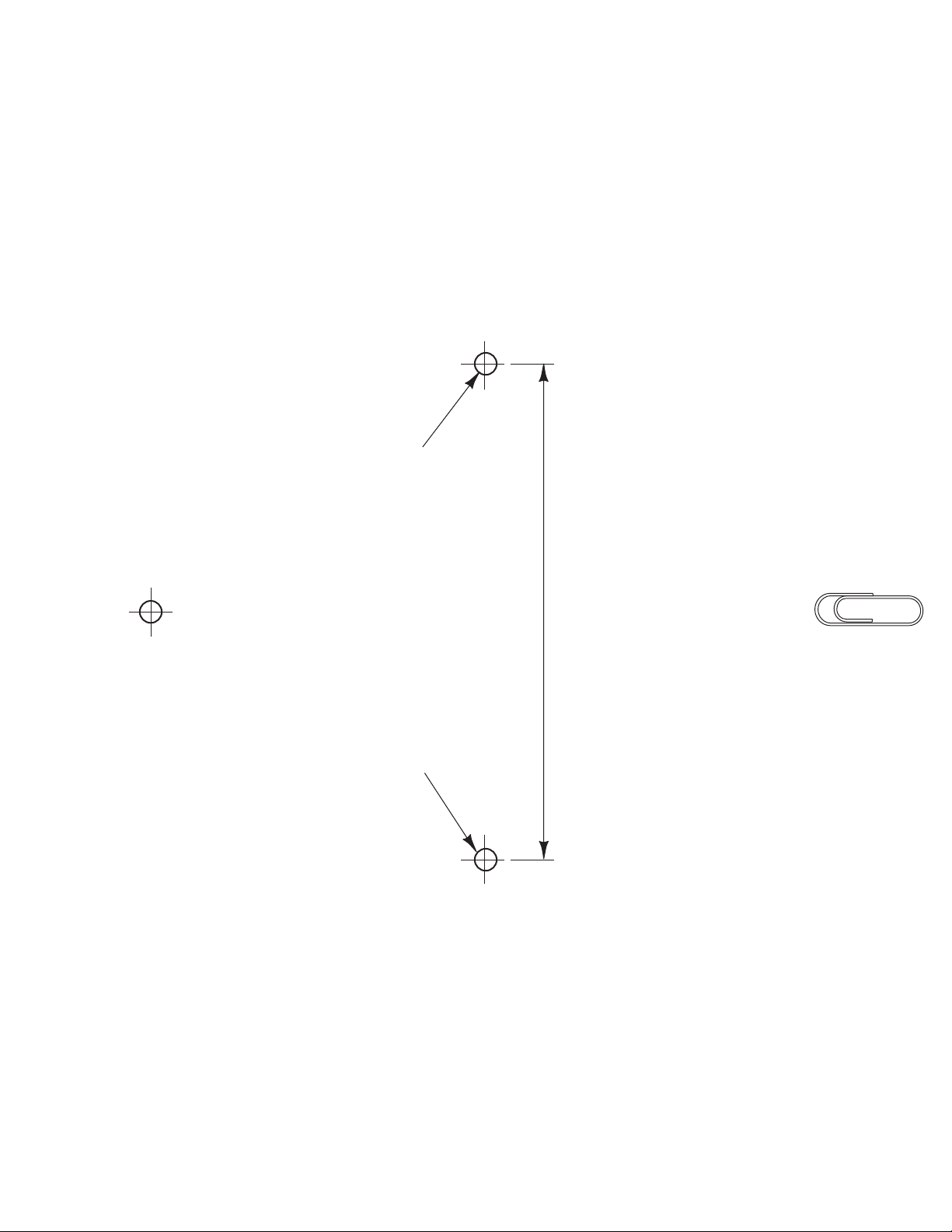
PIN OR TACK
OR
TO MAKE LINE LEVEL
SPOT TWO HANGER HOLES
TO USE TEMPLATE USE A LEVEL
USE A PIN OR TACK TO MOUNT
LET THE TEMPLATE LEVEL ITSELF.
TEMPLATE ON WALL AT POINT SHOWN.
ATTACH A PAPER CLIP WHERE INDICATED.
HANGER HOOK LOCATIONS
4-7/16"
ATTACH PAPER CLIP HERE
 Loading...