

Page 1

Maximize your communication
MW-9
GSM Mobile Fax
User’s Manual
MaxComm Co., Ltd.
Page 2
Maximize your communication
1. Preface
Thanks for choosing our MW-9 GSM/PSTN portable fax. Before using this mobile fax,
please read this manual carefully. Support voice, G3 fax、copier and USB data service,
MW-9 can be as telephone, fax machine, and computer. Connecting MW-9 to a
computer by a USB cable, MW-9 can be regarded as a standard modem; Internet
Access, E-mail, Asynchronous Data Service and PC Fax are available (these text
with underline is only for the terminal with fax function).
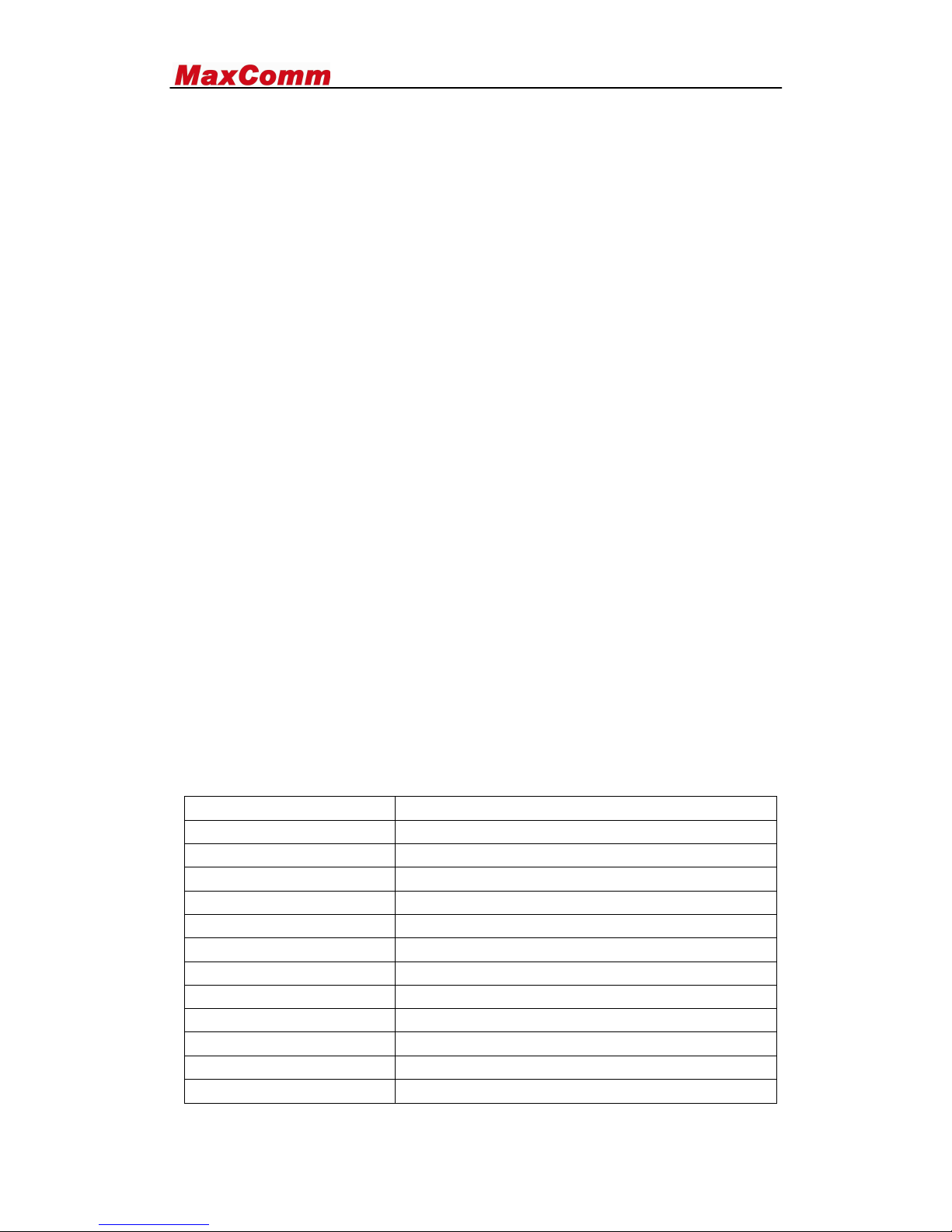
1.1 GSM Specification:
The air interface: EGSM850/GSM900/DCS1800/PCS1900MHZ (optional)
The external interface:
A. The power supply interface: POWER/ DC24V2A(PWR)
B. PSTN connect : LINE
C. The antenna interface: ANT (Male)
D. 3V SIM interface.
E. The data Service interface: USB2.0
F. Power switch: ON/OFF
The power adaptor:
◢ Input voltage: AC100-240V/50/60Hz & vehicle 12v
◢ Output: 24v2A
Antenna: (standard:900/1800mhz)
◢ Frequency Band: 890-960 MHz / 1710-1880 MHz
◢ Gain: 2dBi (7^12dBi optional)
◢ Wave ratio: ≤1.5
◢ Input resistance: 50 ohm.
◢ Polarize method: Perpendicularity polarize
Size (length × width × height): 296 *180*100 mm
Weight: 2.75kg
1.2 FAX Specification
Imaging film
Initial sample roll (included with machine):
Yields approx. 20 A4 pages
Replacement roll (not included):
30 m x one roll
one roll yields approx. 90 A4 pages
Paper tray capacity
Approx. 10 A4 sheets (80 g/m2)
(at room temperature)
Recording system
Thermal transfer recording
Effective printing width
205 mm max.
Memory capacity
Approximately 40 average pages
Modem speed
14,400 bps with auto fallback to lower speeds
Compatibility
ITU-T (CCITT) G3 mode
Compression scheme
MH, H2, MMR
Page 3
Maximize your communication
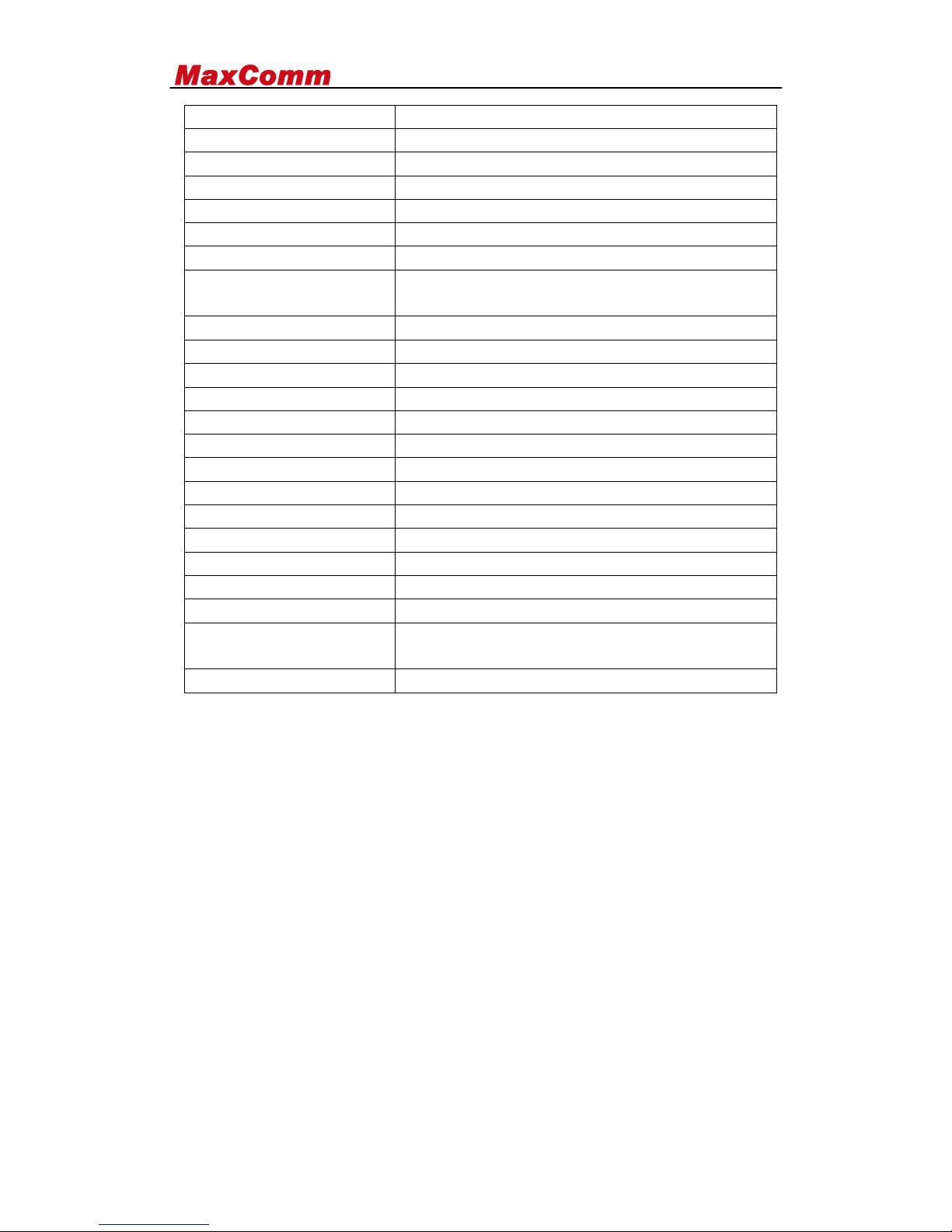
Effective scanning width
205 mm max.
Scanning resolution
Horizontal: 8 pixels/mm
Vertical:
Standard: 3.85 lines/mm
Fine /Halftone: 7.7 lines/mm
Super fine: 15.4 lines/mm
Halftone (grayscales)
64 levels
Applicable telephone line
Analog public switched telephone network
(ES203021) / GSM850/900/1800/1900MHZ
Reception modes
PBX
TEL/FAX,TEL,
Automatic document feeder A4: 10 sheets max. (80 g/m2)
Contrast control
Automatic/Dark selectable
Copy function
Yes
Display
16-digit LCD display
Power requirements
220-230 V AC, 50 Hz
12V IN VEHICLE
Noise emission
Less than 70 dBA
Power consumption
Standby: 1.5 W
Maximum: 90 W
Operating temperature
5 - 35
Humidity
30 - 85% RH
Dimensions (without
attachments)
Width: 296 mm Depth: 180 mm Height: 100 mm
Weight
2.75kg
1.3 SAFE OPERATION INSTRUCTIONS
IMPORTANT! Before installing or operation this product, please read the SAFETY
INFORMATION section of the manual.
Install the unit indoors.
Install the unit on a hard, flat surface for proper ventilation.
Do not expose the unit to rain or moisture.
Do not place the unit on or close to sources of heat.
Check the package
Please confirm the following article, if have the abnormality, pleasing
consultation the dealer.
MW-9 GSM mobile fax (1)
The power adapter: AC100-240V /DC24V2A (1)
Vehicle adapter 12v for car (1)
Rj11 cable: 1.5m (1)
Antenna of GSM: 2dBi (1)
User manual: English (1)
Page 4
Maximize your communication
Qualified certificate (1)
Mike + cable (1)
Appearance:
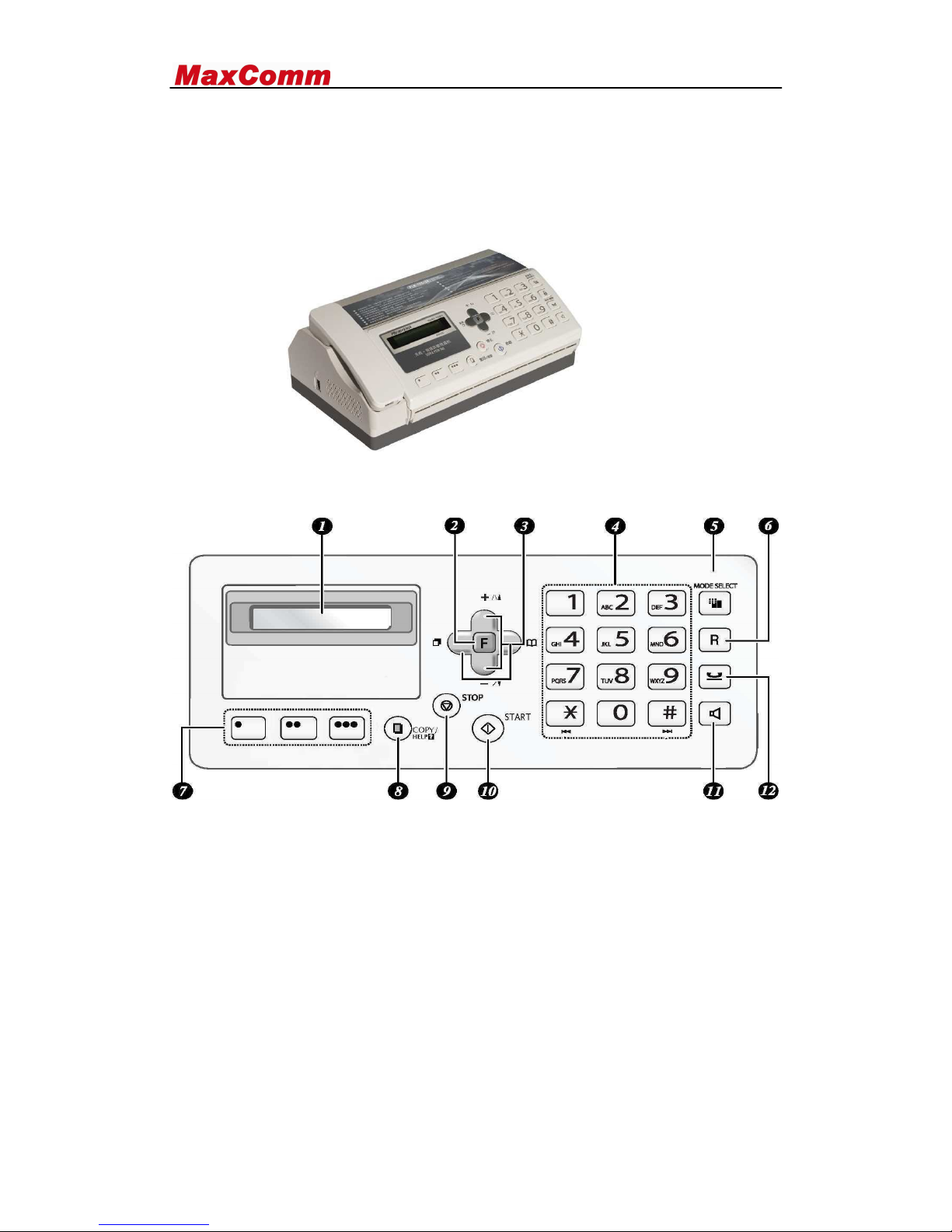
The shape of MW-9 GSM mobile fax is as 2-1 diagrams shows:
Figure 2-1
Figure 2-2
1. Display: This display messages to help you operate the machine
2. Function key: Press this key followed by the arrow keys to select special functions
and settings
3. Arrow keys: Use to scroll through and select setting, and to search for numbers in
the phonebook; hang on, “+ -“change volume, “left key” can redial.
4. Number keys: Use to dial fax number
5. MODE SELECT key: When the document is in feeder press to adjust the scanning
resolution. At any other time, press the reception mode
6. Keyboard lock and unlock
7. Rapid keys: Number stored in the phonebook can be assigned to these keys for one
touch dialing
8. COPY/HELP key: When the document is in the feeder, press to make a copy of the
Page 5

Maximize your communication
document. At any other time, press to print put the help list, a quick
reference guide to the operation the machine.
9. STOP key : Press to cancel an operation before it is completed
10. START key: Press after dialing to send a fax
11. SPEAKER key: Press before dialing to listen to the line and fax tones through the
speaker when faxing(not be used for speaking )
12. HOLD/DELETE key: Press during a call to put the call on hold and also used to
delete various data from the machine
1.6 LCD Indicators:
■ LCD display call id and fax pages numbers
■ Date and time
1.7 External connectors
The side, right side establishes ten exteriors to connect and a power switches after
the fixed pedestal of MW-9.
SMA antenna: ANT
Data interface: USB2.0
The power supply socket: POWER/DC24V2A(PWR)
Power switch: ON/ OFF
The PSTN Interface: LINE
2. Installation
2.1 Install the SIM card
Move power switch to the position of “OFF"; disconnect the power supply.
Open the top cover ofMW-9, you will find the SIM cardholder in the main PCB.
Insert GSM SIM card
2.2 Install the antenna
Connect the spike antenna to MW-9
Finger-tighten the nut of antenna clockwise, do not over tighten the antenna.
2.3 Connect to power adaptor
Move power switch to the position of " OFF"; Plug the cord of power supply into
the power socket
The power supply is proper to go together with the machine exchanges to carry
to insert the Vs AC100-240V 50/60 Hz
3. Operation
* When the Fax be connected with PSTN, you can reset the factory default GSM
calling first convert to PSTN calling first by dial “*##070# ”
* PSTN disconnected , dial “*##071# ”to convert to GSM net as calling service net
Page 6

Maximize your communication
3.1 function introduction
GSM/PSTN Telephone ;
GSM/PSTN FAX
USB Data Service, GPRS (data version) or CSD, Connect to a computer
GSM CSD Point to point fax received and send
Copier
No paper received capacities 40 pages
3.2 System Power on
Connect the power supply, Move the Power Switch to the position “ON”
The LCD to be lighted
LCD display date and time
If SIM card is ready, there is continuous dial tone when you pick up the handset
3.3 Making a call
Pick up the telephone handset.
Dial the phone number, and add “#” at the end of the number, the number will be
sent out immediately; otherwise it will wait 5 seconds.
3.4 Receive a incoming call
The phone rings when a call is coming
Pick up the handset and begin talking
3.5 End a call
Hand up the handset
3.6 G3 Fax Service
3.6.1 Send the fax
Place a document into fax machine;
Picked up the handset or press the ON- HOOK key of the fax machine;
The LCD is on, then dial “* + fax number” ,put a “#” at the end of the number.,
LCD will display” fax number ”
When the other side answers, there is a fax tone in the handset, press “START”
key in fax machine.
3.6.2 Receive the fax
■ In GSM network, when a call is coming, MW-9 can be set to “auto” mode to
judge the call is voice, fax. In the call is fax, MW-9 will enter fax-receiving mode
automatically user need not to pick up the handset.
Don’t picked up the handset, there is fax calling tone in the handset, press the
“START” key in the fax machine; If fax machine work in fax mode, it will receive
fax automatically.
3.7 CSD FAX (Point to Point)
■ Send CSD fax : Hang on Dial “ *##99#+CSD number +# “
Page 7
Maximize your communication
■ Receive CSD fax : Auto
3.8 CLID
The MW-9 provides CLID function (Call Line Identification). It will send the
number of an incoming call to the telephone in FSK. You need a telephone with
CLID. GSM service provider need open this function to you.
3.9 Adjust the time and date
Pick up phone handset
Press ” F、1、1 + YYMMDDHHMM ”
YY-year、MM-month、DD-day、 HH-hour、 MM-minute
Press “ start “ to confirm
Press “ stop” out
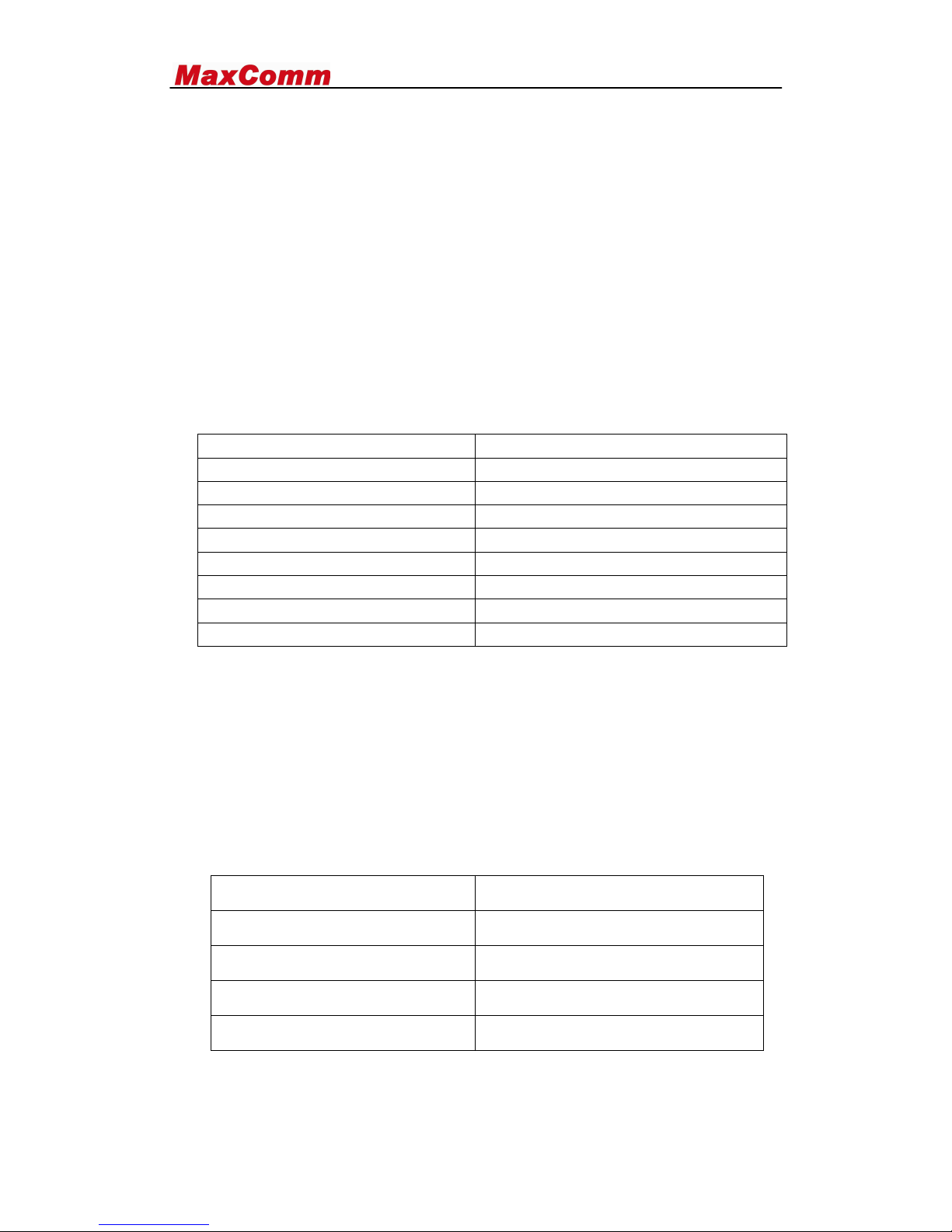
4.0 fax fast guide
F、1、1、YYMMDDHHMM + start
YY-year、MM-month、DD-day、 HH-hour、
MM-minute
F、1、fax number + start
Store the fax number
F、1、2 、2 + stop
Delete the fax number
F、#、2、5 + N+ start
Ring times n= 2^5
F、#、2、1+ 1 + start
Receive fax to store not to print
F、#、2、1+ 2 + start
Print fax not to store
F、5
Store capacity %
F、0
Clear paper jam
5.0 GPRS Data and PC FAX Service
Connecting MW-9 to a computer by a USB cable, we can regard MW-9 as a standard
modem (with GPRS function). Using this modem, we can access Internet and send or
receive email. Asynchronous Data Service and PC Fax are also available for this
modem...
◆Follow the setup of MW-9 manual for GPRS connect
◆You can use PC FAX under win fax or windows soft fax
6.0 Appendix Troubleshooting
Fault
Solution
No dial tone after off-hook
Check the antenna and restart
No response when fax sending
Check the fax number from SP
No response when fax received
Check the fax number from SP
No LCD display when power on
Check the power adapt and switch
 Loading...