

Page 1
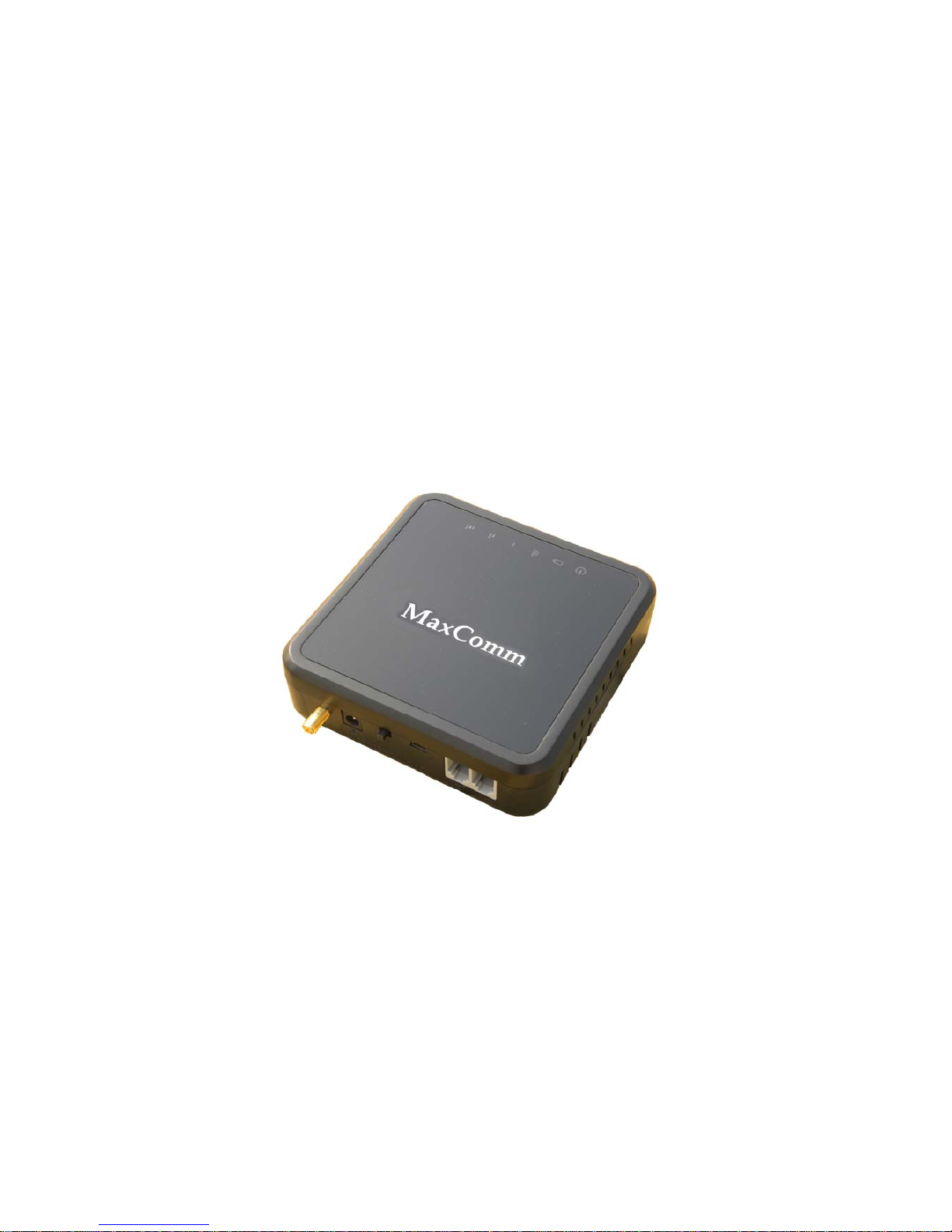
GSM Fixed Wireless
Terminal
FCT-400 (M35)
User Manual
MAXCOMM CO., LTD.
TAIWAN
Page 2

1
Contents
1. Summary............................................ 2
2. Main function...................................... 3
3. Interference....................................... 3
4.Notice List......................................... 4
5. Installation....................................... 5
5.1.Interface .................................................................. 5
5.2. Indicator lights .......................................................... 5
5.3. Signification of Indicator lights ......................................... 5
5.4. Installation .............................................................. 6
6. How to use......................................... 8
6.1. Making Calls .............................................................. 8
6.2. Answering a call .......................................................... 9
7. Command Table...................................... 9
8. Problem and Solution.............................. 10
9. FCC Statement..................................... 11
Page 3

2
Welcome to use the GSM Fixed Wireless Terminal FCT-400(M35 version).
Please read this simple guidance. Further detailed information is given in
this manual.
1. Summary
GSM Fixed Wireless Terminal FCT-400 is a mobile terminal for
telecommunication operators to develop fixed telephone services. It takes the
advantages of the wide coverage of mobile communication network and
convenient installation to meet the fast increasing requirement of users.
The product is particularly suitable for telecommunication operators to
entry the common fixed telephone market. With easy installation and high
efficiency, it can be widely applied in
1. Various enterprises
2. Institutes
3. Movable carriers
4. Places of interest/ scenic spots
5. Large exhibitions
6. Consulting meetings
7. Others
It is used where telephone lines are unavailable or very limited. The installation
is easy and rapid and can be put into use as soon as within mobile network,
while can solve problems of line deficiency and temporary telecommunication.
Page 4

3
It can be connected to common phones via GSM network, providing a service
compared favorably to fixed phones, and producing a communication effect
similar to that of fixed phones. And the minimum separation generally be used
is at least 20cm.
This Wireless Terminal is mainly applied within the coverage of GSM
cellular network.
2. Main function
GSM cellular network outgoing.
GSM cellular network incoming.
DTMF/FSK Caller ID.
Support secondary dial.
Send polarity reversal signal for billing meter while connection.
USB Interface, performing firmware upgrading via special USB
cable & tool connecting PC.
Rechargeable Lithium battery, keep conversation for at least 2~3
hours when out of mains power supply.
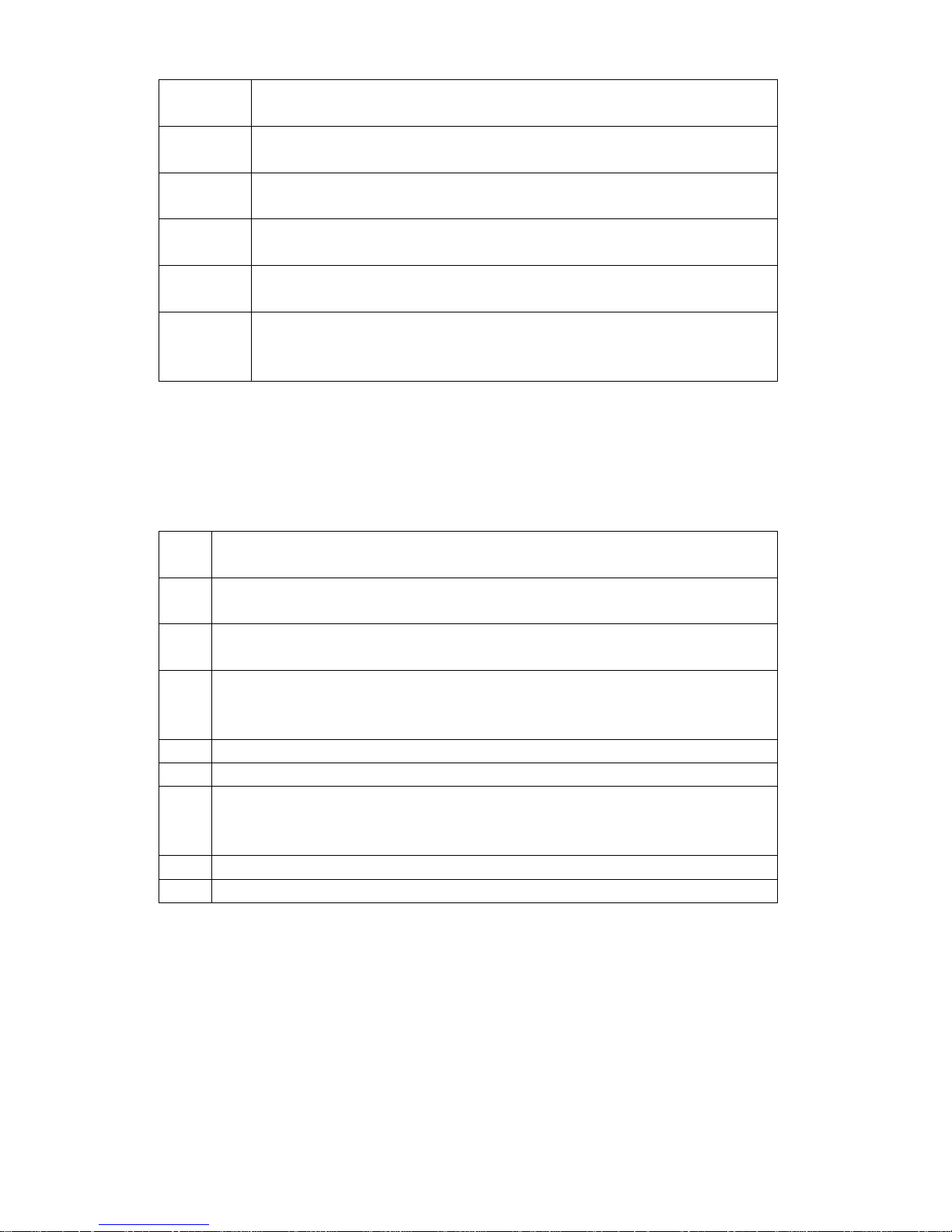
3. Interference
All wireless devices may get interference which could affect performance.
Please make sure that your device is in service, and pay attention to
conditions as follows.
Page 5
4
Topic Description
Hospital Follow any regulations or rules. Switch the device off near medical
equipment.
Aircraft Wireless devices can cause interference. Using them on aircraft is
illegal.
Fuel Don’t use the device at a refueling point. Don’t use near fuel or
chemicals
Blasting Don’t use the device where blasting is in progress. Observe restrictions,
and follow any regulations or rules.
Children Keep your device in a safe place and keep it in out of small children’s
reach. Children could hurt themselves or others and they may damage
the device.
4.Notice List
Description
1 Don’t attempt to repair the device by yourself. Only qualified service
personnel could install or repair the device.
2 Do not tie the antenna with the telephone line during use. Otherwise it could
cause interference and affect connection quality.
3 Please install the antenna 1 meter faraway from the device or other sensitive
electron device. If the antenna is damaged, do not use it any more. You can
contact the franchiser to repair it.
4 Do not use unqualified antenna or try to modify any part of the device.
5 To avoid noise interference, use an anti-EMI phone if possible.
6 If the device installed rechargeable battery, please recharge for at least 24
hours before the first use. If the device is in “Turn Off” state, it do not
recharge to the battery.
7 Please use the device stand to the manual.
8 Use the provided USB data cable for connecting internet. (Optional)
Page 6
5
5. Installation
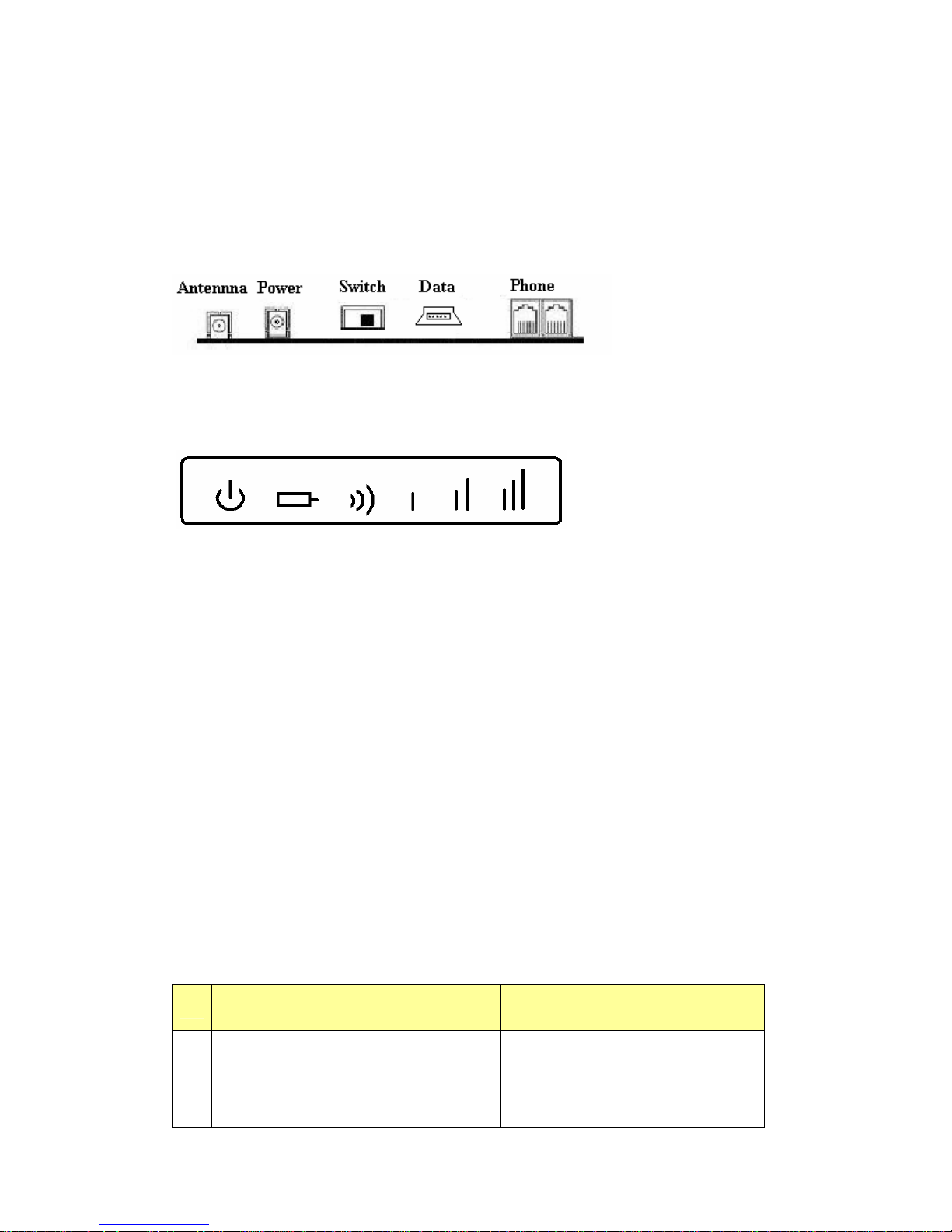
5.1.Interface
The back of the device as below:
5.2. Indicator lights
There are 6 indicator lights in the terminal device. From left to right in turn,
it is:
1. Power indicator lights (Adapters)
2. Power indicator lights (Battery)
3. Status indicator lights
4. Signal Strength 1
5. Signal Strength 2
6. Signal Strength 3
5.3. Signification of Indicator lights
Indicator Light Description
1
Signal Strength 1 flash one times
Signal Strength 2 flash one times
Signal Strength 3 flash one times
Startup
Page 7
6
2 Power Light constantly on Power normal
3 Power Light constantly off Power un-normal
4
Power indicator lights (Adapters) Off
Power indicator lights (Battery) On
Power supply by battery
5
When not in conversation:
Signal Strength 1 flash
Signal Strength 2 flash
Signal Strength 3 flash
No SIM card or SIM card installed
incorrectly
7 Signal Strength 1 flash Searching for network
11
Signal Strength 1 constantly on
Signal Strength 2 constantly off
Signal Strength 3 constantly off
Signal Strength very lower
12
Signal Strength 1 constantly on
Signal Strength 2 constantly on
Signal Strength 3 constantly off
Signal Strength Medium
13
Signal Strength 1 constantly on
Signal Strength 2 constantly on
Signal Strength 3 constantly on
Signal Strength High
14 Signal Strength 1 flash
No SIM.
15 Signal Strength 2 flash
SIM with PIN lock.
16 Signal Strength 3 flash Telephone On-Hook
5.4. Installation
A. Set the device in a place with well ventilation, dryness, few dust, no
electromagnetic interference. And make sure that your device is in GSM
network’s service area.
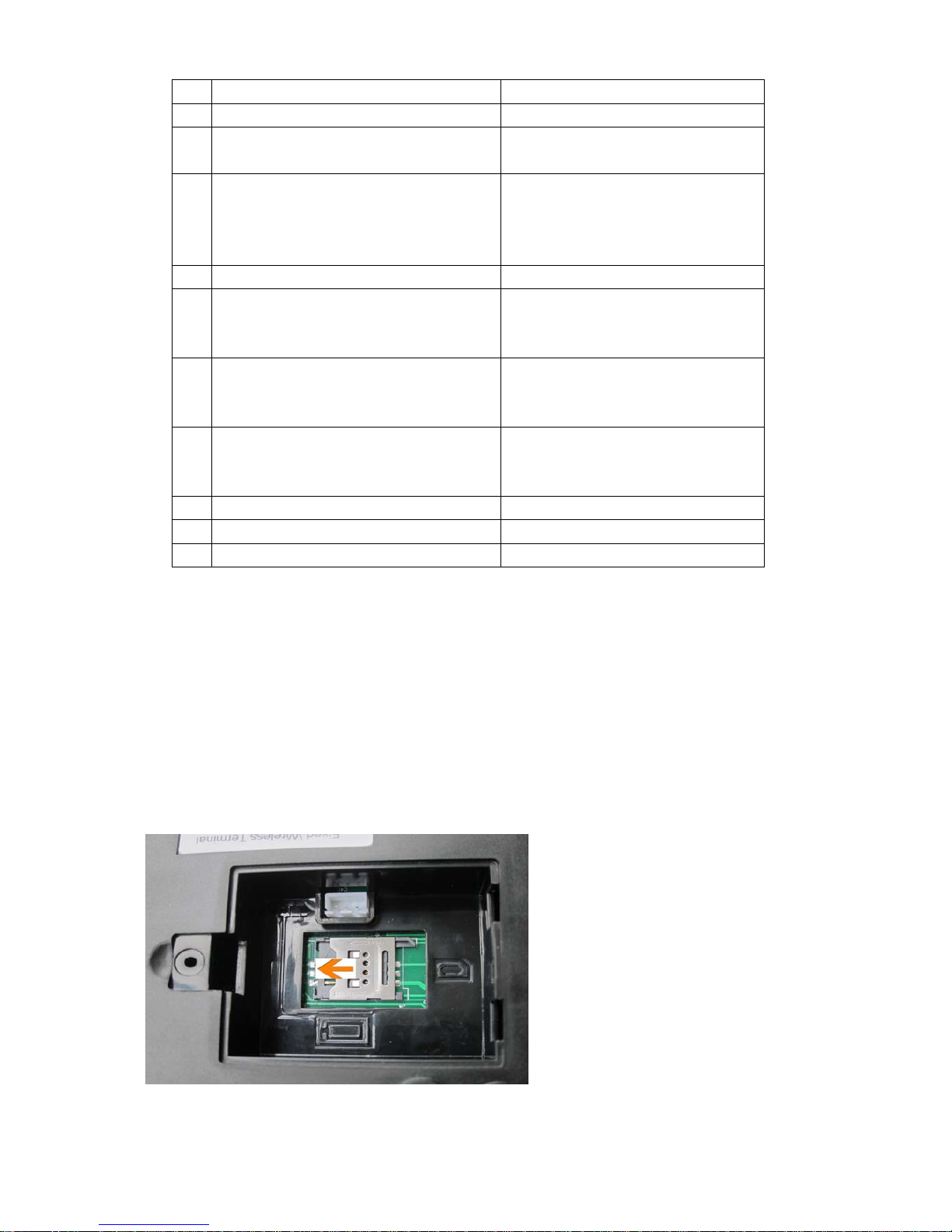
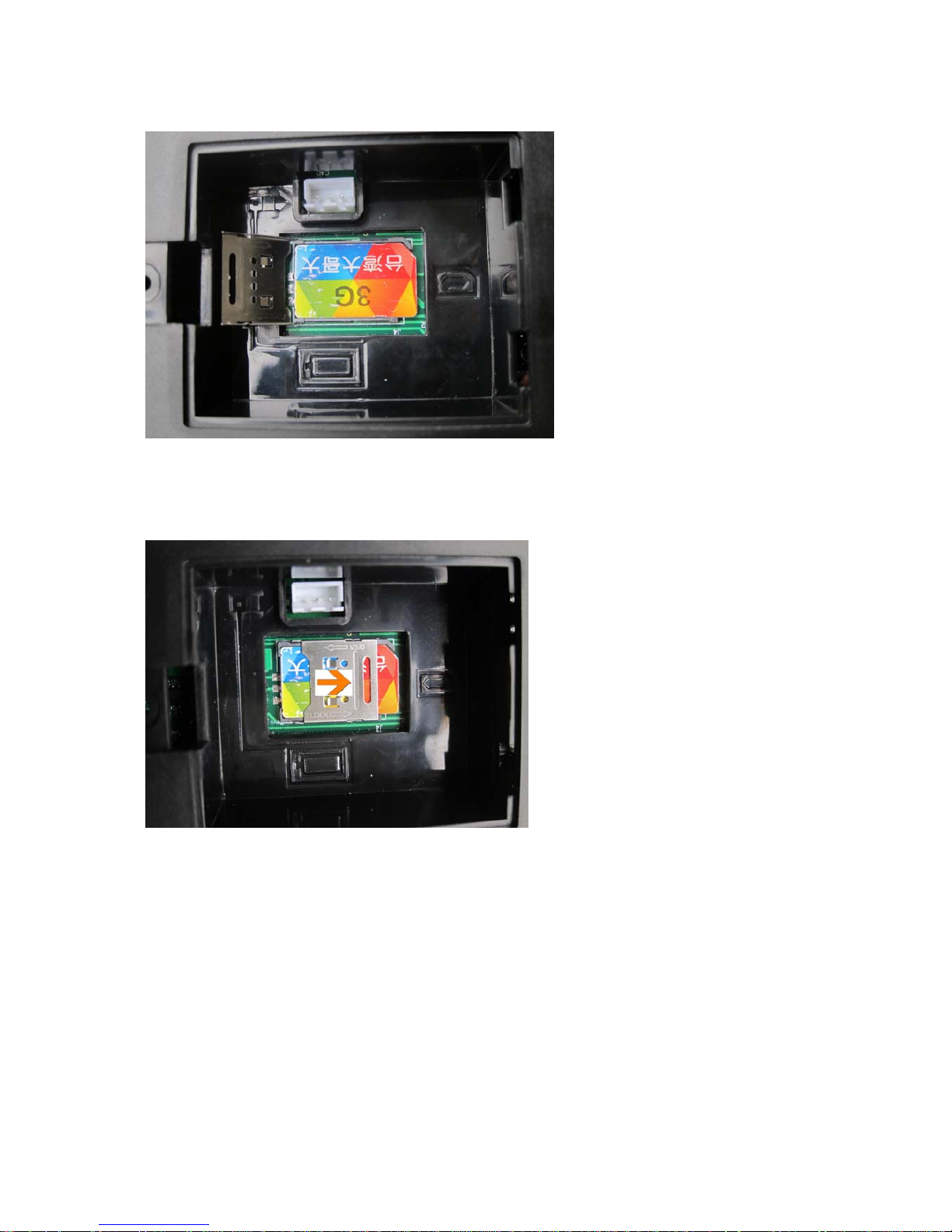
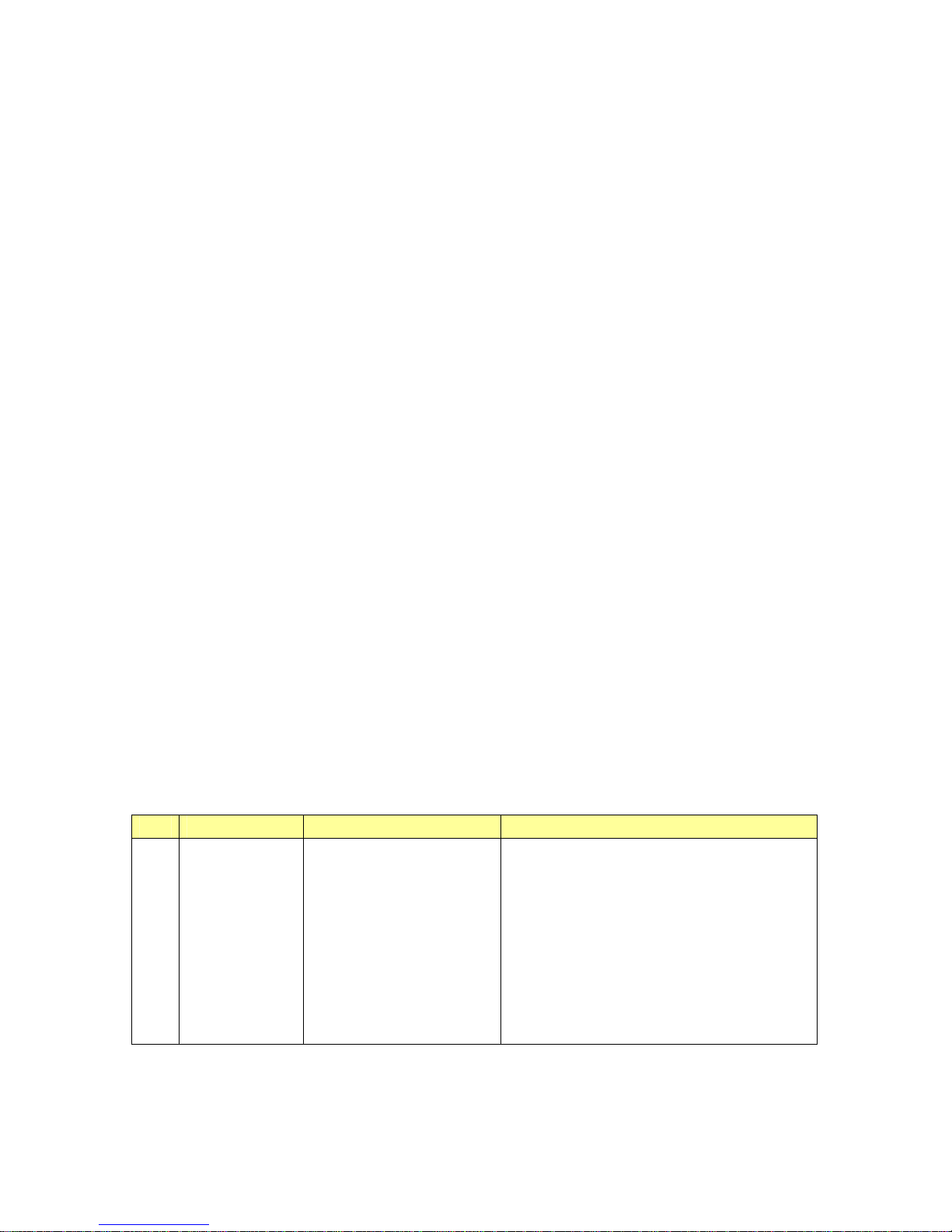
B. Install GSM SIM card
1. OPEN THE SIM CARD HOLDER BY PUSHING BACK THE SIM
Page 8
7
CARD HOLDER TO THE LEFT
2. OPEN UP THE SIM CARD HOLDER BRACKET AND PUT THE SIM
CARD ON THE HOLDER
3. PUSH TO THE RIGHT TO LOCK THE SIM CARD HOLDER
Open the cardholder in the way as the “Open” arrow shows, and put
the SIM card on the right position. Make sure that the chip interface is
facing downwards with the cut corner of the sim card in a correct way.
Close the cardholder and lock it in the way as the “lock” arrow shows.
Close the cover, and tighten the screws.
Page 9

8
C. Install antenna
Screw the head from the antenna on the device (antenna connector). Do not
put the two too close.
D. Connect the telephone and the device (any one phone jack). Place the phone
set away from the antenna to avoid interference.
E. If you want to use a billing meter, connect it with the telephone and the
device. For connection to a user PBX, connect it with the device by trunks.
F. Attach the lead from the adapter carefully to any one of the power-socket on
the back of the device. Connect the power adapter to an AC 120V outlet.
G. Switching on, and then the device startup, it will enter into work state after
searching for network.
H. Make sure that the device is currently in service. If the signal strength is
very lower, maybe the network is currently not available. You may be in a
bad reception area. If possible, move the machine to a different location.
6. How to use
6.1. Making Calls
1. Connecting a normal telephone with telephone cable to the Fixed
Wireless Terminal’s RJ11 phone port. Take up the handset of the phone
and a dialing tone will be heard. Dial phone number from keypad of
telephone.
2. In order to shorten the network access time, you can dial the [#] key as a
Page 10
9
speed dial key. If no more number is dialed within 4 seconds, the
numbers just inputted will be dialed out automatically.
3. Talk after connected. (If the billing meter is connected, it will display the
phone number you have dialed, and start to bill once the number is
connected.)
4. On-Hook, after finished the conversation.
6.2. Answering a call
When there is an incoming call, the phone set will ring. Take up the handset to
speak.
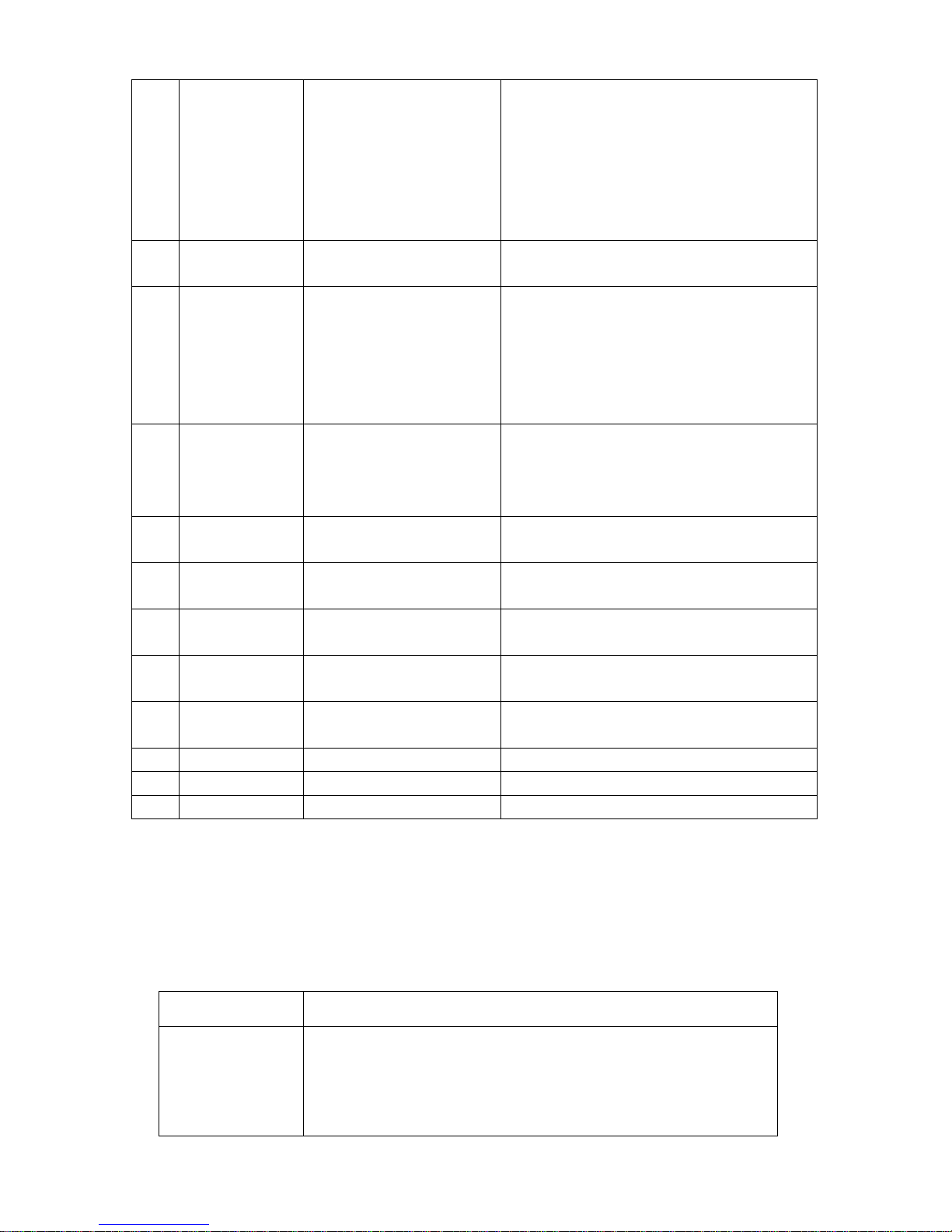
7. Command Table
All commands are listed as below. Connect a telephone set to the device.
Take up the handset and dial the command number, then, hang up to finish the
operation. After finished setting a command, hang up, and then Pickup the
handset to set another command.
NO. Command Function Description
1、
**9AAA..*NN# Setting quick sending out
dialing digits command
(maximum 16 groups).
AAA.. , pre-fix NO (maximum 6 digits)
NN, dialing digits length (2 digits)
For Example
**913*11# pre-fix 13 number, if reaches 11
digits, then sending out.
**90755*12# pre-fix 0755 nu mber, when dialing
12 digits sending out immediately.
Page 11
10
2、
**9AB# Setting sending out dialing
digits command of default.
AB dialing digits length (2 digits)
For Example
**915# when dialing the number (beyond the past
define), if reach 15 digits, then sending
immediately.
3、
**8AAA..#
Delete the quick dialing
setting
AAA.. delete the quick dialing p re- fi x n u mbers
**8**# delete all the quick dialing setting
4、
**7N# Set incoming call ringing
N=2, incoming call ringing,r i ngi n g 2 seco n ds an d
stop 4 seconds
N=1, incoming call ringing,r i ngi n g 2 seco n ds an d
stop 2 seconds
N=0, incoming call ringing,r i ngi n g 1 seco n ds an d
stop 4 seconds
5、
**6N# Set dialing tone frequency N= 3, dialing tone 400Hz
N=2, dialing tone 425+450Hz
N=1, dialing tone 350+440Hz
N=0, dialing tone 450Hz
6、
**5N#
Set Caller ID (CID) N=1, Caller ID as FSK format
N=0, Caller ID as DTMF format
7、
**4N#
Set Reverse Polarity signal N=1, Providing Reverse Polarity signal
N=0, Not providing Reverse Polarity signal
8、
**3NM#
Set talking volume during the
call
N=0-9, FWT receiving volume
M=0-9, FWT sending volume
9、
**2N#
Set simulating ring-back tone
after dialing
N=1, Providing simulating ring-back tone
N=0, Not providing
10、
#*91# Version & signal strength
enquiry
First 2 digits of signal strength +
Last 6 digits of version
11、
#*92# I MEI number enquiry (1) Return first 6 digits of IMEI
12、
#*93# IMEI number enquiry (2) Return last 9 digits of IMEI
13、
#*94# IMEI number enquiry (3) Return all digits of IMEI
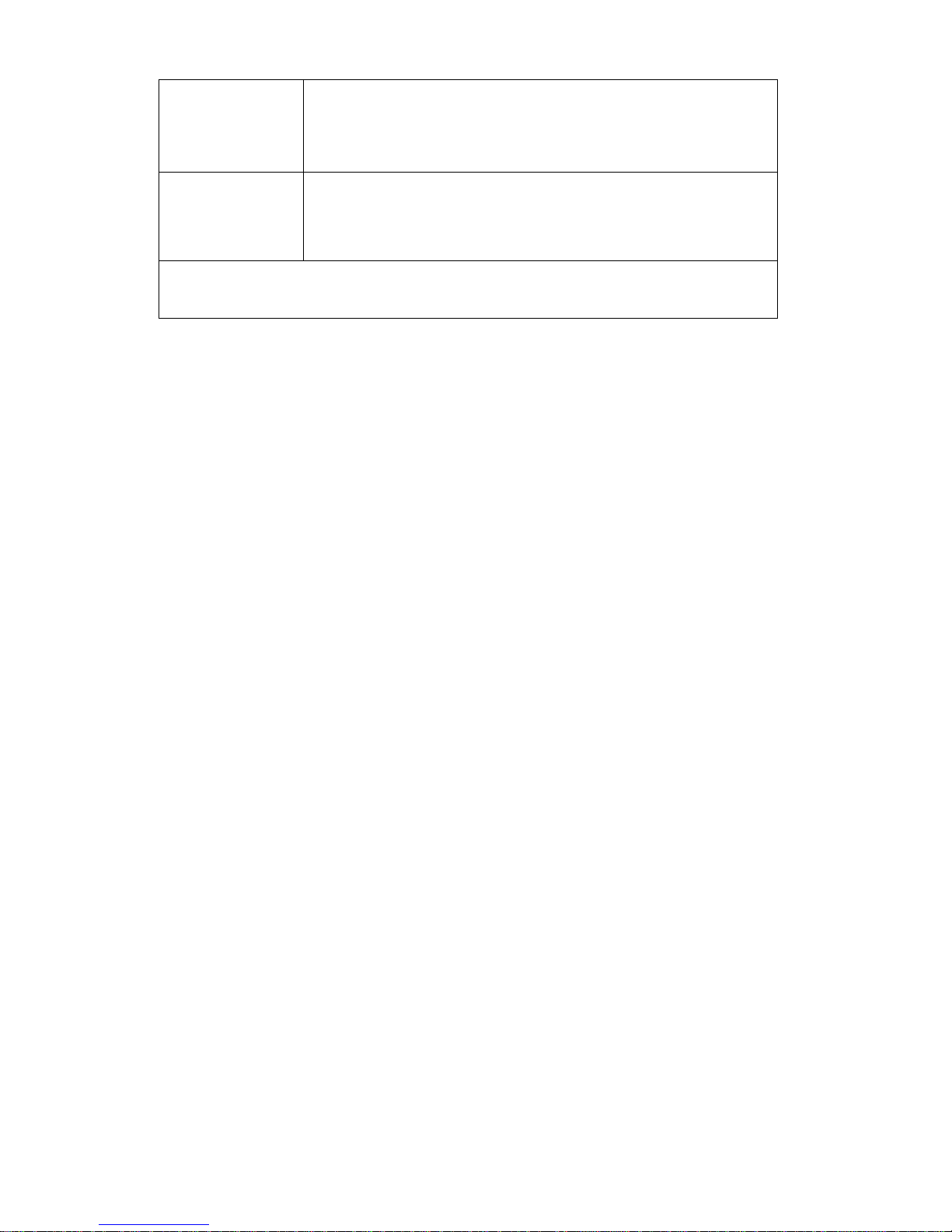
8. Problem and Solution
Problem Possible cause and solution
Can not startup
Check Power:
1. Whether the adapter installed and connected correctly.
2. If the terminal installed battery, check whether the electrical voltage
is enough.
Page 12
11
No Dial Tone
1. It will keep for about 1 minute for startup. After searching network, it
enters into work state.
2. Check whether the phone line is connected correctly.
3. Whether the SIM card is valid.
Dialed, but can not
outgoing.
1. Whether the SIM card is valid.
2. If you connected a billing meter, check whether it is the billing meter
forbid the outgoing.
If you cannot remove the problem by this solution, Please contact with franchiser or
manufacturer.
9. FCC Statement
Changes or modifications not expressly approved by the party responsible for
compliance could void the user's authority to operate the equipment.
This equipment has been tested and found to comply with the limits for a Class
B digital device, pursuant to Part 15 of the FCC Rules. These limits are
designed to provide reasonable protection against harmful interference in a
residential installation. This equipment generates uses and can radiate radio
frequency energy and, if not installed and used in accordance with the
instructions, may cause harmful interference to radio communications. However,
there is no guarantee that interference will not occur in a particular installation.
If this equipment does cause harmful interference to radio or television
reception, which can be determined by turning the equipment off and on, the
user is encouraged to try to correct the interference by one or more of the
following measures:
Page 13

12
-- Reorient or relocate the receiving antenna.
-- Increase the separation between the equipment and receiver.
-- Connect the equipment into an outlet on a circuit different from that to which
the receiver is connected.
-- Consult the dealer or an experienced radio/TV technician for help
This device complies with part 15 of the FCC rules. Operation is subject to the
following two conditions (1)this device may not cause harmful interference, and
(2) this device must accept any interference received, including interference that
may cause undesired operation
 Loading...