

Page 1
DigitalAudioTransport
USERMANUAL
Page 2

Catalog
DigitalAudioTransport
Packinglist. . . . . . . . . . . . . . . . . . . . . . . . . . . . . . . . . . . . . . . . . . . . . . . . . . . . . . . . . . . . . . . . . . . . . . . . 01
Partsandnames. . . . . . . . . . . . . . . . . . . . . . . . . . . . . . . . . . . . . . . . . . . . . . . . . . . . . . . . . . . . . . . . . . 02
Front02............................................................................
Rear03............................................................................
Bottom05..........................................................................
Operationsbeforeusing. . . . . . . . . . . . . . . . . . . . . . . . . . . . . . . . . . . . . . . . . . . . . . . . . . . . . . . . . 06
ConnecttoNetwork............................................................06
Connecttoexternalclock......................................................06
MARemoteApp.................................................................06
Appendix..........................................................................07
Technicalspecifications. .. .. .. .. .. .. .. .. .. .. .. .. .. .. .. .. .. .. .. .. .07
Weight&size... .. .. .. .. .. .. .. .. .. .. .. .. .. .. .. .. .. .. .. .. .. .. .. .. 08
Precautions. . . . . . . . . . . . . . . . . . . . . . . . . . . . . . . . . . . . . . . . . . . . . . . . . . . . . . . . . . . . . . . . . . . . . . 09
Page 3
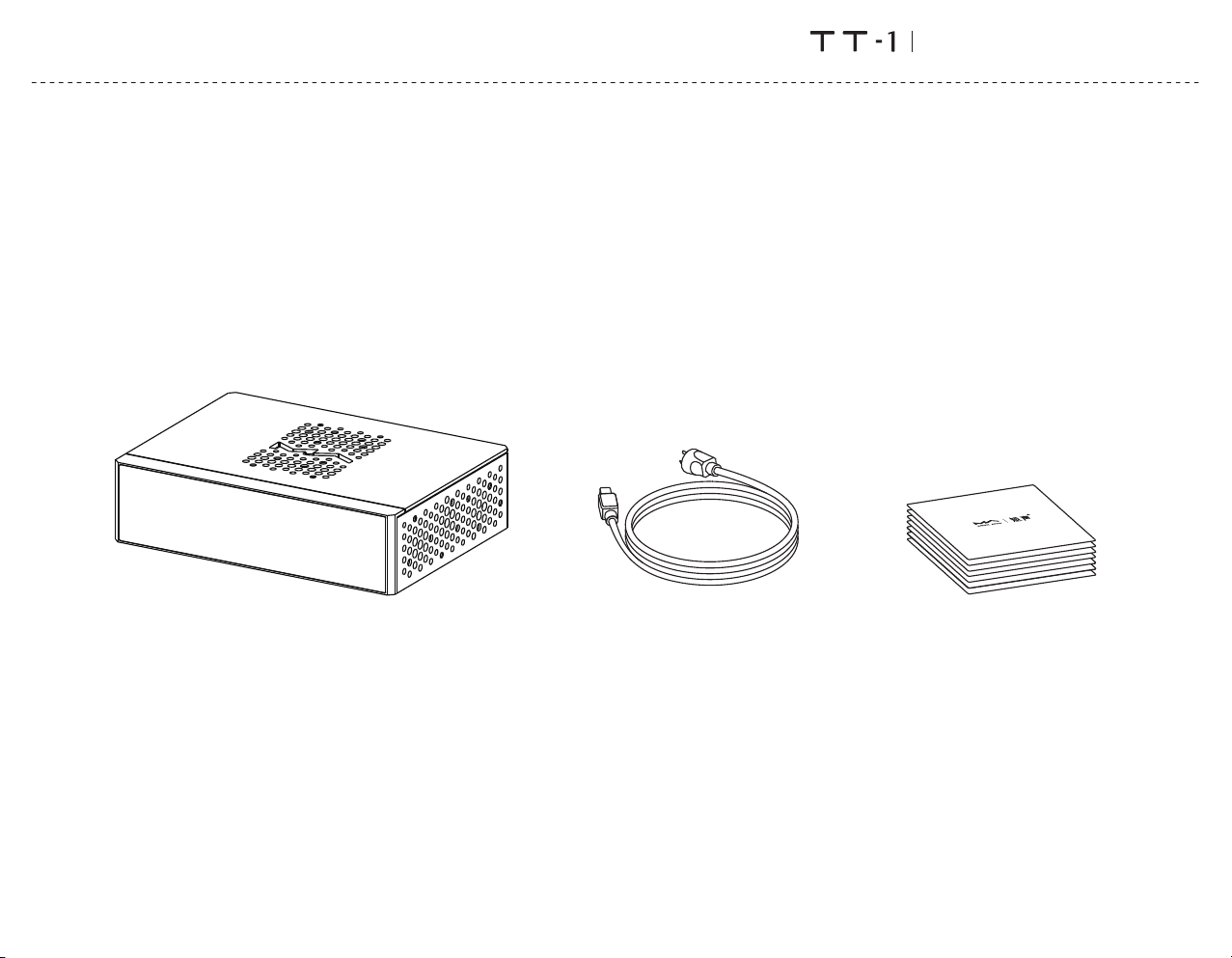
Packlinglist
DigitalAudioTransport
Product
Powercable
01
PrintedMaterials
Page 4
Partsandnames
Front
DigitalAudioTransport
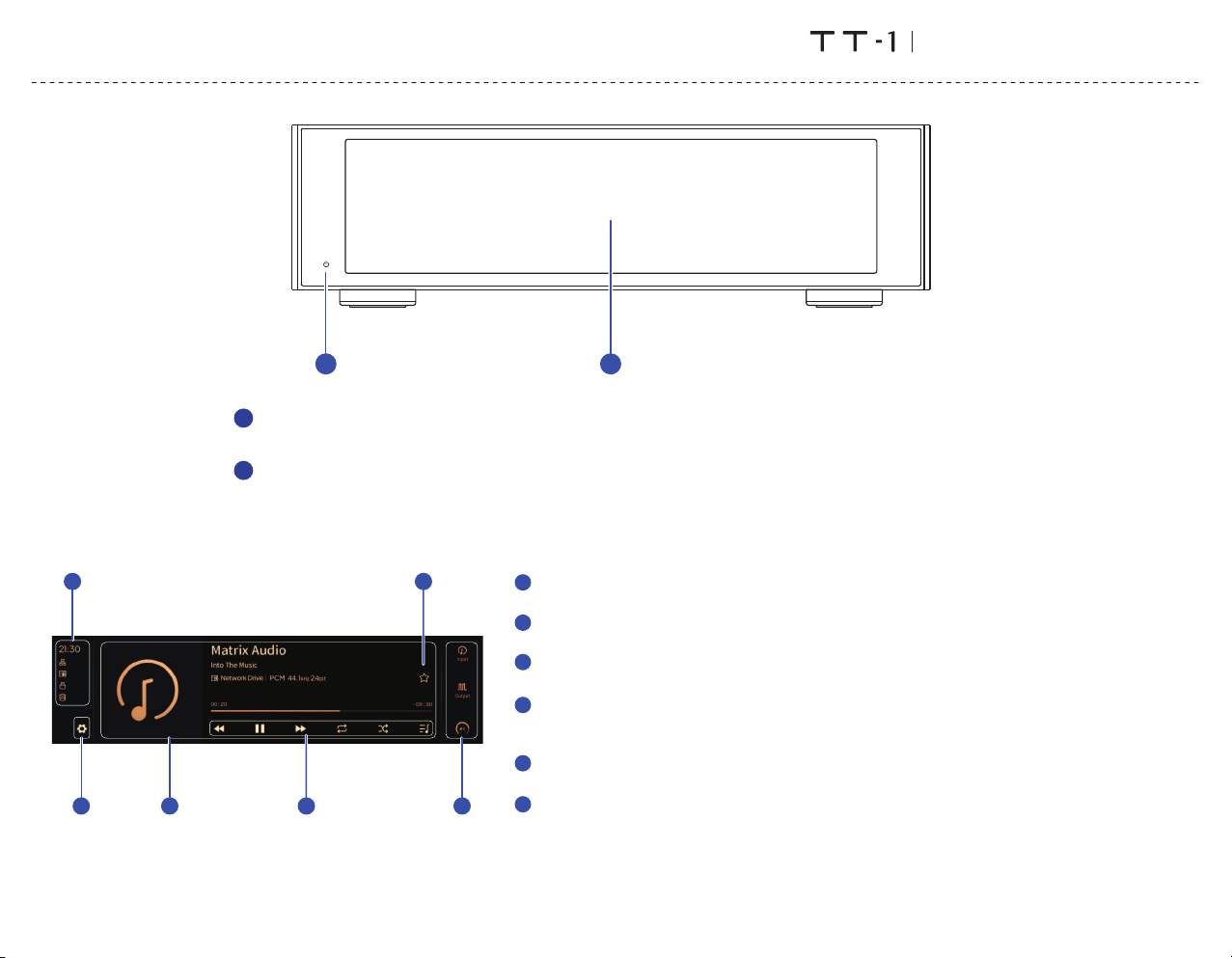
1
Poweron/Standby
1
Afterconnectingtopowersupply,pressthisbuttontopowerthedeviceon,pressitagaintoletthedevicestandby.Itwilltake
about30secondsforthefirststartupafterconnectingtothepowersupplyeverytime.
2
LCDscreen
EA
B
CF
D
Statusinfo
A
Statusincludingtime,networkconnection,storagedevice,NASandhardwarefunctions.
Settingsbutton
B
Taponthisbuttontoenterthe"Settings"menuandchangetheoptionsofthedevice.
C
Informationofaudio
Includingalbumart,tracktitle,artist,duration,audioformat,samplingrateandthefiltertypebeingused.
Playbackcontrolbuttons
D
Withthesebuttons,youcancontroltheplayback,enableanddisableloopandshuffle,checktheplay
queueandtheplaylists.
Myfavoritesbutton
E
AddtrackstoMyfavoritesorremovetracksfromMyfavoritesbytappingonthisbutton.
Controlbar
F
InputchannelSelecttheinputchannel.꞉
OutputchannelSelecttheoutputchannel.꞉
Volumeandmute Whendigitalvolumefunctionisenabled,usethisbuttontochangethevolumeormute.꞉
Whendigitalvolumefunctionisoff,thisbuttonwillnotbedisplayed.
2
02
Page 5
Partsandnames
Rear
DigitalAudioTransport
6
12345
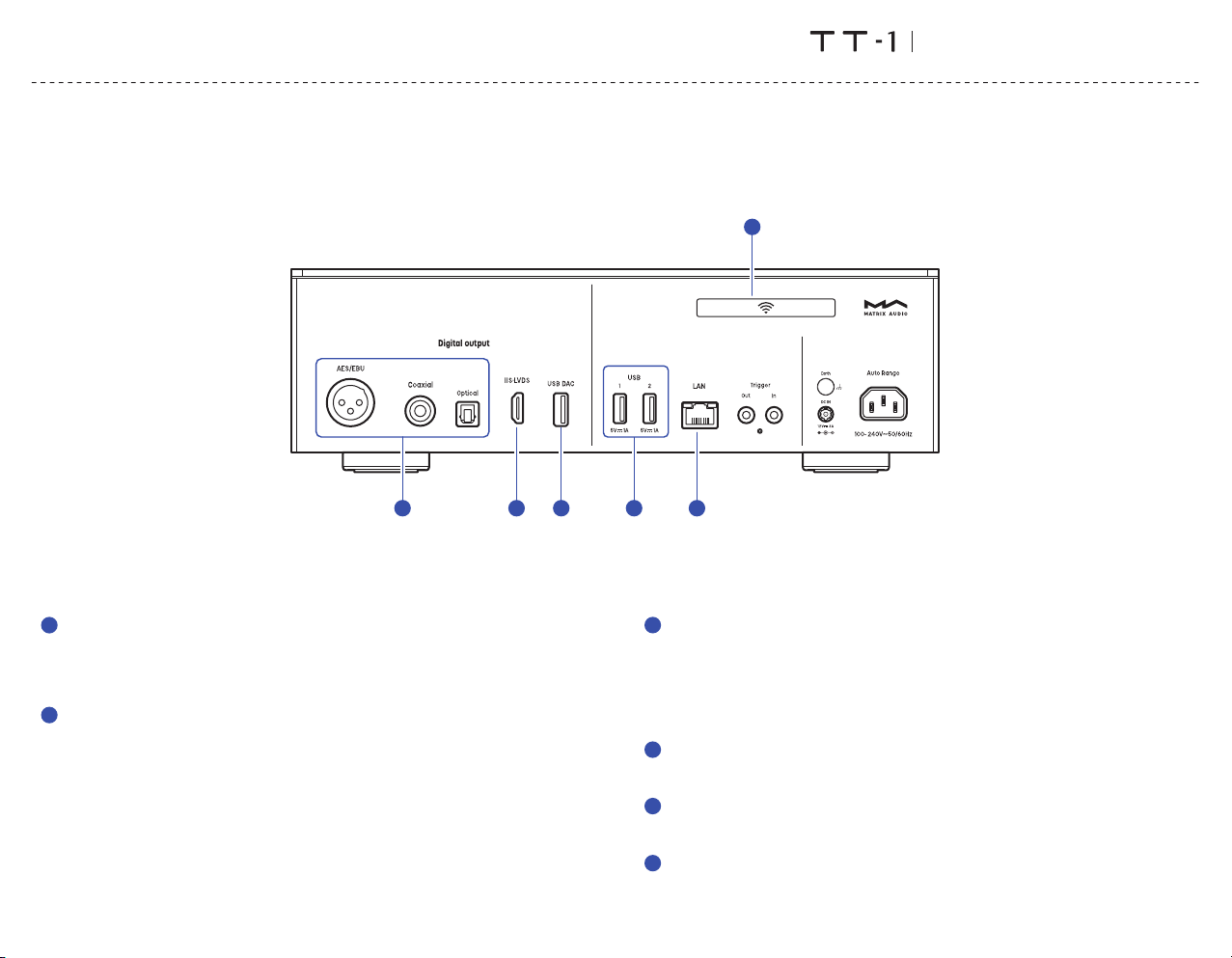
Optical,coaxialandAES/EBUoutputs
1
Theoptical,coaxialandAES/EBUportsoutputupto24bit/192kHzPCMsignalsin
S/PDIFstandardand1bit/DSD64signalsviaDoP.
Note꞉Whenthesamplingrateoftheplayedaudiofileexceedsthemaximum
capabilityoftheoutputport,theoutputwillbeturnedoff.
2
IIS‑LVDSOutput
TheIIS‑LVDSportoutputsmaximum32bit/768kHzsamplingratePCMsignals,
DSD64/128/256/512signalinNativeDSDstandard,andDSD64/128/256signalvia
DoP.
ConnecttoDACswithIIS‑LVDSinputportfromMatrixAudioorothercompatible
devicesthroughHDMIcables.Thedevicefeatures4kindsofIIS‑LVDSpindefinitions,
whichcanbeviewedandconfiguredfromtheMARemoteApp.
03
3
USBDACoutput
AnexternalUSBDACcanbeconnectedtotheproductviathisport.Theaudiospecs
dependontheexternalDAC.
Thisportprovidesupto5V/1AlownoisepowertotheexternalUSBDACs.
NoteWhentheoutputchannelissettoUSBDAC,theoptical,coaxialandAES/EBU꞉
outputswillbeturnedoff.Thetwooutputcategoriescan'tworkatthesametime.U
willbeturnedoff.The2outputmethodscan'tworkatthesametime.
4
USB
ConnecttoUSBstoragedevicesorCDdrives.EachUSBportsproviceamaximum
5V/1Apower.
5
LAN
ConnecttoLANportofthenetworkrouter,theconnectionsupportsGigabit
transmission.
Wi‑Fiantenna
6
Page 6
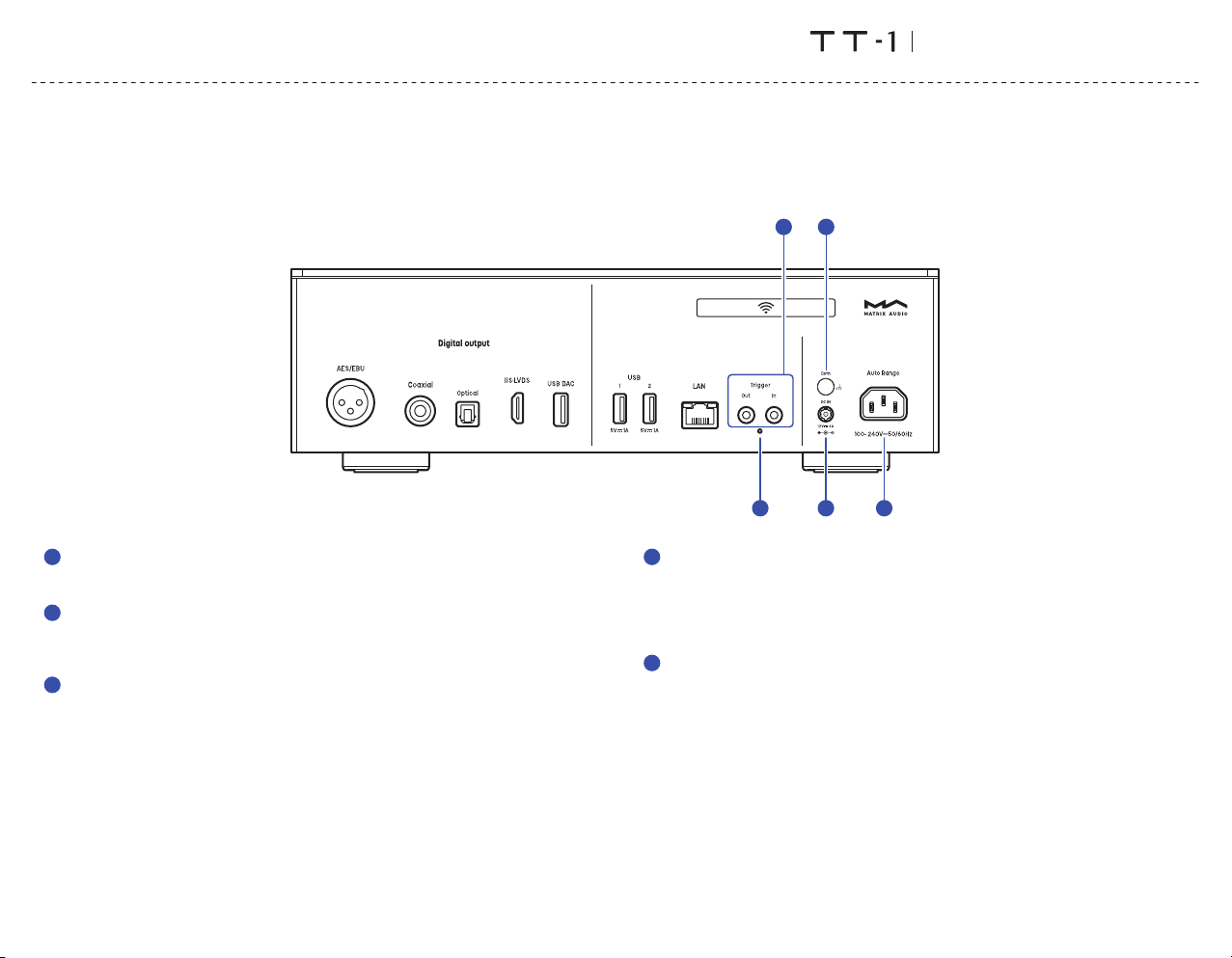
Partsandnames
Rear
DigitalAudioTransport
8
11
Resetbutton
7
Onlyusethisbuttonwhentheunitworksincorrectly,theunitcanberesettofactory
state.PleaseoperateundertheinstructionsbyserviceteamfromMatrixAudio.
Triggerinput/output
8
Connecttoaudiodeviceswithtriggerportsthroughø3.5mmmonoplugcables,to
achievelinkagecontrolbetweentheelementdeviceandotherdevices.Thetrigger
outputprovidesa12VDCsignal.
9
PowerinputDCinput꞉
TT‑1hasabuilt‑inswitchingpower,andaDCinputisreservedforanexternalpower
toupgradethepowersupply.WhenaDCinputisattached,theinternalACinputof
thedevicewillbedisconnected.
WhenthedeviceisusingDCpowerinput,ifthedeviceneedstobegrounded,please
connectthegroundwiretothegroundscrewontherearpanel.
Externalpowersupply DC12V±10%꞉
PowerwattageLargerthan36W꞉
PowerplugOuterdiameter5.5mm;innerdiameter2.1mm(+forinner,‑forouter)꞉
NotePleasepayattentiontothepolarityoftheexternalpowerplug.Donotconnect꞉
apowersupplyhigherthan12Vtothedevicetoavoiddamagetothedevice.
04
710
PowerinputACinput꞉
10
Pleaseuseapowercablewhichincludesanearthwireandensureyouhavea
reliableearthwireconnection.Otherwise,thecasingofthedevicemayhavea
slightlychargedtouch.
Ifyouneedthedevicetobeturnedoffcompletely,pleaseturnoffthisswitch.
Otherwise,thedevicestillconsumespowerinstandbymode.
11
Groundingterminal
Whenusinganexternalpower,itisrecommendedtoconnectthegroundwiretothis
terminaltoeffectivelyeliminatepossiblenoise.
9
Page 7
Partsandnames
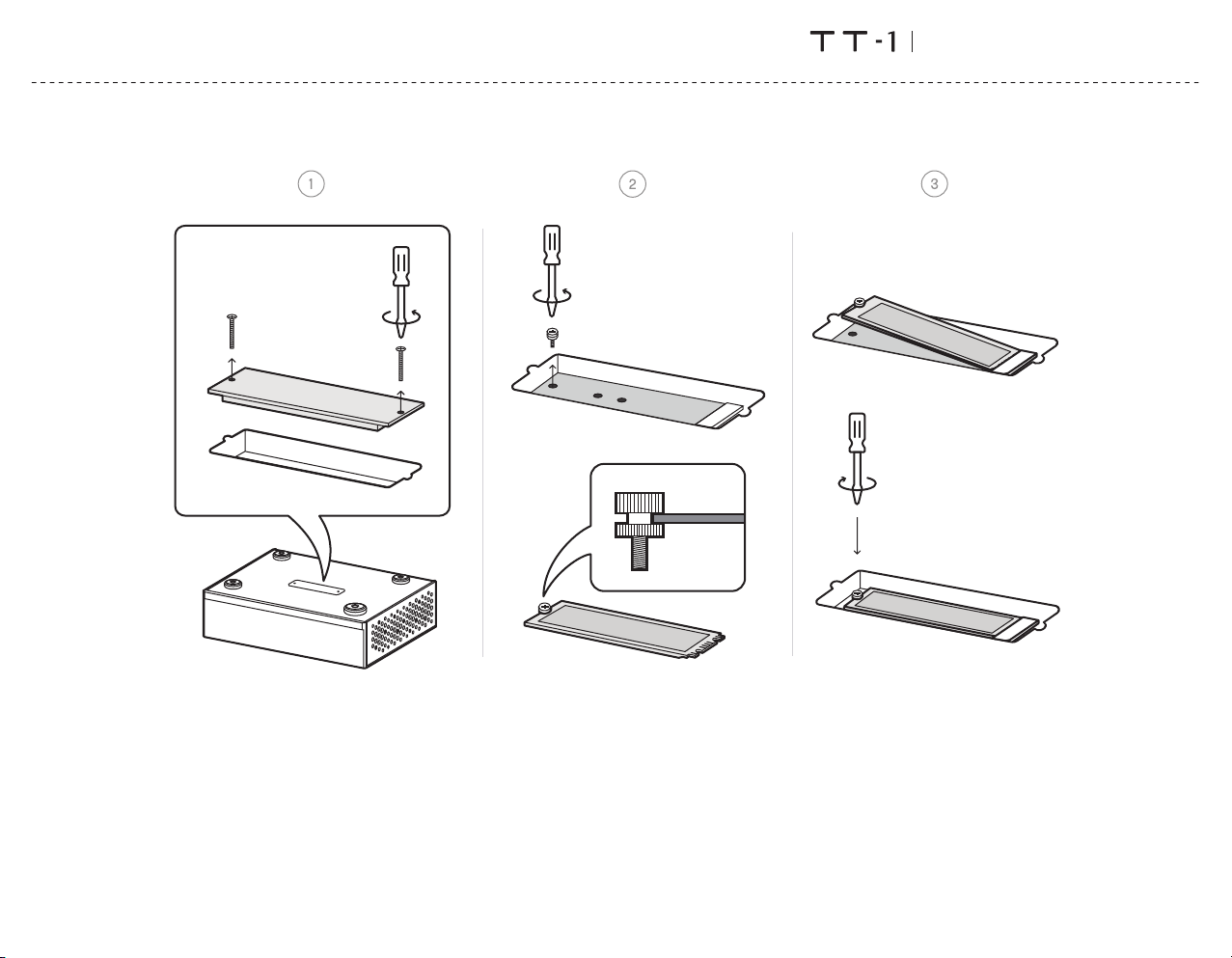
Bottom
DigitalAudioTransport
SSDslot
YoucaninstallanNVMeprotocolhigh‑speedSSDasinternalstorage.Theslotsupports2280,2260,and2240SSDs.
PleaseturnoffandunplugthepowercordthedevicebeforeinstallingtheSSD.Thisexpansionslotdoesnotsupporthotswapping.Operatingwhilepoweredonmay
riskdamagingtheSSDandthedevice.
AfterinstallingSSDandturningonthedevice,thedevicewillnotifyyoutoformattheSSD.Itisrecommendedtoformatitondevicetoavoidcompatibilityissues.If
theSSDhasalreadybeenformattedbeforeinstallation,thesystemwillnotpromptyoutoformat.Youcancheckandformatthedrivethroughthe"InternalStorage"
optioninthedevicesettingmenu.
Note꞉Thedevicesupportsamaximumpowerspecificationof3.3V/3AfortheSSD.UsinganSSDwithaworkingcurrentexceeding3Amaycauseinstability.PleaseverifyandconfirmthisinformationonthelabelofyourSSD.
05
Page 8
Operationsbeforeusing
DigitalAudioTransport
ConnecttoNetwork
LAN
ConnecttheproducttotheLANportofthenetworkrouterthroughanEthernetcable.It
isrecommendedtosetuptherouterasaDHCPserver,thedevicewillbeassignedanIP
addressautomatically.Select"LAN"inoptionNetworkinSettingsmenu,youcan
configurethenetworkspecsmanually,afterjoiningthenetwork,therewillbeanicon
showninthestatusbar.Asshownbelow꞉
Wi‑Fi
EnterSettingsmenu‑Network‑Wi‑Fi,afterthenetworkscanningcomplete,choosethe
SSIDofyournetworkandenterthepasswords,therewillbeawirelessconnectionicon
showninthestatusbarafterconnected.Thedevicessupport2.4GHz/5GHzwireless
network.
WhentheconnectionhasnoInternetaccess,therewillbeaiconinthestatusbar,as
shownbelow꞉
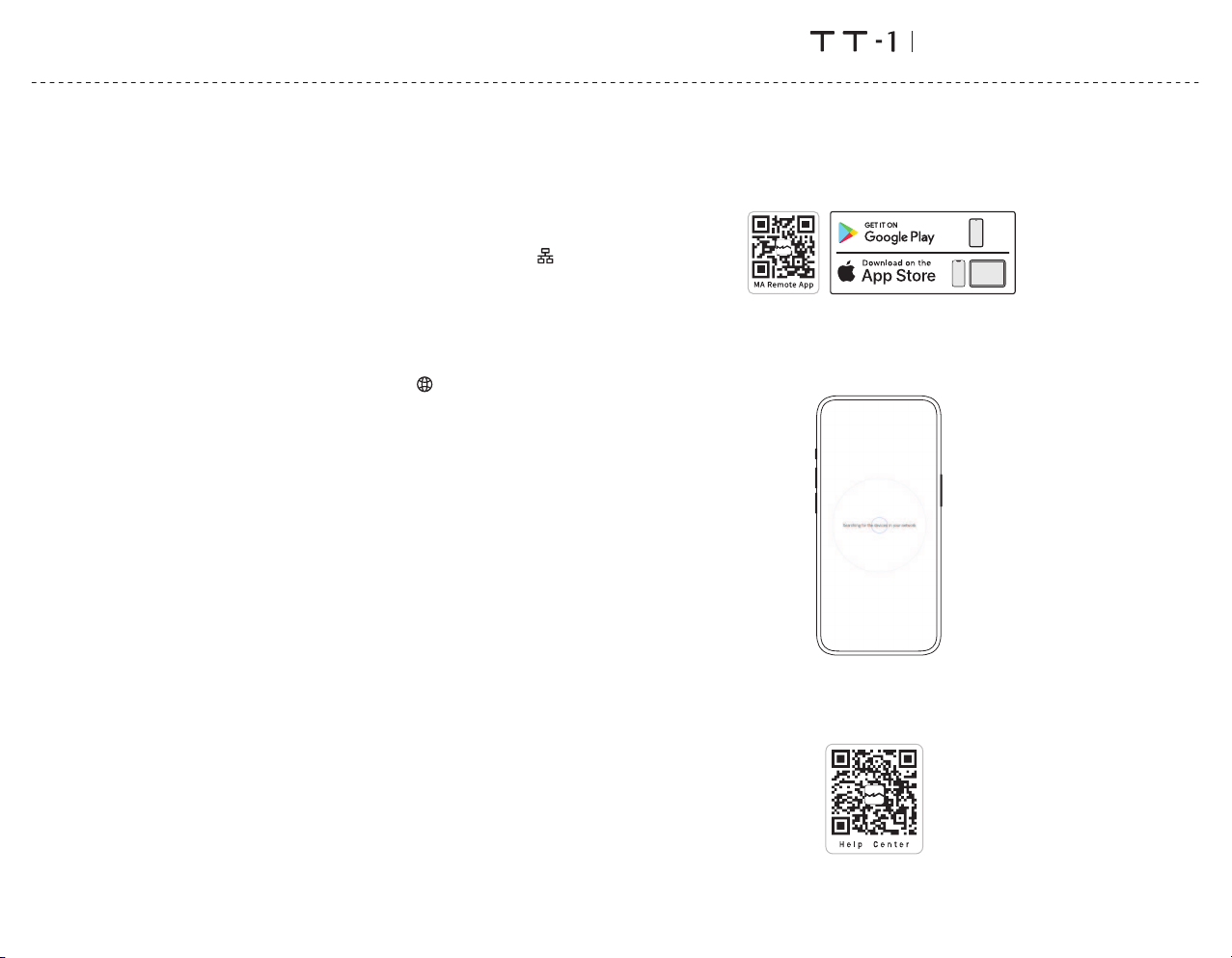
MARemoteApp
InstallMARemoteAppforyouriPad,iPhoneorAndroidphone.
Letthedeviceonthesamenetworkasyourphoneortablet,theMARemoteAppwill
automaticallydiscoverandconnecttothedevice.Ifyouneedtoaddthedevice
manually,usetheAddDeviceWizard.
TocontrolandconfiguretheelementdevicesthroughMARemoteApp,orplayback
streamingmusicfromthedevice,pleaserefertomatrix‑digi.com/tutorialsfor
instructions.
06
Page 9

Appendix
DigitalAudioTransport
Technicalspecifications
DigitalOutput
COAXIAL,OPTICAL&AES/EBU
PCM16‑24Bit/44.1kHz,48kHz,88.2kHz,96kHz,176.4kHz,192kHz
DSD2.8MHz(DoP)
IISLVDS
PCM16‑32Bit/44.1kHz,48kHz,88.2kHz,96kHz,176.4kHz,192kHz,352.8kHz,
384kHz,705.6kHz,768kHz
DSD2.82MHz,3.07MHz,5.64MHz,6.14MHz,11.29MHz,12.29MHz,22.58MHz,
24.58MHz
USBDAC
DependsonthespecificationssupportedbytheconnectedUSBDACdevice.
NothigherthanPCM32Bit/768kHzandDSD24.58MHz.
TheUSBDACportprovidesamaximumof5V/1Alow‑noisepowersupply.
Network
LAN꞉10/100/1000Mbps
Wi‑Fi꞉2.4GHz/5GHz
USB
USB3.0x2
TheUSBportprovidesamaximumpowerof5V/1A.
TheUSBportworkswithdeviceswhichconformtotheUSBmassstorage
standardandsupportsFAT,FAT32,exFAT,andNTFSfileformats,butisnot
guaranteedtobecompatiblewithallstoragedevices.
Trigger
Triggerin꞉DC6‑12V<10mA
Triggerout꞉DC12V/50mAMAX
StorageExtension
M.2228022602240NVMePCIeSSDslot×1
ThemaximumpowerspecificationprovidedbytheexpansionslotisDC3.3V/3A.
MAPlayer
Controllerapp꞉MARemoteApp
LocalPlayback
FormatSupported꞉MP3,WMA,WAV,AIF,AIFC,AIFF,AAC,FLAC,OGG,APE,ALAC,
M4A,DSF,DFF,CUE,I SO
PCM16‑24Bit/44.1kHz,48kHz,88.2kHz,96kHz,176.4kHz,192kHz,352.8kHz,
384kHz,705.6kHz,768kHz
DSD2.82MHz,3.07MHz,5.64MHz,6.14MHz,11.29MHz,12.29MHz,22.58MHz,
24.58MHz
RoonReady
PCM16‑24Bit/44.1kHz,48kHz,88.2kHz,96kHz,176.4kHz,192kHz,352.8kHz,
384kHz,705.6kHz,768kHz
DSD2.82MHz,5.64MHz,11.29MHz,22.58MHz
QQMusic,AirPlay2,DLNA/UPnP,TIDALConnect,SpotifyConnect,vTuner,RadioParadise
Theaudiospecsdependontheserviceprovider.
07
Page 10
Appendix
PowerSpecs
ACinput
Widevoltageswitchingpowersupply
PowerVoltage꞉AC100V‑240V50/60Hz
PowerConsumption꞉<35W
DCinput
Externalpowervoltage꞉DC12V±10%
Externalpowerwattage꞉Largerthan35W
Powerplug꞉Outerdiameter5.5mm;innerdiameter2.1mm(+forinner,‑forouter)
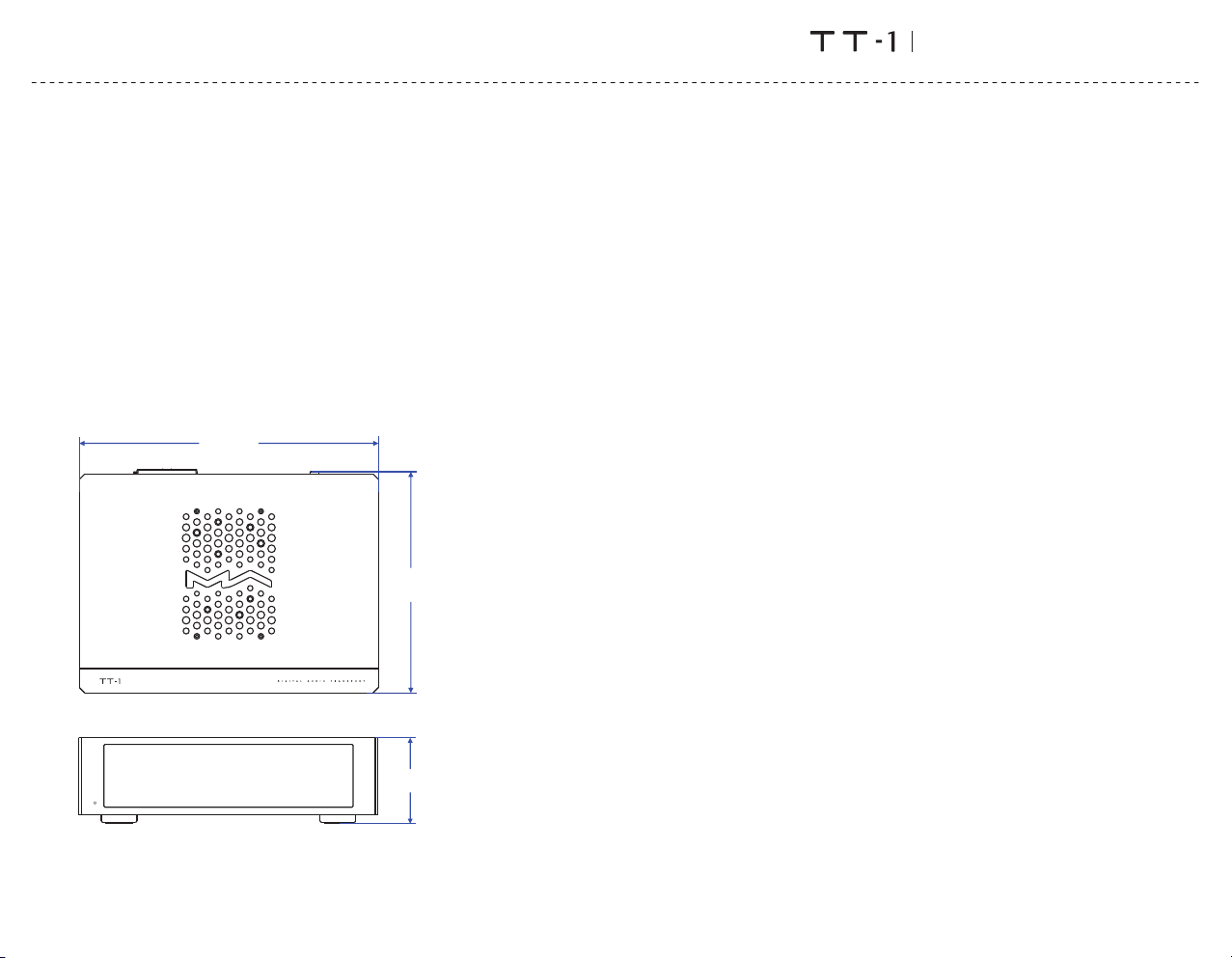
Weight&size
Weight꞉2.76kg(6.08pounds)
Size꞉Width꞉280mm(11.02inches)
Depth꞉210mm(8.27inches)
Height꞉82mm(3.23inches)
280 mm
210 mm
DigitalAudioTransport
AboutRoonReady
BeingRoonReadymeansthatMatrixAudiomusicstreamerstransparentlydiscover
andconnecttoRoonwithoutanyconfiguration,andbit‑perfectaudioisdeliveredfrom
Roontoyourmusicstreamer.
AboutSpotify
Useyourphone,tabletorcomputerasaremotecontrolforSpotify.Goto
spotify.com/connecttolearnhow.
TheSpotifySoftwareissubjecttothirdpartylicensesfoundhere꞉
https꞉//www.spotify.com/connect/third‑party‑licenses.
82mm
*Forimprovementpurpose,specificationssubjecttochangeswithoutpriornotice.
08
Page 11

Precautions
Thisproductisforindooruseonly.
Forfullventilation,itisrecommendedtoreserveaspaceoflargerthan5cmaroundthedevice.
Donotcovertheairventswithstuffssuchaspapers,tablecloths,andcurtainstoobstruct
ventilation.
Donotplacestuffwithflame,suchaslightedcandles,onthedevice.
Ifthedeviceisusedintropicalareas,pleasebecarefultopreventinsectsfromenteringtheunit
throughtheairvents.
Thedevicemustnotbesubjecttowaterdropletsorsplashes.Pleasedonotplacestuffsfilled
withliquidssuchasvasesandcupsonornearthedevice.
DigitalAudioTransport
09
 Loading...