

Page 1
USERMANUAL
DigitalAudioTransport
Page 2

Packinglist . . . . . . . . . . . . . . . . . . . . . . . . . . . . . . . . . . . . . . . . . . . . . . . . . . . . . . 01
Partsandnames . . . . . . . . . . . . . . . . . . . . . . . . . . . . . . . . . . . . . . . . . . . . . . . . . 02
Front 02. . . . . . . . . . . . . . . . . . . . . . . . . . . . . . . . . . . . . . . . . . . . . . . . . . . . . . . . . . . . . . . . . . . . . . . . . . . .
Rear 03. . . . . . . . . . . . . . . . . . . . . . . . . . . . . . . . . . . . . . . . . . . . . . . . . . . . . . . . . . . . . . . . . . . . . . . . . . . .
Bottom 05. . . . . . . . . . . . . . . . . . . . . . . . . . . . . . . . . . . . . . . . . . . . . . . . . . . . . . . . . . . . . . . . . . . . . . . . . .
Operationsbeforeusing. . . . . . . . . . . . . . . . . . . . . . . . . . . . . . . . . . . . . . . . . . . 06
ConnecttoNetwork . . . . . . . . . . . . . . . . . . . . . . . . . . . . . . . . . . . . . . . . . . . . . . . . . . . . . . . . . . . . 06
Connecttoexternalclock. . . . . . . . . . . . . . . . . . . . . . . . . . . . . . . . . . . . . . . . . . . . . . . . . . . . . . 06
MARemoteApp. . . . . . . . . . . . . . . . . . . . . . . . . . . . . . . . . . . . . . . . . . . . . . . . . . . . . . . . . . . . . . . . . . 06
Appendix. . . . . . . . . . . . . . . . . . . . . . . . . . . . . . . . . . . . . . . . . . . . . . . . . . . . . . . . . . . . . . . . . . . . . . . . . . 07
Technicalspecifications . . . . . . . . . . . . . . . . . . . . . . . . . . . . . . . . . . . . . . . . . . . . 07
Weight&size . . . . . . . . . . . . . . . . . . . . . . . . . . . . . . . . . . . . . . . . . . . . . . . . . . . 08
Precautions . . . . . . . . . . . . . . . . . . . . . . . . . . . . . . . . . . . . . . . . . . . . . . . . . . . . . 09
Catalog
DigitalAudioTransport
Page 3
01
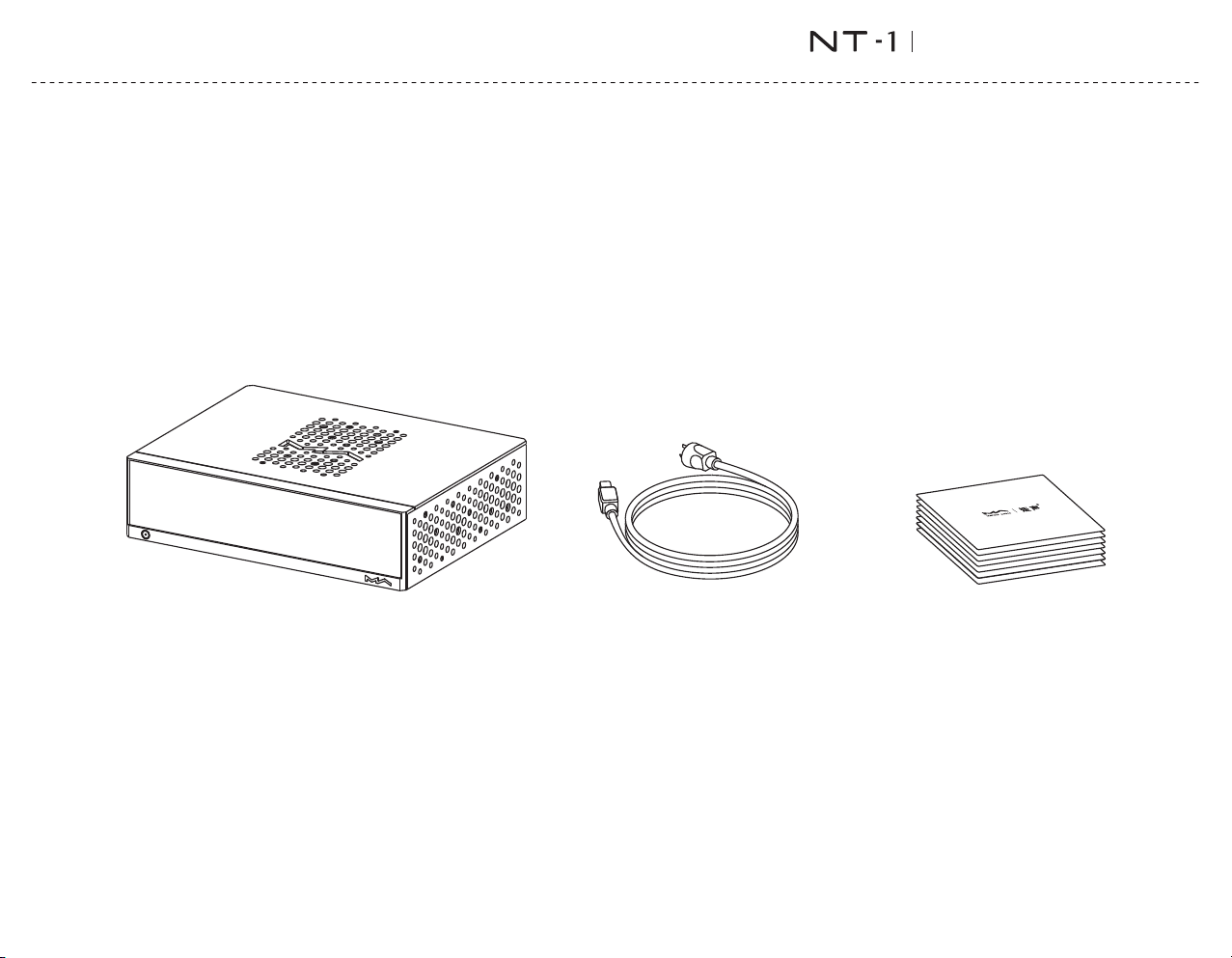
Printedmaterials
Product
Powercable
Packlinglist
DigitalAudioTransport
Page 4
02
2
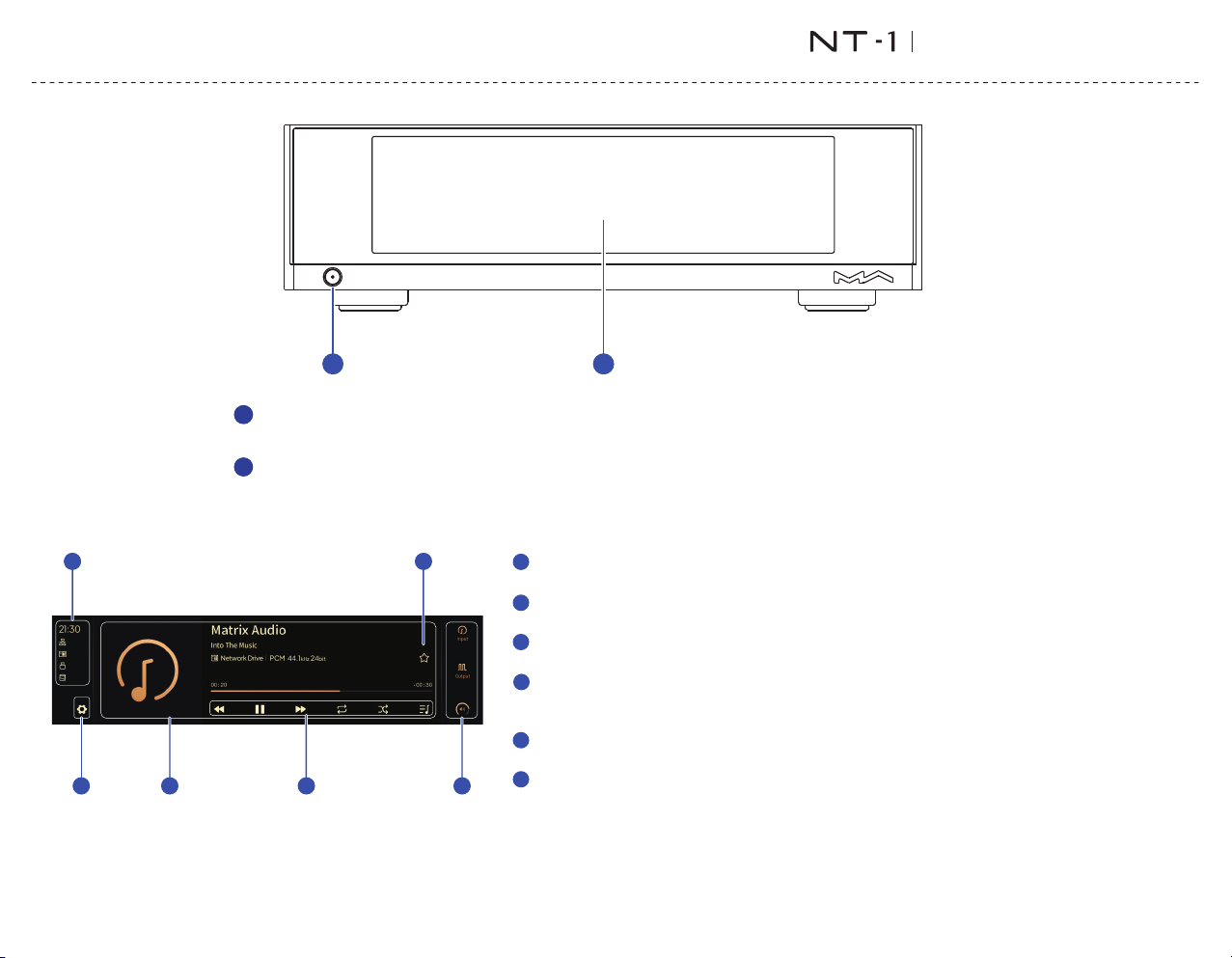
Poweron/Standby
Afterconnectingtopowersupply,pressthisbuttontopowerthedeviceon,pressitagaintoletthedevicestandby.Itwilltake
about30secondsforthefirststartupafterconnectingtothepowersupplyeverytime.
LCDscreen
1
Statusi nfo
Stat usinclud ingtime,n et wor kco nnectio n,storag edevic e,N ASan dhardwa refunctio ns.
Set tingsbut ton
Taponthisbu ttontoenterth e"Settin gs"menuan dch angetheop tionsofthedevice.
Info rm ationofaudio
Inc ludingal bu mart,trackt itle,art ist,durat io n,audioformat,sa mplingratea ndthefilte rtypebein gused.
Pla ybackcon tro lbuttons
Wit hthesebut tons,youcancon tro ltheplayb ack,enab leanddisa bl eloopandsh uffle,ch ec ktheplay
que ueandthepl ay lists.
Myfavori tesb ut ton
Addt rackstoMyfavo ri tesorremovetra cksfromMyfavor itesbytappingont hi sbutton .
Con tro lbar
In putc han ne l꞉Sele ctt heinputch annel.
Out putchann el꞉S electtheo utputcha nnel.
Volumeandmu te꞉Whendigi talvo lumefunc ti onisenabl ed,usethi sbu ttontocha ngethevolumeor
mute .Whendigi talvo lu mefuncti onisoff,th isbuttonwi llnotbedis played.
A
B
C
D
E
Partsandnames
1
2
Front
F
EA
B
C F
D
DigitalAudioTransport
Page 5
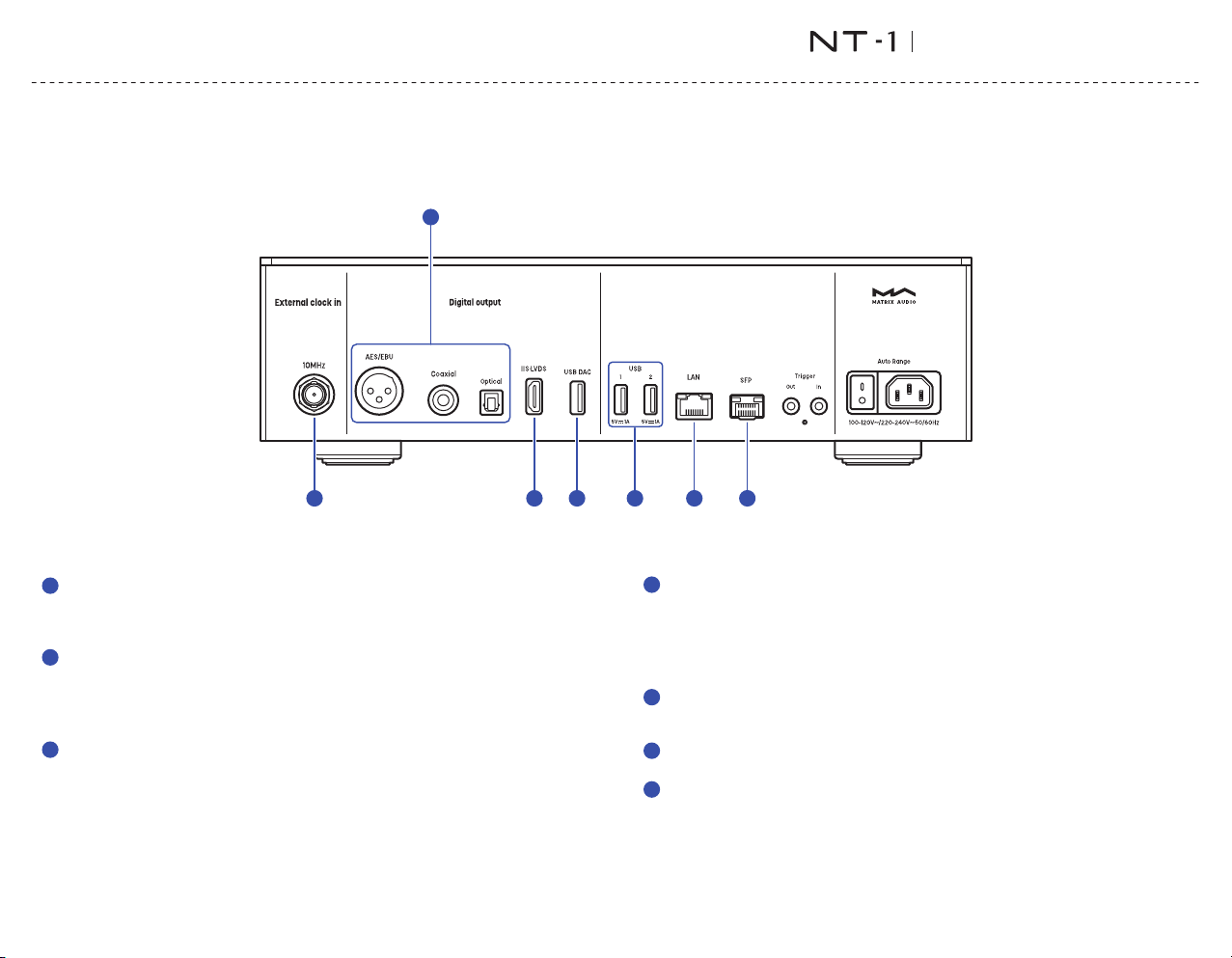
Externalclockinput
To use external clock input, connect the externalclock source to the device through a
coaxialcablewith50Ωimpedance.Thenturntothe settings menu from the deviceand
choose"Externalclock".
Optical,coaxialandAES/EBUoutputs
The optical, coaxial and AES/EBUportsoutput up to24bit/192kHzPCM signals in S/PDIF
standardand1bit/DSD64signalsviaDoP.
Note When thesampling rateoftheplayedaudiofileexceedsthemaximum capabilityof꞉
theoutputport,theoutputwillbeturnedoff.
IIS-LVDSOutput
The IIS‑LVDS port outputs maxim um 32b it /768 kH z sa mp ling rate PC M si gnals,
DSD64/128/256/512signalinNativeDSDstandard,andDSD64/128/256signalviaDoP.
ConnecttoDACswithIIS‑LVDSinputportfromMatrixAudioorothercompatibledevices
throughHDMIcables.Thedevicefeatures4kindsofIIS‑LVDSpindefinitions,whichcanbe
viewedandconfiguredfromtheMARemoteApp.
ThegroundwireoftheIIS‑LVDSportisisolatedfromthegroundwireofthedevice.
USBDACoutput
AnexternalUSBDACcanbeconnectedtotheproductviathisport.Theaudiospecs
dependontheexternalDAC.
Thisportprovidesupto5V/1AlownoisepowertotheexternalUSBDACs.
Note WhentheoutputchannelissettoUSBDAC,theoptical,coaxialandAES/EBU꞉
outputswillbeturnedoff.Thetwooutputcategoriescan'tworkatthesametime.
USB
ConnecttoUSBstoragedevicesorCDdrives.EachUSBportsprovideamaximum5V/1A
power.
LAN
ConnecttoLANportofthenetworkrouter,theconnectionsupportsGigabittransmission.
SFPslot
SFPopticalorSFPtoRJ45modulescanbepluggedintothisslot.Theconnectionsupports
Gigabittransmission.
03
1
2
3
4
6
7
5
Partsandnames
1
2
3 4 5 6 7
Rear
DigitalAudioTransport
Page 6
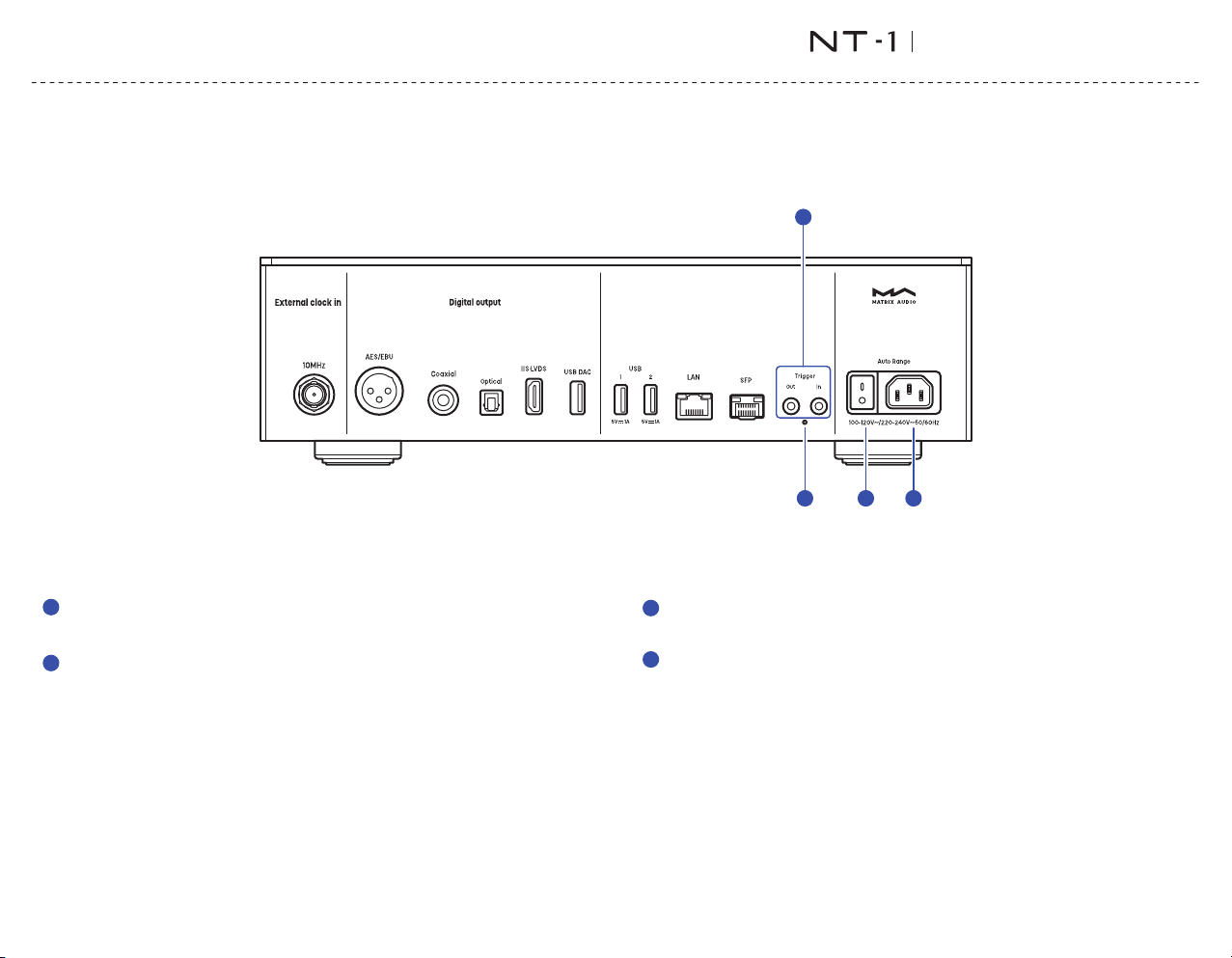
Resetbutton
Onlyusethisbuttonwhentheunitworksincorrectly,theunitcanberesettofactorystate.
PleaseoperateundertheinstructionsbyserviceteamfromMatrixAudio.
Triggerinput/output
Connecttoaudiodeviceswithtriggerportsthroughø3.5mmmonoplugcables,toachieve
linkagecontrolbetweentheelementdeviceandotherdevices.Thetriggeroutputprovides
a12VDCsignal.
Powerswitch
Ifyouneedthedevicetobeturnedoffcompletely,pleaseturnoffthisswitch.Otherwise,
thedevicestillconsumespowerinstandbymode.
Powerinput
Pleaseuseapowercablewhichincludesanearthwireandensureyouhaveareliable
earthwireconnection.Otherwise,thecasingofthedevicemayhaveaslightlycharged
touch.
04
8
9
10
11
Partsandnames
8
9
10 11
Rear
DigitalAudioTransport
Page 7
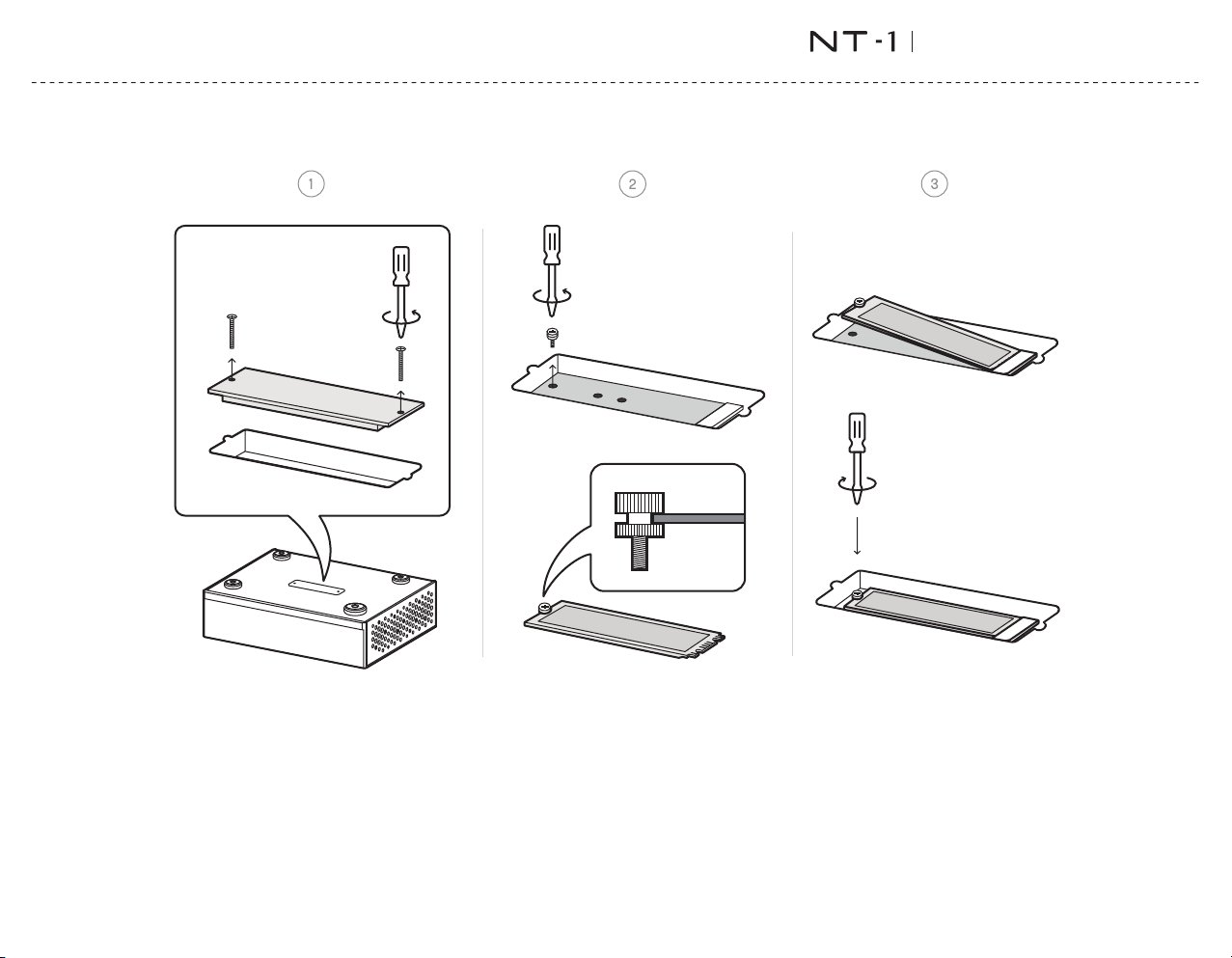
SSDs lot
Youcaninstalla nNVMeprotoc olhigh‑s pe edSSDasinte rnalstorag e.Theslots upports22 80,2260,an d2240SSDs.
Ple aseturnoffandu np lugthepowe rcordthedevicebeforei nstallin gtheSSD.Th isex pansions lotdoesno tsu pporthotswapping.O pe ratingwhi lepoweredonm ay
ris kdamagin gth eSSDandthed evice .
Afte rinstalli ngSSDandtu rningonth edevic e,t hedevicewilln ot ifyyoutofor ma ttheSSD.Iti srecommen dedtoform atitondevicetoavoidcom pa tibilit yissues.I f
theS SDhasalrea dyb eenform attedbeforeinstalla tion,thesystemwillno tpromptyoutofor mat.Youca ncheckandformatthedr ivethro ughthe"In ternalStora ge"
opt ioninthedevicese tt ingmenu.
*Not e꞉Th edevi cesu ppor tsama ximu mpowe rspe cif ica tiono f3.3 V/3 AfortheS SD.U sin ganSS Dwit hawork ingc urre ntexce edi ng3Ama ycau sein stab ili ty.Ple aseve rif yandc onfi rmth isin form ati onont helab elofyo urSS D.
Partsandnames
05
Bottom
DigitalAudioTransport
Page 8
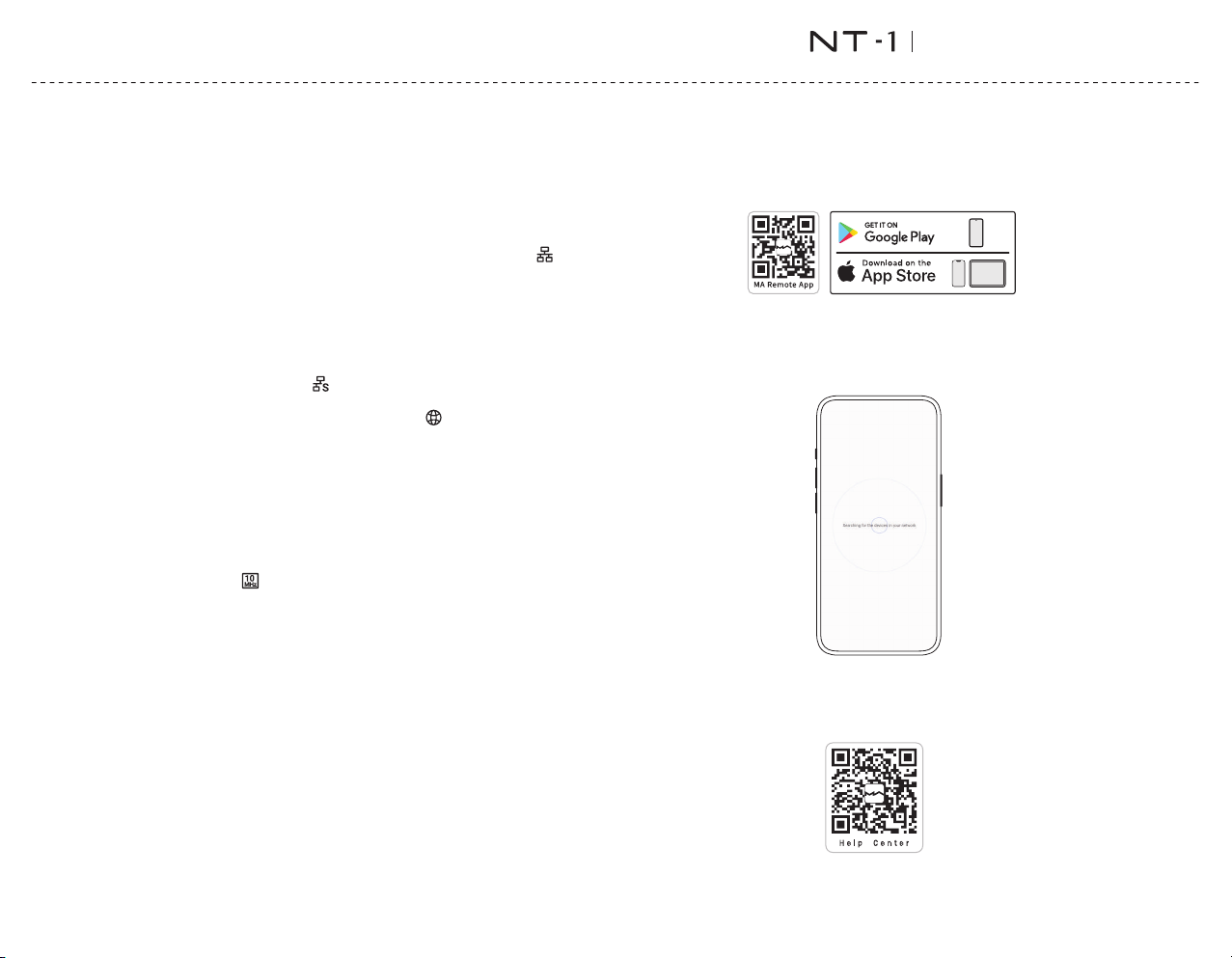
ConnecttoNetwork
LAN
ConnecttheproducttotheLANportofthenetworkrouterthroug hanEthernetcable.Itis
recommended to set upthe router asaDHCP ser ver,the d evice will be assigned an IP
address automatically. S elect "LAN" in option Network in Settings menu, you can
configurethenetworkspecsman ual ly,afterjoiningthenetwo rk,therewillbean icon
showninthestatu sbar.Asshownbe low꞉
SFP
Plug an SFP optical module or an SF P to RJ45 module, you'l l be able to connect the
devicetone tworkvia opticalorEthernetcables. It is recommendedto set up th erouter
asaDHCPserver,thedevicewillbea ssi gne danIPaddressautomatically.Selec t"SFP"in
option Network from Settings menu, you can configure the network sp ecs ma nua lly,
after join ing the n etwork, the re will be an i con shown in t he status bar. As s hown
below꞉
Whentheconnection has no Internetaccess, the rewillbea iconin thestatus bar,
asshownbelow꞉
Connecttoexternalclock
If you wan t to use an external cloc k source, connect the external clo ck to the MS‑1
through a 50Ω impedancecoaxialcable, select "External clock" in the devicesettings
menu. It s upports 10MHz sin e wave or square wave input.When the device detects an
external clock s ign al, the icon willbe di spl ayed o n thestatu s bar.When the opt ion
Referenc eClockissetto"Exter nalClock"whilethecl ockdeviceisnotconnected,music
willnotbeplayed.
MARemoteApp
InstallMARemoteAppforyouriPad,iPhoneorAn droidphone.
Let the device on the same network as your phone or tablet, the MA Remote App wi ll
automatically discover and connect to the device. If you need to add the device
manually,usetheAddDeviceWizard.
To control and c onf igure the eleme nt devices th rough MA Remote App, or pl ayb ack
st re ami ng mu sic fro m t he de vic e, pl e as e refer to mat r ix‑d igi .co m/t u tori als for
instructio ns.
06
Operationsbeforeusing
DigitalAudioTransport
Page 9

Technicalspecifications
Dig ita lOutput
COAXIAL,O PTICAL&AES/EBU
PCM1 6‑24Bit/4 4.1kHz,4 8k Hz,88.2k Hz,96kHz ,176.4k Hz,192kH z
DSD2 .8MHz(Do P)
IISLVDS
PCM1 6‑32Bit/ 44 .1kHz,48 kHz,88.2 kHz,96kH z,1 76.4 kHz,192k Hz ,352.8kH z,
384 kHz,705.6kH z,768 kH z
DSD2 .82MHz,3 .07 MHz,5.64 MHz,6.14 MH z,11.29M Hz,12.29 MH z,22.58M Hz,
24.5 8MHz
USBDAC
Dep endsonthes pe cificat ionssupp ortedbyt heconnec tedUSBDACdev ic e.
Noth ighertha nPC M32Bit/768kH zan dDSD24.5 8M Hz.
TheU SBDACpo rtprovi desamaxim umof5 V/1Alow‑noisep owe rsupply.
Net work
LAN꞉1 0/100/1 00 0Mbps
SFP꞉1 0/100/1 00 0Mbps
USB
USB3 .0x2
TheU SBportprovidesama ximumpowerof5V/1 A.
TheU SBportworkswithdevicesw hichconformtotheUS Bmassstorag e
stan dardandsup portsFAT,FAT32,exFAT,andNTFSfil eformats ,butisnot
gua ranteedtobeco mpatibl ewithallsto ragedev ices.
Extern alClockIn pu t
10M Hz/50Ω/Sinewaveo rsquarewavei np ut.
Trigger
Trigg erin꞉DC6‑12 V<1 0mA
Trigg erout꞉DC12V /5 0mAMAX
StorageExtens ion
M.22 28022602240N VM ePCIeSSDsl ot×1
Them aximumpowers pecific ationprovidedbytheexpan si onslotisDC3 .3V/3A.
MAPl ayer
Con trollerap p꞉MAR emoteAp p
LocalPl ayback
Forma tSu pported꞉Mp 3,WMA,WAV,AIF,AIFC ,AIFF,AAC,F LAC,OG G,APE,ALAC,
M4A ,DSF,DFF,CUE,I SO
PCM1 6‑24Bit/ 44.1kHz ,48 kHz,88.2 kHz,96kH z,176.4 kHz,192k Hz,352.8 kH z,
384 kHz,705.6kH z,768 kH z
DSD2 .82MHz,3 .07 MHz,5.64 MHz,6.14 MH z,11.29M Hz,12.29 MH z,22.58M Hz,
24.5 8MHz
Roo nReady
PCM1 6‑24Bit/44 .1kHz,48k Hz ,88.2kHz ,96kHz,176.4kHz ,192kHz,3 52.8kHz ,
384 kHz,705.6kH z,768 kH z
DSD2 .82MHz,5 .6 4MHz,11. 29MHz,22 .58MHz
QQMusic,Air Pla y2,DL NA/ UPnP,TIDALConnect,SpotifyConnect,vTuner,RadioParadise
Theaudiospec sdep endo nthes erviceprovider.
07
Appendix
DigitalAudioTransport
Page 10
Powe rSp ecs
Powe rVoltage꞉AC100 V‑ 120V50/6 0HzorAC2 20V‑240V5 0/60Hz,A utoRange
Stan dbyP owe rConsump tion꞉< 5W
Max imumPowerCon sumptio n꞉< 50W
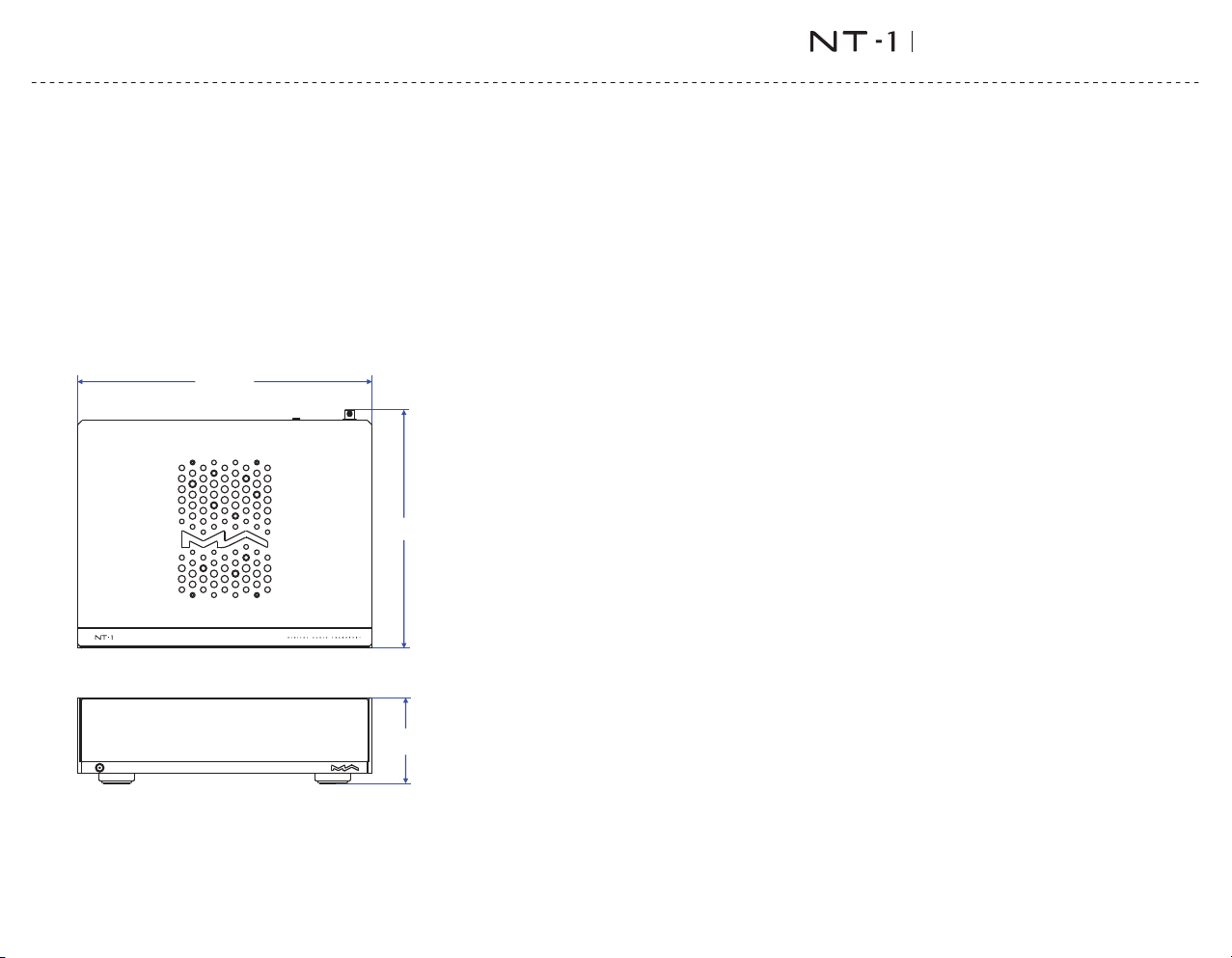
Weig ht&size
Weig ht꞉4.6kg(1 0. 14pounds )
Size꞉Wid th꞉330mm(12 .9 9inches)
Dep th꞉267mm( 10.51inc he s)
Hei ght꞉97mm(3.82in ch es)
AboutRoonReady
Bei ngRoonRea dym eansthatM atrixAud iomusicst rea merstran sp arentlydi scover
andc onnecttoRo onwithou tanycon fi gurati on ,andbit‑p erfecta udioisdel iveredf rom
Roo ntoyou rmusicstre amer.
AboutSpotify
Useyourp hone,tabl etorcompu terasaremoteco ntrolforS potify.Goto
spo tify.com/co nnecttolea rnhow.
TheS potifySoftwareissub jecttothirdp artylice ns esfou ndh ere꞉
htt ps꞉//ww w.spot if y.com/con nect/th ird‑part y‑ license s.
Appendix
08
*Forim prove me ntpu rpo se ,spe cif icati onss ubjec ttocha ngeswi tho utpr io rnot ice .
330 m m
267 m m
97mm
DigitalAudioTransport
Page 11

09
Precautions
Thisproductisforindooruseonly.
Forfullventilation,itisrecommendedtoreserveaspaceoflargerthan5cmaroundthedevice.
Donotcovertheairventswithstuffssuchaspapers,tablecloths,andcurtainstoobstruct
ventilation.
Donotplacestuffwithflame,suchaslightedcandles,onthedevice.
Ifthedeviceisusedintropicalareas,pleasebecarefultopreventinsectsfromenteringtheunit
throughtheairvents.
Thedevicemustnotbesubjecttowaterdropletsorsplashes.Pleasedonotplacestuffsfilled
withliquidssuchasvasesandcupsonornearthedevice.
DigitalAudioTransport
 Loading...