

Page 1
Music Streamer
User Manual
Page 2

Catalog
Packinglist.....................................................................01
Partsandnames ................................................................02
Top...................................................................................02
Front.................................................................................02
LCDScreen.............................................................................02
Rear..................................................................................03
Remotecontrol..........................................................................04
Operationsbeforeusing............................................................05
Connecttonetwork.......................................................................05
MARemoteApp..........................................................................05
DriverforUSBAudio. . . . . . . . . . . . . . . . . . . . . . . . . . . . . . . . . . . . . . . . . . . . . . . . . . . . . . . . . . . . . . . . . . . . . . . . . . . . 06
Appendix.......................................................................08
Technicalspecifications. . . . . . . . . . . . . . . . . . . . . . . . . . . . . . . . . . . . . . . . . . . . . . . . . . . . . . . . . . . . . . . . . . . . . . . . . 08
Powerspecifications. . . . . . . . . . . . . . . . . . . . . . . . . . . . . . . . . . . . . . . . . . . . . . . . . . . . . . . . . . . . . . . . . . . . . . . . . . . . 09
Otherspecifications. . . . . . . . . . . . . . . . . . . . . . . . . . . . . . . . . . . . . . . . . . . . . . . . . . . . . . . . . . . . . . . . . . . . . . . . . . . 09
AboutMQA. . . . . . . . . . . . . . . . . . . . . . . . . . . . . . . . . . . . . . . . . . . . . . . . . . . . . . . . . . . . . . . . . . . . . . . . . . . . . . . . . . . 10
AboutRoonReady. . . . . . . . . . . . . . . . . . . . . . . . . . . . . . . . . . . . . . . . . . . . . . . . . . . . . . . . . . . . . . . . . . . . . . . . . . . . 10
AboutSpotify. . . . . . . . . . . . . . . . . . . . . . . . . . . . . . . . . . . . . . . . . . . . . . . . . . . . . . . . . . . . . . . . . . . . . . . . . . . . . . . . 10
Page 3
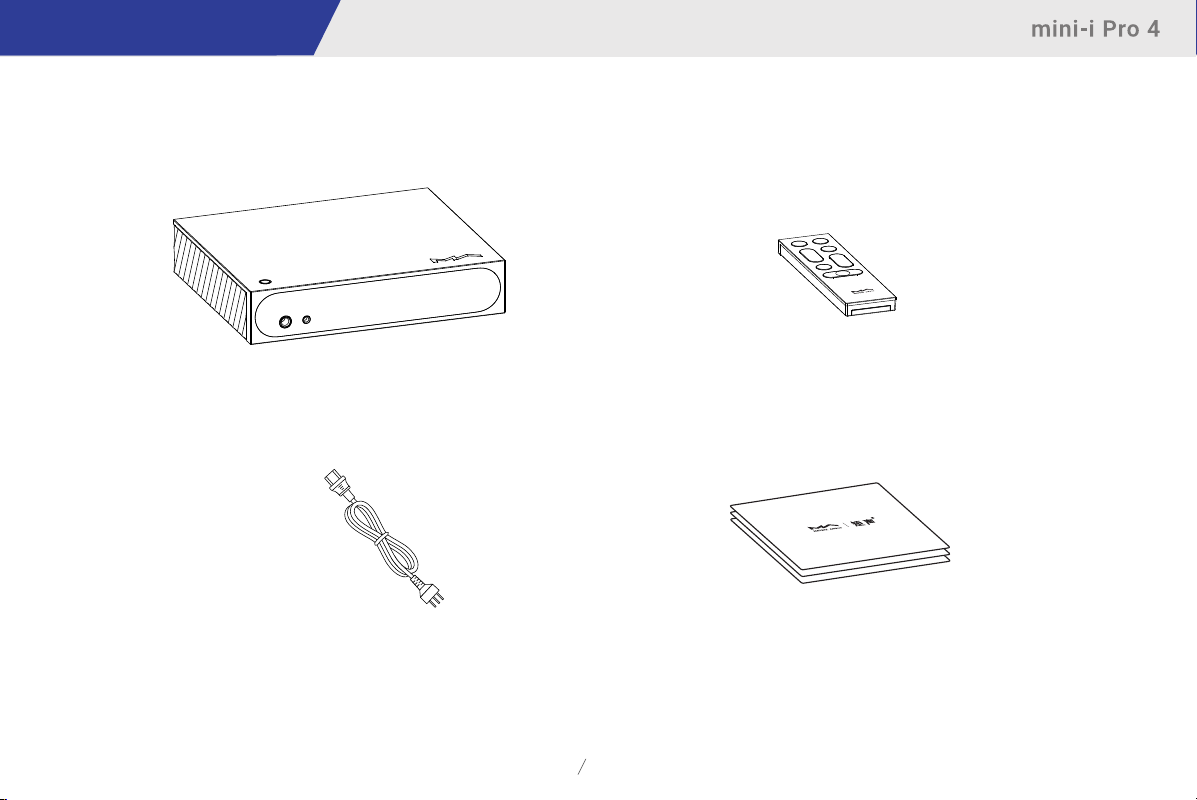
Packing list
Product
Powercable
Remotecontrol
Quickstartguide,warrantycard
01
Page 4
Parts and names
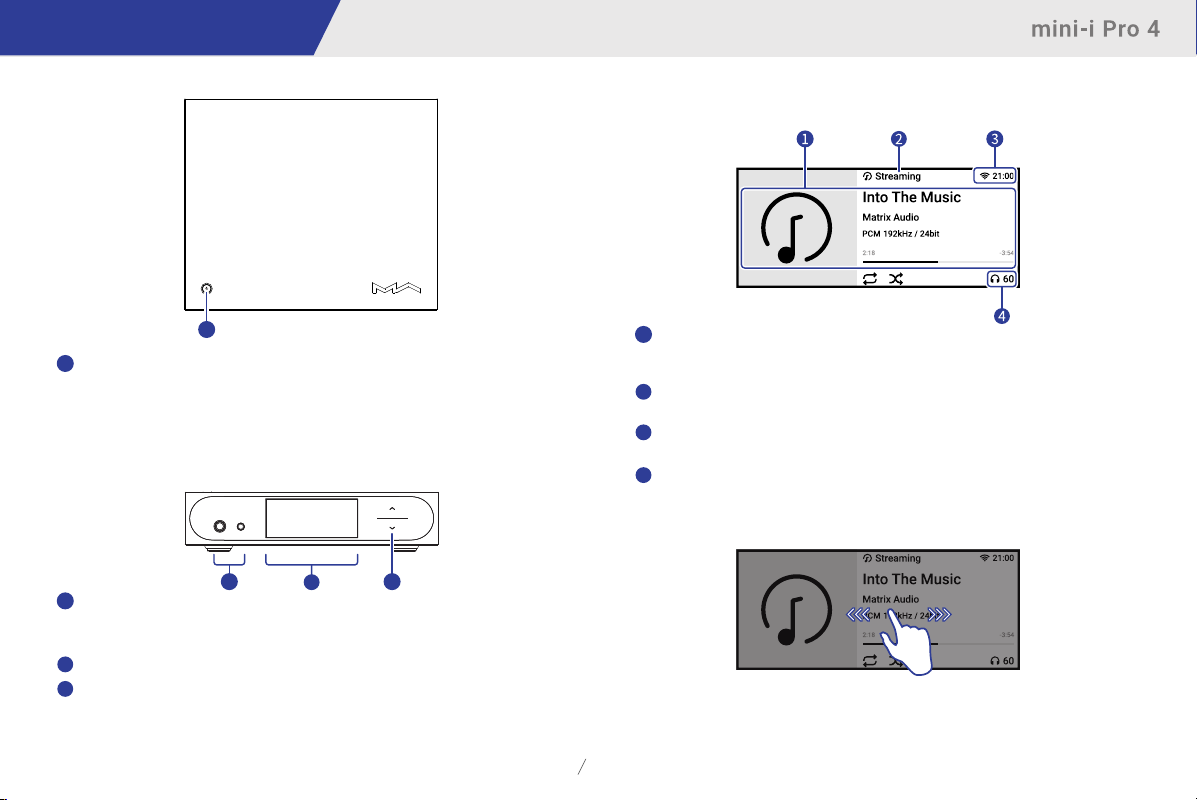
Top
1
1
Poweron/Standby
Afterconnectingtothepowersupply,pressthisbuttontoturnontheunit,
holdthebuttonfortwosecondstostandby.Ittakesabout30secondsforthe
firststartupafterconnectingtothepowersupplyeachtime.
Whenthedeviceisworking,pressthisbuttontomute,pressagaintounmute.
Front
1
Headphonejack
The6.35mmheadphonejackisforsingle-endedheadphones,the4.4mm
headphonejackisforbalancedheadphones.
2
LCDscreen
3
Volumekey
Taponthearrowkeystochangethevolumestepbystep.
Holdthearrowkeysformorethantwosecondstochangethevolumerapidly.
13
2
LCDscreen
Maininformation
Mediaandaudioinformation
1
Includingalbumart,tracktitle,artist,duration,audioformat,samplingrateofthetrack
andthefiltertypebeingused.
2
Inputchannel
Thenameofselectedinputchannel.
3
Statusbar
Includingstatusofclockandnetworkconnection.
Outputchannelandvolume
4
Theselectedoutputchannelandvolumelevel.
Operationoftouchscreen
Swiperighttoopentheshortcutpage.
Swipelefttoopenthemenu.
02
Page 5
Parts and names
Rear
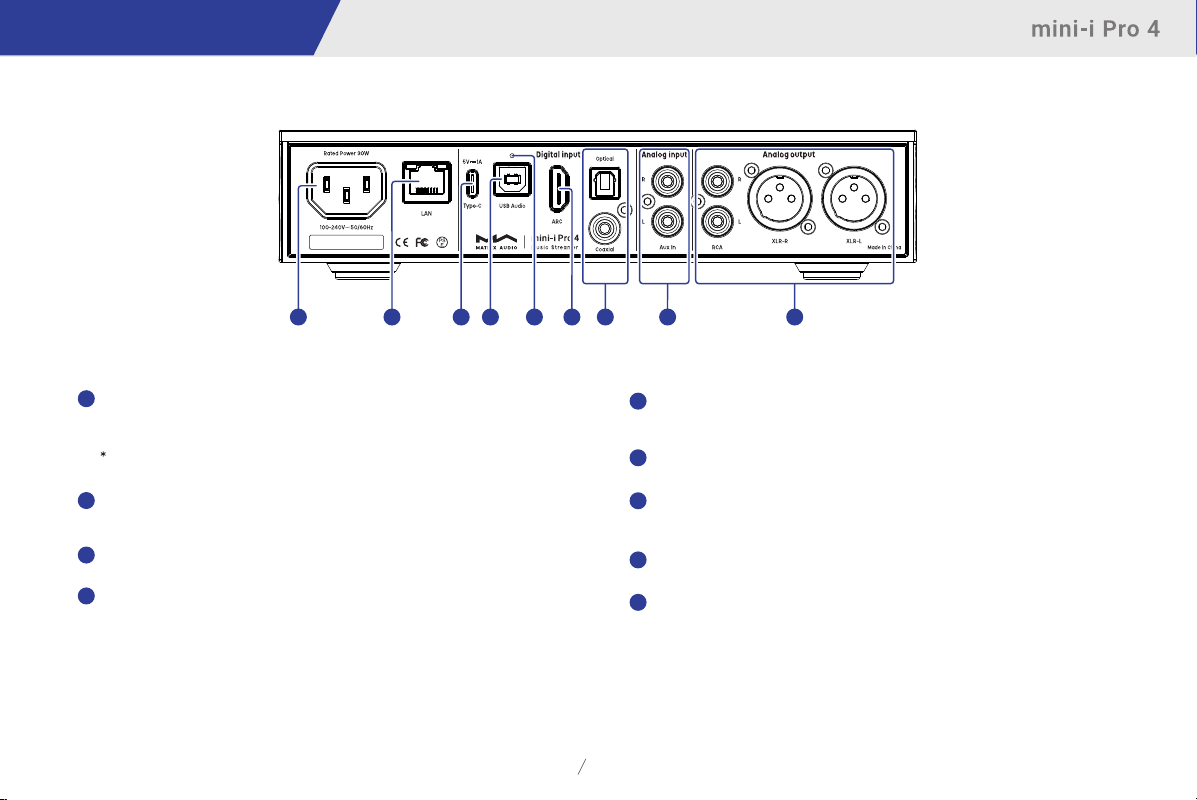
1
1
ACinput
ThisunitadaptstoAC100-240Vpowervoltagerange.Pleasemakesuretousethe
productinthepowervoltagerangementionedabove.
Pleaseusethepowercablewhichincludesanearthwire.Pleaseensureyouhaveareliableearthwire
connection.Otherwise,thecasingoftheunitmayhaveaslightlychargedtouch.Ifyouneedtheunitto
beturnedoffcompletely,pleaseunplugthepowercable.
2
Ethernet
ConnecttoLANportofthenetworkrouter,theconnectionsupportsuptoGigabit
Ethernettransmission.
3
USBTypeC
ConnecttoUSBstoragedeviceswhichrequiresnothigherthan5V/1Apowersupply.
4
USBAudio
Connecttocomputers,smartphonesandtabletsasexternalaudiosourcedevices
throughUSB-Bcables.
3
42
7
6
5
89
5
Resetbutton
Onlyusethisbuttonwhenthedeviceworksincorrectly,thedevicecanberesetto
factorystate.PleaseoperateundertheinstructionsbyserviceteamfromMatrixAudio.
6
HDMIARC
ConnecttoTVswithARC(AudioReturnChannel)functionalitiesthroughHDMIcables.
7
Optical&Coaxialinput
Connecttofront-enddeviceswithS/PDIFsignaloutputsthroughopticalor
coaxialcables.
8
Analoginput
ConnecttovinylturntablesordeviceswithanalogoutputsthroughRCAcables.
9
Analogoutput
ConnecttoactivespeakersoramplifiersthroughRCAorXLRcables.
03
Page 6
Parts and names
CR2032
CR2032
CR2032
CR2032
CR2032
CR2032
CR2032
CR2032
CR2032
CR2032
CR2032
CR2032
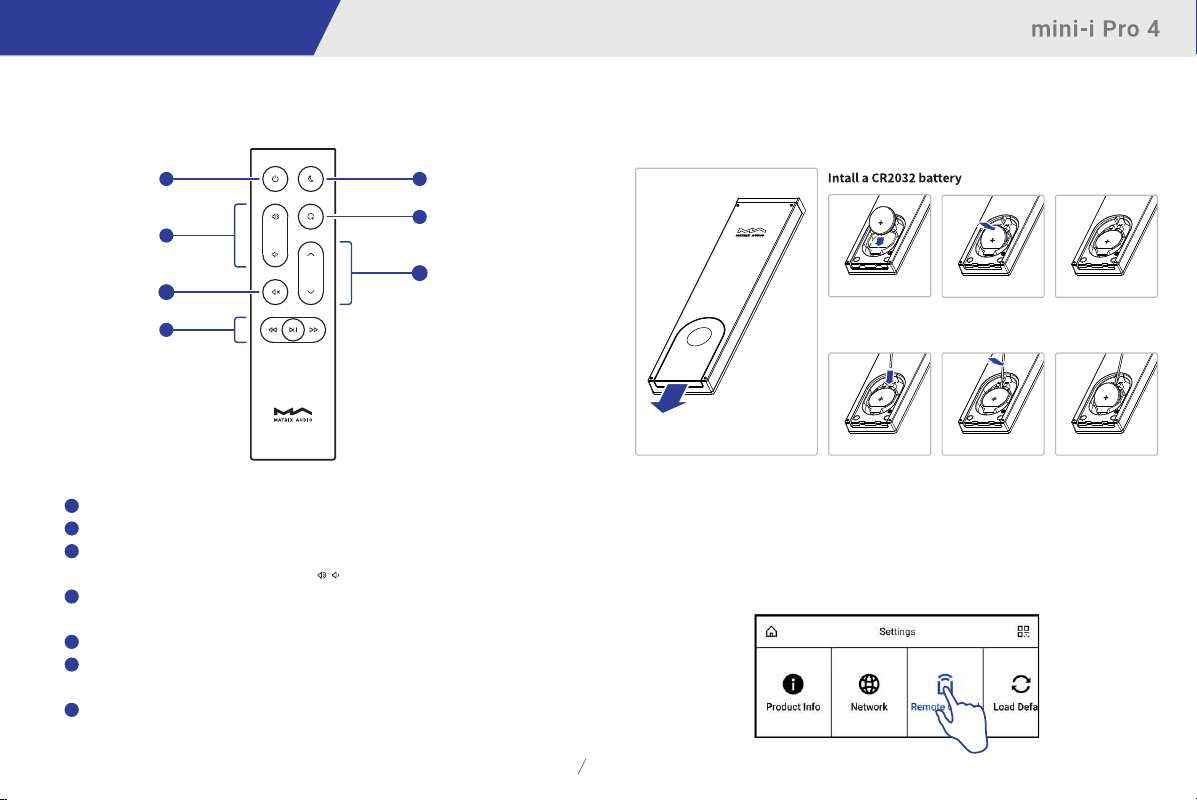
Remotecontrol
1
Poweron/Standby
2
Volume
3
Mute/Unmute
4
Playbackcontrolarea
5
Dimmer
6
Programmablebutton
7
Inputchannels
TheremotecontrolusesaCR2032battery.Slidethebatterycoverinthedirection
ofthearrowtoopenthebatteryholder.Pleasepayattentiontothepolarities
wheninstallingthebattery.
1
2
3
4
Presstomute,pressagaintounmute.Youalsocanunmute
bypressingthe/buttonsinmutestate.
Whentheinputchannelsupports,theplaybackcanbecontrolled
bythesebuttons.
Definethefunctionalitiesoftheprogrammablebuttonthrough
MARemoteApp,thefunctionissetto'Filter'bydefault.
5
6
123
7
Removethebattery
123
Pointtheremotecontroltothedevicewhenusingit,theoperatingdistanceisabout8meters.
Whenthebatteryislow,therewillbeamessageshowingonthedevicedisplaytonotifyyou
aboutreplacingthebattery.
IftherearemorethanoneMatrixAudiodeviceinasingleenvironment,inordertoprevent1
remotecontrolfromcontrollingmultipledevicesatthesametime,wepreset5sets of
addresscodesintheremotecontrol,theseaddresscodescanbeconfiguredintheSettings
menushowingbelow,andfollowtheinstructionsonthedevicedisplay.
04
Page 7
Operations before using
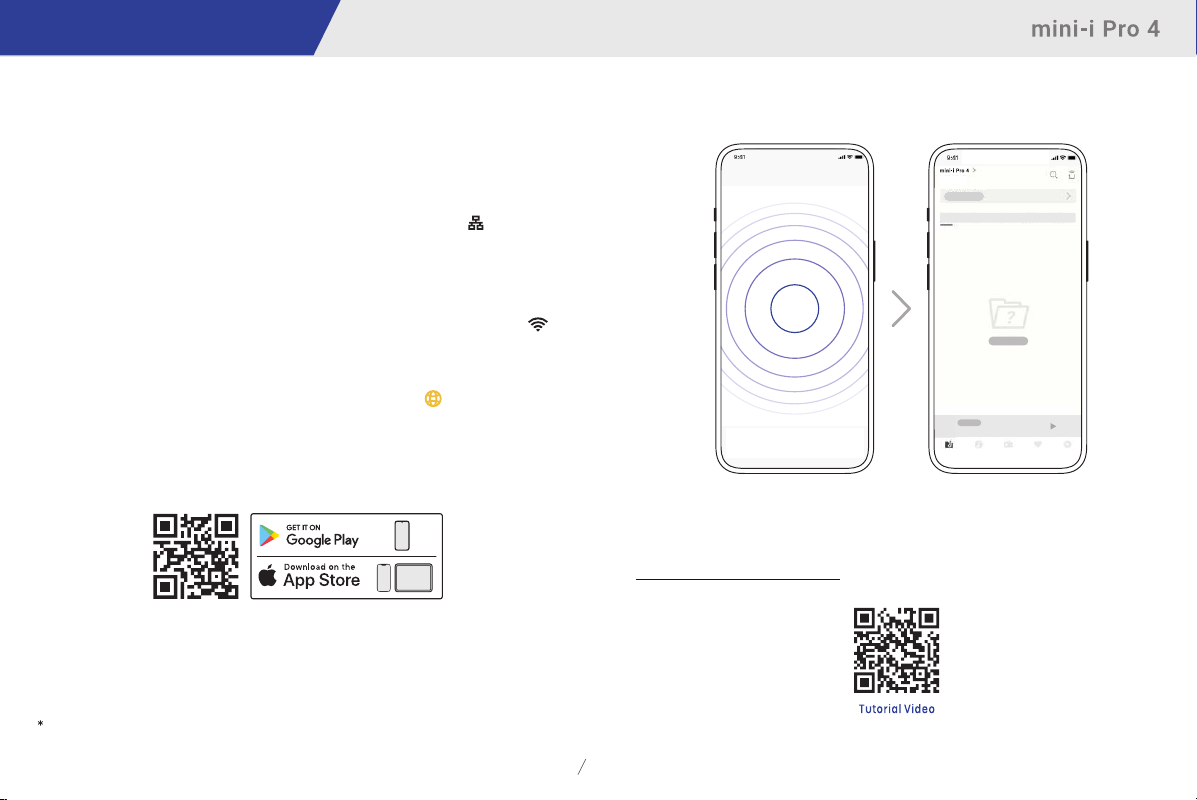
TocontrolandconfigurethedevicethroughMARemoteApp,or
playbackstreamingmusicfromtheelementdevices,pleasereferto
www.matrix-digi.com/tutorialsforinstructions.
Connecttonetwork
LAN
ConnecttheproducttotheLANportofthenetworkrouterthroughanEthernet
cable.ItisrecommendedtosetuptherouterasaDHCPserver.Theunitwill
beassigned anIPaddressautomatically.Select"LAN"inoptionNetwork
inSettingsmenu,afterjoiningthenetwork,therewillbeashownin
thestatusbar.
Wi-Fi
EnterSettingsmenu-Network-Wi-Fi,afternetworkscanningcomplete,choose
theSSIDofyournetworkandenterthepasswords,therewillbea
showninthestatusbarafterconnected.Thedevicesupports2.4GHz/5GHz
wirelessnetwork.
WhentheconnectionhasnoInternetaccess,therewillbeainthestatusbar.
MARemoteApp
InstallMARemoteAppforyouriPad,iPhoneorAndroidphone.
Opentheapp,itwillautomaticallysearchforthedeviceandenterthehomepage
afterthedeviceisadded.
Ifyouneedtoaddthedevicemanually,youcanfollowthepromptsintheapp
wizardandscanthehostQRcodetoadditmanually.
PleasemakesurethedeviceandyourphoneoriPadinthesamenetworkbeforeconnection.
05
Page 8
Operations before using
DriverforUSBAudio
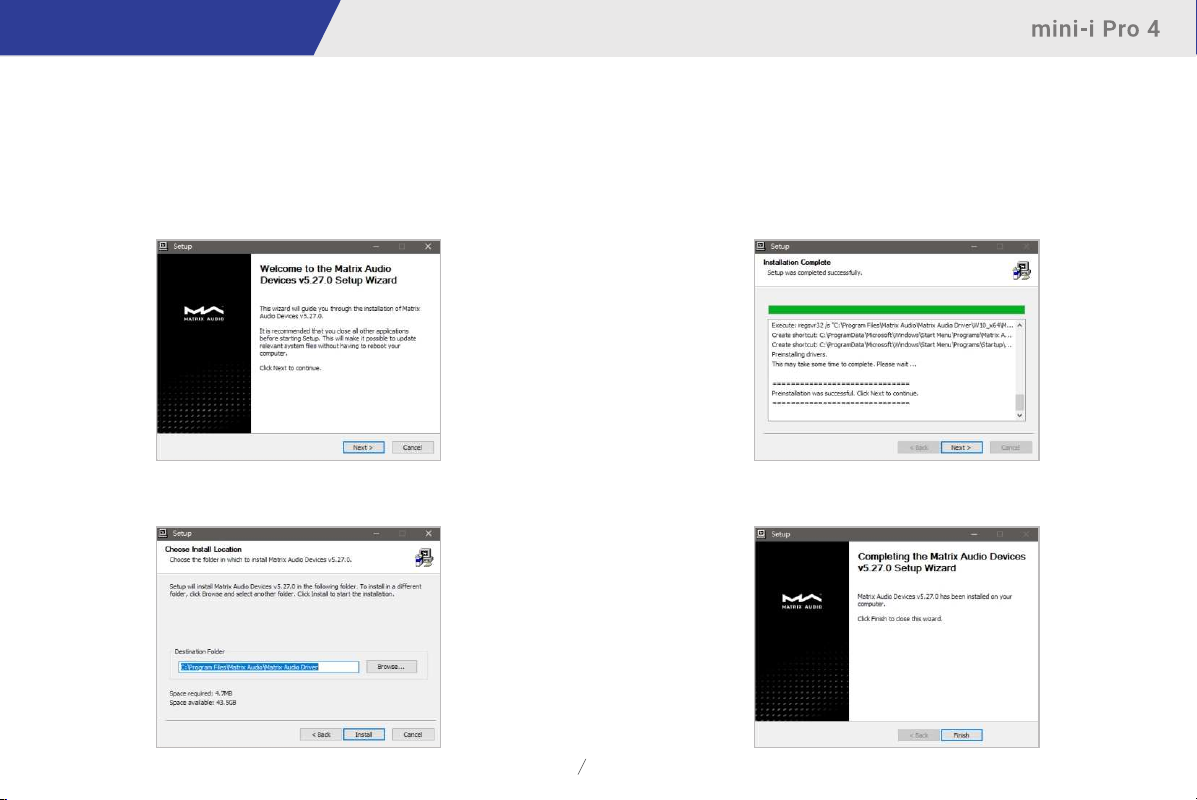
WhenconnectingthedevicetoaWindows7/8/10/11computerviaUSB
connectionasanexternalaudiodevice,pleaseinstalldriversasfollowing
instructions:
1.Double-clickthedriverinstallationpackageandclick"Next".
2.Selectinstallationpathandclick"Install".
3.Click"Next"aftertheinstallationiscomplete.
4.Click"Finish"toclosetheSetupWizard.
06
Page 9
Operations before using
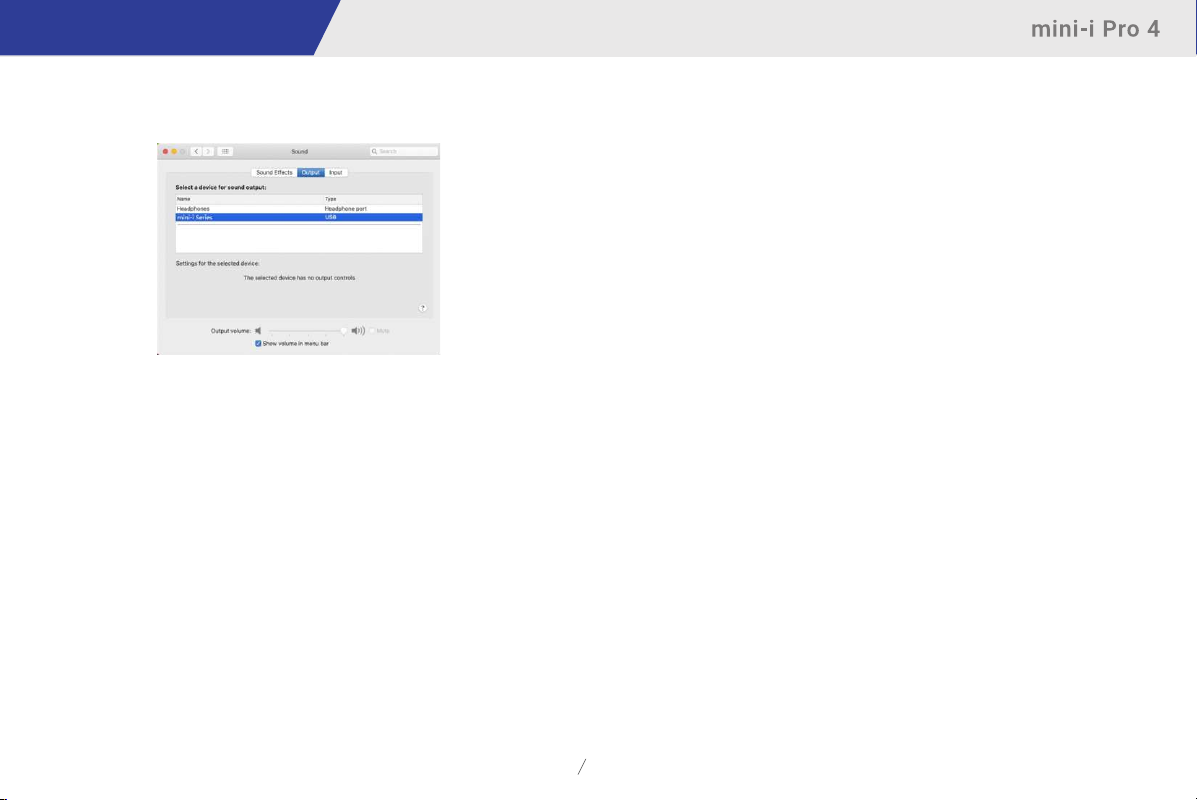
It’snoneedtoinstalldriversformacOS,justselect“mini-iSeries”astheaudio
outputdeviceinSoundPreferences.
ThedevicecanbeconnectedtoaniPhoneoriPadviaaLightningtoUSB
CameraAdapter.
ThedevicecanbeconnectedtoAndroiddevicesviaanOTGadapter,butnot
everyAndroiddevicesarecompatiblewiththedeviceviaOTGconnection.
07
Page 10

Appendix
Technicalspecifications
HardwarePlatform
CPU: QuadCortex-A552.0GHz
D/AChip:ES9039Q2M
DigitalInput
COAXIAL&OPTICAL
PCM 16-24Bit/44.1kHz,48kHz,88.2kHz,96kHz,176.4kHz,192kHz
DSD 2.8MHz(DoP)
HDMIARC
PCM 16-24Bit/44.1kHz,48kHz,88.2kHz,96kHz,176.4kHz,192kHz
USBAudio
PCM 16-24Bit/44.1kHz,48kHz,88.2kHz,96kHz,176.4kHz,
192kHz,352.8kHz,384kHz,705.6kHz,768kHz
MQA 16-24Bit/44.1kHz,48kHz,88.2kHz,96kHz,176.4kHz,
192kHz,352.8kHz,384kHzMQAorMQAStudiostream
DSD 2.8MHz,5.6MHz,11.2MHz(DoP)
DSD 2.8MHz,5.6MHz,11.2MHz,22.4MHz(Native)
AuxInput
SNR:100dBA-weighting
THD+N:<0.0035%@1k,<0.0035%@20Hz-20kHz
Frequency
ChannelCrosstalk:>-105dB
InputLevel:2.1VRMSMaximum
LineOutput
XLR
SNR:127dBA-weighting
THD+N:<0.00008%@1k,<0.00010%@20Hz-20kHz
Response:20Hz-20kHz±0.1-3dB@46kHz
FrequencyResponse:20Hz-20kHz±0.1-3dB@90kHz
Crosstalk:>-146dB
OutputLevel:4.4VRMS@0dB
RCA
SNR:121dBA-weighting
THD+N:<0.00015%@1k,<0.00020%@20Hz-20kHz
FrequencyResponse:20Hz-20kHz±0.1-3dB@90kHz
ChannelCrosstalk:>-133dB
OutputLevel:2.2VRMS@0dB
HeadphoneOutput
4.4mmBalanced
SNR:117dBA-weighting
THD+N:<0.0004%@20Hz-20kHz4VRMS
FrequencyResponse:20Hz-20kHz±0.1-3dB@90kHz
OutputImpedance:<22Ω
OutputPower:2200mW@33Ω,950mW@300Ω,500mW@600Ω,1%THD
Gain:+14dB
6.35mmSingle-ended
SNR:116dBA-weighting
THD+N:<0.0005%@20Hz-20kHz2VRMS
FrequencyResponse:20Hz-20kHz±0.1-3dB@90kHz
OutputImpedance:<11Ω
OutputPower:1200mW@33Ω,260mW@300Ω,130mW@600Ω,1%THD
Gain:+14dB
Network
LAN:10/100/1000Mbps
WLAN:2.4GHz/5GHz
08
Page 11
Appendix
USBTypeC
TheUSBTypeCportprovidesamaximumpowerof5V/1A.
TheUSBTypeCportworkswithdeviceswhichconformtotheUSBmass
storagestandardandsupportsFAT,FAT32,exFAT,andNTFSfileformats,
butisnotguaranteedtobecompatiblewithallstoragedevices.
MAPlayer
Controllerapp: MARemoteApp
LocalPlayback:
FormatSupported
MP3,WMA,WAV,AIF,AIFC,AIFF,AAC,FLAC,OGG,APE,ALAC,
M4A,DSF,DFF,CUE
PCM 16-24Bit/44.1kHz,48kHz,88.2kHz,96kHz,176.4kHz,
192kHz,352.8kHz,384kHz,705.6kHz,768kHz
MQA 16-24Bit/44.1kHz,48kHz,88.2kHz,96kHz,176.4kHz,
192kHz,352.8kHz,384kHzMQAorMQAStudiostream
DSD 2.8MHz,5.6MHz,11.2MHz,22.4MHz
RoonReady:
PCM 16-24Bit/44.1kHz,48kHz,88.2kHz,96kHz,176.4kHz,
192kHz,352.8kHz,384kHz,705.6kHz,768kHz
MQA 16-24Bit/44.1kHz,48kHz,88.2kHz,96kHz,176.4kHz,
192kHz,352.8kHz,384kHzMQAorMQAStudiostream
DSD2.8MHz,5.6MHz,11.2MHz,22.4MHz
AirPlay2,DLNA/UPnP,TIDALConnect,SpotifyConnect,vTuner,Radio
Paradise,HIRESAUDIO,theaudiospecsdependontheserviceprovider.
Powerspecifications
PowerVoltage:AC100V-240V50/60Hz
StandbyPowerConsumption:<5W
MaximumPowerConsumption:<30W
Otherspecifications
Weight:1.3kg(2.87pounds)
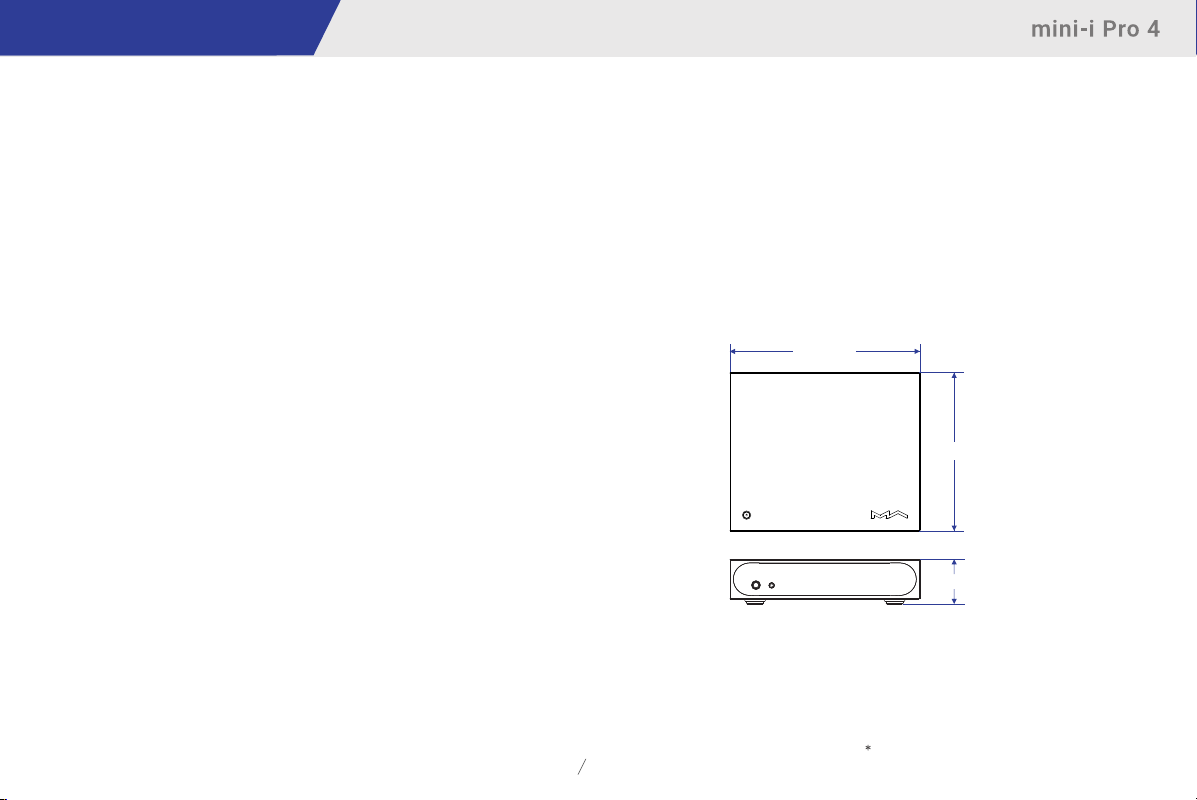
Size:Width224mm(8.80inches)
Depth186mm(7.32inches)
Height53mm(2.07inches)
224m m
186m m
53m m
09
Specificationsaresubjecttochangewithoutnotice.
Page 12
Appendix
AboutRoonReady
BeingRoonReadymeansthatMatrixAudiomusicstreamerstransparently
discoverandconnecttoRoonwithoutanyconfiguration,andbit-perfectaudio
isdeliveredfromRoontoyourmusicstreamers.
AboutSpotify
Useyourphone,tabletorcomputerasaremotecontrolforSpotify.Goto
www.spotify.com/connecttolearnhow.
TheSpotifySoftwareissubjecttothirdpartylicensesfoundhere:
https://www.spotify.com/connect/third-party-licenses
AboutMQA(MasterQualityAuthenticated)
ThisunitincludesaMQAfulldecoder,whichenablesyoutoplaybackMQA
audiofilesviastreamingorUSBaudioport,deliveringthesoundoftheoriginal
masterrecording.
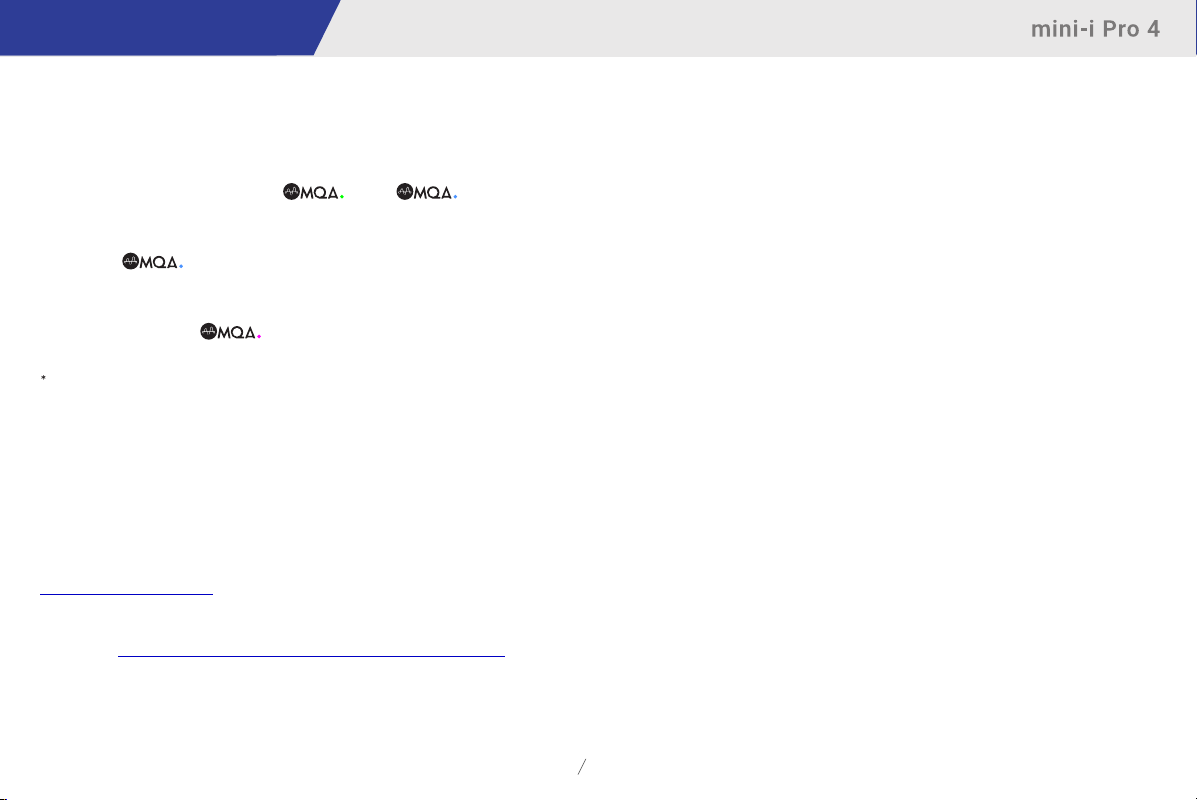
ThedotsbesidetheMQAlogogreenorbluetoindicatethat
theunitisdecodingandplayinganMQAstreamorfile,anddenotes
provenancetoensurethatthesoundisidenticaltothatofthesourcematerial.It
glowsbluetoindicateitisplayinganMQAStudiofile,whichhas
eitherbeenapprovedinthestudiobytheartist/producerorhasbeenverifiedby
thecopyrightowner.
ThedotglowsmagentatoindicatethattheunitisrenderinganMQA
streamorfile.ThisdeliversthefinalunfoldoftheMQAfile.
MQAandtheSoundWaveDeviceareregisteredtrademarksofMQALimited.©2016
10
Page 13

Attention
·Thisproductisforindooruseonly.
·Forfullventilation,itisrecommendedtoreserveaspaceoflargerthan5cmaroundthedevice.
·Donotcovertheairventswithstuffssuchaspapers,tablecloths,andcurtainstoobstructventilation.
·Donotplacestuffwithflame,suchaslightedcandles,onthedevice.
·Ifthedeviceisusedintropicalareas,pleasebecarefultopreventinsectsfromenteringtheunit
·Thedevicemustnotbesubjecttowaterdropletsorsplashes.Pleasedonotplacestuffsfilledwith
·DonotputstuffsaroundthedevicepowerplugandtheACpowersocket,inordertodisconnectthe
throughtheairvents.
liquidssuchasvasesandcupsonornearthedevice.
powersupplyeasilywhenneeded.
11
Page 14

Room 206 Block B, #58 Mingguang Rd,
20240529Ver.1.4
 Loading...