

Page 1

TCR500-PCI
SMPTE - EBU & IRIG – B1
TIME CODE READER
FOR PCs
2484 West Clay
St. Charles, MO 63301
Phone: (636) 724-3666 Fax: (636) 724-3776
www.masterclock.com
User’s Manual-TCR500-PCI, Rev 1.0.1, Jan -07 (C) Masterclock, Inc.
Page 2

TABLE OF CONTENTS
INSTRUCTION BOOK WARRANTY ..................................................................................... A
SOFTWARE LICENSE AGREEMENT ................................................................................... A
License Title/Ownership ................................................................................................ A
Grant of License ............................................................................................................. A
Copyright ....................................................................................................................... A
Other Restrictions .......................................................................................................... B
U.S. Government Restricted Rights ............................................................................... B
General ........................................................................................................................... B
INTRODUCTION ...................................................................................................................... 1
HARDWARE DETAILS ............................................................................................................ 1
Input Connections ........................................................................................................... 1
Input Level ...................................................................................................................... 1
Input Impedance.............................................................................................................. 2
Time Code Input Select .................................................................................................. 2
Plug And Play ................................................................................................................. 2
SOFTWARE ............................................................................................................................... 2
TCRSync-PRO ................................................................................................................ 2
Time Synchronization Service for Windows 95, 98, and Me (Millennium) ...................................... 2
Time Synchronization Service for Windows NT/2000/XP ................................................................ 2
Differences between Windows 2000 and Windows NT .................................................................... 2
TCRSync Configuration Utility ......................................................................................................... 3
TCRSync Monitor Utility ................................................................................................................... 7
Time Code Viewer .......................................................................................................... 8
TCR SDK for CUSTOM PROGRAMMING ................................................................. 9
TCR Dynamic Link Library ............................................................................................ 9
Specifications ............................................................................................................................ 10
Time Code INPUT ........................................................................................................ 10
PCI BUS .......................................................................................................................... 10
Physical ........................................................................................................................... 10
Operating/Storage Temperature & Humidity ............................................................... 11
Compliance ............................................................................................................................... 11
LIMITED SOFTWARE WARRANTY .................................................................................... 12
30 Day Satisfaction Guarantee ..................................................................................... 12
Limited Warranty For Next 60 Days ............................................................................ 12
Limitation of Remedies ................................................................................................. 13
LIMITED HARDWARE WARRANTY .................................................................................. 13
Exclusions ..................................................................................................................... 13
Warranty Limitations .................................................................................................... 13
Exclusive Remedies ...................................................................................................... 14
Obtaining Hardware Service ......................................................................................... 14
FCC Compliance Statement ...................................................................................................... 14
User’s Manual -TCR500-PCI , Rev 1.0.1 - Jan - 07 (C) Masterclock, Inc.
i
Page 3

INSTRUCTION BOOK WARRANTY
The information contained in this document is subject to change without notice.
Masterclock, Inc. (herein after Masterclock) makes no warranty of any kind with regard to this material,
including, but not limited to, the implied warranties of merchantability and fitness for a particular
purpose.
Masterclock shall not be liable for errors contained herein or for incidental or consequential
damages in connection with the furnishing, performance, or use of this material.
SOFTWARE LICENSE AGREEMENT
Please read this License carefully before using the Software. This is a legal agreement between you (the
Customer as an individual or an entity), the end user, and Masterclock, Inc. (herein after Masterclock)
The right to use this Software is granted only if the Customer agrees to the terms of this License. If you
do not agree to the terms of this License, promptly return the disk package and accompanying items
(including written materials and binders or other containers) to the place you obtained them for a full
refund.
Use of this software indicates your acceptance of these terms and conditions.
LICENSE TITLE/OWNERSHIP
No title or ownership of the Software is conferred with this License.
GRANT OF LICENSE
This Masterclock Software License Agreement ("License") permits you to use one copy of the
Masterclock software product ("Software") on any single computer, provided the Software is in use on
only one computer at any time. If you have multiple Licenses for the Software, then at any time you
may have as many copies of the Software in use as you have Licenses. The Software is "in use" in a
computer when it is loaded into the temporary memory (i.e., RAM) or is installed into the permanent
memory (e.g., hard disk, CD-ROM, or other storage device) of that computer. However, a copy
installed on a network server for the sole purpose of distribution to other computers is not "in use." If the
anticipated number of users of the Software will exceed the number of applicable Licenses, you must
have a reasonable mechanism or process in place to assure that the number of persons using the
Software concurrently does not exceed the number of Licenses. If the Software is permanently installed
on the hard disk or other storage device of a computer (other than a network server), then the person
authorized to use such computer also may use the Software on a portable computer, laptop, and home
computer. If such person's authorization to use such computer ceases for any reason (e.g. termination of
employment), then such person's authority to use the software on a portable computer, laptop, and home
computer shall cease.
COPYRIGHT
The Software is owned by Masterclock and is protected by United States copyright laws and
international treaty provisions. Therefore, you must treat the Software like any other copyrighted
material (e.g., a book or musical recording), except that you may either (a) make one copy of the
Software solely for backup or archival purposes, or (b) transfer the Software to a single hard disk
provided you keep the original solely for backup or archival purposes. You may not copy written
User’s Manual -TCR500-PCI , Rev 1.0.1 - Jan - 07 (C) Masterclock, Inc.
A
Page 4

materials accompanying the Software. All authorized copies must bear the copyright notice on or in the
original.
OTHER RESTRICTIONS
This License is your proof of license to exercise the rights granted herein and must be retained by you.
You may not rent or lease the Software, but you may transfer your rights under this License on a
permanent basis provided that you transfer this License, the Software and all accompanying written
materials, you retain no copies, and the recipient agrees to the terms of this License. You may not
decompile, or disassemble the Software. If the Software is an update, any transfer must include the
update and all prior versions.
Masterclock reserves the right to terminate this License upon breach. In the event of termination at
Masterclock's election, all copies of the Software must be returned to Masterclock or destroyed.
U.S. GOVERNMENT RESTRICTED RIGHTS
The Software and documentation are provided with Restricted Rights. Use, duplication, or disclosure
by the U.S. Government is subject to restrictions as set forth in subparagraph (c) (1) (ii) of the Rights in
Technical Data and Computer Software clause as DFARS 252.227-7013 or subparagraphs (c) (1), (2)
and (3) of the Commercial Computer Software - Restricted Rights at 48 CFR 52.227-19, as applicable,
and any amendments thereto. Contractor/manufacturer is Masterclock, Inc., 2484 West Clay St., St.
Charles, MO 63301
GENERAL
This Agreement is governed the laws of the State of Illinois (except federal law governs copyrights and
registered trademarks). If any provision of this Agreement is deemed invalid by any court having
jurisdiction, that particular provision will be deemed deleted and will not affect the validity of any other
Agreement.
User’s Manual -TCR500-PCI , Rev 1.0.1 - Jan - 07 (C) Masterclock, Inc.
B
Page 5

INTRODUCTION
The TCR500-PCI is a time code reader plug-in cards for standard 5V, 32 bit PCI bus, on IBM-PC's and
compatible computer systems. The card can be used to synchronize time in a PC or Server to a master
time code. In addition, it can be used as a SMPTE or IRIG-B(1) linear time code reader, under software
control. The reader is compatible with 24/25/30 fps NDF (Non Drop Frame) SMPTE linear time code.
The reader is also compatible with the IRIG-B(1) 1 kHz amplitude modulated time code format.
This instruction book covers installation and operation of the card using linear SMPTE and also IRIGB(1) TC (Time Code). In some cases references are made to 24, 25 or 30 frames. It should be
understood that the reference to 24, 25 or 30 frames per second only applies to the SMPTE TC.
Masterclock, Inc. provides the following on the CD which ships with the TCR card:
• Card drivers for the following operating systems: Windows 95, 98, 98SE, Me (Millennium), NT
3.51/4.0, 2000 & XP.
• TCRSync-PRO – An advanced time synchronization software package providing time zone
offset capabilities, automatic daylight savings time handling, unobtrusive background operation
functionality, and many other high-end features.
• Time Code Viewer – A time code display/diagnostic utility.
• An API (application programming interface) library with documentation and example code.
Available for separate purchase is:
• TCRSync-NTP – Integrates with TCRSync-Pro for provide enterprise-level network time
synchronization utilizing the open standard NTP (network time protocol). Available for
Windows 2000/XP.
HARDWARE DETAILS
INPUT CONNECTIONS
The TC input is balanced; as such the input polarity is not critical to operation of the TCR card.
However, for systems distributing single ended or unbalanced TC signal to multiple drops (multiple TC
devices), it is suggested that the signal distribution method be consistent.
An insulated BNC female connector is provided as a standard connector for 2-wire time code input. By
convention, Masterclock systems utilizing a BNC connector and coaxial cable to distribute time code
reserve the center conductor of the BNC as the Time Code signal and the outer BNC conductor as the
Time Code Reference/Signal GND
INPUT LEVEL
The input level is controlled via an automatic gain control circuit. The TCR firmware will automatically
determine the appropriate gain control setting for your incoming time code dB level.
The TCR cannot adjust for time code signal levels outside the range of -15 and +20dB. The card
requires up to 30 seconds to complete automatic gain control when decoding SMPTE and (in the worst
User’s Manual - TCR500-PCI, Rev 1.0.1 - Jan-07 (C) Masterclock, Inc.
1
Page 6

case) up to three minutes when decoding IRIG-B(1). When proper gain control has been achieved the
incoming time code should be read and displayed on the screen without any hesitations or jumps, and
the LED on the card will light steady-on.
INPUT IMPEDANCE
The input impedance for the Masterclock TCR circuit is considered to be relatively high at
approximately >100kOhm. This high input impedance allows for connecting multiple Masterclock
TCR load devices without loading and/or distorting the time code input signal.
TIME CODE INPUT SELECT
All TCR500-PCI cards require a jumper configuration to set which type of time code will be decoded SMPTE or IRIG-B(1). The jumper is J1 on the TCR500-PCI. The jumper should be placed in the off
(open) position for SMPTE decoding (factory default setting), and the on (closed) position for IRIGB(1) decoding.
PLUG AND PLAY
The TCR500-PCI is fully plug and play compatible. Windows (with the exception of NT) will detect
this card on the next system boot, automatically configure appropriate I/O port and interrupt settings,
then prompt for the driver.
SOFTWARE
The CD that ships with your TCR card includes a set of software tool programs for use with the TCR
card on the Windows 95/98/ME/NT/2000/XP platforms. Please refer to the TCR500-PCI Installation
Guide located in the documentation directory on the CD for information on installing the drivers and
software tools.
TCRSYNC-PRO
TCRSync-PRO is specifically designed for the TCR500 card to synchronize time in a PC Workstation,
or Server to a master time code input. TCRSync-PRO consists of the following:
• TCRSync Service
• TCRSync Configuration Utility
• TCRSync Monitor Application
Time Synchronization Service for Windows 95, 98, and Me (Millennium)
All three platforms are fully supported by the TCRSyc service [Sync95.exe] which is run as a service.
Time Synchronization Service for Windows NT/2000/XP
Both the Windows NT 3.51 and 4.0 operating systems are fully supported and the software installation
procedures for both are identical. For the remainder of this manual both operating system versions will
be referred to as “Windows NT”.
Differences between Windows 2000 and Windows NT
Windows 2000 is the next generation of Microsoft’s Windows NT (New Technology) platform. Where
appropriate, this manual will discuss installation issues specific to users of the Windows 2000 or
Windows NT platform.
User’s Manual - TCR500-PCI, Rev 1.0.1 - Jan-07 (C) Masterclock, Inc.
2
Page 7
A new feature to Windows 2000/XP networking is the Win32 Time (“W32Time”) native computer-tocomputer time synchronization mechanism. For TCRSync to operate properly W32Time must be
configured in specific ways depending on the network environment. A more detailed discussion of this
topic is found in the section entitled Windows 2000 and W32Time Services. TCRSync-Pro installation
will assist you in configuring W32Time services appropriately.
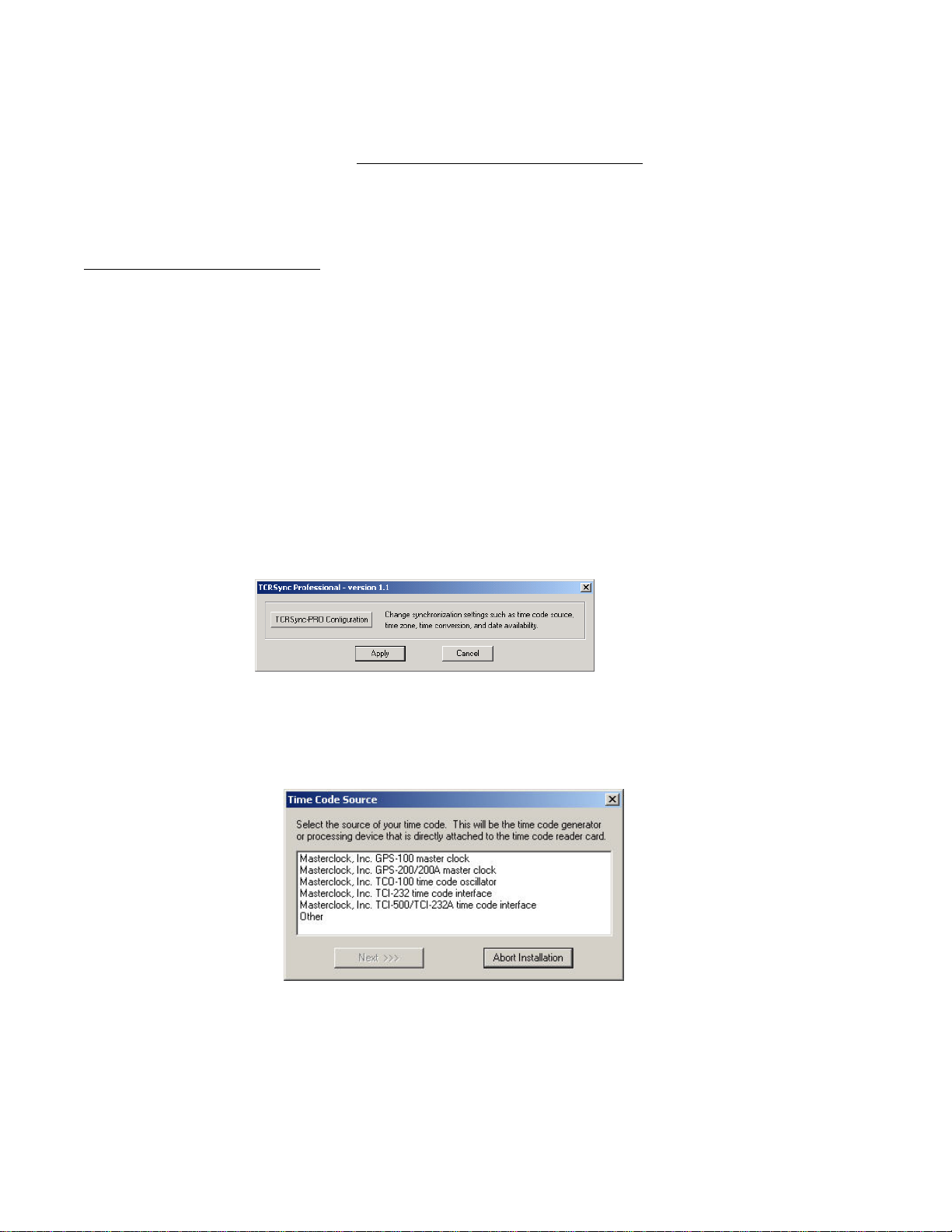
TCRSync Configuration Utility
A TCRSync Configuration applet is installed into the Control Panel by TCRSync installation utility, or
the utility can be accessed from the Masterclock\TCR500 program group by using the start menu button.
The TCRSync Configuration Utility should be run to configure your TCR card and software parameters
for your source of time code input and your system setting. This configuration utility prompts you for
information regarding your source of time code and various clock synchronization operating parameters.
When configuration is changed, you may be prompted to restart the Windows system for the changes to
take effect. Always restart when prompted.
If an error made during installation and is not discovered until after installation has completed, the
installation program does not have to be re-run to change the configuration. Run the TCRSync Utility to
reconfigure for the correct parameters.
Select your time code source from the available options and follow the on screen display.
User’s Manual - TCR500-PCI, Rev 1.0.1 - Jan-07 (C) Masterclock, Inc.
3
Page 8
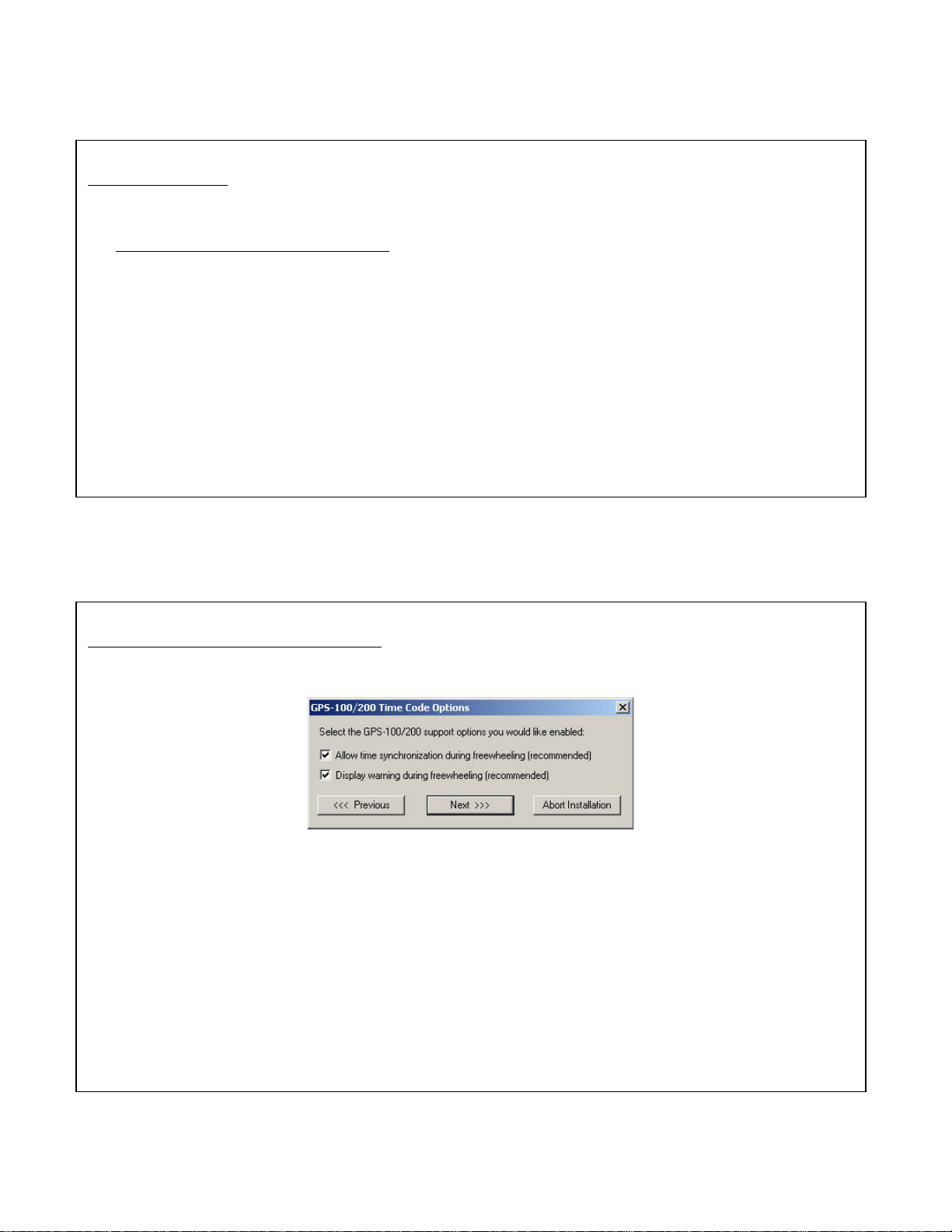
Time Code Source
• Masterclock, Inc. GPS100 master clock - choose this option if your time code source is the
GPS100 master clock. When you choose this time code source options normally presented in the
Incoming Time Code Configuration dialog are automatically determined.
• Masterclock, Inc. GPS200/200A master clock - choose this option if your time code is being
applied to the computer by one of these master clocks.
• Masterclock, Inc. TCO100 Time Code Oscillator - choose this option if your time code is being
applied to the computer by one of these master clocks.
• Masterclock, Inc. TCI232 - choose this option if your time code is being applied to the computer
by one this MC time code converter product.
• Masterclock, Inc. TCI232A/TCI500 - choose this option if your time code is being applied to the
computer by one of these MC time code converter products.
• Other - choose this option if your time code source is not listed.
GPS100/200/200A Time Code Options
This dialog appears only if you have selected the GPS100/200/200A as your time code source.
• Allow time synchronization during freewheeling - check this option if you want to allow time
synchronization if the GPS100/200 is “freewheel” generating time code. See the GPS100/200
manual for more information on freewheel time code generation.
• Display warning during freewheeling - check this option if you want a message to be logged when
the GPS100/200 enters and leaves freewheel time code generation mode.
User’s Manual - TCR500-PCI, Rev 1.0.1 - Jan-07 (C) Masterclock, Inc.
4
Page 9
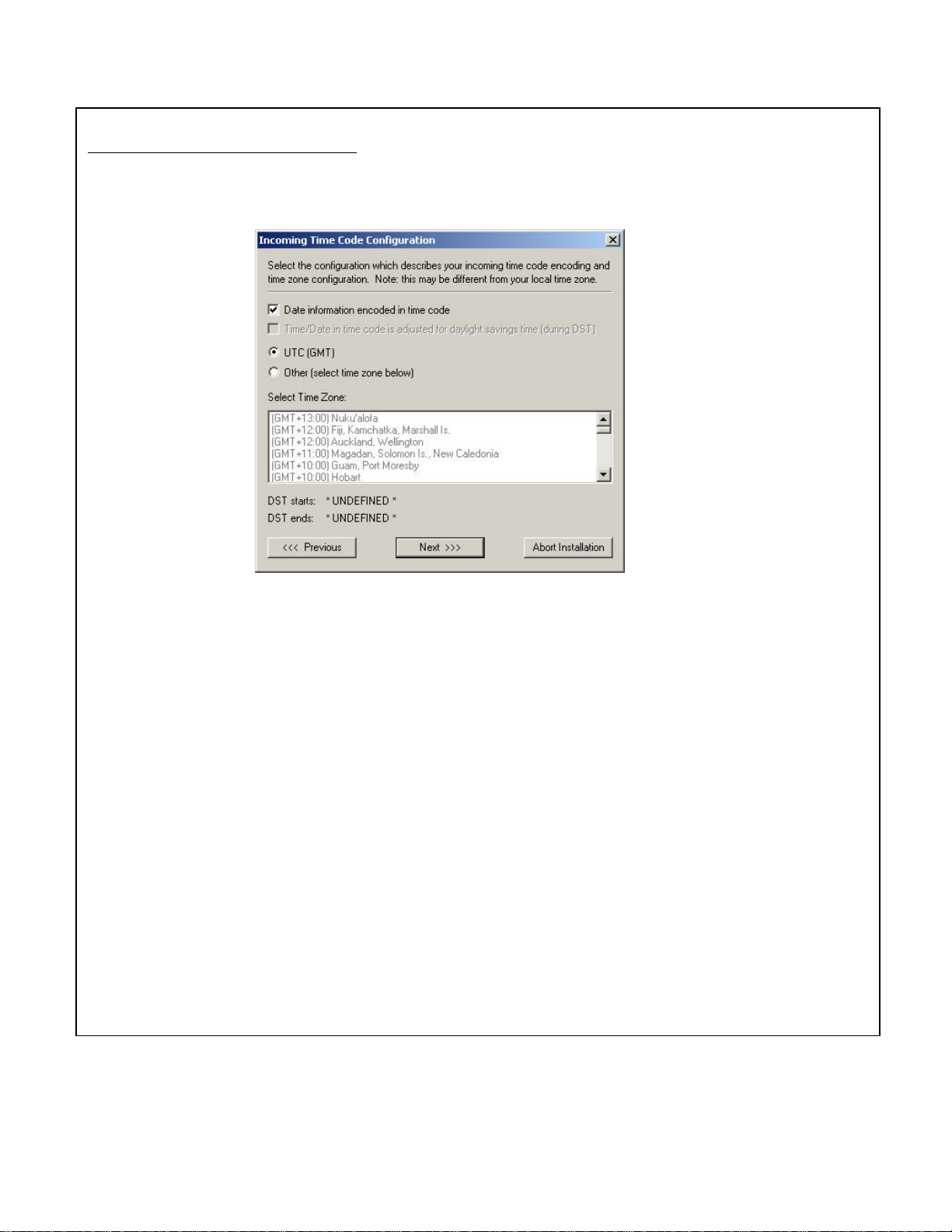
Next, set your incoming time code configuration.
Incoming Time Code Configuration
This dialog appears unless you select the GPS100 as your time code source.
• Date information encoded in time code - check this option if the time code source encodes date
information. For SMPTE-type time codes, the date must be encoded to the LeitchTM specification.
For IRIG-B time code, the date must be encoded within the IEEE 1344 specification. [Note: date
support for IRIG-B under IEEE 1344 requires TCR500 time code reader firmware version 1.6 or
later, or TCR500-PCI card. Consult TCR500 manual for information on determining firmware
version.]
• Time/Date in time code is adjusted for daylight savings time (during DST) - check this option if
your time code time/date information is adjusted for daylight savings time (during DST) to some
time zone standard. This option is available only if the selected time zone reference defines
daylight savings time and the Date information encoded in time code option is checked.
• Select time zone - check UTC if your incoming time code is referenced to UTC/GMT, select Other
if it is not. If Other is selected a time zone must be chosen from the time zone list box. Select the
time zone that matches the reference of your time code source. This is not necessarily your local
time zone. If the selected time zone defines daylight savings time, the start and end of daylight
savings time will be displayed below the time zone selection list box. You may select a time zone
that defines daylight savings time even if your time code source does not adjust for daylight savings
time.
User’s Manual - TCR500-PCI, Rev 1.0.1 - Jan-07 (C) Masterclock, Inc.
5
Page 10
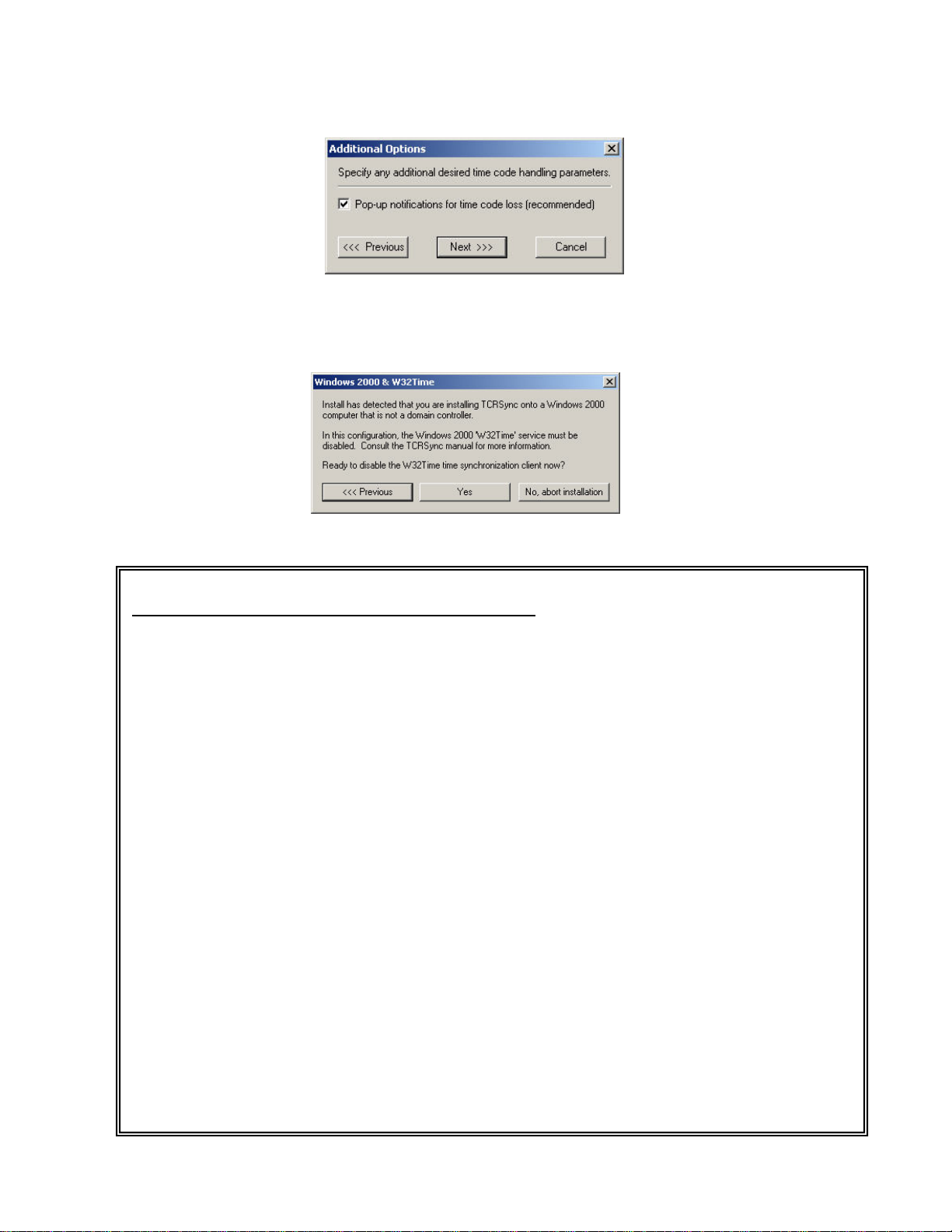
After selecting and configuring your time code input information, you can select an additional pop-up
notification to indicated time code loss in excess of 3 minutes.
Windows 32Time service will be disabled automatically.
Regarding Windows 2000 AND W32Time Services
W32Time is a time synchronization service, which is installed and operational by default on
Windows 2000 computers. Depending on the network role for a Windows 2000 computer,
which is running TCRSyncPro, it may be necessary to reconfigure the W32Time service. There
are two primary scenarios of interest:
Windows 2000 Workstation/Server
In this environment W32Time will act as a client and attempt to synchronize time to a Windows
2000 domain controller, if one is available. When TCRSyncPro is installed in this environment
it will not be able to keep time synchronized properly if W32Time is also attempting to
synchronize time. In this scenario, W32Time must be disabled. TCRSyncPro installation will
prompt to disable W32Time during installation.
Windows 2000 Domain Controller
By default, W32Time acts as a time “master” when operating on a Windows 2000 server in the
role of domain controller. In this scenario it is OK to disable the W32Time service but is it is
recommended that that W32Time be reconfigured such that the time on the domain controller is
“trusted time”. The time is trusted because it is being provided by TCRSync from a stable and
accurate external time code reference. TCRSyncPro installation will offer to reconfigure
W32Time on a domain controller so that it can then offer this trusted time to other computers on
the network.
More W32Time Information
The following Microsoft knowledge base articles discuss various configuration options and
behavioral aspects of the W32Time time synchronization mechanism: Q223184, Q245129,
Q216734, Q240365, Q224799, and Q232209.
User’s Manual - TCR500-PCI, Rev 1.0.1 - Jan-07 (C) Masterclock, Inc.
6
Page 11
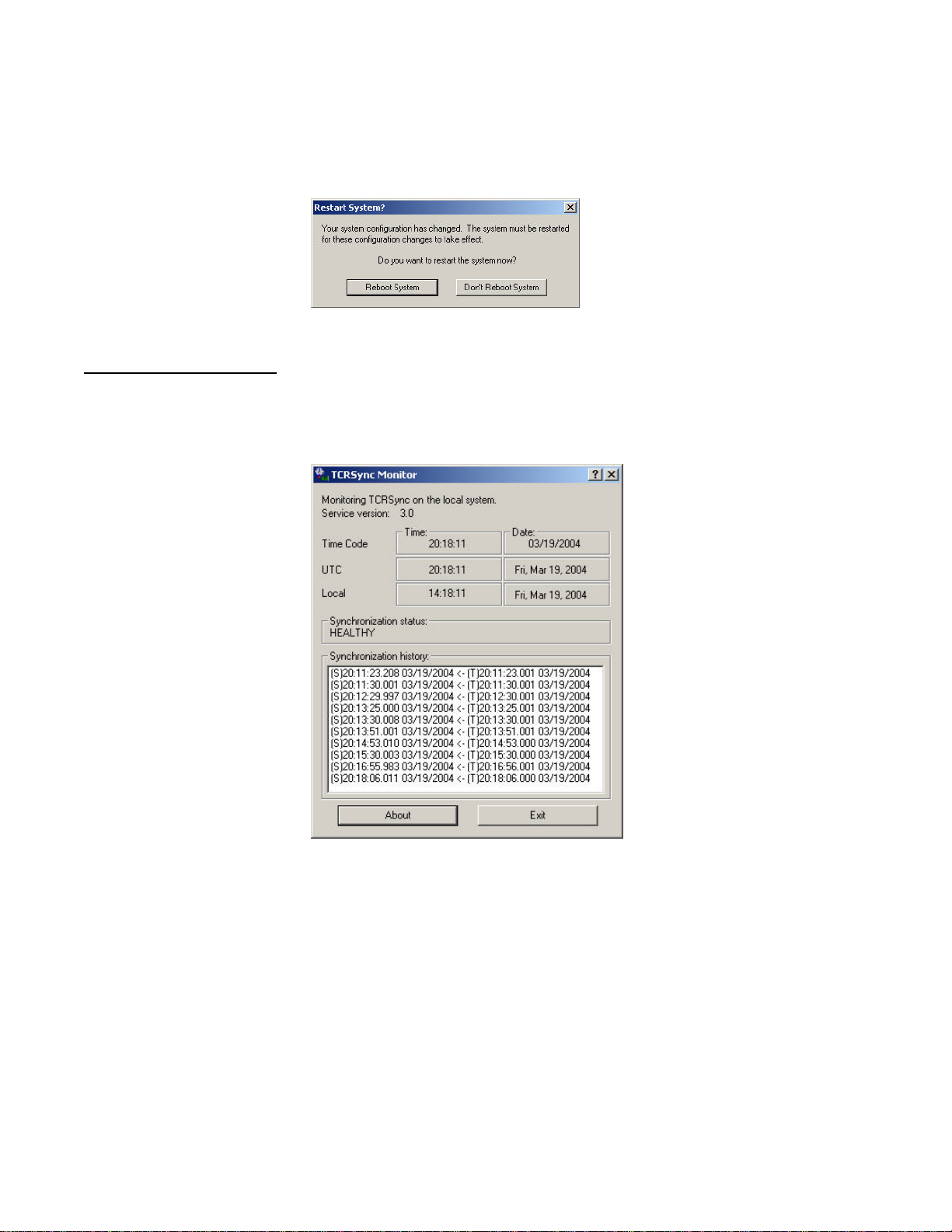
Follow the prompts to complete the configuration and reboot your system.
TCRSync Monitor Utility
The TCRSync Monitor program is provided to help troubleshoot a TCRSync installation as well as
display general information about time synchronization activity.
When executed TCRSync Monitor will, by default, attempt to establish communication with TCRSync
time synchronization on the local computer. If Monitor cannot communicate with a local installation of
TCRSync you will be prompted to specify a remote computer on which TCRSync time synchronization
has been installed. See the troubleshooting tips section if Monitor is unexpectedly failing to
communicate with a local installation of TCRSync. [Note: Monitor may only remotely monitor a
TCRSync installation if that installation is running on Windows 2000/XP.]
By clicking the ? icon on the Monitor title bar then clicking on an item in the dialog you can obtain online help information about a particular item in the dialog.
User’s Manual - TCR500-PCI, Rev 1.0.1 - Jan-07 (C) Masterclock, Inc.
7
Page 12
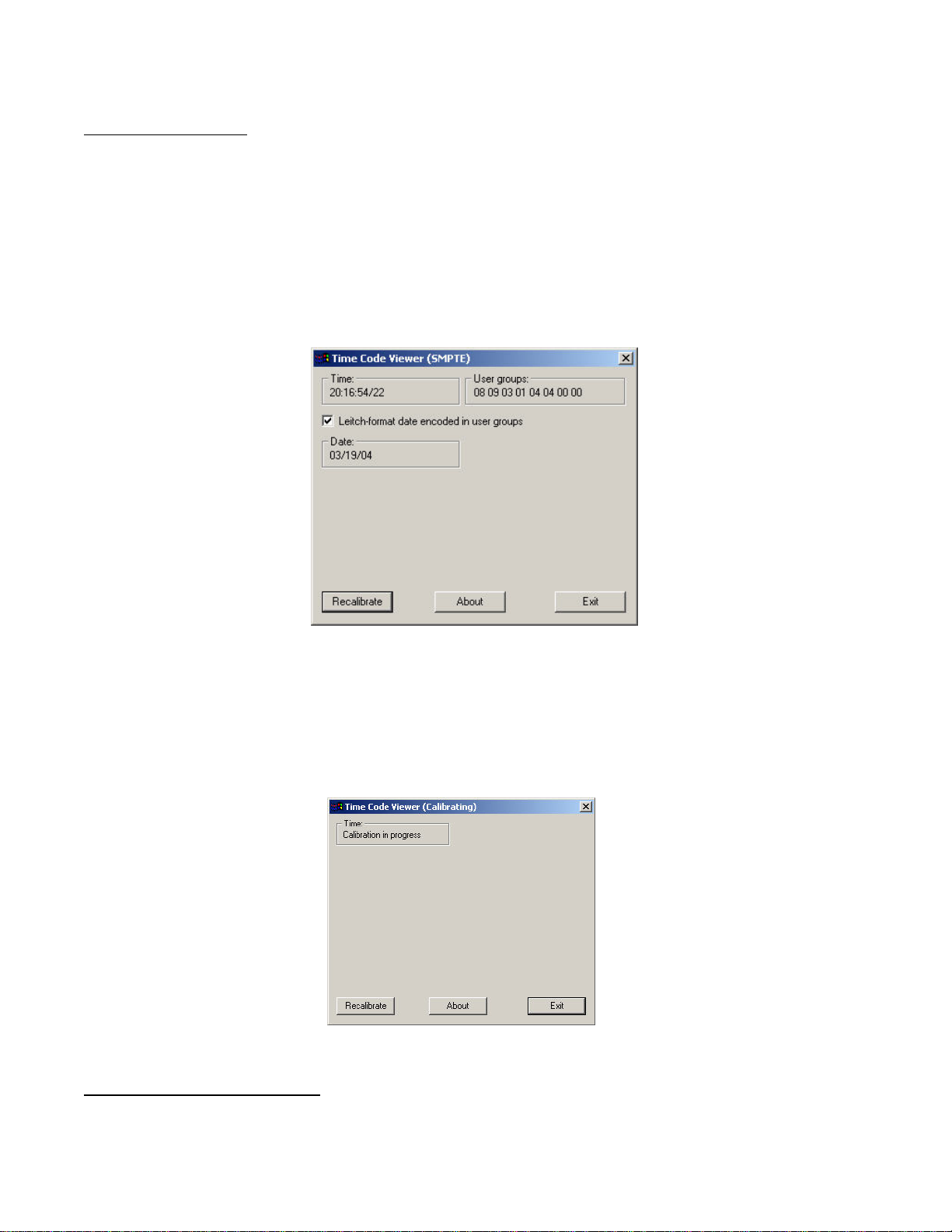
TIME CODE VIEWER
Time Code Viewer is a time code display and diagnostic utility. It can be used to view time code (when
decoding is active) and determine other operational characteristics of the TCR card such as signal
calibration.
Time Code Viewer displays raw time as decoded by your TCR card. You can use this program to easily
determine if SMPTE time code contains the date encoded to the LeitchTM specification by checking the
Leitch Date Decode option. If a valid date appears in the date decode box then you have date
information available that TCRSync can use to synchronize your Windows system.
Time Code Viewer might display one of the following indications instead of time code:
• No Time Code – Time code is not available (but was available at some previous time).
• Calibration In Progress – Time code has not been available since the computer was started and the
card is currently searching for it. You will also receive this message temporarily if the “Recalibrate”
option is selected during normal operation.
Either of the above statuses indicates that there is a problem with the time code source. Refer to the
TCR500 troubleshooting guide for problems with the time code source.
User’s Manual - TCR500-PCI, Rev 1.0.1 - Jan-07 (C) Masterclock, Inc.
8
Page 13
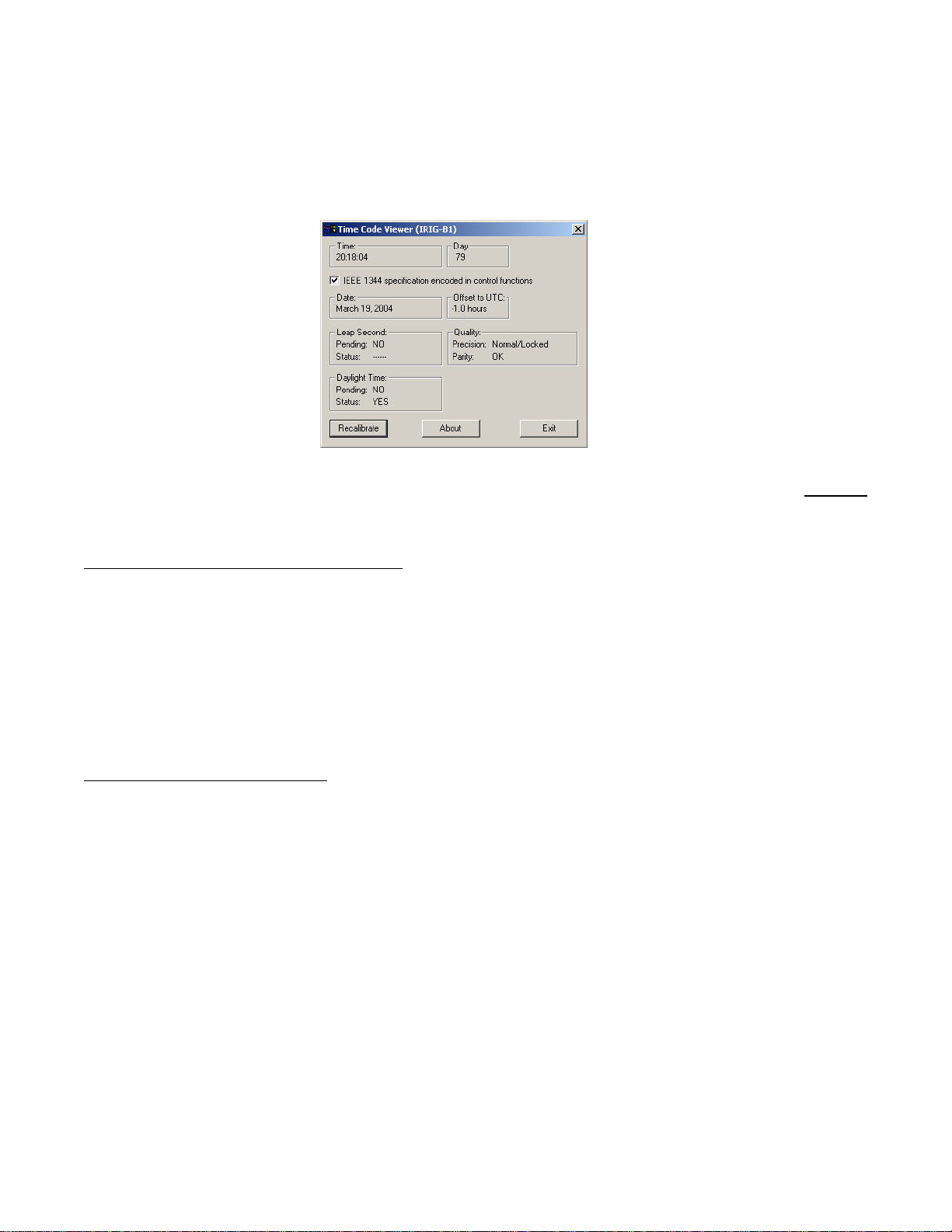
Time Code Viewer can also display IRIG-B1 time code if TCRSync has been installed to decode that
type of time code. If your IRIG-B1 time code source implements IEEE 1344 encoding extensions this
information can also be displayed by checking the appropriate box. Note: do not use this function to
attempt to empirically determine if your IRIG-B1 contains IEEE 1344 encoding. This is not reliable due
to the composition of the standard. Instead, refer to documentation for your IRIG-B1 master clock
system.
Time Code Viewer cannot run if the TCR device driver failed to load. Time Code Viewer utility does not
monitor time synchronization. Use TCRSync Monitor for that task.
TCR SDK FOR CUSTOM PROGRAMMING
The TCR SDK contains an application programming interface (API) to the TCR DLL. It runs on all the
Windows platforms. The API can be linked to and called from custom Windows applications to provide
specialized handling of time code, and for integration into OEM-level applications. The API includes
programmer’s documentation, libraries, and sample applications for MS Visual C++. To intall the TCR
SDK, select the Custom option when installing (See the installation guide). Note: Support for custom
applications , OEM, and software development with the TCR is not provided by Masterclock.
Information, libraries, and sample code is provided as-is.
TCR DYNAMIC LINK LIBRARY
The TCR Dynamic Link Library (DLL) is a library that is used by Windows programs to access the
TCR500 driver.
User’s Manual - TCR500-PCI, Rev 1.0.1 - Jan-07 (C) Masterclock, Inc.
9
Page 14
SPECIFICATIONS
TIME CODE INPUT
Type .................................................................................................. Longitudinal Time Code (LTC), forward running
SMPTE/EBU/Film ............................................................................ 24/25/30 fps, NDF (Non Drop Frame)
Date encoding (User Bits) ........................................................ to Leitch/Masterclock Encoding
NOTE: The use of this device with time code generators providing SMPTE drop frame (DF) time code may cause undesireable operation
when using the TCRSync service for setting the computer date/time. Use only (NDF) linear/longitudinal time code.
NOTE: The use of this device with time code generators providing date encoding or other data in the user bit fields, other than to the
Leitch/Masterclock date encoding standard, may cause undesireable operation.
IRIG-B1 (Amplitude Modulated, 1kHz)
B120 ..................................................................................BCD, CF to IEEE-1344 or zero filled, No SBS or zero filled
B121 ..................................................................................BCD, CF to IEEE-1344, No SBS (zero filled)
B122 ..................................................................................BCD, No CF (zero filled), No SBS (zero filled)
B123 ..................................................................................BCD, No CF (zero filled), No SBS or zero filled
NOTE: This unit does not read the optional SBS information, this information will be ignored/treated as zero filled.
NOTE: This unit does not read CF, except to IEEE-1344 specification for date/year encoding. (See tcr500.sdk for details)
NOTE: The use of this device with time code generators providing CF information that is not to IEEE-1344, or using SBS information
may cause undesireable operation when using the TCRSync service for setting computer date/time.
Connector (Standard)........................................................................ BNC (P2), isolated
Input Impedance ............................................................................... High, >100 kOhm
PCI BUS
Voltage ............................................................................................. 5V
Speed ................................................................................................ 33 MHz (66MHz bus with reduced speed)
Width ................................................................................................ 32 bit,
PHYSICAL
Height ............................................................................................... 4.5”/114.3 mm
Length .............................................................................................. 6.6”/167.6 mm
PCI Bracket(s) ................................................................................. Full height bracket provided
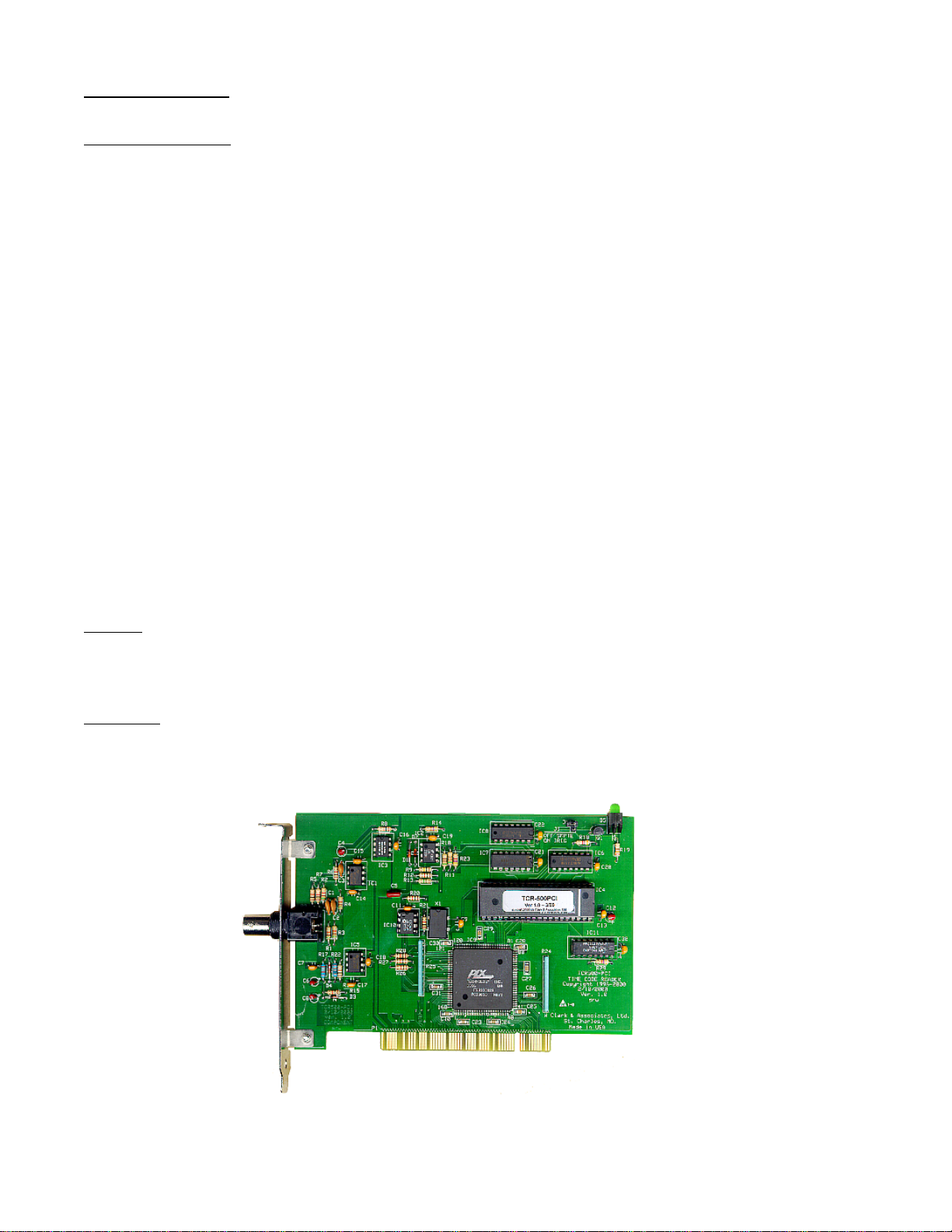
NOTE: Not actual size
User’s Manual - TCR500-PCI, Rev 1.0.1 - Jan-07 (C) Masterclock, Inc.
10
Page 15

OPERATING/STORAGE TEMPERATURE & HUMIDITY
• Operating Temperature .................................................................... 0 to +40°C
• Relative Humidity ............................................................................ Up to 90% (non condensing @ 25°C)
• Storage Temperature ....................................................................... -40 to +70° C
• Relative Humidity ............................................................................ Up to 90% (non condensing @ 25°C)
COMPLIANCE
Radiated Emissions ................................................................................. Class A, FCC Part 15, digital device
User’s Manual - TCR500-PCI, Rev 1.0.1 - Jan-07 (C) Masterclock, Inc.
11
Page 16

LIMITED SOFTWARE WARRANTY
To the original customer only, Masterclock, Inc. (hereinafter Masterclock) provides the following
Limited Warranty.
30 DAY SATISFACTION GUARANTEE
For thirty (30) days after date of delivery of the SOFTWARE to you, if you are dissatisfied with the
SOFTWARE for any reason you may return the complete product, with your receipt, to Masterclock,
postage prepaid, during the thirty (30) day period for a full refund.
LIMITED WARRANTY FOR NEXT 60 DAYS
C&A warrants that for the sixty (60) days following the initial thirty day period, as evidenced by a copy
of your receipt, that:
(1) The SOFTWARE will perform substantially the functions described in the documentation
provided by Masterclock
(2) The media on which the SOFTWARE is furnished will be free from defects in materials and
workmanship under normal use.
Your sole remedy under the warranty during this sixty (60) day period is that Masterclock will
undertake to correct within a reasonable period of time any reported "SOFTWARE Error" (failure of the
SOFTWARE to perform substantially the functions described in the documentation), correct errors in
the documentation, and replace any magnetic media which proves defective in materials or
workmanship on an exchange basis without charge. In order to make a claim under this warranty you
must return the defective item with your receipt to Masterclock, postage prepaid, within ten (10) days
after the warranty period. If Masterclock is unable to replace defective media or if Masterclock is
unable to provide corrected SOFTWARE or corrected documentation within a reasonable time,
Masterclock will, at its sole and exclusive option, either replace the SOFTWARE with a functionally
equivalent program at no charge to you or refund the license fee of the SOFTWARE. These are your
sole and exclusive remedies for any breach of warranty during this sixty (60) day period.
Masterclock does not warrant that the SOFTWARE will meet your requirements that operation of the
SOFTWARE will be uninterrupted or error-free, or that all SOFTWARE errors will be corrected.
Masterclock is not responsible for problems caused by changes in the operating characteristics of
computer hardware or computer operating systems which are made after the release of the SOFTWARE
nor for problems in the interaction of the SOFTWARE with non-Masterclock software. Masterclock
will have no responsibility to replace or refund the license fee of media damaged by accident, abuse or
misapplication.
THE ABOVE WARRANTIES ARE EXCLUSIVE AND IN LIEU OF ALL OTHER WARRANTIES,
WHETHER EXPRESSED OR IMPLIED, INCLUDING THE IMPLIED WARRANTIES OF
MERCHANTABILITY, FITNESS FOR A PARTICULAR PURPOSE AND NON INFRINGEMENT.
NO ORAL OR WRITTEN INFORMATION OR ADVICE GIVEN BY MASTERCLOCK, ITS
EMPLOYEES, DISTRIBUTORS, DEALERS OR AGENTS SHALL INCREASE THE SCOPE OF
THE ABOVE WARRANTIES OR CREATE ANY NEW WARRANTIES.
SOME STATES DO NOT ALLOW THE EXCLUSION OF IMPLIED WARRANTIES, SO THE
ABOVE EXCLUSION MAY NOT APPLY TO YOU. IN THAT EVENT, ANY IMPLIED
WARRANTIES ARE LIMITED IN DURATION TO NINETY (90) DAYS FROM THE DATE OF
User’s Manual - TCR500-PCI, Rev 1.0.1 - Jan-07 (C) Masterclock, Inc.
12
Page 17

DELIVERY OF THE SOFTWARE. THIS WARRANTY GIVES YOU SPECIFIC LEGAL RIGHTS.
YOU MAY HAVE OTHER RIGHTS, WHICH VARY FROM STATE TO STATE.
LIMITATION OF REMEDIES
REGARDLESS OF WHETHER ANY REMEDY SET FORTH HEREIN FAILS OF ITS ESSENTIAL
PURPOSE, IN NO EVENT WILL MASTERCLOCK BE LIABLE TO YOU FOR ANY SPECIAL,
CONSEQUENTIAL, INDIRECT OR SIMILAR DAMAGES, INCLUDING, WITHOUT
LIMITATION, DAMAGES FOR LOSS OF BUSINESS PROFITS, BUSINESS INTERRUPTION,
LOSS OF DATA OR BUSINESS INFORMATION ( OR OTHER PECUNIARY LOSS) ARISING
OUT OF THE USE OF OR INABILITY TO USE THE SOFTWARE OR ANY DATA SUPPLIED
THEREWITH EVEN IF MASTERCLOCK OR ANYONE ELSE HAS BEEN ADVISED OF THE
POSSIBILITY OF SUCH DAMAGES, OR FOR ANY CLAIM BY ANY OTHER PARTY.
SOME STATES DO NOT ALLOW THE LIMITATION OR EXCLUSION OF LIABILITY FOR
INCIDENTAL OR CONSEQUENTIAL DAMAGES SO THE ABOVE LIMITATION OR
EXCLUSION MAY NOT APPLY TO YOU.
IN NO CASE SHALL MASTERCLOCK’s LIABILITY EXCEED THE PURCHASE PRICE FOR THE
SOFTWARE.
LIMITED HARDWARE WARRANTY
Masterclock, Inc. (hereinafter Masterclock) product warranty extends to the original purchaser.
Masterclock warrants all electronic hardware products against defects in materials and workmanship for
a period of one year from date of sale. If Masterclock receives notice of such defects during the
warranty period, Masterclock will, at its option, either repair or replace products, which prove to be
defective.
Should Masterclock be unable to repair or replace the product within a reasonable amount of time, the
customer's alternate remedy shall be a refund of the purchase price upon return of the product to
Masterclock. This warranty gives the customer specific legal rights. Other rights, which vary from state
to state or province to province, may be available.
EXCLUSIONS
The above warranty shall not apply to defects resulting from improper or inadequate maintenance by the
customer, customer-supplied software or interfacing, unauthorized modification or misuse, operation
outside of the environmental specifications for the product or improper site preparation and maintenance
(if applicable).
WARRANTY LIMITATIONS
MASTERCLOCK MAKES NO OTHER WARRANTY, EITHER EXPRESSED OR IMPLIED, WITH
RESPECT TO THIS PRODUCT. MASTERCLOCK SPECIFICALLY DISCLAIMS THE IMPLIED
WARRANTIES OF MERCHANTABILITY OR FITNESS FOR A PARTICULAR PURPOSE.
In any state or province which does not allow the foregoing disclaimer, any implied warranty of
merchantability or fitness for a particular purpose imposed by law in those states or provinces is limited
to the one-year duration of the written warranty.
User’s Manual - TCR500-PCI, Rev 1.0.1 - Jan-07 (C) Masterclock, Inc.
13
Page 18

EXCLUSIVE REMEDIES
THE REMEDIES PROVIDED HEREIN ARE THE CUSTOMER'S SOLE AND EXCLUSIVE
REMEDIES. IN NO EVENT SHALL MASTERCLOCK BE LIABLE FOR ANY DIRECT,
INDIRECT, SPECIAL, INCIDENTAL, OR CONSEQUENTIAL DAMAGES, WHETHER BASED ON
CONTRACT, TORT, OR ANY OTHER LEGAL THEORY.
In any state or province which does not allow the foregoing exclusion or limitation of incidental or
consequential damages, the customer may have other remedies.
OBTAINING HARDWARE SERVICE
When returning any Masterclock hardware product for warranty repair please contact the factory for
return authorization before returning the item. When you return your hardware product to Masterclock
for service, you must prepay all shipping charges, duty, and taxes. Except for products returned by the
customer from another country, Masterclock shall pay for return shipment of products to the customer.
FCC COMPLIANCE STATEMENT
This equipment has been tested and found to comply with the limits for a Class A digital device
pursuant to Part 15 of the FCC Rules. These limits are designed to provide reasonable protection
against harmful interference in a commercial installation. This equipment generates, and can radiate
radio frequency energy and, if not installed and used in accordance with standard installation procedures
and instructions, may cause harmful interference to radio communications. Operation of this equipment
in a residential area is likely to cause harmful interference, in which case, the user will be required to
correct the interference at the user's own expense.
User’s Manual - TCR500-PCI, Rev 1.0.1 - Jan-07 (C) Masterclock, Inc.
14
 Loading...