

Page 1
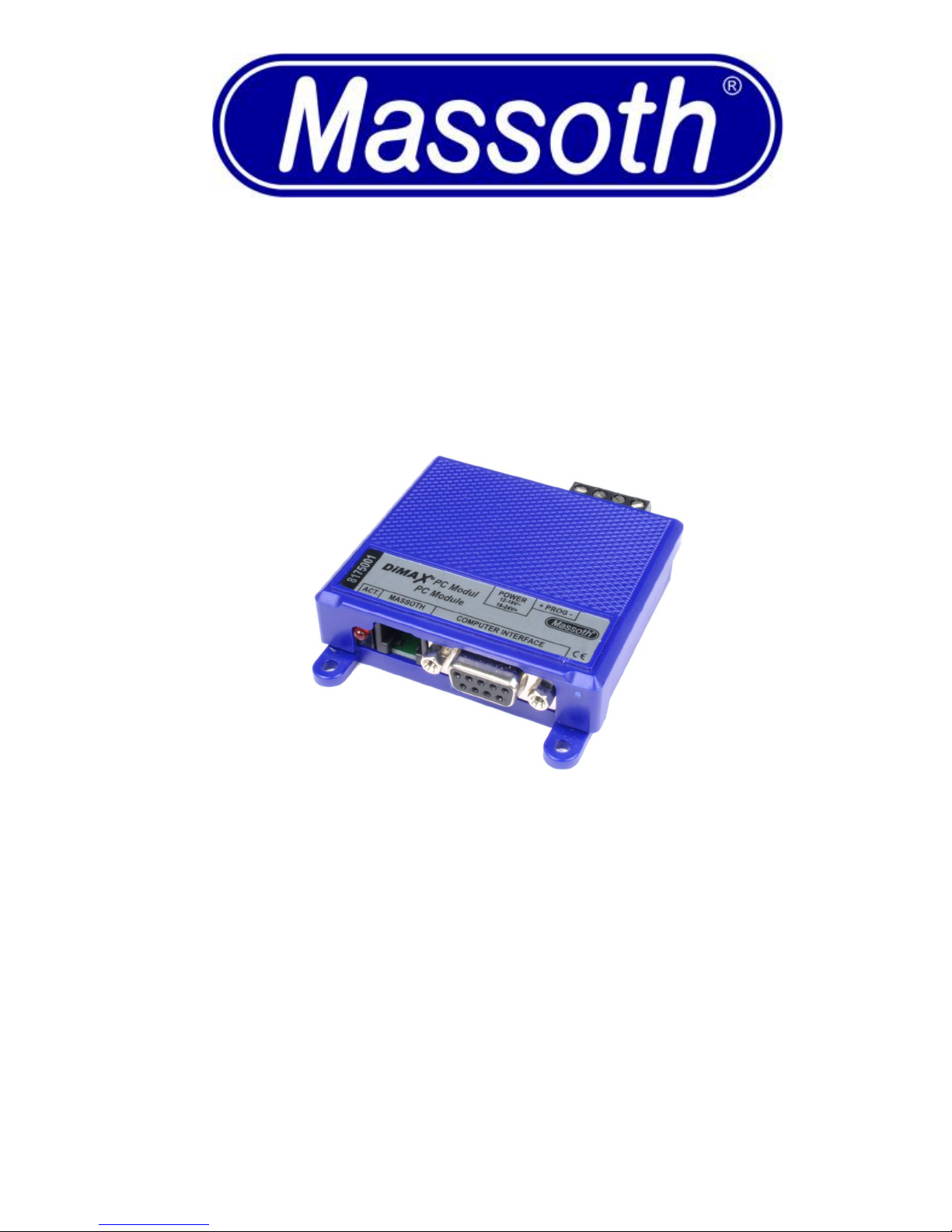
DiMAX® 100A
PC Module 8175001
DiMAX 100A PC Module– 8175001
Version 2.0 - 04/08
Page 2

Summary Page
1.Safety Details 1
1.1.Brief Description 1
1.2.Summary of Functions 1
1.3.Scope of Supply 2
2.Hook-Up and Operational Modes 2
2.1.DiMAX Bus Components 2
2.2.LGB® MTS III Update 3
2.3.eMOTION Decoder Update 3
2.4.CV Programming + Decoder Read-Outs 4
3.Self-Update 4
4.Technical Specifications 5
5.Miscellaneous 5
5.1.Warranty and Support 6
5.2.Hotline 6
1. Safety Details
Congratulations on your purchase of the MASSOTH PC-Module.
We highly recommend reading this manual and the documentation carefully and thoroughly before operating
your new PC-Module.
• Connect this module only to components that are suitable for it.
• The programming outlet must never have any electrical contact to the tracks of a digitally controlled
layout!
1.1. Brief Description
The PC-Module, connected to a PC, facilitates DCC decoder programming and does read-outs of DCC
decoders. In addition updates of DiMAX components, eMOTION Decoders or LGB-MZS-III Central Stations
may be accomplished.
1.2. Summary of Functions
• Serial Interface (RS 232) to connect to a PC.
• DiMAX bus terminal to update Massoth digital components.
• Power terminal for a transformer or DC power supply.
• Output for a programming track for CV-programming and decoder update.
• DCC decoder programming and read-outs.
DiMAX 100A PC Module– 8175001 1
Page 3
1.3. Scope of Supply
• PC-Modul
• Serial Cable RS232
• DiMAX Bus Cable
• Service CD
• Manual
2. Hook-Up and Operational Modes
Please connect only the component to the PC-module which is to be programmed or updated. Disconnect all
other components from the programming track.
Please find the software and update files required on the CD supplied. The current versions of the update files
and the software are available on our web site: http://www.massoth.com Support – Software.
During operation the red LED is flashing.
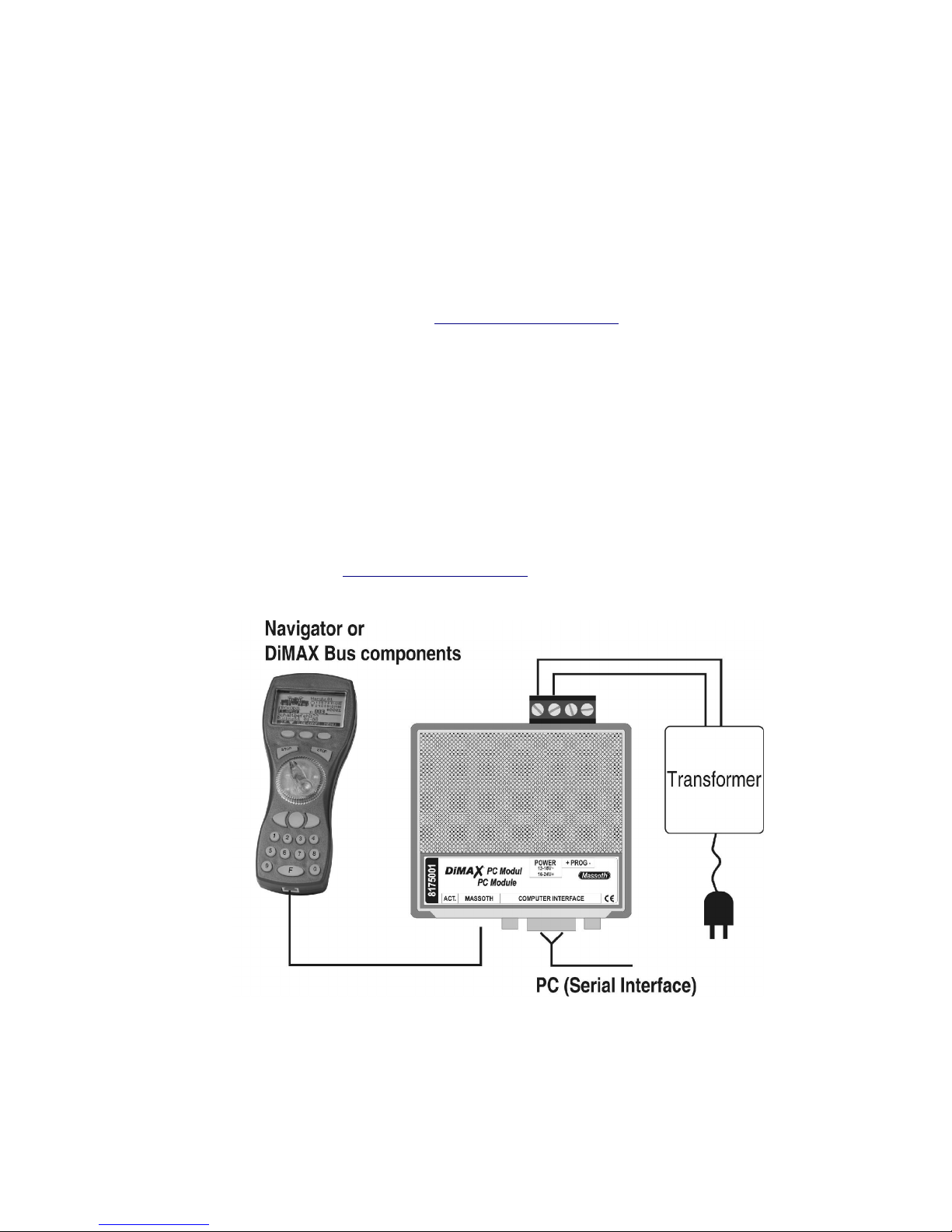
2.1.DiMAX Bus Components
An AC or DC power supply is required for updating all DiMAX bus components. Note the specifications in
chapter 4.
During this procedure the PC-Module acts as a central station and supplies the component which is to be
updated with power via the bus cable.
The DiMAX Navigator needs to be set into the update mode manually: keep the right hand STOP-key
depressed as you plug in the bus cable.
The DimaxUpdate V11 program is required for updating DiMAX bus components. Follow the instructions on the
screen. Please check our web site http://www.massoth.com for the current version of the update software.
Illustration 1: Updating DiMAX Bus Components
DiMAX 100A PC Module– 8175001 2
Page 4
2.2. LGB® MTS III Update
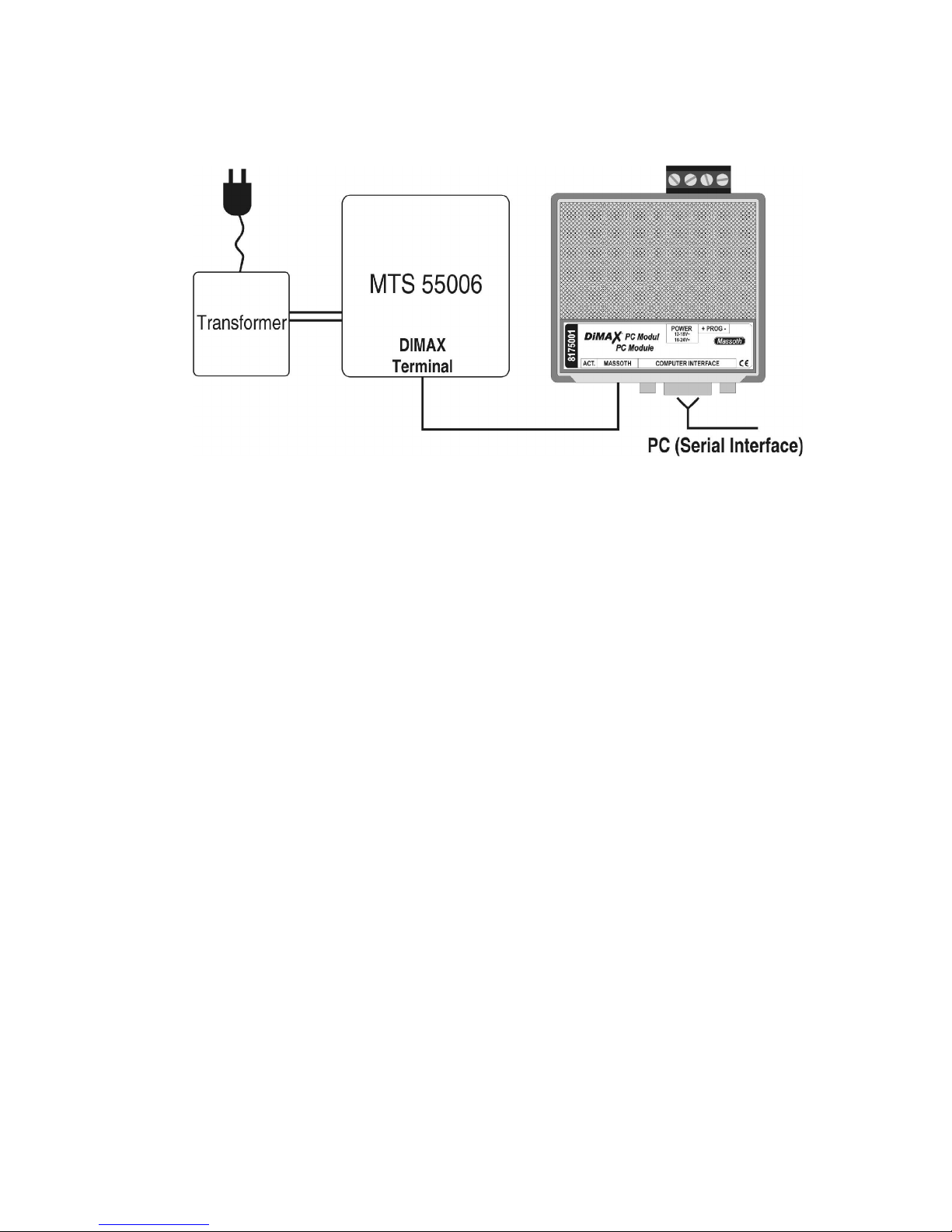
Connect the LGB® MTS III (55006) central station to a transformer. The PC-Module will be supplied with power
by the bus cable which connects to the DiMAX terminal of the central station.
Start the „DimaxUpdate V11“ program and follow the instructions on the screen.
Illustration 2: Updating a LGB® MTS III Central Station
2.3. eMOTION Decoder Update
An AC or DC power supply is required for updating MASSOTH eMOTION Digital Decoders. Note the specifications in chapter 4. Connect the track terminals of the decoder to the right hand terminal of the PC-Module. An
electrical load (preferably a motor) must be connected to the decoder to receive a programming confirmation.
Start the „DimaxUpdate V11“ program and follow the instructions on the screen.
Note: Only Massoth eMOTION Decoders with version 2.0 and higher may be updated! Check the decoder's firmware version by reading CV7.
Programming must be accomplished via the programming track terminal of the PC-Module. Thus the decoder
may be updated even if it is installed in a locomotive.
NOTE: The data volume transferred is tremendous. An optimum track contact during this procedure is a
must. We recommend to utilize the loco's power socket if available or the Massoth Rolling Road. The update
procedure starts with an extensive test of the communication line. In case the update shuts down prematurely, a
better contact must be provided.
DiMAX 100A PC Module– 8175001 3
Page 5
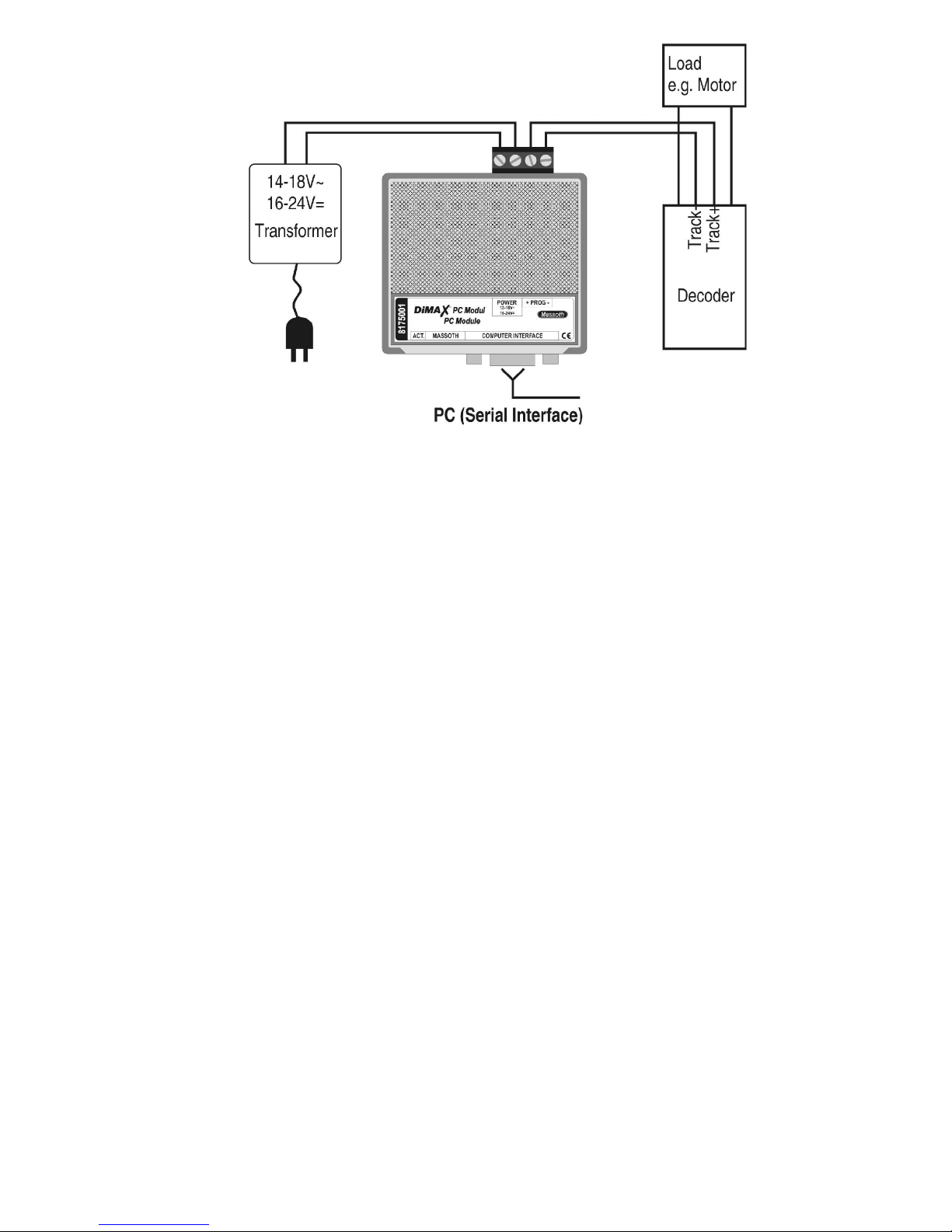
Illustration 3: Updating eMOTION Decoders
2.4.CV Programming + Decoder Read-Outs
An AC or DC power supply is required for programming and reading MASSOTH eMOTION Digital Decoders.
Note the specifications in chapter 4. Connect the track terminals of the decoder to the right hand terminal of the
PC-Module. An electrical load (preferably a motor) must be connected to the decoder to receive a programming
confirmation (see Illustration 3).
The PC-Module supports the programming method “reading and writing bit-by-bit“.
For programming the software “Massoth CV-Programmer“ or “Massoth CV-Programmer Easy“ is required. The
Massoth CV-Programmer features a brief help file. The “Easy“ Program is self-explanatory.
3. Self-Update
You may update the PC-Module as well. An AC or DC power supply is required. Note the specifications in
chapter 4.
Start the „DimaxUpdate V11“ program and follow the instructions on the screen.
DiMAX 100A PC Module– 8175001 4
Page 6
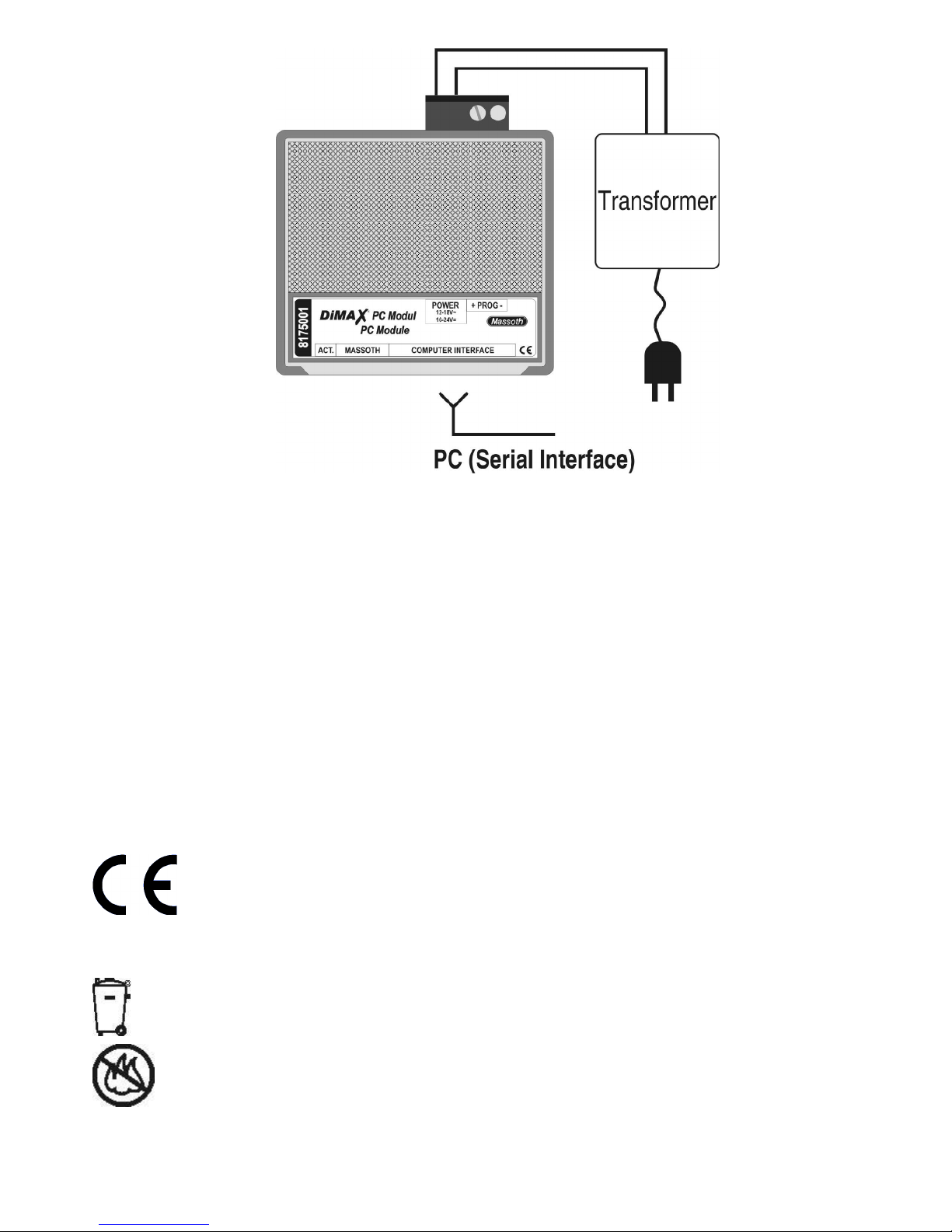
Illustration 4: Self-Update
4.Technical Specifications
Power Supply: 16 to 24 Volts DC or 14 to 18Volts AC
Current: 30 mA in idle
Programming Voltage: 14Volts
Programming Current: max. 1,5Amps
Temperature Range: -4°F to +113°F
Measurements: 68 x 78 x 20 mm (L x W x H)
Note regarding the operating temperature: to prevent the production of condensed water, use the PC-Module in
freezing conditions only if it was previously stored in a heated environment. The heat produced during operation
is sufficient to prevent condensed water.
5. Miscellaneous
This unit conforms to the CE Standards
RoHS
conforming to RoHS Standard.
Please dispose of according to your State regulations.
Do not dispose of in open fire.
DiMAX 100A PC Module– 8175001 5
This unit is manufactured according to the latest EG Standards for lead free manufacturing
Page 7

5.1. Warranty and Support
Warranty:
MASSOTH ELECTRONICS USA warrants this product for 1 year from the original date of purchase. This
product is warranted against defects in materials and workmanship. Peripheral component damage is not
covered by this warranty. Normal wear and tear, consumer modifications as well as improper use or installation
are not covered. Errors and changes excepted.
Warranty Claims:
Valid Warranty Claims will be serviced without charge within the warranty period. To initiate a warranty claim,
please contact your dealer or MASSOTH ELECTRONICS USA for an RMA (Return Merchandise Authorization).
MASSOTH ELECTRONICS USA cannot be responsible for return shipping charges to our repair facility. Please
include your Proof of Purchase with the returned goods.
Support:
For support and technical questions contact: [email protected]
5.2. Hotline
For technical support contact:
Massoth Electronics USA
6585 Remington Dr. Suite 200
Cumming, GA 30040
Hotline hours USA: 9:00 a.m. to 4:00 p.m. EST Mo thru Fr
Ph. 770-886-6670
Fax 770-889-6837
Email [email protected]
Internet www.massoth.com
Manufacturer:
Massoth Elektronik GmbH
Frankensteiner Str. 28
64342 Seeheim
Tel.: 06151 35077-0
Fax: 06151 35077-44
www.massoth.com
Stand: 04/08 ST
Copyrights
Massoth® and DiMAX® are registered trademarks by Massoth Elektronik GmbH, Seeheim, Germany. LGB® is a registered trademark and property of its respective owner. All other trademarks printed are registered trademarks as well. No parts of this work may be reproduced or transmitted in any form or by any means, electronic or mechanical, including photocopying and recording, or by any information storage or retrieval sys tem without the prior written permission by Massoth Elektronik GmbH unless such copying is expressly permitted by federal copyright law.
DiMAX 100A PC Module– 8175001 6
 Loading...