

Page 1
Page 2
MCU Power Management
High / Low Level Input Switch
Auto Turn - on / off Functions
Page 3
(D4000.2 Only)
MCU Power Management
High / Low Level Input Switch
Auto Turn - on / off Functions
(D1600.4 Only)
(D1600.4 Only)
(D1600.4 Only)
Page 4
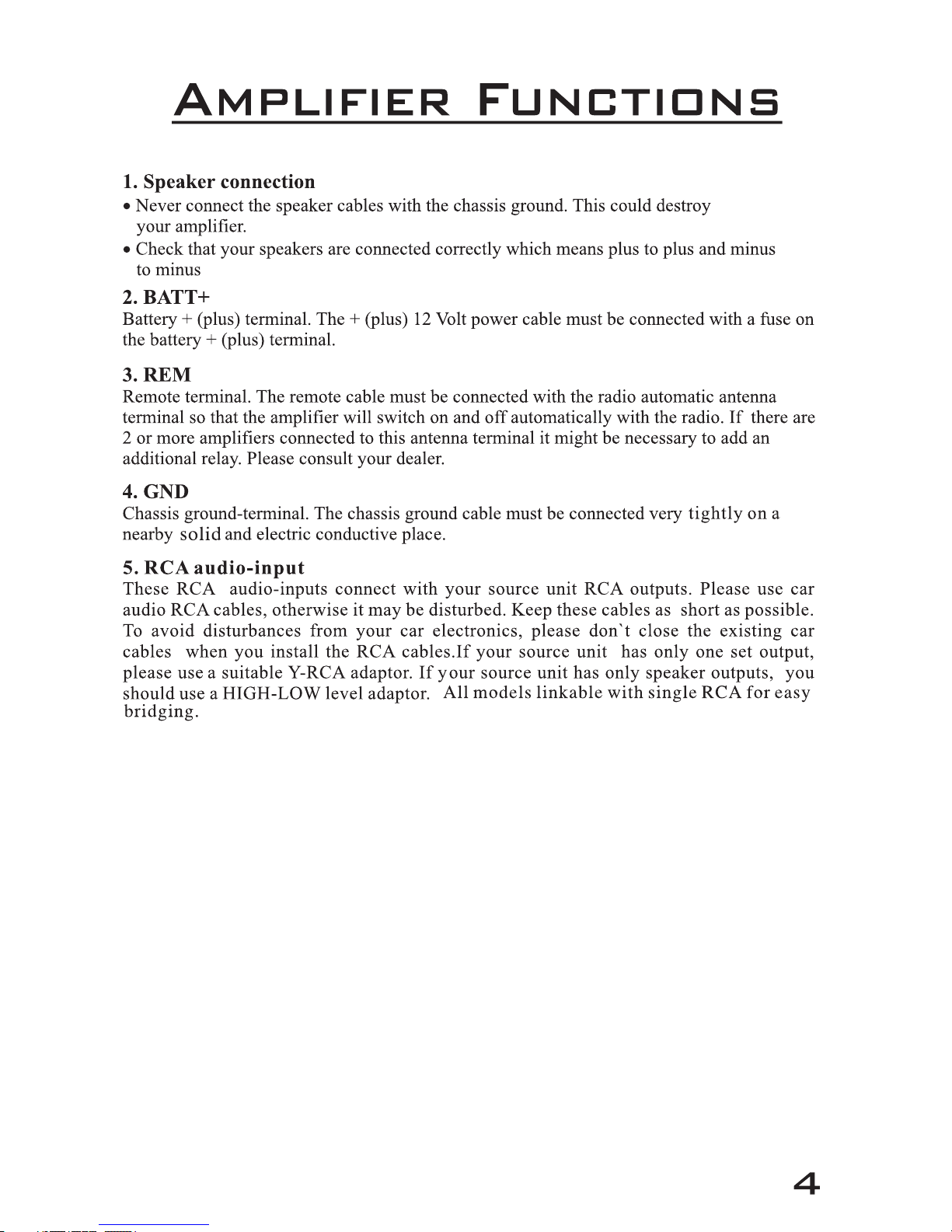
For 4CH mode, Group A (CH1 and CH2) and Group B (CH3, CH4) both require stereo
input signal. All 4 channels will work independently.
For 2CH mode, Only Group A (CH1 and CH2) requires stereo input signal, Group B
(CH3, CH4) will receive the same signal as Group A. 2CH model is for source unit
that has only 1 stereo output signal.
The amplifier has dual input sensitivity differential inputs which will receive either
High level (Speaker output) or Low level (RCA) signals from your car stereo's source
unit.
When switch to PRE IN, The signal can be delivered to the amplifier using the lowlevel RCA outputs on the source unit.
When switch to SPK IN, The high-level signal can be run from the source unit's
speaker outputs to the stereo RCA input on the end panel of the amplifier using the
HL01.
6.Input select (D1600.4 only)
7.Input Level (D1600.4 only)
For auto turn on/off mode, D1600.4 amplifier offer 3 options: DC
REM: When auto turn on to REM, please connect the unit REM terminal to the source
unit remote terminal with an 18AWG cable. This is the preferred mode.
DC OFFSET: If the OEM source unit has no REM signal output, you can choose DC
OFFSET (Meanwhile, Input select switch to SPK IN mode) , DC OFFSET can turn
on/off EA series amp by detecting the 6V DC Offset from the OEM source unit
terminal.
AUDIO: Audio mode can turn ON/OFF D1600.4 amp by detecting the audio signal
from source unit. Note: If the volume is too Low, The amp may fail to turn on. So
please check if the source unit volume is properly set.
8. Auto Turn On (D1600.4 only)
10. X-over mode and frequency Control
9. Gain
When the X1/X10 button is set to the “out ” position the HPF range adjustments are
10Hz ~ 200Hz . When this button in set at the “ in ” the HPF range is from 100Hz ~2KHz.
(Please refer to Table 1 to select cable and fuse)
Page 5
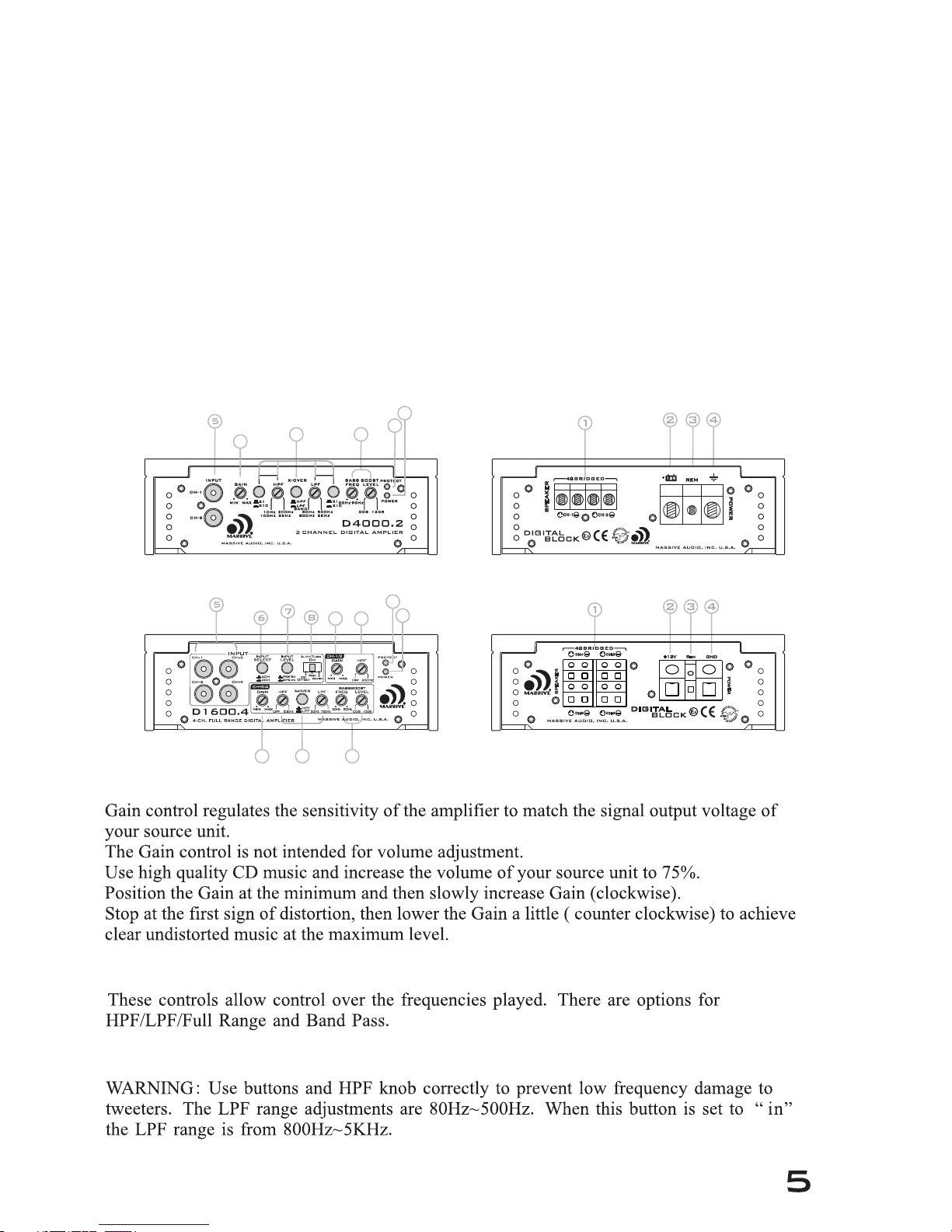
For auto turn on/off mode, D1600.4 amplifier offer 3 options: DC
REM: When auto turn on to REM, please connect the unit REM terminal to the source
unit remote terminal with an 18AWG cable. This is the preferred mode.
DC OFFSET: If the OEM source unit has no REM signal output, you can choose DC
OFFSET (Meanwhile, Input select switch to SPK IN mode) , DC OFFSET can turn
on/off EA series amp by detecting the 6V DC Offset from the OEM source unit
terminal.
AUDIO: Audio mode can turn ON/OFF D1600.4 amp by detecting the audio signal
from source unit. Note: If the volume is too Low, The amp may fail to turn on. So
please check if the source unit volume is properly set.
Offset/Rem/Audio.
speaker
8. Auto Turn On (D1600.4 only)
9
10
11
10 12
12
13
14
14
13
9
9
10. X-over mode and frequency Control
9. Gain
When the X1/X10 button is set to the “out ” position the HPF range adjustments are
10Hz ~ 200Hz . When this button in set at the “ in ” the HPF range is from 100Hz ~2KHz.
( D1600.4 without function of multiple 10 times X-over )
Page 6
12.
13.
14.
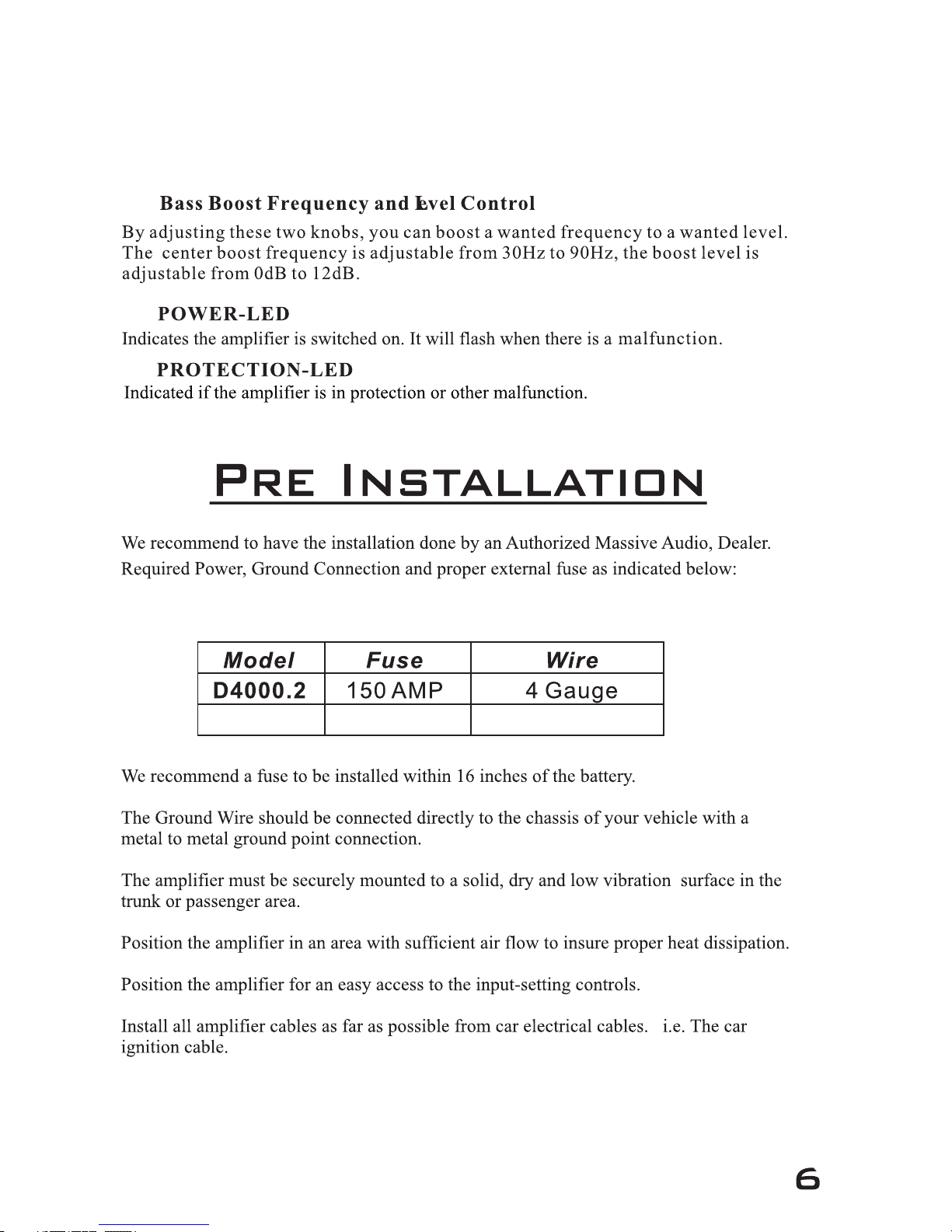
This controls the frequencies played for the front channels. Low frequencies can be
cut off from OFF to 200Hz. At OFF position, No low frequencies cut off, Meaning full
range. Use HPF knob correctly to prevent low frequency damage to tweeters.
11. HPF
D16 00.4 100 AMP
4~6 Gauge
Ta b le 1
Page 7
Page 8
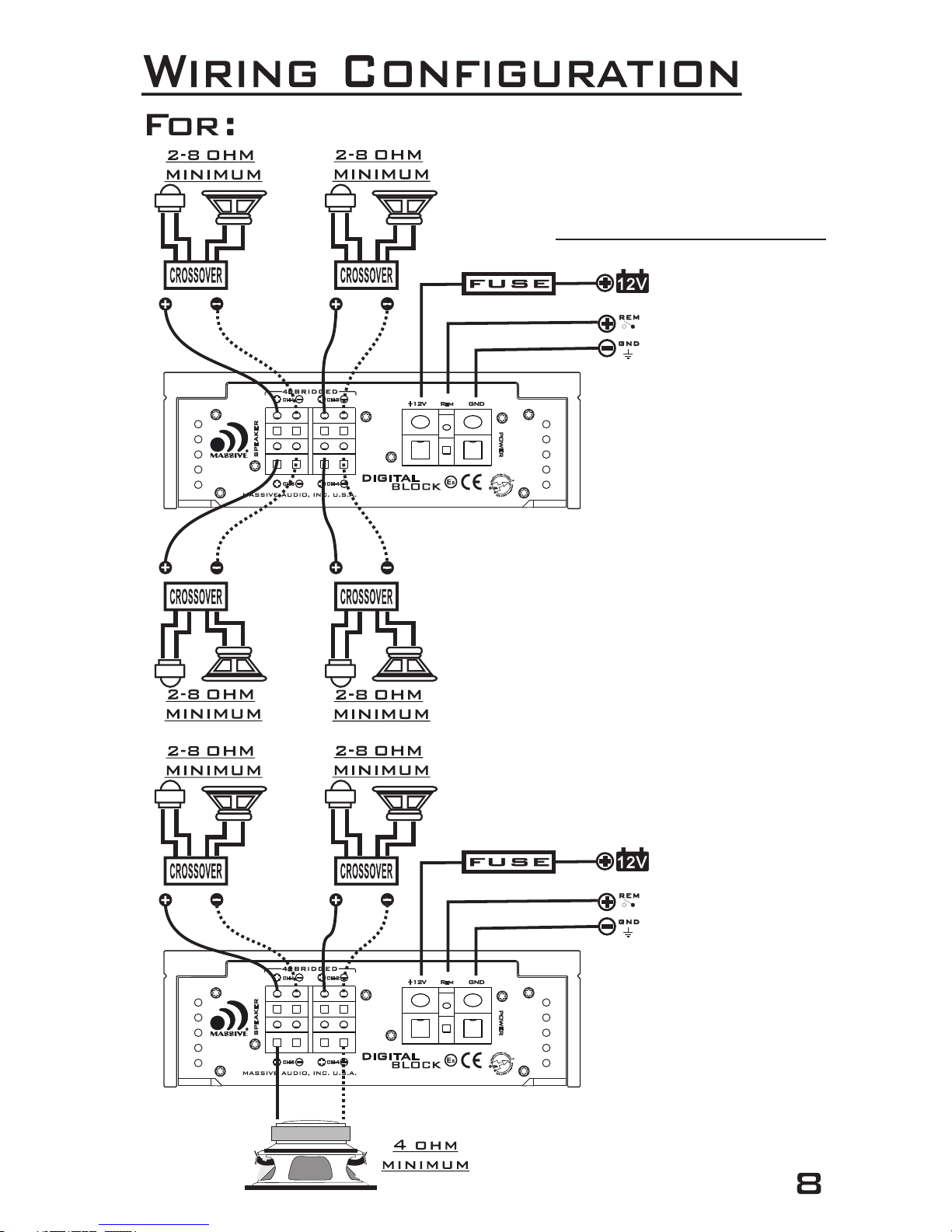
D1600.4
4-CHANNEL STEREO
3-CHANNEL MODE
Page 9
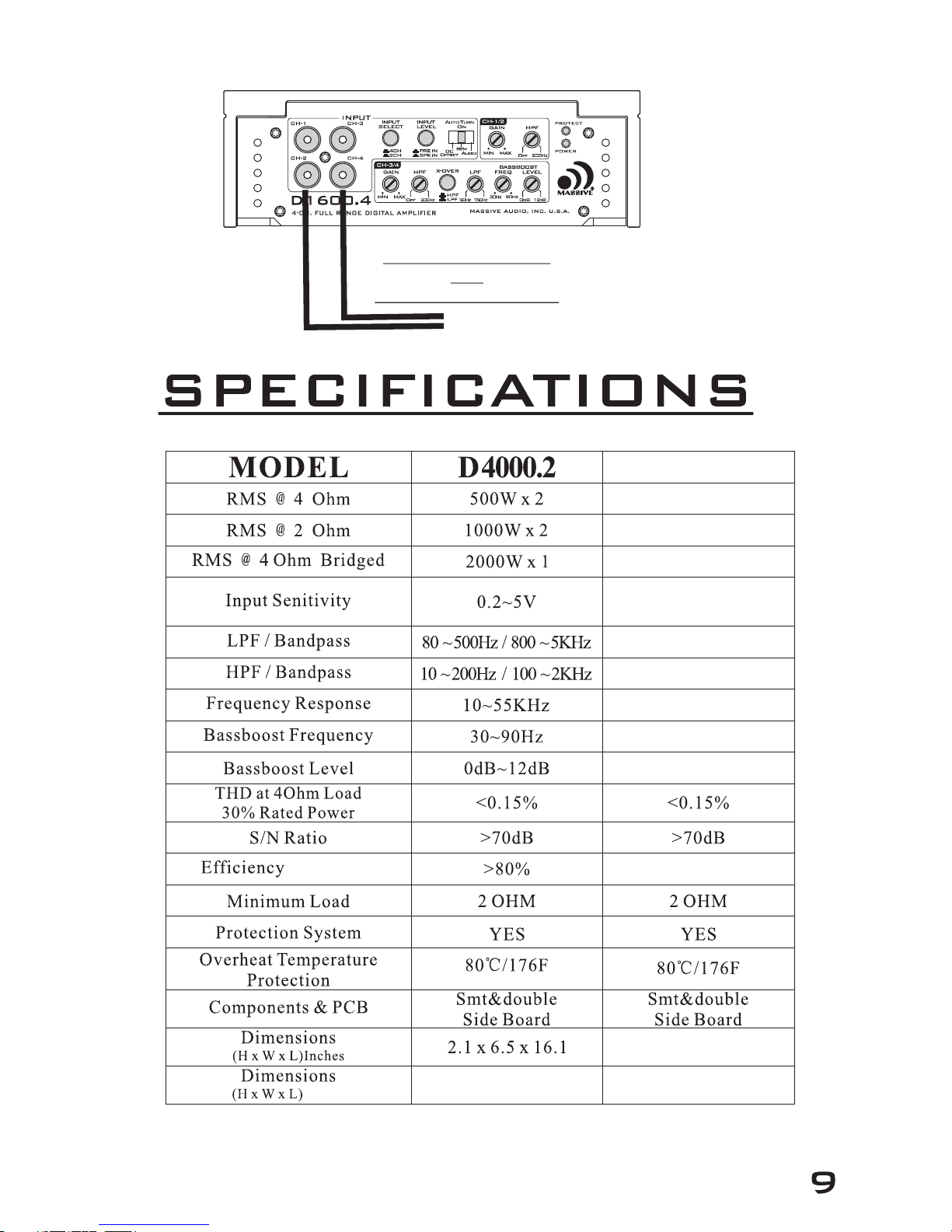
D1600.4
300W x 4
400W x 4
800W x 2
50~750Hz
10~200Hz
20~20KHz
30~90Hz
0dB~12dB
>85%
2.1 x 6.5 x 12.1
54 x 165 x 308
54 x 165 x 409
PRE IN: 0.2~5V
SPK IN: 0.4~10V
(CEA- 2006)
5V MAX P R E I N
OR
10V MAX S P K I N
Millimeter
Page 10

· Massive Audio, Inc. warrants all manufactured amplifier
products to be free from defect in material and workmanship
for a period not to exceed ONE YEAR* from the date of
original purchase when installed by an authorized “Massive
Audio” dealer. Units that are not installed by an authorized
“Massive Audio” dealer maintain a warranty not to exceed 90
days from the original purchase date by the original purchaser.
· PrOducts that displays abuse such as power deficiency, over
driving the amplifier or clipping the input require
purchase of new PCB for replacement.
· “Massive Audio” obligations under this warranty are limited to
repairing or replacing, at its own sole option, any such
defective products. This warranty does not apply to equipment
that has been damaged by accident, negligence, or
misapplication or has been altered or modified in anyway.
This warranty applies only to the original purchaser who must
have properly registered the product within 30 days of
purchase.
Except as provided herein, Massive Audio, Inc. makes no warranties or
representations, express or implied, including any warranty implied by
law, whether for merchantability or fitness for a particular purpose and
shall be effective only for the period that this express warranty is
effective. SEE THE WARRANTY REGISTRATION CARD TO
ADDITIONAL INFORMATION.
10 11
Page 11
Page 12

 Loading...