

Page 1
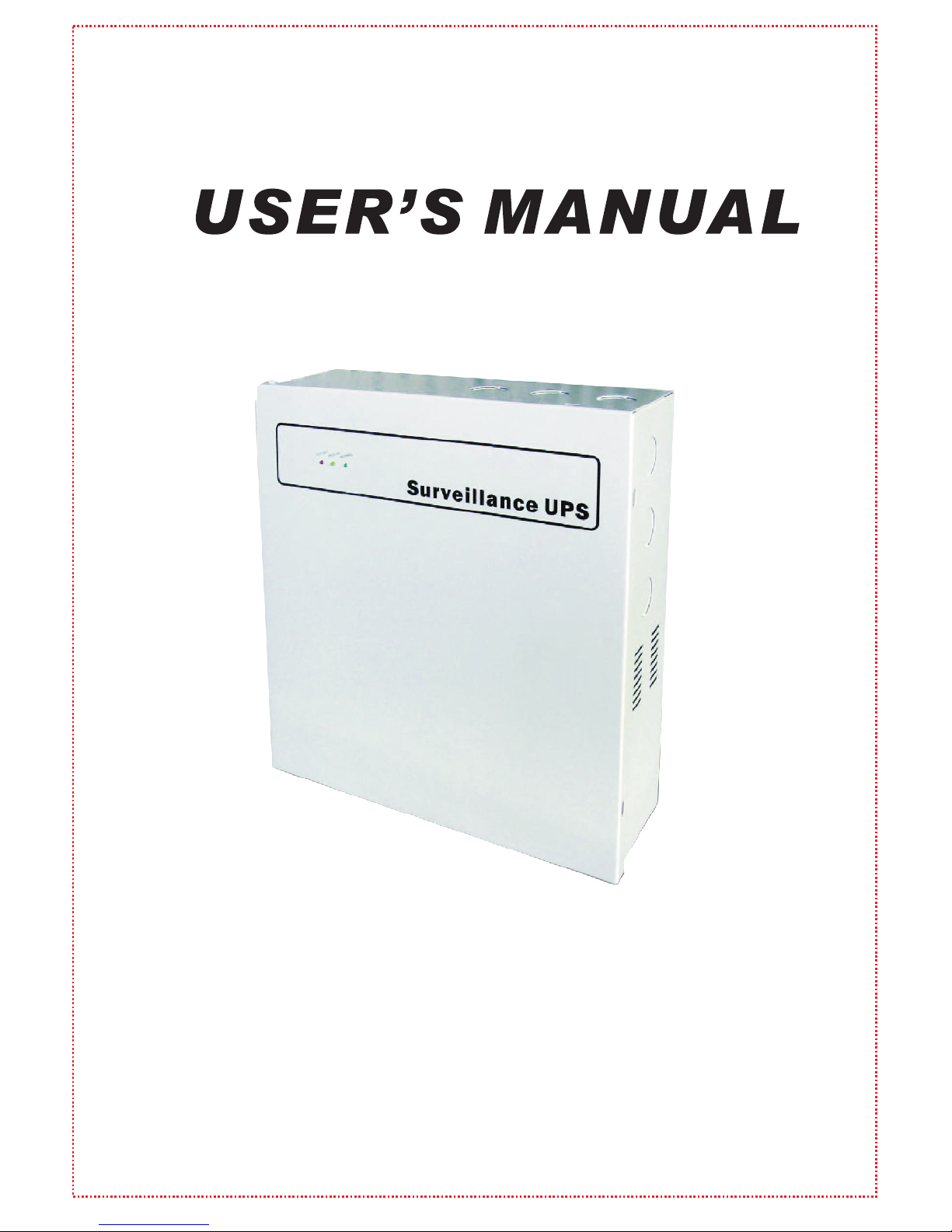
Surveillance UPS
Page 2
12VDC / 24VAC Batter y Power Backup for CCTV Cameras.
Automatic Voltage Regulation (AVR) for Wide Input Operation Voltage and Stable
Output Voltage.
12-13VDC Adjustable Output Voltage to Enhance Video Quality for Long-Distance
Cameras.
9/18 Por ts Overload Protection (fuse optional) for CCTV Cameras.
Batteries are Hot Swappable (cameras, DVR, & monitors are always on).
Multi-LED Indicators for AC/DC Power Supply and UPS Power Status.
2 Amp Fuse or PTC (Break) Power Protection for High Power CCT V Cameras.
Two AC Outlets (NEMA 5-15R/110V or IEC/220V) with Batter y Backup and Surge
Protection for DVR and Monitor.
Cameras Power Failure and AC Power Failure Notification through DVR/ NVR or
Alarm System.
Applications: Provides battery backup, noise filtering, and surge protection for
12VDC/24VAC cameras, monitor and DVR/NVR systems.
The Surveillance UPS Series is an innovative and professional battery backup solution
for all your surveillance needs. You w ill be kept at ease knowing that during a power
outage, your CCT V camera and DVR/NVR equi pment will continue running so you can
keep monitoring and recording your premises.
Page 3
Page 4
SW1
2012-2-15
IPS-SW-006 CODE:2
-4
Page 5
-5
3
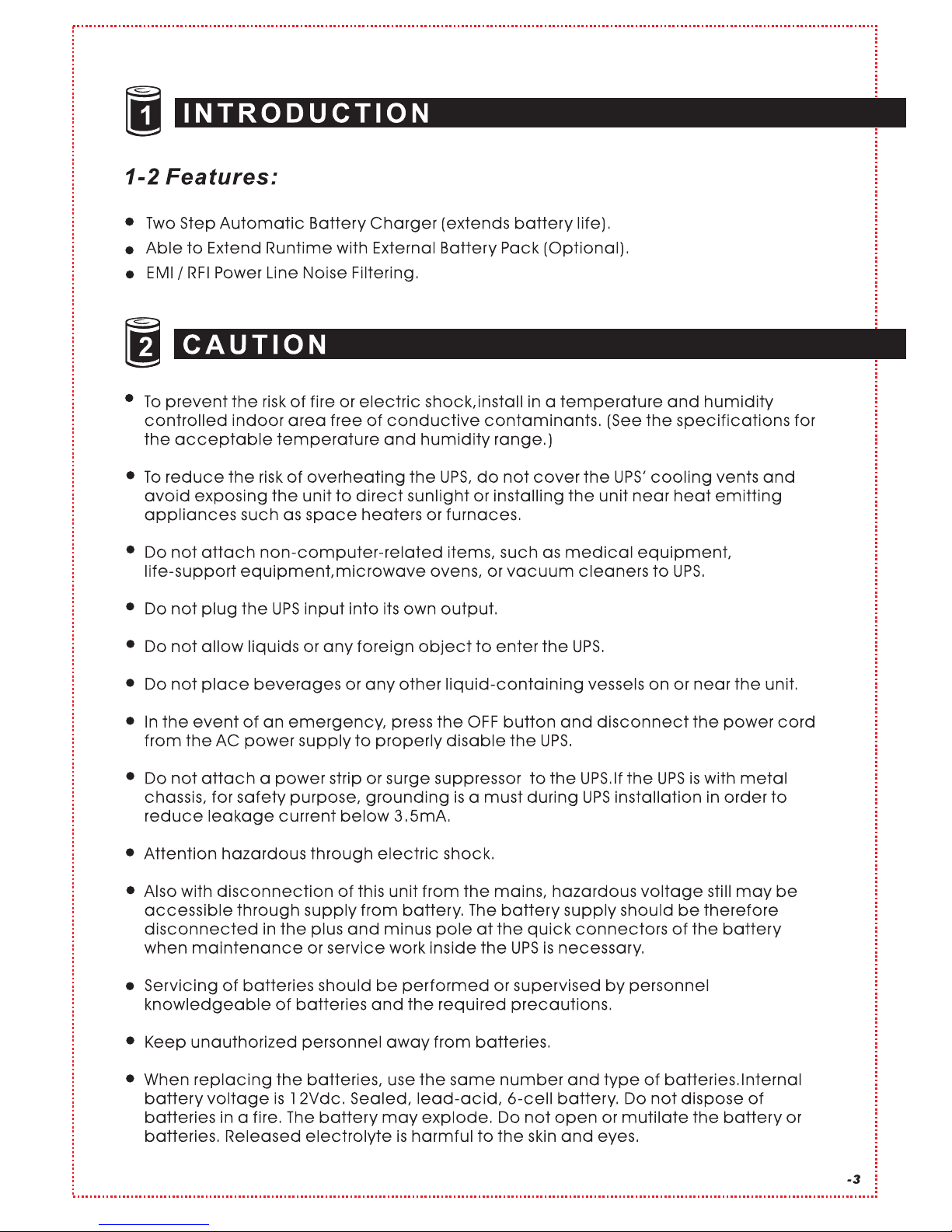
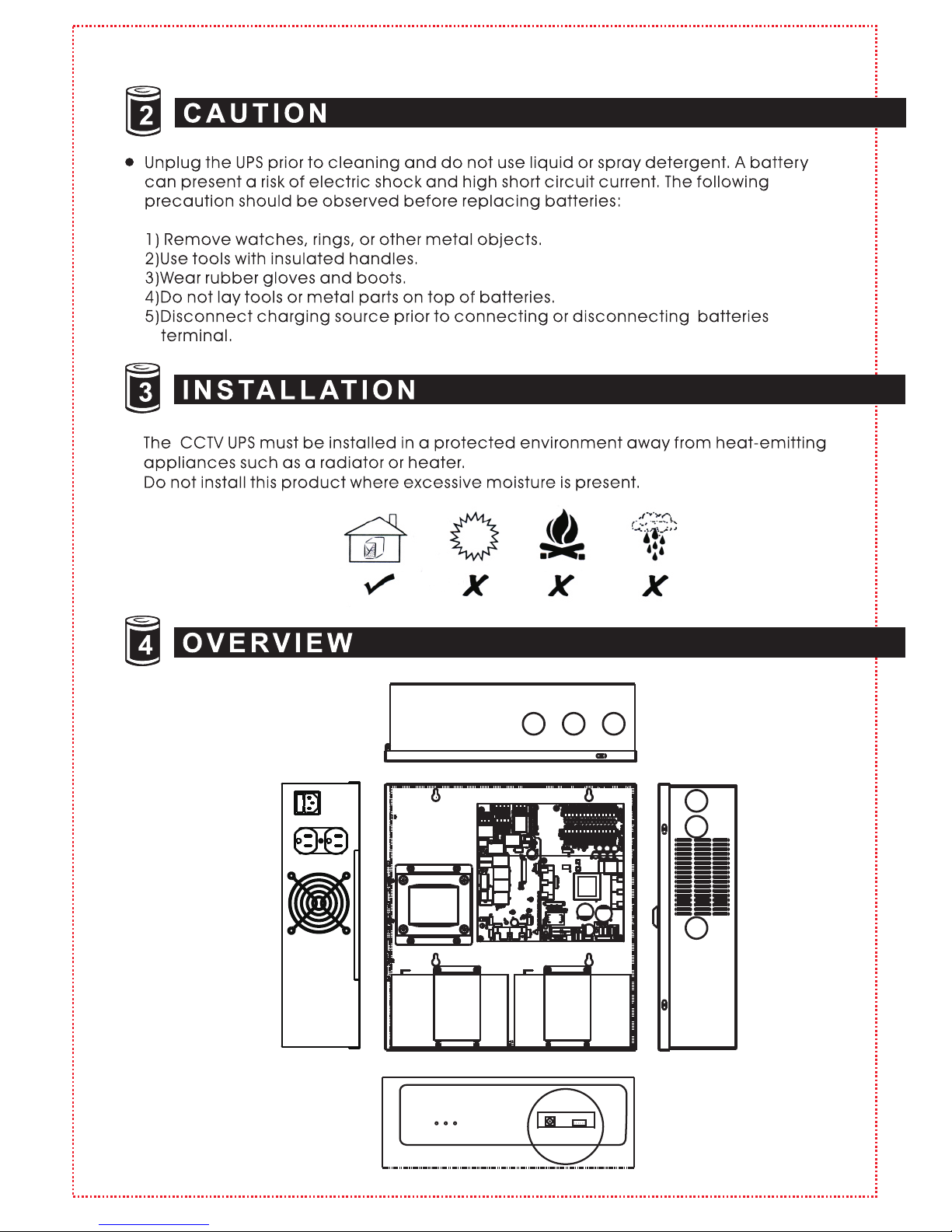
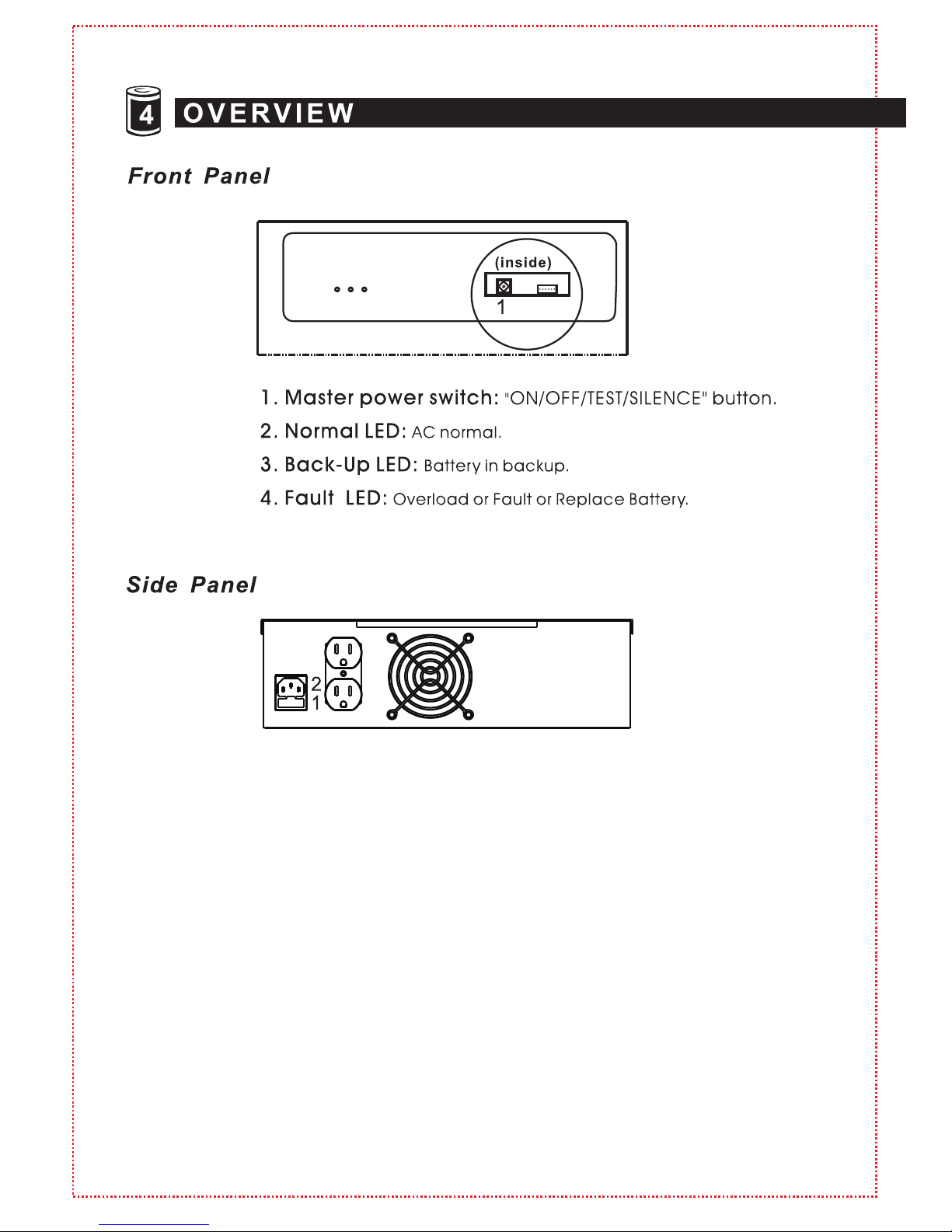
1. Input Fuse
2. AC Input
3. AC Output
4. Fan (SUR-1218UPS/1518UPS): Operating on battery
mode and over heat.
4
SW1
2012-2-15
IPS-SW-006 CODE:2
4 3 2
Page 6
-6
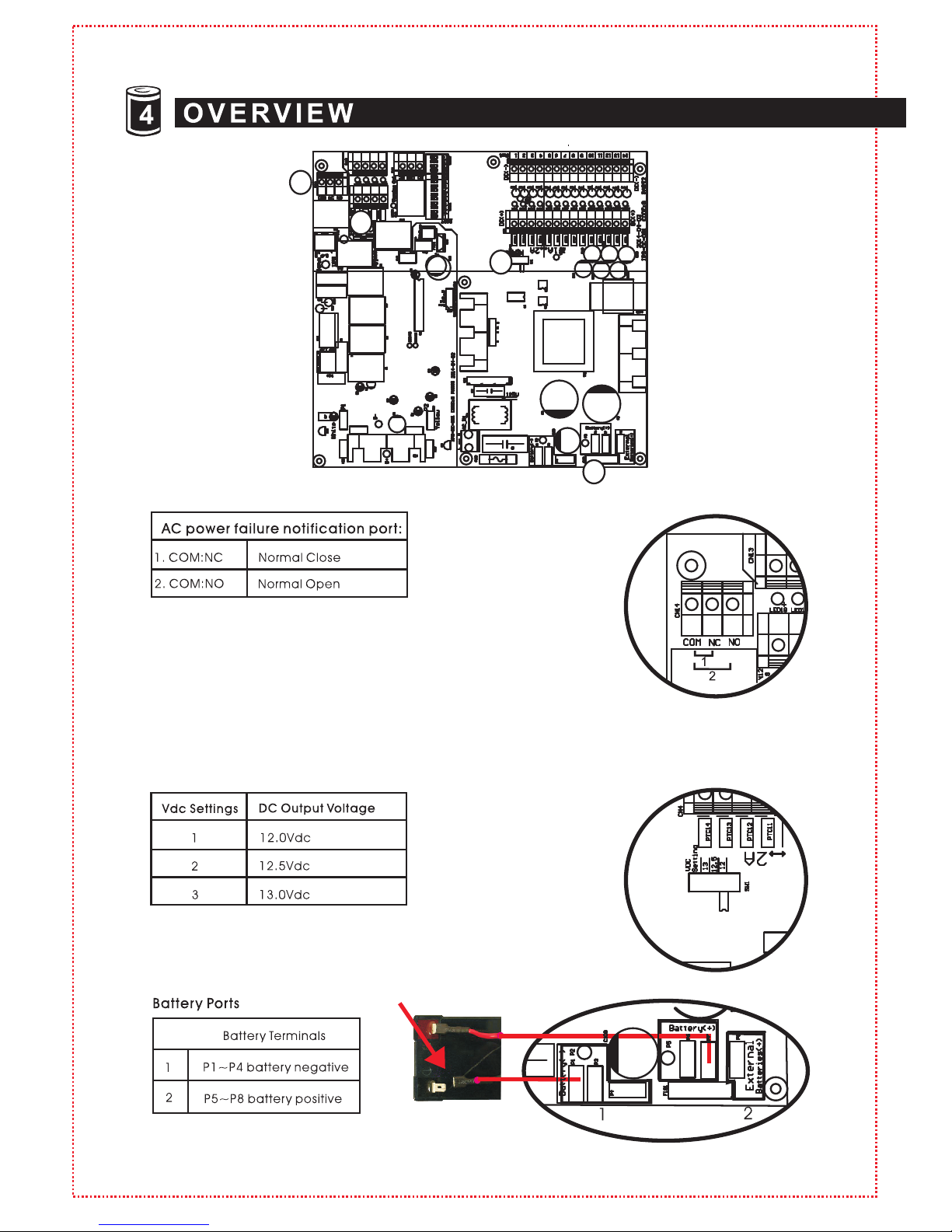
When AC power fails, “N C” and “NO” connec tion will
provid e a notificati on signal to the DVR/NVR or ala rm sys tem.
Major ity of DVR/NVR systems a lso have e -mail aler t features
to send notification of AC power fai lure.
Long- distance cameras te nd to lose voltag e due to dis tan ce
from power so urce. Setting Vd c to a high setting will improve
long- distance camera picture q uality.
32 1
UPS Byp ass Switch
A) UPS Mo de: Unit wil l go into backup mode if power fails.
B) AC Bypas s Mode: Switch to this mode w hen batterie s need to be c hanged or UPS is
abnor mal. “AC Bypass” m ode will contin ue to of fer power to cameras, DVR and moni tor.
1.
3.
4.
2.
1
3
4
2
Page 7
1
12VDC 24VAC
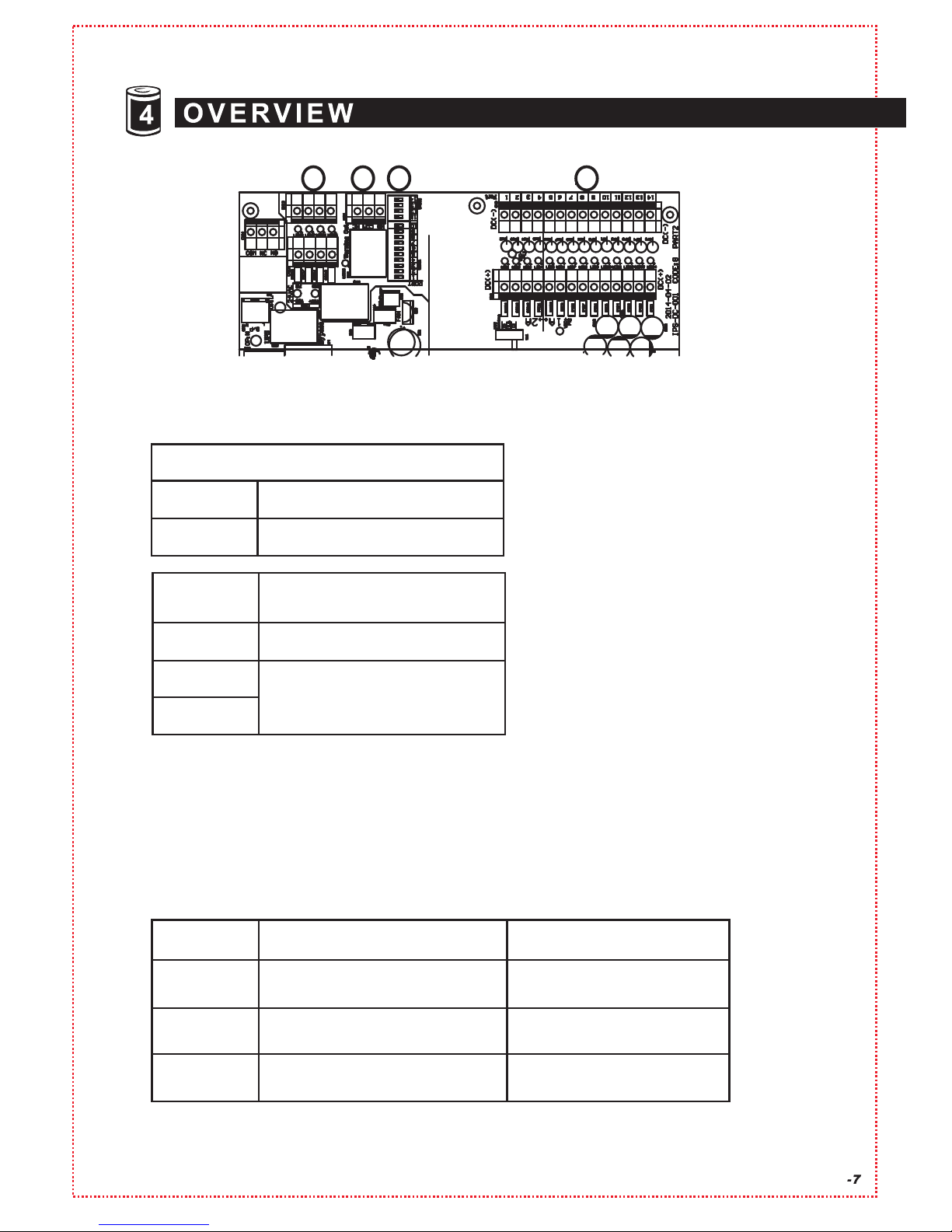
* Dip swi tch por ts need to be swit ch to ON fo r the DC camera por ts and DVR/NVR to rece ive
DC power failure notific ation.
* You can only tu rn dip switches O N with ports number you have your camera connected
to.
* You will get an wrong message if you switch O N with ports th at have no c amera co nnecte d.
Model
SUR-8 09UPS
SUR-1 218UPS
1A, Green LED, Port: 5-9
2A, Orange LED, Port: 1-4
1A, Green LED, Port: 5-14
2A, Orange LED, Port: 1-4
N/A
1A, Orange LED, Port: 15-18
1) Conn ect all camera ports before connectin g batter y.
2) Conn ect battery before turning on UPS. (by pass switch mus t also b e in “UPS mode”)
7
65
7.
6.
5. 24VAC Port 15 ~ Por t 18 (SUR-1218 )
12VDC Por t 15 ~ Port 18 (SUR-1518UPS)
UPS
Model
SUR-0 809UPS
SUR-1 218UPS
Camera DC Power Fa ilure
Notification S etting D ip Switch
Port: 1 -9
Port: 1 -14
Camrea Power Fai lure Notifi cation Por t
1. COM: N C
2. COM : NO
Normal Close
Normal Open
8. 12VDC Por t 1 ~ Port 9 (SUR-809UPS)
12VDC Por t 1 ~ Port 14 (SUR-1218UPS)
12VDC Por t 1 ~ Port 14 (SUR-1518UPS)
SUR-1 518UPS
1A, Green LED, Port: 5-18
2A, Orange LED, Port: 1-4
N/A
SUR-1 518UPS
8
Page 8
-8
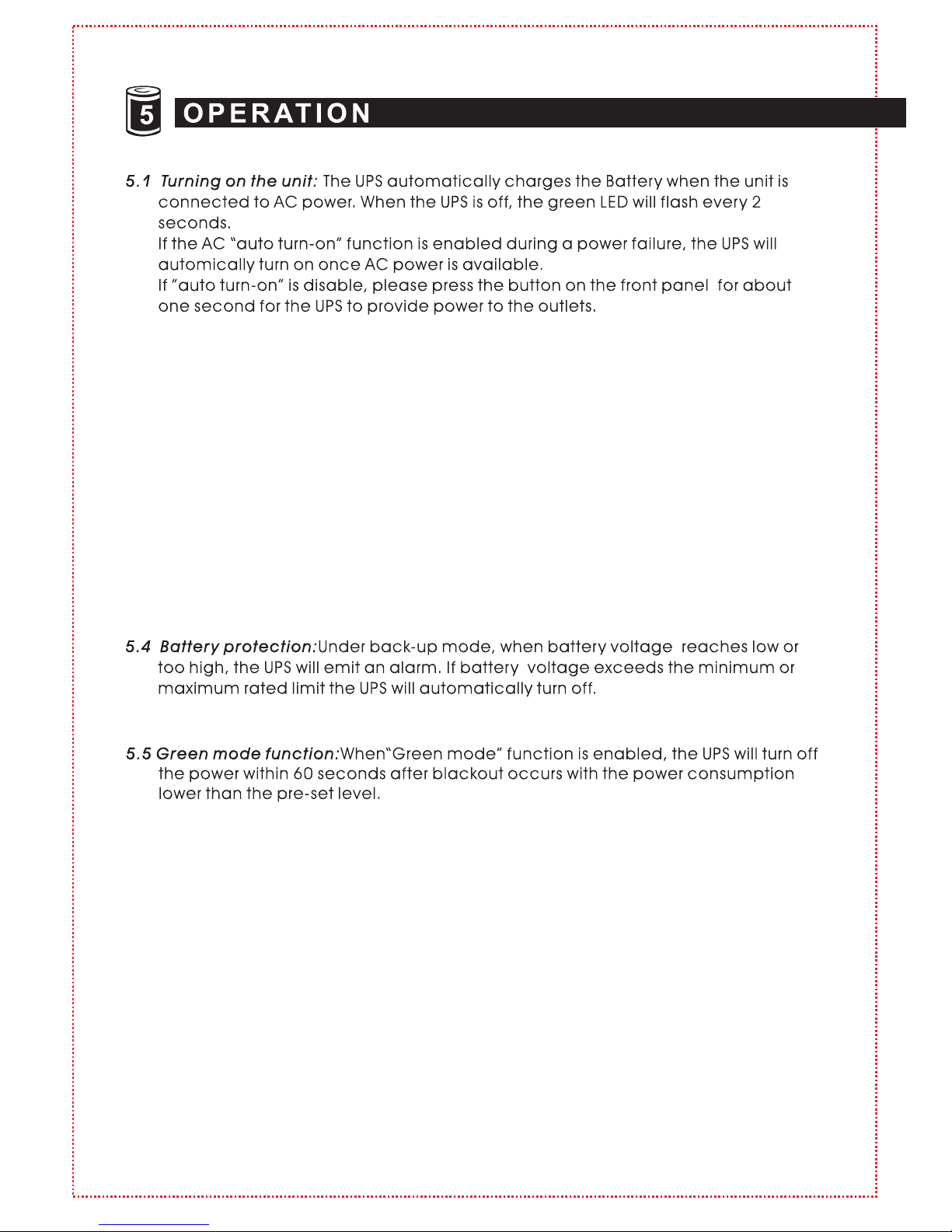
5.2 Turning off the unit: Push the button for 4 seconds to turn the UPS power off.The
UPS will turn off power completely within 10 seconds if there is a utility failure
during off mode. If the utility power is normal, the UPS will continue to charge
the battery.
When utility power is normal, please unplug the power cord if you want to turn
off the UPS completely.
5.3 DC start: During a blackout, push the button for 4 seconds to turn on the UPS
and enter into back-up mode. To turn off the power from UPS, please push the
button for 4 seconds. After turning off the UPS, please wait for 10 seconds if you
need to DC-start the UPS again.
Page 9
-9
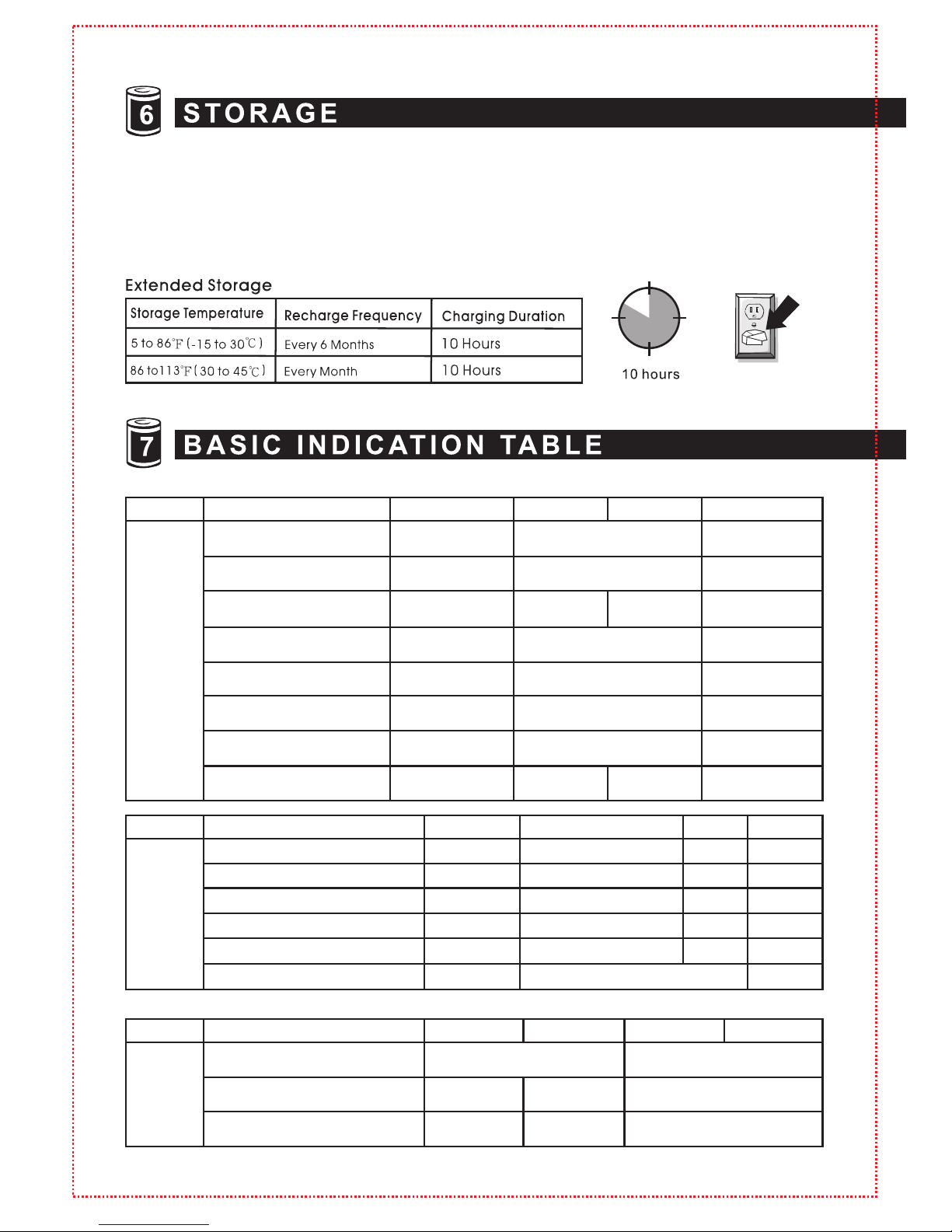
This unit is shipped from the factory with its internal battery fully charged, however,
some charge may be lost during shipping and the battery should be recharged prior
to use. Plug the unit into an appropriate power supply and allow the UPS to charge fully
by leaving it plugged in for at leas t 10 hours.
2 beeps eve ry
8 seconds
STATUS YELLOW LED GREE N LED RED LE D BUZZ ER
Backup
Mode
Batte r y no rm al
Load norma l
No loa d (F or g re en m od e
function o nl y)
Ove r lo ad ( wi ll shut down
at 120% of ful l lo ad )
Ove r Tem pera tu re
O/P shor t ci rc ui t
Low b at te ry
Ove r ba tt er y vo ltage
(For ex te rn al b at tery )
In ph as e lo ck ( AC good,
PLL wor ki ng)
2 flas he s eve ry
4 seconds
One fl as h eve ry
4 seconds
2 flas he s eve ry
4 seconds
32 fla sh es ever y
oth er 2 s ec onds
32 fla sh es ever y
oth er 2 s ec onds
4 flas he s eve ry
second
8 flas he s eve ry
second
OFF
4 flas he s
every s ec ond
One beep ev er y
8 seconds
Continuo us b ee p
Dependin g on
load situa ti on
32 beeps ev er y
oth er 2 s ec onds
4 beeps eve ry
second
8 beeps eve ry
second
STATUS YELLOW LED GREE N LED RED LE D BUZZ ER
AC
norm al
mode
Batte r y fu ll
Batte r y ch arge 70%~9 0%
Batte r y ch arge 50%~7 0%
Batte r y ch arge 30%~5 0%
Batte r y ch arge 0%~30 %
Ove r lo ad (s hut off a t 12 0% o f fu ll l oad)
OFF
OFF
OFF
OFF
OFF
OFF
Continuo us O N
One blink eve ry 8 seconds
One blink eve ry 4 seconds
One blink eve ry 2 seconds
One blink eve ry second
ON
OFF
OFF
OFF
OFF
OFF
OFF
OFF
OFF
OFF
OFF
Continuo us
Beep★
STATUS YELLOW LED GREE N LED
RED LE D
BUZZ ER
OFF
mode
AC I/ P di sc on ne ct ed
(UPS OFF com pl ete ly )
AC I/ P no rm al ( Ba tt . In c harg in g)
UPS timer is s et (Throu gh R S2 32 )
OFF
OFF
1 flas h eve ry
2 seconds
1 flas h eve ry
2 seconds
1 flas h eve ry
2 seconds
OFF
OFF
OFF
Note” ”: The b uzzer w ill keep co ntinu ous bee ping un til the c ontrol bu tton i s pushe d fo r one sec ond.★
OFF
OFF
OFF
OFF
OFF
OFF
OFF
ON
OFF OFF
Page 10
-1 0
Page 11
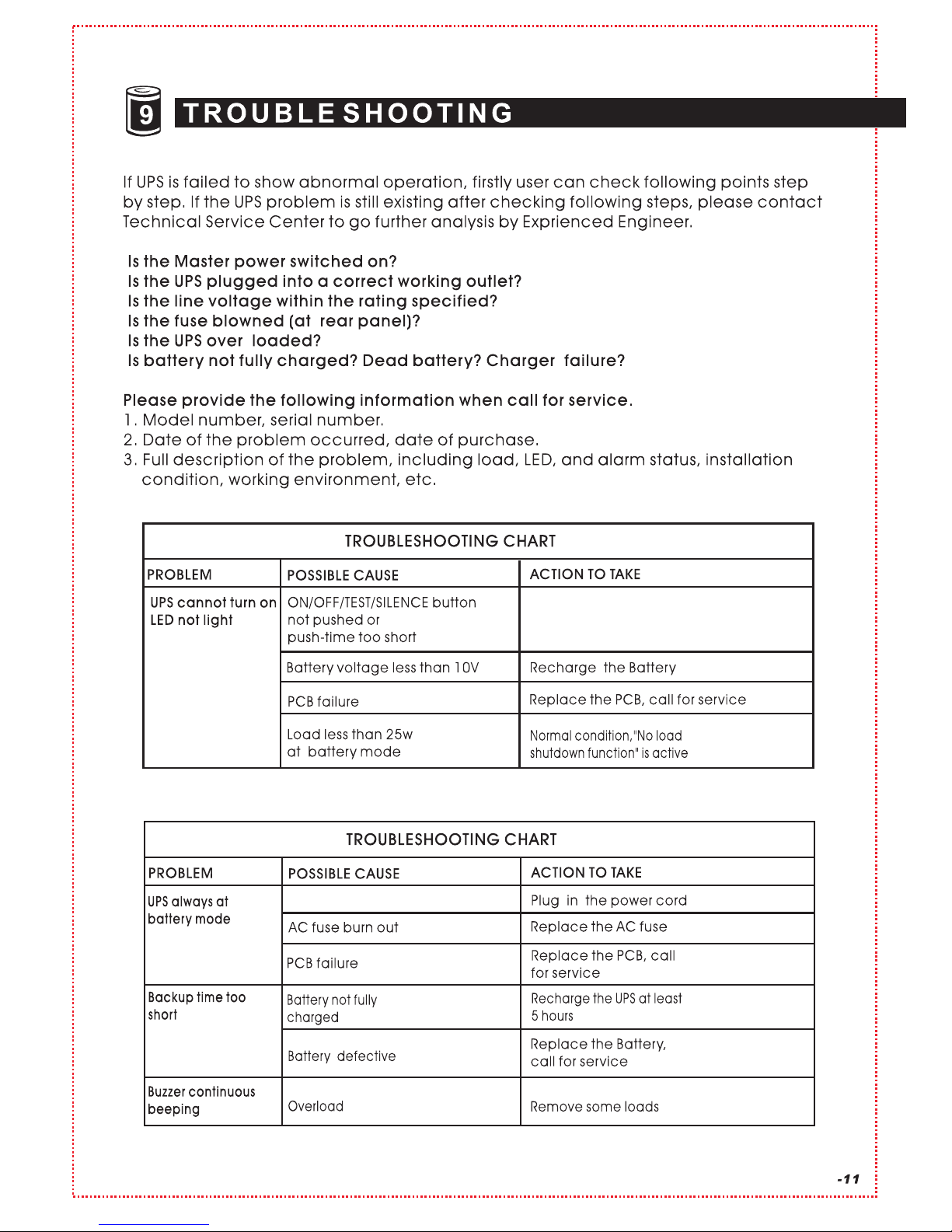
Press the ON/O FF/
TEST/SIL ENCE button
more than 1 seco nd
Power cord loos e
Page 12
70 1- 011 02 05 I P- DC UP S- Ma ru so n- 04
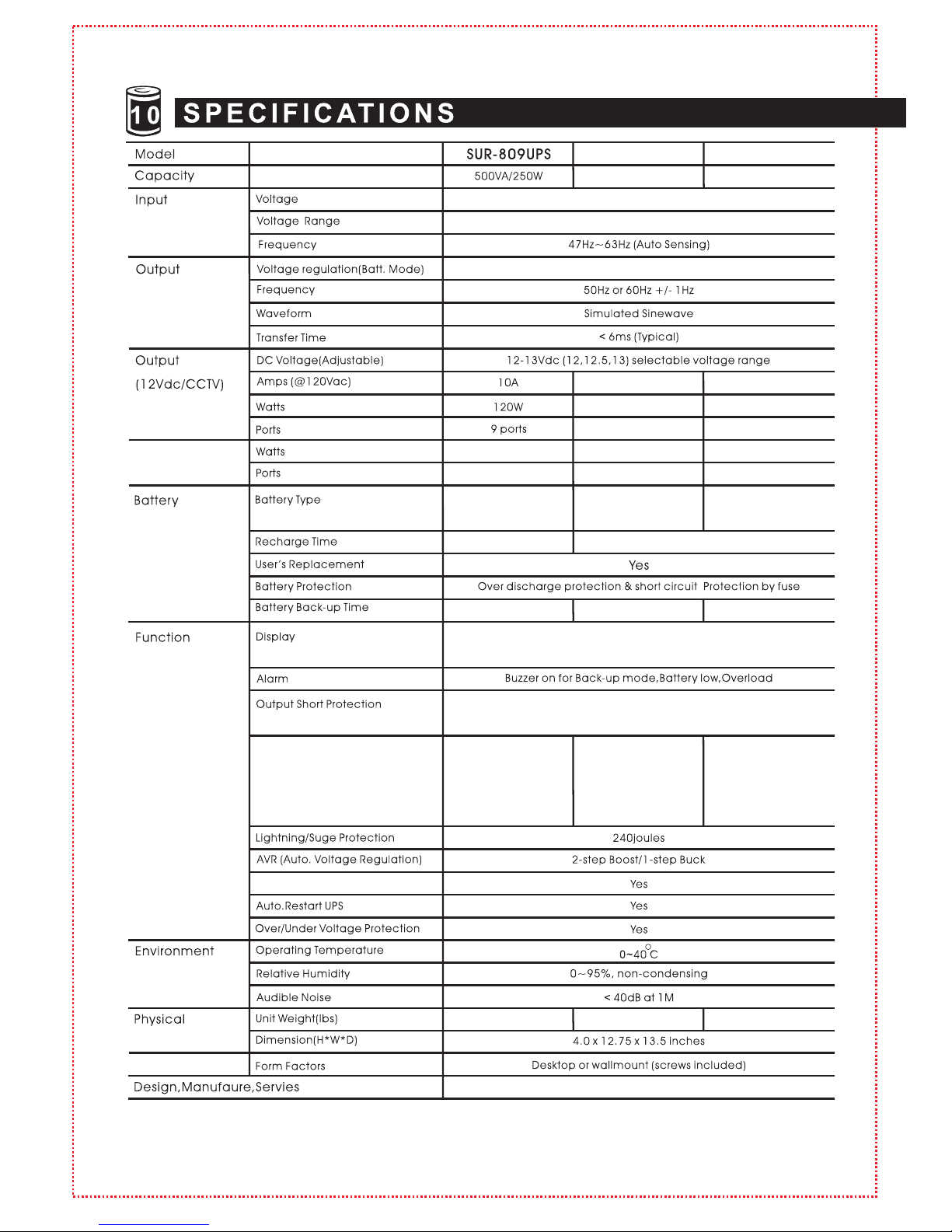
SUR-1218UPS
700VA/ 360W
14A
168W
14 por ts
12V/7AH* 1p c
(7AH*2 Opti on)
12V/7AH* 2p cs
(9AH*2 Opti on)
Outp ut
(24Va c/CCT V )
None
None
100W
4 port s
ISO 9001-2 00 8
*Bat tery back up t ime va ries wi th e qui pm ent, co nf iguration , ba tter y a ge, te mpe rature, etc. Tu rn ing off the mo ni to r wi ll
ext en d backup ti me.
*Ad ditio na l batteries a nd cable are optional . Specifi cations a re sub je ct to ch ange wi th out fur the r noti ce.
LED sta tus indicato rs for AC normal ( Gre en ), Back- up (Ye ll ow),
UPS cut of f( Re d)
AC fu se a nd E le ct roni c ci rcuit(Line mode) ; El ec tronic
circu it (B ac k-up m od e)
Ove rl oa d/ S ho r t Pro tectio n
(Camera )
PTC 1 2V DC 2 A* 4 po rts
12VDC 1A*5 p or ts
PTC 1 2V DC 2 A* 4 po rts
12VDC 1A*1 0 po rts
24VAC 2A*2 p or ts
24VAC 1A*2 p or ts
110/115/ 12 0VAC o r 22 0/ 23 0/ 24 0VAC
80-145VAC or 1 54 -2 80 VAC
110/115/ 12 0VAC o r 22 0/ 23 0/ 24 0VAC
55 ~75 minute s
DC Cold Star t Fu nc ti on
22 lbs 24.5 lbs
35 ~50 minute s
SUR-1518UPS
700VA/ 360W
14A
168W
18 por ts
12V/7AH* 2p cs
(9AH*2 Opti on)
No ne
No ne
PTC 1 2V DC 2 A* 4 po rts
12VDC 1A*1 4 po rts
60 ~80 minute s
24 lbs
<6 hrs to 9 0% <12 hr s to 90% capacity
 Loading...