

Page 1
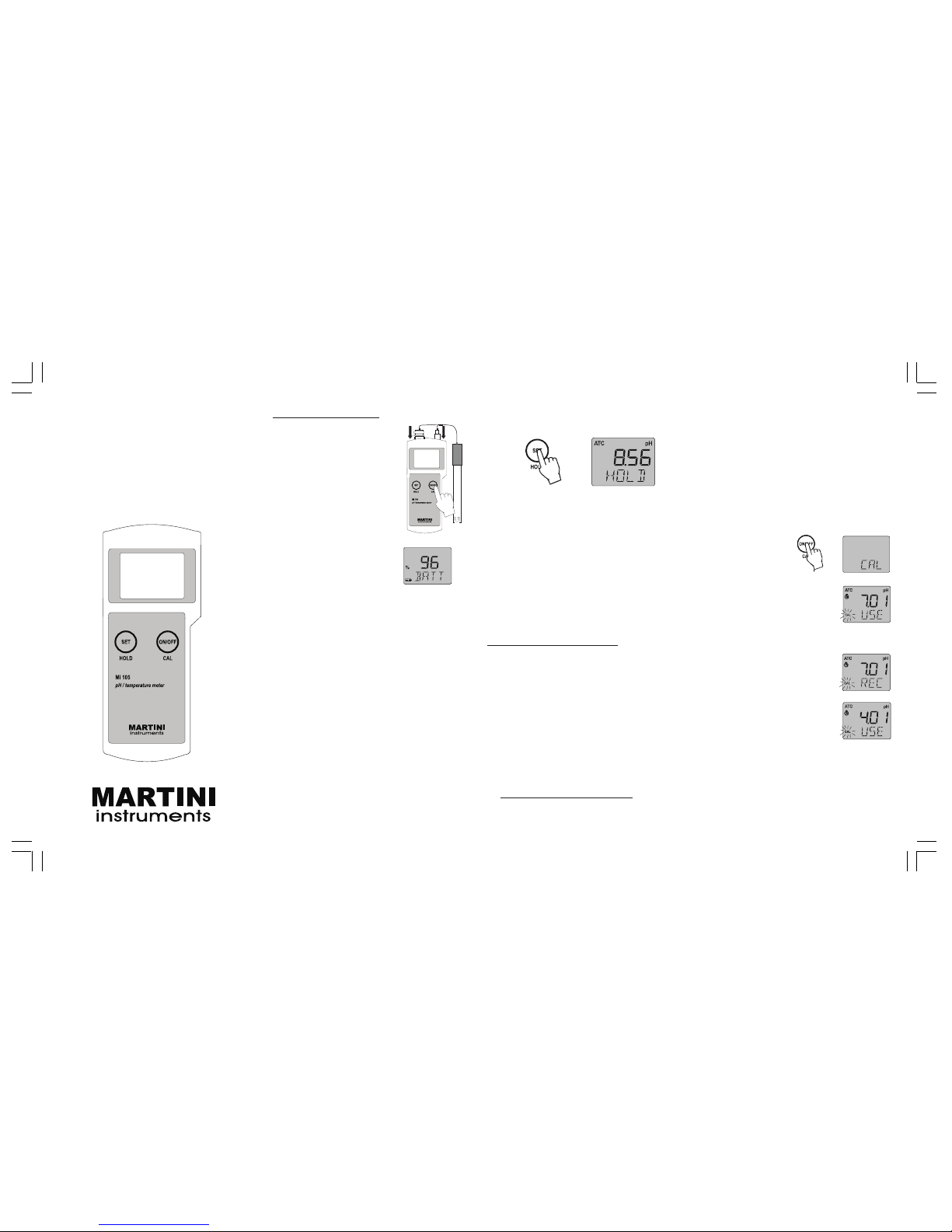
GENERAL OPERATION
• The meter is supplied complete with a 9V battery.
Remove the battery compartment cover on the
back of the meter and install the battery while paying attention to its polarity.
• Connect the MA914BR/1
probe to the meter.
• Turn the instrument on by
pressing the ON/OFF key.
At start-up, the LCD
shows the percentage of
the remaining battery life
for a few seconds, and
then the current measurement.
• Always remove the electrode protective cap
before taking any measurement. If the electrode has been left dry, soak the tip (bottom
2.5 cm) in M10000 rinse solution for a few
minutes.
• Immerse the tip (2.5 cm) of the probe into
the sample and stir gently.
• Read the pH value when the clock symbol
stops blinking.
• The temperature reading can be displayed
in °C or °F unit; to select the desired scale,
press and hold the “ON/OFF” key until “TEMP”
and the current temperature unit are displayed on the secondary LCD. Use the “SET”
button to select the unit and then press the
“ON/OFF” key a couple of times to return to
normal mode.
• To activate the HOLD function, keep pressed
the “HOLD” key. The measured value will
be frozen on the display and the “HOLD”
message appear on the secondary LCD.
• After measurements, switch the meter off
by pressing the “ON/OFF” key. The “OFF”
message appears on the LCD; release the
button.
Notes:
• Before taking any measurement, make sure
that the meter has been calibrated (the “CAL”
tag is displayed on the left lower corner of
the LCD).
• Always replace the electrode protective cap
after use with a few drops of storage
solution.
CALIBRATION PROCEDURE
It is recommended to recalibrate the meter at
least once every three weeks.
A) Preparation, Buffer solutions:
1. pH 7.01 / 6.86 (MA9007 / MA9006)
2. pH 4.01 (MA9004) for acidic calibration
(pH < 7) or pH 10.01 / 9.18 (MA9010 /
MA9009) for alkaline range (pH > 7).
Use two beakers for each buffer solution: one
beaker for rinsing the probe, the other for
calibration. In this way the cross contamination
between solutions is minimized.
B) Procedure:
• Select the calibration buffer set: press and
hold the “ON/OFF” key until the LCD shows
“TEMP”. Press again this key and the “BUFF”
USER MANUAL
MI 105
Portable
pH/Temperature Meter
message will appear; then select the desired buffer set with the “SET” key: “7.01
pH BUFF” (for standard solutions: pH 4.01,
7.01, 10.01) or “6.86 pH BUFF” (for NIST
solutions: pH 4.01, 6.86, 9.18). Press the
“ON/OFF” key again to exit.
• Remove the protective cap, then immerse
the probe in the first buffer (pH 7.01 or
6.86).
• Press and hold the “ON/OFF” key until “CAL”
is displayed on the lower LCD.
• Release the button and the
message “7.01 pH USE” (or
“6.86 pH USE” for NIST
buffer set) will be displayed.
• The meter automatically recognizes the buffer
value: if a valid buffer is detected, then its
value is displayed on the LCD
together with the “REC” message, and the first calibration point is accepted.
• The meter will then require
the second buffer by showing the “pH 4.01 USE” message. Immerse the probe in
the second buffer solution
(pH 4.01 or 10.01 or 9.18). If a valid buffer
is recognized, the meter completes the calibration procedure, shows the “OK 2” message for a few seconds, then returns to
the normal mode.
ISTMI105R1 06/04
Page 2

WARRANTY
This instrument is warranted against defects in materials and manufacturing for a period of two years
from the date of purchase. Probe is warranted for 6
months.
If during this period the repair or replacement of parts
is required, where the damage is not due to negligence or erroneous operation by the user, please
return the parts to either distributor or our office and
the repair will be effected free of charge.
Damages due to accidents, misuse, tampering or
lack of prescribed maintenance are not covered.
Notes:
• If no valid buffer is detected,
the LCD will show the
“WRNG” message.
• For exiting the calibration after the first point
is accepted, press the “ON/OFF” button: the
LCD will show the “OK 1” message for 1
second and then returns to the normal mode.
If using pH 4.01 or 10.01 (or 9.18) buffer
for the first calibration point, the meter will
exit the calibration mode after recognizing
the buffer value and showing the “OK 1”
message for 1 second.
• To quit the calibration procedure and return
to the last data, press “ON/OFF” after entering the calibration mode and before the
first point is accepted. The secondary LCD
shows the “ESC” message for 1 second
and the meter returns to the normal mode.
• To clear a previous calibration and reset to
the default value, press the “SET” key after
entering the calibration mode and before
the first point is accepted. The secondary
LCD shows the “CLR” message for 1 second, the meter resets to the default calibration and the “CAL” tag on the LCD
disappears.
BATTERY REPLACEMENT
The meter shows the remaining battery percentage every time it is switched on. When the
battery level is below 5%, the battery symbol
on the bottom left of the LCD lights up to
indicate a low battery condition.
The meter is also provided with BEPS (Battery
Error Prevention System), which automatically
switches the meter off if the battery level is so
low to cause erroneous readings. It is recommended to replace immediately the battery.
Turn the meter off, remove the battery compartment cover from the rear
of the meter and replace
the rundown 9V battery
with a new one.
Install the battery while
paying attention to its polarity and reattach the
cover.
SPECIFICATIONS
RANGE (*) -2.00 to 16.00 pH
-5.0 to 105.0 ºC or 23.0 to 221.0 °F
RESOLUTION 0.01 pH
0.1 °C or 0.1 °F
ACCURACY (@25°C) ±0.02 pH
±0.5°C up to 60°C; ±1°C outside
±1°F up to 140 °F; ±2°F outside
TYPICAL EMC DEVIATION ±0.02 pH
±0.2 °C or ±0.4 °F
TEMPERATURE COMPENSATION
Automatic, from -5 to 80°C
pH CALIBRATION Automatic, 1 or 2-point
PROBE (included) MA914BR/1
amplified pH/temperature probe
ENVIRONMENT 0 to 50°C; 100% RH max.
BATTERY 1 x 9V alkaline (included)
BATTERY LIFE approx. 500 hours of use
AUTO-OFF after 8 minutes of non-use
DIMENSIONS 200×85×50 mm
WEIGHT 260 g (with battery)
(*) The temperature range is limited to 80°C (176°F) if
using the MA914BR/1 probe.
ACCESSORIES
MA914BR/1 Combination amplified pH/
Temperature probe with
BNC & RCA connectors and
1 m cable
M10004B pH4.01 buffer solution, 20
ml sachet, 25 pcs.
M10006B pH6.86 buffer solution, 20
ml sachet, 25 pcs.
M10007B pH7.01 buffer solution, 20
ml sachet, 25 pcs.
M10009B pH9.18 buffer solution, 20
ml sachet, 25 pcs.
M10010B pH10.01 buffer solution, 20
ml sachet, 25 pcs.
MA9004 pH4.01 buffer solution, 230
ml bottle
MA9006 pH6.86 buffer solution, 230
ml bottle
MA9007 pH7.01 buffer solution, 230
ml bottle
MA9009 pH9.18 buffer solution, 230
ml bottle
MA9010 pH10.01 buffer solution, 230
ml bottle
MA9015 Electrode storage solution,
230 ml bottle
MA9016 Electrode cleaning solution,
230 ml bottle
M10000B Electrode rinse solution, 20
ml sachet, 25 pcs.
 Loading...