

Page 1
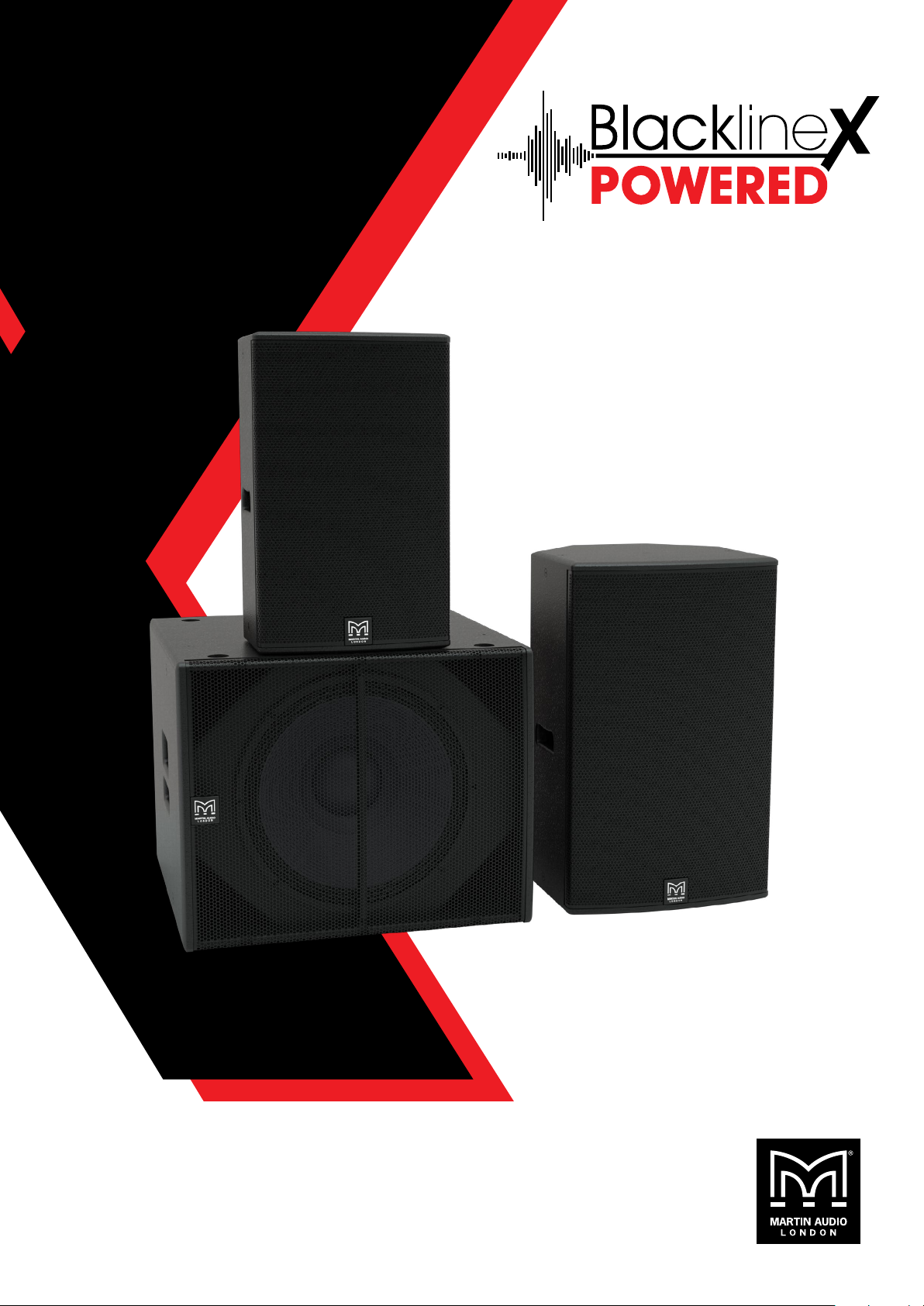
User Guide
Page 2

BLACKLINEX POWERED USER GUIDE
Contents
Introduction
BlacklineX Powered 4
Important Safety Instructions – Read Before Proceeding 5
Caution 5
Unpacking the Units 5
Approvals 6
Safety Rules 6
Consignes De Sécurité Importantes – Lire Avant De Commencer 7
Series Overview
XP12 8
XP15 8
XP118 9
Accessories
Wall Bracket 10
Eye Bolts 10
Pole Mount 10
Safety
Instructions 11
Connections
Power Connection 12
XLR and 1/4" Combo Inputs 12
Mix Out 12
Rear Panel Controls
Power Switch 13
LCD Display 13
Speaker Control 13
Loudspeaker Control
Power Up 14
Mixer Screen 14
EQ 16
Menu Screen 16
Presets 17
Bluetooth 18
BLACKLINEX POWERED USER GUIDE V1.0
Copyright © 2019 Martin Audio Ltd. 2
Page 3

BLACKLINEX POWERED USER GUIDE
Linking 19
Settings 20
Lock 20
Channels 21
Protection
Limiters 22
Thermal Protection 22
AC Power
Using AC Power 23
Care and Maintenance
Care Guidlines 24
Wiring Diagrams
System Configurations 25
Grille Removal and Horn Rotation
Grille Removal 29
Rotating the HF Horn 30
Badge Rotation 31
Wall Mounting
Wall Bracket 32
Eye Bolt Mounting
Eye Bolts 35
Specications
XP12 36
XP15 36
XP118 36
Technical Drawings
XP12 37
XP15 38
XP118 39
Warranty
Warranty Statement 40
BLACKLINEX POWERED USER GUIDE V1.0
Copyright © 2019 Martin Audio Ltd. 3
Page 4
BLACKLINEX POWERED USER GUIDE
Introduction
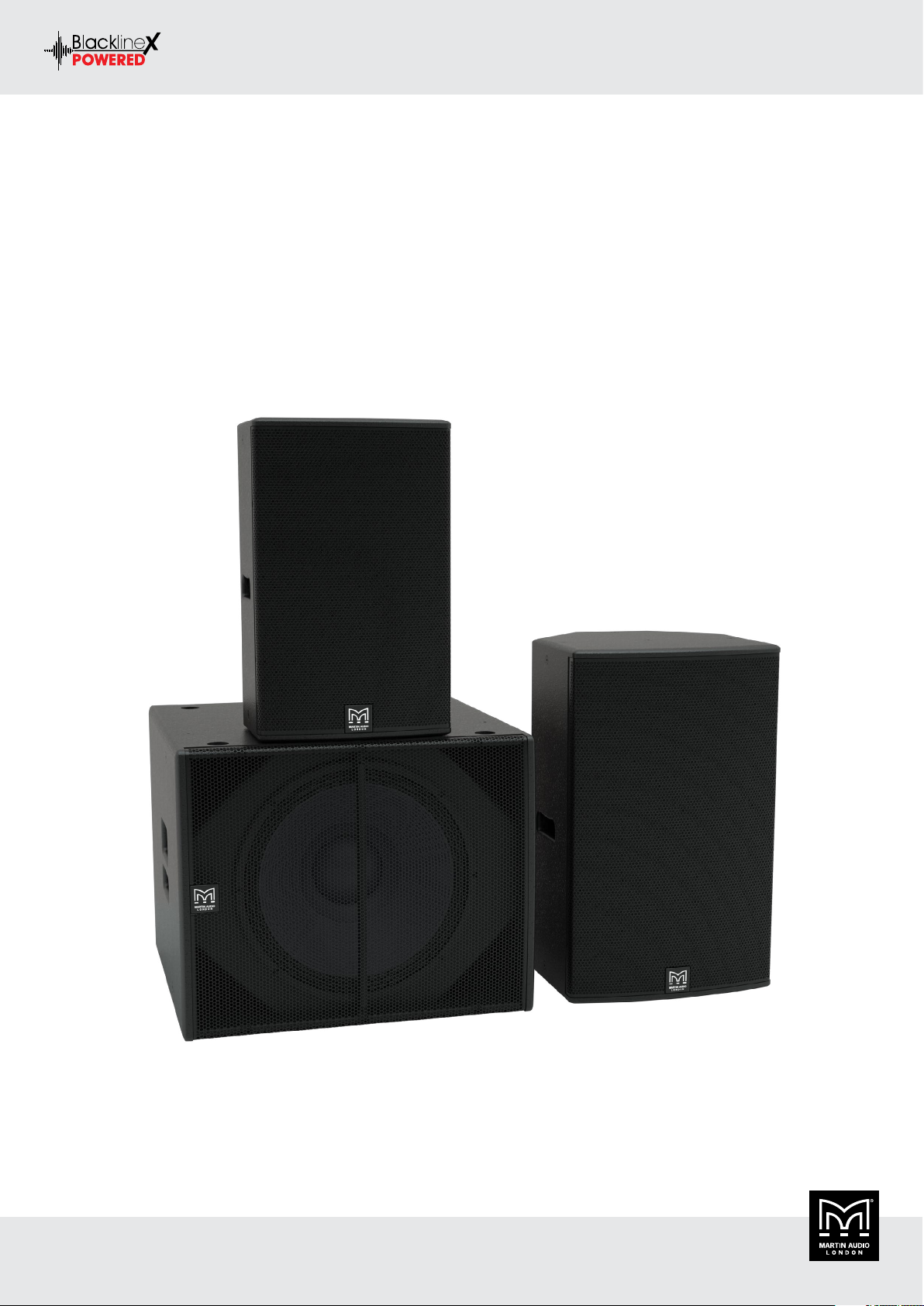
BlacklineX Powered
Thank you for purchasing a Martin Audio BlacklineX Powered Series system. This series integrates all of Martin Audio’s engineering
expertise into easy-to-use, quick-to-deploy, high-powered loudspeakers that bring professional quality sound, top-flight performance and
road-worthy durability into the hands of hard-working industry professionals — from musicians, music bars and mobile DJ’s, to corporate
AV, House of Worship installations and more. With optional Bluetooth control, streaming and a built-in three channel mixer, BlacklineX
Powered puts Martin Audio signature stadium sound at your fingertips.
Comprising of two two-way systems — from the ultra-compact XP12 and powerful XP15 — and the XP118 subwoofer, the multi-purpose
BlacklineX Powered Series raises the performance of loudspeaker systems in its class to a new level. Because the XP12, XP15 and XP118
are active systems with on-board DSP they can be used without a controller making system set up extremely quick and easy connecting a
signal feed direct from the mixing console eliminating the need for amplifier racks.
BLACKLINEX POWERED USER GUIDE V1.0
Copyright © 2019 Martin Audio Ltd. 4
Page 5

BLACKLINEX POWERED USER GUIDE
Important Safety Instructions – Read Before Proceeding
Please read these instructions and retrain for future reference. Heed all warnings and follow all instructions.
• Do not block any ventilation openings. Install in accordance with the manufacturer’s instructions.
• Do not install near any heat source such as radiators, heat registers, stoves, or other such apparatus (including amplifiers) that produce
heat.
• Do not defeat the purpose of the grounding type plug, a grounding plug has two blades and a grounding prong, the third prong is
provided for your safety.
• If the provided plug does not fit your outlet consult an electrician for a replacement type.
• Protect power cords from being walked on or pinched particularly at plugs, convenience receptacles, and the point where they exit
the apparatus.
• Only use attachments and accessories specified by Martin Audio Ltd.
• Use only with the cart, stand, tripod, bracket, flying hardware specified by the manufacturer or sold with the apparatus, when a cart
is used, use caution when moving the cart/apparatus combination to avoid injury from tripping.
• Unplug the apparatus during lightning storms or when unused for long periods of time.
• Refer all servicing to qualified service personnel. Service is required when the apparatus has been damaged in any way, such as powersupply cable or plug damaged, liquid has been spilled or objects have fallen into the apparatus, this apparatus has been exposed to
rain or moisture, does not operate normally, or has been dropped.
• This apparatus shall not be exposed to dripping or splashing, and no object filled with liquids, such as vases or beer glasses, shall be
placed on the apparatus.
• Do not overload wall outlets and extension cords as this can result in a risk of fire or electric shock.
• This apparatus has been designed with Class-I construction and must be connected to a mains socket outlet with a protective earthing
connection (the third grounding prong).
• This apparatus has been equipped with a rocker-style AC mains power switch. This switch is located on the rear panel and should
remain readily accessible to the user.
• The mains plug or an appliance coupler is used as the disconnect device, so the disconnect device shall remain readily operable.
Caution
To reduce the risk of electric shock do not remove the back cover. There are no user serviceable parts inside the unit. Refer servicing to
qualified service personnel only. Call Martin Audio, Ltd on +44 (0) 1494 535312 or e-mail info@martin-audio.com for service.
The lightning flash with arrowhead symbol within an equilateral triangle is intended to alert the user to the presence of uninsulated
“dangerous voltage” within the product’s enclosure, that may be of significant magnitude to constitute a risk of electric shock to persons.
The exclamation point within an equilateral triangle is intended to alert the user of the presence of important operating and maintaining
(servicing) instructions in the literature accompanying the appliance.
Unpacking the Units
Each Martin Audio BlacklineX Powered Series loudspeaker is built to the highest standard and thoroughly inspected before it leaves the
factory. After unpacking the system, examine it carefully for any signs of transit damage and inform your dealer or distributor if any such
damage is found. It is suggested that you retain the original packaging so that the system can be repacked at a future date if necessary.
Please note that Martin Audio and its distributors cannot accept any responsibility for damage to any returned product, through the use
of non-approved packaging. When the product has reached the end of its useful life, please dispose of it responsibly through a recycling
centre.
BLACKLINEX POWERED USER GUIDE V1.0
Copyright © 2019 Martin Audio Ltd. 5
Page 6

BLACKLINEX POWERED USER GUIDE
Approvals
SAFETY IEC60065:2002 + A1:2006
Country of origin United Kingdom
EMC EMISSION EN55103-1:2009 + A1:2012
EMC IMMUNITY EN55103-2:2009
FCC CFR47 PART 15B-2015
ICES-003:2012
This is a class A product. In a domestic environment this product may cause radio interferences in which case the user may be required
to take adequate measures.
Safety Rules
• This BlacklineX Powered product must be powered exclusively by an earth connected mains socket in electrical networks compliant
to the IEC 364 or similar local rules. It is vital that the user verifies this fundamental safety requirement. If you are in any doubt, get
the installation checked by qualified personnel before use.
• The means of disconnection from the mains is the mains plug. We strongly recommend that you power the BlacklineX Powered
loudspeakers via a professionally installed mains supply with an easily accessible on/off switch or circuit breaker.
• Before powering the BlacklineX Powered loudpeaker, make sure that the unit is supplied with the correct mains operating voltage:
100 - 240V ~ 50 - 60Hz.
• The BlacklineX Powered products are protected by internal fuses located on the main amplifier board designated F500
• Do not use this unit if the electrical power cord is frayed or broken.
• Do not remove the cover. Removing the cover will expose you to potentially dangerous voltage.
BLACKLINEX POWERED USER GUIDE V1.0
Copyright © 2019 Martin Audio Ltd. 6
Page 7

BLACKLINEX POWERED USER GUIDE
Consignes De Sécurité Importantes – Lire Avant De Commencer
Veuillez lire ces instructions et les conserver pour vous y référer ultérieurement. Respectez tous les avertissements et suivez toutes les
instructions.
• Ne pas utiliser cet appareil à proximité de l’eau.
• Nettoyer uniquement avec un chiffon sec.
• Ne pas installer à proximité d’une source de chaleur telle qu’une flamme nue, un radiateur, une bouche de chaleur, un poêle ou
d’autres appareils (dont les amplificateurs) produisant de la chaleur.
• Ne pas détériorer la sécurité de la fiche polarisée ou de la fiche de terre. Une fiche polarisée comporte deux lames dont l’une est
plus large que l’autre. Une fiche de terre comporte deux lame et une troisième broche de mise à la terre. La lame la plus large ou la
troisième broche assure la sécurité de l’utilisateur. La fiche fournie ne s’adapte pas à la prise électrique, demander à un électricien
de remplacer la prise hors normes.
• Protéger le cordon d’alimentation afin que personne ne marche dessus et que rien ne le pince, en particulier au niveau des fiches des
prises de courant et du point de sortie de l’appareil.
• Utiliser uniquement les accessoires spécifiés par le fabricant.
• Utiliser uniquement avec un chariot, un trépied, un support ou une table spécifiée par le fabricant ou vendu avec l’appareil. Si un
chariot est utilisé, déplacer l’ensemble chariot-appareil avec précaution afin de ne pas le renverser, ce qui pourrait entraîner des
blessures.
• Débrancher l’appareil pendant les orages ou quand il ne sera pas utilisé pendant longtemps.
• Confier toute réparation à du personnel qualifié. Des réparations sont nécessaires si l’appareil est endommagé d’une façon quelconque,
par exemple : cordon ou prise d’alimentation endommagé, liquide renversé ou objet tombé à l’intérieur de l’appareil, exposition de
l’appareil à la pluie ou à l’humidité, appareil qui ne marche pas normalement ou que l’on a fait tomber.
BLACKLINEX POWERED USER GUIDE V1.0
Copyright © 2019 Martin Audio Ltd. 7
Page 8
BLACKLINEX POWERED USER GUIDE
Series Overview
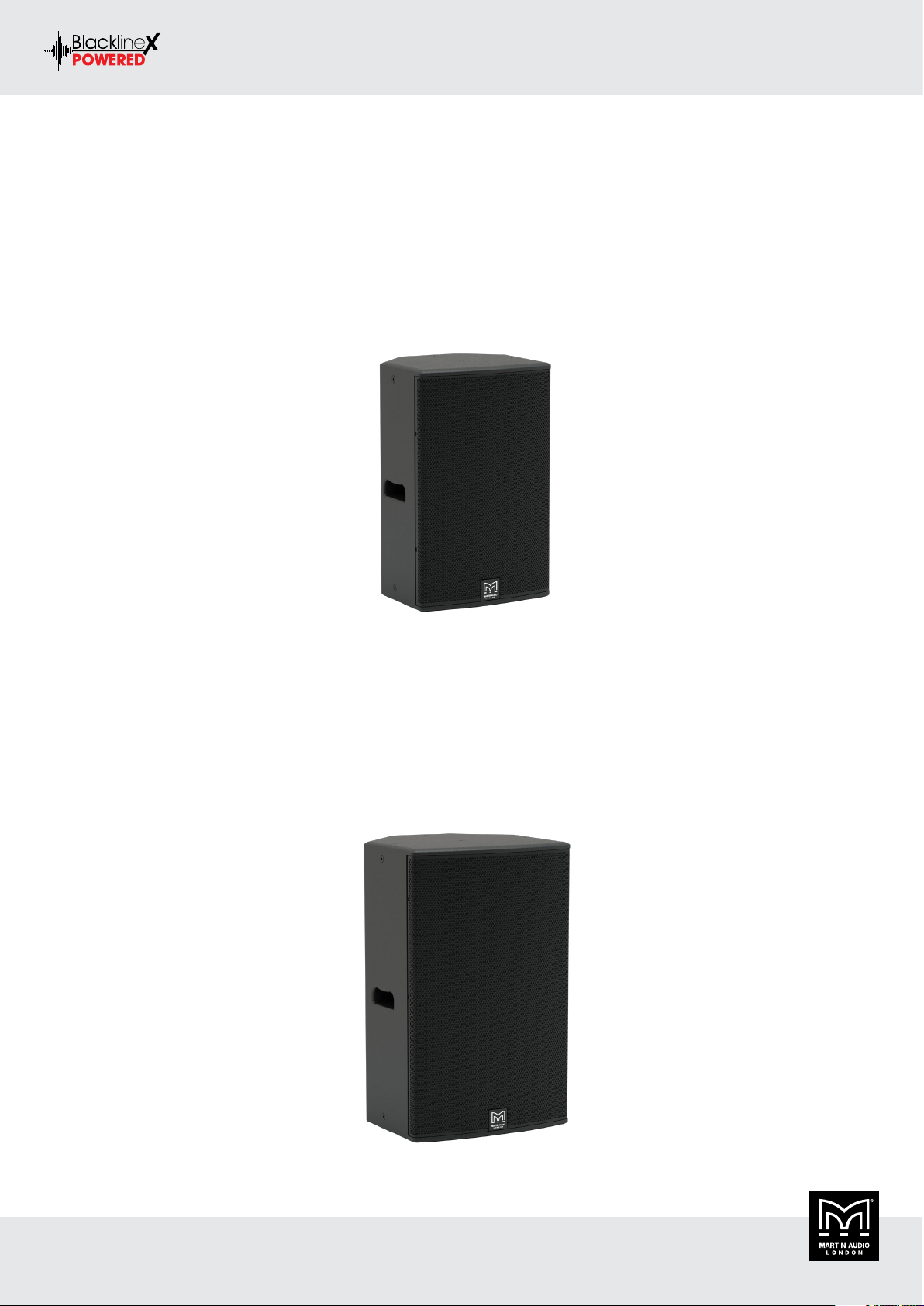
XP12
The XP12 fulfils the requirement for a compact system that can deliver high SPL — either as a stand-alone system or supplemented by
the XP118 subwoofer. Featuring a 12” (300mm) LF driver unit and a 1” (25mm) exit compression driver on a rotatable horn, its 80° x 50°
dispersion pattern is ideal for short to medium throw applications. The LF driver has a 2.5” (65mm) voice coil and a high BL motor, while
the HF compression driver utilises a 1.75” (44mm) polyimide diaphragm for extended high frequency response.
The XP12’s enclosure is constructed from birch/poplar plywood and coated in black textured paint. For easy removal, its steel grille is a
spring-fit into the sides of the enclosure. The XP12 is fitted with M8 inserts for a wall bracket and eyebolt suspension, plus a pole-mount
socket with a removable bung that maintains clean lines when the XP12 is used in install applications
XP15
The XP15 is a high powered two-way system designed for professional portable applications and installations that demand the ultimate in
sonic performance from a single enclosure. With an accurately-defined 80° x 50° coverage pattern, it combines high output capability with
exceptional sonic performance and impact.
The XP15 features a 15” (380mm)/3” (75mm) voice coil LF drive unit, and a 1” (25mm) exit HF compression driver with a 1.75” (44mm)
polyimide diaphragm for extended high frequency response.
Its protective steel grille is a spring-fit into the sides of the enclosure for easy access to rotate the HF horn. The symmetrical, multi-angle
enclosure is manufactured from birch/poplar ply and coated in textured black paint. The XP15 is fitted with M8 inserts for a wall bracket
and eyebolt suspension, plus a pole-mount socket.
BLACKLINEX POWERED USER GUIDE V1.0
Copyright © 2019 Martin Audio Ltd. 8
Page 9

BLACKLINEX POWERED USER GUIDE
XP118
The XP118 is a compact, high performance powered subwoofer for use with BlacklineX Powered Series full-range loudspeakers. It extends
the low frequency operating range of the combined system to 42Hz and provides exceptional low frequency impact. It can be used singly,
stacked or flown via integral M10 insets and features a long-excursion 18” (460mm)/3” (75 mm) voice coil driver in a compact reflex
enclosure. Its four reflex ports have a large frontal area to reduce turbulent air noise at very high levels.
The X118 enclosure is constructed from birch/poplar ply and finished in textured black paint. A perforated steel grille protects the driver,
and the enclosure has a 35mm pole-mount fitting in the top surface and two side handles.
BLACKLINEX POWERED USER GUIDE V1.0
Copyright © 2019 Martin Audio Ltd. 9
Page 10
BLACKLINEX POWERED USER GUIDE
Accessories
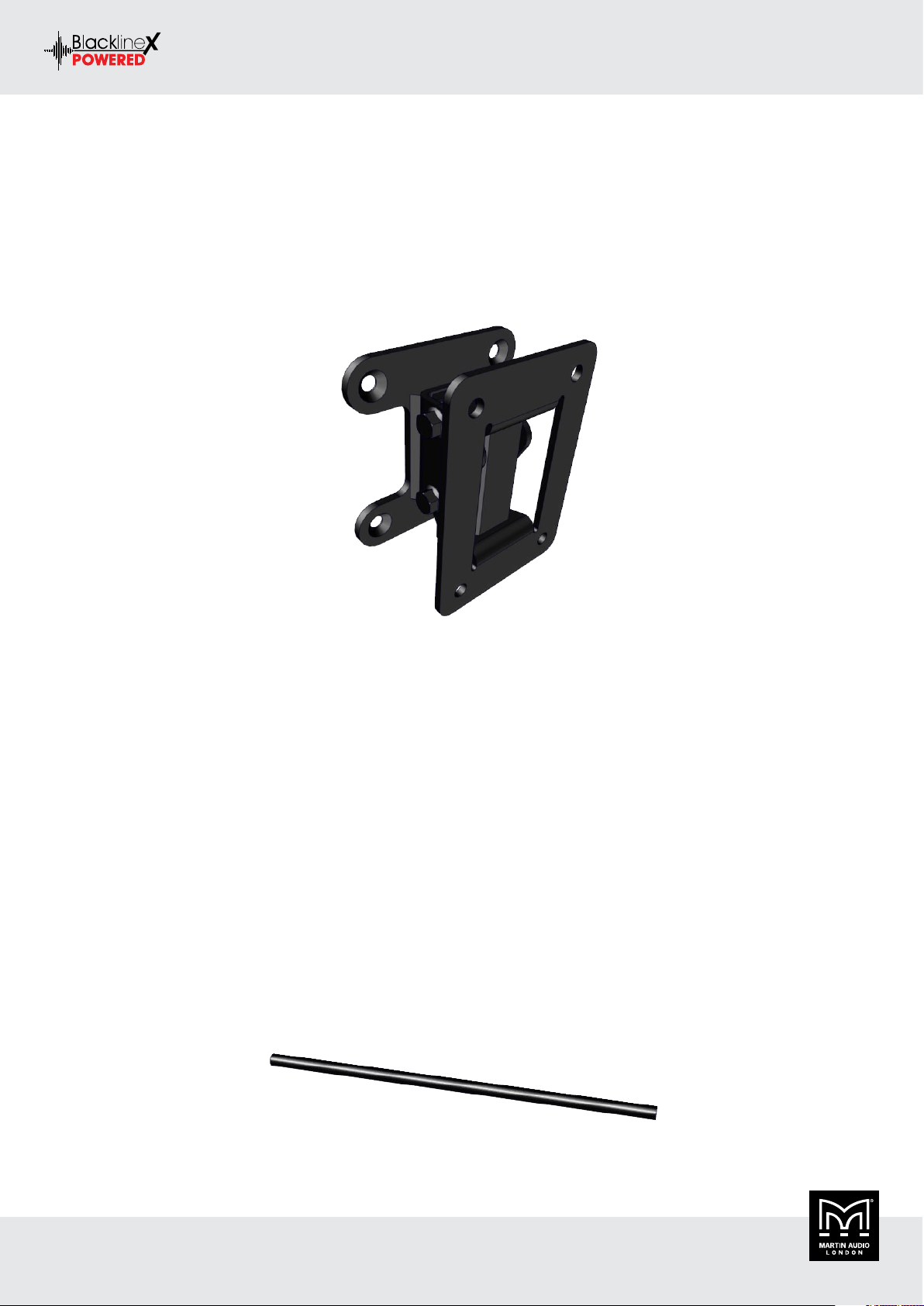
Wall Bracket
The XP12 can be wall mounted using the standard WB10/12B bracket from Martin Audio. This is a two-part bracket enabling the wall
section to be fitted at first fix stage when cables are run. The cabinet half can be fitted to the loudspeaker in advance of arriving at site
so that final installation is just a case of joining the two halves of the bracket and adjusting the position for the coverage required and
connecting the cable. The part number is as follows:
XP12 WB10/12
Eye Bolts
All BlacklineX Powered loudspeakers have threaded inserts available for flown applications in fixed installations. Both full range cabinets
have M8 inserts and the XP118 has M10 inserts. The inserts can be used for fitting bespoke flying hardware or for flying using eye bolts.
These must be forged steel shouldered types certified with a safe working load in excess of the cabinet weight.
Do NOT be tempted to use cheaper formed steel types commonly available from DIY stores as they are unsafe for flying heavy speaker
cabinets.
Correctly rated shouldered eye bolts are available from Martin Audio as an optional accessory. Part numbers are as follows:
M8 (XP12, XP15) HTK00003
M10 (XP118) HTK00004
Pole Mount
BlacklineX Powered loudspeakers have integral pole mount "top hat" fittings. These are fitted to the base of all full range speakers; XP12
and XP15, and on the top of the XP118. The fittings all use the standard 35mm diameter so they can be used with any regular speaker
stand or accessory. The fitting in the subwoofers allows use of a mounting pole to elevate one of the full range cabinets on top of the sub
without the need for a bully and unsightly tripod stands. Martin Audio also make a distance pole specifically for use with the BlacklineX
Powered range. This will support any of the full range cabinets at the optimum height above an XP118. The part number is as follows:
Pole HTKCT04
BLACKLINEX POWERED USER GUIDE V1.0
Copyright © 2019 Martin Audio Ltd. 10
Page 11

BLACKLINEX POWERED USER GUIDE
Safety
Instructions
It is important that loudspeaker systems are used in a safe manner. Please take some time to review the following points concerning safe
use of BlacklineX Powered loudspeaker systems.
Professional loudspeakers are capable of producing extremely high sound levels and should be used with care. Hearing loss is cumulative
and can result from levels above 90dB if people are exposed for a long period. Never stand close to loudspeakers driven at high level.
Pole or Stand Mounting
BlacklineX Powered full-range loudspeakers incorporate pole mounting (“top hat”) sockets so that they may be pole or stand mounted.
When using poles or stands, the following precautions are advised:
• Ensure that the stand will support the weight of the loudspeaker by checking the stand manufacturers rating. (See the Section 10 –
Technical Specifications - for individual BlacklineX Powered weights and dimensions)
• Make sure that the stand is placed on a level surface and that its legs are fully extended.
• Do not place more than one loudspeaker on each stand.
• Run cables so that they do not present a trip hazard which could pull the loudspeaker over.
• When used outdoors in the wind, it may be necessary to add some weight to the base of the stand.
• When using a pole mount with a sub-bass system, observe similar precautions.
Stacking
• Ensure that the floor or stage is level and solid.
• Do not stack loudspeakers too high outdoors where winds could topple the stack.
• Be aware that loudspeakers producing high-power levels can move or creep. To avoid this, place friction material between the floor and
loudspeaker and between each loudspeaker or use strapping to secure the stack.
Rigging and Suspension
WARNING: Suspending the system should only be done by qualified personnel following safe rigging practices. Secure fixings to the
building structure are vital. Seek help from architects, structural engineers or other specialists if in any doubt.
BlacklineX Powered Series enclosures are designed for portable applications but can be suspended singly by means of the threaded inserts
provided. Enclosures are fitted internally with steel corner reinforcement brackets, where necessary, to ensure that each cabinet is strong
enough to be hung from its top.
• Never suspend one enclosure from another to form an array or cluster using these fittings.
• The common practice of using commercially available eye bolts for suspension should only be undertaken with great caution. Only
forged shoulder eye bolts should be considered, and it is important that the thread length is at least 30mm.
• Formed eye bolts i.e. those which are formed from a steel rod bent into an eye are not recommended.
• Eye bolts are strongest along the thread axis. Angling the enclosure will result in an angle pull and it is important to use eye bolts that
are safe in these circumstances.
BLACKLINEX POWERED USER GUIDE V1.0
Copyright © 2019 Martin Audio Ltd. 11
Page 12

BLACKLINEX POWERED USER GUIDE
Connections
Power Connection
This is a standard 3-prong IEC power connector. Connect the detachable power cord (included in the packaging with the loudspeaker) to
the power receptacle and plug the other end of the power cord into an AC outlet.
• Make sure that the AC power is matched to the AC power indicated on the rear panel (below the IEC receptacle)
• Disconnecting the plug’s ground pin is dangerous. DOT NOT disconnect.
XLR and 1/4" Combo Inputs
Both input channels may accept a balanced mic signal using an XLR connector. They are wired as follows, according to standards specified
by the AES (Audio Engineering Society).
XLR Balanced Wiring:
• Pin 1 = Shield (ground)
• Pin 2 = Positive (+ or hot)
• Pin 3 = Negative (– or cold)
In addition to accepting a balanced mic signal using an XLR connector, these input channels may also accept 1/4" line-level signals driven
by balanced or unbalanced sources.
Additionally, both input channels may accept Hi-Z sources (such as guitars) via the 1/4" input without the need for a separate DI box.
To connect balanced lines to these inputs, use a 1/4" Tip-Ring-Sleeve (TRS) plug. “TRS” stands for Tip-Ring-Sleeve, the three connection
points available on a stereo 1/4" or balanced phone jack or plug. TRS jacks and plugs are used for balanced signals and are wired as follows:
1/4" TRS Balanced Mono Wiring:
• Sleeve = Shield
• Tip = Hot (+)
• Ring = Cold (–)
To connect unbalanced lines to these inputs, use a 1/4" mono (TS) phone plug, wired as follows:
1/4" TS Unbalanced Mono Wiring:
• Sleeve = Shield
• Tip = Hot (+)
Mix Out
This is a male XLR-type connector that produces the mix of the three input channels determined by the level and EQ settings entered. Use
it to daisy-chain several BlacklineX Powered loudspeakers together off the same signal source(s).
They are wired as follows, according to standards specified by the AES (Audio Engineering Society):
Balanced XLR Output Connector:
• Pin 1 – Shield (ground)
• Pin 2 – Positive (+ or hot)
• Pin 3 – Negative (– or cold)
BLACKLINEX POWERED USER GUIDE V1.0
Copyright © 2019 Martin Audio Ltd. 12
Page 13

BLACKLINEX POWERED USER GUIDE
Rear Panel Controls
Power Switch
Press the bottom of this rocker switch inwards to turn on the loudspeaker. Press the top of this rocker switch inwards to turn off the
loudspeaker.
As a general guide, the mixer (or other signal source) should be turned on first, subwoofers next and loudspeakers last. As such, the
loudspeakers should also be turned off first, followed by the subwoofers, then the mixer. This will reduce the possibility of any turn-on or
turn-off thumps and other noises generated by any upstream equipment from coming out of the loudspeakers.
LCD Display
This modern, high-resolution, all-colour TFT LCD display is one of the most vital features of the BlacklineX Powered loudspeakers. It
displays loudspeaker information including (but not limited to) levels, EQ, selected voicing, pairing the speakers and a Bluetooth device,
settings, lock / unlock status and other parameters. This is simply for control and monitoring locally at the loudspeaker.
Speaker Control
This push-button rotary encoder allows you to access functions such as channel and master level control and metering, application specific
voicings & EQ, Bluetooth configuration, set-up functions, and product information. See the chapter on system set up.
BLACKLINEX POWERED USER GUIDE V1.0
Copyright © 2019 Martin Audio Ltd. 13
Page 14

BLACKLINEX POWERED USER GUIDE
Loudspeaker Control
The BlacklineX Powered system is set up using the speaker control section comprising the LCD screen and rotary encoder which incorporates
a push-button for selecting properties selected on the screen using the encoder
Power Up
On power up the screen briefly displays the Martin Audio logo while the processor boots up:
It will revert to the mixer screen before returning to whichever screen has been selected as the default, as supplied this will be the mixer
screen.
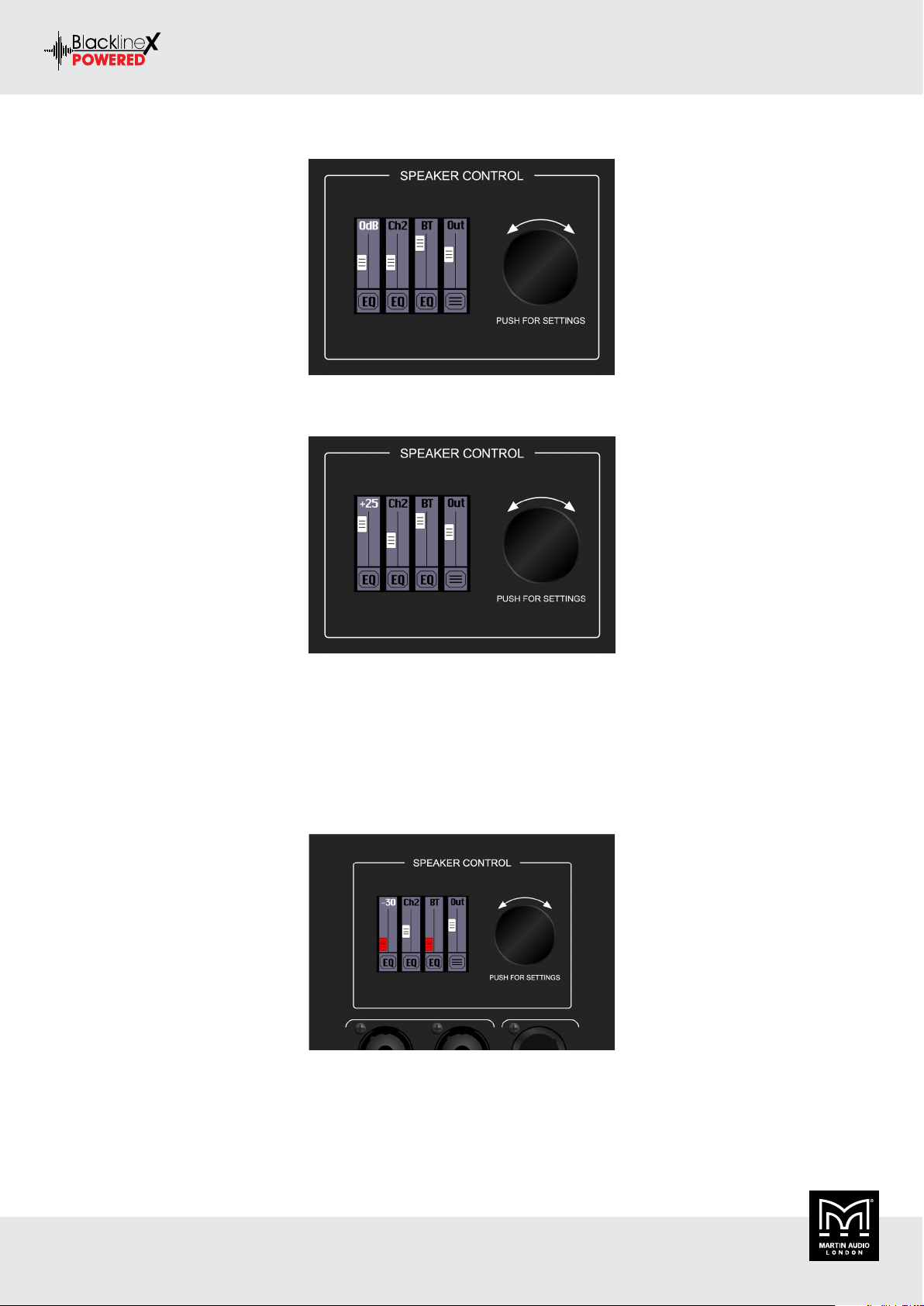
Mixer Screen
Rotating the speaker control encoder will adjust whichever function is highlighted in white. In the mixer window this defaults to the
output level. Push the encoder once to revert to select mode, the highlighted output level will change from the figure in dB to Out, rotate
the encoder to scroll between the selections. There are options for channels 1, 2 and 3 which is the Bluetooth channel, EQ for all three
channels and the menu option bottom right which takes you to the second level. For example, select channel 1 (Ch1).
BLACKLINEX POWERED USER GUIDE V1.0
Copyright © 2019 Martin Audio Ltd. 14
Page 15
BLACKLINEX POWERED USER GUIDE
Press the encoder to enter edit mode, the Ch1 changes to the level in dB:
This can be adjusted to the figure required using the encoder, the fader knob icon will move up and down to give a graphical representation
of the increase or decrease in gain:
The level control ranges are as follows:
• Channels 1 and 2: –30 dB to +40 dB
• Bluetooth: –32 dB to 0 dB
• Main Output: –inf (off) to +10 dB
Note that when a channel is attenuated all the way down to the lowest level, -30 for inputs 1 & 2, -32 for the Bluetooth input 3 and -infinity
for the main output, it will be completely muted and the fader knob will turn red:
BLACKLINEX POWERED USER GUIDE V1.0
Copyright © 2019 Martin Audio Ltd. 15
Page 16
BLACKLINEX POWERED USER GUIDE
EQ
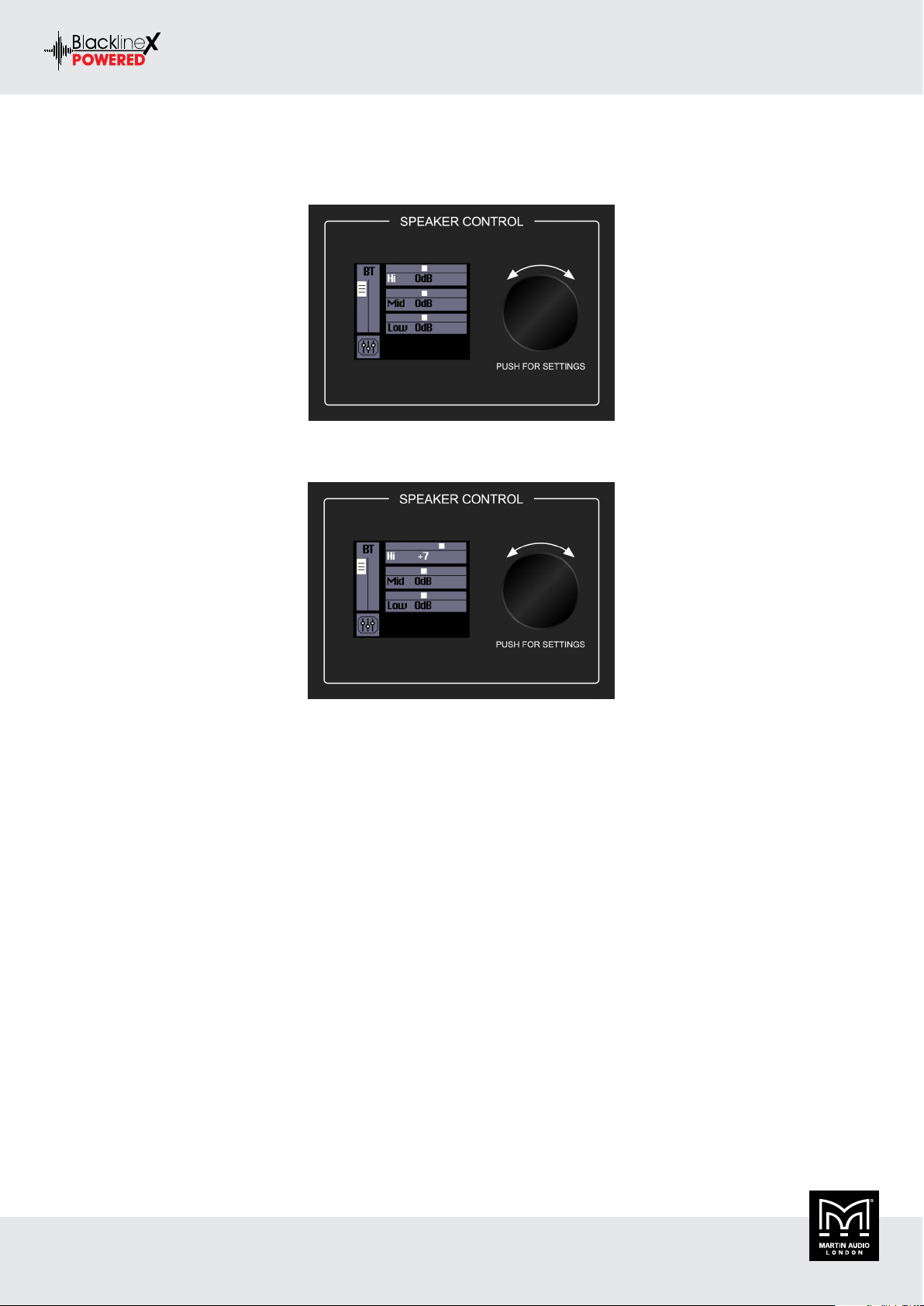
The bottom row has EQ adjustment for input channels 1, 2 and Bluetooth. In order to change a channel’s EQ, rotate the control encoder
and push when the desired channel’s EQ icon is illuminated:
The encoder will now scroll between the High (Hi), mid-range (Mid) and low frequency (Low) and the mixer icon to return to the mixer
layer. If you click on one of the EQ bands the level will be highlighted and the encoder will allow you to adjust the EQ level for that band:
The EQ ranges are as follows:
• High: ±12 dB @ 6 kHz [Channels 1 and 2] @ 12 kHz [Bluetooth]
• Mid: ±12 dB @ 2.5 kHz
• Low: ±12 dB @ 80 Hz
• HPF: 10 Hz – 400 Hz at 12 dB per octave [Channels 1 and 2 only]
Select the mixer icon with the control encoder to return to the previous screen once the EQ settings you need have been entered.
Menu Screen
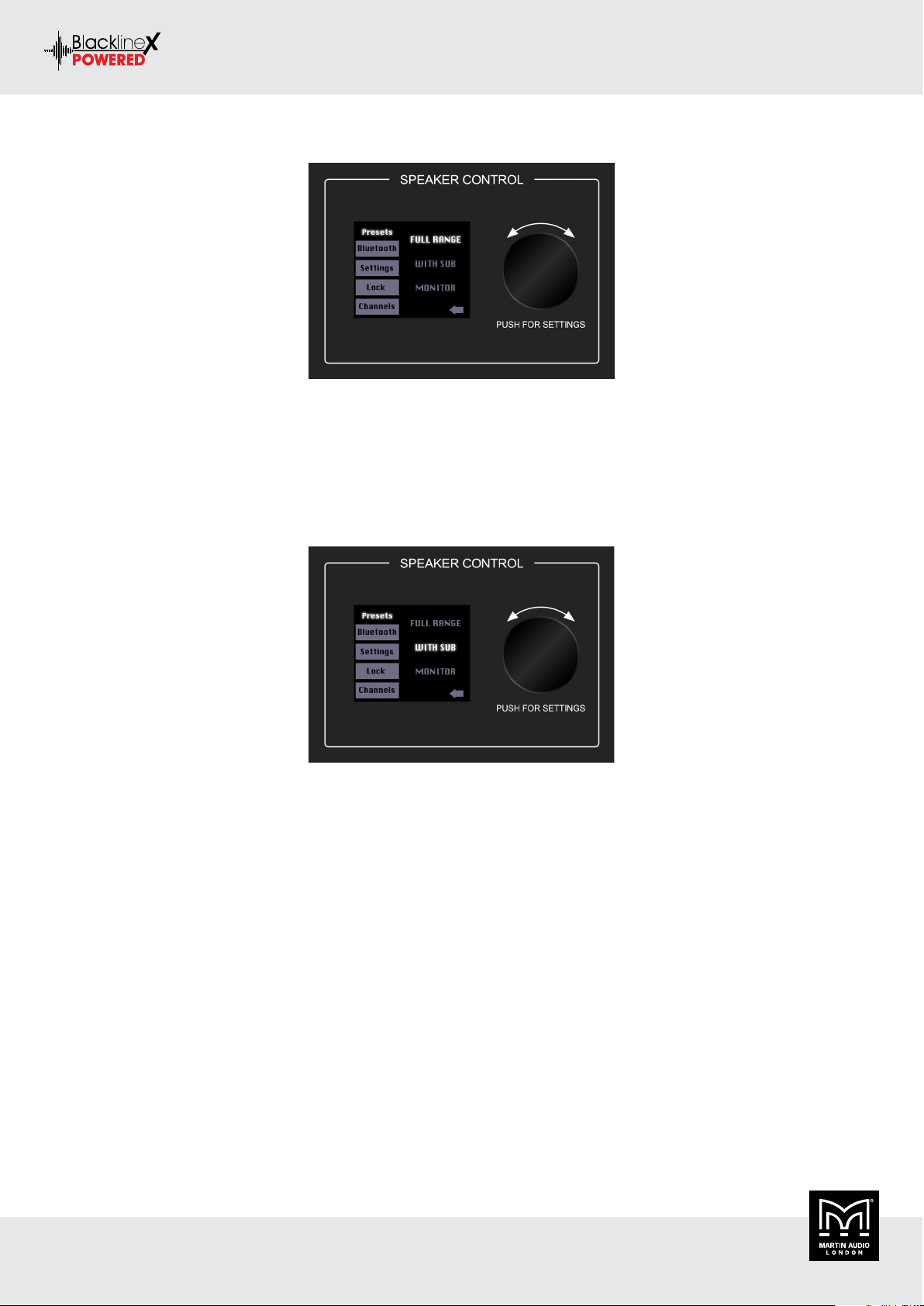
From the mixer screen use the encoder to select the menu icon in the bottom right corner below the output fader. The menu screen displays
five options. Like the mixer screen, rotate the speaker control encoder until the icon of the parameter you want to change is illuminated,
then push the encoder to enter that icon’s screen.
The six icon selectors are as follows:
• Presets
• Bluetooth
• Settings
• Lock
• Channels
BLACKLINEX POWERED USER GUIDE V1.0
Copyright © 2019 Martin Audio Ltd. 16
Page 17
BLACKLINEX POWERED USER GUIDE
Presets
1. FULL RANGE – This mode is optimised for stand-alone configuration without the use of sub reinforcement
2. WITH SUB – This mode introduces a high-pass filter to the loudspeaker to match properly with the XP118 subwoofer.
3. MONITOR – This mode features a low frequency roll-off and optimised equalisation to ensure maximum gain before feedback when
the loudspeaker is used as a floor monitor.
4. As you had done previously, rotate the speaker control encoder until the loudspeaker mode you desire is illuminated, then push to
select it. In this example we have selected 'WITH SUB':
BLACKLINEX POWERED USER GUIDE V1.0
Copyright © 2019 Martin Audio Ltd. 17
Page 18
BLACKLINEX POWERED USER GUIDE
Bluetooth
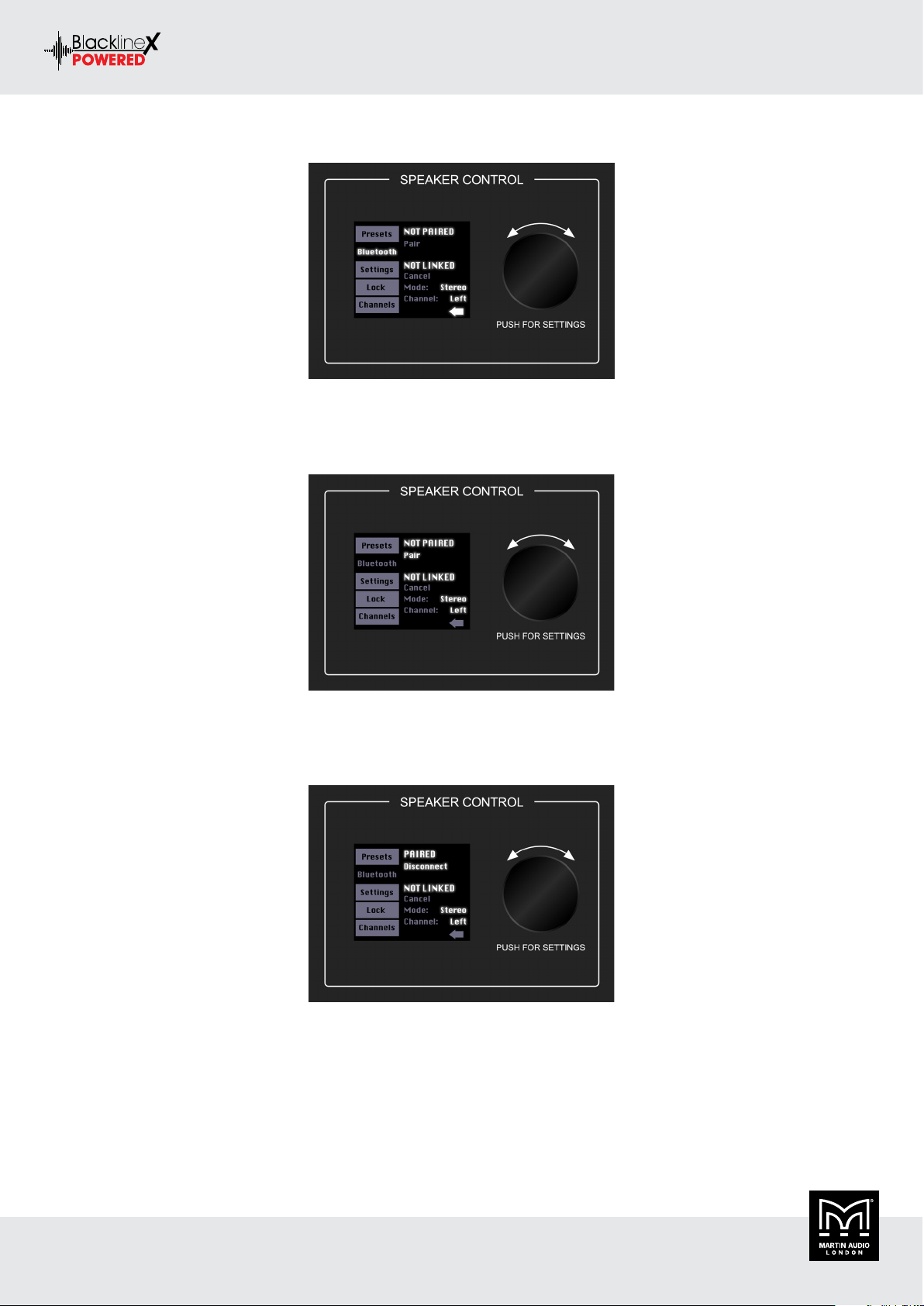
This is where to set up and view Bluetooth connectivity options.
Pair
By default the loudspeaker will not be paired. Use the encoder to select Pair and press.
The NOT PAIRED text will change to DISCOVERABLE and Pair will change to Cancel giving you the option to abandon the pairing. At this
stage you should go to the settings of your Bluetooth device where you should see BLXP12, BLXP15 or BLXP118, depending on which
BlacklineX Powered product you are linking to, in the available devices. Click on the product and you will be paired. There is no code or
password to enter.
The text DISCOVERABLE will change to PAIRED and Cancel will change to Disconnect. You can select disconnect if you need to pair a
second device with the loudspeaker.
The Bluetooth connection may disconnect when affected by electrostatic discharge (ESD) or electrical fast transients (EFT). If this occurs,
manually reconnect the Bluetooth connection.
BLACKLINEX POWERED USER GUIDE V1.0
Copyright © 2019 Martin Audio Ltd. 18
Page 19

BLACKLINEX POWERED USER GUIDE
Linking
The loudspeaker may also be linked to a second loudspeaker. This allows you to stream audio simultaneously to a pair of speakers either in
stereo or “zoned” with a mono signal, useful if for example you need to send a signal to a subwoofer and mid-top combination or to a pair
of loudspeakers in different locations.
The steps to link loudspeakers is quite similar to that of pairing a device as follows:
1. Select Connect and push the speaker control encoder.
2. The text NOT LINKED will change to SEARCHING... and Connect will change to Cancel.
3. From here, turn the other loudspeakers on and follow these same steps to link, or push the speaker control encoder to cancel the
action.
4. The text SEARCHING... will change to PRIMARY on one loudspeaker and SECONDARY on the other. Cancel will also change to
Disconnect. From here select a Bluetooth mode (see below) or push the speaker control encoder to disconnect.
There are two modes available when two loudspeakers are linked; Stereo and Zone. The stereo setting is the default two loudspeaker setup, ideal for applications such as a party, DJ, etc., where a device is paired and streaming music in stereo. The main level controls both
loudspeakers.
If the Bluetooth mode is set to stereo, you may select which loudspeaker is located on the left and which is on the right. Simply rotate the
speaker control encoder so that channel is illuminated, then push the button to enter and edit. Rotate to illuminate your choice – left or
right – then push the button to select.
The zone mode setting is your optional loudspeaker setup, ideal for when the loudspeakers are placed in different locations and allows for
separate main level controls. BlacklineX Powered loudspeakers in zone mode setting will receive a mono-summed signal.
Illuminating and selecting the left-facing arrow returns you to the Settings screen.
BLACKLINEX POWERED USER GUIDE V1.0
Copyright © 2019 Martin Audio Ltd. 19
Page 20

BLACKLINEX POWERED USER GUIDE
Settings
This is where to configure a number of the BlacklineX Powered options. To change a setting, you will just need to rotate the speaker control
encoder until the configuration you desire to change is illuminated, then push to select it. Choices are as follows:
Screensaver
This allows you to select the behavior of the LCD screen when nothing has been adjusted for 30 seconds. There are three options:
• High - The LCD screen remains at full brightness
• Low - The screen dims
• Off - The screen turns off. It will turn back on immediately when the encoder is adjusted or pressed
Home Screen
This allows you to select either the mixer screen or the settings menu as the default to which the LCD window will return following 30
seconds of inactivity. The mixer screen is the default.
Auto Con
Allows a previously paired Bluetooth device to auto reconnect if both the device and speaker are powered on and in range. When illuminated,
push the speaker control encoder to select between on or off.
Auto Link BT
Allows two previously paired loudspeakers to automatically re-link if both are powered on and in range. When illuminated, push the speaker
control encoder to select between on or off.
About
This screen displays details including the device, DSP and Bluetooth firmware versions and the unique device ID.
Restore
Restores all parameters back to their default. This is a permanent reset with no undo, so a confirmation dialog helps prevent accidentally
restoring defaults and losing any custom settings.
Illuminating and selecting the left-facing arrow at the bottom of the screen returns you to the previous screen.
Lock
This is where to lock and unlock the interface with a 4-digit numeric password. Push the speaker control encoder to enter lock mode. From
here, rotate the speaker control encoder until the first number you desire is illuminated and press to select. Follow the same procedure for
the next three numbers. Once four numbers have been selected LOCK will be highlighted.
You can select Del which will delete the last entered number, or LOCK which will lock the DSP. No further changes may be made to any
parameters. Rotating the encoder will have no effect, clicking the encoder switch will take you directly to the lock screen where entering
the correct 4 digits will give you the option to unlock the speaker.
Emergency Unlock
If you set up a 4-digit lock code and forget the passcode, please contact your vendor for support.
BLACKLINEX POWERED USER GUIDE V1.0
Copyright © 2019 Martin Audio Ltd. 20
Page 21

Channels
The final option is Channels. This returns you to the mixer view.
BLACKLINEX POWERED USER GUIDE
BLACKLINEX POWERED USER GUIDE V1.0
Copyright © 2019 Martin Audio Ltd. 21
Page 22

BLACKLINEX POWERED USER GUIDE
Protection
Limiters
BlacklineX Powered loudspeakers employ built-in DSP limiters for drive unit protection.
The individual drive units use DSP limiters optimised so that their effect is not noticeable in normal use but protect against mechanical
and thermal overload. Limiters cannot protect against highly clipped input signals, so if excessive distortion is heard, the level should be
reduced to avoid damage.
Thermal Protection
Although the class D amplifiers in BlacklineX Powered are very efficient, all amplifiers do produce heat. In the unlikely event of the
amplifier overheating, for example if the loudspeakers are installed in a hot location such as in direct sunlight or under hot stage lights, the
amplifier has built in thermal protection to ensure a safe operating temperature is maintained. When the amplifier cools to a safe operating
temperature the switch resets and the amplifier resumes normal operation.
BLACKLINEX POWERED USER GUIDE V1.0
Copyright © 2019 Martin Audio Ltd. 22
Page 23

BLACKLINEX POWERED USER GUIDE
AC Power
Using AC Power
Be sure the loudspeaker is plugged into an outlet that is able to supply the correct voltage specified for your model. It will continue to
operate at lower voltages but will not reach full power. Be sure the electrical service can supply enough current for all the components
connected to it.
We recommend that a robust supply of AC power be used as the amplifiers place high current demands on the AC line. The more power that
is available on the line, the better the system performance will be and the more peak output power will be available for a cleaner, punchier
bass. A suspected problem of “poor bass performance” is often caused by a weak mains supply to the amplifiers.
Never remove the ground pin on the power cable or any other component of the BlacklineX Powered loudspeaker. This is very dangerous.
BLACKLINEX POWERED USER GUIDE V1.0
Copyright © 2019 Martin Audio Ltd. 23
Page 24

BLACKLINEX POWERED USER GUIDE
Care and Maintenance
Care Guidlines
Your BlacklineX Powered loudspeakers will provide many years of reliable service if you follow these guidelines:
• Avoid exposing the loudspeakers to moisture. If they are set up outdoors, be sure they are under cover if rain is expected.
• Avoid exposure to extreme cold (below freezing temperatures). If you must operate the loudspeakers in a cold environment, warm up
the voice coils slowly by sending a low-level signal through them for about 15 minutes prior to high-power operation.
• Use a dry cloth to clean the cabinets. Only do this when the power is turned off. Avoid getting moisture into any of the openings of the
cabinet, particularly where the drivers are located.
BLACKLINEX POWERED USER GUIDE V1.0
Copyright © 2019 Martin Audio Ltd. 24
Page 25

BLACKLINEX POWERED USER GUIDE
Wiring Diagrams
System Congurations
There are several ways that BlacklineX Powered systems can be configured so we will now look at some practical wiring examples for the
most common system configurations. We have shown a limited range of loudspeaker types but the same wiring can be used for other models
which will be listed with an indication of the appropriate BlacklineX Powered preset to select.
System A – Basic set-up
Products that may be used with this wiring:
• XP12
• XP15
This is the simplest system set up, connecting from your source which could be a microphone and an instrument directly to the BlacklineX
Powered using a balanced XLR for the microphone and a standard ¼” jack cable for the instrument. Level and EQ for the two inputs can
be individually adjusted and a good balance between them achieved.
The loudspeaker should have the FULL RANGE preset selected.
BLACKLINEX POWERED USER GUIDE V1.0
Copyright © 2019 Martin Audio Ltd. 25
Page 26

System B – Two cabinet configuration
BLACKLINEX POWERED USER GUIDE
Products that may be used with this wiring:
• XP12
• XP15
This system adds a second cabinet to the simple set-up shown in system A for stereo systems. The two cabinets can be linked with an
additional XLR cable to route the signal from the mixer out of the first cabinet to the second.
In addition, a Bluetooth enabled device such as a smart phone can be linked to the first cabinet via Bluetooth and used to play background
music between sets or backing tracks for the performer.
The loudspeakers should have the FULL RANGE preset selected.
BLACKLINEX POWERED USER GUIDE V1.0
Copyright © 2019 Martin Audio Ltd. 26
Page 27

System C – Stereo feed from an external source
BLACKLINEX POWERED USER GUIDE
Products that may be used with this wiring:
• XP12
• XP15
This system takes a feed from a stereo source such as a mixer where multiple instruments and musicians need to be routed through the
system. Two XLR cables are used from the stereo output of the mixing console, one routed to the left loudspeaker and the second to the
right.
In addition, a Bluetooth capable device such as a smart phone can be paired to one cabinet and the two cabinets linked in stereo mode so
that walk-in music can be routed direct to the loudpeakers. This means that the rest of the system can be set up upon arrival at the venue
and broken down after the artists set whilst retaining background music whenever required.
The loudspeakers should have the FULL RANGE preset selected.
BLACKLINEX POWERED USER GUIDE V1.0
Copyright © 2019 Martin Audio Ltd. 27
Page 28

System D – Stereo system including subwoofers
BLACKLINEX POWERED USER GUIDE
Products that may be used with this wiring:
• XP12 + XP118
• XP15 + XP118
This system takes a feed from a stereo source such as a mixer as in the previous example but adds a pair of XP118 subwoofers. Two XLR
cables are used from the stereo output of the mixing console, one routed to the left XP118 and the second to the right. From the mixer
out on both subwoofers, a short XLR cable links up to the XP12 or XP15 on each side to give a stereo system with a comprehensive SPL
and frequency response capability.
In addition, a Bluetooth capable device such as a smart phone can be paired to one XP118 and the two cabinets linked in stereo mode so
that walk-in or background music can be routed direct to the system.
The XP12 or XP15 should have the WITH SUB preset selected. The XP118 should have the preset selected that matches the full range
model being used.
BLACKLINEX POWERED USER GUIDE V1.0
Copyright © 2019 Martin Audio Ltd. 28
Page 29
BLACKLINEX POWERED USER GUIDE
Grille Removal and Horn Rotation
The BlacklineX Powered full range loudspeakers may be used in landscape or horizontal orientation, most obviously when used as a monitor
wedge but also when flown in fixed installations. For the loudspeaker to perform correctly it is necessary to rotate the horn flare through
90° to preserve the horizontal and vertical dispersion. The loudspeakers are designed to make this as straightforward as possible with
spring-loaded grilles which are easily removed and horns screwed in place with Pozidrive screws. It is also possible to rotate the Martin
Audio badge on the grille.
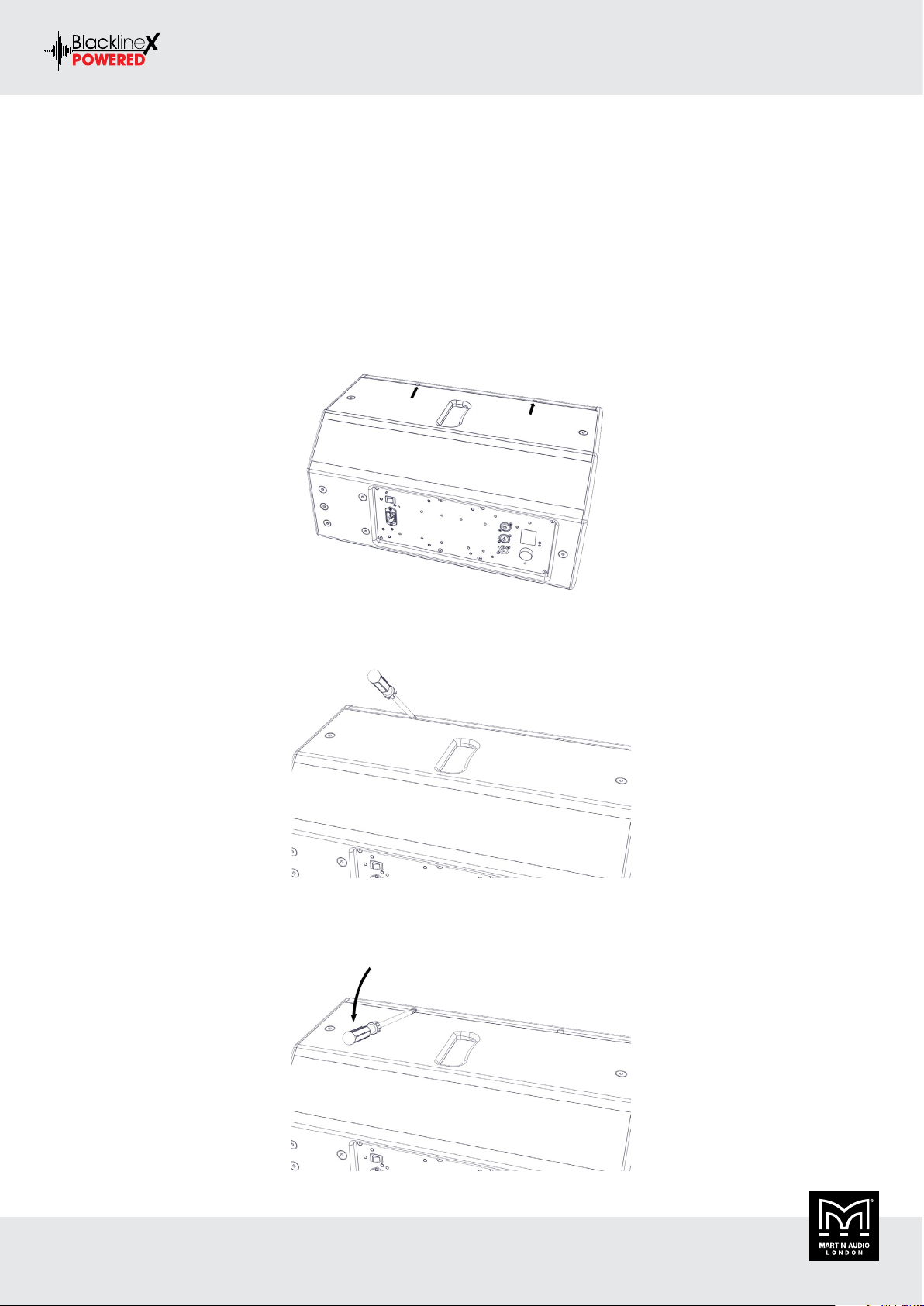
Grille Removal
Grilles on BlacklineX Powered cabinets are designed to be easy to remove to facilitate driver rotation. No screws are used to hold them in
place. They are manufactured with a natural spring which holds them in place in slots in each side of the cabinets. The grilles have two or
three gaps in the sides into which an appropriately sized flat-bladed screwdriver can be inserted to assist in removal.
Insert the screwdriver blade into one of the gaps - either at the top or bottom of the cabinet:
Gently push the handle down. This will ease the grille out of the slot. Tt may have bitten into the paint surface so you just need to make
sure it is free to be lifted clear:
BLACKLINEX POWERED USER GUIDE V1.0
Copyright © 2019 Martin Audio Ltd. 29
Page 30

BLACKLINEX POWERED USER GUIDE
Now lift the handle up. This will ease the grille forward slightly to prevent the return on the grille dropping straight back into the slot:
Repeat this process for the remaining gaps in the grille to ease it out of the slot all the way up one side of the cabinet; when you get to the
final gap the grille should pop out and away from the front of the cabinet.
To replace the grille, first insert one side into the slot on one side of the cabinet. Make sure the return on the grille is completely engaged
in the slot. Push on the front of the grille with the flat of your hand, which will encourage the other edge of the grille to locate on the side
of the cabinet close to the slot. Now push the edge of the grille back starting at the top or the bottom to engage the return in the slot; you
may need to do this a little at a time, working down the length of the grille until it pops into place.
Rotating the HF Horn
The compression driver and horn assembly on all full range models are held into the cabinet using eight Pozidrive No.2 screws. Once the
grille is removed these are easily seen on the flange of the horn. All models are essentially identical with just a larger horn flare on the
bigger cabinets.
When using the loud in horizontal or landscape mode, unscrew all 8 screws placing them somewhere safe:
Lift the horn assembly forward, just enough to allow you to rotate it. Turn it through 90° in either direction, line up the holes in the flange
with those in the cabinet and replace all eight screws:
BLACKLINEX POWERED USER GUIDE V1.0
Copyright © 2019 Martin Audio Ltd. 30
Page 31

BLACKLINEX POWERED USER GUIDE
Be careful not to over-tighten and cross-thread the screws in the cabinet baffle, it is only wood so doesn't need to be too tight:
Badge Rotation
When used in landscape you should rotate the Martin Audio badge on the grille. The badge is spring loaded and very easy to rotate and can
only be turned in fixed 90° increments so you will have no problem making sure that it is straight.
The badge is easier to rotate if the grille is first removed. With the grille removed push the spigot holding the badge in place so the badge
is protruding forward from the grille and is proud of the recess in which it sits. Rotate the badge as required and release the spigot on the
rear so it settles back into the recess in the grille. The grille can then be replaced:
The badge is supplied with a plastic film to protect it from scratches. This should be left in position until the cabinet is fitted in position
in a fixed installation or is ready for use in portable applications when it can be peeled off and discarded.
BLACKLINEX POWERED USER GUIDE V1.0
Copyright © 2019 Martin Audio Ltd. 31
Page 32

BLACKLINEX POWERED USER GUIDE
Wall Mounting
Wall Bracket
XP12 can be wall mounted in portrait mode using wall bracket. The XP12 uses part number WB10/12B.
Installation is a two-part process in common with standard first fix and second fix procedures, installation using both sizes of brackets is
identical, the WB10/12 bracket is just larger than the WB6/8 version.
The first step is to separate the two halves of the bracket. There are two horizontally mounted nut and bolts holding the two halves together.
The upper one which sits in a curved slot does NOT need to be removed. Unscrew the lower bolt and the cabinet bracket will lift off the
wall bracket:
First fix is to secure the wall section of the bracket. This is the part with four mounting holes, a vertical bolt holding the section which
allows horizontal adjustment and the slot into which the cabinet bracket bolt sits. Use appropriate wall fixings suitable for the composition
of the wall. These must be of sufficient strength to support the weight of the loudspeaker:
BLACKLINEX POWERED USER GUIDE V1.0
Copyright © 2019 Martin Audio Ltd. 32
Page 33

BLACKLINEX POWERED USER GUIDE
Next step is to attach the cabinet section of the bracket to the loudspeaker. This is the bracket with four countersunk fixing holes on a
square pattern with the horizontal bolt in the curved slot.
The rear of the cabinet has six countersunk bolts fitted designed for use with the mounting brackets. For portrait mode remove the lower
4 bolts, for landscape mode remove the middle four:
Position the bracket over the mounting holes and screw into place tightly using the bolts removed from the cabinet:
You are now ready to fit the loudspeaker to the wall. Offer the loudspeaker up to the bracket so you can hook horizontal bolt in the curved
slot onto the notch on the ball bracket. Make sure that you follow appropriate safety measures if you are working at height such as using a
scaffold tower or lifting platform which allows you to safely use both hands for this:
BLACKLINEX POWERED USER GUIDE V1.0
Copyright © 2019 Martin Audio Ltd. 33
Page 34

BLACKLINEX POWERED USER GUIDE
Once the bracket is hooked together and taking the weight of the cabinet you can replace the lower bolt:
Final adjustments can now be made. Horizontal (pan) adjustment is available by rotating assembly on the vertical bolt. When you’re happy
with the angle, the vertical securing bolt can be tightened with an M5 hex key (CDDWB8/6) or an M6 hex key (CDDWB10/12) to lock the
position:
Vertical (tilt) adjustment is made by adjusting the grub screw:
Once the vertical position is fixed the two horizontal bolts can be tightened. This is best achieved by using a socket set with an extender
bar to reach the bolt heads.
BLACKLINEX POWERED USER GUIDE V1.0
Copyright © 2019 Martin Audio Ltd. 34
Page 35

BLACKLINEX POWERED USER GUIDE
Eye Bolt Mounting
Eye Bolts
All BlacklineX Powered systems have threaded inserts rated for flown installations. The XP12 and XP15 full range loudspeakers have M8
threaded inserts and the XP118 subwoofer has M10 inserts. Most commonly these are used in conjunction with shouldered eye bolts for
suspending the cabinets using appropriately rated chain or steel wire. Martin Audio's HTK00003 (M8) and HTK00004 (M10) are rated
for use in flown applications. Note that if you plan to use alternative eye bolts these must be shouldered cast steel NOT formed steel types
commonly available from DIY stores. They must have a safe working load rating compatible with the weight of the cabinets.
BlacklineX Powered loudspeakers can be flown in portrait or landscape format. Please note that the horn must be rotated when the cabinet
is used in landscape mode. Please see the chapter on grille removal and horn rotation.
We recommend using a minimum of four eye bolts with which to suspend the cabinet irrespective of which orientation is used. In most
applications two eye bolts are used as the primary support left and right. A third attaches to the rear of the cabinet and is used to adjust
the down-tilt of the cabinet as required. The fourth eye bolt is used to attach a secondary safety line which should be attached to a secure
mounting point which is independent of the primary flying point, round a girder or similar.
BLACKLINEX POWERED USER GUIDE V1.0
Copyright © 2019 Martin Audio Ltd. 35
Page 36
Specications
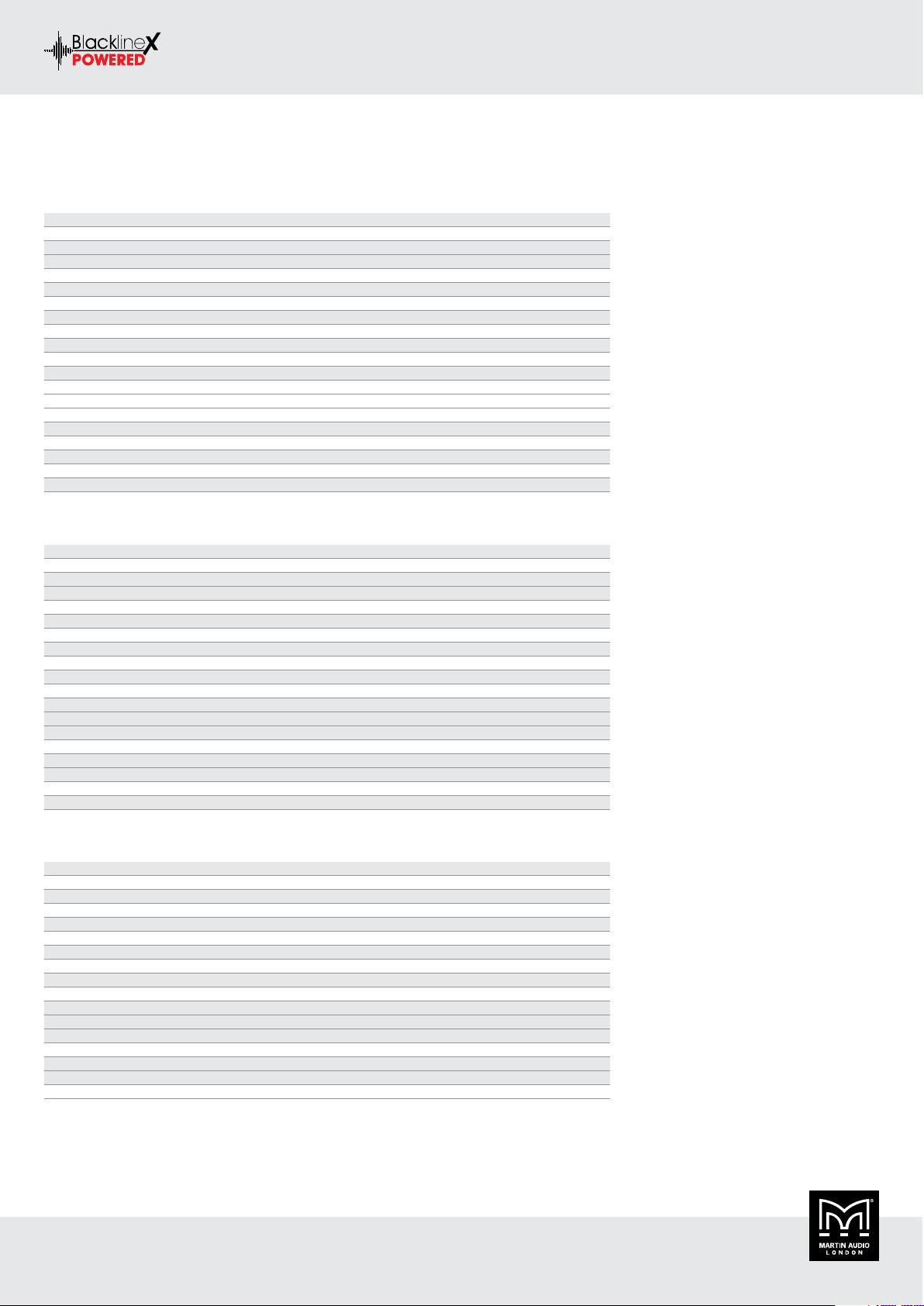
XP12
TYPE Compact, active two-way system
FREQUENCY RESPONSE 62Hz-20kHz ± 3dB, -10dB @ 50Hz
DRIVERS LF: 12” (300mm)/2.5” (63.5mm) voice coil, ferrite motor system
HF: 1” (25mm) exit/1.7” (44mm) voice coil, polyimide dome compression driver
RATED POWER 300W AES, 1200W peak
MAXIMUM SPL 122dB continuous, 128dB peak
DISPERSION (-6dB) 80° H x 50° V (user-rotatable)
CROSSOVER 2.3kHz passive
ENCLOSURE Multi-angle birch/poplar ply
FINISH Black textured paint
PROTECTIVE GRILLE Black perforated steel with scrim cloth backing
FITTINGS Top hat for pole mounting
CONNECTORS 2 x XLRF / 2.5” Jack Combo Input
1 x XLRM Output
IEC Mains
FITTINGS 20 x M8 inserts, pole-mount socket, 1 x bar handle
DIMENSIONS (W) 358mm x (H) 574mm x (D) 337mm
(W) 14.1ins x (H) 22.6ins x (D) 13.7ins
WEIGHT 17kg (37.5lbs)
ACCESSORIES Wall bracket, eyebolts
BLACKLINEX POWERED USER GUIDE
XP15
TYPE High-power, powered two-way system
FREQUENCY RESPONSE 55Hz-20kHz ± 3dB, -10dB @ 45Hz
DRIVERS LF: 15” (380mm)/3” (75mm) voice coil, ferrite motor system
HF: 1” (25mm) exit/1.7” (44mm) voice coil, polyimide dome compression driver
RATED POWER 400W AES, 1600W peak
MAXIMUM SPL 125dB continuous, 131dB peak
DISPERSION (-6dB) 90° H x 50° V (user-rotatable)
CROSSOVER 2.2kHz passive
ENCLOSURE Multi-angle birch/poplar ply
FINISH Black textured paint
PROTECTIVE GRILLE Black perforated steel with scrim cloth backing
CONNECTORS 2 x XLRF / 2.5” Jack Combo Input
1 x XLRM Output
IEC Mains
FITTINGS 19 x M8 inserts, pole-mount socket, 2 x bar handle
DIMENSIONS (W) 427mm x (H) 690mm x (D) 419mm
(W) 16.8ins x (H) 27.2ins x (D) 16.5ins
WEIGHT 24kg (52.9lbs)
ACCESSORIES Eyebolts
XP118
TYPE Compact, direct radiating powered subwoofer
FREQUENCY RESPONSE 42Hz-150Hz ± 3dB, -10dB @ 38Hz
DRIVER 18” (460mm)/3” (75mm) voice coil, long excursion, ferrite magnet
RATED POWER 500W AES, 2000W peak
MAXIMUM SPL 131dB continuous, 137dB peak (half space)
DISPERSION (-6dB) Omnidirectional
CROSSOVER 80-120Hz active
ENCLOSURE Birch/poplar ply
FINISH Black textured paint
PROTECTIVE GRILLE Black perforated steel
CONNECTORS 2 x XLRF / 2.5” Jack Combo Input
1 x XLRM Output
IEC Mains
FITTINGS 16 x M10 inserts, pole-mount socket, 2 x bar handles, provision for castors
DIMENSIONS (W) 530mm x (H) 669mm x (D) 640mm
(W) 20.9ins x (H) 26.3ins x (D) 25.2ins
WEIGHT 33kg (72.7lbs)
BLACKLINEX POWERED USER GUIDE V1.0
Copyright © 2019 Martin Audio Ltd. 36
Page 37

Technical Drawings
XP12
BLACKLINEX POWERED USER GUIDE
BLACKLINEX POWERED USER GUIDE V1.0
Copyright © 2019 Martin Audio Ltd. 37
Page 38

XP15
BLACKLINEX POWERED USER GUIDE
BLACKLINEX POWERED USER GUIDE V1.0
Copyright © 2019 Martin Audio Ltd. 38
Page 39
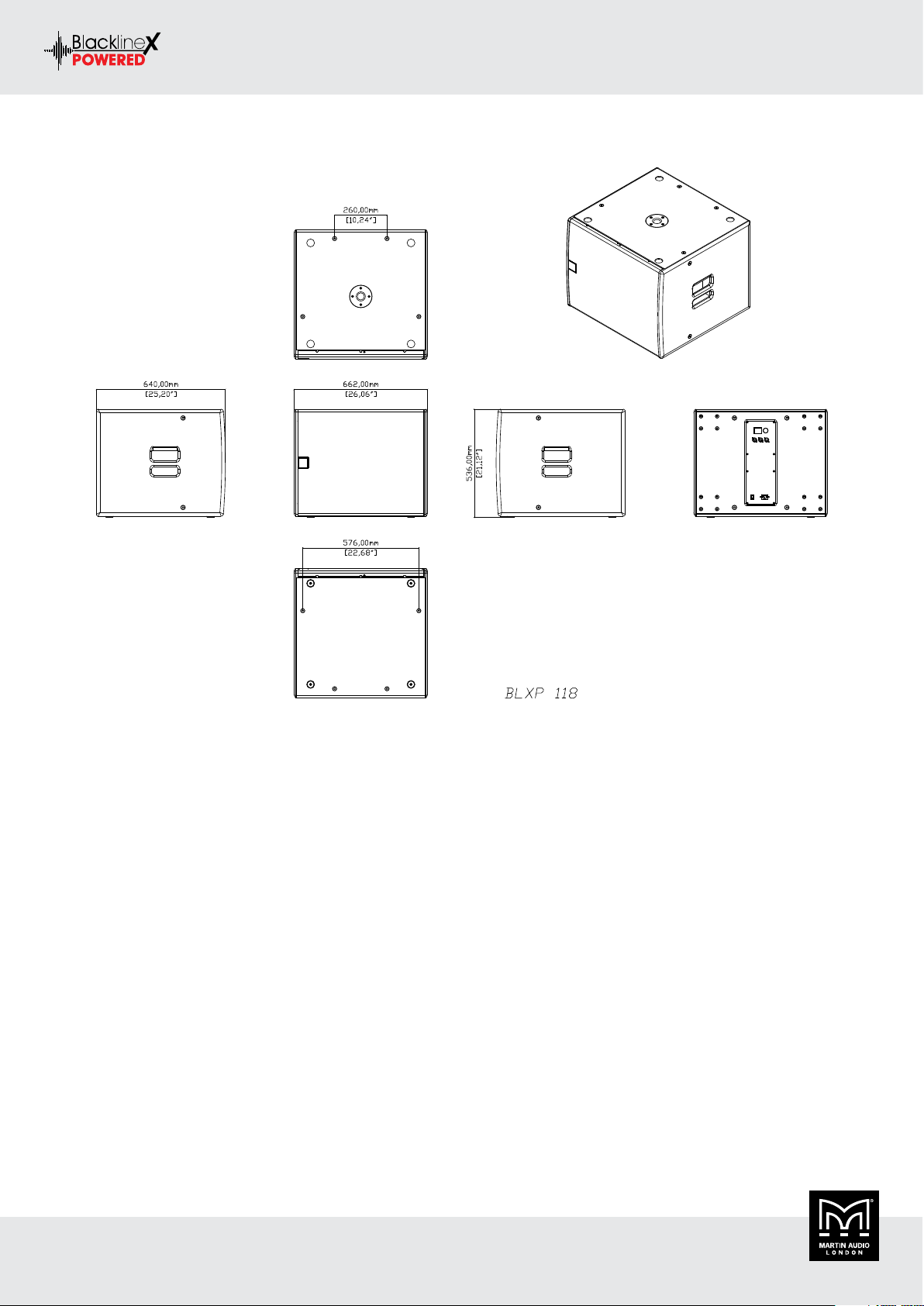
XP118
BLACKLINEX POWERED USER GUIDE
BLACKLINEX POWERED USER GUIDE V1.0
Copyright © 2019 Martin Audio Ltd. 39
Page 40

BLACKLINEX POWERED USER GUIDE
Warranty
Warranty Statement
Martin Audio BlacklineX Powered loudspeaker systems are warranted against manufacturing defects in materials or craftsmanship over a
period of 5 years from the date of original purchase.
Martin Audio BlacklineX Powered amplifier modules are warranted against manufacturing defects in materials or craftsmanship over a
period of 1 year from the date of original purchase.
During the warranty period Martin Audio will, at its discretion, either repair or replace products which prove to be defective provided that
the product is returned in its original packaging, shipping prepaid, to an authorised Martin Audio service agent or distributor.
Martin Audio cannot be held responsible for defects caused by unauthorised modifications, improper use, negligence, exposure to inclement
weather conditions, act of God or accident, or any use of this product that is not in accordance with the instructions provided by Martin
Audio.
Martin Audio is not liable for consequential damages.
This warranty is exclusive and no other warranty is expressed or implied. This warranty does not affect your statutory rights.
BLACKLINEX POWERED USER GUIDE V1.0
Copyright © 2019 Martin Audio Ltd. 40
Page 41

Martin Audio Limited
Century Point
Halifax Road
Cressex Business Park
High Wycombe
Buckinghamshire
HP12 3SL
England
FOR SALES ENQUIRIES:
UK
Telephone: +44 (0)1494 535312
E-mail: info@martin-audio.com
NORTH AMERICA
Telephone: 818 649 7776
www.martin-audio.com
All information is Copyright © 2019 Martin Audio Ltd.
Martin Audio, the Martin Audio logo and Hybrid are registered trademarks of Martin Audio Ltd. in the United Kingdom, United States
and other countries; all other Martin Audio trademarks are the property of Martin Audio Ltd.
 Loading...