

Page 1
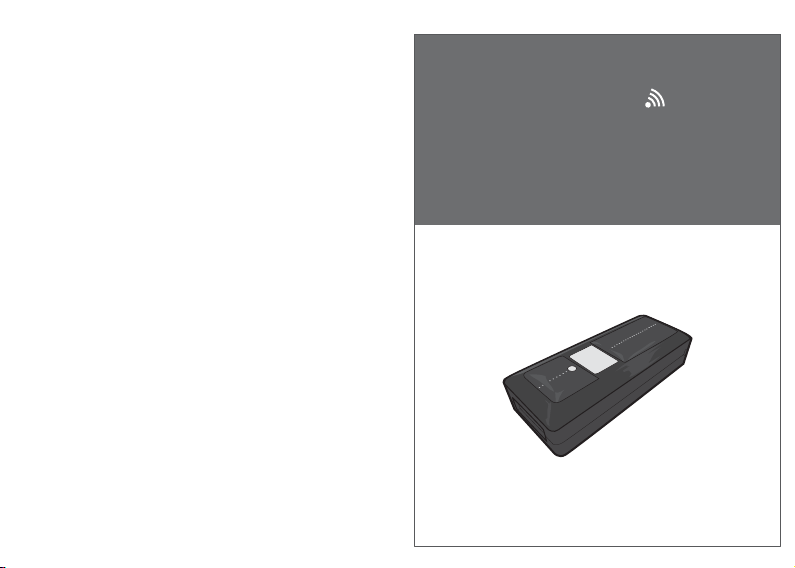
Full user’s manual is available on
the enclosed CD.
Mini Wireless Barcode Reader Quick Guide
P/N: 8002-0028*00
Mini Wireless
Barcode Reader
Quick Guide
Page 2
FCC WARNING STATEMENT
FCC / CAUTION: Any changes or modifications not expressly approved by the party
responsible for compliance could void the user's authority to operate this equipment.
This equipment has been tested and found to comply with the limits for a Class B digital
device, pursuant to Part 15 of the FCC Rules. These limits are designed to provide
reasonable protection against harmful interference in a residential installation.
This equipment generates, uses and can radiate radio frequency energy and, if not
installed and used in accordance with the instructions, may cause harmful interference
to radio communications. However, there is no guarantee that interference will not
occur in a particular installation. If this equipment does cause harmful interference to
radio or television reception, which can be determined by turning the equipment off
and on, the user is encouraged to try to correct the interference by one of the following
measures:
• Reorient or relocate the receiving antenna.
• Increase the separation between the equipment and receiver.
• Connect the equipment into an outlet on a circuit different from that to which the
receiver is connected.
• Consult the dealer or an experienced radio/TV technician for help.
CANADIAN DOC STATEMENT
This digital apparatus does not exceed the Class B limits for radio noise for digital
apparatus set out in the Radio Interference Regulations of the Canadian Department of
Communications.
Le présent appareil numérique n’émet pas de bruits radioélectriques dépassant les
limites applicables aux appareils numériques de las classe B prescrites dans le
Réglement sur le brouillage radioélectrique édicté par les ministère des Communications du Canada.
CE MARKING AND EUROPEAN UNION COMPLIANCE
Testing for compliance to CE requirements was performed by an independent
laboratory. The unit under test was found compliant with all the applicable Directives,
2004/108/EC and 2006/95/EC.
WASTE ELECTRICAL AND ELECTRONIC EQUIPMENT
The WEEE directive places an obligation on all EU-based manufacturers and
importers to take-back electronic products at the end of their useful life.
ROHS STATEMENT OF COMPLIANCE
This product is compliant to Directive 2002/95/EC.
NON-MODIFICATION STATEMENT
Changes or modifications not expressly approved by the party responsible for
compliance
- 1 -
RoHS
WARNING AND CAUTION
1. Take any metals into contact with the terminals in connectors.
2. Use the scanner where any inflammable gases.
If following condition occur, immediately power off the host computer,
disconnect the interface cable, and contact your nearest dealer.
1. Smoke, abnormal odors or noises come from the scanner.
2. Drop the scanner so as to affect the operation or damage its housing.
Do not do behavior below.
1. Put the scanner in places excessively high temperatures such as expose
under direct sunlight.
2. Use the scanner in extremely humid area or drastic temperature
changes.
3. Place the scanner in oily smoke or steam environment such as cooking
range.
4. Be covered or wrapped up the scanner in bad-ventilated area such as
under cloth or blanket.
5. Insert or drop foreign materials or water into scanning window or vents.
6. Using the scanner while hand is wet or damp.
7. Use the scanner with anti-slip gloves containing plasticizer and
Do Not
chemicals or organic solvents such as benzene, thinner, insecticide etc
to clean the housing. Otherwise, it could not result fire and electrical
shock but housing may be broken and injured.
8. Scratch or modify the scanner and bend, twist, pull or heat its interface
cable.
9. Put heavy objects on interface cable.
Do not stare the light source from the scanning window or do not point the
scanning window at other people’s eyes or eyesight may be damaged
by direct exposure under the light.
Do not put the scanner on an unstable or inclined plane.
The scanner may drop, creating injuries.
Once the interface cable is damaged such as exposed or broken copper
wires, stop using immediately and contact your dealer. Otherwise, it could
result fire or electrical shock.
- 2 -
Page 3
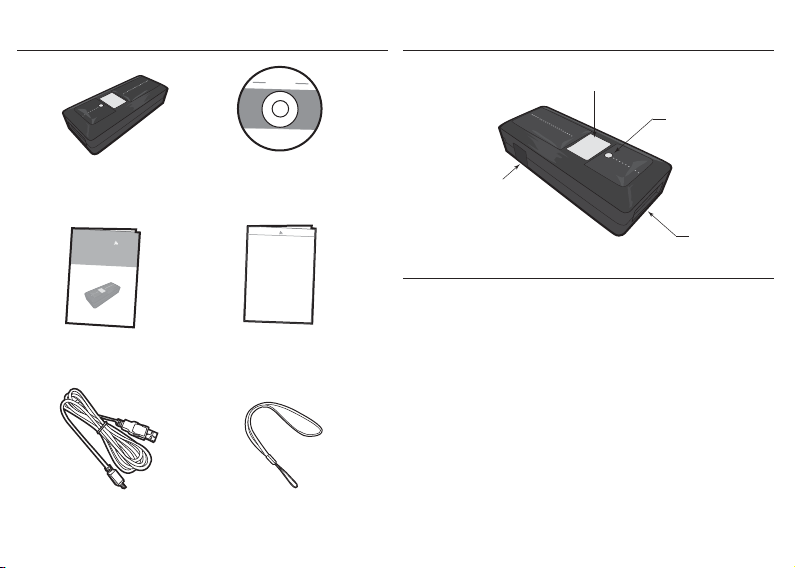
OUT OF THE BOX
INTRODUCTION
Scanner Tools
Mini Wireless
CD
Barcode Reader
Mini Wireless
Barcode Reader
Quick Guide
NUMERIC BARCODES
*1*
*2*
*3*
*4*
*5*
1
2
3
4
5
Quick Guide Quick Connection Card
USB Charger Cable Hand Strap
- 3 -
Trigger
LED Indicator
Mini USB port
(w/ Protective Cover)
Exit Window
SPECIFICATIONS
Light source 625nm visible red LED
Scan rate 240 scans/sec
Sensor Linear CMOS sensor
Resolution 5mil/ 0.127mm
PCS 30%
Housing Plastic(ABS)
Profile SPP, HID
Working Hours 8 hours (1 scan/ 5 sec)
Charge Time 4 hours (fully charged)
Coverage 10M/33ft. (line of sight)
Operating Temp 0 to 50˚C (32˚F to 122˚F)
Symbologies All major 1D barcodes incl. GS1 Databar
- 4 -
Page 4
GETTING STARTED
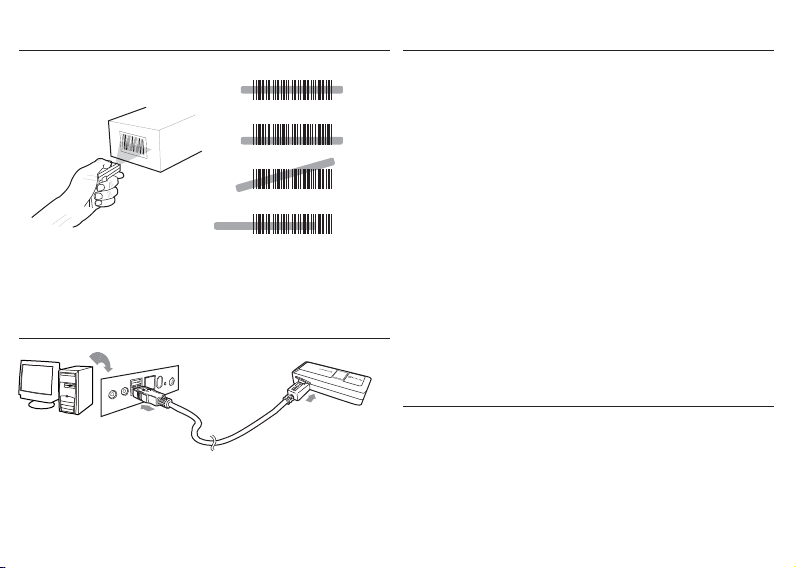
To scan a barcode, make sure the aiming beam crosses
every bar and space of the barcode.
CHARGING THE BATTERY
Host
USB A
1. Flip open the mini USB port on the scanner.
2. Insert the mini USB connector into the port on the
scanner and USB A connector into a USB port on
the host PC.
- 5 -
Scanner
Mini USB
BEEPER INDICATION
Single long beep Power up
Single beep Good read
Single short beep The scanner reads a Code39 of
ASCII in configuration procedure
Two beeps Wireless connection
Two short beeps The scanner successfully reads
a configuration barcode
Five beeps Low power
Three beeps Wireless disconnection
Three short beeps i. The scanner reads a barcodes
while disconnected.
ii. The scanner reads an unexpected
barcode during configuration
procedure. (scan [RESET] to abort
and start over)
10 or 11 short beeps The scanner switches from one
communication mode to another
LED INDICATION
Off
Flashing Green
Green for 2 sec
Flashing Red
Solid Red
Standby or Power off
Disconnected or Discoverable
Good Read
Low power
Charging
- 6 -
Page 5
GETTING CONNECTED PINCODE SETUP
There are two modes of wireless communication:
. E042$
STEP 1
. E032$
*.E042$*
1. Press the trigger for 1 second to activate the scanner.
2. Scan [DISCONNECT]
3. Scan [BT mode - SPP]; the scanner will emit 10 beeps.
4. Select “Wireless Scanner” from discovered device list.
The default pincode is “1234”.
5. Open serial communication software with com port
(see Device Manager) properly set up.
6. The scanner will beep twice to verify the connection.
. E043$
*.E043$*
1. Press the trigger for 1 second to activate the scanner.
2. Scan [DISCONNECT]
3. Scan [BT mode - HID]; the scanner will emit 11 beeps.
4. Select “Wireless Scanner” from discovered device list.
5. The Bluetooth application may prompt you to scan
a pincode(see PINCODE SETUP section) it generated.
6. The scanner will beep twice to verify the connection.
. E031$
*.E031$*
- 7 -- 8 -
BT mode - SPP Pincode Start
BT mode - HID
Disconnect
*.E032$*
STEP 2
Scan numeric barcodes (see NUMERIC BARCODES section
on the next pages)
by the Bluetooth application.
STEP 3
based on the pincode generated
$TX
Enter
*$TX*
STEP 4
Pincode Stop
. E033$
*.E033$*
Page 6

NUMERIC BARCODES
*1*
*2*
*3*
*4*
*5*
- 9 -- 10 -
1
6
*6*
2
7
*7*
3
8
*8*
4
9
*9*
5
0
*0*
Page 7
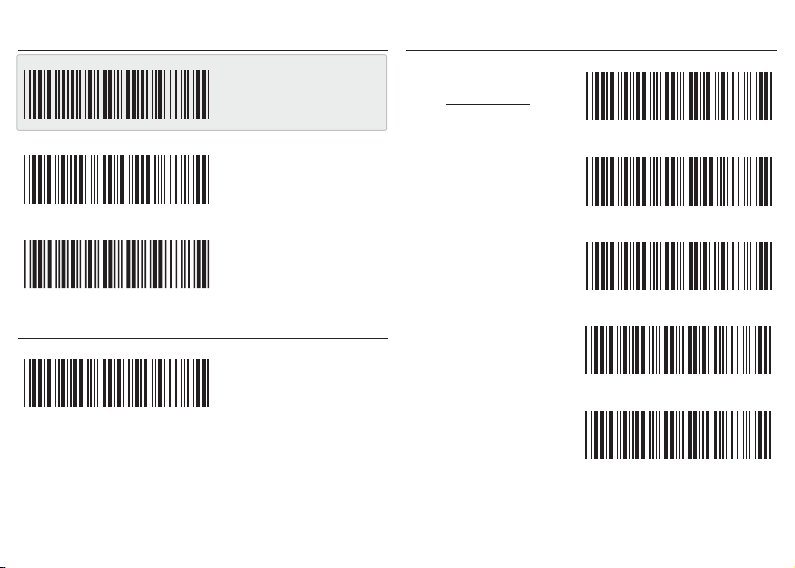
GENERAL SETTINGS
. A001$
READING MODE
. F002$
. P023$
. A007$
BEEPER
. F012$
- 11 -
DEFAULT
RESET
CHECK
VERSION
BEEP OFF
TRIGGER
. F003$
TOGGLE
. F001$
FLASH
. F005$
CONTINUOUS
. F006$
CONTINUOUS
AUTO OFF
- 12 -
Page 8
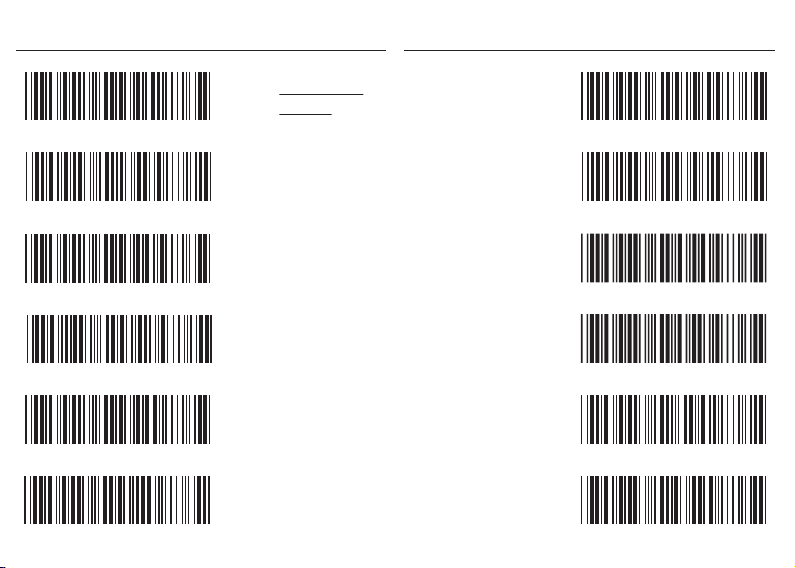
KEYBOARD LAYOUT
. C010$
ENGLISH
(USA)
. C014$
ITALIAN
. C018$
. C012$
. C011$
. C016$
. C013$
- 13 -
ENGLISH
(UK)
FRENCH
GERMAN
SWISS
SPANISH
. C017$
CZECH
(QWERTY)
. C022$
CZECH
(QWERTZ)
. C021$
HUNGARIAN
. C009$
JAPAN
(106 key)
. C015$
ALT CODE
- 14 -
Page 9
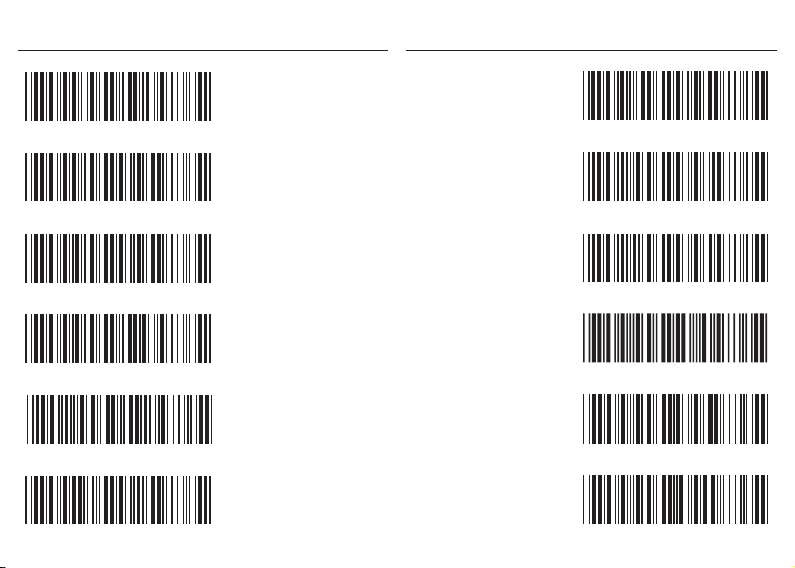
ENABLE SYMBOLOGIES
. A002$
. K010$
ENABLE
ALL CODE
. G010$
CODE 93
. N017$
. L010$
. L001$
. N001$
. M010$
- 15 -
CODE 32
UK PLESSEY
MSI
INDUSTRIAL
2 OF 5
MATRIX
2 OF 5
IATA
. L014$
TELEPEN
. N032$
GS1 DATABAR
. N010$
GS1 DATABAR
LIMITED
. N026$
GS1 DATABAR
EXPANDED
- 16 -
Page 10
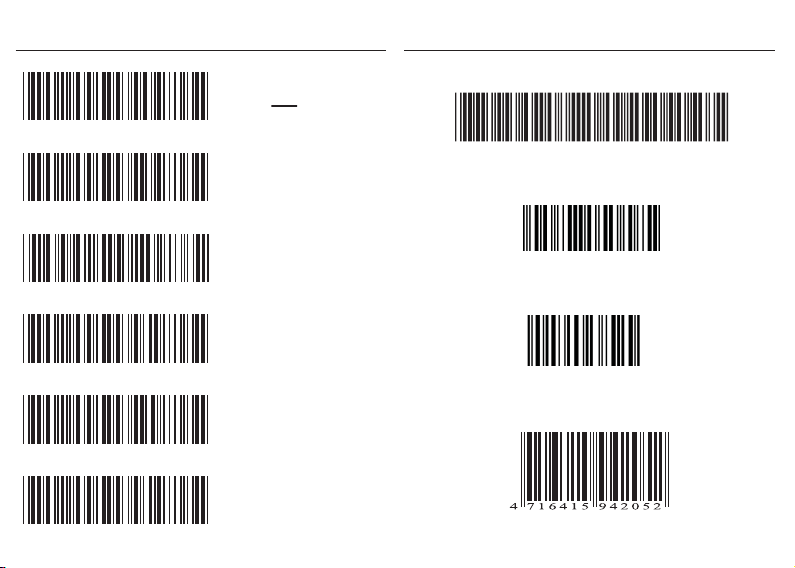
TERMINATOR
. D012$
TEST BARCODES
Code 39
CR
. D011$
. D013$
. D010$
. D015$
. D014$
- 17 -
LF
CR + LF
NONE
SPACE
TAB
CODE-39 TEST
Interleaved 2 of 5
9876543210
Code 128
12345678
EAN
- 18 -
 Loading...