

Page 1
0
™
Connect420
ONNECT42
HDMI SWITCHER
USER MANUAL 3
GEBRAUCHSANLEITUNG 9
GUIDE UTILISATEUR 15
MODO DE EMPLEO 21
MANUALE D’ISTRUZIONI 27
GEBRUIKSAANWIJZING 33
20369/20101005 • CONNECT420™
ALL RIGHTS RESERVED MARMITEK ©
Page 2

2 © MARMITEK
Page 3

SAFETY WARNINGS
• To prevent short circuits, this product should only be used inside and only in dry
spaces. Do not expose the components to rain or moisture. Do not use the product
close to a bath, swimming pool etc.
• Do not expose the components of your systems to extremely high temperatures or
bright light sources.
• In case of improper usage or if you have altered and repaired the product yourself,
all guarantees expire. Marmitek does not accept responsibility in the case of improper usage of the product or when the product is used for purposes other than specified. Marmitek does not accept responsibility for additional damage other than
covered by the legal product responsibility.
• This product is not a toy. Keep out of reach of children.
• Do not open the product (battery panel excepted): the device may contain live parts.
The product should only be repaired or serviced by a qualified expert.
• Keep batteries out of the reach of children. Dispose of batteries as chemical waste.
Never use old and new batteries or different types of batteries together. Remove the
batteries when you are not using the system for a longer period of time. Check the
polarity (+/-) of the batteries when inserting them in the product. Wrong positioning
can cause an explosion.
ENGLISH
• Only connect the adapter to the mains after checking whether the mains voltage is
the same as the values on the identification tags. Never connect an adapter or power
cord when it is damaged. In that case, contact your supplier.
INTRODUCTION
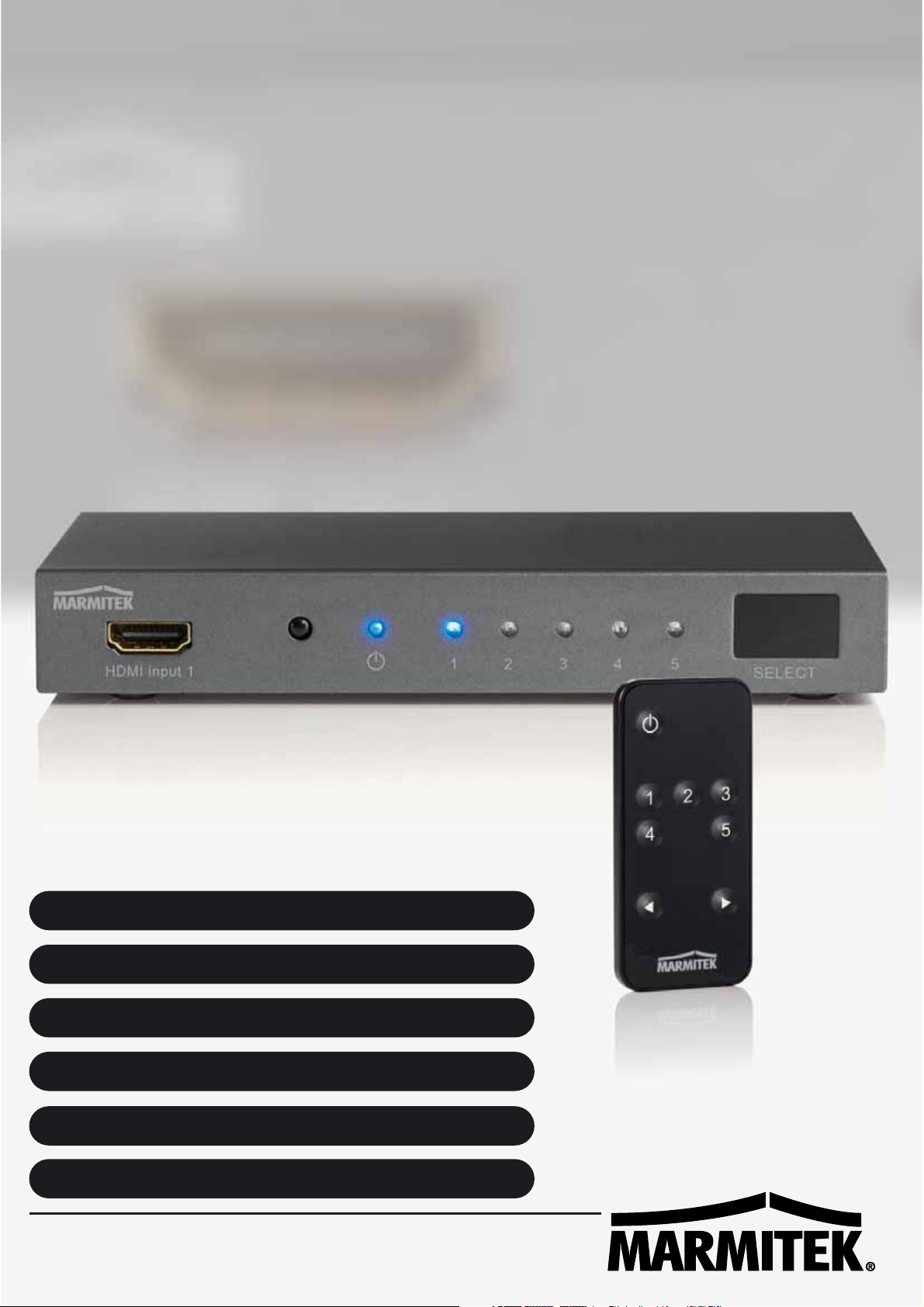
Congratulations on your purchase of the Marmitek Connect420! You can now connect
5 HDMI sources to your (HD) TV with one cable without any loss of signal or encryption. Examples of HDMI sources include; HD-DVD players, Blu Ray players, HD Set-top
boxes, PlayStation3, Xbox 360, etc. The Connect420 supports Full HD 1080p and 3D (so
is suitable for use with your own 3D equipment) and switches automatically and/or with
the use of a remote control.
Marmitek products are manufactured with the utmost care and are exceptionally high
quality. Please read this manual carefully and follow the instructions in order to get the
best from this product.
SET CONTENTS
1x HDMI Switcher
1x Remote control (including battery)
1x Power adapter
1x Instructions
3CONNECT420™
Page 4
ADVANTAGES
• Suitable for simultaneously connecting 5 HDMI sources to your TV. You only need 1
HDMI input and will no longer need to change cables over.
• For connecting gaming computers such as PlayStations and Xbox, Blu-ray Players,
satellite receivers and all other HDMI devices.
• Suitable for Full HD 1080p and all 3D formats.
• With built-in repeater and equalizer for correcting any signal loss, allowing you to
connect up to 15 metres of HDMI cable to the output.
• Switches automatically and/or with remote control.
• No interruptions because solid metal, interference-free, top quality housing is used.
• HDMI certified by ATC (Authorized Test Centers).
• Meets HDCP norms (High-bandwidth Digital Content Protection).
HDMI PROPERTIES
• Video bandwidth 250 MHz (enables image to be provided in 1080p, 12-bit and
60Hz)
• 3D (suitable for use with your own 3D equipment).
• Deep Color 36-bit (billions instead of millions of colours, better reproduction of subtle gradation variances and higher contrasts).
• Dolby TrueHD & DTS HD Master Audio (high quality audio support).
• Lip-Sync (prevents synchronisation problems between image and sound).
• CEC (operate numerous CEC devices with one remote control).
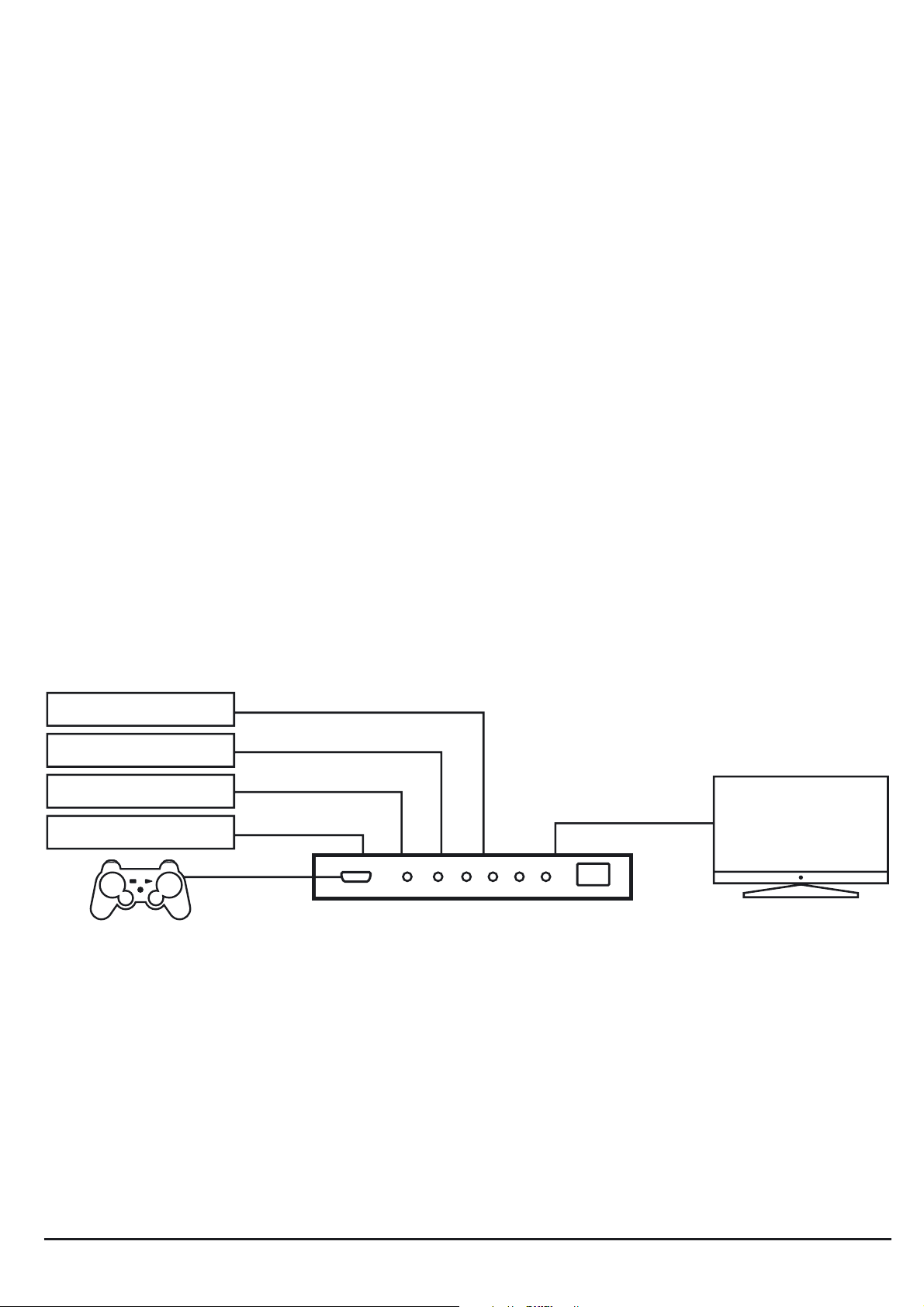
HD SET TOP BOX
BLU RAY / DVD
SATELLITE / DECODER
PC / MOVIE BOX
HD TV
or
3D TV
INSTALLATION
1. Connect the HDMI cable to your screen (TV, monitor or projector) to the HDMI output on the Connect420.
2. Connect the HDMI cables from your sources to the HDMI inputs on the Connect420.
3. Connect the power adapter to the Connect420 and plug into the electrical socket.
4. Pull the plastic strip out of the battery compartment on the remote control in order
to activate the battery and enable use of the remote control.
5. Remove the protective film (prevents scratching) on top of the remote control and
from the ‘Select’ button on the front of the Connect420.
4 © MARMITEK
Page 5

Installation tip:
Only use High Speed HDMI® certified cables for the best picture and sound quality.
USING THE CONNECT420
Automatically switch between HDMI sources
When one of the HDMI sources is used, the Connect420 will automatically switch to the
appropriate input channel. If numerous HDMI sources are already in use, the
Connect420 will automatically switch to the most recently active HDMI source.
Note: Automatic switching must be supported by the HDMI source.
Manual switching between HDMI sources
The ‘Select’ button on the front of the Connect420 can be used to manually switch
between the various HDMI sources. Or use the remote control to manually select an
HDMI source.
The LED lights on the front of the panel indicate which source is active.
FREQUENTLY ASKED QUESTIONS
No (or poor) image and sound
If you experience poor or no image after connecting the HDMI switcher, try to recover
ENGLISH
the problem by connecting the devices one at the time to your screen (TV, monitor or
projector).This way you can determine whether the problem lies with the HDMI sources,
the HDMI cables, the HDMI switcher or the screen. HDMI devices which are not tested
and certified by ATC (Authorized Test Centers) can cause image and sound problems.
• Check if the power adaptor of the Connect420 is connected and plugged into the
mains.
• Only use High Speed HDMI® certified cables for the best picture and sound quality.
• Do not use HDMI cables that are longer than specified in the technical data.
• Both the HDMI source and your screen have to support HDMI fully.
• Check whether your HDMI sources, DVI device and screen support the copy protection HDCP (High-bandwidth Digital Content Protection).
No proper 3D picture
• Check whether the HDMI source has been set to 3D and/or that this is set to automatic.
• Both the HDMI source as well as the HD screen must support the same 3D formats.
• Check whether the proper 3D picture is reproduced by directly connecting the HDMI
source to the screen with an HDMI cable.
Do you have other questions that have not been resolved by the above information?
Please go to www.marmitek.com
5CONNECT420™
Page 6

TECHNICAL SPECIFICATIONS
Resolution
Supported HDTV Resolutions 480p, 576i, 576p, 720p, 1080i, 1080p
Supported PC Resolution (max.) 1920 x 1200
Supported 3D formats 1080p@23.98/24 Hz, 720p@59.94/60/50 Hz
Maximum Pixel Frequency (max.) 250 MHz
Maximum Bit Rate (max.) 7.5 Gbps (2.5 Gbps per channel)
Inputs and outputs
HDMI Input (19-pin female) 1 x HDMI (front), 4 x HDMI (back)
HDMI Output (19-pin female) 1 x HDMI
Maximum HDMI cable length 15 meters
Remote control
Infrared remote control Including battery CR2025
Switcher housing
Dimensions (H x W x D) 155 x 70 x 23 mm
Weight 270 g
Environment
Ambient temperature +0 to +40° C
Ambient humidity 10 % to 85 %
Power
External Power adapter Input: 100-240 VAC @50-60 Hz
Output: 5 VDC @ 300 mA
Specifications may be modified without prior notice.
OPTIONAL ACCESSORIES
Infrared extension
Marmitek offers several products to operate your devices, even when
these are placed in a closed cupboard or in a different room. This as well
wired as wireless. More information about these so called infrared extenders can be found at www.marmitek.com.
Extra remote control
If you want to operate your device from various places in your home, or
if you want to use just one single remote control for all your A/V devices,
then make your choice from the complete range of Marmitek universal
remote controls. These replace almost every remote control you are using
at the moment. More information about these so called universal remote controls can
be found at www.marmitek.com.
6 © MARMITEK
Page 7

Environmental Information for Customers in the European Union
European Directive 2002/96/EC requires that the equipment bearing this symbol on the product and/or its
packaging must not be disposed of with unsorted municipal waste. The symbol indicates that this product
should be disposed of separately from regular household waste streams. It is your responsibility to dispose of this
and other electric and electronic equipment via designated collection facilities appointed by the government or
local authorities. Correct disposal and recycling will help prevent potential negative consequences to the environment and human health. For more detailed information about the disposal of your old equipment, please contact your local authorities, waste disposal service, or the shop where you purchased the product.
ENGLISH
™
7CONNECT420
Page 8

8 © MARMITEK
Page 9

SICHERHEITSHINWEISE
• Um Kurzschluss vorzubeugen, dieses Produkt bitte ausschließlich innerhalb des
Hauses und nur in trockenen Räumen nutzen. Setzen Sie die Komponenten nicht
Regen oder Feuchtigkeit aus. Nicht neben oder nahe eines Bades, Schwimmbades
usw. verwenden.
• Setzen Sie die Komponente Ihres Systems nicht extrem hohen Temperaturen oder
starken Lichtquellen aus.
• Bei einer zweckwidrigen Verwendung, selbst angebrachten Veränderungen oder
selbst ausgeführten Reparaturen verfallen alle Garantiebestimmungen. Marmitek
übernimmt bei einer falschen Verwendung des Produkts oder bei einer anderen
Verwendung des Produktes als für den vorgesehenen Zweck keinerlei
Produkthaftung. Marmitek bernimmt für Folgeschäden keine andere Haftung als
die gesetzliche Produkthaftung.
• Dieses Produkt ist kein Spielzeug. Außer Reichweite von Kindern halten.
• Das Produkt niemals öffnen (ausgen.des Batteriefachs): Das Gerät kann Teile enthal-
ten, worauf lebensgefährliche Stromspannung steht. Überlassen Sie Reparaturen
oder Wartung nur Fachleuten.
DEUTSCH
• Halten Sie die Batterien außerhalb der Reichweite von Kindern. Liefern Sie die
Batterien als chemischen Kleinabfall ein. Verwenden Sie niemals alte und neue oder
unterschiedliche Typen von Batterien durcheinander. Wenn Sie das System längere
Zeit nicht benutzen, entfernen Sie die Batterien. Achten Sie beim Einlegen der
Batterien auf die Polarität (+ / -): Ein falsches Einlegen kann zu Explosionsgefahr
führen.
• Schließen Sie den Netzadapter erst dann an das Stromnetz an, nachdem Sie über-
prüft haben, ob die Netzspannung mit dem auf dem Typenschild angegeben Wert
übereinstimmt. Schließen Sie niemals einen Netzadapter oder ein Netzkabel an,
wenn diese beschädigt sind. In diesem Fall nehmen Sie Kontakt mit Ihrem
Lieferanten auf.
EINFÜHRUNG
Herzlichen Glückwunsch zum Erwerb Ihres Marmitek Connect420. Sie können mit nur
einem Kabel und ohne jeglichen Signal- oder Verschlüsselungsverlust bis zu 5 HDMI
Quellen an Ihren (HD-)TV anschließen. Beispiele von HDMI Quellen sind: HD-DVD Player,
Blu-Ray Player, HD-Set-Top-Box, PlayStation3, XBox360 usw. Der Connect420 unterstützt Full HD 1080p und 3D (ist also für Verwendung mit Ihren eigenen 3D Geräten
geeignet) und schaltet automatisch und/oder mit Fernbedienung.
Die Produkte Marmiteks werden mit großer Sorgfalt hergestellt und sind von hoher
Qualität. Lesen Sie diese Anleitung bitte sorgfältig durch und befolgen Sie die
Anweisungen, um die Möglichkeiten dieses Produkts optimal nutzen zu können.
9CONNECT420™
Page 10
VERPACKUNGSINHALT
1 x HDMI Switch
1 x Fernbedienung (inkl. Batterie)
1 x Speisungsadapter
1 x Gebrauchsanleitung
VORZÜGE
• Geeignet, um 5 HDMI Quellen zugleich an Ihren Fernseher anzuschließen. Sie benötigen lediglich 1 HDMI Eingang und müssen nie mehr Kabel umstecken.
• Zum Anschließen von Spielcomputern wie PlayStation und XBox, Blu-Ray Disc,
Satellitenempfänger und alle anderen HDMI Geräte.
• Geeignet für Full HD 1080p und alle 3D Auflösungen.
• Mit eingebautem Repeater und Equilizer zum Abgleichen bzw. Glätten des HDMI
Signals, womit Ihre HDMI Kabel Übertragung auf bis zu sage und schreibe 15 Meter
verlängert wird.
• Schaltet automatisch und/oder mit Fernbedienung.
• Störungsfrei aufgrund des soliden, interferenzfreiem Metallgehäuses.
• HDMI zertifiziert von ATC (Authorized Test Centers)
• Entspricht den HDCP Anforderungen (High Bandwidth Digital Content Protection)
HDMI EIGENSCHAFTEN
•
Videobandbreite 250 MHz (ermöglicht Bildwiedergabe von 1080p, 12-BIT und 60Hz).
• 3D (geeignet für Verwendung mit Ihren eigenen 3D Geräten)
• Deep Color 36-Bit (Milliarden anstatt Millionen Farben, bessere Wiedergabe von
subtilen Farbwerten und höheres Kontrastverhältnis)
• Dolby TrueHD & DTS HD Master Audio (hohe Qualität Audio-Unterstützung)
• Lip-Sync (verhindert Synchronisationsprobleme zwischen Bild und Ton )
• CEC (mehrere ‘CEC’ Geräte mit nur einer Fernbedienung steuern).
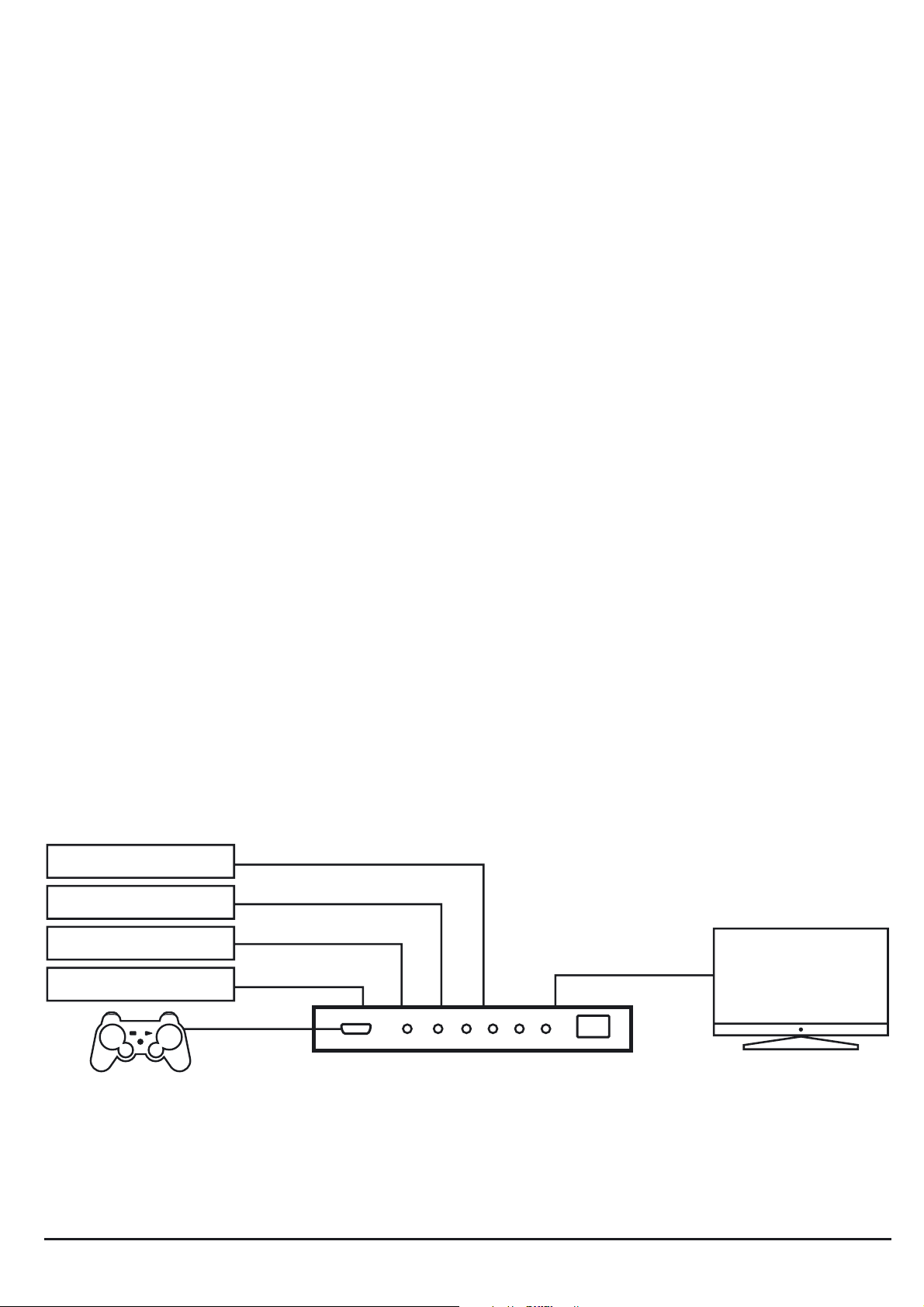
HD SET TOP BOX
BLU RAY / DVD
SATELLITE / DECODER
PC / MOVIE BOX
HD TV
or
3D TV
INSTALLATION
1. Schließen Sie das HDMI Kabel zu Ihrem Bildschirm (TV, Monitor oder Projektor) an
den “HDMI Output” des Connect420 an.
Schließen Sie die HDMI Kabel Ihrer Quellen an die “HDMI Inputs” des Connect420 an.
2.
10 © MARMITEK
Page 11

3. Schließen Sie den Speisungsadapter an den Connect420 an und verbinden Sie diesen mit der Steckdose.
4. Ziehen Sie den Plastikstreifen aus dem Batteriefach der Fernbedienung, um die
Batterie aktivieren und die Fernbedienung nutzen zu können.
5. Entfernen Sie die Schutzfolie (gegen Kratzer) von der Oberseite Ihrer Fernbedienung
und der Select Taste an der Vorderseite des Connect420.
Tipps zur Installation:
Verwenden Sie zum Erhalt einer optimalen Bild- und Tonqualität ausschließlich High
Speed HDMI® zertifizierte Kabel.
ANWENDUNG
Automatisch zwischen den HDMI Quellen schalten
Wird eine der HDMI Quellen eingeschaltet, so wird der Connect420 automatisch auf den
richtigen Eingangskanal schalten. Sind bereits mehrere HDMI Quellen eingeschaltet, so
wird der Connect420 automatisch zur letztmals aktiv gewesenen HDMI Quelle schalten.
Bemerkung: Automatisches Schalten muss jedoch durch die HDMI Quelle unterstützt
DEUTSCH
werden.
Manuell zwischen den HDMI Quellen schalten
Mit der Select-Taste an der Vorderseite des Connect420, kann manuell zwischen den
verschiedenen HDMI Quellen geschaltet werden. Sie können auch die Fernbedienung
verwenden, um manuell eine HDMI Quelle auszuwählen.
Die LED Beleuchtung an der Vorderseite des Bedienfelds zeigt an, welche Quelle gewählt wurde.
HÄUFIG GESTELLTE FRAGEN
Kein (oder schlechtes) Bild und Ton
Wenn Sie nach dem Anschließen des HDMI Switch kein, oder ein schlechtes Bild empfangen, versuchen Sie dann die Geräte Stück für Stück an Ihren Schirm anzuschließen
(TV, Monitor oder Projektor), um zu sehen, wo das Problem liegt. Auf diese Art können
Sie ermitteln ob es an den HDMI Quellen, den HDMI Kabeln, dem HDMI Switch oder
dem Schirm liegt. Nicht von ATC (Authorized Test Centers) erprobte und geprüfte HDMI
Geräte können Bild- und Tonprobleme verursachen.
• Prüfen Sie, ob der Speisungsadapter des Connect420 angeschlossen und mit der
Steckdose verbunden ist
• Verwenden Sie zum Erhalt einer optimalen Bild- und Tonqualität ausschließlich High
Speed HDMI® zertifizierte Kabel.
Verwenden Sie keine HDMI Kabel, die länger sind als in den technischen Daten aufgeführt
•
• Sowohl die HDMI Quelle wie Ihr Bildschirm muss HDMI vollständig unterstützen
• Prüfen Sie, ob Ihre HDMI Quellen, Ihr DVI Gerät und Schirm den Kopierschutz HDCP
(High bandwidth Digital Content Protection) unterstützen
11CONNECT420™
Page 12

Keine korrekte 3D Wiedergabe
• Überprüfen Sie, ob die HDMI Quelle auf 3D Wiedergabe und/oder auf automatisch
eingestellt ist.
• Sowohl die HDMI Quelle wie Ihr HD Bildschirm müssen dieselben 3D Auflösungen
unterstützen.
• Überprüfen Sie, ob 3D korrekt wiedergegeben wird, indem Sie die HDMI Quelle mit
einem HDMI Kabel direkt an den HD Bildschirm anschließen.
Sie haben noch Fragen, die im Obigen nicht beantwortet wurden? Schauen Sie dann
unter www.marmitek.com
TECHNISCHE DATEN
Auflösung
Unterstützte HDTV Auflösungen 480p, 576i, 576p, 720p, 1080i, 1080p
Unterstützte PC Auflösung (max.) 1920 x 1200
Unterstützte 3D Daten 1080p@23.98/24Hz, 720p@59.94/60/50Hz
Maximale Bildpunktfrequenz (max.) 250 MHz
Maximale Bit-Übertragungsgeschwindigkeit (max.) 7.5Gbps (2.5 Gbps pro Kanal)
Ein- und Ausgänge
HDMI Eingang (19-Buchsenkontakt) 1x HDMI (Vorderseite), 4x HDMI (Rückseite)
HDMI Ausgang (19-Buchsenkontakt) 1 HDMI
Höchstlänge HDMI Kabel 15 Meter
Fernbedienung
Infrarot Fernbedienung Einschließlich Batterie CR2025
Switch-Gehäuse
Maßangaben (H x B x T) 155 x 70 x 23mm
Gewicht: 270 g
Umgebung
Umgebungstemperatur +0 to +40° C
Relative Feuchte 10% bis 85%
Speisung
Externer Speisungsadapter Input 100-240VAC @50-60Hz
Output: 5VDC @ 300mA
Angaben können, ohne vorherige Mitteilung, geändert werden.
12 © MARMITEK
Page 13

OPTIONAL ERHÄLTLICH
Infrarotverlängerung
Marmitek bietet eine Vielzahl von Produkten an, die die Bedienung Ihrer
Geräte ermöglichen, auch wenn diese sich in einem geschlossenen
Schrank oder einem anderen Raum befinden. Diese Lösungen sind mit
Kabel oder kabellos erhältlich. Weitere Informationen zu diesen
Infrarotverlängerungen finden Sie auf www.marmitek.com.
Extra Fernbedienung
Wenn Sie Ihre Geräte gerne an verschiedenen Orten im Haus bedienen,
oder nur noch eine Fernbedienung für all Ihre A/V Geräte verwenden
möchten, entscheiden Sie sich dann für eine Universal-Fernbedienung
aus der kompletten Marmitek Serie. Diese ersetzen nahezu alle derzeit
von Ihnen verwendeten Fernbedienungen. Weitere Infos über diese so genannten
Universal-Fernbedienungen finden Sie unter www.marmitek.com.
Umweltinformation für Kunden innerhalb der Europäischen Union
Die Europäische Richtlinie 2002/96/EC verlangt, dass technische Ausrüstung, die direkt am Gerät und/oder
an der Verpackung mit diesem Symbol versehen ist nicht zusammen mit unsortiertem Gemeindeabfall entsorgt werden darf. Das Symbol weist darauf hin, dass das Produkt von regulärem Haushaltmüll getrennt entsorgt
werden sollte. Es liegt in Ihrer Verantwortung, dieses Gerät und andere elektrische und elektronische Geräte über
die dafür zuständigen und von der Regierung oder örtlichen Behörden dazu bestimmten Sammelstellen zu entsorgen. Ordnungsgemäßes Entsorgen und Recyceln trägt dazu bei, potentielle negative Folgen für Umwelt und
die menschliche Gesundheit zu vermeiden. Wenn Sie weitere Informationen zur Entsorgung Ihrer Altgeräte benötigen, wenden Sie sich bitte an die örtlichen Behörden oder städtischen Entsorgungsdienste oder an den Händler,
bei dem Sie das Produkt erworben haben.
DEUTSCH
13CONNECT420™
Page 14

14 © MARMITEK
Page 15

AVERTISSEMENTS DE SECURITE
• Afin d’éviter un court-circuit, ce produit ne doit être utilisé qu’à l’intérieur, et unique-
ment dans des endroits secs. Ne pas exposer les composants à la pluie ou à l’humidité. Ne pas utiliser à côté de ou près d’une baignoire, une piscine, etc.
• Ne pas exposer les composants de votre système à des températures extrêmement
élevées ou à des sources de lumières trop fortes.
• Toute utilisation impropre, toute modification ou réparation effectuée vous-même
annule la garantie. Marmitek n’accepte aucune responsabilité dans le cas d’une utilisation impropre du produit ou d’une utilisation autre que celle pour laquelle le produit est destiné. Marmitek n’accepte aucune responsabilité pour dommage conséquent, autre que la responsabilité civile du fait des produits.
• Ce produit n’est pas un jouet et doit être rangé hors de la portée des enfants.
• Ne jamais ouvrir le produit (excepté le compartiment des piles) : Les appareils peu-
vent comprendre des composants dont la tension est mortelles. Les réparations ou
l’entretien ne doivent être effectués que par des personnes compétentes.
• Tenir les piles hors de portée des enfants. Traiter les piles usagées comme des petits
déchets chimiques. Ne jamais utiliser simultanément des vieilles piles et des piles neuves, ou des piles de types différents. Enlever les piles lorsque le système sera mis
longtemps hors de service. Respecter la polarité en insérant les piles (+/-) : une insertion incorrecte peut engendrer un danger d’explosion.
• Brancher l’adaptateur secteur sur le réseau électrique seulement après avoir vérifié
que la tension d’alimentation correspond à la valeur indiquée sur les plaques d’identification. Ne jamais brancher un adaptateur secteur ou un cordon d’alimentation
lorsque celui-ci est endommagé. Dans ce cas, veuillez contacter votre fournisseur.
INTRODUCTION
Félicitations pour votre achat du Marmitek Connect420 ! Vous pouvez désormais raccorder 5 sources HDMI à votre téléviseur (HD) avec 1 seul câble, sans aucune perte de
signal ou de cryptage. Quelques exemples de sources HDMI : lecteurs de DVD HD, lecteurs Blu-ray, set-top boxes HD, PlayStation3, Xbox 360, etc. Le Connect420 soutient
Full HD 1080p et 3D (et de ce fait il est compatible avec vos appareils 3D) et fonctionne
par commutation automatique et/ou avec une télécommande.
FRANÇAIS
Les produits Marmitek ont été réalisés avec les plus grands soins et par conséquent, ils
sont de haute qualité. Veuillez lire ce mode d'emploi attentivement et suivre les instructions afin de bénéficier au maximum des possibilités de ce produit.
CONTENU DE L'EMBALLAGE
1x commutateur HDMI
1x télécommande (pile incluse)
1x adaptateur d'alimentation
1x mode d'emploi
15CONNECT420™
Page 16

AVANTAGES
• Permet de connecter simultanément 5 sources HDMI sur votre téléviseur. Une seule
entrée HDMI suffit et il ne sera plus nécessaire de changer les câbles.
• Pour la connexion des consoles de jeux, telles que PlayStation et Xbox, les lecteurs
Blu-ray, les récepteurs satellite ou tout autre appareil HDMI.
• Compatible Full HD 1080p et avec tous les formats 3D.
• Avec répétiteur et correcteur incorporés pour corriger une perte de signal éventuelle, permettant de raccorder un câble HDMI de 15 mètres à la sortie.
• Fonctionne par commutation automatique et/ou avec une télécommande.
• Sans interférences grâce à la boite en métal solide de haute qualité.
• Certifié HDMI par ATC (Authorized Test Centers).
• Conforme aux normes HDCP (High-bandwidth Digital Content Protection).
CARATÉRISTIQUES HDMI
• Largeur de bande vidéo 250 MHz (image visible de 1080p, 12-bit et 60Hz)
• 3D (compatible avec vos appareils 3D)
• Deep Color 36-bit (des milliards de couleurs au lieu de millions de couleurs, une amélioration des gradations subtiles et un rapport de contraste plus élevé)
• Dolby TrueHD & DTS HD Master Audio ( soutien audio de haute qualité)
• Lip-Sync (prévient les problèmes de synchronisation de l'image et du son)
• CEC (permet de contrôler plusieurs appareils 'CEC' avec une seule télécommande)
HD SET TOP BOX
BLU RAY / DVD
SATELLITE / DECODER
PC / MOVIE BOX
HD TV
or
3D TV
INSTALLATION
1. Raccordez le câble HDMI vers votre écran (téléviseur, moniteur ou projecteur) à la
sortie HDMI (output) du Connect420.
2. Raccordez les câbles HDMI de vos sources aux entrées HDMI (inputs) du
Connect420.
3. Raccordez l'adaptateur d'alimentation au Connect420 et branchez la prise.
4. Retirez la languette en plastique du compartiment à piles de la télécommande pour
activer la pile et pour pouvoir utiliser la télécommande.
5. Retirez le film de protection (contre les rayures) du côté supérieur de la télécommande et du bouton Select (sélection) situé en façade du Connect420.
16 © MARMITEK
Page 17

Conseils pour l'installation
Utilisez uniquement des câbles certifiés High Speed HDMI® pour la meilleure qualité de
l'image et du son.
UTILISATION
Commutation automatique entre les sources HDMI
Lorsque une des sources HDMI est mise en marche, le Connect420 passera automatiquement vers le canal d'entrée correct. Si plusieurs sources HDMI sont déjà mises en marche,
le Connect420 passera automatiquement vers la source HDMI qui a été activée en dernier.
Remarque : La commutation automatique doit néanmoins être soutenue par la source HDMI.
Commutation manuelle entre les sources HDMI
En utilisant le bouton Select (sélection) situé en façade du Connect420, il est possible de
passer manuellement entre les différentes sources HDMI. Sinon, vous pouvez utiliser la
télécommande pour sélectionner manuellement une source HDMI.
L'éclairage LED situé en façade du panneau indique quelle source a été sélectionnée.
FOIRE AUX QUESTIONS
Pas d’image (ou image floue) ou pas de son (ou mauvais son)
S’il n’y a pas d’image ou si l’image est floue après avoir raccordé l’interrupteur HDMI,
essayez de voir quel est le problème en raccordant les appareils un par un à votre écran
(téléviseur, moniteur ou projecteur). De cette manière vous pouvez déterminer si le problème se trouve dans l’une des sources HDMI, les câbles HDMI, l’interrupteur HDMI ou
l’écran. Les appareils HDMI qui ne sont pas testés et certifiés par ATC (Authorized Test
Centers) peuvent causer des problèmes d’image et de son.
• Vérifiez que l’adaptateur d’alimentation de Connect420 soit raccordé et branché.
• Utilisez uniquement des câbles certifiés High Speed HDMI® pour la meilleure qualité de l'image et du son.
• N’utilisez pas de câbles HDMI qui soient plus longs que spécifié dans les caractéristiques techniques.
• La source HDMI ainsi que votre écran doivent entièrement soutenir HDMI.
• Vérifiez que vos sources HDMI, l’appareil DVI et l’écran soutiennent la sécurité de
FRANÇAIS
copie HDCP (High-bandwidth Digital Content Protection).
Pas d'image (ou image flou) 3D
• Vérifiez que la source HDMI a été réglée pour pouvoir reproduire les images 3D et/ou
que ce réglage est mis en automatique
Il est indispensable que la source HDMI ainsi que l'écran HD soutiennent les mêmes formats 3D.
•
• Vérifiez que l'image 3D est reproduite correctement en raccordant la source HDMI
directement à l'écran HDMI avec un câble HDMI.
Vous avez d'autres questions ? Visitez notre site www.marmitek.com
17CONNECT420™
Page 18

CARACTÉRISTIQUES TECHNIQUES
Résolution
Résolutions soutenues de télévision HD
Résolution soutenue de PC (max) 1920 x 1200
3D-formats soutenus 1080p@23.98/24Hz, 720p@59.94/60/50Hz
Fréquence pixel maximale (max) 250 MHz
Débit binaire maximal (max) 7.5Gb/s (2.5 Gb/s par canal)
Entrées et sorties
Entrée HDMI (19 goupilles femelles) 1x HDMI (en façade), 4x HDMI (à l'arrière)
Sortie HDMI (19 goupilles femelles) 1x HDMI
Longueur maximale du câble HDMI 15 mètres
Télécommande
Télécommande infrarouge Pile CR2025 incluse
Boîtier commutateur
Dimensions (H x L x P) 155 x 70 x 23mm
Poids 270 g
480p, 576i, 576p, 720p, 1080i, 1080p
Environnement
Température ambiante +0 à +40° C
Humidité ambiante 10 % à 85 %
Alimentation
Adaptateur d'alimentation
externe Entrée : 100-240VAC @50-60Hz
Sortie : 5VDC @ 300mA
Les spécifications peuvent être modifiées sans préavis.
18 © MARMITEK
Page 19

DISPONIBLE EN OPTION
Rallonge infrarouge
Marmitek offre une diversité de produits qui vous permettent également
de manier vos appareils quand ils se trouvent dans un placard fermé ou
même dans une autre pièce. Ceci est possible avec ou sans câbles. Vous
trouverez des renseignements additionnels concernant ces rallonges
infrarouges sur notre site www.marmitek.com
Télécommande additionnelle
Si vous voulez manier vos appareils depuis plusieurs emplacements de la
maison, ou si vous ne voulez utiliser qu’une seule télécommande pour tous
vos appareils A/V, choisissez-en une de la série complète de télécomman-
des universelles de Marmitek. Celles-ci remplacent presque toutes les télécommandes que vous utilisez actuellement. Vous trouverez des renseignements additionnels concernant ces télécommandes universelles sur le site www.marmitek.com.
Informations environnementales pour les clients de l’Union européenne
La directive européenne 2002/96/CE exige que l’équipement sur lequel est apposé ce symbole sur le pro-
duit et/ou son emballage ne soit pas jeté avec les autres ordures ménagères. Ce symbole indique que le
produit doit être éliminé dans un circuit distinct de celui pour les déchets des ménages. Il est de votre responsabilité de jeter ce matériel ainsi que tout autre matériel électrique ou électronique par les moyens de collecte indiqués par le gouvernement et les pouvoirs publics des collectivités territoriales. L’élimination et le recyclage en
bonne et due forme ont pour but de lutter contre l’impact néfaste potentiel de ce type de produits sur l’environnement et la santé publique. Pour plus d’informations sur le mode d’élimination de votre ancien équipement,
veuillez prendre contact avec les pouvoirs publics locaux, le service de traitement des déchets, ou l’endroit où vous
avez acheté le produit.
FRANÇAIS
19CONNECT420™
Page 20

20 © MARMITEK
Page 21

AVISOS DE SEGURIDAD
• Para evitar un cortocircuito, este producto solamente se usa en casa y en habitacio-
nes secas. No exponga los componentes del sistema a la lluvia o a la humedad. No
se use cerca de una bañera, una piscina, etc.
• No exponga los componentes del sistema a temperaturas extremamente altas o a
focos de luz fuertes.
• En caso de uso indebido o modificaciones y reparaciones montados por su mismo,
la garantía se caducará. En caso de uso indebido o impropio, Marmitek no asume
ninguna responsabilidad para el producto. Marmitek no asume ninguna responsabilidad para daños que resultan del uso impropio, excepto según la responsabilidad
para el producto que es determinada por la ley.
Este producto no es un juguete. Asegúrese de que está fuera del alcance de los niños.
•
• Nunca abra el producto (a excepción de compartimiento de pilas): Puede contener
piezas que se encuentren bajo una tensión mortal. Deja las reparaciones o servicios
a personal experto.
• Ten cuidado que las pilas se encuentran fuera del alcance de niños. Entrega las pilas
como residuos químicos. Nunca use pilas nuevas y viejas o pilas de tipos distintos a
la vez. Quita las pilas si no usa el sistema durante mucho tiempo. Cuando pone las
pilas, presta atención a la polaridad (+ / -): si no son puestas de manera justa, puede
causar peligro de explosión.
• No conecte el adaptador de red a la red de alumbrado antes de que haya controla-
do si la tensión de red corresponde con el valor indicado en la estampa de tipo.
Nunca conecte un adaptador de red o un cable a la red si ése está dañado. En este
caso, por favor entre en contacto con su proveedor.
INTRODUCCIÓN
¡Felicitaciones por la compra del Marmitek Connect420! Facilita la conexión de 5 fuentes HDMI con un (HD-)TV empleando solamente un cable y sin pérdida de señal o encriptación. Ejemplos de fuentes HDMI son: reproductor HD-DVD, reproductor Blu-Ray, HD
Set top box, PlayStation3, Xbox 360, etc. El Connect420 soporta Full HD 1080p y 3D
(así que puede emplearse en combinación con su equipo 3D) y cambia las fuentes
auomáticamente y/o a distancia.
Los productos de Marmitek se fabrican con el mayor esmero y son de alta calidad. Por
ESPAÑOL
favor lea cuidadosamente este modo de empleo y sigua las instrucciones para poder
aprovechar al máximo de las posibilidades de este producto.
CONTENIDO DEL EMBALAJE
1x Switcher HDMI
1x Mando a distancia (pila incluída)
1x Adaptador de alimentación
1x Mode de empleo
21CONNECT420™
Page 22

VENTAJAS
• Apto para la conexión paralela de 5 fuentes HDMI al televisor. Solamente se necesita una entrada HDMI y no tendrá que cambiar cables nunca más.
• Para conectar videoconsolas como PlayStation y Xbox, reproductores Blu-Ray, receptores de satélite y todos los demás dispositivos HDMI.
• Apto para Full HD 1080p y todos los formatos 3D.
• Con repetidor y ecualizador incorporados para la corrección de una posible pérdida
de señal, así que puede conectarse un cable de 15 metros como máximo a la salida.
• Cambia las fuentes automáticamente y/o a distancia.
• El gabinete sólido de metal evita interferencias.
• HDMI certificado por ATC (Authorized Test Centers).
• Cumple con las exigencias de HDCP (High-bandwidth Digital Content Protection).
CARACTERÍSTICAS DE HDMI
• Anchura de banda de 250 MHz (facilita una reproducción de imágen de 1080p, 12bit y 60Hz).
• 3D (apto para el empleo con dispositivos 3D).
• Deep Color 36-bit, (mil millones en vez de millones de colores, mejor reproducción
de diferencias de gradación y proporción de contraste más alta).
• Dolby TrueHD & DTS HD Master Audio (soporte de audio de alta calidad).
• Lip-Sync (evita problemas de sincronización entre imágen y sónido).
• CEC (manejar varios dispositivos ‘CEC’ con un mando a distancia.
HD SET TOP BOX
BLU RAY / DVD
SATELLITE / DECODER
PC / MOVIE BOX
HD TV
or
3D TV
INSTALACIÓN
1. Conecta el cable HDMI de la pantalla (TV, monitor o proyector) al‘HDMI output’ (la
salida HDMI) del Connect420.
2. Conecta los cables HDMI de las fuentes a los ‘HDMI inputs’ (las entradas HDMI) del
Connect420.
3. Conecta el adaptador de alimentación al Connect420 y enchúfelo.
4. Quita la cinta de plástico del compartimiento de pilas para activar las pila y emplear
el mando a distancia.
5. Quita la lámina de protección (contra rayas) del lado superior del mando a distancia
y del botón ‘Select’ (‘Seleccionar’) en la parte anterior del Connect420.
22 © MARMITEK
Page 23

Aviso para la instalación:
Emplea exclusivamente cables High Speed HDMI® certificados para obtener una calidad
perfecta de imágen y sónido.
EMPLEO
Conmutar automáticamente entre las fuentes HDMI
Cuando una de las fuentes HDMI se enciende, el Connect420 selecciona automáticamente el canal de entrada adecuado. Cuando varias fuentes HDMI están encendidas ya,
el Connect420 selecciona automáticamente la última fuente que se ha activado.
Nota: Conmutación automática solamente es posible si esta función se soporta por la
fuente HDMI.
Conmutar manualmente entre las fuentes HDMI
Se conmuta manualmente entre las diferentes fuentes HDMi con el botón ‘Select’ en la
parte anterior del Connect420 o utilizando el mando a distancia.
La iluminación LED en la parte anterior del panel indica la fuente seleccionada.
PREGUNTAS FRECUENTES
No hay imagen (o hay mala imagen) o no hay sonido (o hay malo sonido)
Si no hay imagen o si la imagen es de baja calidad después de haber conectado el switcher
HDMI, conecte cada aparato a la pantalla (TV, monitor o proyector). De esta manera puede
determinar si el problema es causado por las fuentes HDMI, por los cables HDMI, por el
switcher HDMI o por la pantalla. Aparatos HDMI que no están certificados y comprobados
por los ATC (Authorized Test Centers), pueden causar problemas de imagen y de sonido.
• Compruebe si el adaptador de alimentación del Connect420 está conectado y
enchufado.
• Emplea exclusivamente cables High Speed HDMI® certificados para obtener una
calidad perfecta de imágen y sónido.
• No utilice cables más largos de lo indicado en los datos técnicos
• Tanto la fuente HDMI como la pantalla han de soportar HDMI
• Compruebe si las fuentes HDMI, el aparato DVI y la pantalla soportan la protección
contra copia HDCP (High-bandwidth Digital Content Protection).
Reproducción 3D incorrecta
ESPAÑOL
• Controla si la fuente HDMI está correctamente ajustada para la reproducción 3D o
si está puesta en posición automática.
• Es necesario que la fuente HDMI y la pantalla HD soporten los mismos formatos 3D.
• Controla si la reproducción 3D está correcta cuando la fuente HDMI se conecta
directamente a la pantalla HD con un cable HDMI.
¿Tiene otras preguntas? Visite www.marmitek.com
23CONNECT420™
Page 24

DATOS TÉCNICOS
Resolución
Resoluciones HDTV soportadas 480p, 576i, 576p, 720p, 1080i, 1080p
Resoluciones PC soportadas (max.) 1.920 x 1.200
Formatos 3D soportados 1.080p@23.98/24 Hz, 720p@59.94/60/50 Hz
Máxima frecuencia de píxeles (max.) 250 MHz
Máxima tasa de bits (max.) 7.5 Gbps (2.5 Gbps por canal)
Entradas y salidas
Entrada HDMI (19 pines hembra)
Salida HDMI (19 pines hembra) 1 x HDMI
Longitud máxima del cable HDMI 15 m
Mando a distancia
Mando a distancia infrarrojo Pila incluída CR2025
Gabinete switcher
Dimensiones (A x A x P) 155 x 70 x 23 mm
Peso 270 g
Ambiente
Temperatura ambiental +0 a +40° C
Humedad relativa 10 % a 85 %
Alimentación
Adaptador de alimentación externo, Entrada:
1 x HDMI (parte anterior), 4 x HDMI (parte trasera)
100 – 40 VAC @50-60 Hz
Salida: 5 VDC @ 300 mA
Las especificaciones pueden cambiarse sin previo aviso.
TAMBIÉN A LA VENTA
Extensión infrarroja
Marmitek le ofrece una variedad de productos que le facilita el manejo de
sus aparatos aún cuando se encuentren dentro de un armario cerrado o en
otra habitación. Estos productos existen con o sin cables. Para más información sobre estas extensiones infrarrojas, visite www.marmitek.com
Mando a distancia adicional
Si desea manejar su equipo desde varios lugares en casa o si quiere emplear
un síngulo mando a distancia para todos los aparatos A/V, Marmitek le ofrece un serie completo de mandos a distancia universales. Estos mandos a distancia universales sustituyen todo mando a distancia que emplea actualmen-
te. Más información sobre los mandos a distancia puede encontrar en www.marmitek.com.
24 © MARMITEK
Page 25

Información medioambiental para clientes de la Unión Europea
La Directiva 2002/96/CE de la UE exige que los equipos que lleven este símbolo en el propio aparato y/o
en su embalaje no deben eliminarse junto con otros residuos urbanos no seleccionados. El símbolo indica
que el producto en cuestión debe separarse de los residuos domésticos convencionales con vistas a su eliminación. Es responsabilidad suya desechar este y cualesquiera otros aparatos eléctricos y electrónicos a través de los
puntos de recogida que ponen a su disposición el gobierno y las autoridades locales. Al desechar y reciclar correctamente estos aparatos estará contribuyendo a evitar posibles consecuencias negativas para el medio ambiente y la salud de las personas. Si desea obtener información más detallada sobre la eliminación segura de su aparato usado, consulte a las autoridades locales, al servicio de recogida y eliminación de residuos de su zona o pregunte en la tienda donde adquirió el producto.
ESPAÑOL
25CONNECT420™
Page 26

26 © MARMITEK
Page 27

PRECAUZIONI DI SICUREZZA
• Per evitare il pericolo di cortocircuito utilizzare questo prodotto esclusivamente al
coperto e in luoghi asciutti. Non esporre i componenti di questo prodotto a pioggia
o umidità. Non utilizzare vicino alla vasca da bagno, piscina, ecc.
• Non esporre i componenti del sistema a temperature eccessivamente alte o a fonti
intense di luce.
• In caso di utilizzo scorretto, di riparazioni o modifiche apportate personalmente
decade qualsiasi garanzia. Marmitek declina ogni responsabilità per i danni derivanti da un utilizzo non appropriato del prodotto o da utilizzo diverso da quello per cui
il prodotto è stato creato. Marmitek declina ogni responsabilità per danni consequenziali ad eccezione della responsabilità civile sui prodotti.
• Questo prodotto non è un giocattolo: tenerlo lontano dalla portata dei bambini.
• Non aprire mai il prodotto (vano batteria escluso): L’apparecchio può contenere com-
ponenti la cui tensione è estremamente pericolosa. Lasciare fare riparazioni o modifiche esclusivamente a personale esperto.
• Batterie: conservare le batterie fuori dalla portata dei bambini. Consegnare le batte-
rie agli appositi centri per lo smaltimento. Non utilizzare mai in combinazione batterie nuove e vecchie o di tipo diverso. Togliere le batterie quando l’apparecchio non
viene utilizzato per un lungo periodo di tempo. Inserire correttamente le batterie prestando attenzione alla polarità (+ / -): un errato posizionamento delle batterie può
provocare una esplosione.
• Collegare l’alimentatore alla presa di corrente solamente dopo avere controllato che
la tensione della rete elettrica corrisponda alle indicazioni riportate sulla targhetta.
Non utilizzare mai un alimentatore o un cavo elettrico danneggiato. In tal caso rivolgersi al proprio rivenditore.
INTRODUZIONE
Congratulazioni per l’acquisto del Connect420 di Marmitek! È possibile collegare 5 fonti
HDMI con un solo cavo al vostro (HD)TV, senza alcuna perdita di segnale o crittografia.
Esempi di fonti HDMI sono: lettori HD-DVD, lettori Blu Ray, set-top box HD, PlayStation3,
Xbox360, ecc. Il Connect420 supporta Full HD 1080p e 3D (quindi è adatto all’uso con
le vostre apparecchiature 3D) e commuta automaticamente e/o con il telecomando.
I prodotti di Marmitek sono fabbricati con la massima cura e sono di alta qualità. Vi preg-
ITALIAONO
hiamo di leggere attentamente questo manuale e seguite le istruzioni per sfruttare tutte
le possibilità di questo prodotto.
CONTENUTO DELL'IMBALLAGGIO
1x Commutatore HDMI
1x Telecomando (pila inclusa)
1x Adattore di alimentazione
1x Istruzioni per l’uso
27CONNECT420™
Page 28

VANTAGGI
• Adatto al collegamento contemporaneo di 5 fonti HDMI al vostro TV. Avete bisogno di un solo ingresso HDMI e non dovete mai più cambiare cavi.
• Per il collegamento di console videogiochi come PlayStation e Xbox, lettore Blu-ray,
ricevitore satellitare e tutti gli altri apparecchi HDMI.
• Adatto al Full HD 1080p e tutti i formati 3D.
• Con ripetitore ed equalizzatore integrati per la correzione di un’eventuale perdita di
segnale, grazie a cui è possibile collegare fino a 15 metri di cavo HDMI all’uscita.
• Commuta automaticamente e/o con il telecomando.
• Senza disturbi grazie all’alloggiamento metallico senza interferenze.
• Certificato HDMI dagli ATC (Authorized Test Centers).
• Soddisfa tutte le norme HDCP (High-bandwidth Digital Content Protection).
CARATTERISTICHE HDMI
• Larghezza banda video 250 MHz (rende possibile la riproduzione delle immagini di
1080p, 12-bit e 60Hz)
• 3D (adatto all’uso con le vostre apparecchiature 3D)
• Deep Color 36-bit, (miliardi invece di milioni di colori, migliore riproduzione di sottili differenze di gradazione e rapporto di contrasto più alto)
• Dolby TrueHD & DTS HD Master Audio (supporto audio di alta qualità)
• Lip-Sync (previene i problemi di sincronizzazione tra immagini e suono)
• CEC (comandare più apparecchi ‘CEC’ tramite un solo telecomando).
HD SET TOP BOX
BLU RAY / DVD
SATELLITE / DECODER
PC / MOVIE BOX
HD TV
or
3D TV
INSTALLAZIONE
1. Collegare il cavo HDMI verso lo schermo (TV, monitor o proiettore) all’uscita HDMI
(“HDMI output”) del Connect420.
2. Collegare i cavi HDMI delle fonti agli ingressi HDMI (“HDMI input”) del Connect420.
3. Collegare l’adattore di alimentazione al Connect420 e inserire la spina nella presa.
4. Per attivare la pila e per usare il telecomando togliere la striscia di plastica dal vano
pila del telecomando.
5. Rimuovere la pellicola protettiva (dai graffi) dal lato superiore del telecomando e dal
pulsante Select sul lato anteriore del Connect420.
28 © MARMITEK
Page 29

Consiglio per l’installazione:
Per la migliore qualità di immagini e suono usare solo cavi HDMI High Speed® certificati.
USO
Commutazione automatica tra le fonti HDMI
Quando è attivata una delle fonti HDMI, il Connect420 commuterà automaticamente al
canale di ingresso giusto. In caso di più fonti HDMI attivate il Connect420 commuterà
automaticamente alla fonte attivata per ultimo.
Commento: La commutazione automatica deve essere supportata dalla fonte HDMI.
Commutazione manuale tra le fonti HDMI
Con il pulsante Select sul lato anteriore del Connect420 è possibile commutare manualmente tra le varie fonti HDMI. Oppure si può usare il telecomando per selezionare
manualmente una fonte HDMI.
L’illuminazione LED sul lato anteriore del pannello indica quale fonte è stata selezionata.
DOMANDE FREQUENTI
Manca l’immagine o il suono (o è cattivo)
Se dopo il collegamento dello switch HDMI l’immagine o il suono manca o è cattivo, provare a individuare il problema collegando uno a uno i dispositivi al vostro schermo (TV,
monitor o proiettore). In tal modo si può determinare se il problema è nelle fonti HDMI,
nei cavi HDMI, nello switch HDMI o nello schermo. I dispositivi HDMI che non sono stati
collaudati e certificati dagli ATC (Authorized Test Centers) possono causare problemi con
l’immagine e il suono.
• Controllare se l’adattatore di alimentazione del Connect420 è collegato e si trova
nella presa.
Per la migliore qualità di immagini e suono usare solo cavi HDMI High Speed® certificati.
•
• Non usare i cavi HDMI più lunghi di quanto riportato nei dati tecnici
• Sia la fonte HDMI che il vostro schermo deve supportare completamente HDMI
• Controllare se le vostre fonti HDMI, dispositivo DVI e schermo supportano la protezione anticopia HDCP (High-bandwidth Digital Content Protection).
Manca la corretta riproduzione 3D
ITALIAONO
• Controllare se è stata impostata la fonte HDMI corretta per riprodurre 3D e/o se essa
è stata impostata nel modo automatico.
• Sia la fonte HDMI che il vostro schermo HD devono supportare gli stessi formati 3D.
• Controllare se è corretta la riproduzione 3D collegando la fonte HDMI direttamente
allo schermo HD con il cavo HDMI.
Avete domande che non sono state risposte qui sopra? Vi preghiamo di visitare il nostro
sito www. marmitek.com.
29CONNECT420™
Page 30

DATI TECNICI
Risoluzione
Risoluzioni HDTV supportate 480p, 576i, 576p, 720p, 1080i, 1080p
Risoluzioni PC supportate (max) 1920 x 1200
Formati 3D supportate 1080p@23.98/24Hz, 720p@59.94/60/50Hz
Massima frequenza pixel 250 MHz
Massimo bit rate 7.5Gbps (2.5 Gbps al canale)
Ingressi e uscite
Ingresso HDMI (a 19 poli femmine)
Uscita HDMI (a 19 poli femmine) 1 HDMI
Lunghezza massima del cavo HDMI 15 metri
Telecomando
Telecomando a infrarossi Pila CR2025 inclusa
Custodia commutatore
Dimensioni (A x L x P) 155 x 70 x 23mm
Peso 270 g
Ambiente
Temperatura ambiente +0 ai +40° C
Umidità ambientale 10% all’85%
Alimentazione
Ingresso esterno adattore di alimentazione:
1x HDMI (lato anteriore), 4x HDMI (lato posteriore)
100–240VAC @50/-60Hz
Uscita: 5VDC @ 300mA
Le caratteristiche tecniche possono essere modificate senza preavviso.
ACCESSORI
Prolunga ad infrarossi
Marmitek offre un vasto assortimento di prodotti che consentono
di comandare la propria apparecchiatura anche quando si trova in un armadio
chiuso o in un’altra stanza. Ciò può avvenire con o senza cavi. Per maggiori informazioni sulle prolunghe ad infrarossi consultare il sito www.marmitek.com.
Telecomando addizionale
Se volete comandare le vostre apparecchiature da vari luoghi nella vostra
casa, o se volete usare un solo telecomando per tutte le vostre apparecchiature A/V, scegliete un telecomando universale dalle serie complete di
Marmitek. Sostituiscono quasi ogni telecomando che usate ora. Per ulterio-
ri informazioni su questi cosiddetti telecomandi universali consultare www.marmitek.com.
30 © MARMITEK
Page 31

Informazioni relative all’ambiente per i clienti residenti nell’Unione Europea
La direttiva europea 2002/96/EC richiede che le apparecchiature contrassegnate con questo simbolo sul
prodotto e/o sull’imballaggio non siano smaltite insieme ai rifi uti urbani non differenziati. Il simbolo indica che questo prodotto non deve essere smaltito insieme ai normali rifi uti domestici. È responsabilità del proprietario smaltire sia questi prodotti sia le altre apparecchiature elettriche ed elettroniche mediante le specifi che strutture di raccolta indicate dal governo o dagli enti pubblici locali. Il corretto smaltimento ed il riciclaggio aiuteranno a prevenire conseguenze potenzialmente negative per l’ambiente e per la salute dell’essere umano. Per ricevere informazioni più dettagliate circa lo smaltimento delle vecchie apparecchiature in Vostro possesso, Vi invitiamo a contattare gli enti pubblici di competenza, il servizio di smaltimento rifi uti o il negozio nel quale avete acquistato il prodotto.
ITALIAONO
31CONNECT420™
Page 32

32 © MARMITEK
Page 33

VEILIGHEIDSWAARSCHUWINGEN
• Om kortsluiting te voorkomen, dient dit product uitsluitend binnenshuis gebruikt te
worden, en alleen in droge ruimten. Stel de componenten niet bloot aan regen of
vocht. Niet naast of vlakbij een bad, zwembad, etc. gebruiken.
• Stel de componenten van uw systeem niet bloot aan extreem hoge temperaturen of
sterke lichtbronnen.
• Bij oneigenlijk gebruik, zelf aangebrachte veranderingen of reparaties, komen alle
garantiebepalingen te vervallen. Marmitek aanvaardt geen productaansprakelijkheid
bij onjuist gebruik van het product of door gebruik anders dan waarvoor het product is bestemd. Marmitek aanvaardt geen aansprakelijkheid voor volgschade
anders dan de wettelijke productaansprakelijkheid.
• Dit product is geen speelgoed. Buiten bereik van kinderen houden.
• Het product nooit openmaken (m.u.v. het batterijvakje): de apparatuur kan onder-
delen bevatten waarop levensgevaarlijke spanning staat. Laat reparatie of service
alleen over aan deskundig personeel.
• Houd batterijen buiten bereik van kinderen. Lever batterijen in als klein chemisch
afval. Gebruik nooit oude en nieuwe batterijen of verschillende typen batterijen door
elkaar. Verwijder de batterijen wanneer u het systeem langere tijd niet gebruikt. Let
bij het inleggen van de batterijen op de polariteit (+ / -): verkeerd inleggen kan explosiegevaar opleveren.
• Sluit de voedingsadapter pas op het lichtnet aan nadat u hebt gecontroleerd of de
netspanning overeenkomt met de waarde die op de typeplaatjes is aangegeven.
Sluit een voedingsadapter of netsnoer nooit aan wanneer deze beschadigd is. Neem
in dat geval contact op met uw leverancier.
INT RODUCTIE
Gefeliciteerd met de aankoop van de Marmitek Connect420! U kunt 5 HDMI bronnen
met 1 kabel aansluiten op uw (HD-)TV, zonder enig signaal- of encryptieverlies.
Voorbeelden van HDMI bronnen zijn; HD-DVD speler, Blu Ray speler, HD-Settop Box,
PlayStation3, Xbox 360, etc. De Connect420 ondersteunt Full HD 1080p en 3D (dus
geschikt voor gebruik met uw eigen 3D apparatuur) en schakelt automatisch en/ of met
afstandsbediening.
De producten van Marmitek worden met grote zorgvuldigheid gemaakt en zijn van
hoge kwaliteit. Leest u a.u.b. deze handleiding nauwlettend door en volg de instructies
om optimaal te genieten van de mogelijkheden van dit product.
INHOUD VAN DE VERPAKKING
1x HDMI Switcher
1x Afstandsbediening (inclusief batterij)
1x Voedingsadapter
1x Gebruiksaanwijzing
33CONNECT420™
NEDERLANDS
Page 34

VOORDELEN
• Geschikt voor het gelijktijdig aansluiten van 5 HDMI bronnen op uw TV. U heeft
slechts 1 HDMI ingang nodig en u hoeft nooit meer kabels te verwisselen.
• Voor het aansluiten van spelcomputers zoals PlayStation en Xbox, Blu-ray speler,
satellietontvanger en alle overige HDMI apparaten.
• Geschikt voor Full HD 1080p en alle 3D formaten.
• Met ingebouwde repeater en equalizer voor het corrigeren van eventueel signaalverlies, waardoor u tot maar liefst 15 meter HDMI kabel op de uitgang kunt aansluiten.
• Schakelt automatisch en/of met afstandsbediening.
• Storingsvrij door solide metalen interferentievrije kwaliteitsbehuizing.
• HDMI gecertificeerd door ATC (Authorized Test Centers)
• Voldoet aan de HDCP normen (High-bandwidth Digital Content Protection)
HDMI EIGENSCHAPPEN
• Videobandbreedte 250 MHz (maakt beeld weergave mogelijk van 1080p, 12-bit en
60Hz)
• 3D (geschikt voor gebruik met uw eigen 3D apparatuur)
• Deep Color 36-bit, (miljarden i.p.v. miljoenen kleuren, betere weergave van subtiele
gradatieverschillen en hogere contrastverhouding)
• Dolby TrueHD & DTS HD Master Audio (hoge kwaliteit audio ondersteuning)
• Lip-Sync (voorkomt synchronisatie problemen tussen beeld en geluid )
• CEC (meerdere ‘CEC’ apparaten bedienen met één afstandsbediening).
HD SET TOP BOX
BLU RAY / DVD
SATELLITE / DECODER
PC / MOVIE BOX
HD TV
or
3D TV
INSTALLATIE
1. Sluit de HDMI kabel naar uw scherm (TV, monitor of projector) aan op de “HDMI
output” van de Connect420.
2. Sluit de HDMI kabels van uw bronnen aan op de “HDMI inputs” van de
Connect420.
Sluit de voedingsadapter aan op de Connect420 en steek de stekker in het stopcontact.
3.
4. Trek de plastic strip uit het batterijvakje van de afstandsbediening om de batterij
actief te maken en de afstandsbediening te kunnen gebruiken.
5. Verwijder de beschermfolie (tegen krassen) van de bovenkant van de afstandsbediening en van de Select knop op de voorzijde Connect420.
34 © MARMITEK
Page 35

Tip bij installatie:
Gebruik uitsluitend High Speed HDMI® gecertificeerde kabels voor de beste beeld- en
geluidskwaliteit.
GEBRUIK
Automatisch schakelen tussen de HDMI bronnen
Wanneer één van de HDMI bronnen ingeschakeld wordt zal de Connect420 automatisch naar het juiste ingangskanaal schakelen. Indien meerdere HDMI bronnen al ingeschakeld zijn zal de Connect420 automatisch naar de laatst actief geworden HDMI bron
schakelen.
Opmerking: Automatisch schakelen moet wel ondersteund worden door de HDMI bron.
Handmatig schakelen tussen de HDMI bronnen
Met de Select knop op de voorkant van de Connect420 kan handmatig tussen de diverse HDMI bronnen geschakeld worden. Of gebruik de afstandsbediening om handmatig
een HDMI bron te selecteren.
De LED verlichting op de voorkant van het paneel geeft aan welke bron geselecteerd is.
VEEL GESTELDE VRAGEN
Geen (of slecht) beeld en geluid
Indien u slecht of geen beeld ervaart na het aansluiten van de HDMI switcher, probeer
dan het probleem te achterhalen door de apparaten één voor één aan te sluiten op uw
scherm (TV, monitor of projector). Op deze manier kunt u bepalen of het probleem zich
bevindt in de HDMI bronnen, de HDMI kabels, de HDMI switcher of het scherm.
• Controleer of de voedingsadapter van de Connect421 is aangesloten en in het stopcontact zit.
• Gebruik uitsluitend High Speed HDMI® gecertificeerde kabels voor de beste beelden geluidskwaliteit.
Gebruik geen HDMI kabels die langer zijn dan gespecificeerd in de technische gegevens
•
• Zowel de HDMI bron als uw scherm dient HDMI volledig te ondersteunen
• Controleer of uw HDMI bronnen, DVI apparaat en scherm de kopieerbeveiliging
HDCP (High-bandwidth Digital Content Protection) ondersteunen.
Geen correcte 3D weergave
• Controleer of de HDMI bron is ingesteld om 3D weer te geven en/ of dat deze op
automatisch staat.
• Zowel de HDMI bron als uw HD scherm moet dezelfde 3D formaten ondersteunen.
• Controleer of 3D correct wordt weergegeven door de HDMI bron direct op het HD
scherm aan te sluiten met een HDMI kabel.
Heeft u vragen die hierboven niet beantwoord worden? Kijk dan op www.marmitek.com
35CONNECT420™
NEDERLANDS
Page 36

TECHNISCHE GEGEVENS
Resolutie
Ondersteunde HDTV Resoluties 480p, 576i, 576p, 720p, 1080i, 1080p
Ondersteunde PC Resolutie (max) 1920 x 1200
Ondersteunde 3D formaten 1080p@23.98/24Hz, 720p@59.94/60/50Hz
Maximale Pixel Frequency (max) 250 MHz
Maximale Bit Rate (max) 7.5Gbps (2.5 Gbps per kanaal)
In- en uitgangen
HDMI Ingang (19-pin female) 1x HDMI (voorkant), 4x HDMI (achterkant)
HDMI Uitgang (19-pin female) 1 HDMI
Maximale HDMI kabel lengte 15 meter
Afstandsbediening
Infrarood afstandsbediening Inclusief batterij CR2025
Behuizing Switcher
Afmeting (H x B x D) 155 x 70 x 23mm
Gewicht 270 g
Omgeving
Omgevingstemperatuur +0 to +40° C
Omgevingsvochtigheid 10% to 85%
Voeding
Externe voedingsadapter Input: 100-240VAC @50-60Hz
Output: 5VDC @ 300mA
Specificaties kunnen wijzigen zonder voorafgaande melding hiervan.
EXTRA VERKRIJGBAAR
Infrarood verlenging
Marmitek biedt een verscheidenheid aan producten aan die het u mogelijk maakt
uw apparatuur ook te bedienen wanneer deze zich in een gesloten kast of zelfs
in een andere kamer bevindt. Dit kan met of zonder kabels. Meer informatie over
deze zogenoemde infraroodverlengers vindt u op www.marmitek.com.
Extra afstandsbediening
Wanneer u uw apparatuur graag vanuit verschillende plekken in huis wilt bedienen, of
wanneer u slechts één enkele afstandsbediening wilt gebruiken voor al uw A/V apparaten, maak dan uw keuze uit de complete serie universele afstandsbedieningen van
Marmitek. Deze vervangen bijna alle afstandsbedieningen die u nu gebruikt. Meer
informatie over deze zogenoemde universele afstandsbedieningen vindt u op www.marmitek.com.
36 © MARMITEK
Page 37

Milieu-informatie voor klanten in de Europese Unie
De Europese Richtlijn 2002/96/EC schrijft voor dat apparatuur die is voorzien van dit symbool op het pro-
duct of de verpakking, niet mag worden ingezameld met niet-gescheiden huishoudelijk afval. Dit symbool
geeft aan dat het product apart moet worden ingezameld. U bent zelf verantwoordelijk voor de vernietiging van
deze en andere elektrische en elektronische apparatuur via de daarvoor door de landelijke of plaatselijke overheid
aangewezen inzamelingskanalen. De juiste vernietiging en recycling van deze apparatuur voorkomt mogelijke
negatieve gevolgen voor het milieu en de gezondheid. Voor meer informatie over het vernietigen van uw oude
apparatuur neemt u contact op met de plaatselijke autoriteiten of afvalverwerkingsdienst, of met de winkel waar
u het product hebt aangeschaft.
NEDERLANDS
37CONNECT420™
Page 38

DECLARATION OF CONFORMITY
Hereby, Marmitek BV, declares that this Connect420™ is in compliance with the essential requirements and other relevant
provisions of the following Directives:
DIRECTIVE 2004/108/EC OF THE EUROPEAN PARLIAMENT AND OF THE COUNCIL of 15 December 2004 on the approximation
of the laws of the Member States relating to electromagnetic compatibility
Directive 2006/95/EC of the European Parliament and of the Council of 12 December 2006 on the harmonisation of the laws
of Member States relating to electrical equipment designed for use within certain voltage limits
Directive 2002/95/EC of the European Parliament and of the Council of 27 January 2003 on the restriction of the use of certain
hazardous substances in electrical and electronic equipment
Hiermit erklärt Marmitek BV die Übereinstimmung des Gerätes Connect420™ den grundlegenden Anforderungen und den
anderen relevanten Festlegungen der Richtliniën:
RICHTLINIE 2004/108/EG DES EUROPÄISCHEN PARLAMENTS UND DES RATES vom 15. Dezember 2004 zur Angleichung der
Rechtsvorschriften der Mitgliedstaaten über die elektromagnetische Verträglichkeit
Richtlinie 2006/95/EG des Europäischen Parlaments und des Rates vom 12. Dezember 2006 zur Angleichung der Rechtsvor -
schriften der Mitgliedstaaten betreffend elektrische Betriebsmittel zur Verwendung innerhalb bestimmter Spannungsgrenzen
Richtlinie 2002/95/EG des Europäischen Parlaments und des Rates vom 27. Januar 2003 zur Beschränkung der Verwendung
bestimmter gefährlicher Stoffe in Elektro- und Elektronikgeräten
Par la présente Marmitek BV déclare que l'appareil Connect420™ est conforme aux exigences essentielles et aux autres
dispositions pertinentes de la directives:
DIRECTIVE 2004/108/CE DU PARLEMENT EUROPÉEN ET DU CONSEIL du 15 décembre 2004 relative au rapprochement des
législations des États membres concernant la compatibilité électromagnétique
Directive 2006/95/CE du Parlement européen et du Conseil du 12 décembre 2006 concernant le rapprochement des législations
des États membres relatives au matériel électrique destiné à être employé dans certaines limites de tension
Directive 2002/95/CE du Parlement européen et du Conseil du 27 janvier 2003 relative à la limitation de l'utilisation de certaines
substances dangereuses dans les équipements électriques et électroniques
Marmitek BV declara que este Connect420™ cumple con las exigencias esenciales y con las demás reglas relevantes de la directriz:
DIRECTIVA 2004/108/CE DEL PARLAMENTO EUROPEO Y DEL CONSEJO de 15 de diciembre de 2004 relativa a la aproximación de
las legislaciones de los Estados miembros en materia de compatibilidad electromagnética
Directiva 2006/95/CE del Parlamento Europeo y del Consejo de 12 de diciembre de 2006 relativa a la aproximación de las
legislaciones de los Estados miembros sobre el material eléctrico destinado a utilizarse con determinados límites de tensión
Directiva 2002/95/CE del Parlamento Europeo y del Consejo de 27 de enero de 2003 sobre restricciones a la utilización de
determinadas sustancias peligrosas en aparatos eléctricos y electrónicos
Con ciò, Marmitek BV, dichiara che il Connect420™ è conforme ai requisiti essenziali ed alter disposizioni relative alla Direttiva :
DIRETTIVA 2004/108/CE DEL PARLAMENTO EUROPEO E DEL CONSIGLIO del 15 dicembre 2004 concernente il ravvicinamento
delle legislazioni degli Stati membri relative alla compatibilità elettromagnetica
Direttiva 2006/95/CE del Parlamento europeo e del Consiglio del 12 dicembre 2006 concernente il ravvicinamento delle legislazio-
ni degli Stati membri relative al materiale elettrico destinato ad essere adoperato entro taluni limiti di tensione
Direttiva 2002/95/CE del Parlamento europeo e del Consiglio del 27 gennaio 2003 sulla restrizione dell'uso di determinate sostan-
ze pericolose nelle apparecchiature elettriche ed elettroniche
Bij deze verklaart Marmitek BV, dat deze Connect420™ voldoet aan de essentiële eisen en aan de overige relevante bepalingen
van Richtlijnen:
RICHTLIJN 2004/108/EG VAN HET EUROPEES PARLEMENT EN DE RAAD van 15 december 2004 betreffende de onderlinge aan-
passing van de wetgevingen van de lidstaten inzake elektromagnetische compatibiliteit
Richtlijn 2006/95/EG van het Europees Parlement en de Raad van 12 december 2006 betreffende de onderlinge aanpassing van
de wettelijke voorschriften der lidstaten inzake elektrisch materiaal bestemd voor gebruik binnen bepaalde spanningsgrenzen
Richtlijn 2002/95/EG van het Europees Parlement en de Raad van 27 januari 2003 betreffende beperking van het gebruik van
bepaalde gevaarlijke stoffen in elektrische en elektronische apparatuur
MARMITEK BV - P.O. BOX 4257 - 5604 EG EINDHOVEN – THE NETHERLANDS
38 © MARMITEK
Page 39

Copyrights
Marmitek is a trademark of Pattitude B.V. Connect420™ is a trademark of Marmitek B.V.
All rights reserved.
Copyright and all other proprietary rights in the content (including but not limited to
model numbers, software, audio, video, text and photographs) rests with Marmitek B.V.
Any use of the Content, but without limitation, distribution, reproduction, modification,
display or transmission without the prior written consent of Marmitek is strictly prohibited. All copyright and other proprietary notices shall be retained on all reproductions.
39CONNECT420™
Page 40

DEUTSCH
DEUTSCH
FRANÇAIS
FRANÇAIS
ESPAÑOL
ESPAÑOL
ITALIAONO
ITALIAONO
NEDERLANDS
NEDERLANDS
 Loading...