

Page 1
Weiche
59083/59084
Page 2

2
Inhaltsverzeichnis Seite
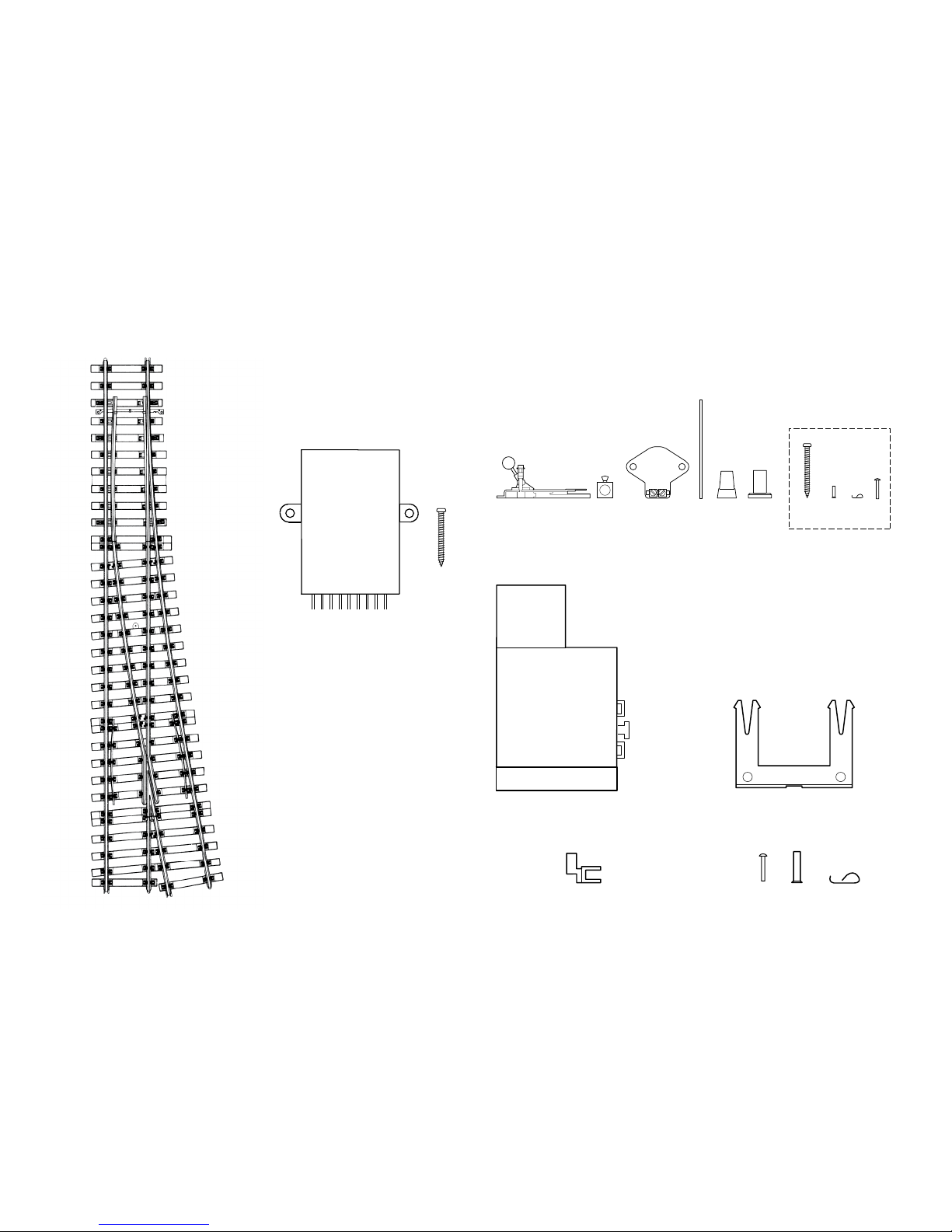
Lieferumfang 4
Sicherheitshinweise 5
Wichtige Hinweise 5
Funktionen 5
Decoder-Einbau 6
Entsorgung 6
Garantie 6
CV Programmierung 7
Vorbereitung und Aufbau 23
Programmier-Tabellen 29
Table of Contents Page
Contents as Delivered 4
Safety Notes 8
Important Information 8
Functions 8
Decoder Installation 9
Disposal 9
Warranty 9
CV Programming 10
Preparation and Building 23
Programming Table 29
Sommaire Page
Matériel fourni 4
Consignes de sécurité 11
Indications importantes 11
Fonctions 11
Installation du décodeur 12
Elimination 12
Garantie 12
Programmation des CV 13
Préparation et Construction 23
Tableau de programmation 29
Inhoudsopgave Pagina
Leveringsomvang 4
Veiligheidsvoorschriften 14
Belangrijke aanwijzingen 14
Werking 14
Decoder inbouwen 15
Afdanken 15
Garantie 15
CV-programmering 16
Voorbereiding en Structuur 23
Programmeertabel 29
Page 3

3
Índice Página
Alcance de suministro 4
Instrucciones de seguridad 17
Notas importantes 17
Funciones 17
Montaje del decoder 18
Eliminación 18
Garantía 18
Programación de variables CV 19
Preparación y construcción 23
Tabla de programación 29
Elenco del contenuto Pagina
Corredo di fornitura 4
Avvertenze di sicurezza 20
Avvertenze importanti 20
Funzioni 20
Montaggio del Decoder 21
Smaltimento 21
Garanzia 21
Programmazione delle CV 22
Preparazione e costruzione 23
Tabella di programmazione 29
Page 4
4
59083/59084
2 x2 x 2 x 1 x
2 x
Stellhebel und Weichenlaterne • Switch lever and turnout
lantern • Levier de commande et lanterne d’aiguille •
Wisselhandel en wissellantaarn • Palanca de mando y farol de
aguja • Leva di azionamento e lanterna per deviatoi
1 x 3 x2 x
2 x
Weichenmotor • Turnout motor • Moteur d’aiguille • Wisselsteller • Motor de agujas • Motore per deviatoi
Digital Decoder
Digital decoder
Le décodeur numérique
Digitaal-decoder
Decoder digital
Decoder Digital
Page 5

5
Sicherheitshinweise
• ACHTUNG! Funktionsbedingte scharfe Kanten und Spitzen.
• Darf nur in trockenen Räumen verwendet werden.
• Verkabelungs- und Montagearbeiten nur im spannungslosen
Zustand ausführen. Bei Nichtbeachtung kann es zu gefähr-
lichen Körperströmen und damit zu Verletzungen führen.
• Decoder nur mit der zulässigen Spannung (siehe technische
Daten) betreiben.
Beim Umgang mit dem Lötkolben besteht die Gefahr von
Hautverbrennungen.
Wichtige Hinweise
• Für den Einbau zusätzlich benötigtes Werkzeug: Pinzette
und Lötstation für eine Löttemperatur bis max. 30W/300˚mit
dünner Spitze, Elektronik-Lötzinn (Ø 0,5-1 mm), Entlötlitze oder
Entlötsaugpumpe.
• Achtung: Beim Einbau möglichst keine Bauteile auf der
Oberseite des Einbau-Digital-Decoders berühren, statische
Aufl adung kann die Funktion beeinträchtigen.
• Die Bedienungsanleitung ist Bestandteil des Produktes
und muss deshalb aufbewahrt sowie bei Weitergabe des
Produktes mitgegeben werden.
• Für Reparaturen wenden Sie sich bitte an Ihren MärklinFachhändler.
• Entsorgung: www.maerklin.com/en/imprint.html
Technische Daten
• Belastung Weichenausgang max. 300 mA
• Spannung Digitalstromkreis max. 20 V eff.
• Spannungsfestigkeit max. 40 V
Funktionen
• Multiprotokoll fähig: fx (MM) und DCC
• Einstellen der Betriebsart mittels DIP-Schalter
• Einstellbare Adressen mit DIP-Schalter:
1-256 fx (MM) (Control Unit 6021/Mobile Station 60651/652)
1-320 fx (MM) (Central Station 6021x/Mobile Station 60653)
1-511 (DCC)
• Programmierbare Adressen über CV –>
1-2044 DCC
• Änderungen der Eigenschaften über CV
• Stromversorgung über Digitalstromkreis
Page 6

6
Entsorgung
Hinweise zum Umweltschutz: Produkte, die mit
dem durchgestrichenen Mülleimer gekennzeichnet sind, dürfen am Ende ihrer Lebensdauer nicht
über den normalen Haushaltsmüll entsorgt
werden, sondern müssen an einem Sammelpunkt
für das Recycling von elektrischen und
elektronischen Geräten abgegeben werden. Das
Symbol auf dem Produkt, der Bedienungsanleitung oder der
Verpackung weist darauf hin. Die Werkstoffe sind gemäß ihrer
Kennzeichnung wiederverwertbar. Mit der Wiederverwendung,
der stofflichen Verwertung oder anderen Formen der
Verwertung von Altgeräten leisten Sie einen wichtigen Beitrag
zum Schutze unserer Umwelt. Bitte erfragen Sie bei Ihrer
Gemeindeverwaltung die zuständige Entsorgungsstelle.
Garantie
Gewährleistung und Garantie gemäß der beiliegenden
Garantie urkunde.
• Für Reparaturen wenden Sie sich bitte an Ihren MärklinFachhändler oder an
Gebr. Märklin & Cie. GmbH
Reparaturservice
Stuttgarter Str. 55 - 57
73033 Göppingen
Germany
Decoder-Einbau
Änderungen der Eigenschaften im fx (MM)-Protokoll durch CV
Programmierung oder zur DCC CV-Programmierung folgen Sie
dem Kapitel „CV Programmierung.“
Folgende Arbeitsschritte dürfen nur im spannungslosen
Zustand ausgeführt werden:
Beachten Sie, dass Einstellungen mit dem DIP-Schalter immer
spannungslos vorzunehmen sind. Der Einbau-Digital-Decoder
erkennt erst mit dem Einschalten der Spannung die aktuellen
Schalterstellungen.
Einbau des Einbau-Digital-Decoders in Märklin-Weiche siehe
Seite 23.
Ab Seite 29 finden Sie die Tabelle für die Adressierung mit
DIP-Schalter.
Page 7
7
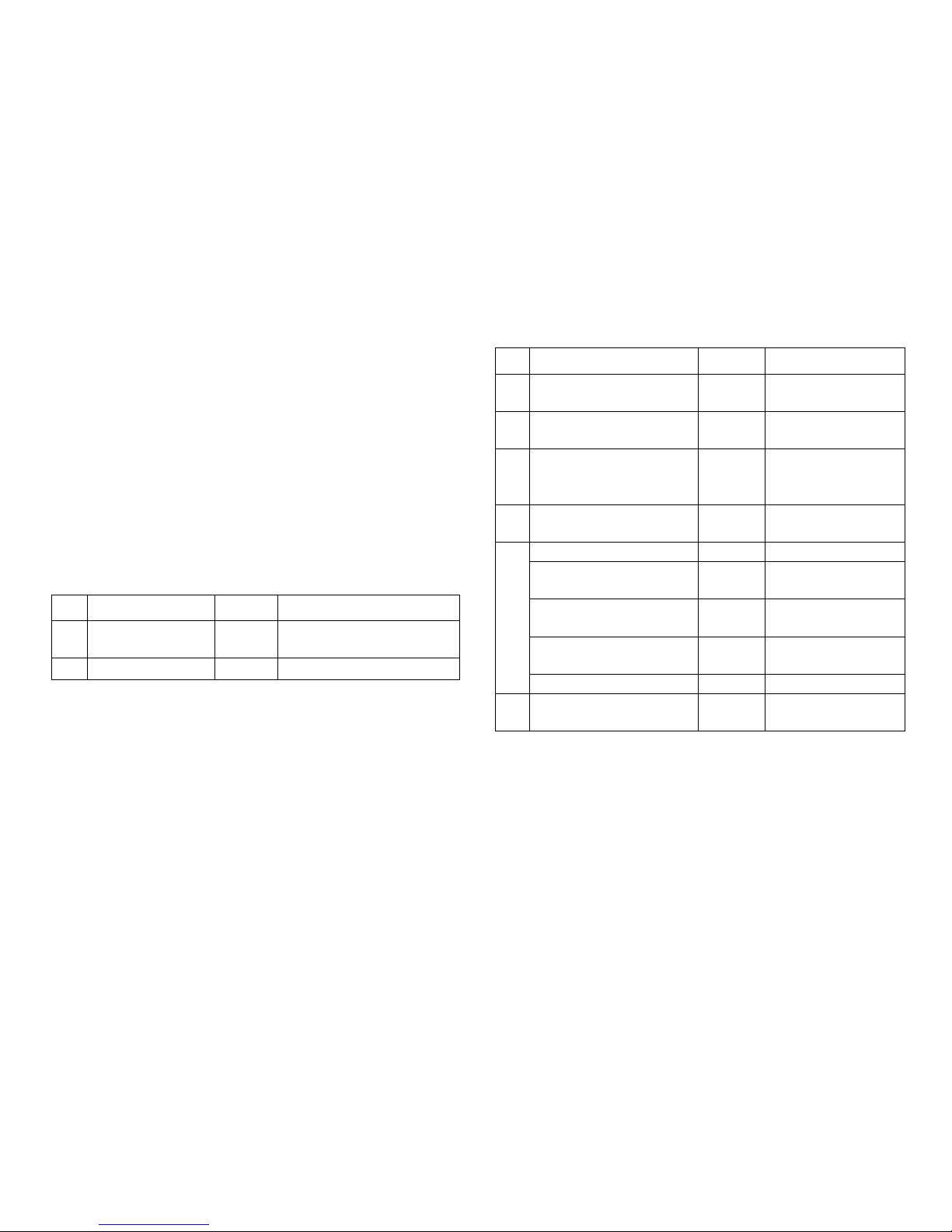
DCC
CV Bedeutung Werte
1 Adresse, niederwertige
Byte
0-255 (1)
7 Hersteller Versionsnum-
mer (Softwareversion)
(-) nur lesen
8 Hersteller Kennung ID
Decoder Reset
(131)
8 (-)
nur lesen,
Werkseinstellung, Wert
wird nicht geschrieben
9 Adresse, höherwertige
Byte
0-7 (0)
29 Konfiguration (192) nur lesen
Bit 0-4 werden nicht
verwendet
0
Bit 5: Decodertyp 0 / 32 Basis- o. erweiterter
Zubehördecoder
Bit 6: Adressierungs-
methode
0 / 64
Decoder- o. Ausgangsadresse
Bit 7: Decoderart 128 Zubehördecoder
37 Stellweg umkehren 0-1 (0) Ändert die Schaltrich-
tung
Einstellen und errechnen der Adressen größer 255:
Z.B. Adresse 1044 -> 1044:256=4,078125 . Der Wert vor dem
Komma (4) ist in CV 9 einzutragen. Den Wert nach dem Komma
(0,078125) wird mit 256 multipliziert 0,078125x256=20. Der errechnete Wert 20 muss in CV 1 eingetragen werden.
CV Programmierung
Die CV Programmierung muss am Programmiergleis erfolgen.
Für die Programmierung empfehlen wir, eine fiktive Lokomotive
anzulegen. Werte in Klammern sind die Werkseinstellungen.
Während der Datenübertragung blinkt zur Kontrolle die am
Einbau-Digital-Decoder angeschlossene Weichenlaterne.
fx (MM)
Vor der Programmierung muss die zu programmierende Weiche
mit dem Keyboard geschaltet werden. Danach unverzüglich mit
der Control Unit bzw. CV Konfiguration der Central Station die
CV geändert werden. Danach sofort die programmierte Weiche
wieder mit dem Keyboard schalten. Erst jetzt ist die Programmierung übernommen und wirksam.
CV Bedeutung Werte
8 Decoder-Reset 8 (-) Werkseinstellung, Wert
wird nicht geschrieben
37 Stellweg umkehren 0-1 (0) Ändert die Schaltrichtung
Die Vorgehensweise beim Programmieren mit der Control Unit
6021 entspricht der Lokprogrammierung (www.maerklin.de ->
Tools & Downloads -> Technische Informationen).
Page 8

8
Safety Notes
• IMPORTANT! This product has sharp edges and points related
to its function.
• This decoder may only be used in dry areas indoors.
• Do wiring and assembly work only in a voltage-free work en-
vironment. Otherwise you may experience electrical current
dangerous to the body leading to injury.
• Operate this decoder only with the permissible voltage
(see technical information).
When using a solder station there is the danger of
burning your skin.
Important Information
• Additional tools required for installation: tweezers and solde-
ring station for a maximum soldering temperature of 30 watts
/ 300˚ Celsius / 572˚ Fahrenheit with a fi ne point, Electronic
solder (0.5-1 mm dia.), desoldering braid or desoldering pump.
• Important: When installing the digital installation decoder, try
to avoid touching components on the upper side of the decoder. Static charge can affect the function of the decoder.
• The operating instructions are a component part of the
product and must therefore be kept with the product,
particularly when it is given to another party.
• For repairs please see your authorized Märklin specialty
dealer.
• Disposing: www.maerklin.com/en/imprint.html
Technical Data
• Load at turnout output max. 300 amps
• Voltage for the digital power circuit max. 20 volts eff.
• Electrical strength max. 40 volts
Functions
• Capable of multi-protocols: fx (MM) and DCC
• Mode of operation set with DIP switches
• Addresses can be set with DIP switches:
1-256 fx (MM) (Control Unit 6021/Mobile Station 60651/652)
1-320 fx (MM) (Central Station 6021x/Mobile Station 60653)
1-511 (DCC)
• Programmable addresses using CVs –>
1-2044 DCC
• Changes to characteristics can be done with CVs
• Power supply done using the digital power circuit
Page 9

9
Decoder Installation
See the section “CV Programming” for changes to other characteristics in the fx (MM) protocol using CV programming or to
the DCC CV programming.
The following work steps may only be done in a voltage-free
work environment:
Note: Settings with the DIP switches are to be only when the
voltage is turned off. The digital installation decoder does not
recognize the current switch settings until the voltage is turned
on.
See page 23 for installation of the digital installation decoder
in Märklin standard turnouts, curved turnouts, or double slip
switches.
Starting on page 29 you’ll find the table for setting addresses
with DIP switches.
Disposal
Information about protecting the environment:
Products marked with a trashcan with a line
through it may not be disposed of at the end of
their useful life along with the normal household
trash. They must be taken to a collection point for
recycling electrical and electronic devices. The
symbol on the product, the instructions, or the
packaging indicates this. Depending on their description, the
raw materials can be used again. You make an important
contribution to the protection of our environment with the
recycling of this material from old devices. Please inquire in
your community about the appropriate disposal site.
Warranty
The warranty terms are stated on the warranty card included
with this product.
• U.S. only:
Märklin, Inc.
PO Box 510559
New Berlin WI 53151
Phone: 262-522-7080
Fax: 262-522-7288
Email: [email protected]
Technical Hotline
Contacts: Curtis Jeung & Rick Sinclair, Digital Consultants
Telephone: 650-569-1318
Hours: 6:00am – 9:00pm PST, Monday through Friday
E-mail: [email protected]
• GB only
Gebr. Märklin & Cie. GmbH
Reparaturservice
Stuttgarter Str. 55 - 57
73033 Göppingen
Germany
Page 10
10
CV Programming
CV programming must be done on the programming track.
We recommend creating a fictitious locomotive for programming purposes. Values in parentheses are the factory settings.
The turnout lantern connected to the digital installation decoder
will blink as a control check during the data transmission.
fx (MM)
Before doing any programming, the turnout to be programmed
must be switched with the Keyboard. After that the CVs are
changed immediately with the Control Unit or the CV configuration on the Central Station. After that the programmed turnout
is to be switched again with the Keyboard. At this point the
programming is accepted and is functional.
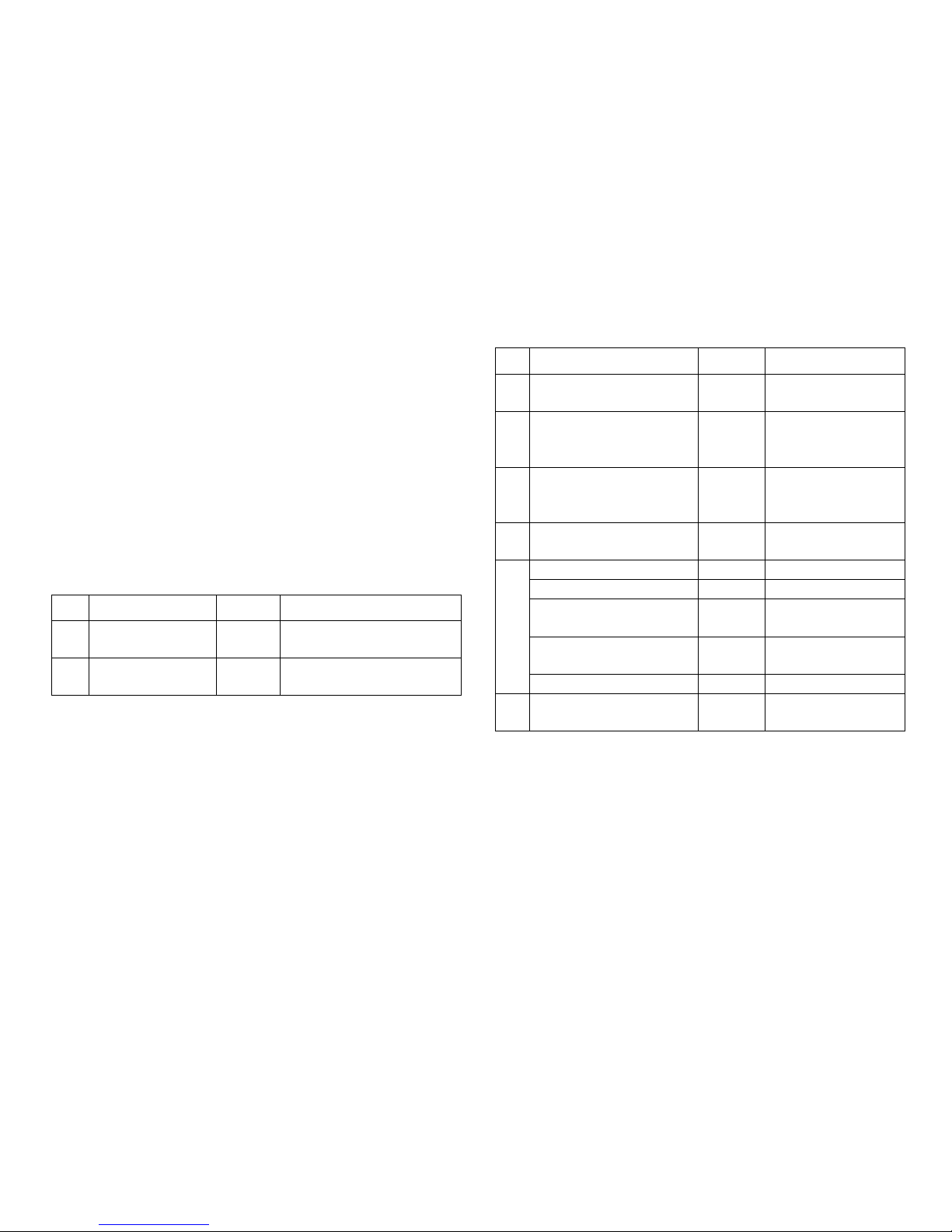
CV Meaning Values
8 Decoder reset 8 (-) factory setting, not written
value is
37
Reverse travel
range
0-1 (0)
Changes the electrical
switching direction
The procedure for programming with the 6021 Control Unit is
the same as locomotive programming (www.maerklin.de ->
Tools & Downloads -> Technische Informationen).
DCC
CV Meaning Values
1
Address, lower value
Byte
0-255 (1)
7
Manufacturer version
number (software
version)
(-) read only
8
Manufacture recognition
ID Decoder reset
(131)
8 (-)
read only,
factory setting, value
is not written
9
Address, higher value
Byte
0-7 (0)
29 Configuration (192) read only
Bits 0-4 are not used 0
Bit 5: Decoder type 0 / 32 basic or advanced
accessory decoder
Bit 6: Addressing method
0 / 64
decoder or output
address
Bit 7: Decoder type 128 accessory decoder
37 Reverse travel range 0-1 (0)
Changes the electrical
switching direction
Setting and generating addresses larger than 255:
Example: Address 1044 -> 1044:256=4,078125 . The value before
the comma (4) is to be entered in CV 9. The value after the com-
ma (0,078125) is multiplied by 256, 078125x256=20. The value of 20
that is generated must be entered in CV 1.
Page 11

11
Consignes de sécurité
• ATTENTION ! L’appareil présente des arêtes coupantes.
• A utiliser exclusivement dans des pièces sèches.
• Câblage et montage doivent être réalisés uniquement quand
l’appareil est hors tension. Le non respect de ces consignes
peut générer des courants de choc dangereux et être à
l’origine de blessures.
• Exploiter le décodeur uniquement avec la tension autorisée
(voir caractéristiques techniques).
Risques de brûlures lors de la manipulation du fer à
souder.
Indications importantes
• Outils nécessaires à l’installation : Pincette et poste à ouder
pour une température de brasage maximale de 30 W/300˚avec
pointe ne, l à souder pour électronique (Ø 0,5-1 mm), tresse
à dessouder ou pompe à dessouder.
• Attention : Lors de l’installation, éviter dans la mesure du
possible de toucher les composants situés sur la face supé-
rieure du décodeur numérique, une charge statique pouvant
entraver le fonctionnement.
• La notice d‘utilisation fait partie intégrante du produit ; elle
doit donc être conservée et, le cas échéant, transmise avec
le produit.
• Pour toute réparation, adressez-vous SVP à votre détaillant
spécialisé Märklin.
• Elimination : www.maerklin.com/en/imprint.html
Caractéristiques techniques
• Charge sortie aiguille max. 300 mA
• Tension circuit numérique max. 20 V eff.
• Tenue en tension max. 40 V
Fonctions
• multi protocole: fx (MM) et DCC
• Dé nition du mode d’exploitation via commutateur DIP
• Dé nition des adresses possible via commutateur DIP :
1-256 fx (MM) (Control Unit 6021/Mobile Station 60651/652)
1-320 fx (MM) (Central Station 6021x/Mobile Station 60653)
1-511 (DCC)
• Adresses programmables via CV –>
1-2 044 DCC
• Modi cations des propriétés via CV
• Alimentation en courant via circuit numérique
Page 12

12
Installation du décodeur
Pour modier les autres caractéristiques dans le protocole
fx (MM) via la programmation des CV ou pour la programmation
des CV dans le protocole DCC, veuillez suivre les indications du
chapitre « Programmation des CV ».
L’installation, dont les différentes étapes sont décrites
ci- dessous, doit impérativement être réalisée hors tension :
Attention : Les paramétrages avec le commutateur DIP doivent
toujours se faire hors tension. Le décodeur numérique ne
reconnaît les nouvelles positions du commutateur qu’à la mise
sous tension.
Installation du décodeur numérique dans les aiguillages
Märklin : voir page 23.
Vous trouverez le tableau pour la définition des adresses avec
commutateur DIP à partir de la page 29.
Elimination
Indications relatives à la protection de
l’environnement : Les produits marqués du signe
représentant une poubelle barrée ne peuvent être
éliminés en n de vie via les ordures ménagères
normales, mais doivent être remis à un centre de
collecte pour le recyclage des appareils
électriques et électroniques. Le symbole gurant
sur le produit lui-même, la notice d’utilisation ou l’emballage
l’indique. Les matériaux sont recyclables selon leur marquage.
Avec le recyclage, la récupération des matériaux ou autres
formes de valorisation de vieux appareils, vous contribuez
sensiblement à la protection de notre environnement.
Renseignez-vous auprès de votre municipalité sur les centres
compétents pour le traitement des déchets.
Garantie
Garantie légale et garantie contractuelle conformément au bon
de garantie ci-joint.
• Pour toute réparation, veuillez vous adresser à votre
détaillant spécialisé Märklin ou à
Gebr. Märklin & Cie. GmbH
Reparaturservice
Stuttgarter Str. 55 - 57
73033 Göppingen
Germany
Page 13
13
Programmation des CV
La programmation des CV se fait sur la voie de programmation.
Pour la programmation, nous vous conseillons de créer une
locomotive ctive. Les valeurs indiquées entre parenthèses
correspondent aux paramètres d‘usine.
Durant la transmission des données, la lanterne d’aiguille
raccordée au décodeur numérique clignote (contrôle).
fx (MM)
Avant de procéder à la programmation, commutez l’aiguille à
programmer via le Keyboard. Modifiez ensuite sans attendre
la CV avec la Control Unit, respectivement via la fonction de
configuration des CV de la Central Station. Commutez alors à
nouveau et immédiatement l’aiguille programmée via le Keyboard. La programmation est enfin enregistrée et effective.
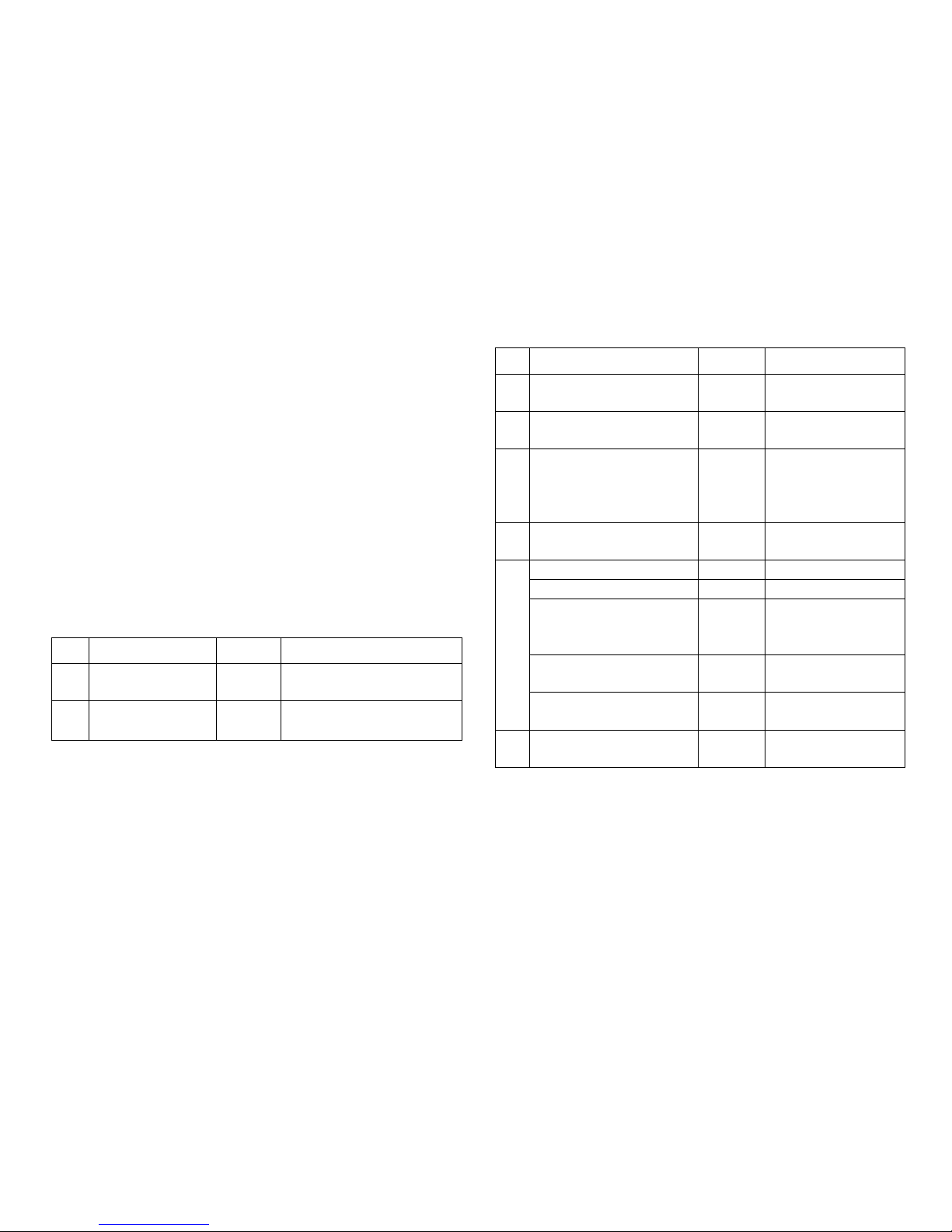
CV Signification Valeurs
8 Réinitialisation du
décodeur
8 (-) Paramètre d’usine, la va-
leur n’est pas enregistrée
37 Inverser la course
de manoeuvre
0-1 (0) Modifie le sens de com-
mutation
La procédure à suivre pour la programmation avec la
Central Unit 6021 correspond à la programmation de la loco
(www.maerklin.de -> Tools & Downloads -> Technische
Informationen).
DCC
CV Signification Valeurs
1 Adresse, octet de valeur
basse
0-255 (1)
7 Numéro de version fabri-
cant (version logicielle)
(-) Lire uniquement
8 Identifiant du fabricant
Réinitialisation du
décodeur
(131)
8 (-)
Lire uniquement,
paramètre d’usine,
la valeur n’est pas
enregistrée
9 Adresse, octet de valeur
supérieure
0-7 (0)
29 Configuration (192) Lire uniquement
Bits 0 à 4 non utilisés 0
Bit 5: Type de décodeur 0 / 32 Décodeur
d‘accessoires de
base ou avancé
Bit 6: Méthode
d’adressage
0 / 64
Adresse du décodeur
ou adresse de départ
Bit 7: Type de décodeur 128 Décodeur
d’accessoires
37 Inverser la course de
manoeuvre
0-1 (0) Modifie le sens de
commutation
Dénition et calcul des adresses supérieures à 255 :
Par ex. Adresse 1044 -> 1044:256=4,078125 . La valeur avant la
virgule (4) est à reporter dans la CV 9. La valeur située après
la virgule (0,078125) est multipliée par 256 0,078125x256=20.
La valeur calculée 20 est à reporter dans la CV 1.
Page 14

14
Veiligheidsvoorschriften
• Let op! bevat vanwege zijn functie scherpe randen en punten.
• Mag alleen in droge ruimtes gebruikt worden.
• Bedrading- en montage alleen in spanningloze toestand uitvoe-
ren. Bij het niet naleven kunnen er gevaarlijke stromen door het
lichaam vloeien en verwondingen ontstaan.
• Decoder alleen met de toegelaten spanning (zie technische
gegevens) gebruiken.
Bij het werken met een soldeerbout bestaat het gevaar
voor brandwonden.
Belangrijke aanwijzingen
•
Voor het inbouwen is het volgende gereedschap nodig:
pincet en soldeerstation met een maximale temperatuur van
30 W/300° C met een dunne stift, elektronica soldeertin (0.5 1mm), desoldeerlitze of soldeertinzuiger.
• Let op: bij het inbouwen de delen op de bovenzijde van de
inbouw-digitaaldecoder niet aanraken, statische ontlading
kan de juiste werking be invloeden.
• De gebruiksaanwijzing is onderdeel van het product en moet
derhalve bij de overdracht van het product meegegeven
worden.
• Voor reparaties kunt u zich tot uw Märklin dealer wenden.
• Afdanken: www.maerklin.com/en/imprint.hmtl
Technische gegevens
• Belasting wisseluitgang max. 300 mA
• Spanning digitale stroomkring max. 20 V eff.
• Diëlektrische sterkte max. 40 V
Werking
• Multiprotocol: fx (MM) en DCC
• Instellen van het bedrijfssysteem met DIP-schakelaar
• Instellen van het adres met DIP-schakelaar
1-256 fx (MM) (Control Unit 6021/Mobile Station 60651/652)
1-320 fx (MM) (Central Station 6021x/Mobile Station 60653)
1-511 (DCC)
• Programeerbare adressen via CV –>
1-2044 DCC
• Wijzigen van de eigenschappen via CV
• Stroomvoorziening via digitale stroomkring
Page 15

15
Decoder inbouwen
Veranderen van de te wijzigende eigenschappen in het fx (MM)
protocol door CV programmering of het DCC CV programmering
vindt u in het hoofdstuk “CV programmering”.
De volgende stappen mogen alleen in spanningloze toestand
uitgevoerd worden:
Let op: instellingen van de DIP-schakelaars alleen in span-
ningloze toestand uitvoeren. De inbouw-digitaaldecoder herkend
de actuele schakelaarstand pas na het inschakelen van de
voedingsspanning.
Inbouw van de inbouw-digitaaldecoder in de Märklin wissels zie
pagina 23.
Vanaf pagina 29 vindt u de tabel voor de adressering met de
DIP-schakelaars.
Afdanken
Milieu-informatie: producten, die met de
doorgestreepte afvalcontainer zijn gemarkeerd,
mogen aan het einde van hun levensduur niet met
het normale huisvuil meegegeven worden, maar
moeten op een verzamelpunt voor de recycling van
elektrische en elektronische apparatuur afgegeven
worden. Het symbool op het product, op de
handleiding of op de verpakking geeft dit aan. De materialen
worden gerecycled in overeenstemming met hun identificatie.
Met het hergebruik van de grondstoffen of andere vormen van
het hergebruik van oude apparatuur levert u een belangrijke
bijdrage aan de bescherming van ons milieu. Neem contact op
met uw gemeente voor een bevoegde plaatselijke inzamelplaats.
Garantie
Waarborg en garantie volgens bijgevoegd garantiebewijs.
• Voor reparaties kunt u zich wenden tot uw Märklin dealer
of tot
Gebr. Märklin & Cie. GmbH
Reparaturservice
Stuttgarter Str. 55 - 57
73033 Göppingen
Germany
Page 16
16
CV Programmering
De CV programmering moet via het programmeerspoor gebeuren. Voor het programmeren is het aan te bevelen een fictive
loc aan te maken. De waarden tussen haakjes zijn de af fabriek
ingestelde waarden.
Tijdens de dataoverdracht knippert, ter controle, de aan de
inbouw-digitaaldecoder aangesloten wisselantaarn.
fx (MM)
Voor het programmeren moet de te programmeren wissel met
het keyboard geschakeld worden. Daarna onmiddellijk met de
Control Unit resp. via CV configuratie met het Central Station de
CV wijzigen. Daarna direct de geprogrammeerde wissel met het
keyboard schakelen. Pas dan is de programmering overgenomen en werkzaam.
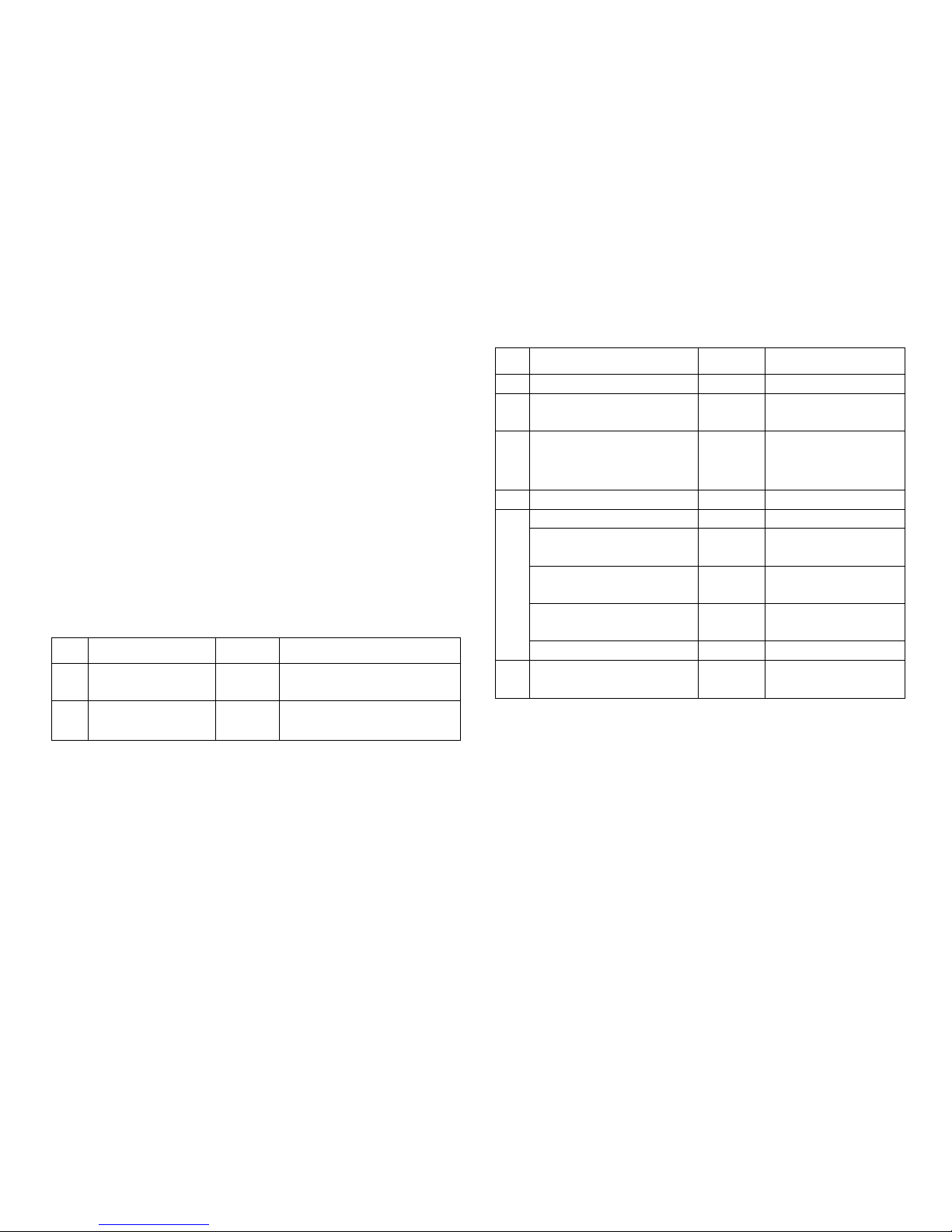
CV Omschrijving Waarde
8 Decoder reset 8 (-) Fabrieksinstelling, waarde
wordt niet geschreven
37 Stelrichting
omkeren
0-1 (0)Wijzigd de schakelrichting
De werkwijze bij het programmeren met de Control Unit 6021
komt overeen met het programmeren van een locomotief-
decoder (www.maerklin.de -> Tools & Downloads -> Technische
Informationen).
DCC
CV Omschrijving Waarde
1 Adres, lage byte 0-255 (1)
7 Fabrikant versienummer
(softwareversie)
(-) alleen lezen
8 Fabrikant kenmerk ID
decoder reset
(131)
8 (-)
alleen lezen, fabrieksinstelling, waarde
wordt niet geschreven
9 Adres, hoge byte 0-7 (0)
29 Configuratie (192) alleen lezen
Bit 0-4 worden niet
gebruikt
0
Bit 5: decodertype 0 / 32 Basis- of uitgebreide
toebehoren decoder
Bit 6: adresseringsmethode
0 / 64
Decoder of uitgangsadres
Bit 7: decodertype 128 Toebehoren decoder
37 Stelrichting omkeren 0-1 (0) Wijzigd de schakel-
richting
Instellen en berekenen van de adressen groter dan 255:
Bijv. adres 1044 -> 1044:256=4,078125. De waarde voor de komma
(4) moet in CV 9 ingevoerd worden. De waarde achter de komma
(0,078125) wordt nu met 256 vermenigvuldigd 0,078125x256=20.
De berekende waarde 20 moet in CV 1 ingevoerd worden.
Page 17

17
Instrucciones de seguridad
• ¡ATENCIÓN! El diseño presenta aristas y puntas cortantes
impuestas por las características funcionales.
• Su uso está permitido únicamente en recintos secos.
• Ejecutar los trabajos de cableado y montaje únicamente
sin tensión. En el caso de inobservancia pueden producirse
corrientes peligrosas a través del cuerpo y, por tanto, lesiones.
• Utilizar el decoder únicamente con la tensión admisible
(véase Datos técnicos).
Al manejar el soldador pueden producirse quemaduras de
la piel.
Notas importantes
• Herramienta adicional necesaria para el montaje: Pinza y
estación de soldadura para una temperatura de soldeo de máx.
30W/300˚ con punta fi na, estaño de soldar para electrónica
(Ø 0,5-1 mm), cordón de desoldeo o bomba aspiradora de
desoldeo.
• Atención: En el montaje, a ser posible, no tocar componentes
situados en el lado superior del decoder digital integrable ya
que las cargas estáticas pueden perjudicar a su funciona-
miento.
• Las instrucciones de empleo forman parte integrante del
producto y, por este motivo, deben conservarse y entregarse
al nuevo comprador en el caso de venta del mismo.
• Para reparaciones, por favor diríjase a su distribuidor
especializado de Märklin.
• Eliminación: www.maerklin.com/en/imprint.html
Datos técnicos
• Carga por salida de desvío max. 300 mA
• Tensión de circuito digital máx. 20 V e .
• Rigidez dieléctrica máx. 40 V
Funciones
• Apto para múltiples protocolos: fx (MM) y DCC
• Con guración del modo mediante microinterruptor DIP
• Direcciones con gurables mediante interruptor DIP:
1-256 fx (MM) (Control Unit 6021/Mobile Station 60651/652)
1-320 fx (MM) (Central Station 6021x/Mobile Station 60653)
1-511 (DCC)
• Direcciones programables mediante variables CV –>
–> 1-2044 DCC
• Modi cación de las características mediante variables CV
• Alimentación eléctrica mediante circuito digital
Page 18

18
Montaje del decoder
En el capítulo “Programación de las CVs” se explican las
modificaciones de las demás características en el protocolo
fx (MM) mediante programaciones de variables CV o para la
programación de variables CV en el protocolo DCC.
Está permitido ejecutar las siguientes operaciones únicamente sin tensión.
Nota importante: Realizar los ajustes con el microinterruptor
DIP siempre sin tensión. El decoder digital integrable no reconoce las posiciones actuales de los microinterruptores hasta
que no se enciende la alimentación eléctrica.
Para el montaje del decoder digital integrable en un desvío
estándar, un desvío en curvas o una travesía de unión doble de
Märklin, véase Página 23.
A partir de la página 29 encontrará la tabla para el direccionamiento con microinterruptores DIP.
Eliminación
Instrucciones para protección del medio
ambiente: Los productos identicados con el
cubo de basura tachado no deben eliminarse
junto con la basura doméstica normal y corriente
una vez alcanzado el nal de su vida útil, sino que
deben entregarse en un punto de recogida para el
reciclaje de equipos eléctricos y electrónicos. El
símbolo que aparece en el producto, en las instrucciones de
empleo o en el embalaje hace referencia a ello. Los materiales
son reutilizables conforme a su identificación. Con la
reutilización, el aprovechamiento de los materiales u otras
formas de reciclado de aparatos viejos hacemos una
aportación importante a la protección del medio ambiente.
Consulte en su Ayuntamiento cuál es la entidad de recogida
competente.
Garantía
La garantía legal y la garantía del fabricante se basan en el
documento de garantía adjunto.
• Para reparaciones, diríjase a su distribuidor profesional de
Märklin-
o a
Gebr. Märklin & Cie. GmbH
Reparaturservice
Stuttgarter Str. 55 - 57
73033 Göppingen
Germany
Page 19
19
Programación de variables CV
La programación de variables CV debe realizarse en la vía de
programación. Para la programación recomendamos crear una
locomotora ficticia. Los valores entre paréntesis representan la
configuración de fábrica.
Durante la transmisión de datos, para comprobación, destella el
farol de aguja conectado al decoder digital integrable.
fx (MM)
Antes de la programación, debe conmutarse con el Keyboard
el desvío que se desee programar. Inmediatamente después
debe modificarse la CV con la Control Unit o bien con la función
Configuración de CV de la Central Station. A continuación,
conmutar de nuevo inmediatamente el desvío programado.
Hasta que esto no se haya hecho no se aplicará ni tendrá efecto
la programación.
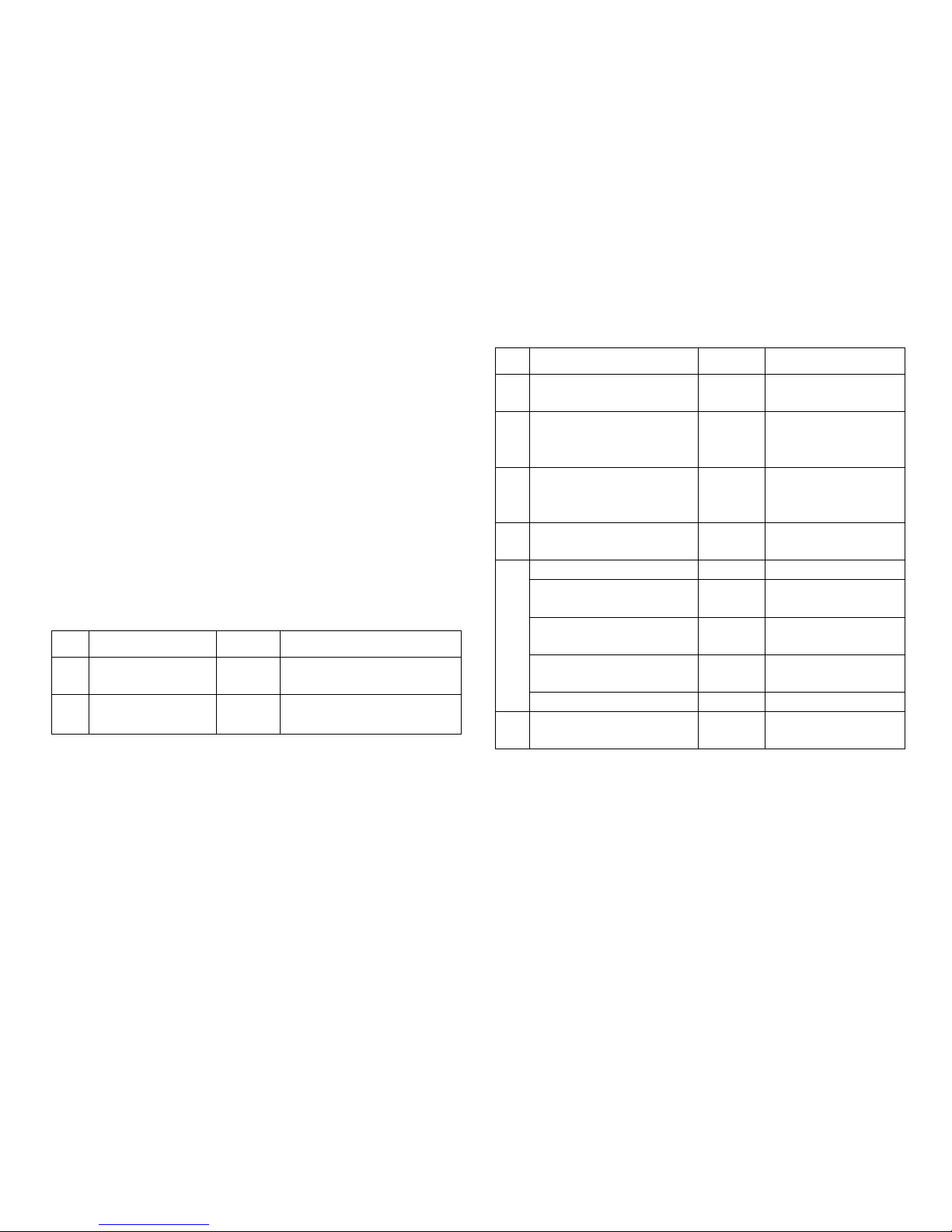
CV Significado Valores
8 Reset de decoder 8 (-) Configuración de fábrica,
no se escribe el valor
37 Invertir el recorrido
de enclavamiento
0-1 (0) Cambia el sentido de
maniobra
El procedimiento en la programación con la Central Unit equivale
a la programación de locomotora (www.maerklin.de -> Tools &
Downloads -> Technische Informationen).
DCC
CV Significado Valores
1 Dirección, byte de menor
peso
0-255 (1)
7 Número de versión de
fabricante (versión de
software)
(-) Sólo lectura
8 ID ident. de fabricante
Reset de decoder
(131)
8 (-)
Sólo lectura, configuración de fábrica, no
se escribe el valor
9 Dirección, byte de mayor
peso
0-7 (0)
29 Configuración (192) Sólo lectura
Bit 0-4 No se utilizan
los bits
0
Bit 5: Modelo de decoder 0 / 32 Decoder accesorio
básico o ampliado
Bit 6: Método de
direccionamiento
0 / 64
Dirección de
decoder o inicial
Bit 7: Tipo de decoder 128 Decoder accesorio
37 Invertir el recorrido de
enclavamiento
0-1 (0) Cambia el sentido de
maniobra
Conguración y cálculo de las direcciones mayores que 255:
P. ej., dirección 1044 -> 1044:256=4,078125. El valor antes de la
coma (4) debe registrarse en la CV 9. El valor después de la
coma (0,078125) se multiplica por 256 0,078125x256=20. El valor
calculado 20 debe registrarse en CV 1.
Page 20

20
Avvertenze di sicurezza
• ATTENZIONE! Spigoli e punte affi lati per necessità funzionale.
• Deve essere impiegato solamente in luoghi asciutti.
• Si eseguano i lavori di cablaggio e di montaggio solo in condizioni esenti da tensione. In caso di mancato rispetto questo
può condurre a pericolose correnti nel corpo e di conseguenza
a ferimenti.
• Si faccia funzionare il Decoder solamente con la tensione
ammissibile (si vedano i dati tecnici).
Durante le operazioni con il saldatore sussiste il pericolo di
scottature della pelle.
Avvertenze importanti
•
Attrezzi necessari in aggiunta per il montaggio: una pinzetta e
una stazione di saldatura per una temperatura di saldatura sino
a un max. di 30W/300˚ con una punta sottile, lega per saldature
elettroniche (Ø 0,5-1 mm), trecciola dissaldante oppure pompetta aspirante per dissaldare.
• Attenzione: durante il montaggio si tocchino il meno possibile
i componenti sul lato superiore del Decoder Digital installabile, le cariche statiche possono compromettere la funzionalità.
• Le istruzioni di impiego costituiscono parte integrante del pro-
dotto e devono pertanto venire conservate con cura nonché
consegnate insieme in caso di cessione a terzi del prodotto.
• Per riparazioni Vi preghiamo di rivolgerVi al Vostro rivenditore
specialista Märklin.
• Smaltimento: www.maerklin.com/en/imprint.html
Dati tecnici
• Carico dell’uscita per deviatoi max. 300 mA
• Tensione nel circuito di corrente Digital max. 20 V eff.
• Rigidità dielettrica max. 40 V
Funzioni
• Capacità multi-protocollo: fx (MM) und DCC
• Impostazione del tipo di funzionamento a mezzo commutatori
DIP
• Indirizzi impostabili con commutatori DIP:
1-256 fx (MM) (Control Unit 6021/Mobile Station 60651/652)
1-320 fx (MM) (Central Station 6021x/Mobile Station 60653)
1-511 (DCC)
• Indirizzi programmabili tramite CV –>
1-2044 DCC
• Modi cazione delle caratteristiche tramite CV
• Alimentazione di corrente tramite circuito di corrente Digital
Page 21

21
Montaggio del Decoder
Per modificazioni delle altre caratteristiche nel protocollo fx
(MM) mediante programmazione delle CV oppure per programmazione delle CV in DCC seguite il capitolo «Programmazione
delle CV.»
I seguenti passaggi del lavoro devono essere eseguiti solamente in condizioni esenti da tensione.
Prestate attenzione: si intraprendano le impostazioni con il
commutatore DIP sempre senza tensione. Il Decoder Digital
installabile riconosce le attuali disposizioni del commutatore
solo con l’attivazione della tensione.
Per il montaggio del Decoder Digital installabile in deviatoi
Märklin si veda a pagina 23.
A partire da pagina 29 potete trovare la tabella per l’indirizzamento con il commutatore DIP.
Smaltimento
Avvertenze per la salvaguardia ambientale: i
prodotti che sono contraddistinti con la pattumiera
cancellata, alla fine della loro durata di vita non
devono venire smaltiti tramite i normali rifiuti
domestici, bensì devono venire conferiti ad un
punto di raccolta per il riciclo di apparecchi
elettrici ed elettronici. Tale simbolo sul prodotto,
sulle istruzioni di impiego oppure sulla confezione dà avviso di
questo. I materiali sono nuovamente utilizzabili in conformità al
loro simbolo di riconoscimento. Con il riutilizzo, la valorizzazione
dei materiali oppure altre forme di recupero degli apparecchi
vecchi Voi fornite un importante contributo alla salvaguardia del
nostro ambiente. Vi preghiamo di chiedere presso la Vostra
amministrazione municipale i punti di smaltimento autorizzati.
Garanzia
Prestazioni di garanzia e garanzie in conformità all’accluso
certificato di garanzia.
• Per riparazioni Vi preghiamo di rivolgerVi al Vostro rivenditore
specialista Märklin oppure a
Gebr. Märklin & Cie. GmbH
Reparaturservice
Stuttgarter Str. 55 - 57
73033 Göppingen
Germany
Page 22
22
Programmazione delle CV
La programmazione delle CV deve avvenire sul binario di
programmazione. Per tale programmazione noi consigliamo di
inserire una locomotiva immaginaria. I valori tra parentesi sono
le impostazioni di fabbrica.
Durante la trasmissione dei dati lampeggia per controllo la
lanterna da deviatoi collegata al Decoder Digital installabile.
fx (MM)
Prima della programmazione il deviatoio da programmare deve
venire commutato con la Keyboard. Dopo di ciò le CV vengono
immediatamente modificate con la Control Unit o rispettivamente
la configurazione CV della Central Station. Dopodiché si commuti
subito nuovamente il deviatoio programmato con la Keyboard.
Soltanto ora la programmazione è acquisita ed operativa.
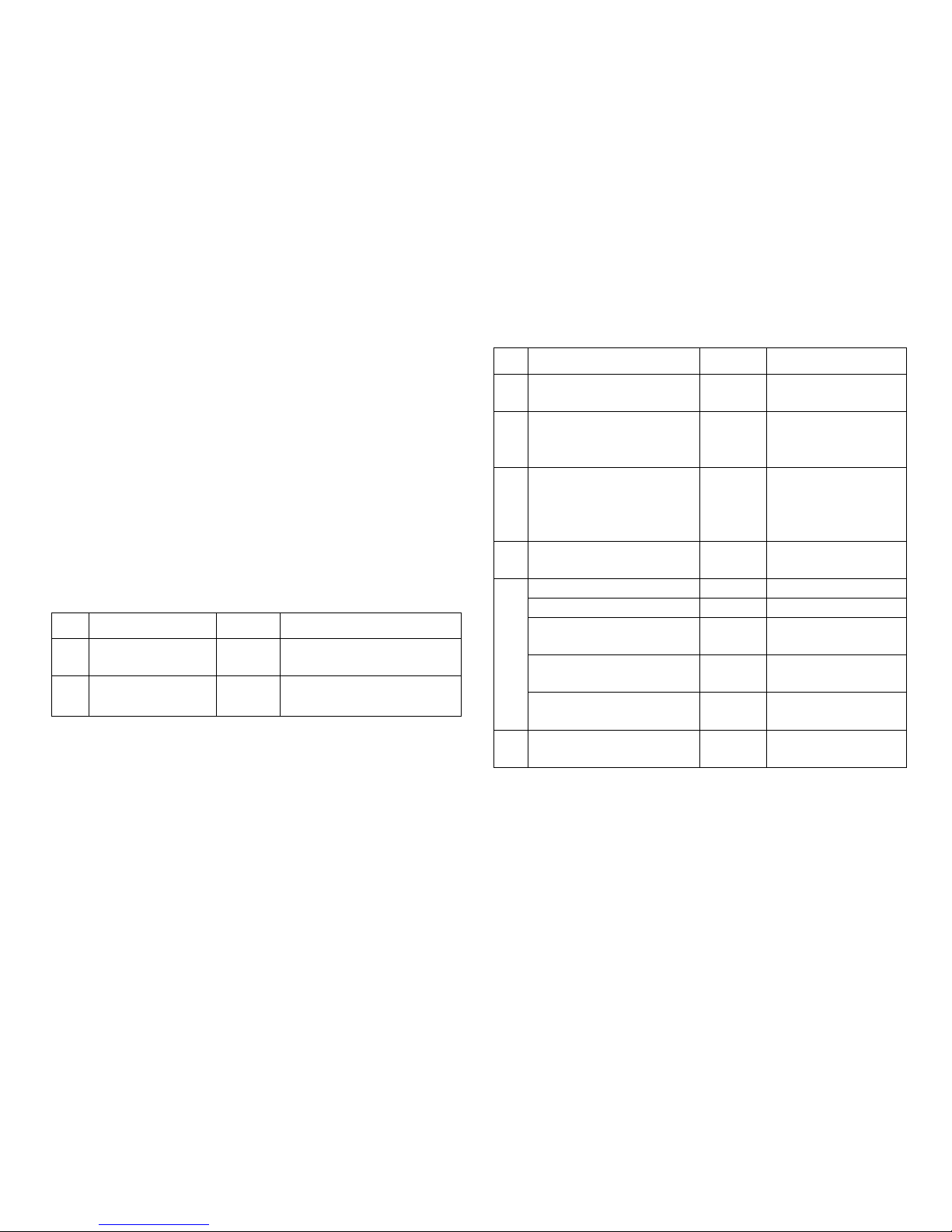
CV Significato Valori
8 Ripristino Decoder 8 (-) Impostazioni di fabbrica, il
valore non viene scritto
37 Inversione corsa di
lavoro
0-1 (0) Modifica la direzione di
commutazione
Il modo operativo nella programmazione con la Central Unit 6021
corrisponde alla programmazione della locomotive
(www.maerklin.de -> Tools & Downloads -> Technische
Informationen).
DCC
CV Significato Valori
1 Indirizzo, byte di valore
più basso
0-255 (1)
7 Numero di versione del
fabbricante (Versione
Software)
(-) sola lettura
8 ID identificativo del
fabbricante
Ripristino Decoder
(131)
8 (-)
sola lettura,
Impostazioni di
fabbrica, il valore non
viene scritto
9 Indirizzo, byte di valore
più alto
0-7 (0)
29 Configurazione (192) sola lettura
I bit 0-4 non vengono usati 0
Bit 5: tipo di Decoder 0 / 32 Decoder per acces-
sori di base o esteso
Bit 6: metodo di indirizzamento
0 / 64
Indirizzo Decoder
o di uscita
Bit 7: tipo di Decoder 128 Decoder per
accessori
37 Inversione corsa di lavoro 0-1 (0) Modifica la direzione
di commutazione
Impostazione e calcolo degli indirizzi maggiori di 255:
Ad es. indirizzo 1044 -> 1044:256=4,078125 . Il valore prima della
virgola (4) si deve inserire in CV 9. Il valore dopo la virgola
(0,078125) viene moltiplicato per 256: 0,078125x256=20. Il valore
calcolato 20 deve venire inserito in CV 1.
Page 23
23
13 mm
< 0,35 mm²
C
d
e
a
b
1.
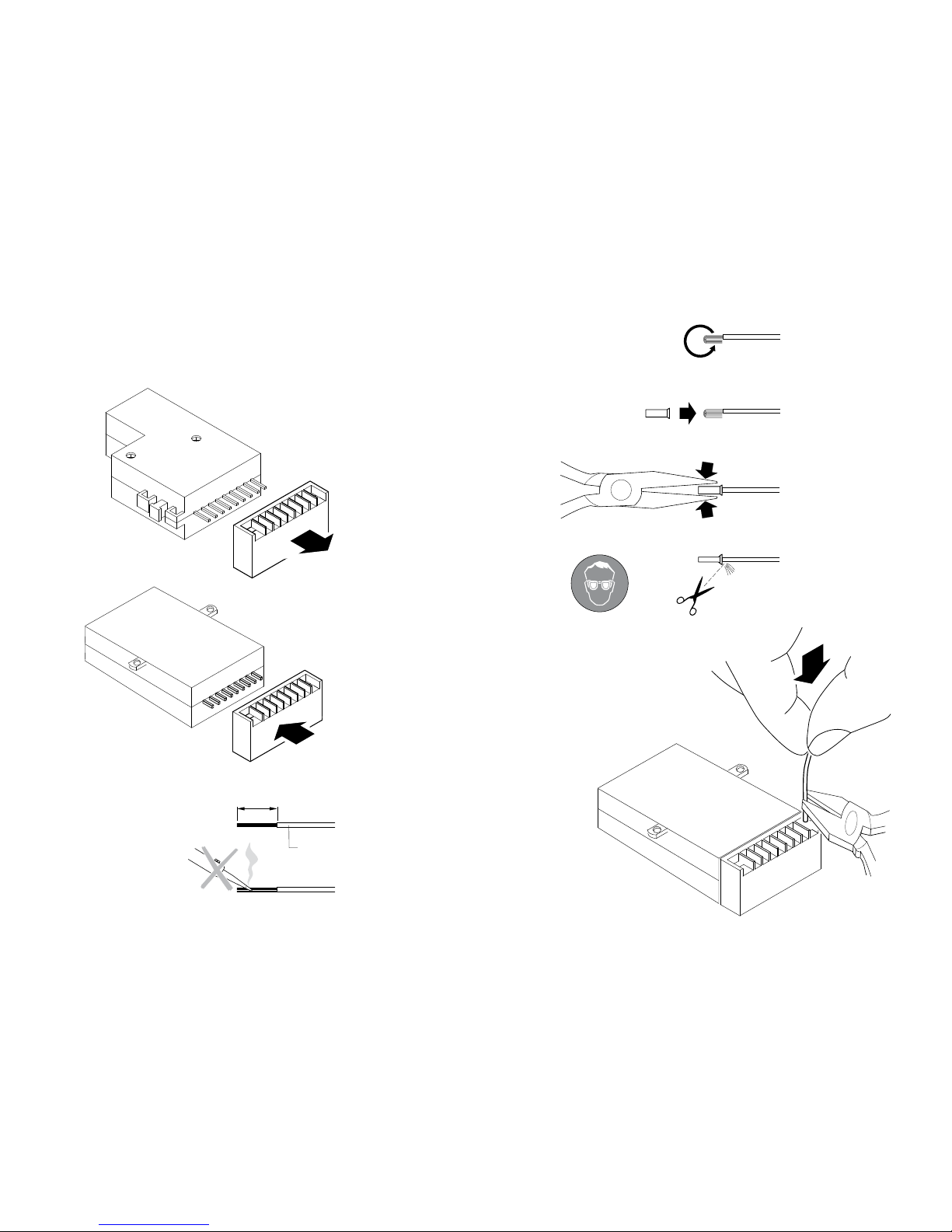
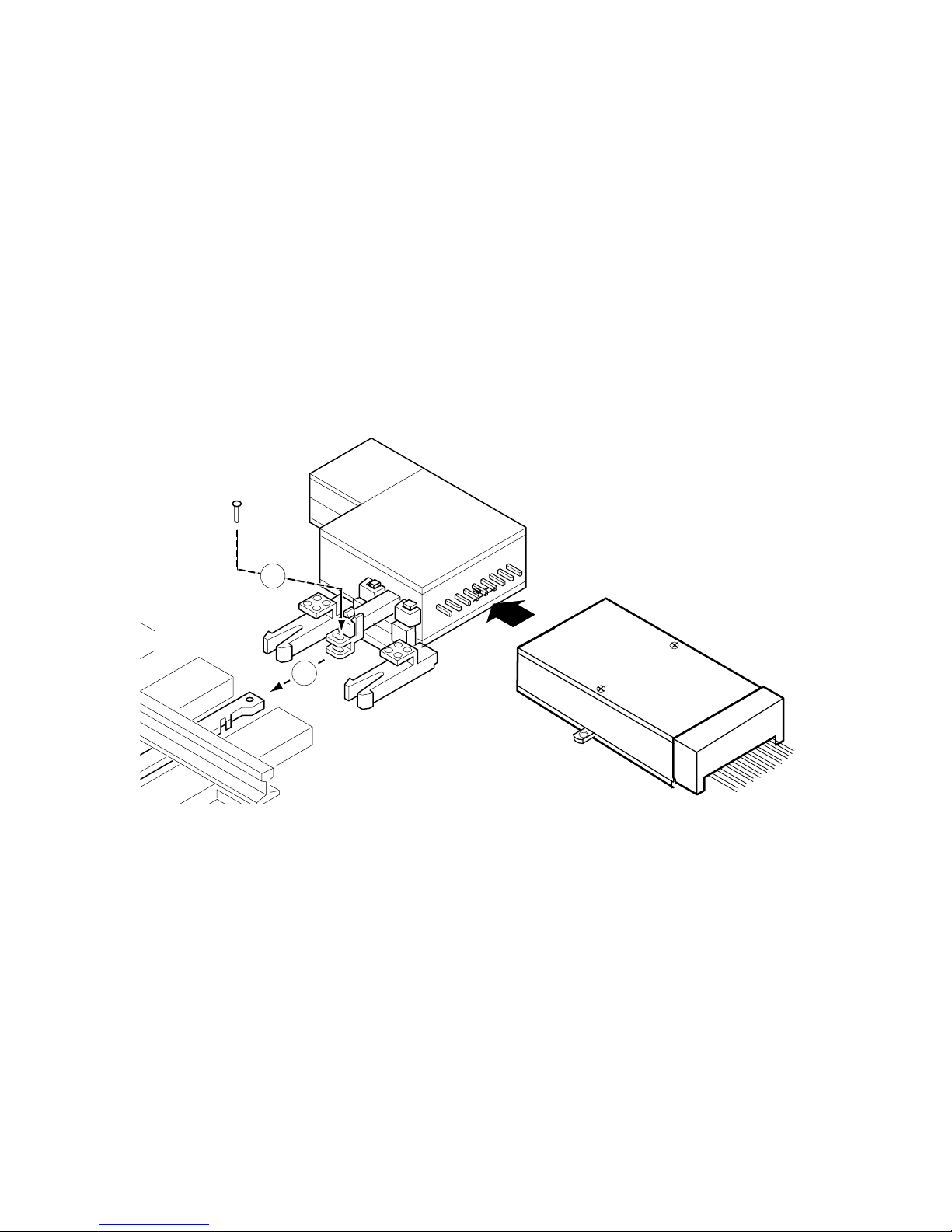
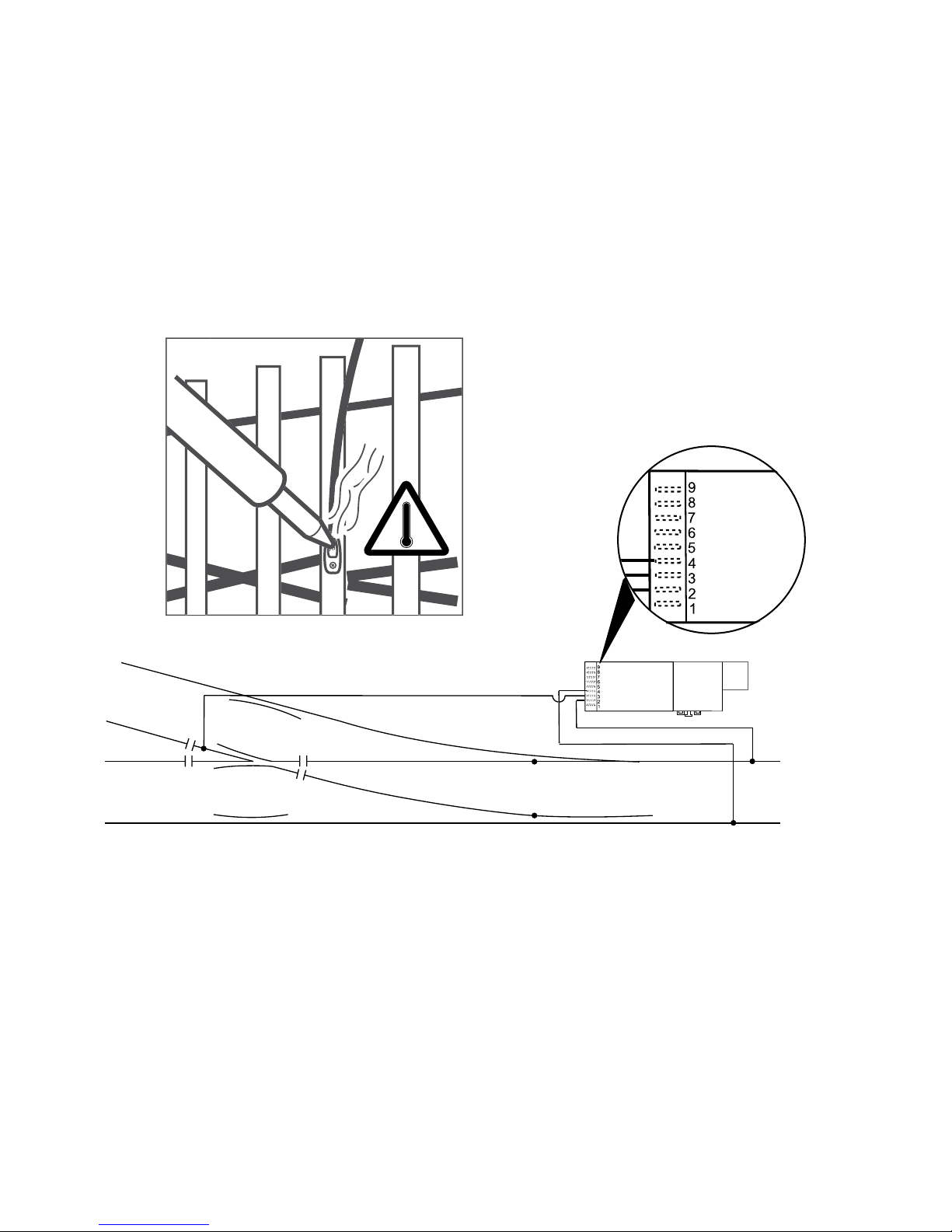
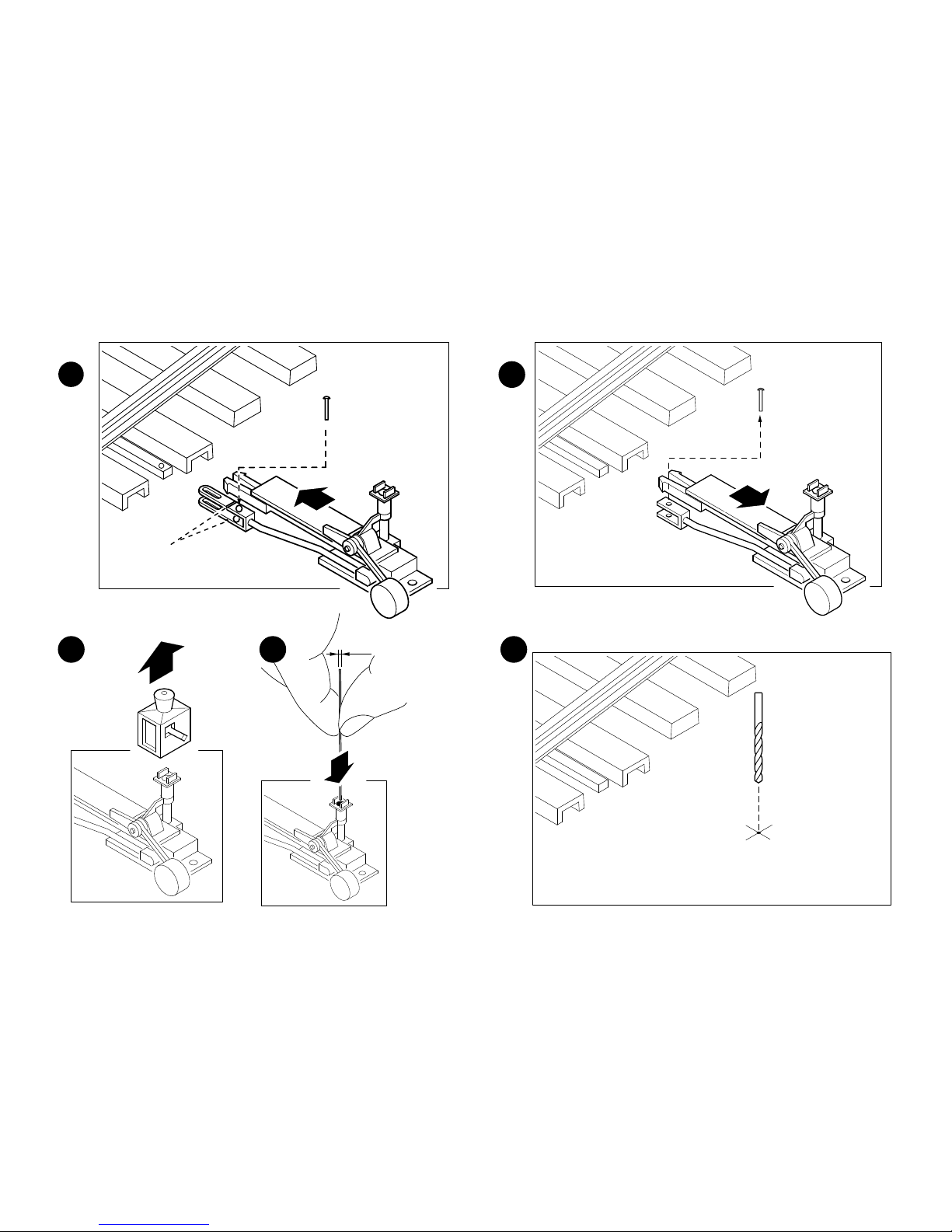
Vorbereitung und Aufbau • Preparation and Building •
Préparation et Construction • Voorbereiding en Structuur •
Preparativos y montaje • Preparativi e montaggio
1
2
3
4
5
6
7
8
9
2.
3.
4.
13 mm
< 0,35 mm²
a
Page 24
24
1
2
5.
Page 25
25
6.
Page 26
26
1 mm
2,5 mm
2
4
3
1
5
Page 27
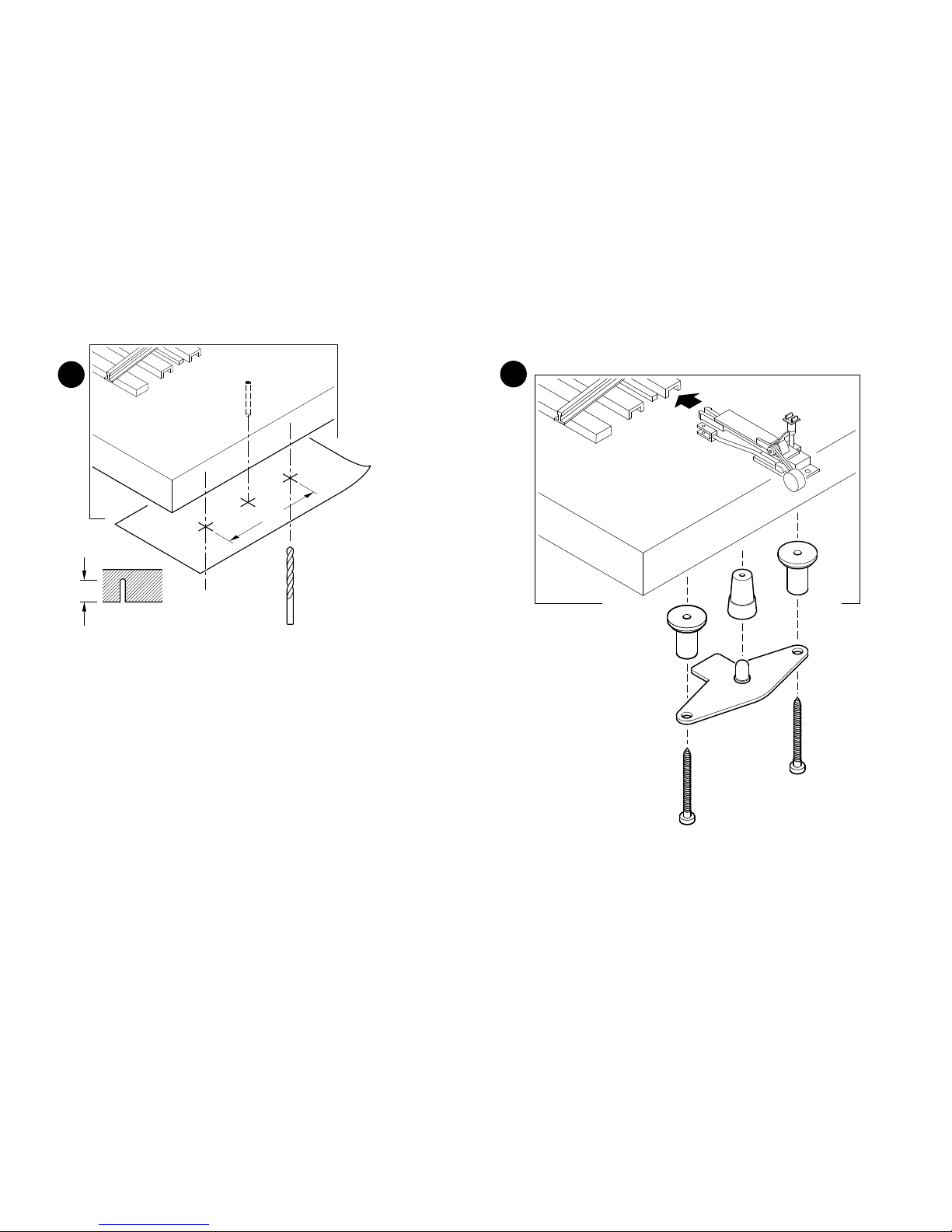
27
2 mm
30 mm
15 mm
6
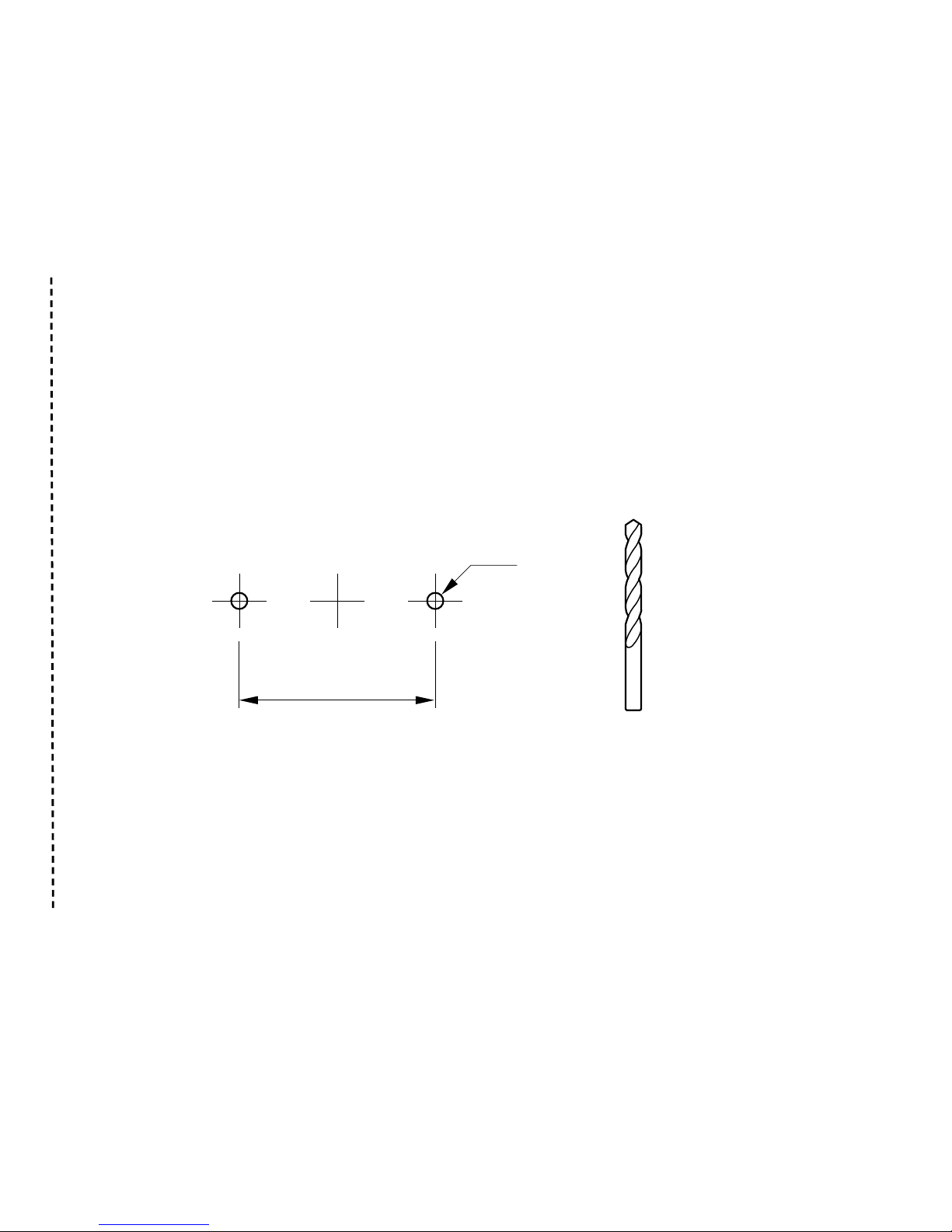
Die Bohrschablone zum Anzeichnen finden Sie auf Seite 41.
For drilling template, see page 41.
Gabarit de perçage, voir page 41.
Boorsjabloon, zie pagina 41.
En la página 41 encontrará la plantilla de taladrado para trazado.
La maschera di foratura per il tracciamento potete trovarla a
pagina 41.
7
Page 28
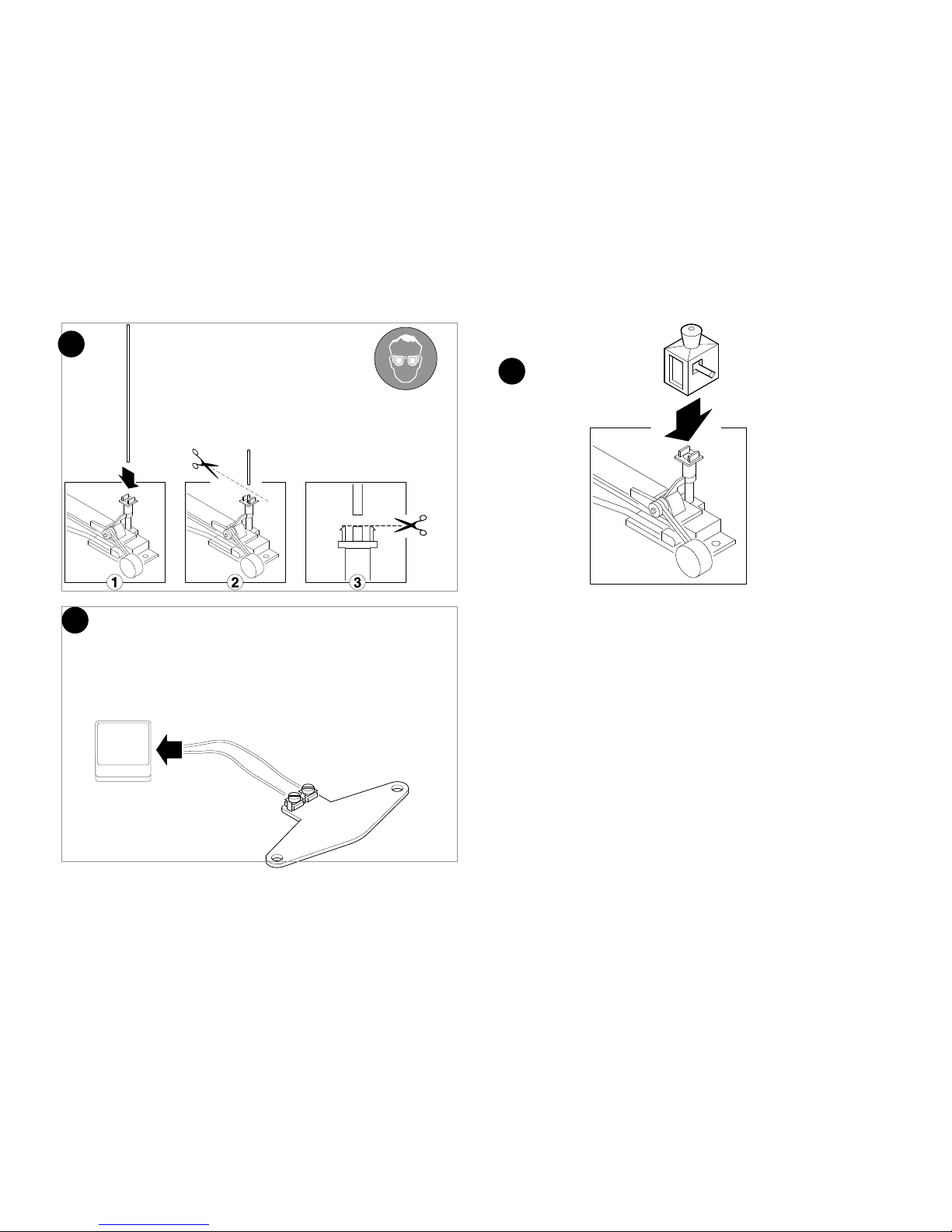
28
~ 16 V-18 V
8
9
10
Page 29
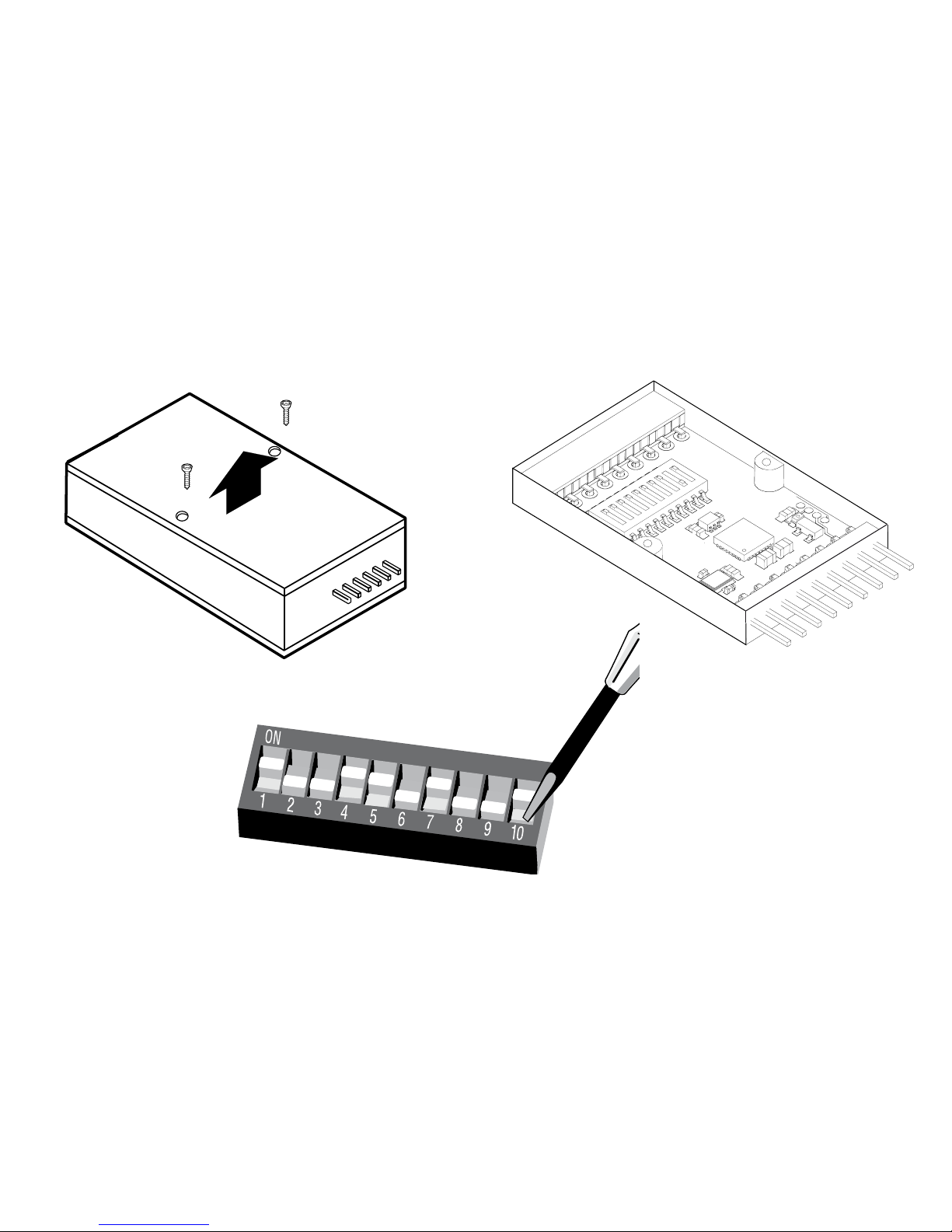
29
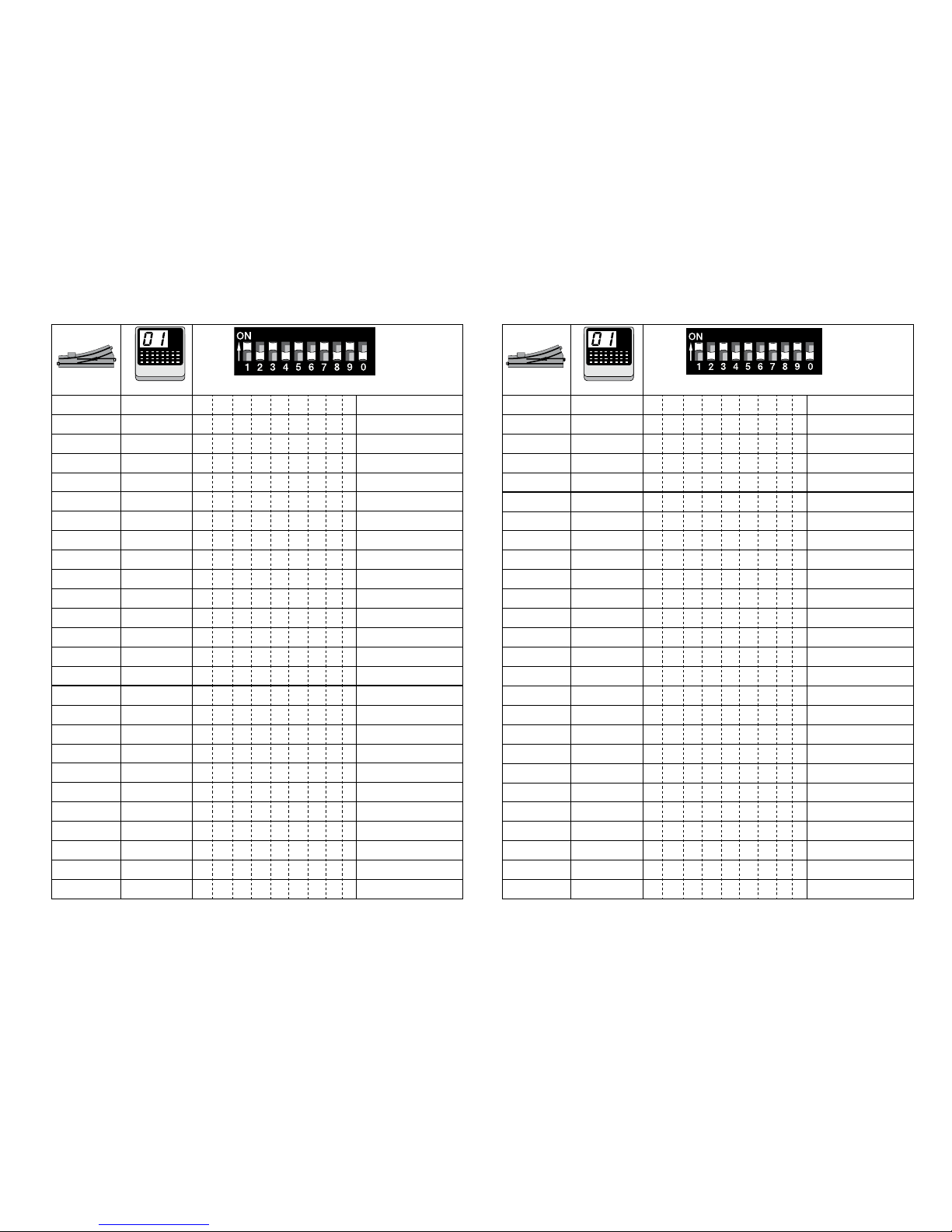
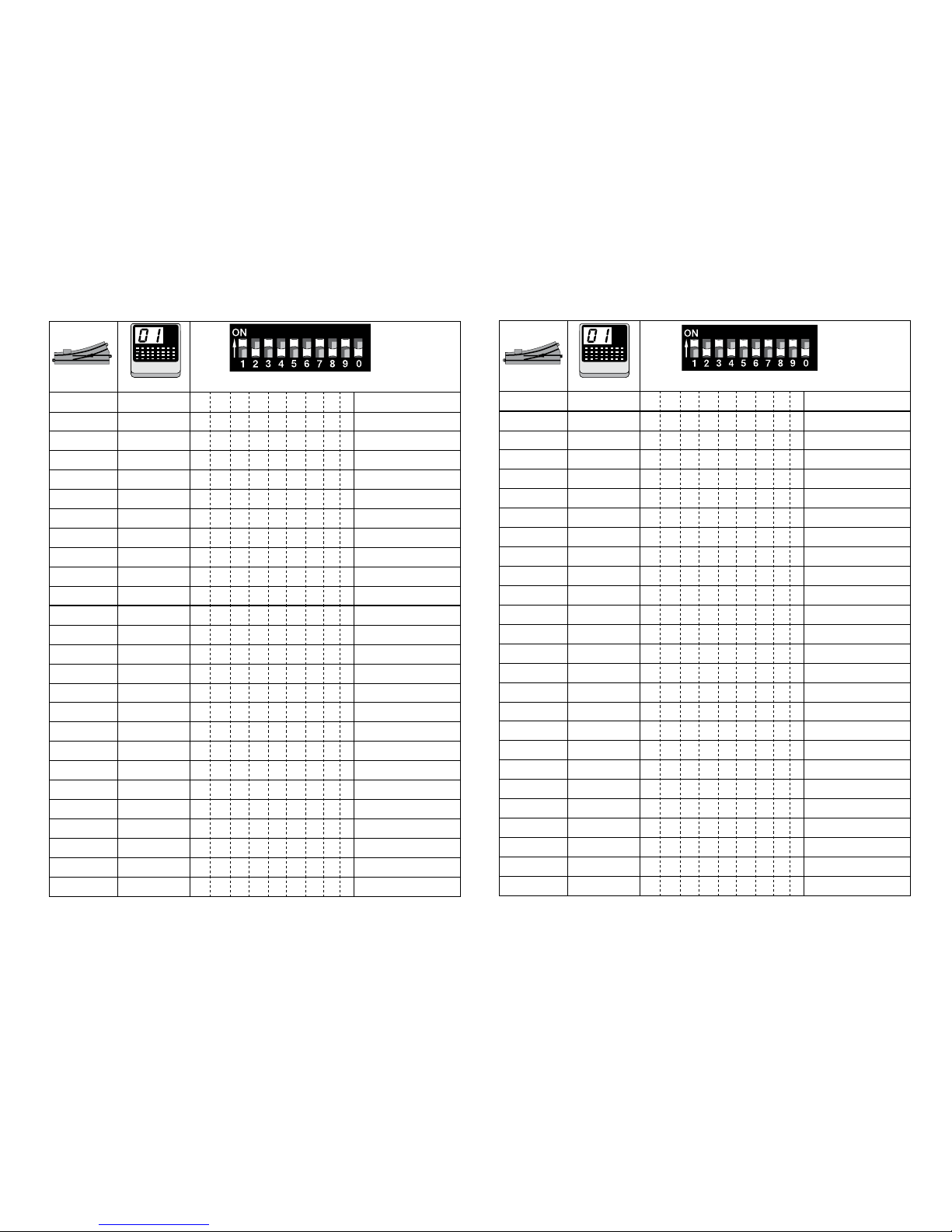
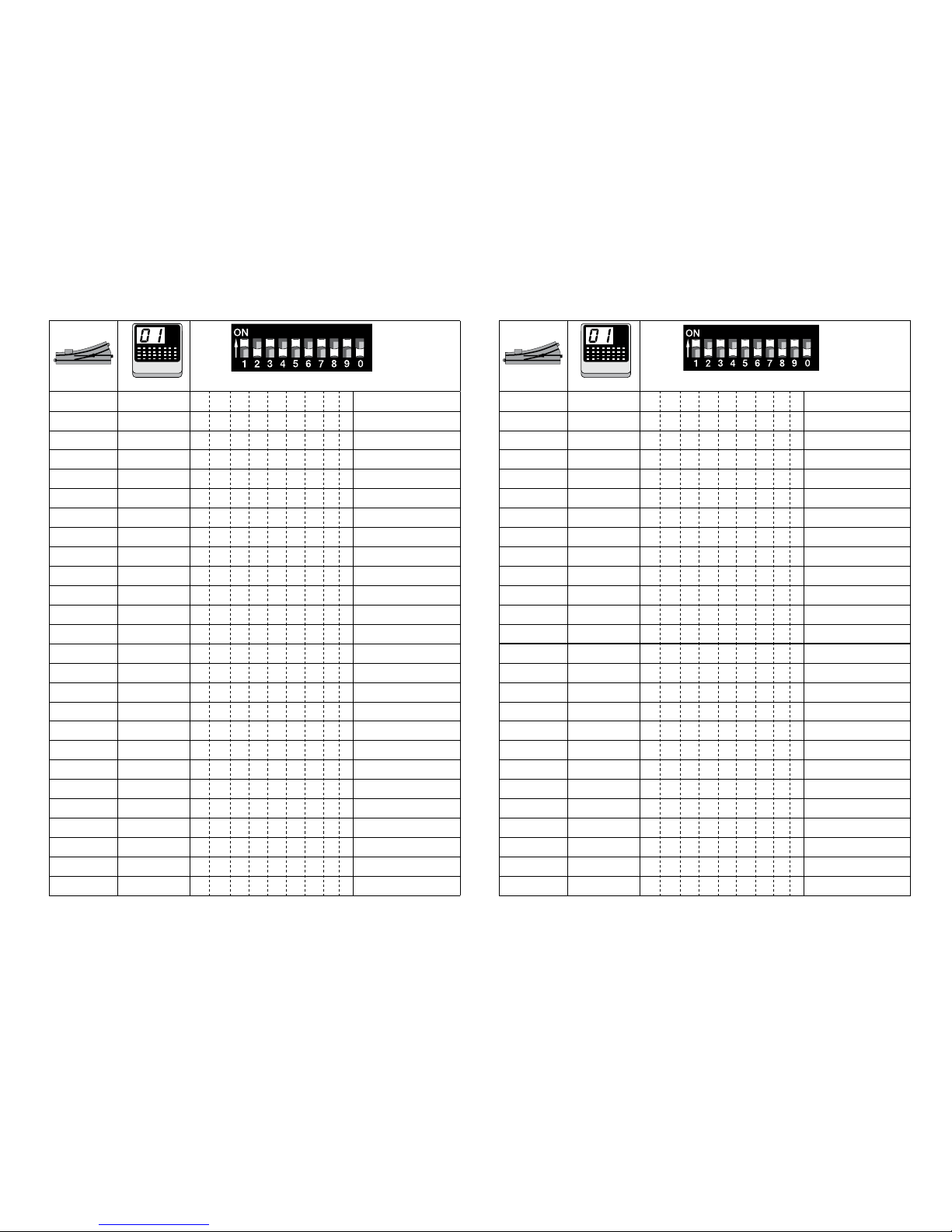
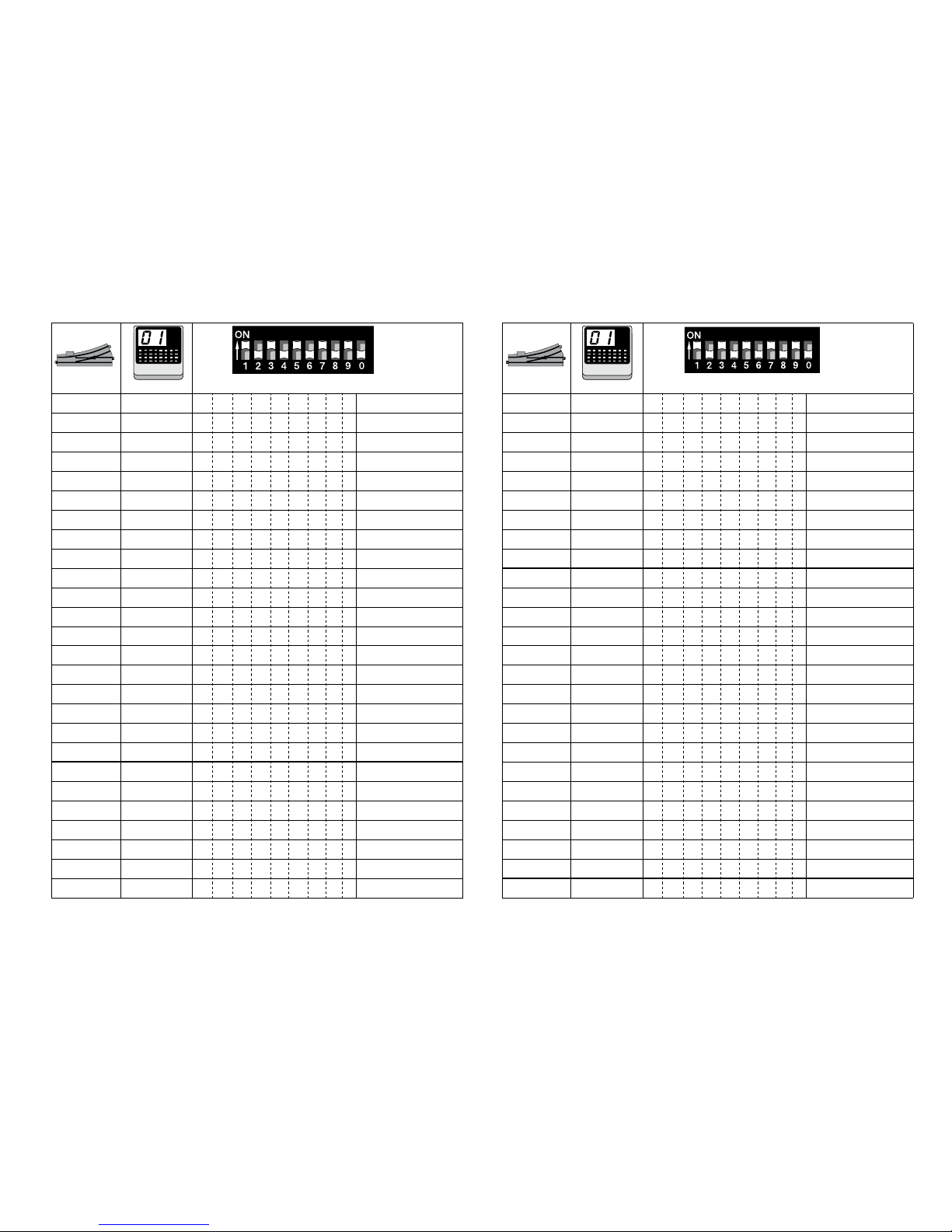
Betriebsart und Adressen einstellen • Setting the mode of operation and addresses • Dénir le mode d’exploitation et les adresses •
Bedrijfsmodus en adres instellen • Conguración de modo de funcionamiento y direcciones • Impostate tipo di funzionamento e
indirizzi
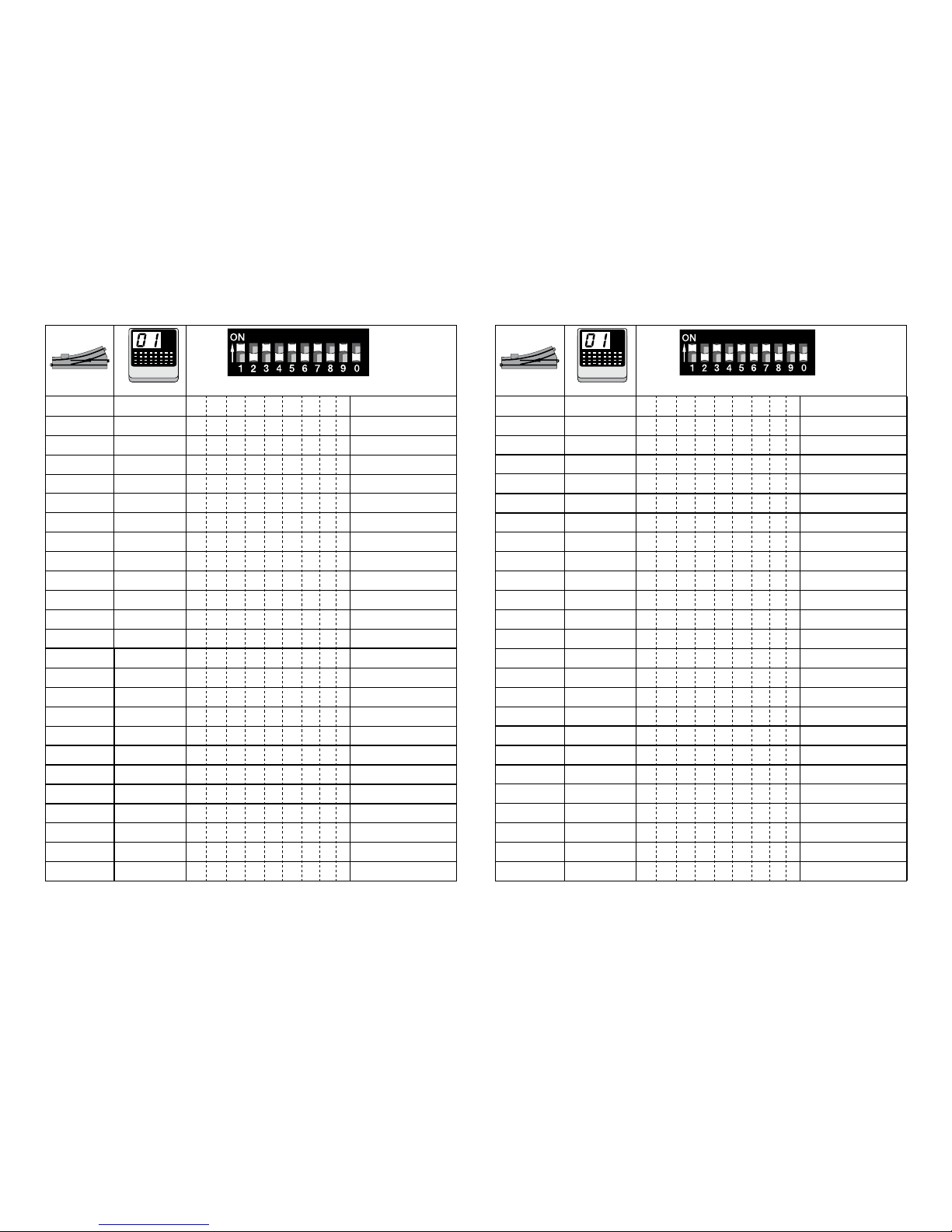
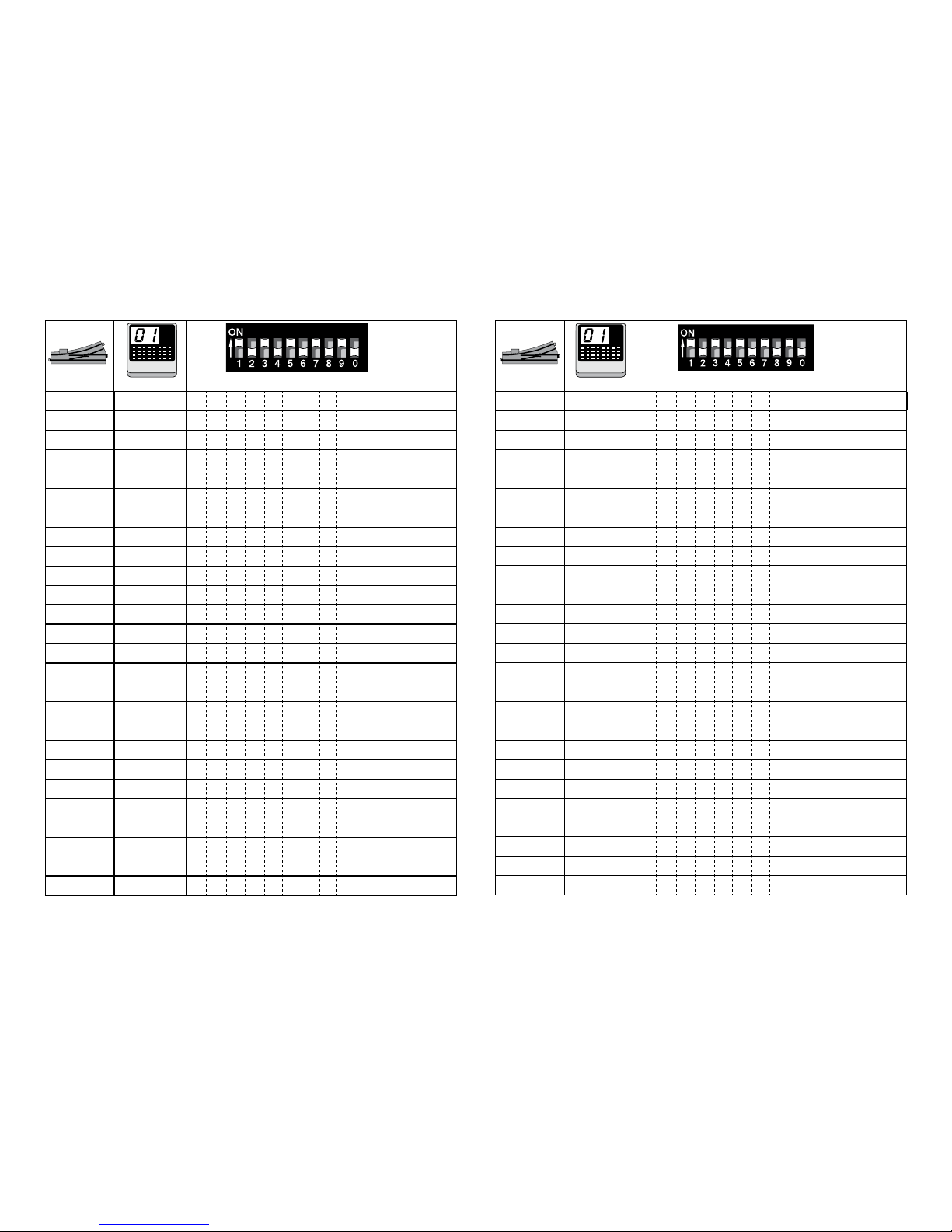
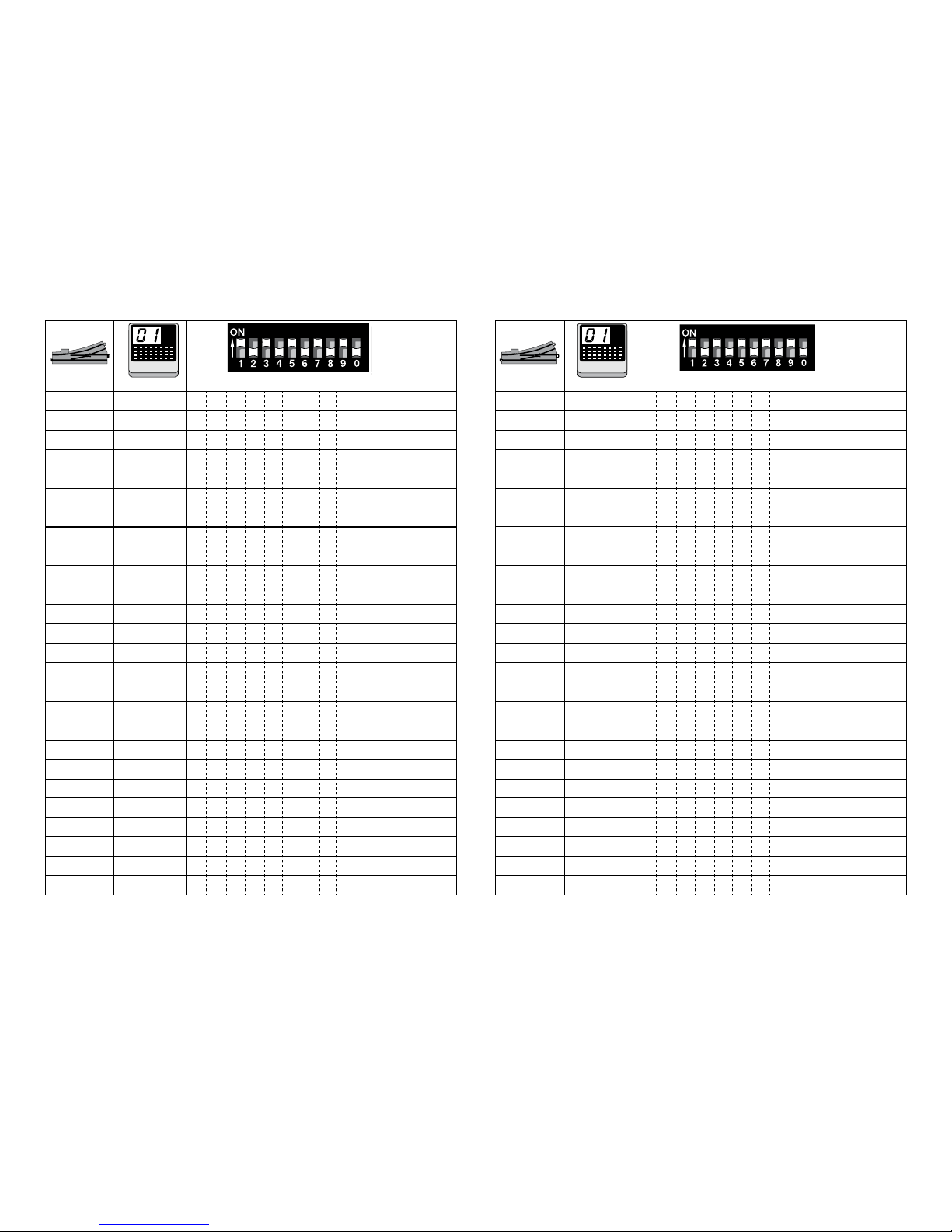
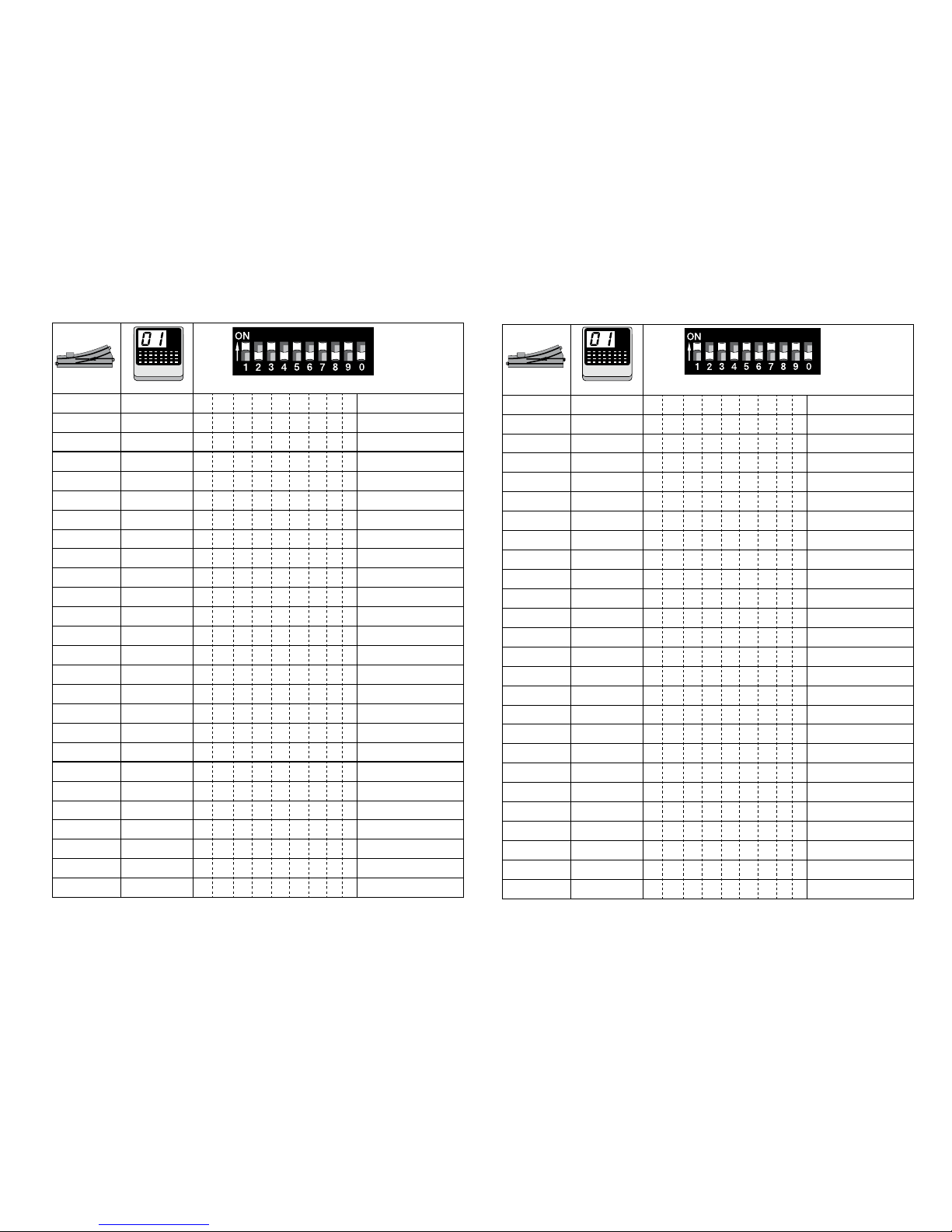
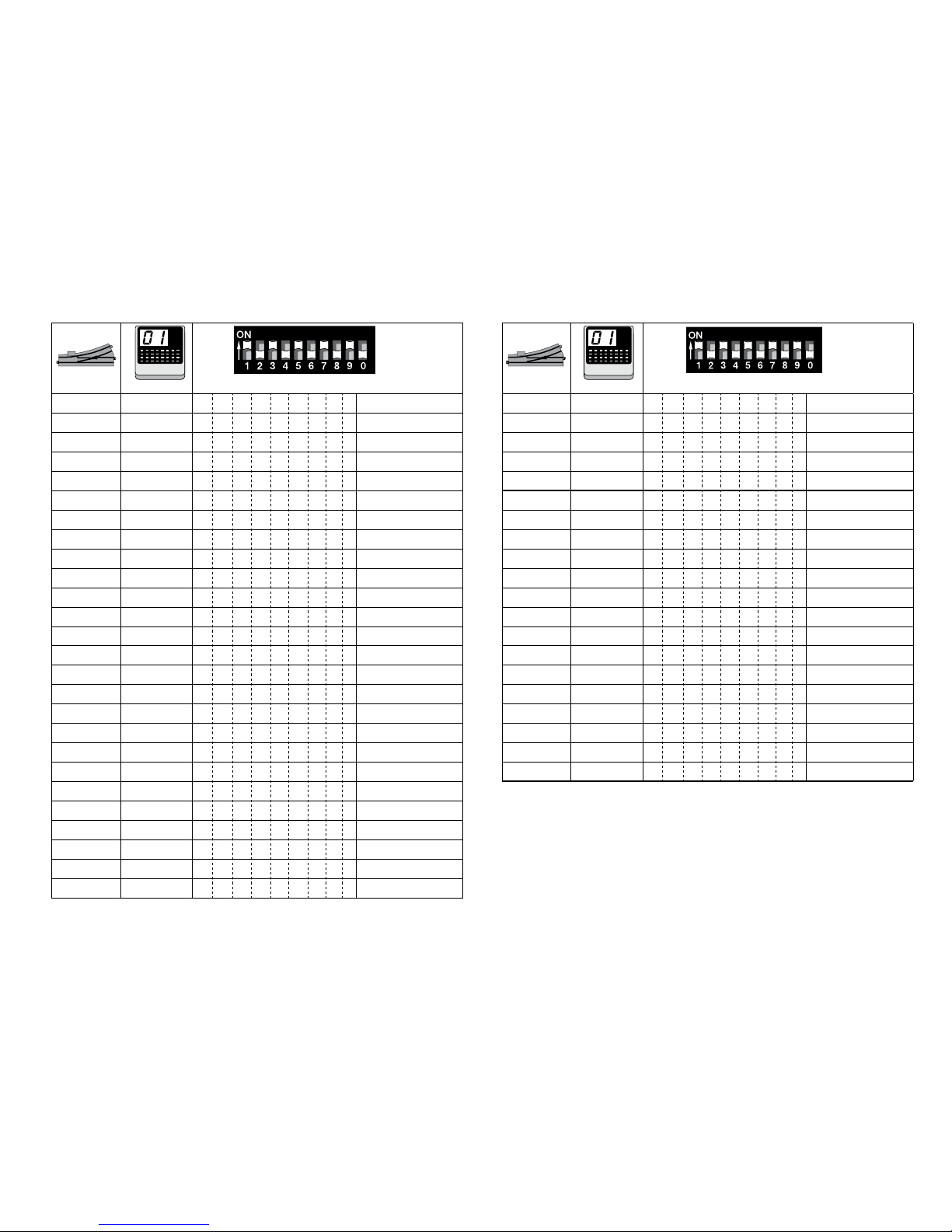
1 2 3 4 5 6 7 8 9 10
Page 30
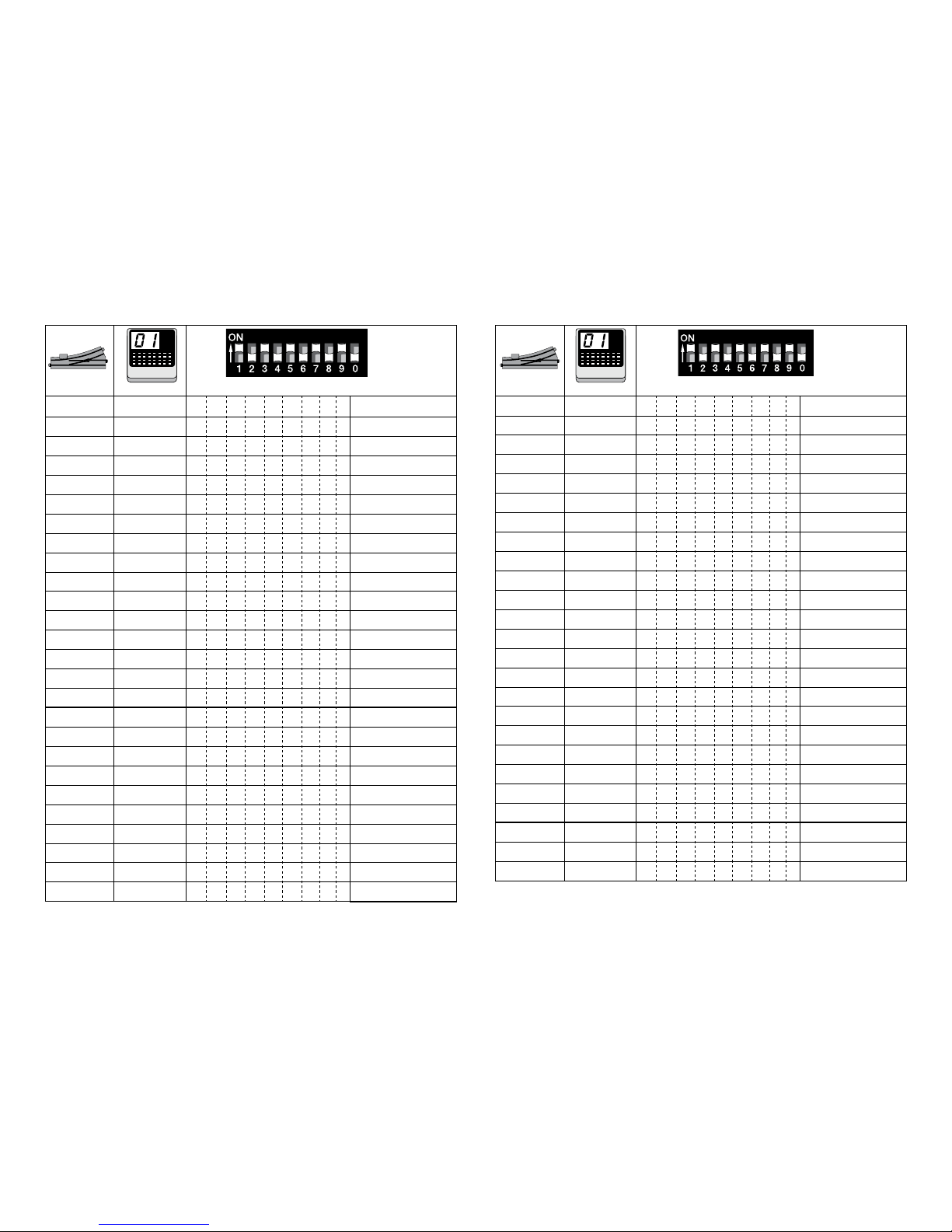
30
10 ( 0/1 )
27 2 11 1 2 4 5 fx (MM)/DCC
28 2 12 3 4 5 fx (MM)/DCC
29 2 13 1 3 4 5 fx (MM)/DCC
30 2 14 2 3 4 5 fx (MM)/DCC
31 2 15 1 2 3 4 5 fx (MM)/DCC
32 2 16 6 fx (MM)/DCC
33 3 1 1 6 fx (MM)/DCC
34 3 2 2 6 fx (MM)/DCC
35 3 3 1 2 6 fx (MM)/DCC
36 3 4 3 6 fx (MM)/DCC
37 3 5 1 3 6 fx (MM)/DCC
38 3 6 2 3 6 fx (MM)/DCC
39 3 7 1 2 3 6 fx (MM)/DCC
40 3 8 4 6 fx (MM)/DCC
41 3 9 1 4 6 fx (MM)/DCC
42 3 10 2 4 6 fx (MM)/DCC
43 3 11 1 2 4 6 fx (MM)/DCC
44 3 12 3 4 6 fx (MM)/DCC
45 3 13 1 3 4 6 fx (MM)/DCC
46 3 14 2 3 4 6 fx (MM)/DCC
47 3 15 1 2 3 4 6 fx (MM)/DCC
48 3 16 5 6 fx (MM)/DCC
49 4 1 1 5 6 fx (MM)/DCC
50 4 2 2 5 6 fx (MM)/DCC
51 4 3 1 2 5 6 fx (MM)/DCC
10 ( 0/1 )
1 1 1 1 fx (MM)/DCC
2 1 2 2 fx (MM)/DCC
3 1 3 1 2 fx (MM)/DCC
4 1 4 3 fx (MM)/DCC
5 1 5 1 3 fx (MM)/DCC
6 1 6 2 3 fx (MM)/DCC
7 1 7 1 2 3 fx (MM)/DCC
8 1 8 4 fx (MM)/DCC
9 1 9 1 4 fx (MM)/DCC
10 1 10 2 4 fx (MM)/DCC
11 1 11 1 2 4 fx (MM)/DCC
12 1 12 3 4 fx (MM)/DCC
13 1 13 1 3 4 fx (MM)/DCC
14 1 14 2 3 4 fx (MM)/DCC
15 1 15 1 2 3 4 fx (MM)/DCC
16 1 16 5 fx (MM)/DCC
17 2 1 1 5 fx (MM)/DCC
18 2 2 2 5 fx (MM)/DCC
19 2 3 1 2 5 fx (MM)/DCC
20 2 4 3 5 fx (MM)/DCC
21 2 5 1 3 5 fx (MM)/DCC
22 2 6 2 3 5 fx (MM)/DCC
23 2 7 1 2 3 5 fx (MM)/DCC
24 2 8 4 5 fx (MM)/DCC
25 2 9 1 4 5 fx (MM)/DCC
26 2 10 2 4 5 fx (MM)/DCC
keyboard
keyboard
Page 31
31
10 ( 0/1 )
52 4 4 3 5 6 fx (MM)/DCC
53 4 5 1 3 5 6 fx (MM)/DCC
54 4 6 2 3 5 6 fx (MM)/DCC
55 4 7 1 2 3 5 6 fx (MM)/DCC
56 4 8 4 5 6 fx (MM)/DCC
57 4 9 1 4 5 6 fx (MM)/DCC
58 4 10 2 4 5 6 fx (MM)/DCC
59 4 11 1 2 4 5 6 fx (MM)/DCC
60 4 12 3 4 5 6 fx (MM)/DCC
61 4 13 1 3 4 5 6 fx (MM)/DCC
62 4 14 2 3 4 5 6 fx (MM)/DCC
63 4 15 1 2 3 4 5 6 fx (MM)/DCC
64 4 16 7 fx (MM)/DCC
65 5 1 1 7 fx (MM)/DCC
66 5 2 2 7 fx (MM)/DCC
67 5 3 1 2 7 fx (MM)/DCC
68 5 4 3 7 fx (MM)/DCC
69 5 5 1 3 7 fx (MM)/DCC
70 5 6 2 3 7 fx (MM)/DCC
71 5 7 1 2 3 7 fx (MM)/DCC
72 5 8 4 7 fx (MM)/DCC
73 5 9 1 4 7 fx (MM)/DCC
74 5 10 2 4 7 fx (MM)/DCC
75 5 11 1 2 4 7 fx (MM)/DCC
76 5 12 3 4 7 fx (MM)/DCC
10 ( 0/1 )
77 5 13 1 3 4 7 fx (MM)/DCC
78 5 14 2 3 4 7 fx (MM)/DCC
79 5 15 1 2 3 4 7 fx (MM)/DCC
80 5 16 5 7 fx (MM)/DCC
81 6 1 1 5 7 fx (MM)/DCC
82 6 2 2 5 7 fx (MM)/DCC
83 6 3 1 2 5 7 fx (MM)/DCC
84 6 4 3 5 7 fx (MM)/DCC
85 6 5 1 3 5 7 fx (MM)/DCC
86 6 6 2 3 5 7 fx (MM)/DCC
87 6 7 1 2 3 5 7 fx (MM)/DCC
88 6 8 4 5 7 fx (MM)/DCC
89 6 9 1 4 5 7 fx (MM)/DCC
90 6 10 2 4 5 7 fx (MM)/DCC
91 6 11 1 2 4 5 7 fx (MM)/DCC
92 6 12 3 4 5 7 fx (MM)/DCC
93 6 13 1 3 4 5 7 fx (MM)/DCC
94 6 14 2 3 4 5 7 fx (MM)/DCC
95 6 15 1 2 3 4 5 7 fx (MM)/DCC
96 6 16 6 7 fx (MM)/DCC
97 7 1 1 6 7 fx (MM)/DCC
98 7 2 2 6 7 fx (MM)/DCC
99 7 3 1 2 6 7 fx (MM)/DCC
100 7 4 3 6 7 fx (MM)/DCC
101 7 5 1 3 6 7 fx (MM)/DCC
keyboard
keyboard
Page 32
32
10 ( 0/1 )
102 7 6 2 3 6 7 fx (MM)/DCC
103 7 7 1 2 3 6 7 fx (MM)/DCC
104 7 8 4 6 7 fx (MM)/DCC
105 7 9 1 4 6 7 fx (MM)/DCC
106 7 10 2 4 6 7 fx (MM)/DCC
107 7 11 1 2 4 6 7 fx (MM)/DCC
108 7 12 3 4 6 7 fx (MM)/DCC
109 7 13 1 3 4 6 7 fx (MM)/DCC
110 7 14 2 3 4 6 7 fx (MM)/DCC
111 7 15 1 2 3 4 6 7 fx (MM)/DCC
112 7 16 5 6 7 fx (MM)/DCC
113 8 1 1 5 6 7 fx (MM)/DCC
114 8 2 2 5 6 7 fx (MM)/DCC
115 8 3 1 2 5 6 7 fx (MM)/DCC
116 8 4 3 5 6 7 fx (MM)/DCC
117 8 5 1 3 5 6 7 fx (MM)/DCC
118 8 6 2 3 5 6 7 fx (MM)/DCC
119 8 7 1 2 3 5 6 7 fx (MM)/DCC
120 8 8 4 5 6 7 fx (MM)/DCC
121 8 9 1 4 5 6 7 fx (MM)/DCC
122 8 10 2 4 5 6 7 fx (MM)/DCC
123 8 11 1 2 4 5 6 7 fx (MM)/DCC
124 8 12 3 4 5 6 7 fx (MM)/DCC
125 8 13 1 3 4 5 6 7 fx (MM)/DCC
126 8 14 2 3 4 5 6 7 fx (MM)/DCC
127 8 15 1 2 3 4 5 6 7 fx (MM)/DCC
10 ( 0/1 )
128 8 16 8 fx (MM)/DCC
129 9 1 1 8 fx (MM)/DCC
130 9 2 2 8 fx (MM)/DCC
131 9 3 1 2 8 fx (MM)/DCC
132 9 4 3 8 fx (MM)/DCC
133 9 5 1 3 8 fx (MM)/DCC
134 9 6 2 3 8 fx (MM)/DCC
135 9 7 1 2 3 8 fx (MM)/DCC
136 9 8 4 8 fx (MM)/DCC
137 9 9 1 4 8 fx (MM)/DCC
138 9 10 2 4 8 fx (MM)/DCC
139 9 11 1 2 4 8 fx (MM)/DCC
140 9 12 3 4 8 fx (MM)/DCC
141 9 13 1 3 4 8 fx (MM)/DCC
142 9 14 2 3 4 8 fx (MM)/DCC
143 9 15 1 2 3 4 8 fx (MM)/DCC
144 9 16 5 8 fx (MM)/DCC
145 10 1 1 5 8 fx (MM)/DCC
146 10 2 2 5 8 fx (MM)/DCC
147 10 3 1 2 5 8 fx (MM)/DCC
148 10 4 3 5 8 fx (MM)/DCC
149 10 5 1 3 5 8 fx (MM)/DCC
150 10 6 2 3 5 8 fx (MM)/DCC
151 10 7 1 2 3 5 8 fx (MM)/DCC
152 10 8 4 5 8 fx (MM)/DCC
153 10 9 1 4 5 8 fx (MM)/DCC
keyboard
keyboard
Page 33
33
10 ( 0/1 )
154 10 10 2 4 5 8 fx (MM)/DCC
155 10 11 1 2 4 5 8 fx (MM)/DCC
156 10 12 3 4 5 8 fx (MM)/DCC
157 10 13 1 3 4 5 8 fx (MM)/DCC
158 10 14 2 3 4 5 8 fx (MM)/DCC
159 10 15 1 2 3 4 5 8 fx (MM)/DCC
160 10 16 6 8 fx (MM)/DCC
161 11 1 1 6 8 fx (MM)/DCC
162 11 2 2 6 8 fx (MM)/DCC
163 11 3 1 2 6 8 fx (MM)/DCC
164 11 4 3 6 8 fx (MM)/DCC
165 11 5 1 3 6 8 fx (MM)/DCC
166 11 6 2 3 6 8 fx (MM)/DCC
167 11 7 1 2 3 6 8 fx (MM)/DCC
168 11 8 4 6 8 fx (MM)/DCC
169 11 9 1 4 6 8 fx (MM)/DCC
170 11 10 2 4 6 8 fx (MM)/DCC
171 11 11 1 2 4 6 8 fx (MM)/DCC
172 11 12 3 4 6 8 fx (MM)/DCC
173 11 13 1 3 4 6 8 fx (MM)/DCC
174 11 14 2 3 4 6 8 fx (MM)/DCC
175 11 15 1 2 3 4 6 8 fx (MM)/DCC
176 11 16 5 6 8 fx (MM)/DCC
177 12 1 1 5 6 8 fx (MM)/DCC
178 12 2 2 5 6 8 fx (MM)/DCC
179 12 3 1 2 5 6 8 fx (MM)/DCC
10 ( 0/1 )
180 12 4 3 5 6 8 fx (MM)/DCC
181 12 5 1 3 5 6 8 fx (MM)/DCC
182 12 6 2 3 5 6 8 fx (MM)/DCC
183 12 7 1 2 3 5 6 8 fx (MM)/DCC
184 12 8 4 5 6 8 fx (MM)/DCC
185 12 9 1 4 5 6 8 fx (MM)/DCC
186 12 10 2 4 5 6 8 fx (MM)/DCC
187 12 11 1 2 4 5 6 8 fx (MM)/DCC
188 12 12 3 4 5 6 8 fx (MM)/DCC
189 12 13 1 3 4 5 6 8 fx (MM)/DCC
190 12 14 2 3 4 5 6 8 fx (MM)/DCC
191 12 15 1 2 3 4 5 6 8 fx (MM)/DCC
192 12 16 7 8 fx (MM)/DCC
193 13 1 1 7 8 fx (MM)/DCC
194 13 2 2 7 8 fx (MM)/DCC
195 13 3 1 2 7 8 fx (MM)/DCC
196 13 4 3 7 8 fx (MM)/DCC
197 13 5 1 3 7 8 fx (MM)/DCC
198 13 6 2 3 7 8 fx (MM)/DCC
199 13 7 1 2 3 7 8 fx (MM)/DCC
200 13 8 4 7 8 fx (MM)/DCC
201 13 9 1 4 7 8 fx (MM)/DCC
202 13 10 2 4 7 8 fx (MM)/DCC
203 13 11 1 2 4 7 8 fx (MM)/DCC
204 13 12 3 4 7 8 fx (MM)/DCC
205 13 13 1 3 4 7 8 fx (MM)/DCC
keyboard
keyboard
Page 34
34
10 ( 0/1 )
206 13 14 2 3 4 7 8 fx (MM)/DCC
207 13 15 1 2 3 4 7 8 fx (MM)/DCC
208 13 16 5 7 8 fx (MM)/DCC
209 14 1 1 5 7 8 fx (MM)/DCC
210 14 2 2 5 7 8 fx (MM)/DCC
211 14 3 1 2 5 7 8 fx (MM)/DCC
212 14 4 3 5 7 8 fx (MM)/DCC
213 14 5 1 3 5 7 8 fx (MM)/DCC
214 14 6 2 3 5 7 8 fx (MM)/DCC
215 14 7 1 2 3 5 7 8 fx (MM)/DCC
216 14 8 4 5 7 8 fx (MM)/DCC
217 14 9 1 4 5 7 8 fx (MM)/DCC
218 14 10 2 4 5 7 8 fx (MM)/DCC
219 14 11 1 2 4 5 7 8 fx (MM)/DCC
220 14 12 3 4 5 7 8 fx (MM)/DCC
221 14 13 1 3 4 5 7 8 fx (MM)/DCC
222 14 14 2 3 4 5 7 8 fx (MM)/DCC
223 14 15 1 2 3 4 5 7 8 fx (MM)/DCC
224 14 16 6 7 8 fx (MM)/DCC
225 15 1 1 6 7 8 fx (MM)/DCC
226 15 2 2 6 7 8 fx (MM)/DCC
227 15 3 1 2 6 7 8 fx (MM)/DCC
228 15 4 3 6 7 8 fx (MM)/DCC
229 15 5 1 3 6 7 8 fx (MM)/DCC
230 15 6 2 3 6 7 8 fx (MM)/DCC
231 15 7 1 2 3 6 7 8 fx (MM)/DCC
10 ( 0/1 )
232 15 8 4 6 7 8 fx (MM)/DCC
233 15 9 1 4 6 7 8 fx (MM)/DCC
234 15 10 2 4 6 7 8 fx (MM)/DCC
235 15 11 1 2 4 6 7 8 fx (MM)/DCC
236 15 12 3 4 6 7 8 fx (MM)/DCC
237 15 13 1 3 4 6 7 8 fx (MM)/DCC
238 15 14 2 3 4 6 7 8 fx (MM)/DCC
239 15 15 1 2 3 4 6 7 8 fx (MM)/DCC
240 15 16 5 6 7 8 fx (MM)/DCC
241 16 1 1 5 6 7 8 fx (MM)/DCC
242 16 2 2 5 6 7 8 fx (MM)/DCC
243 16 3 1 2 5 6 7 8 fx (MM)/DCC
244 16 4 3 5 6 7 8 fx (MM)/DCC
245 16 5 1 3 5 6 7 8 fx (MM)/DCC
246 16 6 2 3 5 6 7 8 fx (MM)/DCC
247 16 7 1 2 3 5 6 7 8 fx (MM)/DCC
248 16 8 4 5 6 7 8 fx (MM)/DCC
249 16 9 1 4 5 6 7 8 fx (MM)/DCC
250 16 10 2 4 5 6 7 8 fx (MM)/DCC
251 16 11 1 2 4 5 6 7 8 fx (MM)/DCC
252 16 12 3 4 5 6 7 8 fx (MM)/DCC
253 16 13 1 3 4 5 6 7 8 fx (MM)/DCC
254 16 14 2 3 4 5 6 7 8 fx (MM)/DCC
255 16 15 1 2 3 4 5 6 7 8 fx (MM)/DCC
256 16 16 9 fx (MM)/DCC
257 17 1 1 9 fx (MM)/DCC
keyboard
keyboard
Page 35
35
10 ( 0/1 )
258 17 2 2 9 fx (MM)/DCC
259 17 3 1 2 9 fx (MM)/DCC
260 17 4 3 9 fx (MM)/DCC
261 17 5 1 3 9 fx (MM)/DCC
262 17 6 2 3 9 fx (MM)/DCC
263 17 7 1 2 3 9 fx (MM)/DCC
264 17 8 4 9 fx (MM)/DCC
265 17 9 1 4 9 fx (MM)/DCC
266 17 10 2 4 9 fx (MM)/DCC
267 17 11 1 2 4 9 fx (MM)/DCC
268 17 12 3 4 9 fx (MM)/DCC
269 17 13 1 3 4 9 fx (MM)/DCC
270 17 14 2 3 4 9 fx (MM)/DCC
271 17 15 1 2 3 4 9 fx (MM)/DCC
272 17 16 5 9 fx (MM)/DCC
273 18 1 1 5 9 fx (MM)/DCC
274 18 2 2 5 9 fx (MM)/DCC
275 18 3 1 2 5 9 fx (MM)/DCC
276 18 4 3 5 9 fx (MM)/DCC
277 18 5 1 3 5 9 fx (MM)/DCC
278 18 6 2 3 5 9 fx (MM)/DCC
279 18 7 1 2 3 5 9 fx (MM)/DCC
280 18 8 4 5 9 fx (MM)/DCC
281 18 9 1 4 5 9 fx (MM)/DCC
282 18 10 2 4 5 9 fx (MM)/DCC
283 18 11 1 2 4 5 9 fx (MM)/DCC
10 ( 0/1 )
284 18 12 3 4 5 9 fx (MM)/DCC
285 18 13 1 3 4 5 9 fx (MM)/DCC
286 18 14 2 3 4 5 9 fx (MM)/DCC
287 18 15 1 2 3 4 5 9 fx (MM)/DCC
288 18 16 6 9 fx (MM)/DCC
289 19 1 1 6 9 fx (MM)/DCC
290 19 2 2 6 9 fx (MM)/DCC
291 19 3 1 2 6 9 fx (MM)/DCC
292 19 4 3 6 9 fx (MM)/DCC
293 19 5 1 3 6 9 fx (MM)/DCC
294 19 6 2 3 6 9 fx (MM)/DCC
295 19 7 1 2 3 6 9 fx (MM)/DCC
296 19 8 4 6 9 fx (MM)/DCC
297 19 9 1 4 6 9 fx (MM)/DCC
298 19 10 2 4 6 9 fx (MM)/DCC
299 19 11 1 2 4 6 9 fx (MM)/DCC
300 19 12 3 4 6 9 fx (MM)/DCC
301 19 13 1 3 4 6 9 fx (MM)/DCC
302 19 14 2 3 4 6 9 fx (MM)/DCC
303 19 15 1 2 3 4 6 9 fx (MM)/DCC
304 19 16 5 6 9 fx (MM)/DCC
305 20 1 1 5 6 9 fx (MM)/DCC
306 20 2 2 5 6 9 fx (MM)/DCC
307 20 3 1 2 5 6 9 fx (MM)/DCC
308 20 4 3 5 6 9 fx (MM)/DCC
309 20 5 1 3 5 6 9 fx (MM)/DCC
keyboard
keyboard
Page 36
36
10 ( 0/1 )
310 20 6 2 3 5 6 9 fx (MM)/DCC
311 20 7 1 2 3 5 6 9 fx (MM)/DCC
312 20 8 4 5 6 9 fx (MM)/DCC
313 20 9 1 4 5 6 9 fx (MM)/DCC
314 20 10 2 4 5 6 9 fx (MM)/DCC
315 20 11 1 2 4 5 6 9 fx (MM)/DCC
316 20 12 3 4 5 6 9 fx (MM)/DCC
317 20 13 1 3 4 5 6 9 fx (MM)/DCC
318 20 14 2 3 4 5 6 9 fx (MM)/DCC
319 20 15 1 2 3 4 5 6 9 fx (MM)/DCC
320 20 16 7 9 fx (MM)/DCC
321 21 1 1 7 9 - - - / DCC
322 21 2 2 7 9 - - - / DCC
323 21 3 1 2 7 9 - - - / DCC
324 21 4 3 7 9 - - - / DCC
325 21 5 1 3 7 9 - - - / DCC
326 21 6 2 3 7 9 - - - / DCC
327 21 7 1 2 3 7 9 - - - / DCC
328 21 8 4 7 9 - - - / DCC
329 21 9 1 4 7 9 - - - / DCC
330 21 10 2 4 7 9 - - - / DCC
331 21 11 1 2 4 7 9 - - - / DCC
332 21 12 3 4 7 9 - - - / DCC
333 21 13 1 3 4 7 9 - - - / DCC
334 21 14 2 3 4 7 9 - - - / DCC
335 21 15 1 2 3 4 7 9 - - - / DCC
10 ( 0/1 )
336 21 16 5 7 9 - - - / DCC
337 22 1 1 5 7 9 - - - / DCC
338 22 2 2 5 7 9 - - - / DCC
339 22 3 1 2 5 7 9 - - - / DCC
340 22 4 3 5 7 9 - - - / DCC
341 22 5 1 3 5 7 9 - - - / DCC
342 22 6 2 3 5 7 9 - - - / DCC
343 22 7 1 2 3 5 7 9 - - - / DCC
344 22 8 4 5 7 9 - - - / DCC
345 22 9 1 4 5 7 9 - - - / DCC
346 22 10 2 4 5 7 9 - - - / DCC
347 22 11 1 2 4 5 7 9 - - - / DCC
348 22 12 3 4 5 7 9 - - - / DCC
349 22 13 1 3 4 5 7 9 - - - / DCC
350 22 14 2 3 4 5 7 9 - - - / DCC
351 22 15 1 2 3 4 5 7 9 - - - / DCC
352 22 16 6 7 9 - - - / DCC
353 23 1 1 6 7 9 - - - / DCC
354 23 2 2 6 7 9 - - - / DCC
355 23 3 1 2 6 7 9 - - - / DCC
356 23 4 3 6 7 9 - - - / DCC
357 23 5 1 3 6 7 9 - - - / DCC
358 23 6 2 3 6 7 9 - - - / DCC
359 23 7 1 2 3 6 7 9 - - - / DCC
360 23 8 4 6 7 9 - - - / DCC
361 23 9 1 4 6 7 9 - - - / DCC
keyboard
keyboard
Page 37
37
10 ( 0/1 )
362 23 10 2 4 6 7 9 - - - / DCC
363 23 11 1 2 4 6 7 9 - - - / DCC
364 23 12 3 4 6 7 9 - - - / DCC
365 23 13 1 3 4 6 7 9 - - - / DCC
366 23 14 2 3 4 6 7 9 - - - / DCC
367 23 15 1 2 3 4 6 7 9 - - - / DCC
368 23 16 5 6 7 9 - - - / DCC
369 24 1 1 5 6 7 9 - - - / DCC
370 24 2 2 5 6 7 9 - - - / DCC
371 24 3 1 2 5 6 7 9 - - - / DCC
372 24 4 3 5 6 7 9 - - - / DCC
373 24 5 1 3 5 6 7 9 - - - / DCC
374 24 6 2 3 5 6 7 9 - - - / DCC
375 24 7 1 2 3 5 6 7 9 - - - / DCC
376 24 8 4 5 6 7 9 - - - / DCC
377 24 9 1 4 5 6 7 9 - - - / DCC
378 24 10 2 4 5 6 7 9 - - - / DCC
379 24 11 1 2 4 5 6 7 9 - - - / DCC
380 24 12 3 4 5 6 7 9 - - - / DCC
381 24 13 1 3 4 5 6 7 9 - - - / DCC
382 24 14 2 3 4 5 6 7 9 - - - / DCC
383 24 15 1 2 3 4 5 6 7 9 - - - / DCC
384 24 16 8 9 - - - / DCC
385 25 1 1 8 9 - - - / DCC
386 25 2 2 8 9 - - - / DCC
387 25 3 1 2 8 9 - - - / DCC
10 ( 0/1 )
388 25 4 3 8 9 - - - / DCC
389 25 5 1 3 8 9 - - - / DCC
390 25 6 2 3 8 9 - - - / DCC
391 25 7 1 2 3 8 9 - - - / DCC
392 25 8 4 8 9 - - - / DCC
393 25 9 1 4 8 9 - - - / DCC
394 25 10 2 4 8 9 - - - / DCC
395 25 11 1 2 4 8 9 - - - / DCC
396 25 12 3 4 8 9 - - - / DCC
397 25 13 1 3 4 8 9 - - - / DCC
398 25 14 2 3 4 8 9 - - - / DCC
399 25 15 1 2 3 4 8 9 - - - / DCC
400 25 16 5 8 9 - - - / DCC
401 26 1 1 5 8 9 - - - / DCC
402 26 2 2 5 8 9 - - - / DCC
403 26 3 1 2 5 8 9 - - - / DCC
404 26 4 3 5 8 9 - - - / DCC
405 26 5 1 3 5 8 9 - - - / DCC
406 26 6 2 3 5 8 9 - - - / DCC
407 26 7 1 2 3 5 8 9 - - - / DCC
408 26 8 4 5 8 9 - - - / DCC
409 26 9 1 4 5 8 9 - - - / DCC
410 26 10 2 4 5 8 9 - - - / DCC
411 26 11 1 2 4 5 8 9 - - - / DCC
412 26 12 3 4 5 8 9 - - - / DCC
413 26 13 1 3 4 5 8 9 - - - / DCC
keyboard
keyboard
Page 38
38
10 ( 0/1 )
414 26 14 2 3 4 5 8 9 - - - / DCC
415 26 15 1 2 3 4 5 8 9 - - - / DCC
416 26 16 6 8 9 - - - / DCC
417 27 1 1 6 8 9 - - - / DCC
418 27 2 2 6 8 9 - - - / DCC
419 27 3 1 2 6 8 9 - - - / DCC
420 27 4 3 6 8 9 - - - / DCC
421 27 5 1 3 6 8 9 - - - / DCC
422 27 6 2 3 6 8 9 - - - / DCC
423 27 7 1 2 3 6 8 9 - - - / DCC
424 27 8 4 6 8 9 - - - / DCC
425 27 9 1 4 6 8 9 - - - / DCC
426 27 10 2 4 6 8 9 - - - / DCC
427 27 11 1 2 4 6 8 9 - - - / DCC
428 27 12 3 4 6 8 9 - - - / DCC
429 27 13 1 3 4 6 8 9 - - - / DCC
430 27 14 2 3 4 6 8 9 - - - / DCC
431 27 15 1 2 3 4 6 8 9 - - - / DCC
432 27 16 5 6 8 9 - - - / DCC
433 28 1 1 5 6 8 9 - - - / DCC
434 28 2 2 5 6 8 9 - - - / DCC
435 28 3 1 2 5 6 8 9 - - - / DCC
436 28 4 3 5 6 8 9 - - - / DCC
437 28 5 1 3 5 6 8 9 - - - / DCC
438 28 6 2 3 5 6 8 9 - - - / DCC
439 28 7 1 2 3 5 6 8 9 - - - / DCC
10 ( 0/1 )
440 28 8 4 5 6 8 9 - - - / DCC
441 28 9 1 4 5 6 8 9 - - - / DCC
442 28 10 2 4 5 6 8 9 - - - / DCC
443 28 11 1 2 4 5 6 8 9 - - - / DCC
444 28 12 3 4 5 6 8 9 - - - / DCC
445 28 13 1 3 4 5 6 8 9 - - - / DCC
446 28 14 2 3 4 5 6 8 9 - - - / DCC
447 28 15 1 2 3 4 5 6 8 9 - - - / DCC
448 28 16 7 8 9 - - - / DCC
449 29 1 1 7 8 9 - - - / DCC
450 29 2 2 7 8 9 - - - / DCC
451 29 3 1 2 7 8 9 - - - / DCC
452 29 4 3 7 8 9 - - - / DCC
453 29 5 1 3 7 8 9 - - - / DCC
454 29 6 2 3 7 8 9 - - - / DCC
455 29 7 1 2 3 7 8 9 - - - / DCC
456 29 8 4 7 8 9 - - - / DCC
457 29 9 1 4 7 8 9 - - - / DCC
458 29 10 2 4 7 8 9 - - - / DCC
459 29 11 1 2 4 7 8 9 - - - / DCC
460 29 12 3 4 7 8 9 - - - / DCC
461 29 13 1 3 4 7 8 9 - - - / DCC
462 29 14 2 3 4 7 8 9 - - - / DCC
463 29 15 1 2 3 4 7 8 9 - - - / DCC
464 29 16 5 7 8 9 - - - / DCC
465 30 1 1 5 7 8 9 - - - / DCC
keyboard
keyboard
Page 39
39
10 ( 0/1 )
466 30 2 2 5 7 8 9 - - - / DCC
467 30 3 1 2 5 7 8 9 - - - / DCC
468 30 4 3 5 7 8 9 - - - / DCC
469 30 5 1 3 5 7 8 9 - - - / DCC
470 30 6 2 3 5 7 8 9 - - - / DCC
471 30 7 1 2 3 5 7 8 9 - - - / DCC
472 30 8 4 5 7 8 9 - - - / DCC
473 30 9 1 4 5 7 8 9 - - - / DCC
474 30 10 2 4 5 7 8 9 - - - / DCC
475 30 11 1 2 4 5 7 8 9 - - - / DCC
476 30 12 3 4 5 7 8 9 - - - / DCC
477 30 13 1 3 4 5 7 8 9 - - - / DCC
478 30 14 2 3 4 5 7 8 9 - - - / DCC
479 30 15 1 2 3 4 5 7 8 9 - - - / DCC
480 30 16 6 7 8 9 - - - / DCC
481 31 1 1 6 7 8 9 - - - / DCC
482 31 2 2 6 7 8 9 - - - / DCC
483 31 3 1 2 6 7 8 9 - - - / DCC
484 31 4 3 6 7 8 9 - - - / DCC
485 31 5 1 3 6 7 8 9 - - - / DCC
486 31 6 2 3 6 7 8 9 - - - / DCC
487 31 7 1 2 3 6 7 8 9 - - - / DCC
488 31 8 4 6 7 8 9 - - - / DCC
489 31 9 1 4 6 7 8 9 - - - / DCC
490 31 10 2 4 6 7 8 9 - - - / DCC
491 31 11 1 2 4 6 7 8 9 - - - / DCC
10 ( 0/1 )
492 31 12 3 4 6 7 8 9 - - - / DCC
493 31 13 1 3 4 6 7 8 9 - - - / DCC
494 31 14 2 3 4 6 7 8 9 - - - / DCC
495 31 15 1 2 3 4 6 7 8 9 - - - / DCC
496 31 16 5 6 7 8 9 - - - / DCC
497 32 1 1 5 6 7 8 9 - - - / DCC
498 32 2 2 5 6 7 8 9 - - - / DCC
499 32 3 1 2 5 6 7 8 9 - - - / DCC
500 32 4 3 5 6 7 8 9 - - - / DCC
501 32 5 1 3 5 6 7 8 9 - - - / DCC
502 32 6 2 3 5 6 7 8 9 - - - / DCC
503 32 7 1 2 3 5 6 7 8 9 - - - / DCC
504 32 8 4 5 6 7 8 9 - - - / DCC
505 32 9 1 4 5 6 7 8 9 - - - / DCC
506 32 10 2 4 5 6 7 8 9 - - - / DCC
507 32 11 1 2 4 5 6 7 8 9 - - - / DCC
508 32 12 3 4 5 6 7 8 9 - - - / DCC
509 32 13 1 3 4 5 6 7 8 9 - - - / DCC
510 32 14 2 3 4 5 6 7 8 9 - - - / DCC
511 32 15 1 2 3 4 5 6 7 8 9 - - - / DCC
Adressen größer 511 können nur im DCC Format ausgegeben
werden und müssen mit der CV Programmierung über das
Programmiergleis durchgeführt werden.
keyboard
keyboard
Page 40

40
Addresses larger than 511 can only be assigned in the DCC
format and must be done by programming a CV using the
programming track.
Les adresses supérieures à 511 peuvent uniquement être éditées
dans le format DCC et doivent être exécutées avec la programmation des CV via la voie de programmation.
Adressen groter dan 511 kunnen alleen in het DCC formaat
gebruikt worden en moeten met de CV programmering via het
programmeerspoor ingesteld worden.
Las direcciones superiores a 511 pueden mostrarse en el
formato DCC y deben configurarse con la función Programación
de CVs mediante la vía de programación.
Indirizzi maggiori di 511 possono essere assegnati solo nel
formato DCC e si devono eseguire con la programmazione delle
CV tramite il binario di programmazione.
Page 41
41
30 mm
2 mm
2 mm
Bohrschablone • Drilling template • Gabarit de perçage • Boorsjabloon • Plantilla de taladrado • Maschera di foratura
Page 42

42
Page 43

43
Page 44
197435/0716/Sc2Ef
Änderungen vorbehalten
© by Gebr. Märklin & Cie. GmbH
Gebr. Märklin & Cie. GmbH
Stuttgarter Straße 55 - 57
73033 Göppingen
Germany
www.maerklin.com
Due to different legal requirements regarding electro-magnetic compatibility, this item may
be used in the USA only after separate certification for FCC compliance and an adjustment if
necessary.
Use in the USA without this certification is not permitted and absolves us of any liability. If you
should want such certication to be done, please contact us – also due to the additional costs
incurred for this.
www.maerklin.com/en/imprint.html
 Loading...