

Page 1
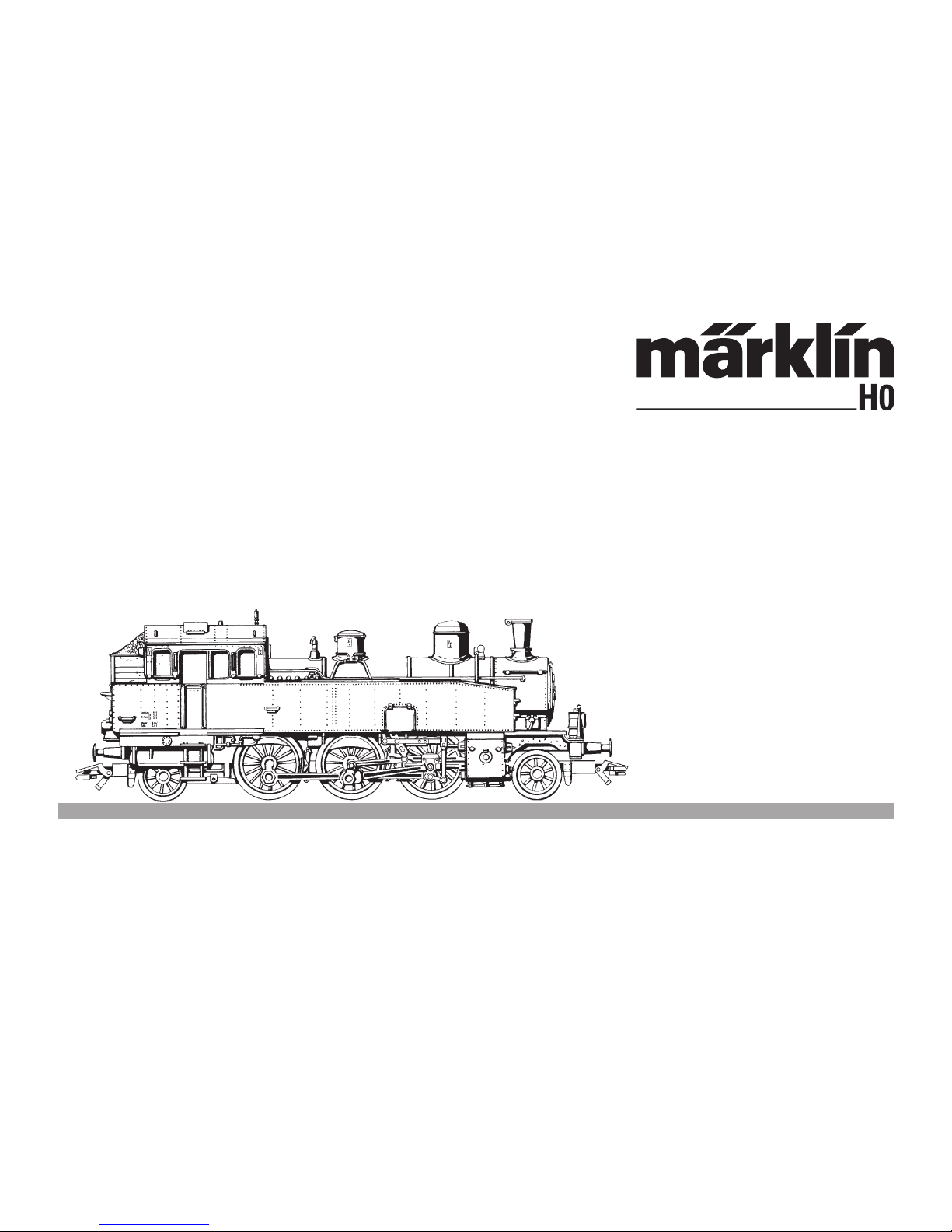
Modell der Baureihe 75
26542
Page 2

2
Informationen zum Vorbild
Die von der ehemaligen Königlich Württembergischen
Staatseisenbahn beschafften sehr leistungsfähigen
Tenderlokomotiven der Gattung T5 wurden fast vollzäh
lig von der Deutschen Reichsbahn übernommen und
erhielten die Baureihenbezeichnung 75.
Noch 89 der ursprünglich 96 Maschinen kamen zur Deutschen Bundesbahn. Erst 1968 wurde das letzte Exemplar,
die 75 042, die bis dahin für Museumszwecke aufbewahrt
worden war, verschrottet.
Die Maschinen mit der Achsfolge 1‘C1‘ hatten eine indizierte Leistung von 880 PSi und eine Höchstgeschwindigkeit von 80 km/h. Sie waren nicht nur im schnellen
Personenzugdienst auf kurzen Haupt- und wichtigen
Nebenstrecken eingesetzt, sondern beförderten gele
-
gentlich auch leichte Schnellzüge und Güterzüge.
Information about the Prototype
The type T5 was a very powerful tank locomotive
purchased by the former Royal Württemberg State
Railroad. Almost all of the T5 units were taken over by
the German State Railroad and classified as the 75. The
German Federal Railroad acquired 89 of the original
96 units. The last example, no. 75 042, was used for
museum purposes until 1968 when it
was scrapped.
These locomotives had a 1‘C1‘ (2-6-2 T) wheel arran-
gement, an indicated output of 880 horsepower and
a maximum speed of 80 km/h (50 m.p.h.). They were
used for fast passenger service on short main line assignments and important branch lines. They were also
used ccasionally for light express and freight trains.
Page 3

3
Informations concernant la locomotive réele
La presque totalité des puissantes locos-tenders
du type T5 achetées par les chemins de fer royaux wür
tembergeois furent reprises par la Deutsche Reichsba
hn sous la dénomination série 75. 89 locos, sur les 96
fabriquées furent reprises par la Deutsche Bundesbahn.
Ce n’est qu’en 1968 que la dernière machine, la 75
042, conservée jusque-là comme machine de musée,
fut mise à la ferraille.
Ces machines du type 131 T développaient une
puissance de 880 CV et leur vitesse maxima était de
80 km/h. Elles assuraient le trafic omnibus rapide sur
de courtes lignes principales ainis que sur des lignes
secondiares importantes. A l’occasion, on les rencon
trait également à la tête de trains express légers ou de
trains de marchandises.
Informatie van het voorbeeld
De voormalige Königlich Württembergische Staats
eisenbahnen schaften de zeer krachtige tenderlocomotieven van de serie T5 aan. Deze serie werd bijna
compleet door de Deutsche Reichsbahn overgenomen
en kreeg de aanduiding BR 75. Van de oorspronkelijke
96 machines kwamen er zelfs nog 89 naar de Deutsche
Bundesbahn. Pas in 1968 werd het laatste exemplaar,
de 75 042, die tot dan bewaard was voor museumdoe
-
leinden, gesloppt.
De machines hadden de asopstelling 1‘C1‘ en beschik-
ten over een geïndiceerd vermogen van 880 pki en een
maximale snelheid van 80 km/h. Ze waren niet alleen
ingezet in de snelle reizigersdienst op korte hoofd- en
belangrijke zijlijnen, maar trokken bij glegenheid ook
lichte sneltreinen en geoderentreinen.
Page 4

4
Funktion
• Mögliche Betriebssysteme: Märklin Transformer 6647,
Märklin Delta, Märklin Digital, Märklin Systems.
• Erkennung der Betriebsart: automatisch.
• Fahrtrichtungsabhängige Stirnbeleuchtung.
• Einstellbare Adressen: 01 – 80.
Adresse ab Werk:
75.
• Mfx-Technologie für Mobile Station / Central Station.
Name ab Werk:
T5 1264
• Veränderbare Anfahr/Bremsverzögerung (ABV).
• Veränderbare Höchstgeschwindigkeit.
• Einstellen der Lokparameter elektronisch über
Control Unit, Mobile Station oder Central Station.
Sicherheitshinweise
•
Die Lok darf nur mit einem dafür bestimmten Betriebssystem (Märklin Wechselstrom-Transformator 6647,
Märklin Delta, Märklin Digital oder Märklin Systems)
eingesetzt werden. Keinesfalls Transformatoren für
eine Eingangsspannung von 220 V - für USA 110 V
- verwenden.
• Die Lok darf nur aus einer Leistungsquelle gleichzeitig
versorgt werden.
• Für den konventionellen Betrieb der Lok muss das
Anschlussgleis entstört werden. Dazu ist das Entstör
set 74046 zu verwenden. Für Digitalbetrieb ist das
Entstörset nicht geeignet.
• Beachten Sie unbedingt die Sicherheitshinweise in
der Gebrauchsanleitung zu Ihrem Betriebssystem.
Die bei normalem Betrieb anfallenden Wartungsarbeiten
sind nachfolgend beschrieben. Für Reparaturen oder
Ersatzteile wenden Sie sich bitte an Ihren Märklin-Fach
-
händler
.
Jegliche Garantie-, Gewährleistungs- und Schadensersatzansprüche sind ausgeschlossen, wenn in Märklin-Produkten nicht
von Märklin freigegebene Fremdteile eingebaut werden und /
oder Märklin-Produkte umgebaut werden und die eingebauten
Fremdteile bzw. der Umbau für sodann aufgetretene Mängel und
/ oder Schäden ursächlich war. Die Darlegungs- und Beweislast
dafür, dass der Einbau von Fremdteilen oder der Umbau in bzw.
von Märklin-Produkten für aufgetretene Mängel und / oder Schäden nicht ursächlich war, trägt die für den Ein- und / oder Umbau
ver antwortliche Person und / oder Firma bzw. der Kunde
Page 5

5
Lokparameter einstellen mit der Control Unit
1. Voraussetzung: Aufbau wie Grafik S. 21.
Nur die zu verändernde Lok ist auf dem Gleis.
2. „Stop“- und „Go“-Taste gleichzeitig drücken, bis
„99“ in der Anzeige aufblinkt.
3. „Stop“-Taste drücken.
4. Lokadresse „80“ eingeben.
5. Umschaltbefehl am Fahrregler halten. Während des
Haltens die „Go“-Taste drücken.
6. Licht der Lok blinkt langsam. Wenn nicht, ab Schritt
2 wiederholen.
7. Registernummer für den zu ändernden Parameter
eingeben (=> Liste auf Seite 23).
8. Fahrtrichtungswechsel betätigen.
9. Licht blinkt schnell
10. Neuen Wert eingeben (=> Liste auf Seite 23).
11. Fahrtrichtungswechsel betätigen.
12. Licht blinkt langsam (Ausnahme Werkreset)
13. Nächste Parametereinstellung ab 6. oder
beenden mit 14.
14. Vorgang beenden mit Drücken der „Stop“-
Taste. Anschließend Drücken der „Go“-Taste.
Betrieb mit Mobile Station / Central Station
• Lok aufgleisen. Die Lok meldet sich selbsttätig in der
Lokliste an.
• Keine Rückmeldung der Lok, wenn:
bei Mobile Station der Geschwindigkeitsbalken blinkt
bei Central Station das mfx-Symbol unterstrichen ist
• Lok abmelden:
1. Lok vom Gleis entfernen.
2. Lokeintrag löschen.
Eine Adressänderung ist nicht notwendig.
Lokparameter mit der Mobile Station /
Central Station verändern
1. Lok aus der Lokliste auswählen.
2. Zum Untermenü „LOKÄNDERN“ wechseln.
3. Zum Untermenü „VMAX“ (Höchstgeschwindigkeit),
„ACC“ (Beschleunigung), „DEC“ (Bremsen),
oder
„RESET“ (Decoder auf Werkeinstellung zurück)
wechseln.
4. Neuen Wert eingeben und übernehmen.
Beachten Sie die Hinweise in der Anleitung zur Mobile
Station / Central Station.
Page 6

6
Safety Warnings
• This locomotive is to be used only with an operating
system designed for it (Märklin 6646/6647 AC transformer, Märklin Delta, Märklin Digital or Märklin Sys
tems). Under no circumstances should transformers
rated for an input of 220 volts be connected to the
American 110 volt household current system.
• This locomotive must never be supplied with power
from more than one transformer.
• The feeder track must be equipped to prevent inter
ference with radio and television reception, when the
locomotive is to be run in conventional operation.
The 74046 interference suppression set is to be used
for this purpose. The interference suppression set is
not suitable for digital operation.
• Pay close attention to the safety warnings in the
instructions for your operating system.
The maintenance work necessary with normal operation of this locomotive is described below. Please see
your authorized Märklin dealer for repairs or spare
parts.
No warranty or damage claims shall be accepted in those cases
where parts neither manufactured nor approved by Märklin have
been installed in Märklin products or where Märklin products
have been converted in such a way that the non-Märklin parts
or the conversion were causal to the defects and / or damage
arising. The burden of presenting evidence and the burden of
proof thereof, that the installation of non-Märklin parts or the
conversion in or of Märklin products was not causal to the
defects and / or damage arising, is borne by the person and / or
company responsible for the installation and / or conversion, or
by the customer.
Function
• Possible operating systems: 6646/6647 Märklin
Transformer, Märklin Delta, Märklin Digital, Märklin
Systems.
•
Recognition of the mode of operation: automatic.
•
Headlights, changing over with the direction of travel.
• Addresses that can be set: 01 – 80.
Address set at the factory:
75.
• Mfx technology for the Mobile Station /
Central Station. Name set at factory:
T5 1264
• Adjustable acceleration.a
• Adjustable Braking delay.
• Adjustable maximum speed.
• Setting the locomotive parameters electronically with
the Control Unit, Mobile Station or Central Station.
Page 7

7
Setting Locomotive Parameters with the
Control Unit
1. Requirement: Setup as in diagram on page 21. Only
the locomotive to be changed can be on the track.
2. Press the “Stop” and “Go” at the same time until
“99” blinks in the display.
3. Press the “Stop” button.
4. Enter the locomotive address „80“.
5. Hold the control knob in the reverse direction area.
While holding the control knob here, press the „Go“
button.
6. The headlights on the locomotive will blink slowly. If
they don‘t, repeat Step 2.
7. Enter the register number for the parameter to be
changed (=> List on page 23).
8. Active the change of direction.
9. The headlights will blink rapidly.
10. Enter the new value (=>List on page 23).
11. Active the change of direction.
12. The headlights will blink slowly (exception: factory reset)
13. Enter the next parameter setting from 6 or end with 14.
14. End the process by pressing the „Stop“ button.
Then press the „Go“ button.
Operation with the Mobile Station /
Central Station
• Set the locomotive on the track. The locomotive
automatically registers itself in the locomotive list.
• The locomotive will not communicate back to the controller
when:
the speed bar on the Mobile Station blinks.
the mfx symbol has a line beneath it on the Central Station.
• Taking the locomotive out of the locomotive list:
1. Remove the locomotive from the track.
2. Delete the locomotive entry.
It is not necessary to change the address.
Changing Locomotive Parameters with the
Mobile Station/Central Station
1. Select the locomotive from the locomotive list.
2. Change to the submenu “EDIT LOC”.
3. Go to the submenu „VMAX“ (maximum speed),
„ACC“ (acceleration), „DEC“ (brakes),
or
„RESET“ (resetting the decoder to factory default
settings)
.
4. Enter the new value and accept it into the system.
Please note the information in the instructions for the
Mobile Station / Central Station.
Page 8

8
Fonction
• Systèmes d’exploitation possibles: Märklin Trans
former 6647, Märklin Delta, Märklin Digital, Märklin
Systems.
• Détection du mode d’exploitation: automatique.
•
Feux de signalisation avec inversion selon sens de
marche.
• Adresses disponibles: 01 – 80.
Adresse encodée en usine:
75.
• Technologie mfx pour Mobile Station /
Central Station. Nom en codee en usine: T5 1264
• Temporisation d’accélération réglable.
• Temporisation de freinage réglable.
• Vitesse maximale réglable.
• Réglage des paramètres de la loco électroniquement
à l’aide de la Control Unit, de la Mobile Station ou de
la Central Station.
Remarques importantes sur la sécurité
• La locomotive ne peut être mise en service qu’avec
un système d’exploitation adéquat (Märklin courant
alternatif - transformateur 6647, Märklin Delta, Mär
klin Digital ou Märklin Systems). N’utilisez en aucun
cas de transformateurs pour une tension à l’entrée
de 220 V - 110 V pour les Etats-Unis.
• La locomotive ne peut être alimentée en courant que
par une seule source de courant.
• Pour l’exploitation de la locomotive en mode conventionnel, la voie de raccordement doit être déparasitée.
A cet effet, utiliser le set de déparasitage réf. 74046. Le
set de déparasitage ne convient pas pour l’exploitation
en mode numérique.
• Veuillez impérativement respecter les remarques sur
la sécurité décrites dans le mode d’emploi en ce qui
concerne le système d’exploitation.
Les travaux d‘entretien occasionnels à effectuer en
exploitation normale sont décrits plus loin. Pour toute
réparation ou remplacement de pièces, adressez vous
à votre détaillant-spécialiste Märklin.
Tout recours à une garantie commerciale ou contractuelle ou à
une demande de dommages-intérêt est exclu si des pièces non
autorisées par Märklin sont intégrées dans les produits Märklin
et / ou si les produits Märklin sont transformés et que les pièces
d’autres fabricants montées ou la transformation constituent
la cause des défauts et / ou dommages apparus. C’est à la
personne et / ou la société responsable du montage / de la
transformation ou au client qu’incombe la charge de prouver
que le montage des pièces d’autres fabricants sur des produits
Märklin ou la transformation des produits Märklin n’est pas à
l’origine des défauts et ou dommages apparus.
Page 9

9
Réglage des paramètres de la loco avec la Control
Unit
1. Condition: Montage comme sur illustration en
page 21. Seule la loco à modifier peut se trouver
sur la voie.
2. Pressez simultanément les touches „Stop“ et „Go“
jusqu’à ce que le nombre „99“ clignote sur l’écran.
3. Pressez la touche „Stop“.
4. Introduisez l’adresse de loco „80“.
5.
Maintenir l’ordre de commutation sur le régulateur
de marche. Durant le maintien, appuyer sur la touche
„Go“.
6. Les feux de la locomotive clignotent lentement.
Dans le cas contraire, renouveler l’opération à partir
de l’étape 2.
7. Indiquer le numéro d’enregistrement pour le para
-
mètre à modifier (=> liste page 23).
8. Activer l’inversion du sens de marche.
9. Les feux clignotent rapidement.
10. Entrer la nouvelle valeur (=> liste page 23).
11. Activer l’inversion du sens de marche.
12. Les feux clignotent lentement (exception : réinitiali
-
sation aux valeurs d’usine)
13. Définition de paramètres suivante à partir du point 6
ou terminer par le point 14.
14. Terminez le processus en pressant la touche
„Stop“. Ensuite, pressez la touche „Go“.
Exploitation avec Mobile Station / Central Station
• Enrailler la locomotive. La locomotive signale automatiquement sa présence dans la liste des locos.
• Pas de rétrosignalisation de la locomotive lorsque :
- la barre de vitesse clignote pour Mobile Station
- le symbole mfx est souligné pour Central Station
• Appeler loco:
1. Enlever loco de la voie.
2. Effacer entrée loco.
Une modification de l’adresse n’est pas nécessaire.
Modification des paramètres de la loco avec la Mobile
Station / Central Station
1. Sélectionnez la loco dans la liste.
2. Allez au sous-menu „MODIF LOC“.
3. Ouvrir le sous-menu « VMAX » (vitesse maximale),
« ACC » (accélération), « DEC » (freinage),
ou
« RESET » (réinitialisation du décodeur aux valeurs
d’usine).
4. Entrez la nouvelle valeur et acceptez.
Respectez les remarques mentionnées dans l’instruction
accompagnant la Mobile/Central Station.
Page 10

10
Veiligheidsvoorschriften
• De loc mag alleen met een daarvoor bestemd bedrjfssysteem (Märklin wisselstroom transformator 6647,
Märklin Delta, Märklin digitaal of Märklin Systems)
gebruikt worden. In geen geval transformatoren met
een ingangsspanning van 220 V - voor USA 110 V
- gebruiken.
• De loc mag niet vanuit meer dan één stroomvoorzie
-
ning gelijktijdig gevoed worden.
• Voor het conventionele bedrijf met de loc dient de
aansluitrail te worden ontstoort. Hiervoor dient men
de ontstoor-set 74046 te gebruiken. Voor het digitale
bedrijf is deze ontstoor-set niet geschikt.
• Lees ook aandachtig de veiligheidsvoorschriften in
de gebruiksaanwijzing van uw bedrijfssysteem.
De in het normale bedrijf voorkomende onderhoudswerkzaamheden zijn verderop beschreven. Voor repa
ratie of onderdelen kunt u zich tot uw Märklin winkelier
wenden.
Elke aanspraak op garantie en schadevergoeding is uitgesloten,
wanneer in Märklin-producten niet door Märklin vrijgegeven
vreemde onderdelen ingebouwd en / of Märklin-producten omgebouwd worden en de ingebouwde vreemde onderdelen resp.
de ombouw oorzaak van nadien opgetreden defecten en / of
schade was. De aantoonplicht en de bewijslijst daaromtrent, dat
de inbouw van vreemde onderdelen in Märklin-producten of de
ombouw van Märklin-producten niet de oorzaak van opgetreden
defecten en / of schade is geweest, berust bij de voor de inbouw
en/of ombouw verantwoordelijke persoon en / of firma danwel
bij de klant.
Werking
• Mogelijke bedrijfssystemen: Märklin Transformer
6647, Märklin Delta, Märklin Digital, Märklin Systems.
• Herkenning van het bedrijfssysteem: automatisch.
• Rijrichtingafhankelijke frontseinen.
• Instelbare adressen: 01-80.
Vanaf de fabriek:
75.
•
Mfx-technologie voor het Mobile Station /
Central Station
.
Naam af de fabriek: T5 1264
• Instelbare optrekvertraging.
• Instelbare afremvertraging.
• Instelbare maximumsnelheid.
• Elektronische instelling van de locomotiefparameters
via de Control Unit, Mobile Station of Central Station.
Page 11

11
Locparameters instellen met de Control Unit
1. Voorwaarde: opbouw zoals tekening op
pagina 21. Alleen de loc die gewijzigd moet worden
op de rails.
2. ”Stop”- en ”Go”-toets gelijktijdig indrukken tot ”99”
in het display oplicht.
3. ”Stop”-toets indrukken.
4. Het adres „80“ invoeren.
5.
Omschakelcommando met de rijregelaar vasthouden.
Tijdens het vasthouden de toets “Go” indrukken.
6. De verlichting van de loc knippert langzaam. Indien
dit niet het geval is, vanaf stap 2 opnieuw beginnen.
7. Het registernummer van de te wijzigen parameter
invoeren (=> lijst op pagina 23).
8. Omschakelcommando geven.
9. Verlichting gaat snel knipperen.
10. Nieuwe waarde invoeren (=> lijst op pagina 23).
11. Omschakelcommando geven.
12. Verlichting knippert langzaam (uitgezonderd bij
decoder reset)
13.
Volgende parameterinstelling of beëindigen met 14.
14.
Sessie beëindigen door het indrukken van de toets
“Stop”. Aansluitend de toets “Go” indrukken.
Bedrijf met Mobile Station / Central Station
• Loc op de rails plaatsen. De loc meldt zichzelf aan in
de loclijst.
• Geen terugmelding van de loc als:
bij het Mobile Station de snelheidsbalk knippert
bij het Central Station het mfx-symbool onderstreept
is
• Loc afmelden:
1. loc van de rails nemen
2. loc invoer wissen.
Het wijzigen van het adres is niet nodig.
Locparameter wijzigen met het Mobile
Station / Central Station
1. Loc uit de loclijst kiezen.
2. Ga naar het nevenmenu ”WIJZIG LOC”.
3. Naar het nevenmenu “VMAX” (maximumsnelheid)
“ACC” (optrekken), “DEC” (afremmen),
of
“RESET” (decoder terugzetten naar fabrieksinstelling) omschakelen.
4. Nieuwe waarde invoeren en overnemen.
Lees ook de opmerkingen in de gebruiksaanwijzing van
het Mobile Station / Central Station.
Page 12

12
Función
• Sistemas operativos posibles: Märklin transformador
6647, Märklin Delta, Märklin Digital, Märklin Systems.
• Reconocimiento del sistema: automático.
• Faros frontales dependendientes del sentido de
marcha.
• Códigos disponibles: 01 – 80.
Código de fábrica: 75.
• Tecnología mfx para la Mobile Station /
Central Station. Nombre de fabrica:
T5 1264
• Arranque lento variable.
• Frenado lento variable.
• Velocidad máxima variable.
• Fijar parámetros de la locomotora electrónicamente
por el Control Unit, Mobile Station o Central Station.
Aviso de seguridad
• La locomotora solamente debe funcionar en un
sistema de corriente propio (Märklin corriente alterna
– transformador 6647 – Märklin Delta – Märklin Digital
o Märklin Systems). En ningún caso utilizar los trans
formadores para una tensión de entrada de 220 V (en
el caso de EE.UU. esta tensión es de 110 V).
• La locomotora no deberá recibir corriente eléctrica
mas que de un solo punto de abasto.
• Para el funcionamiento convencional de la locomotora deben suprimirse las interferencias en la vía de
conexión de la alimentación. Para ello debe emplearse
el set supresor de interferencias 74046. El set supresor
de interferencias no es adecuado para el funciona
-
miento en modo digital.
• Observe bajo todos los conceptos, las medidas
de seguridad indicadas en las instrucciones de su
sistema de funcionamiento.
Los trabajos de mantenimiento normales están descritos a continuación. Para reparaciones o recambios
contacte con su proveedor Märklin especializado.
Se excluye todo derecho de garantía, prestación de garantía e
indemnización sobre aquellos productos Märklin en los que se
hubieran montado piezas ajenas no autorizadas por Märklin y/o
sobre aquellos productos Märklin que hayan sido modificados
cuando la piezas ajenas montadas o la modificación sean las
causas de los desperfectos y/o daños posteriormente surgidos.
La persona y/o empresa o el cliente responsable del montaje o
modificación será el responsable de probar y alegar que el montaje de piezas ajenas o la modificación en/de productos Märklin
no son las causas de los desperfectos y/o daños surgidos.
Page 13

13
Funcionamiento con Mobile Station /
Central Station
• Encarrilar la loc. La loc se introduce por si
misma en la lista de locomotoras.
•
No se recibe señalización de respuesta de la locomotora si
:
En la Mobile Station luce intermitentemente la barra
de velocidad
En la Central Station está subrayado el símbolo mfx
• Dar de baja a la loc.:
1º retirar la loc. de la vía
2º borrar los datos de la loc.
No hace falta cambiar el código.
Modificar los parámetros de la locomotora con la
Mobile Station / Central Station
1. Seleccionar la locomotora de la lista de locomotora.
2. Pasar al menú subsidiario “EDIT LOC”.
3. Cambiar al submenú „VMAX“ (Velocidad máxima),
„ACC“ (Aceleración), „DEC“ (Frenado), o
„RESET“ (Devolver decoder a configuración de
fábrica).
4. Introducir el nuevo código y memorizar.
Observe las indicaciones en las instrucciones de la
Mobile Station / Central Station.
Parámetros de la locomotora configurables con el
Control Unit
1. Condición previa: montaje como el gráfico
pág. 21 En la vía debe encontrarse solamente la
locomotora a configurar.
2. Apretar simultáneamente la tecla “Stop” y “Go”
hasta que aparece “99” en pantalla.
3. Apretar la tecla “Stop”.
4. Marcar el código de la locomotora „80“.
5. Mantener la orden de conmutación en el regulador
de marcha. Durante la parada, pulsar la tecla „Go“.
6. La luz de la locomotora se enciende con intermiten
-
cia lenta. En caso negativo, repetir desde el paso 2.
7. Introducir el número de registro del parámetro que
se desee modificar (=> Lista en página 23).
8. Activar el cambio de sentido de la marcha.
9. La luz se enciende con intermitencia rápida
10. Introducir un valor nuevo (=> Lista en página 23).
11. Activar el cambio de sentido de la marcha.
12. La luz se enciende con intermitencia lenta (excep
-
ción: se ha realizado un reset en fábrica)
13. Configuración de siguiente parámetro repitiendo a
partir de 6. o terminar con 14.
14. Repetir la operación pulsando la tecla „Stop“. A
continuación, pulsar la tecla „Go“.
Page 14

14
Avvertenze per la sicurezza
• Tale locomotiva deve essere impiegata soltanto
con un sistema di funzionamento adeguato per
questa (transformatore per corrente alternata Märklin
6647, Märklin Delta, Märklin Digital oppure Märklin
Systems). Non si impieghino mai per USA, a 110 V, i
transformatori per una tensione di ingresso di 220 V.
• La locomotiva non deve venire alimentata nello stesso
tempo con più di una sorgente di potenza.
• Per il funzionamento tradizionale della locomotiva
il binario di alimentazione deve essere protetto dai
disturbi. A tale scopo si deve impiegare il corredo
antidisturbi 74046. Tale corredo antidisturbi non è
adatto per il funzionamento Digital.
• Vogliate prestare assolutamente attenzione alle
avvertenze di sicurezza nelle istruzioni di impiego per
il Vostro sistema di funzionamento.
Le operazioni di manutenzione che si verificano nel
normale funzionamento sono descritte nel seguito. Per
riparazioni o parti di ricambio Vi preghiamo di rivolgerVi
al Vostro rivenditore specialista Märklin.
Märklin non fornisce alcuna garanzia, assicurazione e risarcimentodanni in caso di montaggio sui prodotti Märklin di componenti nonespressamente approvati dalla ditta. Märklin altresì
non risponde in caso di modifiche al prodotto, qualora i difetti e
i danni riscontrati sullo stesso siano stati causati da modifiche
non autorizzate o dal montaggio di componente esterni da lei
non approvati. L‘onere della prova che i componenti montati e
le modifiche apportate non sono state la causa del danno o del
difetto, resta a carico del cliente o della persona / ditta che ha
effettuato il montaggio di omponenti estranei o che ha apportato
modifiche non autorizzate.
Funzionamento
• Possibili sistemi di funzionamento: Märklin Transformer
6647, Märklin Delta, Märklin Digital, Märklin Systems.
• Riconoscimento del tipo di funzionamento: automatico.
•
Illuminazione di testa dipendente dalla direzione di marcia
.
• Indirizzi impostabili: 01 – 80.
Indirizzo di fabbrica: 75.
• Tecnologia mfx per Mobile Station /
Central Station. Nome de fabrica: T5 1264
• Ritardo di avviamento modificabile.
• Ritardo di frenatura modificabile.
• Velocità massima modificabile.
• Regolazione dei parametri della locomotiva elettroni
camente tramite Control Unit, Mobile Station oppure
Central Station.
Page 15

15
Impostazione dei parametri della locomotiva con la
Control Unit
1. Predisposizione: assetto come da schema a
pag. 21. Soltanto la locomotiva da modificare si
trova sul binario.
2. Premere contemporaneamente i tasti „Stop“ e
„Go“, fino a che sul visore lampeggia „99“.
3. Premere il tasto „Stop“.
4. Introdurre l’indirizzo della locomotiva „80“.
5. Tenere premuto il comando di commutazione sul regolatore di marcia. Durante tale pressione, premere
il tasto „Go„.
6. I fanali della locomotiva lampeggiano lentamente. In
caso negativo, si riprenda dal passo 2.
7. Introdurre il numero di registro per il parametro da
modificare (=> elenco a pagina 23).
8. Azionare la commutazione della direzione di marcia.
9. I fanali lampeggiano velocemente
10. Introdurre il nuovo valore (=> elenco a pagina 23).
11. Azionare la commutazione della direzione di marcia.
12. I fanali lampeggiano lentamente (ad eccezione del
ripristino di fabbrica).
13. Impostazione del prossimo parametro ripartendo da
6. oppure terminare con 14.
14. Terminare il procedimento con la pressione del tasto
„Stop„.Successivamente premere il tasto „Go„.
Funzionamento con Mobile Station /
Central Station
• Disporre la locomotiva sul binario. La locomotiva si
annuncia automaticamente nell’elenco locomotive.
• Nessun segnale di ritorno della locomotiva, qualora:
nel caso di Mobile Station lampeggia la barra della
velocità
nel caso di Central Station il simbolo mfx è sottolineato
• Dare congedo alla locomotiva:
1. Rimuovere la locomotiva dal binario.
2. Cancellare l’impostazione della locomotiva.
Non è necessaria una modifica dell’indirizzo.
Modifica dei parametri della locomotiva con la
Mobile Station / Central Station
1. Selezionare la locomotiva dall’elenco locomotive.
2. Commutare al sottomenù „EDIT LOC“.
3.
Sul menù sottostante commutare „VMAX„ (velocità massima)
,
„ACC„ (accelerazione), „DEC„ (frenatura),
oppure
„RESET„ (riporta il Decoder alle impostazioni di
fabbrica).
4. Introdurre il nuovo valore e accettarlo.
Prestate attenzione alle avvertenze nelle istruzioni della
Mobile Station / Central Station.
Page 16

16
Funktion
• Möjliga driftsystem: Märklin Transformer 6647, Märk
-
lin Delta, Märklin Digital, Märklin Systems.
• Driftsättet igenkänns automatiskt.
• Körriktningsberoende frontbelysning.
• Inställbara adresser: 01 – 80.
Adress från tillverkaren:
75.
• Mfx-teknologi för Mobile Station / Central Station.
Namn fran tillverkaren:
T5 1264
• Accelerationsfördröjning kan ändras.
• Bromsfördröjning kan ändras.
• Toppfart kan ändras.
• Elektronisk inställning av lokparametrar via Control
Unit, Mobile Station eller Central Station.
Säkerhetsanvisningar
• Loket får endast köras med ett därtill avsett driftsystem (Märklin Växelström-transformator 6647, Märklin
Delta, Märklin Digital eller Märklin Systems).Använd
aldrig någonsin transformatorer avsedda att anslutas
till ingångsspänning 220 V - ej eller USA 110 V.
• Loket får inte samtidigt försörjas av mer än en kraftkälla.
• När motorvagnens lokdel ska köras med konventionell/analog drift måste anlutningsskenan vara avstörd.
Till detta använder man anslutningsgaarnityr 74046
med avstörning och överbelastningsskydd. Avstör
-
ningsskyddet får inte användas vid digital körning.
• Beakta alltid säkerhetsanvisningarna i bruksanvisnin
-
gen som hör till respektive driftsystemet.
Underhållsarbeten som uppstår vid normal användning
beskrivs som följer. Kontakta din Märklinfackhandlare
för reparationer och reservdelar.
Varje form av anspråk på garanti och skadestånd är utesluten
omdelar används i Märklin-produkter som inte har godkänts av
Märklin och / eller om Märklin-produkter har modifierats och de
inbyggda främmande delarna resp. modifieringen var upphov till
de därefter uppträdande felen och / eller skadorna. Bevisbördan
för att inbyggnaden av främmande delar i eller ombyggnaden av
Märklin-produkter inte är upphovet till de uppträdande felen och
/ eller skadorna, bär den person och / eller företag resp. kund
som är ansvarig för in- och / eller ombyggnaden.
Page 17

17
Drift med Mobile Station / Central Station
• Sätt loket på spåret. Loket anmäler sig själv på
loklistan.
• Loket anmäler sig inte när:
Mobile Station hastighetsbalk blinkar
Central Station mfx-symbol är understruken
• Att avregistrera loket:
1. Ta loket från spåret
2. Ta bort loket från loklistan.
En adressändring behövs inte
Lokparametrar ändras med Mobile Station /
Central Station
1. Välj lok från loklistan.
2. Växla till undermenyn „EDIT LOC“.
3. Byt till resp. Undermeny: “VMAX“ (maxhastighet),
“ACC“ (acceleration), „DEC„ (bromsning),
eller till
„RESET„ (för återställning av dekodern till ursprung
-
lig fabriksinställning).
4. Mata in nytt värde och acceptera.
Glöm ej: Se även i anvisningarna i bruksanvisningen för
Mobile Station / Central Station!
Lokparametrar ställs in med Control Unit
1. Förutsättning: Montering som visas enligt grafik
på s. 21. Endast det lok som ska ändras ska fin
-
nas på spåret.
2. Både „Stop“- och „Go“-tangenten hålls nedtryckt
tills „99“ blinkar på displayen.
3. „Stop“-tangenten hålls ner.
4. Lokadress „80“ matas in.
5. Tryck ned körkontrollen, som vid ändring av körriktningen. Håll ned knappen och tryck samtidigt på
„Go“-knappen.
6. Lokets strålkastare blinkar långsamt. Om inte
– upprepa steg 2.
7. Ange registernummren för de ändrade parame
-
trarna (=> Se lista på sidan 23).
8. Gör en körriktningsändring.
9. Strålkastarna blinkar snabbt.
10.Ange önskade nya värden (=> Se lista på sidan 23).
11.Gör en körriktningsändring.
12.Strålkastarna blinkar långsamt (Gäller inte vid ge
-
nomförd reset)
13.Nästa parameterinställning från steg 6. eller sluta
med steg 14.
14.Avsluta med att trycka på “Stop“-knappen. Tryck
därefter på “Go“-knappen.
Page 18

18
Vink om sikkerhed
• Lokomotivet må kun bruges med et driftssystem
(Märklin vekselstrøm-transformator 6647, Märklin
Delta, Märklin Digital eller Märklin Systems), der er
beregnet dertil. Transformatorer, der er beregnet til
indgangsspændingen 220 V, må aldrig tilsluttes til
110 V i USA.
• Lokomotivet må ikke forsynes fra mere end én
strømkilde ad gangen.
• Ved konventionel drift af lokomotivet skal tilslut
ningssporet støjdæmpes. Dertil skal anvendes
støjdæmpningssættet 74046. Støjdæmpningssættet
er ikke egnet til digital drift.
• Vær under alle omstændigheder opmærksom på de
vink om sikkerhed, som findes i brugsanvisningen for
Deres driftssystem.
Vedligeholdelsesarbejder ved normal drift er beskrevet
i det efterfølgende. For reparation eller reservedele
bedes De henvende Dem til Deres Märklinforhandler.
Ethvert garanti-, mangelsansvars- og skadeserstatningskrav er
udelukket, hvis der indbygges fremmeddele i Märklinprodukter,
der ikke er frigivet dertil af Märklin og / eller hvis Märklinprodukter bygges om og de indbyggede fremmeddele hhv. ombygningen var årsag til sådanne opståede mangler og / eller skader.
Det påhviler kunden hhv. den person og / eller det firma, der er
ansvarlig for ind- og / eller ombygningen, at påvise hhv. bevise,
at indbygningen af fremmeddele i, eller ombygningen af Märklinprodukter ikke var årsag til opståede mangler og / eller skader.
Funktion
• Mulige driftssystemer: Märklin Transformer 6647,
Märklin Delta, Märklin Digital, Märklin Systems.
• Registrering af driftsarten: automatisk.
• Køreretningsafhængig frontbelysning.
• Indstillelige adresser: 01 – 80.
Adresse ab fabrik:
75.
• Mfx-teknologi til Mobile Station / Central Station.
Navn ab fabrik: T5 1264
• Indstillelig opstartforsinkelse.
• Indstillelig bremseforsinkelse.
• Indstillelig maksimalhastighed.
• Elektronisk indstilling af lokomotivparametrene via
Control Unit, Mobile Station eller Central Station.
Page 19

19
Indstilling af lokomotivparametre med Control Unit
1. Forudsætning: Opbygning som på grafikken
s. 21. Kun det lokomotiv, der skal ændres, er på
sporet.
2. Tryk samtidig på „Stop“- og „Go“-tasten, indtil „99“
blinker i displayet.
3. Tryk på „Stop“-tasten.
4. Indtast den lokomotivadresse „80“.
5. Hold omskiftningskommando på køreregulator Tryk på
„Go“-knappen mens der holdes.
6. Lyset på lokomotivet blinker langsomt. Hvis ikke
gentages proceduren fra trin 2.
7. Indtast registernummeret for den parameter, der skal
ændres (=> liste på side 23).
8. Betjen køreretningsskiftet.
9. Lyset blinker hurtigt
10.Indtast den nye værdi (=> liste på side 23).
11.Betjen køreretningsskiftet.
12.Lyset blinker langsomt (undtaget fabriksnulstilling)
13.Udfør næste parameterindstilling fra 6. eller afslut
med 14.
14.Afslut proceduren ved at trykke på „Stop“-knappen
Tryk derefter på „Go“-knappen.
Drift med Mobile Station / Central Station
• Sæt lokomotivet på skinnerne. Lokomotivet registre
-
res automatisk i lokomotivlisten.
• Ingen tilbagemelding fra lokomotivet, når:
hastighedsbjælken blinker ved brug af Mobile
Station
mfx-symbolet er understreget ved brug af Central
Station
• Afmelding af lokomotivet:
1. Tag lokomotivet af skinnerne.
2. Slet lokomotivet fra listen.
Det er ikke nødvendigt med en adresseændring.
Ændring af lokomotivparametre med Mobile Station
/ Central Station
1. Vælg lokomotivet fra listen.
2. Skift til undermenuen „EDIT LOC“.
3. Til undermenu „VMAX“ (maksimalhastighed),
„ACC“ (acceleration), „DEC“ (bremse),
eller
„RESET“ (nulstille dekoder til fabriksindstilling).
4. Indtast den nye værdi og overtag den.
Lagttag henvisningerne i vejledningen til Mobile Station
/ Central Station.
Page 20
20
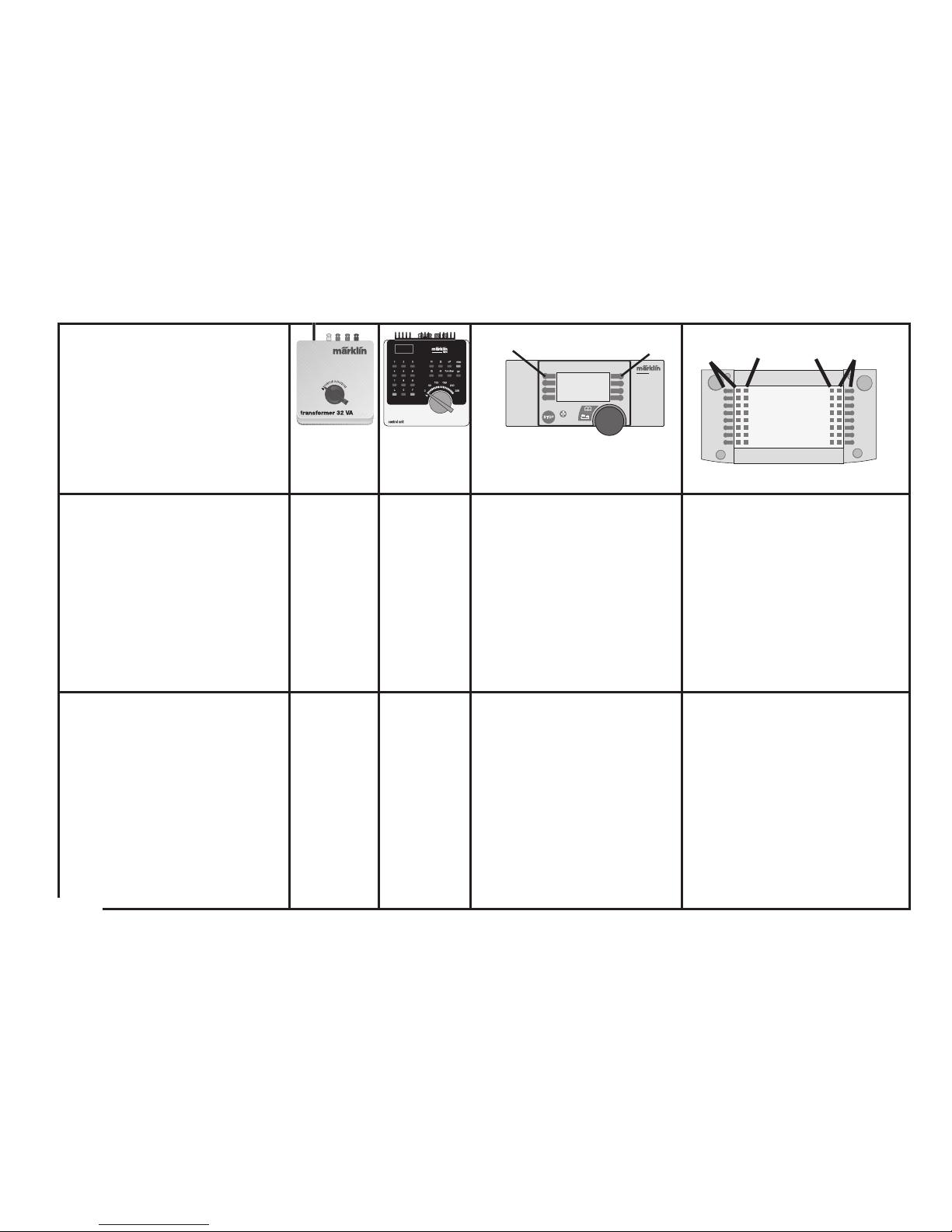
Schaltbare Funktionen
Controllable Functions
Fonctions commutables
Schakelbare functies
Funciones posibles
Funzioni commutabili
Kopplingsbara funktioner
Styrbare funktioner
E
Ein
On
Activé
Aan
Siempre
Accesa
Till
Tændt
function
Licht-Taste
Headlight Button
Touche éclairage
Verlichtingstoets
Tecla alumbrado
Tasto luci
Ljustangent
Belysningstast
Taste f0 mit Symbol
Button f0 with symbol
Touche f0 avec symbole
Toets f0 met symbool
Tecla f0 con símbolo
Tasto f0 con simbolo
Knapp f0 med symbol
Knap f0 med symbol
Rangiergang (ABV)
Switching Range ( ABV)
Mode manoeuvre (ABV)
Rangeerstand (ABV)
Marcha maniobras (ABV)
Andatura da manovra Ran-
gergång (ABV)
Rangergear (ABV)
—
f4
Taste 4 mit Symbol
Button 4 with symbol
Touche 4 avec symbole
Toets 4 met symbool
Tecla 4 con símbolo
Tasto 4 con simbolo
Knapp 4 med symbol
Knap 4 med symbol
Taste f4 mit Symbol
Button f4 with symbol
Touche f4 avec symbole
Toets f4 met symbool
Tecla f4 con símbolo
Tasto f4 con simbolo
Knapp f4 med symbol
Knap f4 med symbol
STOP
mobile station
systems
1
5
central
station
60212
f0
f0f8
f8
Page 21
21
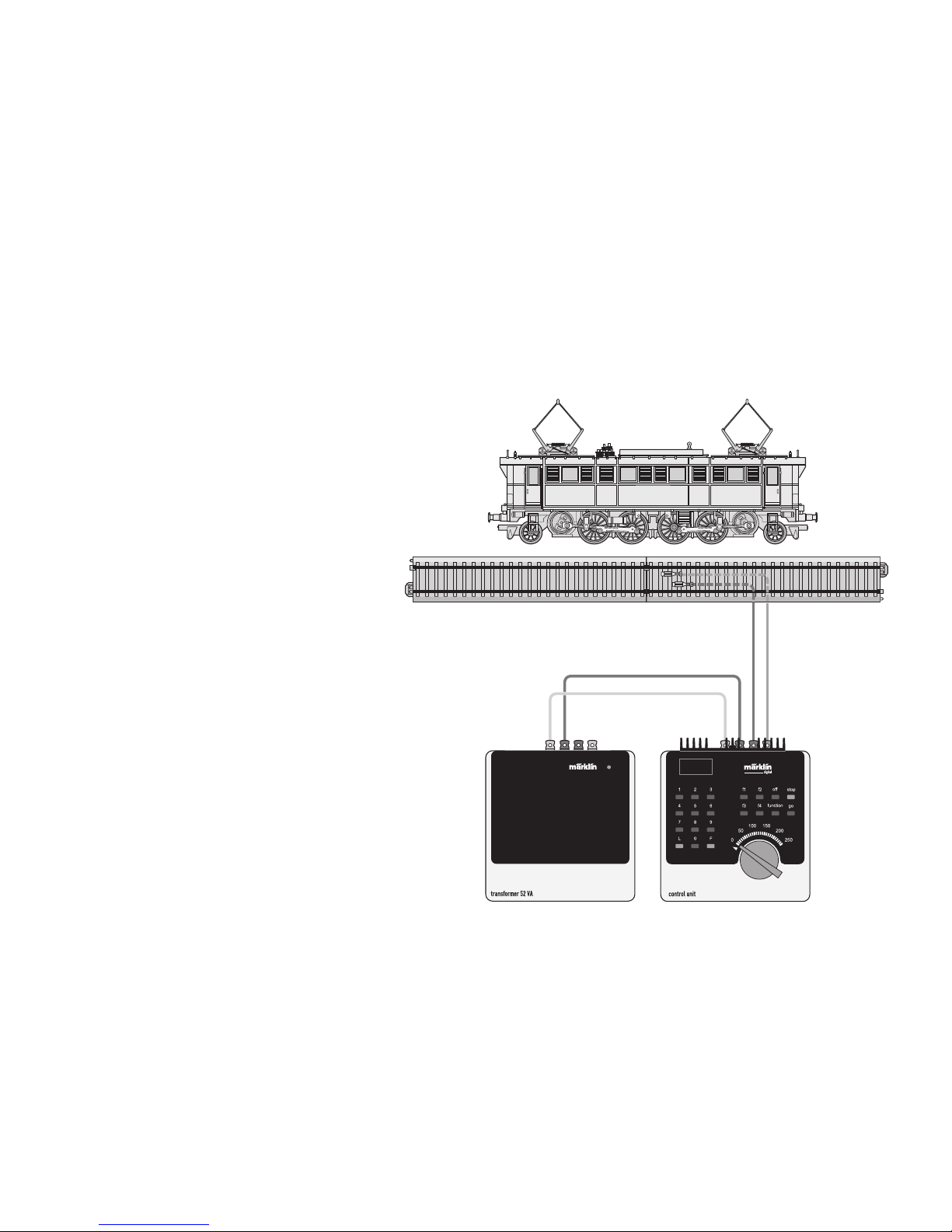
Lokparameter mit Control Unit ändern.
Changing Locomotive Parameters with the Control Unit.
Modification des paramètres avec la Control Unit.
Locparameter met de Control Unit.
Modificar los parámetros de la locomotora con el Control Unit.
Modifica dei parametri della locomotiva con la Control Unit.
Lokparametrar ändras med Control Unit.
Ændring af lokomotivparametre med Control Unit.
Page 22
22
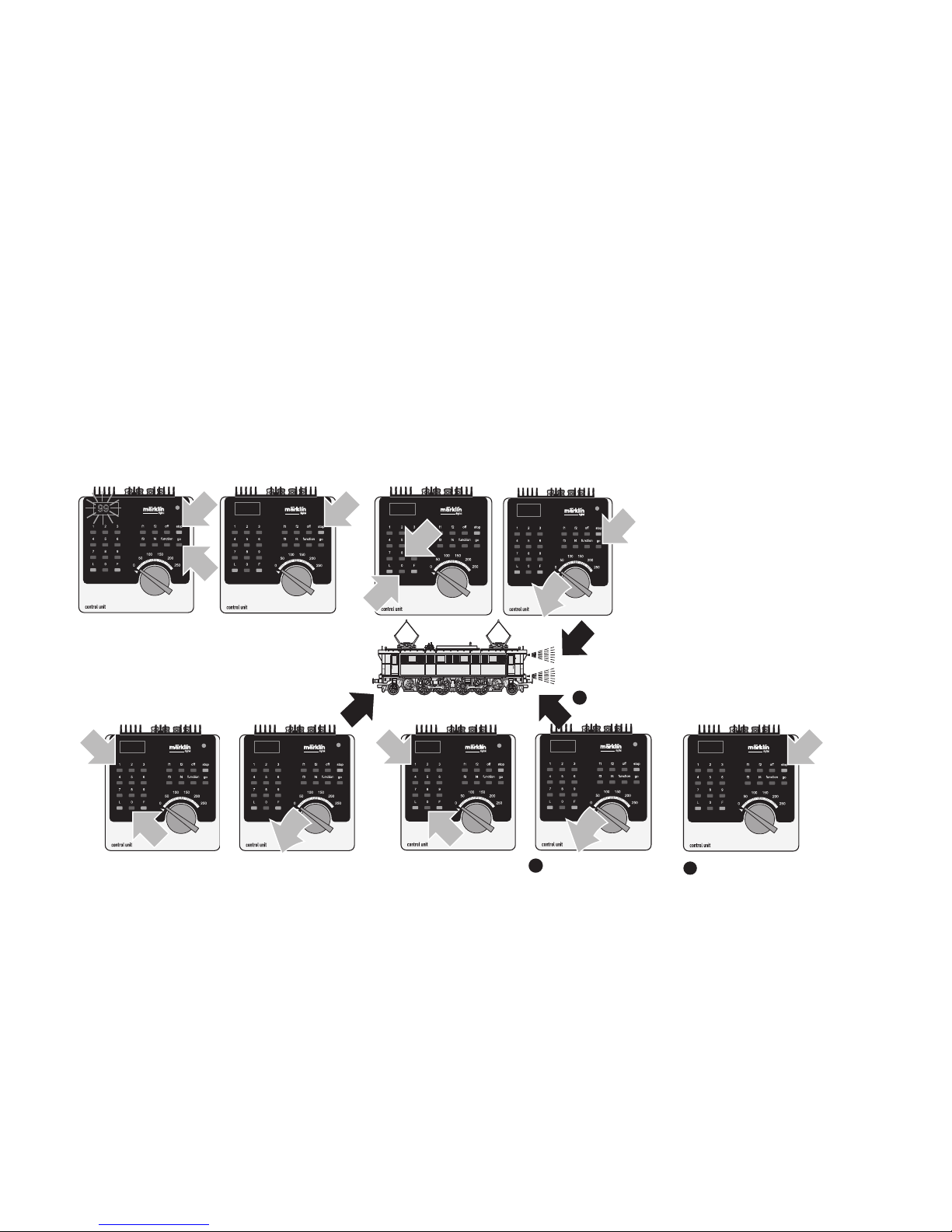
Lokparameter ändern mit der Control Unit 6021.
Changing Locomotive Parameters with the 6021 Control Unit.
Modification des paramètres de la locomotive avec la Control Unit 6021.
Locparameter wijzigen met de Control Unit.
Modificar los parámetros de la locomotora con el Control Unit 6021.
Modifica dei parametri della locomotiva con la Control Unit 6021.
Lokparametrar ändras med Control Unit 6021.
Ændring af lokomotivparametre med Control Unit 6021.
1
80
1
1
1
99
1
2
80
2
1
01
01
1
1
2
10
10
1
11
14
12
Page 23
23
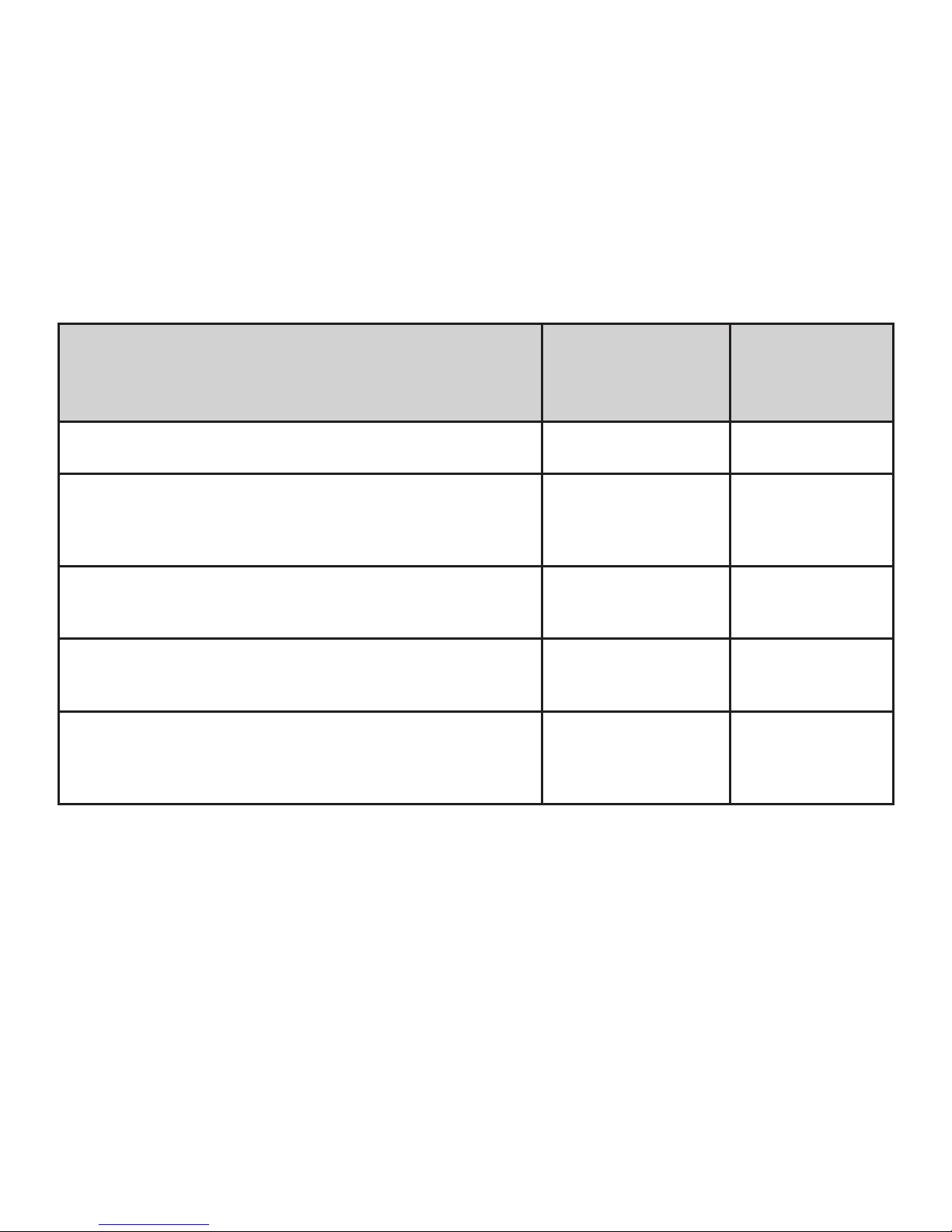
Parameter • Parameter • Paramètre • Parameter •
Parámetro • Parametro • Parameter • Parameter
Register • Register •
Registre • Register •
Registro • Registro •
Register • Register
Wert • Value •
Valeur • Waarde
• Valor • Valore
• Värde • Værdi
Adresse • Address • Adresse • Adres • Código • Indrizzo •
Adress • Adresse
01 01 - 80
Anfahrverzögerung • Acceleration delay • Temoprisation
accélération • Optrekvertraging • Regulación arranque •
Ritardo di avviamento • Igångsättningsreglering • Opstartregulierung
03 01 - 63
Bremsverzögerung • Braking delay • Temporisation de freinage • Afremvertraging • Frenado lento • Ritardo di frentura
• Bromsfördröjning • Bremseforsinkelse
04 01 - 63
Höchstgeschwindigkeit • Maximum speed •
Vitesse maximale • Maximumsneilheid • Velocidad máxima •
Velocità massima • Toppfart • Maksimalhastighed
05 01 - 63
Rückstellen auf Serienwerte • Reset to series value • Remettre aux valeurs de série • Terugzetten naar serie-instellingen •
Restablecer los valores de serie • Pipristinare sui valori di serie
• Återställa till standardvärden • Tibagestil til serieværdien
08 08
Page 24
24
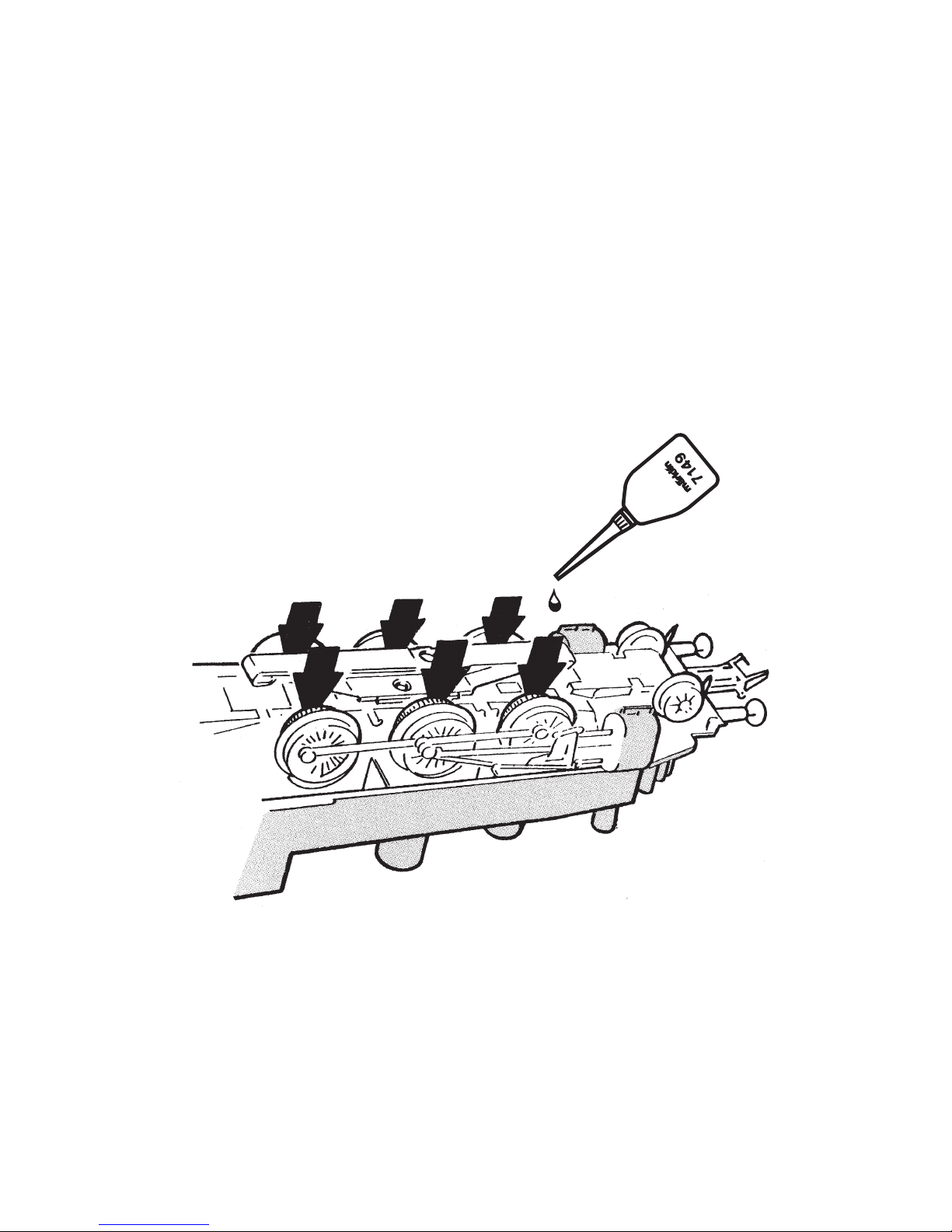
Schmierung nach etwa 40 Betriebsstunden
Lubrication after approximately 40 hours of
Graissage après environ 40 heures de marche
Smering na ca. 40 bedrijfsuren
Engrase a las 40 horas de funcionamiento
Lubrificazione dopo circa 40 ore di funzionamento
Smörjning efter ca. 40 driftstimmar
Smøring efter ca. 40 driftstimer
Page 25
25
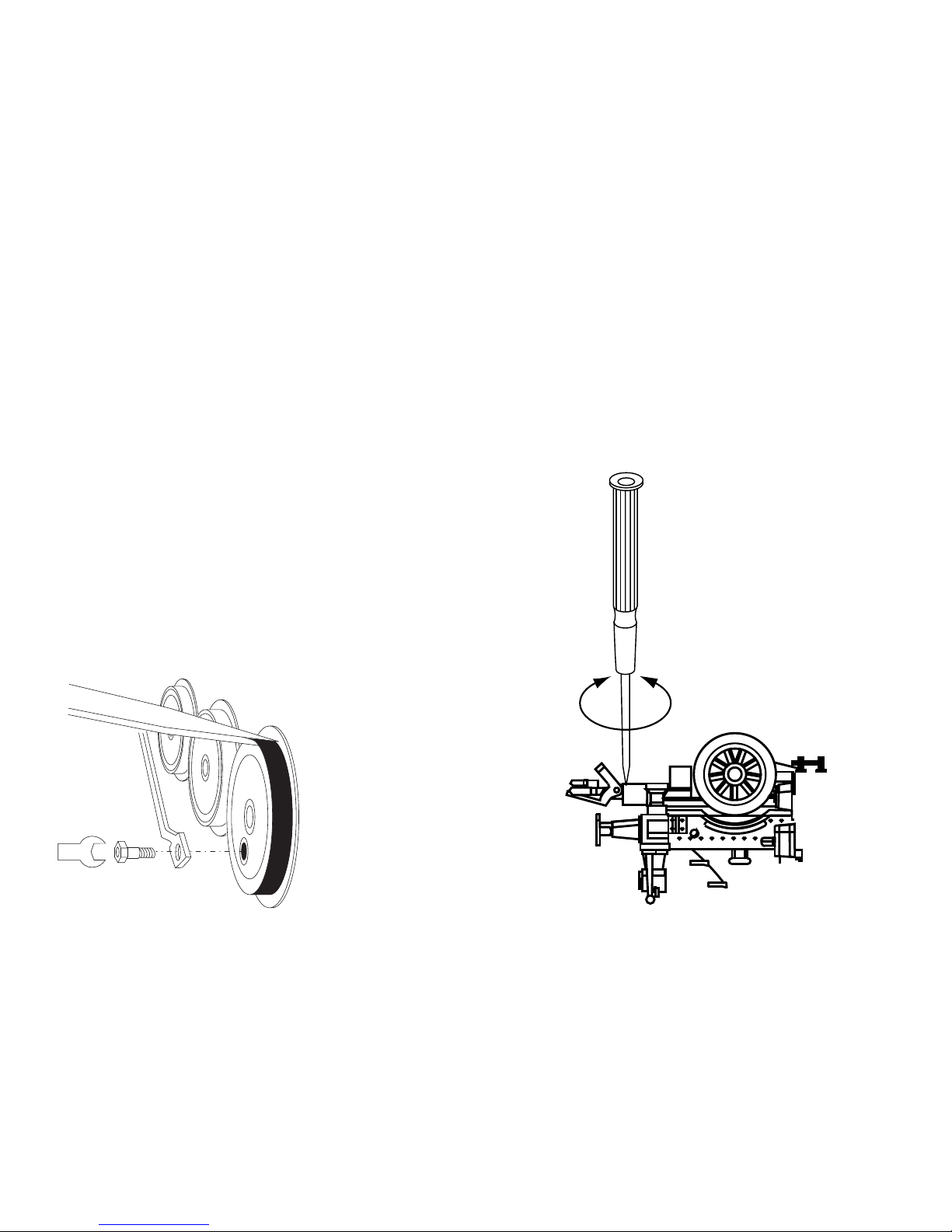
Haftreifen auswechseln
Changing traction tires
Changer les bandages d’adhérence
Antislipbanden vervangen
Cambio de los aros de adherencia
Sostituzione delle cerchiature di aderenza
Slirskydd byts
Friktionsringe udskiftes
Kupplung austauschen
Exchanging the close coupler
Remplacement de l’attelage court
Omwisselen van de kortkoppeling
Enganches cortos
Sostituzione del gancio corto
Utbyte av kortkoppel
Udskiftning af kortkoblingen
Page 26
26
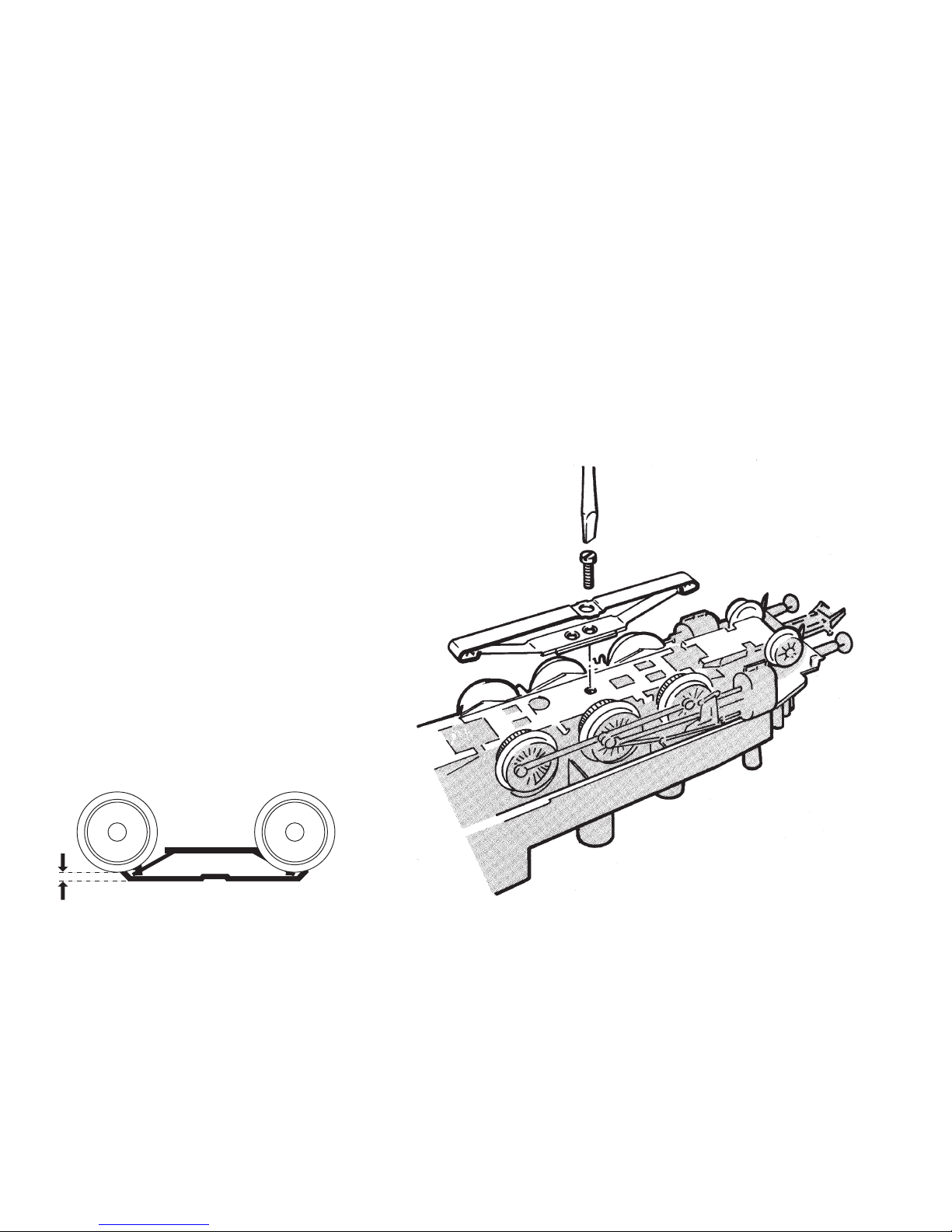
Schleifer auswechseln
Changing the pickup shoe
Changer le frotteur
Vervangen van het sleepcontact
Cambio del patín toma-corriente
Sostituzione del pattino
Byt släpsko
Udskiftning af slæbesko
2 mm
Page 27
27
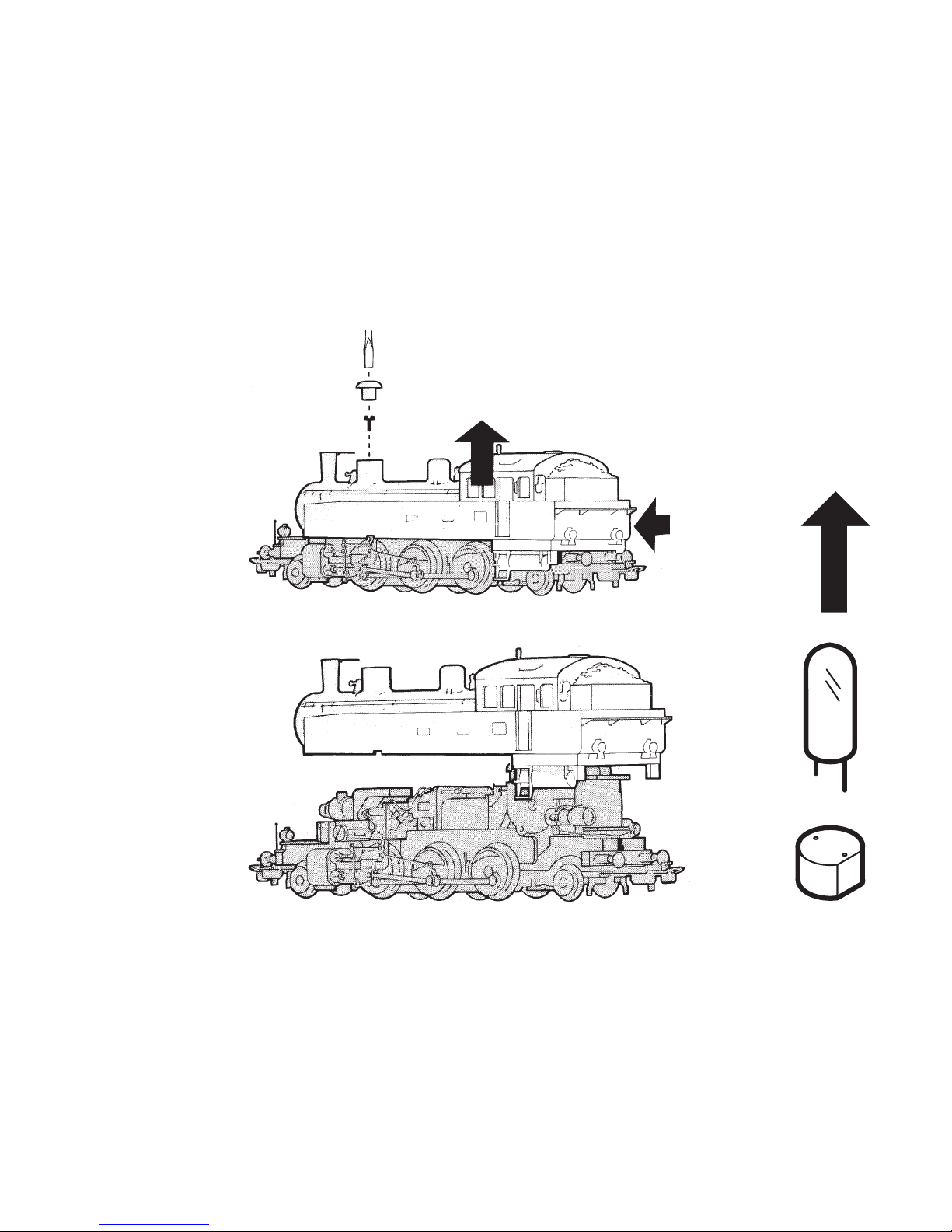
Gehäuse abnehmen
Removing the body
Enlever le boîtier
Kap afnemen
Retirar la carcasa
Smontare il mantello
Kåpan tas av
Overdel tages af
Glühlampen auswechseln
Changing light bulbs
Changer les ampoules
Gloeilamp vervangen
Sustituir la bombilla
Cambiare la lampadina
Glödlampor byts
Elpærer skiftes
Page 28
28
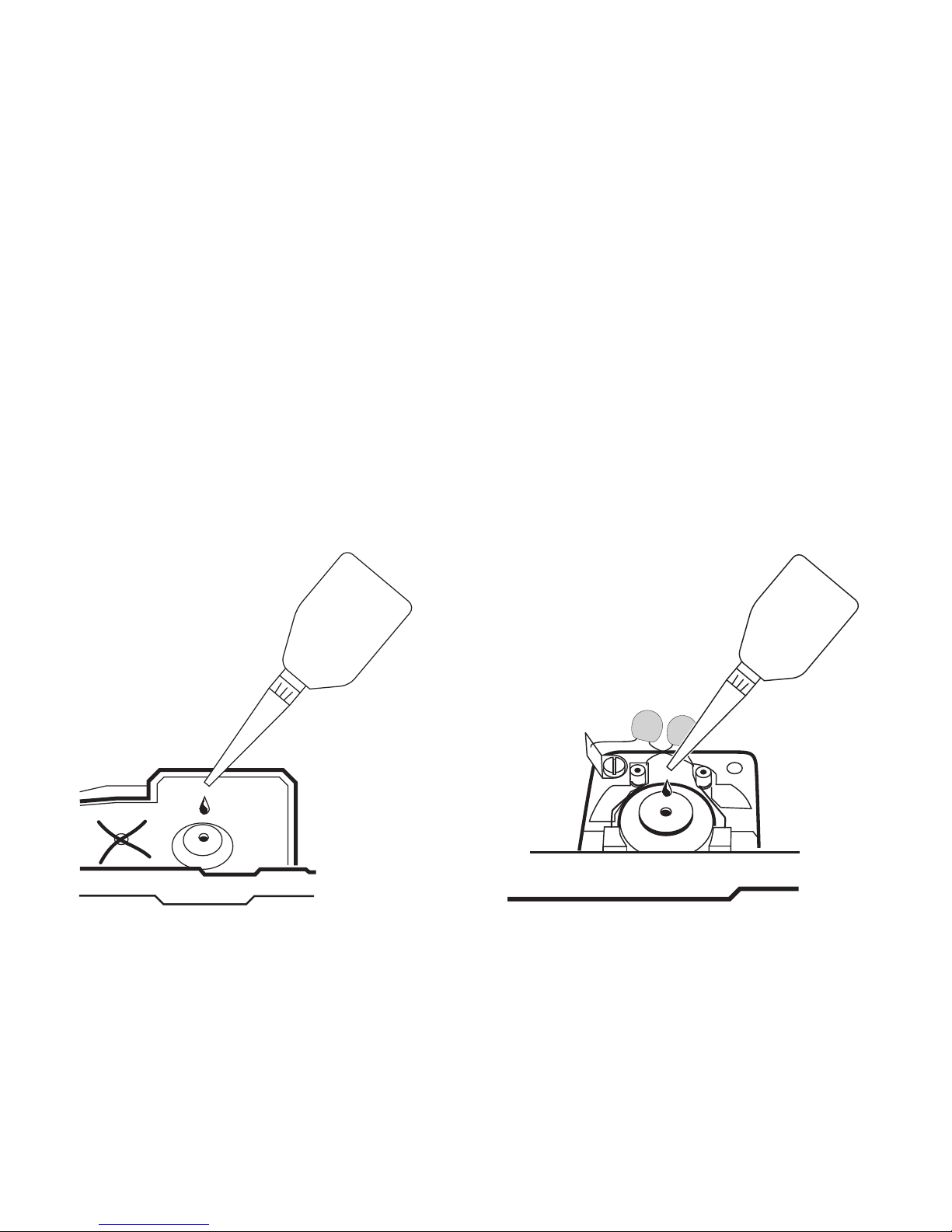
• Nur sparsam ölen (max. 1 Tropfen)
• Oil sparingly (max. 1 drop
• Lubrifiez en très petite quantité (1 goutte max.)
• Slechts spaarzaam oliën (max. 1 druppel)
• Engrasar poco (máx. 1 gota).
• Si lubrifichi soltanto con parsimonia (al max.1 goccia)
• Smörj endast sparsamt (max 1 droppe).
• Giv kun lidt olie (maks. 1 dråbe)
!
Page 29
29
��
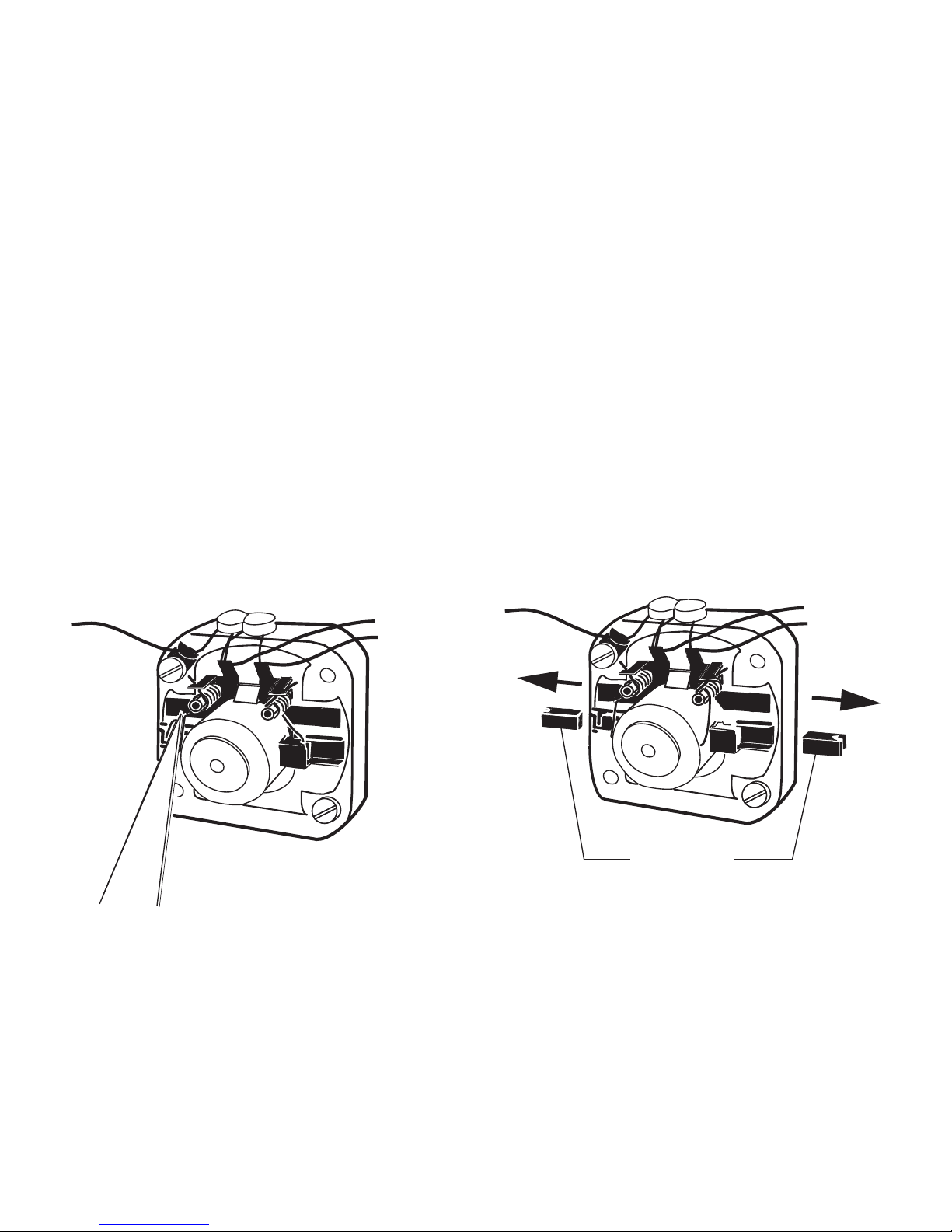
Motor-Bürsten auswechseln
Changing motor brushes
Changer les balais du moteur
Koolborstels vervangen
Cambio de las escobillas
Sostituzione delle spazzole del motore
Motorborstar byts
Motorkul udskiftes
��
601 460
Page 30
30
43
42
44
15
37
49
52
53
22
44
48
50
39
8
4
25
26
24
32
31
30
1
7
7
5
10
9
7
7
7
7
6
2
3
33
35
36
17
11
12
13
29
28
27
27
28
20
19
21
23
18
45
47
46
49
45
46
48
47
40
35
34
38
37
36
16
41
17
14
51
Details der Darstellung
können von dem Modell
abweichen
Page 31

31
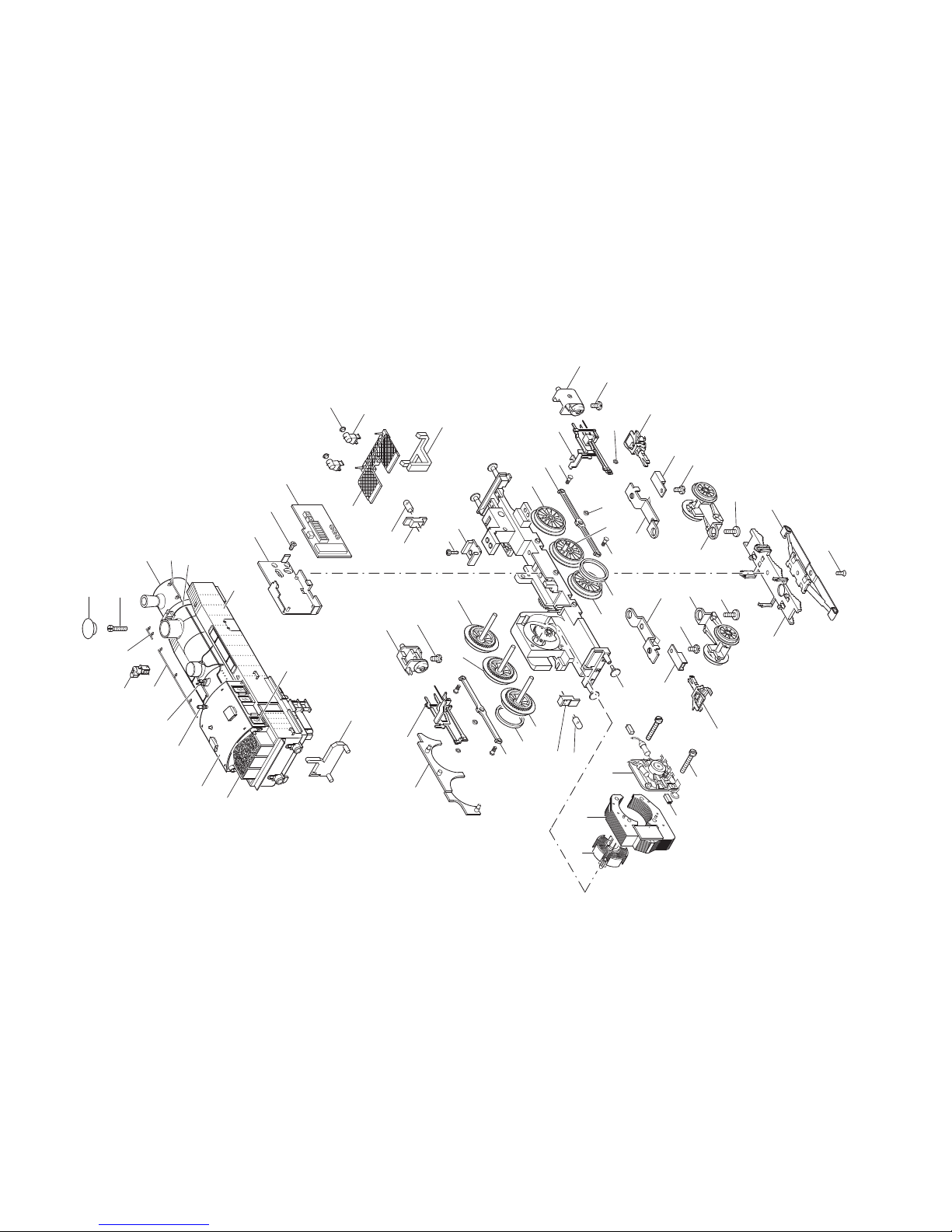
1 Lok-Aufbau (komplett) 119 520
mit
2 Dachaufsatz 248 720
3 Kohlenaufsatz 288 380
4 Fenstereinsatz 248 640
5 Wasserkasten / Umlauf 288 360
6 Pfeife 248 760
7 Sortiment Steckteile 118 272
8 Lichtkörper 248 680
9 Linsenschraube 785 070
10 Deckel 249 170
Treibgestell (komplett) 222 411
11 Treibachsenteil mit Haftreifen 447 270
12 Treibachsenteil 222 423
13 Treibachsenteil 447 310
14 Treibrad mit Haftreifen 447 290
15 Treibrad 218 993
16 Treibrad 447 330
17 Haftreifen 7 153
18 Puffer 761 850
19 Feldmagnet 216 535
20 Anker 386 820
21 Motorschild 386 940
22 Zylinderschraube 785 140
23 Bürstenpaar 601 460
24 Decoder 111 388
Leiterplatte Schnittstelle 612 082
25 Halteplatte 405 040
26 Senkschraube 786 790
27 Lampensockel 259 920
28 Glühlampe 610 080
29 Abdeckung 249 190
30 Lichtkörper 221 623
31 Laterne 242 860
32 Linse 761 600
33 Zylinder, links 203 056
34 Zylinder, rechts 203 058
35 Senkschraube 786 790
36 Kuppelstange 222 422
37 Sechskantansatzschraube 499 850
38 Gestänge, rechts 222 412
39 Gestänge, links 222 418
40 Sechskantmutter 499 830
41 Distanzring 206 262
42 Isolierplatte 228 950
43 Linsenschraube 786 750
44 Deichsel 291 580
45 Kupplungsschacht 288 390
46 Zylinderschraube 750 120
47 Kupplung 7 203
48 Laufgestell 203 055
49 Zylinderschraube 750 180
50 Blende 464 180
51 Bremsattrappe 248 580
52 Schleifer 7 185
53 Senkschraube 786 720
Page 32
111412 04 07 Ni Ef
Änderungen vorbehalten
© Gebr. Märklin & Cie. GmbH
Gebr. Märklin & Cie. GmbH
Postfach 860
D-73008 Göppingen
www.maerklin.com
This device complies with Part 15 of the FCC Rules.
Operation is subject to the following two conditions:
(1) This device may not cause harmful interference, and
(2) this device must accept any interference received, including
interference that may cause undesired operation.
 Loading...