

Page 1

User Guide
Persona for Windows
www.marinersoftware.com
Contents
What's new in
Persona?
Learn About Persona
Solving Problems
Page 2

Pe rso na for Windows Use r Guide
Contents
Discover what you can do
Create Mo de
Intera ct Mode
Introd uction
Learn Mode
Misc
Sho rtcuts
Solving pro blems
Use P ers ona for Windo ws Us er Guide to disc over what you c an do us ing Pe rsona .
To explore what you can do with Pers ona, click an ite m on the left.
To sea rch for text within a page currently displaying in He lp, pres s Ctrl-F to disp lay a s ea rch dialog. Use th is d ialog to
search for te xt.
Page 3

Pe rso na for Windows Use r Guide
Contents
Introduction
Create Mo de
Intera ct Mode
Introd uction
Learn Mode
Misc
Sho rtcuts
Solving pro blems
Hero es color wheel
Hero ines color wheel
How do arche types relate to ea ch other
The Ide olo gy
Villainesses colo r whee l
Villains color wheel
What is the a rchetype color whee l?
Page 4

Pe rso na for Windows Use r Guide
Contents
Create Mode
Create Mo de
Intera ct Mode
Introd uction
Learn Mode
Misc
Sho rtcuts
Solving pro blems
Adding a pho to to a cha racter
Creating a SmartGrou p
Creating a character
Creating a group
Duplicating a character
Printing a ch ara cter
Page 5

Pe rso na for Windows Use r Guide
Contents
Interact Mode
Create Mo de
Intera ct Mode
Introd uction
Learn Mode
Misc
Sho rtcuts
Solving pro blems
Intera ctions be tween characters
Page 6

Pe rso na for Windows Use r Guide
Contents
Learn Mode
Create Mo de
Intera ct Mode
Introd uction
Learn Mode
Misc
Sho rtcuts
Solving pro blems
Learning a bout the arche types an d their styles.
Page 7

Pe rso na for Windows Use r Guide
Contents
Misc
Create Mo de
Intera ct Mode
Introd uction
Learn Mode
Misc
Sho rtcuts
Solving pro blems
Mana ging Tags
Names Databas e
Page 8

Pe rso na for Windows Use r Guide
Contents
Shortcuts
Create Mo de
Intera ct Mode
Introd uction
Learn Mode
Misc
Sho rtcuts
Solving pro blems
Keybo ard shortcuts
Page 9

Pe rso na for Windows Use r Guide
Contents
Solving problems
Create Mo de
Intera ct Mode
Introd uction
Learn Mode
Misc
Sho rtcuts
Solving pro blems
I'm ha ving trouble exporting.
I'm ha ving trouble printing.
Page 10

Pe rso na for Windows Use r Guide
Duplicating a character
To du plicate a character:
1. Click the ac tion menu at the bottom of the source list.
2. Choo se Dup licate s electe d c haracter.
3. A "Copy of" cha rac ter_name appears in the so urce list.
Page 11
Pe rso na for Windows Use r Guide
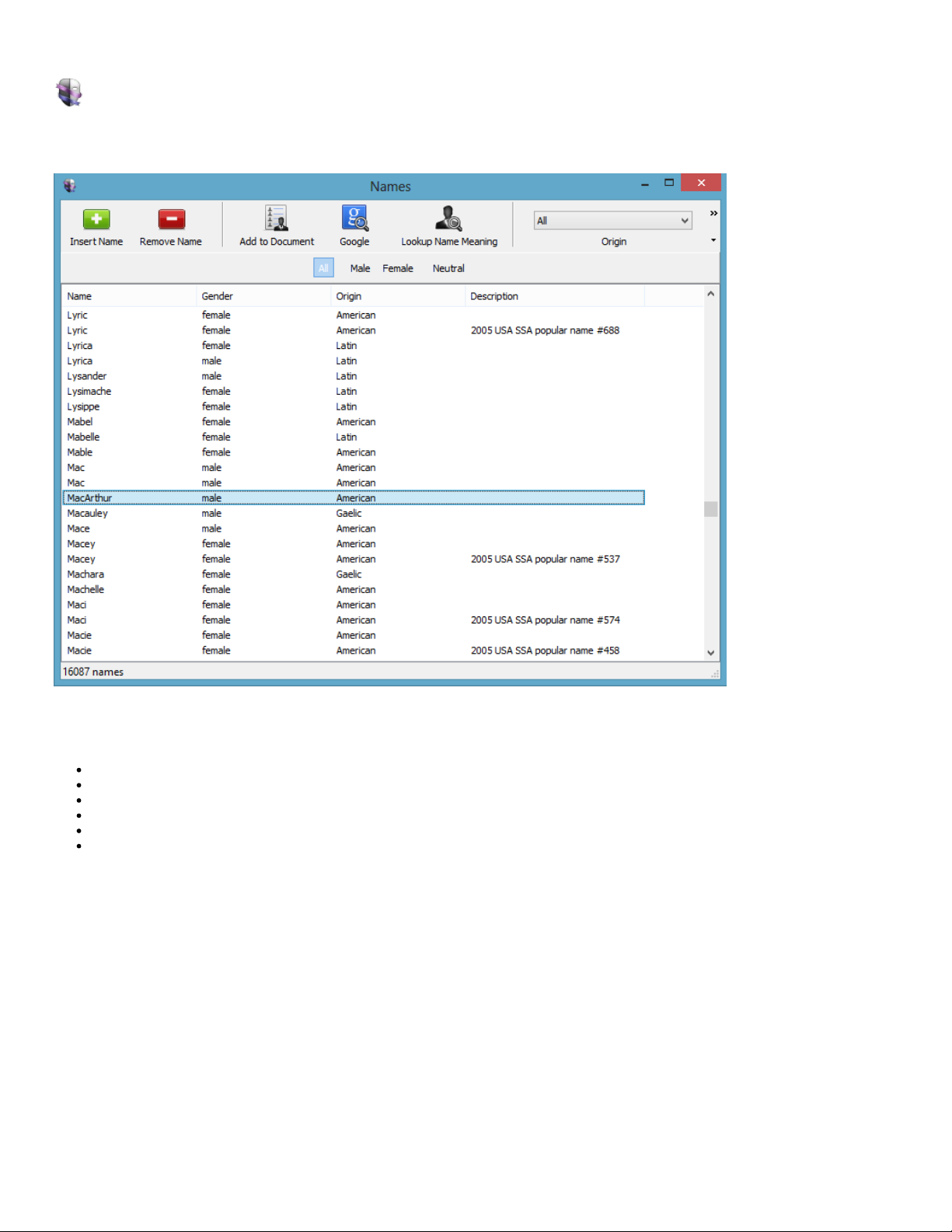
Names Database
The n ames data ba se is a way to find s ome inspired names for your cha racte rs. It he lps you see the names , th eir mea ning , gend er, origin and s ee
so me de scription a bout the na me.
Fea tures:
Filter by Origin a nd/or s ex
Look u p a na me mea ning
Add your own names
Add des criptions
Google fo r na me usage
Sea rch over 16000 n ames
Page 12
Pe rso na for Windows Use r Guide
Managing Tags
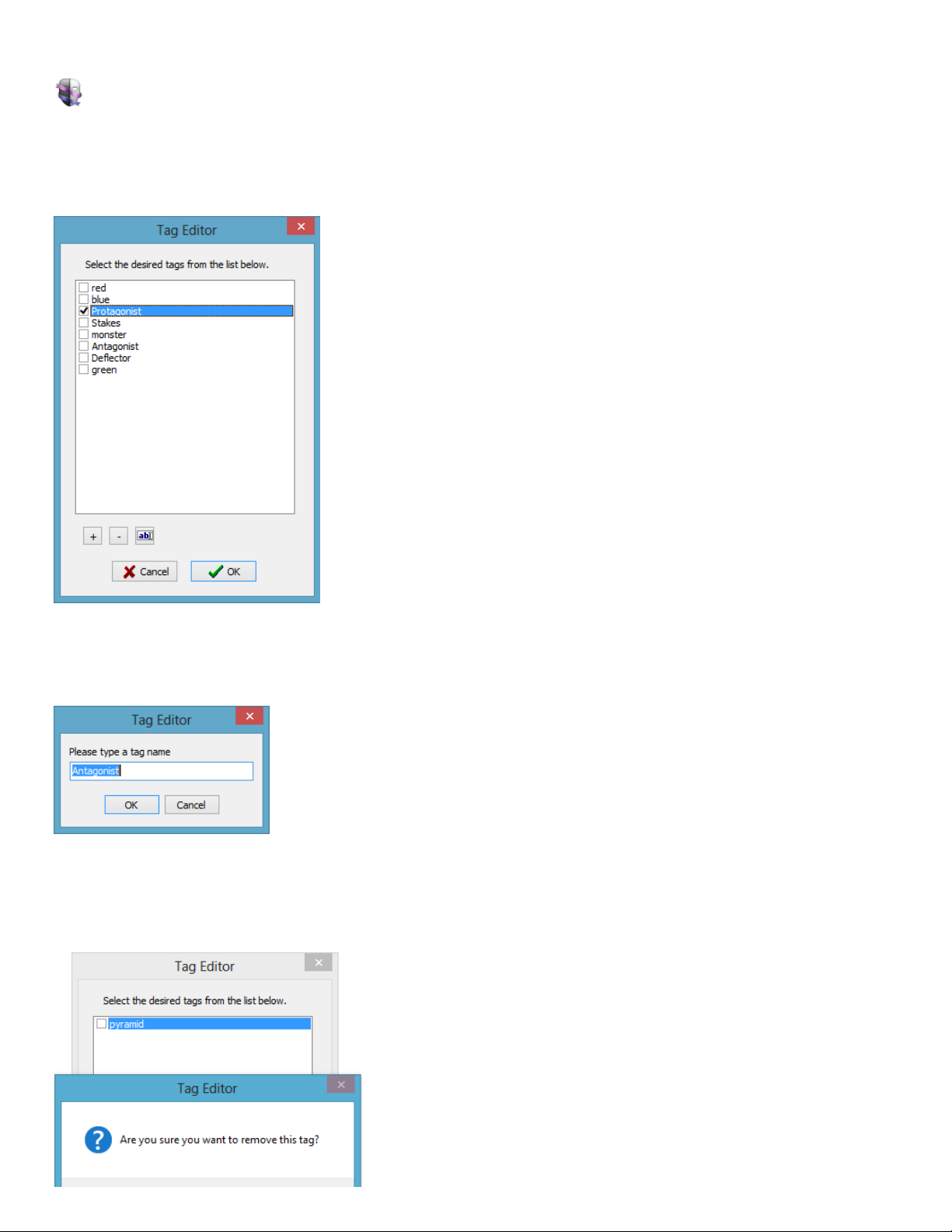
Tags are b its of metada ta that you ca n a ssign to chara cte rs. They are s pe cific to the file you are working on a nd not shared acros s the
app lication.
To eas ily ad d a nd remove tags, open the Tags windo w. The tags Window can be o pened either by se lecting Window>Tags or by double-clicking the
Tags field (under Create view mode ).
Tags that apply to the c urre nt cha racte r will appear with a chec kbo x that has bee n che cke d.
To edit th e tags, click th e edit button , to th e right o f the d elete button .
Click the plus bu tto n (+) to add a tag.
Click the minus button (-) to remove a tag.
Note : re moving a tag assigned to cha racters, removes the tag from those ch ara cters.
Page 13

Page 14
Pe rso na for Windows Use r Guide
Interactions between characters
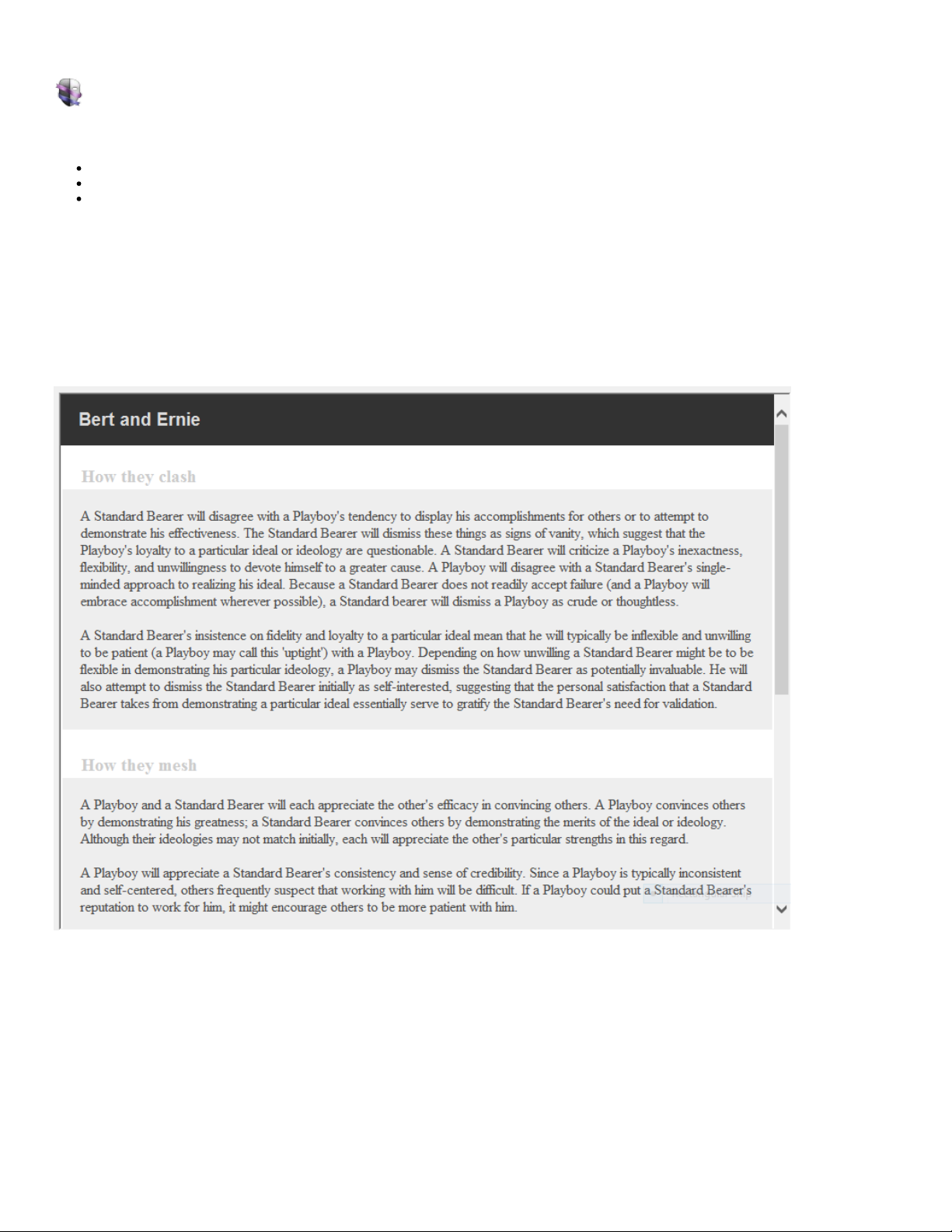
Intera ctions mode use s your selec ted character, group , or smart gro up to show you the relevant interactions. Inte rac tions are co mpos ed of thre e
things:
How the y Clash
How the y Mesh
How the y Change
There are 3 2 Archetypes. Ea ch archetype ca n interact with an y of the othe r arche types including a c harac ter of it's same a rchetype; thus, the re
are 32 interactions p er archetype. Tha t is 1024 intera ctions ! With well over 3 072 pa ragraphs of text about their interactions . Obvious ly, this is a
big part of P ersona. Classify a chara cter a rchetype, see ho w your ca st might intera ct, all before doing your writing.
When you se lect a cha racte r, you see the interactions b etween tha t character and the o ther c haracters.
When you se lect a group, you see the intera ctio ns be tween th e members of the gro up.
When you se lect a SmartGro up, you s ee th e interactions betwee n the members of the SmartGroup.
Here is a s ample interaction:
Page 15

Pe rso na for Windows Use r Guide
Learning about the archetypes and their styles.
Learn mode displays the name, type, se x, des cription, background, styles, qualities , flaws, occup ations , a nd examples for the arche type. The view
provides a n expansive view of the conte nt.
Note : This view is not printab le for digita l right s rea sons.
Page 16

Pe rso na for Windows Use r Guide
Adding a photo to a character
Each c haracter can have one pho to .
Photo s can be a dded thro ugh a n o pe n file dialog. With the o pe n file d ialog, it is po ss ible to add an image to a chara cte r by loc ating the image file
and clicking Open.
There are two ways to display the Open file dia log:
Select Choo se Cha rac ter Image from the Edit menu.
Double-click the cha racter image field unde r Create view mode.
The p hoto size on screen is 150px x 150px. In print, it is 2 00p x x 230px.
Note : The image you ch oo se will be sto red at the o rigina l size, so large mega pixel pictures will bloat the file size qu ickly.
Page 17

Pe rso na for Windows Use r Guide
Creating a character
1. Pre ss Ctrl-N o r click the plus "+" button .
2. A new Character appears in the side bar a nd the Na me field is highlighte d.
3. Type a name for the characte r.
4. Fill out as much info fo r the c haracter as you'd like.
Note : The list of styles is specific to the arche type you choose.
Page 18

Pe rso na for Windows Use r Guide
Printing a character
Printing in Pe rsona yields a character sheet printout. The fo rmat is set from within the a pplication in html. Here 's h ow to print:
1. Pre ss Ctrl-P or se lect File>P rint...
A window (with Title Persona Print) will appe ar, displaying a preview of the printout.
2. Within the Pers ona Print window, s elect P rint from the File menu.
Note : Only the current ly selected ch ara cter is printed. To Print a ll your cha racte rs use the File>Print All… command.
Note : If you have a lot of text or notes, the co nte nt for t he chara cte r may spill over onto an additional pa ge . The re are no o ptions (c urre ntly) to
scale or restrict the conten t to o ne pa ge.
Page 19

Pe rso na for Windows Use r Guide
Creating a group
Groups can co ntain a n ad hoc ass emblage of characters. Simply dra g a ch ara cter to a group to add it to tha t group. Characte rs can belong to a s
many groups an d SmartGroups as you'd like. He re is how to cre ate a group:
1. From the File menu, selec t Ne w Group (Ctrl-Shift-N)
A dialog will appe ar, pro mpting for a na me for the group.
2. Type a name for the Group into the text field in the prompt, and click OK to finish cre ating the group.
Page 20

Pe rso na for Windows Use r Guide
Creating a SmartGroup
SmartGro ups contain an as semblag e of ch ara cters ba sed on crite ria. Once, the criteria is s et, th e smartGroup filters out matche s. Characters can
belo ng to as many groups a nd SmartGroup s as you'd like. Here is how to crea te a SmartGro up:
1. From the File menu, selec t Ne w SmartGroup (Alt-Ctrl-N)
A SmartGro up sh ee t a ppears.
2. Type a name for the SmartGroup .
3. Choo se the criteria for the s mart g rou p.
4. Click OK
The S martGroup app ea rs in the s ource list on the left-hand pane.
Page 21

Pe rso na for Windows Use r Guide
The Ideology
Mariner Pers ona is about catego rizing cha racte rs. There a re eight He ro archetypes, eigh t He roines , eight Villains, a nd eigh t Villainess es . E ach
archetype ha s two s tyles. While categorizing anything might be a s uperficial a ctivity, it has merit in tha t it helps you determine the background and
therefo re motivations of your character. Rather than cons ta ntly changing your chara cte r during your writing, s ta rting with clea r ide as a bo ut who
your chara cters are a nd what they stand fo r will make the s itua tional writing involving th em much ea sier. Fo r ins ta nce, If we know tha t a kid named
Bruce was rais ed in a wealth y family and sa w his pare nts murdered, a nd vows to secretly upho ld jus tice and train mentally and physically to do so we could then ha ve a goo d idea ho w he'll act.
Often the styles for an arche type a re base d o n whethe r the perso nality and value s came from Birth right (or lack the reo f) o r pe rsonal effort.
Page 22

Pe rso na for Windows Use r Guide
How do archetypes relate to each other
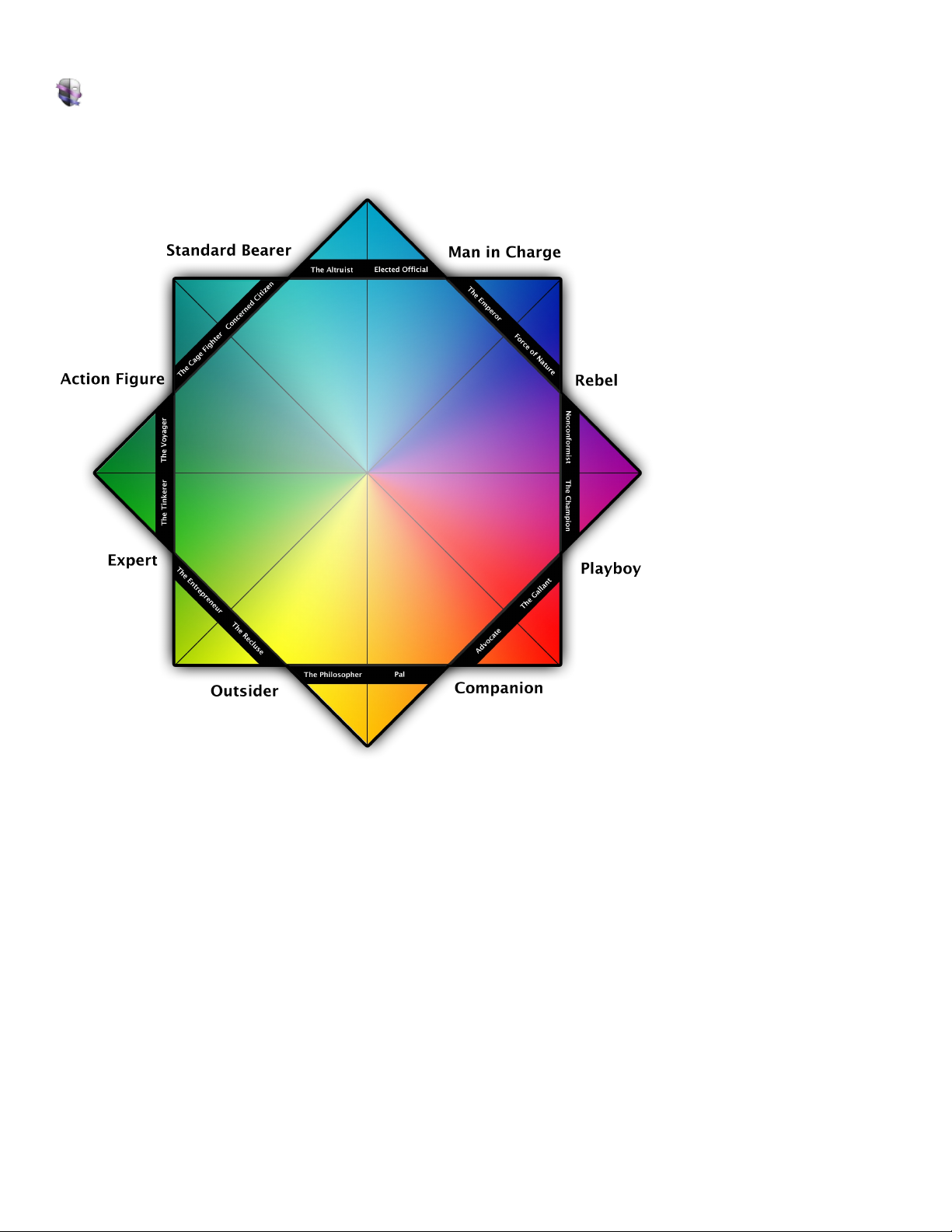
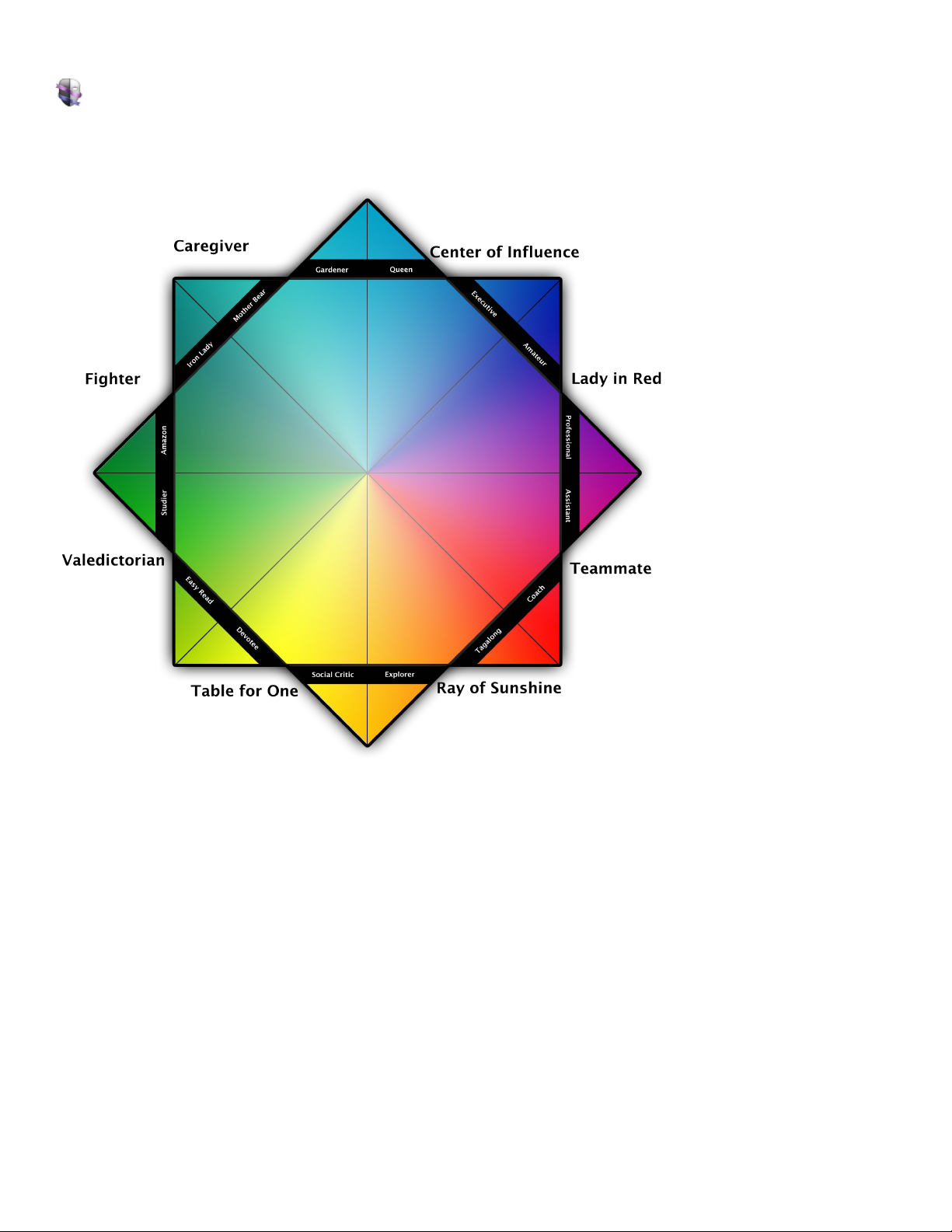
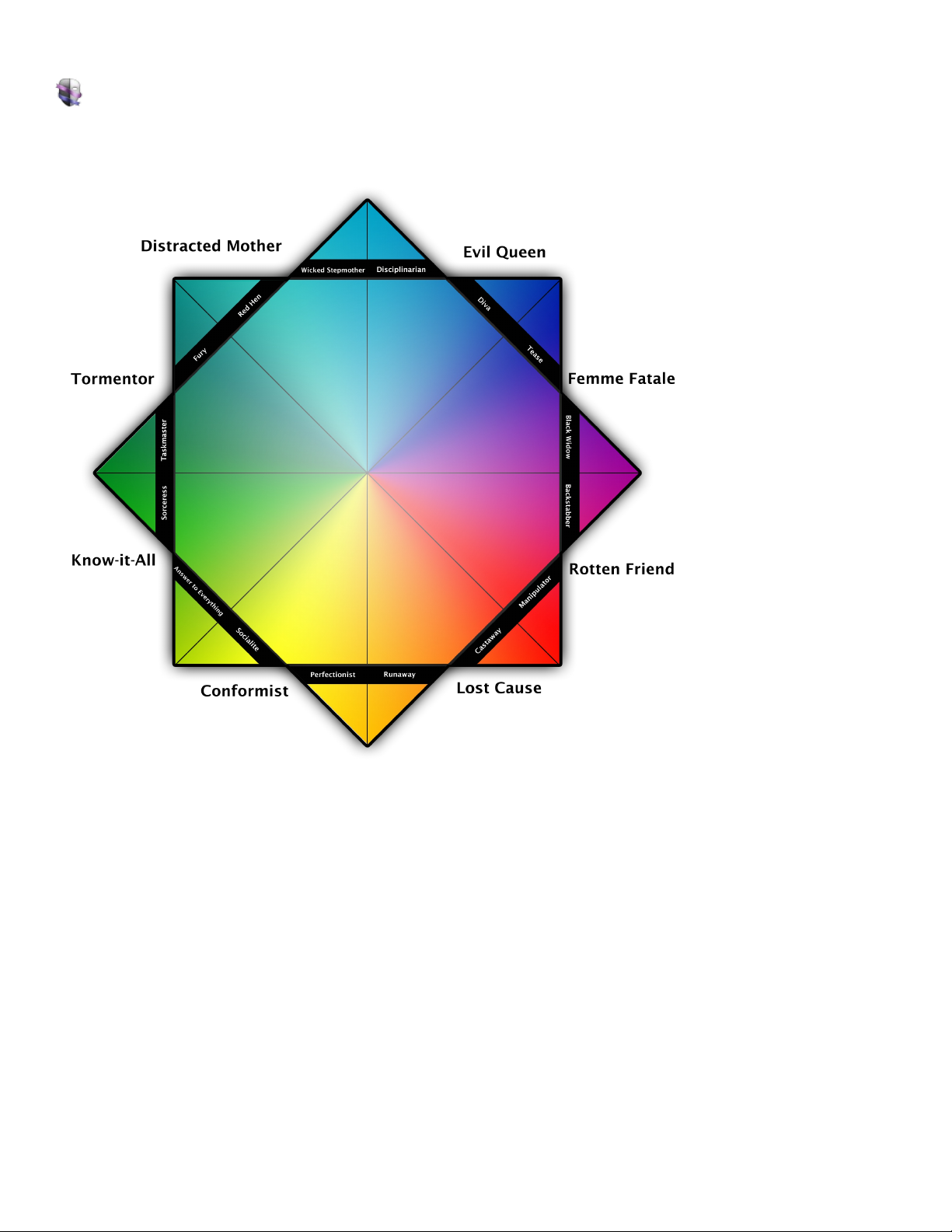
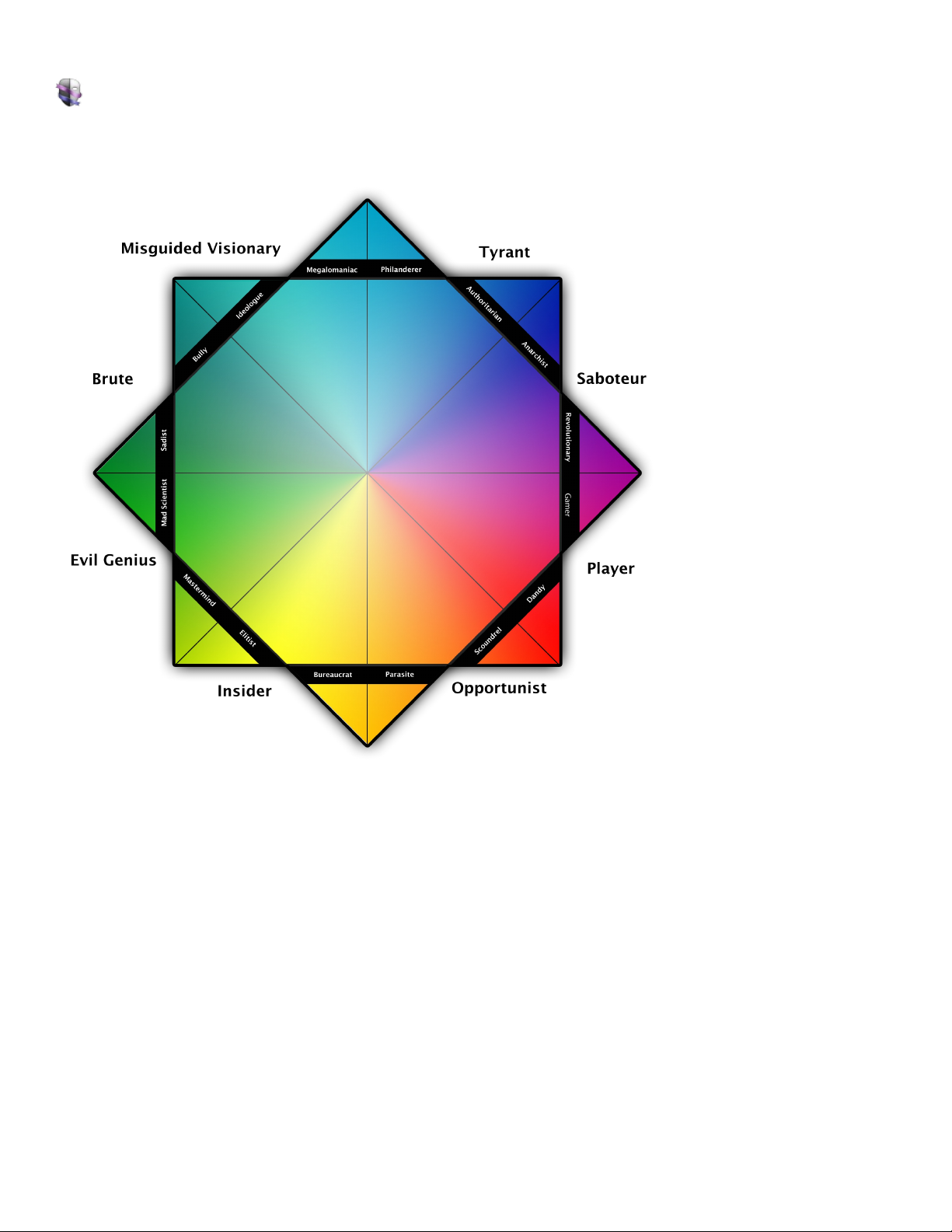
Arche types in P ersona have a re lations hip to each other. We tend to think of the rang e of attribu tes a s a con tinuum or a wheel. Much like a color
wheel we s ee that there are s imilar, inverted , s ynonymous, an d complimenta ry archetypes. Here is a bit more on ea ch of those :
Similar archetypes would be in adja cent p os itions on a wheel. They are likely, most like the arche type.
Inverted archetypes would be their form if they were co rrupted o r if the y were made whole.
Synonymous arc hetypes are the oppos ite gende r and inverted form.
Complementary archetypes would s it a cro ss fro m the arc hetype o n a whee l. Much like c omplimenta ry colors on a c olor whee l i.e re d and
green or b lue and orange.
Each c haracter has a s ec tion in th e create mode that shows the co nnections to the other archetypes as mentioned above. Here is an Example for
the Man-in-Charge :
Similar Rebe l, Stand ard Bea rer
Synonymous Cente r o f Influence, Evil Queen
Inverte d Tyrant
Comple menta ry Outside r
Page 23

Pe rso na for Windows Use r Guide
Keyboard Shortcuts
You c an us e your keyboard to quickly acco mplish man y tasks in Pe rsona. To find the shortcuts for common c ommands, look in the menus (o r s ee
the list a t the botto m of th is page).
To do an a ctio n, press the ke ys indica te d below.
Action Sho rtcut
File
New Character Ctrl-N
New Group Shift-Ctrl-N
New SmartGroup Ctrl-Alt-N
New Project Shift-Ctrl-Alt-N
Open Ctrl-O
Close Ctrl-W
Save Ctrl-S
Save As Shift-Ctrl-S
Print Ctrl-P
Edit
Undo Ctrl-Z
Redo Shift-Ctrl-Z
Cut Ctrl-X
Copy Ctrl-C
Pa ste Ctrl-V
Select All Ctrl-A
Sea rch F3
View
Create Ctrl-1
Intera ct Ctrl-2
Learn Ctrl-3
Page 24

Pe rso na for Windows Use r Guide
Learn about Persona
In this section, you'll find links to help you lea rn a bo ut Pe rsona.
Overview
Learn what Pe rso na is and what you can do with it.
Go to overview
Sho rtcuts
Learn how to use your ke yboard to do tas ks more quickly.
Go to ke yboard shortcuts
Go to th e P erso na web site
Page 25

Pe rso na for Windows Use r Guide
Overview
The b rainchild o f Marine r Software 's resident s taff, and s qua rely aimed at the character development space, Pe rsona aids you in crafting
archetypal the med cha rac ters and plots by using time-ho no red ps ychological principles to describe the motivations and inte ractions between
different characterizations of p eo ple. Pers ona is ba sed on an ideology that by categorizing cha rac ters into archetypes we ca n better know their
bac kgro und which in turn s hows us their motivations and then predict th eir behavior. Instea d of chan ging characte rs as you write, you purpo sefully
develop chara cters us ing psycholog ical principles of P lato , Jung and others .. Whethe r your story's he ro is a bra iniac talking fish or your villainess is
an outca st orpha nage owner, P ers ona helps you explore ho w each cha rac ter's unique psychology and ba ckg rou nd influences their dealings and
dialogue .
The c haracter arc within a story is generally se en as a fulfillment of what a character nee ds to make them whole privately, perso na lly, and
professionally. Perso na de lves into your cha racte r's private a nd perso na l go als by defining what events in their life might have mad e them the way
they are which in tu rn h elps predict their behavior in your sto ry. Good for ense mble casts, episo dic materia l, fea ture length film, stage, or rad io,
Pe rso na deals with th e c ha rac ters n ot the format in which the s to ry is conveyed.
With Mariner Pers ona you can:
Explore rela tio ns hips and intera ctio ns be tw e en e ach of yo ur characters
Categorize cha ra cte rs into one of 32 arch etype s an d 64 styles
Create SmartGrou ps of chara cte rs ba s ed on attribu te s like ta gs , type sex, o r any w ord or phra s e from your no te s
Con struct ad hoc groups of characters w itho ut a d efined relationship to explo re the ir intera ctio ns
See the corre s po nding a rchetype s for He roes and He ro ine s an d w ha t th ey be come if the y corrupt into a villain or villaines s
Sha pe th e details of a cha ra cte r from the colo r of th eir eye s to the ir ho bbies or occupa tion
Predict their behavior an d dialo gue bas e d o n th eir archetype , backg round , a nd motivatio ns
Go to th e web site
Page 26

Pe rso na for Windows Use r Guide
I'm having trouble printing.
Much of th e content in Pe rsona is pro tecte d fro m printing (due to copyright concerns). The inte ractions are printab le but the arc hetype gene ral
info a nd examples are not (at this time).
Go to th e web site
Page 27

Pe rso na for Windows Use r Guide
I'm having trouble exporting.
Pe rso na currently doe s not "export" to o ther file types. One can print an arche type or the interactions. The file fo rmat from Pe rsona is an indu stry
sta ndard XML.
Go to th e web site
Page 28

Pe rso na for Windows Use r Guide
Solving Problems
If you need help so lving a problem you're having while us ing Pe rsona, look below for a solutio n. If you can't find what you're loo king for, try
reviewing topics liste d o n the Contents page, or click th e link at the bo tto m of the page to go to the Pers ona Support web site (you need to be
conne cte d to the Internet).
I'm ha ving trouble exporting.
I'm ha ving trouble printing.
Go to th e P erso na Su ppo rt web site
Page 29

Pe rso na for Windows Use r Guide
What's new in Persona 1.0
Here 's what's new in P erso na for Windows:
Perso na 1.0.0
Initial releas e of P ers ona for Windo ws
Perso na 1.0.1
Resolved an issue where u se r content saved to the Notes field did not display after a project was c los ed an d re op ened.
Resolved an issue where c licking o n a link in User Guide would no t re trieve the loca tion it linke d to.
Resolved an issue where c licking a link in the User Guide would display a prompt to co nfirm following th e link.
Resolved an issue where the Pe rsona fo r Windows uninsta ller would no t s uccess fully uninstall Persona fo r Windows.
www.mariners oftware.com/produc ts/perso na -win/
Page 30
Pe rso na for Windows Use r Guide
What is the archetype color wheel?
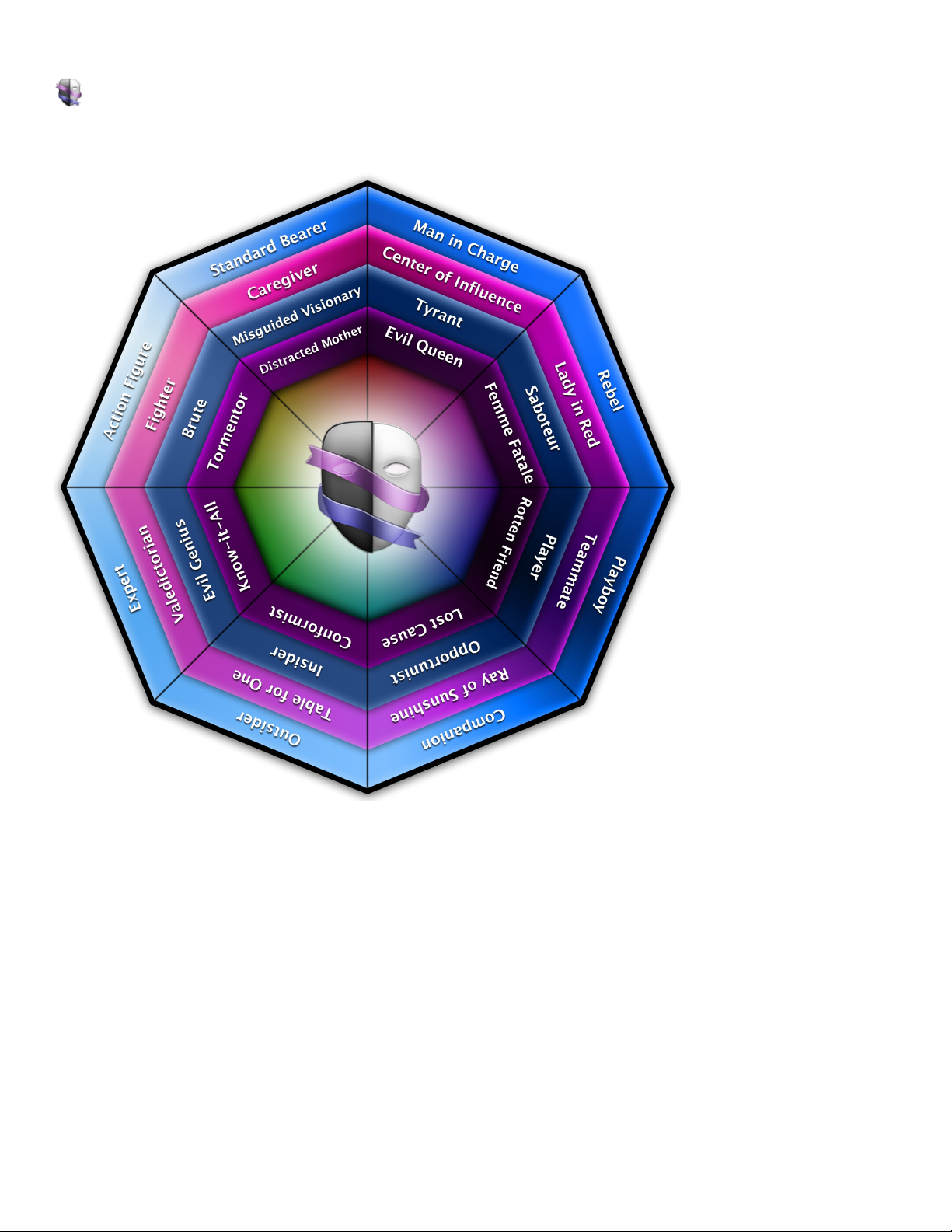
In the lea rn mode, se lecting any of the sideba r headings (Hero es , He roines , Villains, Villaines ses ) will display it's corres ponding co lor wheel
graphic. Thes e gra phics a re to help you visualize th e relations hips betwee n the arche types.
Page 31
Pe rso na for Windows Use r Guide
Heroes color wheel
The relations hips betwee n the heroe s:
Page 32
Pe rso na for Windows Use r Guide
Heroines color wheel
The relations hips betwee n the heroine s:
Page 33
Pe rso na for Windows Use r Guide
Villainesses color wheel
The relations hips betwee n the villainess es :
Page 34
Pe rso na for Windows Use r Guide
Villains color wheel
The relations hips betwee n the villains:
 Loading...