

Page 1

SmartWatch Elegant
SWT201
Instrukcja obsługi
User’s Manual
Page 2
SWT201 PL
2
l Wprowadzenie
Dziękujemy za używanie inteligentnego zegarka z Bluetooth.
Niniejsza instrukcja obsługi opisuje funkcje, sposób użytkowania
oraz procesy eksploatacyjne produktu; prosimy o uważne
przeczytanie instrukcji, celem uzyskania możliwie najlepszych
doświadczeń oraz zapobieżenia przypadkowemu uszkodzeniu
produktu. Produktu nie należy modyfikować lub rozmontowywać,
ponieważ skutkuje to utratą gwarancji.
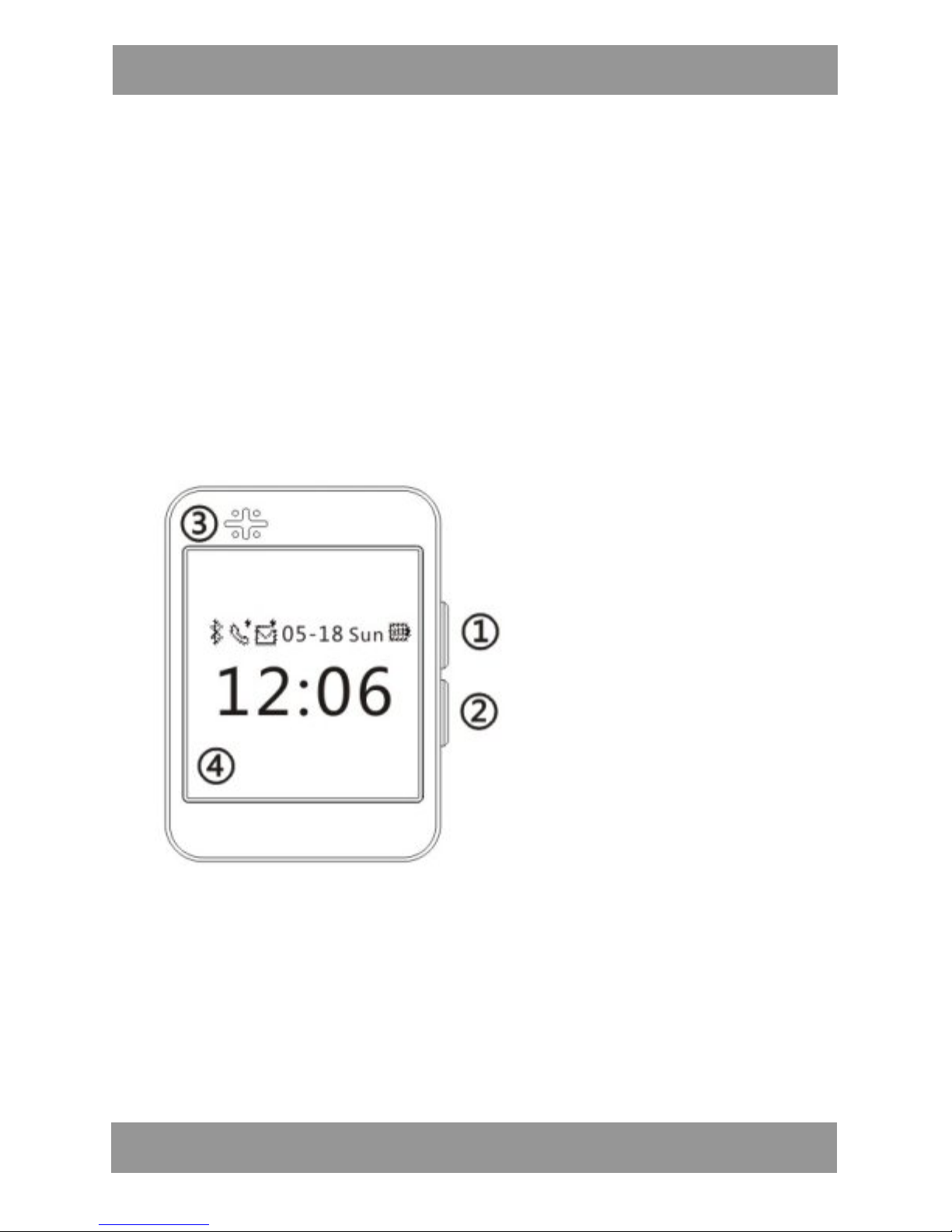
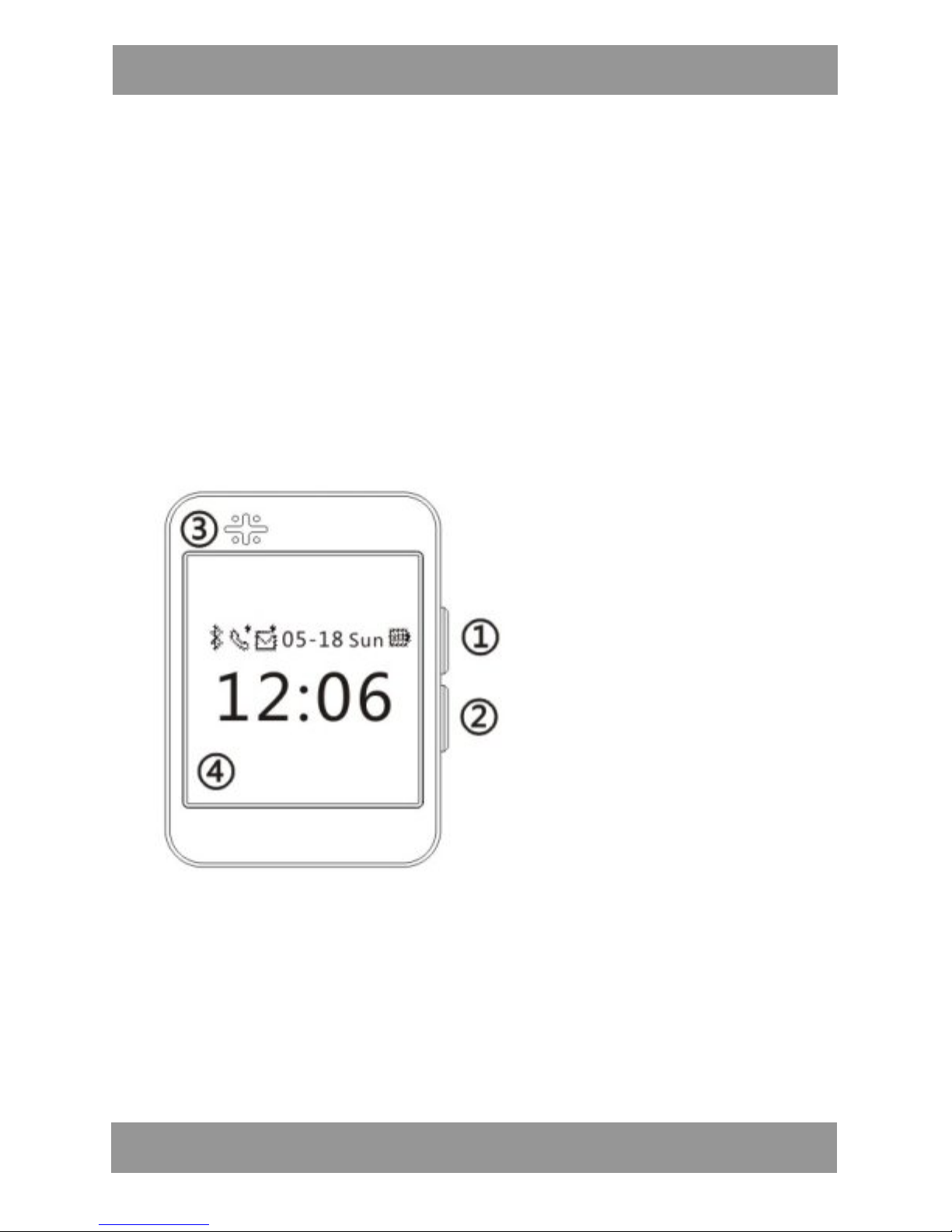
l Przyciski i funkcje
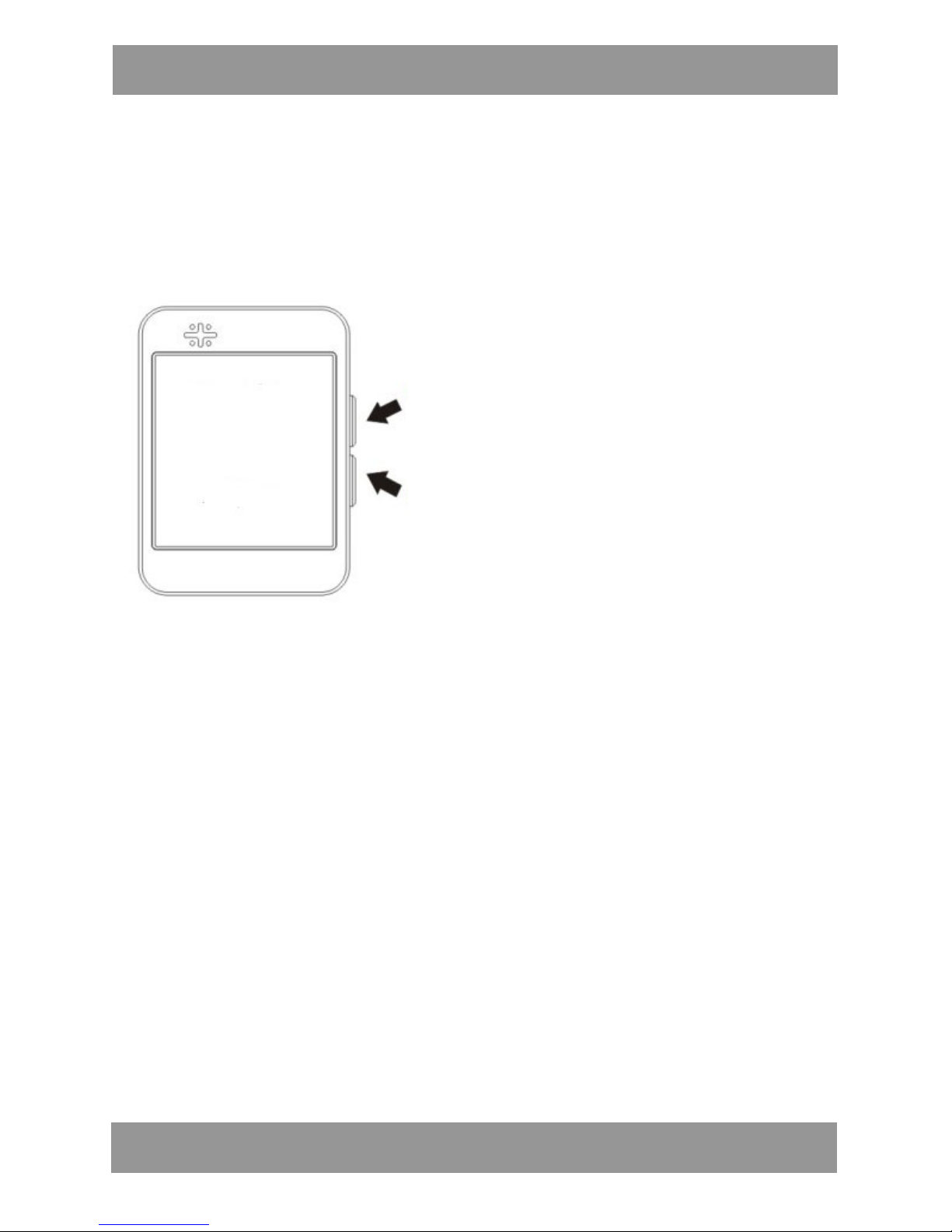
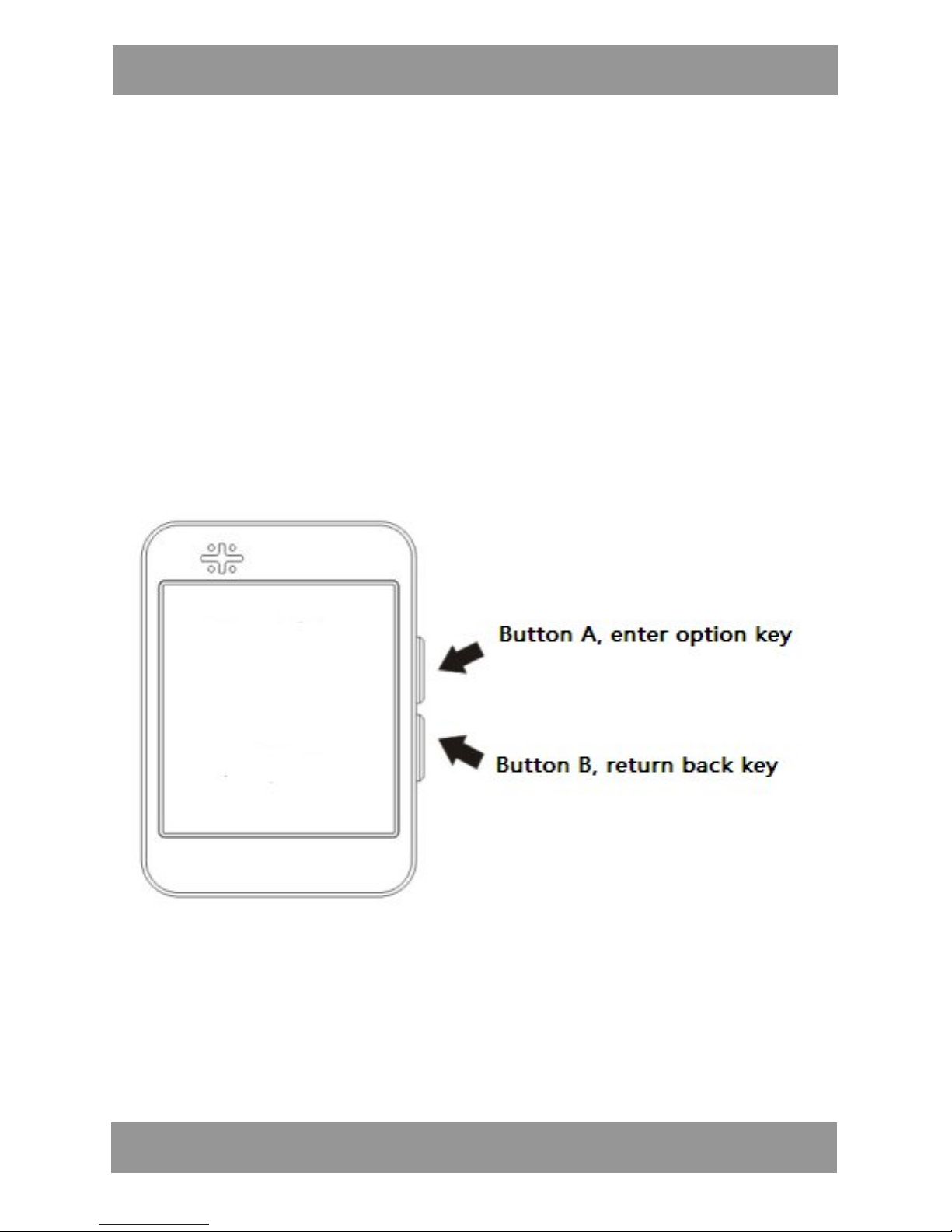
① Przycisk A (przycisk zatwierdzania opcji)
② Przycisk B (przycisk powrotu)
③ Głośnik
④ Ekran wyświetlacza
Page 3
SWT201 PL
3
l Funkcje produktu
1. Synchronizacja książki adresowej
2. Sprawdzanie historii rozmów i oddzwanianie
3. Wyświetlanie nazwiska lub numeru osoby dzwoniącej
4. Alarm wibracyjny połączenia
5. Odpowiedz & wybierz numer połączenia
6. Synchronizacja audio z urządzeniem mobilnym
7. Synchronizacja godziny i daty
8. Synchronizacja odczytu SMS
9. Funkcja krokomierza
10. Alarm bezpieczeństwa (znajdowanie telefonu)
11. Wsparcie dla powiadomień z sieci społecznościowych
Uwaga:
1. Dla pełnego wykorzystanie powyższych funkcji sugerujemy
korzystanie z urządzenia mobilnego z systemem Android.
Aby połączyć zegarek z urządzeniem mobilnym z systemem Android,
na urządzeniu tym należy zainstalować aplikację wysyłającą
powiadomienia. Aby pobrać i zainstalować aplikację na telefonie
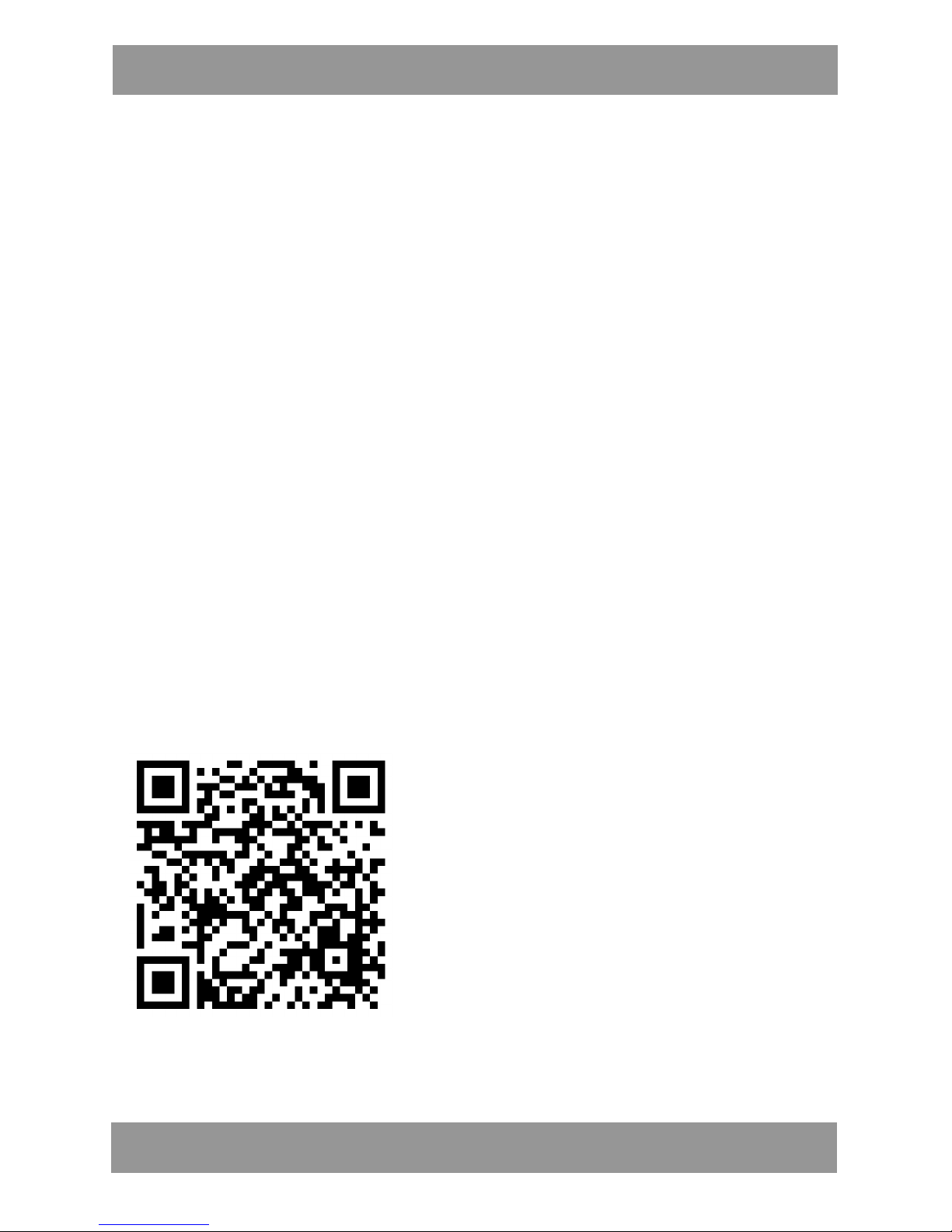
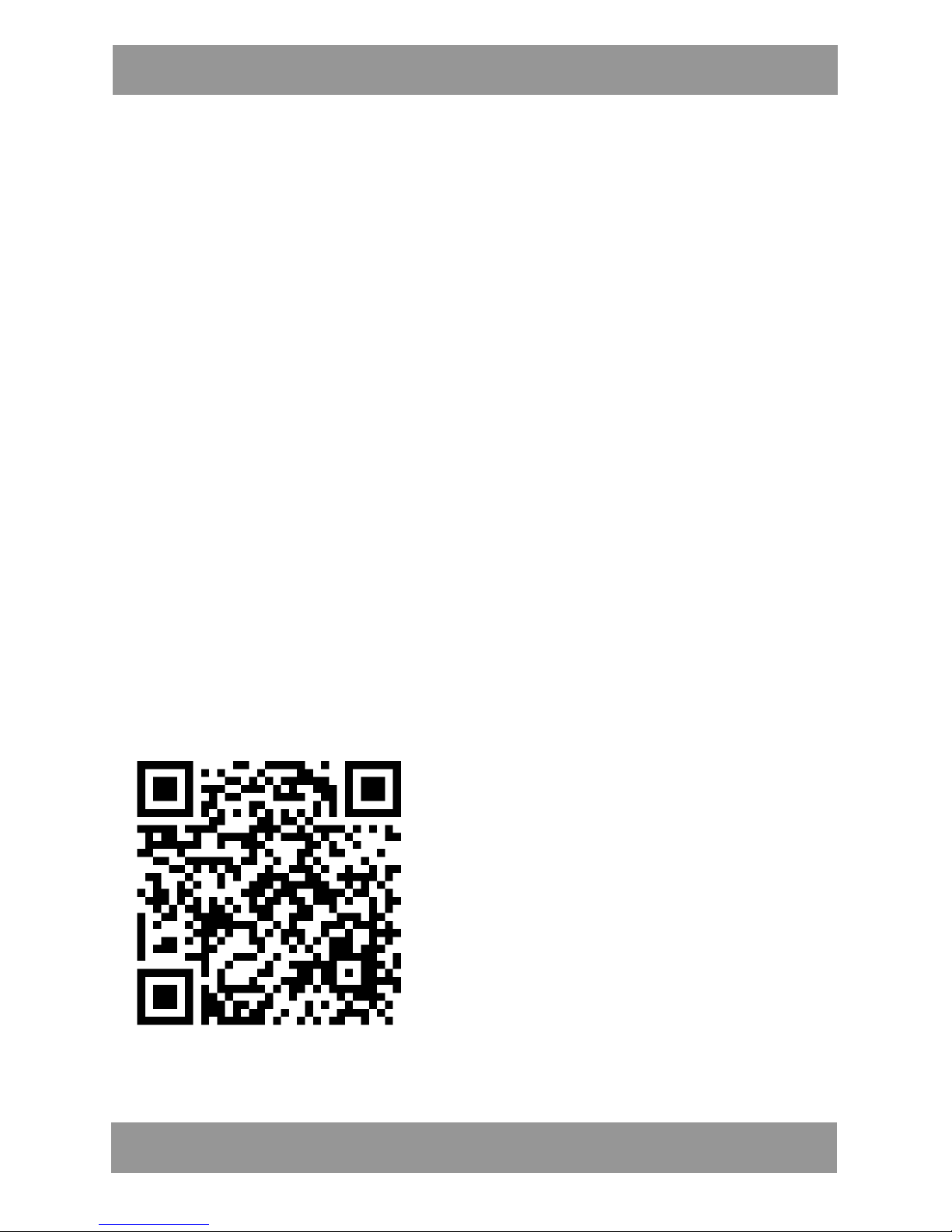
komórkowym z systemem Android należy zeskanować poniższy kod
QR. Lub pobrać aplikację ze strony: www.manta.com.pl
Po zainstalowaniu aplikacji należy podłączyć zegarek do urządzenia
mobilnego przy pomocy Bluetooth.
l Aplikacji nie można zainstalować na urządzeniu mobilnym, które
Page 4
SWT201 PL
4
nie obsługuje synchronizacji z zegarkiem. Należy upewnić się, że
urządzenie mobilne jest zgodne z zegarkiem.
l Zegarek można połączyć jednocześnie tylko z jednym
urządzeniem mobilnym.
2. Poniższe funkcje są aktualnie niedostępne w przypadku
korzystania z urządzenia iPhone:
l Synchronizacja książki adresowej
l Sprawdzanie historii rozmów i oddzwanianie
l Wyświetlanie nazwiska lub numeru osoby dzwoniącej
l Alarm wibracyjny połączenia
l Odpowiedz & wybierz numer połączenia
l Synchronizacja audio z urządzeniem mobilnym
l Ręczne ustawianie godziny i daty
Uwagi: System iOS firmy Apple nie pozwala na pełny dostęp do
danych prywatnych użytkownika, w związku z czym aktualnie nie
oferujemy do pobrania aplikacji do synchronizacji niektórych
powiadomień.
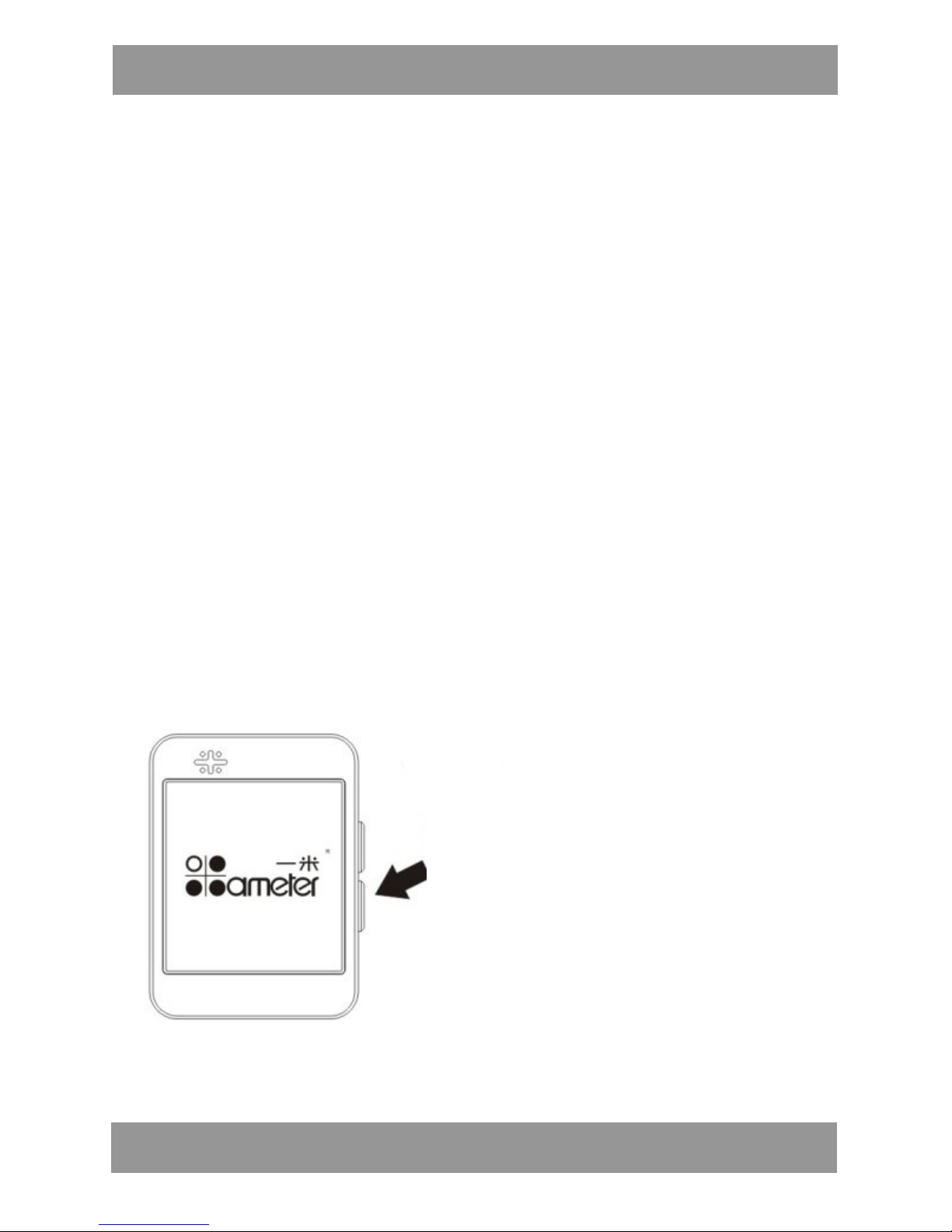
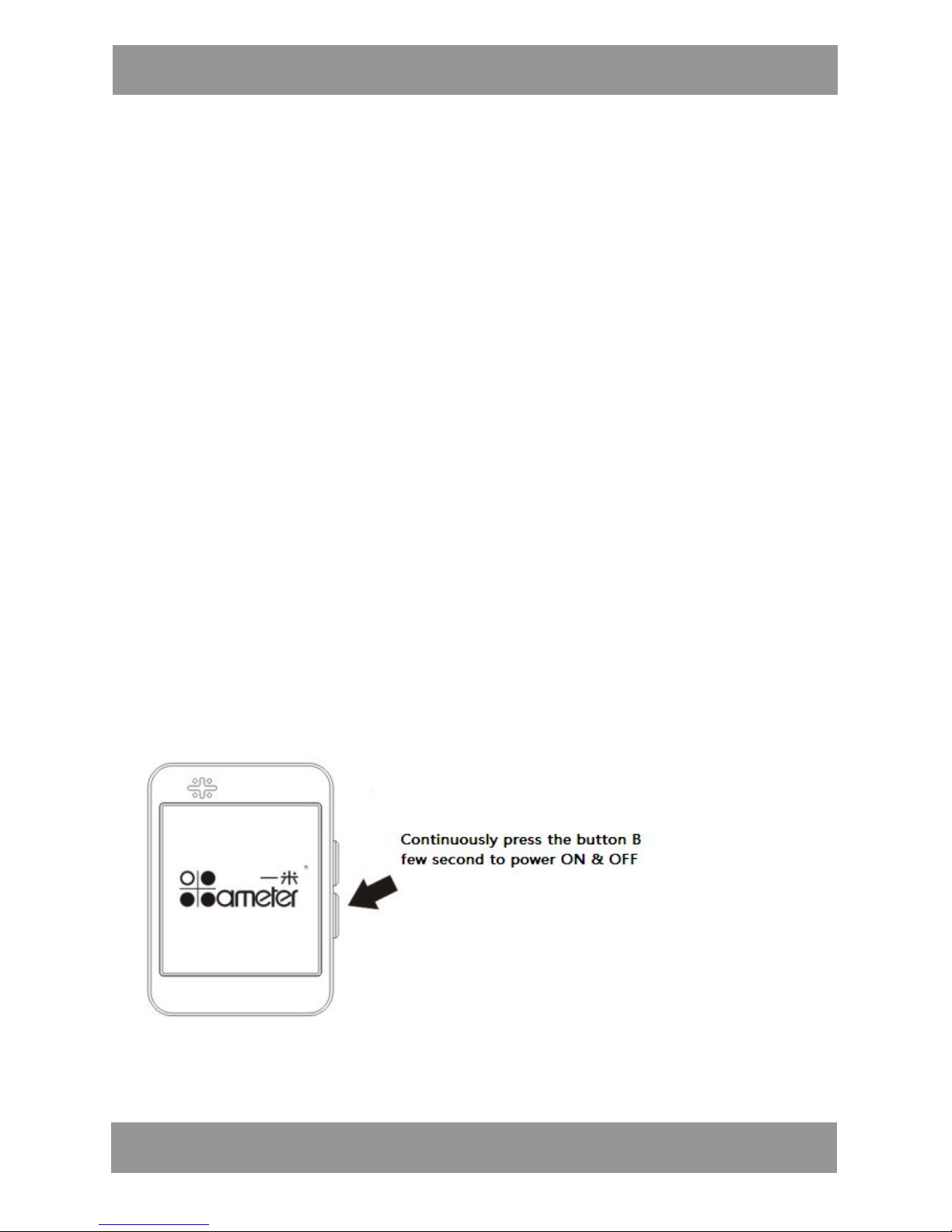
l Włączanie/wyłączanie urządzenia:
Wciśnij i przytrzymaj przycisk B
przez kilka sekund, aby
WŁACZ./WYŁĄCZ. urządzenie
Page 5
SWT201 PL
5
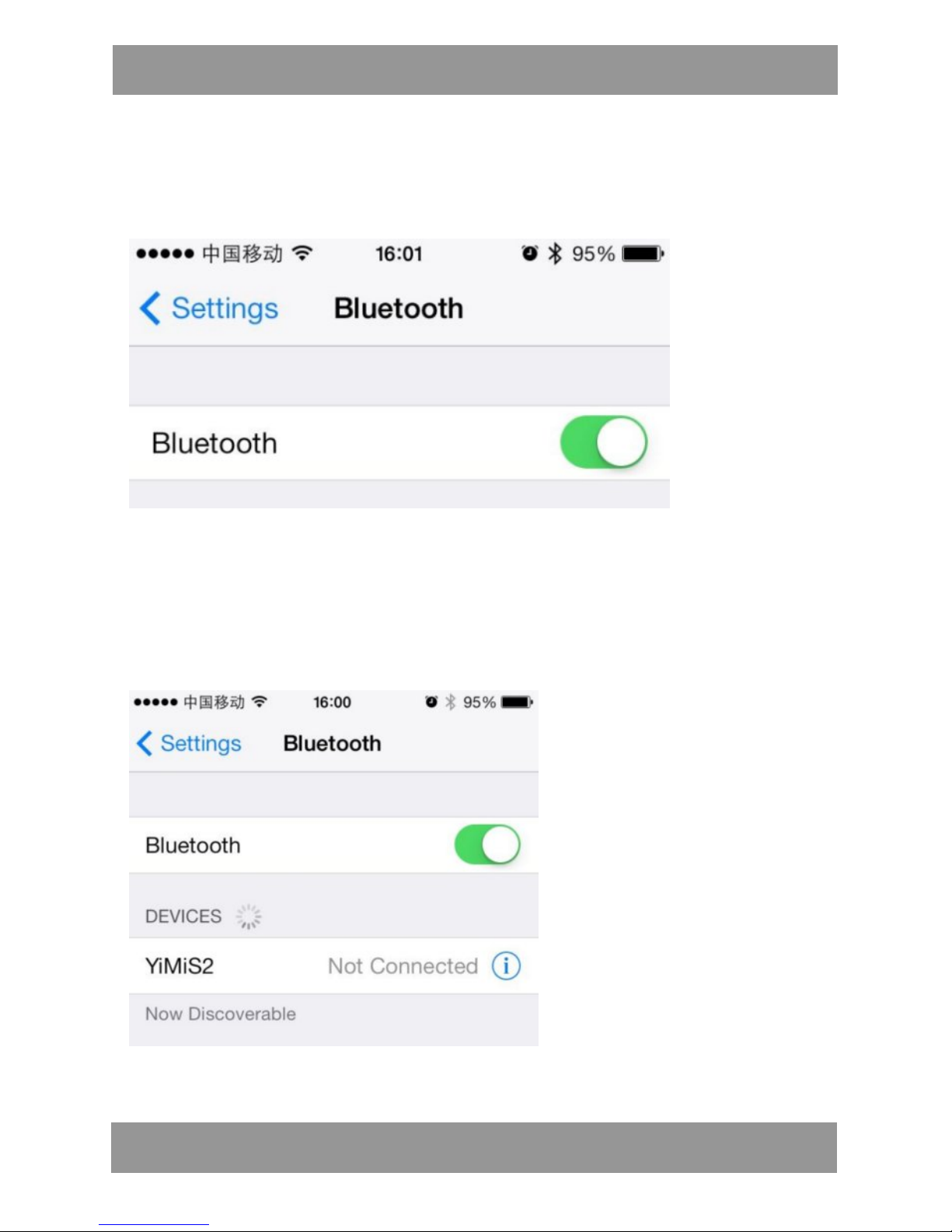
l Wyszukanie i nawiązanie połączenie Bluetooth między
telefonem komórkowym a zegarkiem:
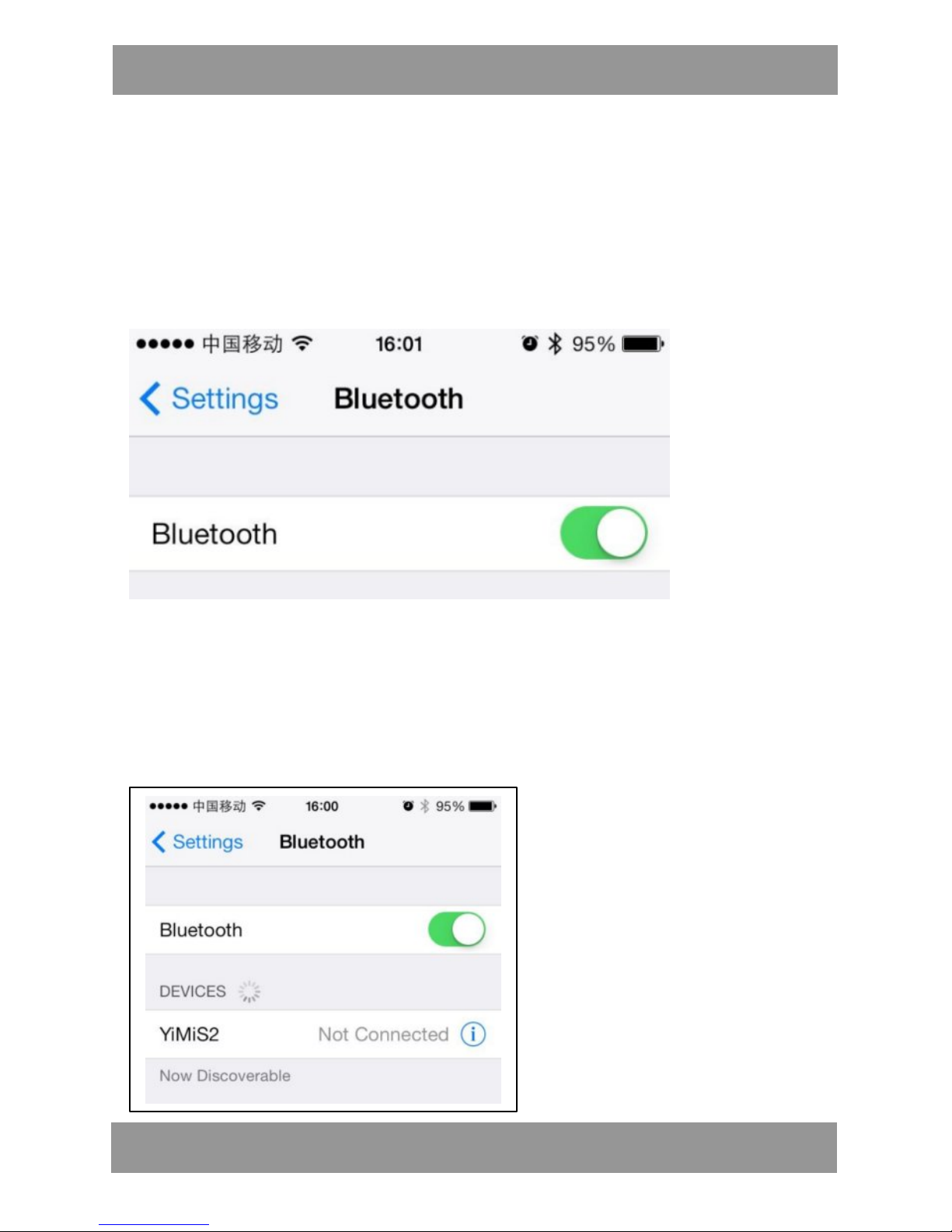
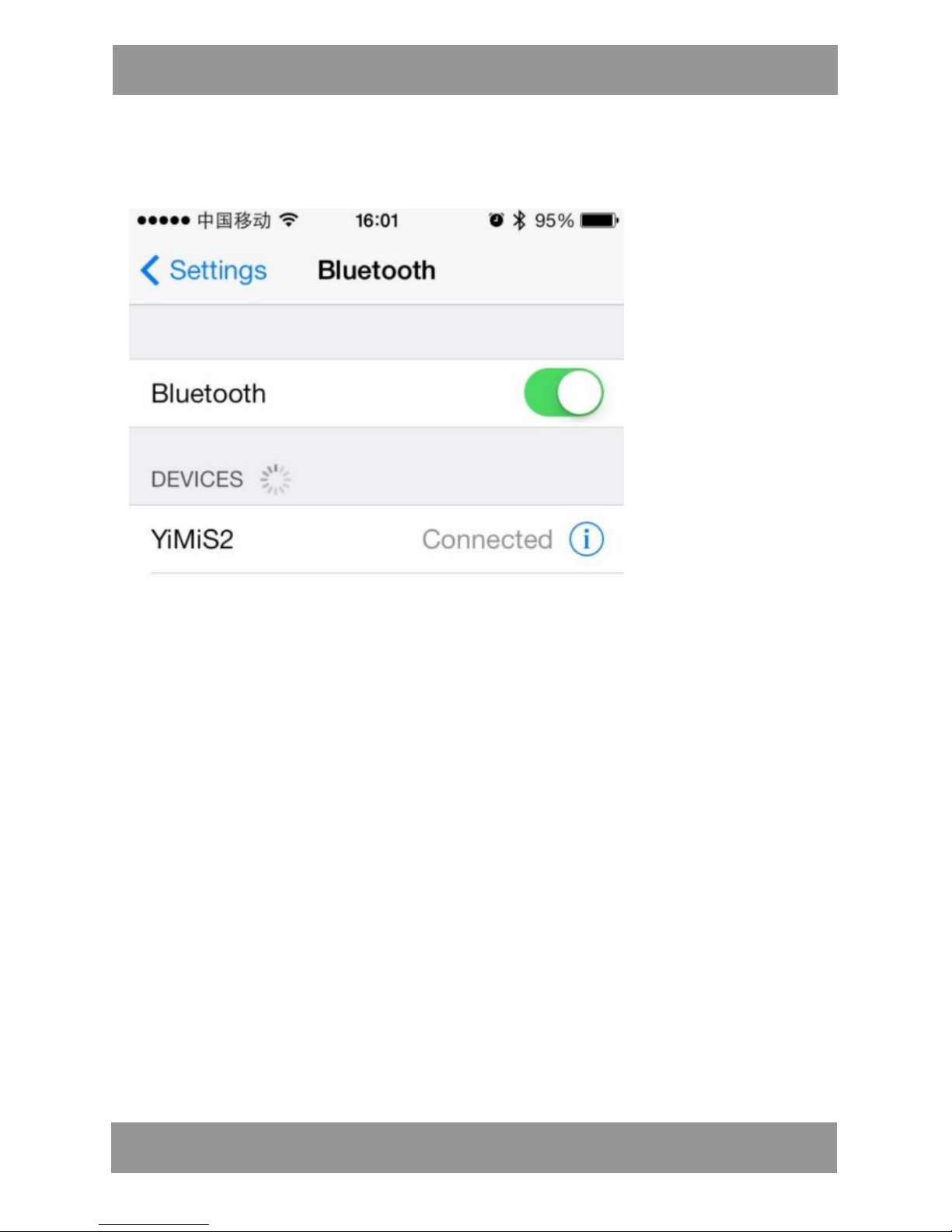
Otworzyć menu Bluetooth w urządzeniu mobilnym, jak pokazano na
rysunku (przykład dla urządzenia firmy Apple).
Wejść do menu „Ustawienia Bluetooth”.
(Przed ustanowieniem połączenia upewnić się, że Bluetooth
telefonu pracuje normalnie.)
l Ustanowienie połączenia przy pomocy interfejsu Bluetooth
telefonu:
Page 6

SWT201 PL
6
Po uruchomieniu zegarka funkcja Bluetooth telefonu rozpocznie
wyszukiwanie sygnału o nazwie „SWT201”; należy kliknąć nazwę i
wykonać kolejne kroki zgodnie ze wskazówkami, aż do uzyskania
połączenia Bluetooth.
l Ustanawiania połączenia Bluetooth w urządzeniach z
systemem Android
Różnica w ustanawianiu połączenia w urządzeniach z systemem
Android i iOS nie jest duża; po wejściu do menu Bluetooth należy
włączyć i wyszukać urządzenie o nazwie „SWT201”, kliknąć je i
połączyć z telefonem postępując zgodnie ze wskazówkami.
Uwaga:
W przypadku nie znalezienia urządzenia, wyłączyć i ponownie
włączyć funkcję Bluetooth. Jeżeli połączenie po stronie telefonu
komórkowego z systemem Android nie jest stabilne, należy wyłączyć
zegarek, włączyć go ponownie i ponownie ustanowić połączenie
przez Bluetooth. Upewnić się, że baterie w urządzeniu mobilnym i w
zegarku są naładowane. Część starszych urządzeń mobilnych może
nie być zgodna z zegarkiem – sprawdzić zgodność przed zakupem.
Page 7
SWT201 PL
7
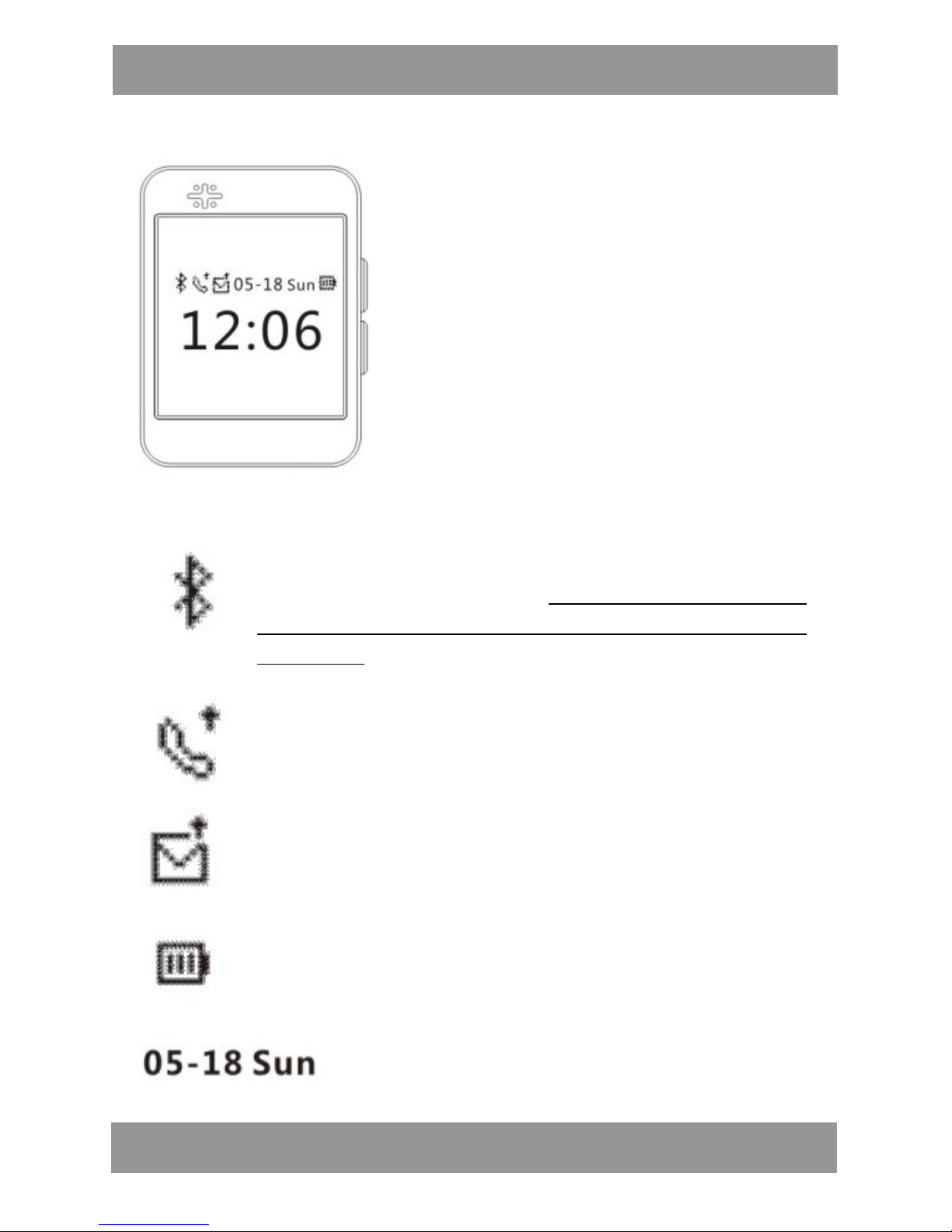
l Ikony wyświetlane na ekranie zegarka
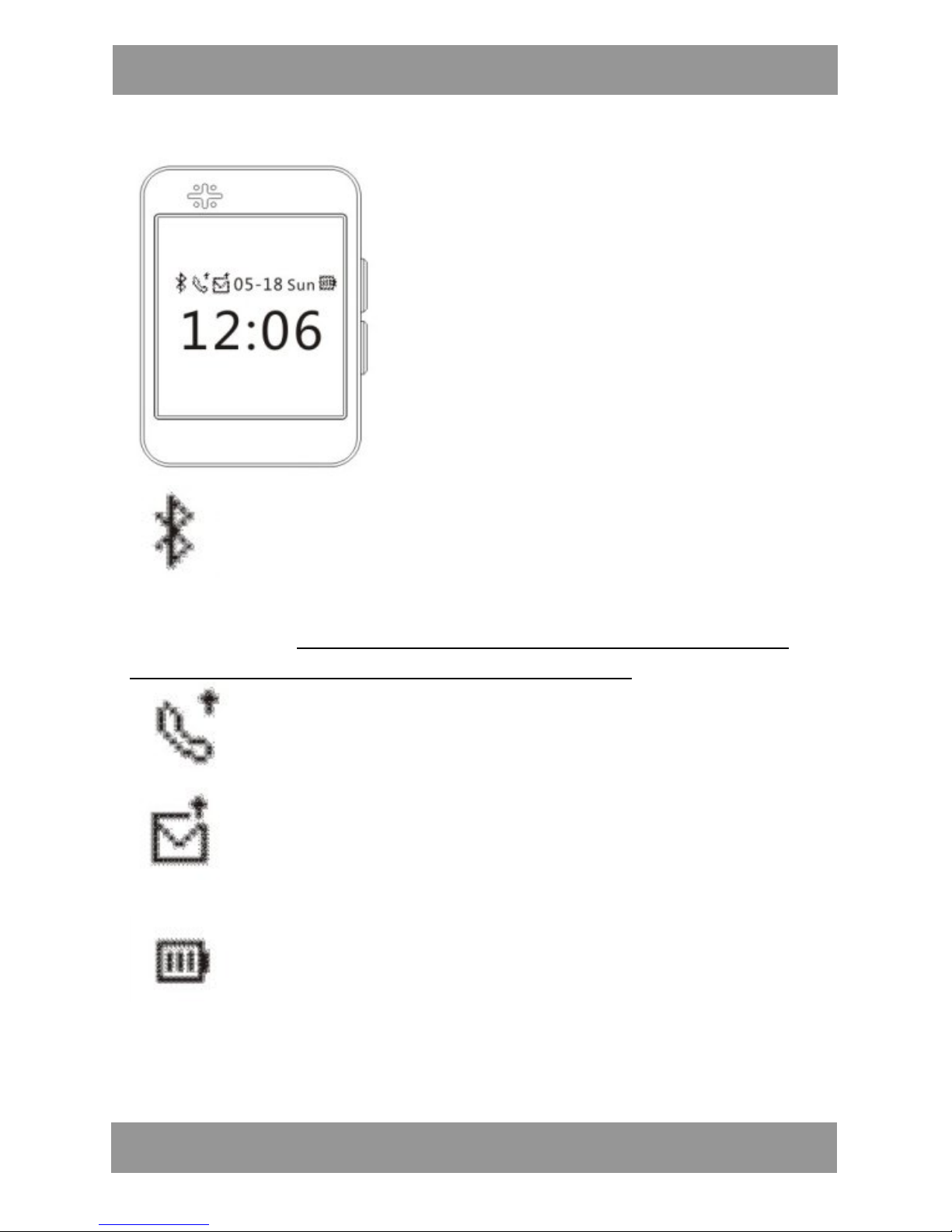
Połączenie Bluetooth: Kiedy na ekranie wyświetlane
jest logo Bluetooth oznacza to, że zegarek jest gotowy
do ustanowienia połączenia, logo Bluetooth zniknie po
ustanowieniu prawidłowego połączenia z urządzeniem
mobilnym.
Powiadomienie o połączeniach telefonicznych:
Przypomina o nieprzeczytanych informacjach o
połączeniach
Powiadomienie o nadejściu wiadomości: Przypomina o
nieprzeczytanych wiadomościacj
Stan baterii: Aktualny stan naładowania baterii zegarka
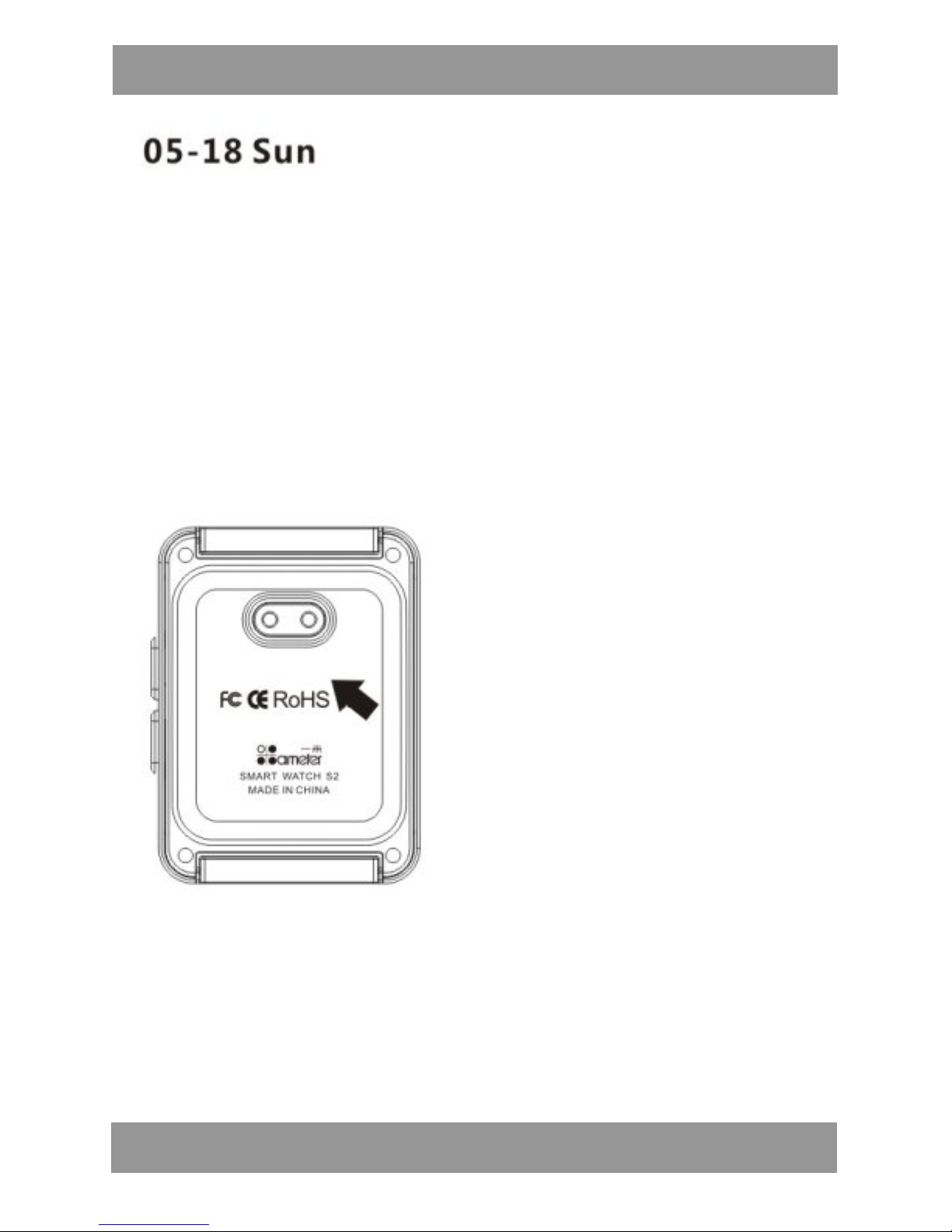
Godzina i data: Informacja o aktualnej
godzinie i dacie [miesiąc/data/tydzień]
Page 8
SWT201 PL
8
l Ładowanie
Inteligentny zegarek posiada wbudowaną baterię litową o
niewielkich wymiarach i wysokiej wydajności, zapewniającą stabilną
pracę urządzenia, która współpracuje z nową podstawką
zawierającą magnetyczną ładowarkę indukcyjną oraz kabel USB,
ułatwiające ładowanie; baterię zegarka należy ponownie naładować
wtedy, gdy pozostanie tylko jedna kreska lub gdy urządzenie jest
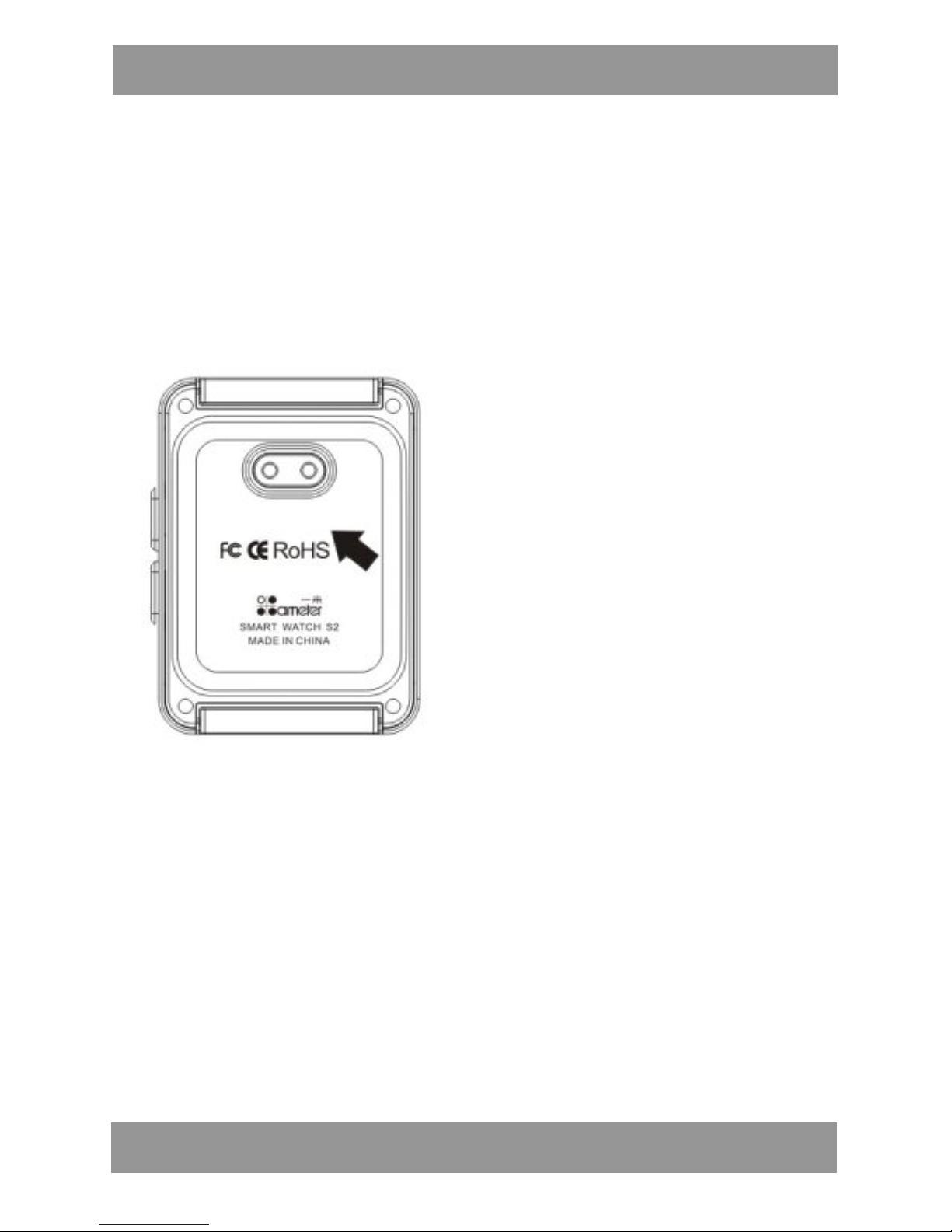
rozładowane. Proces ładowania pokazano na rysunku:
Znajdź przyłącze kabla ładowania, wskazane na rysunku czarną
strzałką. Podstawkę z ładowarką indukcyjną wyjąć z opakowania i
podłączyć do gniazda zasilania. Zegarek wyłączyć i odłożyć na
podstawkę ładowarki (zegarek będzie się ładował bezprzewodowo);
w czasie ładowania ekran zegarka będzie wyświetlał komunikat o
ładowaniu a dioda w podstawce będzie się świeciła na CZERWONO.
Po zakończeniu ładowania dioda zmieni kolor na ZIELONY.
Uwaga:
Należy upewnić się, że zegarek jest ułożony na podstawce ładowarki
w taki sposób, że następuje ładowanie.
Page 9
SWT201 PL
9
Prosimy zwrócić uwagę na bezpieczeństwo – zegarka nie należy
pozostawiać na ładowarce bez dozoru przez dłuższy czas, ponieważ
może to spowodować zagrożenie.
l Obsługa funkcji w menu
Przycisk A na boku zegarka jest przyciskiem wielofunkcyjnym,
natomiast przycisk B ma funkcję powrotu. Aby wyświetlić menu
funkcji w trybie oczekiwania należy WCISNĄĆ I PRZYTRZYMAĆ przez
kilka sekund przycisk A, a następnie WCISNĄĆ JEDNOKROTNIE
przycisk B, aby przeglądać różne funkcje. Po znalezieniu żądanej
funkcji wcisnąć przycisk i PRZYTRZYMAĆ GO PRZEZ TRZY SEKUNDY,
aby włączyć funkcję.
1. Instrukcja obsługi
l Wcisnąć dowolny przycisk, aby włączyć ekran – zegarek pokazuje
godzinę i datę.
l Aby wyświetlić menu wcisnąć i przytrzymać PRZEZ TRZY
SEKUNDY przycisk A.
l SZYBKIE JEDNOKROTNE WCIŚNIĘCIE przycisku A rozpoczyna
wyświetlanie kolejnych ekranów w zamkniętym cyklu.
l Aby wybrać aktualnie wyświetlaną funkcję, należy wcisnąć i
Przycisk A, klawisz wyboru opcji
Przycisk B, klawisz powrotu
Page 10

SWT201 PL
10
przytrzymać przycisk A PRZEZ TRZY SEKUNDY – wyświetlony zostanie
odpowiedni podkatalog.
l Aby wyjść z bieżącej funkcji lub wykonywanej czynności
JEDNOKROTNIE WCISNĄĆ przycisk B.
2. Odbieranie i nawiązywanie połączenia telefonicznego
l W czasie odbierania połączenia przychodzącego,
zsynchronizowanego między zegarkiem a telefonem komórkowym,
zegarek będzie wibrował, a na wyświetlaczu pojawi się identyfikator
osoby dzwoniącej, (jeżeli identyfikator znajduje się w pamięci
telefonu komórkowego zegarek wyświetli dane kontaktowe takiej
osoby).
l Aby odebrać połączenie krótko wcisnąć przycisk A.
l Aby odrzucić połączenie krótko wcisnąć przycisk B.
l Połączenie telefoniczne można nawiązać wybierając numer
bezpośrednio w zegarku.
3. Przeglądanie książki telefonicznej i ostatnich połączeń
l Kiedy zegarek połączony jest z telefonem można sprawdzić
książkę telefoniczną i rejestr połączeń telefonu komórkowego oraz
bezpośrednio wybrać numer z książki telefonicznej.
l Aby sprawdzić numer w książce telefonicznej telefonu, należy
wcisnąć krótko przycisk A/B (góra/dół) lub wcisnąć i przytrzymać
przycisk B, aby wrócić do menu.
4. Przypomnienie o bezpiecznej odległości
Kiedy odległość miedzy zegarkiem a telefonem jest większa niż
zasięg połączenia (8-10 m przy braku przeszkód), zegarek zacznie
wibrować celem przypomnienia o pozostawionym telefonie lub
przekroczeniu zasięgu oraz zapewnienia bezpieczeństwa urządzenia
mobilnego.
Page 11

SWT201 PL
11
5. Znajdowanie telefonu komórkowego
Czasem można odnieść wrażenie, że telefon jest w pobliżu, choć nie
można go znaleźć; w takiej sytuacji zegarek pomaga w znalezieniu
telefonu. Należy wejść do menu funkcji „Szukanie telefonu” w
zegarku – telefon połączony z zegarkiem zacznie wibrować i dzwonić
(funkcja ta wymaga zainstalowania aplikacji i działa tylko w
urządzeniach mobilnych z systemem Android.)
6. Zdalna obsługa aparatu w telefonie
Po zainstalowaniu aplikacji OneMeter w telefonie komórkowym
można zdalnie sterować kamerą w telefonie, aby robić zdjęcia pod
różnym kątem i w różnych sytuacjach. Aby zrobić zdjęcie należy
wcisnąć i przytrzymać przycisk A.
7. Synchronizacja godziny i daty oraz budzik
Po zainstalowaniu aplikacji w urządzeniu mobilnym z systemem
Android można ustawić synchronizowanie powiadomień, godziny i
daty oraz budzika. Zegarek będzie automatycznie synchronizował
oraz przesyłał na czas powiadomienia, sygnalizując ich odebranie
wibracją lub dzwonkiem, zapewniając odbiór powiadomień „na
bieżąco”.
8. Powiadomienie z komunikatora
Po zainstalowaniu aplikacji w urządzeniu mobilnym z systemem
Android można niezwłocznie przeglądać nagłówki powiadomień z
sieci społecznościowych.
9. Odtwarzanie muzyki
Po nawiązaniu połączenia między zegarkiem a telefonem
komórkowym listy odtwarzania w telefonie zostaną automatycznie
zsynchronizowane z zegarkiem; wysokiej jakości głośnik wbudowany
w zegarek zapewnia znakomite wrażenia akustyczne.
Page 12

SWT201 PL
12
l W czasie odtwarzania muzyki poziom głośności w zegarku
można regulować bezpośrednio z telefonu komórkowego.
l Aby przełączyć odtwarzanie muzyki na telefon komórkowy,
należy zamknąć połączenie w menu Bluetooth (urządzenia z
systemem Android).
l W przypadku iPhona odtwarzanie można przełączyć
bezpośrednio z poziomu bieżącej listy odtwarzania.
Uwaga: jakość odtwarzanego dźwięku zależy od typu i szybkości
transmisji danych pliku muzycznego.
10. Porady dotyczące wodoszczelności i codziennego użytkowania
Inteligentny zegarek został uszczelniony przy pomocy rozwiązań
nanotechnologicznych i może być używany podczas pływania, mycia
się i w czasie deszczu.
Uwaga:
1. Nie wolno czyścić zegarka przy pomocy cieczy korozyjnych i
rozpuszczalników.
2. Produktu nie wolno użytkować w miejscach narażonych na
szybkie zmiany temperatur lub w niskich temperaturach. Produktu
nie wolno wkładać do ognia ani przechowywać w pobliżu ognia.
3. Celem zapewnienia długiego korzystania z zegarka należy unikać i
ograniczać możliwość wystąpienia wypadków z udziałem zegarka, a
zwłaszcza unikać długotrwałego zanurzania zegarka w wodzie.
Funkcje
l Współpracuje z telefonami z systemem Android i iOS.
l Książka telefoniczna
l Odtwarzacz muzyczny
l Nawiązywanie i odbieranie połączeń
l Rejestr i ponowne wybieranie połączeń
l Powiadomienia komunikatora
l Funkcja krokomierza
Page 13

SWT201 PL
13
l Synchronizacja godziny i daty
l Budzik
l Funkcja znajdowania telefonu komórkowego
l Zdalne sterowanie aparatem w telefonie
l Wodoszczelność: IP65
Specyfikacja
l Wymiary wyświetlacza: 0,95 cala(rozdzielczość: 96x64)
l Wymiary koperty: 50 x 37 x 9mm
l Wymiary paska: 190 x 24 x 4 mm
l Bluetooth: 3.0
l Materiał: Stop aluminium
l Waga produktu: ok. 60g
l Ładowanie: Kabel USB + ładowarka indukcyjna w podstawce
l Odległość skuteczna: 5-10 m
l Napięcie robocze: 3,3V-4,2V
l Natężenie robocze: 50mA
l Czas ładowania: 3-4 godziny
l Czas czuwania: 80 godzin
l Akumulator: Polimerowy, 210mAh
l Kolor: Niebieski, złoty, srebrny, czerwień róży
l Zawartość opakowania:
1 x zegarek inteligentny z Bluetooth B3
1 x kabel USB do ładowania
1 x podstawka z ładowarką indukcyjną
1 x Instrukcja obsługi
Page 14
SWT201 PL
14
Uwaga!
Konstrukcja produktu i parametry techniczne mogą ulec zmianie bez
wcześniejszego powiadomienia. Dotyczy to przede wszystkim parametrów
technicznych, oprogramowania oraz podręcznika użytkownika. Niniejszy
podręcznik użytkownika służy ogólnej orientacji dotyczącej obsługi
produktu. Producent i dystrybutor nie ponoszą żadnej odpowiedzialności
tytułem odszkodowania za jakiekolwiek nieścisłości wynikające z błędów w
opisach występujących w niniejszej instrukcji użytkownika.
Uwagi dotyczące utylizacji:
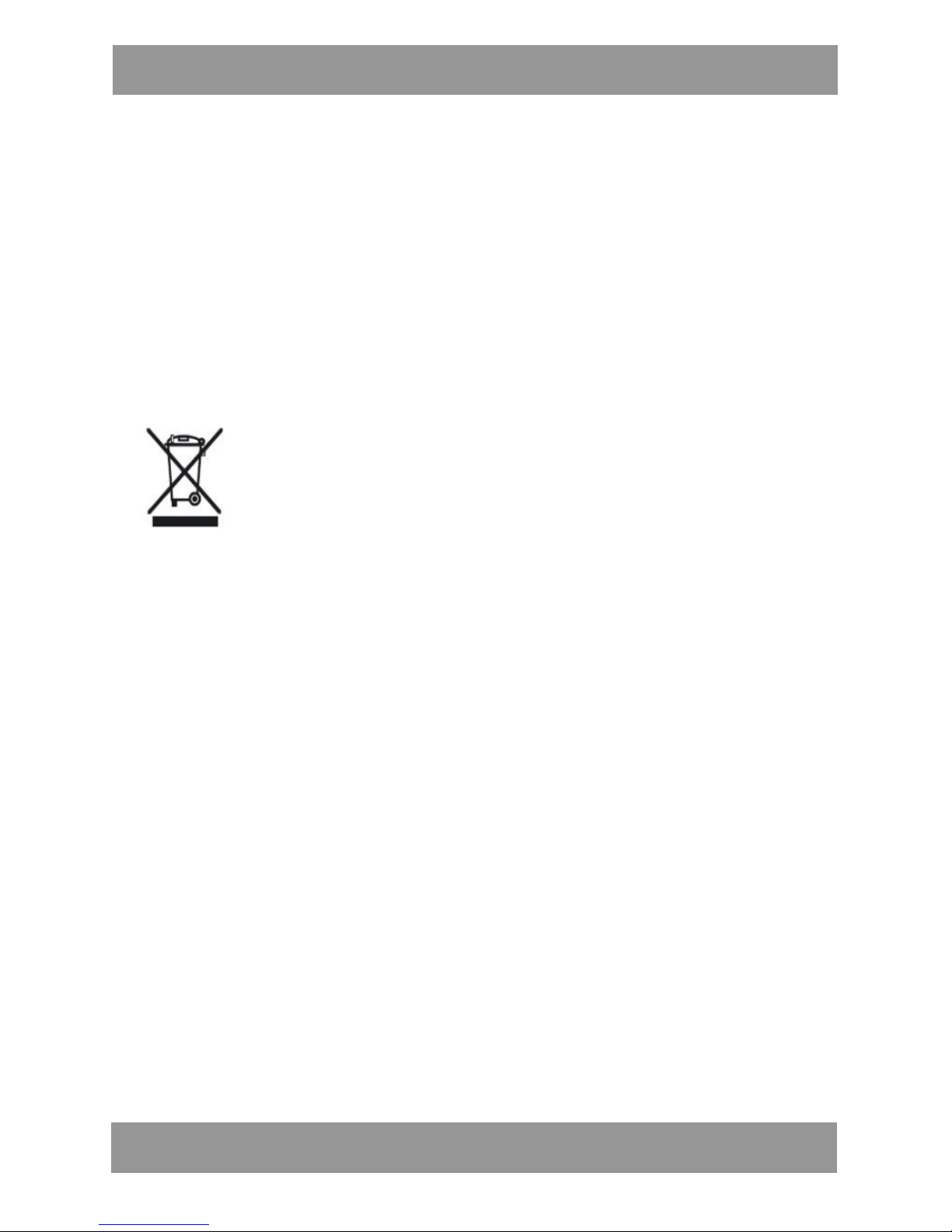
Starsze urządzenia, na których znajduje się symbol jak
pokazano na rysunku, nie można wyrzucić z odpadami
domowymi. Należy oddać je do konkretnego składowiska
(skontaktować się z lokalnymi władzami) lub do sprzedawcy.
Te strony zapewnią bezpieczną utylizację bez szkody dla
środowiska
Page 15
S W T 2 0 1
E N
15
l Introduction
Thank you for use Bluetooth Smart Watch. The instruction manual
include the function, use method, and operation process for the
product, please read it carefully to get the best using experience
and avoid any unnecessary damage of the product. Do not
personally change or disassemble the product since this will result
your product over the range of guarantee.
l Buttons and functions
⑤ Button A (enter option key)
⑥ Button B (return key)
⑦ Speaker
⑧ Display screen
Page 16
S W T 2 0 1
16
l Product Function
12. Phonebook Sync
13. Call history check and callback
14. Calling name or number display
15. Calling vibration alarm
16. Answer & Dial phone call
17. Mobile Audio Sync
18. Time and Date Sync
19. SMS Sync reading
20. Pedometer function
21. Mobile Security alarm (find your mobile)
22. Support Notifications for social networking software
Attention:
1. We suggest you using the Android mobile device for the fullfunction as above.
To connect your smart watch to a Android mobile device, you need
to install the notification APP on the mobile device. Please scan the
below official QR code to download the APP and install to your
Android mobile phone. Or download from: www.manta.com.pl
After install the APP on the mobile device and connect the Smart
Watch to the mobile device via Bluetooth.
E N
Page 17
S W T 2 0 1
17
l You cannot install notification APP on mobile devices that do
not support the smart watch syncing. Ensure that your mobile
device is compatible with the smart watch.
l You cannot connect a mobile device to more than one smart
watch at the same time.
2. If you’re using the iPhone mobile device, currently you can use
some of the functions as below:
l Phonebook Sync
l Call history check and callback
l Calling name or number display
l Calling vibration alarm
l Answer & Dial phone call
l Mobile Audio Sync
l Time and Date manual setting
Remarks: As for the Apple iOS platform is not allowed to open all
the access of user’s private data, currently we don’t have the
available notification APP for downloading and Sync some of the
notifications.
l Power ON & OFF operation:
l Search and connect the Bluetooth between your mobile phone
and the smart watch:
E N
Page 18
S W T 2 0 1
18
Open the mobile Bluetooth, as shown in figure (example to Apple ).
Enter the option of “Setting-Bluetooth”:
(Before connecting, please ensure the Bluetooth of mobile terminal
under the normal condition.)
l Connecting the device in the mobile Bluetooth option
interface:
When the smart watch open in regular way, the mobile Bluetooth
will search out the signal name of "SWT201", please click the name
E N
Page 19
S W T 2 0 1
19
and enter next step according to the tips, then the Bluetooth will be
connected successfully.
l Android devices Bluetooth setting
The operation method is no special different between Android and
IOS, start and search Bluetooth device after enter Bluetooth
interface, you will find the device name of "SWT201", just click and
connect the Bluetooth according to the operation tips.
Attention:
If you cannot find the device, please try to close the mobile
Bluetooth and reopen to connect again. The compatibility for a part
of Android mobile may not very stable, please try to close smart
watch and reopen to connect the Bluetooth again. Please ensure
the power of your mobile and smart watch is in the normal
condition. A part of old version mobile may not able to compatible
with the device, please consult the sales man before buying.
E N
Page 20
S W T 2 0 1
20
l R es i de n t i co n o n th e s c re e n
Bluetooth connection: When you see the Bluetooth logo is
displayed on the screen, it means the Bluetooth is ready for
connection, and the Bluetooth logo will disappear after the smart
watch is connected successfully with your mobile.
Calling alert: Remind the unread calling information
Message alert: Remind the unread message
Power capacity: Current power capacity of the smart
watch
E N
Page 21
S W T 2 0 1
21
Time and Date: Current time and date
information [month/date/week]
l How to charge
The smart watch adopt the mini volume and high performance builtin lithium battery to ensure stable power life, and it work with the
new magnetic inductive charging base and USB cable for easy
charging, when the smart watch power displayed is only one grid
l e f t o r n e a r l y u s e u p , p l e a s e t a k e o f f t h e s m a r t w a t c h a n d r e c h a r g e
the device. See the operation as shown in the figure:
Find the charging connector as shown in black arrow. Please take
the magnetic inductive charging base from the box attachment and
connect to the normal power. Put the smart watch back down, close
and connect the smart watch with the charging base (the smart
watch will adsorb on the inductive charging base naturally), at the
same time, the screen will indicate the device is on charging, the
E N
Page 22
S W T 2 0 1
22
indicate light in the charging base will be on RED during the
charging. When the charging is finished, the indicate light will turn
to GREEN, and it allow to be use again.
Attention:
Please ensure the smart watch is fit with the inductive charging base
in right contact.
Please pay attention to the electricity safe, do not continuous
charging for a long time under unattended situation to avoid any
harm.
l How to operate the menu function
The button A on the side of smart watch is a multi-function key, and
the button B is the return back key. In the standby interface, you
can have a LONG PRESS on the button A with several seconds to
display the function menu, then SINGLE PRESS the button A to view
the various function. When find the function you need, press button
A for THREE SECONDS will start and enter the function.
E N
Page 23

S W T 2 0 1
23
1. Operation instruction
l Press any button to lighten the screen, then you will see the
displayed time and date on the smart watch interface.
l Long press the button A for THREE SECONDS, the menu will be
displayed on the screen.
l With a SWIFT SINGLE PRESS on the button A, the function menu
will start recycling display on the screen one by one according to
y o u s i n g l e p r e s s .
l If you need to enter the current displayed function, please long
press the button A for THREE SECONDS to enter the sub catalog.
l If need to go back or quit current operation, please SINGLE
PRESS the button “B” to return.
2. How to answer & dial the phone call
l U n d e r t h e n o r m a l c o n n e c t i o n b e t w e e n t h e s m a r t w a t c h w i t h
y o u r m o b i l e p h o n e , w h e n y o u h a v e a n y i n c o m i n g c a l l s , t h e
smart watch will have a intermittent vibration for alert and
display the current caller ID (if the ID has been exist in your
mobile phone, it will display the contacts information directly)
l Shortly single press button A to answer the phone call.
l If you’re not inconvenient to answer the phone, shortly single
press the button B to reject current phone call.
l You can dial the phonebook number directly from the smart
watch.
3. Check the phonebook and recent calls
l U n d e r t h e n o r m a l c o n n e c t i o n b e t w e e n t h e s m a r t w a t c h w i t h
y o u r m o b i l e p h o n e , y o u c a n c h e c k t h e ‘ P h o n e b o o k ’ a n d ‘ C a l l
history’ on the smart watch and dial the number directly.
l If you need to check the phonebook numbers up-and-down on
the smart phone, please shortly single press the button A/B
(up/down) for check, or long press the button B for several
E N
Page 24

S W T 2 0 1
24
seconds to return back to the menu.
4. Safe range reminder
When the connection between smart watch and your mobile phone
is over the effective connecting range (in 8-10meter without any
blocking), the smart watch will have a prompt intermittent vibration
to remind you may forget your device or over the safe range and to
ensure your device safety.
5. Looking your mobile phone
Sometimes you may feel your mobile is by your side but you cannot
find it, under this situation, you will have the smart watch to help
you find the mobile phone. Go to the function menu of ‘Looking
phone’ in your smart watch, and the phone that connecting with the
smart watch will start to vibrate and ring. ( this function need to
install the notification APP and it only allow to use with the Android
mobile device.)
6. Remote your mobile camera
After install the OneMeter notification APP in your mobile phone,
you can remote your mobile camera by the smart watch to take
photo in various angles and different occasion. Long press the
button A for photo shutter.
7. Time and date sync & Alarm clock alert
After install the notification APP on your Android mobile device, you
can set up the notification of Massage, Time & Date and Alarm Clock
alert etc. The smart watch can automatically Sync and timely send
out the notification by vibrating or ringing to ensure your message
sync at every moment.
8. Instant message alert
E N
Page 25

S W T 2 0 1
25
After install the notification APP on your Android mobile device, you
can have a quick browse on the smart watch for the title message
from the common social network software
9. Play music
After the normal connection between the smart watch and your
mobile phone, the music play list in your mobile will be
automatically sync to the smart watch, the built-in high quality
speaker in the smart watch will bring you a wonderful voice
experiencing.
l In the condition of playing music, you can directly adjust the
volume button on your mobile phone to control the music
playing volume on the smart watch.
l If you need to switch the music playing to the mobile phone,
please close the media music connection in the Bluetooth
option interface (for Android devices).
l F o r i P h o n e , y o u c a n s w i t c h o v e r t h e m u s i c p l a y i n g d i r e c t l y i n t h e
current playing list.
Attention : the playing voice quality is depend on the music source
file type and the size of speed rate.
10. Daily waterproof and attention tips
The smart watch is nanotechnology waterproof, it satisfied the
common waterproof applications in daily life such as swimming,
washing and normal raining day waterproof.
Attention:
1. Do not scrub the smart watch with any corrosive liquid and
solvent.
2. Do not put product in extreme changes temperature or lowtemperature environment. Do not throw product into fire directly or
close to high temperature fire.
E N
Page 26

S W T 2 0 1
26
3. In order to protect the common useful life, please try to avoid
and reduce the accident occur, especially do not put the smart
watch soak in water for too long time.
Functions
l Work with Android & iOS mobile phone
l Phonebook
l Music player
l Call & Answer
l Call history & redial
l Instant Messaging notification
l Pedometer function
l Time & Date Sync
l Alarm clock
l Mobile anti-lost alarm
l Remote mobile phone camera
l IP65 physical waterproof
Specifications
l Display Screen size: 0.95 inchresolution: 96x64
l Case size: 50 x 37 x 9mm
l Band size: 190 x 24 x 4mm
l Bluetooth: 3.0
l Material: Aluminum alloy
l Product Weight: about 60g
l Charging: USB + inductive charging base
l Effective Distance: 5-10m
l Working voltage: 3.3V-4.2V
l Working current: 50mA
l Charging Time: 3-4 hours
l Stand-by time: 80 hours
l Battery: 210mAH Polymer battery
E N
Page 27
S W T 2 0 1
27
l Color: Blue, Gold, Silver, Rose Red
l What's in the package:
1 x B3 Bluetooth Watch
1 x USB Charging cable
1 x Inductive Charging base
1 x Instruction Manual
Note!
Product design and Technical parameters may be change without notice.
This mainly concerns parameters technical, software and user manual
present. User’s Manual is a general orientation on service product.
Manufacturer and distributor do not assume any responsibility as
compensation for any inaccuracies errors in the descriptions appearing in
this user manual.
Note about disposal
Older appliances, which display the symbol as shown in the
picture, may not be discarded in household waste. You must
take them to a specific disposal site (check with your local
authority) or to your retailer. These sites will guarantee
disposal without harming the environment
E N
Page 28
S W T 2 0 1
28
INFOLINIA SERWISOWA
tel: +48 22 332 34 63 lub e-mail: [email protected]
od poniedziałku do piątku w godz. 9.00-17.00
Producent zastrzega sobie możliwość wprowadzenia zmian w specyfikację
produktu bez uprzedzenia.
Strona główna www.manta.com.pl
Strona wsparcia technicznego www.manta.info.pl
SERVICE INFOLINE
tel: +48 22 332 34 63 or e-mail: [email protected]
from Monday to Friday. 9.00-17.00
T h e m a n u f a c t u r e r r e s e r v e s t h e r i g h t t o m a k e c h a n g e s t o p r o d u c t
s p e c i f i c a t i o n s w i t h o u t n o t i c e .
Home: www.manta.com.pl
Home support: www.manta.info.pl
Made in P.R.C.
FOR MANTA EUROPE
 Loading...