

Page 1

19_J05xxx_Indoor Air Quality Sensor SPB308 E&C.indd 1
9/1/19 5:11 PM
Before Use
Thank you for purchasing a
MANN+HUMMEL Indoor Air Quality
Monitor. Before using the product,
please read this operating manual and
follow the instructions carefully to
prevent any accidents.
Warranty and Service
Scope of Warranty:
•
The product is used according to
the instructions in the operating
manual;
•
The product is handled properly
according to its intended usage;
The MANN+HUMMEL warranty does
not apply if the product is damaged
due to accidents, errors, normal wear
and tear, or inappropriate usage.
Please refer to the MANN+HUMMEL
website at www.mann-hummel.com
for more information or assistance.
EN
1
Page 2

19_J05xxx_Indoor Air Quality Sensor SPB308 E&C.indd 2
9/1/19 5:11 PM
EN
Important Information
Do not operate the product or touch the power plug if your hand is wet
as you may get an electric shock.
Do not wet the product
as this may cause short circuits and electric shocks.
Keep the product away from flammable substances or fire sources.
Do not operate the product if any of the parts, including the power plug or the body is damaged.
The damaged
parts must be replaced by the manufacturer or authorized service centre in order to avoid hazards.
Do not disassemble, repair or alter the product without authorization.
Unauthorized disassembly or repair may
cause failure and danger. Unauthorized alteration may result in fire or breakdown.
Do not use alcohol or solvents to clean the product
as it will damage the product or cause electric shocks leading
to injuries or fire, etc.
Unless under supervision by persons responsible for their safety,
persons who are not familiar with operating
instructions, are not allowed to operate the product.
RF Power (Output power): 16dBm (2412MHz – 2462MHz)
The max operating temperature of the product is 40°C and shouldn’t be lower than 0°C.
Declaration of Conformity
This device complies with the essential requirements in Directive 2014/53/EU, and can be used across EU member
states or regions.
This device complies with part 15 of the FCC Rules (FCC ID: 2AQ3Q-SPB308). Operation is subject to the
following two conditions:
(1) This device may not cause harmful interference, and
(2) This device must accept any interference received, including interference that may cause undesired operation.
Changes or modifications not expressly approved by the party responsible for compliance could void the user’s
authority to operate the equipment.
This device has been tested and found to comply with the limits for a Class B digital device, pursuant to part 15
of the FCC Rules. These limits are designed to provide reasonable protection against harmful interference in a
residential installation. This equipment generates, uses ,and can radiate radio frequency energy and, if not installed
and used in accordance with the instructions, may cause harmful interference to radio communications.
However, there is no guarantee that interference will not occur in a particular installation.
If this equipment does cause harmful interference to radio or television reception, which can be determined by
turning the equipment off and on, the user is encouraged to try to correct the interference by one or more of
the following measures:
- Reorient or relocate the receiving antenna.
- Increase the separation between the equipment and receiver.
- Connect the equipment into an outlet on a circuit different from that to which the receiver is connected.
- Consult the dealer or an experienced radio / TV technician for help.
This equipment complies with FCC radiation exposure limits set forth for an uncontrolled environment. This
equipment should be installed and operated with minimu m distance 20cm between the radiator & your body.
2
Caution:
To prevent accidents or damages to property, please follow the
guidelines and instructions below.
Page 3

19_J05xxx_Indoor Air Quality Sensor SPB308 E&C.indd 3
9/1/19 5:11 PM
No. Description
1 LED ON : Wi-Fi Connected
LED Flashing : Connecting Wi-Fi
LED Off :
No Wi-Fi Connection
Caution: Pay attention to the
polarity of power connection
1. Overview
EN
Front View
Air Inlet for Sensors
1
Rear View
2 3 4 5
6
3
No. Description
2 485B
3 485A
4 DC 24V-
5 DC 24V+
6 Wi-Fi Configuration Button
Page 4

19_J05xxx_Indoor Air Quality Sensor SPB308 E&C.indd 4
9/1/19 5:11 PM
EN
2. Installation
Step 1:
•
Fix the wall mount bracket to the wall. Please refer to the picture below.
•
Please use the screws provided in the packaging, or the head of the screws
must have a low profile.
Fixing hole
Step 2:
Wall Mount Bracket
•
Connect the SPB308 with the power adapter provided with the unit to an
electrical outlet.
•
Do not use power adapters other than those provided in the packaging or
recommended by MANN+HUMMEL.
24V- 24V+
Blue Color Brown Color
The wiring power cord is placed
through the wire groove
4
Caution: Note where the
they are embedded in the wall.
Page 5

19_J05xxx_Indoor Air Quality Sensor SPB308 E&C.indd 5
9/1/19 5:11 PM
Step 3:
•
Refer to the picture below to install main unit to the wall mount bracket.
3. Connectivity
3.1 Wi-Fi Connection
•
For personal computer or laptop with Windows OS, click on Wi-Fi setting and
connect to Wi-Fi of the OurAir_xxxxxx.
•
For iOS and Android mobile phone, go to setting and connect to the Wi-Fi of the
OurAir_xxxxxx.
•
Open Internet browser like IE, Firefox, Safari or Chrome.
•
Enter the IP address 10.10.10.1 in the address bar, then we will see the
configuration interface for Wi-Fi.
5
EN
Page 6
19_J05xxx_Indoor Air Quality Sensor SPB308 E&C.indd 6
9/1/19 5:11 PM
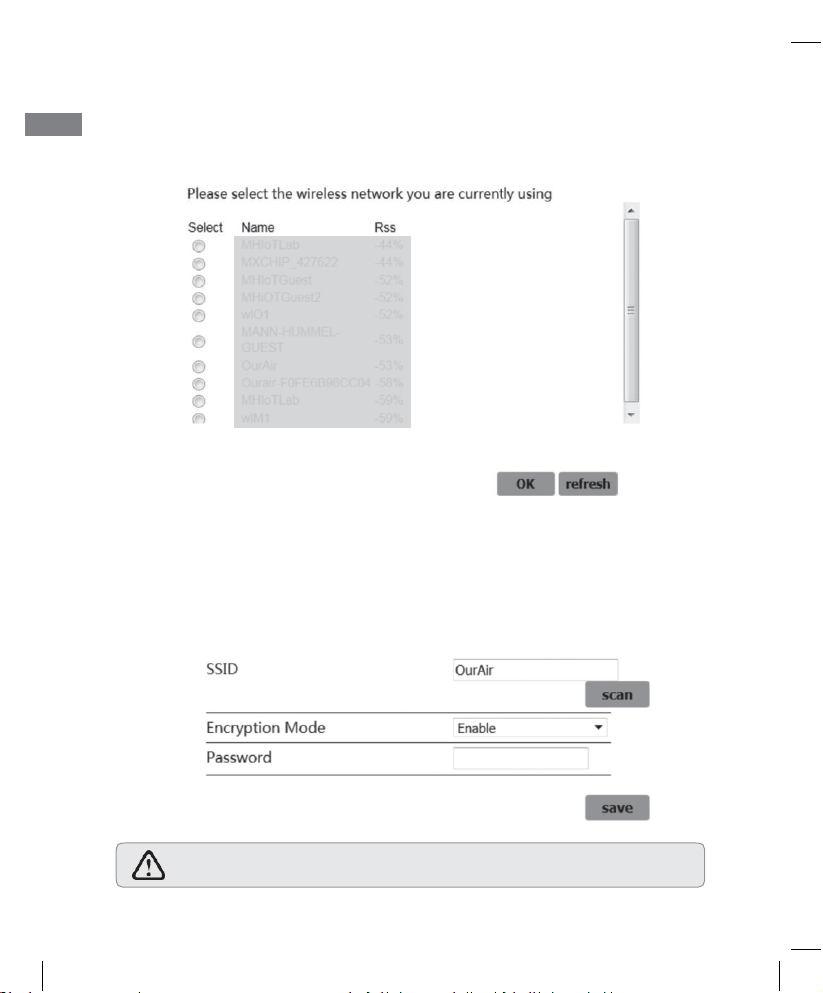
Wi-Fi Setting
Caution: It will take up to 3 seconds to restart the device. Please do not click
on any other commands during reboot to avoid errors.
EN
•
Click on scan to search for Wi-Fi SSID and select your Wi-Fi or manually
enter the Wi-Fi SSID.
•
Enter Wi-Fi Encryption information and click save to save your settings.
•
The device will restart to complete the Wi-Fi configuration.
•
If the front LED is on, the Wi-Fi is connected successfully.
6
Page 7
19_J05xxx_Indoor Air Quality Sensor SPB308 E&C.indd 7
9/1/19 5:11 PM
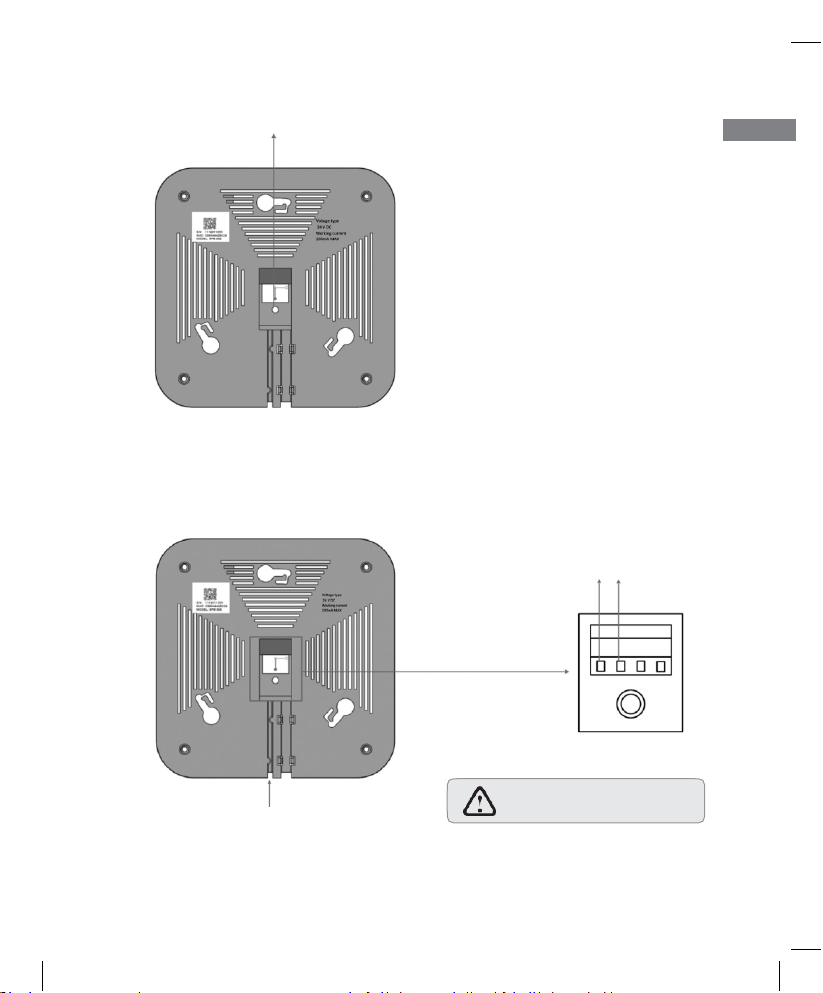
Wi-Fi configuration button
Tips: Press Wi-Fi configuration
button for at least 5 seconds to
reset the Wi-Fi setting
EN
3.2 Modbus Connection
•
Connect SPB308 to RS485 port with Modbus cable.
RS485B RS485A
The Modbus cable is placed
through the wire groove
7
Caution: Pay attention to
the polarity of RS485 ports
Page 8
19_J05xxx_Indoor Air Quality Sensor SPB308 E&C.indd 8
9/1/19 5:11 PM
Caution: Your smart phone needs to meet the following criteria
iOS system: version 8.0 +
Android system: version 4.4 +
EN
4. On-Boarding with the OurAir App
4.1 Download the OurAir App
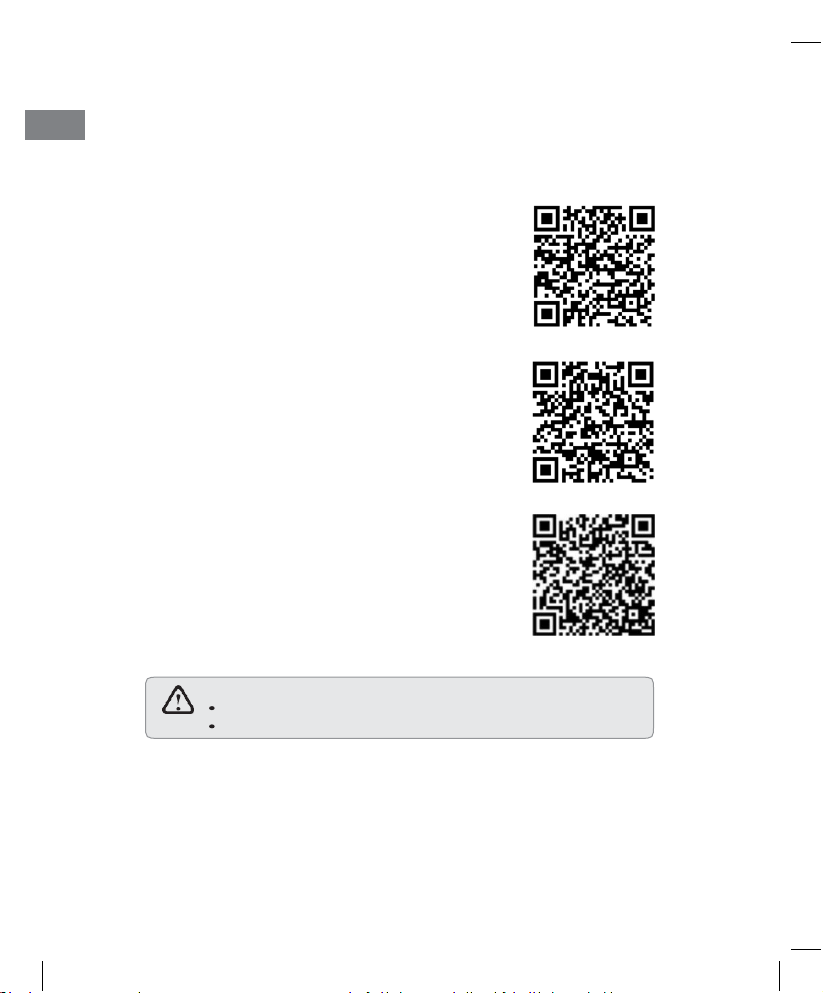
1 For Android users, go to Google Play store
to
search and download the mobile
application
“OurAir” or scan the QR-Code.
2 For iPhone users, go to App store to search
and download the mobile application “OurAir”
or scan the QR-Code.
3 For China Android, go to Tencent store to
search and download the mobile application
“OurAir” or scan the QR-Code.
8
Page 9
19_J05xxx_Indoor Air Quality Sensor SPB308 E&C.indd 9
9/1/19 5:11 PM
4.2 Using the OurAir App
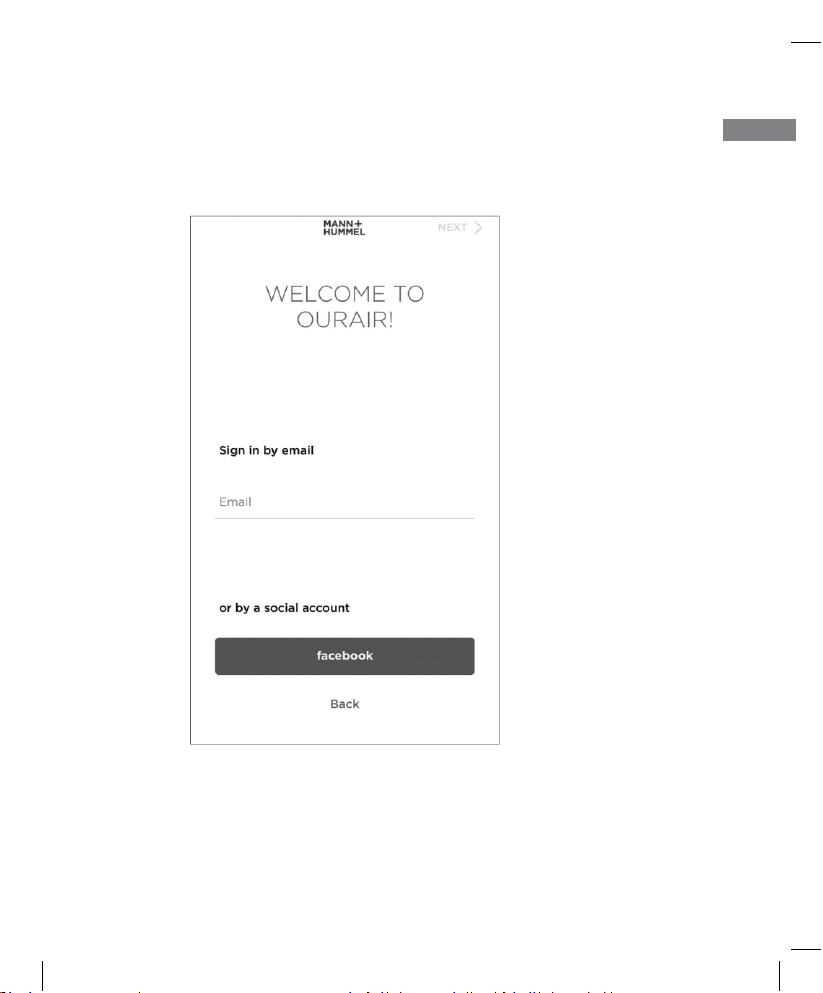
Step 1. Log-in to the OurAir App only by Email
9
EN
Page 10
19_J05xxx_Indoor Air Quality Sensor SPB308 E&C.indd 10
9/1/19 5:11 PM
EN
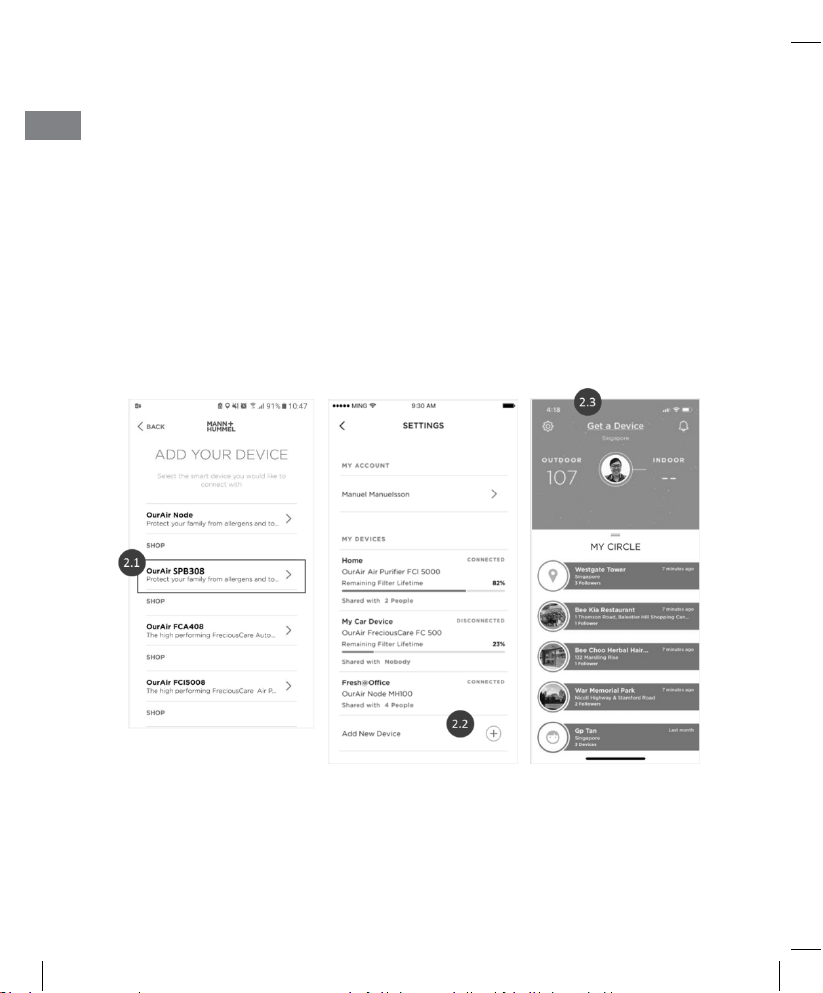
Step 2. Adding a device to your account
Ways to add your first OurAir device
2.1
– After you’ve logged in successfully for the first time, you can select the
device that you want to add
2.2
– Alternatively, you can go to the settings of the OurAir App and tap the
“+” symbol to add new devices
2.3
– You can also add the device at the home screen (if no device was added
previously)
10
Page 11
19_J05xxx_Indoor Air Quality Sensor SPB308 E&C.indd 11
9/1/19 5:11 PM
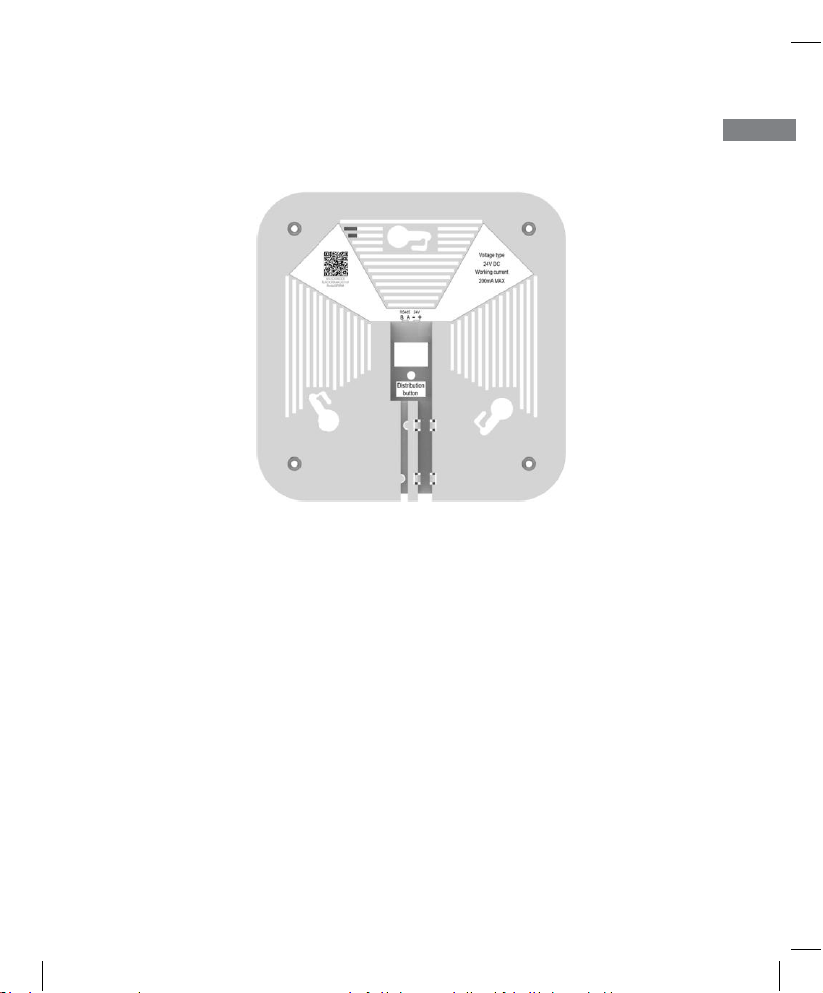
4.3 Pair a Device with the OurAir App
•
Scan the QR code with the OurAir APP to pair the device.
5. Limitation of Use
•
The SPB308 is made for indoor application.
•
The accuracy of the SPB308’s readings can be influenced by the conditions
of
usage
•
Do not use the SPB308 in dusty environments. Otherwise the sensitivity,
accuracy and lifetime of the device will be affected seriously.
•
The sensors and chips used in this device are high tech precision instruments; to
minimize interference to the precision components, please prevent the unit
from
being exposed to high temperature, high humidity, combustible gases and
liquids.
•
Please prevent excessive exposure to ethanol, perfume, and alcohols. In
addition, the rear side of monitor should be kept away from vents, cooking
equipment, and humidifiers.
EN
11
Page 12
19_J05xxx_Indoor Air Quality Sensor SPB308 E&C.indd 12
9/1/19 5:11 PM
Caution: Wi-Fi does not support 5.0GHz and/or 802.11n
EN
•
Normally, SPB308 need 30 minute to warm up.
•
SPB308 is not intended to be used:
o
For outdoor measurements
o
Under extreme temperature or humidity condition
o
Next to a source of heat or fire
o
As a medical device or a substitute to any medical treatment.
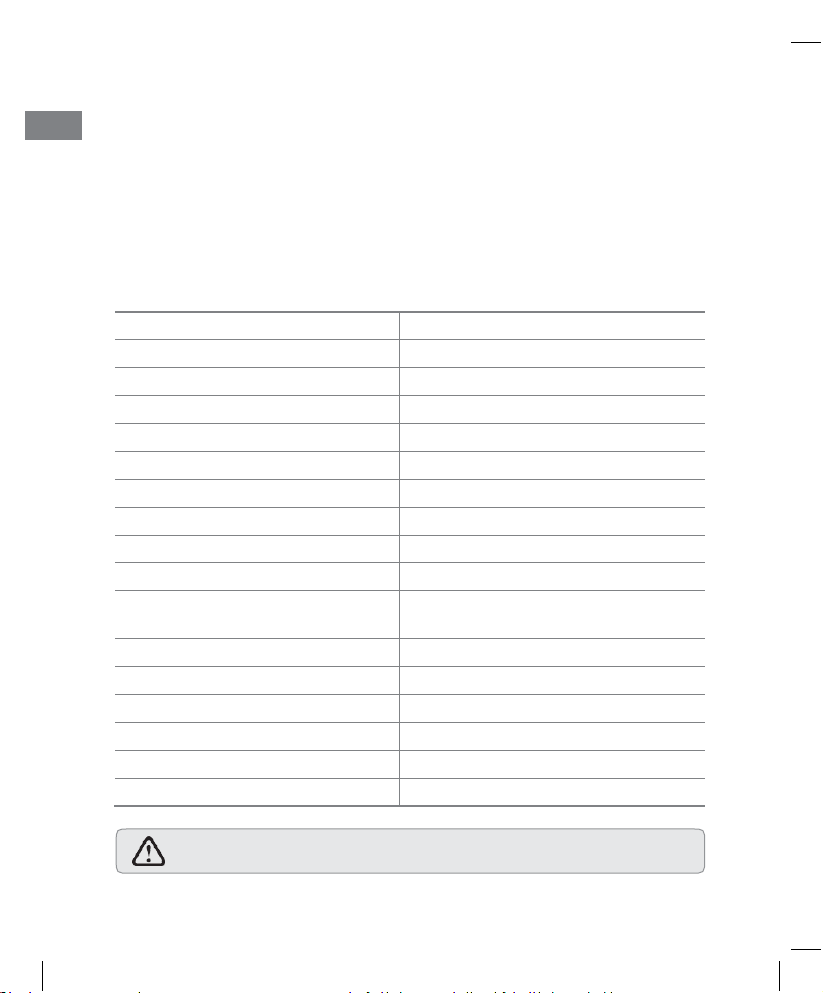
6. Specification
Material
ABS plastic
Color White
Connection
Wi-Fi (2.4Ghz, 802.11b/g/n), Modbus RS485
Operating Voltage
DC 24V
Input currect
200 mA
Operating Temperature
0 - 40°C
Operating Humidity
10 - 95% RH
TVOC measurement principle
MEMS metal oxide sensor technology
TVOC measurement range
125 - 600 ppb (relative)
PM2.5 measurement principle
Laser-based light scattering (mie)
PM2.5 measurement range
(PM2.5 concentration)
1 - 500 μg/m
3
CO2 measurement principle
Non-dispersive infrared
CO2 measurement range
400 - 2000 ppm
Temperature measurement range
0 - 40°C
Relative humidity measurement range
0 - 99%
Dimensions
131 * 131 * 45mm
Weight
400 g
12
Page 13

19_J05xxx_Indoor Air Quality Sensor SPB308 E&C.indd 13
9/1/19 5:11 PM
7. Environment
Please play a part in preserving the environment by not discarding the
indoor air quality monitor with usual household waste at the end of its
lifespan. Please bring it in to a recycling collection point instead.
13
EN
Page 14

19_J05xxx_Indoor Air Quality Sensor SPB308 E&C.indd 14
9/1/19 5:11 PM
EN
14
 Loading...