

Page 1
QUICK START GUIDE
REGISTRATION
1
DISCLAIMER
• The mobile and PC apps are only for use with Makita products.
• Makita Corporation is not responsible for damages incurred by the user (including direct damages, special damages,
consequential damages, punitive damages, penalties, loss of data, loss of profit and resulting damages, or fees for
procuring a replacement device) resulting from the use of the apps.
• The screenshots in this document may differ from the content displayed on your mobile device or PC.
• No part of this document may be copied, reproduced, modified, or reused in any form.
• For details on the NFC contact point of your mobile device, contact the device manufacturer.
• The N-Mark ( ) is a trademark or registered trademark of NFC Forum, Inc. in the United States and in other countries.
• This product and document do not bear or use the ™ and ® symbols.
• The names of products, companies, etc. appearing in this document are trademarks or registered trademarks of their
respective companies.
2
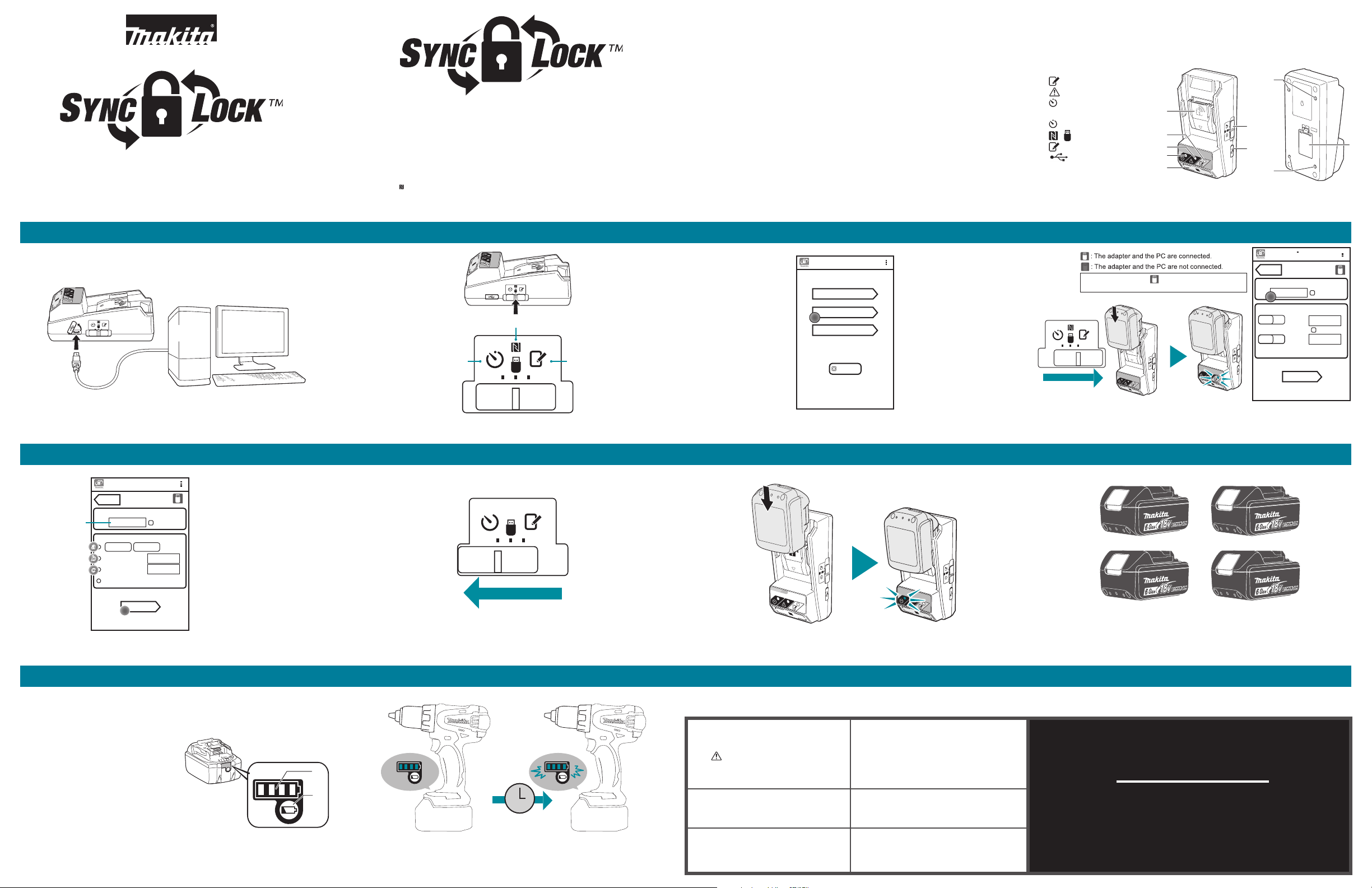
COMMUNICATION MODE
TIMER MODE REGISTRATION MODE
WHAT’S INCLUDED IDENTIFICATION OF PARTS
• Coin cell (CR2450) battery (x1, pre-installed)
• Tamper Proof Screws (x4)
• Tamper Proof Screw bit (x1)
• Instruction manual (x1)
• Quick start guide (x1)
• Flash Drive (PC app / Software)
• Micro USB Cable
REQUIREMENTS
• PC with Windows 7, 8 or 8.1
• Makita battery
Home Menu
3
Timer Setting
Registration Data Setting
Read Setting Status
Close App
1. Battery cartidge port
2. Registration lamp
3. Warning lamp
4. Timer lamp
5. Operation mode switch
Timer Mode
Communication Mode
/
Registration Mode
6. USB port (micro-B type)
7. Installation screw holes
8. Battery cover
4
NOTE: Make sure the
title bar.
1
2
3
4
icon is displayed on the
7
5
6
7
Timer Setting
BACK
Registration Cross PIN
0000
Registration Data Setting
NO
NO
8
Show PIN
New PIN
Show PIN
User Name
Max. 10 letters
Transmit
Connect adapter to PC with micro USB cable.
SETTING TIMER & PROGRAMMING THE BATTERY
Timer Setting
5
ENTER NEW PIN
BACK
Timer Cross PIN
Enter PIN (4-digit)
Timer Setting
Sunday
a
a
Hours Remaining 8 h
b
b
Set Date
c
c
Timer Cancel
Transmit
Show PIN
0:00
Jul 05, 2016
Choose when battery shuts off by (a) day, (b) hour, and (c) calendar date.
Click Transmit.
Day and Time - Selecting this option
will allow you to set the day of the
week and time that the battery
will shut down at. Great for weekly
schedules.
Total Hours - Selecting this option
will allow you to set the total number
of operating hours allowed before the
battery will shut down. Maximum Setting: 1200 hours. Ideal for mobile sites
and maintenance vehicles. Or when
worker is required to unlock batteries
at multiple times throughout day.
Calendar Date - Selecting this option
will allow you to set the exact calendar
date that the battery will shut down
on. Perfect for extended job durations
or for when you do not wish to have an
adaptor on a site.
USE AND TROUBLESHOOTING
CHECKING THE SETTINGS OF THE
BATTERY CARTRIDGE OR THE ADAPTER
NOTICE: You can check whether the battery cartridge
has expired by pressing the button (b) on the
cartridge. If the battery cartridge is past its expiration
date, all segments of the level indicator (a) will flash.
Load Battery. Slide adapter to Registration Mode.
Slide adapter switch to Communication Mode. Open software. Click Registration Data Setting.
Set PIN and User Name. Keep initial code as “0000.”
Enter New PIN under Registration Data Setting.
6
7
8
Multiple batteries can be set by simply repeating steps 4 & 6.
Slide adapter to Timer Mode. Load battery. A blue light will appear.
Timer will apply. Congratulations you are done.
Slide battery on “Registraion Mode” and flipping switch to the
“Timer Mode.” Repeat for each additional battery.
SYMPTOM CAUSE/REMEDY
1.Setting is not in Timer Mode or Resgistration Mode
The Warning lamp blinks.
a
b
The adapter malfunctions.
when setting PIN or depositing more time in the battery.
2.PIN numbers between BPS01 and battery do not match.
3.Low cell battery in BPS01
If you are using the PC app, connect
the PC to the adapter before operating
the app.
ATTENTION
Do not forget the PIN as you will be
unable to change the settings.
NOTE: If the battery cartridge will expire in
approximately one hour, all segments of the level
indicator (a) on the battery cartridge flash.
All segments of the level indicator on
the battery cartridge flash.
The battery cartridge will expire in
approximately one hour.
0317 MA7178-17
 Loading...