

MakeUp Air Electric Heater, Modular Electric Heater, Electric Heat Module, Electric Insert Maintenance Manual
Page 1
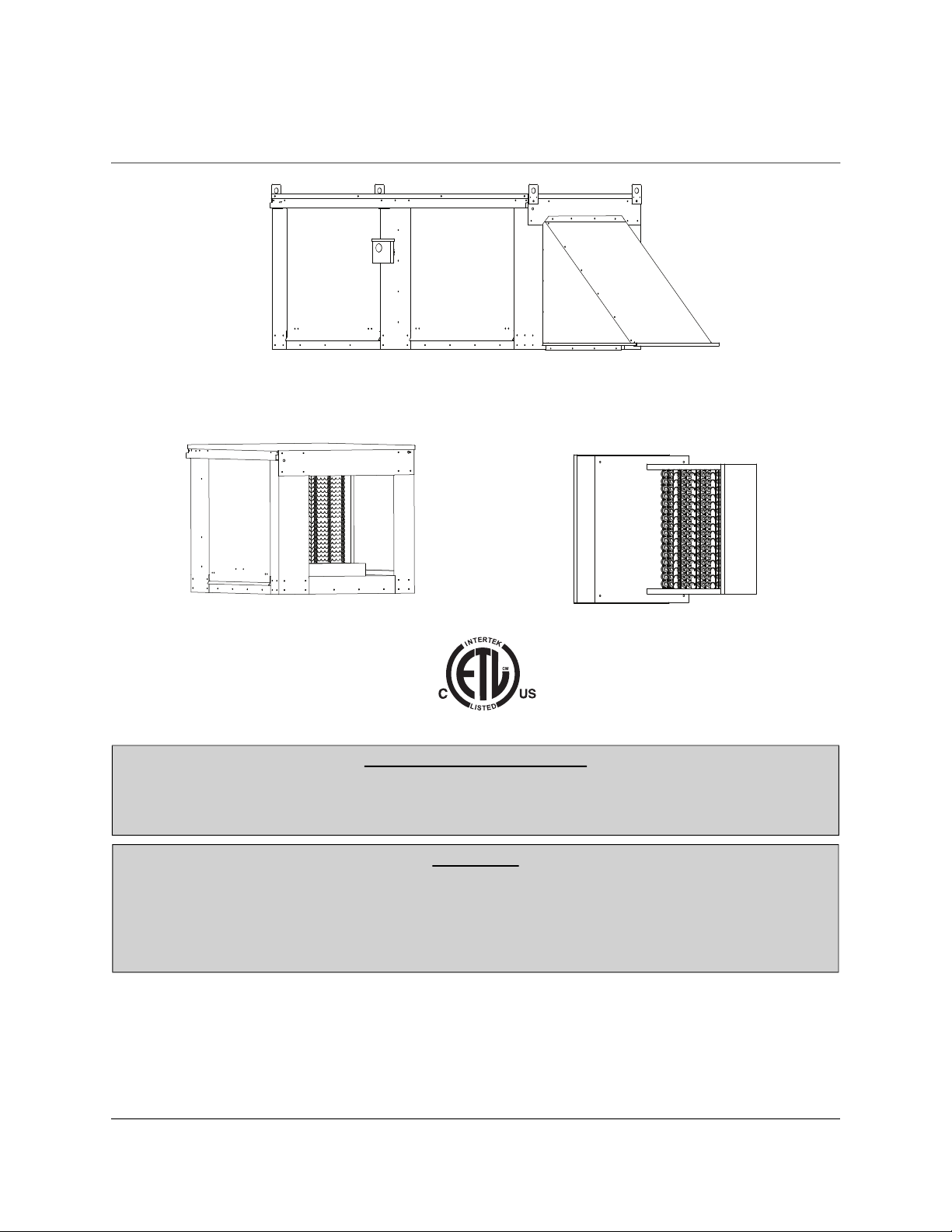
Standard and Modular Electric Heater and Inserts
Installation, Operation, and Maintenance Manual
Modular Electric Heater
Electric Heat Module
RECEIVING AND INSPECTION
Upon receiving unit, check for any interior and exterior damage, and if found, report it
immediately to the carrier. Also check that all accessory items are accounted for and are
damage free.
WARNING!!
Installation of this equipment should only be performed by a qualified professional who has
read and understands these instructions and is familiar with proper safety precautions.
Improper installation poses serious risk of injury due to electric shock and other potential
hazards. Read this manual thoroughly before installing or servicing this equipment. ALWAYS
disconnect power prior to working on equipment.
Save these instructions. This document is the property of the owner of this equipment and is required
for future maintenance. Leave this document with the owner when installation or service is complete.
Electric Insert
A0011031
May 2020 Rev. 24
Page 2

Table of Contents
WARRANTY ............................................................................................................................................................................. 3
INSTALLATION ........................................................................................................................................................................ 4
Mechanical ........................................................................................................................................................................ 4
Service Clearance ..................................................................................................................................................... 4
Common Electric Heater Calculations ....................................................................................................................... 4
Applied vs Rated KW Factors ....................................................................................................................................4
Curb and Ductwork ............................................................................................................................................................ 6
Roof Mount Installation .............................................................................................................................................. 7
Installation with Exhaust Fan ..................................................................................................................................... 7
Duct Mount Installation .............................................................................................................................................. 8
Indoor (Inline) Installation .......................................................................................................................................... 8
Heat Module Add-On Installation ...............................................................................................................................9
ELECTRICAL ..........................................................................................................................................................................10
Fan to Building Wiring Connection .................................................................................................................................. 12
Remote Control Panel ..................................................................................................................................................... 12
Electric Cabinet Heater ............................................................................................................................................13
AC Interlock .............................................................................................................................................................13
Motorized Intake Damper ........................................................................................................................................ 13
Permanent Split Capacitor (PSC) Motor Speed Control ................................................................................................. 13
Electronically Commutated Motor (ECM) Speed Control ................................................................................................ 14
External PWM Signal ...............................................................................................................................................14
Unit Mount Controller ...................................................................................................................................................... 14
Motor Speed Controller (MSC) Installation ...................................................................................................................... 15
MSC Controls Overview .................................................................................................................................................. 16
MSC Menu ...............................................................................................................................................................16
Input Threshold ........................................................................................................................................................18
MSC Menu Tree ...................................................................................................................................................... 19
Heater Controller ..................................................................................................................................................... 20
Variable Frequency Drive (VFD) ..................................................................................................................................... 21
Variable Frequency Drive (VFD) Installation ........................................................................................................... 22
Input AC Power ........................................................................................................................................................ 22
VFD Output Power ................................................................................................................................................... 22
VFD Programming ................................................................................................................................................... 23
ACTECH SMV VFD ................................................................................................................................................. 24
START-UP OPERATION ........................................................................................................................................................25
Start-up Procedure .......................................................................................................................................................... 25
Pulley Adjustment ............................................................................................................................................................ 26
Pulley Alignment/Proper Belt Tension .............................................................................................................................27
Pulley Combination Chart ................................................................................................................................................ 28
Sequence of Operation ................................................................................................................................................... 29
Main Circuit ..............................................................................................................................................................29
Optional Remote Panel Circuit ................................................................................................................................ 30
Silicon Controlled Rectifier (SCR) Electrical Control ....................................................................................................... 31
Modulating Coil Thermostat Settings .............................................................................................................................. 31
Thermostat with Dip Switch Settings ....................................................................................................................... 31
Thermostat without Dip Switch Settings .................................................................................................................. 31
SCR Electrical Circuit Check ...........................................................................................................................................32
Components .................................................................................................................................................................... 33
Remote Panel Option .............................................................................................................................................. 34
Troubleshooting ............................................................................................................................................................... 35
MSC Troubleshooting .............................................................................................................................................. 37
MAINTENANCE ......................................................................................................................................................................38
General Maintenance ...................................................................................................................................................... 38
2 Weeks After Start-up .................................................................................................................................................... 38
Every 3 Months ............................................................................................................................................................... 38
Yearly .............................................................................................................................................................................. 38
Unit Filters ....................................................................................................................................................................... 39
Start-Up and Maintenance Documentation ..................................................................................................................... 40
2
Page 3

WARRANTY
This equipment is warranted to be free from defects in materials and workmanship, under normal use and
service, for a period of 2-years from date of shipment. This warranty shall not apply if:
1. The equipment is not installed by a qualified installer per the MANUFACTURER’S installation instructions shipped with the product.
2. The equipment is not installed in accordance with Federal, State, or Local codes and regulations.
3. The equipment is misused or neglected, or not maintained per the MANUFACTURER’S maintenance instructions.
4. The equipment is not installed and operated within the limitations set forth in this manual.
5. The invoice is not paid within the terms of the sales agreement.
The MANUFACTURER shall not be liable for incidental and consequential losses and damages potentially
attributable to malfunctioning equipment. Should any part of the equipment prove to be defective in
material or workmanship within the 2-year warranty period, upon examination by the MANUFACTURER,
such part will be repaired or replaced by MANUFACTURER at no charge. The BUYER shall pay all labor
costs incurred in connection with such repair or replacement. Equipment shall not be returned without
MANUFACTURER’S prior authorization, and all returned equipment shall be shipped by the BUYER,
freight prepaid to a destination determined by the MANUFACTURER.
NOTE: To receive warranty coverage for this product, copy and print out the “Start-Up and
Maintenance Documentation” on page 40. Fill in all details required. Fax the page to 1-919-516-8710
or call 1-866-784-6900 for email information within thirty (30) days of purchase.
3
Page 4
INSTALLATION
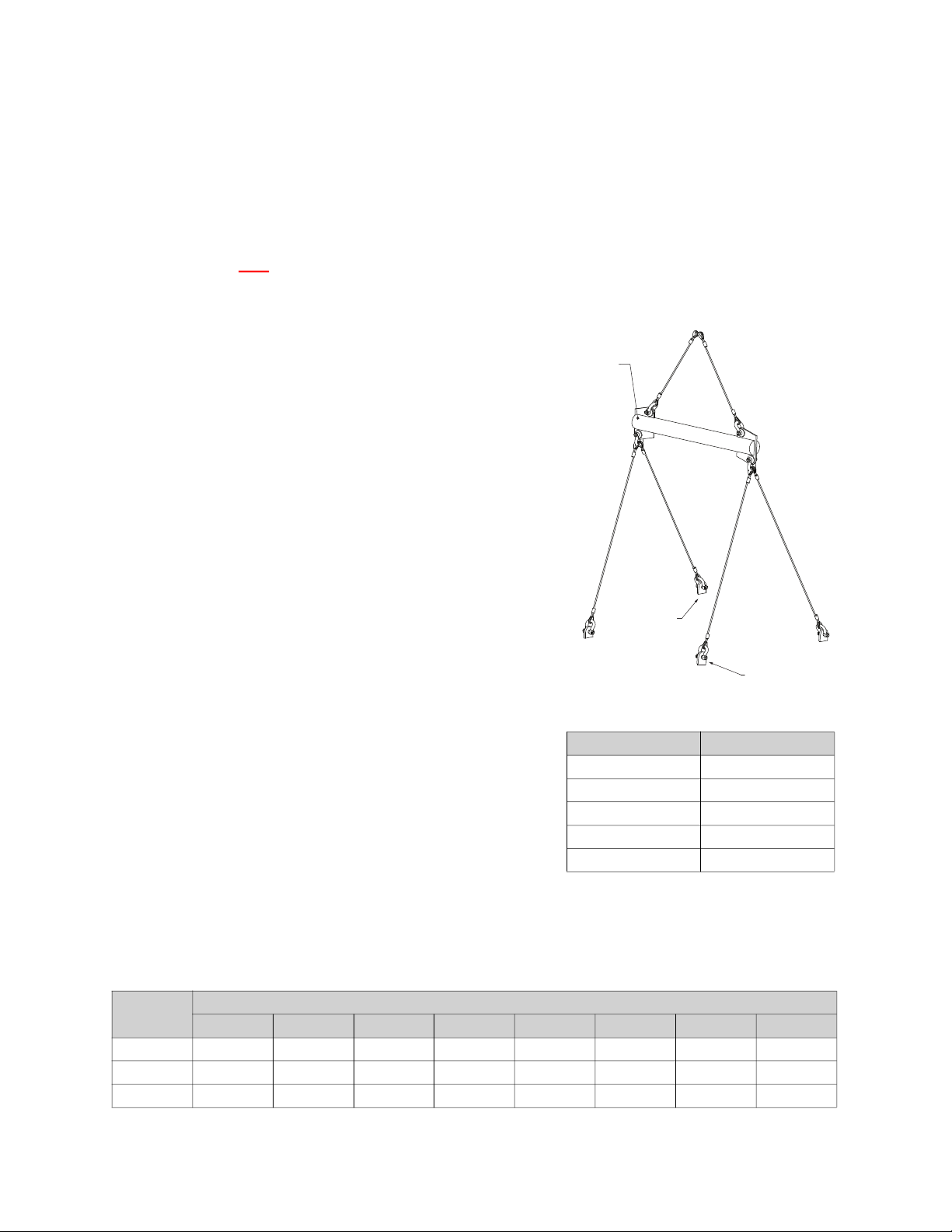
Spreader
Bar
Lifting Lugs
Lifting Lugs
It is imperative that this unit is installed and operated with the designed airflow and electrical supply in
accordance with this manual. If there are any questions about any items, please call the service
department at 1-866-784-6900 for warranty and technical support issues.
Mechanical
WARNING: DO NOT RAISE UNIT BY THE INTAKE HOOD, BLOWER, MOTOR SHAFT, OR
BEARINGS. USE ALL LIFTING LUGS PROVIDED WITH A SPREADER BAR OR SLING UNDER THE
UNIT.
Figure 1 - Spreader Bar
Site Preparation
1. Provide clearance around installation site to safely rig and lift equipment into its final position (Figure 1). Supports must adequately support equipment. Refer to manufacturer’s estimated weights.
2. Locate unit close to the space it will serve to reduce long, twisted duct runs.
3. Consider general service and installation space when locating unit.
4. Do not allow air intake to face prevailing winds. Support
unit above ground or at roof level high enough to prevent
precipitation from being drawn into its inlet. The inlet must
also be located at least 10 feet away from any exhaust
vents. The fan inlet shall be located in accordance with the
applicable building code provisions for ventilation air.
Service Clearance
Refer to Table 1 for unit size clearance specifications. This will
allow for enough clearance in the front, back and sides of the
unit for servicing and maintenance of the unit.
Table 1 - Clearance Chart
Unit Size Clearance
1 24”
2 36”
3 42”
4 48”
5 54”
Common Electric Heater Calculations
Conversion:
1 KW = 3413
Load Requirement:
KW = (CFM x Temperature Rise) / 3160
Line Current (1 Phase):
Amperage = (KW x 1000) / Volts
Applied vs Rated KW Factors
Rated
Voltage
208 .92 1.00 1.12 1.22 1.33 - - -
460 - - - - - .91 1.00 1.09
480 - - - - - .84 .92 1.00
200 208 220 230 240 440 460 480
Applied Voltage
4
Page 5
Intake Assembly
1
2
3
4
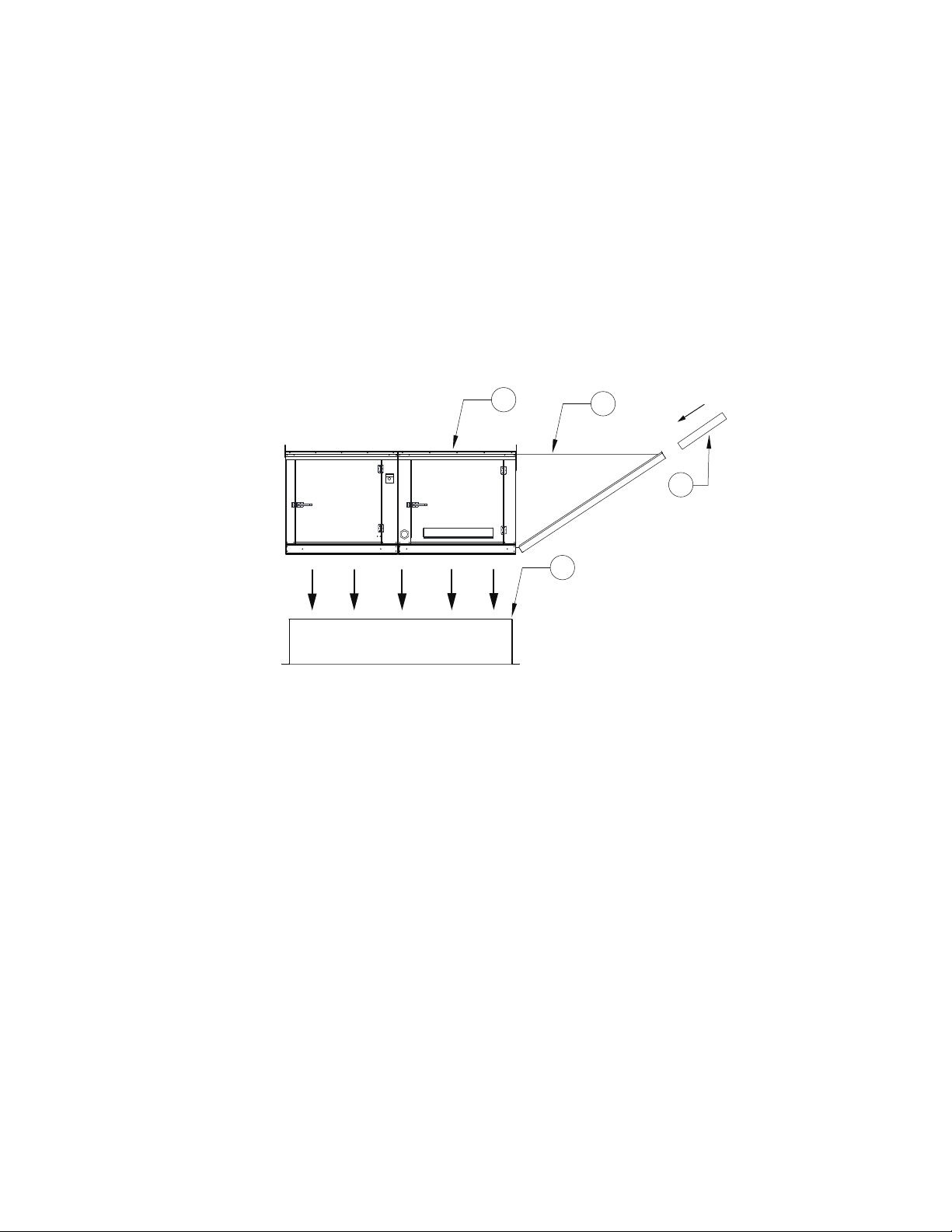
Intakes and curbs (Figure 2) are shipped on a separate skid. Upon unit arrival, perform the following steps
to assemble the intake to the unit.
1. Apply silicone or weather-proof gasket on the backside of the flanges of the intake hood or V-bank intake.
2. Secure the flanges of the intake hood to the unit with the supplied sheet metal screws.
3. Use caulk on the outside of the screws to prevent water leaks.
4. If the unit is a modular unit with a V-bank or evaporative cooler section, the V-bank or evaporative cooler will bolt to the heater with the bolts provided.
5. Slide the filters down the filter track.
Figure 2 - Intake and Curb Assembly
1. Unit
2. Intake Housing
3. Intake Filter(s)
4. Curb
5
Page 6

Curb and Ductwork
This fan was specified for a specific CFM and static pressure. The ductwork attached to this unit will
significantly affect airflow performance. When using rectangular ductwork, elbows must be radius throat,
radius back with turning vanes. Flexible ductwork and square throat/square back elbows should not be
used. Any transitions and/or turns in the ductwork near the fan outlet will cause system effect. System
effect will drastically increase the static pressure and reduce airflow.
• Table 2 shows the minimum fan outlet duct sizes and straight lengths required for optimal fan
performance.
• Do not use the unit to support ductwork in any way. This may cause damage to the unit.
• Follow SMACNA standards and manufacturer's requirements for the duct runs. Fans designed
for rooftop installation should be installed on a prefabricated or factory-built roof curb.
• Follow curb manufacturer’s instructions for proper curb installation.
• The unit should be installed on a curb and/or rail that meets local code height requirements.
• Make sure the duct connection and fan outlet are properly aligned and sealed.
• Secure fan to curb through vertical portion of the ventilator base assembly flange. Use a minimum of
eight (8) lug screws, anchor bolts, or other suitable fasteners (not furnished). Shims may be required
depending upon curb installation and roofing material.
• Verify all fasteners are secure. Figure 3 through Figure 6 show different mechanical installations.
Table 2 - Required Supply Ductwork
Blower Size (Inches) Discharge Duct Size Straight Duct Length*
10
15D, 16Z, 18Z
12
15
20D, 20Z, 22Z
18
24D, 25Z
20
30D, 28Z
25
36D
Side
Down
Side 20” x 20” 72”
Down 14” x 14” 48”
Side
Down
Side
Down
Side 26” x 26” 108”
Down 20” x 20” 72”
Side
Down
Side 30” x 30” 108”
Down 24” x 24” 86”
Side
Down
Side 32” x 32” 168”
Down 26” x 26” 108”
Side
Down
Side 36” x 36” 189”
Down 32” x 32” 168”
14” x 14” 48”
16” x 16” 54”
20” x 20” 72”
24” x 24” 86”
26” x 26” 108”
32” x 32” 168”
6
Page 7
WARNING: ELECTRIC HEATERS HAVE TWO POWER INPUTS. THE EXTERNAL DISCONNECT
AIRFLOW
1
2
3
4
5
6
8
7
9
10
11
AIRFLOW
1
2
3
4
6
8
7
5
9
INTERRUPTS POWER TO THE MOTOR AND CONTROLS ONLY. THE ELECTRIC COIL POWER IS
INTERRUPTED BY THE DISCONNECT SWITCH ON THE ELECTRIC COIL DOOR.
Roof Mount Installation
Note: Refer to submittal drawings for specific unit dimensions.
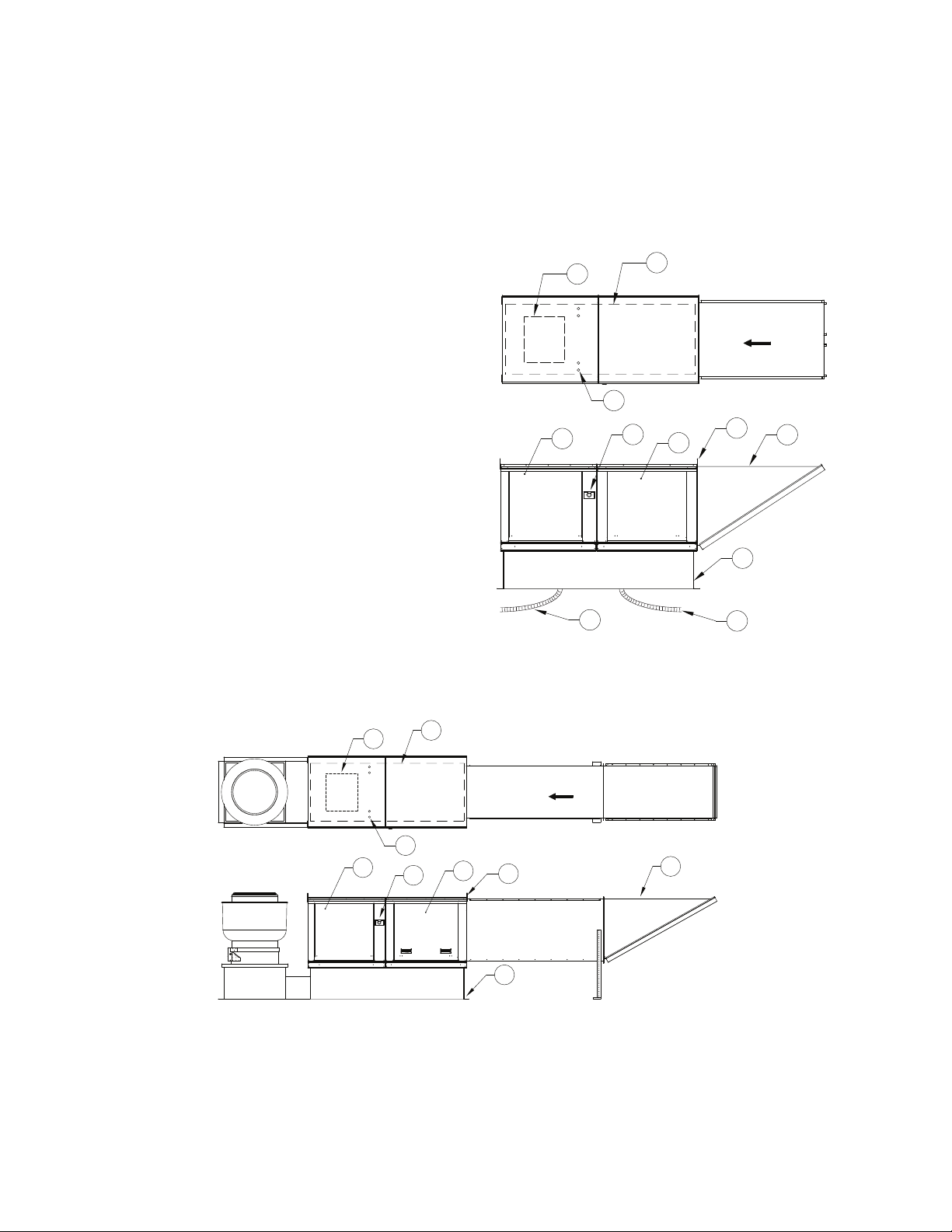
Figure 3 - Roof Mount Details
1. Discharge Opening
2. Curb Outer Wall
3. Flex Conduit for Field Wiring
4. Intake Housing
5. Lifting Lugs
6. Electric Heat Module
7. Service Disconnect Switch
8. Blower/Motor Access Door
9. Curb with Support Legs or Rail (20” High)
10. Control Drop
11. Motor Drop
Max. Roof Opening 2” Smaller than Curb
Outside Dimension.
Installation with Exhaust Fan
Note: Refer to submittal drawings for specific unit dimensions.
Figure 4 - Exhaust Fan Details
1. Discharge Opening
2. Curb Outer Wall
3. Flex Conduit for Field Wiring
4. Intake Housing
5. Lifting Lugs
6. Electric Heat Module
7. Service Disconnect Switch
8. Blower/Motor Access Door
9. Curb with Support Legs or Rail (20” High)
7
Page 8
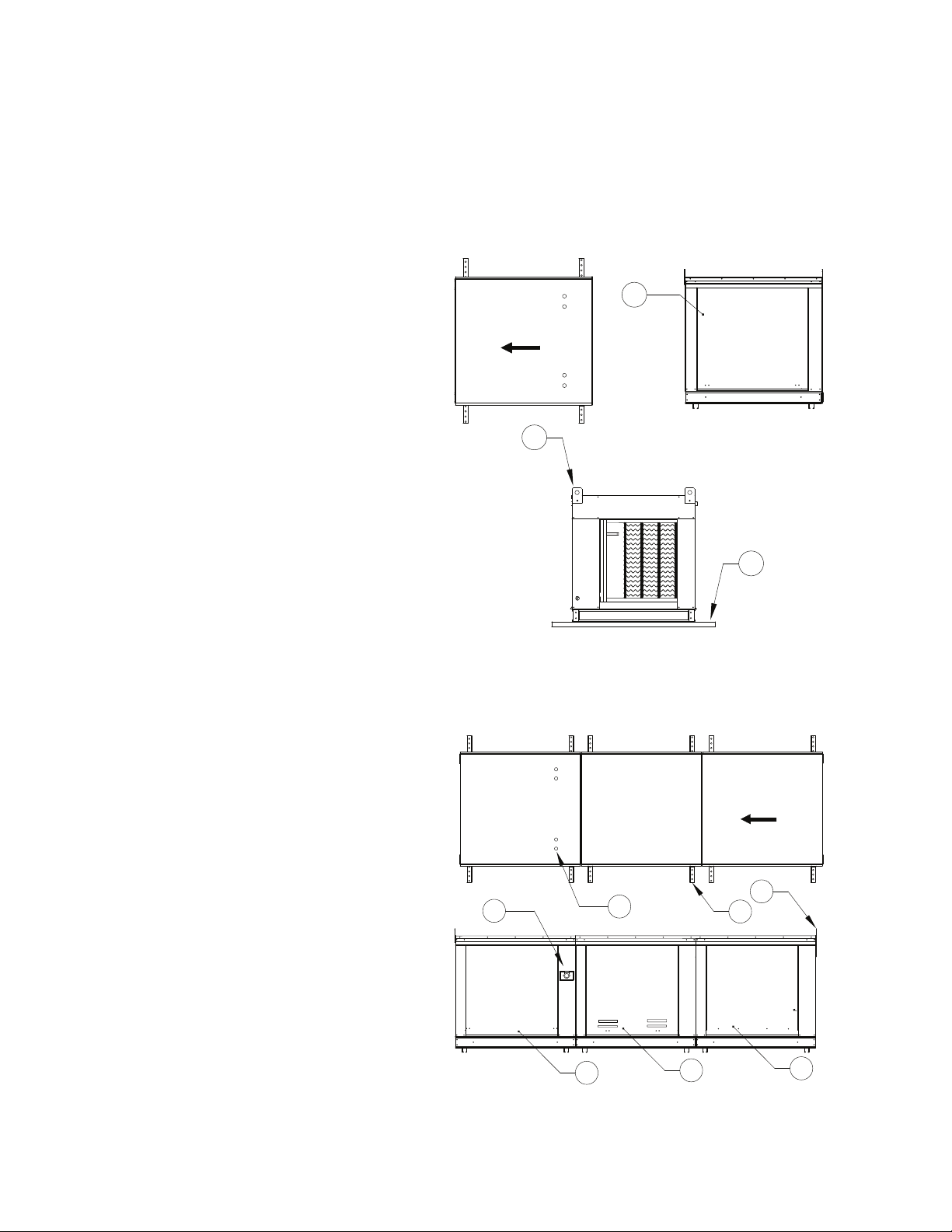
WARNING: ELECTRIC HEATERS HAVE TWO POWER INPUTS. THE EXTERNAL DISCONNECT
AIRFLOW
1
3
2
AIRFLOW
1
2
3
4
5
7
6
INTERRUPTS POWER TO THE MOTOR AND CONTROLS ONLY. THE ELECTRIC COIL POWER IS
INTERRUPTED BY THE DISCONNECT SWITCH ON THE ELECTRIC COIL DOOR.
Duct Mount Installation
Note: Refer to submittal drawings for specific unit dimensions.
Figure 5 - Duct Mount Details
1. Control/Coil Access Door
2. Lifting Lugs
3. Optional Uni-Strut Base
Indoor (Inline) Installation
Note: Refer to submittal drawings for specific unit dimensions.
Figure 6 - Indoor Installation Details
1. Flex Conduit for Field Wiring
2. Optional Uni-Strut Base
3. Lifting Lugs
4. Filter Access Door
5. Electric Heat Module
6. Blower/Motor Access Door
7. Service Disconnect Switch
8
Page 9
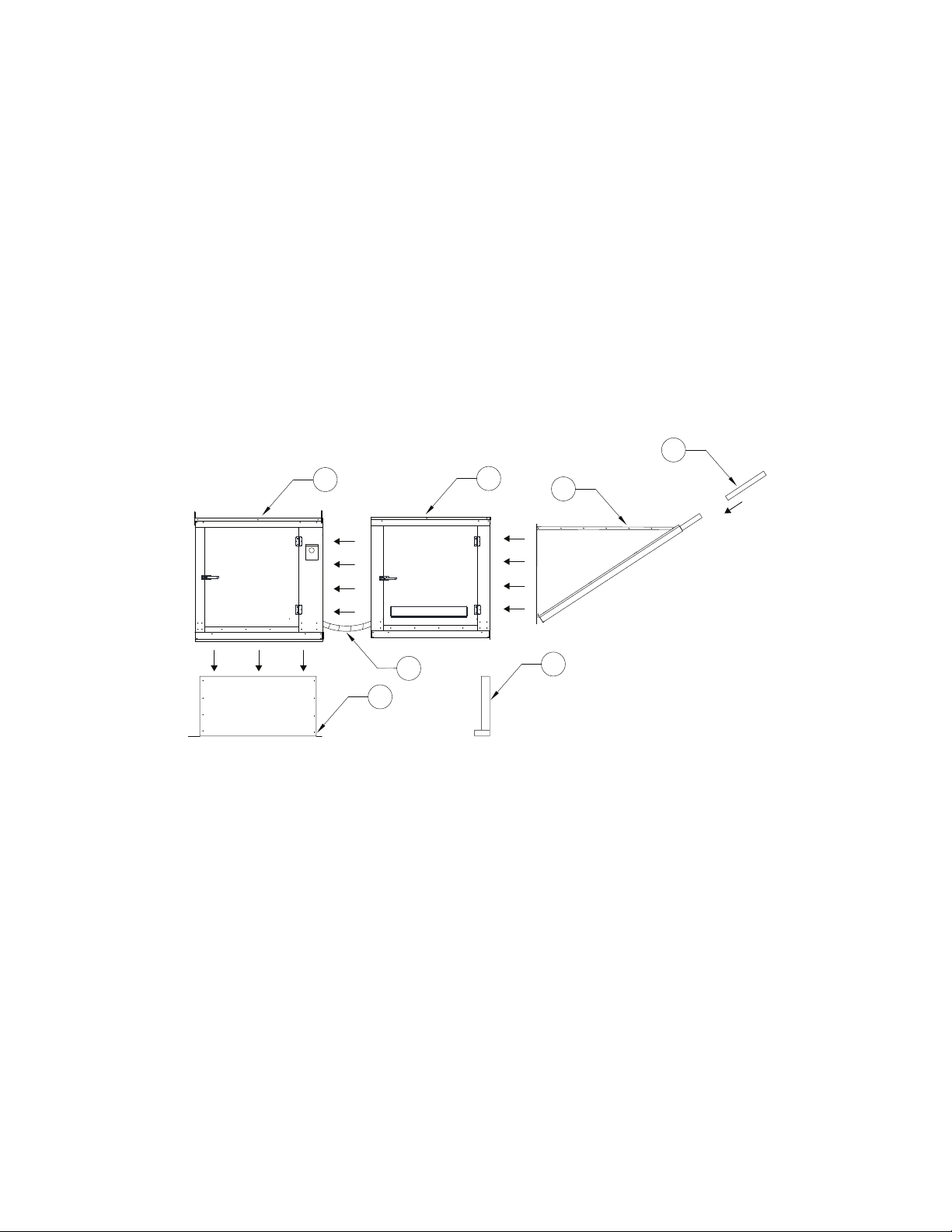
Heat Module Add-On Installation
2
3
4
1
5
7
6
Modular heat units (Figure 7) that are ordered to provide heat onto an existing blower only application
require field mechanical and wiring installation.
1. Remove existing intake housing and lifting lugs from the blower section intake side.
2. Attach heat module to blower intake using the provided sheet metal screws and bolts. Tighten screws and bolts to compress the gasket between the heat module and the blower module.
3. Support and level the end of the heat module (end opposite the blower) with the provided equipment legs/rails.
4. Attach the intake housing to the intake side of the heater module.
5. Drill a hole in the discharge of the blower large enough to insert the discharge control sensor (if provided). Install the sensor through the hole.
6. Wire the sensor and coil as indicated on the supplied wiring schematic. Route all wiring through metal conduit.
7. After the add-on installation is complete, refer to “Start-up Procedure” on page 25.
Figure 7 - Heat Module
1. Blower
2. Electric Heat Module
3. Intake Housing
4. Filters
5. Equipment Legs
6. Conduit
7. Curb
9
Page 10

ELECTRICAL
WARNING!!
Disconnect power before installing or servicing unit. High voltage electrical input is needed for
this equipment. A qualified electrician should perform this work.
Before connecting power to the heater, read and understand the entire section of this document. As-built
wiring diagrams are furnished with each unit by the factory and are attached to the control module’s door
or provided with paperwork packet.
Electrical wiring (Table 3) and connections must be made in accordance with local ordinances and the
National Electric Code, ANSI/NFPA 70. Verify the voltage and phase of the power supply, and the wire
amperage capacity is in accordance with the unit nameplate. For additional safety information, refer to
AMCA publication 410-96, Recommended Safety Practices for Users and Installers of Industrial and
Commercial Fans.
1. Always disconnect power before working on or near this equipment. Lock and tag the disconnect switch and/or breaker to prevent accidental power-up.
2. An electrical drop containing the line voltage power wiring is shipped with every unit. The electrical
drop should be brought through one of the conduit openings located in the base of the unit (Figure 3),
run through the curb, and connected to a junction box inside the building.
3. A dedicated branch circuit should supply the motor circuit with short circuit protection according to the National Electric Code. This dedicated branch should run to the junction box.
4. A separate power source should supply the electric coil power. Power from the building breaker
should be wired directly to the coil disconnect. This should be done using wire of the proper gauge as
indicated in Table 3. A hole must be drilled in the fan enclosure to properly run the electric coil
power.
5. Verify that the power source is compatible with the requirements of your equipment. The nameplate identifies the proper phase and voltage of the equipment.
6. Units shipped with a remote HMI will require a second drop through the base of the unit. It is important to route the motor wires in a separate conduit from the HMI wiring. Refer to Figure 3.
7. Before connecting the unit to the building’s power source, verify that the power source wiring is deenergized.
8. Secure the power cable to prevent contact with sharp objects.
9. Do not kink power cable and never allow the cable to encounter oil, grease, hot surfaces, or chemicals.
10. Before powering up the unit, make sure that the fan rotates freely. Make sure that the interior of the unit is free of loose debris or shipping materials.
11. If any of the original wire supplied with the unit must be replaced, it must be replaced with type THHN wire or equivalent.
WARNING: ELECTRIC HEATERS HAVE TWO POWER INPUTS. THE EXTERNAL DISCONNECT
INTERRUPTS POWER TO THE MOTOR AND CONTROLS ONLY. THE ELECTRIC COIL POWER IS
INTERRUPTED BY THE DISCONNECT SWITCH ON THE ELECTRIC COIL DOOR.
10
Page 11
Table 3 - Copper Wire Ampacity
Wire Size AWG Maximum Amps
14 15
12 20
10 30
8 50
6 65
4 85
3 100
2 115
1 130
1/0 150
2/0 175
3/0 200
4/0 230
250 255
300 285
350 310
400 335
500 380
600 420
11
Page 12
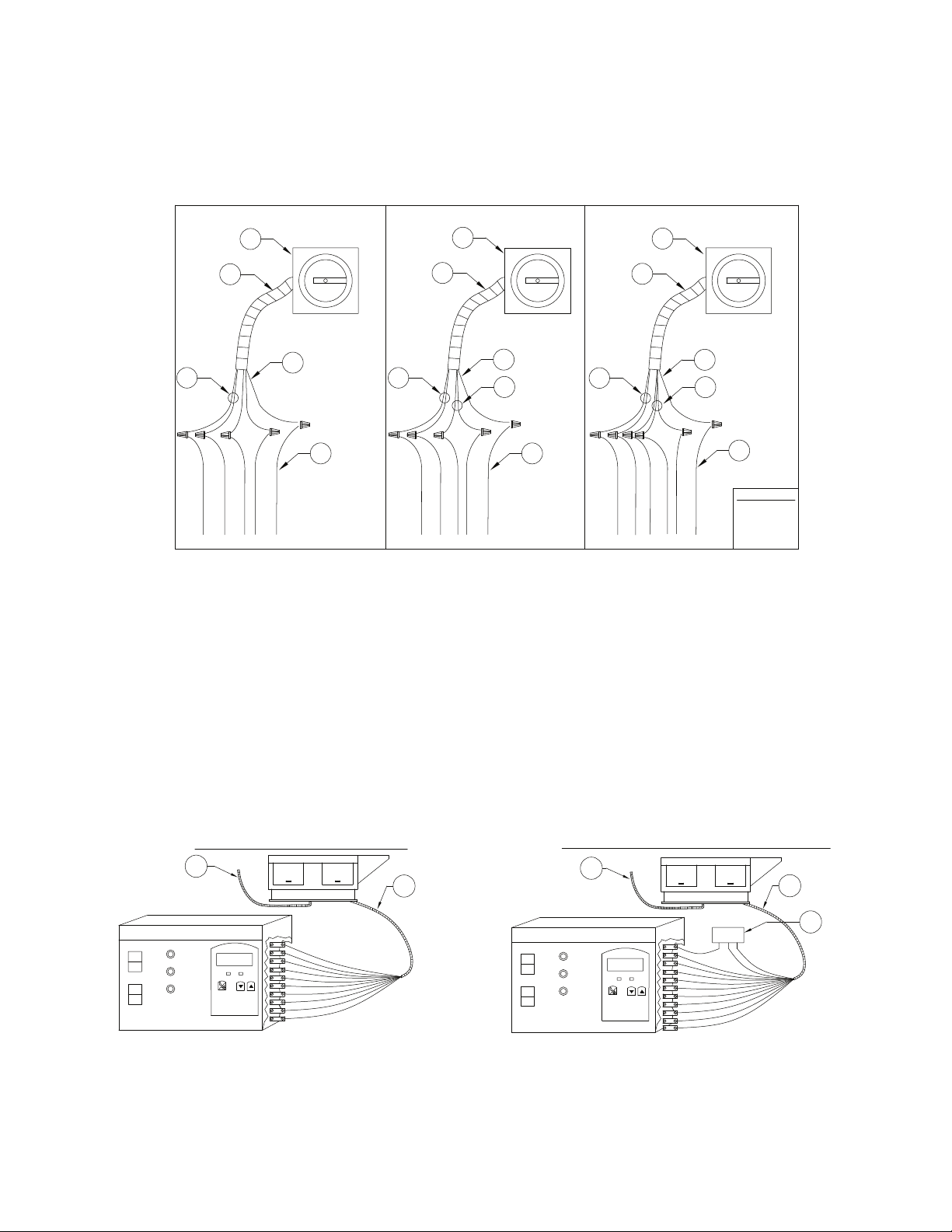
Fan to Building Wiring Connection
WHBK
GR
120V 1 PH. 208-240V 1 PH.
208-240/460/600V 3 PH.
1
2
3
4
1
2
1
2
WH - WHITE
RD - RED
WIRE COLOR
BK - BLACK
GR - GREEN
5
BK
GR
3
4
5
6
WH
RD
BK
GR
3
4
5
7
BK
WH
RD
BK
WH
RD
RD
120V Optional
Electric Heater Remote Panel
Blower On
Blower Off
Heat
Vent
Blower On
Power
Heat On
GY
T4
RD
T9
GY
BK
OR
PR
BL
BK
WH
T5
T14
T16
6
1
N
2
Electric Heater Remote Panel
Vent
Heat
Cool
Blower On
Blower Off
Heat On
BL
GY
PR
BL
RD
BK
T9
T4
11
T5
T14
T16
Blower On
Power
WH
GY
BK
OR
N
6
2
1
NO
NC
1
PR
E
BK
C
STANDARD ELECTRIC HEATER REMOTE PANEL
COOLING INTERLOCK AND EXHAUST ON IN FIRE CONTROL
OVERRIDE
OVERRIDE
RD
7
RD
7
1
2
3
1
2
Figure 8 - Wiring Connection Details
1. Disconnect Switch
2. Galflex Conduit (In Unit)
3. Factory Wiring
4. Field Supplied Wiring - From building power or pre-wired control panel.
Remote Control Panel
On units shipped with the optional remote control panel, an electrical drop containing the panel wiring is
provided with the heater. There is a terminal strip inside the remote panel that matches the terminals in the
heater unit. The remote panel should be wired as shown in Figure 9. Wiring may vary by unit, refer to
electrical schematics that were provided with your unit.
Figure 9 - Typical Remote Control Panel Wiring
5. 120V Single Phase Standing Power
6. 208-240 Single Phase
7. Three Phase
1. Motor Connection 2. Control Connection 3. Fire System Micro-switch
12
Page 13

Electric Cabinet Heater
Vari-Speed
HIGH
LOW
OFF
SOLID STATE SPEED CONTROL
On units shipped with an optional electric cabinet heater, ensure that the thermostat is set correctly while
commissioning the unit and that the thermostat sensing bulb is mounted correctly in the control vestibule
where the heater is located. The stat needs to be set to 0 Degrees Fahrenheit
.
AC Interlock
On units shipped with an optional AC interlock relay, 24V AC power from Y1 in the condensing unit or
rooftop unit should be field wired to terminal block 27 in the MUA. 24V AC common from C in the
condensing unit or rooftop unit should be field wired to terminal block 28 in the MUA. When these terminals
are powered, heat will be locked out within the MUA.
Motorized Intake Damper
On units shipped with the optional motorized intake damper, a power transformer is supplied with the unit if
the main incoming voltage is greater than 120V. The damper motor is automatically energized when the
main disconnect switch is in the ON position. No external wiring to the damper motor is required.
Permanent Split Capacitor (PSC) Motor Speed Control
Figure 10 - PSC Motor Speed Control
Some single-phase direct-drive fans contain speed controls that
regulate the amount of voltage going to the motor. Specific PSC
motors must be used in conjunction with speed controls. The
speed control has a knob (Figure 10) with an off position along
with high to low range. At high speed, the speed control allows
all of the line voltage to pass directly to the motor.
A minimum speed adjustment is provided to allow independent
control of the minimum speed setting. Minimum speed
adjustment ensures the motor runs with sufficient torque to
prevent stalling. To adjust this:
1. Motor must be in actual operating conditions to achieve proper speed adjustment. Motor will not slow
2. Turn main control knob to lowest speed position.
3. Locate and adjust minimum speed setting. This can be found under the speed control faceplate. Use a
4. Motor will now operate from this preset minimum speed to full speed.
The lowest minimum voltage that may be applied to these motors is 65V AC. Running lower
voltages to the motor can cause premature failure and overheating problems.
down unless proper load is applied.
small screwdriver to adjust. Rotate clockwise to decrease minimum speed; counter-clockwise to
increase minimum speed.
13
Page 14

Electronically Commutated Motor (ECM) Speed Control
Column 1 Column 2
APPS
SP
LSPD
DN UP
hSPD
tyP
FSC
0-10
20
20
100
nid
TC42
TC48
re
dABl
EnAb
ver
LT RT
1.0
Select the application
Setpoint/Speed of the motor
Set the low speed limit
Set the high speed limit
Select motor type
Enable/Disable remote
View software version number
Fan Speed Control Application
Programmable 0-10V reference
Default Setpoint
Lowest speed motor will operate
Highest speed motor will operate
Nidec/Ziehl Motor
Telco Green TC42 Motor
Telco Green TC48 Motor
Disable remote
Enable remote
An Electrically Commutated Motor (ECM) with speed control allows for an accurate manual adjustment of
the fan’s speed. The benefits of using an EC motor is exceptional efficiency, performance, and motor life.
External PWM Signal
The fan unit will be shipped with power wiring and communication wiring fed to an internal junction box.
The fan is shipped with Shielded Twisted Pair (STP) wire which is used to wire to a remote PWM signal.
Red wire is used to go to the positive PWM signal, black wire is used to go to the negative PWM signal.
Reference schematics for all wiring connections. STP is connected to the communication wiring of the
motor using wire nuts in the junction box. If a preset length of STP is provided, it will be connected to the
junction box from the factory. Run the STP through any available knockout in the fan base.
Unit Mount Controller
The RTC speed controller features a 4 digit LED display with a five button interface. All parameters can be
accessed through the user menu. The percent of run speed can be changed by using the Up and Down
buttons followed by pressing Enter (middle button) to save changes. Every ten seconds the display will
toggle between current percentage of run speed and current RPMs. The flow index has a range of 0-100%
and is typically linear with motor RPM.
If the remote function (re) is enabled, the speed is controlled through a 0-10V input. 0V = 0% and 10V =
100%, unless overridden by the low speed and high speed limits.
The speed controller requires a 24V AC input and can locally turn the motor on and off. The motor RPM
range is fully adjustable between the minimum and maximum setpoints, see LSPD and HSPD on the
programming display. For more information, see the RTC control operating manual.
For all motors except 16Z, 18Z, 20Z, 22Z, 25Z, 28Z: If “oFF” is being displayed, and the speed is set
above 300 RPM, the ECM is not receiving RPM feedback. Check that the ECM is wired correctly. Check
that the motor “tyP” in the settings matches the motor manufacturer. 16Z, 18Z, 20Z, 22Z, 25Z, 28Z do not
send RPM feedback.
NOTE: A Variable Frequency Drive (VFD) is required to adjust the speed control of a nonelectrically commutated 3-phase direct-drive motor.
Figure 11 - RTC Speed Controller and Menu
14
Page 15

Motor Speed Controller (MSC) Installation
INCOUTC
VAC
0-1024
C
J3J2
J8J7
0-10
J-Box
#8-32 x 1/2”
Screw
#8-32 x 1/2”
Screw
Gasket
Micro USB
Programming
Port
The Motor Speed Controller (MSC) is a versatile device able to output various signal types to many
different Electrically Commutated Motors (ECMs). The MSC signal output types can be selected under the
‘Motor Type’ section of the MSC menu. The MSC may be installed in a fan, remotely in a kitchen space, or
in a mechanical room. While this device can be mounted remotely and powered using 24V, it may also be
mounted with the fan where it will be exposed to higher voltages. If installed in the fan, the electrical
installation must be carried out according to the appropriate regulations (e.g., cable cross-sections, circuit
breaker, protective earth [PE] connection). National and local codes must be followed during the
installation process.
The MSC board may be powered through a 120VAC/24VAC CLASS 2 transformer, 120V AC/24V DC
CLASS 2 power supply, or through MODBUS connections.
The MSC contains static sensitive components. Therefore, you must handle with care to avoid damage to
these components. All operations concerning installation, commissioning, and maintenance must be
carried out by qualified, skilled personnel who are familiar with the installation, assembly, commissioning,
and operation of the electronic board and the application for which it is being used.
Ensure proper handling and avoid excessive mechanical stress. Do not bend any components when
handling or installing component. Do not touch any electronic components or contacts.
Precautions must be adhered to during installation, testing, servicing, and repairing of this board.
Component damage may result if proper procedures are not followed.
Do not install the MSC where it is subjected to adverse environmental conditions such as combustibles,
oils, hazardous vapors, corrosive chemicals, excessive dust, moisture, direct sunlight, or extreme
temperatures. When removing or installing the MSC to the j-box, verify the gasket is present. All electrical
connections for the MSC are located on the backside of the controller. Refer to Figure 12 for details on
installation and electrical connections. When the micro USB programming port is not in use, place the
weather-seal plug into the port location.
Figure 12 - Installation/Electrical Connections
Backside - Electrical Connections
15
Page 16

MSC Controls Overview
Menu Up Down Enter
Micro USB
Programming Port
(For Service Use Only)
SPEED%: 0
RPM: 0
Control Type:
LC = Local
MB = Remote Modbus
10V = Remote 0-10V
EXT = External Device
LC
MOTOR SPEED CONTROLLER
MSC
There are four buttons to navigate through the menu screens, refer to Figure 13.
Press the MENU button to access menu settings/parameters, pressing MENU will also back out of the
current menu screen. To scroll through menus, use UP and DOWN buttons. Press the ENTER button to
change setting/parameter selection.
To enter password, press MENU, then press ENTER when “Board Config” is displayed. Use UP and
DOWN to scroll through numbers, press ENTER to advance to the next numerical setting. To save
changes, press MENU until the screen displays “SAVE CHANGES? [ENTER] TO SAVE.” Press the
ENTER button to save changes.
Figure 13 - MSC Front Detail View
MSC Menu
Board Config - Password (default is 0225)
• Motor Type - User may change motor type between Nidec, Telco 42, Telco 48, Ziehl,
0-10V, Other.
• Control Type - This setting adjusts how the fan will be controlled.
• Local - The fan will be controlled by the MSC.
• Remote Modbus - The fan will be controlled by another master board through the MSC. A
connection between the 0-10V Out to 0-10V In must be made for start command.
• Remote 0-10V - The fan will be controlled by an external 0-10V signal.
• Speed Settings - Provides access to speed and voltage settings.
• Low Speed - Adjustable speed from 20% up to high speed setting, or 0-10V. Setting cannot go
above High Speed parameter.
• High Speed - Adjustable speed from 100% down to low speed setting, or 10-0V. Setting cannot go
below Low Speed parameter.
• Set Speed% - Adjustable speed range is dependent on Low Speed and High Speed settings. This
controls the output of the motor.
• Voltage Range - Only available when Motor Type “OTHER” is selected. Default setting is 24V. 5V,
and 10V are also available.
16
Page 17

• Modbus # - Adjustable Modbus ID. Exhaust Fan range 11-18, Supply Fan range 21 or 22. A VFD and
MSC cannot use the same Modbus #.
• Options
• Feedback Fault - If set to ENABLED, the MSC will monitor RPM feedback. If the MSC does not
receive data for 30 seconds or 70% of the expected RPM, this fault will be displayed. Ziehl motors
do not provide feedback.
• 2 Speed - The 0-10V output cannot be used when the 2 Speed or Manual Speed options are On,
or if the “Control Type” is set to Modbus. When the 0-10V OUT and 0-10V IN terminals are not
jumped together, the fan will operate at low speed. When 0-10V OUT and 0-10V IN terminals are
jumped together, the fan will operate at high speed.
• Analog Speed - The user may enable/disable the option, and calibrate a potentiometer for proper
operation that is connected between the 0-10V OUT and 0-10V IN terminals. When enabled, you
must calibrate the potentiometer. Follow the MSC’s on-screen instructions. The speed will be
adjustable between 0V (low speed) to 10V (high speed).
• Input Threshold - When control type is set to Remote 0-10V, an input threshold will be created for
motor control. Refer to Figure 14 on page 18 for threshold examples.
• Zero Operation - The user may select how the motor will operate when the
0-10V input is at 0V. The options will be Off or Low Speed (default).
• Threshold - Increasing the threshold value will allow for the device to hold its voltage/RPM
output while the input is between the 0 - threshold value.
• Restore Settings - Provides access to restore factory settings, and test & balance settings.
• Factory Settings - This will reset all values back to factory settings.
• T & B Settings - This will reset all values back to last saved test & balance settings.
• Change Password - Users may update the password setting to their own. Password 0225 will also be
stored for backup. Both passwords will allow users to enter “Board Config” settings.
Software Version - Displays the current software version installed on the board.
Faults - This provides access to “Fault History,” “Fault Totals,” and “Clear Faults.”
• Fault History - Displays fault history and board reboots in chronological order. Possible displayed
faults are:
• No Faults - There are no active faults with the system.
• Feedback Fault - Only displayed for motors with feedback capabilities.
• Reboot - Any time the fan goes from OFF to ON, this “fault” will be logged. This fault will only
display in “Fault History.”
• Modbus - Issue with Modbus communication between the MSC and master board.
• Variable Device Fault - When “Analog Speed” is selected and a potentiometer is connected, if the
voltage drops below 1V, this fault will be displayed.
• Fault Totals - Displays amount of faults for Modbus, Feedback, Var Device, Reboot, and Total Faults.
• Clear Faults - Users may clear all faults from the board.
Service - This provides access to service settings. Password: 1234
• Save T & B - After the test & balance process has been completed, save adjustments under this
menu.
• IO Status - Provides access to information about the inputs and outputs of the MSC board.
• V In - Displays the incoming voltage (0-10V) to the MSC.
• V Out - Displays the output voltage (0-10V) to the motor.
• RPM - Displays motor RPM feedback. Ziehl motors do not provide feedback.
• PWM V - Displays equivalent voltage reading of the PWM output to the motor.
• Speed% - Displays PWM percentage output value to the motor.
17
Page 18

Input Threshold
OFF
HIGH SPEED
01 423 6785910
OPERATING
BAND
INPUT VOLTS
0-10V OR PWM
OUTPUT SIGNAL
DEPENDANT ON
SETTINGS
0-10V INPUT
Factory Default: Zero operation set to low speed, threshold set to 0V.
LOW
SPEED
DEVICE OUTPUT
HIGH SPEED
01 423 6785910
OPERATING
BAND
INPUT VOLTS
0-10V OR PWM
OUTPUT SIGNAL
DEPENDANT ON
SETTINGS
0-10V INPUT
DEVICE OUTPUT
LOW SPEED
Zero operation set to low speed, threshold set to 2V.
OFF
HIGH SPEED
01 423 6785910
OPERATING
BAND
INPUT VOLTS
0-10V OR PWM
OUTPUT SIGNAL
DEPENDANT ON
SETTINGS
0-10V INPUT
DEVICE OUTPUT
Zero operation set to off, threshold set to 2V.
Figure 14 - Input Threshold Examples
18
Page 19

MSC Menu Tree
RANGE: NIDEC, TELCO 42, TELCO 48 (DEFAULT),
ZIEHL, 0-10V, OTHER
BOARD CONFIG
MOTOR TYPE
RANGE: LOCAL (DEFAULT),
REMOTE MODBUS, REMOTE 0-10V
CONTROL TYPE
SPEED SETTING LOW SPEED
RANGE: 20%-100% or 0-10V
DEFAULT: 20% or 0V
HIGH SPEED
RANGE: 20%-100% or 0-10V
DEFAULT: 100% or 10V
SET SPEED %
RANGE: 20%-100% or 0-10V
DEFAULT: VARIES
VOLTAGE RANGE
RANGE: 5V, 10V, 24V
DEFAULT: 24V
RANGE: 11-18 (EXHAUST FAN) / 21 or 22 (SUPPLY FAN)
DEFAULT: 11
MODBUS #
FEEDBACK FAULT
OPTIONS
FACTORY RESTORE?
[ENTER] TO RESTORE
RESTORE SETTINGS
PASSWORD
0000
CHANGE PASSWORD
PASSWORD OK?
0000
SOFTWARE VERSION
FAULTS
CURRENT SOFTWARE VERSION
DISPLAYED
DISPLAYS FAULTS DAY/HOUR/MINUTE/SECONDS
DISPLAYS BOARD REBOOT
FAULT HISTORY
FAULT TOTALS
FEEDBACK, MODBUS, REBOOT, VARIABLE DEVICE,
and TOTAL FAULT COUNTS ARE SHOWN
2 SPEED
ANALOG SPEED
RANGE: 20%-100% or 0-10V
DEFAULT: VARIES
ENABLED/DISABLED/CALIBRATION
ENABLED/DISABLED
DEFAULT: DISABLED
CLEAR FAULTS
CLEAR FAULTS?
[ENTER] TO CLEAR
IO STATUS
DISPLAYS INCOMING VOLTAGE (0-10V) TO THE MSC.
V IN
V OUT
RPM
DISPLAYS MOTOR RPM FEEDBACK. ZIEHL MOTORS
DO NOT PROVIDE FEEDBACK
PWM V
DISPLAYS EQUIVALENT VOLTAGE READING OF THE
PWM OUTPUT TO THE MOTOR.
SPEED %
DISPLAYS PWM PERCENTAGE OUTPUT VALUE TO
THE MOTOR.
DISPLAYS OUTPUT VOLTAGE (0-10 V) TO THE
MOTOR.
INPUT THRESHOLD
ZERO OPERATION
THRESHOLD
RANGE: OFF - LOW SPEED
DEFAULT: LOW SPEED
RANGE: 0-10V
DEFAULT: 0V
SERVICE
SAVE T & B
T & B SAVE?
[ENTER] TO SAVE
FACTORY SETTINGS
T & B SETTINGS
T & B RESTORE?
[ENTER] TO RESTORE
19
Page 20

Heater Controller
OVERRIDE
1
2
3
Only Factory Service Personnel should make adjustments to the configuration menu settings.
The heat controller features a two-line, eight character display with a three button interface. To adjust heat
settings, use the Up and Down buttons. Other parameters may be accessed in the configuration menu. To
access the configuration menu, press and hold the “Override” button for at least 8 seconds.
Figure 15 - Viconics VT7225 Heat Controller
1. Override Button – Press the “Override” button
to scroll between the available parameters.
2. Up Button – Adjust value up.
3. Down Button – Adjust value down.
Pswrd Set
– This allows the user to set a password to prevent unauthorized access to the configuration
menu. Default value is 0. Range is 0-1000.
MenuScro
– Removes the scrolling display and displays just the room temperature to the user. When set
to on, the scroll feature is active. When set to off, the scroll feature is inactive. Default value is off. On/off
option.
°C/°F
– Sets the temperature unit between Celsius or Fahrenheit. Default is Fahrenheit.
Unocc HT
Heat Max
– Unoccupied heating setpoint. Default value is 62°F (17°C). Range is 0 -180°F (-17° - 82°C).
– Maximum occupied and unoccupied heating setpoint adjustment. Default value is 90°F.
Range is 0 -180°F (-17 - 82°C).
Heat Min
– Minimum occupied and unoccupied cooling setpoint adjustment. Default value is 90°F. Range
is 0 -180°F (-17 - 82°C).
Note: Heat Max has a priority over Heat Min.
Pband
– Adjusts the proportional band used by the room controller. Default is 3°F (1.2°C). Range is 3-
10°F (1.2 - 5.6°C).
Set Type
– Enables temporary setpoint features to any change of occupied or unoccupied setpoints.
Available modes are Permnent/Temporar.
ToccTime
– Temporary occupancy time with occupied mode setpoints when override functions are
enabled. Default value is 2 hours. Range 0-24 hours.
Cal RS
– Offset that can be added/subtracted to the actual displayed room temperature. Default value is
0.0°F/C. Range is +/- 5°F with 1° increments (+/- 2.5°C with 0.5° increments).
20
Page 21

Variable Frequency Drive (VFD)
WARNING!!
- Before installing the VFD drive, ensure the input power supply to the drive is OFF.
- The power supply and motor wiring of the VFD must be completed by a qualified electrician.
- The VFD is factory programmed, only change if replaced or ordered separately.
Consult the VFD manual and all documentation shipped with the unit for proper installation and wiring of
the VFD. The VFD has been programmed by the factory with ordered specific parameters. Use Table 4 as
a guide during installation.
Table 4 - VFD Installation Check List
Check
Off
Description
The installation environment conforms to the VFD manual.
The drive is mounted securely.
Space around the drive meets the drive’s specification for cooling.
The motor and driven equipment are ready to start.
The drive is properly grounded.
The input power voltage matches the drive’s nominal input voltage.
The input power connections at L1, L2, and L3 are connected and tight.
The input power protection is installed.
The motor power connection at U, V, and W are connected and tight.
The input, motor, and control wiring are run in separate conduit runs.
The control wiring is connected and tight.
NO tools or foreign objects (such as drill shavings) are in the drive.
NO alternative power source for the motor (such as a bypass connection) is connected - NO
voltage is applied to the output of the drive.
21
Page 22

Variable Frequency Drive (VFD) Installation
Input AC Power
• Circuit breakers feeding the VFDs are recommended to be thermal-magnetic and fast-acting. They
should be sized based on the VFD amperage and according to Table 5 on page 24. Refer to the
installation schematic for exact breaker sizing.
• Every VFD should receive power from its own breaker. If multiple VFDs are to be combined on the
same breaker, each drive should have its own protection measure (fuses or miniature circuit breaker)
downstream from the breaker.
• Input AC line wires should be routed in conduit from the breaker panel to the drives. AC input power to
multiple VFDs can be run in a single conduit if needed. Do not combine input and output power
cables in the same conduit.
• The VFD should be grounded on the terminal marked PE. A separate insulated ground wire must be
provided to each VFD from the electrical panel. This will reduce the noise being radiated in other
equipment.
ATTENTION: Do not connect incoming AC power to output terminals U, V, W. Severe damage to the
drive will result. Input power must always be wired to the input L terminal connections (L1, L2, L3).
VFD Output Power
• Motor wires from each VFD to its respective motor MUST be routed in a separate steel conduit away
from control wiring and incoming AC power wiring. This is to avoid noise and crosstalk between drives.
An insulated ground must be run from each VFD to its respective motor. Do not run different fan output
power cables in the same conduit.
• VFD mounted in ECP: A load reactor should be used and sized accordingly when the distance
between the VFD and motor is greater than specified below. The load reactor should be installed within
10 feet of the VFD output:
208/230V - Load reactor should be used when distance exceeds 250 feet.
460/480V - Load reactor should be used when distance exceeds 50 feet.
575/600V - Load reactor should be used when distance exceeds 25 feet.
• VFD mounted in fan: The load reactor should be sized accordingly when the VFD is mounted in the
fan.
208/230V - Load reactor is optional but recommended for 15 HP and above motors.
460/480V - Load reactor is optional but recommended for 7.5 HP and above motors.
575/600V - Load reactors are required for all HP motors.
• If the distance between the VFD and the motor is extremely long, up to 1000 FT, a dV/dT filter should
be used, and the VFD should be increased by 1 HP or to the next size VFD. The dV/dT filter should be
sized accordingly and installed within 10 feet of the output of the VFD.
208/230V – dV/dT filter should be used when distance exceeds 400 feet.
460/480V – dV/dT filter should be used when distance exceeds 250 feet.
575/600V – dV/dT filter should be used when distance exceeds 150 feet.
• Do not install a contactor between the drive and the motor. Operating such a device while the drive is
running can potentially cause damage to the power components of the drive.
• When a disconnect switch is installed between the drive and motor, the disconnect should only be
operated when the drive is in a STOP state.
22
Page 23

VFD Programming
AUTO
FWD
REV
RUN
STOP
M
RF
Programming
1. The Drive should be programmed for the proper motor voltage. P107 is set to 0 (Low) if motor voltage
is 120V AC, 208V AC or 400V AC. P107 is set to 1 (High) if the motor voltage is 230V AC, 480V AC, or
575V AC.
2. The Drive should be programmed for the proper motor overload value. P108 is calculated as Motor
FLA x 100 / Drive Output Rating (available in Table 5 on page 24).
To enter the PROGRAM mode to access the parameters:
1. Use the buttons on the VFD screen (Figure 16) to adjust VFD settings. Press the Mode (M) button.
This will activate the password prompt (PASS).
2. Use the Up and Down buttons to scroll to the password value (the factory default password is “0225”)
and press the Mode (M) button. Once the correct password is entered, the display will read “P100”,
which indicates that the PROGRAM mode has been accessed at the beginning of the parameter
menu.
3. Use the Up and Down buttons to scroll to the desired parameter number.
4. Once the desired parameter is found, press the Mode (M) button to display the present parameter
setting. The parameter value will begin blinking, indicating that the present parameter setting is being
displayed. The value of the parameter can be changed by using the Up and Down buttons.
5. Pressing the Mode (M) button will store the new setting and exit the PROGRAM mode. To change
another parameter, press the Mode (M) button again to re-enter the PROGRAM mode. If the Mode
button is pressed within 1 minute of exiting the PROGRAM mode, the password is not required to
access the parameters. After one minute, the password must be re-entered to access the parameters
again.
P500 parameter provides a history of the last 8 faults on the drive. It can be accessed without entering
PROGRAM mode.
Figure 16 - VFD Screen
23
Page 24

ACTECH SMV VFD
Table 5 - Cross Reference
1Ø
HP Part Number Volts
0.5 ESV371N01SXB 120/240V X - 9.2 4.6 2.4 15 15
1 ESV751N01SXB 120/240V X - 16.6 8.3 4.2 25 15
1.5 ESV112N01SXB 120/240V X - 20 10 6 30 20
HP Part Number Volts
0.5 ESV371N02YXB 240V X X 5.1 2.9 2.4 15 15
1 ESV751N02YXB 240V X X 8.8 5 4.2 15 15
1.5 ESV112N02YXB 240V X X 12 6.9 6 20 15
2 ESV152N02YXB 240V X X 13.3 8.1 7 25 15
3 ESV222N02YXB 240V X X 17.1 10.8 9.6 30 20
5 ESV402N02TXB 240V - X - 18.6 16.5 - 30
7.5 ESV552N02TXB 240V - X - 26 23 - 40
10 ESV752N02TXB 240V - X - 33 29 - 50
15 ESV113N02TXB 240V - X - 48 42 - 80
20 ESV153N02TXB 240V - X - 59 54 - 90
1 ESV751N04TXB 480V - X - 2.5 2.1 - 15
1.5 ESV112N04TXB 480V - X - 3.6 3 - 15
2 ESV152N04TXB 480V - X - 4.1 3.5 - 15
3 ESV222N04TXB 480V - X - 5.4 4.8 - 15
5 ESV402N04TXB 480V - X - 9.3 8.2 - 15
7.5 ESV552N04TXB 480V - X - 12.4 11 - 20
10 ESV752N04TXB 480V - X - 15.8 14 - 25
15 ESV113N04TXB 480V - X - 24 21 - 40
20 ESV153N04TXB 480V - X - 31 27 - 50
25 ESV183N04TXB 480V - X - 38 34 - 70
30 ESV223N04TXB 480V - X - 45 40 - 80
40 ESV303N04TXB 480V - X - 59 52 - 100
50 ESV373N04TXB 480V - X - 74 65 - 125
60 ESV453N04TXB 480V - X - 87 77 - 150
Input
1Ø
Input
3Ø
Input
3Ø
Input
Input Amps 1Ø
120V AC
Input Amps 1Ø Input Amps 3Ø
Input Amps 1Ø
240V AC
Output
Amps
Output
Amps
Breaker 1Ø
120V AC
Breaker 1Ø Breaker 3Ø
Breaker 1Ø
240V AC
1 ESV751N06TXB 600V - X - 2 1.7 - 15
2 ESV152N06TXB 600V - X - 3.2 2.7 - 15
3 ESV222N06TXB 600V - X - 4.4 3.9 - 15
5 ESV402N06TXB 600V - X - 6.8 6.1 - 15
7.5 ESV552N06TXB 600V - X - 10.2 9 - 20
10 ESV752N06TXB 600V - X - 12.4 11 - 20
15 ESV113N06TXB 600V - X - 19.7 17 - 30
20 ESV153N06TXB 600V - X - 25 22 - 40
25 ESV183N06TXB 600V - X - 31 27 - 50
30 ESV223N06TXB 600V - X - 36 32 - 60
40 ESV303N06TXB 600V - X - 47 41 - 70
50 ESV373N06TXB 600V - X - 59 52 - 90
60 ESV453N06TXB 600V - X - 71 62 - 110
24
Page 25

START-UP OPERATION
Before starting up or operating the unit, verify all fasteners are secure and tight. Check the set screw in
the, bearings, and the fan sheaves (pulleys). With power OFF to the unit or before connecting the unit to
power, turn the fan wheel by hand. Verify it is not striking the inlet or any obstructions. If necessary, recenter.
Special Tools Required: Standard Hand Tools, AC Voltage Meter, Tachometer
Start-up Procedure
1. Check all electrical connections are secure and tight.
2. Check pulley alignment and belt tension. Refer to “Pulley Alignment/Proper Belt Tension” on
page 27.
3. Inspect the condition of the intake damper and damper linkage, if applicable.
4. Remove intake filters if not already installed, inspect the air stream for obstructions. Install intake
filters.
5. Compare the supplied motor voltage with the fan’s nameplate voltage. If this does not match, correct
the problem. Compare the supplied coil voltage with the coil’s nameplate voltage. If this does not
match, correct the problem. If this does match, turn the coil disconnect to the ON position.
6. Place the external disconnect to the ON position to start the unit. Immediately place the disconnect
switch off. Check the rotation of the fan with the directional arrow on the blower scroll. Reversed
rotation will result in poor air performance, motor overloading and possible burnout. For units equipped
with a single-phase motor, check the motor wiring diagram to change rotation. For 3-phase motors,
any two power leads can be interchanged to reverse motor direction.
7. When the fan is started, observe the operation and check for any unusual noises.
8. Place the external disconnect switch back to the ON position. The system should be in full operation
with all ducts attached. Measure the system airflow. The motor sheave (pulley) is variable pitch and
allows for an increase or decrease of the fan RPM. If an adjustment is needed, refer to “Pulley
Adjustment” on page 26. Refer to “Pulley Combination Chart” on page 28 for adjustment
specifications.
9. Once the proper airflow is achieved, measure and record the fan speed with a reliable tachometer.
Caution - Excessive speed will result in motor overloading or bearing failure. Do not set fan
RPMs higher than specified in the maximum RPM chart. Refer to “Troubleshooting” on page 35
for more information.
10. Measure and record the voltage and amperage to the motor. Compare with the motor’s nameplate to
determine if the motor is operating under safe load conditions.
11. Once the RPM of the ventilator has been properly set, disconnect power. Re-check belt tension and
pulley alignment, refer to “Pulley Alignment/Proper Belt Tension” on page 27.
12. Measure and record the voltage and amperage to the electric coil and compare with the coil
nameplate to determine if the coil is operating under safe load conditions. While the blower is
operating, configure the thermostat for supply temperature control and disconnect one wire from the
discharge air sensor or thermostat. The amp draw and voltage should be measured in the override
condition to verify proper coil operation at max amperage. Reconnect all wires and dip switches to
original stat.
13. Verify that the coil thermostat is operating properly. Turn the thermostat dial to a set-point warmer than
the outside air temperature (if possible). With the blower running, the coil should become energized
and begin to heat the air. Once the thermostat becomes satisfied, the coil should cycle off or reduce
the number of energized heating stages. Turn the set-point below the outside air temperature (if the
climate permits), and the electric coil should cycle off. Set the thermostat set-point to the desired
setting to control either discharge air temperature or space temperature (depending on how the unit
was ordered).
25
Page 26

Pulley Adjustment
Decrease Amperage
and
Blower RPM
The adjustable motor pulley is factory set for the RPM specified (Table 6). Speed can be increased by
closing or decreased by opening the adjustable motor sheave. Two groove variable pitch pulleys must be
adjusted to an equal number of turns open or closed. Any increase in speed represents a substantial
increase in horsepower required by the unit. Motor amperage should always be checked to avoid serious
damage to the motor when the speed is varied. Always torque set screws according to the torque
specifications shown in Figure 17.
Figure 17 - Adjustable Pulley
Setscrew Thread Size Torque (in-lbs)
No. 10 (bushing) 32
1/4” (bushing) 72
5/16” 130
Table 6 - Maximum RPM and HP Chart
Belt Drive
Blower Size Max. RPM Max. HP
10” 1800 2
12” 1500 3
15” 1400 5
18” 1200 5
20” 1000 10
25” 900 20
Direct Drive
Blower Size Max. RPM Max. HP
15D 1800 2
20D 1500 3
24D 1400 5
30D 1200 5
36D 1000 10
16Z 2400 4
18Z 3200 5
20Z 2300 5
22Z 1900 5
25Z 1800 8
28Z 1400 7
26
Page 27

Pulley Alignment/Proper Belt Tension
Correct Incorrect
Incorrect Incorrect
1. Belts tend to stretch and settle into pulleys after an initial start-up sequence. Do not tension belts by
changing the setting of the motor pulley, this will change the fan speed and may damage the motor.
• To re-tension belts, turn OFF power to the fan motor.
• Loosen the fasteners that hold the blower scroll plate to the blower.
• Rotate the motor to the left or right to adjust the belt tension. Belt tension should be adjusted to
allow 1/64” of deflection per inch of belt span. Use extreme care when adjusting V-belts as not to
misalign pulleys. Any misalignment will cause a sharp reduction in belt life and produce squeaky
noises. Over-tightening will cause excessive belt and bearing wear as well as noise. Too little
tension will cause slippage at startup and uneven wear.
• Whenever belts are removed or installed, never force belts over pulleys without loosening
motor first to relieve belt tension. When replacing belts, use the same type as supplied by the
manufacturer. On units shipped with double groove pulleys, matched belts should always be used.
2. All fasteners should be checked for tightness each time maintenance checks are performed before restarting unit.
Belt tension examples:
• Belt span 12” = 3/16” deflection
• Belt span 32” = 1/2” deflection
Figure 18 - Pulley Alignment/Belt Tension
A. Belt Span Length
B. Deflection
C. Center Distance
A
B
C
27
Page 28

Pulley Combination Chart
Motor RPM 1725
1/3 to 1-1/2 HP MOTOR PULLEY Dd1 Dd2 Pd1 Pd2
AX BELTS 1VL34 1.9 2.9 2 3
Open Clos ed
BLOWER PULLEY DATUM DIAMETER PITCH DIAMETER 5 4 1/2 4 3 1/2 3 2 1/2 2 1 1/2 1 1/2 0
AK114 11 11.2 308 323 339 354 37 0 385 400 416 431 447 462
1/3 to 2 HP MOTOR PULLEY Dd1 Dd2 Pd1 Pd2
AX BELTS 1VL40 2.4 3.4 2.6 3.6
Open Clos ed
BLOWER PULLEY DATUM DIAMETER PITCH DIAMETER 5 4 1/2 4 3 1/2 3 2 1/2 2 1 1/2 1 1/2 0
AK114 11 11.2 400 416 431 447 46 2 477 493 508 524 539 554
AK94 9 9.2 4 88 506 525 544 563 5 81 600 619 638 656 67 5
AK79 7.5 7.7 582 605 627 650 672 694 717 739 762 784 806
AK66 6.2 6.4 701 728 755 782 809 836 863 889 916 943 970
AK54 5 5.2 8 63 896 929 962 995 1028 1062 1095 1128 1161 1194
AK46 4.2 4.4 1019 1059 1098 1137 1176 1215 1255 1294 1333 1372 1411
AK39 3.5 3.7 1212 1259 1305 1352 1399 1445 1492 1539 1585 1632 1678
AK32 3 3.2 1402 1455 1509 1563 1617 1671 1725 1779 1833 1887 1941
3 to 5 H P MOTOR PULLEY Dd1 Dd2 Pd1 Pd2
BX BELT S 2VP42 2.9 3.9 3 4
Open Clos ed
BLOWER PULLEY DATUM DIAMETER PITCH DIAMETER 6 5 1/2 5 4 1/2 4 3 1/2 3 2 1/2 2 1 1/2 1 1/2 0
2BK160H 15.4 15.7 330 3 39 348 357 366 375 385 394 403 412 421 430 439
2BK140H 13.4 13.7 378 3 88 399 409 420 430 441 451 462 472 483 493 504
2BK120H 11.4 11.7 442 4 55 467 479 491 504 516 528 541 553 565 577 590
2BK110H 10.4 10.7 484 4 97 511 524 537 551 564 578 591 605 618 631 645
2BK100H 9.4 9.7 534 548 563 578 593 608 622 637 652 667 682 697 711
2BK90H 8 .4 8 .7 595 611 628 644 661 677 694 710 727 744 76 0 777 793
2BK80H 7 .4 7 .7 672 691 709 728 747 765 784 803 821 840 85 9 877 896
2BK70H 6 .4 6 .7 772 794 815 837 858 880 901 923 944 965 987 1008 1030
2BK60H 5 .4 5 .7 908 933 958 984 1009 1034 1059 1084 1110 1135 1160 1185 1211
2BK55H 4 .9 5 .2 995 1023 1050 1078 1106 1133 1161 1189 1 216 1244 1272 1299 1327
2BK50H 4.4 4.7 1101 1132 1162 1193 1223 1254 1285 1315 1346 1376 1407 1438 1468
7-1/2 to 10 HP MOTOR PULLEY Dd1 Dd2 Pd1 Pd 2
BX BELT S 2VP60 4.3 5.5 4.7 5.9
Open Clos ed
BLOWER PULLEY DATUM DIAMETER PITCH DIAMETER 6 5 1/2 5 4 1/2 4 3 1/2 3 2 1/2 2 1 1/2 1 1/2 0
2BK160H 15.4 15.7 516 5 27 538 549 560 571 582 593 604 615 626 637 648
2BK140H 13.4 13.7 592 6 04 617 630 642 655 667 680 693 705 718 730 743
2BK120H 11.4 11.7 693 7 08 722 737 752 767 781 796 811 826 840 855 870
2BK110H 10.4 10.7 758 7 74 790 806 822 838 854 871 887 903 919 935 951
2BK100H 9.4 9.7 836 854 871 889 907 925 943 960 978 996 1014 1031 10 49
2BK90H 8 .4 8 .7 932 952 972 991 1011 1031 1051 1071 1091 1110 1130 1150 1170
2BK80H 7.4 7.7 1053 1075 1098 1120 1143 1165 1187 1210 1232 1255 1277 1299 1322
3 to 5 H P MOTOR PULLEY Dd1 Dd2 Pd1 Pd2
BX BELT S 2VP42 2.9 3.9 3 4
Open Clos ed
BLOWER PULLEY DATUM DIAMETER PITCH DIAMETER 6 5 1/2 5 4 1/2 4 3 1/2 3 2 1/2 2 1 1/2 1 1/2 0
2B5V278 27.8 28.1 184 189 194 200 20 5 210 215 2 20 225 230 235 240 246
2B5V250 25 25.3 205 210 216 222 22 7 233 239 244 250 256 261 267 273
2B5V234 23.4 23.7 218 224 230 237 24 3 249 255 2 61 267 273 279 285 291
2B5V200 20 20.3 255 262 269 276 28 3 290 297 304 312 319 326 333 340
2B5V184 18.4 18.7 277 284 292 300 30 7 315 323 3 31 338 346 354 361 369
2B5V160 16 16.3 317 326 335 344 35 3 362 370 379 388 397 406 414 423
2B5V154 15.4 15.7 330 339 348 357 36 6 375 385 3 94 403 412 421 430 439
2B5V136 12.6 12.9 401 412 423 435 44 6 457 468 4 79 490 501 513 524 535
2B5V124 12.4 12.7 407 419 430 441 45 3 464 475 4 87 498 509 521 532 543
2B5V110 11 11.3 458 471 483 496 50 9 522 534 547 560 572 585 598 611
7-1/2 to 10 HP MOTOR PULLEY Dd1 Dd2 Pd1 Pd 2
BX BELT S 2VP60 4.3 5.5 4.7 5.9
Open Clos ed
BLOWER PULLEY DATUM DIAMETER PITCH DIAMETER 6 5 1/2 5 4 1/2 4 3 1/2 3 2 1/2 2 1 1/2 1 1/2 0
2B5V278 27.8 28.1 289 295 301 307 31 3 319 325 3 31 338 344 350 356 362
2B5V250 25 25.3 320 327 334 341 34 8 355 361 368 375 382 389 395 402
2B5V234 23.4 23.7 342 349 357 364 37 1 378 386 3 93 400 408 415 422 429
2B5V200 20 20.3 399 408 416 425 43 3 442 450 459 467 476 484 493 501
2B5V184 18.4 18.7 434 443 452 461 47 0 480 489 4 98 507 517 526 535 544
2B5V160 16 16.3 497 508 519 529 54 0 550 561 571 582 593 603 614 624
2B5V154 15.4 15.7 516 527 538 549 56 0 571 582 5 93 604 615 626 637 648
2B5V136 12.6 12.9 628 642 655 669 68 2 695 709 7 22 735 749 762 776 789
2B5V124 12.4 12.7 638 652 666 679 69 3 706 720 7 33 747 761 774 788 801
2B5V110 11 11.3 717 733 748 763 77 9 794 809 824 840 855 870 885 901
15 to 20 HP MOTOR PULLEY Dd1 Dd2 Pd1 Pd2
BX BELT S 2VP75 5.8 7 6.2 7.4
Open Clos ed
BLOWER PULLEY DATUM DIAMETER PITCH DIAMETER 6 5 1/2 5 4 1/2 4 3 1/2 3 2 1/2 2 1 1/2 1 1/2 0
2B5V278 27.8 28.1 381 387 393 399 40 5 411 417 4 24 430 436 442 448 454
2B5V250 25 25.3 423 430 436 443 45 0 457 464 470 477 484 491 498 505
2B5V234 23.4 23.7 451 459 466 473 48 0 488 495 5 02 509 517 524 531 539
2B5V200 20 20.3 527 535 544 552 56 1 569 578 586 595 603 612 620 629
2B5V184 18.4 18.7 572 581 590 600 60 9 618 627 6 36 646 655 664 673 683
2B5V160 16 16.3 656 667 677 688 69 8 709 720 730 741 751 762 773 783
2B5V154 15.4 15.7 681 692 703 714 72 5 736 747 7 58 769 780 791 802 813
2B5V136 12.6 12.9 829 842 856 869 88 3 896 909 9 23 936 949 963 976 990
** 2HP Motors on 20 IN Blowe r s use 2V P4 2 Pu l l e ys
10 - 20 IN. BLOWER**
TURNS ON MOT OR PULLEY
25 IN. BLOWER
TURNS ON MOTOR PULLEY
TURNS ON MOTOR PULLEY
TURNS ON MOTOR PULLEY
TURNS ON MOTOR PULLEY
TURNS ON MOT OR PULLEY
TURNS ON MOTOR PULLEY
28
Page 29

Main Power
Supply
External
Disconnect
Switch
On
Off
Nothing
Happens
Freeze-Stat
Powered
Discharge
Temp erature
Blower Shuts Down
After Time Setting
on Freeze-Stat
Passes
Motorized
Damper Actuator
Energized
Colder Then
Freeze-Stat
Set-Point
W armer T hen
Freeze-Stat Set-Point
No Freeze-
Stat
Provided
Damper End
Switch
Damper Opens ,
Nothing Else
Happens
Supply Motor
Contactor is
Energized, M otor
Starts
End Switch
Makes
End Switch
Does N ot
Make
No Damper
Provided
No Fr eeze-Stat
or
Damper Provid ed
Coil Blower
Interlock Relay is
Energized
Coil
Disconnect
Switch
On
Off No Heat
Air flow Switch
Energized
No Heat - Not
Enough Airflow
No
Yes
Yes
Outside Air
Temp erature
No
No Heat
Requirement
Coil Step Controller
is Energized -
Heating Begins
Normal Operation
Cooler Then T hermos tat
Set-Point
Warmer Then
Ther mostat
Set-Point
Blower Interlock
Energized
No
No Heat - No Power to
Blower Interlock Relay -
Follow Flow Chart to Lef t
Thermal Limit
Tripped
Overh eat Situ ation Not Enough Airflow
Yes
Sequence of Operation
The main power supply provides power to both the motor controls and the coil. The blower interlock relay
is the common link between the two circuits, as shown below. Once in normal operation, the coil
modulating stage will energize first and then subsequent power stages as required.
Main Circuit
29
Page 30

Optional Remote Panel Circuit
Power
Supply From
Heater
"Power" LightOnOff
No Power to
Panel
Panel is
Powered
Blower Switch
Nothing Happens
No Power is Sent
to Heat er
Power is Sent to
Heater to Open
Damper (if
provided) and
Star t Blower
"Blower Off"
Position
(3-Position Panels Only)
"Blower On"
Position
"Blower On"
Light
Damper is not
Open or Freeze-
Stat has Detected
Low Temperature
Operation
On
Off
Temperatur e
Control Switch
Blower Operates
Heat D oes not
Oper ate
"Vent"
Position
"Heat"
Position
"Heat On" Light
Turns On
Heat Circuit is
Energized
Blower Operates
Cooling Circuit is
Energized
"Cool"
Position
(if provided)
30
Page 31

Silicon Controlled Rectifier (SCR) Electrical Control
The electric coils on the heater are controlled using Silicon Controlled Rectifier (SCR) controls. SCR is a
time proportioning type controller that modulates the heater and supplies the exact amount of power to
match heating demand of the system.
During modulation (proportional) control of the heater, an electric signal (0-10V DC) from a proportional
thermostat is transmitted to the stage controller. The thermostat, which may be either a duct type for fresh
make-up air or a room sensor thermostat for zone heating. The stage controller activates the modulating
stage(s) of the electric heater. The heater is electronically controlled to provide 0 to 100% of its capacity to
heat the space.
Depending on the space’s thermostat demand, the heater is pulsed in different proportions of ON time and
OFF time to match the heating demand. A modulation control can maintain an accurate room or discharge
temperature without the typical variations of the ON/OFF method.
An example of proportional control would be when the heater element is operating at 10% of its capacity,
10% ON and 90% OFF.
Heaters that use more than one modulating stage use an ON/OFF control for supplemental stages.
Modulating Coil Thermostat Settings
To test and verify all coil circuits during startup, perform the following:
Thermostat with Dip Switch Settings
• Discharge Control: Disconnect one wire from the discharge air sensor to simulate a call for maximum
amperage.
• Space control:
• Set the Thermostat Dip switch to discharge control.
• Once maximum amperage is achieved and tested, configure wiring and Dip switches to their original
state.
Table 7 - Thermostat Dip Switch Settings
Discharge Control
S1 On
S2 Off
S3 On
Space Control
S1 Off
S2 On
S3 On
Thermostat without Dip Switch Settings
• Press the override button for eight seconds to access settings menu. Use the override button to scroll
through the menu to the “Heat Max” setting. Use the up arrow button to change the “Heat Max” setting
to 110°F.
• Press the override button to save changes. Let the controller idle in order to exit the settings menu.
• After the controller has exited the settings menu, change the “Heating” set point to 110°F. This will
simulate a call for maximum amperage.
• Once maximum amperage is achieved and tested, adjust the “Heat Max” setting to 90°F. Change
“Heating” set point to desired temperature.
31
Page 32

SCR Electrical Circuit Check
+
-
0-10VDC INTERLOCK
24V
C
I
-
+
Components and electrical wiring will vary depending on heater model and insert. Refer to schematics
provided with unit for appropriate electrical wiring checks.
• Verify the automatic and manual cutout switches are in their closed position.
• Verify electrical wiring and component connections are secure and tight.
• Check for air flow, and air flow switch operation. If the switch is not closed during operation, verify the
tube is properly installed.
• Verify the control setting is set to 0-10V DC on the stage control board.
• Check for 0-10V DC between (-) to (+) connections.
• When there is a call for heat, verify there is 24V AC between interlock connection “I” and common
connection “C”.
• When the unit is operating at 50% demand, the green LED should blink. If the light is not blinking, there
may be an issue with the stage control board.
• Check for 24V AC at control fuse (labeled CF on heater schematics).
• Check SSR output terminals. There should be 0V DC when the demand is 0% and 24V DC when the
demand is 100%. If the voltage readings are incorrect, there may be an issue with the stage control
board.
• If the heater is equipped with multiple heating stages, verify operation of contacts. When the heating
unit is at 100% demand, there should be 24V AC present at the corresponding contactor coil. The
contacts should be closed.
If any components or wiring are found defective during these checks, repair or replace as required.
Figure 19 - Typical Heater Insert Wiring
32
Page 33

Components
1
15
2
3 4
5
6
8
9
12
10
14
11
13
7
16
The following image and list outlines the common electric heater components and their functions.
Figure 20 - Typical Cabinet
1. Motor Disconnect Switch - Interrupts power to blower motor and controls.
2. Motor Starter - Contactor with overload protection to start and protect motor.
3. Airflow Switch - A safety device insuring proper air flow during coil operation.
4. Automatic Reset Thermal Limit - Safety device that prevents the coil from overheating.
5. Stage Controller - Controls multiple heating stages in a pre-determined sequence. Works in
conjunction with a proportional thermostat (not shown). A sensor is mounted in blower for discharge
control. The set-point is mounted remotely for either space control or discharge control.
6. Coil Termination - Wired connection to heating coil element.
7. Silicon Control Rectifier (SCR) - Modulates power to the electric coil.
8. Fuse Blocks - Provides over-current protection.
9. Control Transformer - 120V primary; 24V secondary control transformer.
10. Coil Contactor - Energizes coil when there is a signal from step controller.
11. Inline Fuse - Provides over-current protection.
12. Terminal Strip - Central location to terminate control wiring.This should be used for troubleshooting.
13. Circuit Breaker - Protects electrical components from high current spikes.
14. Power Transformer - Installed when motor voltage is greater than 120V. Used to provide 120V service to controls.
15. Freeze-Stat Thermostat (Optional) - De-energizes blower motor if the discharge air temperature falls below the set point.
16. Coil Disconnect Switch - The disconnect switch is mounted with the coil termination blocks. When the disconnect switch is used, the power to the coil elements will be interrupted.
33
Page 34

Remote Panel Option
BLOWER
ON
BLOWER
OFF
VENT
HEAT
REMOTE HEATER CONTROLS
BLOWER
ON
HEAT
POWER
LOW
TEMP
CLOGGED
FILTER
OVERRIDE
1
2
3
4
The remote panel is a device used to control the operation of the heater from a remote location. This unit is
available in both a “2 Position” and “3 Position” configuration, and with or without a cooling output. It also
will accommodate both discharge and space heating configurations. It is important to understand the
following remote panel controls and uses:
Figure 21 - Remote Heater Controls
1. Blower On/Blower Off Switch - Used to control blower operation and tempering mode of unit. The
Blower On position sends power to the blower motor and the heater begins to ventilate. The Blower
Off position turns the blower and heating functionality off. This switch is disabled when the “2 Position”
remote panel is ordered and fan power is then controlled by the pre-wire package.
2. Lights - Displays the current status of unit features. The light definitions are as follows:
POWER - Illuminated when there is power to remote panel.
BLOWER ON - Illuminated when the blower motor is powered.
HEAT ON - Illuminates after heat circuit is energized.
LOW TEMP - (Optional) Illuminated when the Freeze-stat turns off blower.
CLOGGED FILTER - (Optional) Illuminated when the intake filters are dirty.
3. Temperature Control - Controls the discharge temperature of a standard unit. Can be configured to control space temperature.
4. Heat/Vent Switch - This switch is used to control the tempering mode of the unit. The VENT position
will prevent the burner from operating and the heater will deliver untempered air. The HEAT position
will force the heat circuit on and the unit will heat the incoming air. This switch becomes a Heat/Vent/
Cool switch when the cooling interlock is ordered. This option provides a 120V cooling output from the
remote panel.
34
Page 35

Troubleshooting
The following table lists causes and corrective actions for possible problems with the fan units. Review this
list prior to consulting manufacturer. The following table lists causes and corrective actions for possible
problems with the fan units. Review this list before consulting manufacturer.
Airflow Troubleshooting Chart
Problem Potential Cause Corrective Action
Fan Inoperative Blown fuse/Open circuit breaker Check amperage.
Check fuse, replace if needed.
Check circuit breaker.
Disconnect switch in “OFF” position Place switch to the “ON” position.
Incorrect wiring to motor
Broken fan belt Replace belt.
Motor starter overloaded Check amperage.
Motor Overload Incorrect fan rotation
Fan speed is too high Reduce fan RPM.
Incorrect wiring to motor
Overload in starter set too low Set overload to motor’s FLA value.
Motor HP too low Determine if HP is sufficient for job.
Duct static pressure lower than design Reduce fan RPM.
Insufficient Airflow Incorrect fan rotation
Poor outlet conditions
Intake damper not fully open
Duct static pressure higher than design
Blower speed too low Increase fan RPM. Do not overload motor.
Supply grills or registers closed Open/Adjust.
Dirty/clogged filters
Belt slippage Adjust belt tension.
Excessive Airflow Blower speed too high Reduce fan RPM.
Filters not installed Install filters.
Duct static pressure lower than design Reduce fan RPM.
Excessive Vibration and
Noise
Damaged/Unbalanced wheel Replace wheel.
Misaligned pulleys Align pulleys.
Fan is operating in unstable region of fan
curve
Bearings need lubrication/Damaged bearing Lubricate bearings, replace if damaged.
Fan speed is too high Reduce fan RPM.
Dirty/oily belt(s) Clean belt(s).
Belt(s) too loose Adjust, replace if necessary.
Worn belt(s) Replace belt(s).
Inspect motor wiring. Verify connections with
wiring diagram located on fan motor.
Reset starter.
Verify that the fan is rotating in the direction
shown on rotation label.
Inspect motor wiring. Verify connections with
wiring diagram located on fan motor.
Verify that the fan is rotating in the direction
shown on rotation label.
Check duct and connections. There should be
a straight duct connection to the outlet.
Inspect damper linkage. If the linkage is
damaged, replace damper motor.
Check ductwork. Adjust/resize to eliminate or
reduce duct losses.
Clean filters. Replace filters if they cannot be
cleaned or are damaged.
Refer to performance curve for fan.
35
Page 36

Problem Potential Cause Corrective Action
Insufficient Heating Blown fuse(s) Inspect fuses. Replace if needed.
Thermostat settings too low Increase thermostat setting.
Excessive Airflow Reduce fan RPM.
Insufficient coil power Check incoming voltage and amperage with
all coil stages on and compare to nameplate
values.
No Heat Blown fuse(s) Inspect fuses. Replace if needed.
Airflow switch not energized Increase fan RPM (Sensing tube should be
curved toward air flow)
Hi-limit activation Insufficient airflow. Increase fan RPM.
Improper coil wiring Inspect coil power wiring.
36
Page 37

MSC Troubleshooting
Fault Problem Potential Cause Corrective Action
Feedback Fault
Feedback Fault on
MSC Display
Disconnected/faulty
wiring
No feedback for 30
seconds
Secure connections to
fan. If faulty wiring is
found, repair or replace
as required.
Check parameters
Less than 70% of RPM
Faulty Cat 5
Modbus
Variable Device Fault
Motor not responding
TURN OFF POWER TO THE MOTOR WHILE PROGRAMMING THIS DEVICE.
• If the device has a potentiometer or a 2-Speed switch, a jumper wire can be placed in between the 10V
In and 10V Out terminals to rule out a defective device. This will cause the motor to go to HIGH
SPEED.
• The IO STATUS menu can be used to verify the inputs and outputs of the device are functioning as
expected.
• The FAULT HISTORY menu can be used to keep track of faults while working on the device.
Modbus fault on MSC
Display
Motor not responding to
changes made on
variable device
(potentiometer)
Motor not functioning
as expected
connection/cable
ECPM03 does not
recognize device
Defective
potentiometer
Faulty wiring to motor
2-Speed switch not
working
Wiring to motor
defective
Check for other faults
on MSC display
Check duct/fan for
obstructions.
Find and replace faulty
cable
Verify Modbus # on
device is set correctly.
Replace potentiometer
Find and replace faulty
wiring.
Check switch and
wiring.
Find and replace faulty
wiring.
If no other faults are
present, motor maybe
defective.
37
Page 38

MAINTENANCE
To guarantee trouble-free operation of this heater, the manufacturer suggests following these guidelines.
Most problems associated with fan failures are directly related to poor service and maintenance.
Please record any maintenance or service performed on this fan in the documentation section located at
the end of this manual.
WARNING: ELECTRIC HEATERS HAVE TWO POWER INPUTS. DO NOT ATTEMPT MAINTENANCE
ON THE HEATER UNTIL BOTH THE MOTOR AND COIL ELECTRICAL SUPPLY HAVE BEEN
COMPLETELY DISCONNECTED.
General Maintenance
1. Fan inlet and approaches to ventilator should be kept clean and free from any obstruction.
2. All fasteners and electrical connections should be checked for tightness each time maintenance checks are performed before restarting unit.
3. These units require very little attention when moving clean air. Occasionally oil and dust may
accumulate, causing imbalance. If the fan is installed in a corrosive or dirty atmosphere, periodically
inspect and clean the wheel, inlet, and other moving parts to ensure smooth and safe operation.
4. Motors are normally permanently lubricated. Caution: Use care when touching the exterior of an
operating motor. Components may be hot enough to burn or cause injury.
5. The electric coil should be kept free of dirt and foreign matter that may cause uneven air patterns. Hot spots on the coil can shorted the lift of the coil.
2 Weeks After Start-up
1. Belt tension should be checked after the first 2 weeks of fan operation. See “Pulley Alignment/ Proper Belt Tension” on page 27.
2. All fasteners should be checked for tightness each time maintenance checks are performed before restarting unit.
3. Inspect the electric coil. All elements should be in the proper location and clean. If an element is missing or broken, replace coil immediately.
Every 3 Months
1. Belt tension should be checked quarterly. See “Pulley Alignment/Proper Belt Tension” on page 27. Over-tightening will cause excessive bearing wear and noise. Too little tension will cause slippage at start-up and uneven wear.
2. Filters need to be cleaned and/or replaced quarterly, and more often in severe conditions. Washable
filters can be washed in warm soapy water. When re-installing filters, be sure to install with the airflow
in the correct direction as indicated on the filter.
3. Inspect the electric coil. All elements should be in the proper location and clean. If an element is missing or broken, replace coil immediately.
Yearly
1. Inspect bearings for wear and deterioration. Replace if necessary.
2. Inspect belt wear and replace torn or worn belts.
3. Inspect bolts and set screws for tightness. Tighten as necessary.
4. Inspect motor for cleanliness. Clean exterior surfaces only. Remove dust and grease from the motor housing to ensure proper motor cooling. Remove dirt from the wheel and housing to prevent imbalance and damage.
5. Inspect the electric coil. All elements should be in the proper location and clean. If an element is missing or broken, replace coil immediately.
38
Page 39

Unit Filters
Table 8 - Filter Quantity Chart
Intake 16” x 20” 20” x 25”
Size 1 Standard Sloped 2 -
Size 2 Standard Sloped - 2
Size 1 Modular Sloped 3 -
Size 2 Modular Sloped - 3
Size 3 Modular Sloped 6 -
Size 4 Modular Sloped 10 -
Size 5 Modular Sloped - 8
Size 1 V-Bank - 3
Size 2 V-Bank 8 -
Size 3 V-Bank - 8
Size 4 V-Bank 15 -
Size 5 V-Bank - 12
Size 1 Inline 1 -
Size 2 Inline - 1
Size 3 Inline - 2
39
Page 40

Start-Up and Maintenance Documentation
START-UP AND MEASUREMENTS SHOULD BE PERFORMED AFTER THE SYSTEM HAS BEEN AIR
BALANCED (Warranty will be void without completion of this form)
Job Information
Job Name
Address
City
State
Zip
Phone Number
Fax Number
Contact
Purchase Date
Unit Information
Refer to the start-up procedure in this manual to complete this section.
Name Plate and Unit Information
Model Number
Serial Number
Coil Voltage
Coil Hertz
Coil Phase
Coil FLA
Motor HP
Motor Volts
Motor Hertz
Motor Phase
Motor FLA
# of Steps
Blower Pulley
Motor Pulley
Belt Number
Service Company
Address
City
State
Zip
Phone Number
Fax Number
Contact
Start-up Date
Field Measured Information
Coil Voltage
Coil Amperage
Motor Voltage
Motor Amperage**
RPM
Thermostat
Setpoint
Temperature
Control
# of Operating
Steps
Airflow Direction Correct
Discharge:
Space:
Incorrect
**If measured amps exceed the FLA rating on the nameplate, fan RPM must be reduced to decrease the
measured amps below the nameplate FLA rating.
CLEANING & MAINTENANCE RECORD
Date Service Performed
Factory Service Department | Phone: 1-866-784-6900 | Fax: 1-919-516-8710
40
 Loading...