

Page 1
MAKER WORKS TECHNOLOGY INC
Technical support: [email protected]
www.makeblock.cc
Great tool for beginners to learn
graphical programming, electronics
and robotics.
:@Makeblock : @Makeblock
: +Makeblock
Page 2
Quick Guide
mBot is an educational robot kit for beginners to get hands-on experience about graphical
programming, electronics, and robotics. It is an all-in-one solution for robotics learning and
designed for STEM education.
WARNING: CHOKING HAZARD - Small parts. Not for children under 3 years old.
C
B
A
E
D
F
0
3
2
6
1
5
4
9
8
7
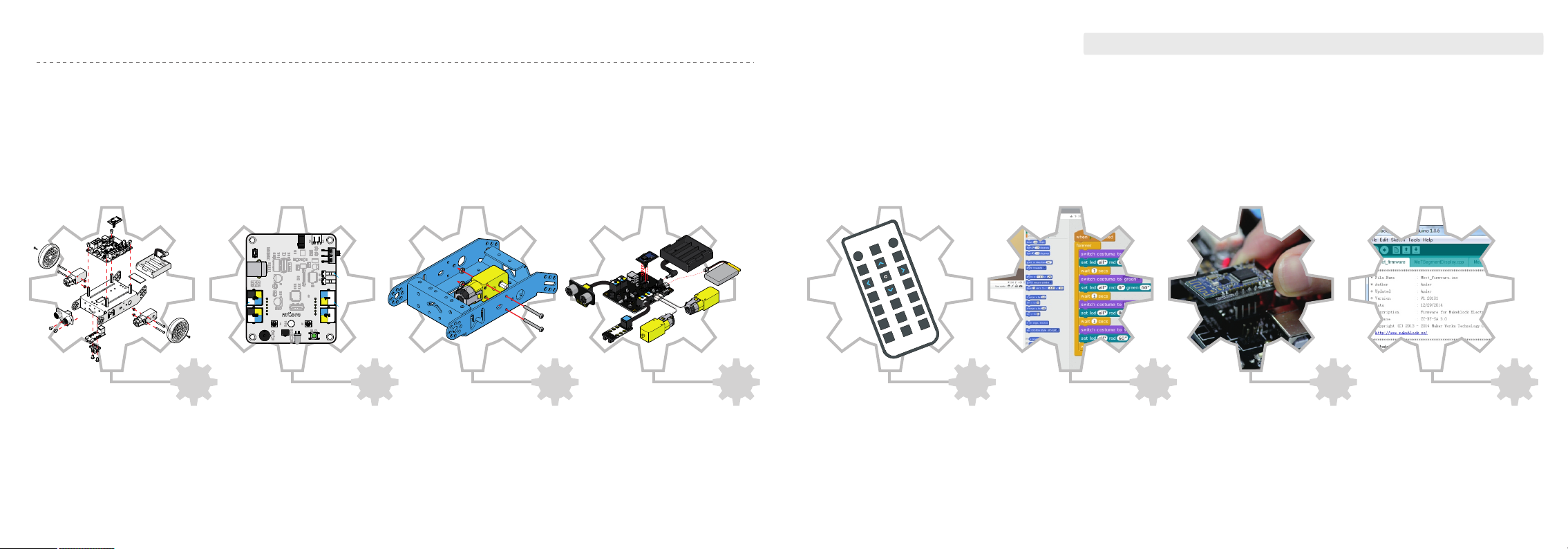
Part list
2
mCore
3
Assembly
4
Wiring
7
Remote control
8
programming-mBlock
Graphical
10 11
Wireless
communication
Arduino
programming
12
Page 3
Part List
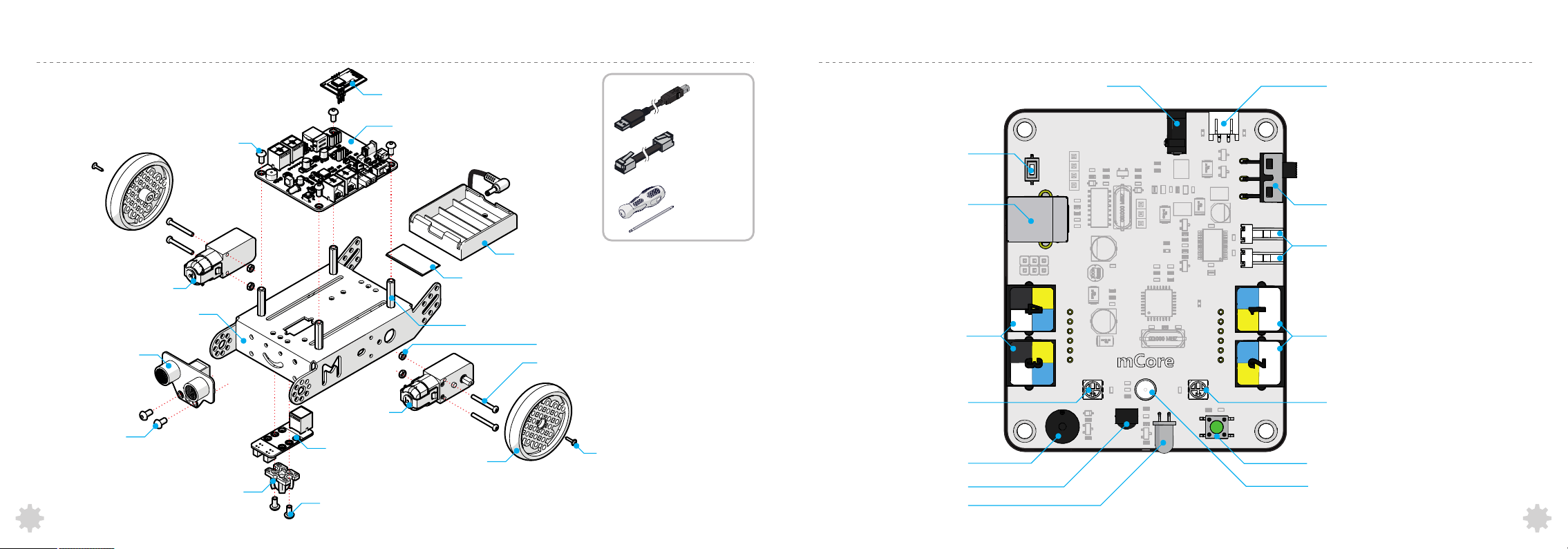
mCore
Me Ultrasonic Sensor
Screw M4×8
2
Motor R
Chassis
Screw M4×8
Rolle r Ba ll
Motor L
Me Line Follower
Screw M4×8
Bluetooth/2.4G module
mCore
Velcro
Brass Stud M4×25
Wheel
Battery Holder
( 4 x AA batteries ,not included )
M3 nut
Screw M3×25
Screw M2.2×9
USB cable
6P6C RJ25 Cable
Screw driver
Reset
USB Type-B Connector
RJ25 Port
RGB LED
Buzzer
IR Receiver
IR Emitter
DC Power Jack
2-pin connector for lithium battery
Power switch
Motor Port
RJ25 Port
RGB LED
Button
Light Sensor
3
Page 4
Assembly
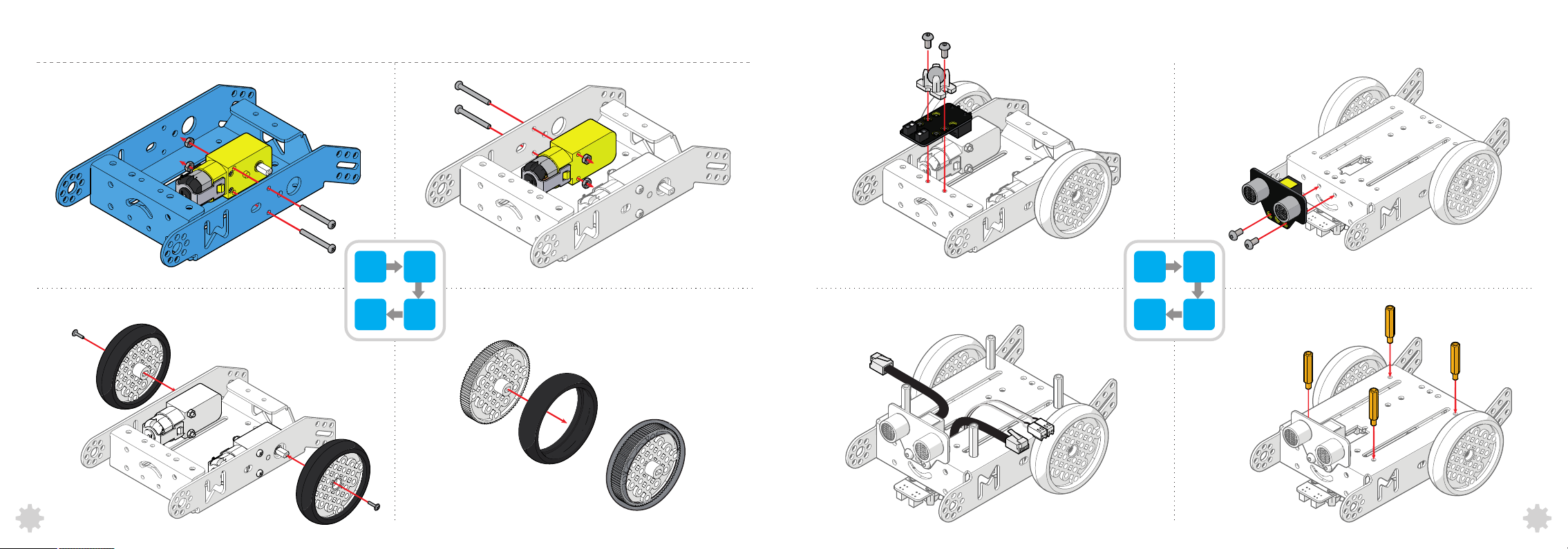
Chassis
Motor R
M3 nut
Screw M3×25
Screw M2.2×9
×1
×1
×2
×2
1
×2
4
2
3
Motor L
M3 nut
Screw M3×25
Wheel
×1
×2
×2
×2
Screw M4×8
Roller Ball
Me Line Follower
RJ25 Cable
×2
×2
×1
×1
5
8
6
7
Screw M4×8
Me Ultrasonic Sensor
Brass Stud M4×25
×2
×1
×4
4
5
Page 5
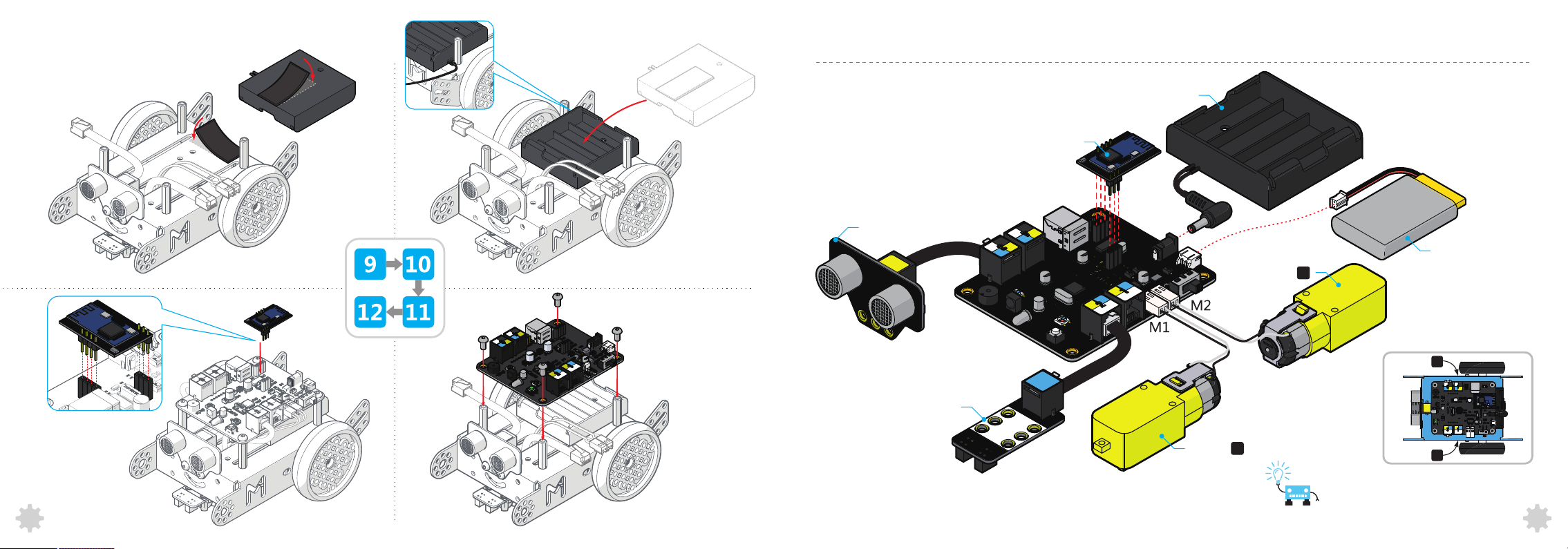
Battery Holder
Velcro
Wiring
×1
×1
AA battery holder
Bluetooth/2.4G module
Me Ultrasonic Sensor
Lithium batte ry
Motor
R
(Not included)
Bluetooth/2.4G module
6
Screw M4×8
mCore
×4
×1
R
Motor
Me Line Follower
×1
Motor
L
You may need to switch the order of two
wires(M1, M2) to correct the rotation direction
Motor
L
7
Page 6
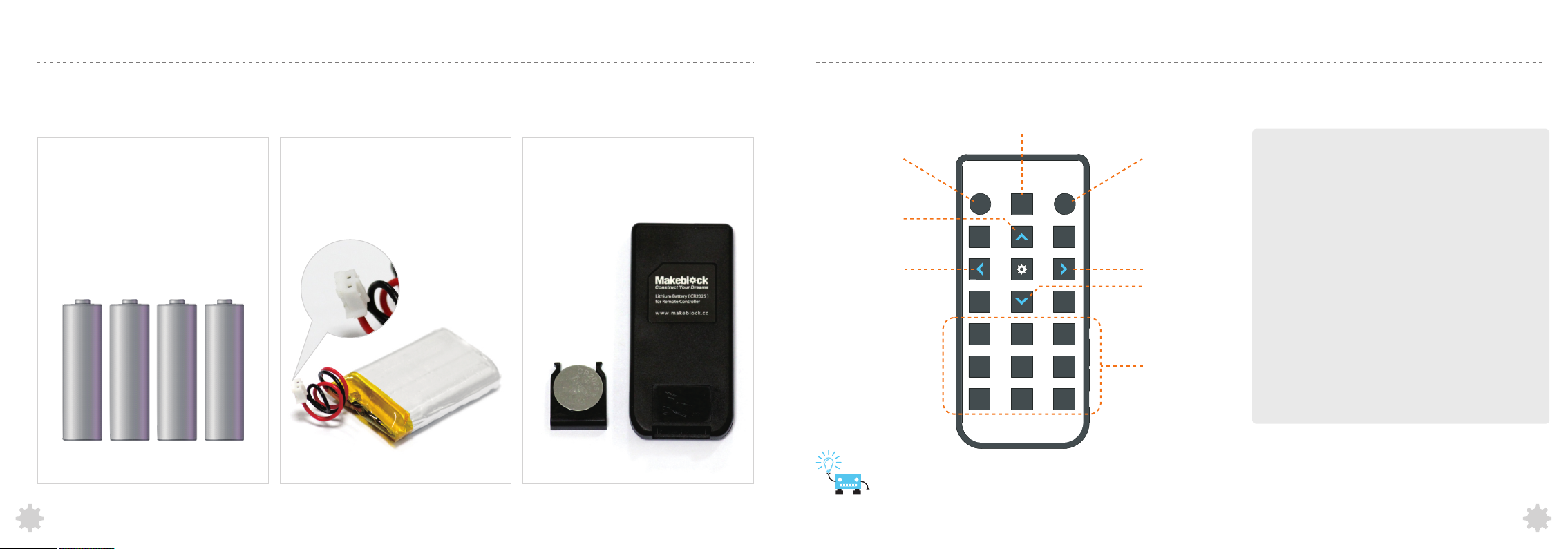
Batteries Suggestion
mCore's power supply: 3.7V DC — 6V DC
Remote Control
Mode 2: Wall
avoidance robot
Option 1:
4 × AA batteries(Not included)
8
Option 2:
3.7V lithium battery(Not included) with a
standard 2-pin JST-PH connector.
Support on-board charge via USB cable.
Notice:
CR2025 button cell battery for remote
control is not included .
Mode 1: Remote
manual control
Forward
Left
Suggestion: Play mBots on the flat sur fa ce
A B C
0
1
4
2
5
7 8 9
Line follower robot
ED
Right
Backward
Mode 1: Remote manual control
Users can use buttons to control the
direction and speed of mBot.
Mode 2: Wall avoidance robot
A robot that can avoid walls and obstacles
while moving.
F
3
6
Set the speed
of the robot.
Mode 3: Line follower robot
Line follower is a robot that can follow a
path. The path can be visible like a black
line on a white surface (or vice-versa)
9
Page 7
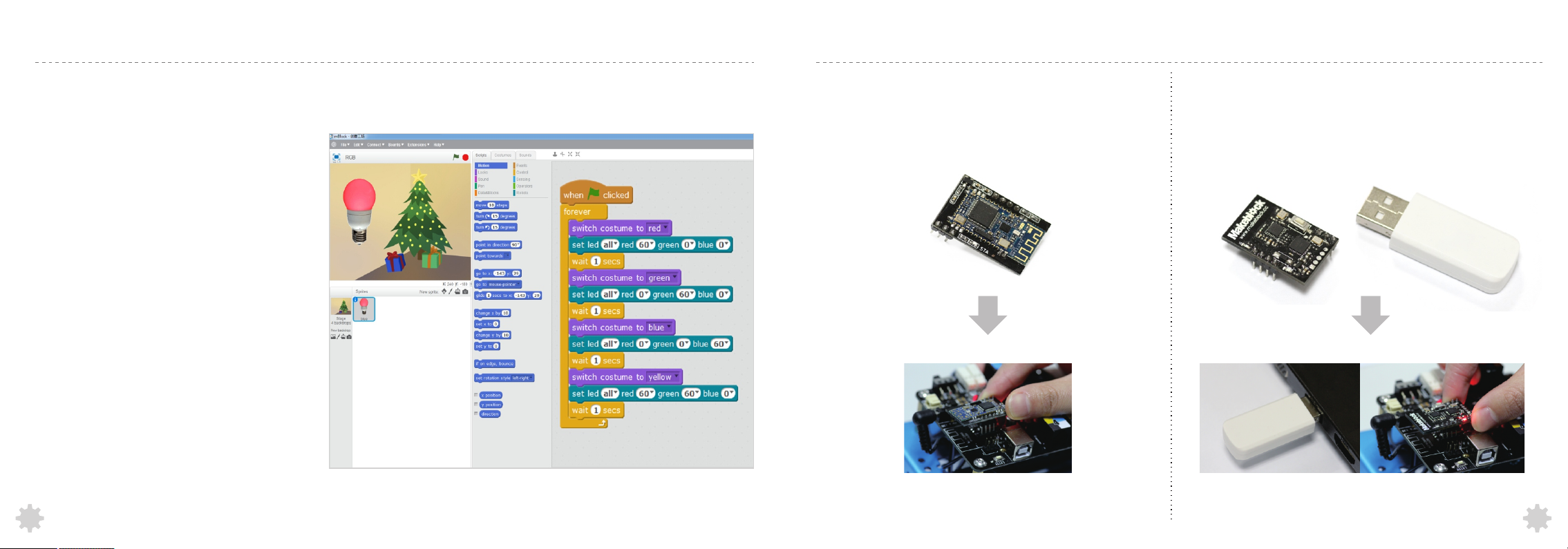
Graphical Prgramming-mBlock
Wireless Communication
Introduction
mBlock is a free modified version of Scratch
2.0 developed by MIT Media Lab. Added
some hardware-related blocks based on
the original Scratch, mBlock enables users
to read sensors, control motors and even
the whole robot with ease.
Download: http://mblock.cc/download/
Get started with mBlock to program the mBot:
http://learn.makeblock.cc/mbot/
1. Introduction of Bluetooth module
This Bluetooth module is designed specially for mCore with the support
of Bluetooth 2.0 and 4.0. It's suitable for both individual users and family.
Users can use their smart phones or computers to control the mBots
wirelessly with this module.
2. Introduction of 2.4G wireless serial
The 2.4G wireless serial includes two parts: 2.4G wireless serial-USB for
computer; 2.4G wireless serial-module for mCore. It uses the same
technology as wireless mouse and is very suitable for classroom. No
driver and pairing needed.
10
More detailed tutorials:
http://learn.makeblock.cc/mbot/
More detailed tutorials:
http://learn.makeblock.cc/mbot/
11
Page 8
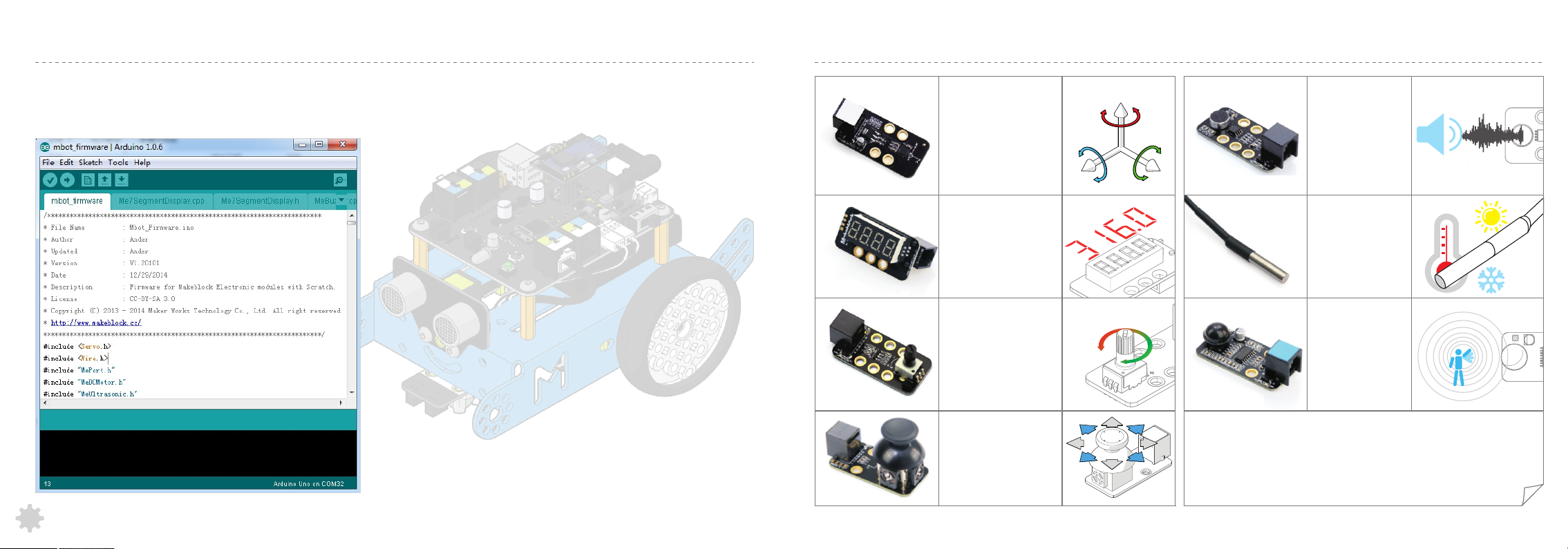
Arduino Programming(C language)
Electronic Modules on Makeblock--Further Exploration
Arduino is an open-source electronics prototyping platform based on flexible, easy-to-use hardware and software. The Arduino
software consists of a development environment(IDE) and the core libraries. The IDE is written in Java and based on the Processing
development environment.
More detailed tutorials:
http://learn.makeblock.cc/mbot/
Me 3-Axis
Accelerometer and Gyro
Sensor is used to measure
the angular rate and the
acceleration information of
your robot or other
devices. It is useful for
sumo robots to detect
bumps.
http://learn.makeblock.cc/ultrasonic-sensor/
Me 7-Segment Display
is a display module
with four digits tube
which can show some
data....some data, such
as speed, time, score,
and etc.
Me Potentiometer can
convert rotary motion to
an analog input which
can be used to control the
speed of a mobile robot,
the brightness of RGB
LEDs, or others.
Me Joystick is
normally used to
control the moving
direction of object.
X Y
-
Z
+
Me Sound Sensor
can measure the
volume.It can be
used in some
sound interactive
projects,such as
an voice operated
switch.
Me Temperature
Sensor is a stainless
steel tube sensor
which is used for
measuring
temperature.
Me PIR Motion
Sensor can detect
infrared ray which
derives from
animals/humans
within 19.7 feet (6
meters)
See More on Makeblock Platform
12
 Loading...