

Page 1

Strona główna » MAJORITY » MAJORITY Moto Turntable Instrukcja obsługi
zawartość
1 gramofon Moto
1.1 Instrukcja obsługi
1.1.1 Zawartość pudełka
1.1.1.1 Co znajduje się w pudełku?
1.1.2 Sterowanie i funkcje
1.1.2.1 Widok z góry
1.1.2.2 Widok z przodu
1.1.2.3 Widok z tyłu
1.1.2.4 Widok z boku
1.1.3 Instrukcja obsługi
1.1.3.1 Podstawowa obsługa
1.1.3.2 Uruchomienie gramofonu
1.1.3.3 Tryb Phono – Odtwarzanie płyty winylowej
1.1.3.4 Bluetooth – tryb wyjścia
1.1.3.5 Nagrywanie USB
1.1.3.6 Tryb wejścia AUX
1.1.3.7 Bluetooth – tryb włączony
1.1.3.8 Tryb odtwarzania USB
1.1.3.9 Podłączanie głośników za pomocą złącza RCA
1.1.3.10 Wskazówki dotyczące lepszej wydajności gramofonu
1.1.4 Rozwiązywanie problemów
1.1.4.1 Wsparcie
1.1.5 Specyfikacja i gwarancja
1.1.5.1 Specyfikacja
1.1.5.2 Gwarancja
1.1.6 Ostrzeżenia i informacje dotyczące bezpieczeństwa
2 Dokumenty / Zasoby
2.1 Odniesienia
3 Powiązane posty
⚙
Page 2

Gramofon Moto
Instrukcja obsługi
AUDIO DOMOWE • CAMBRIDGE
3-letnia gwarancja
Zarejestruj swój produkt online, aby otrzymać BEZPŁATNĄ rozszerzoną gwarancję na 3 lata na
stronie: www.majority.co.uk
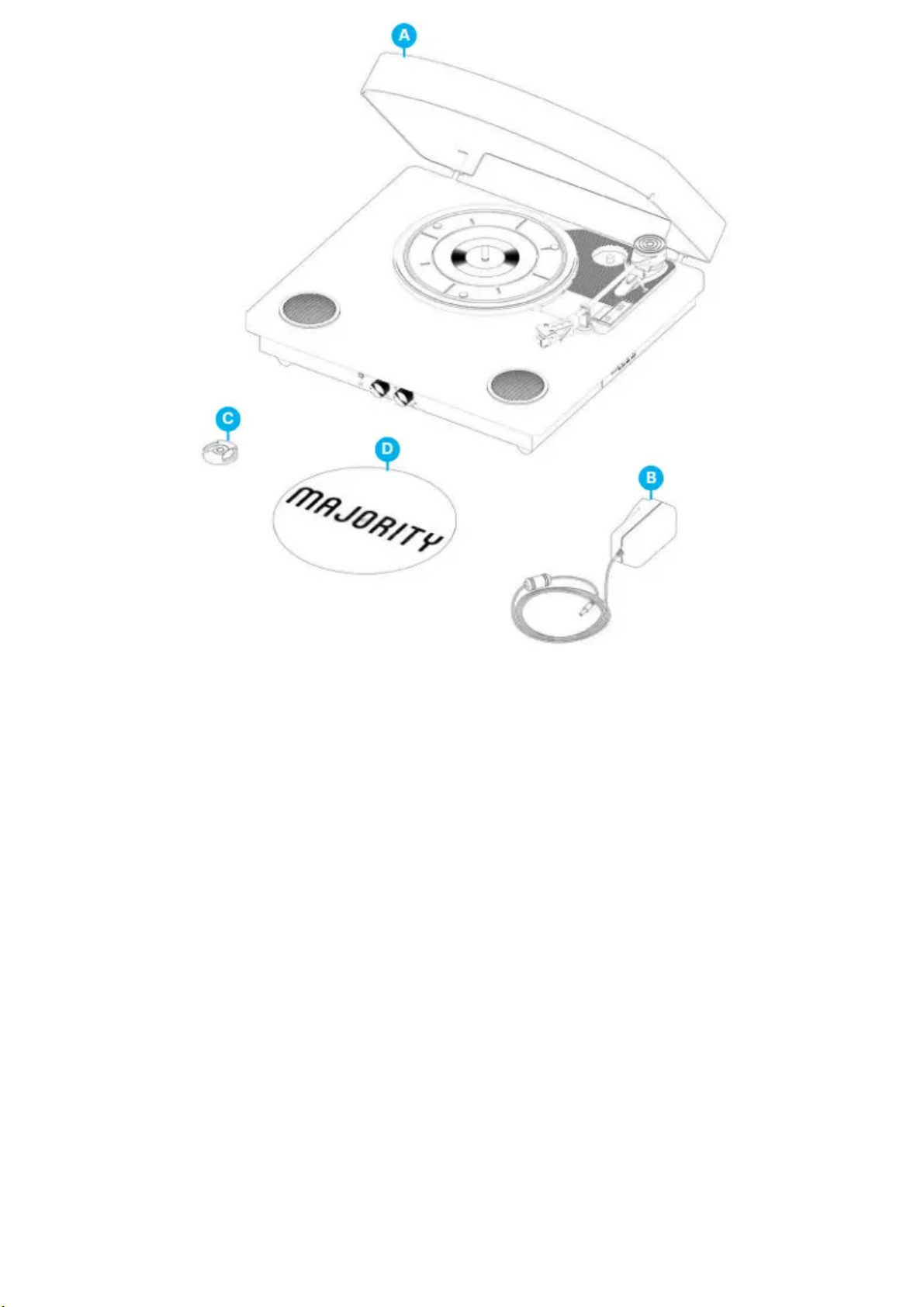
Zawartość pudełka
Co jest w pudełku?
A. Gramofon Majority Moto
B. Zasilacz
C. Zasilacz 45 RPM
D. Mata filcowa
⚙
Page 3
⚙
Page 4
Sterowanie i funkcje
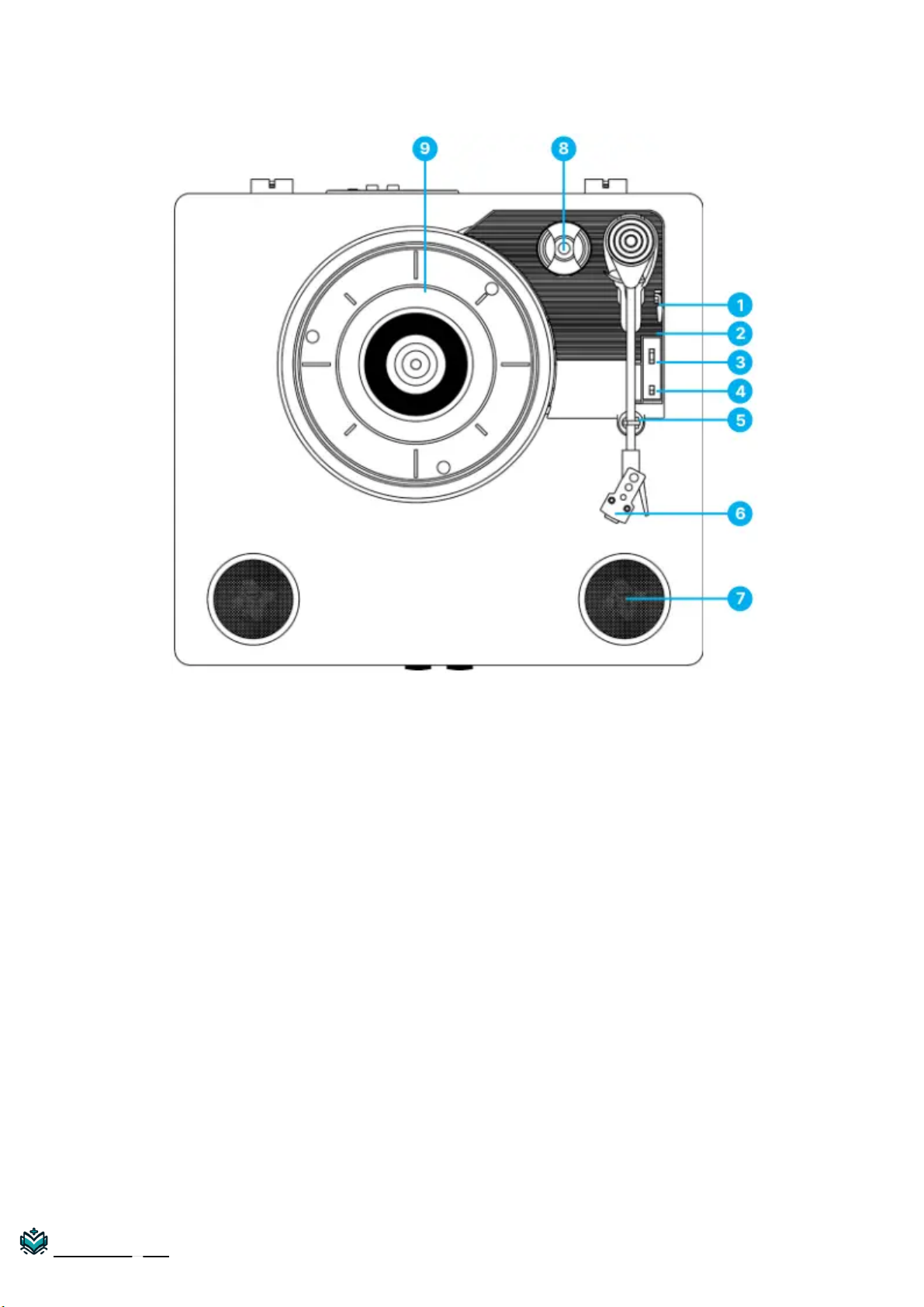
Widok z góry
1. Dźwignia podnoszenia
2. Ramię gramofonu – Gramofon jest dostarczany z gotowym do użycia, wstępnie wyważonym
ramieniem gramofonu i wkładką.
3. Przełącznik 33/45/78 RPM – Ten przełącznik kontroluje prędkość talerza gramofonu.
4. Przełącznik AUTO STOP ON/OFF
5. Klips ramienia gramofonu
6. Wkładka Audio-Technica
7. Głośnik
8. Adapter 45 RPM – Jest używany do płyt winylowych 45 RPM.
9. Talerz – Umieść tutaj swoją płytę.
Instrukcje+
⚙
Page 5
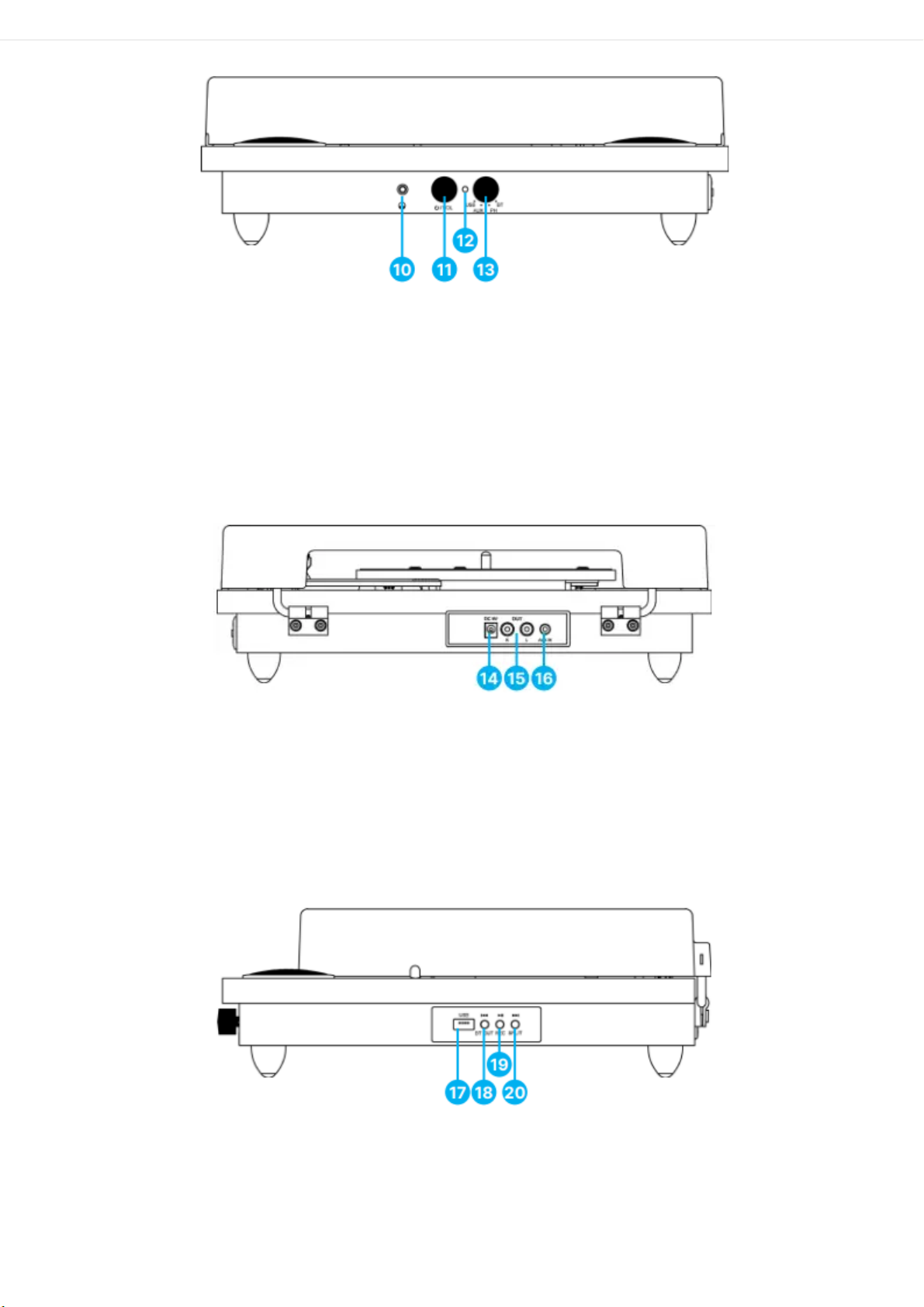
Widok z przodu
10. Gniazdo słuchawkowe – służy do podłączania słuchawek.
11. Pokrętło włączania/wyłączania zasilania i regulacji głośności
12. Wskaźnik LED
13. Pokrętło wyboru trybu (USB /AUX IN /PH /BT IN)
Widok z tyłu
14. Port DC IN – służy do podłączania zasilacza.
15. Wyjście RCA – służy do podłączania zewnętrznego głośnika, nie wchodzi w skład zestawu.
16. Gniazdo AUX IN
Widok z boku
17. Port USB
18. Przycisk PREV i BT OUT
19. Przycisk PLAY/PAUSE/REC
20. Przycisk NEXT i SPLIT
⚙
Page 6

Instrukcja obsługi
Podstawowa obsługa
Proszę zwrócić uwagę na wszystkie (Ref.) informacje zawarte w instrukcji
mapowania elementów sterujących i funkcji na stronie 4-7.
Przed użyciem gramofonu Majority Moto wybierz bezpieczne miejsce, w którym urządzenie będzie
chronione przed bezpośrednim działaniem promieni słonecznych i nie będzie znajdować się w
pobliżu źródeł ciepła.
Umieść Majority Moto tak, aby z tyłu obudowy pozostało trochę miejsca na umieszczenie na
talerzu płyty winylowej w pełnym rozmiarze. Unikaj powierzchni narażonej na wibracje,
nadmierne zapylenie, zimno lub wilgoć.
Do czyszczenia urządzenia należy używać wyłącznie suchej ściereczki.
Nie otwieraj wewnętrznych części szafki, ponieważ może to spowodować porażenie prądem.
Podczas wyjmowania wtyczki zasilania z gniazdka ściennego ciągnij bezpośrednio za wtyczkę, NIE
za przewód.
Zachowaj tę instrukcję do wykorzystania w przyszłości.
Uruchamianie gramofonu
Załóż przezroczystą osłonę przeciwpyłową na gramofon.
Mocno i pewnie włóż wtyczkę DC adaptera do gniazda DC IN z tyłu urządzenia. Podłącz wtyczki
AC adaptera do gniazdka elektrycznego.
Tryb Phono – Odtwarzaj płytę winylową
1. Obróć pokrętło wyboru trybu na PH (Ref.13).
2. Obróć pokrętło zasilania i regulacji głośności zgodnie z ruchem wskazówek zegara, aby włączyć i
ustawić głośność. Wskaźnik LED zacznie migać na czerwono.
3. Umieść płytę na talerzu gramofonu i wybierz żądaną prędkość (33/45/78) zgodnie z płytą.
Uwaga: Podczas odtwarzania płyty 45RPM należy używać dołączonego adaptera
45RPM znajdującego się w uchwycie obok talerza (nr 8).
4. Zdejmij osłonę igły i gumkę (zachowaj ją, aby chronić igłę, gdy nie jest używana).
5. Otwórz zacisk ramienia gramofonu, aby zwolnić ramię gramofonu (Ref.2). Podnieś dźwignię
podnoszenia, aby podnieść ramię gramofonu i delikatnie przesuń je do żądanej pozycji, nad płytą.
6. Gramofon zacznie się obracać, gdy ramię gramofonu zostanie przesunięte w kierunku płyty (gdy
przełącznik AUTO STOP jest włączony). Przesuń dźwignię podnoszenia z powrotem do
⚙
Page 7

pozycji 7. w dół, aby powoli opuścić ramię gramofonu do żądanej pozycji płyty, aby rozpocząć
odtwarzanie.
8. Jeśli przełącznik sterowania Auto Stop jest włączony, płyta zatrzyma się automatycznie po
zakończeniu. Jeśli przełącznik sterowania Auto Stop jest wyłączony, płyta NIE zatrzyma się
automatycznie po zakończeniu.
Uwaga: Funkcja AUTO STOP dotyczy większości płyt winylowych 33RPM. Jednak w
przypadku bardzo niewielu płyt winylowych z nietypowym wzorem rowków,
zatrzyma się przed końcem. Jeśli tak się stanie, ustaw przełącznik AUTO STOP w
pozycji `OFF', a następnie kontynuuj odtwarzanie.
Bluetooth – tryb wyjścia
Tryb Bluetooth-Out umożliwia sparowanie gramofonu z głośnikiem Bluetooth lub słuchawkami.
1. Ustaw funkcję trybu głównego na PH (phono), aby odtwarzać płyty winylowe.
2. Naciśnij przycisk BT OUT. Wskaźnik LED zacznie migać na czerwono.
3. Włącz funkcję BT głośnika lub słuchawek i rozpocznij parowanie z Majority Moto. Po
pomyślnym nawiązaniu połączenia wskaźnik LED przestanie migać.
Po sparowaniu dźwięk z płyty winylowej będzie bezprzewodowo przesyłany do głośnika lub
słuchawek.
Note: In this mode, the volume level can only be controlled from the speakers or
headphones that you are pairing with the turntable.
USB Recording
Recording to USB stick is only available with Phono mode and AUX mode playback.
1. Plug your USB stick into the USB port. Start playing a vinyl record under Phono Mode playback
or play via AUX playback from another device connected to the turntable.
2. Press the REC button to start a recording. The LED light indicator will flash red and blue to
confirm the recording has begun.
3. To save different files on the recording, press the SPLIT button when recording. Press the
SPLIT button again and it will generate another file.
4. Press the REC button to stop the recording. The LED light indicator will flash red to confirm
recording has been ended, and it resumes to Phono mode playback or AUX mode playback.
⚙
Page 8

Files recorded onto the USB are saved in MP3 file format, under folders titled `ALBUM_01′ and
the files titled `REC_0000, 0001, 0002′ etc.
Note: The recording is made in a fixed-volume format. The volume level of the
recorded file cannot be changed by any adjustments of the volume control on the
turntable.
Note: Max size of USB stick supported is 128GB and needs to be set to FAT format.
AUX In Mode
Connect your iPod, MP3 player, mobile phones etc. to the AUX IN port using a 3.5mm3.5mm
audio cable (not included).
1. Turn the MODE knob to AUX. The LED indicator will flash purple. You can now play music
from an auxiliary device through the unit.
2. Turn the VOLUME CONTROL knob on the Majority Moto Turntable to adjust the volume. (The
iPod, MP3 player and/or mobile phones’ volume control may also impact the volume level,
therefore, ensure this is also turned up).
Bluetooth – In Mode
1. Turn the MODE knob to BT. The LED light indicator will flash blue.
2. Switch on Bluetooth connectivity on your device and search for Majority Moto. Once
successfully paired, the LED light indicator will stop flashing.
3. Use the VOLUME CONTROL knob to adjust the volume as per your preferences.
Note: The volume on your device paired with the turntable via Bluetooth can also
impact the playback volume, therefore make sure the volume level is also turned up
on your device while playing.
USB Playback Mode
1. Turn the MODE knob to USB. The LED light indicator will flash red.
2. Plug in the USB drive and play your chosen audio. The LED light will now flash red.
3. Press PLAY/PAUSE/REC to play or pause. Press PREV button to play the previous track. Press
NEXT button to play the next track.
⚙
Page 9

Note: Max size of USB stick supported is 128GB, and it needs to be set to FAT format.
USB playback supports MP3.
Connecting Speakers via RCA Connection
In PH (phono) Vinyl Playback mode, you can connect to your own speaker system using the RCA
port on the turntable.
Note: This works using RCA to 3.5mm audio cable only (not included).
When using this type of connection with any speaker via RCA, it will supersede the
in-built turntable speakers, therefore, you will only hear audio through your
connected speakers. Use the volume control on your connected speakers to adjust
the audio level as per your preferences.
Tips for Better Turntable Performance
1. When opening or closing the turntable cover, handle it gently, gripping it either at the centre or
at each side.
2. Do not touch the needle tip with your fingers; avoid bumping the needle against the turntable
platter or record edge.
3. Frequently clean the needle tip with a soft brush in a back-to-front motion only.
4. If you must use needle cleaning fluid, use it very sparingly.
5. Gently wipe the dust cover and turntable housing with a soft cloth. Use only a small amount of
mild detergent to clean the turntable and dust cover.
⚙
Page 10

Troubleshooting
Observatio
n
Potential Cause/Solution
No power/f
unction
Check whether the power is switched on or off at the wall.
Check that the power adaptor is properly connected to the power outlet.
No sound
Check whether unit is set to MUTE.
Check whether MODE is correctly selected.
Turn up the volume on the speakers or on your external device.
Check that cables are properly installed.
Function di
sturbance
Switch off and unplug the unit. Leave it for 2 minutes and switch it on again.
Bluetooth
not connec
ting
Ensure that you are on Bluetooth mode on the speaker and the Bluetooth on yo
ur device is switched on. Select the Bluetooth device ‘Majority Moto’ and you sh
ould now be able to play audio.
Support
If you require further assistance with your Majority product, please contact our support team on
the Majority website: www.majority.co.uk/support
Specification & Warranty
Specification
Power Supply DC 5V 1A
Frequency Response 30Hz-20KHz
SNR 70dB
Separation 45dB
Bluetooth V5.3
Dimension (WxHxD) 38 × 12 × 34.6 cm
Warranty
All products come with a standard 12 month warranty. All items must be registered within 30 days
of purchase on www.majority.co.uk for the warranty to be valid. Once on the web page, use the
⚙
Page 11

menu to find `Register Your Product’. You will also be given the chance to extend your warranty
for an additional 24 months, free of charge.
Warning & Safety Information
Safety and Usage Guidelines (All where applicable)
General Safety Information – Read and Retain: Review all safety and operating
instructions before use; keep them for future reference.
Follow Instructions: Adhere strictly to all safety and operational guidelines. Water
Exposure: Keep the device away from water; avoid placing liquids near it. Ventilation: Ensure
ventilation openings are unobstructed to prevent overheating. Heat Sources: Keep the device
away from heat-emitting appliances. Wall Mounting – Installation Safety: Follow the
manufacturer’s instructions and use approved mounting kits only. Avoid drilling into areas with
cables, gas, or water lines. Use proper tools and safety apparatus. Regular Maintenance:
Inspect regularly for wear or damage, especially if wall-mounted. Relocation: Detach from the
wall mount before moving. Child Safety: Keep out of children’s reach and ensure heavy items
are securely mounted. Seismic Precautions: Use specialized mounts in earthquake-prone
areas. Electrical Safety – Power Source: Use the specified power source; consult an
electrician if unsure. Cable Management: Protect the power cord from damage. Power
Disconnection: Keep the main plug accessible; unplug during storms or long periods of nonuse. Battery Safety – Charging: Use the manufacturer’s charger; avoid extreme conditions.
Heat Exposure: Keep batteries away from heat to prevent explosion or leakage. Battery
Condition: Discontinue use if the battery is damaged; dispose of it properly. Replacement:
Only use recommended batteries; incorrect types can cause hazards. External Batteries: Use
only specified types, observing correct polarity. Battery Removal: Remove batteries if not used
for an extended period. Disposal: Follow local regulations for battery disposal; do not incinerate.
Connectivity Safety – Cable Connections: Power off devices before connecting or
disconnecting cables. Bluetooth Pairing: Ensure a secure connection; avoid interference from
other devices. Volume Control: Keep volume moderate to prevent hearing damage.
Connectivity and Data Security – Wireless Security: Review privacy policies and secure
your network. Software Updates: Keep software updated for security and performance.
Children’s Safety Warnings – Product Use: Intended for adults; keep away from children.
Battery Warning: Keep batteries and items containing batteries out of children’s reach.
Volume Control: Maintain a safe volume level to protect children’s hearing. Fire Hazard –
Flammable Materials: Do not place open flames near the product. Overheating: Avoid
covering the product to prevent overheating and fire risks. Disposal and Recycling – Product
Disposal: Dispose of at a recycling centre according to local laws. Environmental
Compliance: Follow regulations for battery and electronic waste disposal. User Maintenance
– Cleaning: Unplug before cleaning; use a dry cloth only. Servicing: Only qualified personnel
should perform repairs. Data Protection: Reset to factory settings before returning or disposing
of the product. Disclaimer: Failure to follow these instructions may result in injury, death, or
property damage. The manufacturer is not liable for damage caused by improper use.
Declaration of Conformity:
I hereby declare that the product:
Product Name: Majority Moto Turntable Model: 1000002931/1000002932 Brand Name:
Majority
⚙
Page 12

Satisfies all the technical regulations applicable to the product within the scope of Council
Directives 2014/35/EU and 2014/30/EU, 2023/826, 2012/19/EU, 2014/53/EU,
2011/65/EU&2015/863/EU, 1907/2006/EC
2014/35/EU(LVD Directive) EN IEC 62368-12020+A112020 2014/30/EU(EMC
Directive) EN 550322015/A12020, EN 550352017/A112020, EN IEC 61000-322019/A12021,
EN61000-3-32013/A22021 2023/826 (ERP Directive) 2012/19/EU (WEEE Directive)
2014/53/EU (RED Directive) Draft ETSI EN 301 489-17 V3.2.6 (2023-06), EN
550322015/A12020, EN 550352017/A112020, ETSI EN 300 328 V2.2.2 (2019-07), EN
624792010, EN 506632017, EN IEC 62368-12020+A112020 2011/65/EU&2015/863/EU
(ROHS Directive) 1907/2006/EC (REACH Directive)
All essential test suites have been carried out. This declaration is issued under the sole
responsibility of iZilla Ltd. Point of Contact: Eddie Latham | Founder
Signed: Date: August 2024
Importer’s Addresses:
UK iZilla Ltd, Newton House, 2 Pioneer Court, Histon, Cambridge, CB24 9PT
Email: [email protected]
EU RP AR Experts, Po Box 5047, 3620 AA Breukelen, The Netherlands
Email: [email protected]
US iZilla Ltd C/O A.N.Deringer Inc, 19520 Wilmington Ave, Rancho Dominguez, CA, 90220
Email: [email protected]
ATTENTION
RISK OF ELECTRIC SHOCK DO NOT OPEN
WAŻNE: Przed użyciem należy uważnie przeczytać wszystkie instrukcje i zachować je
na przyszłość.
www.większość.co.uk
⚙
Page 13
Dokumenty / Zasoby
MAJORITY Moto Turntable
[
pdf
] Instrukcja obsługi
Moto Turntable, Moto, Gramofon
MAJORITY MOTO Gramofon
[
pdf
] Instrukcja obsługi
2BKRO-MOTO, 2BKROMOTO, MOTO Gramofon, MOTO, Gramofon
Odniesienia
Instrukcja obsługi
Ta strona internetowa jest niezależną publikacją i nie jest ani powiązana, ani popierana przez żadnego z właścicieli znaków towarowych. Znak słowny „Bluetooth®” i logo są
zarejestrowanymi znakami towarowymi należącymi do Bluetooth SIG, Inc. Znak słowny „Wi-Fi®” i logo są zarejestrowanymi znakami towarowymi należącymi do Wi-Fi
Alliance. Jakiekolwiek użycie tych znaków na tej stronie internetowej nie oznacza żadnego powiązania ani poparcia.
⚙
 Loading...