

Page 1
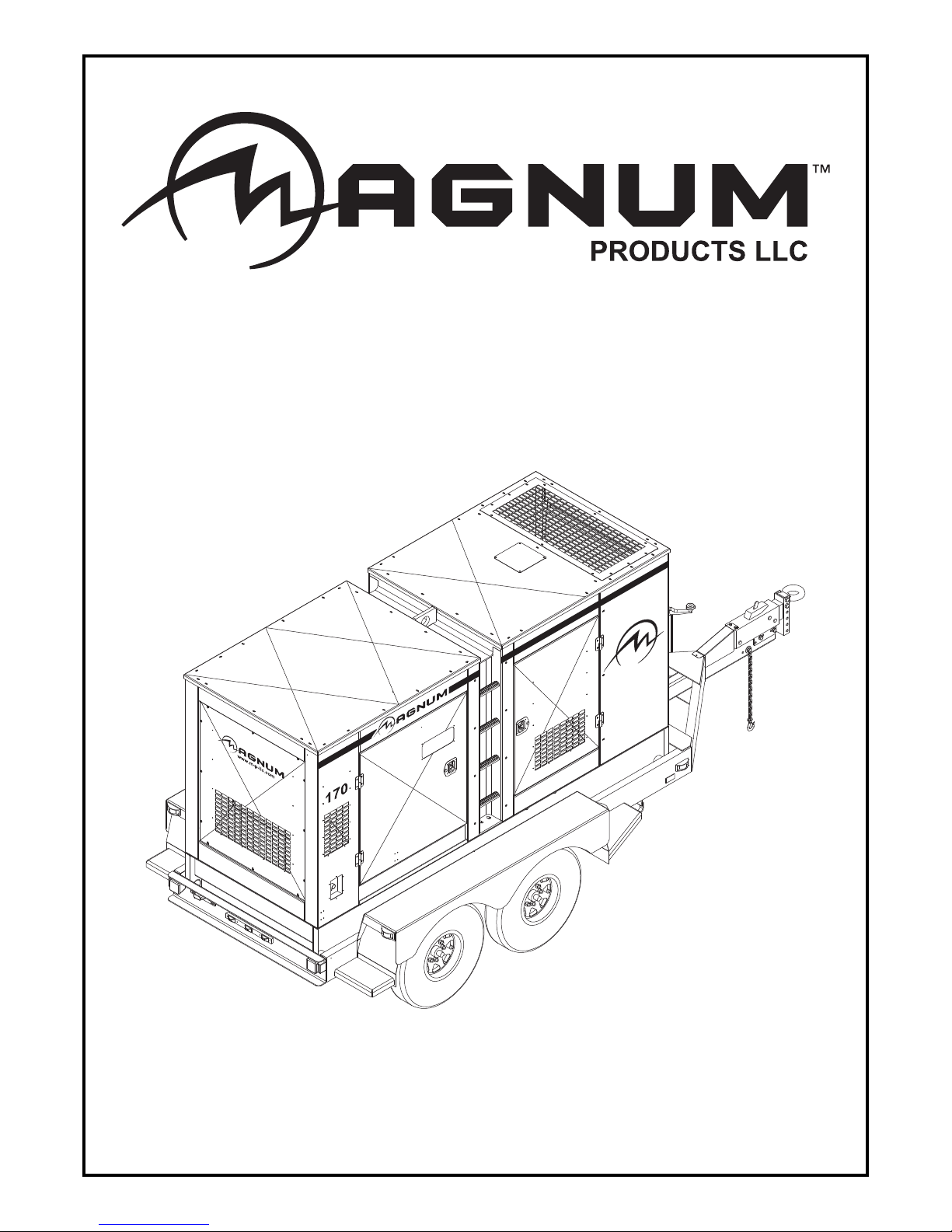
DIESEL GENERATOR
MMG150 • MMG170 • MMG235
OPERATING MANUAL
Page 2

INTRODUCTION
This manual provides information and procedures to safely operate and maintain the engine and generator. For your
own safety and protection from physical injury, carefully read, understand, and observe the safety instructions
described in this manual. The information contai ned in this manual was based on machines in production at the time
of publication. Magnum Products LLC reserves the right to change any portion of this information without notice.
DO NOT MODIFY or use this equipment for any application other than which it was designed for.
Magnum Products LLC recommends that a trained and licensed professional perform all electrical wiring and testing
functions. Any wiring should be in compliance with the United States National Electric Code (NEC), state and local
codes and Occupational Safety and Health Association (OSHA) guidelines.
Keep a copy of this manual with the unit at all times. Additional copies are available from Magnum Products LLC, or
can be found at www.m-p-llc.com. An engine operator’s manual was also supplied with the unit at the time of
shipment from the factory. The manual provides detailed operation and maintenance procedures for the engine.
Additional copies of the engine operators manual are available from the engine manufacturer.
MAGNUM PRODUCTS LLC
215 Power Drive • Berlin, WI 54923
U.S.A.
Phone: 920-361-4442
FAX: 920-361-4416
Toll Free: 1-800-926-9768
www.m-p-llc.com
For technical or part s QUESTIONS, please contact Magnum Products’ Customer Support or
Technical Support team at 920-361-4442 or toll free at 1-800-926-9768. Please have your serial
number available.
To ORDER SERVICE PARTS, please contact the dealer from which you purchased the unit, or call
Magnum Products to locate a dealer in your area.
Supplemental information may be available for your unit ; when ordering p a rt s ALWAYS check for a
supplement that applies to your unit. A supplement may have been provided with your un it and can
be found on the Magnum Products LLC website.
Engine Make:__________________________________________
Engine Serial Number:___________________________________
Engine Model Number: __________________________________
Generator Make: _______________________________________
Generator Model Number: ________________________________
Generator Serial Number: ________________________________
Unit Model Number:_____________________________________
Unit Serial Number: _____________________________________
CALIFORNIA PROPOSITION 65 WARNING: Diesel engine exhaust and some of its
constituents are known to the state of California to cause cancer, birth defects and
2
WARNING
other reproductive harm.
Page 3

TABLE OF CONTENTS
INTRODUCTION ........................................................................................................................................2
TABLE OF CONTENTS .............................................................................................................................3
SAFETY NOTES ........................................................................................................................................4
OPERATING SAFETY ...............................................................................................................................4
ENGINE SAFETY ......................................................................................................................................5
ELECTRICAL SAFETY ..............................................................................................................................5
TOWING SAFETY .....................................................................................................................................6
REPORTING TRAILER SAFETY DEFECTS ............................................................................................. 6
UNIT SERIAL NUMBER LOCATIONS ....................................................................................................... 7
SAFETY SYMBOL SUMMARY ..................................................................................................................8
SPECIFICATIONS .....................................................................................................................................9
UNIT DIMENSIONS .................................................................................................................................12
SERVICE LOCATIONS ............................................................................................................................ 13
MAIN CONTROL PANEL FEATURES, STANDARD ............................................................................... 14
MAIN CONTROL PANEL FEATURES, WITH OPTIONAL CAM LOCKS ................................................ 16
MAGNUM DIGITAL CONTROLLER (MDC) ............................................................................................. 18
DIGITAL CONTROLLER FEATURES AND FUNCTIONS ....................................................................... 18
GENERATOR MONITORING ..................................................................................................................19
ENGINE MONITORING ...........................................................................................................................19
FINE VOLTAGE ADJUSTMENT .............................................................................................................21
PRE - START CHECK LIST ..................................................................................................................... 22
MANUAL STARTING OF THE GENERATOR .........................................................................................22
“AUTO” (REMOTE) STARTING OF THE GENERATOR ......................................................................... 24
SHUTTING DOWN THE GENERATOR ..................................................................................................24
MDC CONTROLLER INFORMATION DISPLAYS, FUNCTIONS AND RESET ...................................... 25
MAGNUM DIGITAL CONTROLLER (MDC) – GENERATOR OPERATIONAL STATUS ........................25
MAGNUM DIGITAL CONTROLLER (MDC) - ALARM MANAGEMENT ..................................................25
MAGNUM DIGITAL CONTROLLER (MDC)- LIST OF POSSIBLE ALARMS/DESCRIPTIONS ..............26
JOHN DEERE ECU INFORMATION DISPLAYS AND FUNCTIONS ...................................................... 27
MDC CONTROLLER (MDC) – HISTORY ................................................................................................28
ADJUSTING THE DISPLAY BACK LIGHTING ........................................................................................ 28
RESETTING OF THE “TIME TO SERVICE” REMINDER ........................................................................29
TROUBLESHOOTING AUTOMATIC SHUT DOWN CONDITIONS ........................................................29
GENERATOR OUTPUT CONNECTION LUGS ....................................................................................... 31
GENERATOR CAM LOCK CONNECTIONS (OPTIONAL) ......................................................................32
VOLTAGE SELECTOR SWITCH (MMG150 & MMG170 ONLY) ............................................................ 33
4-POSITION VOLTAGE SELECTOR SWITCH (OPTIONAL) .................................................................. 34
CHANGING OUTPUT VOLTAGE (MMG235 ONLY) ............................................................................... 35
EMERGENCY STOP SWITCH ................................................................................................................36
MAIN CIRCUIT BREAKER ......................................................................................................................36
VOLTAGE REGULATION .........................................................................................................................36
CUSTOMER CONVENIENCE OUTLETS ................................................................................................ 37
DERATING FOR ALTITUDE ....................................................................................................................37
REMOTE START TERMINAL BLOCK ..................................................................................................... 37
TRANSFER SWITCH ...............................................................................................................................38
ENGINE AND GENERATOR MAINTENANCE ........................................................................................ 39
DAILY WALK AROUND INSPECTION ....................................................................................................39
BELT TENSION ........................................................................................................................................39
ENGINE BREAK-IN REQUIREMENTS ...................................................................................................40
DAILY MAINTENANCE CHECKS ............................................................................................................ 40
LIFTING THE GENERATOR .................................................................................................................... 41
TOWING THE TRAILER ..........................................................................................................................41
TRAILER WHEEL BEARINGS .................................................................................................................41
AUXILIARY FUEL TANK OPTION ........................................................................................................... 42
FUEL TRANSFER PUMP OPTION .........................................................................................................42
CHECKING GENERATOR DRIVE PLATE TORQUE ............................................................................... 42
TRAILER WIRING DIAGRAM ..................................................................................................................43
ELECTRIC BRAKE WIRING HARNESS .................................................................................................44
AC WIRING DIAGRAM: MMG150-MMG170 ........................................................................................... 45
AC WIRING DIAGRAM: MMG150-MMG170 - 4-POSITION PHASE SWITCH .......................................46
AC WIRING DIAGRAM: MMG235 ........................................................................................................... 47
AC WIRING DIAGRAM: MMG235 - 4-POSITION PHASE SWITCH .......................................................48
DC WIRING DIAGRAM: MMG150-MMG170 ...........................................................................................49
DC WIRING DIAGRAM: MMG235 ...........................................................................................................50
SERVICE LOG .........................................................................................................................................51
Page
3
Page 4
SAFETY NOTES
DANGER
CAUTION
This is the safety alert symbol. It is used to alert you to potential personal injury hazards. Obey all
safety messages that follow this symbol to avoid possible injury or death.
This manual contains DANGERS, WARNINGS, CAUTIONS, NOTICES and NOTES which must be
followed to prevent the possibility of improper service, damage to the equipment, personal injury or death.
The following formatting options will apply when calling the readers attention to the DANGERS, WARNINGS, CAUTIONS, NOTICES and NOTES.
INDICA TES A HAZARDOUS SITUATION WHICH, IF NOT AVOIDED, WILL RESULT IN
Indicates a hazardous situation which, if not avoided, could result in death or serious
Indicates a hazardous situation which, if not avoided, may result in minor or moderate injury.
Indicates a hazardous situation which, if not avoided, may result in property or equipment
DEATH OR SERIOUS INJURY.
WARNING
injury.
damage.
Note: Notes contain additional information important to a procedure and will be found within the regular text body
of this manual.
OPERATING SAFETY
Before using the generator be sure you read and understand all of the instructions! This equipment was
designed for specific applications; DO NOT modify or use this equipment for any application other than
which it was designed for. Equipment operated improperly or by untrained personnel can be dangerous!
Read the operating instructions and familiarize yourself with the location and proper use of all instruments
and controls. Inexperienced operators should receive instruction from someone familiar with the equipment
before being allowed to operate or set up the generator. The following points should be practiced at all times:
• The area immediately surrounding the generator should be dry, clean, and free of debris.
• NEVER start a unit in need of repair.
• Make certain the generator is securely fastened to a good earthen ground before use.
• NEVER operate unit on a combustible surface.
• NEVER operate the generator if any of the following conditions exist during operation:
1. Noticeable change in engine speed.
2. Loss of electrical output.
3. Equipment connected to the generator overheats.
4. Sparking occurs.
5. Engine misfires or there is excessive engine/generator vibration.
6. Protective covers are loose or missing.
7. If the ambient air temperature is above 120° F.
• Make sure slings, chains, hooks, ramps, jacks, and other types of lifting devices are attached securely
and have enough weight-bearing capacity to lift or hold the equipment safely. Always remain aware
of the position of other people around you when lifting the equipment.
4
Page 5

ENGINE SAFETY
Internal combustion engines present special hazards during operation and fueling! Failure to follow the
safety guidelines described below could result in severe injury or death. Read and follow all safety warnings
described in the engine operator's manual. A copy of this manual was supplied with unit when it was
shipped from the factory.
• DO NOT run engine indoors or in an area with poor ventilation. Diesel engine exhaust contains carbon
monoxide, a deadly, odorless and colorless gas which, if inhaled, can cause nausea, fainting or death.
Only use this unit outside and away from windows, doors and ventillation equipment.
• DO NOT fill fuel tank near an open flame, while smoking, or while engine is running. DO NOT fill tank
in an enclosed area with poor ventilation.
• DO NOT operate with the fuel tank cap loose or missing.
• DO NOT touch or lean against hot exhaust pipes or engine cylinders.
• DO NOT clean air filter with gasoline or other types of low flash point solvents.
• DO NOT remove engine coolant cap while engine is hot.
• DO NOT operate the unit without a functional exhaust system. Prolonged exposure to sound levels
in excess of 85 DBA can cause permanent hearing loss. Wear hearing protection when working around
a running engine.
• Keep hands, feet and loose clothing away from moving parts on the generator and engine.
• Keep area around exhaust pipes and air ducts free of debris to reduce the chance of an accidental fire.
• Batteries contain sulfuric acid which can cause severe injury or death. Sulfuric acid can cause eye
damage, burn flesh or eat holes in clothing. Protective eye wear and clothing are necessary when
working on or around the battery. Always disconnect the NEGATIVE (-) battery cable from the
corresponding terminal before performing any service on the engine or other components..
ELECTRICAL SAFETY
The unit is powered by a generator driven by a diesel engine. While the engine is running, potentially
lethal voltages are present at the 120V Ground Fault Circuit Interrupt (GFCI) outlets and the 240V twist
lock outlets located on the control panel, and at the connection lugs and cam lock receptacles. Failure to
follow the safety guidelines described below could result in severe injury or death.
• Only a qualified and licensed electrician should make connections to the generator.
• NEVER wash the unit with any high pressure hoses or power washers.
• NEVER start the unit under load. The circuit breakers must be in the “OFF” position when starting the
unit in MANUAL mode. The circuit breakers can be in the “ON” position only when started in the AUTO
mode. A transfer switch must be used in the AUTO mode to deflect the load upon start up.
• ALWAYS disconnect the NEGATIVE (-) battery cable from the corresponding terminal before
performing any service on the engine, generator or any other components. Remove the NEGATIVE
(-) battery cable from the corresponding terminal if the unit is to be stored or transported.
• ALWAYS use extreme caution when servicing this unit in damp conditions. Do not service the unit if
your skin or clothing is wet. Do not allow water to collect around the base of the unit.
• ALWAYS connect the unit to a good earthen ground before use. Follow any local, state or United
States National Electric Code (NEC) guidelines.
5
Page 6

TOWING SAFETY
Towing a trailer requires care! Both the trailer and vehicle must be in good condition and securely fastened
to each other to reduce the possibility of an accident. Also, some states require that large trailers be
registered and licensed. Contact your local Department of Transportation office to check on license
requirements for your particular unit.
• Check that the hitch and coupling on the towing vehicle are rated equal to, or greater than, the trailer's
“gross vehicle weight rating” (GVWR).
• Check tires on trailer for tread wear, inflation, and condition.
• Inspect the hitch and coupling for wear or damage. NEVER tow trailer using defective parts!
• Make sure the trailer hitch and the coupling are compatible. Make sure the coupling is securely fastened
to the vehicle.
• Connect safety chains in a crossing pattern under the tongue and attach the breakaway cable TO
THE REAR BUMPER OF THE TOWING VEHICLE. Do not attach the cable to the trailer hitch.
• Make sure directional and brake lights on the trailer are connected and working properly.
• Check that lug nuts holding wheels are tight and that none are missing.
• Maximum recommended speed for highway towing is 45 mph. Recommended off-road towing speed
is not to exceed 10 mph or less depending on terrain.
Before towing the trailer, check that the weight of the trailer is equal across all tires. On trailers with
adjustable height hitches, adjust the angle of the trailer tongue to keep the trailer as level as possible. On
units equipped with a tandem axle trailer, a large angle between the trailer and tow vehicle will cause more
weight to be carried by one axle, which could cause premature wear on the tires and axles and cause
potentially unsafe operating conditions.
The trailer is equipped with hydraulic surge brakes or electric surge brakes. Check the operation of the
brakes by braking the vehicle at a slow speed before entering traffic. Both the trailer and the vehicle should
brake smoothly. If the trailer seems to be pushing, check the level in the surge brake fluid reservoir.
When towing, maintain extra space between vehicles and avoid soft shoulders, curbs and sudden lane
changes. If you have not pulled a trailer before, practice turning, stopping, and backing up in an area away
from heavy traffic.
A film of grease on the coupler will extend coupler life and eliminate squeaking. Wipe the coupler clean
and apply fresh grease each time the trailer is towed.
REPORTING TRAILER SAFETY DEFECTS
If you believe your trailer has a defect which could cause a crash or could cause injury or death, you should immediately
inform the National Highway Traffic Safety Administration (NHTSA) in addition to notifying Magnum Products LLC.
If NHTSA receives similar complaints, it may open an investigation; and if it finds that a safety defect exists in a group
of vehicles, it may order a recall and remedy campaign. However, NHTSA cannot become involved in individual
problem between you, your dealer, or Magnum Products LLC.
To contact NHTSA, you may either call the Auto Safety Hotline toll-free at 1-888-327-4236 (TTY:1-800-424-9153),
go to http://www.safercar.gov; or write to:
Administrator
NHTSA
1200 New Jersey Avenue S.E.
Washington, DC 20590
You can also obtain other information about motor vehicle safety from http://www.safercar.gov.
6
Page 7
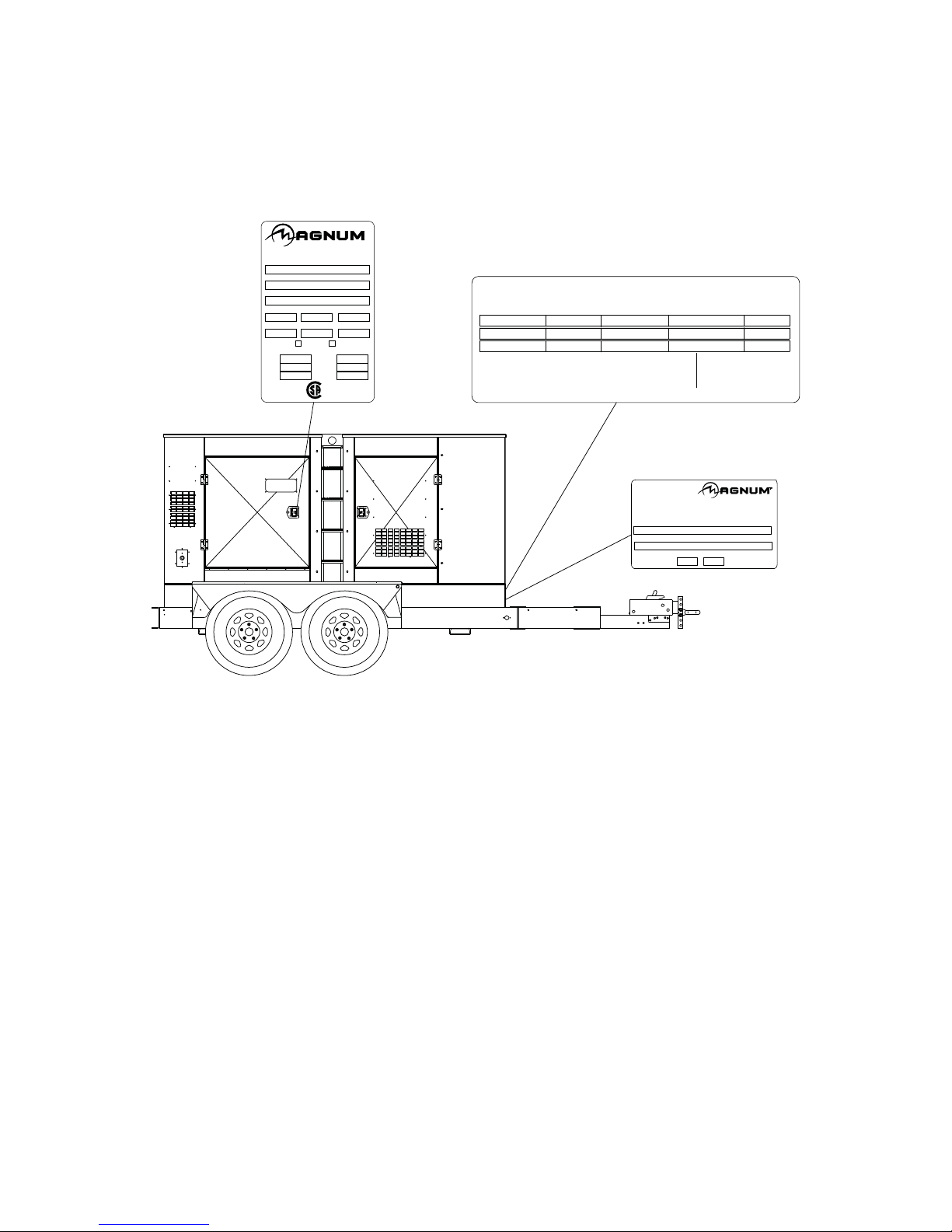
UNIT SERIAL NUMBER LOCATIONS
Refer to the locations illustrated below to find the unit ID tag, V.I.N. tag and trailer ID tag on your unit. Important
information, such as the unit serial number, model number and Vehicle Identification Number (V.I.N.) for your trailer
are found on these tags. Record the information from these tags, so it is available if the tags are lost or damaged.
When ordering parts or requesting technical service information, you may be asked to specify this information.
UNIT ID Tag
PRODUCTS LLC
1 Phase
KW
V
A
FOR ELECTRICAL
EQUIPMENT ONLY.
®
POUR MATERIAL
ELECTRIQUE SEULEMENT.
TM
V.I.N. Tag
KPA(PSI/LPC)
DATE:
COLD INFL. PRESS./PRESS.
DE GONF A FROID
SGL/DUAL
MANUFACTURED BY/FABRIQUE PAR: MAGNUM PRODUCTS LLC
GVWR/PNBV:
GAWR/PNBE TIRE/PNEU RIM/JANTE
THIS VEHICLE CONFORMS TO ALL APPLICABLE STANDARDS PRESCRIBED UNDER THE
CANADIAN MOTOR VEHICLE SAFETY REGULATIONS IN EFFECT ON THE DATE OF
MANUFACTURE. / CE VEHICULE EST CONFORME A TOUTES LES NORMES QUI LUI
SONT APPLICABLES EN VERTU DU REGLEMENT SUR LA SECURITE DES VEHICULES
AUTOMOBILES DU CANADA EN VIGUEUR A LA DATE SA FABRICATION.
V.I.N./N.I.V.: 00000000000000000
TYPE/TYPE DE VEHICULE: TRAILER
MODEL
SERIAL NUMBER
000000
kg lbs
MADE IN USA
THIS VEHICLE CONFORMS TO ALL
APPLICABLE U.S. FEDERAL MOTOR
VEHICLE SAFETY STANDARDS
(FMVSS) IN EFFECT ON THE DATE
OF MANUFACTURE SHOWN ABOVE.
Trailer ID Tag
MAGNUM PRODUCTS LLC
BERLIN, WI 54923 USA
(800) 926-9768
MADE IN USA
215 Power Drive
Berlin, WI 54923
1-800-926-9768
Model
Serial Number
Mfg. Code
kg
lbs
rpm hz amb. temp.
RATING: CONT. STAND BY
3 Phase
KVA
V
A
LR 114630-1
7
Page 8
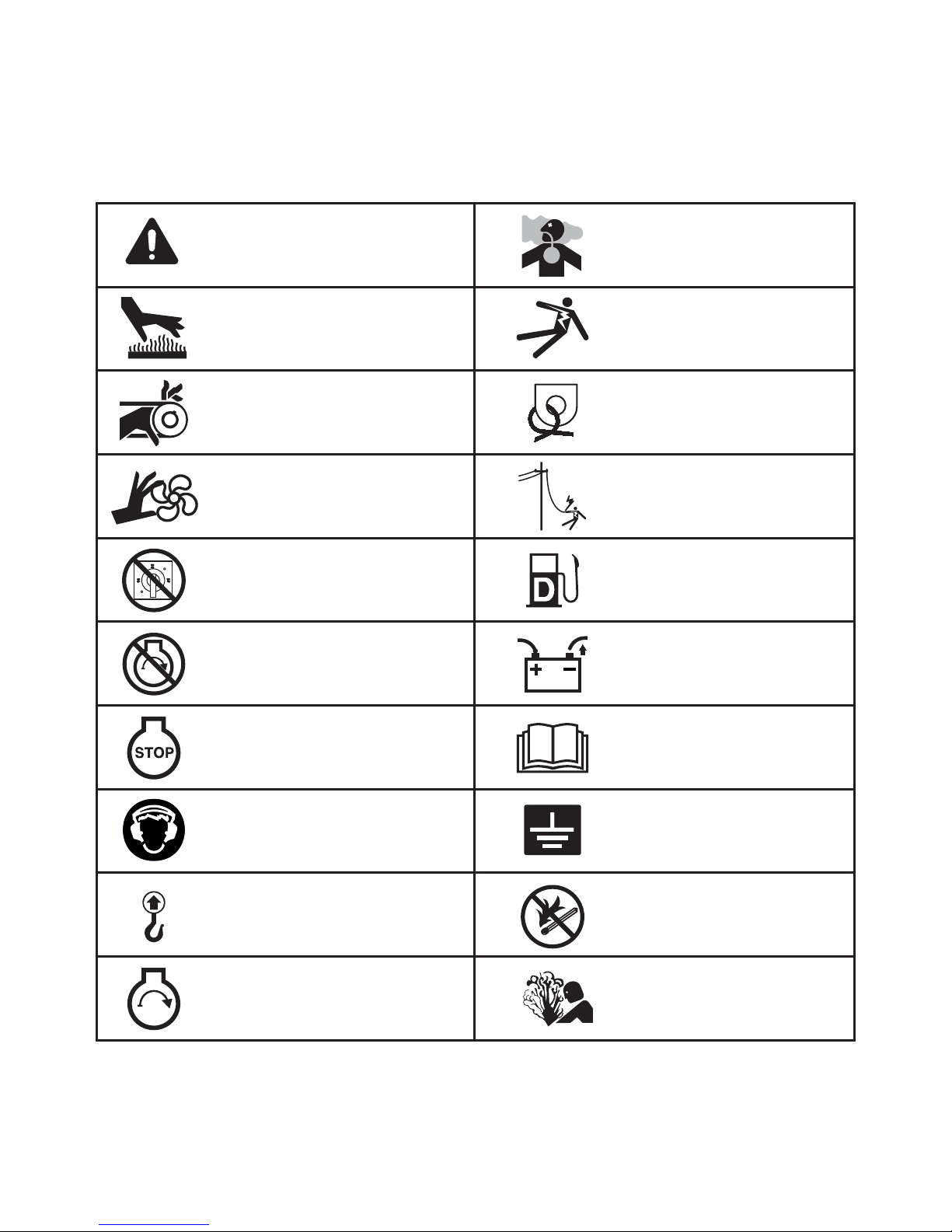
SAFETY SYMBOL SUMMARY
Hot surface(s) nearby.
Fire/explosion hazard; Keep
open flames away from unit.
Read and understand the
supplied operator’s manual
before operating unit.
Remove negative battery
cable before performing
any service on unit.
Stop engine before making
connections.
Use clean diesel fuel only.
Unit electrical ground.
Hearing protection required
while operating unit with doors
open.
Anchor/tie down point.
Lift here only.
Asphyxiation hazard; Operate
in well ventilated area.
Dangerous voltage may be
present.
Never change switch position
while engine is running.
Burn/scald hazard;
pressurized steam.
Fan hazard; Keep body parts
clear of this area.
Isolate generator to prevent
electrocution hazard.
Belt/entanglement hazard; Keep
body parts clear of this area.
Safety alert symbol; Used to
alert you to potential personal
injury hazards.
Stop engine before fueling.
Engine running.
This equipment has been supplied with numerous safety and operating decals. These decals provide important
operating instructions and warn of dangers and hazards. Replace any missing or hard-to-read decals and use care
when washing or cleaning the unit. Decal placement and part numbers can be found in the parts section or parts
manual included with your unit. Below is a summary of the intended meanings for the symbols used on the decals.
8
Page 9

SPECIFICATIONS
Read this manual carefully before attempting to use this generator. The potential for property damage, personal
injury or death exists if this equipment is misused or installed incorrectly. Read all of the manuals included with this
unit. Each manual details specific information regarding items such as set up, use and service requirements.
SPECIFICATIONS ARE SUBJECT TO CHANGE WITHOUT NOTICE.
MAGNUM MODEL MMG150 MMG150 Super Start
Engine
Make/Brand...................................................................... John Deere ...................................John Deere
Model ............................................................................... PE6068HF285 ..............................PE6068HF285
Horsepower - prime hp (kW) ..........................................180 (134).......................................180 (134)
Horsepower - standby hp (kW) ....................................... 197 (147).......................................197 (147)
Operating Speed rpm .....................................................1800 ..............................................1800
Displacement in
Cylinders - qty .................................................................. 6 ....................................................6
Fuel Consumption - 100% prime gph (Lph) ...................9.8 (37.1).......................................9.8 (37.1)
Battery Type..................................................................... Group 31 .......................................Group 31
Battery Voltage (Quantity per Unit) ..................................12V (1) ..........................................12V (1)
Battery Rating .................................................................. 1000 CCA .....................................1000 CCA
Generator
Make/Brand...................................................................... Marathon Electric ..........................Marathon Electric
Model ............................................................................... 363PSL1661 .................................432PSL6210
Type, Insulation................................................................ Brushless, H..................................Brushless, H
Generator Set (Engine/Generator)
3Ø - Standby kW (kVA) ................................................... 127 (159).......................................131 (164)
Amps - 3Ø Standby 480V (208V) A ................................ 191 (441).......................................197 (455)
3Ø - Prime kW (kVA) ...................................................... 116 (145).......................................119 (149)
Amps - 3Ø Prime 480V (208V) A .................................... 174 (402).......................................179 (414)
1Ø - Standby kW (kVA) ................................................... 114 (114) .......................................128 (128)
Amps - 1Ø Standby - 240V A .......................................... 475 ................................................533
1Ø - Prime kW (kVA) ...................................................... 106 (106).......................................117 (117)
Amps - 1Ø Prime - 240V A ............................................. 442 ................................................488
Frequency Hz .................................................................. 60 ..................................................60
Power Factor.................................................................... 1 (1Ø), 0.8 (3Ø).............................1 (1Ø), 0.8 (3Ø)
3
(L) .......................................................415 (6.8)........................................415 (6.8)
Weights
Dry Weight, Skid Mounted lbs (kg) .................................5944 (2696)...................................6409 (2907)
Operating Weight, Skid Mounted lbs (kg) ...................... 8500 (3856)...................................8965 (4066)
Dry Weight, Trailer Mounted* lbs (kg) ............................ 7340 (3329)...................................7805 (3540)
Operating Weight, Trailer Mounted* lbs (kg) ..................9896 (4489)...................................10361 (4700)
*Standard trailer only. Consult factory for custom trailer weights.
Capacities
Fuel Tank Volume gal (L) ................................................ 342 (1295).....................................342 (1295)
Usable Fuel Volume gal (L) ............................................ 313 (1185).....................................313 (1185)
Coolant (incl. engine) qt (L) ............................................ 42.0 (39.7).....................................42.0 (39.7)
Oil (incl. filter) qt (L) ........................................................ 31.5 (29.8).....................................31.5 (29.8)
Maximum Run Time hrs .................................................32 ..................................................32
AC Distribution
Circuit Breaker Size ......................................................... 600 ................................................600
Voltage Selection .............................................................3 Position Switch (lockable) ..........3 Position Switch (lockable)
Voltage Regulation........................................................... +/- 1% ...........................................+/-1%
Voltages Available 1Ø...................................................... 120, 139, 208, 220, 240, 277 ........120, 139, 208, 220, 240, 277
Voltages Available 3Ø...................................................... 208, 220, 440, 480 ........................208, 220, 440, 480
Trailer
Number of Axles .............................................................. 2 ....................................................2
Capacity - Axle Rating lbs (kg) ....................................... 6000 (2722)...................................6000 (2722)
Tire Size in ......................................................................16 ..................................................16
Brakes.............................................................................. Surge ............................................Surge
Hitch - Standard ............................................................... 3" Ring .........................................
Maximum Tire Pressure psi ............................................ 75 ..................................................75
.3" Ring
9
Page 10

SPECIFICATIONS
Read this manual carefully before attempting to use this generator. The potential for property damage, personal
injury or death exists if this equipment is misused or installed incorrectly. Read all of the manuals included with this
unit. Each manual details specific information regarding items such as set up, use and service requirements.
SPECIFICATIONS ARE SUBJECT TO CHANGE WITHOUT NOTICE.
MAGNUM MODEL MMG170 MMG170 Super Start
Engine
Make/Brand...................................................................... John Deere ...................................John Deere
Model ............................................................................... PE6068HF285 ..............................PE6068HF285
Horsepower - prime hp (kW) ..........................................216 (161).......................................216 (161)
Horsepower - standby hp (kW) ....................................... 237 (177).......................................237 (177)
Operating Speed rpm .....................................................1800 ..............................................1800
Displacement in
Cylinders - qty .................................................................. 6 ....................................................6
Fuel Consumption - 100% prime gph (Lph) ................... 10.9 (41.3).....................................10.9 (41.3)
Battery Type..................................................................... Group 31 .......................................Group 31
Battery Voltage (Quantity per Unit) ..................................12V (1) ..........................................12V (1)
Battery Rating .................................................................. 1000 CCA .....................................1000 CCA
Generator
Make/Brand...................................................................... Marathon Electric ..........................Marathon Electric
Model ............................................................................... 431PSL6306 .................................432PSL6210
Type, Insulation................................................................ Brushless, H..................................Brushless, H
Generator Set (Engine/Generator)
3Ø - Standby kW (kVA) ................................................... 150 (188).......................................158 (198)
Amps - 3Ø Standby 480V (208V) A ................................ 226 (522).......................................238 (550)
3Ø - Prime kW (kVA) ...................................................... 137 (171).......................................144 (180)
Amps - 3Ø Prime 480V (208V) A .................................... 206 (475).......................................217 (500)
1Ø - Standby kW (kVA) ................................................... 125 (125).......................................154 (154)
Amps - 1Ø Standby - 240V A .......................................... 521 ................................................642
1Ø - Prime kW (kVA) ...................................................... 120 (120).......................................142 (142)
Amps - 1Ø Prime - 240V A ............................................. 500 ................................................592
Frequency Hz .................................................................. 60 ..................................................60
Power Factor.................................................................... 1 (1Ø), 0.8 (3Ø).............................1 (1Ø), 0.8 (3Ø)
3
(L) .......................................................415 (6.8)........................................415 (6.8)
Weights
Dry Weight, Skid Mounted lbs (kg) .................................6139 (2785)...................................6604 (2996)
Operating Weight, Skid Mounted lbs (kg) ...................... 8567 (3886)...................................9032 (4097)
Dry Weight, Trailer Mounted* lbs (kg) ............................ 7535 (3418)...................................8000 (3629)
Operating Weight, Trailer Mounted* lbs (kg) ..................9963 (4519)...................................10428 (4730)
*Standard trailer only. Consult factory for custom trailer weights.
Capacities
Fuel Tank Volume gal (L) ................................................ 342 (1295).....................................342 (1295)
Usable Fuel Volume gal (L) ............................................ 313 (1185).....................................313 (1185)
Coolant (incl. engine) qt (L) ............................................ 31.5 (29.8).....................................31.5 (29.8)
Oil (incl. filter) qt (L) ........................................................ 33.0 (31.2).....................................33.0 (31.2)
Maximum Run Time hrs .................................................29 ..................................................29
AC Distribution
Circuit Breaker Size ......................................................... 700 ................................................700
Voltage Selection .............................................................3 Position Switch (lockable) ..........3 Position Switch (lockable)
Voltage Regulation........................................................... +/- 1% ...........................................+/-1%
Voltages Available 1Ø...................................................... 120, 139, 208, 220, 240, 277 ........120, 139, 208, 220, 240, 277
Voltages Available 3Ø...................................................... 208, 220, 440, 480 ........................208, 220, 440, 480
Trailer
Number of Axles .............................................................. 2 ....................................................2
Capacity - Axle Rating lbs (kg) ....................................... 6000 (2722)...................................6000 (2722)
Tire Size in ......................................................................16 ..................................................16
Brakes.............................................................................. Surge ............................................Surge
Hitch - Standard ............................................................... 3" Ring .........................................
Maximum Tire Pressure psi ............................................ 75 ..................................................75
.3" Ring
10
Page 11

SPECIFICATIONS
Read this manual carefully before attempting to use this generator. The potential for property damage, personal
injury or death exists if this equipment is misused or installed incorrectly. Read all of the manuals included with this
unit. Each manual details specific information regarding items such as set up, use and service requirements.
SPECIFICATIONS ARE SUBJECT TO CHANGE WITHOUT NOTICE.
MAGNUM MODEL MMG235 MMG235 Super Start
Engine
Make/Brand...................................................................... John Deere ...................................John Deere
Model ............................................................................... PE6068HF485 ..............................PE6068HF485
Horsepower - prime hp (kW) ..........................................286 (213).......................................286 (213)
Horsepower - standby hp (kW) ....................................... 315 (235).......................................315 (235)
Operating Speed rpm .....................................................1800 ..............................................1800
Displacement in
Cylinders - qty .................................................................. 6 ....................................................6
Fuel Consumption - 100% prime gph (Lph) ................... 15.2 (57.5).....................................15.2 (57.5)
Battery Type..................................................................... Group 31 .......................................Group 31
Battery Voltage (Quantity per Unit) ..................................12V (1) ..........................................12V (1)
Battery Rating .................................................................. 1000 CCA .....................................1000 CCA
Generator
Make/Brand...................................................................... Marathon Electric ..........................Marathon Electric
Model ............................................................................... 431PSL6336 .................................433PSL6216
Type, Insulation................................................................ Brushless, H..................................Brushless, H
Generator Set (Engine/Generator)
3Ø - Standby kW (kVA) ................................................... 204 (255).......................................209 (261)
Amps - 3Ø Standby 480V (208V) A ................................ 307 (708).......................................251 (724)
3Ø - Prime kW (kVA) ...................................................... 186 (233).......................................190 (237)
Amps - 3Ø Prime 480V (208V) A .................................... 280 (647).......................................285 (658)
1Ø - Standby kW (kVA) ................................................... N/A ................................................N/A
Amps - 1Ø Standby - 240V A .......................................... N/A ................................................N/A
1Ø - Prime kW (kVA) ...................................................... N/A ................................................N/A
Amps - 1Ø Prime - 240V A ............................................. N/A ................................................N/A
Frequency Hz .................................................................. 60 ..................................................60
Power Factor.................................................................... 0.8 (3Ø).........................................0.8 (3Ø)
3
(L) .......................................................415 (6.8)........................................415 (6.8)
Weights
Dry Weight, Skid Mounted lbs (kg) .................................6510 (2953)...................................7330 (3325)
Operating Weight, Skid Mounted lbs (kg) ...................... 9100 (4128)...................................9920 (4500)
Dry Weight, Trailer Mounted* lbs (kg) ............................ 8450 (3833)...................................9270 (4205)
Operating Weight, Trailer Mounted* lbs (kg) .................. 11040 (5008).................................11860 (5380)
*Standard trailer only. Consult factory for custom trailer weights.
Capacities
Fuel Tank Volume gal (L) ................................................ 342 (1295).....................................342 (1295)
Usable Fuel Volume gal (L) ............................................ 313 (1185).....................................313 (1185)
Coolant (incl. engine) qt (L) ............................................ 38.0 (35.9).....................................38.0 (35.9)
Oil (incl. filter) qt (L) ........................................................ 33.0 (31.2).....................................33.0 (31.2)
Maximum Run Time hrs .................................................21 ..................................................21
AC Distribution
Circuit Breaker Size ......................................................... 800 ................................................800
Voltage Selection .............................................................Link/Reconnect Board...................Link/Reconnect Board
Voltage Regulation........................................................... +/- 1% ...........................................+/-1%
Voltages Available 1Ø...................................................... N/A ................................................N/A
Voltages Available 3Ø...................................................... 208, 480 ........................................208, 480
Trailer
Number of Axles .............................................................. 2 ....................................................2
Capacity - Axle Rating lbs (kg) ....................................... 7000 (3175)...................................7000 (3175)
Tire Size in ......................................................................16 ..................................................16
Brakes.............................................................................. Surge ............................................Surge
Hitch - Standard ............................................................... 3" Ring .........................................
Maximum Tire Pressure psi ............................................ 80 ..................................................80
.3" Ring
11
Page 12
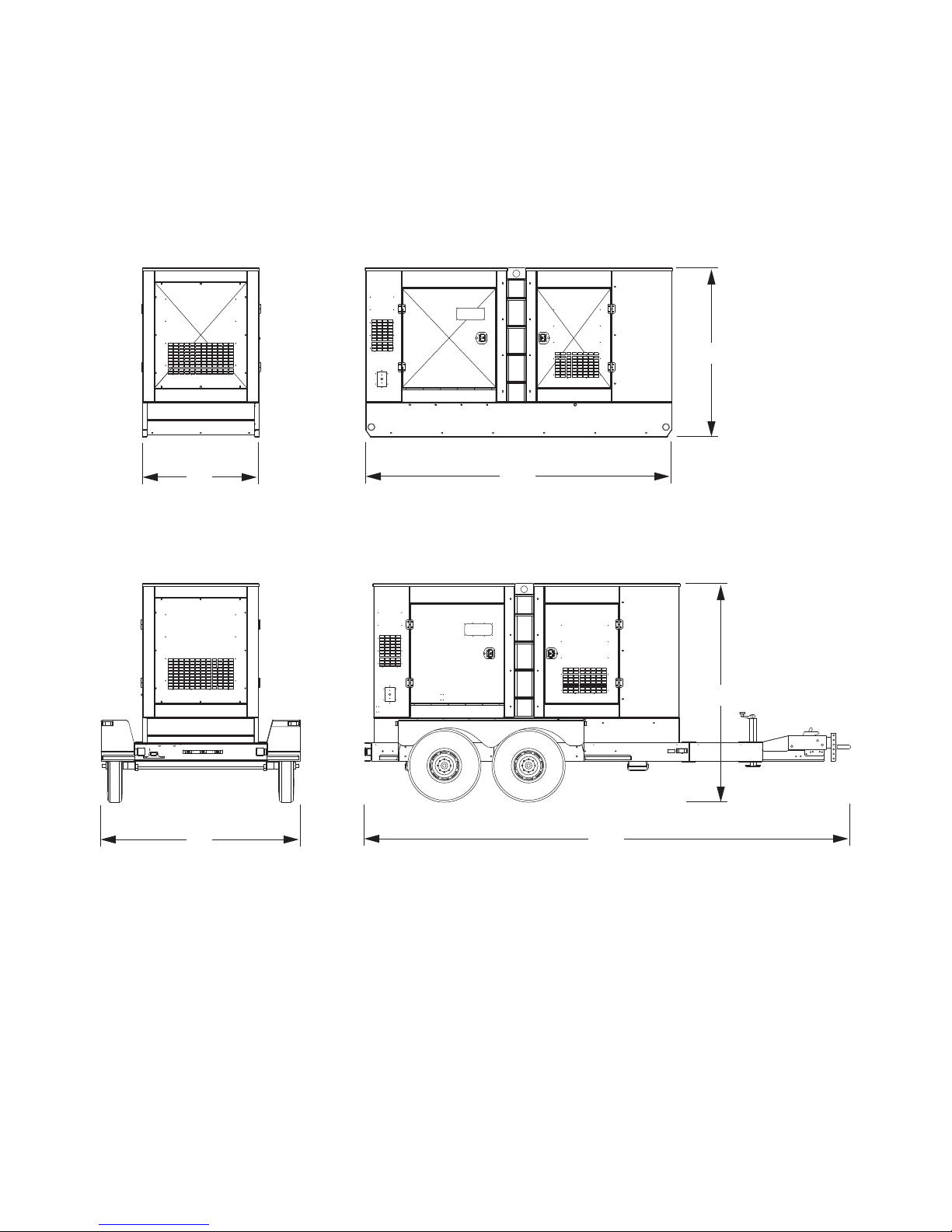
UNIT DIMENSIONS
50”
132”
77”
86”
210”
93”
Read this manual carefully before attempting to use this generator. The potential for property damage, personal
injury or death exists if this equipment is misused or installed incorrectly. Read all of the manuals included with this
unit. Each manual details specific information regarding items such as set up, use and service requirements.
SPECIFICATIONS ARE SUBJECT TO CHANGE WITHOUT NOTICE.
Dimensions (L x W x H)
Skid Mounted in (m) ................................. 132 x 50 x 77 (3.35 x 1.27 x 1.96)
Trailer Mounted in (m) .............................. 210 x 86 x 93 (5.33 x 2.18 x 2.36)
12
Page 13
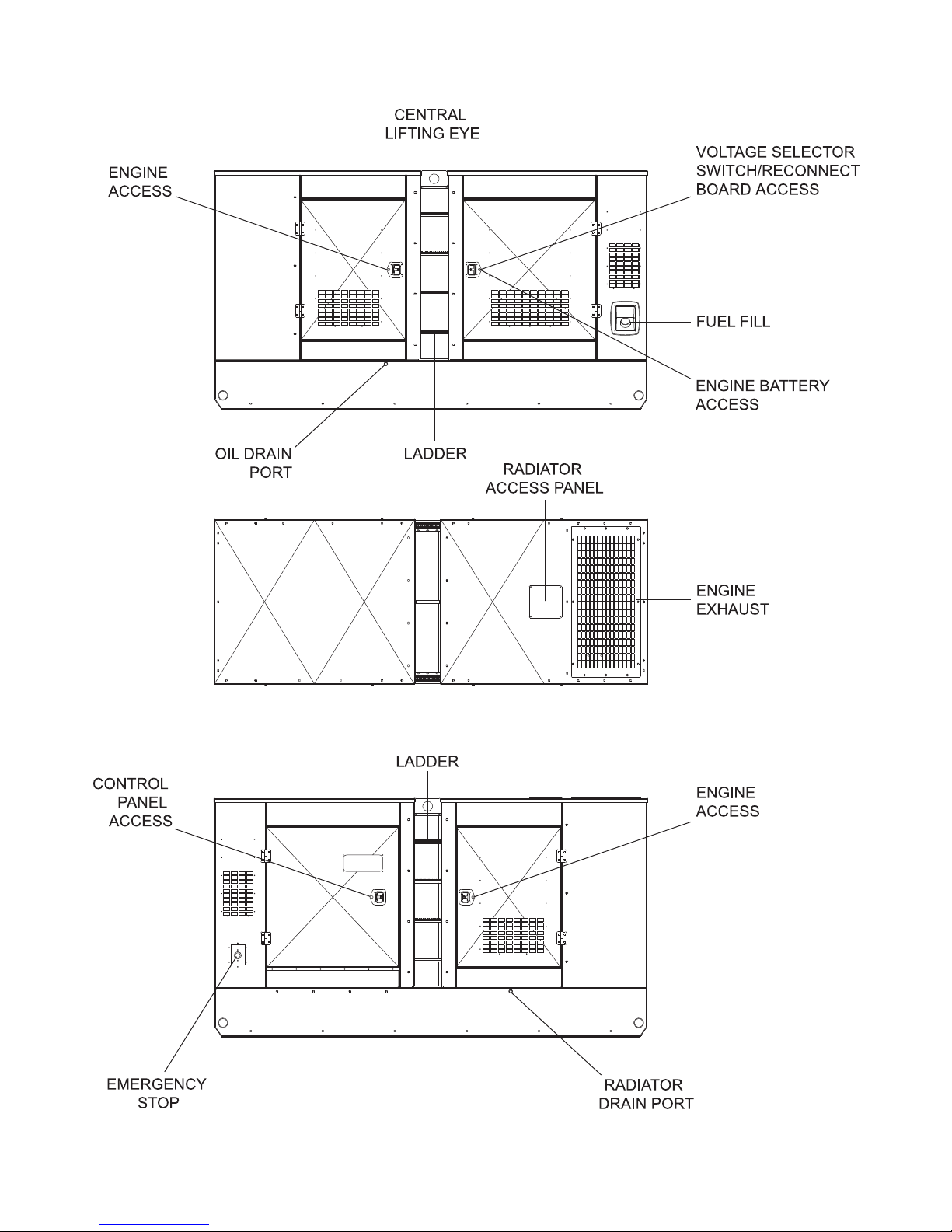
SERVICE LOCATIONS
13
Page 14
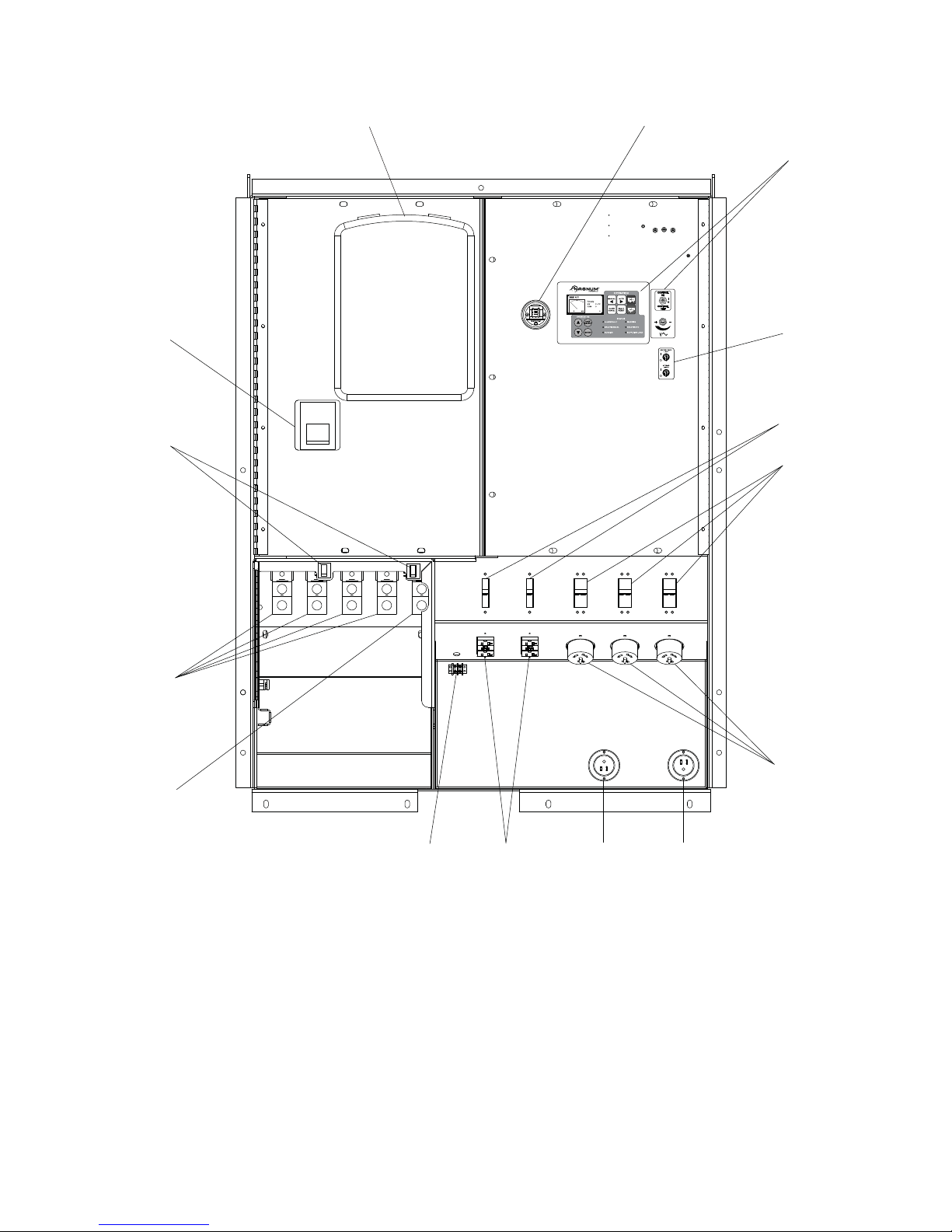
MAIN CONTROL PANEL FEATURES, STANDARD
12
3
4
7
891011
12
13
15
14
5
6
14
Page 15

1. DOCUMENT HOLDER
2. AIR FILTER METER: This gauge shows the condition of the air filter when the engine is running.
3. MAGNUM DIGITAL CONTROLLER (MDC): See pages 18-19 for additional information.
4. AUXILIARY LIGHT SWITCHES: These switches operate the optional control panel and interior lights.
5. CIRCUIT BREAKERS FOR 120V GFCI CONVENIENCE OUTLETS, 20A (2)
6. CIRCUIT BREAKERS FOR 120/240V CONVENIENCE OUTLETS, 50A (3)
7. 120/240V TWIST-LOCK CONVENIENCE OUTLETS (3): These outlets are used for connecting additional loads
or equipment to the generator.
8. CONNECTION FOR BATTERY CHARGER (OPTIONAL): Allows for 120VAC input to power onboard battery
charger.
9. CONNECTION FOR ENGINE BLOCK HEATER (OPTIONAL): Allows for 120VAC input to power the engine
block heater.
10. 120V GFCI DUPLEX CONVENIENCE OUTLETS: Outlets for additional equipment that may require Ground
Fault Interrupt (GFCI) protection.
11. REMOTE ST ART TERMINAL BLOCK: Used to connect the generator to a dry-contact closure switch for remote
starting of the generator.
12. OUTPUT GROUND CONNECTION: Ground lug for attaching the generator to a good earthen ground.
13. CONNECTION TERMINAL LUGS: External loads are wired to these lugs.
14. DOOR SAFETY SWITCHES: The connection lug door is equipped with safety interlock switches that will trip
the main circuit breaker and disable the voltage regulator if the door is opened while the unit is operating.
15. MAIN CIRCUIT BREAKER FOR CONNECTION LUGS: The MMG 150 has one 600A breaker, the MMG 170
a 700A breaker and the MMG 235 has an 800A breaker.
15
Page 16
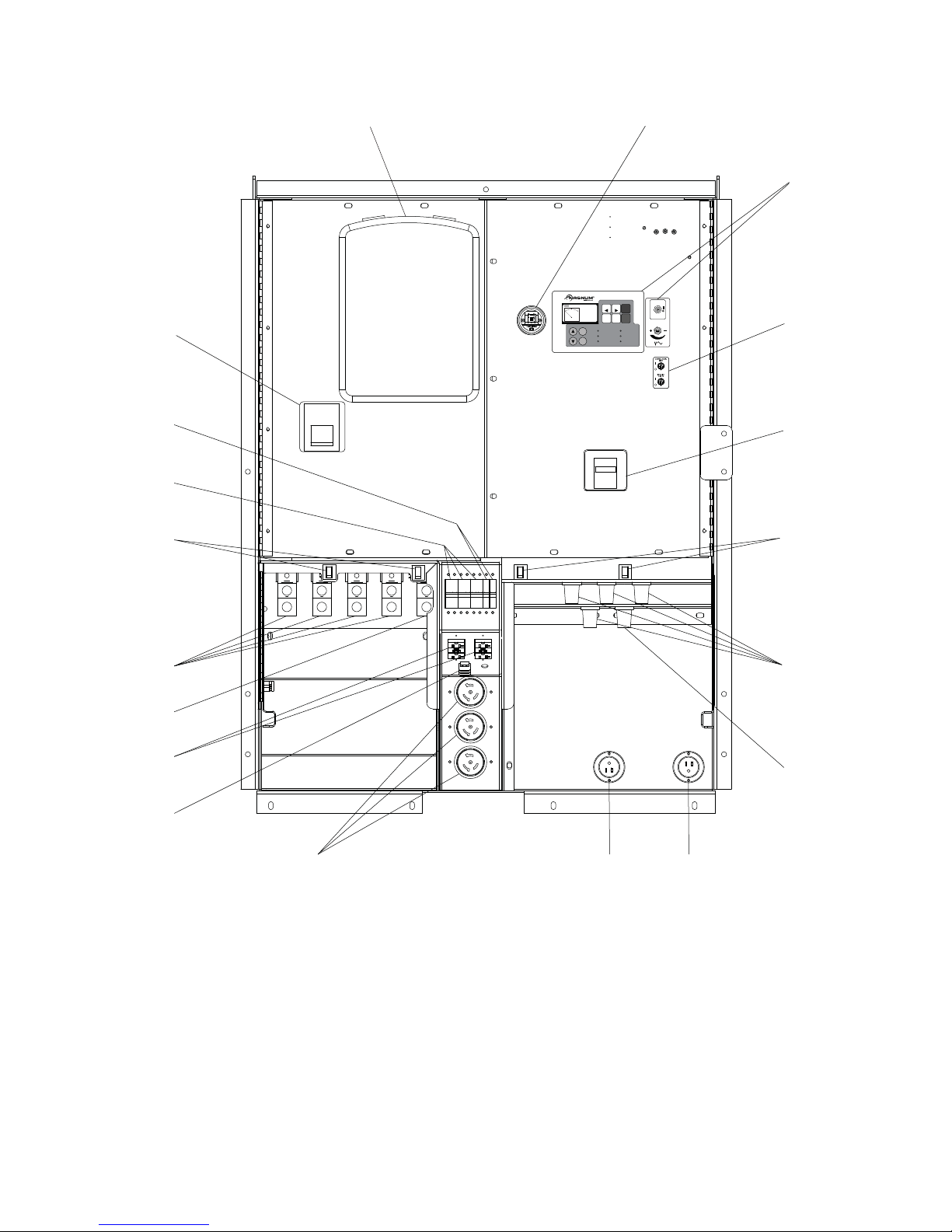
MAIN CONTROL PANEL FEATURES, WITH OPTIONAL CAM LOCKS
ENGINE
START
ENGINE
STOP
CONTROL
ON
CONTROL
OFF
12
CONTROL
18
AUT
MAN
0 kW 0
DIAGNOSTICS
Ready
PF 0.00
RPM 0
PAGE
SELECT
ENTER
OPERATION
MANUAL AUTO
ALARM
CANCEL
ALARM/FAULT
READY/MANUAL READY/AUTO
RUNNING SUPPLYING LOAD
ON
ENGINE
START
CONTROL
ENGINE
FAULT
OFF
RESET
STOP
STATUS
WARNING
3
4
17
16
15
14
13
12
11
5
15
6
7
910
8
16
Page 17

1. DOCUMENT HOLDER
2. AIR FILTER METER: This gauge shows the condition of the air filter when the engine is running.
3. MAGNUM DIGITAL CONTROLLER (MDC): See pages 18-19 for additional information.
4. AUXILIARY LIGHT SWITCHES: Operate optional control panel and interior lights.
5. CIRCUIT BREAKER FOR CAM LOCK CONNECTORS (OPTIONAL): Units equipped with one set of cam lock
receptacles (as shown) have one 450A breaker. Units equipped with two sets of cam lock receptacles have two
450A breakers.
6. CAM LOCK CONNECTORS (OPTIONAL): Series 16 Taper Nose 400A, 600V cam locks are connected here.
See page 32 for more information.
7. OUTPUT GROUND CONNECTION: (Green) Cam lock ground connection for attaching the generator to a good
earthen ground.
8. CONNECTION FOR BATTERY CHARGER (OPTIONAL): Allows for 120VAC input to power onboard battery
charger.
9. CONNECTION FOR ENGINE BLOCK HEATER (OPTIONAL): Allows for 120VAC input to power the engine
block heater.
10. 120/240V TWIST-LOCK CONVENIENCE OUTLETS (3): These outlets are used for connecting additional loads
or equipment to the generator.
11. REMOTE ST ART TERMINAL BLOCK: Used to connect the generator to a dry-contact closure switch for remote
starting of the generator.
12. 120V GFCI DUPLEX CONVENIENCE OUTLETS (2): Outlets for additional equipment that may require Ground
Fault Interrupt (GFCI) protection.
13. OUTPUT GROUND CONNECTION: Ground lug for attaching the generator to a good earthen ground.
14. CONNECTION TERMINAL LUGS: External loads are wired to these lugs.
15. DOOR SAFETY SWITCHES: The connection lug door and cam lock door are equipped with safety interlock
switches that will trip the main circuit breaker and disable the voltage regulator if the doors are opened while the
unit is operating.
16. CIRCUIT BREAKERS FOR 120/240V CONVENIENCE OUTLETS, 50A (3)
17. CIRCUIT BREAKERS FOR 120V GFCI CONVENIENCE OUTLETS, 20A (2)
18. MAIN CIRCUIT BREAKER FOR CONNECTION LUGS: The MMG 150 has one 600A breaker, the MMG 170
a 700A breaker and the MMG 235 has an 800A breaker.
17
Page 18

MAGNUM DIGITA L CONTROLLER (MDC)
The Magnum Digital Controller (MDC) is an enhanced digital generator controller used to start, stop and monitor the
operation of the generator and the engine. The controller constantly monitors vital generator and engine functions
for a number of pre-programmed alarm and fault conditions. When a fault condition occurs, the engine will shut down
automatically and the Liquid Crystal Display (LCD) window will display the fault that caused the shut down; to resume
operation the fault condition must be resolved. The controller has the ability to provide the display readout in English
and Spanish; other languages are available. A screen print out of the display screen is also available. This controller
also records a “History” of the unit’s performance which may be viewed at any time and will not be removed or lost
when the controller is powered down.
The MDC panel consists of five sections, including: the “CONTROL ON/OFF” Toggle Switch and Fine Voltage
Adjustment Screw; the “OPERATION” keypad; the LCD window; the “DIAGNOSTICS” keypad; and the “STATUS”
Light Emitting Diodes (LED’s).
DIGITAL CONTROLLER FEATURES AND FUNCTIONS
1. The “CONTROL ON/OFF” Toggle Switch and Fine Voltage Adjustment Screw
• “CONTROL ON/OFF” T oggle Switch: This toggle switch powers-up the control panel and the controller.
• Fine V oltage Ad justment Screw: This screw may be adjusted to set the generator output voltage after the
voltage selector switch has been changed from one phase to another. This adjustment must
within 45 seconds of start-up so that the unit does not experience a shut down alarm for “SENSING”.
2. The “OPERATION” Keypad
• “ENGINE START” Button: The Power Screen Display must be in the “MAN” mode in the upper left corner
of the LCD window display and the “Ready/Manual” LED lit in the “Status” portion of the controller. Press
the green “ENGINE START” button to start the unit.
• “ENGINE STOP” Button: Press the red “ENGINE STOP” button to shut down the unit and start the “Stop
Value” timer.
• “MANUAL W” Button:Press this button to change from the Automatic (remote) starting mode to Manual
starting mode.
• “AUTO X” Button: Press this button to change from Manual starting mode to Automatic (remote) starting
mode.
18
be accomplished
Page 19

• “ALARM CANCEL” Button: When an alarm is activated, either visually or audibly, press this button to
silence or cancel the alarm.
• “FAULT RESET” Button: Press this button to clear the fault from the LCD window after the fault has been
corrected. Press “FAULT RESET” and “ENTER” to clear the John Deere ECU Alarm List Codes.
3. The Liquid Crystal Display (LCD)
• This window will toggle between the Generator Display Screen and the Engine Display Screen upon startup of the unit. By viewing these screens, the operator will be able to monitor both the engine and generator
status while the unit is running.
4. The “DIAGNOSTICS” Keypad
• “S” Scroll-Up Button: Press this button to scroll-up within the LCD window.
• “T” Scroll-Down Button: Press this button to scroll-down within the LCD window.
• “PAGE SELECT” Button: Pressing this button will select the next display screen.
• “ENTER” Button: Pressing this button will place you inside the particular display to review the generators
pre programmed setpoints or parameters.
5. The “STATUS” Light Emitting Diodes (LED’s)
• These six LED’s will illuminate to display the current operational status of the generator;
○ Alarm/Fault: Indicates active or inactive alarms, but not reset shut down alarms.
○ Warning: Indicates an active or inactive alarm, or a warning alarm that has not been reset
○ Ready/Manual: Indicates the controller is ready to start and in the manual mode.
○ Ready/Auto: Indicates the unit is in the “AUTO” mode ready for the remote start signal.
○ Running: Indicates the unit is running.
○ Supplying Load: Indicates a load is being applied to the generator.
GENERATOR MONITORING
Generator information is shown on the Liquid Crystal Display (LCD) window in a toggling manner with the Engine
information after the first 60 seconds of operation, then every five seconds thereafter. The generator display screen
will show frequency, line to neutral voltage, line to line voltage and amperage.
Note: When loading the generator, it is important to observe the amperage to determine the load ba lance on each
line of the generator. Minor load unbalances, usually five percent or less, will not cause any particular problems.
Every effort should be made to distribute the load equ ally be tween all lines.
• Hertz: Displays output frequency.
• Generator Output Voltage: Line to Neutral display, single phase (1Ø).
• Generator Output Voltage: Line to Line display, 3 phase (3Ø).
• Amps: Displays the AC output amperage produced by the generator.
ENGINE MONITORING
Engine information is shown on the Liquid Crystal Display (LCD) window in a toggling manner with the Generator
information after the first 60 seconds of operation and then every five seconds thereafter. The engine display screen
will show oil pressure, engine coolant temperature, fuel level and battery voltage.
19
Page 20

• Oil Press: Displays engine oil pressure. The display registers oil pressure between 0-100 psi. Normal
operating pressure is between 35-80 psi.
• Eng Temp: Displays the temperature of the engine’s coolant. If the coolant temperature exceeds the
Maximum Water Temperature of 230° F the engine will automatically shut down. Zero “0” will be displayed
until a minimum temperature of 100° F is reached.
• Fuel Level: Displays the level of fuel in the tank by percentage (50% = 1/2 tank, 75% = 3/4 tank, etc.). If the
fuel level drops below a programmed low fuel point – usually at 15%, a low fuel warning and optional audio
alarm will be activated. If the fuel level drops below the programmed low fuel limit, usually at five percent,
the engine will automatically shut down.
• Vbat: Displays the engine battery voltage. A normal reading is 13-14V on 12 volt systems and 24-26 on 24
volt systems (with the engine running).
Additional information may be viewed while the unit is in “MANUAL” or “AUTO” mode. By pressing the “Page Select”
button, the operator will select one of the following screens; “Running” screen, “Password” screen, or “History” screen.
In each of these page selections the operator may press the “S” or “T” buttons on the “DIAGNOSTICS” keypad to
display additional information as follows:
• “Running” screen:The operator may press the “S” or “T” buttons on the “DIAGNOSTICS” keypad to
display the “Alarm List” screen, “ECU Alarm List” screen, “Run Hours” screen, “ECU Values” screen, Engine
display screen and Generator display screen.
• “Password” screen: The operator may press the “S” or “T” buttons on the “DIAGNOSTICS” keypad to
move the cursor (>) up or down a list of text.
• “History” screen:The operator may press the “S” or “T” buttons on the “DIAGNOSTICS” keypad to move
the cursor (>) up or down a list of recent alarm or shut down codes. Pressing the “Enter” button at a particular
selection will allow the operator to scroll to the right in the LCD window to view the generator operating
parameters at the time of the alarm or shut down. The history of alarms or codes is saved in the digital
controller. The most recent alarm or code is the first to be listed, with the time/date of the alarm or code at
the bottom of the screen. The controller stores up to 118 codes. When full, the controller will automatically
remove the oldest file. These codes will not be lost when the “CONTROL ON/OFF” toggle switch is powered
off.
20
Page 21

FINE VOLTAGE ADJUSTMENT
A
Upon start-up of the generator, the “Running” screen of the Magnum Digital
Controller (MDC) will display “SENSING” and will countdown from 45 seconds
to “0” Zero. This is a safety feature of the controller to protect the generator
from over or under voltage upon start-up.
“SENSING” is a 45 second time delay and count down process before the MDC
VOLTAGE
DJUSTMENT
RHEOSTAT
CONTROL
ON
CONTROL
OFF
records the generator nominal output voltage. This nominal generator voltage
is then compared to the current set point voltage of the voltage selector switch.
If the nominal voltage recorded by the controller is greater than or lower than
the current set point voltage of the voltage selector switch setting by 10% or
more, the controller will shut the generator down automatically. The display will
read: Wrn VG1 or 2 or 3 Under/Over and/or Sd Vg1 or 2 or 3 Under/Over. This
means the controller warned (“Wrn”) or shut down (“Sd”) the unit due to an
output voltage irregularity.
The output voltage of the generator may be adjusted after the generator is running by using the fine voltage adjustment
screw. The adjusting screw is located directly below the “CONTROL ON/OFF” toggle switch on the control panel.
This screw turns a rheostat that will provide an increase (“+”) or a decrease (“-”) in the generator output voltage as
displayed on the Power Display Screen on the control panel. If the voltage is increased or decreased too fast or too
slow, the unit will automatically shut down. This adjustment needs to be made within the 45 second delay and
countdown to “0” Zero period.
To adjust the output voltage, check the output voltage on the Liquid Crystal Display (LCD) window labeled Gen freq
& Hz. Look at the L1N voltage or the L12 voltage on the display. The generator nominal output voltage should be
within 10% of the voltage rating on the voltage selector switch.
To adjust the output voltage loosen the lock nut at the base of the screw and turn the screw in the desired direction
until the required voltage shown on the LCD window matches the stated voltage on the voltage selector switch.
For Example: With the voltage selector switch set to “208/120V” 3 Phase position, the voltage displayed on the
Gen freq & Hz screen must be within ± 10% of the 208/120 position (188-228 V Line to Line / 108-132 V Line to Neutral).
Note: Each time the voltage selector switch is changed from one setting to another, an adjustment will need to be
made to the fine voltage using this adjustment screw.
21
Page 22

PRE - START CHECK LIST
DANGER
Before starting the generator, carefully read the pre-start check list. Make sure that all of the items are checked
before trying to start the generator. This check list applies to both manual and remote starting of the generator.
Read and understand ALL safety sections at the beginning of this manual.
Make sure the control ON/OFF toggle switch is in the OFF “O” position.
Make sure that the circuit breakers (main and convenience) are switched OFF “O”.
Check that the generator is properly grounded to a good earthen ground per any local and NEC
regulations.
Check all electrical connections at the connection lugs and cam lock receptacles (if equipped). Are
they wired correctly? Are they tight?
Check the voltage selector switch and make sure that it is set to the desired voltage.
Is the voltage selector switch locked?
Is the generator sitting level?
Thoroughly check for any water inside the unit, on or near the generator. Dry the unit before starting.
Check oil, coolant and fuel levels and engine battery connections.
Check engine fan belt tension and condition.
Check engine fan belt guard.
Check engine exhaust system for loose or rusted components.
Check radiator and surrounding shroud for debris.
Are any of the generator covers loose or missing?
Are all preventative maintenance procedures up to date?
Check that the battery disconnect switch is on, if equipped.
MANUAL STARTING OF THE GENERATOR
1. Move the control ON/OFF toggle switch to the “CONTROL ON / I” position.
CARBON MONOXIDE: USING A GENERATOR INDOORS CAN KILL YOU IN MINUTES!
2. The Liquid Crystal Display (LCD) window will quickly display system information, all Light Emitting Diodes (LED’s)
will flash.
3. The LCD window will indicate “MAN” (manual) mode and “Ready”. The Ready/Manual LED will be lit. Note: The
unit must be in the “MAN” Mode with the Ready/Manual LED lit to start the unit.
22
Page 23

4. Press the green “ENGINE START” button. The Prestart (Preheat) screen will be displayed (if equipped) and a
countdown will begin from 20 seconds to 0.
5. The Starting screen will be displayed. The engine will crank and start running.
6. The Running screen will display.
Note: It may take a few seconds for the engine to run smoothly and reach its governed operating speed. The 45
second “SENSING” time delay will start to count down.
7. The LCD window will then toggle from the Running screen to the Generator Display Screen and then to the
Engine Display Screen.
8. If the engine does not start after the first cranking attempt, the engine will pause for 15 seconds to allow the
starter to cool. The LCD window will show “PAUSE”. The engine will make two more attempts to start for a total
of three crank cycles.
23
Page 24

9. Should the engine not start and run within three starting cycles, the LCD window will show “SD Start fail”. The
starting sequence may be repeated after the starter has had a minimum of two minutes to cool. Press the “FAULT
RESET” button to clear the controller. To start the unit, press the green “ENGINE START” button.
Note: The engine controller may skip the preheat engine steps on some of the larger models.
10. Once the engine starts it will immediately begin speeding up to a constant 1800 rpm. The engine may hunt or
change speeds until operating speed is reached. After a few minutes of operation, the engine will be warmed
up and the LCD window will show engine and generator operating parameters. Temperature will be shown as
“0” until the engine temperature is approximately 100° F.
11. Check the generator for excessive noise or vibration and any coolant, oil or fuel leaks before applying any loads.
12. Check that the AC output voltage is correct. The output voltage can be fine adjusted by using the fine voltage
adjustment screw (rheostat), as described on page 21.
13. Check that the frequency (Hz) is correct. With no loads connected to the generator, the frequency should read
approximately 60 Hz, depending on the type of engine governing used.
14. If all wiring connections have been made correctly, switch the main circuit breaker to the “ON / I” position and
then add any loads attached to the convenience outlets by switching the respective circuit breaker to the “ON /
I” position. You will notice a slight change in engine sound when a load is applied to the unit.
“AUTO” (REMOTE) STARTING OF THE GENERATOR
The “AUTO” button is used when the generator is started from a location other than the control panel and by using
a transfer switch. “AUTO” (remote start) is the normal setting when the generator is being used as a standby power
supply. Before putting the generator in the “AUTO” mode, review the Pre-Start Check List and Manual Starting of the
Generator sections beginning on page 22. Also follow all safety warnings and information on isolating the generator
with a transfer switch if the unit is to be used as a standby power supply (see page 38). Then continue with the steps
described below:
1. Perform a manual start of the generator at least once to verify that the engine is operating correctly.
2. If a check of the remote start circuit is desired, remove the wires from the remote start terminal block.
Press the “AUTO” button, the Liquid Crystal Display (LCD) window should highlight “AUTO” in the upper
left corner. Attach a jumper wire (minimum 16 gauge) across the two terminals on the remote start
terminal block. This applies a ground to the Magnum Digital Controller (MDC) to close the starting circuit
contacts. The engine should crank, start and run.
3. Remove the jumper wire from the remote start terminal block and the engine will stop. Reconnect any
necessary wires from the remote start switch (transfer switch) to the remote start terminal block.
4. Confirm unit is in “AUTO” mode. The LCD window should have “AUT” highlighted in the upper left corner.
5. Close the main circuit breaker (set to “ON / I”).
6. Secure the generator by closing and locking all access doors.
7. The generator is now ready for remote starting.
SHUTTING DOWN THE GENERATOR
Check with personnel using power supplied by the generator and let them know that the power is going to be turned
off. Make sure the power shut down will not create any hazards by accidentally turning off equipment that needs to
be kept on (pumps, compressors, lights, etc.).
1. Remove all loads from the generator by opening all circuit breakers (turn to OFF / “O”).
2. Let the engine run for approximately five minutes to allow it to cool down.
3. Push the red “ENGINE STOP” button. Pressing “Engine Stop” will result in the generator going into the
shut down cycle and starting a 15 second shut down timer called “Stop Value.” If the unit does not shut
down within 15 seconds a “Stop Fail” alarm will be displayed on the Liquid Crystal Display (LCD) window.
4. Move the “CONTROL ON/OFF” toggle switch to the “CONTROL OFF / O” position.
24
Page 25

MDC CONTROLLER INFORMATION DISPLAYS, FUNCTIONS AND RESET
No. Engine State Machine Description
1 AfterCool Engine aftercooling, Cooling Pump output is closed.
2 Cooling The unit is cooling before stop.
3 Cranking Engine is cranking.
4 EmergMan Emergency Manual gen-set operation.
5 Init Autotest during controller power on.
6 Loaded
The unit is running at nominal speed and GCB OPEN/CLOSE is
closed.
7 Not Ready The unit is not ready to start.
8 Pause Pause between start attempts.
9 Prestart Prestart sequence in process, Prestart output is closed.
10 Ready The unit is ready to run.
11 Running The unit is running at nominal speed.
12 Shutdown Shut-down alarm is activated.
13 Starting Starting speed is reached and the
Idle timer
is running.
14 Stop Stop
No. Electrical State Machine Description
1 StabilTO Stabilization Timeout
No. Type Description
1 Sensor fail (FLS)
Sensor fail is detected when measured value is 6% out of the selected
characteristic. Sensor fail indicated by ##### symbol instead measured
value.
2 Warning (WRN) When warning comes up, see list of possible alarms.
3 Shut down (SD)
When the shut-down alarm comes up the Magnum Digital Controller opens
outputs GCB CLOSE/OPEN, FUEL, SOLENOID, STARTER AND
PRESTART to stop the engine immediately.
The Magnum Digital Controller (MDC) constantly monitors vital generator and engine functions for a number of
operation, alarm and fault conditions. When a fault condition occurs, the engine will shut down automatically and the
Liquid Crystal Display (LCD) window will show the fault that has caused the shut down. To resume operation, the
fault condition must be resolved. To reset the controller and resume operation, press the “FAULT RESET” button.
The operation of the Magnum Digital Controller (MDC) is divided into the following sections:
MAGNUM DIGITAL CONTROLLER (MDC) – GENERATOR OPERATIONAL STATUS
The Magnum Digital Controller (MDC) displays the operational status of the generator using the following codes:
MAGNUM DIGITAL CONTROLLER (MDC) - ALARM MANAG EM ENT
The Magnum Digital Controller (MDC) is capable of displaying the following alarms:
25
Page 26

MAGNUM DIGITAL CONTROLLER (MDC)- LIST OF POSSIBLE ALARMS/DESCRIPTIONS
No. Events Specification
Protection
Type
Information on
Binary Output
Available
Description
1 AnInIOM Sd SD YES
Shutdown alarm configurable on the input of IGIOM/IGS-PTM.
2 AnInIOM Wrn WRN YES
Warning alarm configurable on the input of IG-IOM/IGSPTM.
3 Battery Flat SD YES
If the controller switches off during starting sequence
due to bad battery condition it doesn't try to start again
and activates this protection.
4 Binary Input Configurable YES
Configurable Warning/Shutdown alarms on the inputs of
IL-NT.
5 ChrgAlternFail WRN YES Failure of the alternator for charging the battery.
6 EmergencyStop SD NO
If the input
Emergency stop
is opened shutdown is
immediately activated.
7 Engine Temp Sd SD NO
Water temperature is greater than
Sd Water temp
setpoint.
8 Engine Temp Wrn WRN YES
Water temperature is greater than
Wrn Water temp
setpoint.
9 Fgen <, > SD YES
The generator frequency is out of limits given by
Gen >f
and
Gen <f
setpoints.
10 Fuel Level Sd SD YES
Fuel level is smaller than
Sd Fuel Level
setpoint.
11 Fuel Level W rn WRN YES
Fuel level is smaller than
Wrn Fuel Leve
l setpoint.
12 GCB fail SD NO Failure of the generator circuit breaker.
13 Igen unbl SD NO The generator current is unbalanced.
14 Low BackupBatt WRN NO RTC backup battery is flat.
15
Oil Press Sd (Shut Down)
SD NO
Oil pressure is smaller than
Sd Oil press
setpoint.
16
Oil Press Wrn (Warning)
WRN YES
Oil pressure is smaller than
Wrn Oil press
setpoint.
17 Overload SD YES
The load is greater than the value given by
Overload
setpoint.
18 Overspeed SD YES
The protection comes active if the speed is greater than
Overspeed
setpoint.
19 ParamFail NONE NO
Wrong checksum of parameters. Happens typically after
downloading new firmware or changing of the
parameter. The controller stays in INIT mode. Check all
parameters write at least one new parameter.
20 PickupFault SD NO
Failure of the magnetic pick-up sensor for speed
measurement.
21 Sd IOM fail SD NO
IOM/IGS-PTM module.
22 SprinklActive WRN NO
The protecion is active if the output
Sprinkler
is closed.
23 Start failed SD YES Gen-set start failed
24 Stop fail SD YES Gen-set stop failed.
25 Ubat WRN YES
Battery voltage is out of limits given by
Batt overvolt
and
Batt undervolt
setpoints.
26 Underspeed SD YES
During starting of the engine when the RPM reaches the
value of
Starting RPM
setpoint the starter is switched
off and the speed of the engine can drop under
Start
RPM
again. Then the Underspeed protection becomes
active. Protection evaluation starts 5 sec
27 Vgen <, > SD YES
The generator voltage is out of limits given by
Gen <V
and
Gen >V
setpoints.
28 Vgen unbal SD NO
The generator voltage is unbalanced more than the
value of
Volt unbal
setpoint.
29 W rn ECU Alarm WRN NO ECU alarm list is not empty.
30 W rn RA15 fail WRN NO
Warning alarm in case of lost connection to IGL-RA15
module.
31 W rnServiceTime WRN NO
The period for servicing is set by the
NextServTime
setpoint. The protecion comes active if the running
hours of the engine reach this value.
Shut down and warning fault conditions and the displayed message are described in the following table:
26
Page 27

JOHN DEERE ECU INFORMATION DISPLAYS AND FUNCTIONS
1 SPN:100 EngOil Press
2 SPN:102 Boost Press
3 SPN:105 Intake Temp
4 SPN:110 EngCool Temp
5 SPN:175 EngOil Temp
6 SPN:629 Controller #1
7 SPN:636 PositionSensor
8 SPN:637 TimingSensor
9 SPN:651 InjectorCyl#1
10 SPN:652 InjectorCyl#2
11 SPN:653 InjectorCyl#3
12 SPN:654 InjectorCyl#4
13 SPN:655 InjectorCyl#5
14 SPN:656 InjectorCyl#6
15 SPN:677 EngStartRelay
16 SPN:1485 ECU MainRelay
Following ECU messages are displayed with the description:
This unit has a John Deere Electronic Engine Control Unit (ECU) which regulates the engine speed (RPM) and
constantly monitors vital engine functions for a number of operation, alarm and fault conditions. When an operation,
alarm or fault condition occurs, the Liquid Crystal Display (LCD) window will alert the operator either visually or
audibly. In addition to the “Alarm List,” there is an “ECU Alarm List” which will list any faults specified by the John
Deere ECU.
Press the “S” Scroll-Up button (on the diagnostic keypad) to view the “ECU Alarm List.” This will allow the operator
to view a description of the fault, along with the diagnostic trouble codes located at the bottom of the display (see
FIGURE 1). To further identify a fault by using these codes, refer to the John Deere Operators Manual supplied with
the unit. To resume operation, the fault condition must be resolved and the code cleared from the display.
Diagnostic messages are read and displayed in the ECU Alarm List. The Suspect Parameter Number (SPN)*, Failure
Mode Identifier (FMI) and Occurrence Counter (OC) are shown together with a description (if possible). One SPN*/
FMI describes one failure. If FMI is equal to zero or one, “WRN” is displayed in the ECU Alarm list. For any other
FMI value “FLS” is displayed. Detailed SPN*/FMI information may been found in the SAE HS-1939 Publication, or
refer to engine manufacturers ECU error codes list.
*Note: The Suspect Parameter Number (SPN) is displayed as “FC” on the bottom left of the LCD window. See
FIGURE 1.
27
Page 28

MDC CONTROLLER (MDC) – HISTORY
No.
Record Structure
Abbreviation
Historical value
1 AIM1 IG-IOM, IGS-PTM Analog input 1 value (when configured IG-IOM, IGS-PTM)
2 AIM2 IG-IOM, IGS-PTM Analog input 2 value (when configured IG-IOM, IGS-PTM)
3 AIM3 IG-IOM, IGS-PTM Analog input 3 value (when configured IG-IOM, IGS-PTM)
4 AIM4 IG-IOM, IGS-PTM Analog input 4 value (when configured IG-IOM, IGS-PTM)
5 BIM IG-IOM, IGS-PTM Binary inputs (when configured IG-IOM, IGS-PTM)
6 BIN Binary inputs IL-NT
7 BOM IG-IOM, IGS-PTM Binary outputs (when configured IG-IOM, IGS-PTM)
8 BOUT Binary inputs IL-NT
9 Date Date of historical event in format DD/MM/YY
10 EngT IL-NT Analog input 2 value (default Water temperature)
11 FC ECU alarm FailureCode
12 FLvl IL-NT Analog input 3 value (default Fuel level)
13 FMI ECUalarm Failure Mode Identifier
14 Gfrg Generator frequency
15 Ig1 Generator current L1
16 Ig2 Generator current L2
17 Ig3 Generator current L3
18 LChr Character of the load
19 Num Number of historical event
20 OilP IL-NT Analog input 1 value (default Oil pressure)
21 PF Generator PF
22 Pwr Generator active power
23 Reason Event specification
24 RPM Engine Speed
25 Time Time of historical event in format HH:MM:SS
26 Ubat Battery voltage
27 Vg1 Generator voltage L1
28 Vg2 Generator voltage L2
29 Vg3 Generator voltage L3
The Magnum Digital Controller (MDC) controller stores a record of each important event into the history file of the
controller. The history file seats 118 records. When the history file is full, the oldest records are removed.
ADJUSTING THE DISPLAY BACK LIGHTING
The brightness on the Liquid Crystal Display (LCD) window may be adjusted by the operator whenever the Magnum
Digital Controller (MDC) is powered up.
Note: Anytime an “*” is displayed on the LCD window, the text or set point cannot be changed without the use of a
password. Contact Magnum Products Technical Support for assistance.
1. Press and hold “Enter,” then press “S” or “T” on the Diagnostics keypad to increase or decrease the
brightness as needed.
2. Release the “Enter” button when the desired brightness is attained.
28
Page 29

RESETTING OF THE “TIME TO SERVICE” REMINDER
The Magnum Digital Controller (MDC) will display the message “WrnServiceTime” when the unit is due for
maintenance or service. The maintenance or service interval is set at 250 hours of engine running time. Once the
unit has been serviced, the “ServiceTime” reminder needs to be reset to the 250 hour interval. The following procedure
demonstrates how to reset the running hours to 250:
1. With the unit shut down, power up the controller with the “Control On/Off” Toggle Switch. The initialization
screen will be displayed. The controller will toggle automatically to the “Ready” Display screen.
2. Press the “S” button. The “Alarm List” display screen will appear. The next screen will display lines of
text; starting with the word “Password”, then “Basic Settings”, “Engine Params”, “Engine Protect” etc.
The top line has a cursor (>) before the word “Password”.
3. Press the “T” button to move the cursor (>) down to the “Engine Protect” line of text.
4. Press Enter. “NextServTime” will appear at the top left of the display screen. The current service time
hour setting (250) will be one line below it on the right side.
5. Press Enter. The current run time in hours will now appear on the left side of the display screen, directly
under “NextServTime.”
6. Press the “S” button and reset the current run time hour setting to 250. If you pass the 250 time interval
use the “T” button to get back to the 250 time interval.
7. Press “Enter” to save the current run time hour setting.
8. Move the “CONTROL ON / I” toggle switch to the “CONTROL OFF / O” position.
TROUBLESHOOTING AUTOMATIC SHUT DOWN CONDITIONS
LOW FUEL LEVEL SHUT DOWN
1. Check the fuel level on the Liquid Crystal Display (LCD) window.
2. Check for leaks in the fuel tank. The fuel tank should not run dry under normal circumstances. The
engine controller will shut the engine down when there is five percent of fuel remaining in the tank. This
is done to keep the fuel lines from running dry.
3. If the fuel level is good and no leaks are found, check the fuel level sender and the connecting wiring
for damage. To check for continuity between the sender and the engine controller, remove the appropriate
bolts from the control panel to access the inside of the control box. Consult the appropriate DC wiring
diagram in the parts manual for the proper path between the engine controller and the fuel level sender.
LOW OIL PRESSURE SHUT DOWN
1. Check the level of the engine oil with the dipstick. The engine controller will shut the engine down when
the oil pressure is less than 20 psi. Add oil if required.
2. Visually inspect the engine for oil leaks.
3. If the oil level is good, restart the unit and verify the loss of oil pressure. Shut the engine down immediately
if the oil pressure value does not read five (5) psi within five (5) seconds.
4. Check the oil pressure sender on the engine block and the connecting wiring for damage. To check for
continuity between the sender and the engine controller, remove the appropriate bolts from the control
panel to access the inside of the control box. Consult the appropriate DC wiring diagram in the parts
manual for the proper path between the engine controller and the pressure sender.
5. If the oil level, pressure sender and wiring are good, the oil loss may be caused by engine failure. Consult
the ENGINE OPERATION AND MAINTENANCE MANUAL for additional information on excessive oil
consumption.
LOW COOLANT LEVEL SHUT DOWN
1. Allow the engine to cool.
2. Check the coolant level in the radiator. To access the radiator cap, you must remove the access panel
from the top of the enclosure directly above the radiator. Add coolant until it is 3/4” below the filler neck.
Secure the radiator cap back into its original position.
3. Inspect coolant hoses, engine block and water pump for visible leaks.
29
Page 30

HIGH COOLANT TEMPERATURE SHUT DOWN
1. Check the coolant level in the overflow jug.
2. Restart the engine and read the coolant temperature to verify High Coolant Temperature Shut down.
Stop the engine immediately if the coolant temperature is 230°F or more.
3. Allow the engine to cool. Add coolant to the overflow jug if it is low and then check the level of coolant
in the radiator. To access the radiator cap, you must remove the access panel from the top of the
enclosure directly above the radiator. Add coolant until it is 3/4” below the filler neck. Secure the radiator
cap back into its original position.
4. Check the radiator shroud and ducting for blockage and remove any foreign matter.
5. Inspect coolant hoses, engine block and water pump for visible leaks.
6. Check the tension of the serpentine drive belt for the water pump.
7. Check the coolant temperature sender on the engine block and the connecting wiring for damage. To
check for continuity between the sender and the engine controller, remove the appropriate bolts from
the control panel to access the inside of the control box. Consult the appropriate DC wiring diagram in
the parts manual for the proper path between the engine controller and the temperature sender.
8. If the sender and wiring are good and no other problems are found, remove the load on the generator
and restart the engine. Observe the coolant temperature and shut the engine down immediately if it
starts to overheat. Consult the ENGINE OPERATION AND MAINTENANCE MANUAL for additional
information on engine overheating.
OVERCRANK SHUT DOWN
1. Check the fuel level in tank.
2. Check for proper operation of the fuel pump.
3. Check air filter for blockage.
4. If the engine will not start, consult the ENGINE OPERATION AND MAINTENANCE MANUAL for
additional information on troubleshooting starting problems.
OVERSPEED OR UNDERSPEED SHUT DOWN
1. Disconnect all loads and restart the generator. Read the frequency (Hz) on the LCD display. With no
loads on the generator, the frequency should read 60.0 Hz.
2. If the frequency is above or below 60.0 Hz, the engine speed will have to be adjusted. See the engine
manual for throttle adjustments on mechanical governed units and see the electronic governor manual
for electronically controlled units.
30
Page 31

GENERATOR OUTPUT CONNECTION LUGS
DANGER
RUN CABLES THROUGH SLOTS
The generator is equipped with connection lugs behind the lug box door located on the lower portion of the control
box. The lugs provide connection points for attachment of external loads to the generator. A large decal on the inside
of the connection lug door details the proper connections for selected voltages.
WARNING
It is HIGHL Y RECOMMENDED that only a trained and licensed electrician perform any
wiring and related connections to the generator . Inst allation should be in compliance
with the National Electric Code (NEC) as well as any local or state guidelines as
required by law. Failure to follow proper installation requirements may result in
equipment or property damage, p erson a l inj u ry or deat h.
WARNING
Before any connections are made to the generator, make sure that the main circuit
breaker and the engine start switch are in the OFF “O” position. Potentially lethal
voltages may be present at the generator connection lugs.
IMPROPER OR INCORRECT CONNECTIONS TO A BUILDINGS ELECTRICAL SYSTEM
CAN CAUSE POTENTIALLY LETHAL VOLTAGES TO BACKFEED ONTO UTILITY
LINES. THIS MAY RESULT IN INJURY OR ELECTROCUTION TO UTILITY WORKERS
NEARBY. MAKE SURE THE GENERATOR IS SUPPLING POWER TO AN ISOLATED
OBJECT OR BUILDING THAT IS NOT CONNECTED TO ANY UTILITY LINES.
Connections to the lugs should be made by running the power cables up through the slot in the bottom of the box.
Use a hex-wrench to tighten the cable connections. The connection lug door is equipped with safety interlock switches
that will trip the main circuit breaker and disable the voltage regulator if the door is opened while the unit is operating.
WARNING
Never attempt to disable or modify the lug door safety s witches. Equipment damage,
personal injury or death may result.
A ground connection is located next to the connection lugs. The unit MUST HAVE this ground lug connected to a
good earthen ground for proper operating safety. The ground connection SHOULD BE IN COMPLIANCE WITH THE
NATIONAL ELECTRIC CODE (NEC) AS WELL AS ANY STATE OR LOCAL GUIDELINES OR CODES.
31
Page 32

GENERATOR CAM LOCK CONNECTIONS (OPTIONAL)
DANGER
L1
L2
L3
N (Neutral)
G (Ground)
Black
Red
Blue
White
Green
LOCK
LOCK
DOUBLE CAM LOCK PANELSINGLE CAM LOCK PANEL
The generator may be equipped with cam lock connections behind the door on the right side of the customer
convenience outlets. These receptacles provide connection points for attachment of external loads to the generator.
A large decal on the inside of the connection lug door details the proper connections for selected voltages.
WARNING
It is HIGHL Y RECOMMENDED that only a trained and licensed electrician perform any
wiring and related connections to the generator . Inst allation should be in compliance
with the NA TIONAL ELECTRIC CODE (NEC) as well as any local or state guidelines
as required by law. Failure to follow proper installation requirements may result in
equipment or property damage, p erson a l inj u ry or deat h.
WARNING
Before any connections are made to the generator, make sure that the main circuit
breaker and the engine st art switch are in the OFF “O” posit ion and that the negative
(-) battery cable is disconnected. Potentially lethal voltages may be present at the
generator connection lugs.
IMPROPER OR INCORRECT CONNECTIONS TO A BUILDINGS ELECTRICAL SYSTEM
CAN CAUSE POTENTIALL Y LETHAL VOLT AGE TO BACKFEED ONTO UTILITY LINES.
THIS MA Y RESULT IN INJUR Y OR ELECTROCUTION TO UTILITY WORKERS NEARBY .
MAKE SURE THE GENERATOR IS SUPPLYING POWER TO AN ISOLATED OBJECT
OR BUILDING THAT IS NOT CONNECTED TO ANY UTILITY LINES.
Connections should be made by plugging power cables equipped with series 16 taper nose 400A, 600V cam lock
plugs into the cam lock receptacles. Secure the connection by rotating the plug a 1/4 turn to the right. The cam lock
connection door is equipped with safety interlock switches that will trip the main circuit breaker and disable the voltage
regulator, dropping the generator output to residual voltage, if the door is opened while the unit is operating.
WARNING
NEVER attempt to disable or modify the lug door safety switches!
A ground connection is located on the far right of the cam lock panel. The unit MUST be connected to a good earthen
ground for proper operating safety. The ground connection SHOULD BE IN COMPLIANCE WITH THE NATIONAL
ELECTRIC CODE (NEC) AS WELL AS ANY STATE OR LOCAL GUIDELINES OR CODES.
Some units are equipped with two sets of cam lock connections. Make sure all
connections to the cam lock receptacles are made to one side only, below each
corresponding breaker. i.e. DO NOT attach L1, L2 and L3 t o the left side and Neutral
32
WARNING
and Ground to the right side.
Page 33

VOLTAGE SELECTOR SWITCH (MMG150 & MMG170 ONLY)
The voltage selector switch is located on a panel attached to the generator behind the door located next to the fuel
tank filler. The selector switch is a three position switch that mechanically changes the connections between the
generator output leads and the connection lugs on the main control panel. Voltage ranges are selected by rotating
the handle on the switch to the desired voltage.
NEVER CHANGE THE VOLTAGE SELECTOR SWITCH WHILE THE ENGINE IS RUN-
NING! This will cause severe arcing and damage to the switch and generator windings.
480/277V
3-PHASE
208/120V
3-PHASE
240/120V
1-PHASE
208
120
480
277
T6
T3
L3
208
120
L1
T1
T4
T7
T10
N
T11
T12
T9
L1
T7
T8
L-N
T1
L-L
T5
T2
L2
L1 - L2 = 480V L1 - N = 277V
L2 - L3 = 480V L2 - N = 277V
L3 - L1 = 480V L3 - N = 277V
N =
L1 - L2 = 208V L1 - N = 120V
L2 - L3 = 208V L2 - N = 120V
L3 - L1 = 208V L3 - N = 120V
480
277
208
120
240
120
T12
T9
T3
L3
T3
T9
240
120
L3
T4
T10
T5
N
T6
T11
T8
L-N
T6
T8
T2
T12
T5
240V
L-L
T2
L2
T11
T10
N
T4 T1
N =
L1 - L3 = 240V L2 - N = -------
T7
120V 120V
L1 - N = 120V L3 - N = 120V
L1
The voltage selector switch is equipped with a locking mechanism. Once the proper voltage has been selected, push
the red latch on the inside of the switch handle up and insert a padlock through the handle. By locking the handle in
place you will prevent unauthorized personnel from changing the switch settings.
Note: When the voltage selector switch is in position for 480/277V 3Ø, volt age at the two GFCI duplex convenience
outlets is 139 V olts and the vo ltage at the thr ee twist-lock outlet s is 240/139 V olts. When the volt age selector switch
is in position for 208/120V 3Ø, voltage at the three twist-lock outlets and the two GFCI outlets is 208/120 volts.
33
Page 34

4-POSITION VOLTAGE SELECTOR SWITCH (OPTIONAL)
The optional four position voltage selector switch is located on a panel attached to the generator behind the door
located next to the fuel tank filler. The voltage selector is a four position switch that mechanically changes the
connections between the generator output leads and the connection lugs on the main control panel. Voltage ranges
are selected by rotating the handle on the switch to the desired voltage.
NEVER CHANGE THE VOLTAGE SELECTOR SWITCH WHILE THE ENGINE IS RUN-
NING! This will cause severe arcing and damage to the switch and generator windings.
The voltage selector switch is equipped with a locking mechanism. Once the proper voltage has been selected, push
the red latch on the inside of the switch handle up and insert a padlock through the handle. By locking the handle in
place you will prevent unauthorized personnel from changing the switch settings.
Note: (The following applies to units without a convenience outlet buck transformer:) When the voltage selector
switch is in position for 277/480V 3Ø, voltage at the two GFCI duplex convenience outlet s is 139 Volts and the volt age
at the three twist-lock outlets is 139/240 Volts. When the voltage selector switch is in position for 120/208V 3Ø,
voltage at the two GFCI duplex convenience ou tlets is 120 V olts and the voltage at the th ree twist-lock outlets is 120/
208 Volts. When the voltage selector switch is in position for 120/240 3Ø (DELTA), voltage at the two GFCI dup lex
convenience outlets is 120 Volts and the THREE TWIST LOCK OUTLETS SHOULD NOT BE USED. When the
voltage selector switch is in position for 120/240V 1Ø, voltage at the two GFCI duplex convenience outlets is 120
Volts and the voltage at the three twist-lock outlets is 120/240 Volts.
34
Page 35

CHANGING OUTPUT VOLTAGE (MMG235 ONLY)
DANGER
The output voltage can be changed by moving the shorting (link) board in the generator reconnect box. The reconnect
box is located on the top of the generator. Before attempting to change the output voltage, shut the generator down
and make sure that the main circuit breaker and the control power switch are in the off “O” position.
NEVER ATTEMPT TO CHANGE THE VOLTAGE WHILE THE ENGINE IS RUNNING.
LETHAL VOLTAGE MAY BE PRESENT AT THE CONNECTION LUGS ON THE RECON-
NECT BOARD.
To receive 480/277 3Ø voltage at the connection lugs, the shorting (link) board must be attached in the lower position
as shown in the illustration. For 208/120 3Ø voltage, the shorting (link) board must be in the upper position as shown
in the illustration. If the board needs to be changed from one setting to the other, remove all of the 1/2” nuts that hold
the shorting (link) board down and move it to the new position. Replace all of the hardware and tighten it to 25 ft-lbs.
of torque.
Reinstall the reconnect box door and start the generator by following the instructions in the GENERATOR STARTUP section, beginning on page 22.
REMOVE ALL
1/2” NUTS
L3
L1
T1
T4
T7
T10
N
T11
T12
T9
T6
T3
T8
T5
L-N
L-L
L2
T2
LINK BOARD ATTACHED IN
480 VOLT 3Ø POSITION
L1
T7
T10
T1
T4
L-L
N
T12
T5
T9
T3
L3
T6
T11
L-N
T2
T8
L2
LINK BOARD ATTACHED IN
208 VOLT 3Ø POSITION
35
Page 36

EMERGENCY STOP SWITCH
ON/I
ON/I
OFF/O
OFF/O
The generator is equipped with one emergency stop switch, located on the right rear
corner of the unit next to the control door. The switch is clearly labeled “EMERGENCY
STOP” and is red in color. The switch can be accessed and activated with all doors closed
and locked.
G
E
R
N
E
C
M
E
Y
S
P
T
O
Activate the emergency stop switch by pushing the red button in until it locks down. This
will trip the main circuit breaker which will open the contact disconnecting the load to the
connection lugs. This will also open the fuel circuit, shutting down the engine. The
Emergency Stop fault will be displayed on the control panel.
The switch will remain closed until it is pulled out.
Use the EMERGENCY STOP switch only when the generator must be shut down immedi-
ately. For any other shut down, follow the detailed procedure on page 24.
MAIN CIRCUIT BREAKER
The main circuit breaker is located on the main control panel. When the breaker is in the off “O” position, power is
interrupted between the customer connection lugs and the generator. Once the connections have been made to the
connection lugs and the generator has been started and allowed to reach normal operating temperature, the breaker
may be switched to the on “I” position. Use the breaker handle extension supplied with this unit to apply additional
leverage to the switch.
The main circuit breaker will be tripped, disconnecting power to the connection lugs, if
any of the following items occur while the unit is running:
1. Overload of the generator circuits to the connection lugs.
2. The door covering the customer connection lugs is opened.
3. If the emergency stop switch is activated.
4. If the door to the reconnect box (shorting board) is removed.
Make sure that any problems that cause the main circuit breaker to trip are corrected
before returning the switch to the on “I” position.
WARNING
The main circuit breaker interrupt s power to the customer connection lugs on ly! The
customer convenience outlets have power even if the main circuit brea ker is in the
OFF “O” position. T o disconnect power to the co nvenience outlets, use the individual
circuit breakers located near each outlet.
VOLTAGE REGULATION
The electronic voltage regulator controls the output of the generator by regulating the current into the exciter field.
The regulator has three screwdriver adjustable potentiometers that may be adjusted for voltage, stability and voltage
roll-off (U/F). The voltage regulator on your unit is adjusted before shipment from the factory. Contact Magnum
Products LLC for additional information before attempting to adjust the voltage regulator.
36
Page 37

CUSTOMER CONVENIENCE OUTLETS
120V DUPLEX
CONVENIENCE
OUTLETS
50A CIRCUIT
BREAKERS
20A CIRCUIT
BREAKERS
120/240V
TWIST LOCK
CONVENIENCE
OUTLETS
OUTLET PANEL FOR UNITS
EQUIPPED WITH CAM LOCKS
120V DUPLEX
CONVENIENCE OUTLETS
50A CIRCUIT
BREAKERS
20A CIRCUIT
BREAKERS
120/240V TWIST LOCK
CONVENIENCE OUTLETS
The generator is equipped with five convenience outlets. The large outlets are 240/120 VAC twist-lock receptacles
rated at 50 A each. The smaller outlets are 120 VAC duplex receptacles rated at 20 A each with ground fault interrupt
(GFCI) protection. These receptacles are not routed through the main circuit breaker. Each receptacle has its own
circuit breaker, located directly above or next to the outlet. Each breaker is sized to the maximum rating of the
corresponding outlet.
Power to the outlets is available any time the generator is running, EVEN IF THE MAIN
CIRCUIT BREAKER IS OFF “O”. MAKE SURE THAT ANY EQUIPMENT CONNECTED TO
THE CONVENIENCE OUTLETS IS TURNED OFF BEFORE TURNING THE BREAKERS
ON. Make sure that the voltage selector switch is in the proper position and that the output
voltage is correct for the equipment that is connected to the outlets. Improper voltage may
cause equipment damage or malfunction.
Note: When the shorting board is in position for 480/27 7V 3Ø, volt age at th e two GFCI duplex convenien ce outlet s
is 139 Volts and the voltage at the three twist-lock outlets is 240/139 Volts. When the shorting board is in position
for 208/120V 3Ø, voltage at the three twist-lock outlets and the two GFCI outlets is 208/120 volts.
DERATING FOR ALTITUDE
All generator sets are subject to derating for altitude and temperature; this will reduce the available power for operating
of tools and accessories connected to the auxiliary outlets. Typical reductions in performance are 2-4% for every
1000 ft. (305 meters) of elevation and 1% per 10º F (3-5º C) increase in ambient air temperature above 72º F (22.2º C).
REMOTE START TERMINAL BLOCK
The remote start terminal block is located just to the right of the three twist-lock convenience outlets.
It provides a connection for installation of a remote start switch which will allow the generator to
be started by a remote dry-contact closure switch.
Before pressing the AUTO button, verify that the contacts on any remote switch linked to the
generator are OPEN. If the contacts on a remote switch are closed, the generator will crank and
start when AUTO is selected. Attach the switch leads to the two unused terminals on the generators
remote start block. For additional information on starting the generator, see GENERATOR START
UP on page 22.
REMOTE
START
SWITCH
TERMINALS
37
Page 38

TRANSFER SWITCH
DANGER
INCOMING
UTILITY
POWER
WHITE = INCOMING
UTILITY POWER
GRAY = NORMAL UTILITY
POWER CIRCUIT
BLACK = EMERGENCY
GENERATOR POWER CIRCUIT
UTILITY
METER
TRANSFER
SWITCH
MAIN DISTRIBUTION
PANEL
(UTILITY POWER)
EMERGENCY
DISTRIBUTION PANEL
(GENERATOR POWER)
POWER FROM
GENERATOR
When the generator is used as a standby power supply, it must be equipped with a transfer switch which isolates it
from the utility’s distribution system. A transfer switch is designed to transfer electrical loads from the normal power
source (utility) to the emergency power source (generator) when normal voltage falls below a prescribed level. The
transfer switch automatically returns the load back to the normal source when power is restored back to operating
levels.
FAILUR E TO ISOLA TE THE GENER A TOR FROM THE NO RMAL POWER UTILITY CAN
CAUSE POTENTIALL Y LETHAL VOL TAGE TO BACKFEED INTO THE UTILITY LINES.
THIS MA Y RESULT IN INJUR Y OR ELECTROCUTION OF UTILITY WORKERS NEARBY .
MAKE SURE THE GENERA TOR IS ISOLATED BY A TRANSFER SWITCH FROM ANY
LOCAL UTILITY LINES. THIS ALSO APPLIES IF THE GENERATOR IS BEING USED
AS A BACK UP TO SOME OTHER TYPE OF POWER SUPPLY.
Installation of a transfer switch or other type of remote starting device is the responsibility of the generator user.
Installation of such devices must be performed by following all directions supplied by the manufacturer of the switch.
If attaching generator to a power supply normally serviced by a utility company, notify the utility company and check
local and state regulations. Familiarize yourself with all instructions and warning labels supplied with the switch.
38
Page 39

WARNING
CAUTION
It is strongly recommended that ONLY a licensed electrician perform any wiring and
any related connections to the generator . Inst allation should be in compliance of the
National Electric Code (NEC) as well as any state or local codes or regulations. Failure
to follow these procedures could result in property damage, p ersonal injury or death.
Before any connections are attempted, make sure the main circuit breaker and the
engine start switch are in the OFF “O” position.
When using the generator as a standby or substitute power supply, make sure the output
voltage and phase rotation of the generator match those of the local power utility. Improper
voltage or phase rotation may cause equipment damage or malfunction.
ENGINE AND GENERATOR MAINTENANCE
Poorly maintained equipment can become a safety hazard! In order for the equipment to operate safely and properly
over a long period of time, periodic maintenance and occasional repairs are necessary. NEVER perform even routine
service (oil/filter changes, cleaning, etc.) unless all electrical components are shut off. When servicing this equipment
always follow the instructions listed below.
• Before servicing the machine, make sure the engine start switch is turned to the OFF “O” position.
• The circuit breakers are open (OFF, “O”).
• The emergency stop switch is activated (pushed in).
• The negative (-) terminal on the battery is disconnected.
• Attach a “DO NOT START” sign to the control panel. This will notify everyone that the unit is being serviced and will reduce the chance of someone inadvertently trying to start the unit.
• If the unit is connected to a remote start or transfer switch, make sure the remote switch is also off and
tagged.
• Never wash the unit with a high pressure hose or with any kind of power washer.
• Never wash the engine block or fuel tank with a power washer or steam cleaner. Water may enter the
cabinet and collect in the generator windings or other electrical parts causing damage.
• If the unit is stored outside, check for water inside the cabinet and generator before each use. If wet, dry
the unit thoroughly before starting.
DAILY WALK AROUND INSPECTION
Look for conditions that could hinder performance or safety, such as (but not limited to) oil/coolant/fuel leakage,
blocked vents, loose/missing hardware and electrical connections.
Visually inspect the fan belt for cracks, fraying, stretching and that the belt is properly seated in pulley grooves.
Replace the belt according to the manufacturer’s recommendations.
Note: At the 500 hour/12 month service interval, it is recommended that the belt be removed and checked for wear.
While the belt is removed, inspect pulleys and bearings. Rotate and fee l for hard turning or unusual sounds. If pulleys
or bearings need replacement contact John Deere.
Failure to perform a daily inspection may result in serious damage to the prime mover.
BELT TENSION
John Deere engines use two types of belt tensioners: manual and automatic. Adjust the belt using the manual
tensioner according to the manufacturer’s specifications. The automatic tensioner cannot be adjusted or repaired
and is designed to maintain proper tension over the belt’s life. Units with the automatic belt tensioner must be inspected
according to the manufacturer’s specifications.
39
Page 40

ENGINE BREAK-IN REQUIREMENTS
Note: During the first 20 hours of operation, avoid long periods of no load o r sust ai ned maxim um load operation. If
the generator is to run for longer than five minutes without a load, shut the generator down.
The engine is supplied with engine break-in oil from the factory. Extra care during the first 100 hours of engine
operation will result in better performance and longer engine life. DO NOT exceed 100 hours of operation with the
break-in oil. Operate the engine at heavy loads (60-90% of maximum) as much as possible. If the engine has spent
significant time at idle, constant speeds and/or light load or if makeup oil is required, a longer break in period may
be needed. Consult the engine OPERATION AND MAINTENANCE MANUAL for a full description of necessary
procedures on the addition of break-in oil and extension of the break-in period. Use the schedule table on the following
page as a guide for regular maintenance intervals.
DAILY MAINTENANCE CHECKS
Check the engine oil level daily before starting engine. DO NOT start the generator if the oil level is below the ADD
mark on the dipstick. The normal operating level for the engine oil is anywhere in the crosshatch pattern between
the FULL and ADD markings. Add oil to the engine only if the level is below the ADD mark on the bottom of the
crosshatch pattern. DO NOT OVERFILL the crankcase. Consult the engine OPERATION AND MAINTENANCE
MANUAL for the proper grade of oil, including special operating conditions such as a change in season or climate.
Check the coolant level daily. The coolant is checked by visually inspecting the level in the coolant overflow jug,
located near the radiator. The normal operating level is anywhere between the FULL and ADD markings on the
overflow jug, with the optimum level noted as “NORMAL RANGE”. Coolant may be added directly to the overflow
jug WHEN THE ENGINE IS STOPPED AND COMPLETELY COOL. Consult the engine OPERATION AND
MAINTENANCE MANUAL for coolant recommendations and proper mixture.
Check the condition of the air filter by viewing the level of vacuum draw on the filter minder gauge. Replace the air
filter when the yellow center bar reaches the red section on the gauge (20 in. H
ITEM DAILY
Check engine oil level
Check air cleaner and filter minder gauge*
Check engine coolant level
Visual walk around inspection
Check fuel filter
Service battery
Inspect radiator for blockage, clean as necessary
Change engine oil and replace filter**
Replace fuel filter element
Inspect oil vapor recirculation filter (if equipped)
Check air intake hoses, connections and system
Check automatic belt tensioner and belt wear
Check cooling system
Perform coolant solution analysis
Replace oil vapor recirculation filter (if equipped)
Pressure test cooling system
Flush cooling system***
Check and adjust engine valve clearance
Check generator drive plate torque (see procedure
on page 42)****
50
HRS.
250
HRS.
0).
2
500
HRS.
1000
HRS.
ANNUALLY
* Replace primary air cleaner when restriction indicator shows a vacuum of 25 in. H
** Change the oil and oil filter after the first 100 hours, then every 250 hours.
40
O.
2
Page 41

*** If engine manufacturer’s recommended coolant is used, the flushing interval may be extended. See engine
1
2
3
4
5
6
6-Stud Sequence
5
2
3
4
1
5-Stud Sequence
8 -Stud Sequence
1
2
3
4
5
6
7
8
OPERATION AND MAINTENANCE MANUAL.
**** Check the torque of the generator drive plate bolts after the first 250 hours of operation, then annually.
LIFTING THE GENERATOR
CENTRAL LIFT EYE
A large central lifting eye is located on the top of the generator.
The eye is connected to a central lifting frame inside the unit.
Attach a sling or hook directly to the lifting eye only if the devices
are in good condition and the equipment being used to raise the
unit has sufficient capacity. Approximate weights can be found
on pages 9 - 11. Always remain aware of others around you
when moving or lifting the generator. Keep the cabinet doors
closed and locked.
TOWING THE TRAILER
1. Use the jack to raise or lower the trailer onto the hitch of the towing vehicle. Lock the hitch coupling and attach
the safety chains or cables to the vehicle. Raise the jack foot completely.
2. Connect any trailer wiring to the tow vehicle. Check for proper operation of the stop and signal lights.
3. Make sure all doors are properly latched.
4. Check for proper inflation of the trailer tires. Maximum tire pressures can be found on pages 9 - 11.
5. Check the wheel lugs. Tighten or replace any that are loose or missing. If a tire has been removed for axle service
or replaced, tighten the lugs in the order shown to the following specifications:
A. Start all lug nuts by hand.
B. First pass tighten to 20-25 Ft-Lbs (27-33 Nm).
C. Second pass tighten to 50-60 Ft-Lbs (67-81 Nm).
D. Third pass tighten to 90-120 Ft-Lbs (122-162 Nm).
After the first road use, re-torque the lug nuts in sequence.
6. Maximum recommended speed for highway towing is 45 m.p.h. Recommended off-road towing speed is not to
exceed 10 m.p.h. or less depending on terrain.
TRAILER WHEEL BEARINGS
Some trailers are equipped with a grease zerk fitting to allow lubrication of the wheel bearings without the need to
disassemble the axle hub. To lubricate the axle bearings, remove the small rubber plug on the grease cap, attach a
standard grease gun fitting to the grease zerk fitting and pump grease into the fitting until new grease is visible around
the nozzle of the grease gun. Use only a high quality grease made specifically for lubrication of wheel bearings. Wipe
41
Page 42

any excess grease from the hub with a clean cloth and replace the rubber plug when finished. The minimum
recommended lubrication is every 12 months or 12,000 miles; more frequent lubrication may be required under
extremely dusty or damp operating conditions.
AUXILIARY FUEL TANK OPTION
The auxiliary fuel tank option is desgined so the unit can run from an external
fuel tank. The unit is still programed to shut down when the internal tank’s fuel
level drops below five percent. In order for the unit to run off of an auxiliary tank,
the fuel level in the internal tank must remain over five percent. To operate the
unit using an auxiliary fuel tank, use the following procedure:
1. Shut down the unit and check that the level of fuel in the tank is above five
percent.
2. Attach the auxiliary fuel tank's fuel lines to the “AUXILIARY FUEL INLET”
and “AUXILIARY FUEL OUTLET” fittings on the unit.
3. Open the “AUXILIARY FUEL INLET” and “AUXILIARY FUEL OUTLET”
valves located inside of the right front door.
FUEL TRANSFER PUMP OPTION
The fuel transfer pump option allows the fuel tank to be refilled from an external bulk fuel source. When the fuel
transfer switch is on, anytime the fuel level drops below 15% the fuel transfer pump will begin pumping fuel from an
external bulk fuel source into the fuel tank on the unit. The fuel transfer pump will shut off when the fuel level of the
internal tank reaches 90%. The pump will also be monitored to ensure a certain percentage increase in fuel level
over a given period of time to prevent the pump from running dry. To operate the fuel transfer system, use the following
procedure:
1. Shut down the unit. Note: if the external bulk fuel supply is already connected, the
unit does not have to be shut down to turn the fuel transfer pump option on or off.
2. Attach the external bulk fuel supply to “FUEL TRANSFER INLET” fitting on the unit.
3. Turn on the Fuel Transfer Switch.
FUEL TRANSFER
CHECKING GENERATOR DRIVE PLATE TORQUE
Follow the procedure below to check the torque of the generator drive plate bolts in
accordance with the maintenance chart on page 40.
1. Remove the generator fan guard.
2. Torque each of the drive plate bolts to the appropriate specification shown in the table below.
Unit FT/LB
MMG150 46
MMG170 46
MMG235 46
INLET
3. Reinstall the generator fan guard.
42
Page 43

TRAILER WIRING DIAGRAM
TRAILER
PLUG
AMBER
MARKER
AMBER
MARKER
FENDER
MARKER
LAMP
LAMP
RED
LAMP
PLATE
LAMP
IDENTIFICATION
LIGHT BAR
AMBER
MARKER
LAMP
AMBER
MARKER
LAMP
FENDER
RED
MARKER
LAMP
STOP-TURN
SIGNAL LAMP
(LEFT)
STOP-TURN
SIGNAL LAMP
(RIGHT)
43
Page 44

ELECTRIC BRAKE WIRING HARNESS
TO BRAKES
LEFT TURN/STOP
RIGHT TURN/STOP
TAIL/MARKER
GROUND
+ BATT -
BREAK
AWAY SW
BLU
BLK
GREEN
YELLOW
BROWN
WHITE
44
Page 45

BREAKER
240V 50A
BRN
240V 50A
BREAKER
240V 50A
BREAKER
BLK
BLK
BLK
BLK
BRN
59
13
6
10 14
7
8
11
12
15
16
T5
BLK
BLK
PAIR BLK
GRN/YEL
(T7)
CT-3
BRN/WHT
L2 L3
SHUNT
L1
CT-2CT-1
BLK
GRN/YEL
GRN/YEL
GRN/YEL
PAIR BLK
PAIR BLK
1
2
3
4
T4
BRN/WHT
(2.5K, 2 WATT)
ADJUSTMENT
VOLTA GE
GROUND
TO GEN FRAME
L0
60HZ
50HZ
ON REGULATOR
4 AMP FUSE
WHT
RED F+
F-
F+
3
4
6
7
BRN/WHT
BLK
BLK F-
BRN
MECHANICAL LUGS
GROUND
TO
FRAME
BLK
BLK
50A
240V
RCPT.
BLK
GFCI
RECPT
120V
17
21
25
18
22
26
19
20
23
24
27
28
T9
RCPT.
240V
50A
50A
RCPT.
240V
BLK
BLK
BLK
T6T8T10
T11T7T1
T12
T2
T3
GENERATOR
F+
F-
120V
20A
BRKER
120V
RECPT
GFCI
L3
L2
L1
L0
SE350
VOLTAGE REGULATOR
12VDC
(T9)
GRN/YEL
BRKER
20A
120V
GND
BLK
RED
LUG DOOR
NO
12
11
SAFETY SWITCH
LT BLU
LT BLU
LT BLU
LT BLU
LT BLU
BLK
BLK
PAIR BLK
(L0)
NC
NO
COM
H1 H3 X4X2H2H4
X1 X3
BLK
RED
WHT
WHT
QTY 2 BRN
BLK
RELAY
BUCK XFORMER
2
7
8
5
6
WHT
BLK
BLK
(3) JUMPER
WIRES ON PHASE
SWITCH 15-20,
12-17, 10-21
WIRES NOT USED IN
BUCK BOOST OPTION
SEE DC WIRING DIAGRAM FOR CT CONNECTIONS
BUCK BOOST OPTION
MAIN
CIRCUIT
BREAKER
VOLTAGE
SENSING RELAY
21 PIN
PLUG
P
P
N
N
AC WIRING DIAGRAM: MMG150-MMG170
45
Page 46

AC WIRING DIAGRAM: MMG150-MMG170 - 4-POSITION PHASE SWITCH
TO
FRAME
GROUND
GEN
BOX
F-
F+
120V
120V
MECHANICAL LUGS
GFCI
GFCI
23
11
RECPT
RECPT
GND
L0
L2 L3
L1
NO
NC
LUG DOOR
SAFETY SWITCH
120V
120V
24
12
20A
20A
BRKER
BRKER
6GA
6GA
6GA
GRN/YEL
GRN/YEL
6 AWG
GRN/YEL
GRN/YEL
GRN/YEL
GROUND
TO GEN FRAME
CIRCUIT
BREAKER
SHUNT
12VDC
BRN/WHT
BRN/WHT
GENERATOR
T10
T9
T2
T6
T8
T7
T1
T11
(3) JUMPER
WIRES (DASHED)
38
37
34
33
29
30
T5
26
25
21
22
17
T12
BLK
BLK
BLK
BLK
18
13
10 14
6
59
2
1
T9
L2
ORN
TP3A
RCPT.
240V
50A
50A
RCPT.
240V
BLK
BLK
BRN
240V 50A
BREAKER
BLK
BLK
BRN
WIRES NOT USED IN
BUCK BOOST OPTION
BLK
BLK
240V 50A
BREAKER
BLK
BLK
(T7)
RCPT.
240V
50A
BLK
BLK
240V 50A
BREAKER
BLK
BLK
(T9)
BLK
BLK
GRN
RELAY
VOLT REGULATION
2
LT BLU
LT BLU
LT BLU
LT BLU
LT BLU
BLK
(L0)
46 53
ORN
WHT/BR
YEL
CT-3
CT-2CT-1
PRINT
"W" SEE DC
7
TO 21 PIN PLUG
RED
81
BRN
BRN/W
WHT
L1
39
40
35
36
31
32
27
28
23
24
20
19
16
15
11
12
8
7
4
3
L3
T7
LO
CT-3
YEL
BRN
10GA
ON PHASE SWITCH
TP3
TP3A
RED
PRINT
X SEE DC
TO PLUG2 POS
CT-2
CT-1
T4
T3
PLUG
PP
NN
21 PIN
TP0
RED
BLK
ADJUSTMENT
(2.5K, 2 WATT)
VOLTAGE
BLK F+
BRN
BRN/WHT
BLK F-
WHT
BLK
7
4
6
3
F+
F-
SE350
VOLTAGE REGULATOR
4 AMP FUSE
50HZ
60HZ
ON REGULATOR
BLK
BLK
7
VOLTAGE RELAY
NC
BRN
BUCK BOOST OPTION
NO
RELAY
COM
X2 X4H3H1
RED
BUCK XFORMER
WHT
WHT
H2
46
GN/YL
BR/WT
YL/WT
OR/WT
65
8
2
BLK
H4
BLK
X3X1
WHT
L1
N
L3
L2
INPUTS
GEN VOLTAGE
CT3
L3
CT2
CT COMMON
COM
L2
CT1
L1
INPUTS
GENERATOR CURRENT
4 PIN PLUG 4 PIN PLUG
ELECTRONIC CONTROL BOARD
Page 47

BREAKER
240V 50A
240V 50A
BREAKER
240V 50A
BREAKER
BLK 10GA
BLK 10GA
BLK 10GA
BLK 10GA
BLK 10GA
BLK 10GA
800A
LT BLU 10GA
GRN/YEL 10GA
(T7)
CT-3
L2 L3
SHUNT
L1
CT-2CT-1
BREAKER
QTY 3 BLK 3/0
QTY 3 BLK 3/0
QTY 3 BLK 3/0
GRN/YEL 14GA
GRN/YEL 10GA
GRN/YEL 10GA
PAIR BLK 6GA
PAIR BLK 6GA
(2.5K, 2 WATT)
ADJUSTMENT
VOLTAGE
GROUND
TO GEN FRAME
L0
60HZ
50HZ
ON REGULATOR
4 AMP FUSE
WHT
BLK F+
F-
F+
3
4
6
7
BRN/WHT
BLK
BLK F-
BRN
MECHANICAL LUGS
GROUND
TO
FRAME
BLK
BLK
50A
240V
RCPT.
BLK
GFCI
RECPT
120V
RCPT.
240V
50A
50A
RCPT.
240V
BLK
BLK
BLK
GENERATOR
F+
F-
120V
20A
BRKER
120V
RECPT
GFCI
3/0
SE350
VOLTAGE REGULATOR
12VDC
(T9)
GRN/YEL 14GA
BRKER
20A
120V
GND
(L0)
PAIR BLK 6GA
LT BLU 10GA
LT BLU 10GA
LT BLU 10GA
LT BLU 10GA
BLK
RED
6 AWG
CIRCUIT
BOARD
RECONNECT
T5
T10, T11, T12
T4 T6
T8T7
L1
T9
L2 L3
T7
480V SHORT
208V SHORT
T10
T11
T12
T1T2T3T4T5
T6
T8
T9
3/0
3/0
QTY 3 BLK 3/0
RECONNECT
DOOR
SAFETY SWITCH
NC
NO
COM
H1 H3 X4X2H2H4
X1 X3
BLK 10GA
RED 10GA
WHT 10GA
WHT 14GA
QTY 2 BRN 14
BLK 10GA
RELAY
BUCK XFORMER
VOLTAGE RELAY
2
7
8
56
WHT 10GA
BLK 14GA
BLK 14GA
PLUG 1
23-PIN
B
B
TO LUG DOOR SW SEE DC PRINT
TO 21 POS PLUG SEE DC PRINT
P
NN
21 PIN
PLUG
P
AC WIRING DIAGRAM: MMG235
47
Page 48

AC WIRING DIAGRAM: MMG235 - 4-POSITION PHASE SWITCH
RELAY
VOLT REGULATION
7
2
GRN
ORN
YEL
18
3564
RED
BRN
BRN/W
T3T2T1T4T5
6
48
7011 19 32 8
GENERATOR
T6
68
60
33
1440
4
2
TIE POINT 1
120V
120V
GFCI
GFCI
RECPT
RECPT
GND
L0
120V
120V
20A
20A
BRKER
BRKER
GRN/YEL 14GA
6 AWG
GRN/YEL 14GA
GRN/YEL 10GA
GRN/YEL 10GA
GRN/YEL 10GA
GROUND
TO GEN FRAME
50A
RCPT.
240V
BLK
BLK
BREAKER
240V 50A
BLK 10GA
BLK 10GA
RCPT.
240V
50A
BLK
BLK
BREAKER
240V 50A
BLK 10GA
BLK 10GA
(T7)
240V
BLK
240V 50A
BLK 10GA
PAIR BLK 6GA
50A
RCPT.
BLK
BREAKER
BLK 10GA
(T9)
PAIR BLK 6GA
LT BLU 10GA
LT BLU 10GA
LT BLU 10GA
(L0)
PAIR BLK 6GA
LT BLU 10GA
LT BLU 10GA
BLK
WHT/BR
TO
FRAME
GROUND
F-
T9
T8
T7
T12
F+
T11
T10
N
PLUG
PP
N
21 PIN
26
41
RED
1
57
BLK
1623
44
7
56
65
52
61
36
TIE POINT 2
MECHANICAL LUGS
SEE DC DIAGRAM
TO BREAKER SHUNT
23
11
L2 L3
L1
NC NO
LUG DOOR
SAFETY SWITCH
QTY 2 BRN 14
3/0
3/0
CT-3
CT-2CT-1
3/0
24
12
SHUNT
12VDC
800A
CIRCUIT
BREAKER
PRINT
X SEE DC
TO PLUG2 POS
VOLTAGE
(2.5K, 2 WATT)
ADJUSTMENT
BRN/WHT 14GA
BRN/WHT 14GA
BLK 14GA
BLK 14GA
8
56
7
VOLTAGE RELAY
NC
RELAY
NO
COM
2
BLK 10GA
BLK 10GA
SE350
VOLTAGE REGULATOR
BRN/WHT
RED F+
BLK F-
3
F+
F-
WHT
7
4 AMP FUSE
BLK
6
ON REGULATOR
BRN
4
50HZ
60HZ
RED 10GA
BUCK XFORMER
H1 H3 X4X2H2H4
WHT 10GA
WHT 14GA
48
X1 X3
WHT 10GA
Page 49

PLUG LOCATION
2 PIN PLUG (RPM)
PIN
RPM IN
RPM GND
MAG IN
MAG REF
D+
PLUG LOCATION PIN
POWER + DC
+
RELAY BOARD
D+
BOTTOM
PIN
E STOP
BI1
7 PIN PLUG (BINARY INPUTS)
BO1
C1 +12VDC
LOCATION
LOCATION
LOCATION
CONTROL
POWER
SWITCH
RD/BK
BLK
RD/BK
LARGE 4 PIN PLUG (GEN VOLTAGE)
PHASE A VOLTAGE
PHASE B VOLTAGE
PHASE C VOLTAGE
LOCATION
L1
PINPLUG LOCATION
NEUTRAL
L2L3N
PHASE C CURRENT
PHASE B CURRENT
PHASE A CURRENT
4 PIN PLUG (GEN CURRENT)
PLUG LOCATION
L3
L2
L1
PIN
LOCATION
PHASE GND
COM
PLUG LOCATION
C+
STARTER
RELAY
B+
678
9
10
5
GTB
1
4
3
2/B
GROUND TERMINAL BLOCK
MJB
RD/VI
12 V
-+
BATTERY
BLK
GROUND TO
ENGINE BLOCK
11
12/B
15A
BR/WT
YL/WT
OR/WT
GRN
WHT
ORN
YEL
BRN
GRY
WT/VI
GY/OR
BLK
YEL
RED
RD/WT
RED
WT/VI
BLK
YEL
BLK
RED
RD/WT
BLK
BLK
RED
GN/YL
BLK
TB
2
1
REMOTE START
CONTACTS
ORN
RD/YL
ORN
FUEL
LEVEL
GROUND
TO TANK
WT/VI
21-PIN G
"RUN"
DEUTSCH
RD/VI
DEUTSCH
21-PIN J
ALT. EXCITE
ORN
MOTOR
STARTER
B+
F+
RED
LUG DOOR
SAFETY
ORG
RED
SWITCH
22
21
NC
NC
C
LOCATION
WATER IN
FUEL IN
OIL IN
PIN
3 PIN PLUG (ANALOG INPUTS)
PLUG LOCATION
WHT
AI1 (OIL)
AI3 (FUEL)
AI2 (TEMP)
REMOTE START
BI2
BI3
BI4
BI5
BI6
OPEN
OPEN
LOW COOLANT OPTION
C2 +12VDC
BO2
SRT
FUE
BO3
BO4
BO5
BO6
OPEN
OPEN
OPEN
OPEN
GND ON BOARD
BO2 FUEL
BO1 START
COM
L
H
ECU COM
PIN
LOCATION
PLUG LOCATION
ECU H
3 PIN PLUG
ECU L
SHIELD
BLK
GRY
DEUTSCH
21-PIN F
CAN-SHLD
CAN-L
21-PIN U
DEUTSCH
DEUTSCH
21-PIN V
CAN-H
BLK
Shield not connected
Cut back and Tape
RED
TO
GEN FIELD
LOW
COOLANT
GY/BK
BLK
ALT
B+
RED
GY/BK
BLK
CT-1
CT-2
CT-3
WHT
WHT
GRN
BLK
BLK
BLK
BRN
YEL
ORN
L1 L2 L3
SHUNT
WHT
GRN
WHT
SPLICE
SPLICE
YEL
ORN
MAIN
BREAKER
L0
BOTTOM
BOTTOM
TOP
TOP
BOTTOM
LEFT SIDE
GN/YL
GN/YL
RD/WT
RD/WT
10
123456789
BLK
OPTIONAL
BATTERY
DISCONNECT
XTUVWMNP RSHJ KLC
DE
F
G
A
B
GRY
SHLD
RED
BLK
GEN
F-
RED
GEN
F+
E-STOP
SWITCH
RD/WT
ORN
GN/YL
GRY
E-STOP
SWITCH
NO NO
13
14
13
14
BLK
RED
RED
F-
BLK
TO
VOLTAGE
REGULATOR
RED
RED
SHLD
GRY
BLK
RD/VI
GY/BK
BLK
GRY
GN/YL
ORN
RD/WT
BLK
BLK
ORN
ORN
VIO
BLK
GRN
BLK
OPEN
POWER - DC
-
BO7
OPEN
RD/YL
RD/WT
BI7
OPEN
MDC CONTROLLER
90208, ORG 7.25.08
*NOT REQUIRED WITH JOHN DEERE ECU ENGINE
DC WIRING DIAGRAM: MMG150-MMG170
49
Page 50

DC WIRING DIAGRAM: MMG235
NC
SWITCH
SAFETY
C
LUG DOOR
BLK
GN/YL
GND ON BOARD
PIN
LOCATION
RPM IN
RPM GND
PIN
LOCATION
AI1 (OIL)
AI2 (TEMP)
GTB
ORN
WT/VI
AI3 (FUEL)
GROUND TERMINAL BLOCK
YEL
12/B
BRN
PINPLUG LOCATION
GN/YL
LOCATION
BLK
9
11
10
L1 L2 L3
YEL
BRN
L1
L2L3N
4
3
678
5
2/B
BLK
BLK
GRN
GRN
BLK
WHT
SPLICE
WHT
SHUNT
YEL
MAIN
BREAKER
BLK
L0
CT-1
WHT
WHT
ORN
BR/WT
L1
PIN
LOCATION
1
GN/YL
SPLICE
BLK
CT-2
WHT
YL/WT
L2
ORN
15A
BLK
CT-3
WHT
OR/WT
L3
ORG
GRN
COM
BLK
BLK
ORN
RED
GRN
MJB
RED
10
YEL
123456789
RELAY
STARTER
RED
BLK
4 POS PHASE
RED
ORN
ORN
BLK
RED
C+
B+
POWER
SWITCH
CONTROL
R/BLK
SWITCH ONLY
TO PHASE SW
SEE AC PRINT
LOCATION
RD/WT
RD/BK
+
RD/WT
RD/WT
RD/WT
BLK
YEL
D+
RD/YL
BLK
RD/WT
-
C1 +12VDC
RD/YL
RD/BK
C2 +12VDC
BO1 START
RD/VI
BO3
BO2 FUEL
BO4
BO5
SAFETY
SWITCH
LUG DOOR
BO6
BO7
TO 3 POS LUG BLOCK T7 SEE DC PRINT
TO VOLTAGE REGULATOR 3 SEE DC PRINT
NO
C
F+
TO
VOLTA GE
REGULATOR
F-
GRY
BI1
PIN
LOCATION
RED
RED
BLK
BRN
BLK
GRY
BR/WT
RD/WT
ORN
GN/YL
GRY
RED
BLK
BLK
GY/BK
WT/VI
ORN
RD/VI
BLK
GRY
SHLD
GY/OR
BI2
GY/BK
BI3
RED
G
RED
BLK
DE
B
XTUVWMNP R SHJK LC
BLK
BLK
ORN
BLK
F
SHLD
A
2
TB
BLK
GRY
BI6
BI4
BI5
RED
RED
12 V
BATTERY
BATTERY
OPTIONAL
DISCONNECT
BLK
BRN
BLK
GRY
BR/WT
RED
GY/BK
WT/VI
RD/VI
GRY
1
RD/WT
ORN
GN/YL
GRY
DEUTSCH
GEN
GEN
LOW
21-PIN J
DEUTSCH
CAN-H
21-PIN V
21-PIN F
DEUTSCH
CONTACTS
REMOTE START
RECONNECT
13
NO NO
13
F+
TO
F-
GEN FIELD
COOLANT
ALT. EXCITE
NC
21
22
21-PIN U
DEUTSCH
CAN-SHLD
DOOR SW
14
14
CAN-L
23
-+
BLK
12
NO24NC
11
SWITCH
E-STOP
SWITCH
E-STOP
FUEL
VIO
B+
RED
B+
GROUND TO
ENGINE BLOCK
TO TANK
GROUND
LEVEL
21-PIN G
DEUTSCH
SHIELD
BLK
GRY
PIN
LOCATION
MOTOR
STARTER
ALT
"RUN"
Cut back and Tape
Shield not connected
L
H
COM
2 PIN PLUG (RPM)
BOTTOM
MDC CONTROLLER
PLUG LOCATION
BOTTOM
3 PIN PLUG (ANALOG INPUTS)
MAG REF
PLUG LOCATION
MAG IN
OIL IN
TOP
PHASE A VOLTAGE
PHASE B VOLTAGE
PHASE C VOLTAGE
FUEL IN
LARGE 4 PIN PLUG (GEN VOLTAGE)
WATER IN
NEUTRAL
50
4 PIN PLUG (GEN CURRENT)
TOP
PHASE C CURRENT
PHASE B CURRENT
PHASE A CURRENT
PLUG LOCATION
PHASE GND
RELAY BOARD
PLUG LOCATION PIN
BOTTOM
POWER + DC
D+
POWER - DC
BO1
3 PIN PLUG
OPEN
OPEN
6 PIN PLUG (BINARY INPUTS)
PLUG LOCATION
BOTTOM
E STOP
REMOTE START
LOW COOLANT OPTION
RECONNECT DOOR
OPEN
OPEN
PLUG LOCATION
LEFT SIDE
ECU H
ECU COM
ECU L
OPEN
OPEN
OPEN
FUE
SRT
BO2
*NOT REQUIRED WITH JOHN DEERE ECU ENGINE
Page 51

SERVICE LOG
OIL GRADE AND TYPE: ____________________________ BRAND:___________________________________
COOLANT MIXTURE: ______________________________ BRAND:___________________________________
__________________________________________________________________________________________
__________________________________________________________________________________________
__________________________________________________________________________________________
__________________________________________________________________________________________
__________________________________________________________________________________________
__________________________________________________________________________________________
__________________________________________________________________________________________
__________________________________________________________________________________________
__________________________________________________________________________________________
__________________________________________________________________________________________
51
Page 52

REV: F
PART NO: 26277
01.11.10
 Loading...