

Page 1

User Manual
MagniLink Vision BASIC
LVI Low Vision International
352 46 Växjö Fax: +46 470 –727725 Internet: www.lvi.se
Page 2

2 User Manual 79 44 269 | MagniLink Vision BASIC
Page 3

User Manual 79 44 269 | MagniLink Vision BASIC 3
LIST OF CONTENTS
GENERAL INFORMATION .......................................................... 5
SAFETY INFORMATION .............................................................. 7
UNPACKING ................................................................................ 9
3.1 Packaging .............................................................................................. 9
INSTALLATION .......................................................................... 10
4.1 Work place .......................................................................................... 11
INSTRUCTIONS ......................................................................... 12
5.1 Panel .................................................................................................... 12
5.2 Reading table ...................................................................................... 13
TROUBLESHOOTING ................................................................ 14
TECHNICAL SPECIFICATION ................................................... 15
FCC STATEMENT (USA AND CANADA ONLY) ......................... 17
Page 4

4 User Manual 79 44 269 | MagniLink Vision BASIC
The information in this manual has been carefully checked and is
believed to be accurate. However, LVI assumes no responsibility for any
inaccuracies which may be contained in this manual. In Under no
circumstances will LVI be liable for direct, indirect, special, exemplary,
incidental, or consequential damages resulting from any defect or
omission in this manual.
In the interest of continued product development, LVI reserves the right
to make improvements to this manual, and the products it describes, at
any time, without notice or obligation.
Page 5
User Manual 79 44 269 | MagniLink Vision BASIC 5
General Information
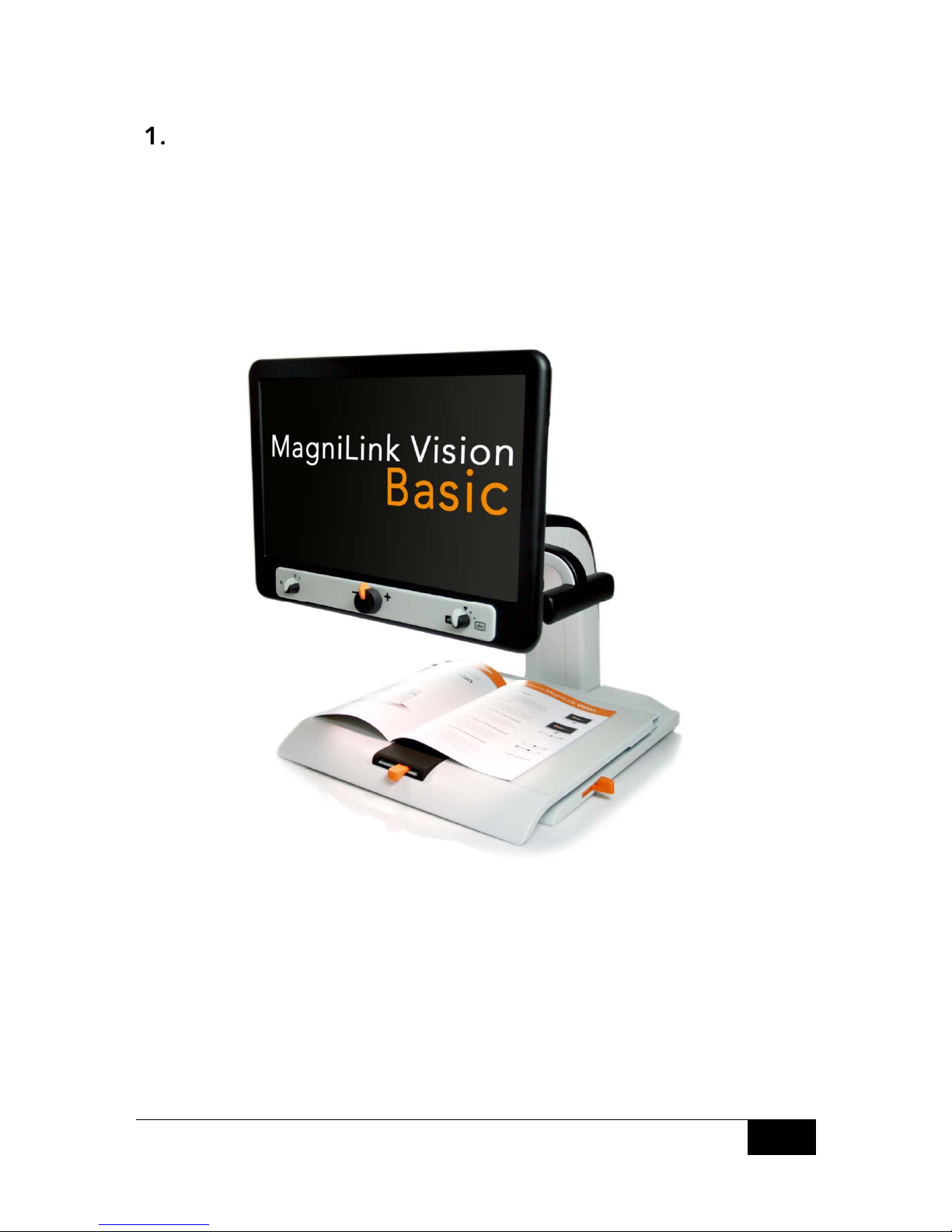
MagniLink Vision (MLV) is a video magnifier which is available in several
models. All models have the same structure, reading table and
electronics. Thereafter, the module is chosen following 2 steps:
- Camera (available as Standard Definition (SD) or High Definition
(HD).
- Screen size (integrated 18,5” or 23” wide-screen TFT).
Page 6
6 User Manual 79 44 269 | MagniLink Vision BASIC
Model Camera Screen Control panel
MLV-BASIC-19 SD 18.5” 3 Turn
MLV-BASIC-23 SD 23.0” 3 Turn
MLV-BASIC-HD-19 HD 18.5” 3 Turn
MLV-BASIC-HD-23 HD 23.0” 3 Turn
The equipment complies with requirements for CE-approval
of medical devices according to 93/42/EEG directives and
MDD 93/42/ECC with amendment from directive 2007/47/EC.
Page 7

User Manual 79 44 269 | MagniLink Vision BASIC 7
Safety Information
MagniLink Vision is only intended for use as a reading aid in home,
school or office environments.
Before connecting, check the system and the mains cord to ensure
that nothing is damaged. The enclosed power supply is only
intended for use with the MagniLink Vision.
Never operate the MagniLink Vision if the unit has been exposed
to water or other liquids.
Damaged mains cord or plugs may result in electrical shock or a
fire hazard. Do not allow anything to rest or roll over the mains
cord.
If cleaning is required, unplug the MagniLink Vision, and then use a
slightly damp (not wet) cloth. Only use water or a detergent
specially made for cleaning monitors and computers. Do not use
aerosol cleaners directly on the MagniLink Vision since it may
overspray and cause an electrical shock.
When operating the reading table, do not place hands under or
behind the reading table as one’s finger may get caught between
the reading table and the stand or the slides. The MagniLink Vision
should be placed at least 10 cm from the edge of the table.
Warning! Do not apply excessive weight to the reading table when
it is in its most extended position, as this may cause the system to
turn over, which could lead to personal injuries.
If the MagniLink Vision is to be transported, do not lift the unit by
the screen or the reading table, as these are movable parts.
If you are unable to restore normal operation by following the
operating instructions, do not attempt any further adjustments.
Unplug the set and contact your dealer or service technician. Only
use replacement parts specified by LVI.
Page 8
8 User Manual 79 44 269 | MagniLink Vision BASIC
!
Moving the system from a cold to a warm place may cause
condensation (water droplets) on its internal surfaces or on the
lens. To avoid condensation, install the system in the room where it
is to be used at least 30 minutes before use. Do not expose the
system to sudden or extreme changes in temperature.
If you are unsure, contact your dealer or service technician.
To prevent fire or shock hazard, do not expose the
equipment to moisture. To reduce the risk of electric shock,
do not remove the cover.
No user serviceable parts inside. Please refer service to qualified service
personnel.
Page 9

User Manual 79 44 269 | MagniLink Vision BASIC 9
Unpacking
The equipment is delivered in one box containing:
the unit
the user manual
Power adaptor
Inspect the package for exterior damage. Note that severe damages
should be addressed with the transport company.
Open the box and take out the MagniLink Vision. Remove the packaging
and place the unit on a table. The mains cord is placed on the back of
the unit. Refer to the section “Installation”, in the next chapter, for
further information.
3.1 Packaging
The packaging of the unit contains the following:
cellular plastic (EPP)
corrugated cardboard
polyethylene (LDPE4)
LVI recommends that all packaging material be kept, to be reused in
case of future shipping.
Page 10

10 User Manual 79 44 269 | MagniLink Vision BASIC
Installation
Place the unit on a table. The MagniLink Vision should be placed at least
10 cm/3.9 inches from the edge of the table. Note that the system’s
reading table can be moved up to 30 cm/11.8 inches in three directions.
MagniLink Vision is very light, which means that it is important to place
the system correctly to ensure that it always remains stable, especially if
the reading table is in its most extended position. An overload in this
position may cause the system to turn over.
Connect the mains cord to the wall socket and press Power On. The unit
is now ready to be used. The screen can be tilted 10 degrees and
lowered 8,5 cm/3.4 inches from the highest position. Place your hands on
the soft touch padding on both sides of the screen and adjust it to the
desired position. Release the brakes on the reading table; you are now
ready to start using the MagniLink Vision.
Writing position
Place the reading table in the desired position. Lock the table by
pushing the side way brake to the right end position and the depth way
brake to the far end position (towards the back).
Transport position
Place the table in the middle position and push it back as far as possible.
Lock the table by pushing the side way brake to the right end position
and the depth way brake towards the back.
Page 11

User Manual 79 44 269 | MagniLink Vision BASIC 11
4.1 Work place
A comfortable work place around your MagniLink is important.
It could be useful to keep the following in mind:
The chair should have a back rest.
The seat of the chair should be at a height which does not make
your legs become numb.
Let your feet rest on the floor.
The reading table should be at a height which allows your forearm
to rest horizontally on the table.
Shield off daylight. Lights from ceiling lamps, table lamps and
windows might be reflected on the monitor.
Page 12
12 User Manual 79 44 269 | MagniLink Vision BASIC
Instructions
5.1 Panel
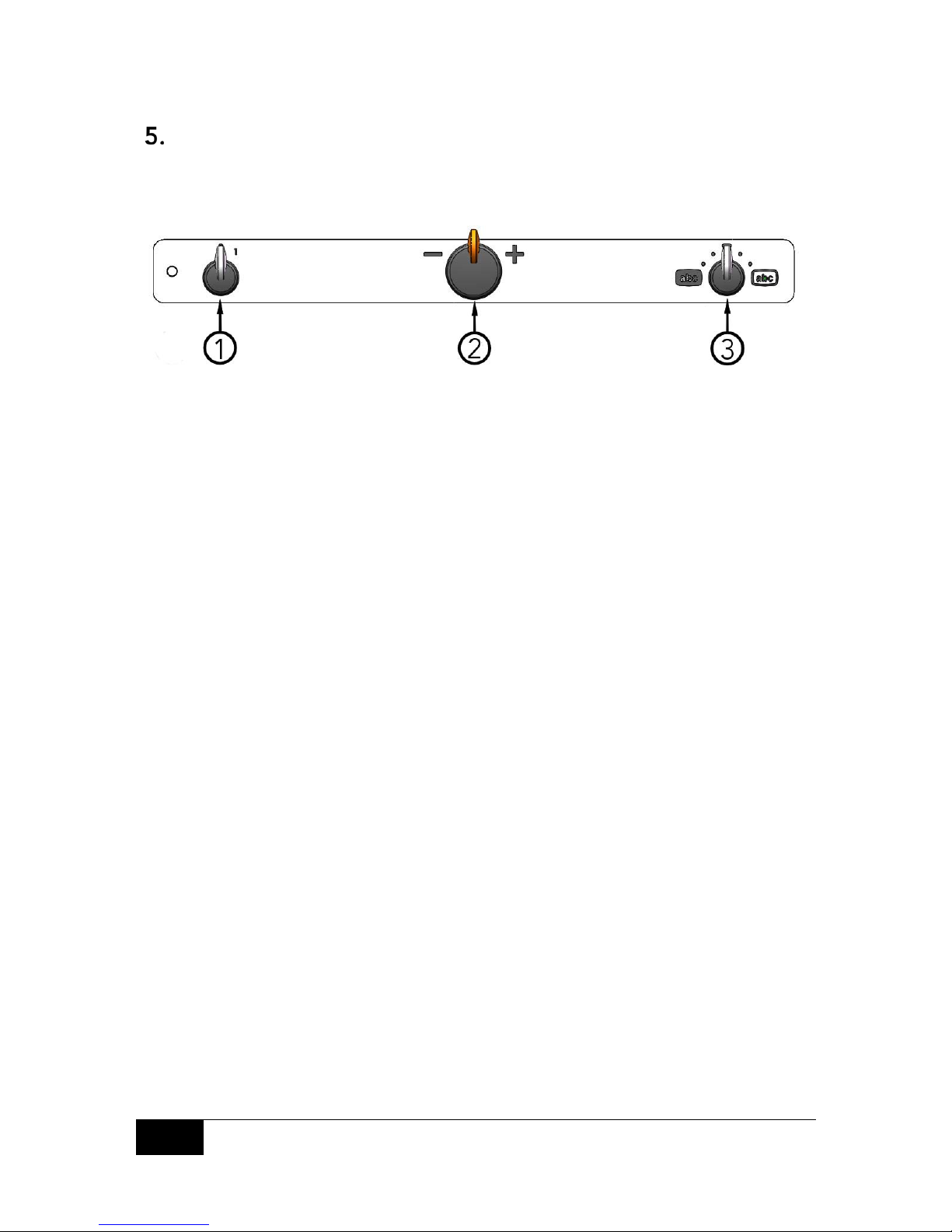
1. Power on/off
Turn this knob to switch the unit on or off.
2. Magnification control
Turn this knob to the left to decrease the magnification or turn it to
the right to increase the magnification. With this knob the
magnification can be set to 16 different levels.
3. Colour picture mode and high contrast mode
With the knob in the upright starting position the colour picture,
with natural colours, is displayed on the screen. Turn the knob to
the left for a negative high contrast mode and to the right for a
positive high contrast mode. There are four combinations in the
standard configuration:
Background/Text
White/Black
Black/White
Background/Text
Yellow/Black
Black/Yellow
Page 13
User Manual 79 44 269 | MagniLink Vision BASIC 13
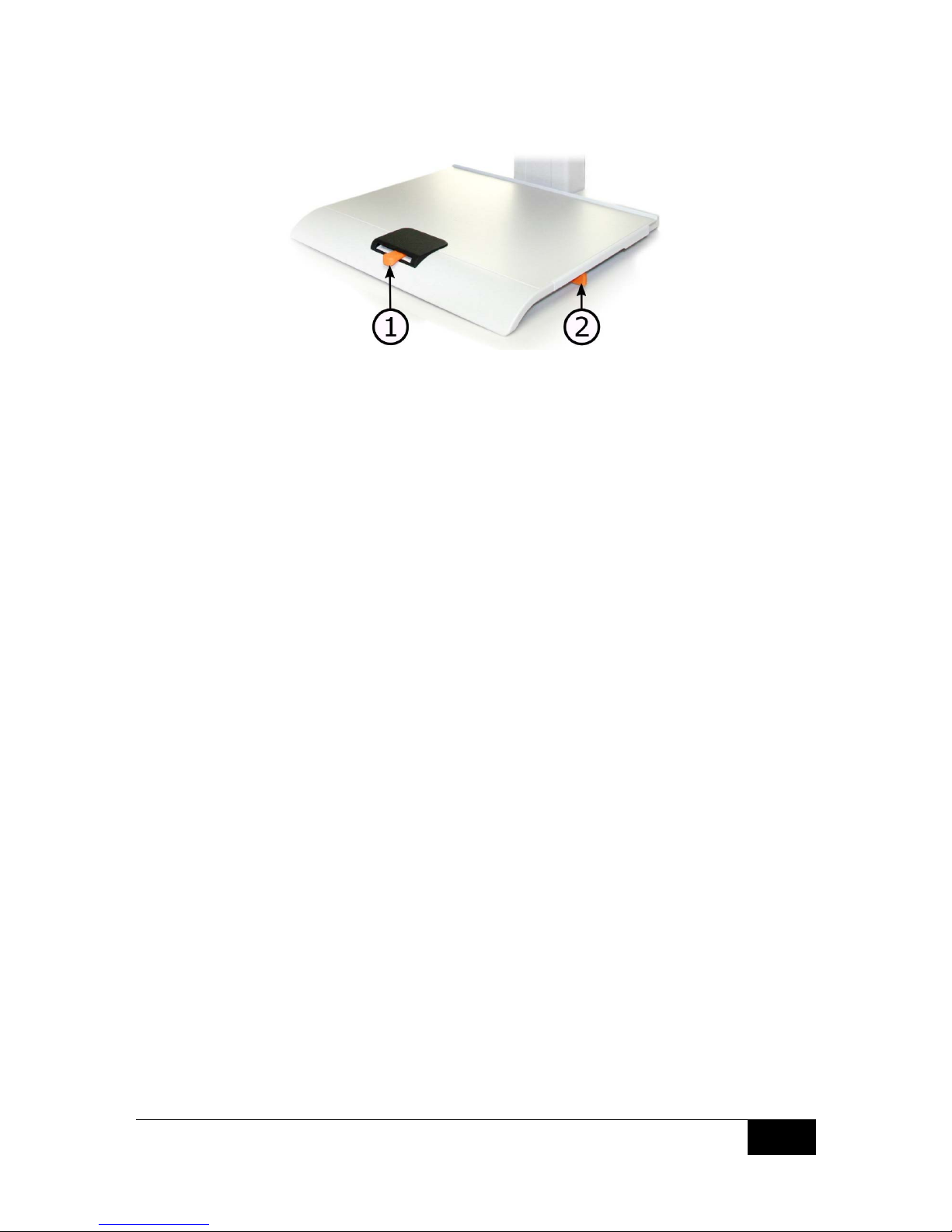
5.2 Reading table
1. Side way direction friction adjustment
Set the side way friction by moving this handle. With the brake in
the left end position, the reading table is unlocked. To increase
friction, push the side way brake to the right.
2. Depth way direction friction adjustment
Set the depth way friction by moving this handle. With the brake in
the near end position, the reading table is unlocked. To increase
friction, push the depth way brake towards the back.
Page 14

14 User Manual 79 44 269 | MagniLink Vision BASIC
Troubleshooting
If nothing happens when turning the system on, refer to the section
“Installation“ and check that all connections are correct.
If the LED to the left of the main switch is solid red, something is wrong
with the equipment and it cannot be used. Press the main switch once
and MagniLink Vision will make three attempts to restart. If the light still
indicates a solid red, turn off the equipment and contact an authorised
service technician.
If the light is flashing red, it means that the wrong voltage is being
supplied from the power supply. If the problem continues, pull out the
power outlet cable and contact an authorised service technician.
Never disassemble any covers to try to repair the system yourself.
Page 15

User Manual 79 44 269 | MagniLink Vision BASIC 15
Technical specification
MagniLink Vision with an 18.5” TFT widescreen
Magnification:
Resolution:
Power consumption:
Power consumption, standby:
Weight:
2.8 – 59x (SD) or 1.7 - 60x (HD)
1366 x 768
Max 28 W (SD) or 40 W (HD)
1.3 W
11.8 kg
26 lb
MagniLink Vision with a 23” TFT widescreen
Magnification:
Resolution:
Power consumption:
Power consumption, standby:
Weight:
3.5 – 68 (SD) or 2.0 - 60x (HD)
1920 x 1080
Max 40 W (SD) or 50 W (HD)
1.3 W
13.5 kg
29.7 lb
General properties
Refresh rate:
Luminance:
Contrast:
Focusing distance:
Working space:
Lamp type:
Mains Voltage:
Size of reading table:
Dimensions in use:
Dimensions of packaging:
60 Hz
300 cd/m
2
1000:1
0-60 mm (at max. magnification)
110 mm – 195 mm
4.3 – 7.7“
2 LEDs (SD)
100-240 V, 50-60 Hz
420 x 300 mm (W x D)
16.5 x 11.8” (W x D)
420 x 470 x 570 mm (W x D x H)
16.5 x 18.5 x 24.4” (W x D)
620 x 590 x 610 mm (W x D x H)
24.4 x 23.2 x 24.0” (W x D)
Page 16
16 User Manual 79 44 269 | MagniLink Vision BASIC
Temperature limit:
Relative air humidity:
Transportation and storage:
-20°C – +60°C
-4°F – +140°F
Operation: +5°C – +35°C
+41°F – +95°F
<80%
Disposal of old Electrical & Electronic Equipment (Applicable
throughout the European Union and other European
countries with separate collection programs).
This symbol, found on your product or on its packaging, indicates that
this product should not be treated as household waste when you wish
to dispose of it. Instead, it should be handed over to an applicable
collection point for the recycling of electrical and electronic
equipment.
By ensuring this product is disposed of correctly, you will help prevent
potential negative consequences to the environment and human
health, which could otherwise be caused by inappropriate disposal of
this product. The recycling of materials will help to conserve natural
resources. For more detailed information about the recycling of this
product, please contact your local city office, household waste disposal
service or the retail store where you purchased this product.
Page 17

User Manual 79 44 269 | MagniLink Vision BASIC 17
FCC statement (USA and Canada only)
NOTE: This device complies with Part 15 of the FCC rules. Operation is
subject to the following two conditions:
(1) This device may not cause harmful interference.
(2) This device must accept interference received, including interference
which may cause undesired operation.
This equipment has been tested and complies with the limits for a Class
B digital device, according to part 15 of the FCC Rules. These limits are
designed to provide reasonable protection against harmful interference
in a residential installation.
This equipment generates uses and can radiate radio frequency energy.
If not installed and used in accordance with the instructions, it may cause
harmful interference to radio communications. However, there is no
guarantee that no interference will occur in a particular installation.
If this equipment causes harmful interference to radio or television
receivers, (which can be determined by turning the equipment on and
off) the user is encouraged to try one or more of the following measures:
Reorient or relocate the receiving antenna.
Increase the distance between the equipment and receiver.
Connect the equipment to a different circuit from the one that the
receiver is connected to.
Consult LVI or an experienced radio/TV technician for help.
CAUTION: The Federal Communications Commission warns the user
that changes or modifications of the unit not expressly approved by the
party responsible for compliance could void the user´s authority to
operate the equipment.
To comply with the FCC rules, the system should only be used with the
enclosed LVI power supply.
Page 18
18 User Manual 79 44 269 | MagniLink Vision BASIC
DECLARATION OF CONFORMITY
according to the Medical Devices Directive, 93/42/EEC with amendments from
directive 2007/47/EC
Type of equipment:
Reading Aid
Brand name or trademark:
MagniLink
Type designation:
MLV
Product class:
Class 1.
Manufacturer:
LVI Low Vision International AB
Address:
Verkstadsgatan 5
S-352 46 Växjö
Sweden
Web: http://www.lvi.se
Phone:
Fax:
+46 470 - 72 77 00
+46 470 - 72 77 25
As the manufacturer, we declare under our sole responsibility that:
the product complies with the provisions of the Council Directive 93/42/EEC with
amendments from directive 2007/47/EC.
we will keep the technical documentation described in section 3 of Annex VII
available to the national authorities for a period ending at least five years after the
last product has been manufactured.
the device meets the Essential Requirements of Annex 1 which applies to it, taking
into account the intended purpose of the device.
to follow the requirements regarding products placed on the market as described
in section 4 of Annex VII.
Manufacturer Manufacturer´s authorized representative
Date Signature Position
2010-09-21
Managing Director
Clarification
Erik Bondemark
 Loading...