

Page 1
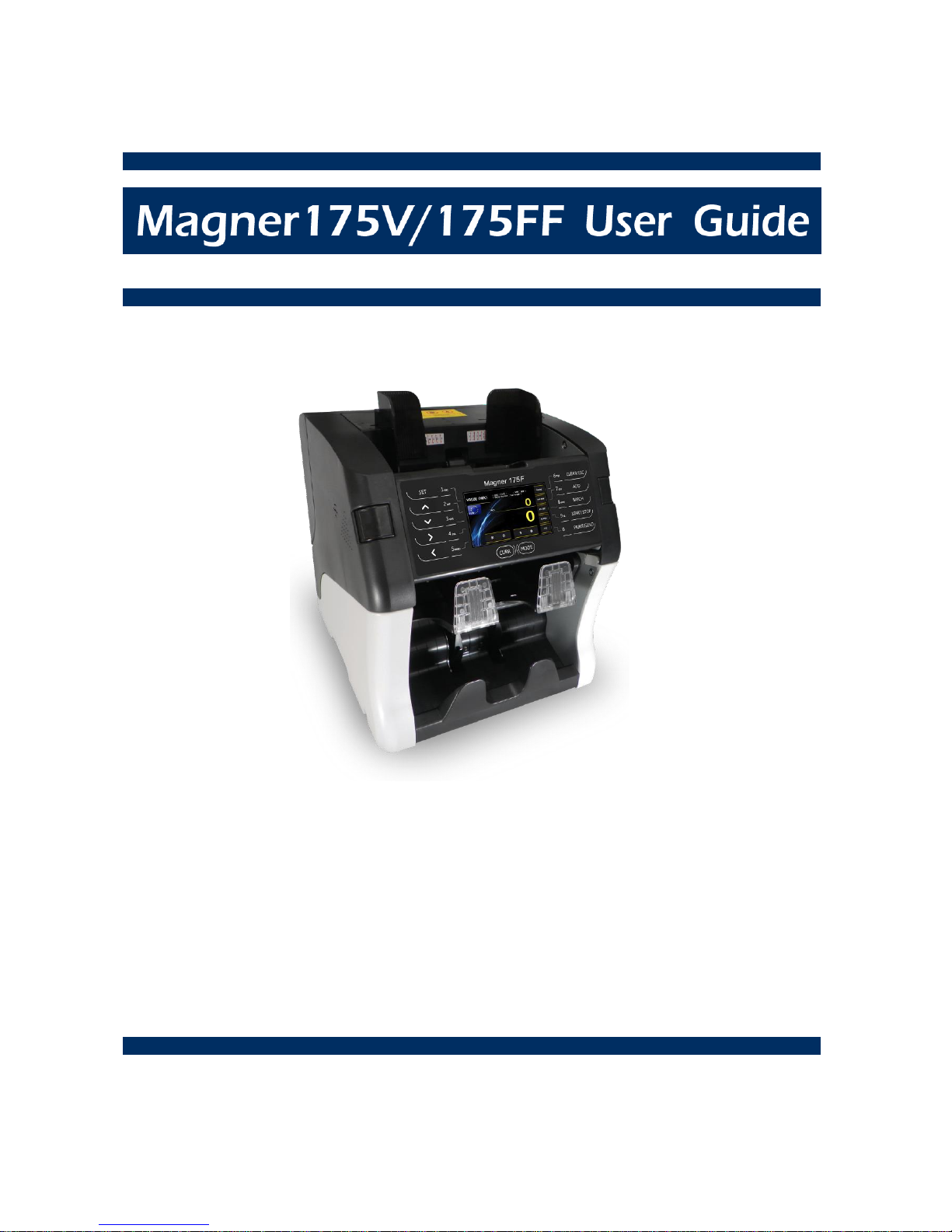
Satisf ied with our counterfeit detector?
Here comes a machine with a complete solution using the
most advanced state-of-the-art technology.
Introducing, the new Magner-175V/175FF.
This Machine is designed to make your banknotes safe and
your duties easier than ever before.
Rev. 1.0.6
Date: 2014. 12. 31
Currency Fitness Sorter, Authenticator, in a 2 Pocket design
Page 2

Magner175V/175FF USER Guide
Magner INT 2
- Contents –
Introduction
..................................................................................................................... 3
For Safety Use ...................................................................................................................
3
Packing List .....................................................................................................................
10
Options ............................................................................................................................
10
Appearance .....................................................................................................................
11
1. Screen Description
.....................................................................................................
13
2. Basic Operation
..........................................................................................................
15
3. Operation Mode 1
........................................................................................................
19
4. Operation Mode 2
........................................................................................................
21
5. Fitness Level
...............................................................................................................
35
6. CF Level
.......................................................................................................................
39
7. Machine Model
...........................................................................................................
.42
8. Machine Setting
..........................................................................................................
43
9. System Setting
............................................................................................................
44
10. Network Setting
.........................................................................................................
50
11. Specification
.............................................................................................................
52
12. Error Code
.................................................................................................................
53
13. Maintenance
..............................................................................................................
55
Page 3
Magner175V/175FF USER Guide
Magner INT 3
Introduction
Thank you for purchasing MAGNER175V/175FF.
MAGNER175V/175FF is smart, practical multi-currencies fitness sorter.
MAGNER175V/175FF sorts holes, tears, dog-ears, tape, soil, stains, folded and de-inked
banknotes with high speed.
The machine is designed for user’s convenience, optimized for high performance and
easy maintenance.
MAGNER175V/175FF has high connectivity interfaces and 7” full color graphic LCD display.
For Safety Use
In this section, the compliance matters are described in order to use the product safely,
and to prevent you and other people from the damages brought by the product to
the human bodies or properties.
Please read this instruction manual thoroughly in advance to use in the correct way.
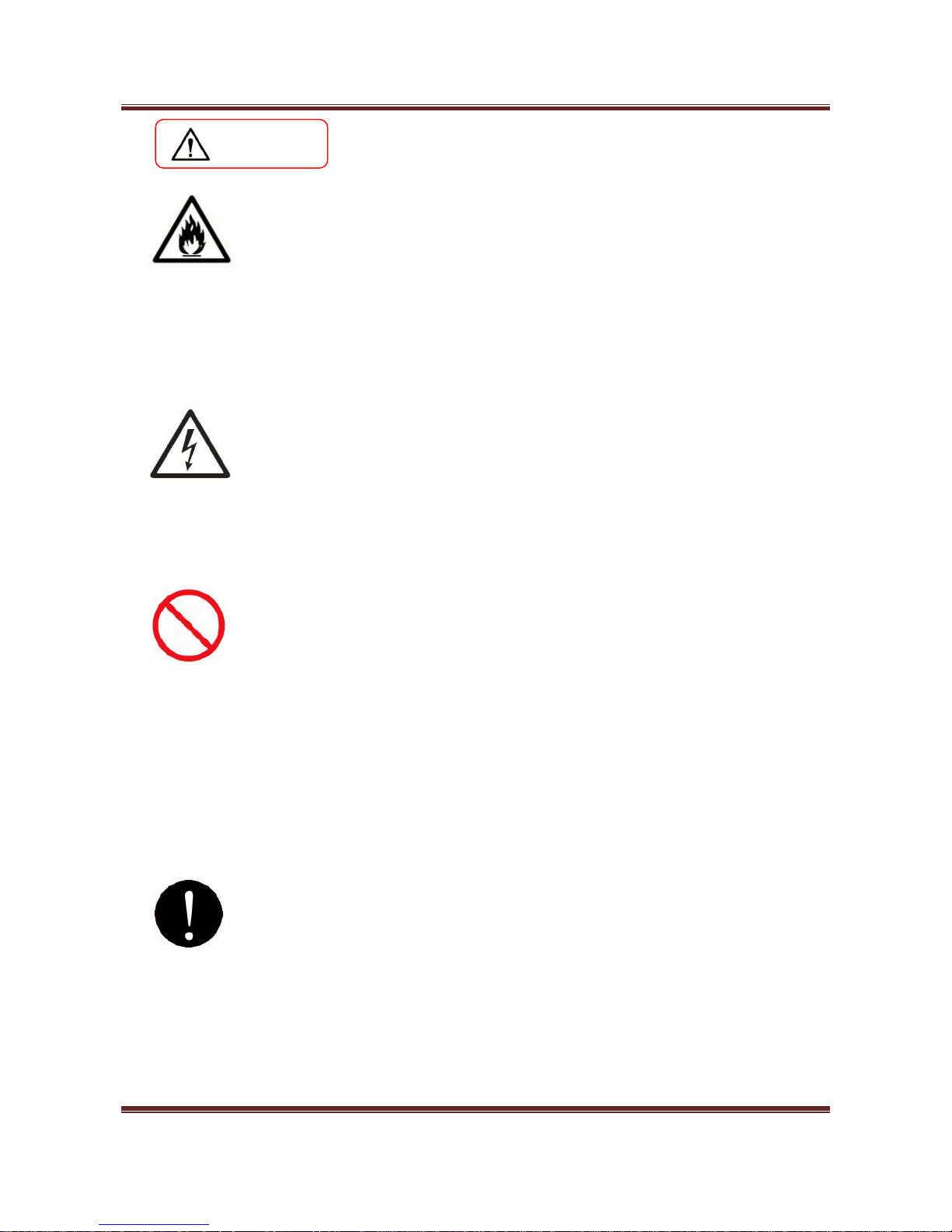
Warning
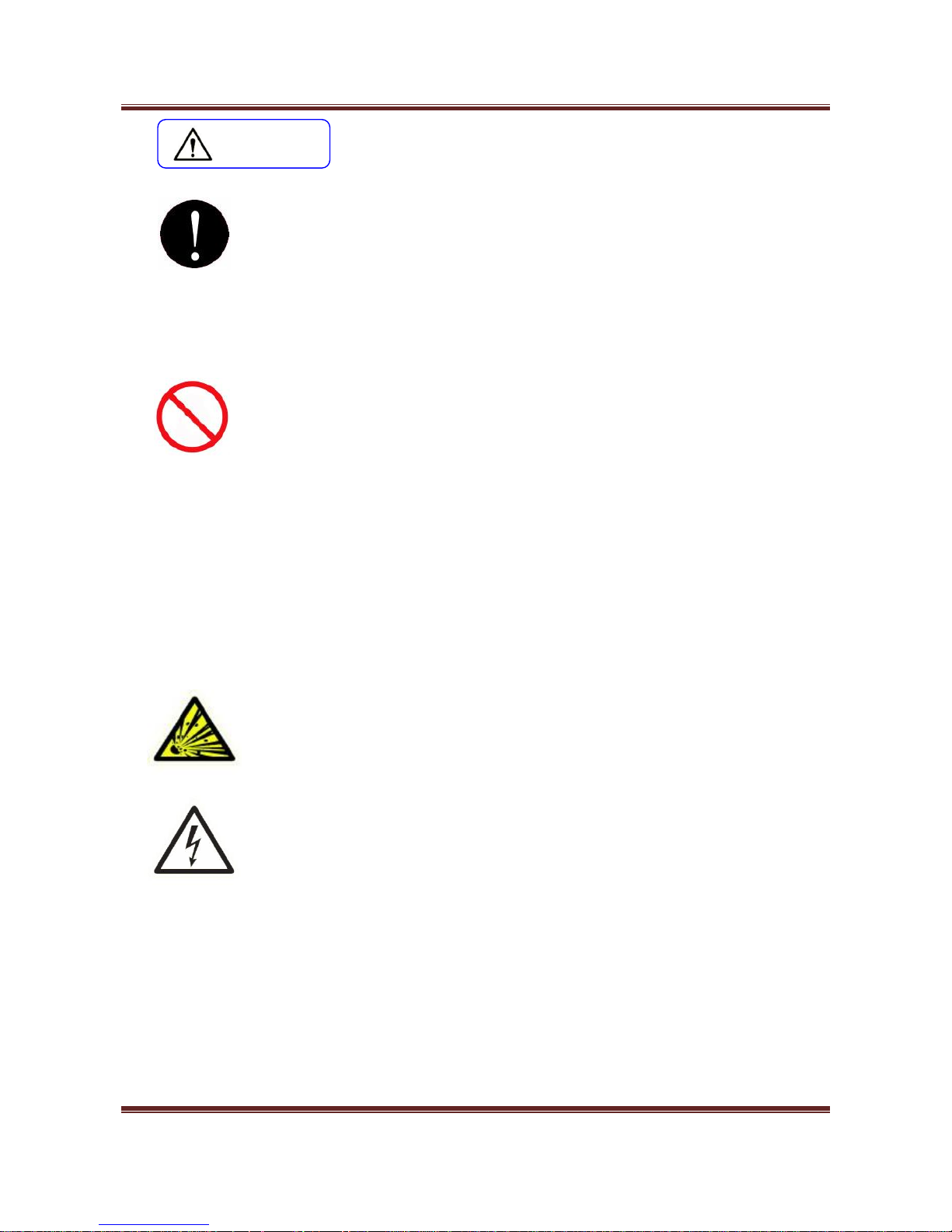
Caution
It denotes the contents in which mishandling of the product by
neglecting this indication may cause the people’s light injury or only
physical damage.
It denotes the contents in which mishandling of the product by
neglecting this indication may cause the people’s serious injury.
This symbol indicates that the precautions for handling the product.
Please read the indications well and utilize the product safely.
This symbol indicates prohibited matters not to do. Please read the
indications well and never do the prohibited matters.
This symbol denotes that there are indication matters which should be
done without fail. Please read the indicated matters thoroughly and
perform the matters without fail.
Page 4
Magner175V/175FF USER Guide
Magner INT 4
Warning
Installation
1. At installation and relocation of the products, please contact our distributor near
you or our designated dealers. If installation is not perfect, there is a risk of a falling
accident, electric shock, fire and burn injury.
2. At installation and use of the products, keep the space sufficient for opening and
closing the door, cover and operation. If a part of the product touches a human
body, it may cause an accident.
3. In case of installing the product at the following places, you should confirm the
Road Law, Road Traffic Law and Fire Protection Law, etc. If compliance conditions
are not clear, please consult with the authorities concerned.
- The place which may disturb traffic or accident prevention.
- The place adjacent to the fire extinguishing and detecting apparatus.
- The place adjacent to the road signs or traffic signals.
- The place where combustible materials or gas are treated (gas stations, etc.)
Passages and facilities for evacuation Illegal installation may cause an accident.
4. Keep an installation space as described in the instruction manual, and do not
choke up the ventilation inlet. If the ventilation inlet is choked, heat is accumulated
inside and it may cause fire.
5. Depending on the installation place, mounting of an earth leakage breaker is
required by Electricity Enterprises Law. Illegal installation may cause an accident.
1. Do not install the product at the place where water may spill on it. If water enters
into the product, insulation performance degrades and it may cause fire and/or
electric shock.
2. Do not install the product at the place where the floor cannot bear the load of the
product, or at the unstable place with inclination and/or irregularity. It may cause the
accidents of floor caving and sudden move of the product.
3. Installation at the following places should be avoided.
There are safety problems and deterioration of the product may be accelerated,
which leads to a cause of failure.
- 1m or less from volatile combustible materials or curtains.
- 1m or less from heating apparatus such as stoves, heaters etc.
- The place with direct winds blown from air conditioners, ventilating openings
etc.
Page 5
Magner175V/175FF USER Guide
Magner INT 5
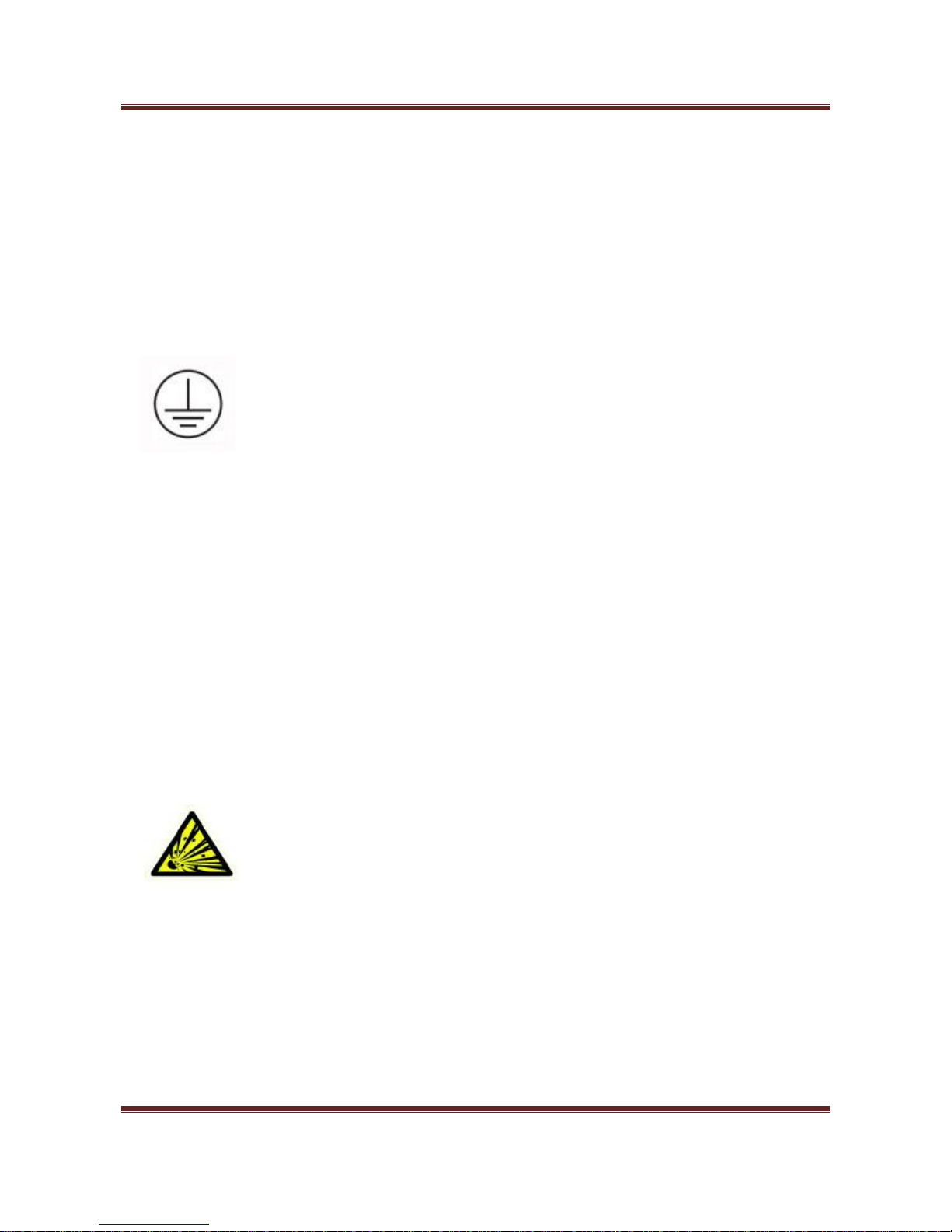
Grounding work should be made for safety and prevention of static electricity and
noise failure. In addition, a ground wire should be installed independently without
sharing the wire with other products. At grounding work, please be sure to contact
our distributor near you or our designated dealers. In case of electrical leakage
when grounding is insufficient or not connected, it may cause fire and/or electric
shock.
The place where a ground wire can be fitted:
- Ground terminals for power receptacle.
- The copper piece etc. with a length of 65 cm or more, buried in the ground.
- The ground terminals on which grounding work is made.
The place where is a ground wire must not be fitted.
- Gas pipes
- Telephone wires for exclusive use
- Lightning rods
- Water pipes or faucets with plastic materials at their intermediate part.
- The place with high temperature, high humidity, or low temperature.
- The place with direct sunlight.
- The place with much dust.
When installing the product at the following places, please contact our distributor
near you or our designated dealers.
- The place exposed to salty winds or corrosive gas.
- The place with much swinging or vibration.
Do not use or put the combustible materials such as thinner, combustible gas, or a
high-volatile object around/inside the product. Otherwise, it may cause explosion
and/or fire due to heating from the product or flashing from power supply..
Page 6
Magner175V/175FF USER Guide
Magner INT 6
Warning
Power Supply
1. When using the product, connect it to the power supply specified in the instruction
manual. If it is connected to the power supply, other than the product’s specification,
it may become a cause of fire, electric shock, and/or electrical leakage.
2. Do not use a power supply cord and the plug other than the attached ones. If a
current that exceeds the rating flows in the power supply cord, it may cause fire.
3. Be sure to insert the blade part of the power supply plug into an outlet. Insufficient
insertion may cause fire.
1. When the earth leakage breaker frequently operates, please contact our
distributor near you or our designated dealers. If the product is used or left as it is, it
may cause fire and/or electric shock.
2. Do not modify, process, or repair the power supply cord and the plug. In addition,
do not convert a 3-prong power supply plug into a two-pole type. Grounding
becomes insufficient and there may cause electric shock.
Please follow the items below to prevent electric shock and/or fire due to damage
of the power supply cord.
- Do not pull the cord part when pulling out the power supply plug.
- Do not put anything on the cord part.
- Do not pass the cord near a source of heat.
- Do not bend or pinch the cord.
- Do not tread or twist the cord.
- Do not spill chemicals on the cord.
- Do not use it while it is bundled.
- Do not fix it with a stapler etc.
1. Do not use the power supply cord and the plug for other products or purposes.
Further, when they are lost or damaged, please purchase them at our distributor
near you or our designated dealers. The attached power supply cord and the plug
are designed and confirmed the safety for connecting to this product to use. If
they are used for other products or purposes, it may cause fire and/or electric
shock.
2. The product should be used at the specified frequency. If it is used at other than
the specified frequency, it may cause an accident.
Page 7
Magner175V/175FF USER Guide
Magner INT 7
Caution
Handling
1. The product should be used under the environment specified in the instruction
manual. If it is used under the other environment of the specification, there may
cause fie and electric shock.
2. When operating inside the product for error or clearing or cleaning etc., the
operation should be made in accordance with the description in the instruction
manual. Operation other than the description may cause an accident.
1. Do not turn off the power, pull out the power supply plug, or open the cover of
the product during the operation. Otherwise, it may cause an accident.
2. Do not put a vase or glass with an object and/or water etc. on the product.
Otherwise, it may cause fire, electric shock, and/or injury by spilling water or
dropping.
3. Do not apply shock on the product. There is a risk of damaging the product and
normal operation cannot be performed.
4. Do not use chemicals such as thinner or benzene when removing dirt of the
product. Otherwise, it may cause damages.
5. Do not use a interface cable other than the attached one. When cables are other
than the attachment, it may cause the interface error or machine trouble.
Do not us a combustible spray etc. around product. If spray gas etc. contacts the
electrical parts inside the product, it may cause explosion and fire.
1. When touching inside the product for cleaning or parts replacement etc., be sure
to turn off the power. If you work with turning the power on, it may cause electric
shock and/or injury.
2. Do not touch the product and power supply plug and cord with a wet hand.
There is a risk of electric shock.
3. The electrical parts inside the product should not get wet by rain or water at
cleaning etc. if they get wet, it may cause electric shock and/or shock.
4. Do not turn of air heating suddenly when the product is completely cold.
Moisture may adhere inside the product due to sudden air heating and it may
cause electric shock.
Page 8
Magner175V/175FF USER Guide
Magner INT 8
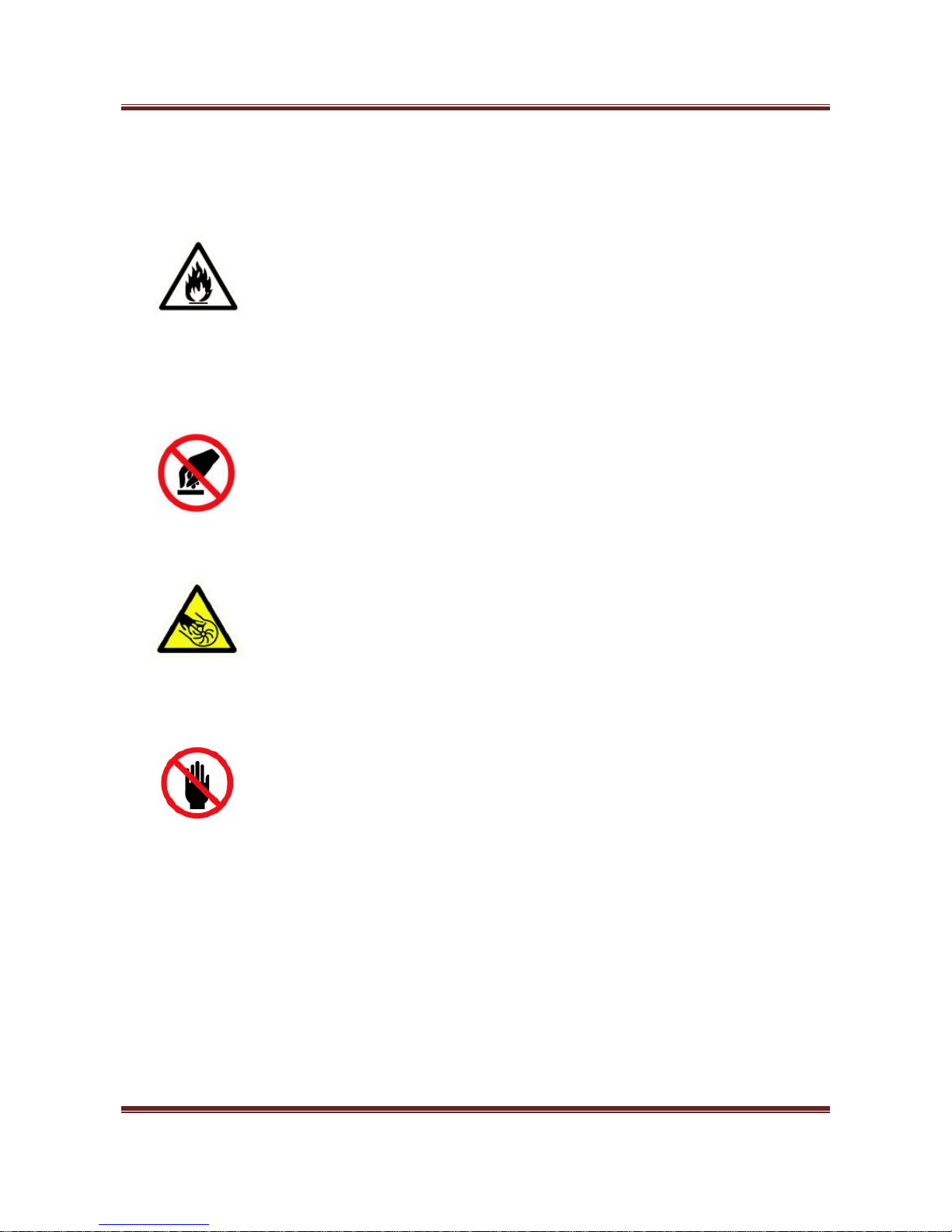
5. There is a charging part inside. Be sure to open the cover with turning off the
power. If the cover is opened without turning off the power, it may cause electric
shock.
1. Do not drop any metallic piece such as a clip, staple etc. inside or in a clearance
of the product. If a metallic piece drops inside the product and contacts the electric
circuit, it may cause fire.
2. When the product is not use for a long time, be sure to pull out the power supply
plug from an outlet for safety. Otherwise, it may cause heating and/or firing due to
dust accumulation.
Do not modify the product or mount modified parts on the product. Further, do not
dismount the portion which is not indicated to be opened/closed in the manual, or
the cover and parts etc. fixed with screws etc. Otherwise, it may cause fire,
electric shock, and/or injury.
1. Do not approach your hand or cloths during operation to moving parts of the
product reachable. There may cause injury and/or pinching of a finger.
2. When closing a door, pay attention not to pinch a finger. It may cause of injury.
3. When working with a door opened, confirm it is locked. It may become a
cause of injury because the door may suddenly close.
Do not touch the gear etc. It may cause injury.
Page 9
Magner175V/175FF USER Guide
Magner INT 9
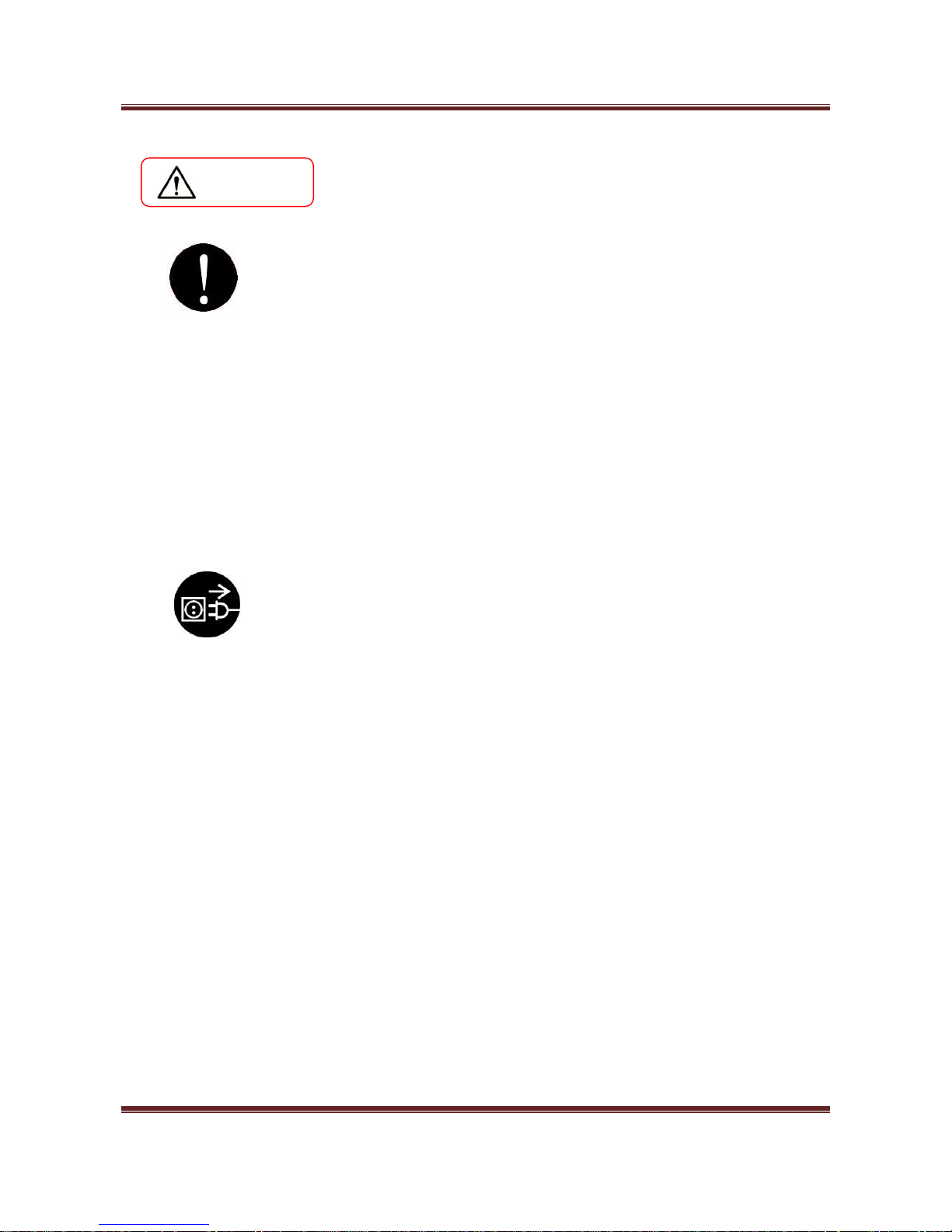
Warning
Maintenance
1. For repairing the product, please contact our distributor near you or our
designated dealers. Insufficient repair may cause fire, electric shock, and/or injury.
2. When the product has sunk under the water due to a disaster etc., stop using it
and please ask for repair/check to our distributor near you or our designated
dealers. If used as it is, it may cause fire and/or electric shock.
3. Check periodically whether its installation place is unstable or not. If there is any
abnormality, please contact our distributor near you or our designated dealers. If it
is continuously used with insufficient installation, it may cause a falling accident.
4. Check and clean the power supply plug and the cord regularly. It the power
supply plug is broken or the cord is damaged, stop using and please replace it by
contacting our distributor near you or our designated dealers. It may cause fire
and/or electric shock.
When smoke, abnormal smell, or abnormal sound is generated from the product,
stop using it immediately, cut off power supply and pull out the plug from the outlet.
Then, please contact our distributor near you or our designated dealers. It used or
left as it is, it may cause fire and/or electric shock.
Page 10
Magner175V/175FF USER Guide
Magner INT 10
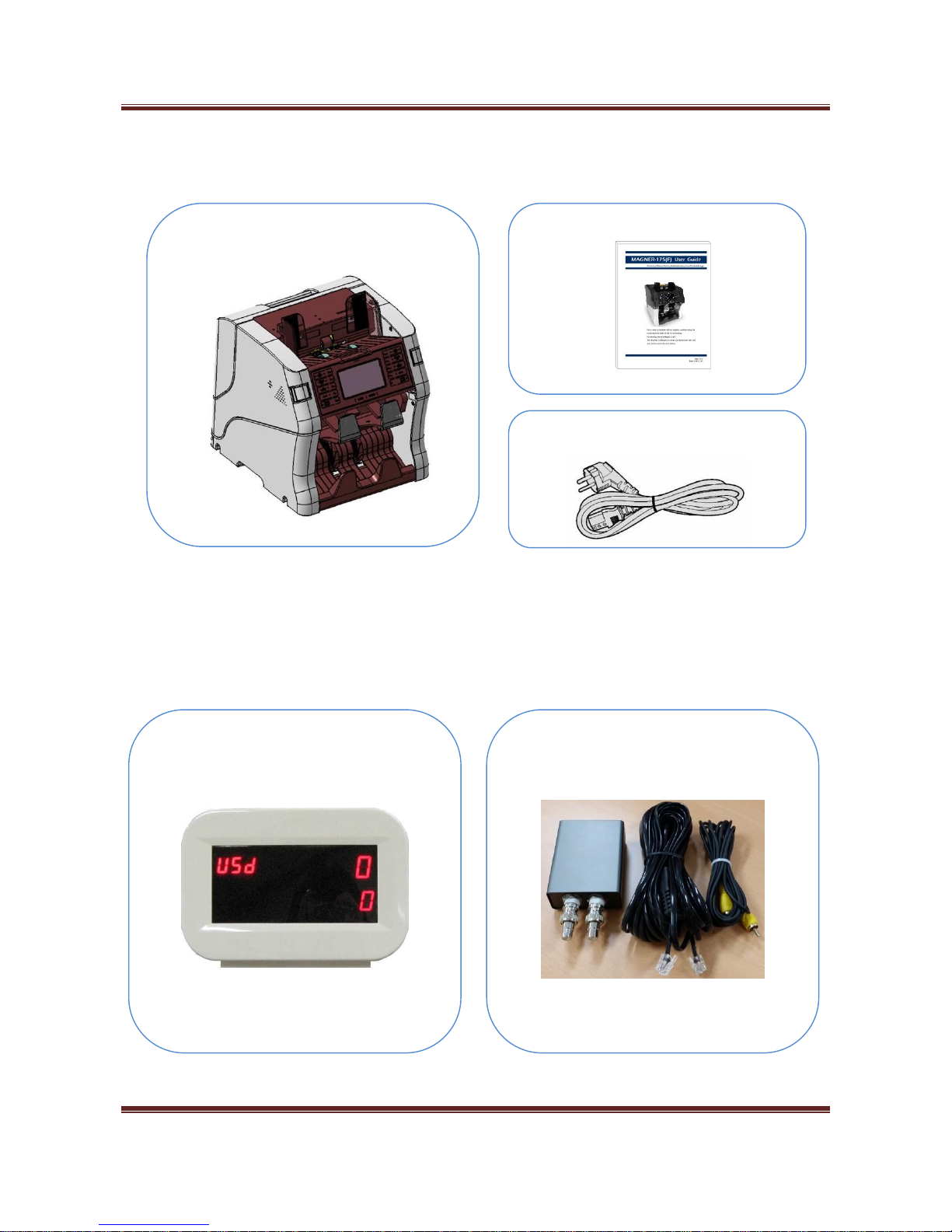
Packing List
Options
External Display
OSD Kit
Magner175V/175FF
Power Cable
Manual
Page 11
Magner175V/175FF USER Guide
Magner INT 11
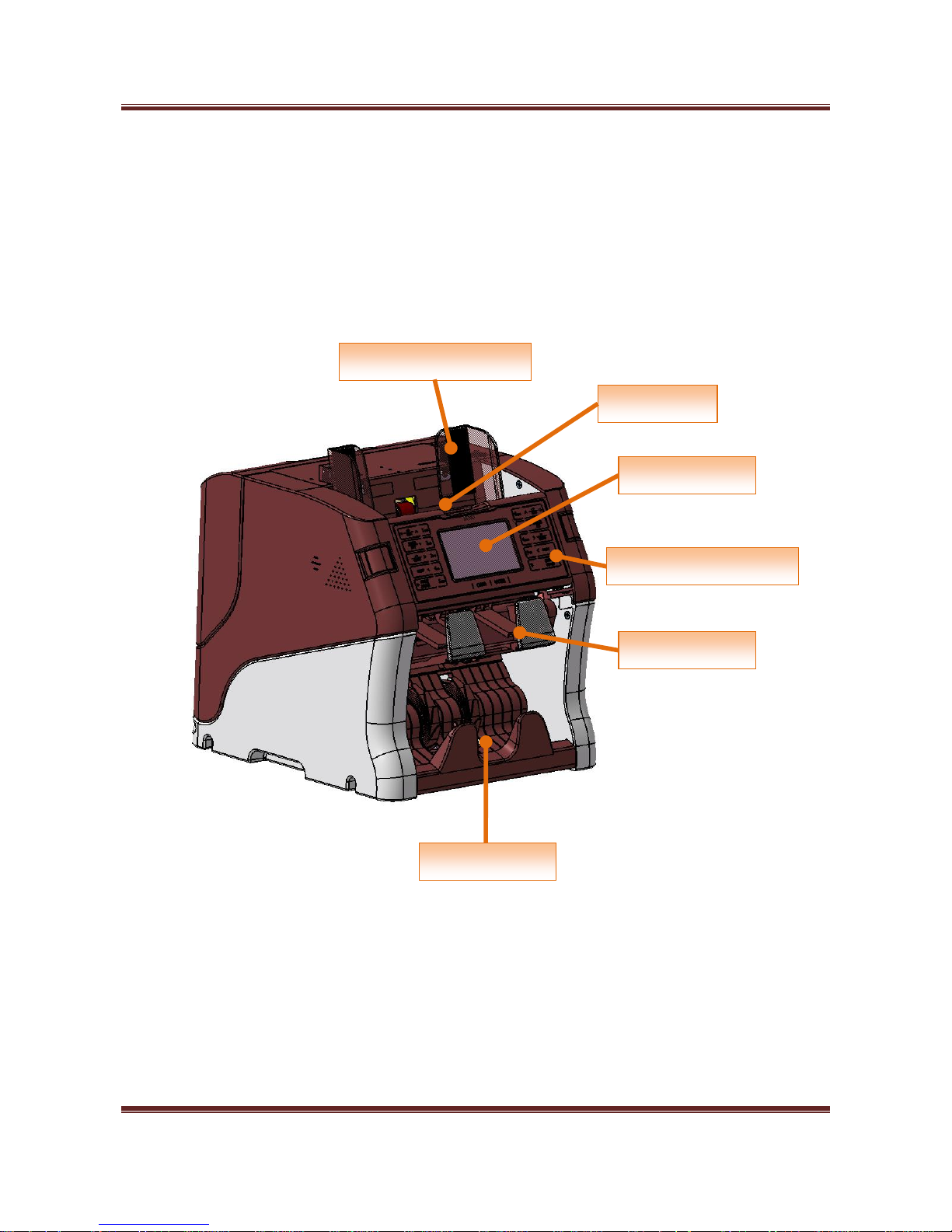
Appearance
<Front View>
Hopper
Reject Pocket
Stacker
LCD Display
Hopper Guide
Operation Keys
Page 12
Magner175V/175FF USER Guide
Magner INT 12
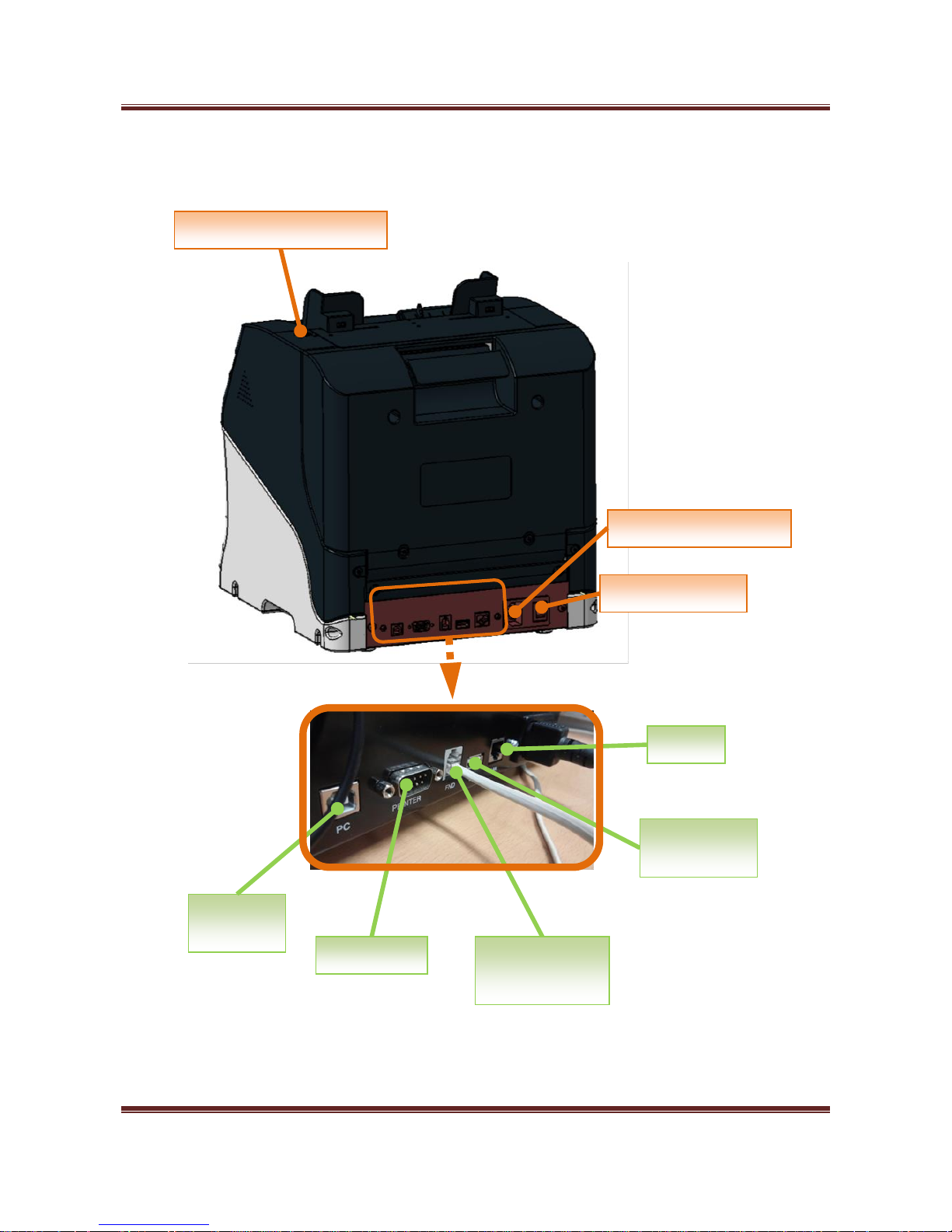
<Rear View>
Printer
USB-H
(PC)
USB-S
(Devices)
LAN
External
Display
Gap Adjust Knob
Power Switch
Power Supply Socket
Page 13
Magner175V/175FF USER Guide
Magner INT 13
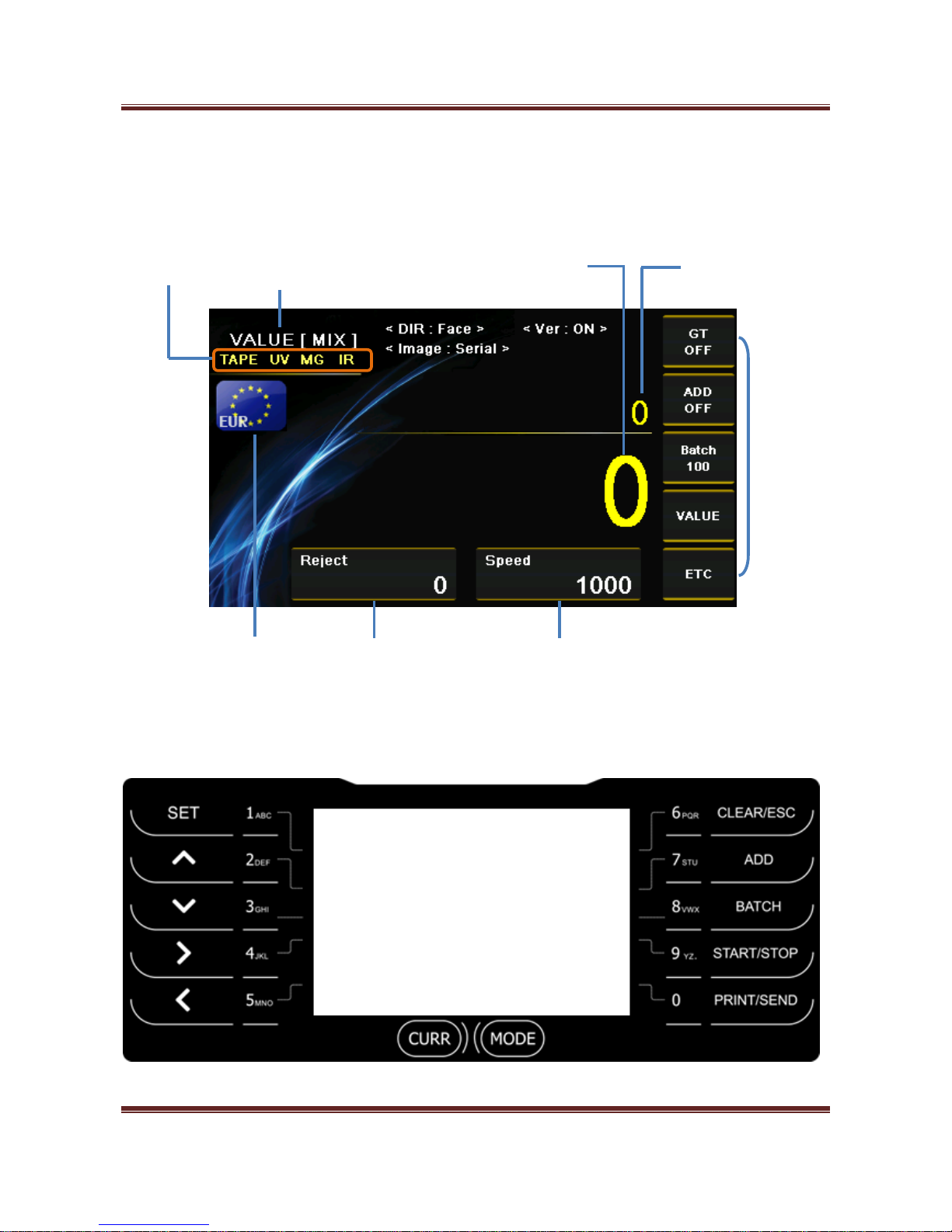
1. Screen Description
1) Key Operation
Currency
Operation
Mode 1
Reject
Number
Counting
Speed
Counting
Value
Counting
Number
CF
Sensors
Operation
Mode 2
Page 14
Magner175V/175FF USER Guide
Magner INT 14
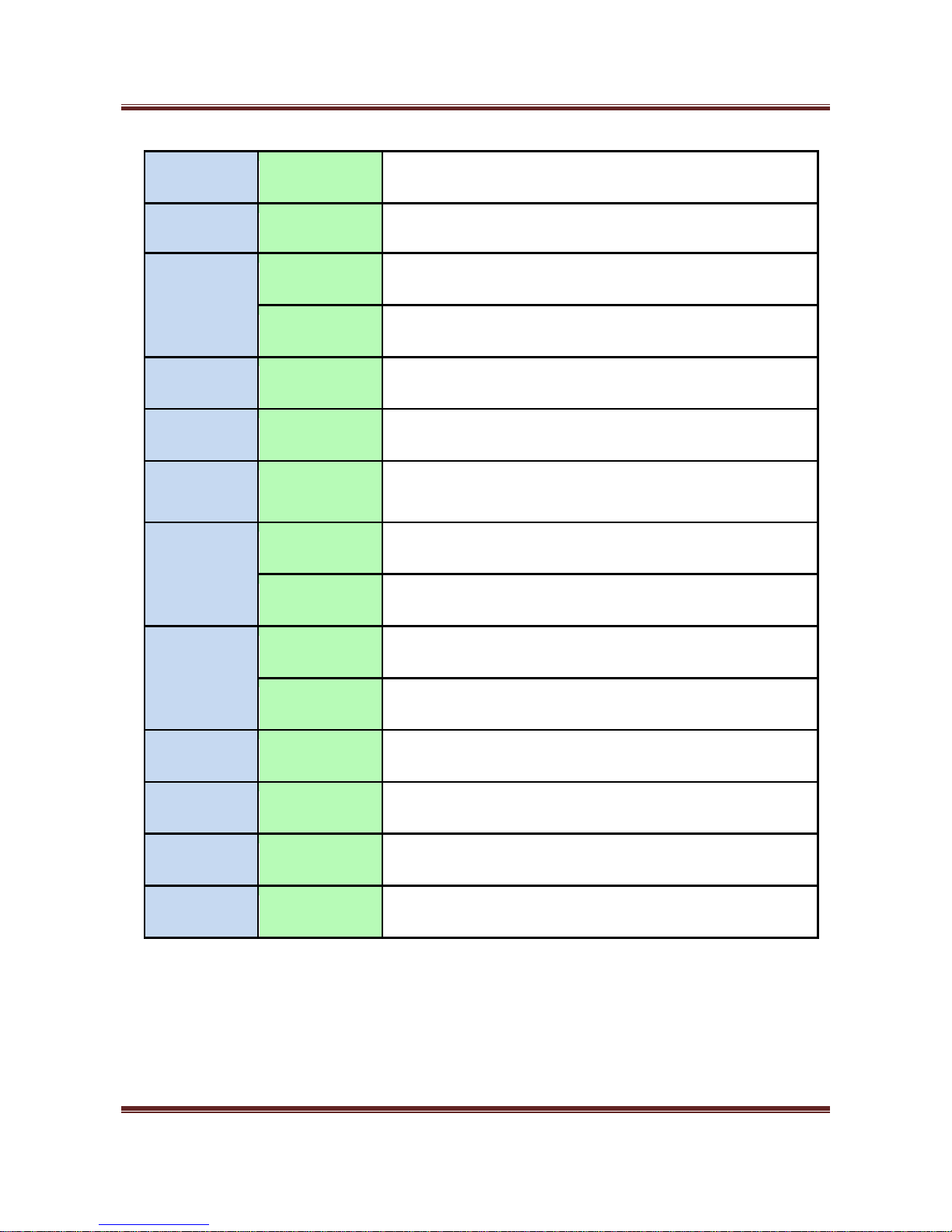
CURR
Short Key
Select Currency
MODE
Short Key
Select Operation Mode.
SET
Short Key
Enter fitness setup menu. Save the number.
Long Key
Enter Pincode menu.
CLEAR/ESC
Long Key
Delete characters
ADD
Short Key
Turn on or off ADD
BATCH
Short Key
Select BATCH number.
START/STOP
Short Key
Start or stop the counting and exit the menu.
Long Key
Enter Setting Mode.
PRINT/SEND
Short Key
Print the counting result to Display or Printer.
Long Key
Print the counting result via Printer.
↑↓
Short Key
Change counting Speed.
↑↓
Long Key
Page at Setting Mode.
→ ←
Short Key
Change value and move curser or page at Setting Mode.
1~0
Short Key
Enter the relevant menu.
Page 15
Magner175V/175FF USER Guide
Magner INT 15
2. Basic Operation
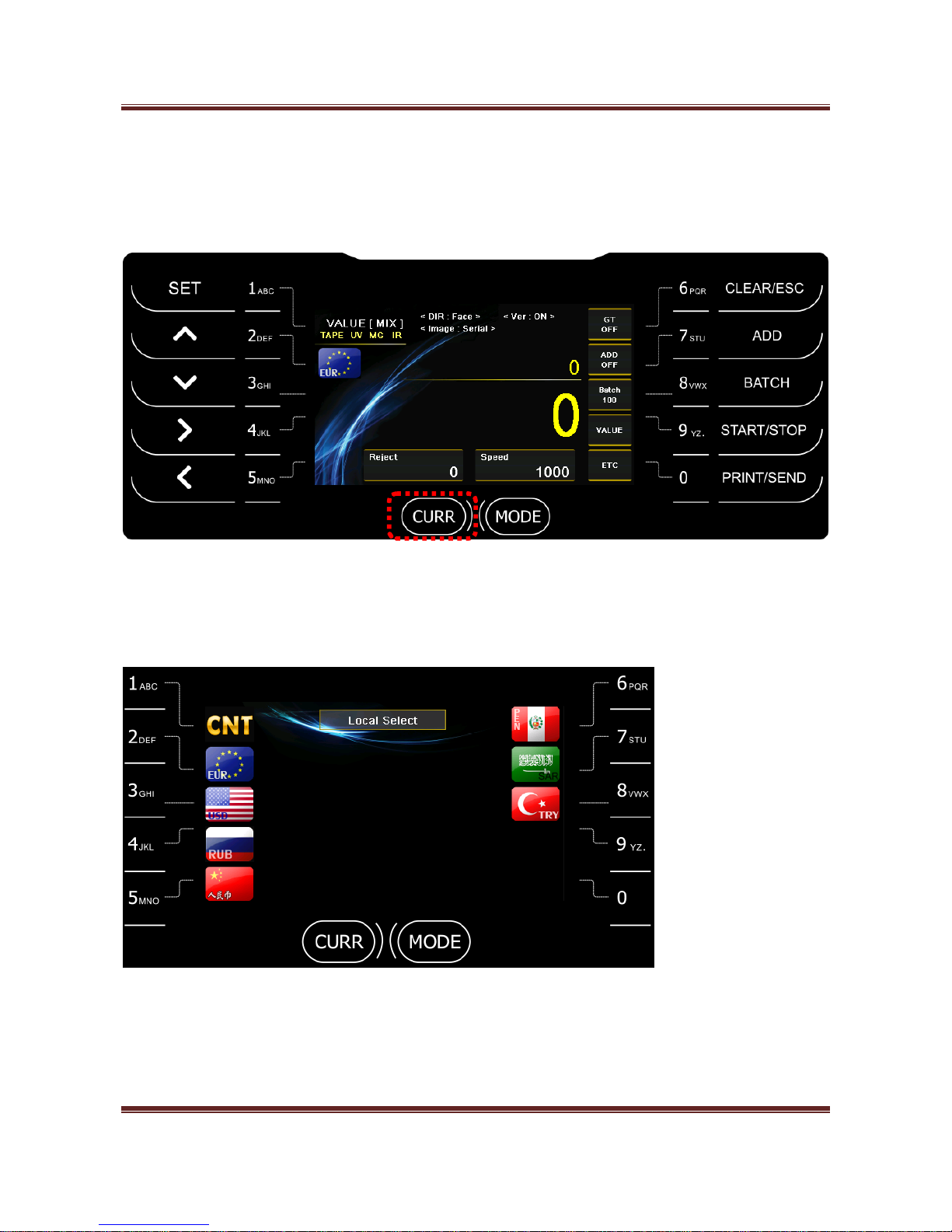
2-1. Currency - Change local currency.
When long press “CURRENCY”, the installed currencies are shown together and you can select the currency
directly with number key.
Page 16
Magner175V/175FF USER Guide
Magner INT 16
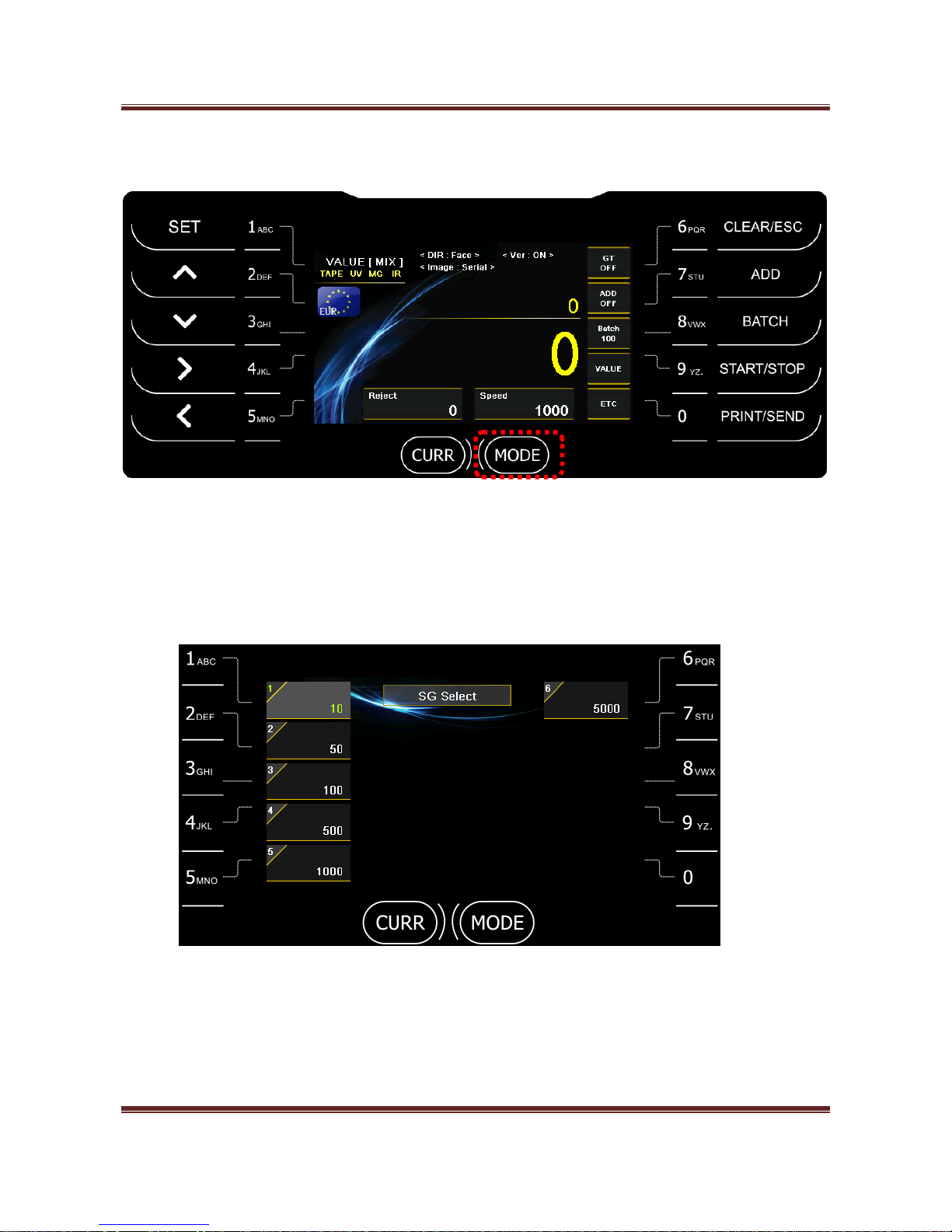
2-2. Mode - Select Operation Mode, MIX, SP and SG Mode.
- Mix - Count all denominations of selected currencies.
- SP - The first inserted denomination is sent to Stacker Pocket.
- SG - The selected denomination is sent to Stacker Pocket.
Long press MODE key and select the denomination.
Page 17
Magner175V/175FF USER Guide
Magner INT 17
2-3. CF detection
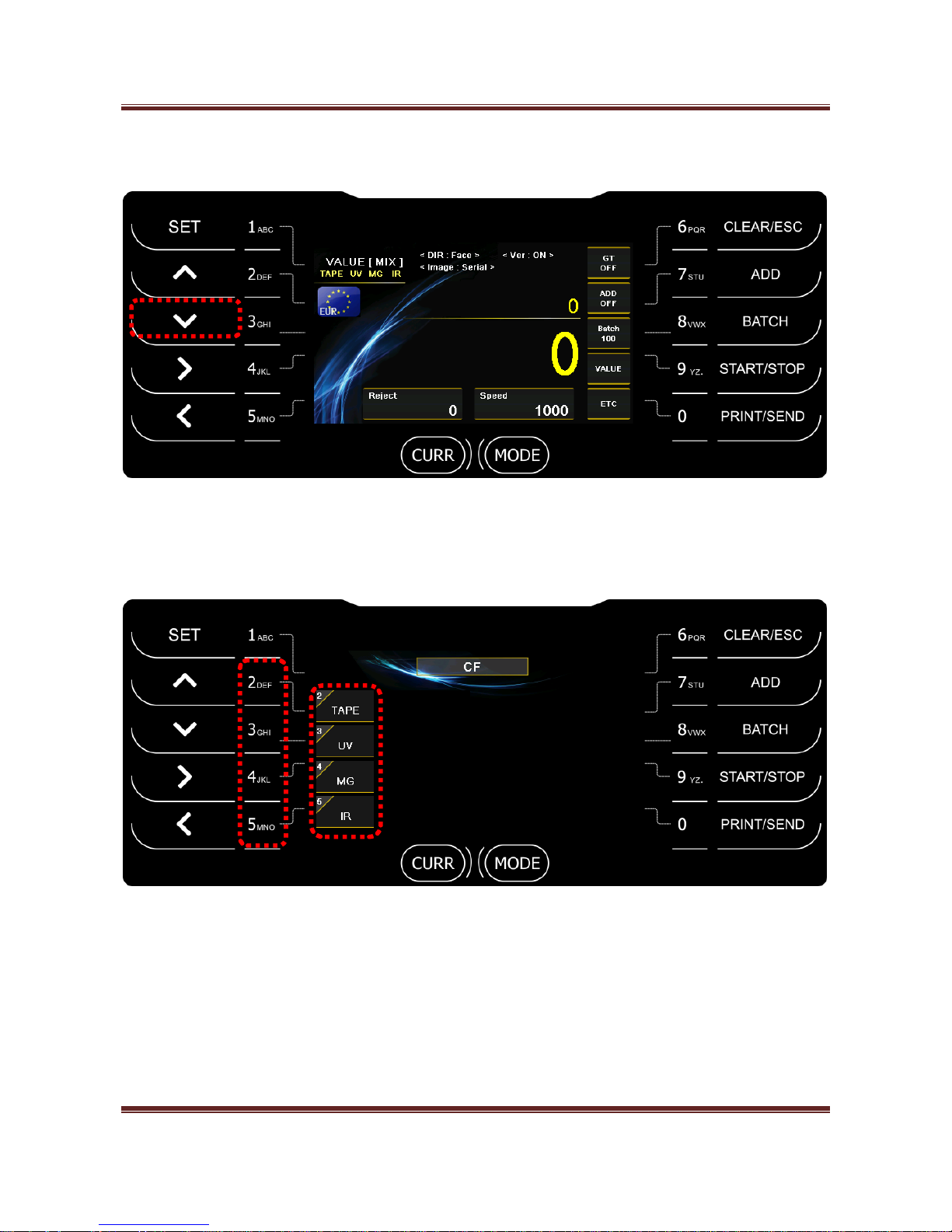
There are 4 kinds of sensors for detecting counterfeits. (TDS, UV, MG and IR)
By pressing ∨ key, user can turn on or off each sensor. (Pincode is needed.)
Press BATCH key -> Press 2 ~ 5 key for turning on or off the sensors.
Page 18
Magner175V/175FF USER Guide
Magner INT 18
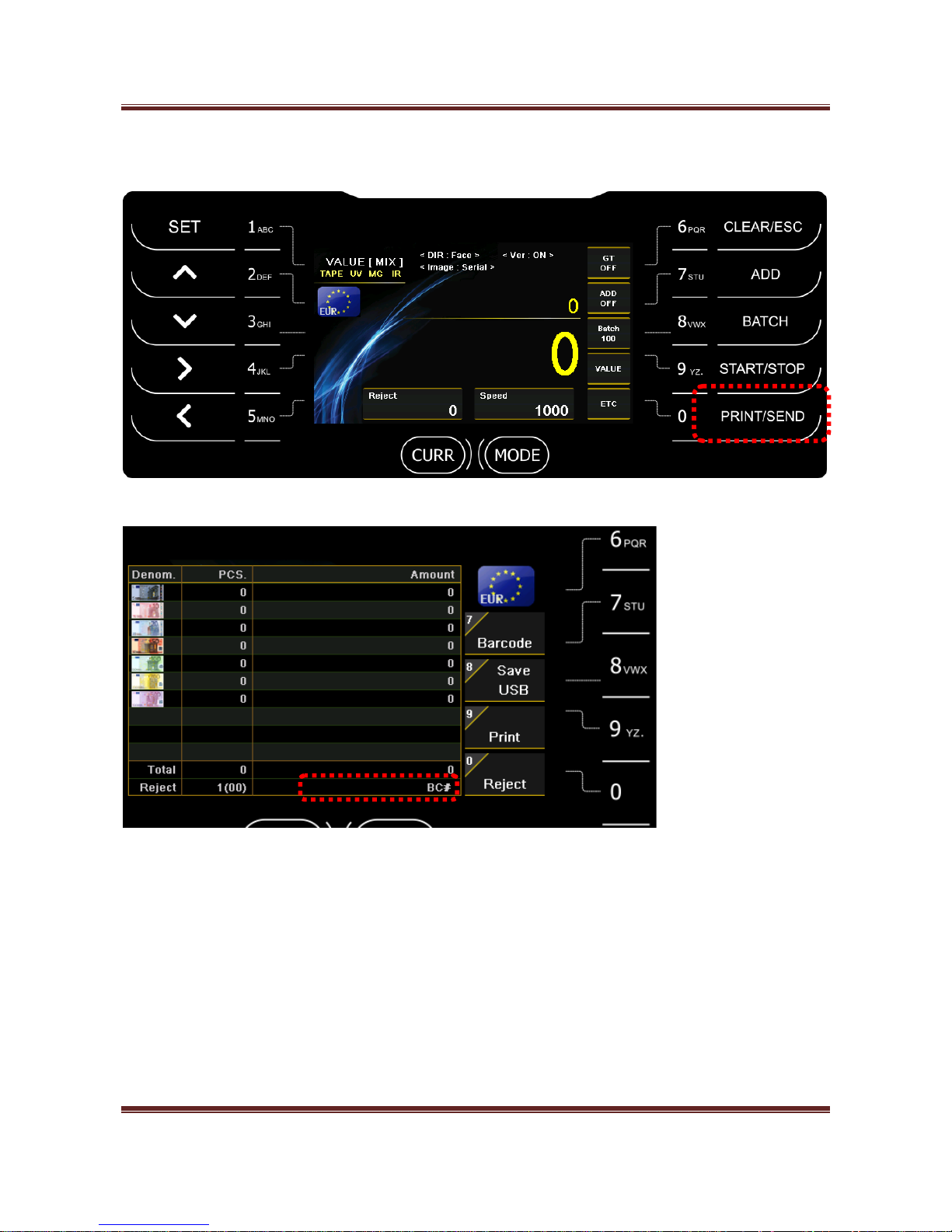
2-4. How to check Counting Result
After count the notes, press PRINT/SEND key and check counting result.
Barcode (Russia only)
You can connect Barcode Reader to MAGNER175V/175FF via USB port.
Press “7” key and scan Barcode.
When you press “9” key, the scanned barcode is printed with counting result.
Save USB
After select operation mode, if press “8” key, counting result is saved to USB stick.
Page 19
Magner175V/175FF USER Guide
Magner INT 19
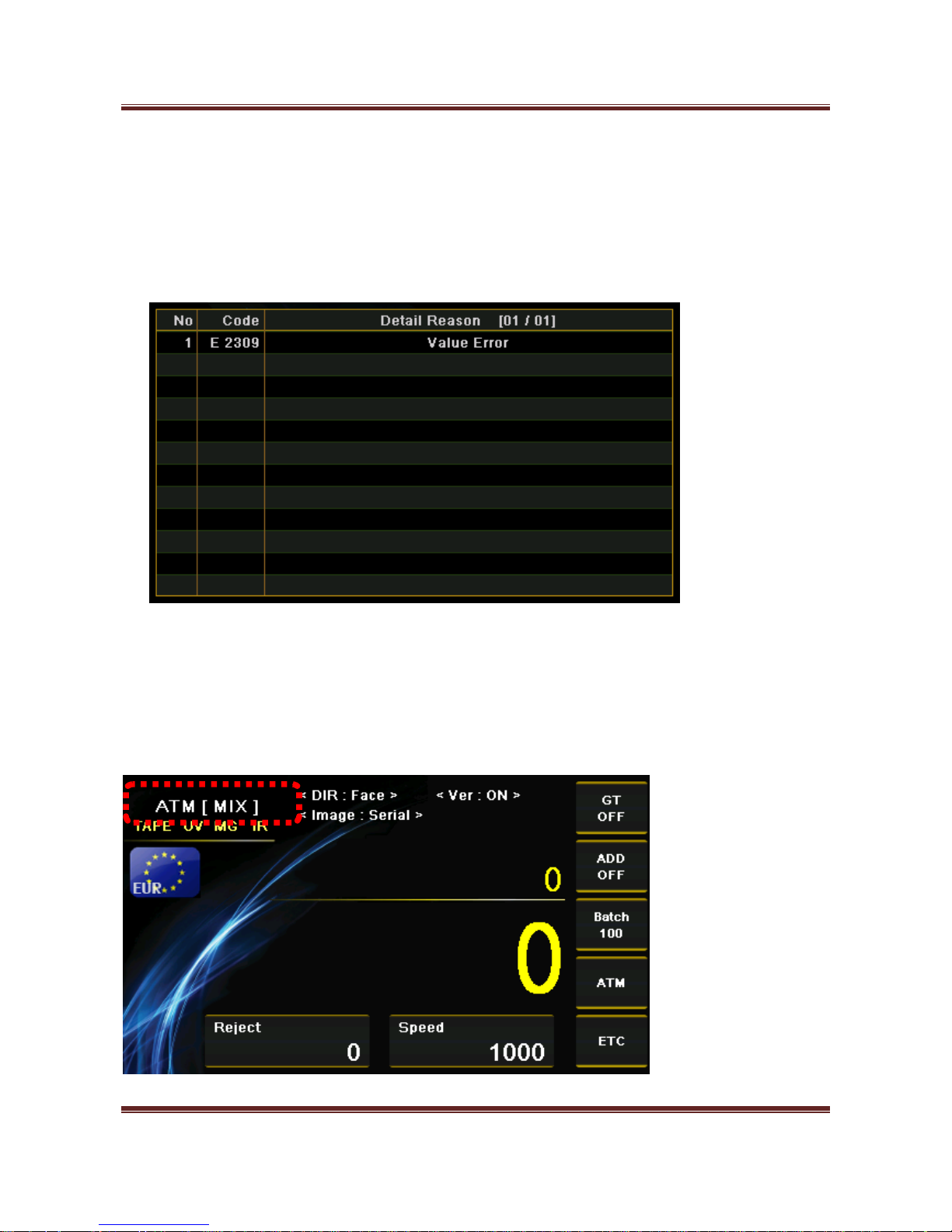
Print
When press “9” key, print the counting result via Printer.
Reject
When press “0” key, you can check the reason of the rejected notes.
3. Operation Mode 1
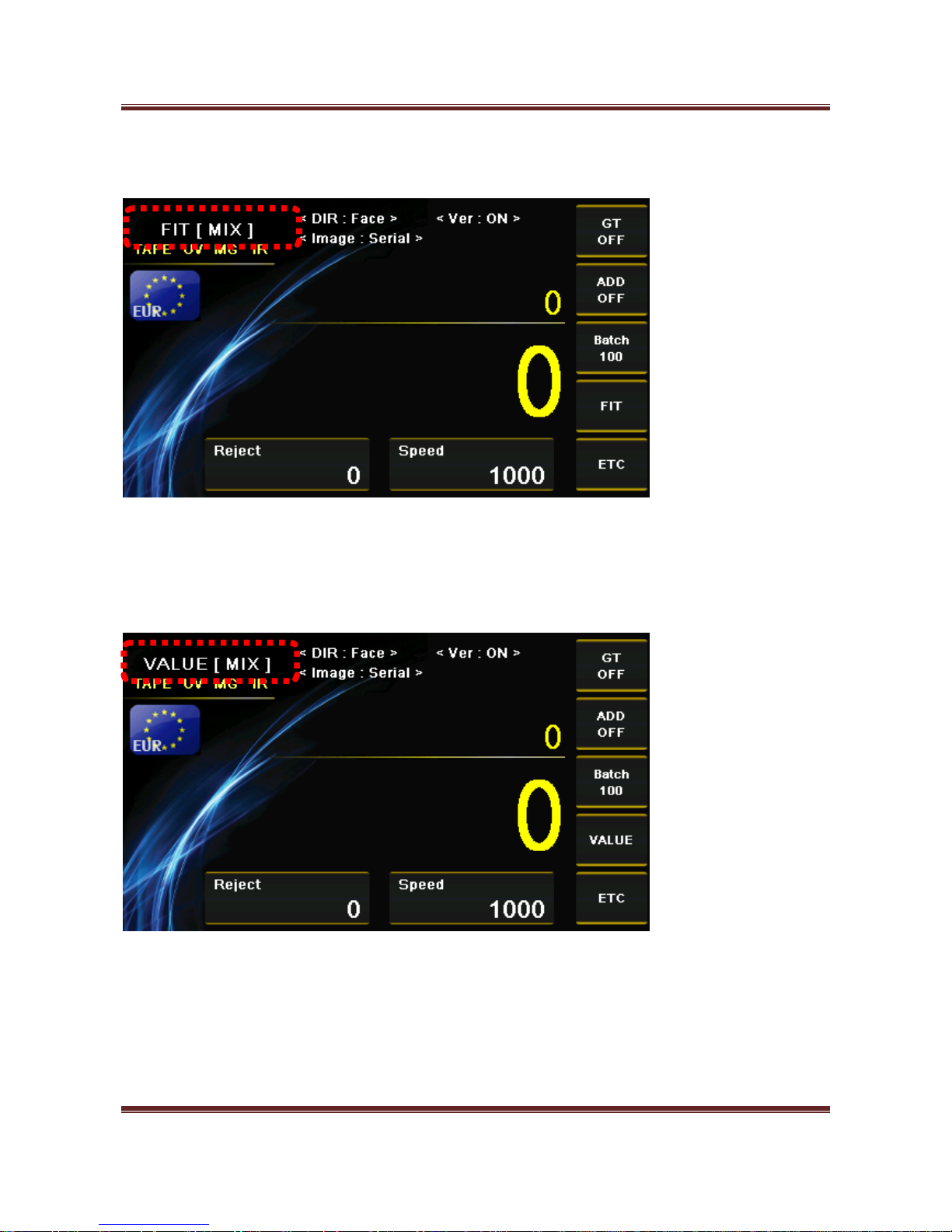
3-1. ATM – Sorts very clean notes. (Magner175FF Only)
Page 20
Magner175V/175FF USER Guide
Magner INT 20
3-2. FIT – Sort clean notes by fitness standards. (Magner175FF Only)
3-3. VALUE – Count notes normally.
Page 21
Magner175V/175FF USER Guide
Magner INT 21
4. Operation Mode 2
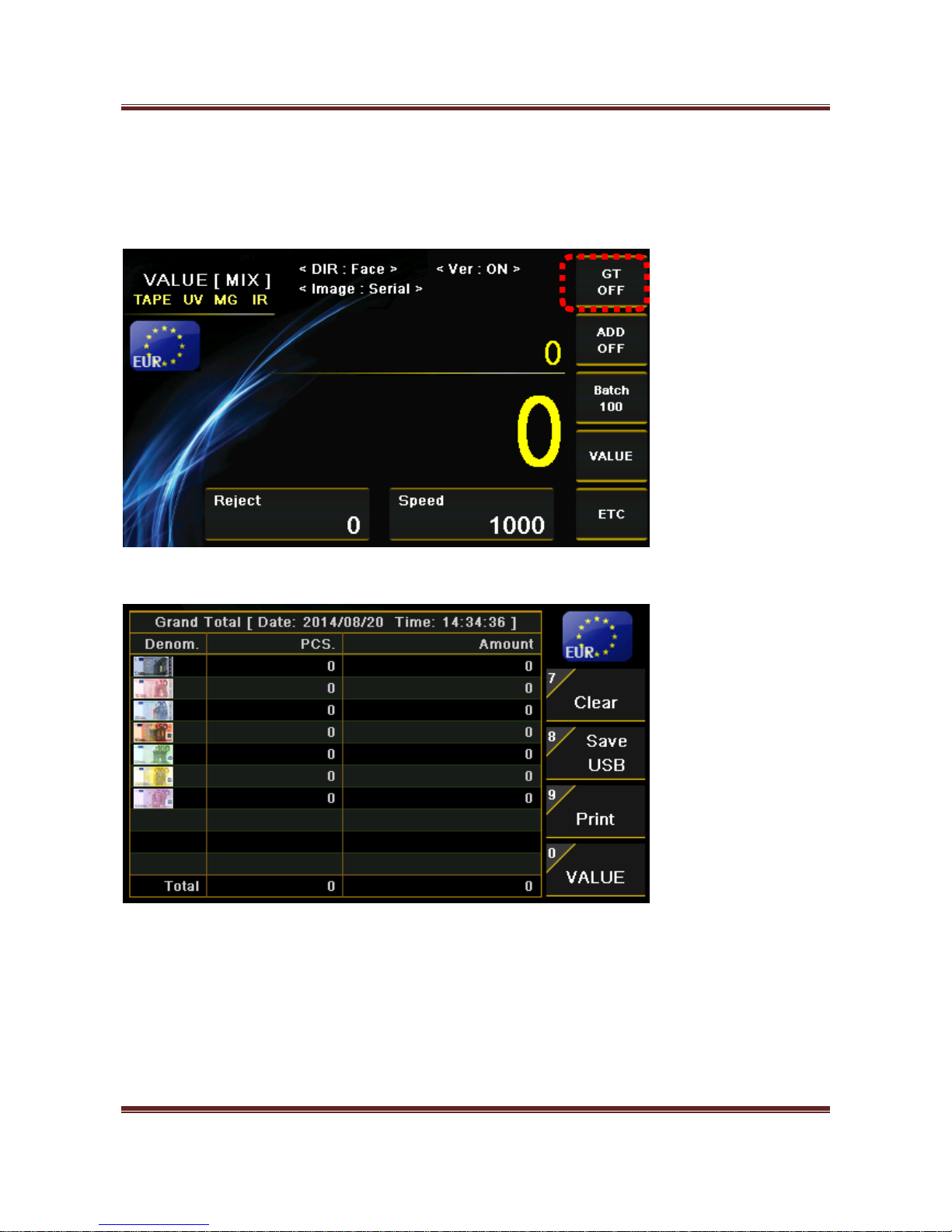
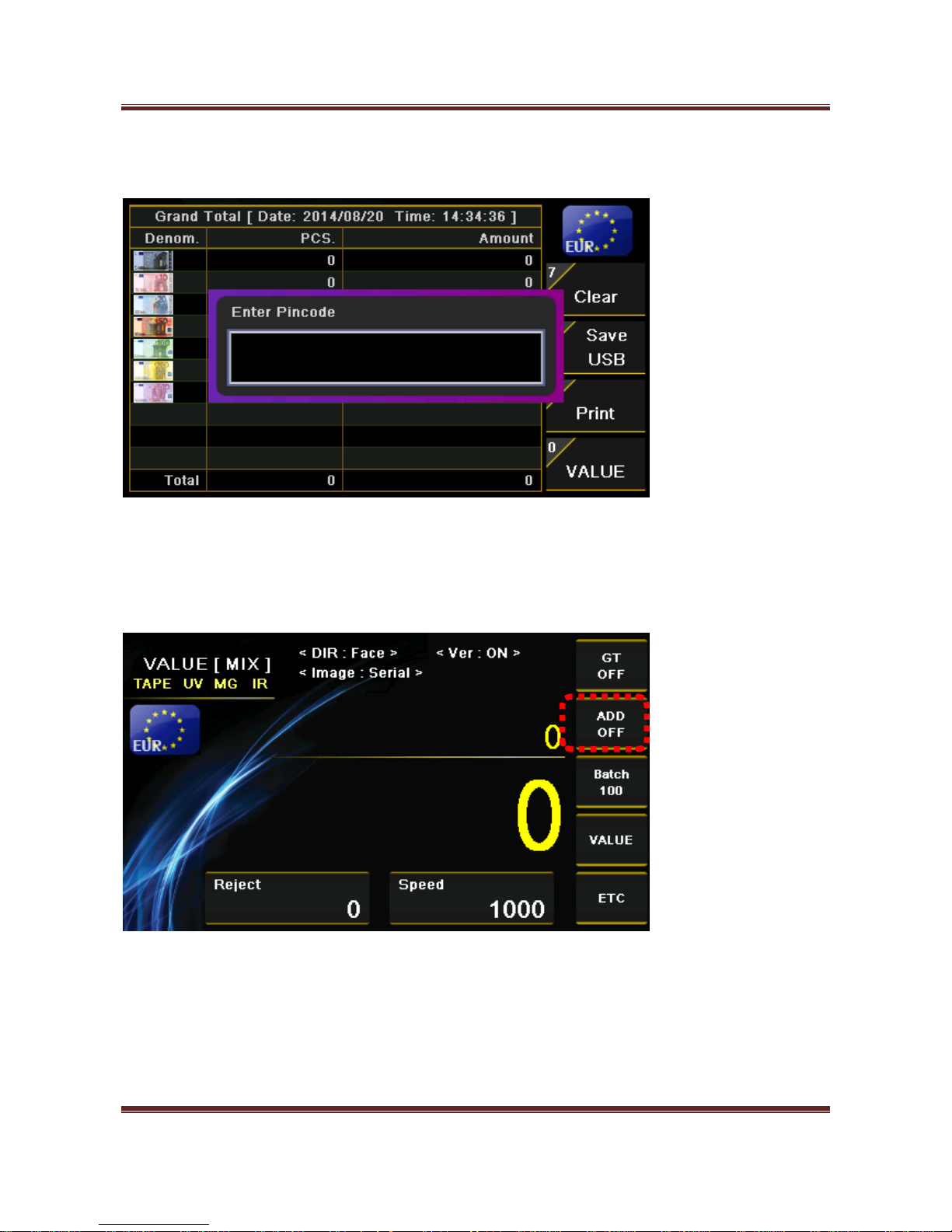
4-1. GT - When GT function is on, machine settles accounts before user clears the accounts.
By long pressing “6” key, you can see the result of GT.
When you press “0” key, GT result of each operation mode is shown.
(VALUE -> ATM -> FIT -> Unfit)
After select operation mode, if press “9” key, GT result of the selected mode is printed to Printer.
After select operation mode, if press “8” key, GT result of the selected mode is saved to USB stick.
Page 22
Magner175V/175FF USER Guide
Magner INT 22
You can clear GT Result by pressing “7” key but Pincode is needed.
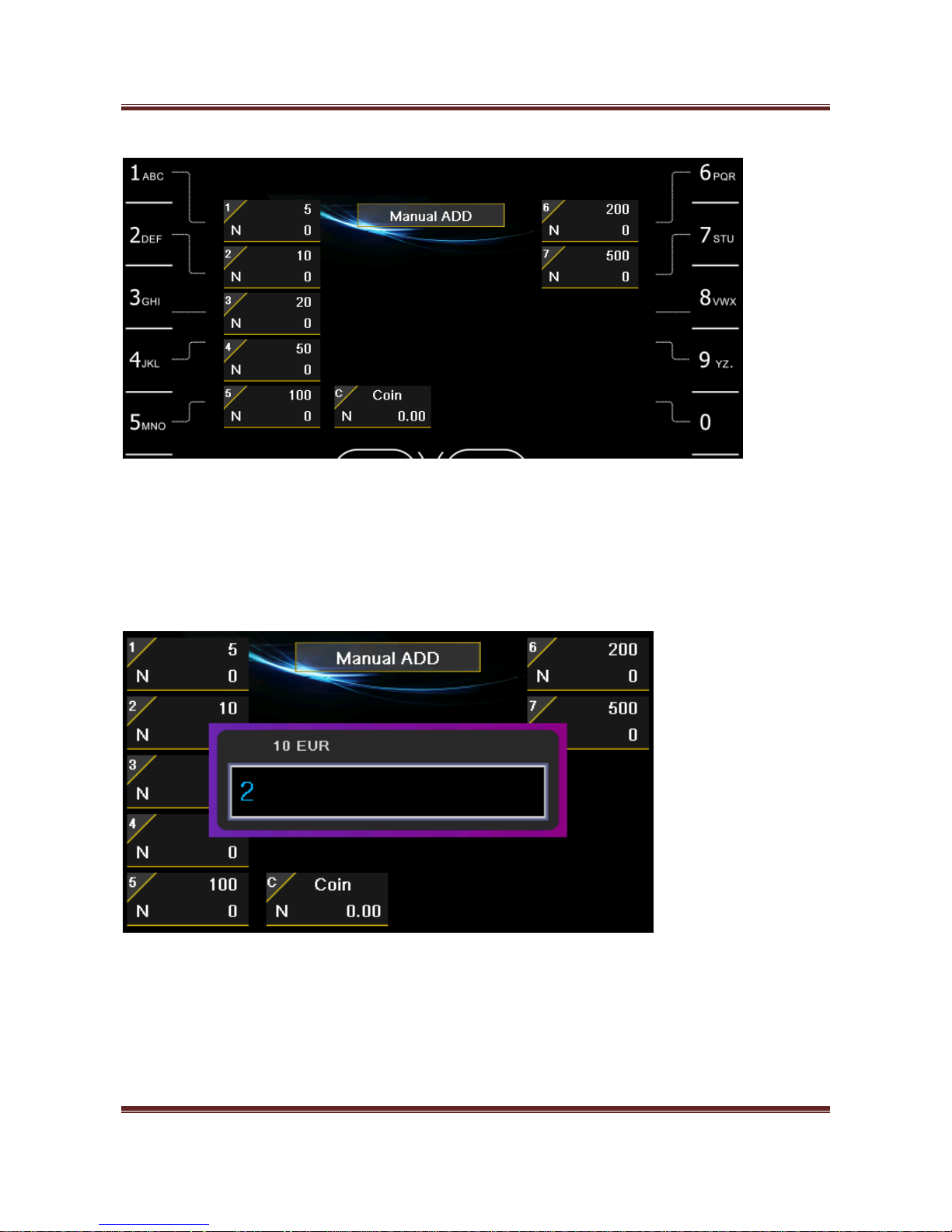
4-2. ADD - The total counting result is accumulated.
Manual Add
You can enter counting result about notes and coin manually.
When press ADD key, Manual Add menu is shown.
Page 23
Magner175V/175FF USER Guide
Magner INT 23
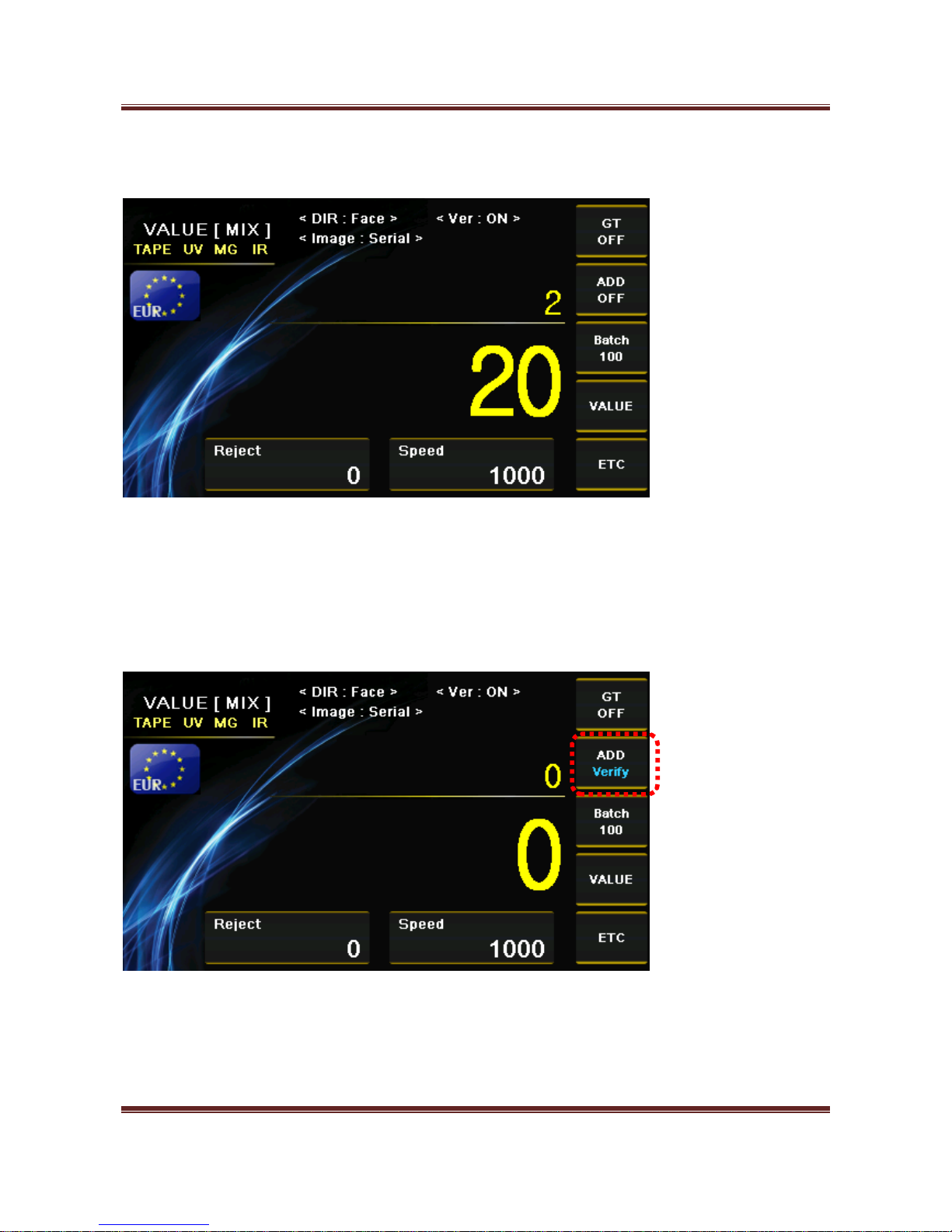
After select the denomination by pressing number keys, enter the number of notes and press “SET” key for
saving.
(For example 10 EUR – 2 notes)
Press START/STOP key and exit the Manual Add menu.
Page 24
Magner175V/175FF USER Guide
Magner INT 24
The added value is shown on Display.
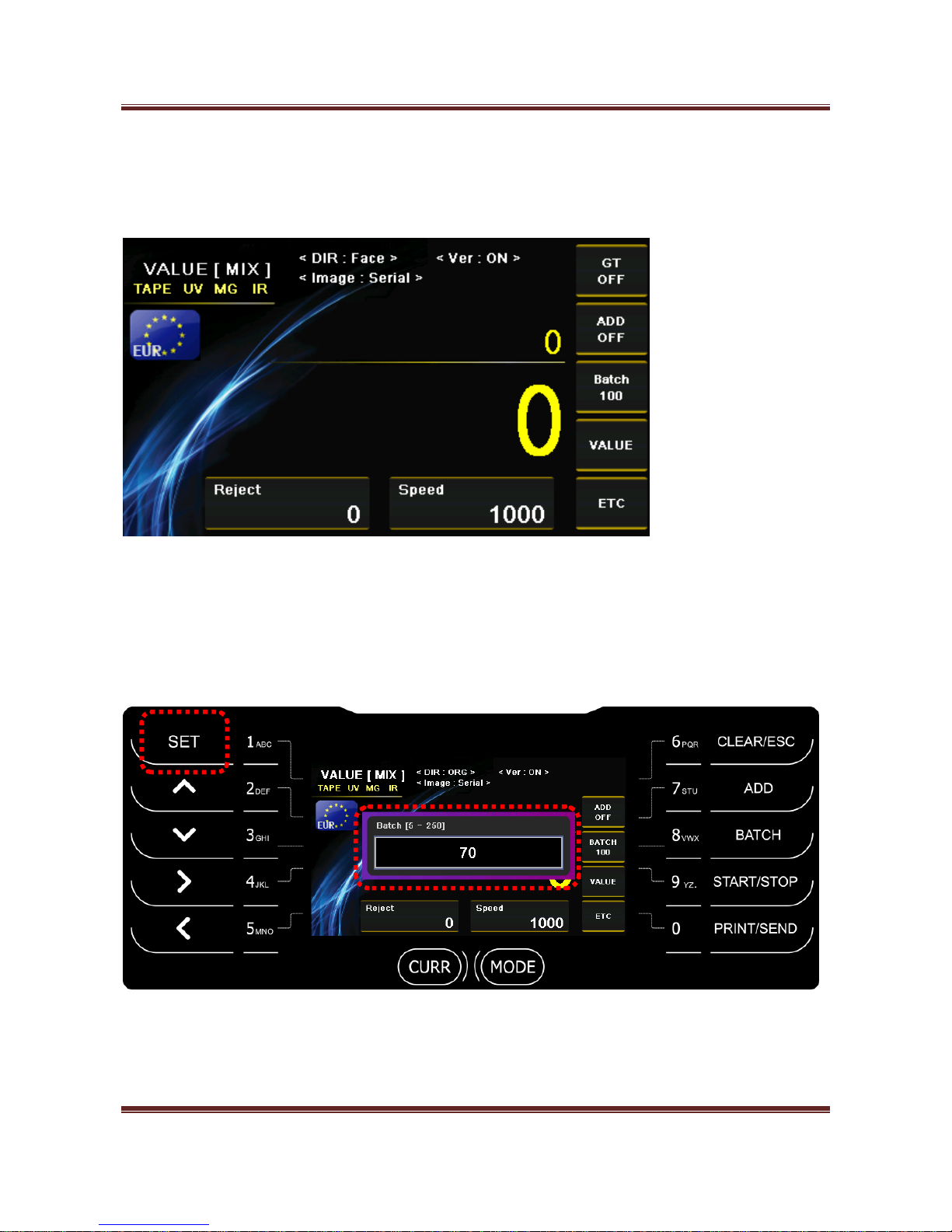
2) Verify function
If ADD function is “ON”, you can active verify function.
When long press “7” key, verify function is shown as below.
If you count the notes in verify function, counting result is not added in the previous counting result.
Page 25
Magner175V/175FF USER Guide
Magner INT 25
4-3 Batch
1) Batch number. (5 ~250)
When press “BATCH” key, you can enter batch number directly
After enter batch number, you need to press SET key for saving.
Page 26
Magner175V/175FF USER Guide
Magner INT 26
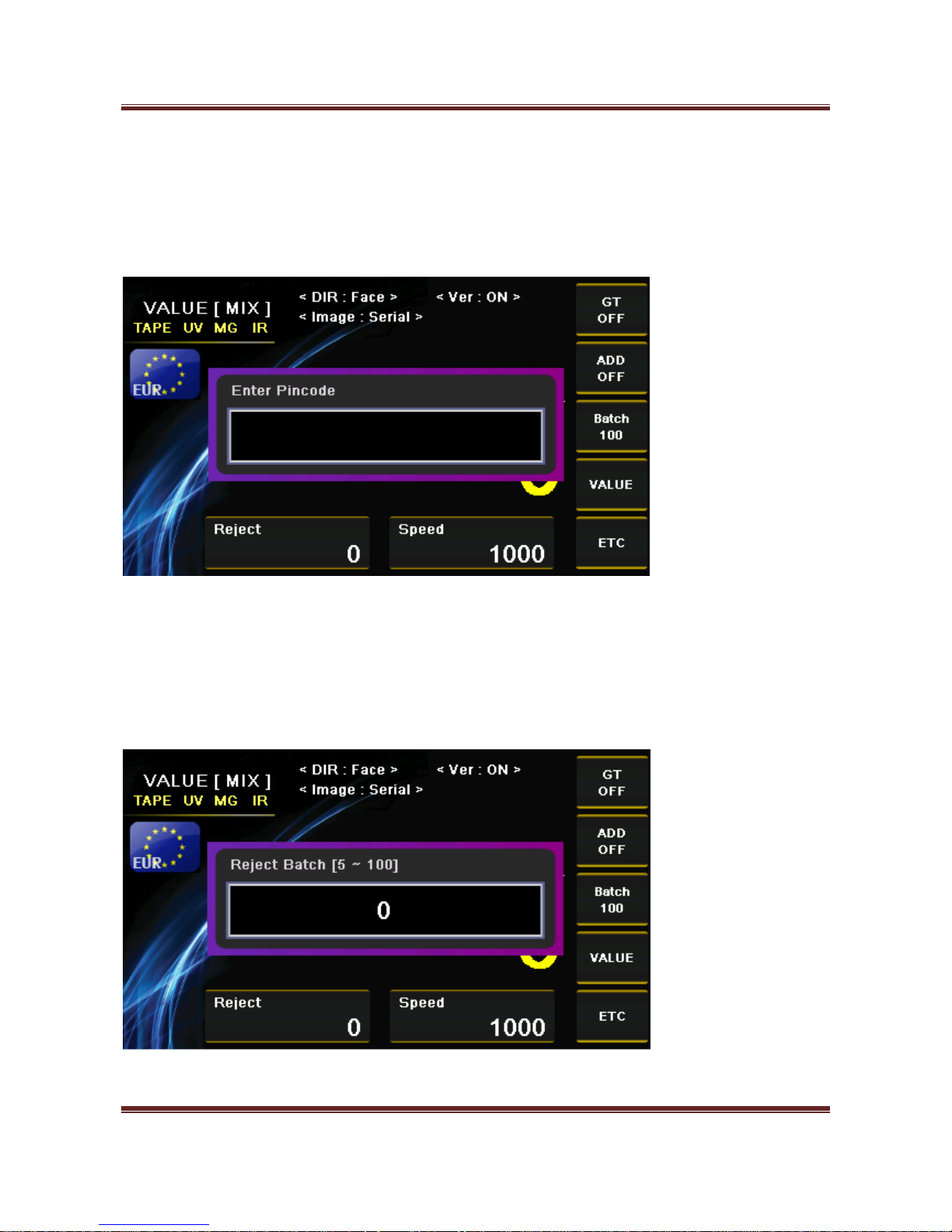
2) Reject Batch number. (5 ~100) (Pincode is needed.)
Long press “SET” key
After enter Pincode, try to press “SET’ key.
When long press “BATCH” key, you can enter reject batch number directly
After enter batch number, you need to press SET key for saving.
Page 27
Magner175V/175FF USER Guide
Magner INT 27
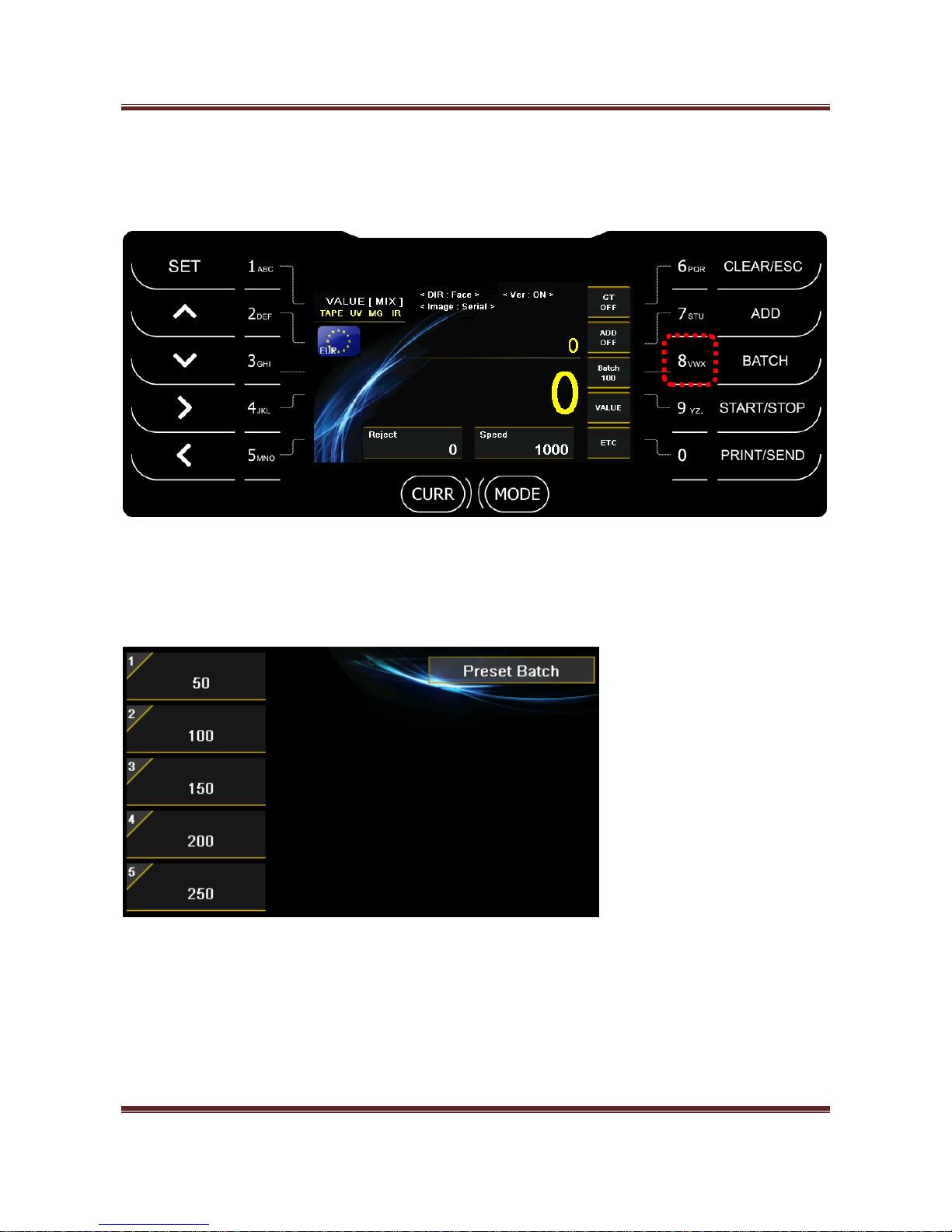
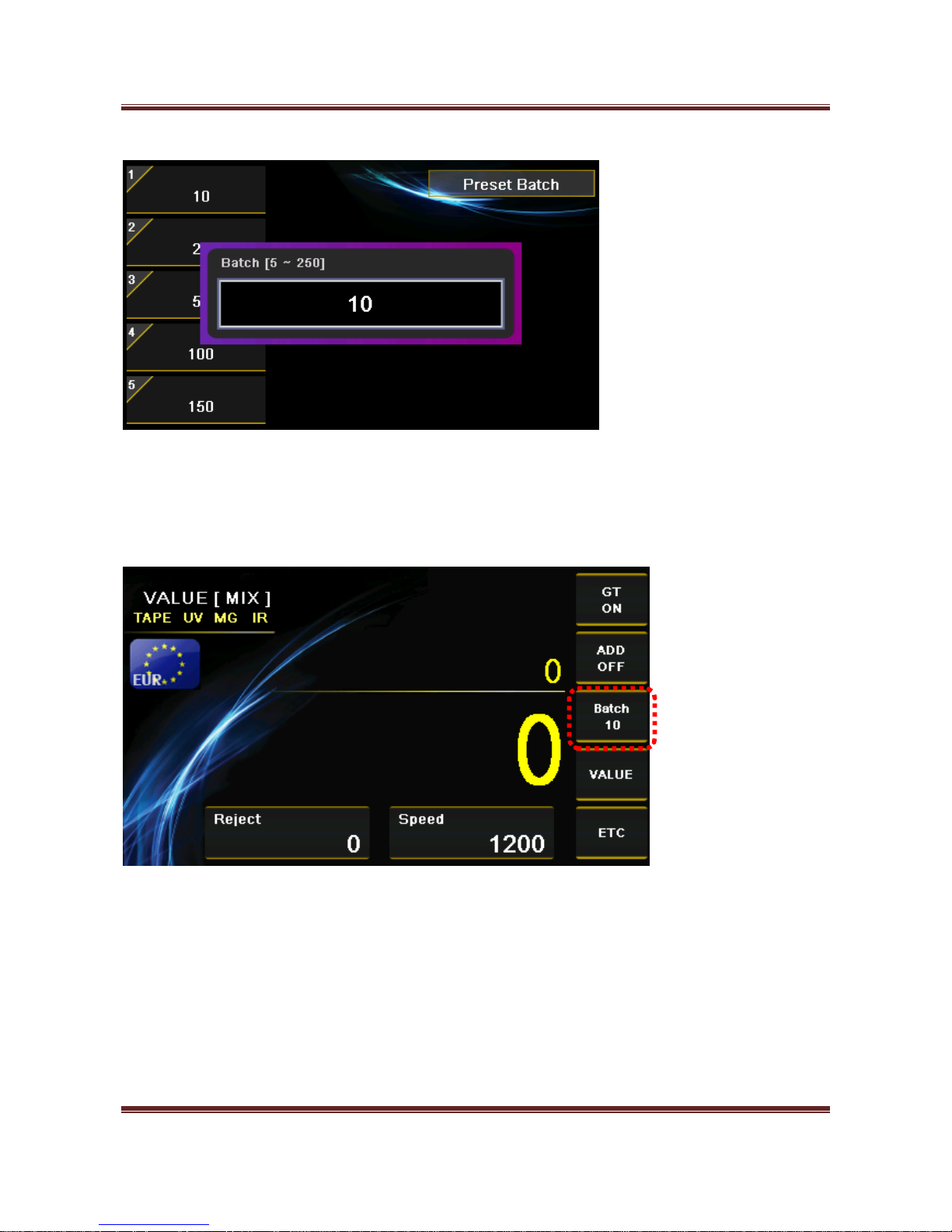
3) Preset Batch
When long press “8” key, you can set batch number.
After press number key, enter batch number and you save batch by “SET” key.
Page 28
Magner175V/175FF USER Guide
Magner INT 28
When you press “8” key, batch is changed from Preset Batch number.
Page 29
Magner175V/175FF USER Guide
Magner INT 29
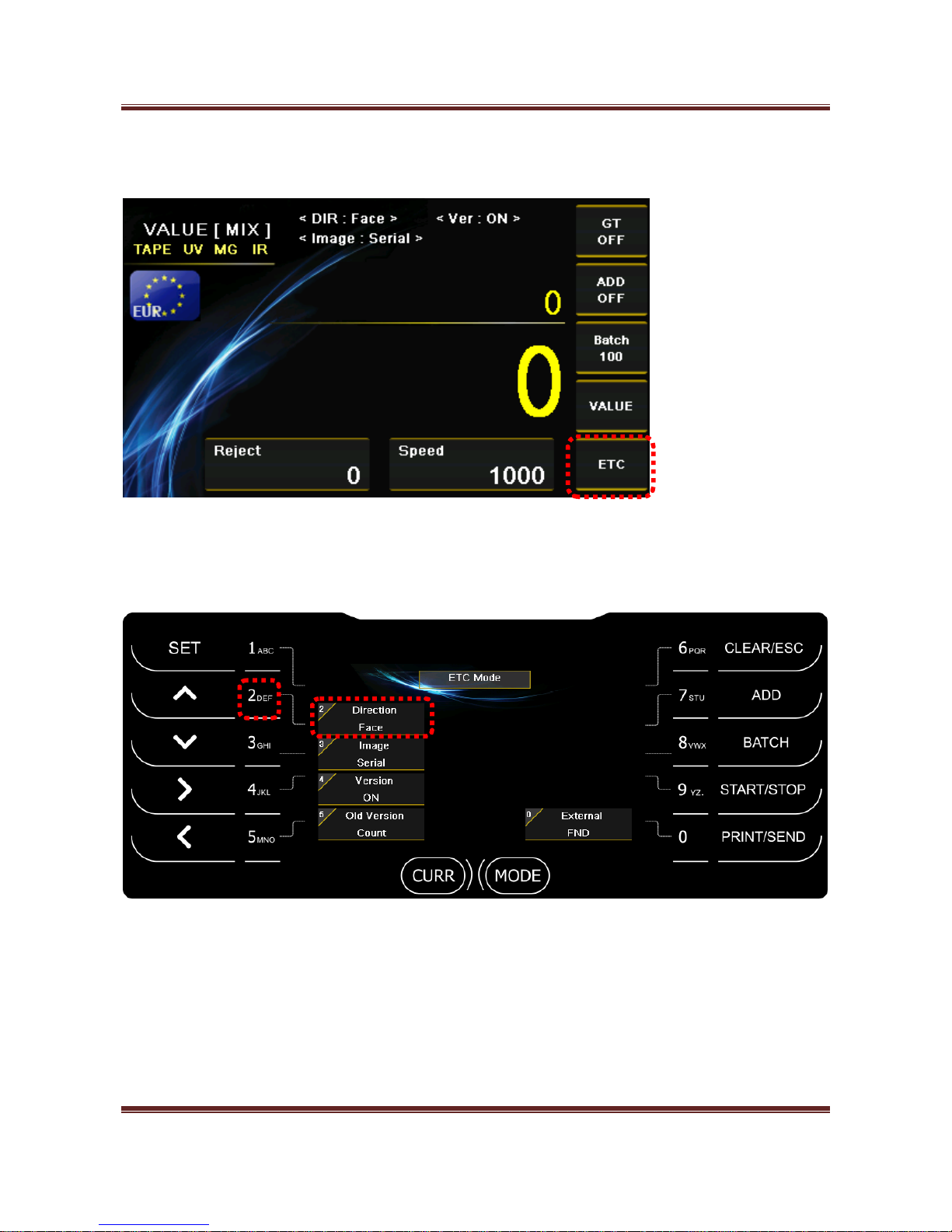
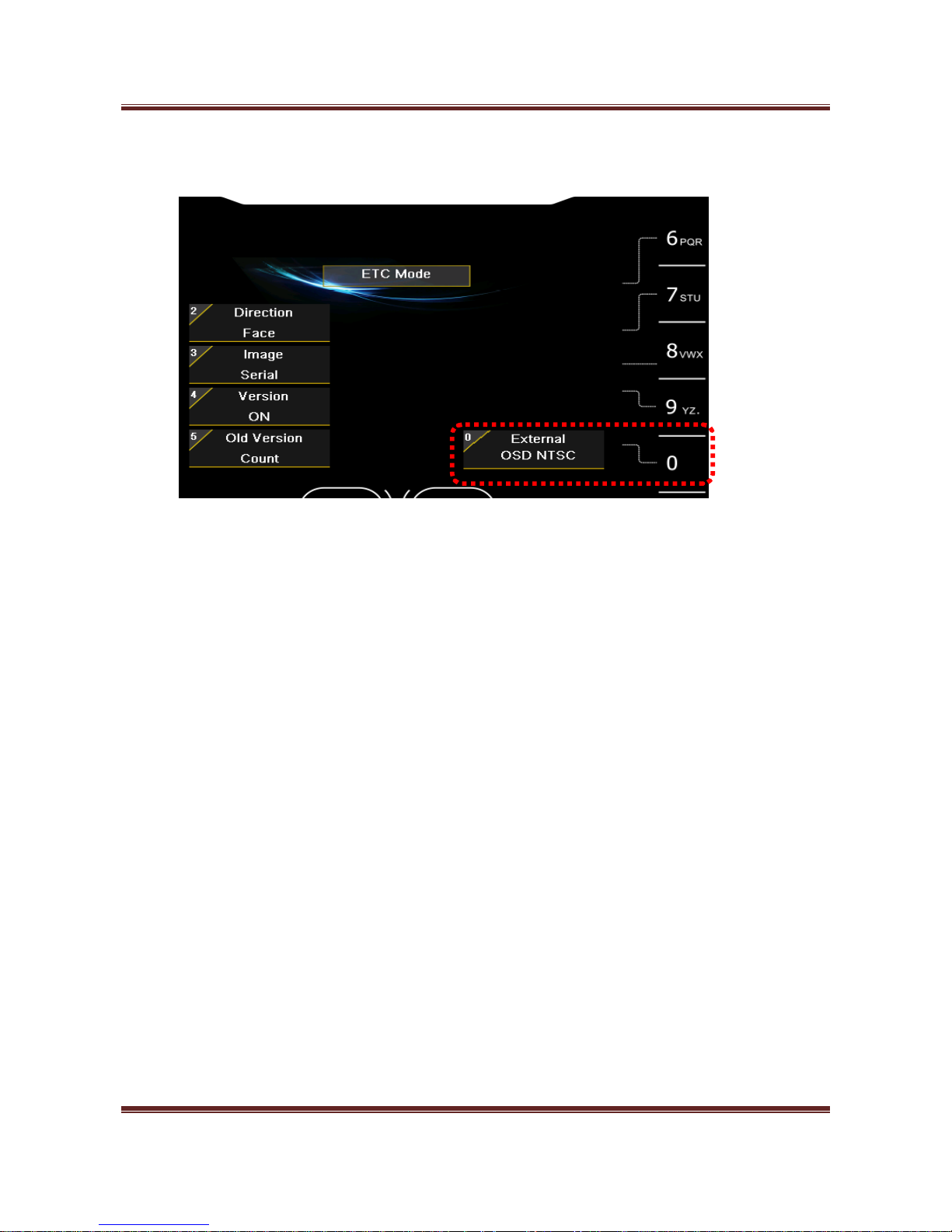
4-4. ETC – Select Direction, Serial and Version Mode by pressing “0” key.
1) Direction (NONE, Face, ORG)
Press “2” key and select Direction mode.
- Face
Sort the notes by face of the notes.
- ORG
Sort the notes by face and orientation together.
Page 30
Magner175V/175FF USER Guide
Magner INT 30
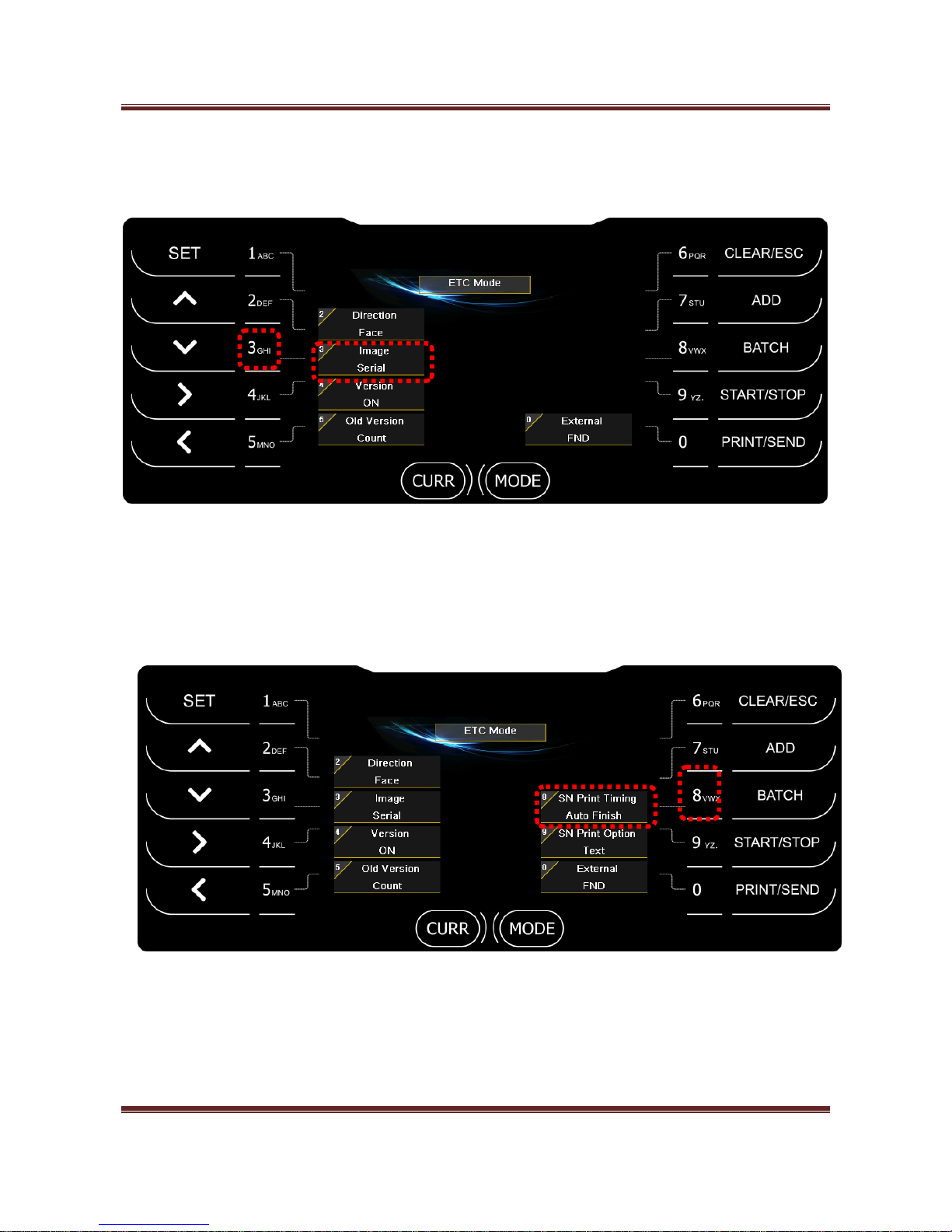
2) Image (NONE, Serial)
Press “3” key and select the scanned image data for transferring it to PC.
- Serial: Send serial image to PC.
When you select Serial function, 2 menus appear.
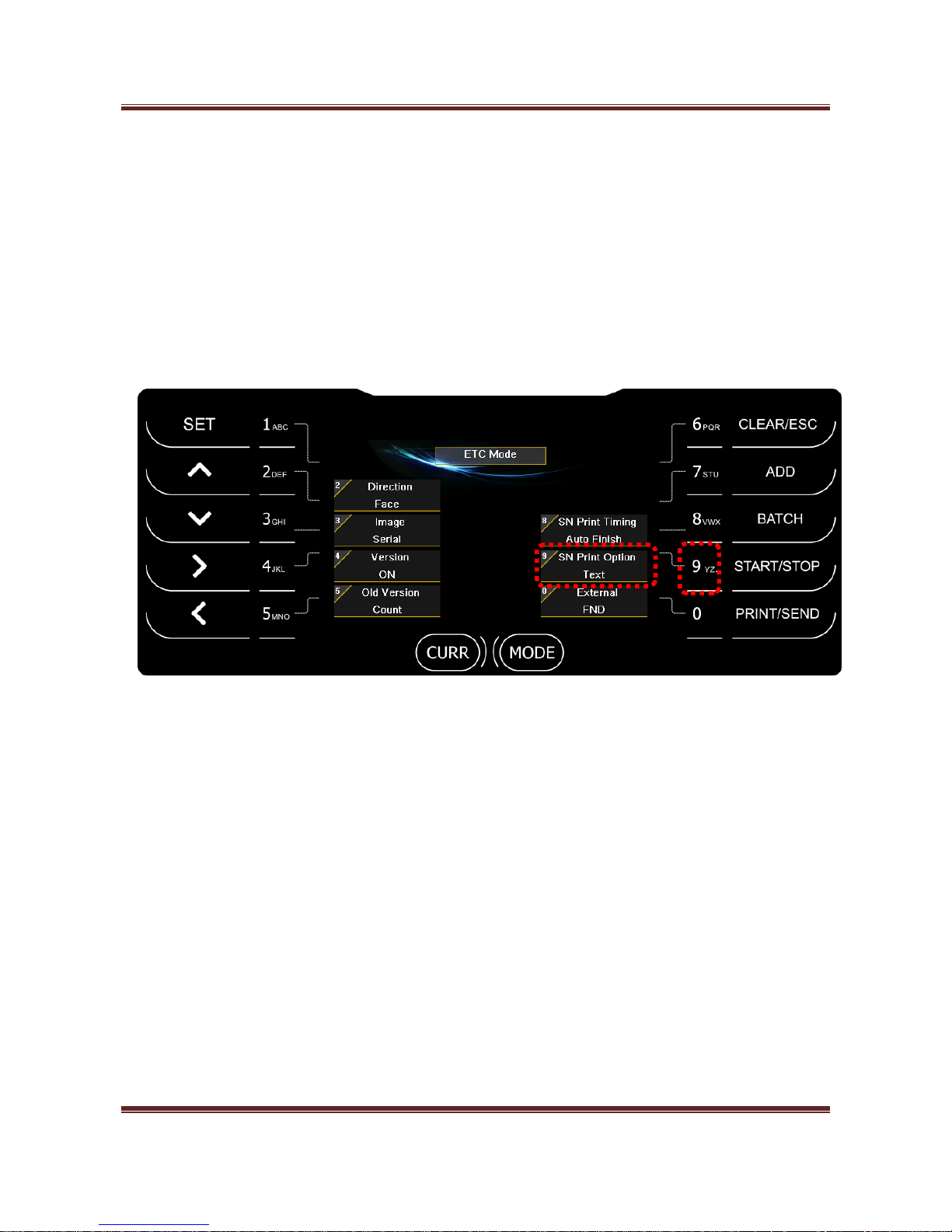
2-1) SN Print Timing
- Auto Batch
When Batch is full, print the counting result via Printer automatically.
Page 31
Magner175V/175FF USER Guide
Magner INT 31
- Auto Finish
When count is finish regardless of Batch, print counting result via Printer automatically.
- Manual
When you press “PRINT/SEND”, you can print counting result via Printer.
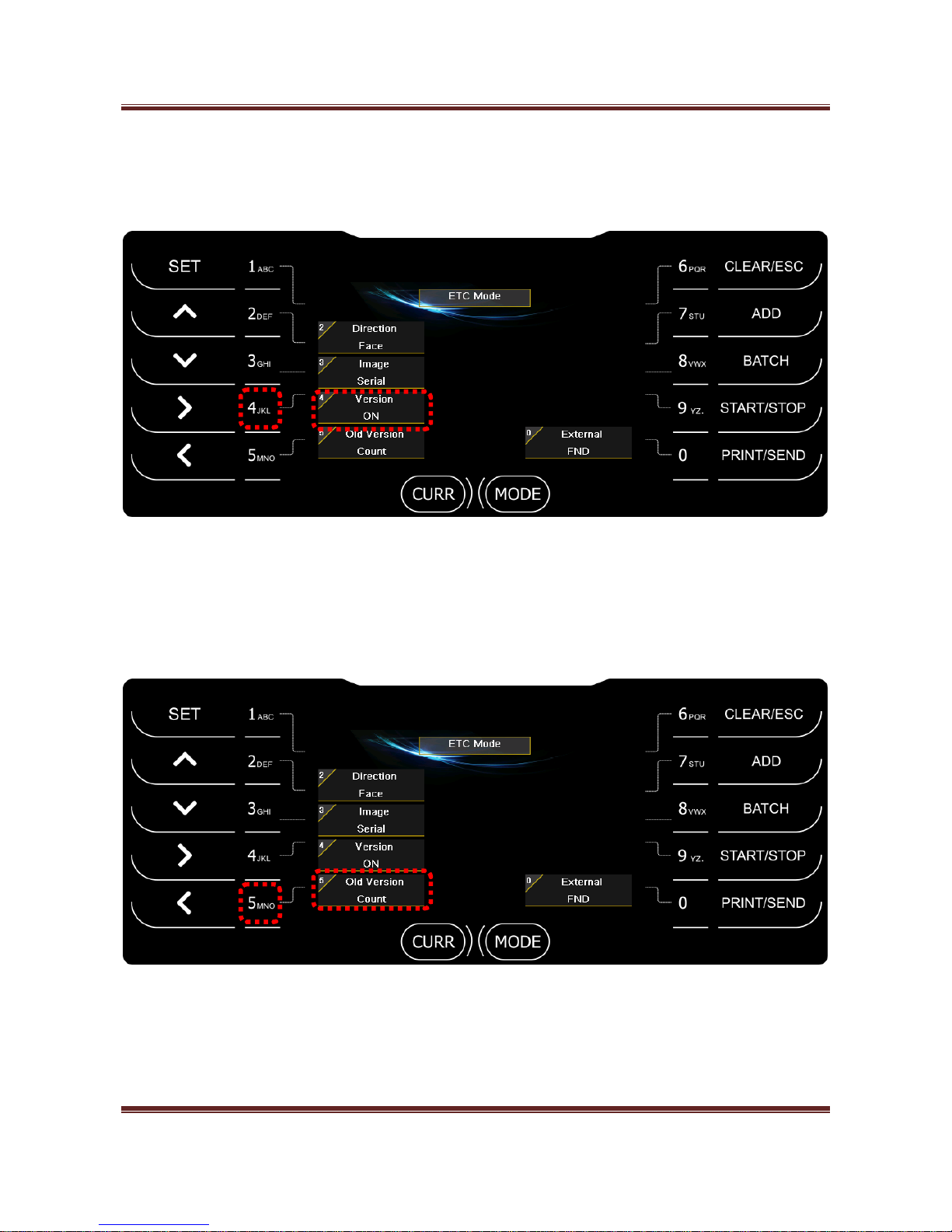
2-2) SN Print Option
- Text
When you print Serial number, output form of Serial number is Text.
- Image
When you print Serial number, output form of Serial number is Image.
- Both
You can print Serial number for both Text and Image form.
Page 32
Magner175V/175FF USER Guide
Magner INT 32
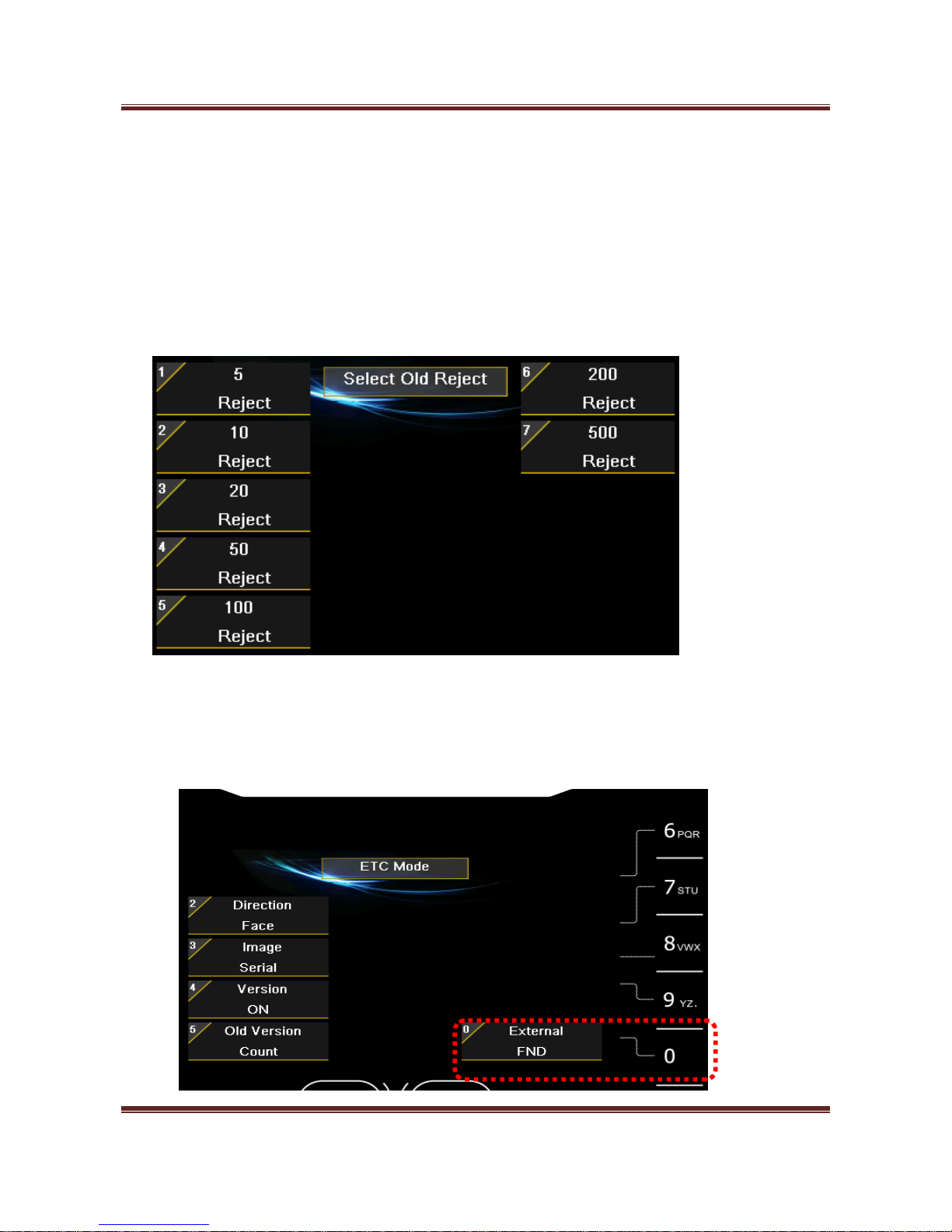
3) Version (ON / OFF)
Press “4” key and turn on or off version soring operation.
- ON - Sorts the notes by version. (Old, New and Very New)
4) Old Version
Press “5” key and turn Count or Reject old version soring operation.
- Count
Old version notes are counted.
Page 33
Magner175V/175FF USER Guide
Magner INT 33
- Reject
Old version notes are counted.
- User
You can select Count or Reject for each denomination.
When you long press “5”key, you can select Count or Reject operation by number key.
5) External (Pincode is needed.)
- FND
Page 34
Magner175V/175FF USER Guide
Magner INT 34
If select “Enternal FND”, you can connect External Display to the machine.
- OSD NTSC/PAL
OSD is for displaying counting result to Monitor.
We support NTSC and PAL together.
Page 35
Magner175V/175FF USER Guide
Magner INT 35
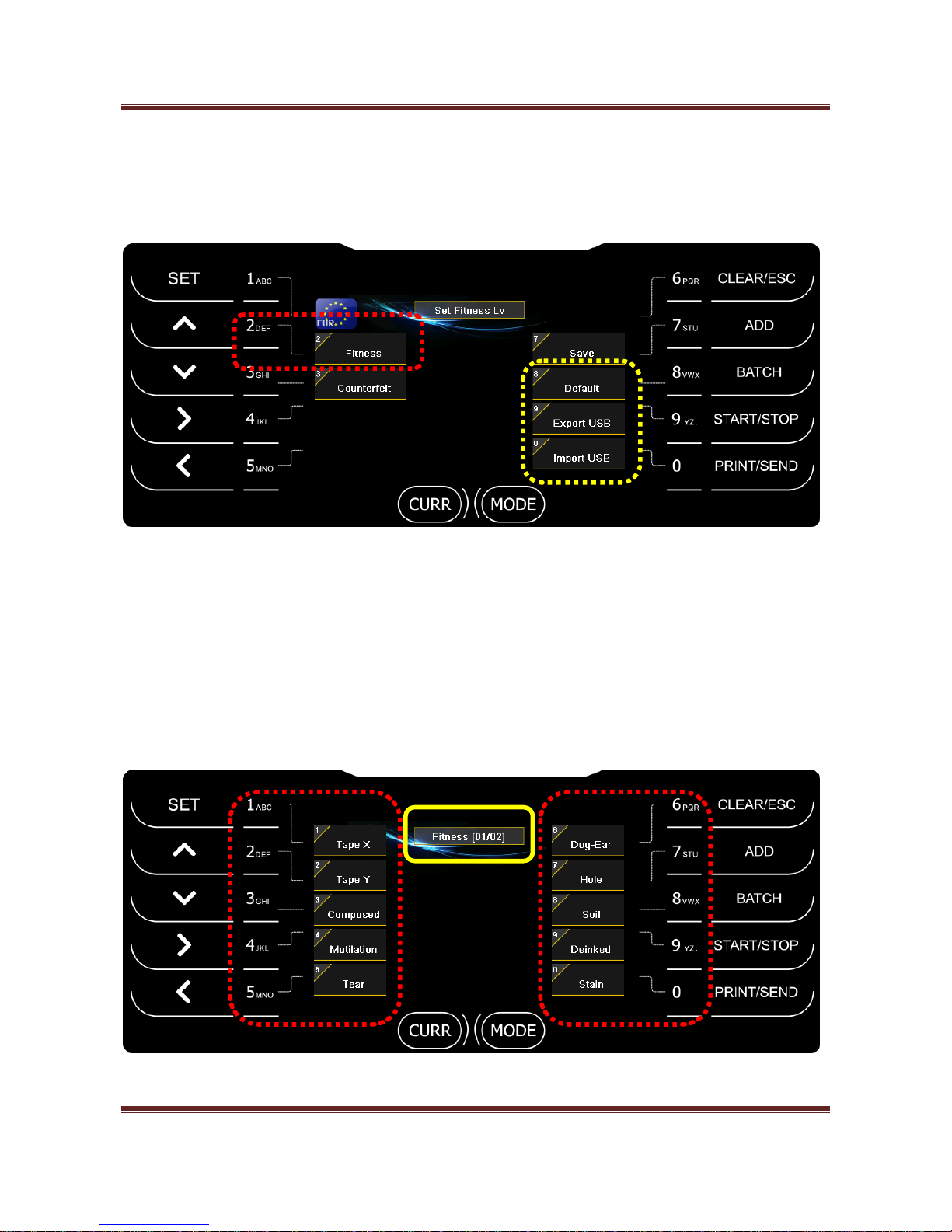
5. Fitness Level (Magner175FF Only)
After press SET key and “2” key, you can enter Fitness Level mode.
- Default – Load default value of Fitness and Counterfeit level.
- Export USB – Send the current Fitness and Counterfeit level to USB Stick.
- Import USB – Load Fitness and Counterfeit level from USB Stick.
After select an item first, adjust Fitness level as below.
14 kinds of fitness parameter are available.
Page 36
Magner175V/175FF USER Guide
Magner INT 36
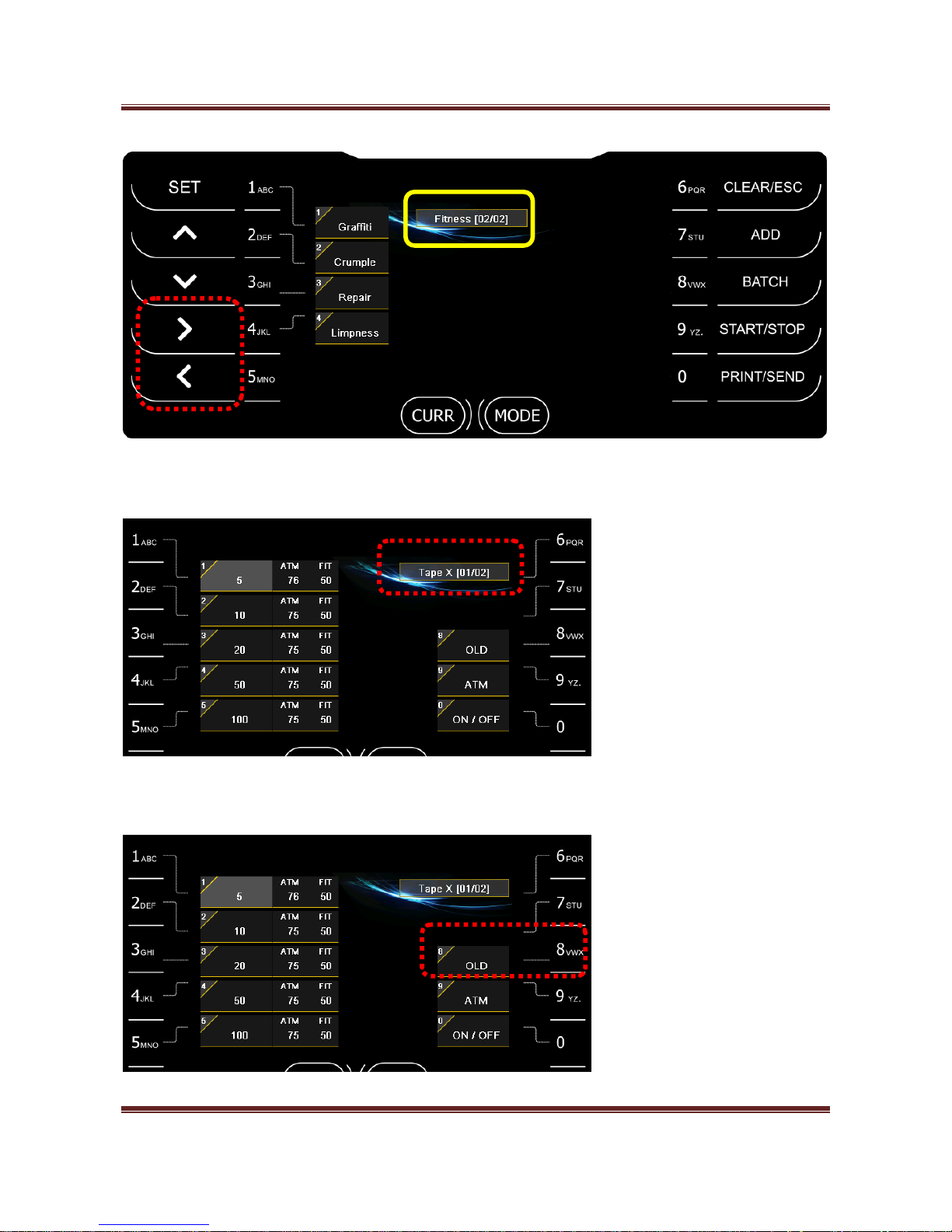
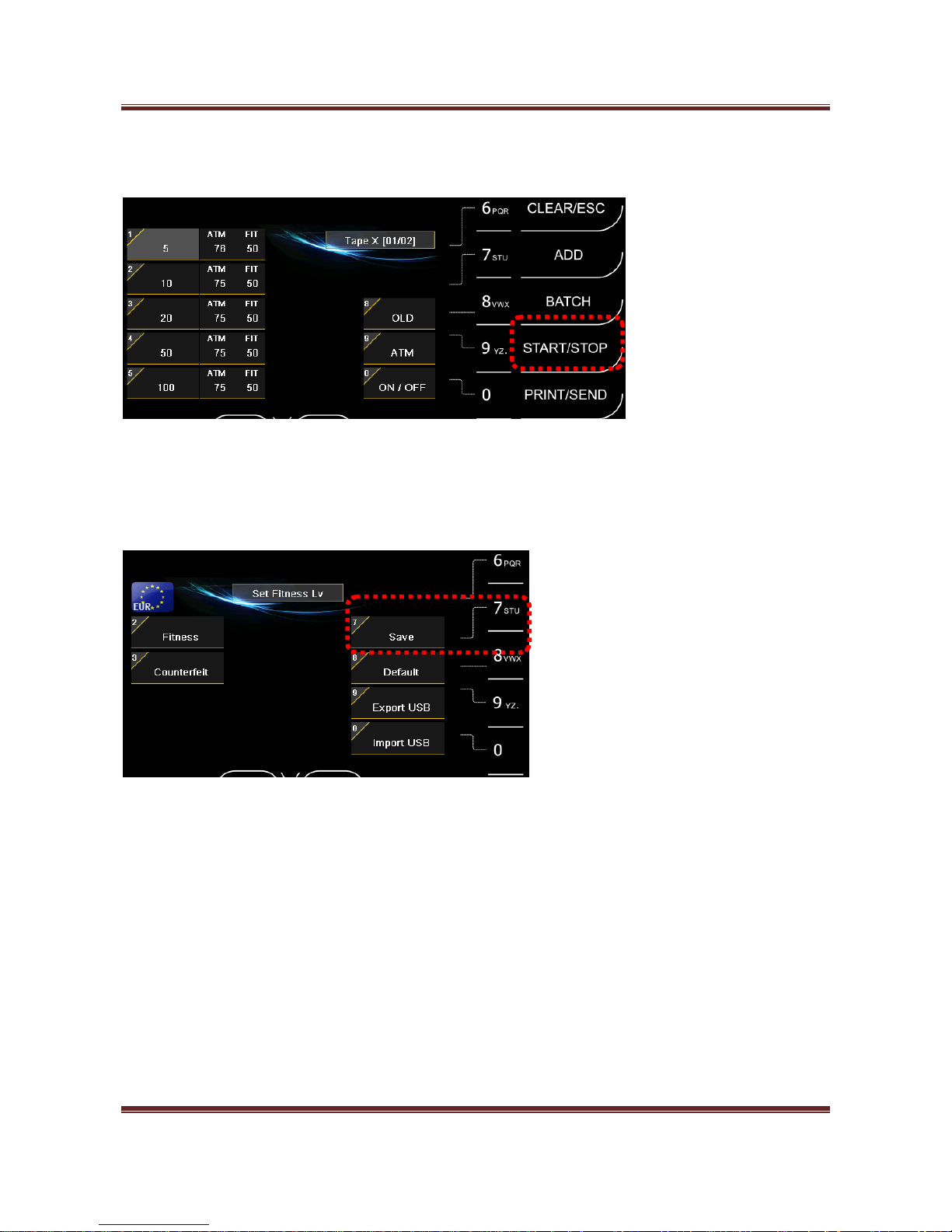
① Select Fitness parameter. (for example Tape X)
② Select Version by pressing “8” key.
Page 37
Magner175V/175FF USER Guide
Magner INT 37
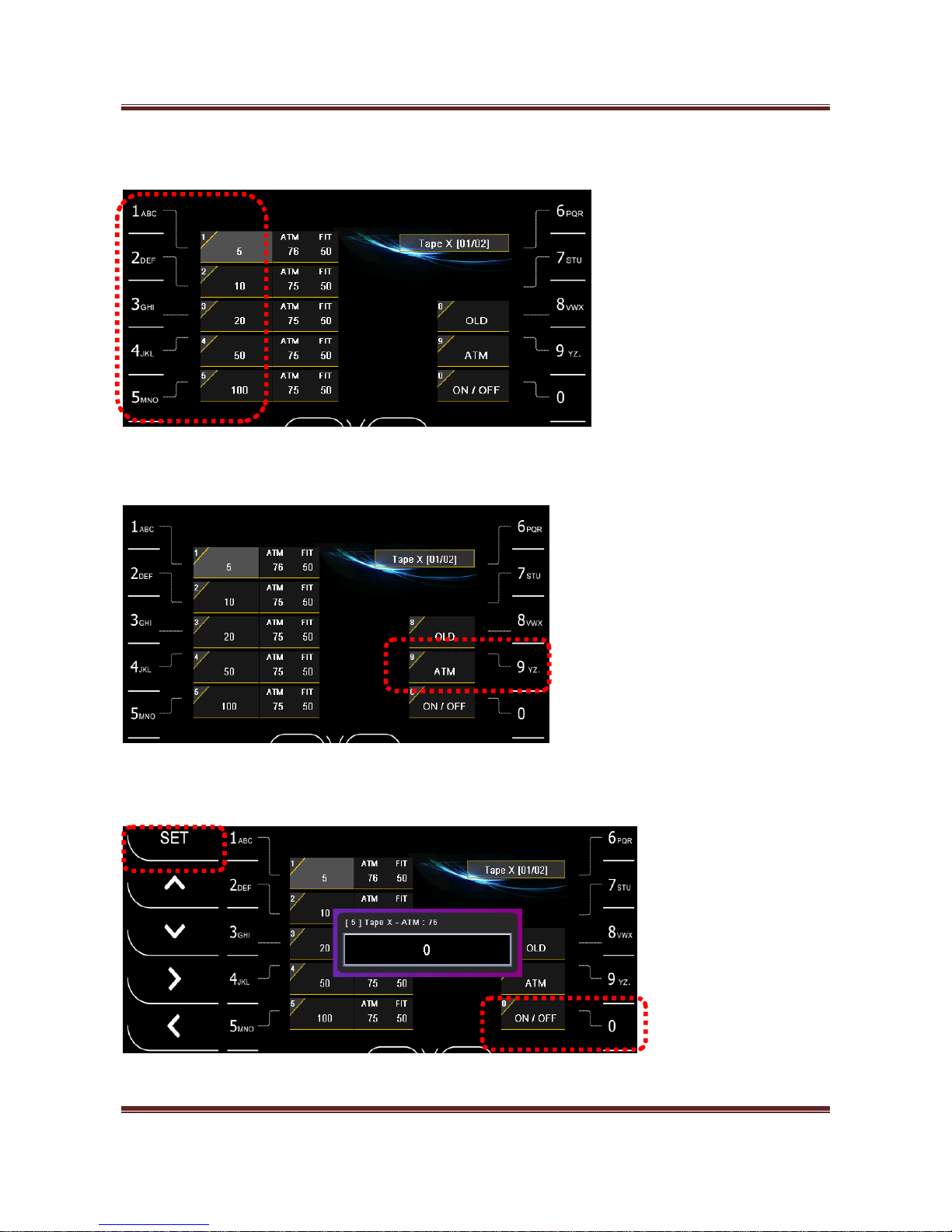
③ Select Denomination by pressing 1~5 key.
④ Select ATM/FIT by pressing “9” key.
⑤ Enter level by pressing number keys and SET key or select Fitness ON/OFF by pressing “0” key.
Page 38
Magner175V/175FF USER Guide
Magner INT 38
⑥ Press START/STOP key twice.
⑦ Save the changed level by pressing “7” key.
Page 39
Magner175V/175FF USER Guide
Magner INT 39
6. CF Level
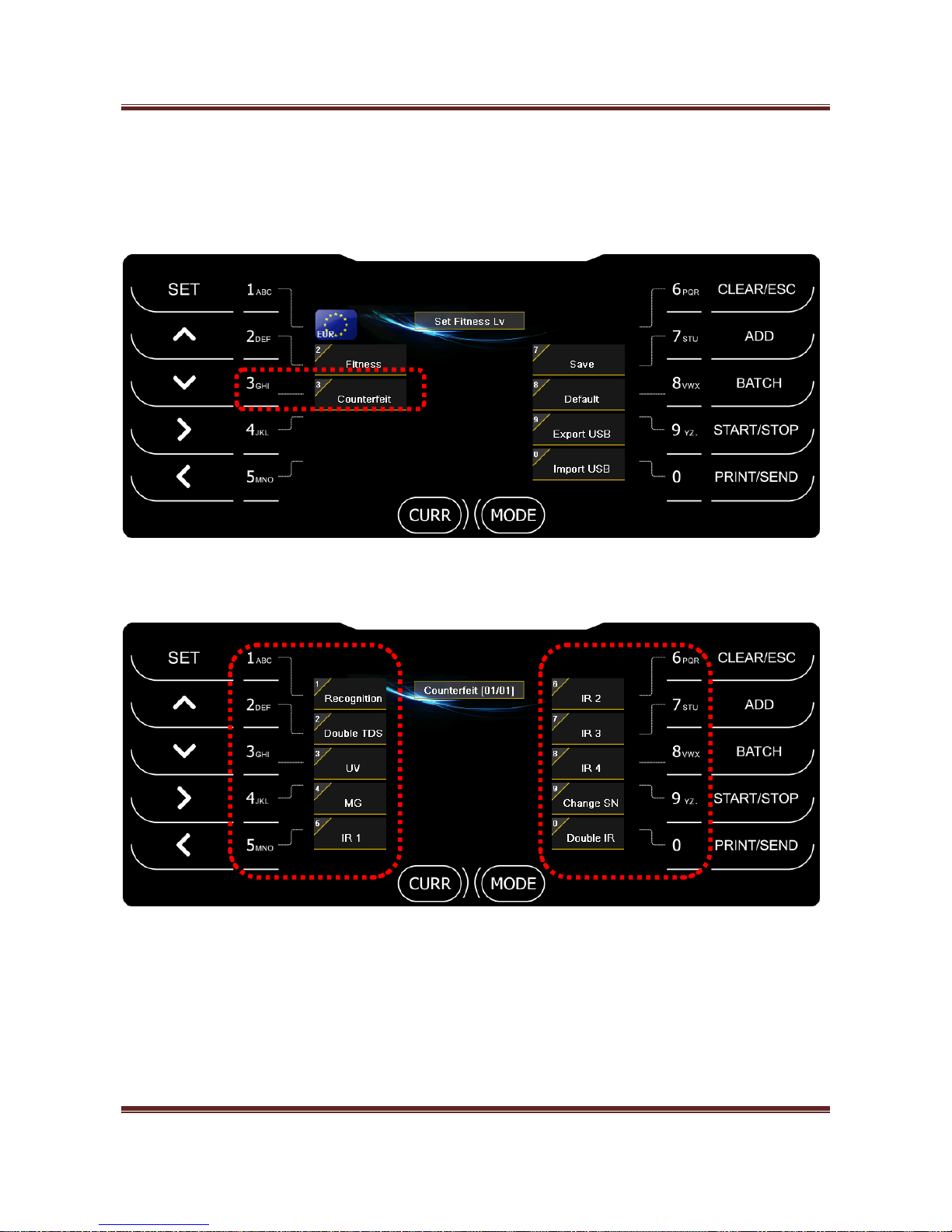
After press SET key and “3” key, you can enter Counterfeit Level mode.
After select item first, adjust CF level as below.
Page 40
Magner175V/175FF USER Guide
Magner INT 40
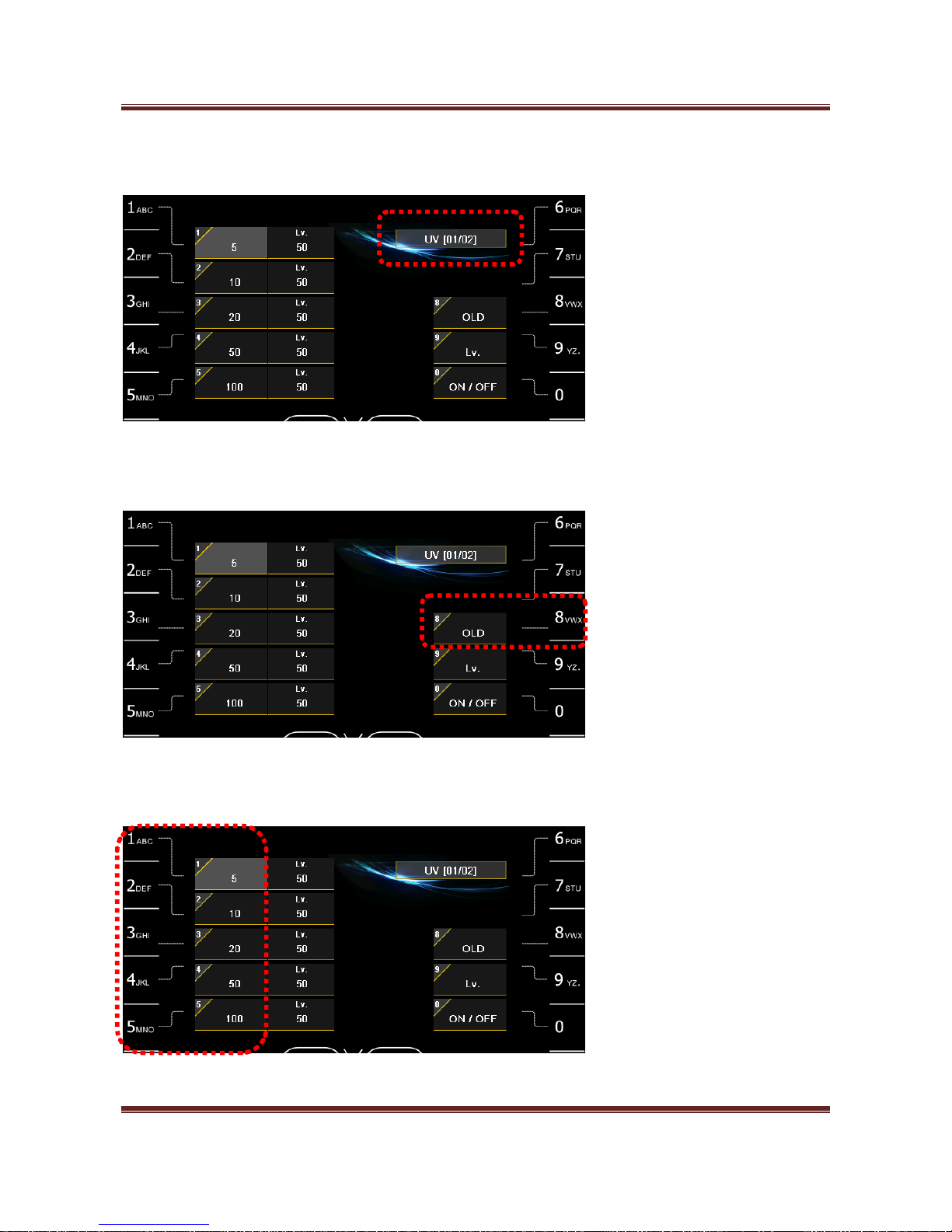
① Select CF item. (for example UV)
② Select Version by pressing “8” key.
③ Select Denomination by pressing 1~5 key.
Page 41
Magner175V/175FF USER Guide
Magner INT 41
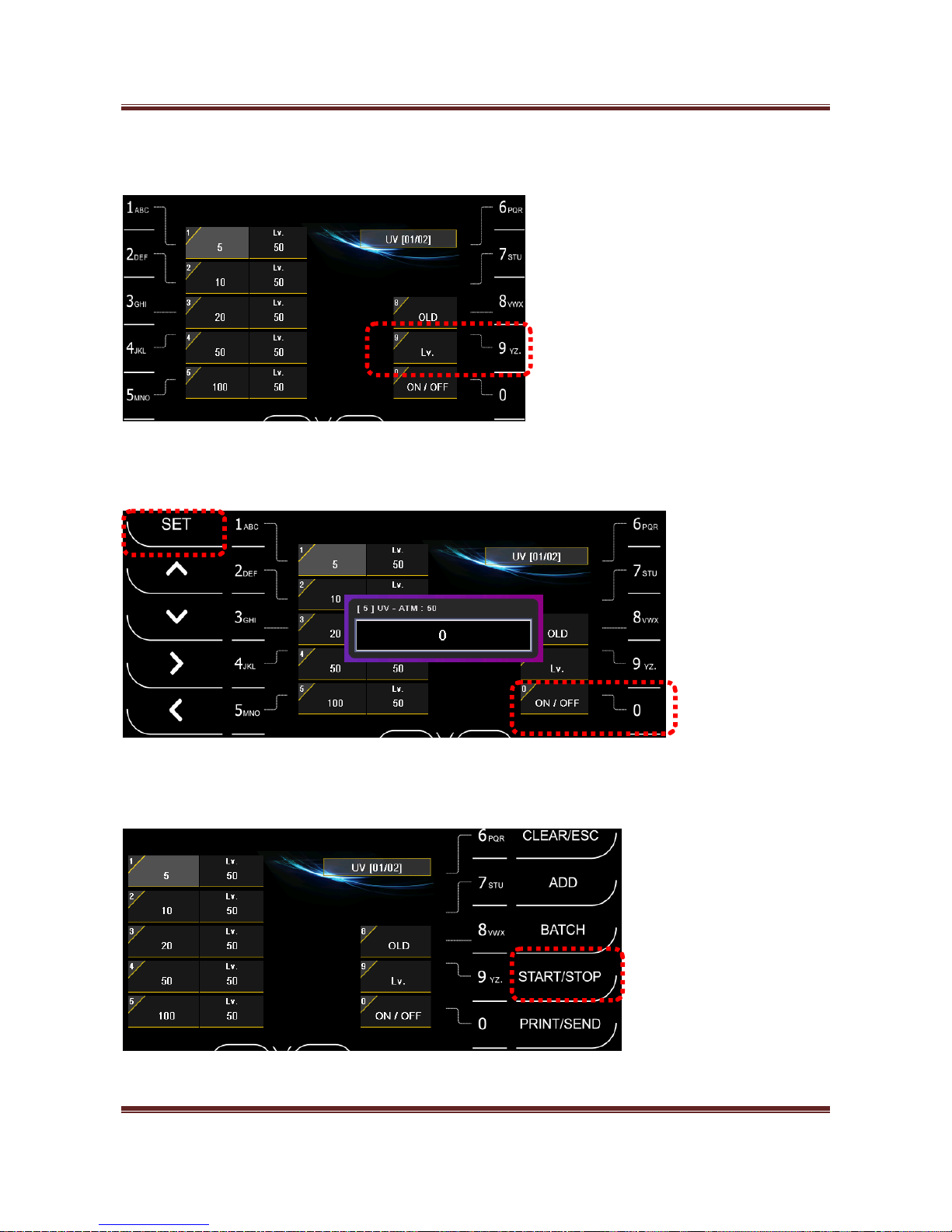
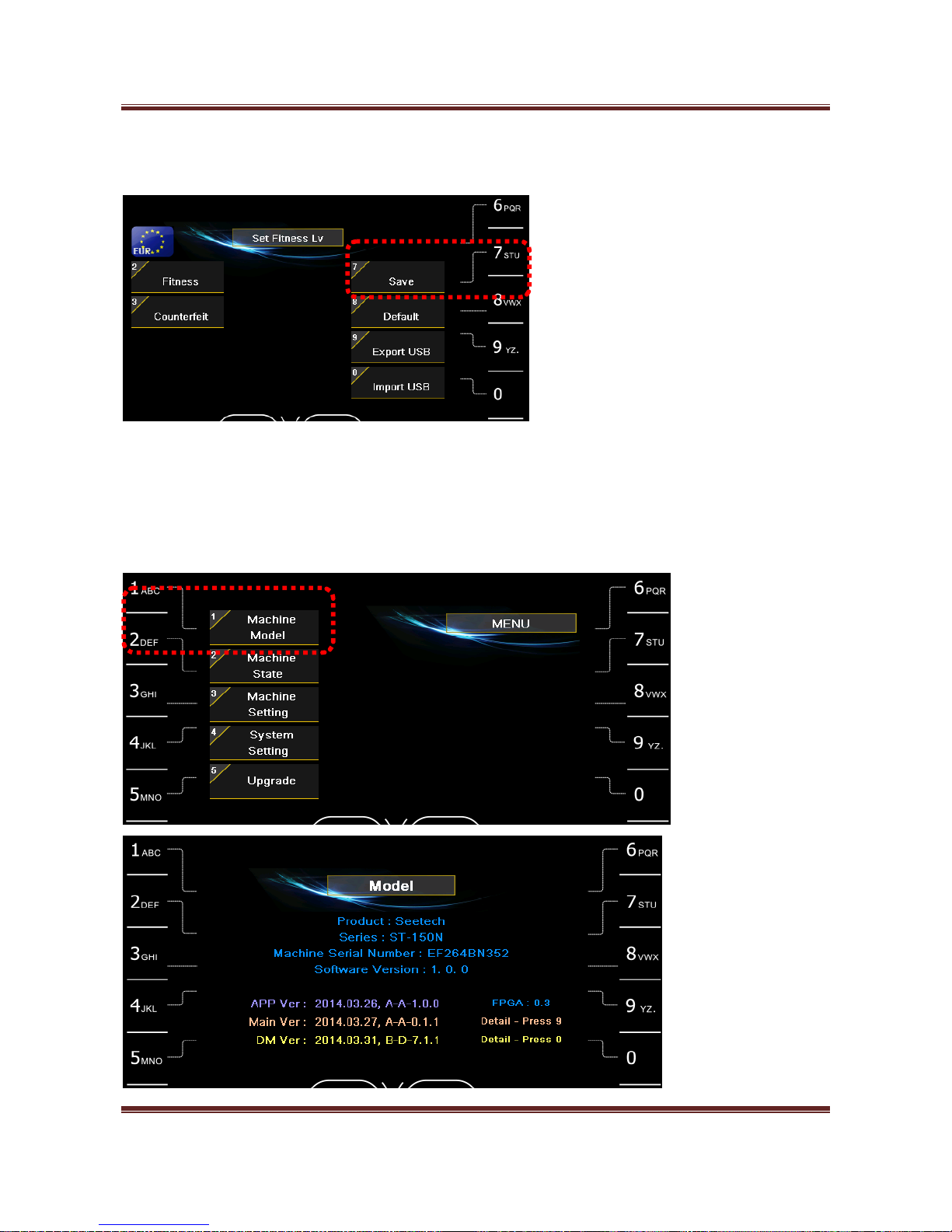
④ Select Lv. by pressing “9” key.
⑤ Enter level by pressing number keys and SET key or select Counterfeit ON/OFF by pressing “0” key.
⑥ Press START/STOP key twice.
Page 42
Magner175V/175FF USER Guide
Magner INT 42
⑦ Save the changed level by pressing “7” key.
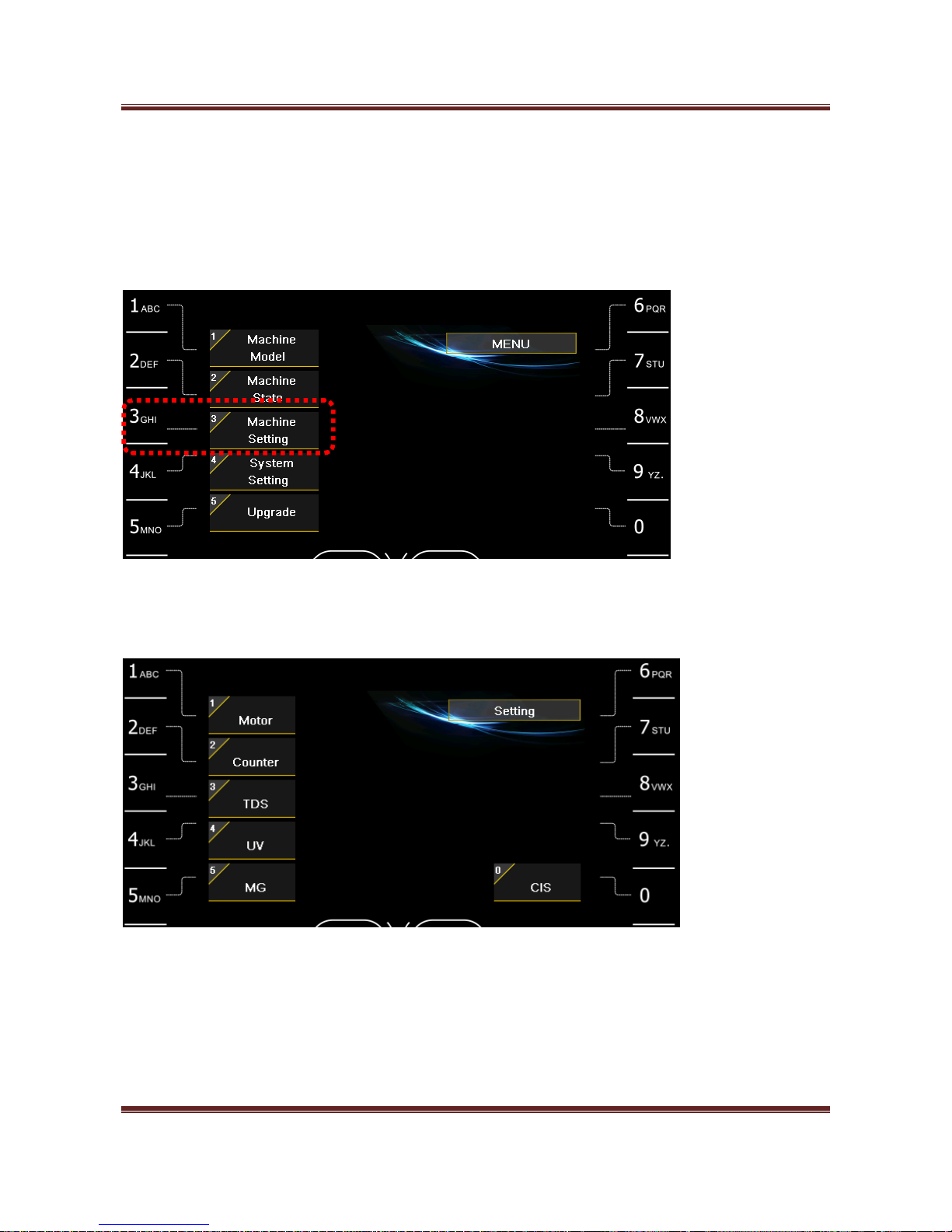
7. Machine Model
When long press START/STOP key and press “1” key, you can check machine information.
Page 43
Magner175V/175FF USER Guide
Magner INT 43
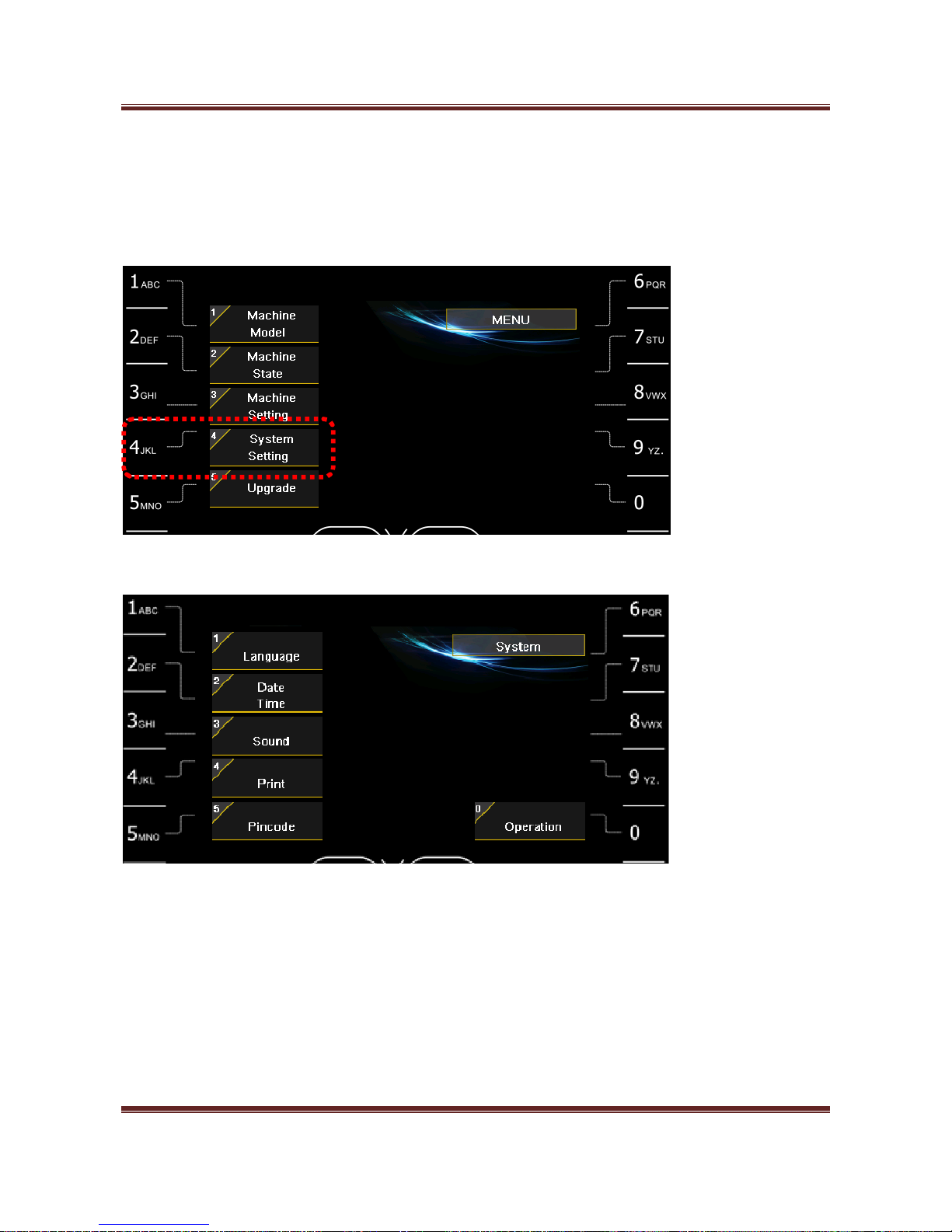
8. Machine Setting
Pincode is needed.
When long press START/STOP key and press “3” key, you can enter Machine Setting mode.
You can set each sensor by pressing number keys.
Page 44
Magner175V/175FF USER Guide
Magner INT 44
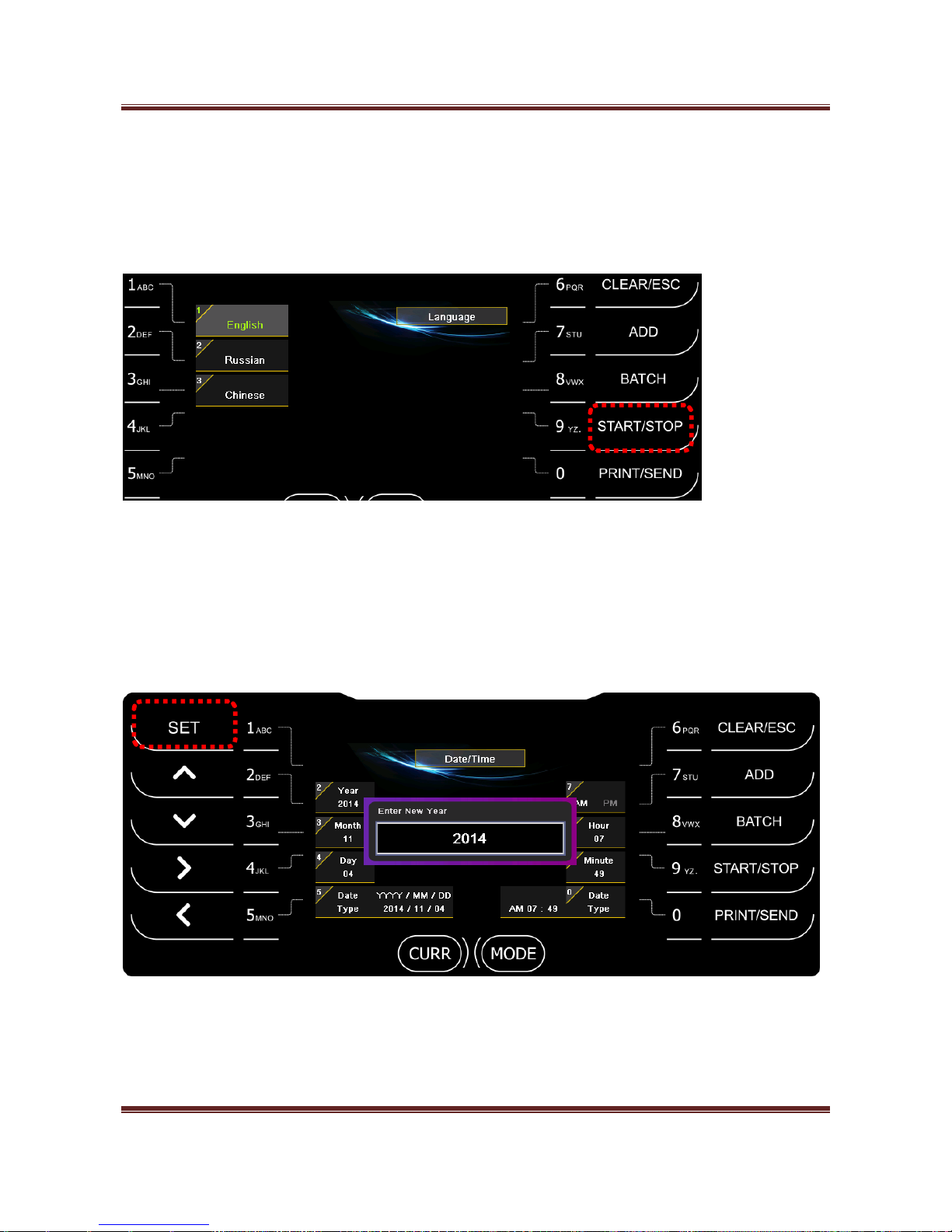
9. System Setting
When long press START/STOP key and press “4” key, you can enter System Setting mode.
Page 45
Magner175V/175FF USER Guide
Magner INT 45
1) Language
Press “1” key -> Press Number key for selecting Language for display.
When press START/STOP key, exit the mode and the selected language is displayed.
2) Date/Time
Press “2” key -> Press Number key for entering Date and Time.
When press “SET” key, the entered data is accepted.
When press START/STOP key, exit the mode and Date and Time setting is completed.
Page 46
Magner175V/175FF USER Guide
Magner INT 46
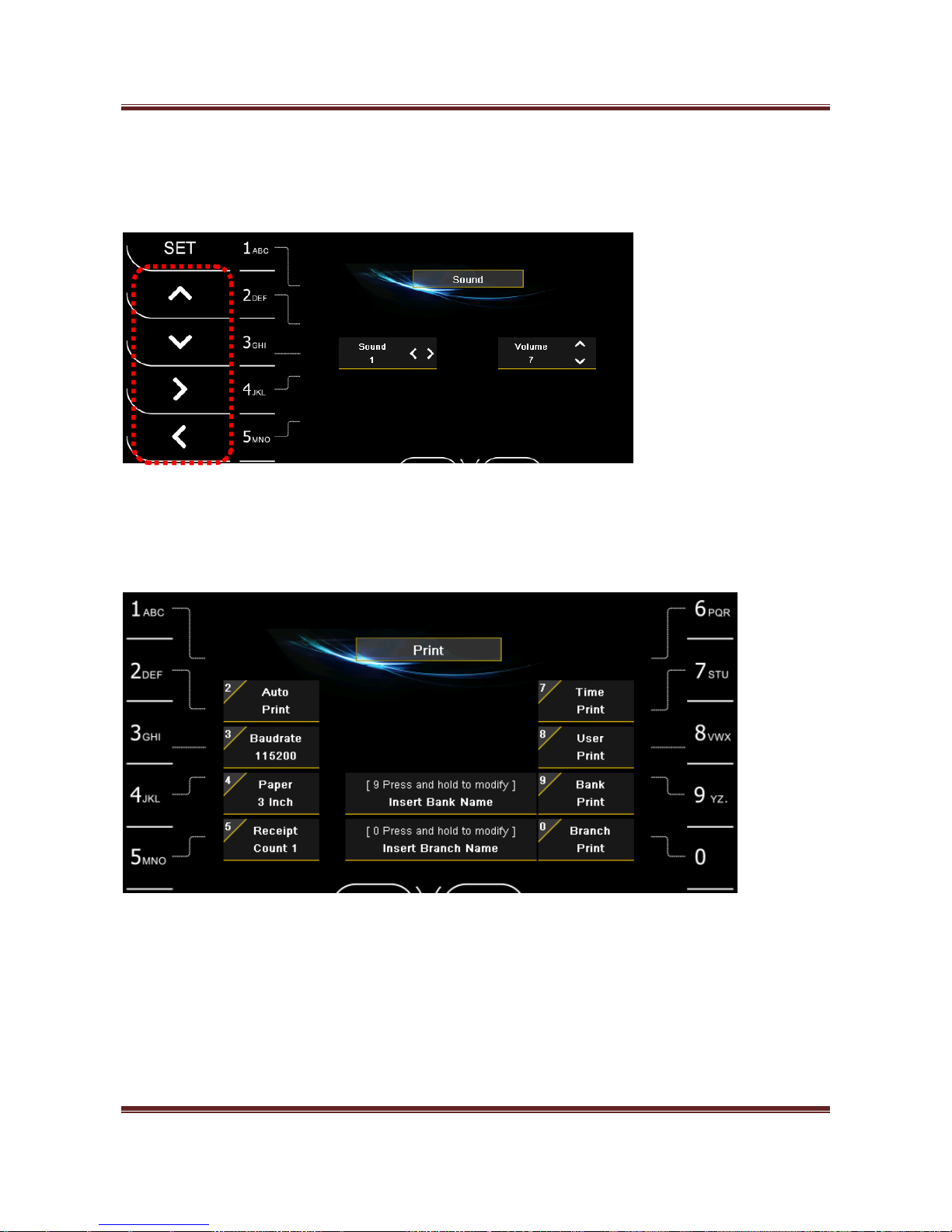
3) Sound
Press “3” key -> Press “>”, “<” key and “∧”, “∨” key for selecting and adjusting Sound and Volume.
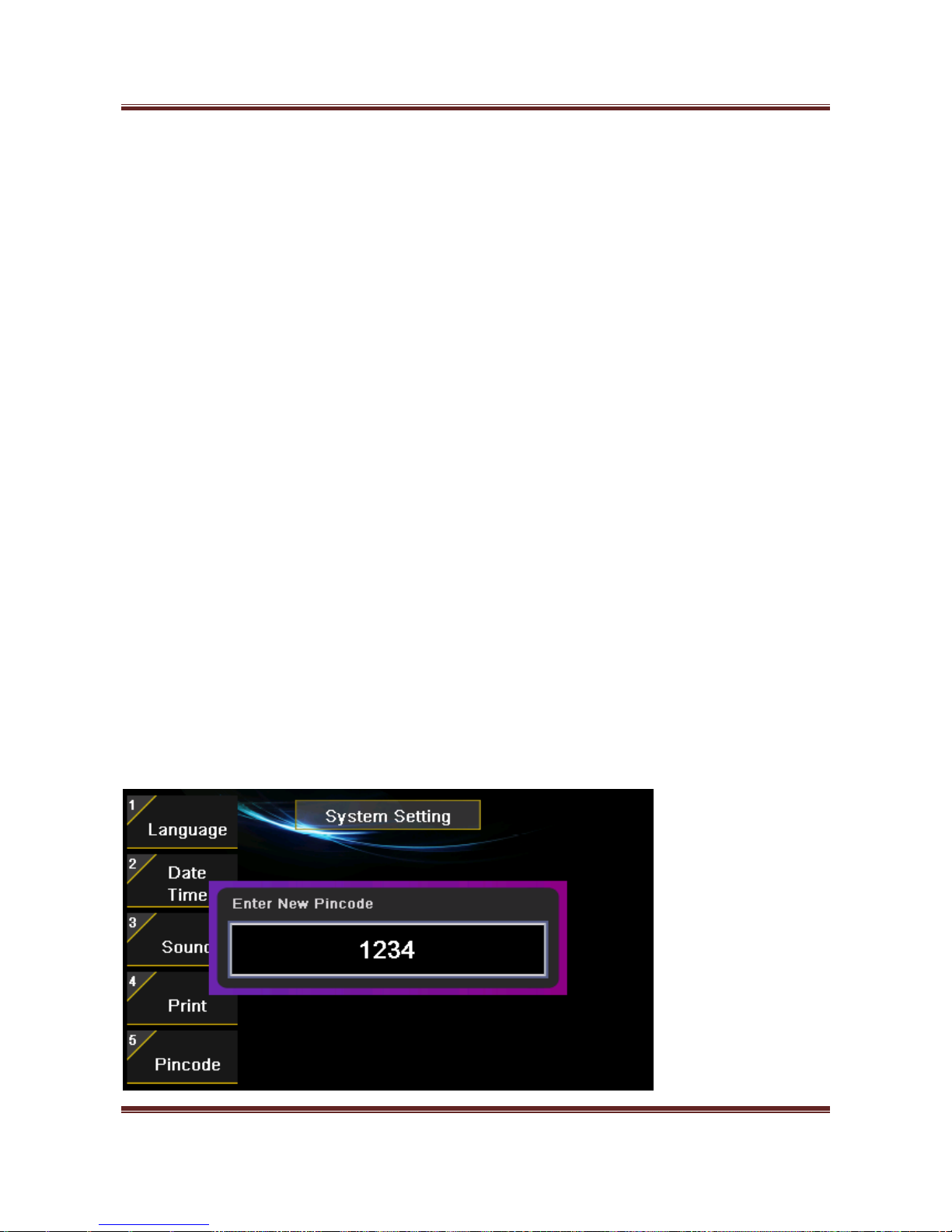
4) Print
Press “4” key and enter Printer setting mode.
Auto Print
After finish the counting, the receipt is printed automatically.
Baud rate
Select Baud rate between Machine and Printer.
Page 47
Magner175V/175FF USER Guide
Magner INT 47
Paper Size
Select paper size. (2 inch and 3 inch)
Receipt Count
Select the number of the printed Receipt.
Time Print
Select to print Time to Receipt.
User Print
Select to print User Name to Receipt.
Bank Print
Select to print Bank Name to Receipt.
When long press “9” key, you can enter or change Bank Name.
Branch Print
Select to print Branch Name to Receipt.
When long press “0” key, you can enter or change Branch Name.
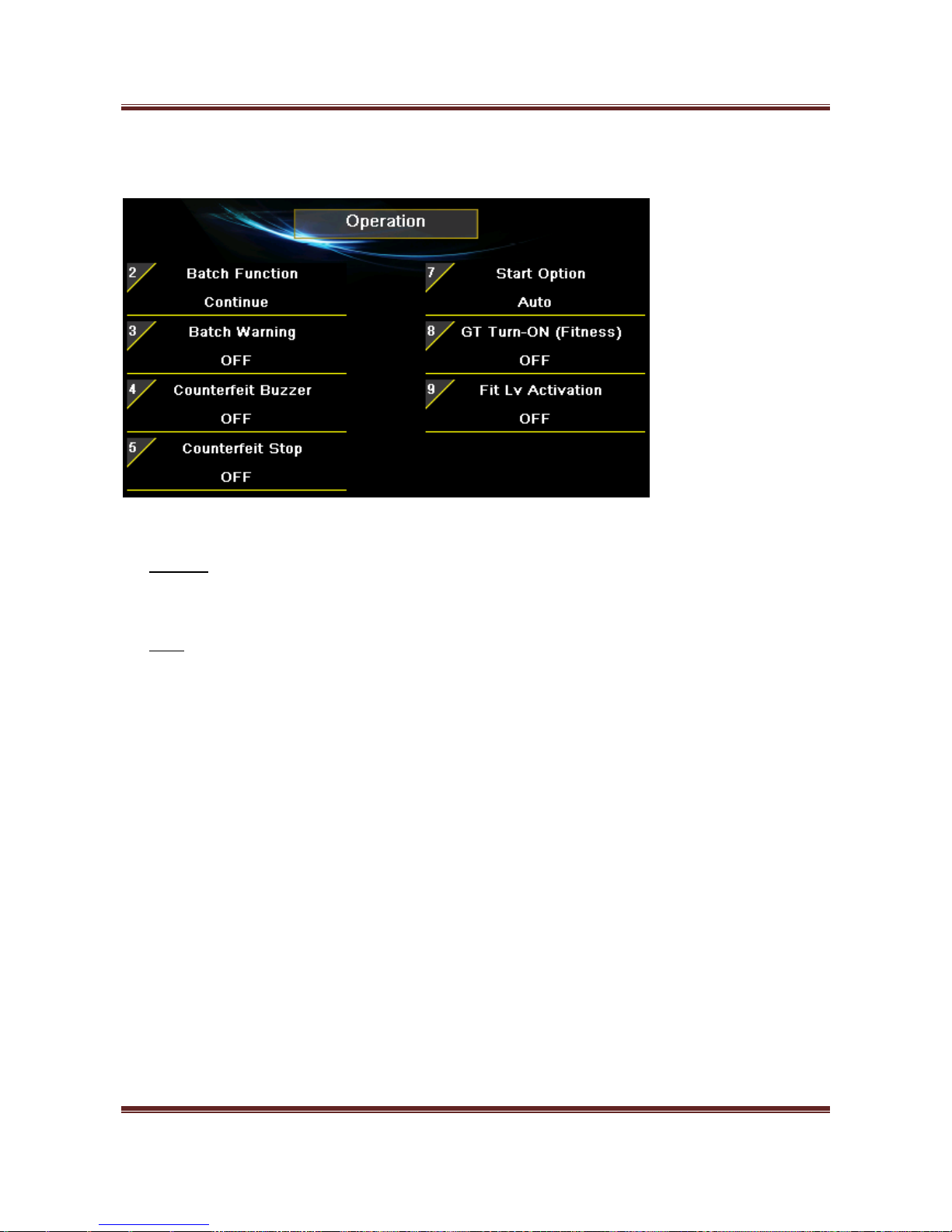
5) Pincode
Change Pincode of MAGNER175V/175FF. (Pincode is needed.)
Page 48
Magner175V/175FF USER Guide
Magner INT 48
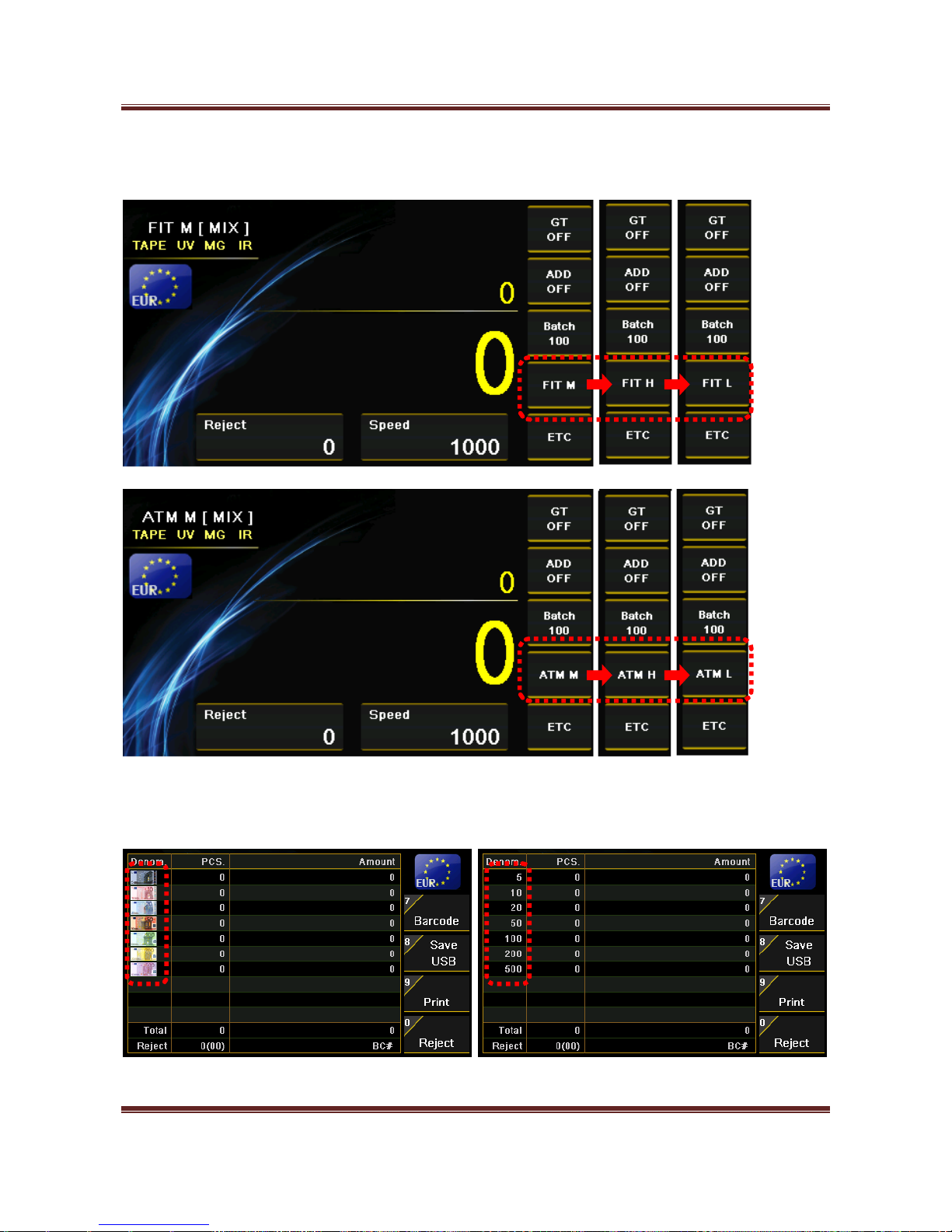
6) Operation
Batch Function
Continue – When next Batch is started, the displayed value is started from the previous
counting result..
Clear – When next Batch is started, the displayed value is started from 0.
Batch Warning
When Batch is not complete and the user removes the notes from Stackers then error message will show.
Counterfeit Stop
When counterfeit is sent to Reject Pocket, the machine makes the warning sound.
Start Option
By pressing Start/Stop icon or key, machine will start or stop counting.
GT Turn-ON (Fitness)
When enter FIT or ATM mode, GT is turned on automatically.
Page 49
Magner175V/175FF USER Guide
Magner INT 49
Fit Lv Activation
Set fitness level, High, Middle and Low.
Display Denom
Set the display type of face value, Text or Image, from the counting result.
Page 50
Magner175V/175FF USER Guide
Magner INT 50
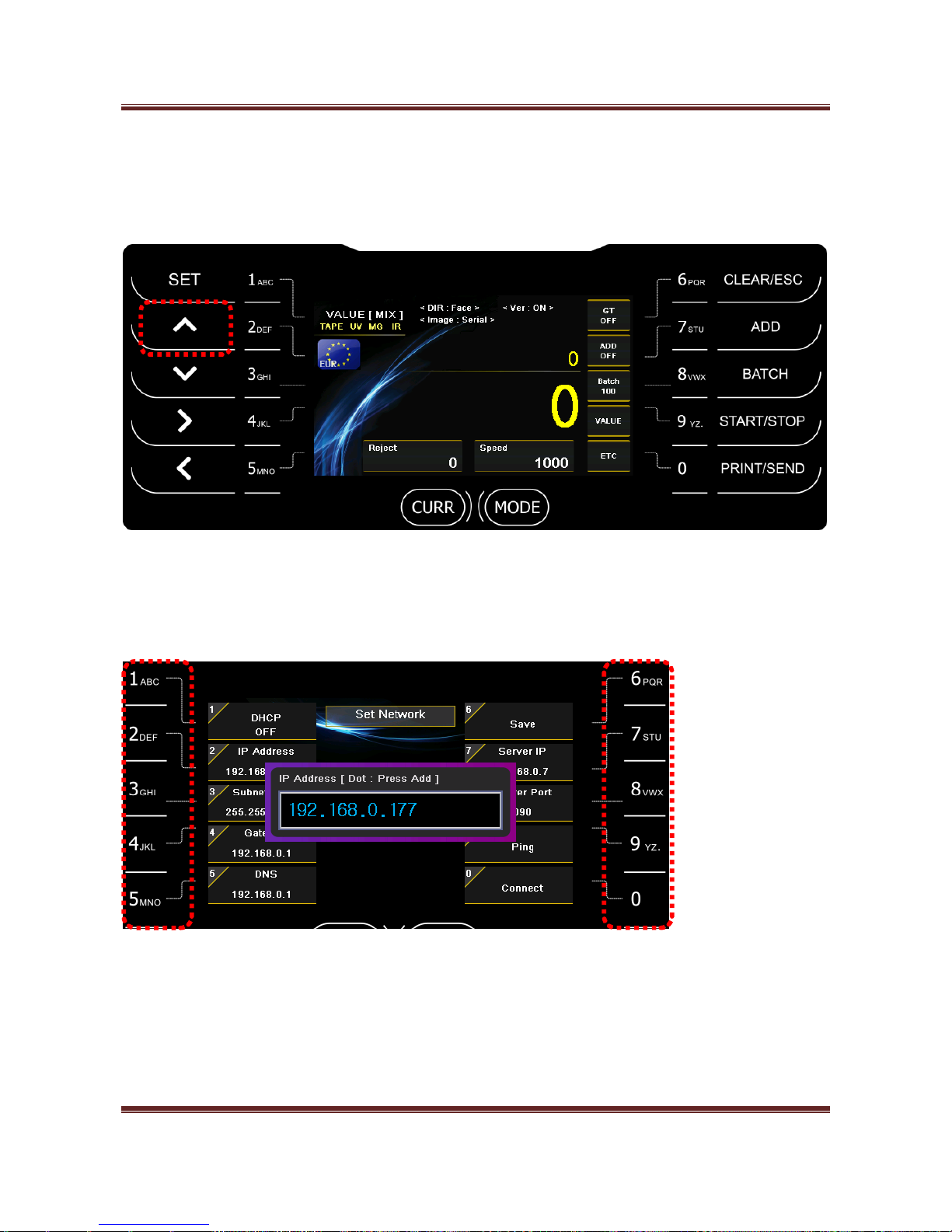
10. Network Setting
When long press “∧”key, you can set Network.
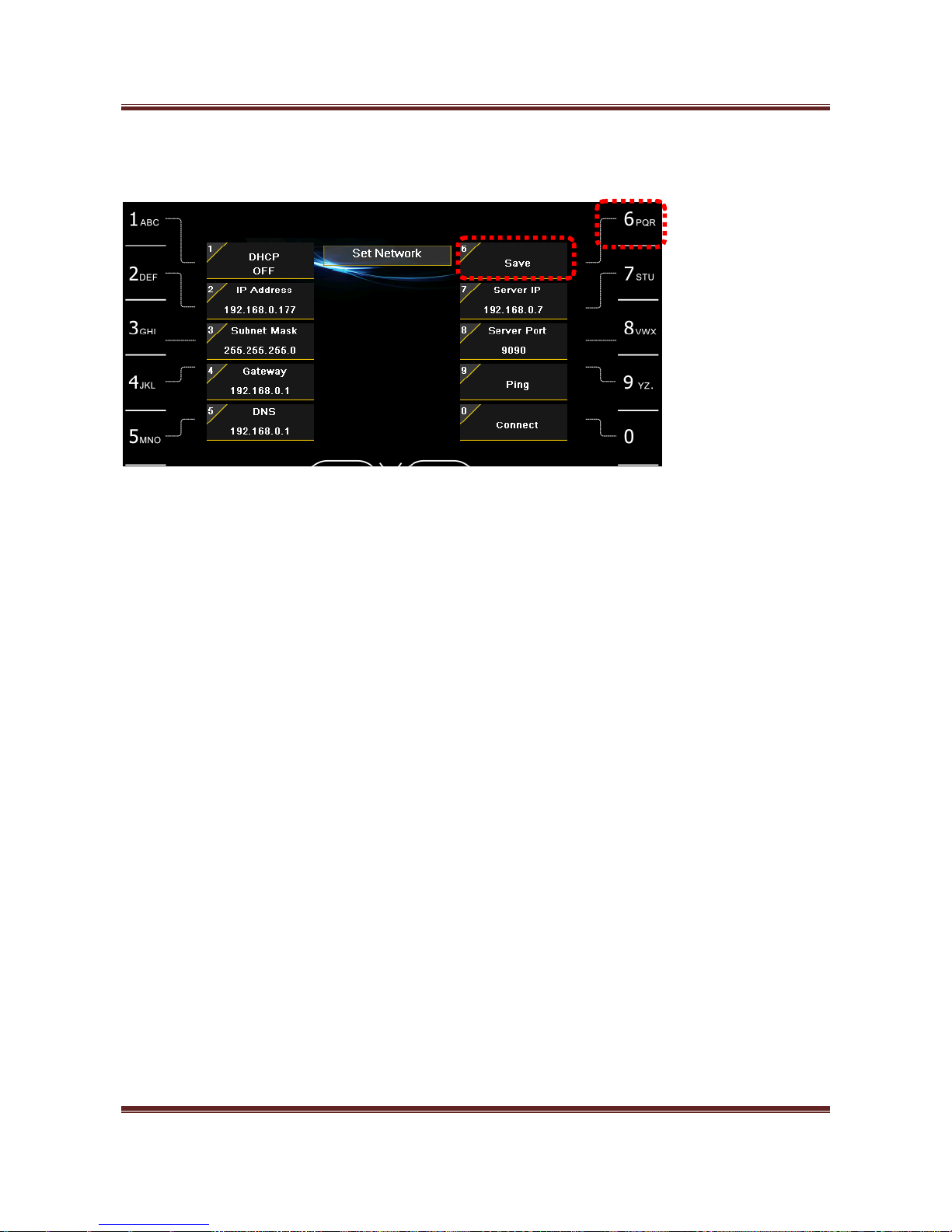
You can enter the required information by number keys and ADD key. (ADD key - enter “DOT”)
After enter each item, press SET key for accepting.
Page 51
Magner175V/175FF USER Guide
Magner INT 51
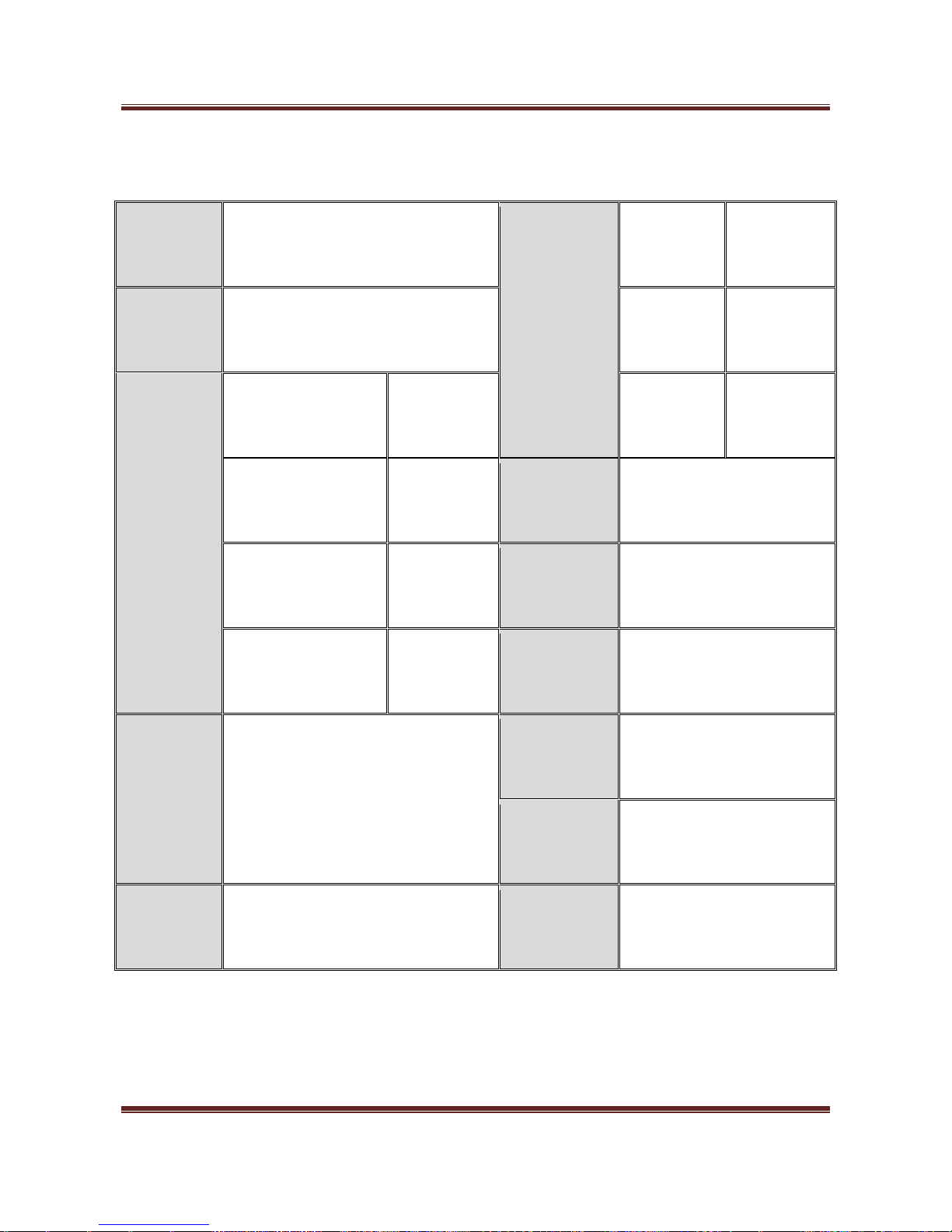
After enter all data, try to press “6” key for saving the information.
Page 52
Magner175V/175FF USER Guide
Magner INT 52
11. Specification
Counterfeit
Detection
CIS, IR, MG, UV, FL
Pocket
Capacity
(New/Old)
Hopper
Over 500
Notes
Currency
Maximum 10 currencies
Reject
Pocket
100 Notes
High Speed
Value
counting
Count Only
1200
notes/min
Stacker
250 Notes
Value
1200
notes/min
Dimensions
300(W) x 321(D) x 310(H) mm
Fitness(Magner175FF)
1200
notes/min
Weight
Net: 14 Kg, Gross: 16 Kg
Serial(option)
1000
notes/min
Power Supply
100 ~ 240V AC, 50/60 Hz
Fitness
Stains, Limpness, Dog-ears, Tears,
Holes, Folds, Mutilations, Thickness
Repairs, Composed, De-inked, etc.
Globalization
Local language support,
software customizing
Communication
Channel
LAN, USB, RS232C (External
Display, Thermal Printer)
User
Interface
Colors TFT-LCD(4.3 inch), Audio
Upgrade
LAN, USB
Page 53
Magner175V/175FF USER Guide
Magner INT 53
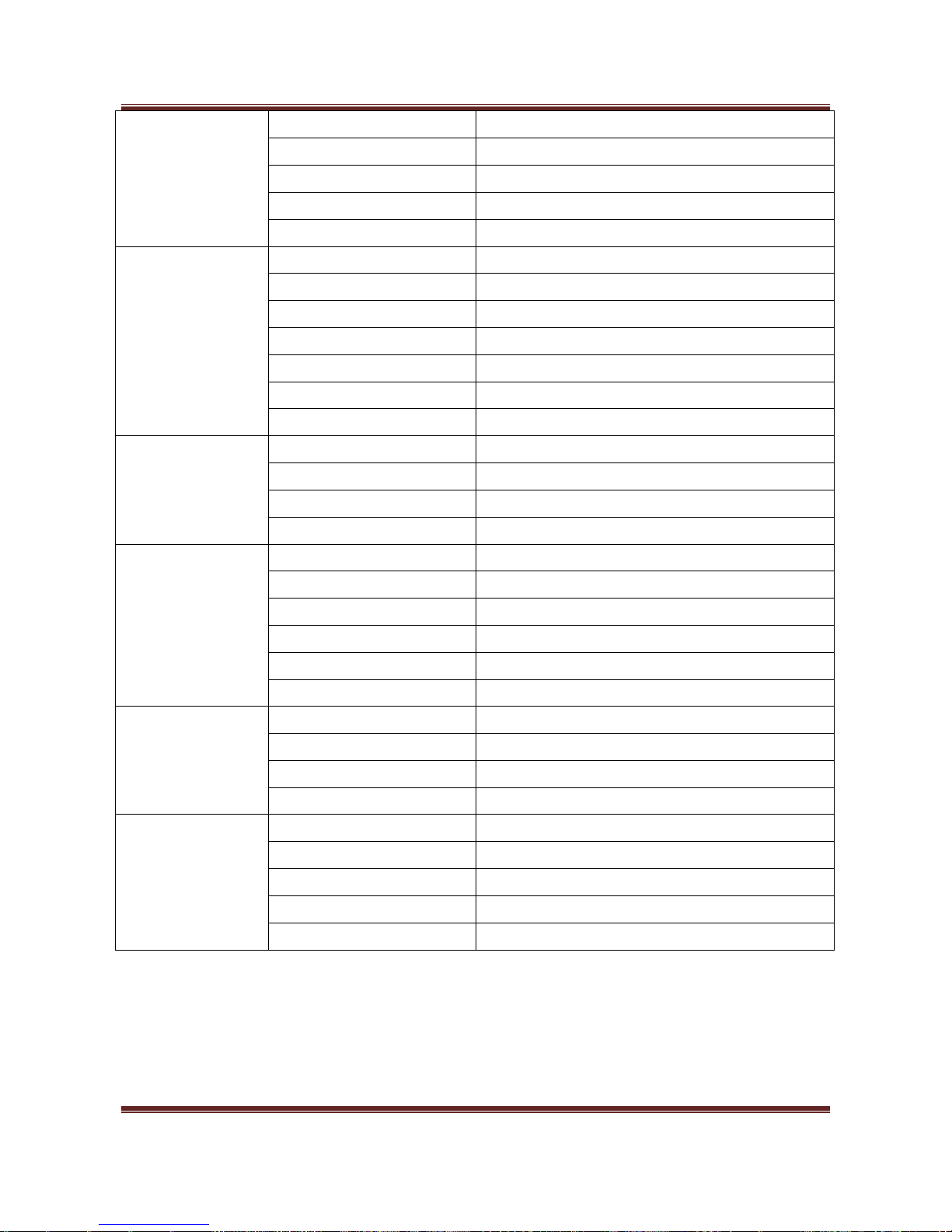
12. Error Code
HI Code
Low Code
Error
12
1~2
Chain Error
3~4
Skew Error
6~7
Size Error
8
Skew Error
9
Jam Error;
10
Communication Error
12~14
Communication Error
15
Double Error
24
POCKET FULL
25
BATCH FULL
26
REJECT POCKET FULL
27
Different Denomination
28
Different Face
29
Different Orientation
31
Different Version
40
Notes followed by Chain
default
Err-Main12
14
1~9
MG Error
10~19
UV Error
20~25
Tape
51
IR + MG
52
IR + UV
53
UV + MG
54
IR + UV + MG
55
IR + Tape
56
MG + Tape
57
UV + Tape
58
IR + MG + Tape
59
IR + UV + Tape
60
UV + MG + Tape
61
IR + UV + MG + Tape
default
Err-Main14
Page 54
Magner175V/175FF USER Guide
Magner INT 54
16
1
Old Version
2
New Version
3
VeryNew Version
11~20
User Select Denom
default
Err-Main16
22
1~2
Skew Error
3~5
Value Error
6~8
Skew Error
9
Size Error
10
Chain Error
11
Double Error
default
Err-DM22
23
6~11
Value Error
20
Old Version
22
New Version
default
Err-DM23
24
1~10
IR Error
11
Double Error
12
Miss metalthread
20
Different Serial
21
Change Serial Number
default
Err-DM24
28
1
Missing Serial Number
2
uncertain Serial Number
3
Different Serial Number
default
Err-DM28
29
1
Wrong Side of Barcode
2
Search Error Barcode
3
Wrong Type Barcode
4
Exceed Pattern Numbers of Barcode
default
Err-DM29
Page 55
Magner175V/175FF USER Guide
Magner INT 55
13. Maintenance
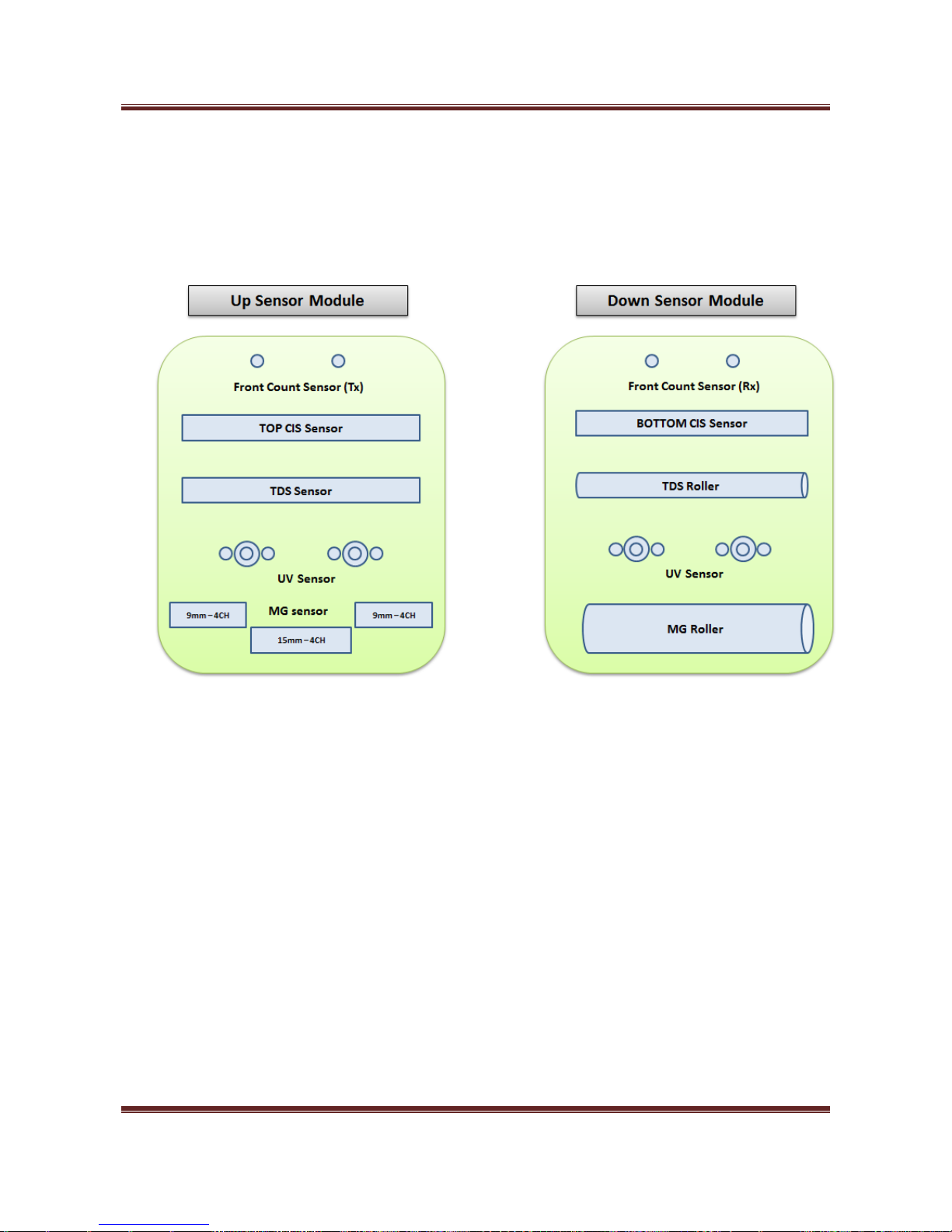
13-1. Sensor Structure
13-2. Daily Cleaning
The machine has many sensitive sensors to perform high technology functions, for example
fitness sorting, detecting counterfeit detection, recognizing denominations, etc.
Users are recommended to clean the machine sensors at least once a day.
Refer to following section and clean the machine regularly. Wipe with a cloth and/or can air.
※ Turn the power off before cleaning the machine.
Page 56
Magner175V/175FF USER Guide
Magner INT 56
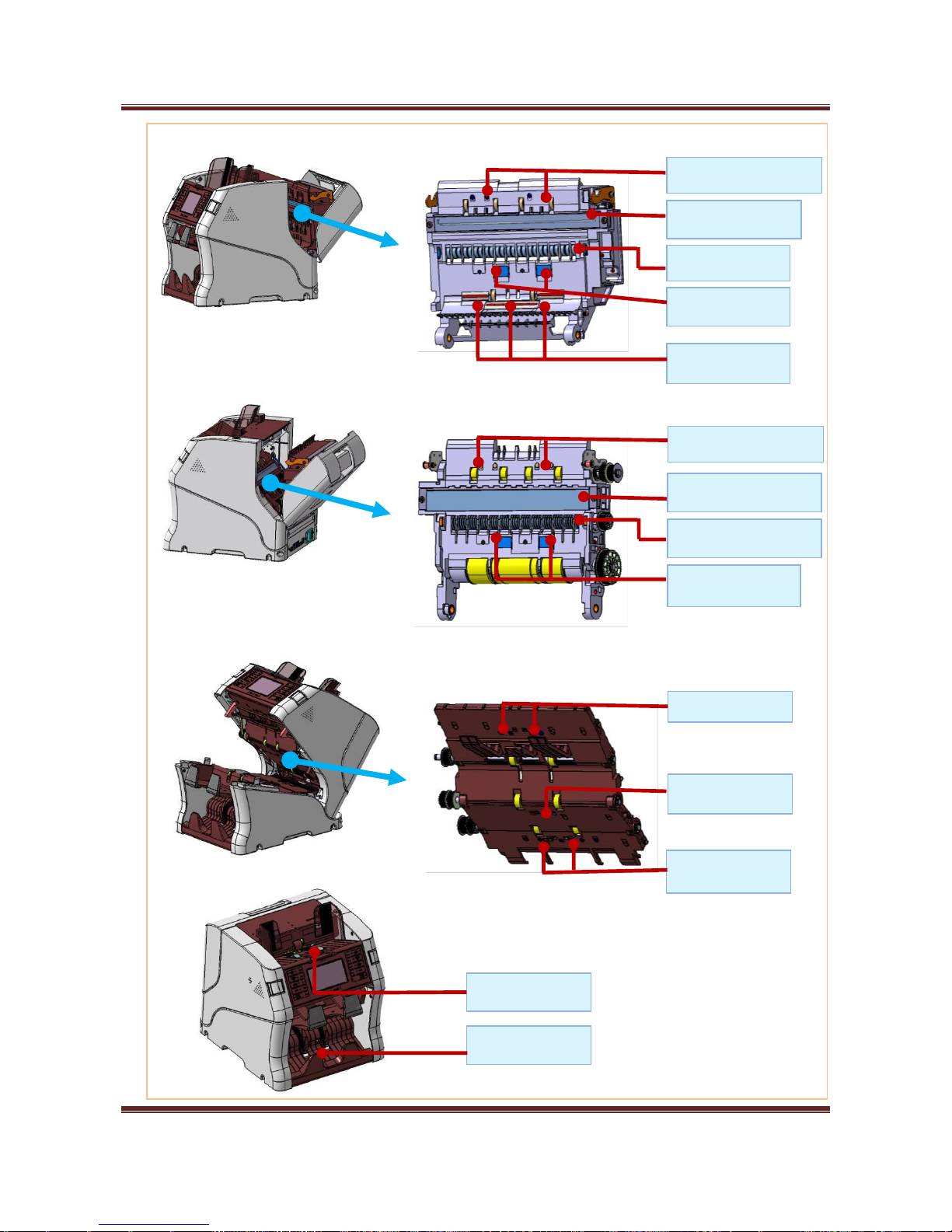
Down Sensor Module
Up Sensor Module
Lower Drive Body
Hopper sensor
Stacker sensor
TOP CIS Sensor
Tape Sensor
Counter LED Sensor
MG Sensor
UV Sensor
Bottom CIS Sensor
UV Sensor
Tape Sensor Roller
Counter Sensor
Reject Sensor
Jam 2 sensor
Jam 1 sensor
Page 57
Magner175V/175FF USER Guide
Magner INT 57
 Loading...