

Page 1
Quick Start Guide & Technical Manual
LUNA
Page 2

1 EN
MADRIX® LUNA –
Quick Start Guide & Technical Manual
5th Edition – July 2017
Thank you for purchasing MADRIX
®
LUNA!
Please read this guide carefully and thoroughly before using MADRIX®
LUNA. Make sure that you fully understand all information.
This MADRIX® LUNA Quick Start Guide is written in English and German.
(Diese Kurzanleitung wurde in englischer und deutscher Sprache verfasst.)
Developed and made in Germany.
Imprint
inoage GmbH
Wiener Straße 56
01219 Dresden
Germany
Managing Directors: Christian Hertel, Sebastian Pinzer, Sebastian Wissmann
Page 3

EN 2
English
Copyright Information And Disclaimer
© 2017 inoage GmbH. All rights reserved. Information is subject to change at
any time and without prior notice. Errors and omissions excepted. Reproduction,
adaptation, or translation without prior written permission is prohibited.
inoage GmbH does not grant guarantee on validity for a particular reason, the
marketability, or other properties of the product. There is no way to assert a
claim to inoage GmbH, neither in the legal way nor in other ways. inoage GmbH
is not responsible for damages, including all disadvantages that are not just
limited to the loss of sales, but that are caused due to the use of the product,
due to the loss of serviceability of the product, due to misuse, happenings,
circumstances, or actions that inoage GmbH does not have influence on, no
matter if the damages as well as consequential damages are direct or indirect;
whether they are special damages or others, nor if the damage is caused by the
owner of the warranty or a third person.
Trademark Credits
Microsoft® and Windows® are U.S. registered trademarks of Microsoft
Corporation. NEUTRIK® is a registered trademark of Neutrik AG. Art-Net™ –
Designed by and Copyright Artistic Licence Holdings Ltd. All other products
mentioned herein may be trademarks of their respective companies. MADRIX®
is a registered trademark of inoage GmbH.
Package Contents
1x MADRIX® LUNA
1x Power cord
(IEC C13)
1x USB 2.0 cable
(certified)
2x Rack-mount brackets
(already mounted to the device)
1x Quick start guide
Please note: Check the package contents and the condition of the interface
after unpacking! Contact your supplier if something is missing or damaged. Do
not use the device if it seems to be damaged!
Page 4
3 EN
Safety Instructions And Limited Warranty
Two years of limited manufacturer’s warranty are granted to the purchaser
of this product. Warranty applies to constructional fault, material defect, or
incorrect assembly the manufacturer has caused or is to be held responsible
for. Warranty will be void if the interface is opened, modified, damaged through
inappropriate handling and wrong usage, damaged through overvoltage, or
damaged through any other cause.
Please follow the instructions below to avoid mishandling, damage to the
device, or personal injury:
WARNING! HANDLE WITH CAUTION! THE POWER SUPPLY /
THE DEVICE WORKS WITH MAINS VOLTAGE (AC 100 V – 240 V).
Beware that the interface works with electrical power. Only use the
device in dry environments (indoor use). The IP Rating of the device
is IP20. Do not use the interface in humid environments and avoid
contact with water or any other liquids. Turn off the power if you are not using
the device for a long time.
It is recommended to always use galvanic isolation (e.g. an opto-isolator/optocoupler splitter). Avoid unwanted voltage on the DMX lines/cables at all times.
Do not remove any parts from the unit including the plug ground pin or connect
to an ungrounded circuit. Do not connect the unit to LEDs that are switched
on. Only connect the unit to LEDs and controllers that are initially powered off.
There are no user serviceable parts inside or outside the interface. Repair
service lies only within the responsibilities of the manufacturer. If the interface
appears to be defective, please contact your dealer. After expiration of the
warranty period you may contact your supplier or the manufacturer to have the
unit repaired against payment of an individual service fee, if possible.
The interface has several ports and slots. Only connect or insert devices,
cables, and connectors to the individual ports and slots using connectors of the
same type as the port. Do not use inapplicable equipment. This device should
be used by professionals. The device is not designed to be operated by nonprofessionals or children.
▴
!
Page 5

EN 4
English
End-Of-Life
This electrical device and its accessories need to be disposed of
properly. Do not throw the device into normal trash or household
waste. Please recycle packaging material whenever possible.
Usage
In general, this device is designed to receive DMX512 data over Ethernet
(Art-Net) or USB and distribute it over XLR. It is a hardware interface to be
connected towards various types of controllable lights or lighting controllers.
Do not use the interface for any other, deviating purpose.
The device can be connected to and disconnected from the PC during use and
without a reboot (Hot Swapping & Plug and Play). Multiple interfaces can be
used at the same time.
Technical Specifications
THE DEVICE REQUIRES AC 100 V – 240 V TO WORK. DO NOT USE ANY
OTHER VOLTAGE BECAUSE IT CAN DAMAGE THE DEVICE.
Power supply:
Power consumption:
DMX512 (OUT):
DMX512 (IN):
DMX512 ports (OUT):
DMX512 ports (IN):
Ethernet (Art-Net):
USB port:
Case:
Size:
Dimensions (body only):
Dimensions (total):
Dimensions (LUNA 16):
Weight:
Temperature range:
Relative humidity:
AC 100 – 240 V, 50 – 60 Hz, 0.4 A max., IEC C14 inlet
< 5 W during normal operation
4x / 8x / 16x 512 DMX channels output
1x 512 DMX channels input
5-pin, XLR, female, NEUTRIK
5-pin, XLR, male, NEUTRIK
RJ45, 10/100 MBit/s, Auto MDI-X, NEUTRIK etherCON
(compatible with 1 GBit/s)
USB 2.0, type B plug
Metal enclosure, IP20
19″ x 1U (LUNA 4 / LUNA 8) | 19″ x 2U (LUNA 16)
76 mm x 440 mm x 44 mm (length x width x height)
76 mm x 482.6 mm x 44 mm (length x width x height)
76 mm x 482.6 mm x 88 mm (length x width x height)
1.3 kg (LUNA 4) | 1.4 kg (LUNA 8) | 2.0 kg (LUNA 16)
-10 °C to 60 °C (Operating) | -20 °C to 70 °C (Storage)
20 % to 80 %, non-condensing (Operating / Storage)
Page 6
5 EN
Power Supply
Be careful when handling the device and electrical power! To supply the unit with
power, first connect the provided power cable to the unit (‘Power’) and then
to a suitable power outlet. The device uses mains voltage (AC 100 V – 240 V)!
CAUTION!
DO NOT OPEN THE UNIT. RISK OF ELECTRICAL SHOCK.
Description Of Status LED Codes
The following tables describe the LED status codes on the front of the device.
STATUS STATUS LED POWER
Powered off
Power cable not connected. The device has no power.
Permanently green
Connected to power.
The power is on.
Blinking green
Bootloader activated. Reset the device (see page 7).
STATUS STATUS LED ETHERNET STATUS LED USB
Powered off
Ethernet not connected
or the device has no power.
USB not connected
or the device has no power.
Permanently green
Connected to Ethernet.
No data is sent or
received over Ethernet.
Connected to USB.
No data is sent or
received over USB.
Blinking green
Communicating over
Ethernet.
Sending or receiving data
over Ethernet.
Communicating over
USB.
Sending or receiving data
over USB.
STATUS STATUS LED DMX-IN STATUS LED DMX-OUT
Powered off
DMX not connected
or the device has no power.
DMX not connected
or the device has no power.
Blinking green
Receiving data via DMX-IN.
The input port works.
Sending data to DMX-OUT.
The output ports work.
Page 7
EN 6
English
Connectivity
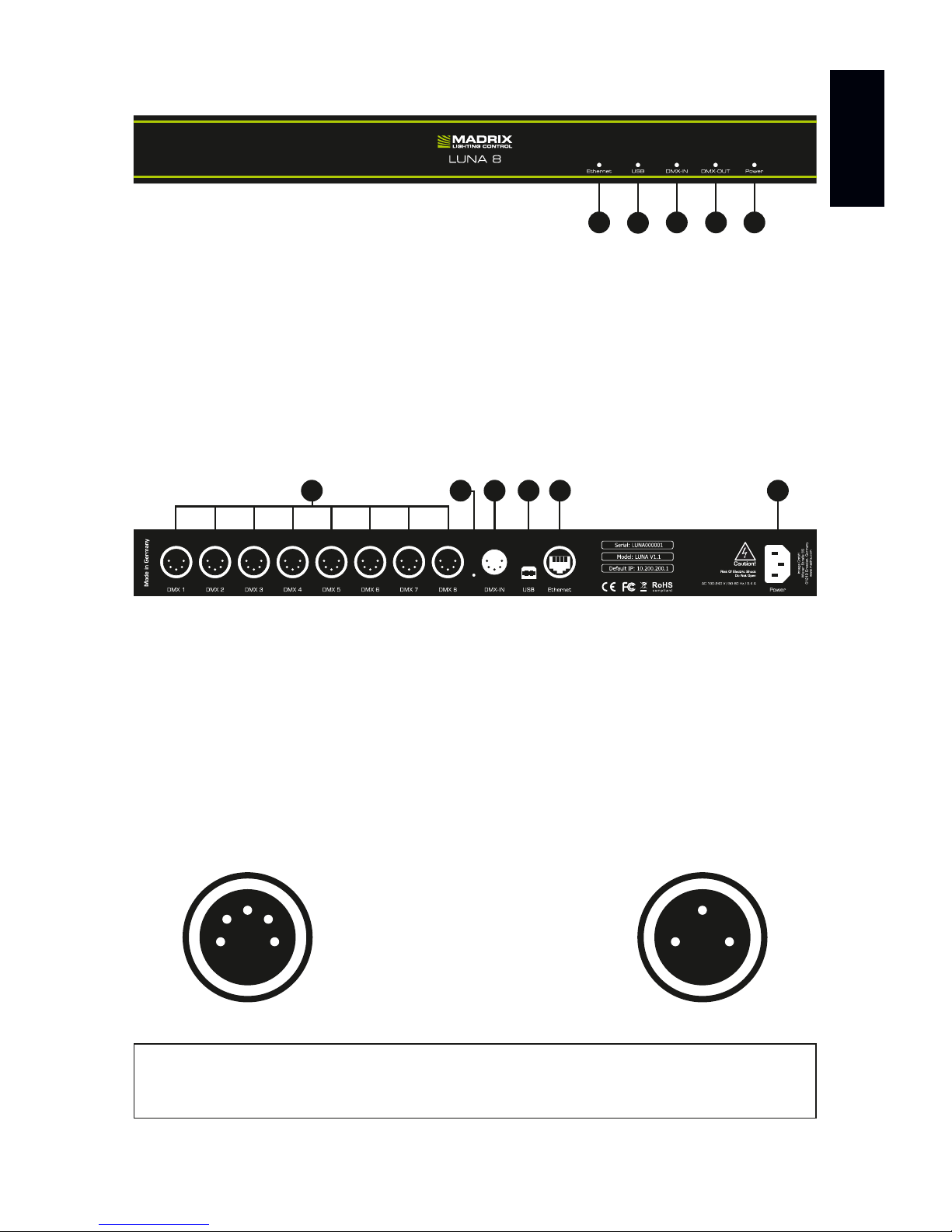
1) Status LED for Ethernet
2) Status LED for USB
3) Status LED for DMX-IN
4) Status LED for DMX-OUT
5) Status LED for Power
6) XLR ports: DMX 1 – DMX 4/8/16
7) Reset button
8) XLR port: DMX-IN
9) USB port
10) RJ45 Ethernet port
11) Power socket
3-Pin And 5-Pin XLR Connector Layout
The images below outline the general pin layout of 5-pin and 3-pin XLR ports.
5
4
3
2
1 2
3
1
Please note: MADRIX® LUNA features 5-pin, female XLR connectors and one
5-pin, male XLR connector. Please use XLR adapters if necessary!
5-Pin Description 3-Pin
1 Ground
2 DMX –
3 DMX +
4 Spare
5 Spare
9876 1110
1 2 43 5
Note: MADRIX® LUNA 8 is used above as example.
MADRIX® LUNA 4 and MADRIX® LUNA 16 have a similar layout and functionality.
Page 8

7 EN
IP Address And Other Device Information
You will find the following important information on the back side of the device:
• Serial number (‘Serial’)
• Hardware revision (‘Model’)
• Default and preconfigured IP address (‘Default IP’)
Web Configuration
You can access various settings and information of MADRIX® LUNA using the
built-in web configuration tool, in case that the device is connected to a network.
Step 1) Connect MADRIX® LUNA and your computer to the same network.
Step 2) Assign correct network settings for your PC in the Windows operating
system. (Recommended default settings:
IP address 10.0.0.1 / Subnet mask 255.0.0.0)
Step 3) Open your web browser and enter the IP address of MADRIX® LUNA.
(You can find the default IP address on the back side of the device.)
Step 4) The web configuration tool will be launched. You will have access to
different settings, such as the IP address.
Reset To Factory Default Settings
In rare cases, you might need to do a reset to factory default settings:
Step 1) Disconnect the device from power.
Step 2) Use a suitable tool to press the reset button on the unit’s back side.
Step 3) Continue to press the reset button and connect to power again.
Step 4) Continue to press the reset button and wait until all status LEDs
on the front of the device flash repeatedly or wait 10 seconds.
Using Any 3rd-Party Controller Via Art-Net
MADRIX® LUNA is a standard Art-Net node. Because of this, you can use the
device with any application, console, or controller that supports Art-Net.
Please note: Simply repeat these steps should the process fail.
Page 9
EN 8
English
Using The MADRIX® Software
The MADRIX® Software is a professional and advanced LED lighting control tool.
It is recommended to use the MADRIX® Software in order to access all features
of MADRIX® LUNA, including the USB connection, Art-Net, and Sync Mode.
MADRIX® Minimum System Requirements
The minimum system requirements for the MADRIX® Software are as follows.
The optimal system specifications will often be higher. For the latest information,
please check the website www.madrix.com
• 2.0 GHz dual-core CPU
• OpenGL 2.1 graphics card
(NVIDIA recommended)
• 2 GB RAM
• 1 GB free harddisk space
• 1280 x 768 screen resolution
• Network card
• Sound card
• USB 2.0
MADRIX® Supported Operating Systems
The MADRIX® Software supports the following operating systems. For the
latest information, please check the website www.madrix.com
Please note: In order to distribute data via MADRIX® LUNA using MADRIX®,
a MADRIX® Software license is required (sold separately)!
Microsoft® Windows® 7 | 8 | 8.1 | 10
Please keep the system, drivers, and updates up to date.
Compatible with 32 bit and 64 bit.
Page 10
9 EN
Installing The MADRIX® Software And Drivers
Start the installation process for the MADRIX® Software on your operational
computer via CD, USB flash drive, or downloaded software installer. Follow the
on-screen installation instructions as described below.
PLEASE INSTALL THE SOFTWARE AND ITS DRIVERS
BEFORE YOU CONNECT MADRIX® LUNA TO YOUR PC.
Second, the ‘Welcome’ window appears. Click ‘Next >’ to start the installation.
Third, the ‘License Agreement’ will be shown. It outlines the terms you are
agreeing to when you install the software. You must accept these terms in
order to continue. Please click ‘I Agree’.
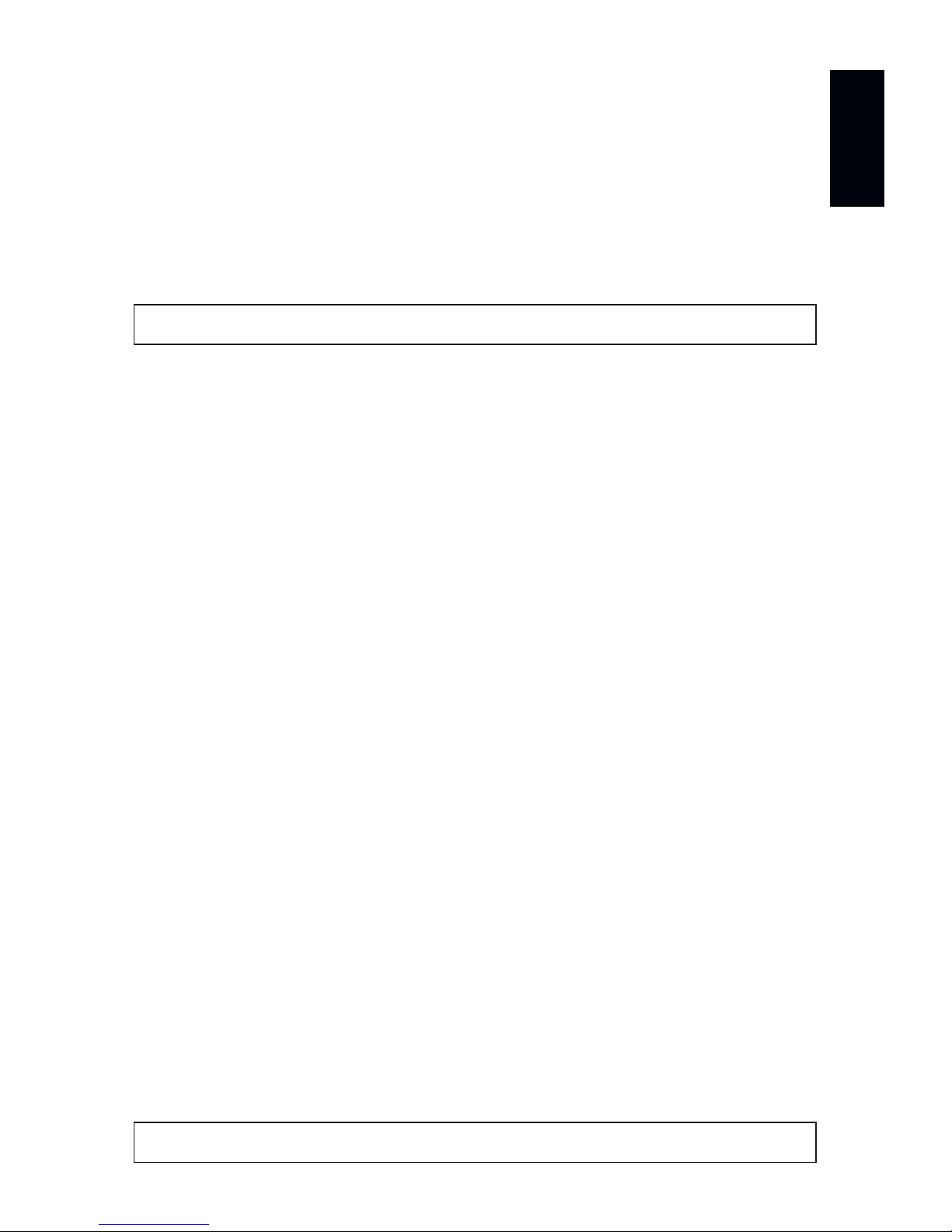
First, please choose your preferred language and
confirm with ‘OK’. You may abort the process at any
time by clicking ‘Cancel’.
Fourth, the ‘Choose Components’ window
allows you to select which items you
want to install. A description is given for
each item. The items ‘MADRIX’, ‘MADRIX
Interface Driver’, and ‘MADRIX KEY
Driver’ need to be selected and are the
most important items for operating the
MADRIX® LUNA. Click ‘Next >’.
Fifth, the section called ‘Destination Folder’ allows you to select the location
on your harddisk where the software will be installed. Please use the button
‘Browse...’ to choose a location and then click ‘Install’.
The installation process may take a few minutes.
Sixth, when the ‘Installation Complete’ window appears, click ‘Next >’.
Seventh, uncheck ‘Run MADRIX’ and then click ‘Finish’ to complete the
installation process.
Page 11
EN 10
English
Operating Modes
Four main operating modes are available to you when using MADRIX®:
• DMX-OUT via Ethernet network (Art-Net)
• DMX-OUT via USB
• DMX-IN via Ethernet network (Art-Net Remote)
• DMX-IN via USB
Using DMX-OUT Via Art-Net
You can connect MADRIX® LUNA over Ethernet network to the network
card of the computer that runs the MADRIX® Software. Data is distributed
to the device over network cabling and sent to the XLR output ports
(‘DMX 1 – DMX 4/8/16’).
Follow these quick steps to configure Art-Net in the MADRIX® Software:
Step 1) Connect LED controllers/fixtures to the XLR ports of MADRIX® LUNA.
Step 2) Connect MADRIX® LUNA to power.
Step 3) Connect MADRIX® LUNA to your computer using network cabling.
Step 4) Assign correct network settings for your PC in the Windows operating
system. (Recommended default settings:
IP address 10.0.0.1 / Subnet mask 255.0.0.0)
Step 5) Start MADRIX® and go to ‘Preferences...’ à ‘Device Manager...’
à tab ‘Art-Net’ and activate ‘Enable’. Click on the search button
(loupe icon) and the device appears in the list.
Step 6) In MADRIX®, go to ‘Preferences...’ à ‘Device Manager...’
à tab ‘DMX Devices’ to configure DMX output. Activate ‘Enable’ for
each required port in the section ‘Settings’.
Step 7) In MADRIX®, configure your virtual LED matrix using ‘Preferences...’
à ‘Matrix Generator...’ or à ‘Patch Editor...’.
For more information, please read the MADRIX® user manual.
Please note: The package contents do not include network cabling.
Please note: DMX-OUT and DMX-IN can be used at the same time.
Page 12

11 EN
Using DMX-OUT Via USB
You can connect MADRIX® LUNA directly over USB to the computer that runs
the MADRIX® Software. Data is distributed to MADRIX® LUNA via USB cabling
and sent to the XLR output ports (‘DMX 1 – DMX 4/8/16’). Follow these quick
steps to configure USB output in MADRIX®:
Step 1) Connect LED controllers/fixtures to the XLR ports of MADRIX® LUNA.
Step 2) Connect MADRIX® LUNA to power.
Step 3) Connect MADRIX® LUNA to a free USB 2.0 port of your computer
using the provided USB cable.
Step 4) Start MADRIX® and go to ‘Preferences...’ à ‘Options…’
à tab ‘Devices USB’. Activate ‘MADRIX LUNA’ and click ‘OK’.
Step 5) In MADRIX®, go to ‘Preferences...’ à ‘Device Manager...’
à tab ‘DMX Devices’. Activate ‘Enable’ for each required output port.
Step 6) In MADRIX®, configure your virtual LED matrix using ‘Preferences...’
à ‘Matrix Generator...’ or à ‘Patch Editor...’.
For more information, please read the MADRIX® user manual.
Device Configuration In MADRIX
®
Web Configuration
You can access the web configuration also through MADRIX® if Art-Net is
configured. Go to ‘Preferences...’ à ‘Device Manager...’ à tab ‘Art-Net’. Your
device is shown in the list with its IP address. Select it and click on the HTTP
Configuration button (HTTP icon). Your default web browser will be opened.
MADRIX Device Configuration
In MADRIX®, go to ‘Tools...’ à ‘MADRIX Device Configuration...’. A new window
will open and the same settings from the web configuration will be available. For
more information, please read the MADRIX® user manual.
DMX Input Settings
If DMX-IN is used, MADRIX® LUNA will automatically send the data via Art-Net
Remote to the network (when connected). Use the web configuration to change
relevant settings (Art-Net Universe and Broadcast/Direct IP Mode). Receiving
Art-Net Remote data or DMX-IN data via USB in MADRIX® requires further
configuration. For more information, please read the MADRIX® user manual.
Page 13
EN 12
English
Updates And Further Information
Digital documentation files are automatically installed with MADRIX®. More
information about the software and how to connect MADRIX® LUNA is provided
in the MADRIX® Help And Manual. You can access this user manual by pressing
‘F1’ on your keyboard while using the MADRIX® Software, by navigating to the
menu ‘Help’ à ‘User Manual…’, or online at help.madrix.com
The latest quick start guide and MADRIX® Software, including drivers, firmware
updates, and documentation, are available from www.madrix.com
Support
In case of further questions concerning handling of MADRIX® LUNA or technical
problems, please read the MADRIX® Help And Manual first, contact your dealer,
or have a look at the website www.madrix.com
You can also directly contact [email protected]
CE And RoHS Declaration Of Conformity
The device complies with the requirements set
forth in the council Directive of the law of the
Member States relating to electromagnetic compatibility (2004/108/EC), the
Low Voltage Directive (2006/95/EC), and the Directive on the restriction of
the use of certain hazardous substances in electrical and electronic equipment
(2011/65/EU) (RoHS). The compliance with these three Directives has been
evaluated in accordance with the following standards: DIN EN 55015; VDE
0875-15-1 (Nov. 2009) and DIN EN 61547:2010-03; VDE 0875-15-2.
FCC Declaration Of Conformity
The device has passed the following tests of compliance:
FCC (2003) - Title 47, Part 15, class A, Radio frequency devices.
This device complies with part 15 of the FCC Rules. Operation is subject
to the following two conditions: (1) This device may not cause harmful
interference, and (2) this device must accept any interference received,
including interference that may cause undesired operation.
RoHS
compliant
Page 14

13 EN
Frequently Asked Questions (FAQs)
What do the blinking LEDs on the front of the device mean?
Please read the chapter ‘Description Of Status LED Codes’ on page 5.
How can I change the IP address?
You can use the web configuration as described on page 7.
The current IP address cannot be reached. What can I do?
You could perform a reset to factory default settings as described on page 7.
Does the device support RDM?
No. RDM is not supported by MADRIX® LUNA at this time.
Is it possible to use more than one MADRIX® LUNA?
Yes. Multiple devices can be used together to control larger LED projects.
Art-Net is recommended for large projects. Use suitable network components
to create a network and connect the devices to a network switch (1 GBit/s).
Where do I activate the Sync Mode?
You can activate it in the MADRIX® Software under ‘Preferences...’
à ‘Device Manager...’ à tab ‘Art-Net’.
Can I use other controllers apart from MADRIX® to control fixtures?
Yes. When using MADRIX® LUNA as a standard Art-Net node, you can use
it in combination with other software applications, consoles, and controllers.
Do I need a MADRIX® LUNA and a MADRIX® KEY?
If you want to use the MADRIX® Software, yes. The MADRIX® Software license
is necessary and sold separately.
Can I repair MADRIX® LUNA myself?
No. Do not attempt any repairs. Any attempt will void your warranty (see p. 3)!
What can I do if my unit does not work anymore?
Please contact your dealer or supplier if the device seems to be defective.
Page 15

Deutsch
DE 1
MADRIX® LUNA –
Kurzanleitung & Technisches Handbuch
5. Edition – July 2017
Vielen Dank, dass Sie sich für das MADRIX
®
LUNA entschieden haben!
Bitte lesen Sie sich diese Kurzanleitung aufmerksam und sorgfältig vor der
Erstbenutzung durch. Vergewissern Sie sich, dass Sie alle Informationen
verstanden haben.
Diese Kurzanleitung wurde in englischer und deutscher Sprache verfasst.
Entwickelt und hergestellt in Deutschland.
Impressum
inoage GmbH
Wiener Straße 56
01219 Dresden
Deutschland
Geschäftsführer: Christian Hertel, Sebastian Pinzer, Sebastian Wissmann
Amtsgericht Dresden, HR B 29795
WEEE-Reg.-Nr. DE 26695213
USt-IdNr. DE276174128
Page 16

2 DE
Urheberrecht und Haftungsausschluss
© 2017 inoage GmbH. Alle Rechte vorbehalten. Änderungen und Irrtümer
vorbehalten. Reproduktion, Adaption oder Übersetzungen sind ohne vorherige,
schriftliche Erlaubnis nicht gestattet. Dieses Handbuch wurde mit größter
Sorgfalt verfasst. inoage GmbH gibt jedoch keine Gewähr hinsichtlich Richtigkeit,
Marktfähigkeit oder Eigenschaften des Produkts. Es gibt keinen rechtlichen oder
anderen Weg, Anspruch gegenüber inoage GmbH zu erheben. inoage GmbH
schließt jede Haftung für Schäden, Nachteile sowie Folgeschäden aus, die durch
Absatzausfall sowie durch die Benutzung des Produktes, durch den Verlust der
Betriebsfähigkeit des Produktes, durch unsachgemäße Benutzung, Ereignisse,
Umstände oder Handlungen, auf die inoage GmbH keinen Einfluss hat, ganz
gleich, ob es sich um direkte oder indirekte Schäden und Folgeschäden, ob es
sich um spezielle Schäden handelt oder ob diese vom Besitzer oder einer dritten
Person verursacht wurden.
Eingetragene Marken
Microsoft®, Windows® sind eingetragene Marken der Microsoft Corporation.
NEUTRIK® ist eine eingetragene Marke der Neutrik AG. Art-Net™: Entwicklung
und Copyright Artistic Licence Holdings Ltd. Alle anderen genannten Produkte
können eingetragene Marken der jeweiligen Firmen sein. MADRIX® ist eine
eingetragene Marke der inoage GmbH.
Lieferumfang
1x MADRIX® LUNA
1x Kaltgerätekabel
(IEC C13)
1x USB 2.0-Kabel
(zertifiziert)
2x Winkel
(bereits am Gerät montiert)
1x Kurzanleitung
Hinweis: Überprüfen Sie den Verpackungsinhalt und das Gerät nach dem
Auspacken. Kontaktieren Sie bitte Ihren Händler, sollte der Inhalt unvollständig
oder beschädigt sein. Verwenden Sie das Produkt nicht bei Beschädigung!
Page 17
Deutsch
DE 3
Sicherheitshinweise und Garantie
Der Käufer dieses Produktes erhält zwei Jahre Herstellergarantie auf das
Produkt hinsichtlich Konstruktions- und Designfehler, Materialfehler oder
fehlerhafte Montage soweit diese durch den Hersteller verursacht wurden oder
er diese zu verantworten hat. Die Garantie erlischt sobald das Gerät geöffnet,
verändert, modifiziert oder durch unsachgemäße Handhabung, durch Elektrizität
oder durch anderweitige Ursachen beschädigt wurde.
Bitte beachten Sie die nachstehenden Hinweise, um falsche Handhabung,
gesundheitliche Schäden oder Geräteschäden zu vermeiden:
Betreiben Sie das Gerät nur in trockener Umgebung (Gebrauch in
geschlossenen Räumen). Die Schutzklasse des Gerätes ist IP20.
Vermeiden Sie hohe Luftfeuchtigkeit und Kontakt mit Wasser
und jeglichen anderen Flüssigkeiten. Trennen Sie das Gerät bei längerer
Nichtbenutzung vom Netz.
Es wird empfohlen, das Gerät immer durch galvanische Trennung abzusichern
(z.B. durch Optokoppler). Es sollte zu keiner Zeit Fremdspannung auf den DMXKabeln anliegen. Entfernen Sie keine Teile vom Gerät oder andere Bauteile
und verbinden Sie es niemals mit einem ungeerdeten Stromkreis. Schließen
Sie das Gerät nicht an eingeschaltete LEDs an. Verbinden Sie nur LED- und
Steuergeräte, welche zunächst ausgeschaltet sind.
Es gibt keine vom Benutzer zu wartenden Teile innerhalb des Gerätes. Eventuelle
Reparaturarbeiten obliegen dem Hersteller. Wenden Sie sich bei Defekt bitte an
Ihren Händler. Nach Ablauf der Garantie können kostenpflichtige Reparaturen
beim Händler bzw. Hersteller angefragt werden.
Verbinden Sie nur Geräte, Kabel, Anschlüsse, o.Ä., die dem Typ des jeweiligen
Anschlusses am Gerät entsprechen. Verbinden und benutzen Sie keine
Gerätschaften mit falschen Anschlüssen.
Das Gerät sollte fachmännisch betrieben werden. Es ist für den professionellen
Gebrauch vorgesehen und nicht für Kinder bestimmt.
ACHTUNG, GEFAHR! DAS GERÄT ARBEITET MIT
NETZSPANNUNG (100 V – 240 V WECHSELSTROM).
▴
!
Page 18

4 DE
Altgeräte und Entsorgung
Das Gerät, sein Zubehör sowie Verpackungsmaterial müssen
ordnungsgemäß entsorgt werden. Geben Sie nichts in den Hausmüll.
inoage GmbH ist beim bundesweiten Rücknahmesystem für Elek tronische Geräte (EAR) registriert (WEEE-Reg.-Nr. DE 26695213).
Benutzung
Das Gerät ist dazu konzipiert, DMX512-Daten über Netzwerk (Art-Net) oder
über USB zu empfangen und über XLR weiter zu versenden. Es wird als Interface
an verschiedene, steuerbare Leuchtprodukte/Controller angeschlossen.
Verwenden Sie das Gerät nur zu seinem vorgesehenen Zweck. Das Gerät kann
während der Benutzung und ohne Neustarten des PCs von diesem getrennt und
an diesen angeschlossen werden (sogenanntes Hot Swapping und Plug & Play).
Mehrere Geräte können zur selben Zeit betrieben werden.
Technische Daten
NUTZEN SIE AUSSCHLIESSLICH 100 V – 240 V WECHSELSTROM FÜR
DIE SPANNUNGSVERSORGUNG DES GERÄTES.
Stromversorgung:
Stromaufnahme:
DMX512-Ausgabe:
DMX512-Eingabe:
DMX-Anschlüsse:
DMX-Anschluss:
Netzwerk (Art-Net):
USB-Anschluss:
Gehäuse:
Größe:
Abmaße (Gehäuse):
Abmaße (Gesamt):
Abmaße (LUNA 16):
Gewicht:
Temperaturbereich:
Relative Luftfeuchte:
AC 100 V – 240 V, 50/60 Hz, max. 0,4 A, IEC C14-Buchse
< 5 W im Normalbetrieb
4x / 8x / 16x 512 DMX-Kanäle
1x 512 DMX-Kanäle
5-polig, XLR, weiblich, NEUTRIK, (4x / 8x / 16x)
5-polig, XLR, männlich, NEUTRIK, (1x)
RJ45, 10/100 MBit/s, Auto MDI-X, NEUTRIK etherCON
(mit 1 GBit/s kompatibel)
USB 2.0, Stecker vom Typ B
Metallgehäuse, Schutzklasse IP20
19″ x 1 HE (LUNA 4 / LUNA 8) | 19″ x 2 HE (LUNA 16)
76 mm x 440 mm x 44 mm (Länge x Breite x Höhe)
76 mm x 482,6 mm x 44 mm (Länge x Breite x Höhe)
76 mm x 482,6 mm x 88 mm (Länge x Breite x Höhe)
1,3 kg (LUNA 4) |1,4 kg (LUNA 8) | 2,0 kg (LUNA 16)
-10 °C bis 60 °C (Betrieb) | -20 °C bis 70 °C (Lagerung)
20 % bis 80 %, nicht kondensierend (Betrieb / Lagerung)
Page 19
Deutsch
DE 5
Spannungsversorgung
Seien Sie vorsichtig beim Umgang mit Strom! Um das Gerät mit Spannung zu
versorgen, schließen Sie zuerst das mitgelieferte Stromkabel an das Gerät an
(“Power”) und stellen Sie danach die Spannungsversorgung her.
ACHTUNG! ÖFFNEN SIE NICHT DAS GERÄT.
GEFAHR VOR ELEKTRISCHEN SCHLÄGEN.
Anzeige der Status-LEDs
Die folgenden Tabellen beschreiben die Funktionen der 5 Status-LEDs.
STATUS POWER (SPANNUNGSVERSORGUNG)
Ausgeschalten
Keine Spannungsversorgung. Das Gerät hat keinen Strom.
Permanent grün
Spannungsversorgung liegt an.
Das Gerät hat Strom.
Grün blinkend
“Bootloader” aktiviert. Gerät zurücksetzen (siehe Seite 7).
STATUS ETHERNET (NETZWERK) USB
Ausgeschalten
Netzwerk nicht
angeschlossen oder das
Gerät hat keinen Strom.
USB nicht
angeschlossen oder das
Gerät hat keinen Strom.
Permanent grün
Netzwerk ist angeschlossen.
Kein Datenverkehr über
Netzwerk.
USB ist angeschlossen.
Kein Datenverkehr über
USB.
Grün blinkend
Kommunikation über
Netzwerk.
Daten werden gesendet
oder empfangen.
Kommunikation über
USB.
Daten werden gesendet
oder empfangen.
STATUS DMX-IN (EINGABE) DMX-OUT (AUSGABE)
Ausgeschalten
DMX nicht verbunden oder
das Gerät hat keinen Strom.
DMX nicht verbunden oder
das Gerät hat keinen Strom.
Grün blinkend
Empfang von Daten über
DMX-IN.
Der Anschluss arbeitet.
Ausgabe von Daten über
DMX.
Die Anschlüsse arbeiten.
Page 20
6 DE
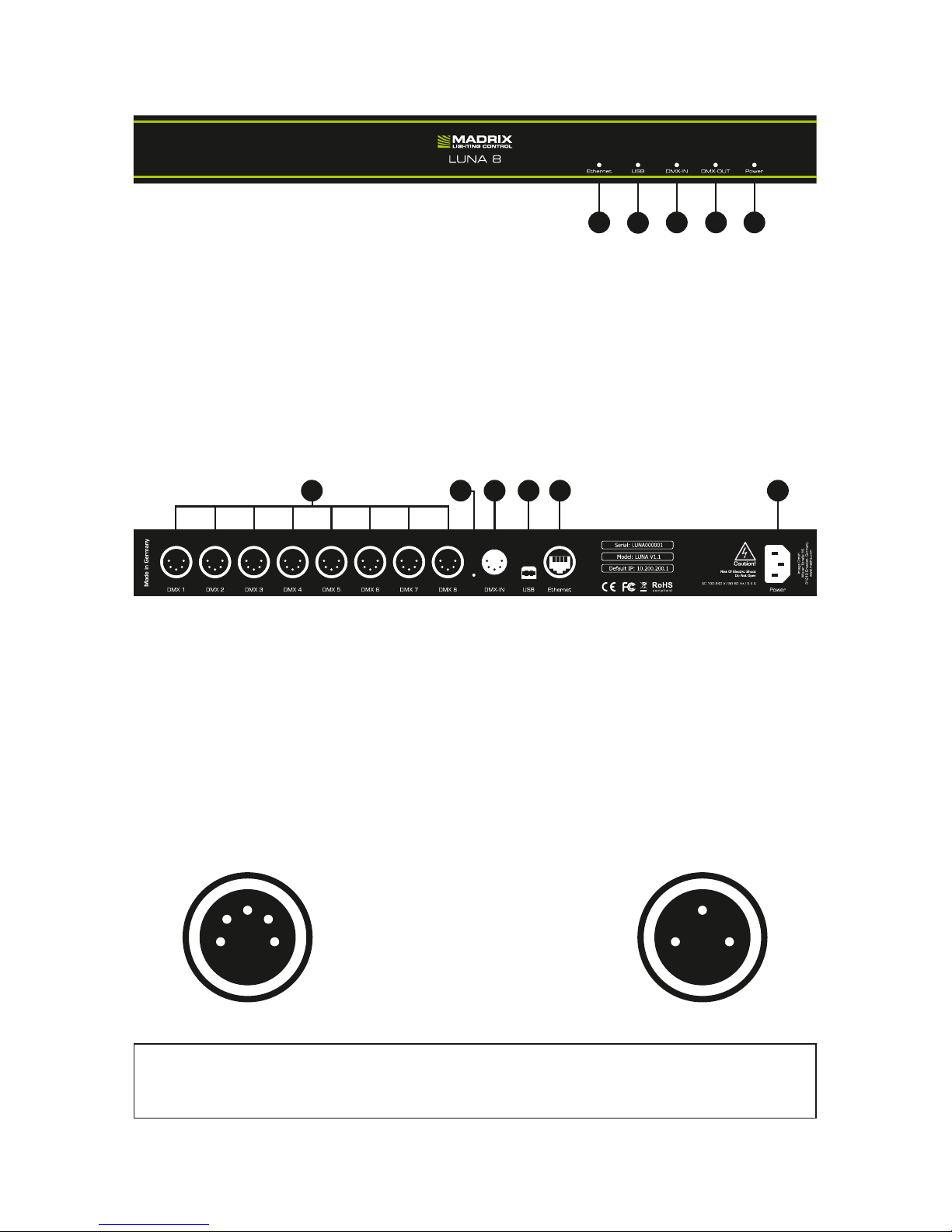
Anschlussmöglichkeiten
Allgemeine Pin-Belegung von XLR-Anschlüssen
Hier findet sich die allg. Belegung von 5-poligen bzw. 3-poligen XLR-Buchsen.
5
4
3
2
1 2
3
1
Hinweis: Das MADRIX® LUNA verfügt über 5-polige, weibliche XLR-Buchsen
und eine 5-polige, männliche XLR-Buchse. Nutzen Sie Adapter, wenn nötig!
5-polig Belegung 3-polig
1 Masse
2 DMX –
3 DMX +
4 Frei
5 Frei
1) Status-LED für Ethernet (Netzwerk)
2) Status-LED für USB
3) Status-LED für DMX-IN (Eingabe)
4) Status-LED für DMX-OUT (Ausgabe)
5) Status-LED für Power (Strom)
6) XLR-Buchsen: DMX 1 – 4/8/16
7) Reset-Taste
8) XLR-Buchse: DMX-IN
9) USB-Anschluss
10) RJ45-Netzwerkanschluss
11) Stromanschluss
9876 1110
1 2 43 5
Anmerkung: MADRIX® LUNA 8 wird an dieser Stelle als Beispiel genutzt.
MADRIX® LUNA 4 und MADRIX® LUNA 16 haben einen vergleichbaren Aufbau.
Page 21

Deutsch
DE 7
IP-Adresse und andere wichtige Informationen
Sie finden folgende, wichtige Informationen auf der Rückseite des Gerätes:
• Seriennummer (‘Serial’)
• Hardwareversion (‘Model’)
• Vorkonfiguration und Standardeinstellung der IP-Adresse (‘Default IP’)
Konfiguration über einen Webbrowser
Auf zahlreiche Informationen und Einstellungen des MADRIX® LUNA kann über
einen Webbrowser zugegriffen werden, wenn es sich in einem Netzwerk befindet.
Schritt 1) Verbinden Sie MADRIX® LUNA und den PC mit demselben Netzwerk.
Schritt 2) Stellen Sie die richtigen Netzwerkeinstellungen für den PC im
Windows-Betriebssystem ein. (Empfohlene Standardeinstellungen:
IP-Adresse 10.0.0.1 / Subnetzmaske 255.0.0.0)
Schritt 3) Öffnen Sie einen Webbrowser und geben Sie die IP-Adresse des
MADRIX® LUNA ein. (Zu finden auf der Rückseite des LUNA.)
Schritt 4) Das Fenster für die Konfiguration (IP-Adresse, usw.) öffnet sich.
Zurücksetzen auf Werkseinstellungen
Führen Sie folgende Schritte für ein Zurücksetzen auf Werkseinstellungen aus:
Schritt 1) Trennen Sie das Gerät von der Spannungsversorgung.
Schritt 2) Drücken Sie die Reset-Taste auf der Rückseite des Gerätes.
Schritt 3) Halten Sie die Reset-Taste gedrückt und stellen Sie die
Spannungsversorgung wieder her.
Schritt 4) Halten Sie die Reset-Taste gedrückt und warten Sie bis alle Status LEDs des Gerätes schnell blinken oder warten Sie 10 Sekunden.
Nutzung von anderen Zuspielern über Art-Net
MADRIX® LUNA ist ein standardisiertes Art-Net-Gerät. Deshalb kann das Gerät
mit sämtlichen Zuspielern, die Art-Net unterstützen, betrieben werden.
Hinweis: Wiederholen Sie die Schritte, sollte der Vorgang fehlschlagen.
Page 22
8 DE
Nutzung der MADRIX®-Software
Für den Zugang zu allen Funktionen des Gerätes (inkl. der USB-Verbindung,
Art-Net und Synchronisationsmodus) wird es empfohlen, die MADRIX®Software zu nutzen.
Min. Systemanforderungen für MADRIX
®
Die MADRIX®-Software setzt die folgenden Anforderungen mindestens
voraus. Die optimalen Systemspezifikation sind oftmals höher. Die aktuellsten
Informationen stehen zur Verfügung auf www.madrix.com
• Zweikern-Prozessor mit 2,0 GHz
• Grafikkarte mit OpenGL 2.1
(NVIDIA wird empfohlen)
• 2 GB RAM
• 1 GB freier Festplattenspeicherplatz
• Monitorauflösung von 1280 x 768
• Netzwerkkarte
• Soundkarte
• USB 2.0
Unterstützte Betriebssysteme
Die MADRIX®-Software unterstützt die folgenden Betriebssysteme. Die
aktuellsten Informationen stehen zur Verfügung auf www.madrix.com
Hinweis: Zur Ausgabe von Daten über das MADRIX® LUNA wird eine
Softwarelizenz für MADRIX® benötigt (separat erhältlich)!
Microsoft® Windows® 7 | 8 | 8.1 | 10
System, Treiber und Updates bitte aktuell halten.
Kompatibel zu 32-bit and 64-bit.
Page 23
Deutsch
DE 9
Installation MADRIX®-Software und Treiber
Installieren Sie die MADRIX®-Software auf Ihrem betriebsbereiten Computer
mit Hilfe von CD, USB-Stick oder heruntergeladener Installationsdatei. Folgen
Sie den Anweisungen auf dem Bildschirm, wie im Folgenden beschrieben.
INSTALLIEREN SIE BITTE DIE SOFTWARE UND TREIBER
BEVOR SIE DAS GERÄT AN DEN PC ANSCHLIESSEN.
Klicken Sie im zweiten Schritt auf “Weiter >”, um die Installation zu starten.
Im dritten Schritt erscheint das “Lizenzabkommen”. Es umfasst die
Vereinbarungen zur Nutzung der Software. Bitte klicken Sie auf “Annehmen”,
um zuzustimmen und fortzufahren.
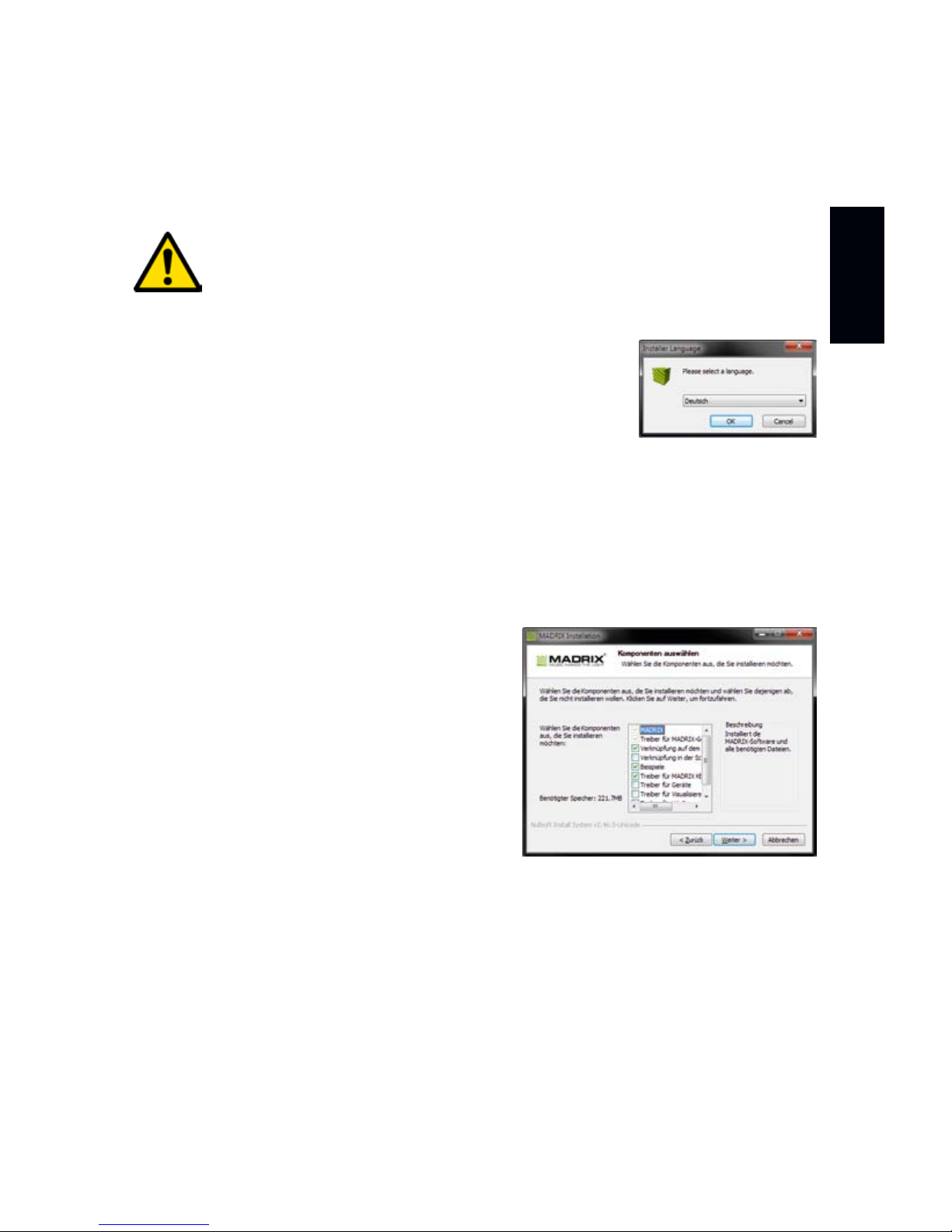
Wählen Sie im ersten Schritt Ihre bevorzugte Sprache
aus. Bestätigen Sie mit “OK”. Der Installationsvorgang
kann zu jeder Zeit mit “Cancel” (“Abbrechen”) beendet
werden.
Das vierte Fenster stellt die Komponenten
zur Auswahl. Eine Erklärung ist für jede
Komponente gegeben. Die Komponenten
“MADRIX”, “Treiber für MADRIX-Geräte”
sowie “Treiber für MADRIX KEY” müssen
ausgewählt sein (Häkchen gesetzt), da sie
für den Gebrauch des LUNA nötig sind.
Bestätigen Sie mit “Weiter >”.
Im fünften Fenster “Zielverzeichnis auswählen” wird nach dem Installationsort
gefragt. Bitte wählen Sie einen Ort auf Ihrer Festplatte mit Hilfe von
“Durchsuchen...” aus und klicken Sie im Anschluss auf “Installieren”.
Die Installation kann einige Minuten Zeit in Anspruch nehmen.
Wenn im sechsten Schritt das Fenster “Die Installation ist vollständig” erscheint,
klicken Sie bitte auf “Weiter >”.
Im siebten Fenster klicken Sie bitte zum Abschluss auf “Fertig stellen”.
Page 24

10 DE
Betriebsarten
Hauptsächlich können 4 Betriebsmodi mit MADRIX® genutzt werden:
• DMX-Ausgabe über Netzwerk (Art-Net)
• DMX-Ausgabe über USB
• DMX-Eingabe über Netzwerk (Art-Net Remote)
• DMX-Eingabe über USB
Nutzung von Art-Net
Das MADRIX® LUNA kann über Netzwerk mit der Netzwerkkarte des Computers
verbunden werden, auf dem die MADRIX®-Software genutzt wird. Daten
werden über Netzwerk zum Gerät und danach intern zu den XLR-Buchsen für
die DMX-Ausgabe gesendet (“DMX 1 – DMX 4/8/16”).
Folgen Sie dieser Kurzanleitung, um Art-Net in MADRIX® zu konfigurieren:
Schritt 1) Verbinden Sie Ihre LED-Produkte bzw. -Steuergeräte mit den
XLR-Anschlüssen des MADRIX® LUNA.
Schritt 2) Stellen Sie die Spannungsversorgung für das MADRIX® LUNA her.
Schritt 3) Verbinden Sie das Gerät mit Ihrem Computer über Netzwerk.
Schritt 4) Stellen Sie die richtigen Netzwerkeinstellungen für den PC im
Windows-Betriebssystem ein. (Empfohlene Standardeinstellungen:
IP-Adresse 10.0.0.1 / Subnetzmaske 255.0.0.0)
Schritt 5) Starten Sie MADRIX® und gehen Sie in das Menü
“Systemeinstellungen...” à “Geräteverwaltung...” à Reiter
“Art-Net”. Aktivieren Sie “Einschalten” und betätigen Sie das
Lupen-Symbol. Das Gerät erscheint in der Liste.
Schritt 6) Konfigurieren Sie die DMX-Ausgabe unter “Systemeinstellungen...”
à “Geräteverwaltung...” à Reiter “DMX-Geräte” und aktivieren Sie
“Einschalten” für jeden benötigten Ausgang unter “Einstellungen”.
Schritt 7) Stellen Sie die virtuelle LED-Matrize in MADRIX®
unter “Systemeinstellungen...” à “Matrixgenerator...” oder
à “Beleuchtungsplaner...” ein.
Hinweis: DMX-Ausgabe und DMX-Eingabe stehen gleichzeitig zur Verfügung.
Hinweis: Netzwerkkabel sind nicht im Paket enthalten.
Page 25

Deutsch
DE 11
Nutzung der DMX-Ausgabe über USB
MADRIX® LUNA kann direkt über USB mit dem Computer verbunden werden,
auf dem MADRIX® genutzt wird. Daten werden über USB zum Gerät und intern
zu den XLR-Buchsen für die DMX-Ausgabe gesendet (“DMX 1 – DMX 4/8/16”).
Folgen Sie dieser Kurzanleitung, um die Ausgabe in MADRIX® zu konfigurieren:
Schritt 1) Verbinden Sie Ihre LED-Produkte bzw. -Steuergeräte mit den
XLR-Anschlüssen des MADRIX® LUNA.
Schritt 2) Stellen Sie die Spannungsversorgung für das MADRIX® LUNA her.
Schritt 3) Verbinden Sie das Gerät mit Hilfe des mitgelieferten USB-Kabels
mit einem freien USB 2.0-Anschluss Ihres Computers.
Schritt 4) Starten Sie MADRIX® und aktivieren Sie die USB-Treiber im Menü
“Systemeinstellungen...” à “Optionen…” à Reiter “USB-
Geräte à “MADRIX LUNA” und bestätigen Sie mit “OK”.
Schritt 5) Konfigurieren Sie die DMX-Ausgabe unter “Systemeinstellungen...”
à “Geräteverwaltung...” à Reiter “DMX-Geräte” und aktivieren
Sie “Einschalten” für jeden benötigten Ausgang unter “Einstellungen”.
Schritt 6) Stellen Sie die virtuelle LED-Matrize in MADRIX
®
unter “Systemeinstellungen...” à “Matrixgenerator...” oder
à “Beleuchtungsplaner...” ein.
Geräte-Einstellungen in MADRIX
®
Konfiguration über einen Webbrowser
Die Web-Konfiguration kann in auch in der MADRIX®-Software aufgerufen werden,
wenn Art-Net konfiguriert ist. Gehen Sie in das Menü “Systemeinstellungen...”
à “Geräteverwaltung...” à Reiter “Art-Net”. Ihr MADRIX® LUNA wird in der
Liste mit seiner IP-Adresse angezeigt. Wählen Sie das Gerät aus und klicken
Sie auf das Symbol zur Web-Konfiguration (HTTP). Ihr Webbrowser öffnet sich
automatisch und die Konfiguration erscheint.
MADRIX-Gerätekonfiguration
In der MADRIX®-Software stehen unter “Werkzeuge” à “MADRIXGerätekonfiguration...” dieselben Einstellungen wie zur Konfiguration über
einen Webbrowser zur Verfügung. Weitere Informationen finden Sie im
Benutzerhandbuch der MADRIX®-Software.
Page 26

12 DE
Empfangen von DMX-Daten
Wenn DMX-IN genutzt wird, sendet MADRIX® LUNA diese Daten automatisch
über Art-Net Remote in das Netzwerk (falls verbunden). Nutzen Sie die
Konfiguration über einen Webbrowser, um dazugehörige Einstellungen zu tätigen.
Es sind weitere Einstellungen notwendig, um Daten über Art-Net Remote oder
über USB in MADRIX® zu empfangen. Weitere Informationen finden Sie im
Benutzerhandbuch der MADRIX®-Software.
Aktualisierungen und weitere Informationen
Weitere Handbücher werden automatisch mit der MADRIX®-Software installiert
und somit digital bereitgestellt. Mehr Informationen finden sich im MADRIX®
Help And Manual, dem Handbuch zur Software. Es kann während des Arbeitens
mit MADRIX® durch die Taste “F1” auf der Tastatur, über das Menü “Hilfe” à
“Benutzerhandbuch…” oder online unter help.madrix.com aufgerufen werden.
Die neueste Version dieser Kurzanleitung sowie Software-Updates für MADRIX®,
inkl. Treiber, aktueller Firmware und aktueller Versionen der Handbücher, sind im
Internet erhältlich unter www.madrix.com
Hilfe und Support
Sollten weitere Fragen zur Handhabung oder technische Probleme auftauchen,
konsultieren Sie bitte die weiteren Benutzerhandbücher, kontaktieren Sie Ihren
Händler oder besuchen Sie die Internetseite www.madrix.com
Anfragen können auch direkt per Telefon oder per E-Mail erfolgen.
Konformitätserklärung für CE und RoHS
Das Gerät entspricht den Anforderungen der
Richtlinie der Mitgliedsstaaten über die
elektromagnetische Verträglichkeit (2004/108/EG), der Niederspannungsrichtlinie (LVD) (2006/95/EG) und der Richtlinie zur Beschränkung der
Verwendung bestimmter gefährlicher Stoffe in Elektro- und Elektronikgeräten
(2011/65/EU) (RoHS). Die Einhaltung mit diesen Richtlinien wurde auf
Grundlage der folgenden Standards evaluiert: DIN EN 55015; VDE 0875-15-1
(Nov. 2009) und DIN EN 61547:2010-03; VDE 0875-15-2.
RoHS
compliant
Page 27

Deutsch
DE 13
Häufig gestellte Fragen
Was bedeuten die leuchtenden LEDs auf dem Gerät?
Lesen Sie dazu bitte den Abschnitt “Anzeige der Status-LEDs” auf Seite 5.
Wie kann ich die IP-Adresse des Gerätes ändern?
Nutzen Sie die Konfiguration über einen Webbrowser (siehe Seite 7).
Das Gerät kann über die aktuelle IP-Adresse nicht erreicht werden.
Setzen Sie das Gerät auf die Werkseinstellungen zurück (siehe Seite 7).
Unterstützt das Gerät RDM?
Nein. RDM wird von MADRIX® LUNA aktuell nicht unterstützt.
Ist es möglich, mehr als ein MADRIX® LUNA zu verwenden?
Ja. Mehrere Geräte können problemlos für größere Projekte genutzt werden.
Art-Net wird für große Projekte empfohlen. Nutzen Sie geeignete Netzwerkkomponenten, um ein Netzwerk aufzubauen und die Geräte an einen NetzwerkSwitch (1 GBit/s) anzuschließen.
Wo kann ich den Modus zur Synchronisation einstellen?
Dieser kann in der MADRIX®-Software im Menü “Systemeinstellungen...”
à “Geräteverwaltung...” à Reiter “Art-Net” aktiviert werden.
Kann ich andere Zuspieler an Stelle von MADRIX® benutzen?
Ja. Wenn Sie das Gerät als reinen Art-Net-Node nutzen möchten, ist die
Verwendung mit anderen Zuspielern möglich.
Brauche ich den MADRIX® KEY zusätzlich zum MADRIX® LUNA?
Ja. Eine Softwarelizenz ist nötig, wenn Sie MADRIX® nutzen möchten. Die
Softwarelizenz ist separat erhätlich.
Kann ich das MADRIX® LUNA selber reparieren?
Nein. Versuchen Sie keine Reparaturarbeiten. Jeglicher Versuch führt zum
Erlöschen der Garantie (siehe S. 3).
Was mache ich, wenn mein Gerät ausfällt?
Kontaktieren Sie bitte Ihren Händler bei Gerätedefekt.
Page 28

www.madrix.com
 Loading...