

Page 1
MYSZ
GAMINGOWA
GM805
Instrukcja obsługi
iwarunki gwarancji
GM805
GAMING MOUSE
Operating Manual
& Warranty Terms
1
Page 2

WARUNKI BEZPIECZEŃSTWA IZAGROŻENIA
1. Produkt należy używać zgodnie z przeznaczeniem.
2.
Nie należy ingerować we wnętrze urządzenia, dokonywać prób samodzielnej naprawy ani modyfikacji.
3. Urządzenie nie jest zabawką i należy je chronić przed
dziećmi.
4. Nie należy używać urządzenia w pobliżu źródeł ciepła.
5. Nie należy zanurzać urządzenia w wodzie ani innych
płynach.
6. Należy chronić urządzenie przed nadmiernym nasłonecznieniem i wilgocią. Nie należy używać w pomieszczeniach o podwyższonym zapyleniu, zanieczyszczeniu
powietrza.
7.
Nie należy owijać przewodu zasilającego wokół urządzenia.
8.
Nie należy przechowywać urządzenia w miejscach
narażonych na nagłą zmianę temperatury otoczenia. Po
ewentualnej zmianie otoczenia należy odczekać około
30 minut przed podłączeniem urządzenia do komputera.
9.
Urządzenie nie jest zabawką. Należy przechowywać je z dala
2
Page 3

od dzieci. Przewód może okręcić się wokół szyi i spowodować
uduszenie.
10. Ładowanie należy przeprowadzać w miejscu suchym,
dobrze wentylowanym oraz nie narażonym na bezpośrednie działanie promieni słonecznych.
11.
Nie narażaj urządzenia na działanie wysokich lub niskich
temperatur: poniżej 0°C lub powyżej 40°C.
12. Podczas ładowania nie pozostawiać bez nadzoru.
13.
Nie należy podejmować się samodzielnej próby wymiany
akumulatora.
14.
Nie należy patrzeć bezpośrednio w światło diody myszy.
Jest ono szkodliwe dla oczu i może skutkować uszkodzeniem wzroku
15. Nie należy kierować światła w stronę ludzi i zwierząt.
16.
Wszelkie naprawy należy zlecać producentowi, autoryzowanemu punktowi serwisowemu lub osobie o odpowiednich
kwalifikacjach.
17. Nie należy spożywać pokarmów lub napojów bezpośrednio nad urządzeniem.
3
Page 4
WPROWADZENIE
Dziękujemy zazaufanie, jakim nas Państwo obdarzyli, dokonując zakupu urządzenia marki Mad Dog.
Jesteśmy przekonani, że tobardzo dobrej jakości urządzenie zapewni Państwu dużo radości isatysfakcji
zjego użytkowania.
NALEŻY DOKŁADNIE PRZECZYTAĆ INSTRUKCJĘ OBSŁUGI IJEJ PRZESTRZEGAĆ!
Tourządzenie jest przeznaczone doużytku domowego lub innego nie dotyczącego celów komercyjnych.
Producent nie ponosi odpowiedzialności zaszkody powstałe wwyniku użytkowania niewłaściwego
lub niezgodnego zprzeznaczeniem.
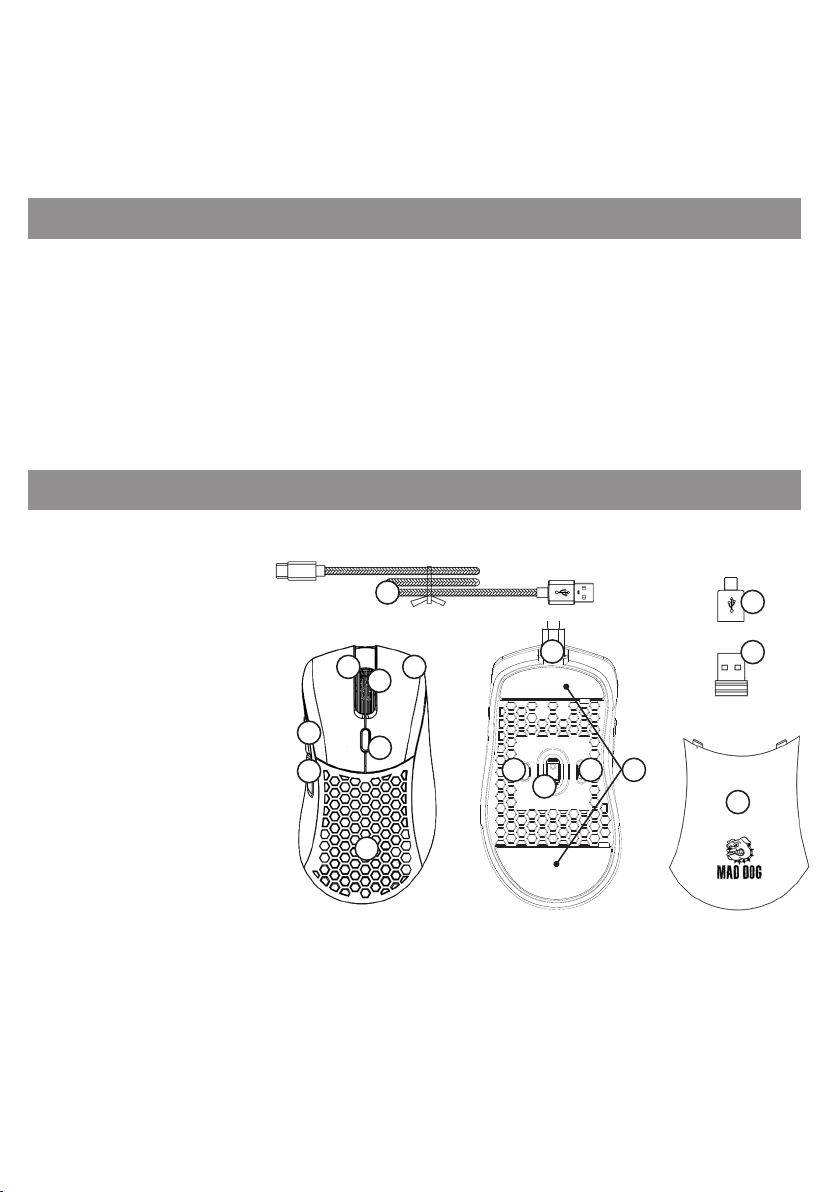
OPIS URZĄDZENIA
1. Lewy Przycisk Myszy
2. Prawy Przycisk Myszy
3. Scroll / Środkowy przycisk myszy
4. Przedni Przycisk Boczny
5. Tylny Przycisk Boczny
6. Przycisk zmiany DPI
7. Wymienna osłona
8. Wejście USB-C
9. Przycisk zmiany podświetlenia
10. Sensor
11. Przełącznik trybu pracy
12. Ślizgacze
13. Odbiornik RF
14. Przewód USB
15. Adapter USB-C
4
5
14
1
2
3
6
7
8
9
11 12
10
15
13
7
4
Page 5
DANE TECHNICZNE
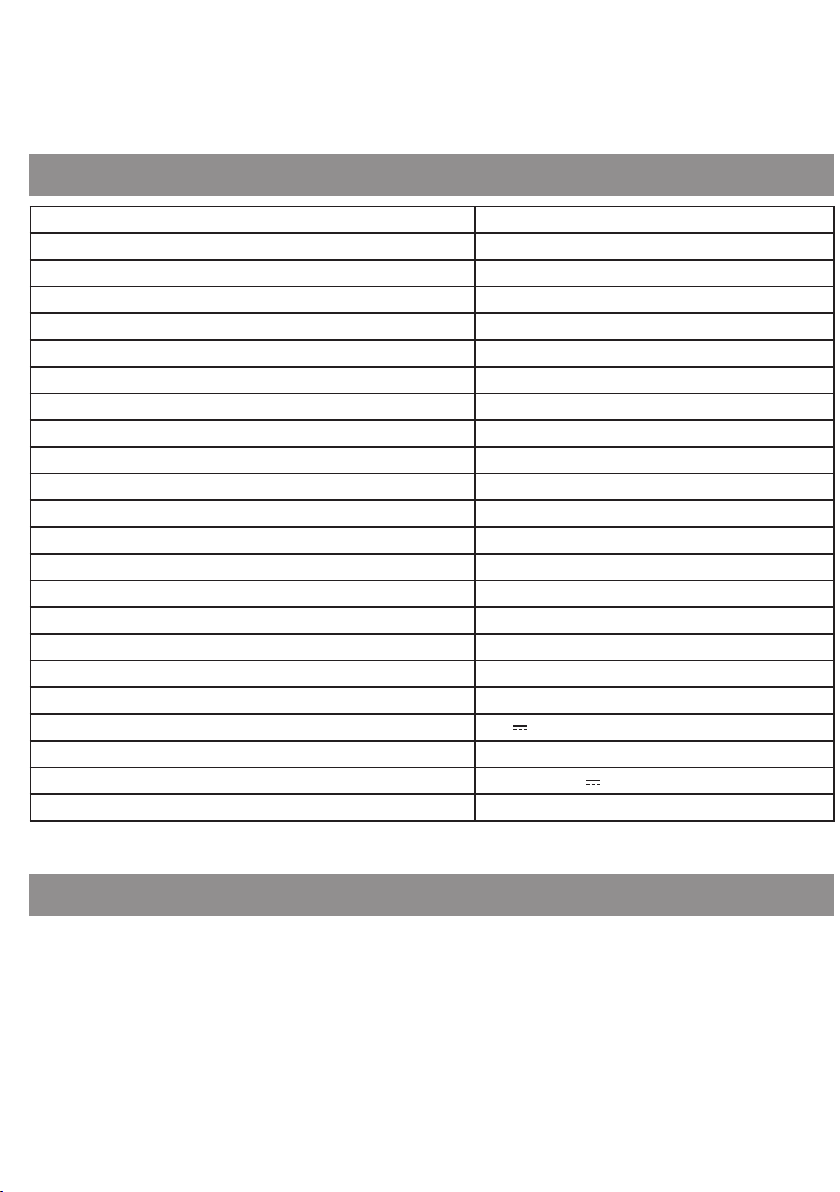
Model GM805
Przeznaczenie Dla Praworęcznych
Sensor Pixart PAW3335
Przełączniki LPM i RPM Huano 20 mln kliknięć
Ilość przycisków 7
Maksymalna rozdzielczość do 16000 DPI
Ilość trybów DPI 6
Częstotliwość raportowania do 1000 Hz
Maksymalne przyspieszenie do 40 G
Maksymalna szybkość ~10 m/s
Podświetlenie LED RGB
Ilość trybów podświetlenia 10
Waga (bez przewodu) ok. 80 g
Rodzaj przewodu W oblocie z pierścieniem ferrytowym
Długość przewodu 1,8 m
Częstotliwość transmisji 2402 MHz – 2480 MHz
Maksymalna moc transmisji do 5 dBm
Czas działania do 40 godzin*
Czas ładowania do 3 godzin
Zasilanie 5.0 V 0.5 A
Akumulator Li-ion DC 3.7 V, 430 mAh
Zasilanie przy połączeniu przewodowym Z portu USB 5.0 V 0.2 A
Zgodność z systemami Windows XP/7/8/10/11
*Czas pracy na baterii uzależniony jest od włączonego trybu podświetlenia.
OBSŁUGA URZĄDZENIA
Pierwsze podłączenie
1.
Podłącz mysz do portu USB w komputerze za pomocą dołączonego do zestawu przewodu, aby
urządzenie automatycznie zainstalowało potrzebny do działania sterownik.
2.
Kiedy system powiadomi Cię o poprawnym zainstalowaniu sterownika, urządzenie jest gotowe
do pracy.
5
Page 6
Mysz można używać w trybie:
• Bezprzewodowym - po podłączeniu odbiornika radiowego do portu USB w komputerze.
• Przewodowo - podłączając mysz do komputera za pomocą przewodu USB dołączonego do zestawu.
Zmiana DPI
Myszka posiada 6 różnych ustawień DPI, pomiędzy którymi można się przełączać za pomocą przycisku
wyznaczonego przycisku.
1. Aby zmienić DPI naciśnij przycisk 6, znajdujący się przed scrollem.
2.
Po naciśnięciu przycisku zmiany DPI obserwuj podświetlenie LED rolki scroll. Zaświecenie się scrolla
na jeden z 6 kolorów powiadomi Cię, jaka wartość DPI została wybrana.
Kolor podświetlenia Standardowo ustawione DPI
Czerwony 800 DPI
Zielony 1600 DPI
Niebieski 3200 DPI
Fioletowy 6400 DPI
Żółty 12000 DPI
Błękitny 16000 DPI
Każdy profil DPI można edytować za pomocą oprogramowania, które można pobrać ze strony producenta.
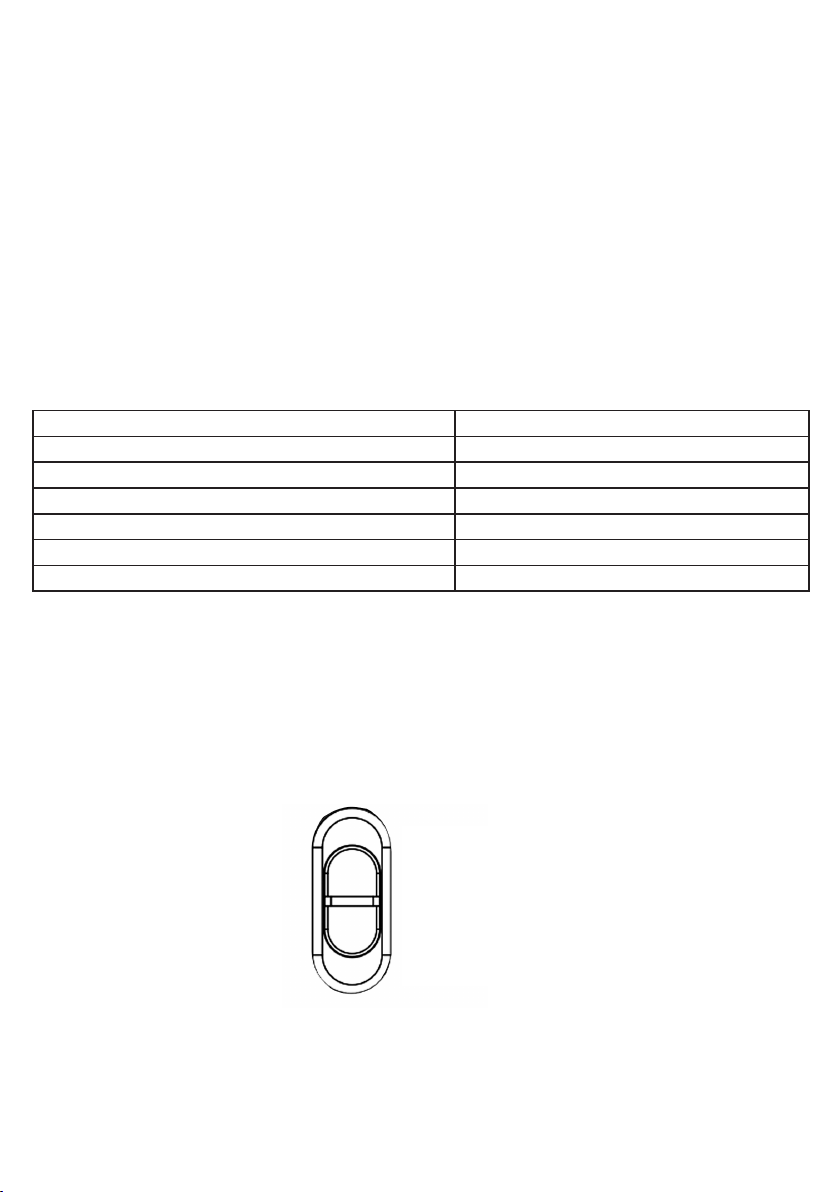
Wybieranie trybu pracy
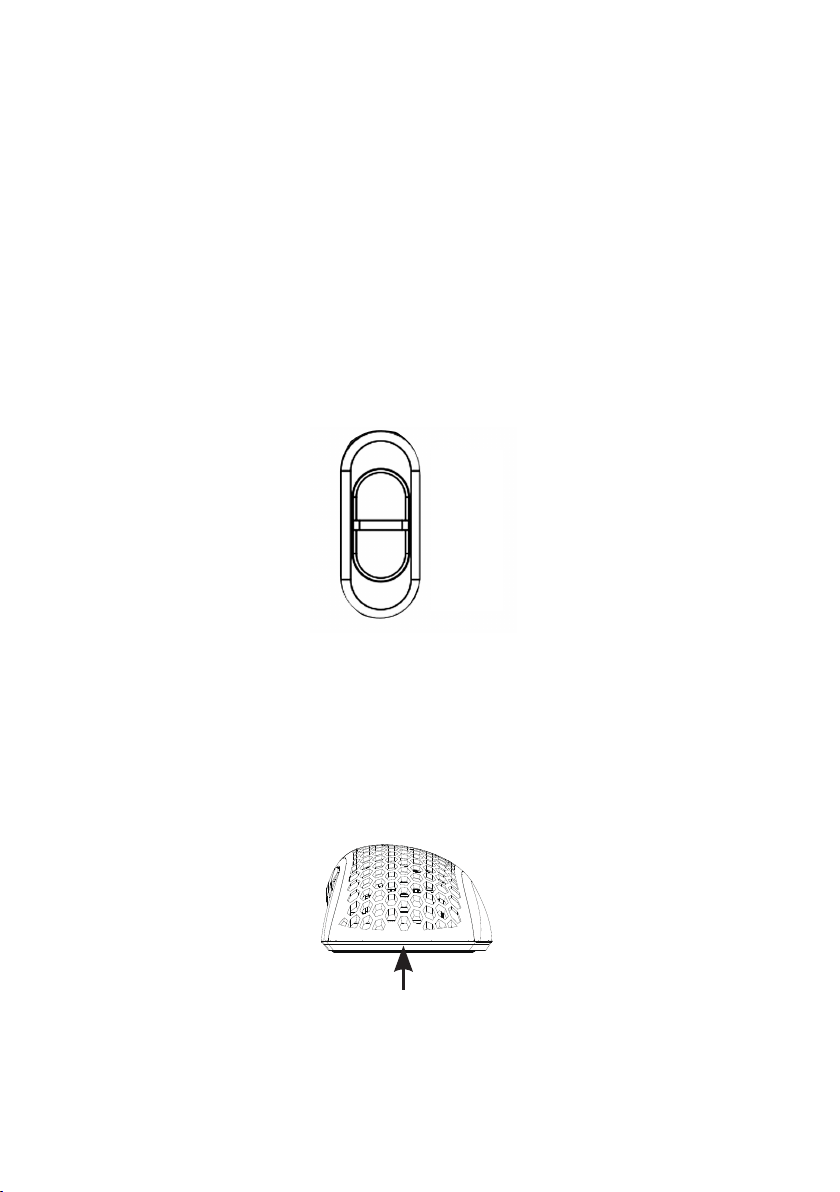
Przełącznikiem na spodzie myszy możesz wybrać jeden z 3 trybów pracy:
- OFF – mysz wyłączona,
- LED – mysz włączona razem z podświetleniem,
- ON – mysz włączona bez podświetlenia.
OFF
LED
ON
6
Page 7
Podświetlenie RGB
Myszka posiada 10 różnych trybów podświetlenia LED RGB. Aby przełączyć podświetlenie RGB, naciśnij
przycisk 6, znajdujący się przed scrollem.
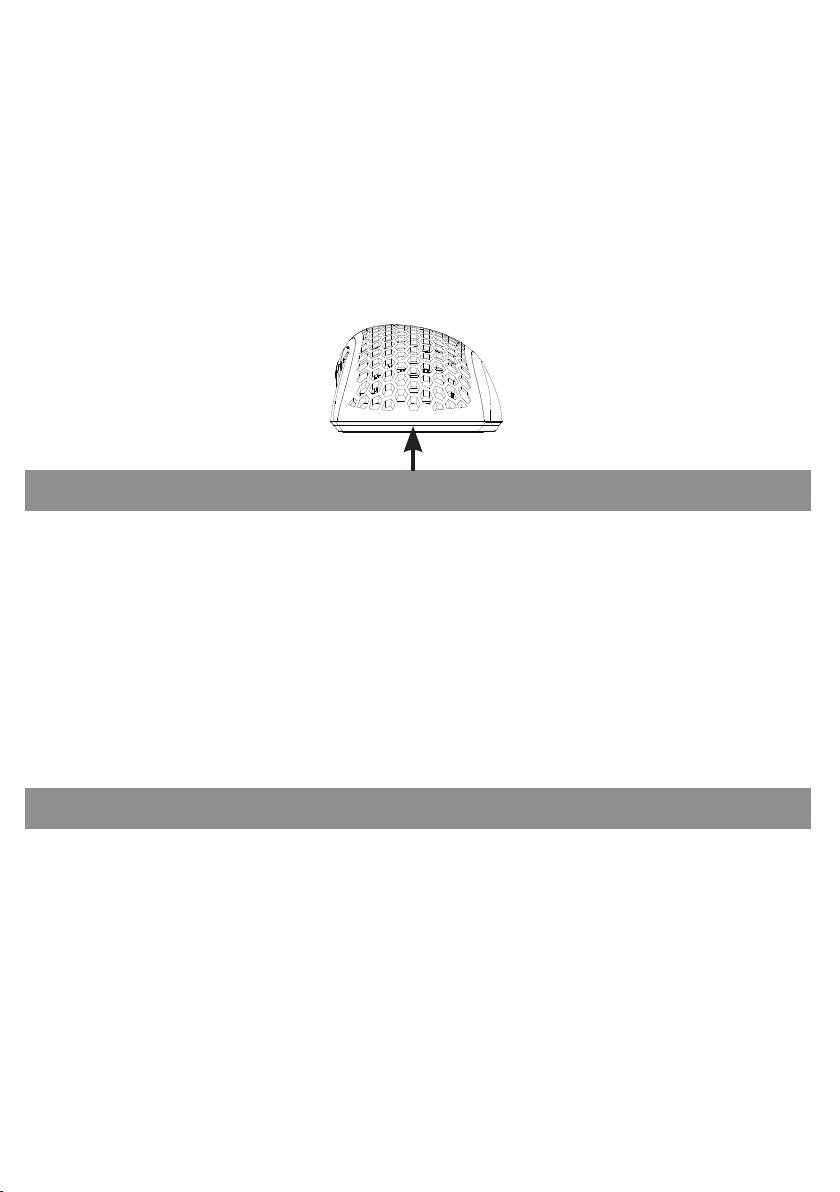
Wymiana tylnej obudowy
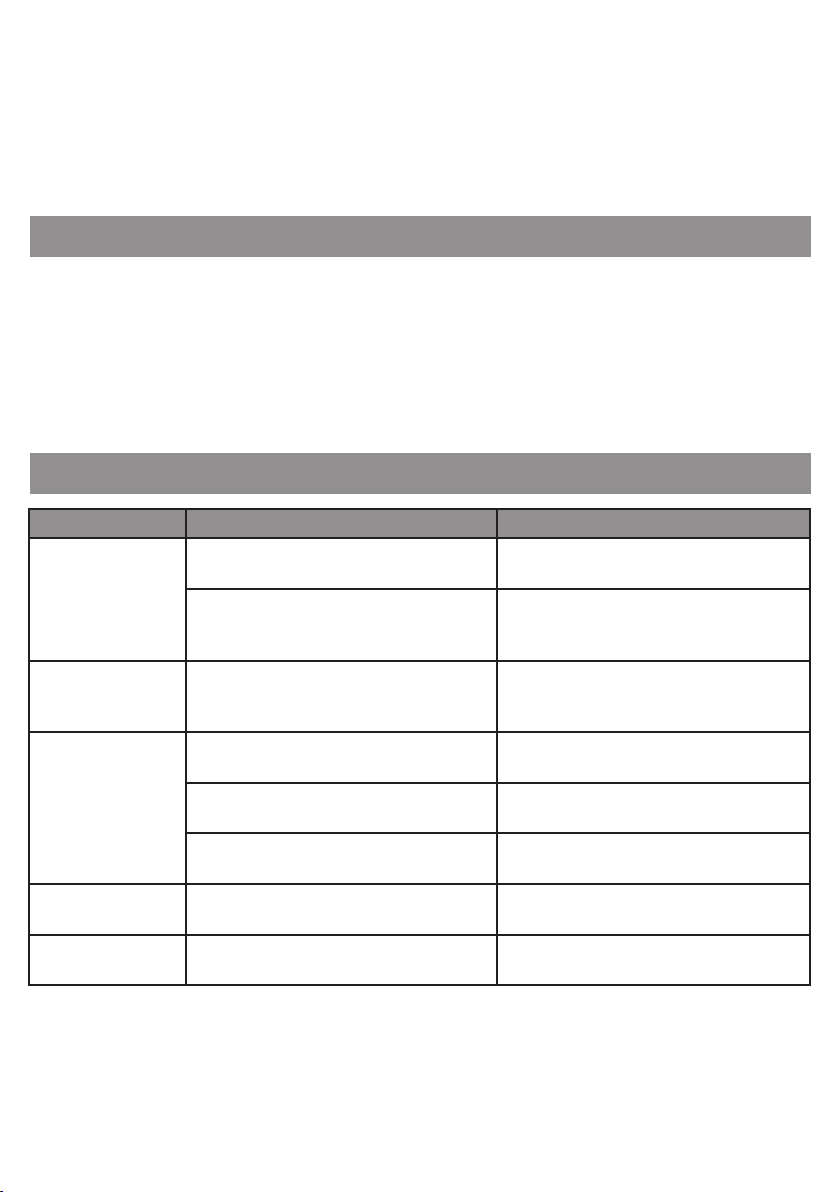
W zestawie znajdują się dwie wymienne osłony. Aby zdemontować obecnie zainstalowaną osłonę,
podważ ją od tyłu urządzenia, w miejscu wskazanym na rysunku poniżej. Aby zamontować nową, nałóż
ją z na miejsce tak, aby została magnetycznie połączona.
OPROGRAMOWANIE
Instalacja oprogramowania
1. Wejdź na stronę http://maddog.pl/sterowniki/sterowniki-i-instrukcje.
2. Wybierz rodzaj urządzenia oraz jego model.
3. Pobierz plik instalacyjny oprogramowania.
4. Zainstaluj oprogramowanie z pliku instalacyjnego na Twoim komputerze.
Obsługa oprogramowania
Instrukcja obsługi oprogramowania znajduje się do pobrania na stronie:
http://maddog.pl/sterowniki/sterowniki-i-instrukcje.
ŁADOWANIE
Kiedy scroll urządzenia zacznie migać na czerwono oznacza to, że poziom baterii myszki jest niski i
wymaga naładowania.
Aby naładować myszkę należy połączyć ją do portu USB komputera za pomocą przewodu dołączonego do zestawu.
Po podłączeniu do komputera myszka przejdzie w try b przewodowy, przez co można jednocześnie ją ładować jak
i z niej korzystać. Podczas ładowania scroll myszki będzie mrugał na kolor niebieski.
Kiedy myszka zostanie w pełni naładowana, kolor scrolla zmieni się na stały, zależny od ustawionego
DPI na połączeniu przewodowym.
7
Page 8

UWAGA ! ZUŻYCIE AKUMULATORA PODCZAS EKSPLOATACJI URZĄDZENIA JEST NATURALNYM ZJAWI
SKIEM. ABY UTRZYMAĆ AKUMULATOR W DOBREJ KONDYCJI I WYDŁUŻYĆ JEGO ŻYWOTNOŚĆ NALEŻY
STOSOWAĆ SIĘ DO PONIŻSZYCH ZALECEŃ:
1. Nie uruchamiaj urządzenia, jeśli akumulator jest rozładowany.
2.
Akumulator ładuj zgodnie z danymi o napięciu i prądzie ładowania podanymi na tabliczce znamionowej.
3. Przed dłuższym okresem przechowywania naładuj akumulator do poziomu 50% oraz doładowuj go
co 3-4 miesiące. Jeśli w produkcie nie ma możliwości ustalenia konkretnego poziomu naładowania,
rozładuj urządzenie, po czym ładuj je przez połowę czasu potrzebnego do pełnego naładowania.
Pozostawienie rozładowanego akumulatora na dłuższy okres może skutkować jego uszkodzeniem
lub utratą jego właściwości.
4. Przy regularnym użytkowaniu urządzenia unikaj pełnego rozładowania akumulatora oraz zawsze
ładuj go do pełna.
5. Po naładowaniu akumulatora odłącz wtyczkę ładowarki od gniazda ładowania w urządzeniu.
6. Nie pozostawiaj urządzenia w trakcie ładowania bez nadzoru.
7.
Używanie ładowarek oraz przewodów innych, niż zalecane w instrukcji z urządzeniem, może prowadzić
do uszkodzenia produktu, a nawet do eksplozji akumulatora.
8.
Ładowanie przeprowadzaj w miejscu suchym, dobrze wentylowanym oraz nie narażonym na
bezpośrednie działanie promieni słonecznych.
CZYSZCZENIE I KONSERWACJA
Do czyszczenia urządzenia należy używać delikatnie zwilżoną ściereczkę z miękkiego materiału.
Wnętrze urządzenia można czyścić przy pomocy sprężonego powietrza, używając go w odległości
ponad 5 cm.
Kiedy urządzenie nie jest użytkowane należy przechowywać je w oryginalnym opakowaniu, chroniącym
urządzenie przed kurzem i wilgocią.
Podczas transportu odbiornik RF należy umieścić w dedykowane na niego miejsce, do którego można
uzyskać dostęp po zdemontowaniu tylnej osłony.
UWAGA! NIE ZANURZAJ URZĄDZENIA W WODZIE. DO CZYSZCZENIA NIE UŻYWAJ WODY ANI ŚRODKÓW
CHEMICZNYCH.
8
Page 9
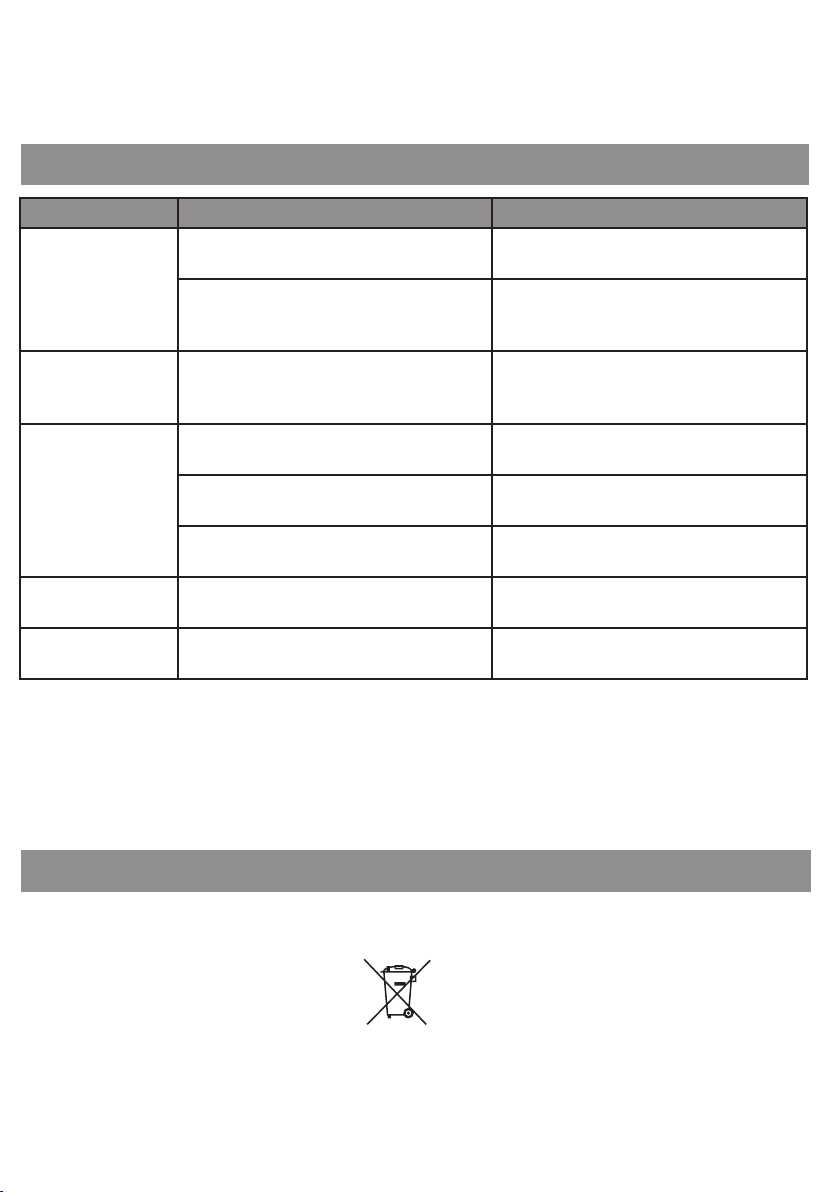
PROBLEMY I ROZWIĄZANIA
Problem Możliwa przyczyna Rozwiązanie
Urządzenie nie
uruchamia się.
Kursor myszy porusza
się bardzo szybko lub
bardzo wolno.
Kursor myszy zacina
się lub nie porusza
się.
Nie można podłączyć
myszki do komputera.
Nie ładuje się. Nieprawidłowy przewód ładowania. Do ładowania należy używać przewodu
DEKLARACJA
ART-DOM sp. z o.o. niniejszym oświadcza, że mysz bezprzewodowa GM805 jest zgodna z odnośnymi
wymaganiami unijnego prawodawstwa harmonizacyjnego: dyrektywą 2014/53/UE i innym unijnym
prawodawstwem harmonizacyjnym. Pełny tekst deklaracji zgodności UE jest dostępny pod nastę-
pującym adresem:
www.artdom.net.pl/deklaracja/GM805/
Nieprawidłowo podłączona wtyczka do
złącza w komputerze.
Komputer nie zainstalował sterownika
urządzenia.
Ustawiona została zbyt wysoka lub zbyt
niska rozdzielczość DPI.
Otwór optyczny na spodzie myszy jest
zabrudzony.
Faktura powierzchni, na której pracuje mysz
negatywnie wpływa na pracę sensora.
Po czasie dłuższym czasie bez aktywności
myszka przeszła w stan uśpienia.
Brak portu USB-A w komputerze. Podłącz myszkę do komputera poprzez
Podłącz prawidłowo wtyczkę do złącza w
komputerze.
Podłącz wtyczkę przewodu do złącza USB
w komputerze i poczekaj, aż sterownik
urządzenia zostanie zainstalowany.
Zmień rozdzielczość DPI, naciskając przycisk
zmiany DPI.
Wyczyść spód myszy.
Zaleca się stosować podkładkę pod mysz.
Naciśnij dowolny przycisk myszki, aby
wybudzić urządzenie.
adapter USB-C, załączony do zestawu.
USB-C/A dołączonego do zestawu.
EKOLOGICZNA IPRZYJAZNA DLA ŚRODOWISKA UTYLIZACJA
Tourządzenie jest oznaczone, zgodnie zDyrektywą Parlamentu Euro-pejskiego iRady 2012/19/UE
zdnia 4 lipca 2012r. wsprawie zużytego sprzętu elektrycznego ielektronicznego (WEEE), symbolem
przekreślonego kontenera naodpady:
9
Page 10

Nie należy wyrzucać urządzeń oznaczonych tym symbolem, razem zodpadami domowymi. Urządzenie
należy zwrócić dolokalnego punktu przetwarzania iutylizacji odpadów lubskontaktować się zwładzami
miejskimi.
MOŻESZ POMÓC CHRONIĆ ŚRODOWISKO!
Właściwe postępowanie zezużytym sprzętem elektrycznym ielektronicznym przyczynia się douniknięcia
szkodliwych dla zdrowia ludzi iśrodowiska naturalnego konsekwencji, wynikających zobecności
składników niebezpiecznych oraz niewłaściwego składowania iprzetwarzania takiego sprzętu.
WARUNKI GWARANCJI DOTYCZĄCE MYSZKI
1.
ART-DOM Sp. z o.o. z siedzibą w Łodzi (92-402) przy ul. Zakładowej 90/92 Numer Krajowego Rejestru
Sądowego 0000354059 (Gwarant) gwarantuje, że zakupione urządzenie jest wolne od wad fizycznych. Gwarancja obejmuje tylko wady wynikające z przyczyn tkwiących w rzeczy sprzedanej
(wady fabryczne).
2.
Ujawniona wada zostanie usunięta na koszt Gwaranta w ciągu 14 dni od daty zgłoszenia uszkodzenia
do serwisu autoryzowanego lub punktu sprzedaży.
3. W wyjątkowych przypadkach, np. konieczności sprowadzenia części zamiennych od producenta,
termin naprawy może zostać wydłużony do 30 dni.
4. Okres gwarancji dla użytkownika wynosi 24 miesiące od daty wydania towaru.
5.
Towar przeznaczony jest do używania wyłącznie w warunkach indywidualnego gospodarstwa
domowego.
6. Gwarancja nie obejmuje:
a. uszkodzeń powstałych na skutek używania urządzenia niezgodnie z instrukcją obsługi,
b. uszkodzeń mechanicznych, chemicznych lub termicznych,
c. napraw i modyfikacji dokonanych przez firmy lub osoby nieposiadające autoryzacji produ-
centa,
d. części z natury łatwo zużywalnych lub materiałów eksploatacyjnych takich jak: baterie,
żarówki, bezpieczniki, filtry, pokrętła, półki, akcesoria,
e. instalacji, konserwacji, przeglądów, czyszczenia, odblokowania, usunięcia zanieczyszczeń
oraz instruktażu.
7. O sposobie usunięcia wady decyduje Gwarant. Usunięcie potwierdzonej wady urządzenia nastąpi
poprzez wykonanie naprawy gwarancyjnej lub wymianę urządzenia. Gwarant może dokonać
naprawy, gdy kupujący żąda wymiany lub Gwarant może dokonać wymiany, gdy kupujący żąda
naprawy, jeżeli doprowadzenie do zgodności towaru (urządzenia) zgodnie z udzieloną gwarancją
10
Page 11

w sposób wybrany przez kupującego jest niemożliwe albo wymagałoby nadmiernych kosztów dla
Gwaranta. W szczególnie uzasadnionych wypadkach, jeżeli naprawa i wymiana są niemożliwe lub
wymagałyby nadmiernych kosztów dla Gwaranta może on odmówić doprowadzenia towaru do
zgodności z udzieloną gwarancją i zaproponować inny sposób załatwienia reklamacji z gwarancji.
8. Wymiany towaru dokonuje punkt sprzedaży, w którym towar został zakupiony (wymiana lub zwrot
gotówki) lub autoryzowany punkt serwisowy, jeżeli dysponuje taką możliwością (wymiana). Zwracane
urządzenie musi być kompletne, bez uszkodzeń mechanicznych. Niespełnienie tych warunków może
spowodować nieuznanie gwarancji.
9. W przypadku braku zgodności towaru z umową sprzedaży, kupującemu z mocy prawa przysługują
środki ochrony prawnej ze strony i na koszt sprzedawcy, a gwarancja nie ma wpływu na te środki
ochrony prawnej.
10. Niniejsza gwarancja obowiązuje na terytorium Polski.
11. Warunkiem dokonania naprawy lub wymiany urządzenia w ramach gwarancji jest przedstawienie
dowodu zakupu oraz użytkowanie towaru zgodnie z informacjami zawartymi w instrukcji obsługi.
UWAGA: Uszkodzenie lub usunięcie tabliczki znamionowej z urządzenia może spowodować
nieuznanie gwarancji.
Cały czas udoskonalamy nasze produkty, dlatego mogą się one nieznacznie różnić od zdjęć przedstawionych na opakowaniu
oraz w instrukcji obsługi. Przed przystąpieniem do użytkowania urządzenia przeczytaj instrukcję obsługi.
ART-DOM Sp. z o.o., ul. Zakładowa 90/92, 92-402 Łódź, [email protected]. Numer Krajowego Rejestru Sądowego
0000354059.
v. 7
11
Page 12

SAFETY AND HAZARD CONDITIONS
1. Use the product only as intended.
2.
Do not tamper with the interior of the device, do not
attempt to repair or modify it yourself.
3. The device is not a toy, it should be stored away from
children.
4. Do not use the device near sources of heat.
5.
Do not immerse the device in water nor in other liquids.
6. Protect the device from excessive light and moisture.
Do not use it in rooms with increased dustiness, air
pollution.
7. Do not wrap the power cord around the device.
8. Do not store the device in places exposed to sudden
changes in ambient temperature. After a possible
change of environment, wait about 30 minutes before
connecting the device to the computer.
9. The device is not a toy. Keep it away from children. The
cable may twist around the neck and causesuocation.
12
Page 13

10.
Charging should be carried out in a dry, well-ventilated
place that is not exposed to direct sunlight.
11.
Do not expose the device to excessively high or low
temperatures: below 0°C or above 40°C.
12. Do not leave unattended while charging.
13. Do not attempt to replace the battery yourself.
14.
Do not look directly into the light of the mouse LED. It is
harmful to the eyes and may result in visual impairment
15. Do not direct the light towards people and animals.
16. Any repairs should be ordered from the manufacturer,
an authorized service or a person with appropriate
qualifications.
17.
Do not consume food or drink directly above the device.
INTRODUCTION
Thank you for the trust you have placed in us when you purchased your Mad Dog device. We are
convinced that this high quality device will provide you with a lot of joy and satisfaction during its use.
PLEASE CAREFULLY READ AND FOLLOW THE OPERATING MANUAL!
This device is intended for domestic or other, non-commercial use.
The manufacturer will not be held liable for damages resulting from improper or non-compliant use.
13
Page 14
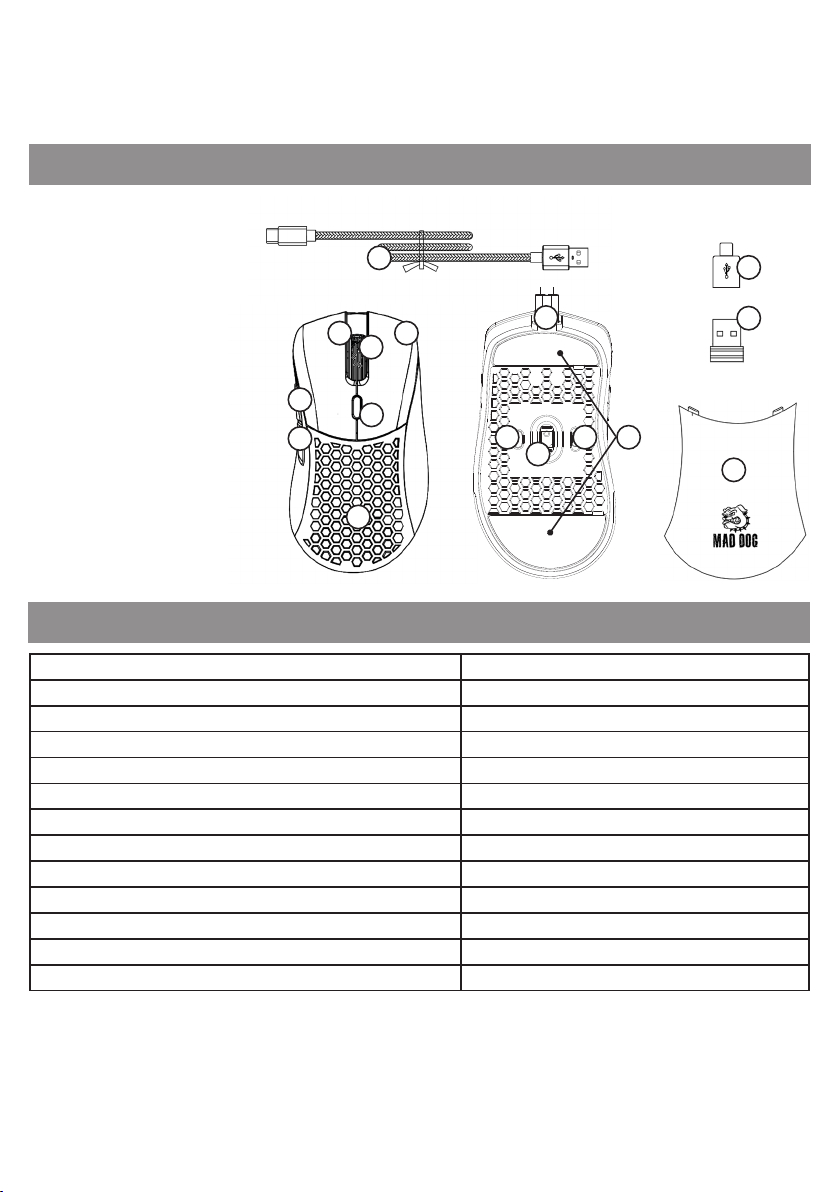
DEVICE DESCRIPTION
1. Left Mouse Button
2. Right Mouse Button
3. Scroll / Middle Mouse Button
14
4. Front Side Button
5. Rear Side Button
6. DPI change button
7. Interchangeable guard
8. USB-C port
9. Backlight change button
10. Sensor
11. Operating mode switch
1
4
5
2
3
6
8
9
11 12
10
12. Sliders
13. RF receiver
7
14. USB cable
15. USB-C adapter
TECHNICAL DATA
Model GM805
Intended use For right handed persons
Sensor Pixart PAW3335
LMB and RMB switches Huano 20 million clicks
Number of buttons 7
Maximum resolution up to 16000 DPI
Number of DPI modes 6
Reporting frequency up to 1000 Hz
Maximum acceleration up 40 G
Peak Speed ~10 m/s
Backlight LED RGB
Number of backlight modes 10
Weight (without cable) ca. 80g
15
13
7
14
Page 15
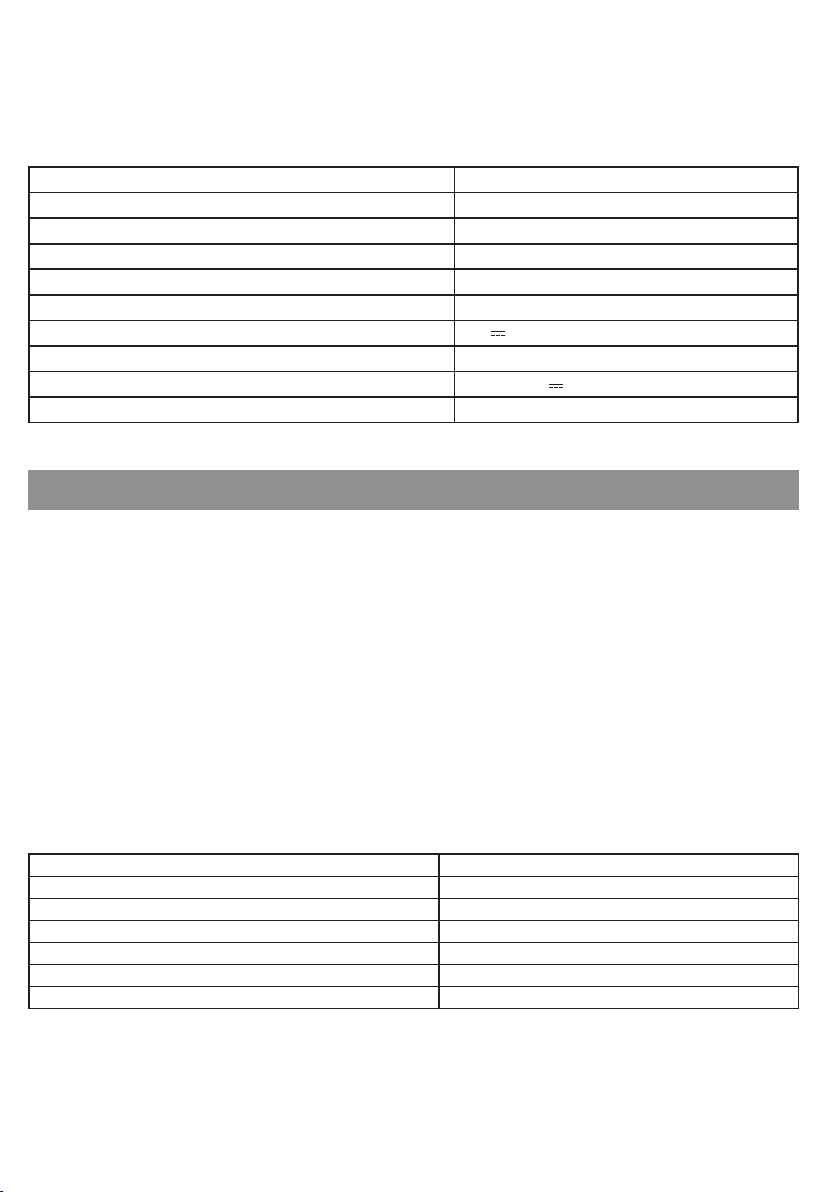
Cable type Braided with ferrite ring
Cable length 1,8 m
Transmission frequency 2402 MHz – 2480 MHz
Maximum transmission power up 5 dBm
Operating time up to 40 hours*
Charging time up to 3 hours
Power supply 5.0 V 0.5 A
Battery Li-ion DC 3.7 V, 430 mAh
Power supply with wired connection From USB 5.0 V 0.2 A
OS compatibility Windows XP/7/8/10/11
*Battery life depends on the backlight mode on.
OPERATION OF THE DEVICE
First connection
1. Connect the mouse to the computer USB port using the cable included in the set so that the device
automatically installs the driver required for its operation.
2.
Once the OS notifies you that the driver has been installed correctly, the device is ready for operation.
The mouse can be used in the following modes:
• Wireless - after connecting the radio receiver to the computer USB port.
• Wired - by connecting the mouse to the computer using the USB cable included in the set.
DPI change
The mouse has 6 dierent DPI settings, you can switch between them using the designated button.
1. To change the DPI, press button 6 in front of the scroll.
2. After pressing the DPI change button, observe the LED backlight of the scroll roll. The scroll will light
up in on of 6 colours to notify which DPI value has been selected.
Backlight colour Default DPI setting
Red 800 DPI
Green 1600 DPI
Blue 3200 DPI
Violet 6400 DPI
Yellow 12000 DPI
Cyan 16000 DPI
15
Page 16
Each DPI profile can be edited using software that can be downloaded from the manufacturer’s website.
Selecting the operating mode
The switch at bottom of the mouse allows you to select one of 3 operating modes:
OFF – mouse o,
LED – the mouse is switched on together with backlight,
ON – the mouse is switched on without backlight.
OFF
LED
ON
RGB backlight
The mouse has 10 dierent RGB LED backlight modes. To toggle the RGB backlight, press button 6 in
front of the scroll.
Rear cover replacement
Two interchangeable covers are included. To disassemble the currently installed cover, pry it from the
rear of the device, in the place indicated in the figure below. To install a new one, place it so that it is
magnetically connected.
16
Page 17

SOFTWARE
Software installation
1. Visit http://maddog.pl/sterowniki/sterowniki-i-instrukcje.
2. Select the type of device and its model.
3. Download the software installation file.
4. Install the software from the installation file on your computer.
Software support
The software manual can be downloaded at:
http://maddog.pl/sterowniki/sterowniki-i-instrukcje.
CHARGING
When the scroll of the device starts flashing red, it means that the battery level of the mouse is low and
needs to be charged.
In order to recharge the mouse, it is necessary to connect to a computer USB port using the cable
provided. Once connected to a computer, the mouse will enter the wired mode, so you can charge it
and still use it at the same time. When charging, the scroll of the mouse will blink blue.
Once the mouse is fully charged, the colour of the scroll will change to solid, depending on the DPI set
for the wired connection.
CAUTION! BATTERY DETERIORATION DURING OPERATION OF THE DEVICE IS A NATURAL PHENOMENON.
TO KEEP THE BATTERY IN GOOD CONDITION AND E XTEND ITS LIFE, PLEASE FOLLOW THESE GUIDELINES:
1. Do not start the deevice if the battery is discharged.
2. Charge the battery according to the voltage and charging current data on the rating plate.
3. Before a longer storage period, charge the battery to 50% and recharge it every 3-4 months. If it is
not possible to determine a specific charge level in the product, discharge the device, then charge
it for half the time required to fully charge it. Leaving a discharged battery for a prolonged period
of time may result in its damage or loss of its properties.
4. When using the device regularly, avoid full discharge of the battery and always charge it to the full.
5. Once the battery is charged, disconnect the charger plug from the charging socket on the device.
6. Do not leave the device unattended while charging.
7. Using chargers and cables other than those recommended in the device manual with may lead to
damage to the product and even an explosion of the battery.
8. Charge in a dry, well-ventilated place that is not exposed to direct sunlight.
17
Page 18
CLEANING AND MAINTENANCE
Use a lightly dampened cloth of soft material to clean the device. The interior of the device can be cleaned
with compressed air, using it at a distance of more than 5 cm.
When not in use, store the device in its original packaging to protect it from dust and moisture.
During transport, the RF receiver should be placed in its dedicated location, which can be accessed after
removing the rear cover
PLEASE NOTE! DO NOT IMMERSE THE DEVICE IN WATER. DO NOT USE WATER OR CHEMICALS FOR CLEANING.
PROBLEMY I ROZWIĄZANIA
Problem Possible cause Solution
The device does not
start.
The mouse cursor
moves very fast or very
slowly.
The mouse cursor
freezes or does not
move.
Unable to connect
mouse to computer.
The device is not
charging.
Incorrectly connected plug to the computer
connector.
The computer has not installed the device
driver.
Too high or too low DPI resolution set. Change the DPI resolution by pressing the
The optical hole at the bottom of the mouse
is dirty.
The texture of the surface on which the mouse
works negatively aects the sensor operation.
After a long time without activity, the mouse will
go to standby.
No USB-A port in the computer. Connect the mouse to the computer via the
Wrong charging cable. Use the USB-C/A cable included in the set
Connect the plug to the connector on the
computer correctly.
Connect the cable plug to the USB connector
on the computer and wait for the device
driver to be installed.
DPI change button.
Clean the underside of the mouse.
It is recommended to use a mouse pad.
Press any mouse button to wake up the
device.
USB-C adapter included in the set.
for charging.
18
Page 19

DECLARATION
ART-DOM Sp. z o.o. hereby declares that the GM805 wireless mouse complies with the relevant
requirements of the Union harmonisation legislation: Directive 2014/53/EU and other Union harmonisation
legislation. The full text of the EU declaration of conformity is available at the following address:
www.artdom.net.pl/deklaracja/GM805/
ECOFRIENDLY AND ENVIRONMENTALLY FRIENDLY DISPOSAL
This device is marked, in accordance with Directive 2012/19/EU of the European Parliament and of the
Council of 4 July 2012 on waste electrical and electronic equipment (WEEE), with the symbol of a crossed-
-out waste container:
Do not dispose of the device marked with this symbol together with household waste.14
For disposal return the device to your local waste treatment and disposal facility or contact your local
authorities.
YOU CAN HELP PROTECT THE ENVIRONMENT!
Proper handling of waste electrical and electronic equipment contributes to avoiding harmful consequences for human health and the environment resulting from the presence of hazardous components
and improper storage and processing of such equipment.
WARRANTY CONDITIONS FOR THE MOUSE
1. ART-DOM Sp. z o.o. with its registered o ice in Łódz (92-402) at ul. Zakładowa 90/92 National Court
Register Number 0000354059 (Guarantor) guarantees that the purchased device is free from
physical defects. The warranty covers only defects resulting from the causes inherent in the item
sold (manufacturing defects).
2. A disclosed defect will be removed at the Guarantor’s expense within 14 days from the date of
reporting the damage to the authorized service or point of sale.
3. In exceptional cases, e.g. the need to import spare parts from their manufacturer, the repair period
may be extended up to 30 days.
4. The warranty period for the user is 24 months from the date of delivery of the goods.
5. The goods are intended for use only in the conditions of an individual household.
6. The present warranty does not cover:
19
Page 20

a. damage caused by using the device in a manner inconsistent with the user manual,
b. mechanical, chemical or thermal damage,
c. repairs and modifications made by companies or persons that were not authorized to do so by the
manufacturer,
d. parts that are easy to use or consumables such as: batteries, bulbs, fuses, filters, knobs, shelves,
accessories,
e. installation, maintenance, inspection, cleaning, unlocking, removal of contaminants and instruction.
7. The Guarantor will select the mode of defect removal at its own discretion. Removal of a confirmed
defect of the device will take place through warranty repair or replacement of the device. The
Guarantor may perform repairs when the buyer requests replacement or the Guarantor may perform
replacements when the buyer requests repair, if bringing the goods (device) into conformity in
accordance with the granted warranty in the manner selected by the buyer is impossible or would
require excessive costs 20 at the part of Guarantor. In particularly justified cases, if both repair and
replacement are impossible or would require excessive costs for the Guarantor, the Guarantor may
refuse to bring the goods into compliance with the granted warranty and propose another way to
settle the warranty claim.
8.
The exchange of goods is made at the point of sale at which the goods were purchased (replacement
or refund) or an authorized service point, if it o ers such service (replacement). The returned device
must be complete, without mechanical damage. Failure to comply with these conditions may result
in failure to accept the warranty claim.
9. In the event of non-compliance of the goods with the sales contract, the buyer is entitled by law to
legal protection measures on the part and at the expense of the seller, and the warranty does not
a ect these legal protection measures.
10. The warranty is valid in Poland.
11. The condition for the warranty repair or replacement of the device is the presentation of proof of
purchase and the use of the goods in accordance with the information contained in the user manual..
CAUTION!
Damage or removal of the rating plate from the device may result in warranty being deemed void.
We are constantly improving our products, so they may dier slightly from the images presented on the packaging and in
the user manual. Please read the user manual before operating the appliance
ART-DOM Sp. z o.o., ul. Zakładowa 90/92, 92-402 Łódź, [email protected]. National Court Register number
0000354059.
20
v. 7
Page 21

21
 Loading...