

Page 1
GAMEPAD
GC550C
Instrukcja obsługi
iwarunki gwarancji
GC550C
GAMEPAD
Operating Manual
& Warranty Terms
WARUNKI BEZPIECZEŃSTWA I ZAGROŻENIA
1. Należy unikać długotrwałego użytkowania produktu. Po każdej godzinie gry należy zrobić 15 minutową
przerwę.
2. Należy natychmiast zaprzestać używania tego produktu w przypadku odczucia dyskomfortu, bólu rąk
lub ramion.
3. Produkt jest przeznaczony do użytku wyłącznie rękami. Nie należy zbliżać urządzenia do głowy oraz
twarzy.
4. Nie należy używać urządzenia z funkcją wibracji
w przypadku dolegliwości lub urazu kości, mięśni
oraz stawów dłoni lub ramion.
5. Niniejszy sprzęt może być użytkowany przez
dzieci w wieku co najmniej 8 lat i przez osoby
o obniżonych możliwościach fizycznych, umy-
2
słowych i osoby o braku doświadczenia i znajomości sprzętu, jeżeli zapewniony zostanie nadzór lub instruktaż odnośnie użytkowania sprzętu
w bezpieczny sposób, tak aby związane z tym zagrożenia były zrozumiałe.
6. Nie należy podejmować się modyfikacji urządzenia.
7. Nie należy uruchamiać urządzenia jeżeli jest ono
uszkodzone. Urządzenie musi zostać naprawione
przez serwis lub osobę do tego uprawnioną.
8. Naprawa urządzenia przez niewykwalifikowany lub
nieautoryzowany serwis grozi uszkodzeniem urządzenia i utratą gwarancji.
9. Nie należy narażać urządzenia na szkodliwe warunki atmosferyczne.
10. Należy chronić urządzenie przed upadkami oraz
wstrząsami.
3
11. Urządzenie jest przeznaczone wyłącznie do użytku domowego, nie komercyjnego.
12. Nie należy zanurzać urządzenia w wodzie lub
winnych substancjach.
13. Ładowanie akumulatora powinno przebiegać
w miejscu suchym i dobrze wentylowanym,
gdzie temperatura utrzymuje się wzakresie 15-
25°C.
14. Nie wolno ładować uszkodzonego akumulatora.
15. Nie wrzucać akumulatorów do ognia.
16. Wprzypadku uszkodzenia akumulatora, należy zaprzestać użytkowania urządzenia oraz unikać kontaktu ze skórą lub oczami. W przypadku kontaktu
należy przemyć miejsce wodą izwrócić się opomoc
do lekarza.
WPROWADZENIE
Dziękujemy za zaufanie, jakim nas Państ wo obdarzyli, dokonując zakupu urządzenia marki MAD DOG. Jes teśmy
przekonani, że to bardzo dobrej jakości urządzenie zapewni Państwu dużo radości i satysfakcji z jego uż ytkowania.
4
Page 2
NALEŻY DOKŁADNIE PRZECZ YTAĆ INSTRUKCJĘ OBSŁUGI I JE J PRZESTRZEGAĆ!
To urządzenie jest przeznaczone do użytku domowego lub podobnego, nie dotyczącego celów komercyjnych.
Producent nie ponosi odpowiedzialności za szkody powstałe w wyniku użytkowania niewłaściwego lub
niezgodnego z przeznaczeniem.
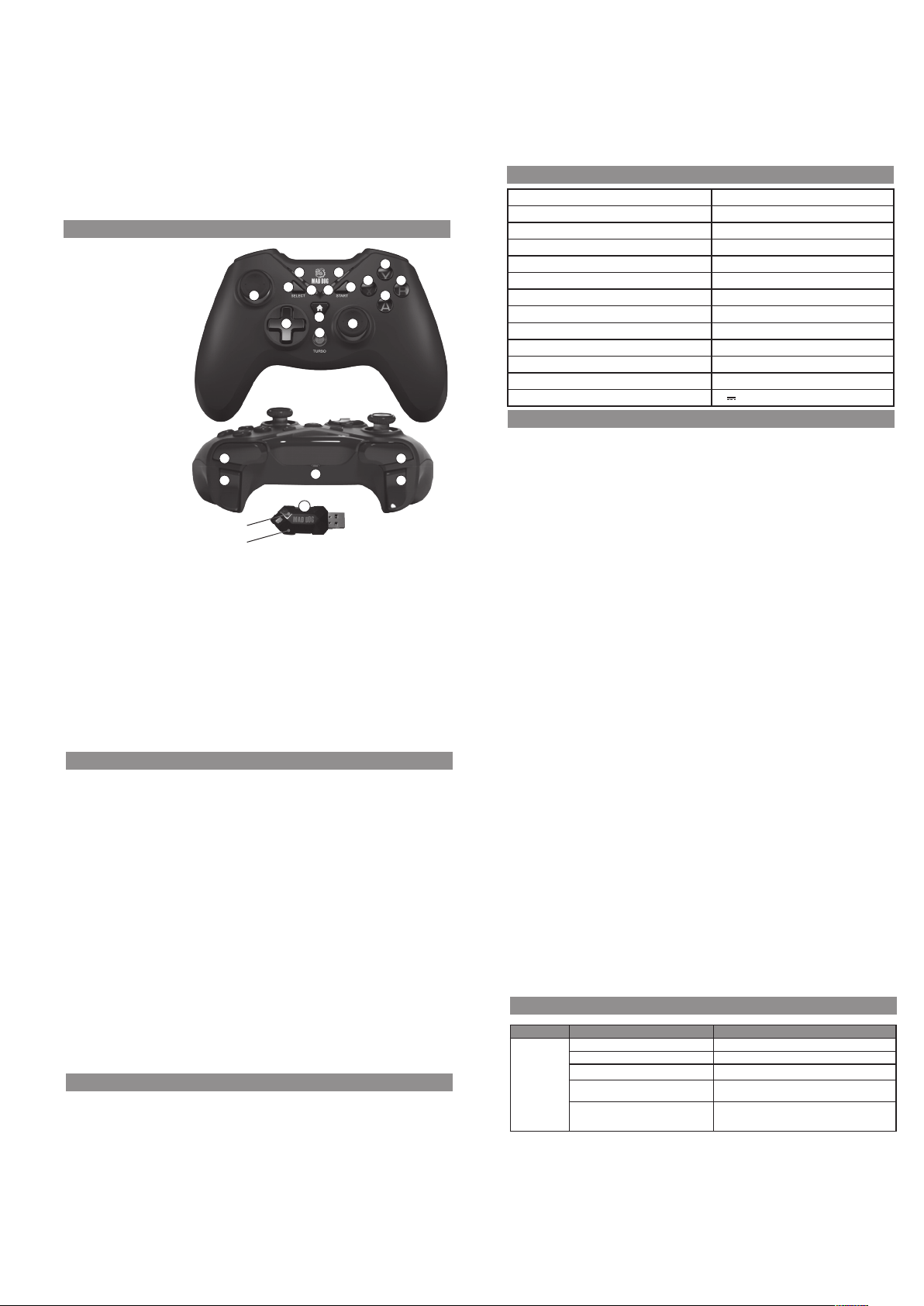
OPIS PRODUKTU
1. Odbiornik 2.4GHz
2. Przycisk SELECT
3. Przycisk START
4. Przycisk HOME
5. Przycisk Y
6. Przycisk X
7. Przycisk B
8. Przycisk A
9. Lewy joystick
10. D-Pad (kierunkowy)
11. Przycisk TURBO
12. Prawy joystick
13. Przycisk R1
14. Przycisk R2
15. Przycisk L1
16. Przycisk L2
17. Złącze USB-C
18. Wskaźnik LED1
19. Wskaźnik LED2
20. Wskaźnik LED3
21. Wskaźnik LED4
13 15
14 16
Czerwona dioda LED
Zielona dioda LED
9
5
18
2
10 12
21
19
20
4
11
17
1
5
6
3
7
8
SPECYFIKACJA
Model GC550C
Ilość przycisków 12
Joysticki analogowe 2
Tr yby X-Input/D-Input
Złącze USB-C
Czas ładowania 2-3h
Czas grania na akumulatorze do 12h
Akumulator 3.7V, 600mAh
Zakres częstotliwości pracy urządzenia 24 05-247 5MHz
Maksymalna moc częstotliwości radiowej 0.91dBm
PC z portem USB i systemem operacyjnym Windows Vista/7/8/10/11
Inne urządzenia konsola PS3
Napięcie zasilania 5V
1A
INSTALACJA
1. Wypakuj urządzenie z opakowania.
2. Podłącz bezprzewodowy adapter radiowy do wolnego portu USB w konsoli lub kompu terze, aby ten automatycznie się zainstalował. Czerwona dioda adaptera USB sygnalizuje, gotowość do pracy.
3. Włącz kontroler przełącznikiem znajdującym się na tylnej części gamepada na pozycję ON. Jeśli po włączeniu
urządzenie nie podświetla się, należy je naładować.
4. Po podłączeniu adaptera do komputera lub konsoli oraz przełączeniu włącznika naładowanego kontrolera w
pozycję ON, zielona dioda powinna świecić w adapterze w sposób ciągły. Jeżeli dioda pulsuje, przytrzymaj przycisk HOME na urządzeniu przez około 8 sekund. Kontroler połączy się automatycznie z adapterem. W momencie
parowania urządzeń upewnij się, że adapter USB od innego kontrolera nie jest podłączony do portu USB.
5. Gamepad jest gotowy do pracy.
6
OBSŁUGA
TRYBY X-INPUT / D-INPUT
Po podłączeniu isparowaniu kontrolera z komputerem dostępne są 2 tryby działania, które można przełączać
przytrzymując prz ycisk HOME przez ok. 8 sekund.
1. Jeśli na panelu LED świeci się dioda LED1, oznacza to, że urządzenie działa wtr ybie D-Input . Wtym trybie naciśnięcie przycisku HOME spowoduje przełączanie się pomiędzy dwiema opcjami działania:
- Cyfrowej (świeci się wskaźnik LED1)
- Analogowej (świecą się wskaźniki LED1 iLED2)
2. Jeśli na panelu LED gamepada świeci się dioda LED2, oznacza to, że urządzenie działa wtrybie X-Input.
3. Jeśli zaświeci się LED3, należy ponownie przytrz ymać przycisk HOME przez 5 sekund.
Funkcja zmiany tr ybów możliwa jest wyłącznie na PC. Na konsoli PS3 gamepad jest automatycznie wykrywany
wtrybie D-Input, adiody LED wskazują kolejność podłączonych graczy do konsoli.
FUNKCJA TURBO
Aby włączyć funkcję, przy trzymaj przycisk TURBO ijednocześnie naciśnij jeden zdostępnych przycisków - A, B, X,
Y, L1, L2, R1, R2.
Włączenie funkcji turbo dla wy branego przycisku spowoduję zmianę jego działania, kie dy jest on przytrz ymany ciągła aktywacja zostaje zmieniona na intensywne wciskanie.
Aby wyłączyć funkcję dla danego przycisku ponownie przytrzymaj przycisk TURBO oraz jednoc ześnie naciśnij
przypisany przycisk. Możesz również wyłączyć iwłącz yć kontroler, aby zresetować ustawienia.
TRYB UŚPIENIA
Jeśli na podłączonym gamepadzie nie zostanie wykonana żadna akcja wciągu 5 min, urządzenie przejdzie wstan
uśpienia, aby oszczędzać baterię.
Aby wybudzić kontroler naciśnij przycisk HOME.
ŁADOWANIE
Kiedy urządzenie ma niski poziom naładowania, wskaźnik aktualnego trybu działania zacznie szybko migać . Aby naładować
kontroler, podłącz go do portu USB wkomputerze lub ładowarki oparametrach podanych na tabliczce znamionowej gamepada, za pomocą przewodu USB dołączonego do zestawu. Wtrakcie ładowania wskaźnik aktualnego trybu działania będzie
powoli migał do momentu pełnego naładowania, gdzie zacznie świecić stale oraz przejdzie wstan uśpienia po 5 minutach.*
7
Śledzenie statusu ładowania jest możliwe jedynie w tedy, kiedy przełącznik na t yle urządzenia jest ustawiony na
pozycję ON. Urządzenie ładuje się 2-3 godziny, działa do 12 godzin.
*W przypadku, kiedy urządzenie nie jes t sparowane z odbiornikiem, po pełnym naładowaniu wszystkie 4 wskaźniki
zaczną szybko migać, a po 1 minucie kontroler przejdzie w stan uśpienia.
UWAGA! ZUŻYCIE AKUMULATORA PODCZAS EKSPLOATACJI URZĄDZENIA JEST NATURALNYM
ZJAWISKIEM. ABY UTRZYMAĆ AKUMULATOR W DOBREJ KONDYCJI I WYDŁUŻYĆ JEGO Ż YWOTNOŚĆ
NALEŻY STOSOWAĆ SIĘ DO PONIŻSZYCH ZALECEŃ:
1. Nie uruchamiaj urządzenia, jeśli akumulator jest rozładowany.
2. Akumulator ładuj zgodnie z danymi o napięciu i prądzie ładowania podanymi na tabliczce znamionowej.
3. Przed dłuższym okresem przechowywania naładuj akumulator do poziomu minimum 50% oraz doładowuj go
co 3-4 mie siące. Pozostawienie rozładowanego akumulatora na dłuższy okres może skutkować jego uszkodzeniem lub utratą jego właściwości.
4.
Przy regularnym użytkowaniu urządzenia unikaj pełnego rozładowania akumulatora oraz zawsze ładuj go do pełna.
5. Po naładowaniu akumulatora odłącz wtyczkę ładowarki od gniazda ładowania w urządzeniu.
6. Nie pozostawiaj urządzenia w trakcie ładowania bez nadzoru.
7. Używanie ładowarek oraz przewodów innych, niż zalecane w instrukcji z urządzeniem, może prowadzić do
uszkodzenia produktu, a nawet do eksplozji akumulatora.
8.
Ładowanie przeprowadzaj w miejscu suchym, dobrze wentylowanym oraz nienarażonym na bezpośrednie
działanie promieni słonecznych.
PROBLEMY I ROZWIĄZANIA
PROBLEM MOŻLIWA PRZYCZYNA ROZWIĄZANIE
Nie działa. Niesprawny port USB. Podłącz urządzenie do innego portu USB.
Rozładowany akumulator. Naładuj urządzenie.
Przełącznik ON/OFF w pozycji OFF. Przełącz przełącznik w pozycję ON.
Niepoprawnie wybrana opcja sterowania w grze. W ustawieniach gry wybierz podłączony gamepad, jako
Brak podłączenia z odbiornikiem USB. Przytrzymaj przycisk HOME na urządzeniu przez około 8
główne urządzenie sterowania.
sekund. W razie potrzeby powtórz czynność. Maksymalna
odległość odbiornika USB od kontrolera to 8 m.
8
Page 3
Nie działa część
przycisków.
Nie działają
wibracje.
Zły tryb pracy. Przełącz się pomiędzy trybami X-INPUT i D-INPUT.
Wibracje są wyłączone w ustawieniach gry. Sprawdź, czy gra ma dostępne wibracje oraz czy są one
Zły tryb pracy. Przełącz się pomiędzy trybami X-INPUT i D-INPUT.
włączone.
CZYSZCZENIE
• Odłącz przewód USB z portu komputera lub konsoli.
• Przetrzyj delikatnie obudowę i przyciski lekko zw ilżoną, miękką ściereczką.
DEKLARACJA
ART-DOM Sp. z o.o. niniejszym oświadcza, że gamepad GC550C jest zgodny z odnośnymi wymaganiami unijnego
prawodawstwa harmonizacyjnego: dyrektywą 2014/53/UE i innym unijnym prawodawstwem harmonizacyjnym.
Pełny tekst deklaracji zgodności UE jest dostępny pod następującym adresem: www.artdom.net .pl/deklaracja/GC550C/
EKOLOGICZNA I PRZYJAZNA DLA ŚRODOWISKA UTYLIZACJA
Tourządzenie jest oznaczone, zgodnie zDyrektywą Parlamentu Europejskiego iRady 2012/19/UE zdnia 4 lipca 2012r.
wsprawie zuży tego sprzętu elektrycznego ielektronicznego (WEEE), symbolem przekreślonego kontenera naodpady:
Nie należy wyrzucać urządzeń oznaczonych tym symbolem razem zodpadami domowymi.
Urządzenie należy zwrócić dolokalnego punktu przetwarzania iutylizacji odpadów lubskontaktować się zwładzami
miejskimi.
UTYLIZACJA ZUŻYT YCH AKUMULATORÓW
Zgodnie z dyrektywą UE 2006/66/EC z późn. zm. o akumulatorach, produkt ten jest oznaczony symbolem przekreślonego
kosza na śmieci. Symbol oznacza, że zastosowane w tym produkcie baterie lub akumulatory nie powinny być
wyrzucane razem z normalnymi odpadami z gospodarstw domowych. Uż ytkownicy baterii i akumulatorów muszą
korzystać z dostępnej sieci odbioru tych elementów, która umożliwia ich zwrot, recykling oraz utyliz ację.
9
MOŻESZ POMÓC CHRONIĆ ŚRODOWISKO!
Właściwe postępowanie zezużyt ym sprzętem elektrycznym ielektronicznym przyczynia się douniknięcia szkodliwych
dla zdrowia ludzi iśrodowiska naturalnego konsekwencji, wynikających zobecności składników niebezpiecznych
oraz niewłaściwego składowania iprzetwarzania takiego sprzętu.
Li-Po
WARUNKI GWARANCJI DOTYCZĄCE GAMEPADA
1. ART-DOM Sp. z o.o. z siedzibą w Łodzi (92-402) przy ul. Zakładowej 90/92 Numer Krajowego Rejestru Sądowego
0000354059 (Gwarant) gwarantuje, że zakupione urządzenie jest wolne od wad fiz ycznych. Gwarancja obejmuje
tylko wady wynikające z przyczyn tkwiących w rze czy sprzedanej (wady fabryczne).
2.
Ujawniona wada zostanie usunięta na koszt Gwaranta w ciągu 14 dni od daty zgłoszenia uszkodzenia do serwisu
autoryzowanego lub punktu sprzedaży.
3.
W wyjątkowych przypadkach, np. konieczności sprowadzenia części zamiennych od producenta, termin naprawy
może zostać wydłużony do 30 dni.
4. Okres gwarancji dla użytkownika wynosi 24 miesiące od daty wydania towaru.
5. Towar przeznaczony jest do używania wyłącznie w warunkach indywidualnego gospodarstwa domowego.
6. Gwarancja nie obejmuje:
a. uszkodzeń powstałych na skutek używania urządzenia niezgodnie z instrukcją obsługi,
b. uszkodzeń mechanicznych, chemicznych lub termicznych,
c. napraw i modyfikacji dokonanych przez firmy lub osoby nieposiadające autoryzacji producenta,
d. części z natury łatwo zużywalnych lub materiałów eksploatacyjnych takich jak: baterie, żarówki, bezpiec-
zniki, filtry, pokrętła, półki, akcesoria,
e. instalacji, konserwacji, przeglądów, czyszczenia, odblokowania, usunięcia zanieczyszczeń oraz
instruktażu.
7.
O sposobie usunięcia wady decyduje Gwarant. Usunięcie potwierdzonej wady urządzenia nastąpi poprzez
wykonanie naprawy gwarancyjnej lub wymianę urządzenia. Gwarant może dokonać naprawy, gdy kupujący żąda
wymiany lub Gwarant może dokonać wymiany, gdy kupujący żąda naprawy, jeżeli doprowadzenie do zgodności
towaru (urządzenia) zgodnie z udzieloną gwarancją w sposób wybrany przez kupującego jest niemożliwe albo
wymagałoby nadmiernych kosz tów dla Gwaranta. W szczególnie uzasadnionych wypadkach, jeżeli naprawa
10
iwymiana są niemożliwe lub wymagałyby nadmiernych kosztów dla Gwaranta może on odmówić doprowadzenia
towaru do zgodności zudzieloną gwarancją izaproponować inny sposób załatwienia reklamacji z gwarancji.
8. Wymiany towaru dokonuje punkt sprzedaży, wktórym towar został zakupiony (wymiana lub zwrot gotówki) lub
autoryzowany punkt serwisowy, jeżeli dysponuje taką możliwością (wymiana). Zwracane urządzenie musi być
kompletne, bez uszkodzeń mechanicznych. Niespełnienie tych warunków może spowodować nieuznanie gwarancji.
9.
Wprzypadku braku zgodności towaru zumową sprzedaży, kupującemu zmocy prawa przy sługują środki
ochrony prawnej ze strony ina koszt sprzedawcy, agwarancja nie ma wpływu na te środki ochrony prawnej.
10. Niniejsza gwarancja obowiązuje na terytorium Polski.
11.
Warunkiem dokonania naprawy lub wymiany urządzenia w ramach gwarancji jest przedstawienie dowodu
zakupu oraz użytkowanie towaru zgodnie zinformacjami zawartymi winstrukcji obsługi.
UWAGA!
Uszkodzenie lub usunięcie tabliczki znamionowej zurządzenia może spowodować
nieuznanie gwarancji.
Cały czas udoskonalamy nasze produkty, dlatego mogą się one nieznacznie różnić od zdjęć przedstawionych na opakowaniu
oraz w instrukcji obsługi. Przed przystąpieniem do uży tkowania urządzenia przeczytaj instrukcję obsługi.
ART-DOM Sp. z o.o., ul. Zakładowa 90/92, 92-4 02 Łódź, [email protected]. Numer Krajowego Rejestru Sądowego
0000354059.
11
SAFETY CONDITIONS AND HAZARDS
1. Long-term use of the product should be avoided.
Take a 15-minute break after every hour of play.
2. You should stop using this product immediately if
you feel discomfort or pain in your hands or arms.
3. The product is intended for use by hands only. Do
not bring the device closer to your head or face.
4. Do not use the device with vibration function in
case of ailments or injuries of your bones, muscles and joints of hands or arms.
5. This equipment can be used by children aged at
least 8 years and by persons with reduced physical or mental abilities, and persons without experience in using and knowledge of the device, if
supervision or instruction is provided regarding
the use of the equipment in a safe manner so that
v. 3
12
Page 4
the risks involved are understood.
6. Do not attempt to modify the device.
7. Do not start the device if it is damaged. The device must be repaired by the service or a person
authorized to do so.
8. Repair of the device by unqualified or unauthorized service may damage the device and void the
warranty.
9. Do not expose the device to harmful weather
conditions.
10. Protect the device from falls and shocks.
11. The device is intended for domestic use only, and
not for commercial use.
12. Do not immerse the device in water or other substances.
13. The battery should be charged in a dry and
13
well ventilated place, where the temperature remains in the range of 15-25°C.
14. Do not attempt to charge a damaged battery.
15. Never dump batteries into fire.
16. In case of battery damage, stop using the device
and avoid contact with the skin or eyes. In case of
contact, wash the area with water and seek medical assistance.
INTRODUCTION
Thank you for the trust you have placed in us when you purchased your MAD DOG device.
We are convinced that this high quality device will provide you with a lot of joy and satisfaction during its use.
PLEASE CAREFULLY READ AND FOLLOW THE OPERATING MANUAL!
This device is intended for domestic or similar, non-commercial use. The manufacturer will not be held liable f or
damages resulting from improper or non-compliant use.
14
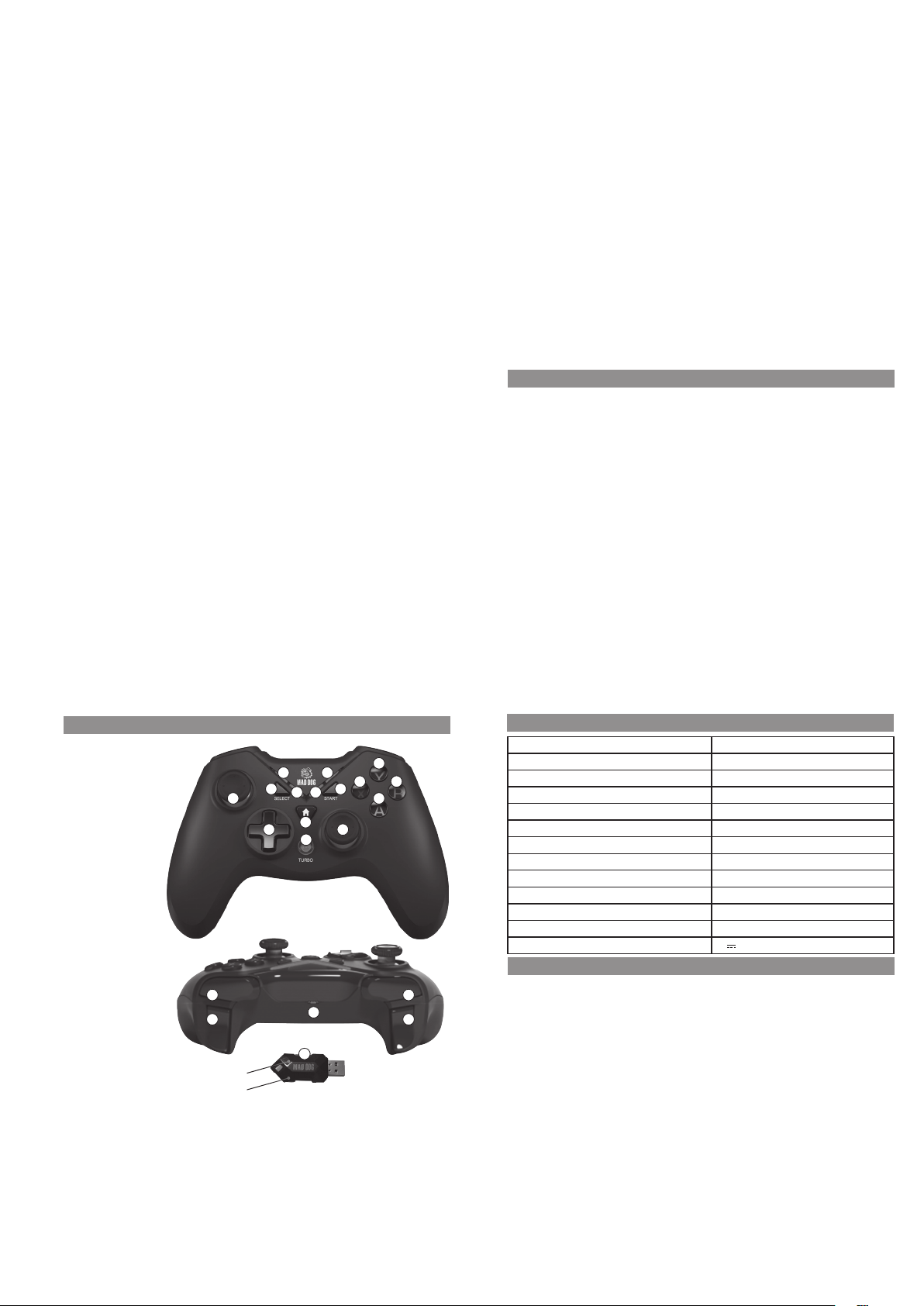
1. 2.4GHz receiver
2. SELECT button
3. START button
4. HOME button
5. Y button
6. X button
7. B button
8. A button
9. Left joystick
10. D-Pad (directional)
11. TURBO button
12. Right joystick
13. R1 button
14. R2 button
15. L1 button
16. L2 button
17. USB-C p ort
18. LED1 indicator
19. LED2 indicator
20. LED3 indicator
21. LED4 indicator
PRODUCT DESCRIPTION
18
21
2
9
13 15
14 16
Red LED
Green LED
19
4
10 12
11
1
15
6
3
20
17
SPECIFICATION
Model GC550C
5
7
8
Number of buttons 12
Analog joysticks 2
Modes X-Input/D-Input
Connector USB-C
Charging time 2-3h
Battery playtime up to 12h
Battery 3.7V, 600mAh
Operating frequency range of the device 2405-2475MHz
Maximum radio-frequency power 0.91dBm
PC with USB port and Windows Vista/7/8/10/11
Other devices PS3 console
Power supply voltage 5V
1A
INSTALLATION
1. Remove the device from the packaging.
2. Connect the wireless radio adapter to a free USB port on your console or computer to automatically install it.
The red LED of the USB adapter indicates that it is ready for operation.
3. Turn the controller moving the switch on the back of the gamepad to the ON position. If the device does not
illuminate once turned on, charge it.
4. After connecting the adapter to the computer or console and turning the switch of the charged controller to the
ON position, the green LED should light continuously in the adapter. If the led is flashing, hold the HOME button on
the device for about 8 seconds. The controller will automatically connect to the adapter. When pairing devices,
make sure that the USB adapter from another controller is not connected to the USB port.
5. The gamepad is ready for use.
16
Page 5
OPERATION
X-INPUT/D-INPUT MODES
After connecting and pairing the controller with a computer, there are 2 operation modes that can be switched by
holding the HOME button for approx. 8 seconds.
1. If the LED1 on the led panel is lit, it means that the device is operating in D-Input mode. In this mode, pressing
the HOME button will toggle between two operation options:
- Digital (LED1 indicator lights up)
- Analog (LED1 and LED2 indicators illuminate)
2. If the LED2 on the gamepad LED panel is lit, it means that the device is operating in X-Input mode.
3. If LED3 lights up, press and hold the HOME button again for 5 seconds.
The mode change func tion is only possible on a PC. In PS3, the gamepad is automatically detec ted in D-Input mode,
and the LEDs indicate the order of players connected to the console.
TURBO FUNCTION
To activate the function, hold down the TURBO button and at the same time press one of the available buttons - A,
B, X, Y, L1, L2, R1, R2.
Enabling the turbo function for the selected button will change its operation when it is held down - continuous
activation is changed to intense pressing.
To deactivate the function for a given button, hold down the TURBO button again and press the assigned button at
the same time. You can also turn the controller o and on to reset the settings.
STANDBY MODE
If no action is performed on the connec ted gamepad for 5 minutes, the device will go to standby to save battery.
To wake the controller, press the HOME button.
CHARGING
When the device has a low battery level, the current mode indicator will flash quickly. To charge the controller, connect
it to the USB por t of a computer or to a charger with the parameters specified on the nameplate of the gamepad,
using the USB cable included in the set. During charging, the active mode indicator will flash slowly until it is fully
charged, where it will start to glow constantly and go to standby mode after 5 minutes.*
17
The charging status can only be tracked if the switch on the back of the device is set to ON. The device charges for
2-3 hours, after which it will operate for up to 12 hours.
*In the event that the device is not paired with the receiver, after full charging, all 4 indicators will flash quickly, and
after 1 minute the controller will go to standby.
PLEASE NOTE! BATTERY DETERIORATION DURING OPERATION OF THE DEVICE IS A NATURAL PHENOMENON. TO
KEEP THE BATTERY IN GOOD CONDITION AND EXTEND ITS LIFE, PLEA SE FOLLOW THESE GUIDELINES:
1. Do not start the device if the battery is discharged.
2. Charge the battery according to the voltage and charging current data on the rating plate.
3.
Before a longer storage period, charge the battery to 50% and recharge it every 3-4 months. Leaving a discharged
battery for a prolonged period of time may result in its damage or loss of its properties .
4. When using the device regularly, avoid full discharge of the battery and always charge it to the full.
5. Once the battery is charged, disconnect the charger plug from the charging socket on the device.
6. Do not leave the device unattended while charging.
7. Using chargers and cables other than those recommended in the device manual with may lead to damage to
the product and even an explosion of the battery.
8. Only charge in a dry, well-ventilated place that is not exposed to direct sunlight.
TROUBLESHOOTING
PROBLEM POSSIBLE CAUSE SOLUTION
Device is not
working.
Some of the
buttons do not
work.
Defective USB port. Connect the device to another USB port.
Discharged battery. Charge the device.
ON/OFF switch in OFF position. Turn the switch to the ON position.
Incorrectly selected control option in the game. In the game settings, select the connected gamepad as the
No connection with USB receiver. Hold down the HOME button on the device for some 8
Wrong operating mode. Switch between X-INPUT and D-INPUT modes.
main control device.
seconds. Repeat if necessary. The maximum distance of the
USB receiver from the controller is 8m.
18
Vibrations do not
work.
Vibrations disabled in game settings. Check if the game has vibrations available and if they are
Wrong operating mode. Switch between X-INPUT and D-INPUT modes.
enabled.
CLEANING
• Disconnect the USB cable from the computer or console port .
• Gently wipe the housing and buttons with a slightly damp, soft cloth.
DECLARATION
ART-DOM Sp. z o.o. hereby declares that the GC550 gamepad complies with the relevant requirements of the Union
harmonisation legislation: Directive 2014/53/EU and other Union harmonisation legislation.
The full text of the EU declaration of conformit y is available at the following address:
www.artdom.net.pl/deklaracja/GC550C/
ECOFRIENDLY AND ENVIRONMENTALLY FRIENDLY DISPOSAL
This device is marked, in accordance with Directive 2012/19/EU of the European Parliament and of the Council of 4
July 2012 on waste electrical and electronic equipment (WEEE), with the symbol of a crossed-out waste container:
Do not dispose of the device marked with this symbol together with household waste.
For disposal return the device to your local waste treatment and disposal facility or contact your local authorities.
DISPOSAL OF WASTE BATTERIES
In accordance with the EU Direc tive 2006/66/EC, as amended, on batteries, this product is marked with the symbol
of a crossed out waste bin. The symbol indicates that the batteries or rechargeable batteries used in this product
should not be disposed of together with normal household waste. Users of batteries and rechargeable batteries must
use the available collection network for these elements, which allows them to be returned, recycled and disposed of.
19
Li-Po
YOU CAN HELP PROTECT THE ENVIRONMENT!
Proper handling of waste electrical and elec tronic equipment contributes to avoiding harmful consequences for
human health and the environment resulting from the presence of hazardous components and improper storage
and processing of such equipment.
WARRANTY CONDITIONS FOR THE GAMEPAD
1. ART-DOM Sp. z o.o. with its registered oice in Łódź (92- 402) at ul. Zakładowa 90/92 National Cour t Register
Number 0000354059 (Guarantor) guarantees that the purchased device is free from physical defects. The
warranty covers only defects resulting from the causes inherent in the item sold (manufacturing defec ts).
2. A disclosed defec t will be removed at the Guarantor’s expense within 14 days from the date of repor ting the
damage to the authorized service or point of sale.
3. In exceptional cases, e.g. the need to import spare par ts from their manufacturer, the repair period may be
extended up to 30 days.
4. The warranty period for the user is 24 months from the date of delivery of the goods.
5. The goods are intended for use only in the conditions of an individual household.
6. The present warranty does not cover:
a. damage caused by using the device in a manner inconsistent with the user manual,
b. mechanical, chemical or thermal damage,
c. repairs and modifications made by companies or persons that were not authorized to do so by the
manufacturer,
d. parts that are easily worn or consumables such as: batteries, bulbs, fuses, filters, knobs, shelves, acces-
sories,
e. installation, maintenance, inspection, cleaning, unlocking, removal of contaminants and instruction.
7. The Guarantor will select the mode of defect removal at its own discretion. Removal of a confirmed defect of the
device will take place through warranty repair or replacement of the device. The Guarantor may per form repairs
when the buyer requests replacement or the Guarantor may perform replacements when the buyer re quests
repair, if bringing the goods (device) into c onformity in accordance with the granted warranty in the manner
selected by the buyer is impossible or would require excessive costs at the part of Guarantor. In par ticularly
justified cases, if both repair and replacement are impossible or would require excessive costs for the Guarantor,
20
Page 6

the Guarantor may refuse to bring the goods into compliance with the granted warranty and propose another
the Guarantor may refuse to bring the goods into compliance with the granted warranty and propose another
way to settle the warranty claim.
8.
The exchange of goods is made at the point of sale at which the goods were purchased (replacement or refund) or
an authorized service point, if it oers such service (replacement). The returned device must be complete, without
mechanical damage. Failure to comply with these conditions may result in failure to accept the warranty claim.
9.
In the event of non-compliance of the goo ds with the sales contract, the buyer is entitled by law to legal
protection measures on the part and at the expense of the seller, and the warranty does not aect these le gal
protection measures.
10. The warranty is valid in Poland.
11. The condition for the warranty repair or replacement of the device is the presentation of proof of purchase and
the use of the goods in accordance with the information contained in the user manual.
CAUTION!
Damage or removal of the rating plate from the device may result in warranty being
deemed void.
way to settle the warranty claim.
The exchange of goods is made at the point of sale at which the goods were purchased (replacement or refund) or
8.
an authorized service point, if it oers such service (replacement). The returned device must be complete, without
mechanical damage. Failure to comply with these conditions may result in failure to accept the warranty claim.
In the event of non-compliance of the goo ds with the sales contract, the buyer is entitled by law to legal
9.
protection measures on the part and at the expense of the seller, and the warranty does not aect these le gal
protection measures.
10. The warranty is valid in Poland.
11. The condition for the warranty repair or replacement of the device is the presentation of proof of purchase and
the use of the goods in accordance with the information contained in the user manual.
CAUTION!
Damage or removal of the rating plate from the device may result in warranty being
deemed void.
We are constantly improving our product s, so they may dier slightly from the images presented on the packaging and in the
user manual. Pleas read the user manual before operating the device.
ART-DOM Sp. z o.o., ul. Zakładowa 90/92, 92-402 Łódź, info@ar tdom.net.pl. National Court Register number 0000354059.
21
v. 3
 Loading...