

Page 1
© 2014 Macro Air Technol ogies Toll Free: 866 66 8 3 247 Fax: 9 09 890 2313 www.macroairf ans.com 1
Rev. Date 111714
Page 2

Page 3

© 2014 Macro Air Technol ogies Toll Free: 866 66 8 3 247 Fax: 9 09 890 2313 www.macroairf ans.com 1
Rev. Date 111714
Table of Contents
Caution & Safety ................................................................................................................................. 2
Fan Placement....................................................................................................................................4
Fan Clearance & Placement .............................................................................................................. 5
Fan Dimensions ..................................................................................................................................6
Fan Components & Tools ................................................................................................................... 7
Step 1 - Fan Mounting ................................................................................................................. 8
Rapid Mount Commercial .......................................................................................................... 9
1.1 Unistrut Span Mounting ....................................................................................................... 10
1.2 I-Beam Mounting .................................................................................................................. 11
1.3 Glulam/Wood Beam Mounting ............................................................................................. 13
Step 2 - Extension and Motor Unit Installation ........................................................................... 15
2.1 Extension and Motor Unit Installation .................................................................................16
Step 3 - Safety Cable and Electrical Installation ......................................................................... 17
3.1 Touchpad Remote Mounting................................................................................................. 18
3.2 Safety Cable & Electrical Installation .................................................................................. 20
Step 4 - Airfoil Installation .......................................................................................................... 21
4.1 Airfoil Installation .................................................................................................................. 22
Step 5 - Touchpad Remote Navigation and Operation ................................................................. 25
5.1 Touchpad Remote Navigation............................................................................................... 26
5.2 Touchpad Remote Operation ................................................................................................ 27
Maintenance Information ................................................................................................................... 28
Warranty and Technical Support ........................................................................................................ 29
Page 4

© 2014 Macro Air Technol ogies Toll Free: 866 66 8 3 247 Fax: 9 09 890 2313 www.macroairf ans.com 2
Rev. Date 111714
Caution & Safety
READ THE ENTIRE MANUAL BEFORE OPERATING THE FAN. Ensure that all safety practices
and instructions are followed during the installation, operation and servicing of the fan. Failure
to apply these safety practices could result in death or serious injury. If you do not understand
the instructions please call our Technical Department for guidance (Technical Support contact
information can be found on page 29).
The fan installation should follow the recommendations outlined in this manual. MacroAir is not
responsible for any injury or damage to people or property as a result of the user and/or installer
not complying with the recommendations outlined in this manual.
All fan controls and incoming power should only be installed by qualified technicians familiar
with the requirements of the NEC and local codes. Refer to appropriate portions of this manual
for other important requirements. Failure to follow these guidelines will void the manufacturer’s
warranty.
NOTICE: All electrical controls are configured at the factory and are ready to use. No user
adjustments are available. Follow the included wiring schematics and installation instructions
when installing this device to ensure proper operation. Do not make any changes to any part of
the fan without first consulting MacroAir.
Installation is to be in accordance with the national electrical code, ANSI/NFPA 70-1999 and local
codes.
HAZARD OF ELECTRIC SHOCK, EXPLOSION, OR ARC FLASH.
Read and understand this manual before installing or operating a fan unit. Installation,
adjustment, repair, or maintenance must be performed by qualified personnel.
The user is responsible for compliance with all international and national electrical code
requirements with respect to grounding of all equipment.
Many of the parts of this unit operate at line voltage. DO NOT TOUCH.
Install all covers before applying power or starting and stopping the unit.
DAMAGED EQUIPMENT
Do not operate or install any fans or fan accessories that appear to be damaged.
Failure to follow this instruction can result in death, serious injury, or equipment damage.
MAINTENANCE AND SERVICE:
If the fan does not operate properly using the procedures in this manual, BE CERTAIN TO
REMOVE ALL POWER TO THE UNIT and contact our technical department for further assistance.
Keep all body parts clear of moving part at all times.
All electrical troubleshooting and repair must be done by a qualified technician and meet all
applicable codes.
Page 5

© 2014 Macro Air Technol ogies Toll Free: 866 66 8 3 247 Fax: 9 09 890 2313 www.macroairf ans.com 3
Rev. Date 111714
Caution & Safety
Key Safety System Components
MacroAir fans are engineered with key safety features to prevent pieces of the fan from falling
in the unlikely event of a catastrophic failure. Used together, these systems and devices provide
comprehensive protection of people, equipment and property. Follow the detailed instructions
precisely when installing fans, including the following:
Install Safety cable on EVERY fan. The Safety cable, if installed per MacroAir specifications,
will prevent the fan from falling in the unlikely event that the mounting system should fail. A
MacroAir fan should never be run without a properly installed Safety cable, which is supplied
with every fan along with all required hardware. You must install a Safety cable for the warranty
to be in effect. Refer to page 20.
Mark the Floor to Alert Personnel
When mounting a fan in an area where materials may be elevated into its path, MacroAir
recommends marking or painting the floor with a large crosshatched circle to alert personnel of
the overhead location of fans.
Weight Considerations
We recommend that a building structure be capable of holding approximately twice the stated
hanging weight of the fan. The maximum hanging weight for the Model 370 is 115 lbs including
the weight of an additional extension. If there is some doubt of this, a professional structural
engineer should perform a thorough evaluation of the building prior to purchasing the fans.
MacroAir provides guidelines for mounting fans; however, it is the sole responsibility of the
building owner and installer to ensure the safety of the mounting system, that the building
structure is sound and that the installation complies with all federal, state, and local codes.
Torque
The maximum torque (twisting force) that must be handled by the mounting system, including the
building structure. For a Model 370, the maximum potential torque is 20 ft-lbs.
Check Federal, State, and Local Codes
Check all relevant codes to make sure that all product certifications, product listings, and building
regulations are met. Code compliance is the responsibility of the installer.
Windy Conditions
Fans should not be operated when wind is present. Fans should not be installed in applications
where it is frequently windy.
Page 6

© 2014 Macro Air Technol ogies Toll Free: 866 66 8 3 247 Fax: 9 09 890 2313 www.macroairf ans.com 4
Rev. Date 111714
Fan Placement
Sprinkler Systems and Fan Placement
In any installation where fire sprinklers are in place, fan should not interfere with their correct
operation. Fans should be located no less than 3 feet below a sprinkler, and placed central to
each sprinkler quadrant. Our AirBrain motor controller can be connected to a fire suppression
control system, which will emergency-stop fans in case of fire. Prior to installing fans, review all
codes applicable to sprinkler systems and fans to ensure code compliance (refer to NFPA 13).
Please call our Technical Department for guidance (Technical Support contact information can be
found on page 29). However, it is your sole responsibility to see that the installation is completed
to code and that it is correct.
Other Information on Placement and Spacing
If possible, avoid mounting fans directly below lights or skylights to avoid any strobe effect caused
by moving airfoils. Note, a large fan, 20 – 24 feet in diameter, performs best at 20 to 30 feet above
the floor, but acceptable performance has been demonstrated as low as 10 feet and as high as 50
feet.
If the building has a mezzanine, fans should be mounted so a person can not reach a fan in any
way from the upper level/deck. Make certain that fans are positioned so that the airfoil tips are at
least 3 feet away from any area where a person may be able to extend outward to reach them.
Page 7
© 2014 Macro Air Technol ogies Toll Free: 866 66 8 3 247 Fax: 9 09 890 2313 www.macroairf ans.com 5
Rev. Date 111714
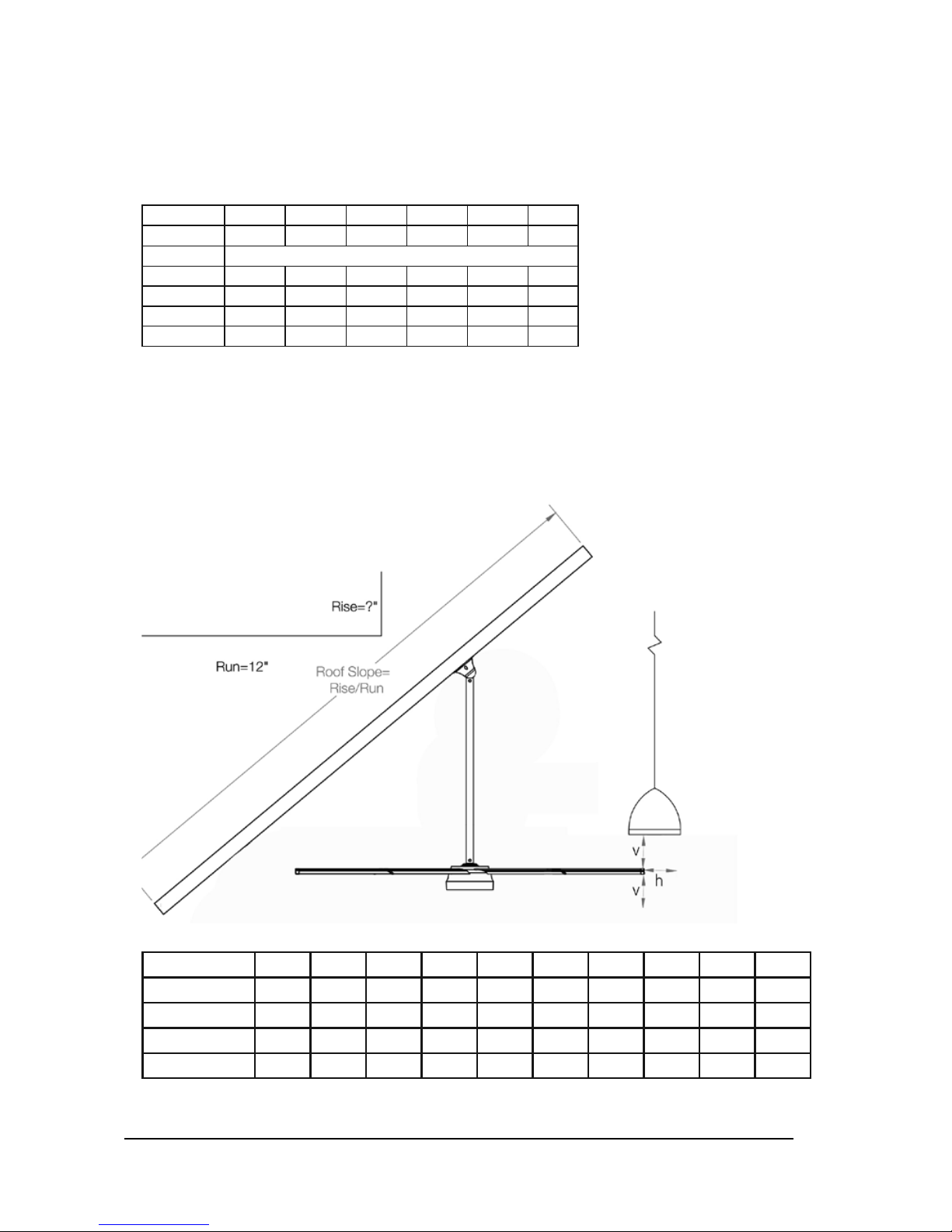
Fan Clearance & Placement
WARNING: FANS ARE NOT MEANT TO BE OPERATED IN WINDY CONDITIONS.
Maximum Angle for Mount (feet)
Slope (in)
0 2/12 4/12 6/12 8/12 10/12
Roof Angle
0 9.5
o
18.4
o
26.6
o
33.7
o
39.8
o
Diameter Recommended Total Drop (Mount to Blade) Length
6 feet 2 2 2 N/A* N/A* N/A*
8 feet 2 2 2 N/A* N/A* N/A*
10 feet 2 2 2 N/A* N/A* N/A*
12 feet 2 2 3 N/A* N/A* N/A*
*The Rapid Mount Commercial does not support this angle
The extension lengths above are minimum recommendations only, based solely on roof pitch
and fan diameter. Other factors must be evaluated when determining extension requirements.
In addition, OSHA requirements state that the fan airfoils must be a minimum of 10 feet (3.05
meters) above the floor. Contact our technical department for assistance with fan placement and
extension selection (technical support contact information can be found on page 29).
Minimum Clearance (Horizontal / Vertical inches):
Airfoil / Extension
1 2 3 4 5 6 7 8 9 10
6 feet 3 / 3 3 / 3 3 / 3 3 / 3 3 / 3 3 / 3 3 / 3 3 / 3 3 / 3 3 / 3
8 feet 3 / 3 3 / 3 3 / 3 3 / 3 3 / 3 3 / 3 3 / 3 3 / 3 3 / 3 3 / 4
10 feet 3 / 3 3 / 3 3 / 4 3 / 4 3 / 4 3 / 4 3 / 4 3 / 4 3 / 4 3 / 4
12 feet 3 / 4 3 / 4 3 / 4 3 / 4 3 / 4 3 / 4 3 / 5 3 / 5 3 / 5 3 / 5
The table above shows the clearance needed from the fan to obstructions such as lighting,
conduit, etc.
Page 8
© 2014 Macro Air Technol ogies Toll Free: 866 66 8 3 247 Fax: 9 09 890 2313 www.macroairf ans.com 6
Rev. Date 111714
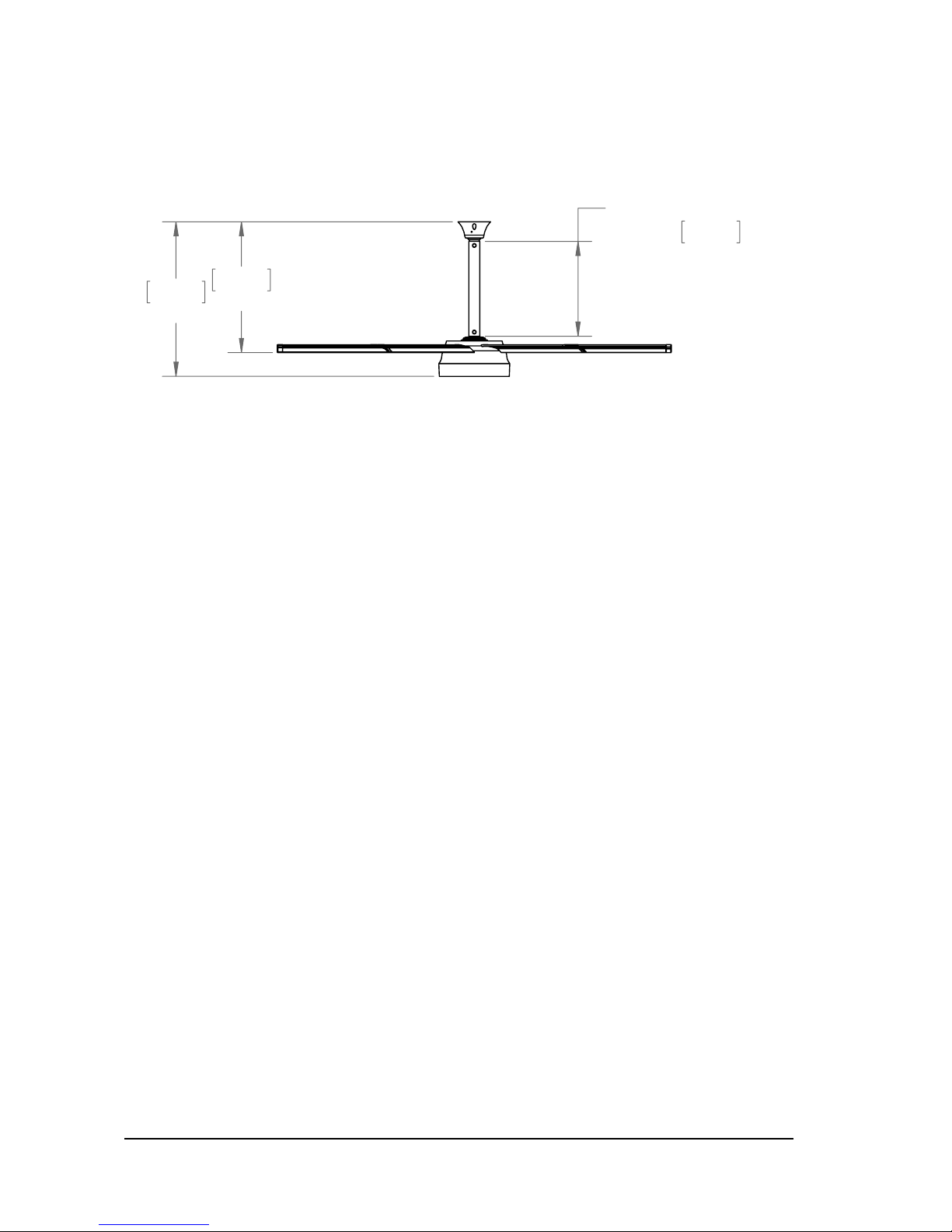
The Model 370 has a standard airfoil to mounting point clearance of 2 feet [0.61 m] with the
Rapid Mount Industrial. Refer to the Fan Clearance & Placement charts on page 5 for allowable
mounting options.
Fan Dimensions
ILLUSTRATION
SHOWN WITH
STANDARD EXTENSION
0.441
1'5.375"
0.609
2'0"
0.720
2'4"
Page 9
© 2014 Macro Air Technol ogies Toll Free: 866 66 8 3 247 Fax: 9 09 890 2313 www.macroairf ans.com 7
Rev. Date 111714
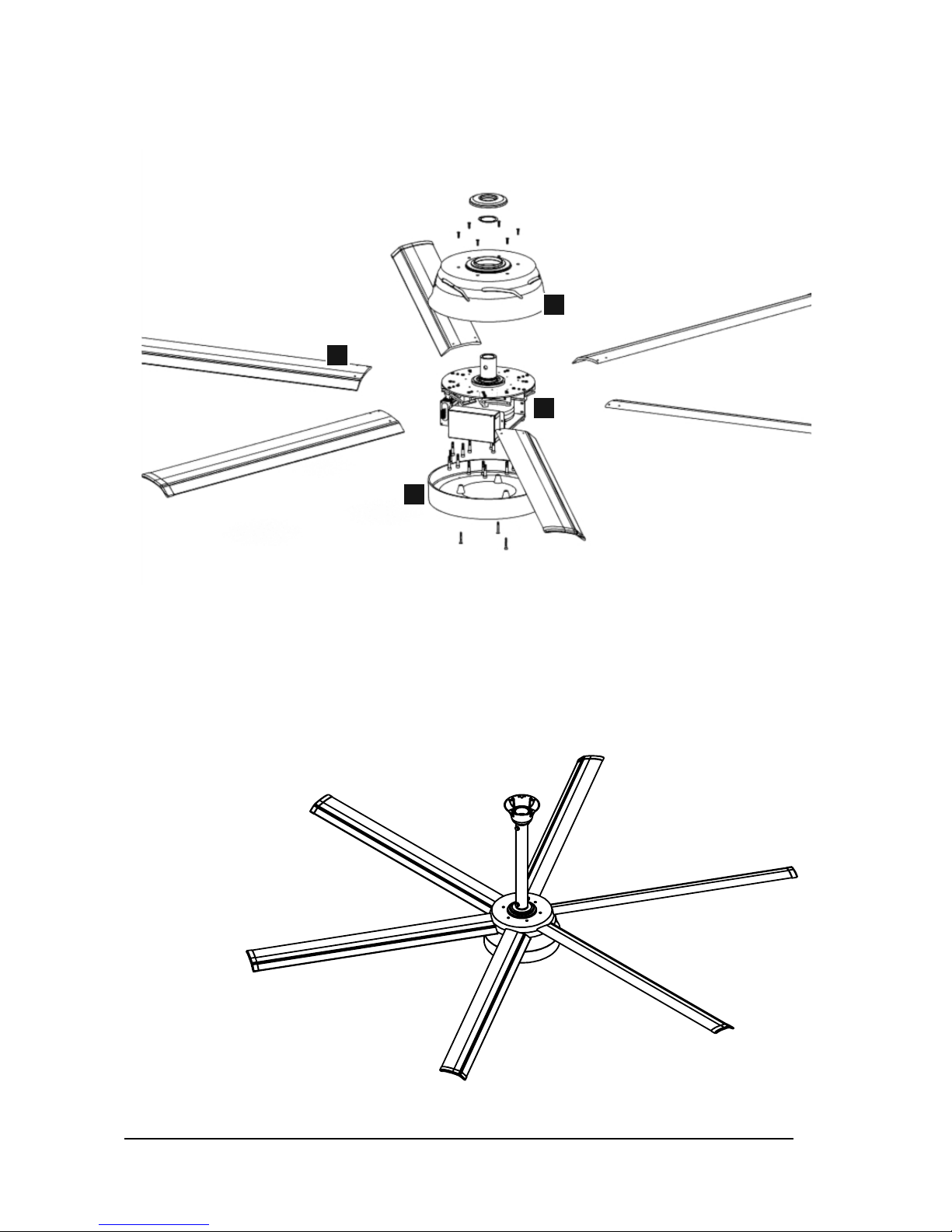
Fan Components and Tools
A
C
B
D
A - D-Drive Motor & Controller
B - Bottom Cover
C - XS Airfoil
D - Top Cover
Tools Required for Provided Hardware:
5/32’’ Allen Wrench
1/8’’ Allen Wrench (Mount Set Screw)
3/32’’ Allen Wrench
5/16’’ Allen Wrench
9/16’’ Wrench
Phillips Screwdriver
3/8’’ Socket
3/4’’ Wrench
3/4’’ Socket
Ratchet and Torque Wrenches
Page 10

© 2014 Macro Air Technol ogies Toll Free: 866 66 8 3 247 Fax: 9 09 890 2313 www.macroairf ans.com 8
Rev. Date 111714
Step 1 - Fan Mounting
Choose the appropriate method for
mounting the fan(s) based upon your
specific application.
Page 11
© 2014 Macro Air Technol ogies Toll Free: 866 66 8 3 247 Fax: 9 09 890 2313 www.macroairf ans.com 9
Rev. Date 111714
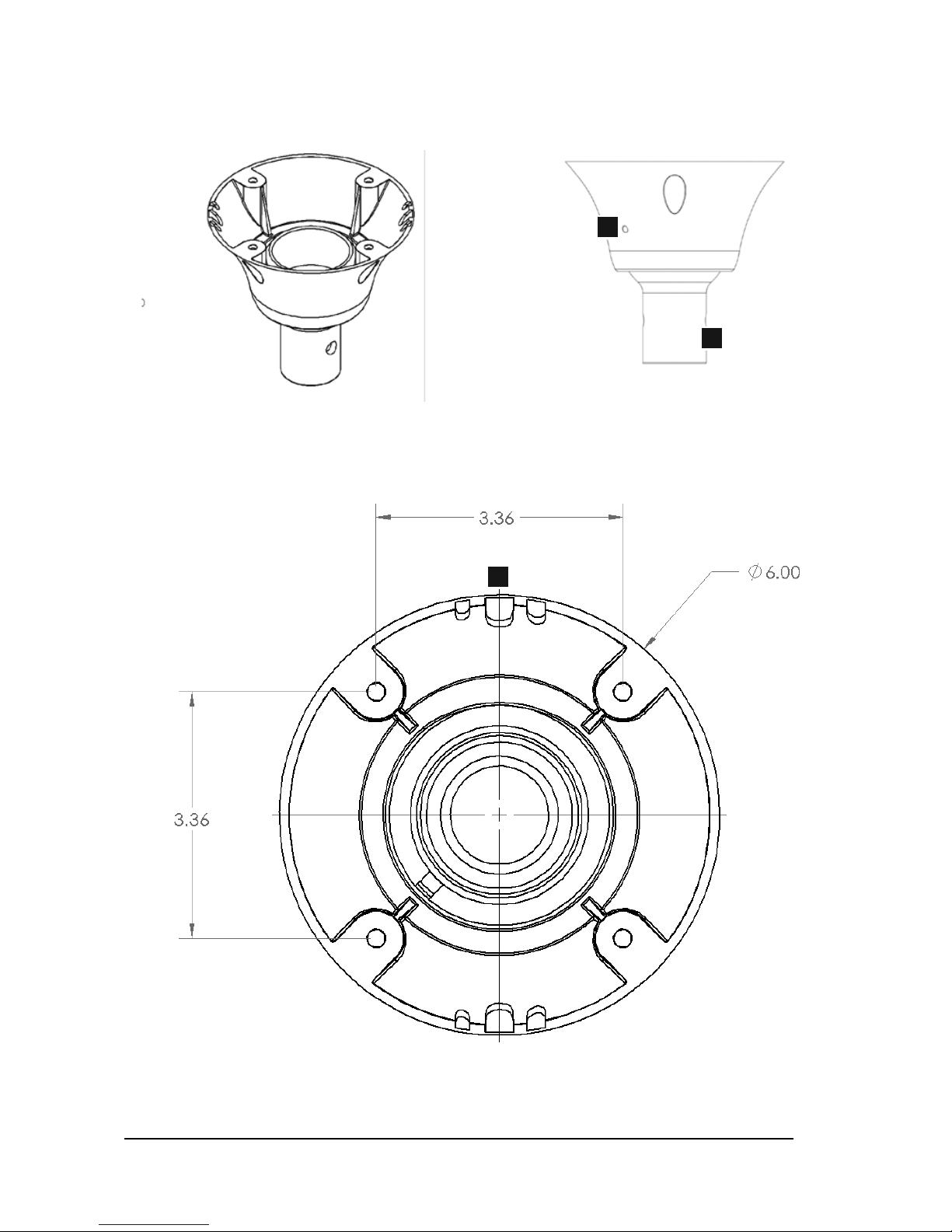
Rapid Mount Commercial
A
C
Components:
A - Locking Set Screws (2 locations on mount)
B - Extension Attachment Point
C - Break-outs for Power Wire, Remote Cable and Safety Cable
B
Page 12
© 2014 Macro Air Technol ogies Toll Free: 866 66 8 3 247 Fax: 9 09 890 2313 www.macroairf ans.com 10
Rev. Date 111714
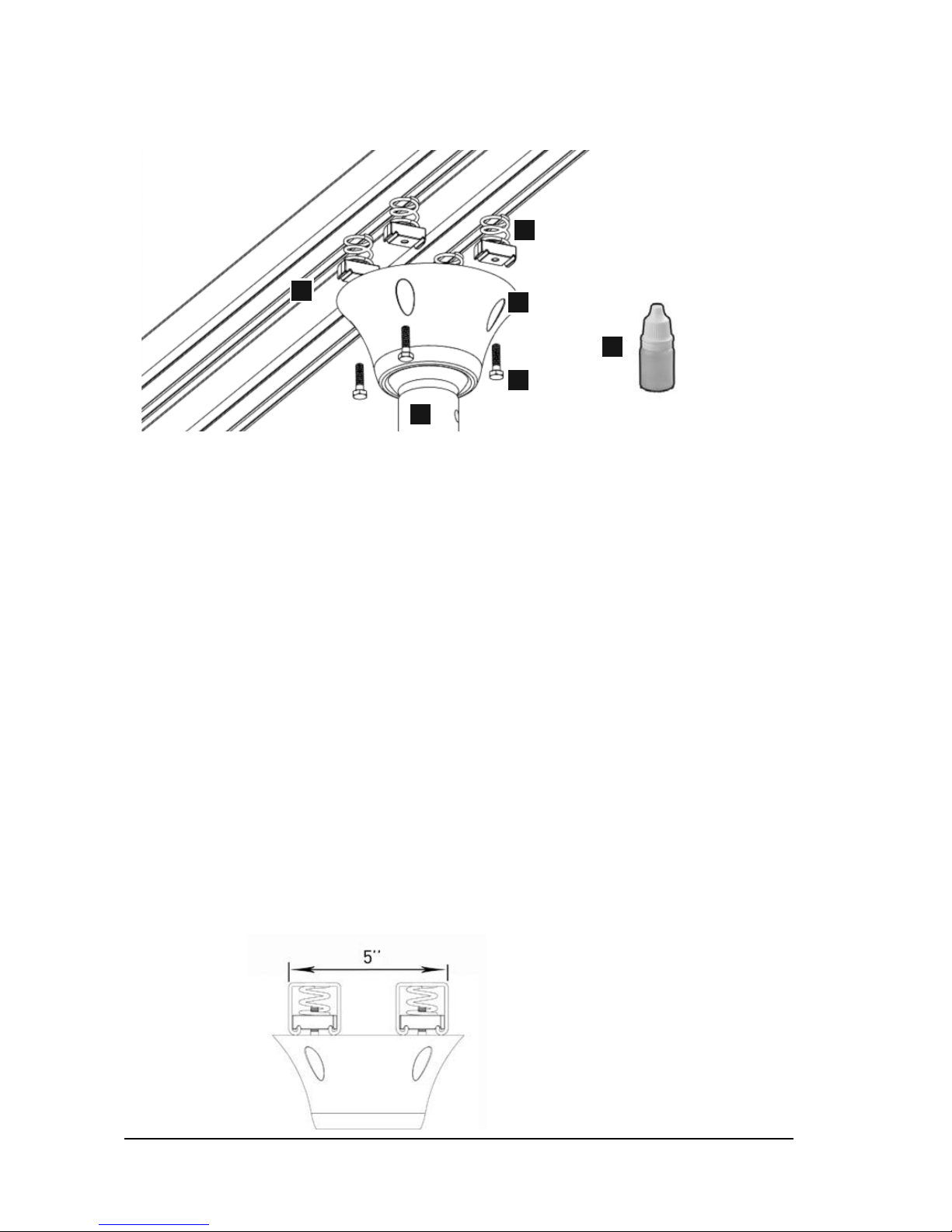
1.1 Unistrut Span Mounting
Components:
A - 1/4-20 x 1” Grade 5 Bolts (4)
B - 1/4”-20 Unistrut Spring Nuts (P1006-1420) (4)
C - Liquid Thread Lock
D - Rapid Mount Commercial
E - 1-5/8” Unistrut Unpierced Channels (P1000 or P1001B) (2) (not included)
F - Extension Attachment Point
This method is used to span components of a building structure. The attachment point to the
building structure can vary greatly and we recommend Unistrut be contacted so they may
recommend the best method to attach the Unistrut to the building (www.unistrut.us). If the
spanning distance is greater than 6 feet (P1000) or 10 feet (P1001B), please consult a Structural
Engineer. Please refer to pg. 3 for a list of fan weights and torques.
1.1.1: Cut two lengths of 1-5/8” Unistrut to the appropriate length. Span the two pieces of 1-5/8”
Unistrut open side facing down and space apart so there is 5” from outside edge to outside edge
(see illustration for example).
1.1.2: Once the Unistrut is in place, apply liquid thread lock to the recommended bolts and use
the remaining recommended hardware to attach the mount to the Unistrut. Torque the bolts to
6ft-lbs. Recommended torque is based on 1/4-20” hardware.
1.1.3: Tighten the locking set screws on the mount once the extension attachment point is level.
Refer to page 9 for illustration.
Final Results:
A
B
C
D
E
F
Page 13
© 2014 Macro Air Technol ogies Toll Free: 866 66 8 3 247 Fax: 9 09 890 2313 www.macroairf ans.com 11
Rev. Date 111714
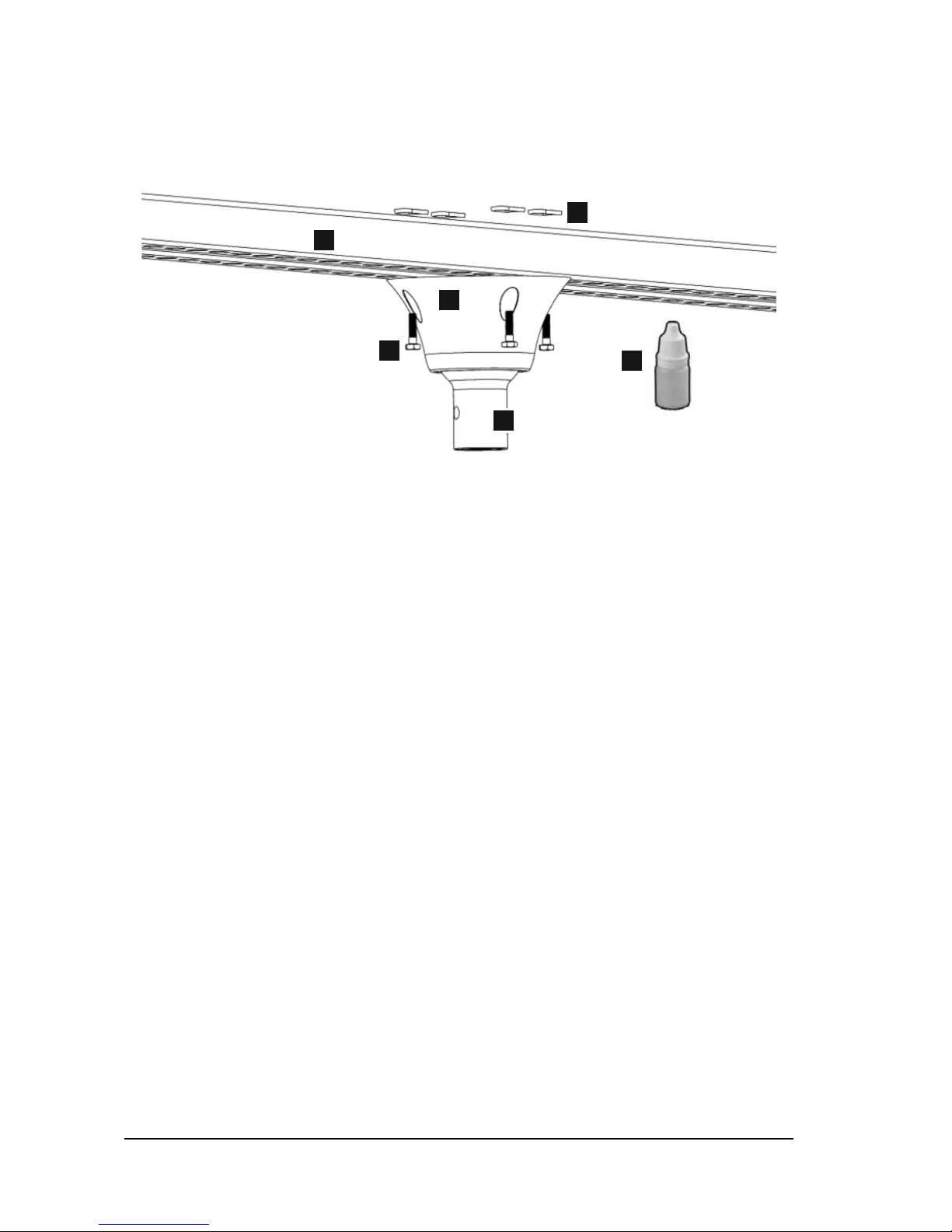
Components:
A - 1/4-20 x 1” Long Grade 5 Bolts (4) (not included)
B - 1/4”-20 Unistrut Channel Nuts (P3016-1420) (4) (not included)
C - Liquid Thread Lock (not included)
D - Rapid Mount Commercial
E - 1-5/8” Unistrut Pierced Channels (P1000T) (2) (not included)
F - Extension Attachment Point
This method is used to install the Rapid Mount Commercial to an I-Beam. The attachment point
to the building structure can vary greatly and we recommend Unistrut be contacted so they may
recommend the best method to attach the Unistrut to the building (www.unistrut.us). Please refer
to pg. 3 for a list of fan weights and torques.
1.2.1: Cut two lengths of 1-5/8” Unistrut approximately 4” wider than the I-Beam or Bar Joist you
will attach the fan to.
1.2.2: Apply the liquid thread lock to each bolt and fasten both pieces of Unistrut (open side up) to
the Rapid Mount Commercial as close to center as possible using the recommended hardware
and torque the bolts to 6ft-lbs. Recommended torque is based on 1/4-20” hardware.
1.2 I-Beam Installation (1 of 2)
A
B
C
D
E
F
Page 14
© 2014 Macro Air Technol ogies Toll Free: 866 66 8 3 247 Fax: 9 09 890 2313 www.macroairf ans.com 12
Rev. Date 111714
1.2 I-Beam Installation (2 of 2)
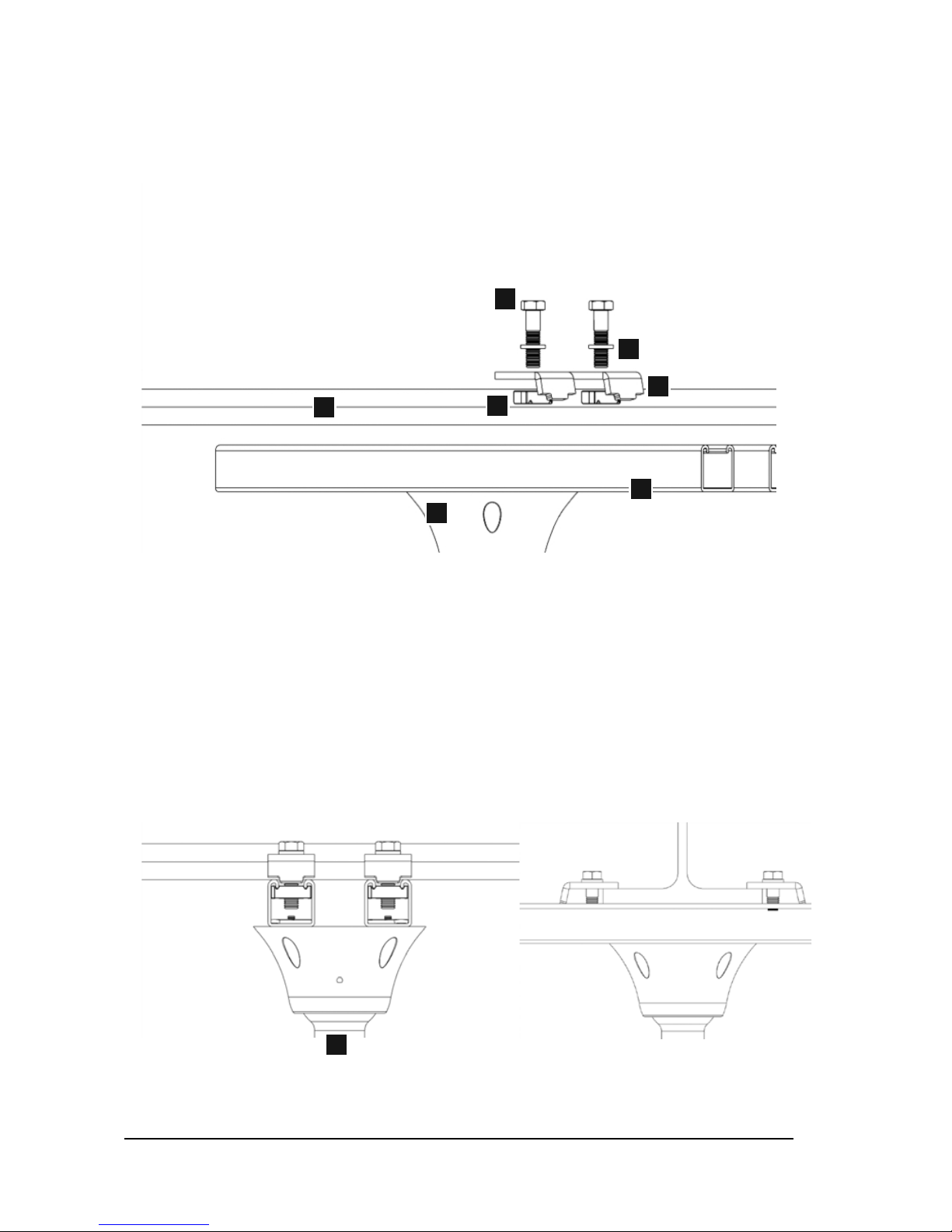
Components:
A - 1/2”-13 Grade 5 Bolts (4) (not included)
B - 1/2” Spring Washer (4) (not included)
C - Unistrut Beam Clamps (P1386) (4) (not included)
D - Unistrut 1/2” Nuts (P3010) (4) (not included)
E - 1-5/8” Unistrut Pierced Channels (P1000T) (2) (not included)
F - Rapid Mount Commercial
G - I-Beam
H - Extension Attachment Point
1.2.3: Once the Unistrut is attached to the mount, you can use the recommended hardware to
attach the assembly to your I-Beam or Bar Joists.
1.2.4: Ensure that there is adequate engagement between all clamps and the attachment point
and torque the bolts to 70 ft-lbs. For more information on the Unistrut clamp system, please
contact Unistrut. Recommended torque is based on 1/2-13” hardware.
1.2.5: Tighten the locking set screws on the mount once the extension attachment point is level.
Refer to page 9 for illustration.
Final Results:
A
B
C
D
F
E
G
H
Page 15
© 2014 Macro Air Technol ogies Toll Free: 866 66 8 3 247 Fax: 9 09 890 2313 www.macroairf ans.com 13
Rev. Date 111714
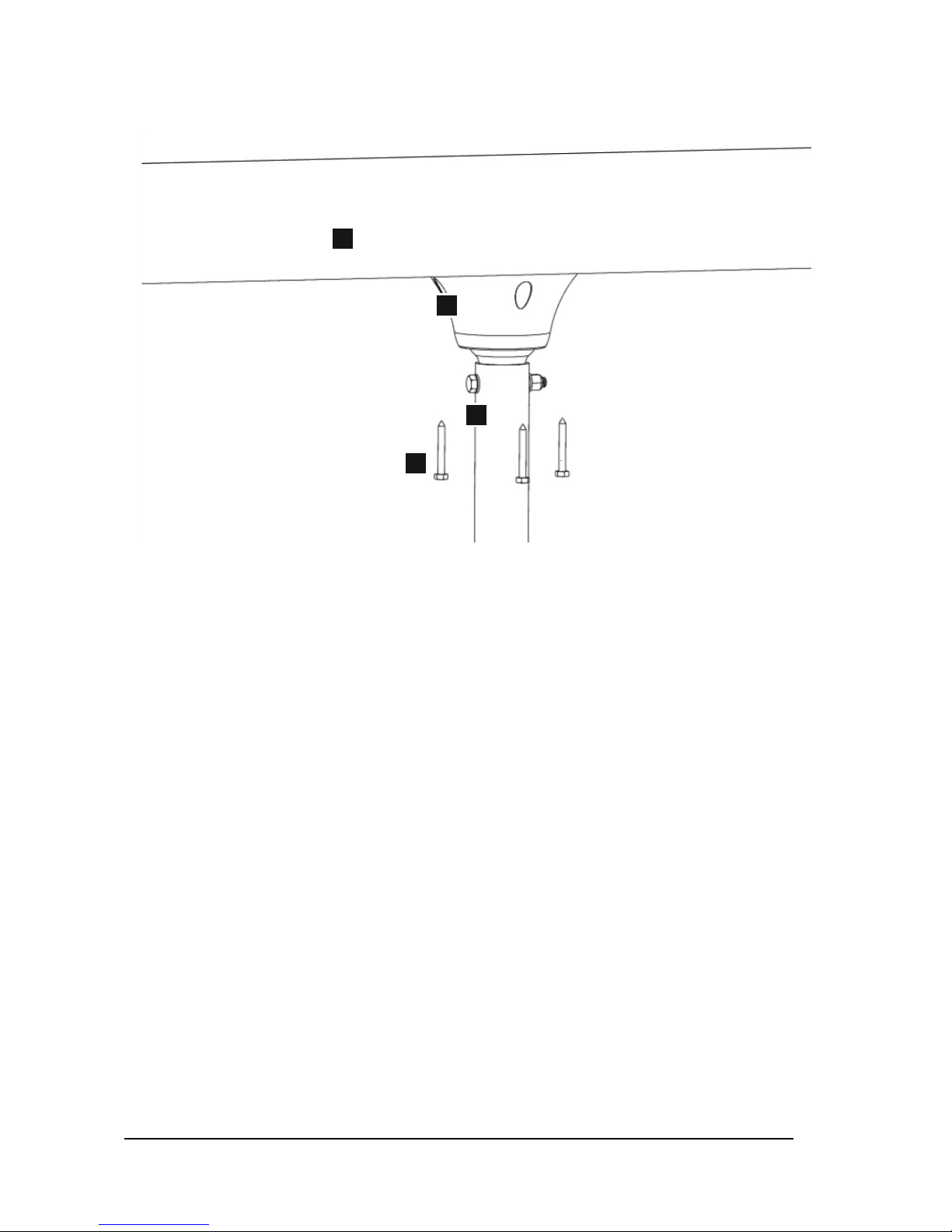
Components:
A - 1/4 x 2” (Minimum Length) Wood Lags (4)
(not provided)
B - Rapid Mount Commercial
C - Glulam
D - Extension Attachment Point
This method is recommended for Glulams or wood beams 6” or wider. For narrower attachment
points please refer to the Unistrut mounting method to span across two or more beams to
increase the structural integrity.
1.3.1: Place the mount against the bottom of the beam and position the holes so that they are the
furthest from the edge as possible. Keep in mind there are breakouts for wire and safety cable
around the upper edge of the Rapid Mount Commercial. Determine where you want to route the
power, remote, and safety cable and orientate the mount appropriately. It is ideal to route the
safety cable on the opposite side of the power wire.
1.3.2: Mark each hole location and use a 3/16” drill bit to drill a pilot hole for each lag. The pilot
hole depth must be as deep or deeper than the length of the lag bolts. Once the pilot holes are
drilled, remove the breakouts to be used for power, remote, and safety cable.
1.3 Glulam/Wood Beam Installation (1 of 2)
A
B
C
D
Page 16
© 2014 Macro Air Technol ogies Toll Free: 866 66 8 3 247 Fax: 9 09 890 2313 www.macroairf ans.com 14
Rev. Date 111714
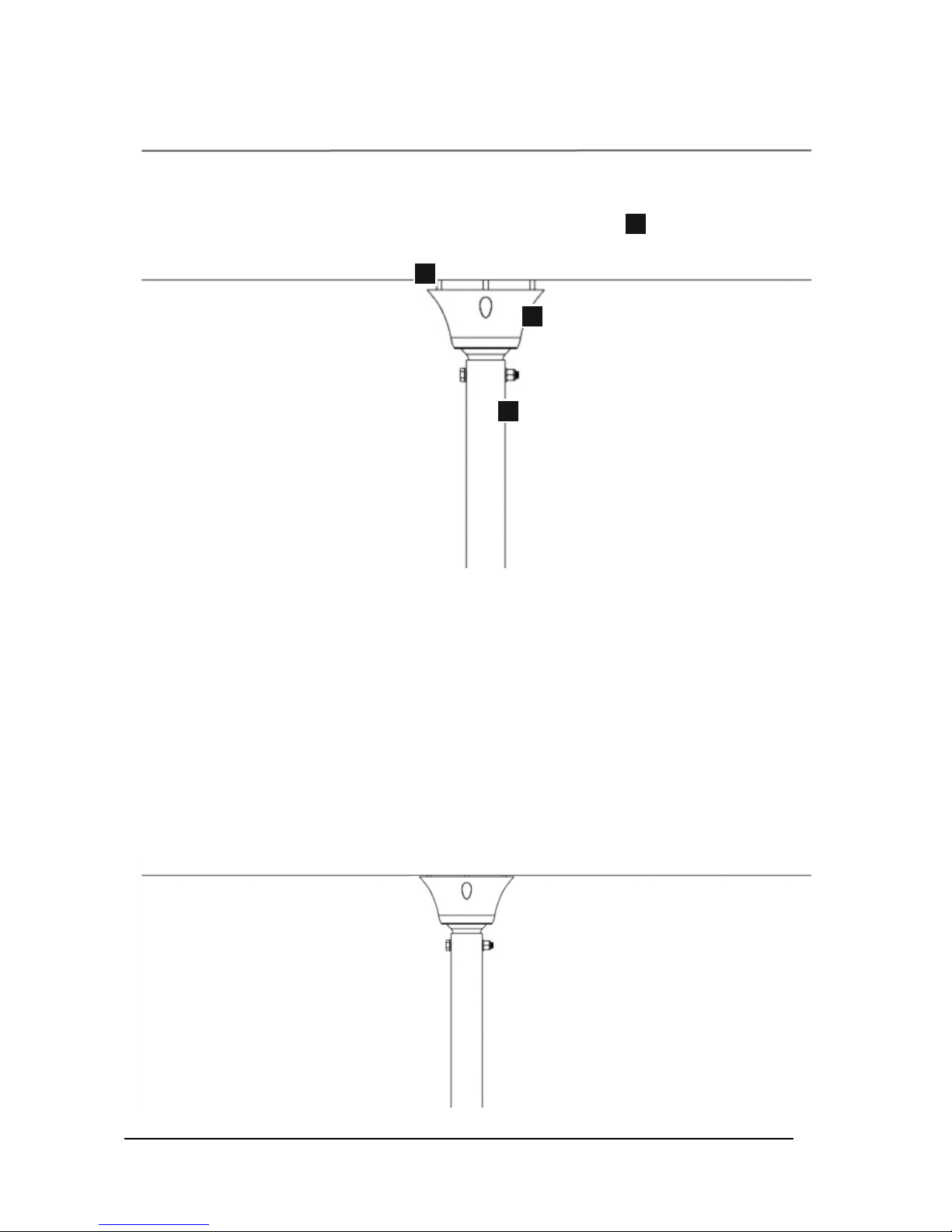
Components:
A - 1/4 x 2” (Minimum Length) Wood Lags (4)
(not provided)
B - Rapid Mount Commercial
C - Glulam
D - Extension Attachment Point
1.3.3: Place the mount against the bottom of the beam and drive the four lag bolts into the pilot
holes but do not drive them all the way in as there needs to be roughly 1/2” of gap between the
top of the mount and the bottom of the beam to run wire and cable.
1.3.4: Once the power wire, remote cable, and safety cable have been routed and are sitting in
their appropriate breakouts the lags can be tightened (refer to lag manufacturer for torque
specs). While tightening the lags it is recommended that you observe all wires and cables to
ensure they are not getting damaged between the mount and beam.
1.3.5: Tighten the locking set screws on the mount once the extension attachment point is level.
Refer to page 9 for illustration.
Final Results:
1.3 Glulam/Wood Beam Installation (2 of 2)
A
B
C
D
Page 17

© 2014 Macro Air Technol ogies Toll Free: 866 66 8 3 247 Fax: 9 09 890 2313 www.macroairf ans.com 15
Rev. Date 111714
Step 2 - Extension & Motor Unit
Installation
Attach the extension to the bottom of the
mount and the motor to the bottom of the
extension.
Page 18
© 2014 Macro Air Technol ogies Toll Free: 866 66 8 3 247 Fax: 9 09 890 2313 www.macroairf ans.com 16
Rev. Date 111714
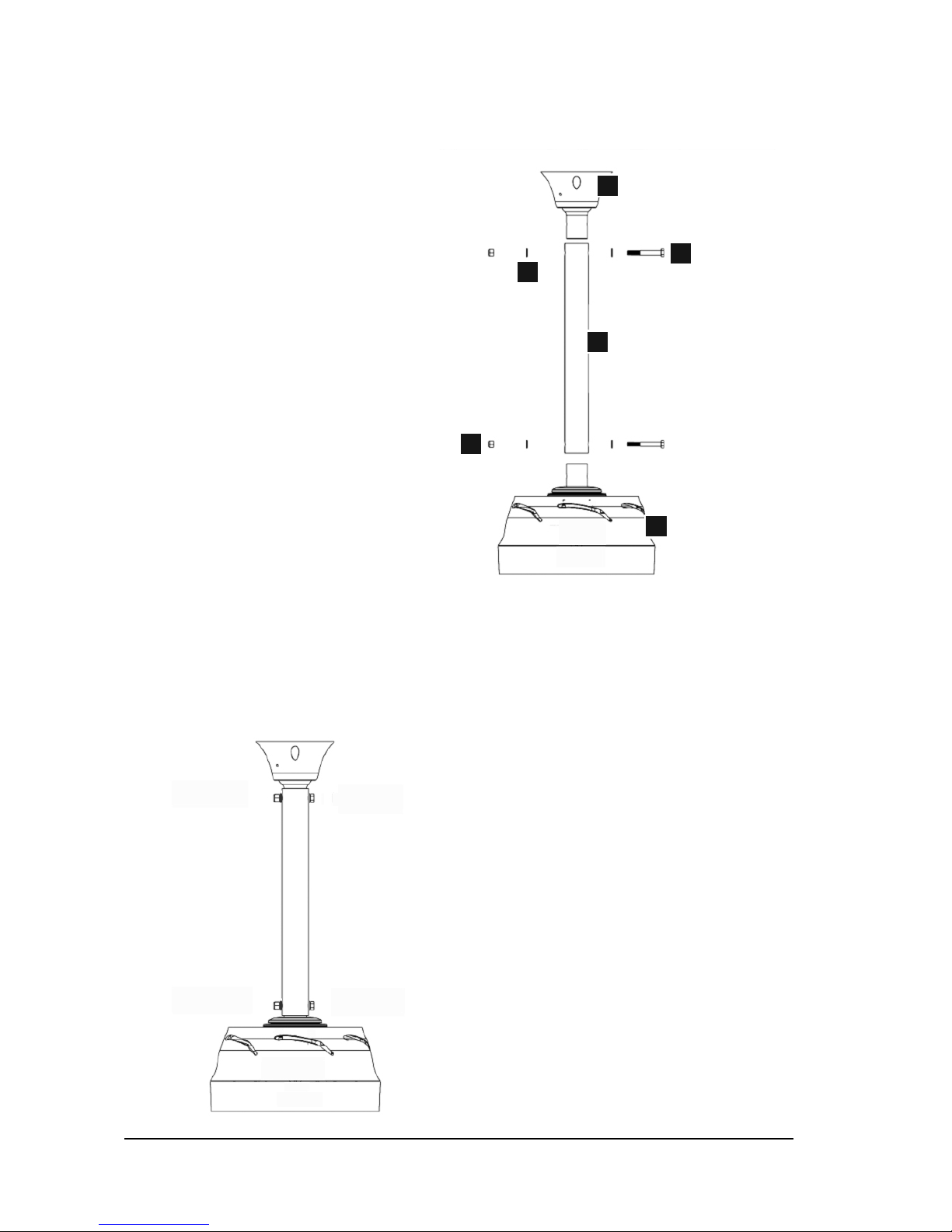
Components:
A - 3/8-16 x 3” Grade 5 (or higher) Bolts (2)
B - 3/8” Flat Washer (4)
C - 3/8”-16 Nylon Locking Nuts (2)
D - Rapid Mount Commercial
E - Extension
F - Motor Unit
2.1.1: The image above illustrates the proper assembly of the motor unit, extension, and mount.
The provided hardware can be installed and hand tightened until the fan is installed and the
power wire, safety cable, and remote cable are installed. Once completed, torque the bolts to 30
ft-lbs.
Final Results:
2.1 Extension & Motor Unit Installation
A
B
C
D
F
E
Page 19

© 2014 Macro Air Technol ogies Toll Free: 866 66 8 3 247 Fax: 9 09 890 2313 www.macroairf ans.com 17
Rev. Date 111714
Step 3 - Safety Cable and
Electrical Installation
Install the Safety cable and insert the
wires into the appropriate terminals on the
controller.
Page 20
© 2014 Macro Air Technol ogies Toll Free: 866 66 8 3 247 Fax: 9 09 890 2313 www.macroairf ans.com 18
Rev. Date 111714
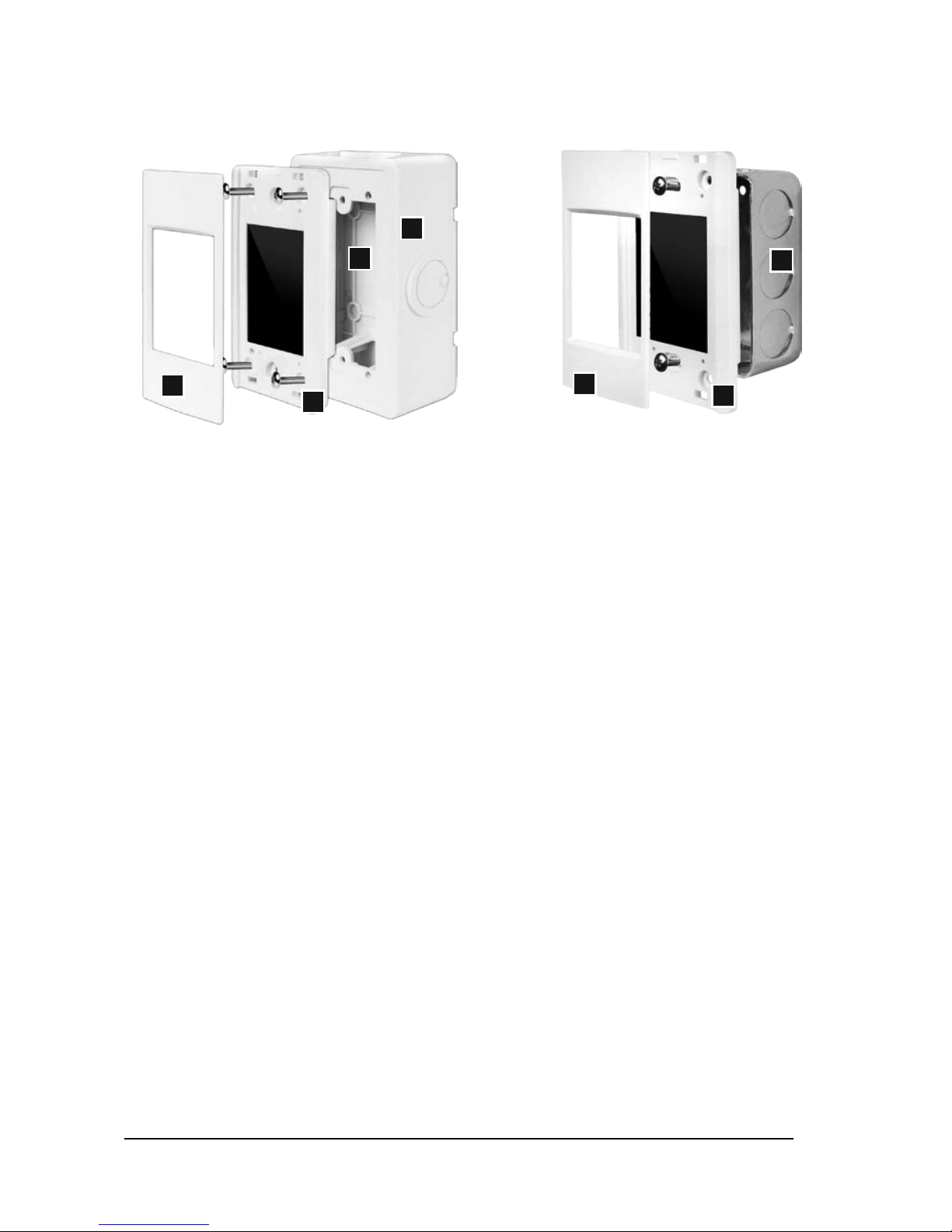
3.1 Touchpad Remote Mounting
3.1B Flush Mounting (Not Provided)
3.1.1B: Install the single gang
electrical box (not provided).
3.1.2B: Run the provided CAT5e cable
from the fan into the single gang
electrical box.
3.1.3B: Plug the remote cable into the
pre-wired CAT5e cable from the screen
using the provided RJ45 coupler.
3.1.4B: Secure the touch screen to the
enclosure using the 2 provided screws.
3.1.5B: Lock the provided bezel into
place via the plastic tabs.
3.1A Wall Mounting (Provided)
3.1.1A: Mount the base plate of the enclosure to the
wall using the 4 provided wall anchors and screws.
3.1.2A: Snap the front of the enclosure to the base
plate.
3.1.3A: Plug in the pre-wired CAT5e cable from the
screen into the RJ45 coupler inside the enclosure.
3.1.4A: Secure the touch screen to the enclosure
using the 4 provided screws.
3.1.5A: Lock the provided bezel into place via the
plastic tabs.
3.1.6A: Plug the provided CAT5e cable from the fan
into the RJ45 on the outside of the enclosure.
Note: The Touchpad Remote will automatically turn off after 30 seconds of inactivity. To turn the
screen back on, simply touch anywhere on the screen.
Note: 100 feet of CAT5e cable is provided standard. Up to 400 feet of cable can be ordered and 400
feet is the maximum distance allowed.
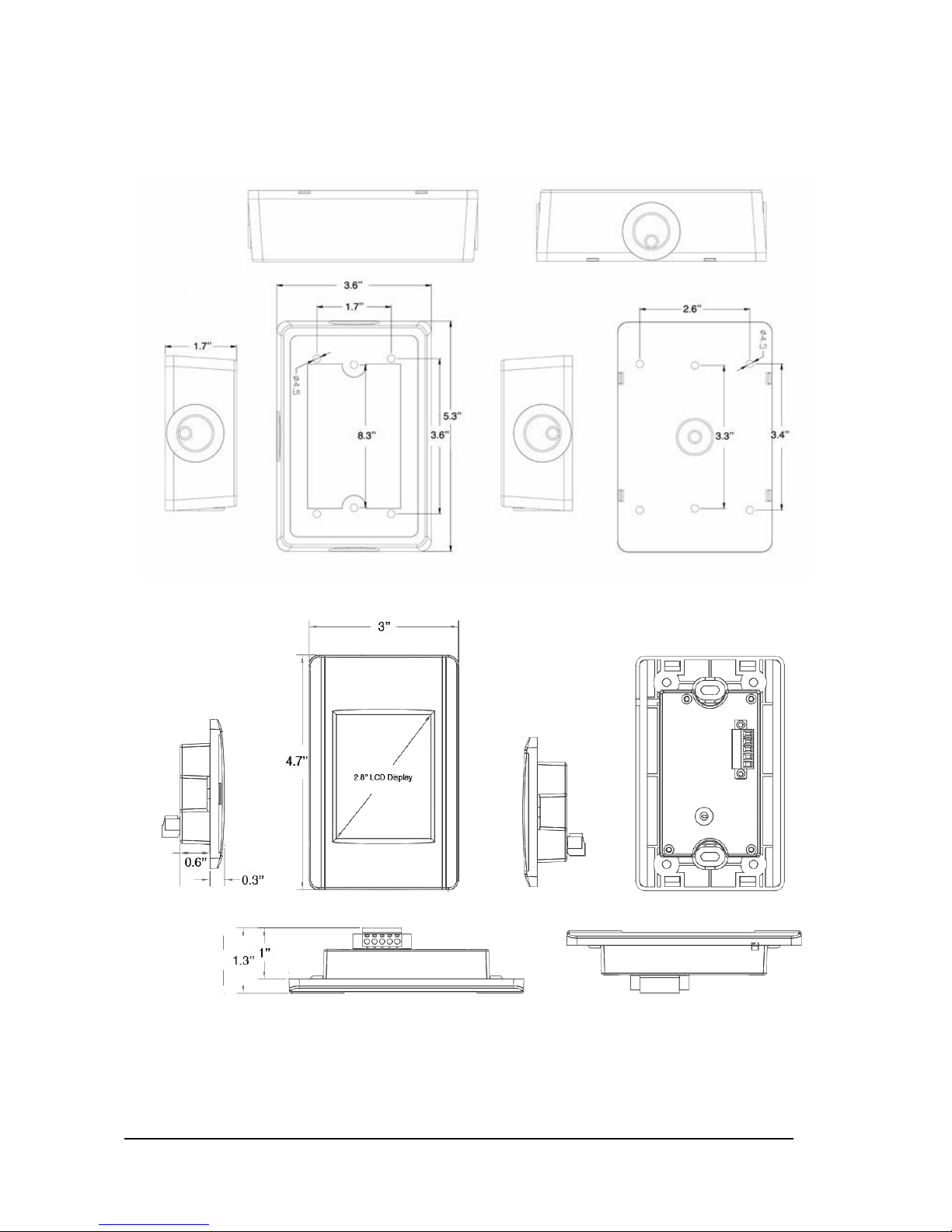
Refer to the next page for dimensions.
Components:
A - Base Plate
B - Front of Enclosure
C - Touch Screen
D - Bezel
E - Single Gang Electrical Box (not provided)
A
B
C
C
D
D
E
Page 21
© 2014 Macro Air Technol ogies Toll Free: 866 66 8 3 247 Fax: 9 09 890 2313 www.macroairf ans.com 19
Rev. Date 111714
3.1 Touchpad Remote Drawings
Remote Enclosure
Remote LCD Display
Page 22
© 2014 Macro Air Technol ogies Toll Free: 866 66 8 3 247 Fax: 9 09 890 2313 www.macroairf ans.com 20
Rev. Date 111714
A
B
A
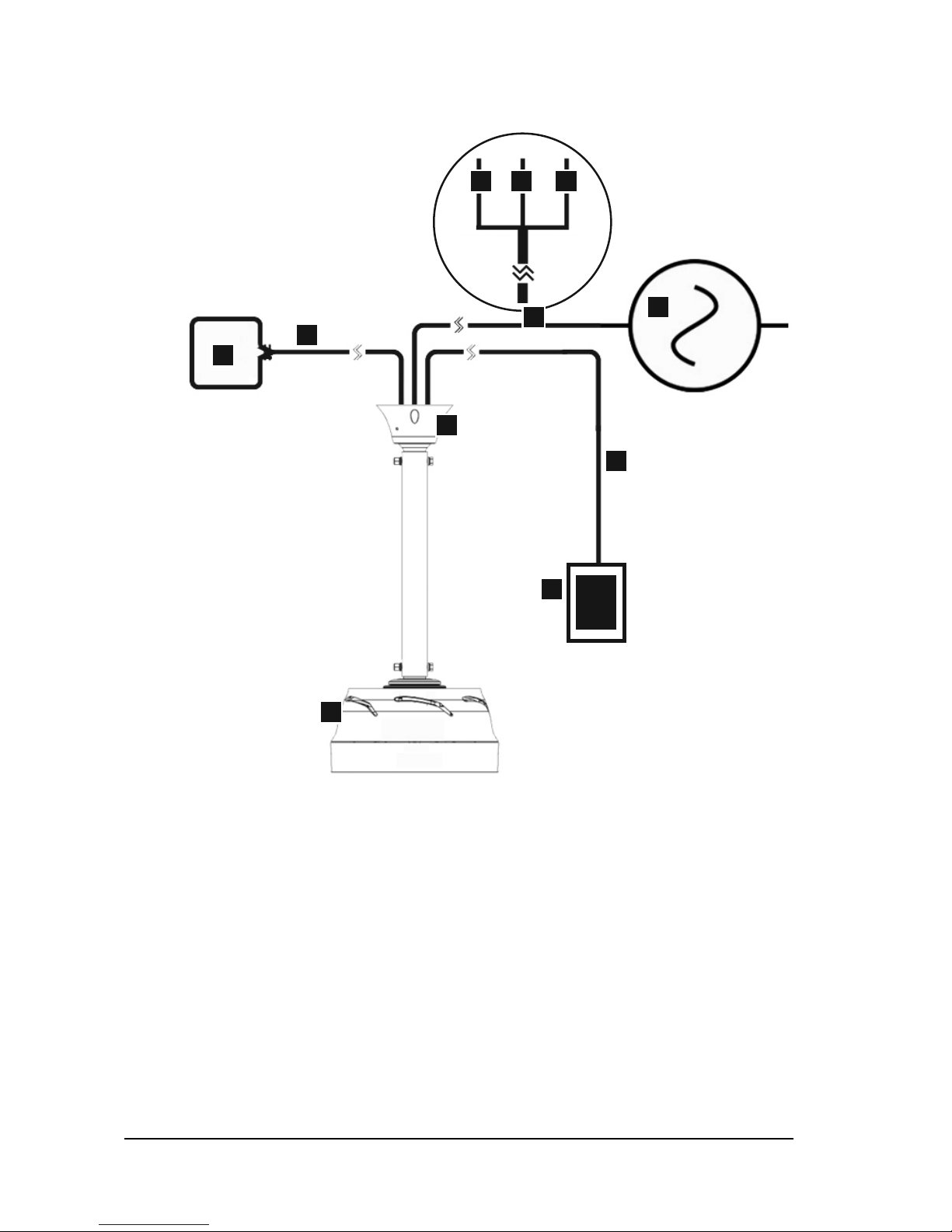
Components:
A - Safety Cable Attachment Point
(Minimum load rating 400 lbs)
B - AC Power Source
C - Touchpad Remote
D - Rapid Mount Commercial
E - D-Drive Motor Unit
F - Remote Cable (100 feet)
G - Power Wires (20 feet)
H - Safety Cable (20 feet)
I - Ground (Green)
J - Live (Black)
K - Neutral (White)
3.2.1: Route the safety cable, remote cable and power wires through the extension and the mount.
3.2.2A: For Glulam or wood beam installation, drill a 5/16’’ hole through the beam above the
center line and route the safety cable in a loop and attach the cable to itself with the provided
cable clamps. Make sure that there is little to no slack in the safety cable. Avoid sharp edges.
3.2.2B: For I-beam installation, beam clamps can be used with eye bolts. Attach the beam clamps
on both sides of the beam and route the safety cable through the eye bolts. Attach the cable to
itself using the provided cable clamps and make sure that there is no slack. Avoid sharp edges.
3.2.3: Run the remote cable to the remote location. The cable can be run in conduit or open if
desired as the cable is low voltage and shielded. To attach to the touchpad remote, simply plug
the end of the remote cable into the RJ45 jack on the touchpad remote.
3.2.4: Connect to power in compliance with local and state codes. This device may require a
disconnect that is outside of the swept area of the blades to comply with OSHA (not provided).
Refer to the above illustration for the Final Results.
B
C
D
F
I J K
E
G
H
3.2 Safety Cable & Electrical Installation
Detail of Power Wires
Page 23

© 2014 Macro Air Technol ogies Toll Free: 866 66 8 3 247 Fax: 9 09 890 2313 www.macroairf ans.com 21
Rev. Date 111714
Step 4 - Airfoil Installation
Remove the bottom cover, install the
airfoils to the airfoil clamps and re-attach
the bottom cover.
Page 24
© 2014 Macro Air Technol ogies Toll Free: 866 66 8 3 247 Fax: 9 09 890 2313 www.macroairf ans.com 22
Rev. Date 111714
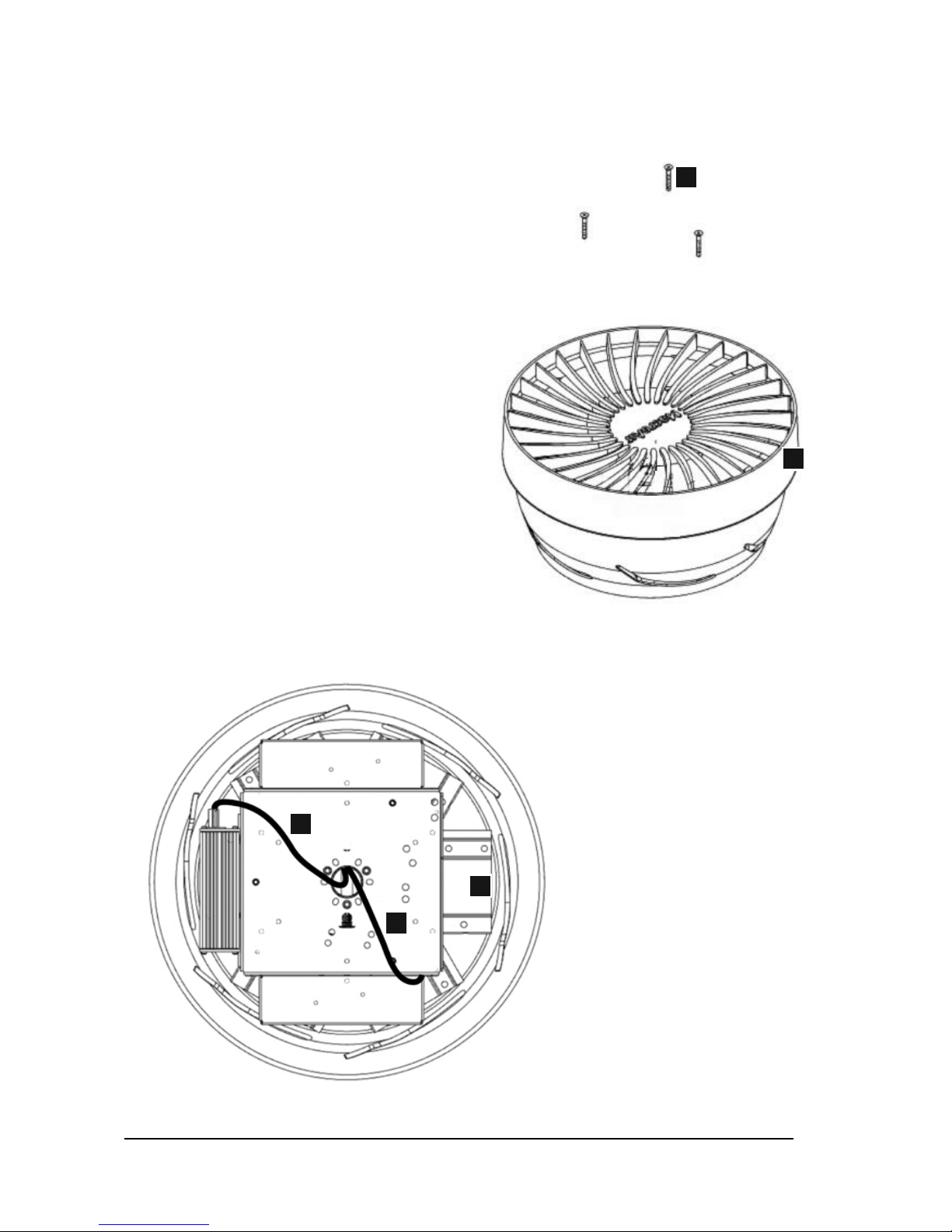
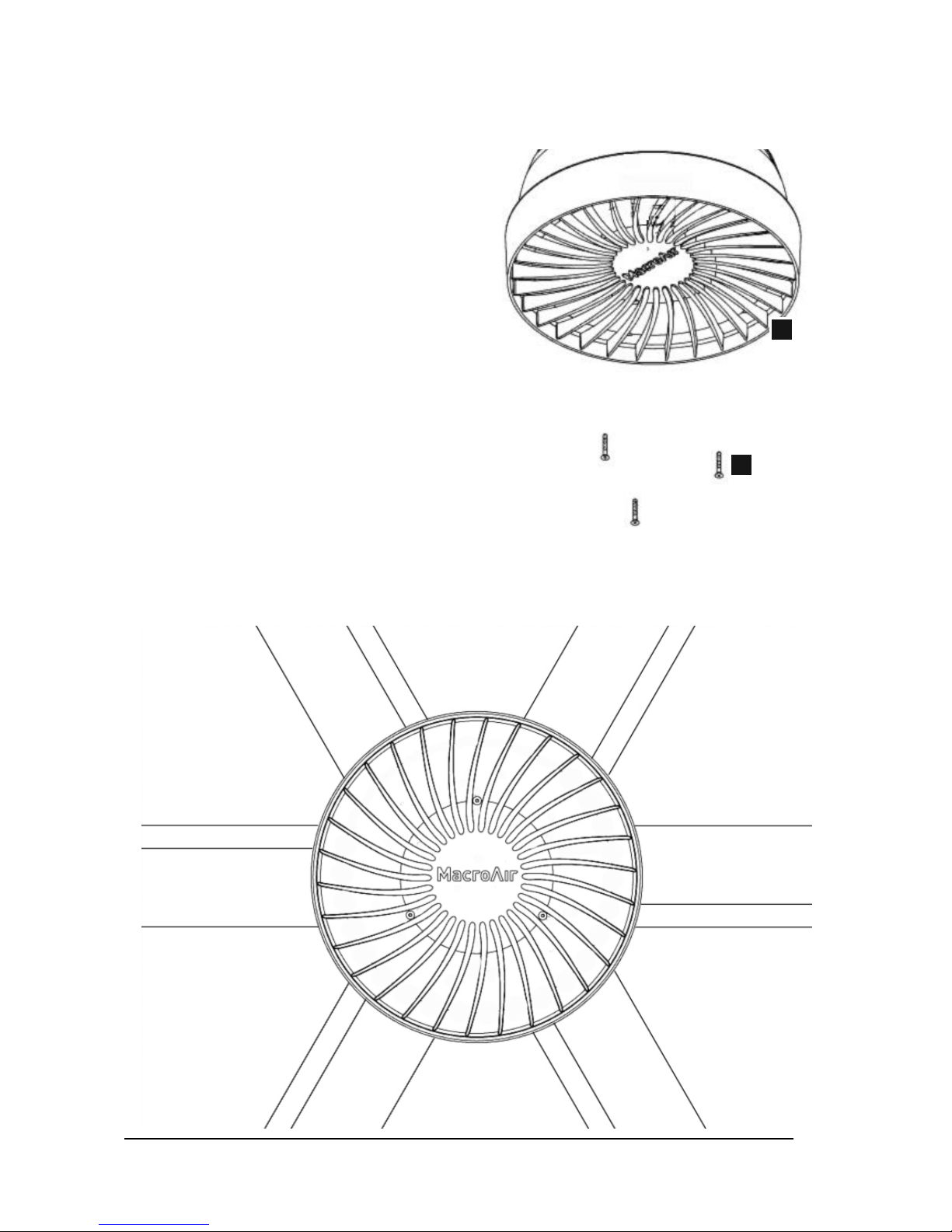
Components:
A - 8-32 x 1-1/4’’ Bolts
B - Bottom Cover
C - Airfoil Clamps
D - Remote Cable
E - Power Wires
3.1.1: Remove the three allen bolts that secure the bottom cover and remove the bottom cover to
expose the bottom of the airfoil clamps and the wiring.
A
B
C
4.1 Airfoil Installation (1 of 3)
D
E
Page 25
© 2014 Macro Air Technol ogies Toll Free: 866 66 8 3 247 Fax: 9 09 890 2313 www.macroairf ans.com 23
Rev. Date 111714
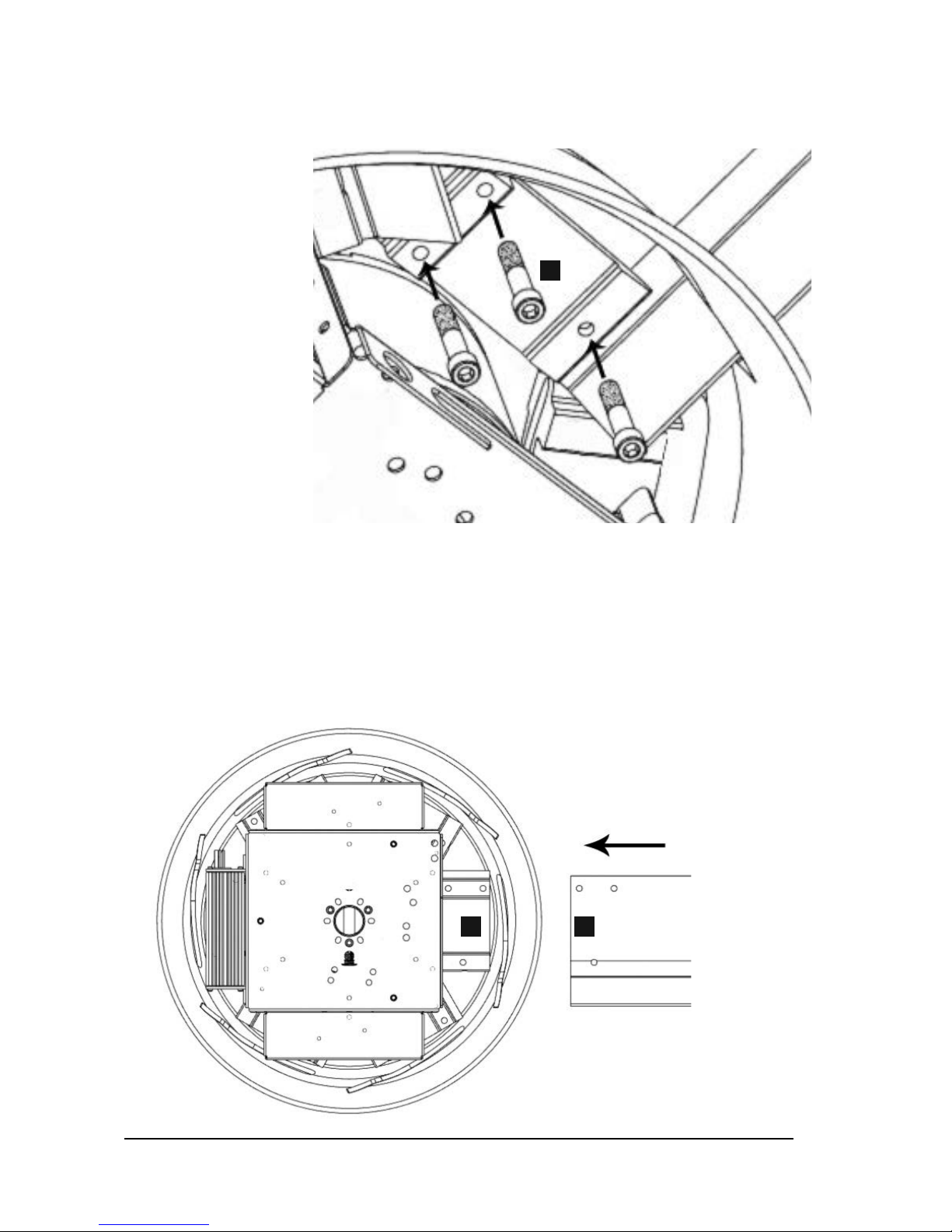
Components:
A - 10-24 x 1-1/2’’ Bolts
B - Airfoil
C - Airfoil Clamps
4.1.2: Insert an airfoil into one of the airfoil clamps and line up the three bolt holes. Insert an
airfoil bolt into the airfoil clamp and hand tighten until snug. Repeat the last step until all three
airfoil bolts are installed snugly. If the bolts seem like they will not tighten chances are they are
not seated in the airfoil clamp properly. Try moving the airfoil up and down and side to side with
slight movements while applying upward pressure to the bolt. The bolt should seat further into
the airfoil clamp. Once all bolts are seated and snug, torque them to 75 in-lbs.
4.1.3: Repeat step 4.1.2 for all 6 blades.
4.1 Airfoil Installation (2 of 3)
A
BC
Page 26
© 2014 Macro Air Technol ogies Toll Free: 866 66 8 3 247 Fax: 9 09 890 2313 www.macroairf ans.com 24
Rev. Date 111714
Components:
A - 8-32 x 1-1/4’’ Bolts
B - Bottom Cover
4.1.4: Re-install the bottom cover using the provided allen bolts and torque bolts snugly.
Final Results:
4.1 Airfoil Installation (3 of 3)
A
B
Page 27

© 2014 Macro Air Technol ogies Toll Free: 866 66 8 3 247 Fax: 9 09 890 2313 www.macroairf ans.com 25
Rev. Date 111714
Step 5 - Touchpad Remote
Navigation and Operation
Choose one of the two methods to mount
the touchpad remote and configure the fan
diameter for initial operation.
Page 28
© 2014 Macro Air Technol ogies Toll Free: 866 66 8 3 247 Fax: 9 09 890 2313 www.macroairf ans.com 26
Rev. Date 111714
5.1 Touchpad Remote Navigation
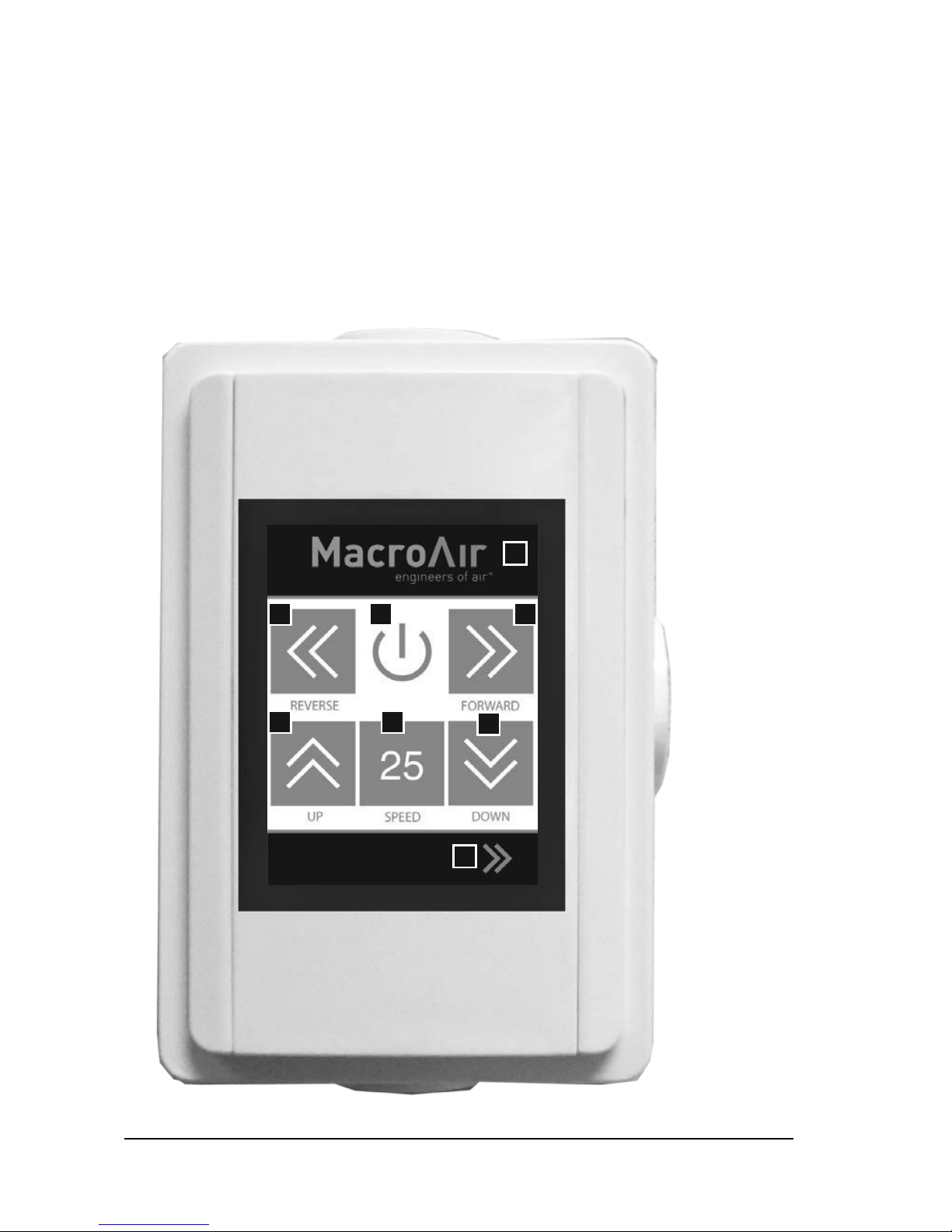
Buttons:
A - Forward / Reverse: Alternate between forward and reverse operation
B - Power Button: Turn the screen off
C - Speed Up / Speed Down: Increase or decrease the speed of the fan
D - Speed Box: Real-time indication of fan speed
E - Navigation: Navigate to the next screen
F - Fan Diameter Selection: Hidden button to navigate back to the fan diameter selection screen
A B
C D
A
C
E
F
Page 29
© 2014 Macro Air Technol ogies Toll Free: 866 66 8 3 247 Fax: 9 09 890 2313 www.macroairf ans.com 27
Rev. Date 111714
5.2 Touchpad Remote Operation
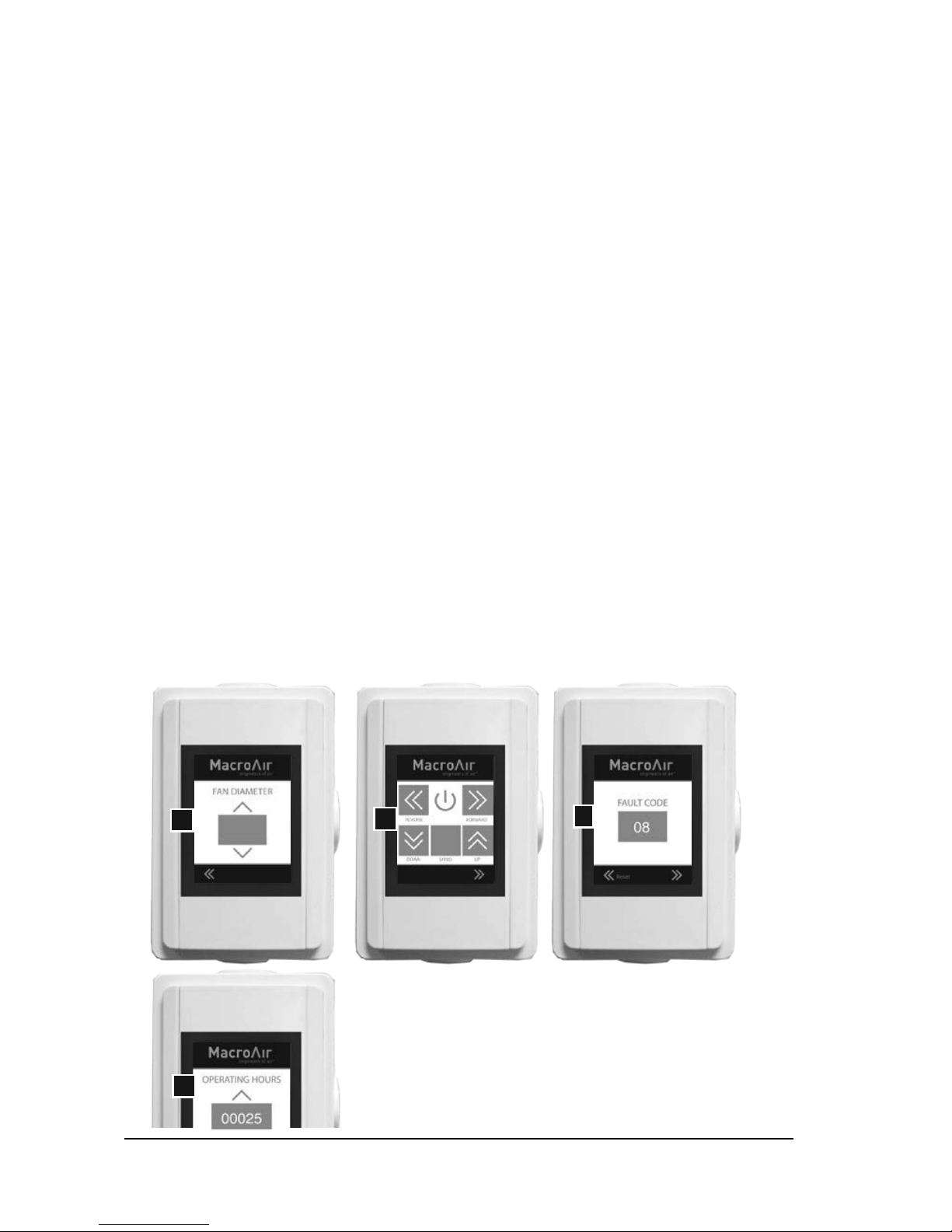
Screens:
A - Fan Diameter Selection Screen
B - Home Screen
C - Fault Code Screen
D - Operating Hours Screen
Instructions:
5.2.1: Upon initial power-up, the touchpad remote will default to the fan diameter selection
screen. Use the up and down arrows to select the proper fan diameter for the fan and use the
left arrows in the footer to navigate to the home screen. The fan diameter selection screen will
become hidden after you make the selection. Should the need arise to change the fan diameter
any time after you have left the fan diameter selection screen, you must touch the upper right
corner of the home screen (reference hidden button on page 26) to get back to the fan diameter
selection screen.
5.2.2: Once on the home screen, test your fan by setting the speed to 100 in forward operation by
increasing the speed and then clicking the forward button. Keep the fan’s speed at 100 for a few
minutes to ensure proper functionality.
5.2.3: If the fan stops operating unexpectedly, navigate to the fault code screen and record any
fault codes (if present). Click the reset button until the display reads ‘0’. Then, attempt to run
the fan again. If the fan is still not operating, navigate to the fault code screen via the navigation
arrows at the bottom of the screen and document the code(s) displayed and call technical support
at 866-668-3247.
5.2.4: To view your fan’s operating hours, navigate from the home screen to the far right screen.
A
B
D
C
Page 30

© 2014 Macro Air Technol ogies Toll Free: 866 66 8 3 247 Fax: 9 09 890 2313 www.macroairf ans.com 28
Rev. Date 111714
Maintenance Information
Guy Wire Check (if applicable): Checking a MacroAir fan’s Guy wires for tension and inspecting
for frayed sections could mitigate a problem before it occurs. Fan owners should confirm that the
Guy wires are not wrapped around any sharp edges. MacroAir recommends attaching Guy wires
to the building with eye bolts or eye lags. If they are not already installed with eye bolts or lags, we
urge fan owners to install these in order to help keep the Guy wires from fraying. If Guy wires are
installed with turnbuckles, jam nuts should periodically be checked to ensure tightness. If they
are loose, the Guy wire cables may need to be re-tensioned.
Airfoil Cleaning: Depending on the type of commercial application the MacroAir fan is in, there
can be quite a bit of dust or other particulates (including grease!) that cling to the fan’s airfoils.
While this may not affect fan performance, we recommend fan owners keep airfoils clean by
having a maintenance person or skilled trade professional – who has experience using a lift –
wipe the fan airfoils with a rag or sponge using hot water or regular cleaning solutions. Please do
not use chlorine or any chemicals containing chlorine.
Safety Cable Check: Each MacroAir fan comes with a safety cable. Depending on the fan model,
the safety cable either wraps around the building structure and the fan frame, or comes out
of the top of the fan and wraps around the building structure. The safety cable is an important
part of the safety system and acts as a last resort should an earthquake, collision, or similar
catastrophic event occur. As such, it’s vital for fan owners to ensure that it is intact and properly
secured.
Reverse Operation: The beauty of MacroAir HVLS fans is that they are built to run in forward and
reverse mode, however changing the direction of your fan can put initial stress on the fan if it has
not been properly checked. It is a good idea to make sure the safety cables and all bolts and nuts
are tight. Cleaning the fan before switching directions will prevent dust and other particles from
falling off the fan airfoils that are now turning in the opposite direction.
Page 31

© 2014 Macro Air Technol ogies Toll Free: 866 66 8 3 247 Fax: 9 09 890 2313 www.macroairf ans.com 29
Rev. Date 111714
Warranty and Technical Support
To register the installed fans for the 50,000 hour
warranty, go to macroairfans.com/register.
What does the 50,000 hour warranty cover?
This warranty covers any part or component of the AirVolution-D shipped by MacroAir that is
found to contain a manufacturing defect. MacroAir will repair or replace such part, component,
or the entire fan free of charge.
How Long Does the Coverage Last?
This warranty covers the entire AirVolution-D fan and all its component parts for 50,000 hours of
running time.
Do I Need to Pay Shipping, Removal and Re-Installation Costs?
You do NOT need to pay shipping, removal and installation costs if your AirVolution-D needs to be
repaired or replaced due to a manufacturing defect within three years of the original purchase,
and you will be reimbursed for those costs, upon approval of such costs by MacroAir. After three
years, this warranty is still in full effect for the remainder of the 50,000 hours, but it just does not
cover your cost to ship the fan to MacroAir, or removal or re-installation of the fan.
What is NOT covered under this warranty?
This warranty will not cover repairs or replacements caused by installation, operation or storage
of the fan that is outside the specifications and limitations contained in the AirVolution-D
installation and operation instructions.
Technical Support
For installation assistance, application questions, technical sales support & any other inquiries,
please contact our technical support team at (866) 668-3247.
Page 32
© 2014 Macro Air Technol ogies Toll Free: 866 66 8 3 247 Fax: 9 09 890 2313 www.macroairf ans.com 30
Rev. Date 111714
 Loading...