

Page 1
300.0 mm
180.0 mm
MCUPGRAVITY
CAR CUP PHONE MOUNT WITH
GRAVITY HOLDER
User’s Guide
www.macally.com
Installing the MCUPGRAVITY Adjusting the MCUPGRAVITY
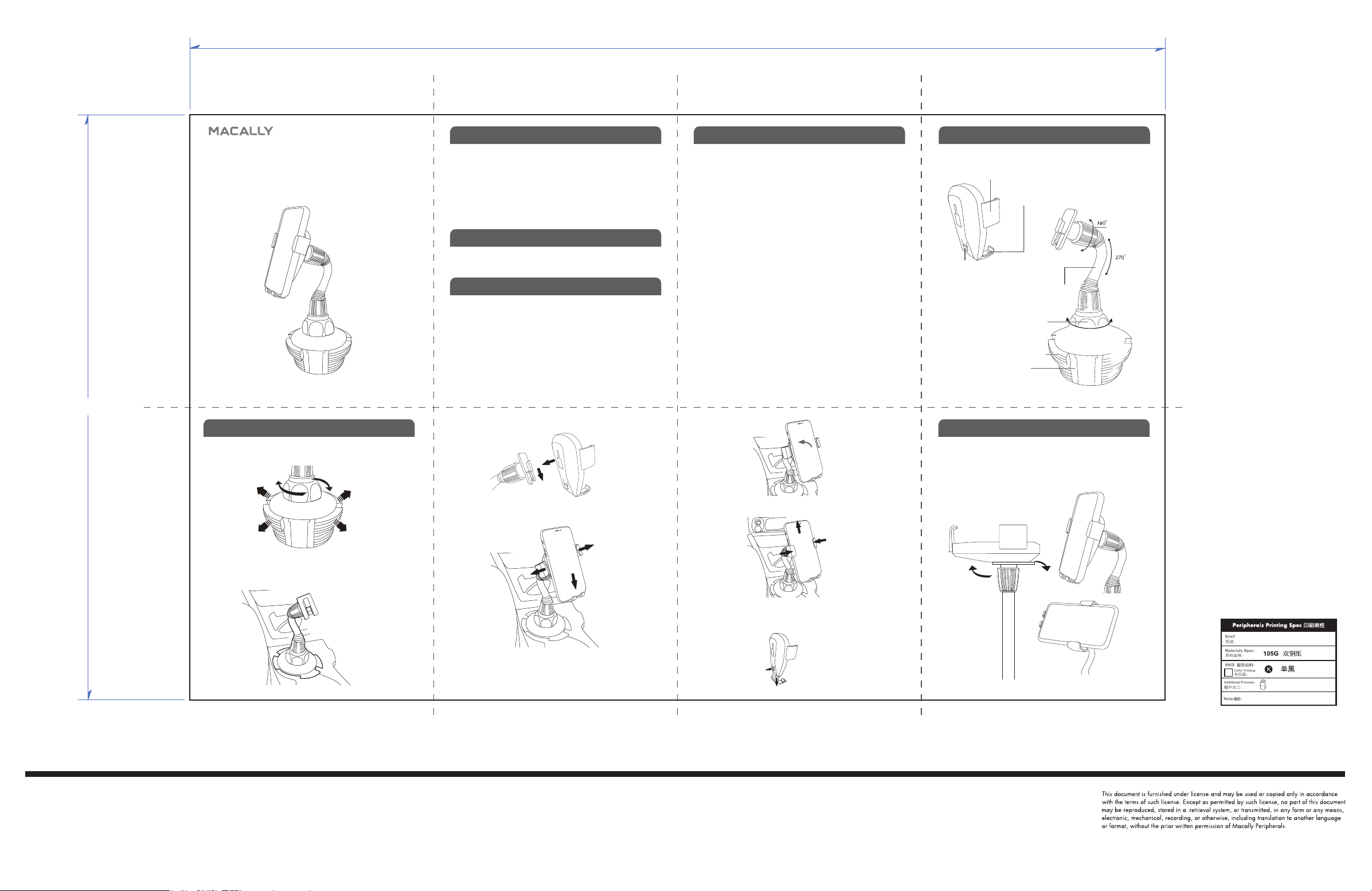
1. Begin the installation by first turning the screw knob counter-clockwise and the Expandible Side Base will expand outward.
Introduction
Thank you for purchas ing the Mac ally pro duct, Mac ally MCUPGRAVITY is designed to allow one hand operation to mount your phone into a
car cup holder effortlessly. The cradle grips open between 2.36"(60 mm)
and 3.39"(86 mm) width to support a wide range of smartphones with or
without protection cases. Its expandable base can be released to fit into
various sizes of car cup holders.
Before you begin using this product, be sure to read this user’s guide in
its en tir ety.
Package Contents
• Car Cup Phon e Mount wi th Gravity Hold er
• User’s Guide
Macally Product Information
Technica l Support
Please E-mail us at [email protected], or call us at
1-909-230-6888 Monday to Friday,
8:30AM to 5:30PM, Pacific Standard Time
FAQ & help - https://help.macally.com/help
Manual and driver download https://us.macally.com/pages/drivers-and-download
4. Attach the holder to the neck base securely.
Macally Product Information
Warranty
Macall y periph erals war rants tha t this pro duct wil l be free fr om defect s
in title, m aterial s and manuf acturi ng workma nship fo r one year fr om the
date of pur chase. If t he produ ct is foun d to be defec tive the n, as your so le
remedy a nd as the m anufact urer’s onl y oblig ation, Ma cally wi ll repai r or
replac e the prod uct. Th is warrant y shall not apply to p roduc ts that have
been sub ject to ab use, misu se, abno rmal elec trica l or enviro nmenta l
conditions, or any condition other than what can be considered as normal
use.
Limita tion of Liabili ty
The liab ility of M acally Pe ripher als aris ing from t his warra nty and s ale
shall be l imited to a r efund of th e purcha se pric e. In no event sh all Maca lly
Periphe rals be li able for c osts of pr ocureme nt of subs titute pr oduct s or
servi ces, or fo r any lost p rofit, or f or any cons equent ial, inc identa l, direct
or indir ect dama ges, howeve r caused a nd on any the ory of li abilit y, aris ing
from this warranty and sale. These limitations shall apply not with standing
any failur e of essen tial pur pose of any l imited re medy.
Copyri ght® 2019 by Ma cally Per ipheral s
Impor tant safet y note: DO NOT install or adjus t the Macally
MCUPGRAVITY while driving. Please always park your car in a safe
location before doing any installation steps or adjustment.
21 3
Hardware Basics
Cradle grip
Cradle bottom support
/Cradle grip opener
Push button to
extend the
bottom support
Screw knob
Expandible side grip
Cup mount base
To change the viewing angle, simply hold and bend the flexible arm
to accommodate your viewing comfort. To change between vertical
view and horizontal view, simply hold and rotate the grip arms.
Bendable
gooseneck
Flexible
mount
2. Place the MCUPGRAVITY base into your car’s cup holder.
3. Once you have placed MCUPGRAVITY into the car cup holder,
continue to turn the screw knob counter- clockwise to lock
MCUPGRAVITY securely in place.
If you have any questions, please contact one of us below:
4
Tel: 909-230-6888 ext 125
Tel: +86-755-6682-0980 ext 103
5. Place your phone on the cradle bottom support, push them
downward to open the cradle grips.
6. When the cradle grips open wide enough, lay your phone onto the
cradle back support.
7. Then lift up your phone just a little bit to retract and fully close both
grips in to hold your phone securely. You are ready to go.
8. If you have a large size phone(6.5-inch or longer), you may want to
extend the bottom support to accommodate it. Press the release
button while pulling down the bottom support to the desired length.
65 7
MCUPGRAVITY US manual
1
4页弹簧折,再对折
 Loading...