

Page 1
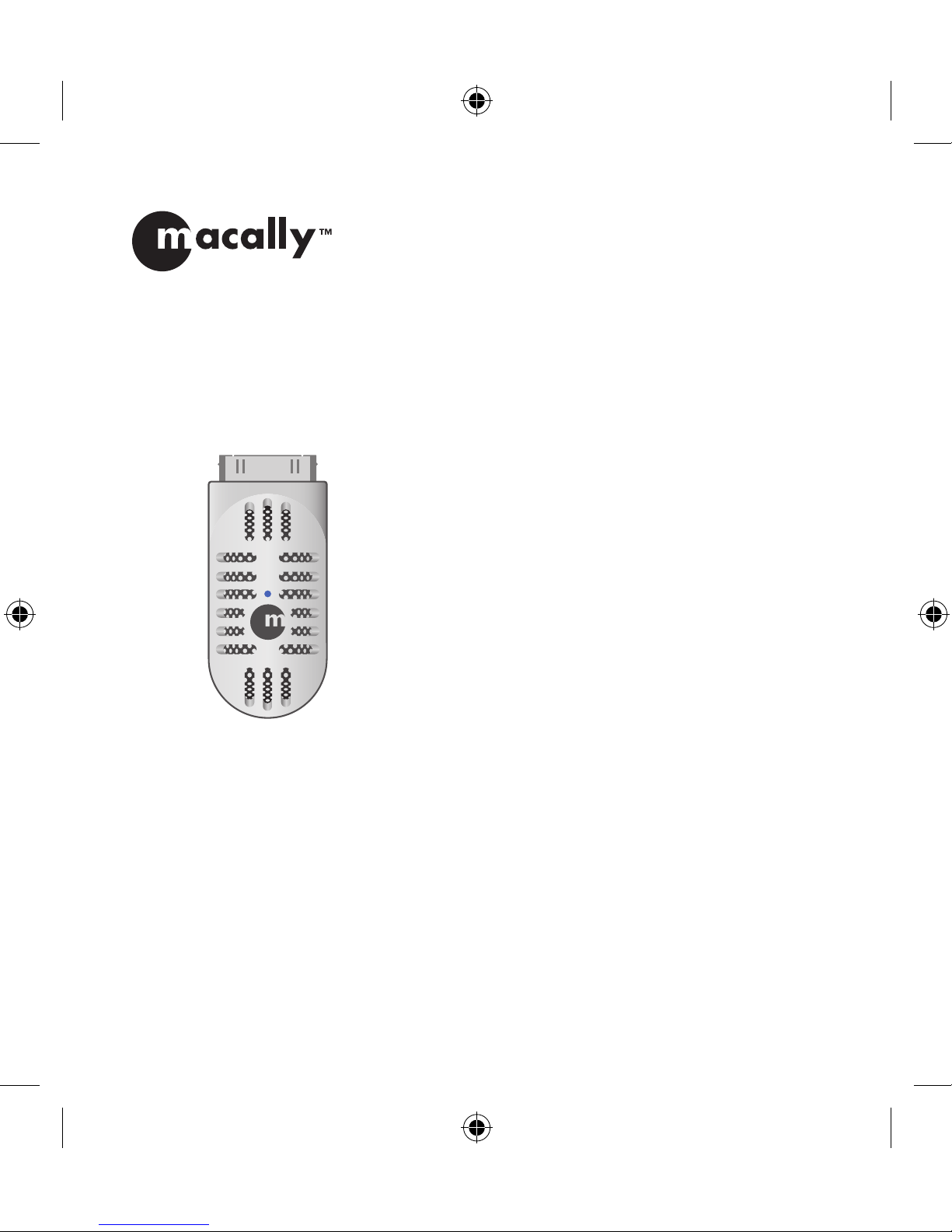
Voice and Audio Recorder for iPod
®
iVoicePro
USER GUIDE
BEDIENUNGSANLEITUNG
GUIDE DE L’UTILISATEUR
GUÍA DEL USUARIO
GEBRUIKERSGIDS
GUIDA D’USO
Page 2
2
IT NL ES FR DE EN
About this guide
Before you start using the iVoicePro, be sure to read
this guide in its entirety.
Package contents
• iVoicePro
• USB cable
• 3.5 mm audio cable
• User guide
Registration
Please register this product at http://www.macallyeurope.com/register.php.
Technical support
Please call to +31 24 373 14 10 or email to techsup
[email protected]. Technical support hours
are from 9h00 to 17h00 (CET), from Monday to
Friday.
Hardware basics
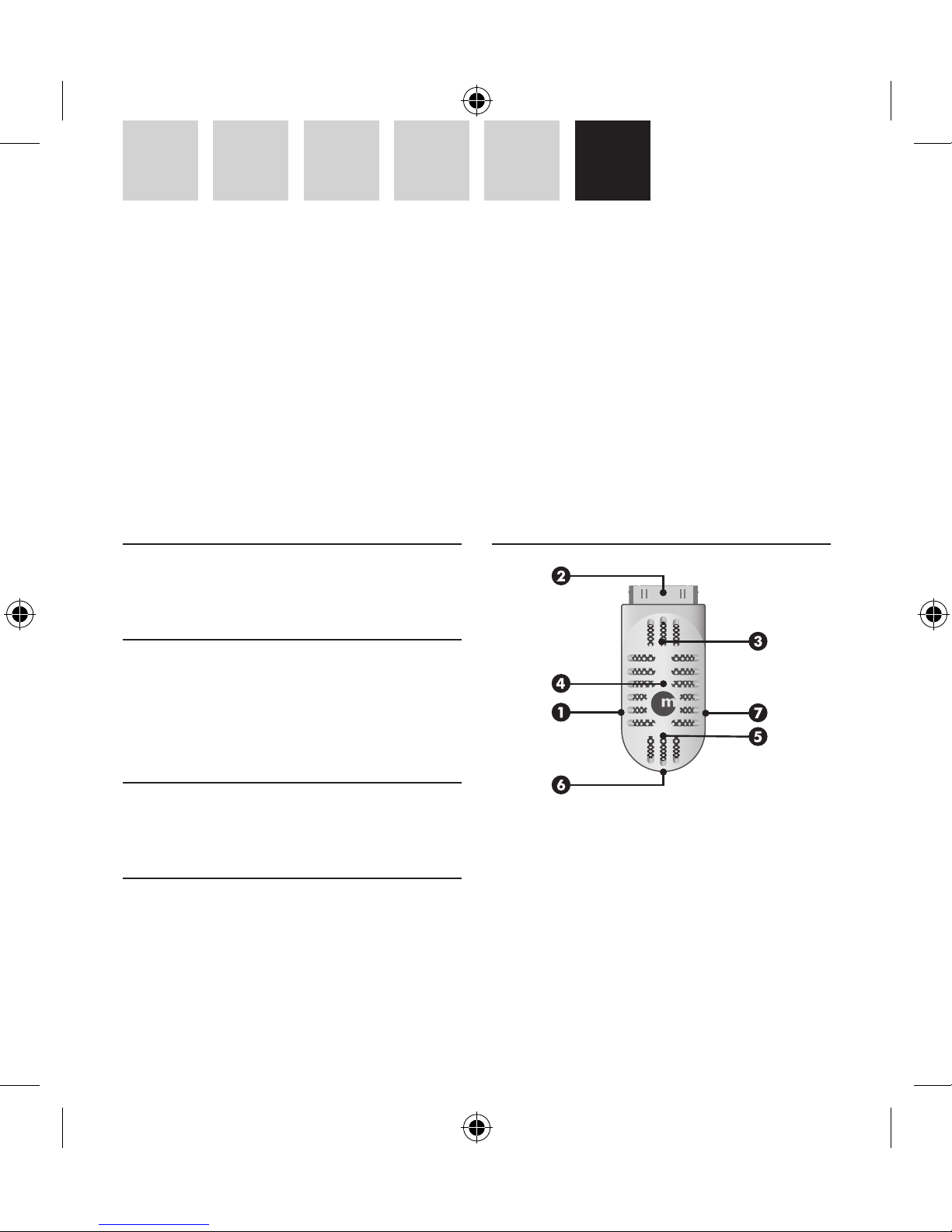
1 USB port to charge iPod and extend recording
time
2 30 pin Dock connector to your iPod, fits through
most iPod cases
3 Built-in speaker
4 LED status indicator
5 Built-in microphone
6 Record mode switch
EN – USER GUIDE
Thank you for purchasing the Macally iVoicePro, voice and audio recorder for iPod®. The iVoicePro is an
elegantly, in thirties/forties style, designed microphone for your iPod nano 2nd/3rd gen. and iPod 5th/6th
gen. With the iVoicePro you can record your lecture notes, interviews or live music, but also record from
external audio devices through the built-in 3.5mm line-in jack. When you are done recording you can listen
to the result through the built-in speaker. The iVoiceIII connects easily to your iPod even when it is in a silicon
protection case!
Page 3

3
EN DE FR ES NL IT
7 Stereo line-in for any audio device with a 3.5 mm
line-out jack
Recording
For iPod nano 2nd gen. and iPod 5th gen. (video):
when you connect the iVoicePro, the Voice Memos
menu will open automatically and you are ready
to record.
For iPod nano 3rd gen. and iPod classic: when you
connect the iVoicePro, go to the iPod main menu and
select the Voice Memos menu.
1. Recording with built-in microphone
For general voice recording during a lecture or a
conference, you can simply use the built-in microphone (mono). Connect the iVoicePro to your iPod
and set the record mode switch of the iVoicePro to
microphone position. Then, in Voice Memos menu
set the recording quality at “Low”* and you are
ready to record.
2. Recording through stereo input
You can record CD quality stereo audio on your
iPod through the 3.5mm input jack in the iVoicePro. Connect the iVoicePro to your iPod and set the
record mode switch of the iVoicePro to Audio Device
Recording or Microphone Recording (for an external
stereo microphone). The difference in the Record
Mode is that the Microphone Recording position
uses amplification and the Audio Device Recording
position does not need amplification for recording. When you connect an external audio device to
the 3.5mm input jack of the iVoicePro, the builtin microphone will be disabled. Then, in the Voice
Memos menu set the recording quality at “High”*
and you are ready to record.
Notes
• Low recording quality (mono) uses 22.05KHz
Sample Rate, 16bit Sample Size and 352kbps Bit
Rate. One minute recording takes about 2.6MB in
the iPod.
• High recording quality (stereo) uses 44.1KHz
Sample Rate, 16bit Sample Size and 1411kbps
Bit Rate. One minute recording takes about
10.3MB in the iPod.
• To use less drive space in the iPod it is recommended to select Low quality for voice recording,
and High quality for stereo audio input recording.
• Recording files, in WAV format, are stored within
the Voice Memo menu in the iPod. When your
iPod is connected to a computer, the recording
files are imported into the Playlist Voice Memos
in iTunes and are removed from the iPod. To
reduce the file size for long recordings stored in
iTunes, it is recommended to convert them to
AAC or MP3 format.
Listening
You can play back the recording and listen through
the iVoicePro speaker, by selecting the file and press
“Enter” in the Voice Memos menu. You can also listen
to songs through the iVoicePro speaker.
Page 4

4
IT NL ES FR DE EN
Charging
The iVoicePro works on the iPod’s power. Therefore,
to avoid that your iPod runs out of power while you
are recording, you can charge your iPod through the
iVoicePro. Simply connect the mini-B end of the
included cable to the iVoicePro and the other end to
the USB port of your computer, an USB power adaptor (f.i. Macally USBPower or PowerPal) or external
battery (f.i. Jbox or Jboxmini).
However, when you connect your iPod through the
iVoicePro to your computer, your iPod will mount
in iTunes and prevent you from accessing the Voice
Memos menu on your iPod. Therefore, to access the
Voice Memos menu while connected to the computer, simply eject your iPod from iTunes.
Warranty
Macally Peripherals warrants that this product will be free from defects
in title, materials and manufacturing workmanship for two (2) years
from the date of the purchase. If the product is found to be defective
then, as your sole remedy and as the manufacturer’s only obligation,
Macally will repair or replace the product. This warranty is exclusive
and is limited to the Macally iVoicePro. This warranty shall not apply to
products that have been subjected to abuse, misuse, abnormal electrical
or environmental conditions, or any condition other than what can be
considered normal use.
The liability of Macally Peripherals arising from this warranty and sale
shall be limited to a refund of the purchase price. In no event shall
Macally Peripherals be liable for costs of procurement of substitute
products or services, or for any lost profits, or for any consequential,
incidental, direct or indirect damages, however caused and on any
theory of liability, arising from this warranty and sale. These limitations shall apply notwithstanding any failure of essential purpose of
any limited remedy.
Environmental Information for Customers in the European
Union
European Directive 2002/96/EC requires that the equipment bearing this symbol on the product and/or its packaging must not be disposed of with unsorted municipal
waste. The symbol indicates that this product should
be disposed of separately from regular household waste
streams. It is your responsibility to dispose of this and
other electric and electronic equipment via designated collection facilities appointed by the government or local authorities. Correct disposal
and recycling will help prevent potential negative consequences to the
environment and human health. For more detailed information about
the disposal of your old equipment, please contact your local authorities,
waste disposal service, or the shop where you purchased the product.
Page 5
5
EN DE FR ES NL IT
Über diese Anleitung
Bevor Sie den Macally iVoicePro benutzen, lesen Sie
bitte die gesamte Anleitung hier durch.
Lieferumfang
• iVoicePro
• USB-Kabel
• 3,5 mm Audiokabel
• Bedienungsanleitung
Registrierung
Wir bitten Sie Ihr Produkt unter http://www.macally-europe.com/register.php zu registrieren.
Technische Assistenz
Für technische Assistenz, verwenden Sie bitte die
Rufnummer +31 24 373 14 10 oder senden Sie ein
e-mail an [email protected]. Die
technische Assistenz kann Montags bis Freitags von
9:00 bis 17:00 Uhr MEZ erreicht werden.
Hardwaregrundlagen
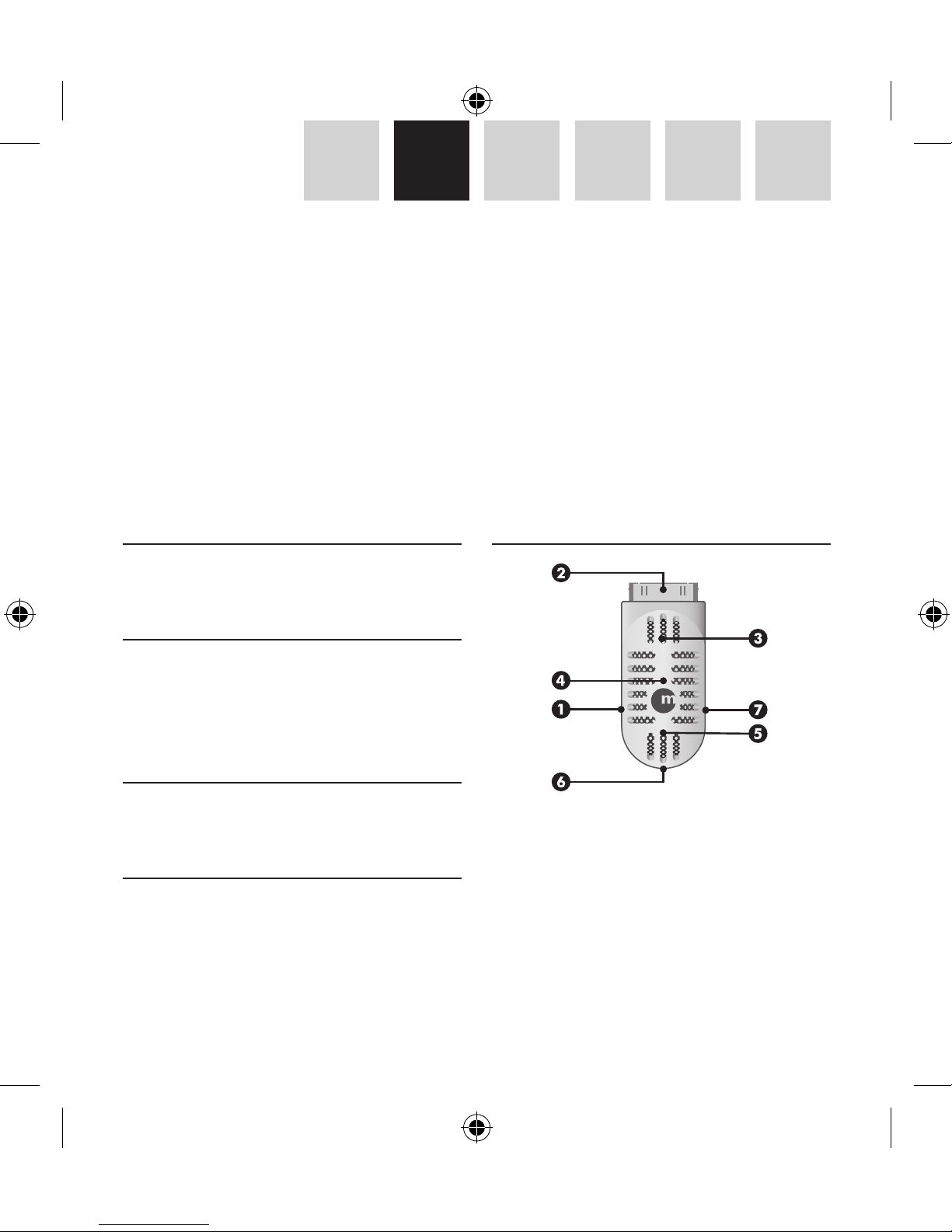
1 USB Anschluss zum aufladen des iPod und die
Aufnahmezeit zu verlängern
2 30 poliger Dock Connector zu Ihrem iPod, passt in
die meisten iPod Schutzhüllen
3 Eingebauter Lautsprecher
4 LED Statusanzeige
5 Eingebautes Mikrophon
6 Schalter für den Aufnahmemodus
DE – BEDIENUNGSANLEITUNG
Vielen Dank für den Kauf des Macally iVoicePro, voice and audio recorder for iPod®. iVoicePro ist ein elegantes
Mikrophon für Ihr iPod nano 2./3. Gen und iPod 5./6. Gen. im Stil der 30er/40er Jahre Mit iVoicePro können
Sie gesprochene Notizen, Interviews oder Musik, aber auch, über den eingebauten 3,5 mm Audioeingang,
von externen Audiogeräten aufnehmen. Ist die Aufnahme beendet, können Sie diese über den eingebauten
Lautsprecher anhören. Das iVoicePro kann leicht an Ihr iPod angeschlossen werden, selbst wenn es sich in
seiner Schutztasche befindet!
Page 6

6
IT NL ES FR DE EN
7 Stereoeingang für irenddein Audiogerät mit 3,5
mm Klinkensteckerausgang
Aufnehmen
Für iPod nano 2G und iPod 5G (Video): sobald Sie
iVoicePro anschliessen, erscheint automatisch
das Sprachmemos Menü und Sie können mit der
Aufnahme beginnen.
Für iPod nano 3G und iPod classic: nachdem Sie
iVoicePro angeschlossen haben, wählen Sie
am iPod das Hauptmenü und dann die Option
Sprachmemos.
1. Aufnahme mit dem eingebauten Mikrophon
Für normale Sprachaufnahmen während einer
Vorlesung oder Konferenz können Sie einfach das
eingebaute Mikrophon benutzen (Mono). Schliessen
Sie iVoicePro an Ihr iPod an und stellen Sie den
Schalter für den Aufnahmemodus am iVoicePro in
die Position Mikrophon. Danach setzen Sie im Menü
Sprachmemos die Aufnahmequalität auf “Gering”*
und die Aufnahme kann beginnen.
2. Aufnahme über den Stereoeingang
Sie können mit Ihrem iPod Tonaufnahmen
in CD-Qualität und Stereo über den 3,5 mm
Klinkensteckeranschluss speichern. Schliessen
Sie iVoicePro an Ihr iPod an und stellen Sie den
Schalter für den Aufnahmemodus am iVoicePro in
die Position zur Aufnahme über Tongeräte oder auf
Mikrophon (für externe Stereomikrophone). Der
Unterschied zwischen den Aufnahmemodi liegt
darin, das der Mikrophoneingang einen Verstärker
benutzt , während die Option Tongeräteaufnahme
keine Verstärkung benötigt. Wenn Sie ein
Wiedergabegerät an den Klinkensteckeranschluss
des iVoicePro anschliessen, wird das eingebaute
Mikrophon abgeschaltet. Danach setzen Sie im Menü
Sprachmemos die Aufnahmequalität auf “Hoch” und
die Aufnahme kann beginnen.
Hinweise
• Bei geringer Aufnahmequalität (Mono) wird das
Signal mit 22.05 KHz /16 bit und 352 kbps verarbeitet. Eine Minute Tonaufnahme belegt im iPod
etwa 2.6 MB.
• Bei hoher Aufnahmequalität (Stereo) wird das
Signal mit 44,1KHz /16 bit und 1411 kbps verarbeitet. Eine Minute Tonaufnahme belegt im iPod
etwa 10,3 MB.
• Um weniger Platz im iPod zu belegen empfiehlt sich eine geringe Tonqualität bei Menü
Sprachmemos zu verwenden und eine hohe
Tonqualität bei Aufnahmen von Stereogeräten.
• Die aufgenommenem Dateien sind im Format
WAV unter der Option Sprachaufnahmen
des iPod gespeichert. Wird Ihr iPod an einen
Computer angeschlossen, werden die gespeicherten Dateien in die Wiedergabeliste für
Sprachaufnahmen in iTunes importiert und aus
dem iPod gelöscht. Um die Dateigrösse bei lang
andauernden Aufnahmen zu verringern, empfiehlt es sich die Dateien in das Format AAC oder
MP3 umzuwandeln.
Page 7

7
EN DE FR ES NL IT
Wiedergabe
Sie können Aufnahmen über den Lautsprecher des
iVoicePro abspielen, indem Sie die Datei auswählen
und die Bestätigungstaste im Menü Sprachmemos
betätigen. Sie können auch Musik über den
Lautsprecher des iVoicePro abspielen.
Laden
iVoicePro bezieht seinen Strom vom iPod. Um zu vermeiden, das dem iPod während der Wiedergabe der
Strom ausgeht, können Sie den iPod über iVoicePro
aufladen. Schliessen Sie einfach den mitgelieferten Mini-B Stecker an iVoicePro an und das andere
Ende an den USB-Anschluss Ihres Computers, eine
USB-Stromversorgung (z.B. Macally USBPower oder
PowerPal) oder eine externe Batterie (z.B. Jbox oder
Jboxmini).
Jedoch, wenn Sie den iPod über iVoicePro mit
dem Computer verbinden, wird Ihr iPod in iTunes
eingebunden und sperrt somit den Zugang
zu den Sprachmemos auf dem iPod. Um auf die
Sprachmemos zuzugreifen während eine Verbindung
zum Computer besteht, entfernen Sie den iPod aus
iTunes.
Gewährleistung
Macally Peripherals garantiert daß dieses Produkt frei von
Rechtsmängeln ist, und gewährleistet eine Garantie von zwei (2) Jahre
für Material- und Fertigungsfehler ab Kaufdatum. Sollte das Produkt
jedoch Mängel aufweisen, so besteht der Anspruch des Käufers und die
Verpflichtung des Herstellers lediglich in der Reparatur oder im Ersatz
des Produkts durch Macally. Diese Gewährleistung gilt ausschließlich
für dem Macally iVoicePro. Sie gilt nicht für den Fall, daß der Defekt des
Produkts durch Anwendungsfehler, Mißbrauch, anormale elektrische
oder Umweltbedingungen bzw. Bedingungen entstand, die nicht als
normaler Gebrauch gelten.
Die Verantwortung von Macally Peripherals aufgrund dieser Garantie
ist auf den Wert des von Ihnen verauslagten Kaufpreises begrenzt. In
keinem Falle haftet Macally Peripherals für Vertretungskosten, Kosten
für den Produktersatz oder Serviceleistungen wie auch verloren gegangenen Gewinn oder andere folgerichtige zufällige, direkte oder indirekte
Schäden wie auch immer verursacht und in welcher Haftungstheorie
enthalten, die ihre Grundlage in dieser Garantie bzw. diesem Kauf
haben. Diese Beschränkungen sind auch dann anzuwenden, wenn die
essenziellen Ziele einer beschränkten Besserung nicht erreicht werden.
Umweltinformation für Kunden innerhalb der Europäischen
Union
Die Europäische Richtlinie 2002/96/EC verlangt, dass
technische Ausrüstung, die direkt am Gerät und/oder
an der Verpackung mit diesem Symbol versehen ist nicht
zusammen mit unsortiertem Gemeindeabfall entsorgt
werden darf. Das Symbol weist darauf hin, dass das
Produkt von regulärem Haushaltmüll getrennt entsorgt
werden sollte. Es liegt in Ihrer Verantwortung, dieses Gerät und andere
elektrische und elektronische Geräte über die dafür zuständigen und von
der Regierung oder örtlichen Behörden dazu bestimmten Sammelstellen
zu entsorgen. Ordnungsgemäßes Entsorgen und Recyceln trägt dazu bei,
potentielle negative Folgen für Umwelt und die menschliche Gesundheit
zu vermeiden. Wenn Sie weitere Informationen zur Entsorgung Ihrer
Altgeräte benötigen, wenden Sie sich bitte an die örtlichen Behörden
oder städtischen Entsorgungsdienste oder an den Händler, bei dem Sie
das Produkt erworben haben.
Page 8
8
IT NL ES FR DE EN
A propos de ce guide
Avant d’utiliser le Macally iVoicePro, assurez-vous de
lire attentivement le contenu intégral de ce guide.
Contenu de l’embalage
• iVoicePro
• Câble USB,
• Câble audio
• Guide de l’utilisateur
Enregistrement
Veuillez enregistrer ce produit à l’adresse suivante:
http://www.macally-europe.com/register.php
Support technique
Pour support technique, veuillez nous contacter
au +31 24 373 14 10 ou nous envoyer un courrier
électronique à [email protected]. Le
support technique est disponible du lundi au vendredi, de 9 à 17 heures (heure centrale européenne).
Caractéristiques matérielles principales
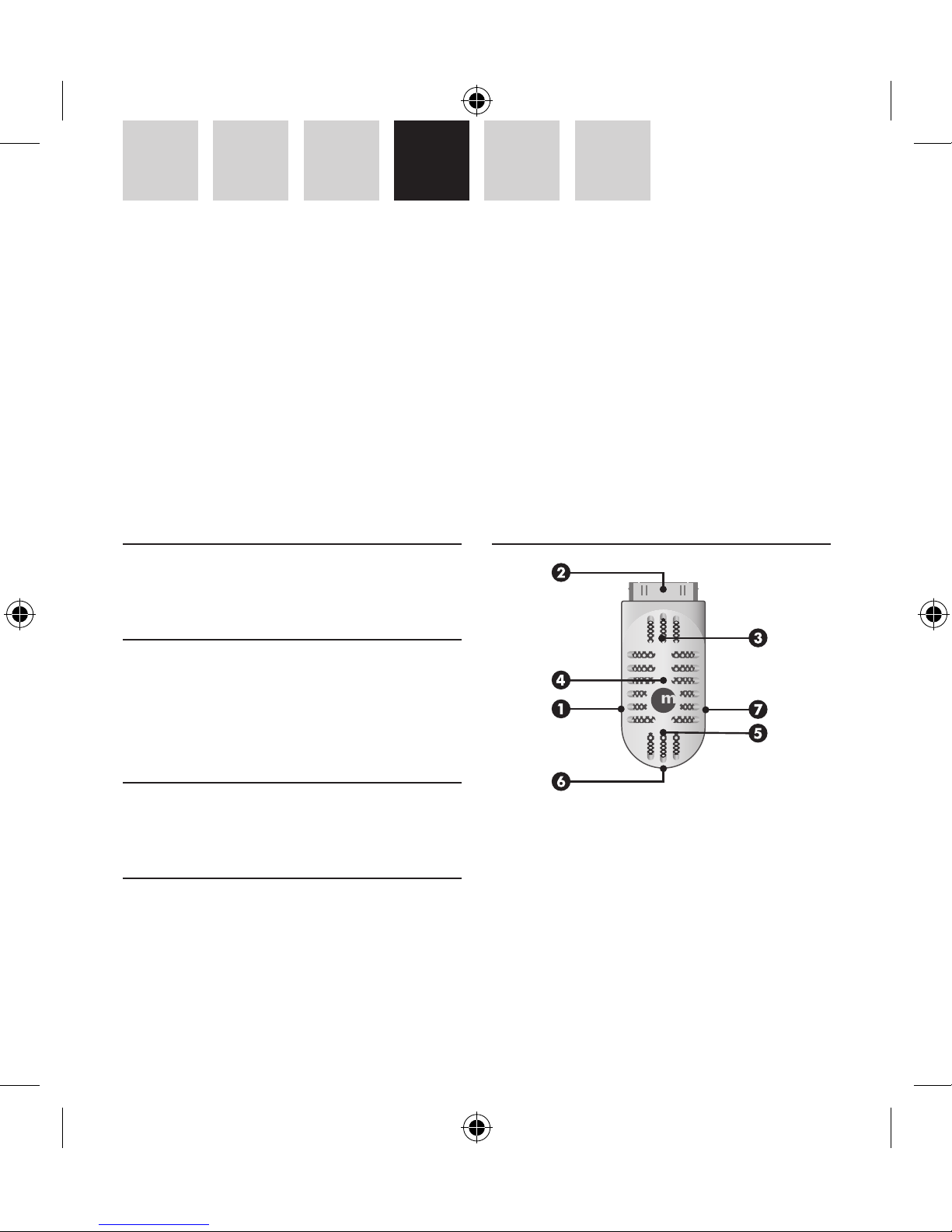
1 Prise USB pour charger les iPod et étendre le
temps d’enregistrement
2 Connecteur Dock de 30pin pour connecter à votre
iPod, s’adapte à la plupart des étuis iPod
3 Haut-parleur intégré
4 LED indicateur d’état
5 Microphone intégré
6 Interrupteur mode d’enregistrement
FR – GUIDE DE L’UTILISATEUR
Merci d’avoir acheté le Macally iVoicePro, enregistreur de voix et audio pour iPod. L’iVoicePro est un microphone, au design élégant du style 1930-1940 pour votre iPod nano 2eme et 3eme génération et iPod 5eme et
6eme génération. Avec l’iVoicePro vous pouvez enregistrer vos notes, interviews, ou musique en direct, vous
pouvez également enregistrer à partir de sources audio extérieures à l’aide de la prise 3.5mm intégrée. Une
fois l’enregistrement termine, vous pouvez écouter le résultat à l’aide du haut-parleur intégré. L’iVoicePro se
connecte aisément à votre iPod même dans un étui de protection en silicone.
Page 9

9
EN DE FR ES NL IT
7 Ligne d’entrée stéréo pour n’importe quel appar-
eil muni d’une sortie jack 3.5mm
Enregistrement
Pour les iPod nano 2ème génération et les iPod
5ème génération (vidéo) : lorsque vous connectez
l’iVoicePro, le menu Mémos Vocaux s’ouvrira automatiquement et vous êtes prêt à enregistrer.
Pour les iPod nano 3ème génération et l’iPod classic :
lorsque vous connectez l’iVoicePro, rendez-vous dans
le menu principal de l’iPod et sélectionnez le menu
Mémos Vocaux.
1. Enregistrement avec un microphone intégré
Pour un enregistrement de voix pendant un cours
ou une conférence, vous pouvez simplement utiliser le microphone intégré (mono). Connectez
l’iVoicePro à votre iPod et mettez le bouton du mode
d’enregistrement de l’iVoicePro en position micro.
Puis, dans le menu Mémos Vocaux, réglez la qualité
d’enregistrement sur « Inférieur » et vous êtes prêt
à enregistrer.
2. Enregistrement via l’entrée stéréo
Vous pouvez enregistrer en qualité stéréo CD avec
votre iPod via l’entrée de ligne au format jack 3,5
mm de l’iVoicePro. Connectez l’iVoicePro à votre iPod
et positionnez le bouton du mode d’enregistrement
de l’iVoicePro sur Enregistrement audio ou
Enregistrement par micro (en cas d’utilisation de
microphone stéréo externe). La différence dans
le mode d’enregistrement est que la position
d’enregistrement par microphone nécessite une
amplification alors que ce n’est pas le cas de la
position d’enregistrement audio. Lorsque vous connectez un appareil audio externe à l’entrée de ligne
au format jack 3,5 mm de l’iVoicePro, le microphone intégré sera désactivé. Dans le menu Mémos
Vocaux, réglez ensuite la qualité d’enregistrement
sur « Supérieur » et vous êtes prêt à enregistrer.
Remarques
• Une qualité d’enregistrement Inférieur (mono)
applique un taux d’échantillonnage de 22,05
KHz, un type d’échantillonnage de 16 bits
et un débit binaire de 352 kbps. Une minute
d’enregistrement utilise environ 2,6 MB d’espace
sur votre iPod.
• Une qualité d’enregistrement Supérieur (stéréo)
applique un taux d’échantillonnage de 44,1
KHz, un type d’échantillonnage de 16 bits et
un débit binaire de 1411 kbps. Une minute
d’enregistrement utilise environ 10,3 MB
d’espace sur votre iPod.
• Pour économiser l’espace de votre iPod, nous
nous recommandons d’effectuer vos enregistrements de voix en faible qualité et les enregistrements stéréo en haute qualité.
• Les fichiers enregistrés au format WAV sont
stockés dans le menu Mémos Vocaux de l’iPod.
Lorsque votre iPod est connecté à un ordinateur, les fichiers enregistrés sont importés dans
le menu Playlist Mémos Vocaux de iTunes et
retirés de l’iPod. Pour réduire la taille des enregistrements longs dans iTunes, nous vous recom-
Page 10

10
IT NL ES FR DE EN
mandons de convertir les fichiers au format ACC
ou MP3.
Ecouter
Vous pouvez lire les fichiers enregistrés et les écouter
à l’aide du haut-parleur de l’ iVoicePro en sélectionnant le fichier et en appuyant sur « Enter » du menu
Mémos Vocaux. Vous pouvez également écouter les
pistes à l’aide du haut-parleur iVoicePro.
Chargement
L’ iVoicePro fonctionne avec l’alimentation de l’iPod.
Ainsi, pour éviter que votre iPod ne se retrouve à
court batterie en plein enregistrement, vous pouvez charger l’iPod via l’iVoicePro. Vous n’avez qu’à
connecter l’extrémité mini-B du câble inclus dans
l’iVoicePro et l’autre extrémité au port USB de votre
ordinateur, un adaptateur secteur USB (par exemple
Macally USBPower ou PowerPal) ou une batterie
externe (Jbox ou Jboxmini).
Cependant, si vous connectez votre iPod à votre ordinateur via l’ iVoicePro, l’iPod passera en mode iTunes
et vous empêchera d’accéder au menu Mémos
Vocaux. Ainsi, pour accéder au menu Mémos Vocaux
si connecté à l’ordinateur, vous n’avez qu’à éjecter
votre iPod de iTunes.
Garantie
Macally Peripherals garantit ce produit exempt de défaut en matière
de désignation, de matériaux et de fabrication pour une durée de deux
(2) ans à compter de la date de l’achat. Si le produit s’avère défectueux,
Macally s’engage à en effectuer la réparation ou le remplacement, ceci
constituant la seule réparation envers l’acheteur et l’unique obligation
du fabricant. Cette garantie est exclusive et limitée au Macally iVoicePro
Macally. Elle ne pourra s’appliquer à un produit soumis à une utilisation
abusive ou erronée, à des contraintes électriques ou d’environnement
anormales, ou à toute condition autre que celles pouvant être considérées normales pour son usage.
La responsabilité de Macally Peripherals envers l’acheteur au titre de la
présente garantie est limitée au remboursement du prix d’achat du produit. Macally Peripherals ne pourra en aucun cas être tenu responsable
de débours résultant de l’achat de produits ou services de substitution,
de manque à gagner, ni de dommages conséquents ou accidentels,
directs ou indirects, quelle qu’en soit la cause ou en vertu de quelque
principe de responsabilité que ce soit, en application de la présente
garantie du produit vendu. Ces limites s’appliquent sans préjudice de
tout manquement d’une réparation à l’objet constitutif du produit.
Informations environnementales pour les clients de l’Union
européenne
La directive européenne 2002/96/CE exige que
l’équipement sur lequel est apposé ce symbole sur le
produit et/ou son emballage ne soit pas jeté avec les
autres ordures ménagères. Ce symbole indique que le
produit doit être éliminé dans un circuit distinct de celui
pour les déchets des ménages. Il est de votre responsabilité de jeter ce matériel ainsi que tout autre matériel électrique ou
électronique par les moyens de collecte indiqués par le gouvernement
et les pouvoirs publics des collectivités territoriales. L’élimination et le
recyclage en bonne et due forme ont pour but de lutter contre l’impact
néfaste potentiel de ce type de produits sur l’environnement et la santé
publique. Pour plus d’informations sur le mode d’élimination de votre
ancien équipement, veuillez prendre contact avec les pouvoirs publics
locaux, le service de traitement des déchets, ou l’endroit où vous avez
acheté le produit.
Page 11
11
EN DE FR ES NL IT
Acerca de esta guía
Antes de comenzar a usar el iVoicePro de Macally, lea
esta guía íntegramente.
Contenido del paquete
• iVoicePro
• Cable USB
• Cable de audio
• Guía del usuario
Registro
Por favor registre este producto en http://www.
macally-europe.com/register.php.
Soporte técnico
Para soporte técnico, por favor llame al +31 24 373
14 10 o envíe un correo electrónico a techsupport@
macally-europe.com. Los horarios del servicio técnico son de 9h00 a 17h00 (CET), de lunes a viernes.
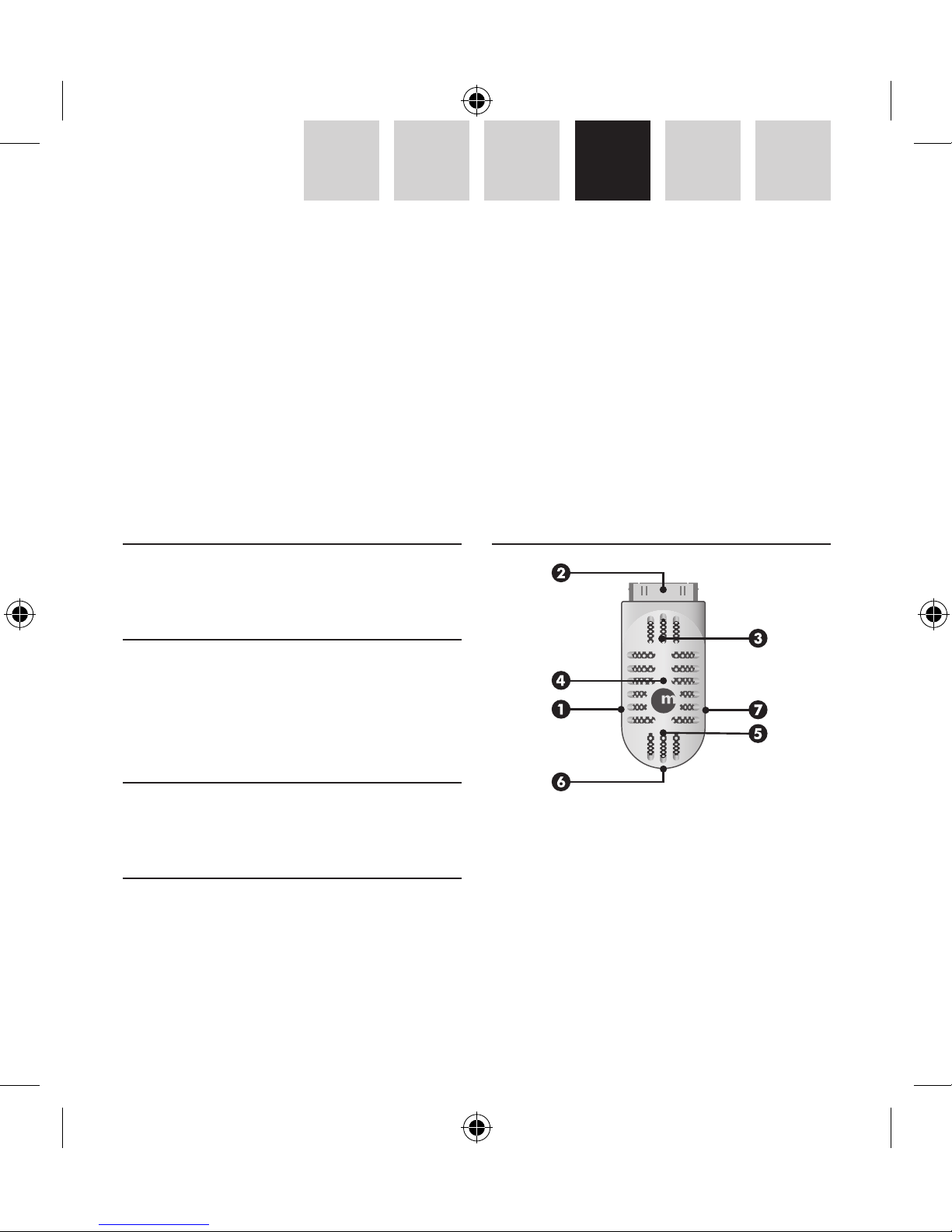
Hardware básico
1 Puerto USB para cargar su iPod y aumentar el
tiempo de grabación
2 Conector Dock de 30 pins para conectar a su iPod,
se ajusta con la mayor parte de las fundas para
iPod
3 Altavoz incorporado
4 Indicador LED de estado
5 Micrófono incorporado
ES – GUÍA DEL USUARIO
Gracias por comprar el Macally iVoicePro, grabadora de audio y voz para iPod. El iVoicePro es un micrófono
elegante, de diseño de los años treinta/cuarenta para su iPod nano de 2ª o 3ª generación y para su iPod de
5ª o 6ª generación. Con su iVoicePro puede grabar las notas de un discurso, entrevistas o música en directo,
pero también puede realizar grabaciones a partir de dispositivos de audio externos por medio de la clavija de
entrada de 3,5 mm incorporada. Cuando termine la grabación, puede escuchar el resultado gracias al altavoz
incorporado. ¡El iVoicePro se conecta de un modo sencillo a su iPod incluso cuando se encuentre en una funda
de protección de silicona!
Page 12

12
IT NL ES FR DE EN
6 Interruptor de modo de grabación
7 Entrada estéreo para cualquier dispositivo audio
con una clavija de salida de 3,5 mm.
Grabación
Para iPod nano de 2ª generación e iPod de 5ª gener
ación (vídeo): cuando conecta el iVoicePro, se abre
automáticamente el menú Notas Voz y ya puede
grabar.
Para iPod nano de 3ª generación e iPod classic:
cuando conecte el iVoicePro, vaya al menú principal
de iPod y seleccione el menú Notas Voz.
1. Grabación con micrófono incorporado
Para grabaciones de voz generales durante una
charla o conferencia, puede utilizar el micrófono
incorporado (mono). Conecte el iVoicePro a su iPod
y coloque el interruptor de modo grabación del
iVoicePro en la posición de micrófono. Después, en el
menú Notas Voz, configure la calidad de la grabación
como “Baja”* y ya está preparado para grabar.
2. Grabar por medio de la entrada estéreo
Puede grabar audio de calidad estéreo CD en su iPod
por medio de la toma de entrada de 3,5 mm en el
iVoicePro. Conecte el iVoicePro en su iPod y configure
el interruptor de modo grabación del iVoicePro en
Grabación de Dispositivo de Audio o Grabación con
Micrófono (para un micrófono estéreo externo). La
diferencia en el Modo Grabación es que la posición
de Grabación con Micrófono utiliza amplificación
y la posición de Grabación de Dispositivo de Audio
no necesita amplificación para grabación. Cuando
conecta un dispositivo de audio externo a la toma
de entrada de 3,5 mm del iVoicePro, se desactiva el
micrófono incorporado. Después, en el menú Voice
Memos, configure la calidad de la grabación en “Alto”
y ya está preparado para grabar.
Notas
• La baja calidad de grabación (mono) utiliza una
velocidad de muestreo de 22,05 KHz, un tamaño
de muestreo de 16 bit y una velocidad de transferencia de datos de 352 kpbs. Un minuto de
grabación ocupa unos 2,6 MB en el iPod.
• La alta calidad de grabación (estéreo) utiliza una
velocidad de muestreo de 44,1 KHz, un tamaño
de muestreo de 16 bit y una velocidad de transferencia de datos de 1411 kpbs. Un minuto de
grabación ocupa unos 10,3 MB en el iPod.
• Para utilizar menos espacio en el iPod, se
recomienda seleccionar la calidad baja para la
grabación de voz y la alta para la grabación de
entrada de audio estéreo.
• Los archivos de grabación, en formato WAV, se
almacenan en el menú Notas Voz en el iPod.
Cuando su iPod está conectado a un ordenador,
los archivos de grabación se importan a la lista
Play list Notas Voz en iTunes y se eliminan del
iPod. Para reducir el tamaño del archivo para
grabaciones largas almacenadas en iTunes, se
recomienda convertirlos en AAC o formato MP3.
Page 13

13
EN DE FR ES NL IT
Escuchar
Puede reproducir la grabación y escucharla a través
del altavoz del iVoicePro, seleccionando el archivo
y pulsando “Enter” en el menú Notas Voz. También
puede escuchar canciones a través del altavoz del
iVoicePro.
Cargar
El iVoicePro funciona con la alimentación del iPod.
Por este motivo, para evitar que su iPod quede
sin energía mientras está grabando, puede cargar
su iPod a través del iVoicePro. Simplemente debe
conectar el extremo mini-B del cable incluido al
iVoicePro y el otro extremo al puerto USB de su ordenador, un adaptador de alimentación USB (Macally
USBPower o PowerPal) o una batería externa (Jbox
o Jboxmini). Sin embargo, cuando conecta su iPod a
través del iVoicePro a su ordenador, su iPod se monta
en iTunes y evita que acceda al menú Notas Voz en
su iPod. Por ello, para acceder al menú Notas Voz
mientras esté conectado al ordenador debe extraer
su iPod del iTunes.
Garantía
Macally Peripherals garantiza que este producto está exento de defectos
materiales y derivados de su proceso de fabricación y cuenta con una
garantía de dos (2) años a contar desde la fecha de compra. Si el producto resulta defectuoso, Macally, como única solución para el usuario y
como obligación exclusiva del fabricante, reparará o reemplazará el producto. Esta garantía es exclusiva y está limitada al iVoicePro de Macally.
Esta garantía no se aplica a productos que hayan sido sometidos a
abuso, uso indebido, condiciones eléctricas o ambientales anormales, o
cualquier otra condición que no se considere de desgaste normal.
La obligación de Macally Peripherals que emana de esta garantía y
venta estará limitada al reembolso del importe de la compra. Macally
Peripherals en ningún caso se responsabilizará de los costes de adquisición de productos o servicios de reemplazo, o de la pérdida de beneficios, o de daños consecuentes, incidentales, directos o indirectos, sea
cual fuere su causa y según toda base de obligación que se desprenda
de esta garantía y venta. Estas limitaciones son aplicables a pesar de
cualquier falta de propósito esencial de toda solución limitada.
Información medioambiental para clientes de la Unión Europea
La Directiva 2002/96/CE de la UE exige que los equipos que lleven este símbolo en el propio aparato y/o
en su embalaje no deben eliminarse junto con otros
residuos urbanos no seleccionados. El símbolo indica que
el producto en cuestión debe separarse de los residuos
domésticos convencionales con vistas a su eliminación.
Es responsabilidad suya desechar este y cualesquiera otros aparatos
eléctricos y electrónicos a través de los puntos de recogida que ponen
a su disposición el gobierno y las autoridades locales. Al desechar y
reciclar correctamente estos aparatos estará contribuyendo a evitar
posibles consecuencias negativas para el medio ambiente y la salud
de las personas. Si desea obtener información más detallada sobre la
eliminación segura de su aparato usado, consulte a las autoridades
locales, al servicio de recogida y eliminación de residuos de su zona o
pregunte en la tienda donde adquirió el producto.
Page 14
14
IT NL ES FR DE EN
Info over deze gids
Voordat u de Macally iVoicePro, gaat gebruiken, leest
u deze gids eerst in zijn geheel door.
Inhoud van de verpakking
• iVoicePro
• USB-kabel
• 3,5 mm audiokabel
• Gebruikershandleiding
Registratie
Registreer dit product op http://www.macallyeurope.com/register.php.
Technische ondersteuning
Voor technische ondersteuning, bel +31 24 373 14
10 of stuur een e-mail aan techsupport@macallyeurope.com. De tijden voor technische ondersteuning zijn van maandag t/m vrijdag van 9u00 tot
17u00 (CET).
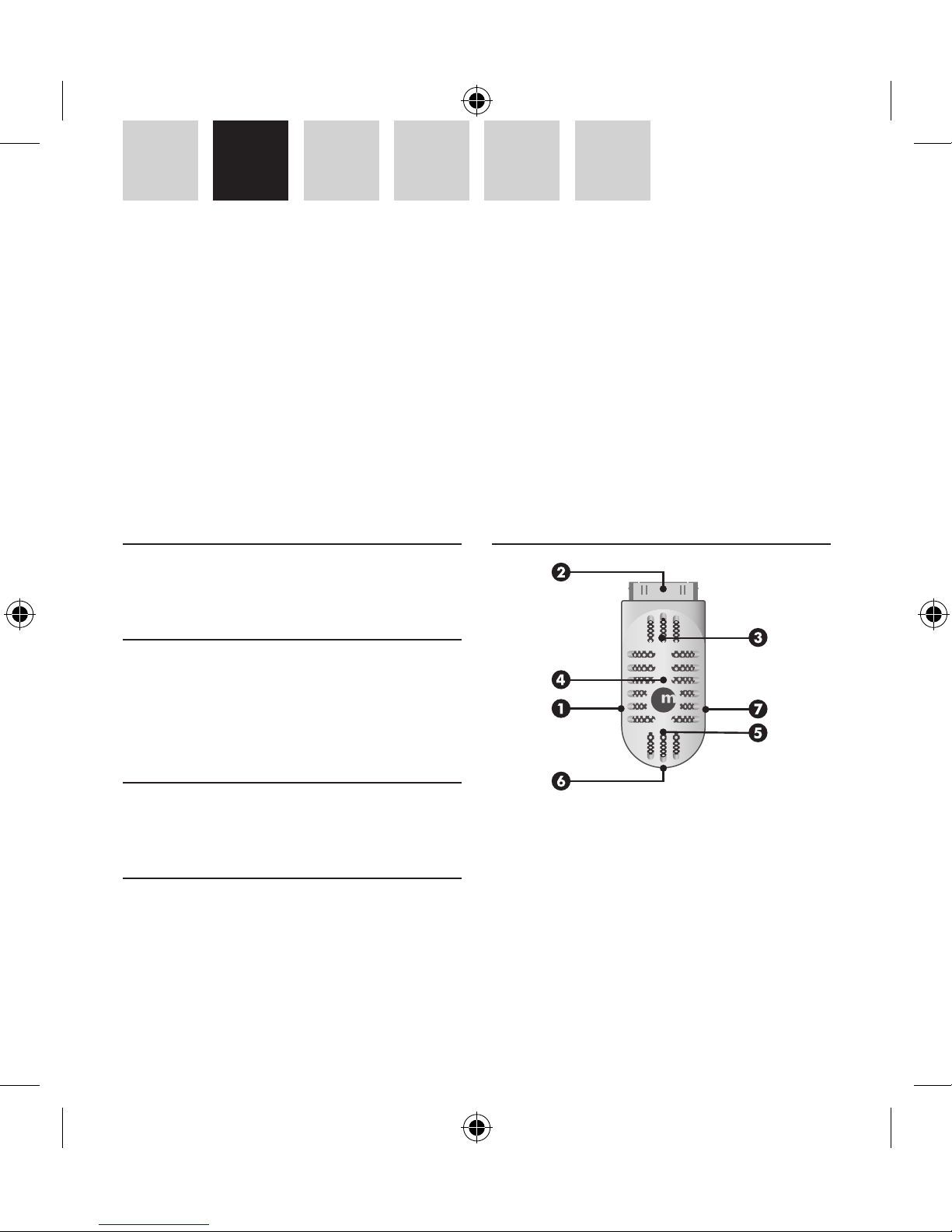
Basisinformatie over de hardware
1 USB-poort om uw iPod op te laden en meer
opnametijd
2 30-pins Dock-connector naar uw iPod, past door
de meeste iPod-hoezen
3 Ingebouwde luidspreker
4 LED statusindicator
5 Ingebouwde microfoon
6 Opnamemodusknop
NL – GEBRUIKERSHANDLEIDING
Dank u voor de aanschaf van uw Macally iVoicePro, stem- en audiorecorder voor iPod. De iVoicePro is een
elegante, in jaren dertig/veertig stijl ontworpen microfoon voor uw iPod nano 2e/3e gen. en iPod 5e/6e gen.
Met de iVoicePro kunt u uw collegeaantekeningen, interviews of livemuziek opnemen, maar via de ingebouwde 3,5 mm line-in jack ook vanaf externe audioapparatuur opnemen. Wanneer u klaar bent met opnemen,
kunt u via de ingebouwde luidspreker het resultaat beluisteren. De iVoicePro is eenvoudig op uw iPod aan te
sluiten, zelfs wanneer deze in een siliconen beschermhoes zit!
Page 15

15
EN DE FR ES NL IT
7 Stereo line-in voor een audioapparaat met een
3,5 mm line-out jack
Opnemen
Voor iPod nano 2e gen. en iPod 5e gen. (video): wan
neer u de iVoicePro aansluit, wordt het Gesproken
memo’s-menu automatisch geopend en kunt u met
opnemen beginnen.
Voor iPod nano 3e gen. en de klassieke iPod: wanneer u de iVoicePro aansluit, gaat u naar het iPod
hoofdmenu en selecteert u het Gesproken memo’smenu.
1. Opnemen met de ingebouwde microfoon
Voor algemene stemopname tijdens een lezing of
conferentie kunt u gewoon de ingebouwde microfoon gebruiken (mono). Sluit de iVoicePro op uw
iPod aan en stel de opnamemodusknop van de
iVoicePro in op microfoon. Stel vervolgens in het
Gesproken memo’s-menu de opnamekwaliteit in op
“Laag”* en u kunt met opnemen beginnen.
2. Opnemen via stereo-input
U kunt stereo audio met CD-kwaliteit op uw iPod
opnemen via de 3,5 mm input jack op de iVoicePro.
Sluit de iVoicePro op uw iPod aan en stel de opnamemodusknop van de iVoicePro op Audio Device
Recording of Microphone Recording (voor een
externe stereomicrofoon). Het verschil in opnamemodus is dat Microphone Recording gebruik maakt
van versterking, terwijl Audio Device Recording
voor het opnemen geen versterking nodig heeft.
Wanneer u een extern audioapparaat op de 3,5 mm
input jack van de iVoicePro aansluit, wordt de ingebouwde microfoon uitgeschakeld. Stel vervolgens in
het Gesproken memo’s-menu de opnamekwaliteit in
op “Hoog” en u kunt met opnemen beginnen.
Opmerkingen
• De lage opnamekwaliteit (mono) verbruikt
22.05KHz steekproefsnelheid, 16bit steekproefomvang en 352kbps bitsnelheid. Een minuut
opnemen verbruikt ongeveer 2,6MP op iPod.
• De hoge opnamekwaliteit (stereo) verbruikt
44,1KHz steekproefsnelheid, 16bit steekproefomvang en 1411kbps bitsnelheid. Een minuut
opnemen verbruikt ongeveer 10,3MP op iPod.
• Om minder schijfruimte op de iPod in beslag te
nemen, is het raadzaam lage kwaliteit te selecteren voor stemopname en hoge kwaliteit voor
stereo audio input opname.
• Opgenomen bestanden in WAV-formaat worden
in de Gesproken memo’s Afspeellijst op iPod
opgeslagen. Wanneer uw iPod op een computer
is aangesloten, worden de opgenomen bestanden naar de Voice Memos Afspeellijst op iTunes
geïmporteerd en van de iPod verwijderd. Om de
bestandgrootte van lange, op iTunes opgeslagen
opnames te verkleinen, is het raadzaam ze in
AAC- of MP3-formaat om te zetten.
Beluisteren
U kunt de opname terugspelen en via de iVoicePro
luidspreker beluisteren door het bestand te selecteren en in het Gesproken memo’s-menu op “Enter”
te drukken. Via de iVoicePro luidspreker kunt u ook
Page 16

16
IT NL ES FR DE EN
naar liedjes luisteren.
Opladen
De iVoicePro werkt op de voeding van uw iPod. Om
te voorkomen dat uw iPod tijdens het opnemen
leeg raakt, kan de iPod via de iVoicePro opgeladen
worden. Sluit het mini-B uiteinde van de bijgeleverde kabel op de iVoicePro aan en het andere
uiteinde op de USB-poort van uw computer, een
USB-voedingsadapter (bijv. Macally USBPower
of PowerPal) of een externe batterij (bijv. Jbox of
Jboxmini).
Wanneer de iPod echter via de iVoicePro op de
computer wordt aangesloten, gaat iPod in iTunes
open en is het Gesproken memo’s-menu op de iPod
niet toegankelijk. Om toegang tot het Gesproken
memo’s-menu te hebben wanneer de iPod op de
computer is aangesloten, moet u de iPod uit iTunes
verwijderen.
Garantie
Macally Peripherals garandeert dat dit product vrij is van materiaal- en
fabricagefouten en geeft een garantie van twee (2) jaar vanaf de
aankoopdatum. Als het product defect is, zal Macally als enige verhaalsmogelijkheid en als enige verplichting van de fabrikant, het product
herstellen of vervangen. Deze garantie is exclusief en beperkt tot de
Macally iVoicePro. Deze garantie is niet van toepassing voor producten
die werden blootgesteld aan verkeerd gebruik, misbruik, abnormale
elektrische of omgevingsvoorwaarden, of elke andere toestand die niet
als normale slijtage kan worden beschouwd.
De aansprakelijkheid van Macally Peripherals tengevolge van deze
garantie en verkoop is beperkt tot een terugbetaling van de aankoopprijs. Macally Peripherals kan in geen geval aansprakelijk worden gesteld
voor kosten van aankoop of vervanging van producten of diensten, of
voor enigerlei winstderving, of voor enigerlei gevolgschade, incidentele,
directe of indirecte schade, wat ook de oorzaak ervan is en volgens welke
aansprakelijkheidstheorie ook, uit hoofde van deze garantie en verkoop.
Deze beperkingen zijn van toepassing, ook als een beperkte oplossing
een essentieel doel niet nakomt.
Informatie voor klanten in de Europese Unie
De Europese Richtlijn 2002/96/EC schrijft voor dat apparatuur die is voorzien van dit symbool op het product of
de verpakking, niet mag worden ingezameld met nietgescheiden huishoudelijk afval. Dit symbool geeft aan
dat het product apart moet worden ingezameld. U bent
zelf verantwoordelijk voor de vernietiging van deze en
andere elektrische en elektronische apparatuur via de daarvoor door de
landelijke of plaatselijke overheid aangewezen inzamelingskanalen. De
juiste vernietiging en recycling van deze apparatuur voorkomt mogelijke
negatieve gevolgen voor het milieu en de gezondheid. Voor meer informatie over het vernietigen van uw oude apparatuur neemt u contact op
met de plaatselijke autoriteiten of afvalverwerkingsdienst, of met de
winkel waar u het product hebt aangeschaft.
Page 17
17
EN DE FR ES NL IT
Premessa
Prima di iniziare ad utilizzare il Macally iVoicePro,
leggere attentamente la guida.
Contenuto della confezione
• iVoicePro
• Cavo USB
• Cavo audio da 3.5 mm
• Guida utente
Registrazione
Vi preghiamo di voler registrare il prodotto a http://
www.macally-europe.com/register.php.
Assistenza tecnica
Per assistenza tecnica, contattare il +31 24 373
14 10 inviare una email a techsupport@macallyeurope.com. L’assistenza tecnica è disponibile dalle
9h00 alle 17h00 (CET), dal Lunedì al Venerdì.
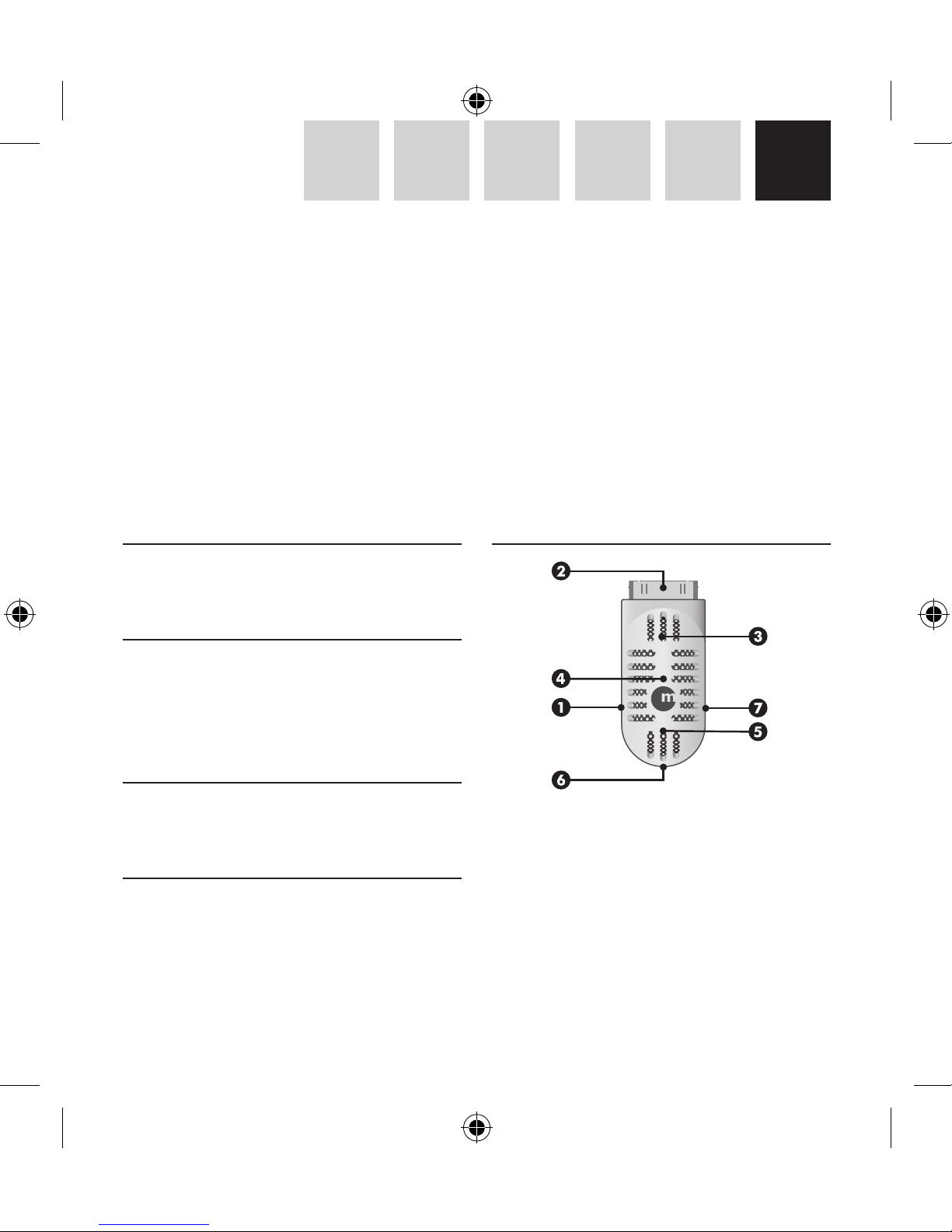
Base hardware
1 Porta USB per caricare iPod e per tempi di regis
-
trazione prolungati
2 Connettore Dock da 30 pin all’iPod®, inseribile
nella maggior parte dei case per iPod
3 Altoparlante incorporato
4 Indicatore LED di stato
5 Microfono incorporato
6 Interruttore di modalità registrazione
IT – GUIDA UTENTE
Grazie per aver acquistato il iVoicePro, registratore voce e audio per iPod®. L’iVoicePro è un microfono dal
design elegante, in stile anni trenta/quaranta, per iPod nano di 2ª/3ª gen. e iPod di 5 ª/6ª gen. Con iVoicePro
è possibile registrare note di lettura, interviste o musica dal vivo, ma è consentita la registrazione anche da
dispositivi audio esterni attraverso il jack line-in da 3.5mm incorporato. Dopo aver registrato i risultati possono
essere riprodotti dall’altoparlante incorporato. iVoicePro si collega facilmente all’iPod anche quando è posto
in un case protettivo al silicone!
Page 18

18
IT NL ES FR DE EN
7 Stereo line-in per qualsiasi dispositivo audio con
jack line-out da 3.5 mm
Registrazione
Per iPod nano 2ª gen. e iPod 5 ª gen. (video): quando
si collega l’iVoicePro, il menu Memo Vocali si aprirà
automaticamente e si è pronti per registrare.
Per iPod nano 3ª gen. e iPod classic: quando si collega l’iVoicePro, andare al menu principale dell’iPod
e selezionare il menu Memo Vocali.
1. Registrazione con microfono integrato
Per una registrazione vocale durante una lezione o
una conferenza, è possibile utilizzare semplicemente
il microfono integrato (mono). Collegare l’iVoicePro
all’iPod e impostare l’interruttore di modalità registrazione dell’iVoicePro alla posizione microfono.
Quindi, nel menu Memo Vocali impostare la qualità di registrazione su “Low”* e la registrazione è
pronta.
2. Registrazione tramite ingresso stereo
È possibile registrare sull’iPod CD di qualità audio
stereo attraverso il jack d’ingresso da 3.5mm
nell’iVoicePro. Collegare l’iVoicePro all’iPod e
impostare l’interruttore di modalità registrazione
dell’iVoicePro al Dispositivo di registrazione audio
o al microfono (per un microfono stereo esterno).
La differenza nella Modalità registrazione sta nel
fatto che la posizione del microfono di registrazione utilizza l’amplificazione mentre la posizione del
Dispositivo di registrazione audio non necessita di
amplificazione per la registrazione. Quando si collega un dispositivo audio esterno al jack d’ingresso
da 3.5mm dell’iVoicePro, il microfono integrato
verrà disattivato. Quindi, nel menu Memo Vocali
impostare la qualità di registrazione su “Alta” e la
registrazione è pronta.
Note
• La qualità di registrazione bassa (mono) utilizza
un sample rate a 22.05KHz, sample size a 16bit
e un bit rate a 352kbps. Nell’iPod un minuto di
registrazione richiede circa 2.6MB.
• La qualità di registrazione alta (stereo) utilizza
un sample rate a 44.1KHz, sample size a 16bit
e un bit rate a 1411kbps. Nell’iPod un minuto di
registrazione richiede circa 10.3MB.
• Per utilizzare meno spazio su disco nell’iPod si
consiglia di selezionare la qualità bassa per la
registrazione vocale, e la qualità alta per la registrazione d’ingresso audio stereo.
• La registrazione dei file, in formato WAV, viene
memorizzata nel Memo Vocali dell’iPod. Quando
l’iPod è collegato a un computer, i file registrati
vengono importati nella Playlist Memo Vocali di
iTunes e rimossi dall’iPod. Per ridurre la dimensione del file per lunghe registrazioni memorizzate nell’iTunes, si consiglia di convertire il file in
formato AAC o MP3.
Ascolto
Per riascoltare la registrazione e ascoltare attraverso
l’altoparlante di iVoicePro, selezionare il file e pre-
Page 19

19
EN DE FR ES NL IT
mere “Enter” nel menu Memo Vocali. È possibile
ascoltare i brani attraverso l’altoparlante di iVoicePro.
Caricamento
L’iVoicePro funziona con l’alimentazione dell’iPod.
Tuttavia, per evitare che l’iPod si scarichi durante la
registrazione, lo si può caricare attraverso l’iVoicePro.
Collegare semplicemente l’estremità mini-B del cavo
in dotazione all’iVoicePro e l’altra estremità alla
porta USB del computer, a un adattatore di potenza
USB (ad es. USBPower o PowerPal Macally) o a una
batteria esterna (ad es. Jbox o Jbomini).Tuttavia,
quando si collega l’iPod al computer attraverso
l’iVoicePro, l’iPod verrà fissato all’iTunes e non consentirà l’accesso al menu Memo Vocali sull’iPod.
Tuttavia, per accedere al menu Memo Vocali mentre
si è connessi al computer, espellere semplicemente
l’iPod dall’iTunes.
Garanzia
La Macally Peripherals garantisce che questo prodotto è privo di difetti
di sorta, materiali o fabbricazione per la durata del periodo di garanzia,
a decorrere dalla data di acquisto. Qualora il prodotto dovesse risultare
difettoso, come vostra unica riparazione ed obbligo del costruttore, la
Macally provvederà a riparare o sostituire il prodotto. La presente garanzia è esclusiva e limitata al iVoicePro di Macally. La presente garanzia
non è applicabile a prodotti che siano stati oggetto di uso indebito, uso
eccessivo, condizioni elettriche o ambientali anomale o qualsiasi altra
condizione diversa da ciò che si considera uso normale.
La responsabilitá della Macally Peripherals scaturente dalla presente
garanzia e vendita è limitata al rimborso del prezzo di acquisto. La
Macally Peripherals non sarà in alcun caso responsabile per il costo
di fornitura di prodotti o servizi sostitutivi, né per perdite di profitto,
né per qualsiasi danno conseguente, incidentale, diretto o indiretto,
qualunque ne sia la fonte, né per qualsiasi teoria di responsabilità
scaturente da questa garanzia e vendita. Queste limitazioni varranno
anche nonostante eventuali mancanze di scopo essenziale di qualsiasi
riparazione limitata.
Informazioni relative all’ambiente per i clienti residenti
nell’Unione Europea
La direttiva europea 2002/96/EC richiede che le apparecchiature contrassegnate con questo simbolo sul prodotto
e/o sull’imballaggio non siano smaltite insieme ai rifi
uti urbani non differenziati. Il simbolo indica che questo
prodotto non deve essere smaltito insieme ai normali rifi
uti domestici. È responsabilità del proprietario smaltire
sia questi prodotti sia le altre apparecchiature elettriche ed elettroniche
mediante le specifi che strutture di raccolta indicate dal governo o dagli
enti pubblici locali. Il corretto smaltimento ed il riciclaggio aiuteranno
a prevenire conseguenze potenzialmente negative per l’ambiente e per
la salute dell’essere umano. Per ricevere informazioni più dettagliate
circa lo smaltimento delle vecchie apparecchiature in Vostro possesso,
Vi invitiamo a contattare gli enti pubblici di competenza, il servizio di
smaltimento rifi uti o il negozio nel quale avete acquistato il prodotto.
Page 20

Macally Europe
Teklink Europe BV
Tel: +31 24 3731410
Fax: +31 24 3731134
email: [email protected]
website: www.macally-europe.com
Copyright © 2008 Macally Peripherals
www.macally-europe.com
 Loading...