

Page 1
t
L
L C
L L W M U
u
S M
W
a
r
e
a
o
1
g
W
E
4
m
N
A
X
w
d
b
s
US
R MA
UAL
In the
Prod
box
ens cap
ens hood
amera str
ens cloth
i-ion batte
all charg
icro-USB
ser Manu
ct requi
D card (n
ac OS X
indows 7
p
y
3.0 cable
l
rements
t included)
0.8.5 or hi
or 64-bit
her (min:
indows 8 (
GB RAM, I
in: 4GB R
ntel Core 2
M, Direct
Duo or ne
10.0 and
er), or 64-
ual-proces
it
or CPU)
Confiden
ial – Property
of Lytro, Inc.
1
Page 2
t
Q
g
*
s
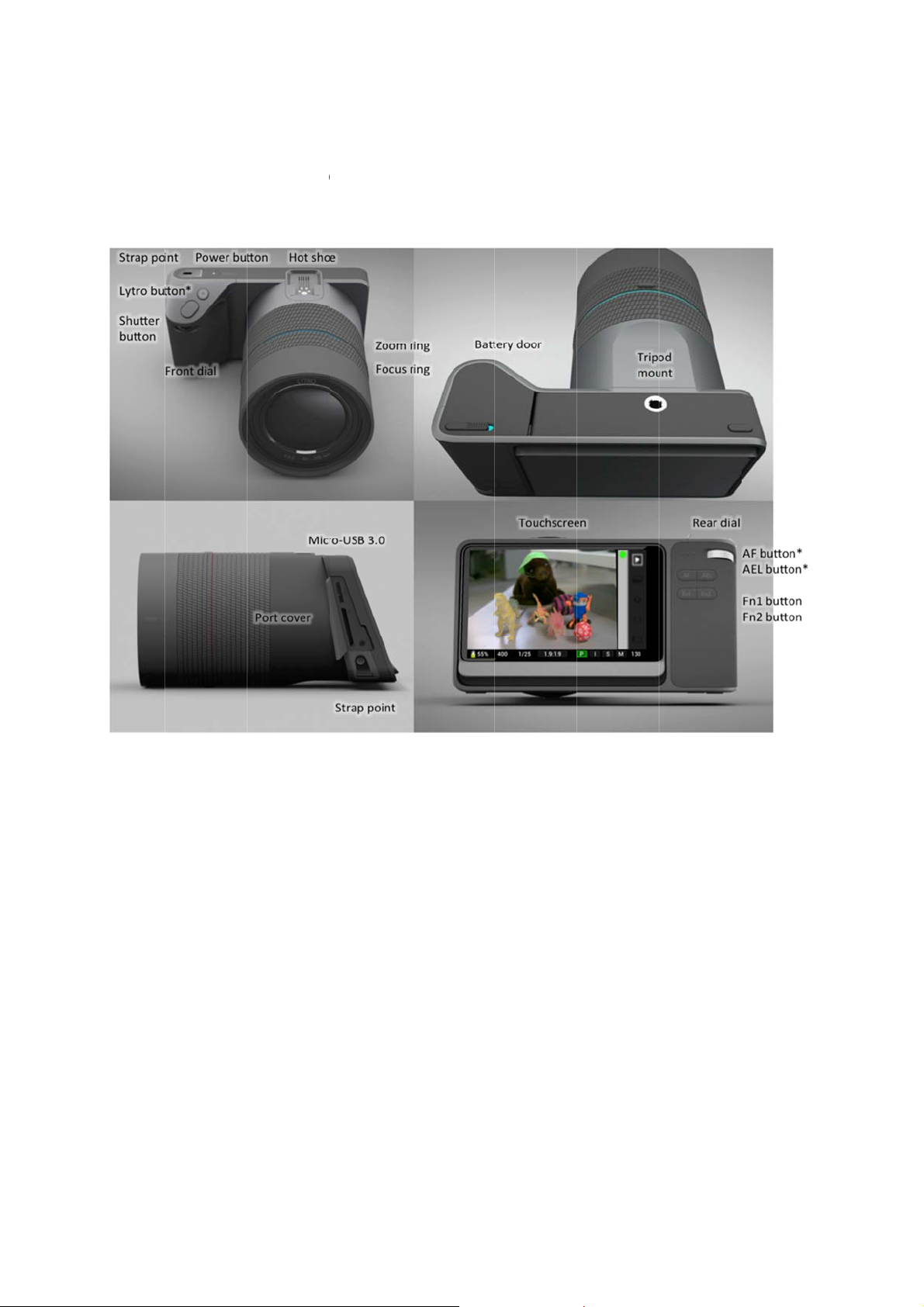
Camera
uick re
exterior
ference
uide
Confiden
ial – Property
of Lytro, Inc.
These feature
are not functional on the test unit.
2
Page 3
t
Touchs
c
s
t
o
e
e
Touch
reen layou
creen lay
in Captur
ut in Revi
Mode
w Mode
Confiden
ial – Property
of Lytro, Inc.
3
Page 4

Getting started
Charging the battery
Before using the camera for the first time, you need to charge the lithium-ion battery. Place the battery into the
included standalone charger, and plug the charger into a standard 110 – 240 volt, 50 – 60 Hz electrical outlet. When
you first receive your camera, the battery will be partially charged; a fully discharged battery may take four hours or
more to charge completely.
Inserting the charged battery
The battery compartment is on the underside of the camera. Slide the thumb-latch to one side and open the door.
Insert the charged battery, and close the door fully so the latch reengages.
Inserting an SD card
Open the port cover and insert a SD, SDHC, or SDXC card into the SD card slot. Close the port cover.
Powering on (and off)
Briefly press the power button to turn the camera on. To power off, press the power button for 5 seconds, then
release.
Confidential – Property of Lytro, Inc.
4
Page 5
t
Capt
u
e
d
t
n
t
a
P L
d
S F Z
F
R A
A F F
u
s
e
c
t
h
n
*
o
s
—
s
—
—
—
—
o
o
a
e
e
h
o
c
s
r
e
p
o
o
d
n
g
g
u
t
u
e
e
a
e
n
d
c
s
s
M
P
a
y
o
f
u
e
d
a
a
i
c
a
s
a
t
t
e
o
f
s
o
p
o
u
t
a
Each tim
the card i
live view
focus on
way dow
To opera
Physic
re Mod
you power o
s not full, the
isplayed on
he object at t
and release.
e the camera
l controls
n your camer
amera will b
he screen. Pr
e center of t
in Capture M
, it will start u
ready to cap
ssing the sh
e frame. Wh
de, you’ll us
p in Capture
ure a Living
tter button h
n you’re read
a combinati
ode. If there’
icture. You c
lf way will act
to capture a
n of physical
s a compatibl
n compose y
vate the auto
picture, pres
ontrols and o
SD card in
ur shot by lo
ocus, and the
the shutter b
n-screen con
lace, and
king at the
camera will
tton all the
rols.
* This feat
ower butto
ytro button
isplays a live
hutter butt
ront dial —
oom ring —
ocus ring
ear dial —
F button*
EL button*
n1 button
n2 button
re is not functi
— turns the
— a half-pre
depth histog
n — a half-pr
ets shutter s
adjusts the f
adjusts the f
ets ISO (in IS
activates an
activates a
any of a ran
any of a ran
nal on the test
amera on/off
s displays de
am
ss engages
eed (in Shutt
cal length of t
cus of the le
O Priority Mo
locks autofo
d locks autoe of function
e of function
unit.
pth feedback
utofocus; a f
r Priority Mo
he lens
s
e and Manu
us while held
exposure whil
can be assig
can be assig
or the object
ll-press relea
e and Manu
l Mode only)
down
e held down
ned to this bu
ned to this bu
t the center
es the shutte
l Mode only)
ton
ton
f the frame;
r
full-press
Touch
Confiden
creen lay
ial – Property
ut in Capt
of Lytro, Inc.
re Mode
5
Page 6
t
R H S
m
V C B I S E
c
S
I
S
a
u
w
e
P
c
I
a
S
a
M
e
—
p
t
o
S
a
r
d
a
d
S
n
u
s
n
t
M
y
e
i
e
o
t
e
n
d
y
h
—
o
e
—
y
e
I
o
d
a
u
—
o
s
s
e
O
c
g
h
M
a
w
e
e
e
a
s
o
t
s
h
c
u
g
o
c
n
o
r
m
a
r
,
d
w
p
e
e
e
y
i
e
d
u
e
t
m
n
t
h
t
e
a
b
c
o
t
b
n
e
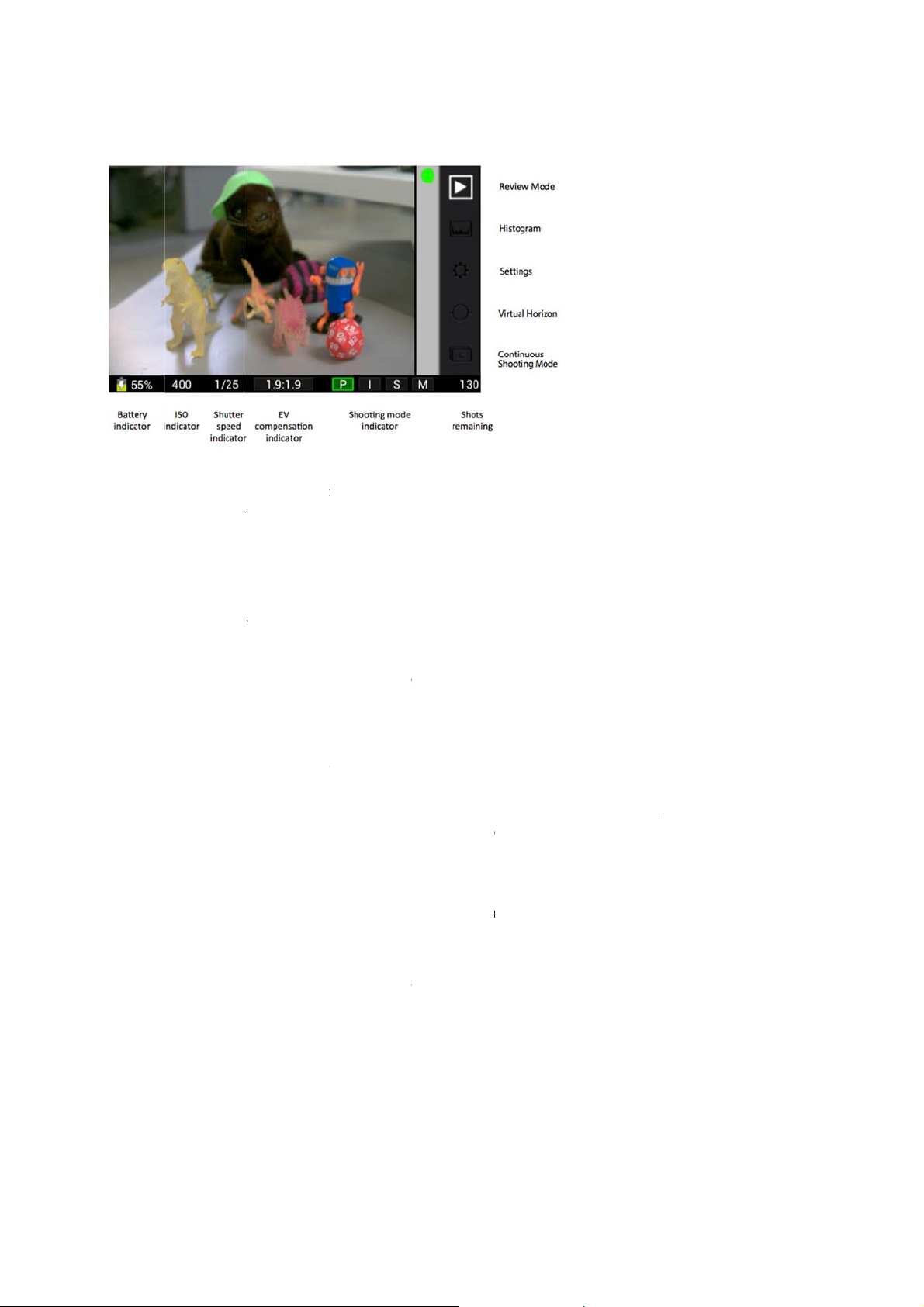
SO indicato
SO Priority,
eview Mod
istogram
ettings — o
enu and res
irtual Horiz
ontinuous
attery indic
hutter spee
compens
ompensation
hooting mo
hots remai
— switches
opens the liv
ens the Setti
ore the live vi
n — turns on
hooting Mo
tor — displa
— displays t
indicator
tion indicat
currently sel
e indicator
for Shutter P
ing — displa
he camera fr
exposure hi
gs menu (thi
ew)
level indicato
e* — activat
s the battery’
e current IS
displays the
r — displays
cted (to the ri
the highlig
riority, M for
s how many
m Capture M
togram
will replace
rs
s continuous
s remaining c
urrent shutte
the target val
ht of the col
ted letter indi
anual
dditional Livi
de to Revie
he live view;
hooting mod
arge
r speed
e in f-stops (t
n)
ates the curr
g Pictures th
Mode
ress the Shu
o the left of th
nt shooting
SD card ca
ter button to
e colon) and t
ode: P for Pr
hold
lose the
he
gram, I for
* These fe
Hiding t
The Feat
from vie
Choosi
The cam
mode ind
Confiden
tures are not f
he Feature
res Menu ca
by swiping it
ng a shoo
ra offers four
icator at the b
; Program
ompensation
; ISO Priorit
nd EV comp
; Shutter Pr
nd EV comp
; Manual M
ial – Property
nctional on th
Menu and
be hidden fr
down. To brin
ing mode
shooting mo
ottom of the s
ode — the c
value
Mode — yo
nsation
ority Mode
nsation
de — you se
of Lytro, Inc.
test unit.
nformation
m view by s
g them back,
es. The first l
creen. To sel
mera sets th
set the ISO,
you set the
t both the shu
Bar
iping it to the
swipe in the
tter of the cu
ct a different
ISO and the
nd the came
hutter speed
tter speed an
6
right. Similarl
pposite direct
rently selecte
mode, tap on
shutter spee
a sets the sh
and the cam
the ISO
, the Informa
ions.
d mode is hig
of the other
based on m
tter speed b
ra sets ISO
ion Bar can
lighted in the
hree letters.
tered value a
sed on meter
ased on met
e hidden
shooting
d EV
ed value
red value
Page 7
t
Changin
g
t
r
a
o
t
r
a
d
t
e
f
o
t
g
o
e
h
t
T
n
t
n
d
c
t
s
e
a
b
t
h
e
h
n
n
g
n
e
u
p
d
o
p
s
v
e
t
s
t
a
g
,
y
M
e
t
s
a
v
e
n
o
e
e
g
e
t
h
t
0
y
W
e
s
g
n
g
t
c
o
d
e
o
s
o
s
e
M
o
M
r
b
o
o
e
f
w
V
i
T
g
o
s
t
a
f
i
e
e
m
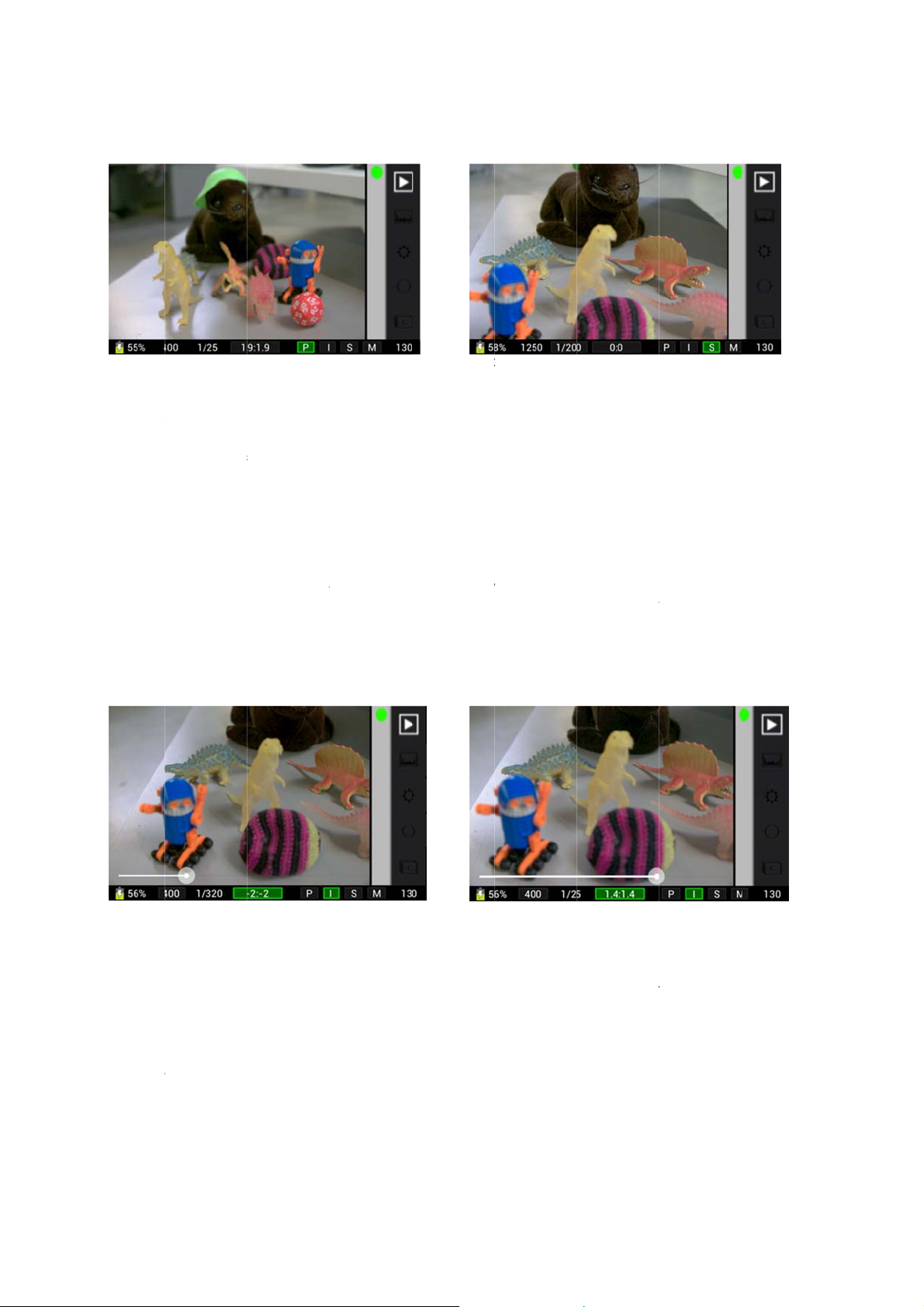
Setting
In ISO P
the avail
change t
Setting
In Shutte
through
speed in
Setting
Exposur
bottom o
colon sh
To chang
dragging
in the EV
the shooting
he ISO
iority Mode a
ble ISO spee
display the
he shutter
Priority Mod
ll of the avail
icator at the
he EV com
value compe
the screen, t
ws the comp
e the EV com
the slider to t
compensatio
mode by tap
d Manual Mo
s, from 100 t
urrent setting.
peed
and Manual
ble shutter s
ottom of the
pensation
nsation is acti
e figure to th
nsation curre
pensation set
e left; increa
indicator will
ing P, I, S or
e, you set th
6400. As yo
Mode, you se
eeds, from 1
creen will ch
e in all shoot
left of the co
ntly selected.
ing, tap on th
e the compe
change as y
in the shoo
ISO using t
u rotate the di
the shutter s
econd to 1/4
nge to displa
ing modes.
lon shows th
indicator. A
sation by dra
u go, reflecti
ing mode indi
e rear dial. R
al, the ISO in
peed using th
00th of a sec
the current
hen you view
target value i
lider opens
ging it to the
g the current
ator.
tating the dia
icator at the
front dial. R
nd. As you r
etting.
the EV comp
n f-stops; the
n screen. Lo
right. The figu
etting.
l will cycle thr
ottom of the
tating the dia
tate the dial,
nsation indic
igure to the ri
er the compe
re to the right
ugh all of
creen will
l will cycle
he shutter
tor at the
ght of the
nsation by
of the colon
Tapping
slider.
he EV compe
nsation indica
tor to open th
ging the slid
Dra
r to set the E
Compensat
on.
Openin
You can
screen. F
the Shutt
the Settin
pen the Setti
or details on
r button.
s menu
gs menu by
ach of the av
apping the S
ilable Settin
ttings icon in
s, see the Se
the Features
tings section
enu on the r
n page 12.
ight-hand sid
o close the m
of the
nu, press
Using t
To open
screen.
icon agai
Confiden
e live histo
he live expos
he histogram
.
ial – Property
ram
re histogram
will be displa
of Lytro, Inc.
tap the Histo
ed in the low
gram icon in t
r left-hand co
7
he Features
rner of the sc
enu on the ri
een. To close
ht-hand side
the histogra
of the
, tap the
Page 8
t
Evaluatin
g
h
f
h
n
n
a
a
c
c
s
n
w
a
o
l
o
a
i
c
e
w
o
s
e
e
v
t
T
m
n
z
e
e
o
h
s
y
n
n
t
o
t
e
o
p
o
l
t
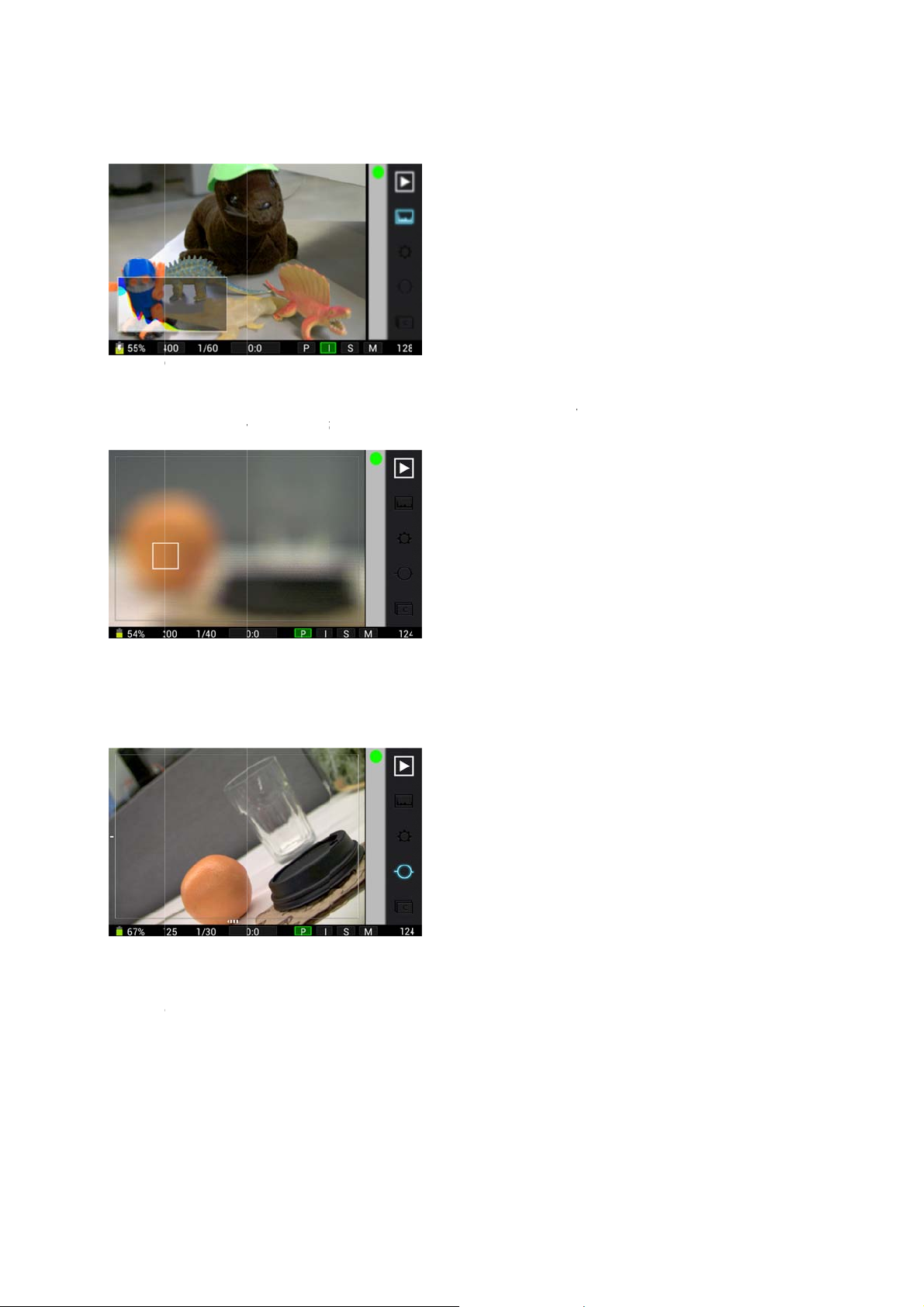
Using t
You can
screen in
g a potential
e on-scree
ocus the lens
the area you
hot using the
Tap to Fo
by rotating th
ould like to f
live histogra
us
focus ring o
ocus.
.
the lens itse
lf. Additionall
, you can als
focus by tap
ing on the
Focusing
Using t
To turn o
The level
icon agai
Leveling
Using
To take p
automati
from the
the lens by t
e Virtual H
the level ind
indicators wil
.
potential sh
flash
ictures using
ally when tak
amera.
pping on the
rizon
icators, tap th
appear at th
t using the le
flash, moun
ng a picture.
creen.
Virtual Hori
bottom and l
el indicators.
a compatible
o discontinu
on icon in the
ft-hand side
flash unit to t
using the fla
Features Me
f the screen.
e hot shoe a
h, power off
u on the righ
To turn off th
d power it on
he flash unit
-hand side of
level indicat
. The flash wi
r disconnect
the screen.
rs, tap the
l fire
he flash
Confiden
ial – Property
of Lytro, Inc.
8
Page 9
t
Revie
R
i
c
P
t
C G D P S
b
s
P
u
d
P
P
e
h
m
h
t
u
e
e
—
p
g
t
t
e
n
n
s
h
e
a
n
r
’
e
w
a
e
d
i
e
C
s
s
g
o
e
g
c
p
s
y
t
r
P
s
n
F
g
p
u
S
r
c
e
s
u
s
y
i
e
v
h
m
h
S
p
e
t
t
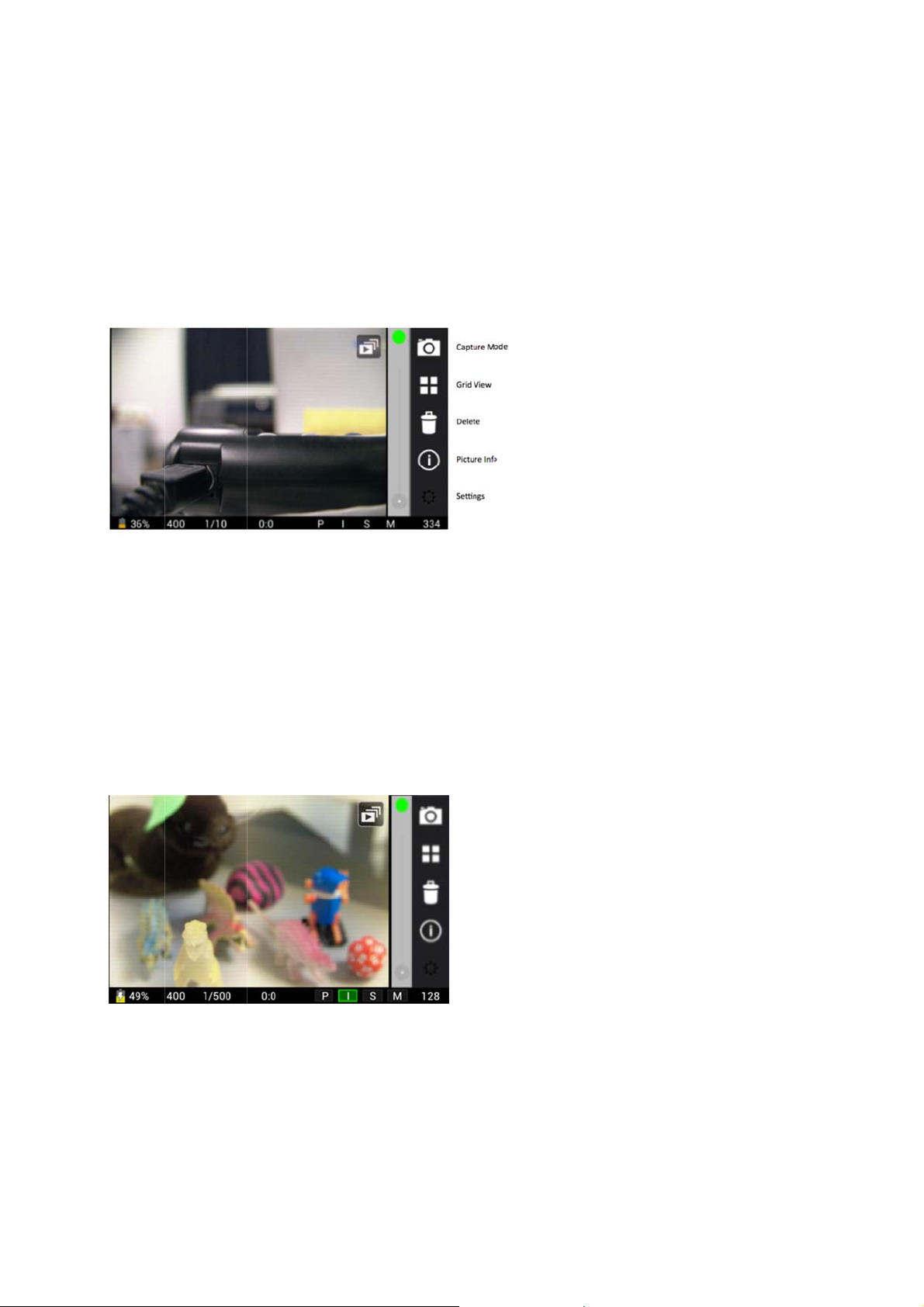
To enter
the scree
picture, s
left.
Touchs
w Mode
eview Mode
n. A new colu
mply swipe t
reen layou
from Capture
n of icons w
e touchscree
in Review
Mode, tap th
ill appear, an
from left to r
Mode
Review Mod
the last Livin
ght. To go ba
icon in the
Picture you
k to the first
eatures Men
took will be di
icture displa
on the right-
played. To vi
ed, swipe fro
and side of
ew an older
right to
Proces
A Living
When yo
right-han
rocess Pict
ouchscreen
apture Mod
rid View —
elete — del
icture Info
ettings — o
utton to exit)
ing a Livin
icture can be
review a pic
corner.
re — proces
— returns t
displays a thu
tes the pictur
shows met
ens the Setti
Picture fo
refocused by
ure that hasn
es the pictur
e camera to
mbnail grid of
currently di
data for the p
gs menu (thi
refocusin
simply tappin
t yet been pr
currently dis
apture Mode
the pictures
played
icture currentl
will replace
g the touchsc
cessed, the
layed, so yo
tored on the
displayed
he picture cu
een, but the
rocess Pictur
can refocus
D card
rently display
amera has to
icon will be
t by tapping t
d; press the
process the
isible over th
e
hutter
icture first.
upper
A Living
Tap the
When th
tapping t
Confiden
icture ready
rocess Pictur
progress win
e touchscree
ial – Property
o be process
icon, and it
dow disappe
.
of Lytro, Inc.
d.
ill disappear.
rs — usually i
You’ll see a
n just a seco
9
mall progres
d or two — th
window over
e picture is re
the center of
ady to be refo
he picture.
cused by
Page 10
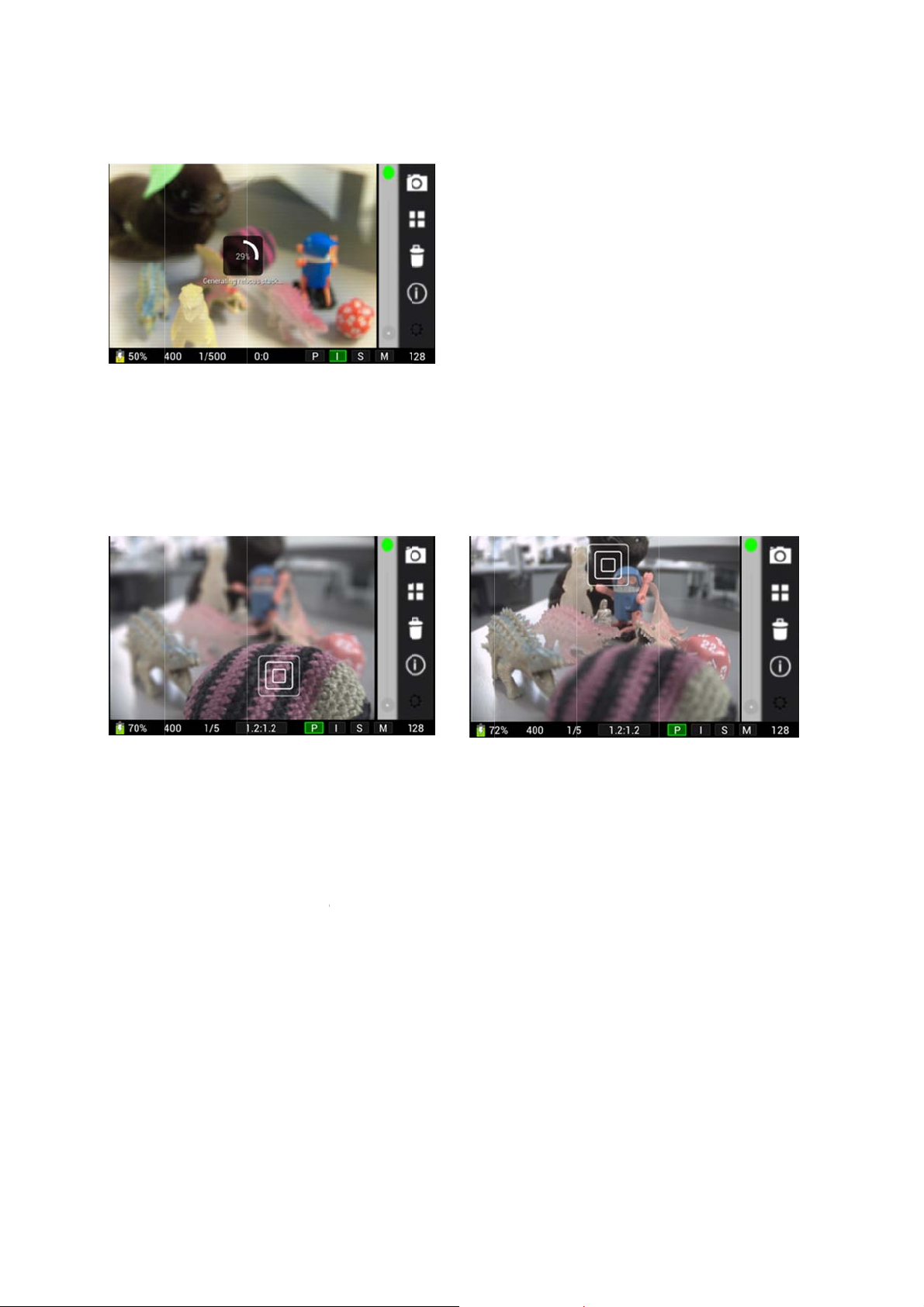
t
The cam
e
a
n
s
i
c
h
n
g
o
o
yi
h
o
g
a
g
e
s
c
g
n
e
I
o
r
r
u
m
p
a
n
t
e
c
w
w
h
e
e
c
e
a
c
e
a
h
d
X
s
c
n
e
h
s
m
a
v
e
u
r
p
t
e
e
s
o
t
h
n
You can
section o
Refocu
Once a p
focus as
outside t
Refocusi
Openin
You can
on each
Displa
To view t
hand edg
by swipin
close it,
ra processin
lso set the c
page 12 for
ing a Livin
cture has be
losely as po
e refocus ran
g a Living Pi
the Settin
pen the Setti
f the availabl
ng Picture
e metadata f
e of the scree
g. When you’
r tap anywhe
a Living Pict
mera to auto
details.
Picture
n processed,
sible to the s
ge — essenti
ture by tappi
s menu
gs menu by
Settings, se
nformation
r the picture
n. A window
e finished vie
e outside of t
re to allow r
atically proc
you can refo
ot you tap. D
lly the origin
g the touchs
apping the S
the Settings
currently displ
ill open, displ
ing the meta
e window.
focusing.
ss each new
us it by just t
pending on t
l depth of fiel
reen.
ttings icon at
section on pa
ayed, tap the
aying the met
data, tap the
picture the fir
pping the tou
e compositio
that was in
the upper rig
ge 12. To clo
Picture Infor
adata. You c
in the upper
t time you re
hscreen. The
of the pictur
ffect when yo
t-hand corne
e the menu,
ation icon in
n scroll up or
right-hand co
iew it. See th
camera will r
, some area
took the sh
of the screen
ress the Shu
he column on
down within t
rner of the wi
Settings
-center the
may fall
t.
. For details
ter button.
the right-
e window
dow to
Confiden
ial – Property
of Lytro, Inc.
10
Page 11
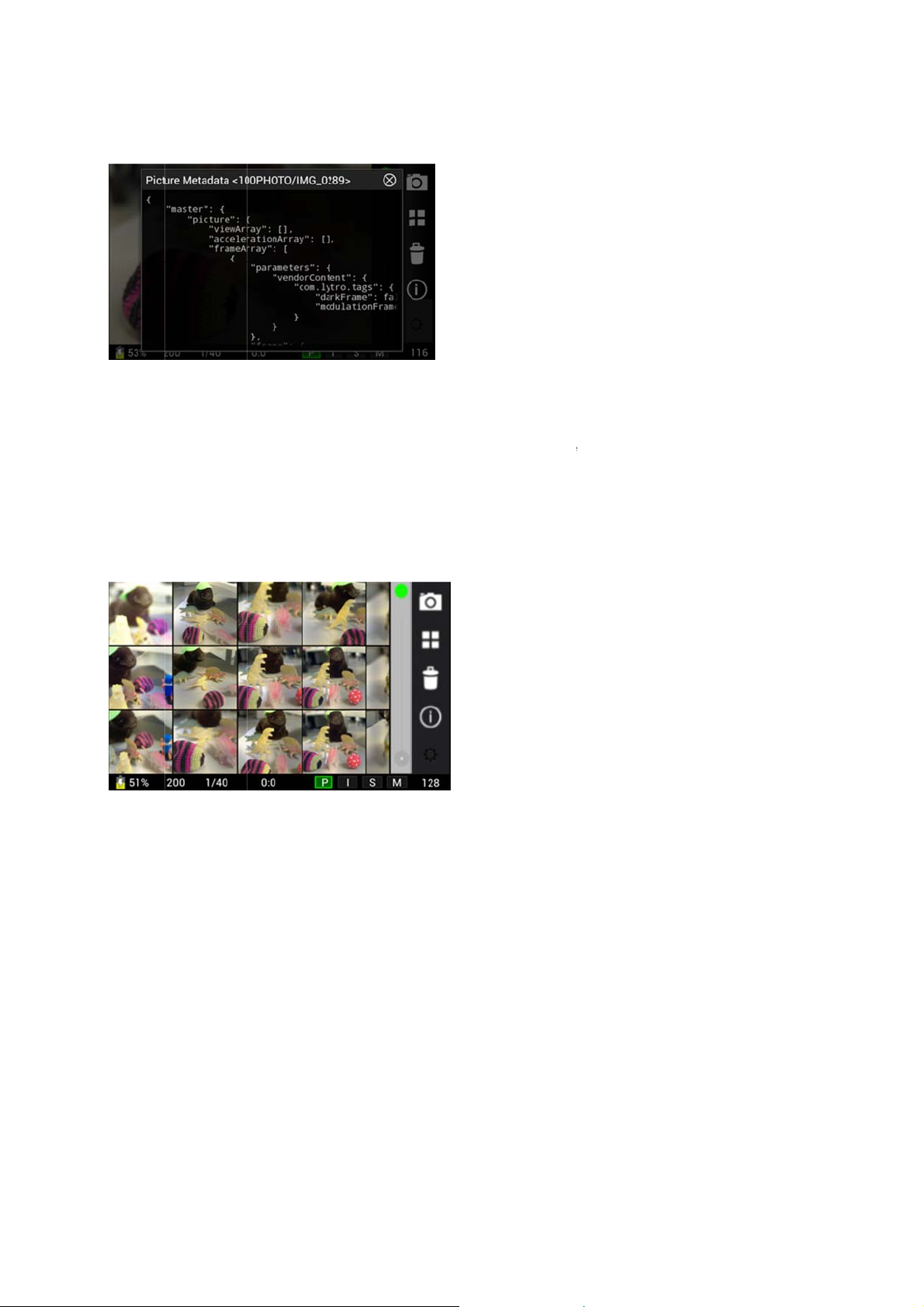
t
Viewing
m
g
w
G
h
m
S
t
g
e
u
w
-
c
G
y
e
n
f
A
s
h
e
i
c
s
w
e
c
e
d
T
r
s
V
o
e
Deletin
To delete
window
Using
To sort t
the colu
viewing.
from righ
etadata in th
a picture
the picture c
ill open with t
rid View
rough the Livi
n on the right
wipe the tou
to left. If you
Picture Info
rrently displa
o options: D
ng Pictures o
-hand edge o
hscreen from
tap on any of
window.
ed, tap the D
lete or Canc
the SD card
the screen.
left to right to
the thumbnail
elete icon in t
el. Tap Delet
more quickly,
thumbnail gr
view older pi
, the picture
e column on
to delete th
you can sele
d of 12 pictur
tures. To get
ill expand to
the right-han
picture.
t Grid View.
s will replace
back to the fi
fill the screen
edge of the
ap the Grid
the picture y
st 12 display
, closing Grid
creen. A
iew icon in
u were
d, swipe
View.
Reviewin
Confiden
pictures in
ial – Property
rid View.
of Lytro, Inc.
11
Page 12

Settings
You can open the Settings menu from either Capture or Review Mode by tapping the Settings icon at the upper righthand corner of the screen. The Settings menu will fill the screen, replacing whatever was displayed. Swipe the
touchscreen to scroll up or down through the menu. To close the menu, press the Shutter button.
Exposure Bracketing
With exposure bracketing activated, the camera will take one picture at a lower exposure compensation value and
one picture at a higher exposure compensation value in addition to the picture with the current exposure
compensation value.
Focus Bracketing
With focus bracketing activated, the camera will take one picture at a shallower focal length and one picture at a
deeper focal length in addition to the picture with the current focal length.
Note: If both Exposure Bracketing and Focus Bracketing are turned on, the camera will take nine pictures.
Auto Generate Refocus
Before you can refocus a Living Picture by tapping the touchscreen, the camera has to process the picture (see
Processing a Living Picture for refocusing in the Review Mode section on page 9). You can choose to have the
camera automatically process each picture the first time you review it.
Show Depth Value On Tap
When activated, tapping on the screen will temporarily show a depth value for that point.
Format SD card
For best performance, you should format your SD card when first using it in the camera, and again after using it in
any other device. Please note that formatting the card will erase any data stored on it. To begin, tap Format SD card
in the Settings menu. A window will open with two options: Format SD card or Cancel. To continue with formatting,
tap Format SD card. When formatting is complete, tap Done to return to the Settings menu.
Language
To change the language used on screen, tap Language in the Settings menu. A window will open, displaying the
language options. Tap the language you prefer, the window will close, and the camera will begin using the selected
language.
Screen Brightness
Use the slider to increase or decrease the brightness of the screen.
Confidential – Property of Lytro, Inc.
12
Page 13

The Fine Print
Repair and Charging
The camera does not contain any user serviceable parts. Do not disassemble or
attempt to repair your camera. Disassembly will void the warranty and may result in
electric shock or damage to the camera.
Lytro recommends you take normal precautions when charging the camera to avoid
electrical shock.
Operating Temperatures
Do not expose the camera to direct sunlight or high temperatures for extended periods
of time. Prolonged exposure to direct sunlight or extreme temperatures could void the
warranty and can cause permanent damage to your camera’s internal components.
Don’t leave your camera in your car, because temperatures in parked cars in the sun
can exceed this range.
Operate your Lytro camera in a place where the temperature is between 41°F to 104°F
(0°C to 40°C). Note that the camera will not charge when outside the camera's normal
operating range. Be sure to store your Lytro camera where the temperature is between
-4°F to 158°F (-20°C to 85°C).
While in operation, the Lytro camera may get warm to the touch, which is normal.
Liquids and Solvents
Do not use organic solvents to clean the camera or expose your camera to water or
other liquids; doing so may damage the camera and void the warranty. If liquid or
foreign objects enter your camera, immediately disconnect all cables from the camera,
turn off the camera, and contact Lytro customer service or the Lytro customer service
contact in your country. Refer to lytro.com/support for a list of customer service
contacts.
Safe Handling
Avoid dropping the camera or subjecting it to sudden impact; doing so may damage the
camera and void your warranty. If glass parts break as a result of sudden impact,
handle them with caution to avoid injury.
3D
A small percentage of people may be sensitive to viewing 3D images. If you feel ill
watching 3D, immediately discontinue 3D use and consider seeking medical attention.
Radio Frequency (RF) Exposure
The Lytro camera can receive and transmit low levels of radio frequency energy (RF)
through its antenna. To date, the weight of scientific evidence has not effectively linked
exposure to RF energy from wireless devices with any known health problems.
The Lytro camera has been tested and found to comply with FCC RF exposure limits
for portable devices and meets the FCC RF exposure guidelines. The specific
absorption rate (SAR) test report for the Lytro camera can be found on the FCC website.
RF Interference
The Lytro camera could interfere with other electronic devices if they are not adequately
shielded. Keep the Lytro camera at a distance of at least 6 inches (15 cm) from
pacemakers and other sensitive medical devices. If you suspect interference, hold
down the camera’s power button until the camera is completely switched off. Certain
places may prohibit the use of wi-fi enabled devices; in such locations, ensure that the
camera’s wi-fi connectivity is disabled.
Choking Hazard
This package may contain small parts, which may present a choking hazard to small
children. Keep the camera and its accessories away from small children.
Battery and Charging
Your Lytro camera comes partially charged from the factory. The amount of battery
charge will vary depending on temperature. Lytro recommends fully charging the
battery prior to using. Please see the section titled Charging the battery for further
instructions.
Confidential – Property of Lytro, Inc.
13
Page 14
t
File Size
s
e
A
g
p
c
w
v
v
e
v
a
p
n
o
l
s
m
t
e
t
r
e
C
e
o
e
e
t
N
e
s
s
e
c
n
o
b
k
0
o
c
a
c
m
t
u
p
n
o
c
s
o
o
.
a
o
t
e
n
n
n
c
o
C
p
c
e
m
t
e
t
g
a
c
c
e
e
e
m
r
e
S
t
s
s
p
A
t
e
n
h
a
s
a
e
e
e
n
q
t
a
v
h
e
s
s
e
t
c
d
s
f
e
a
a
i
e
n
r
-
.
g
s
b
s
n
n
o
m
y
e
e
i
i
e
t
x
S
N
u
a
m
n
a
p
m
e
r
n
n
e
o
a
n
e
m
f
u
a
e
1
u
d
r
s
e
p
n
d
v
n
m
-
m
y
t
t
f
y
y
R
f
t
r
The Lytro
point-andInternet s
License
Use of the
License A
FCC Com
This devi
following t
1. This de
2. This de
cause und
Note: This
digital de
provide re
This equi
installed a
to radio c
occur in a
radio or te
on, the u
following
• Reorien
• Increas
• Connec
receive
• Consult
Changes
responsibl
under FC
This devic
range.
Federal C
This equip
for genera
been test
OET Bull
contact wi
Notice to
operated.
Canadian
This devic
is subject
and (2) thi
undesired
d'Industrie
est autori
brouillage,
subi, mêm
The devi
informatio
transmissi
required
reduce ris
radars are
5650-585
devices.
IC Radiati
camera produ
hoot cameras.
rvice providers
greement
Lytro camera
reement (lytro.
liance State
e complies wi
o conditions:
ice may not ca
ice must acce
esired operatio
equipment has
ice, pursuant t
sonable prote
ment generate
d used in acc
mmunications
particular inst
evision recepti
er is encourag
easures:
or relocate th
the separatio
the equipmen
is connected.
the dealer or a
or modificatio
for complian
rules.
is restricted t
mmunication
ment is in com
l population/un
d in accordanc
tin 65 Supple
h the radiator a
consumers in
o other chann
Compliance S
complies with
to the followin
device must
operation of
Canada appli
ée aux deux
et (2) l'utilisat
si le brouillag
e could auto
to transmit,
n of control o
y the technolo
of harmful int
allocated as p
MHz and thes
on Exposure
es an .lfp file
We advise con
that charge fee
nd the Lytro a
om/legal/EUL
ent
h Part 15 of
se harmful int
t any interfere
.
been tested a
o part 15 of t
tion against h
, uses and c
rdance with th
However, the
llation. If this
n, which can b
ed to try to co
receiving ante
between the e
t into an outle
experienced r
s to this de
e could void t
indoor use wh
ommission (FC
liance with the
ontrolled expo
with the mea
ent C. This
nd your body.
he United Sta
ls can be sele
atement
Industry Cana
two condition
ccept any inter
the device. L
ables aux app
onditions suiv
ur de l'appare
est susceptibl
atically disco
or operationa
signaling info
gy. The band
rference to co
rimary users (i
e radars could
tatement
ype that is lar
umers to take
based on volu
plication is su
).
he FCC Rule
rference, and
nce received, i
d found to com
e FCC Rules.
rmful interfere
n radiate radi
instructions,
re is no guara
quipment does
determined b
rrect the interf
na.
uipment and r
on a circuit d
dio/TV technic
ice not expr
e user's autho
n operated in
C) Radiation E
Spatial-Peak
ure limits in A
urement metho
quipment sho
es and Canad
ted.
a license-exe
: (1) this devic
erence, includi
présent app
reils radio exe
ntes : (1) l'ap
l doit accepter
d'en compro
tinue transmis
l failure. This
mation or the
5150-5250 MH
channel mobil
e. they have p
cause interfere
er in size than
that into accou
me of transmitt
ject to the Lytr
. Operation is
cluding interfe
ply with the limi
These limits
ce in a reside
frequency en
ay cause har
ntee that inter
cause harmful
turning the eq
rence by one
ceiver.
fferent from th
an for help.
ssly approved
rity to operate
he 5.15 to 5.25
posure Statem
pecific Absorpt
SI/IEEE C95.
ds and proced
ld be installe
: only channe
pt RSS standa
e may not cau
g interference
reil est confo
mpts de licenc
areil ne doit
tout brouillage
ettre le fonctio
sion in case
is not inten
use of repetiti
z is only for i
satellite syste
riority) of 5250
ce and/or da
most standard
t when utilizing
d data.
, Inc. Software
subject to the
rence that ma
ts for a Class B
re designed to
tial installation.
rgy and, if no
ful interference
erence will no
interference to
ipment off and
or more o
t to which the
by the part
the equipment,
GHz frequenc
nt
ion Rate (SAR)
-1999 and has
res specified in
and operated
ls 1-11 can be
d(s). Operation
e interference,
that may cause
rme aux CN
. L'exploitation
as produire de
radioélectrique
nement.
of absence o
ed to prohibi
e codes where
door usage to
s. High-powe
5350 MHz and
age to LE-LAN
the
Confiden
ial – Property
of Lytro, Inc.
14
Page 15
t
This equi
p
C
a
t
S
t
d
e
o
e
p
a
c
c
a
s
は
m
y
は
r
X
L
명
M
제
설
l
.
n
E
e
d
l
a
o
m
S[##
a
n
B
t
t
e
c
y
e
o
て
e
a
て
X
y
_
신
f
e
e
d
e
c) t
d
o
i
f
s
d
能
能
X
y
o
c
s
a
a
p
+
o
p
d
o
n
i
t
a
t
n
t
과
c
t
e
4
o
r
e
u
d
n
n
w
m
e
e
e
t
스
h
0
.
3
c
t
f
c
t
t
y
t
limits in I
methods
and opera
CAN ICE
The Coun
States an
Singapor
Co
IDA
Taiwan W
Warning f
power, int
without ex
must not
interferen
interferen
communic
be able t
medical,
spectrum.
この製品
Japan Co
ment is compli
RSS-102 a
nd procedures
ed with minimu
-3 (B)/NMB-3(
ry Code Selec
Canada.
Wireless Cer
plies with
tandards
#####]
ireless Statem
r wireless devi
nded use or fe
licit consent b
ffect air traffic
e is detected,
e is eliminated.
tion permitted
o tolerate int
cientific, etc.)
屋内におい
pliance Stat
nce with SAR
d had been t
specified in IE
m distance 20
ion feature is
ification
nt
es operating in
atures of this l
operating cert
safety or inter
the user mu
“Lawful electro
by electronic c
rference from
r low powere
のみ使用可
ment
for general po
sted in accor
EE 1528. This
m between the
isabled for pr
the 2.4GHz zo
w powered rad
fication authori
ere with lawful
t cease oper
nic communica
ommunication l
lawful electro
radios opera
です
ulation/uncont
ance with th
equipment sho
radiator & your
ducts markete
e: The freque
o device must
y. This low po
electronic co
tion of the d
ion” means wir
aws. Low pow
ic communica
ing within the
olled exposure
measuremen
ld be installed
body.
in the United
cy, transmitting
ot be changed
er radio device
munications. I
vice until this
less electroni
red radio mus
ion (industrial,
ISM frequenc
[s
この製品
South Ko
MSIP-XX
상 호 명:
기자재의
제조연월:
제 조 자/
해당 무선
CE Comp
Lytro, Inc
requireme
2004/108/
lytro.com/l
Manufactu
Authorize
Wahis 53,
mail@obe
Disposal
Your Lytr
mbol] [identific
屋内におい
ea
-XXX-XXXXXX
ytro, Inc.
칭 (모델명): L
anufactured [
조 국 : Lytro, I
비는 전파혼
iance Stateme
hereby decla
ts and other
C. A copy o
gal/complianc
rer: Lytro, Inc.,
representativ
1030 Brussels,
is.net.
nd Recycling
camera shoul
tion code]
のみ使用可
XXXXXX
tro camera m
_____] 2014
nc. Made in Ch
가능성이 있으
nt
res that this
relevant provi
the EU Decl
.
1300 Terra Bell
for CE com
Belgium, Tel:
Information
be disposed
です
del [___]
ina.
므로 인명 안전
amera is in
ions of Direc
ration of Con
Ave., Mountai
liance purpos
32.2.732.59.5
f properly acc
관련된 서비
ompliance wit
ive 1999/5/EC
formity is avai
n View, CA 94
s: Obelis S.A
, Fax: +32.2.7
rding to appli
는 할 수 없음
the essential
and Directive
lable online a
43, USA
, Bd. Général
2.60.03; Email:
able local laws
Confiden
ial – Property
of Lytro, Inc.
15
Page 16

and regulations. Because this product contains a battery, please dispose of product
separately from household waste. When your Lytro camera reaches its end of life,
contact Lytro or your local authorities to learn about recycling options.
Disposal and Recycling Information (EU)
This symbol means that this product must not be disposed of with your other household
waste. To dispose of your Lytro camera, take it to a designated collection point for the
recycling of waste electrical and electronic equipment. The separate collection and
recycling of your waste equipment at the time of disposal will help to conserve natural
resources and ensure that it is recycled in a manner that protects human health and the
environment. For more information about where you can drop off your waste equipment
for recycling, please contact your local city office, your household waste disposal
service or the retailer from whom you purchased the product.
Warranty Information
United States
Limited Warranty of Hardware
The limited warranties provided by Lytro, Inc. (“Lytro,” “we,” or “us”) apply only to new
Lytro-branded cameras and related accessory products (“Accessories” and collectively
with Lytro cameras, “Lytro Products”) that you purchased in the United States directly
from Lytro or an authorized Lytro reseller for your own use, and not for resale.
Lytro warrants that the Lytro camera will be free from defects in workmanship and
materials, under normal non-commercial use, for one (1) year from the original
purchase date, and that the Accessories will be free from defects in workmanship and
materials, under normal non-commercial use, for ninety (90) days from the original
purchase date.
Any products purchased from Lytro that are not Lytro-branded products are covered by
the warranty, if any, of the respective branded manufacturer.
Our warranties do not apply to:
• Software, including any firmware, operating system or application software delivered
to you either prior to or subsequent to delivery of the Lytro Product to you;
• Any website services provided by Lytro or third parties in connection with the Lytro
Product;
• Any third party products (including software) or services, included with or used with
the Lytro Product, or damages to the Lytro Product caused by third party products or
services;
• Damage to the surface of the Lytro Product, including cracks or scratches to the LCD
display, or any other cosmetic damage;
• Damage that results from accident, abuse, misuse, neglect or any use of the Lytro
Product other than for its intended use;
• Damage that results from any unauthorized attempts to open, maintain, repair or
modify the Lytro Product; and
• Damage that results from the Lytro Product being subjected to abnormal physical,
thermal or electrical stress, including water, dust, power fluctuations or other hazards.
As your sole and exclusive remedy and Lytro’s entire liability under this warranty, Lytro
will, at its option, repair the Lytro Product or replace it with a comparable Lytro Product.
Replacement Lytro Products and parts used to repair the Lytro Products may be new,
refurbished or reconditioned. Repaired or replaced Lytro cameras are warranted for the
unexpired portion of the original warranty period or 90 days from the date of shipment
of the repaired or replacement Lytro Product, whichever is longer. Repaired or
replaced Accessories are warranted for the unexpired portion of the original warranty
period. All Lytro Products and parts that are replaced become the property of Lytro.
Confidential – Property of Lytro, Inc.
16
Page 17

You must contact Lytro Customer Support within the warranty period and furnish a
dated proof of original purchase prior to the return of any Lytro Product for warranty
service. To obtain contact information, refer to Lytro’s website at
http://www.lytro.com/support. Upon validation of your warranty entitlement, Lytro will
issue a Return Material Authorization (RMA) number along with return instructions.
You must ship the Lytro Product to the designated location, postage pre-paid, in original
or equivalent packaging within five (5) days after Lytro’s issuance of an RMA number.
The returned Lytro Products must not have missing or altered serial numbers or other
identification marks that appear on the Lytro Products as delivered. Lytro will not be
responsible for any Lytro Product damaged or lost in transit. Lytro will return the
repaired or replacement Lytro Product to you, postage pre-paid, in the United States.
Lytro will not be responsible for the loss or damage of any software, data or information
contained in or stored on any Lytro Product. Data recovery is not included in the
warranty service. Prior to shipping the Lytro camera back to Lytro, you should
download all photos and other personal information from the Lytro camera. Lytro and
its agents may delete any and all such photos and other personal information without
any liability.
THESE LIMITED WARRANTIES ARE IN LIEU OF, AND LYTRO EXPRESSLY
DISCLAIMS, ALL OTHER WARRANTIES AND CONDITIONS, EXPRESS OR IMPLIED,
INCLUDING ANY IMPLIED WARRANTIES AND CONDITIONS OF
MERCHANTABILITY, FITNESS FOR A PARTICULAR PURPOSE AND
NONINFRINGEMENT, AND ANY WARRANTIES AND CONDITIONS ARISING OUT
OF COURSE OF DEALING OR USAGE OF TRADE. IN THE EVENT THAT THE
DISCLAIMER OF ANY IMPLIED WARRANTIES IS PROHIBITED BY STATUTE, SUCH
IMPLIED WARRANTIES ARE LIMITED TO THE DURATION OF THESE EXPRESS
WARRANTIES. NO ADVICE OR INFORMATION, WHETHER ORAL OR WRITTEN,
OBTAINED FROM LYTRO OR ELSEWHERE WILL CREATE ANY WARRANTY OR
CONDITION NOT EXPRESSLY STATED IN THIS LIMITED WARRANTY. SOME
JURISDICTIONS DO NOT ALLOW DISCLAIMERS OF IMPLIED WARRANTIES OR
LIMITATIONS ON HOW LONG AN IMPLIED WARRANTY LASTS, SO THE ABOVE
LIMITATION MAY NOT APPLY TO YOU.
Limitations of Liability
LYTRO, ITS AFFILIATES, AND THEIR RESPECTIVE OFFICERS, DIRECTORS,
EMPLOYEES, AGENTS, LICENSORS AND SERVICE PROVIDERS WILL NOT BE
LIABLE FOR ANY (1) PERSONAL INJURY; (2) SPECIAL, INCIDENTAL, EXEMPLARY,
PUNITIVE OR CONSEQUENTIAL DAMAGES (INCLUDING LOSS OF USE, DATA,
BUSINESS, OR PROFITS); OR (3) COST OF PROCURING SUBSTITUTE
PRODUCTS OR SERVICES, IN EACH CASE ARISING OUT OF OR RELATED TO
YOUR USE OR INABILITY TO USE LYTRO.COM, THE LYTRO WEBSTORE, OR ANY
PRODUCTS, SERVICES, CONTENT, MATERIALS OR INFORMATION PURCHASED
FROM OR PROVIDED BY LYTRO, WHETHER SUCH LIABILITY ARISES FROM ANY
CLAIM BASED UPON CONTRACT, WARRANTY, TORT (INCLUDING NEGLIGENCE),
STRICT LIABILITY OR OTHERWISE. THESE LIMITATIONS WILL APPLY EVEN IF
LYTRO HAS BEEN ADVISED OF, OR SHOULD HAVE KNOWN OF, THE
POSSIBILITY OF SUCH DAMAGES. IN NO EVENT SHALL LYTRO’S TOTAL
LIABILITY TO YOU FOR ALL DAMAGES (OTHER THAN AS MAY BE REQUIRED BY
APPLICABLE LAW IN CASES OF PERSONAL INJURY) EXCEED THE GREATER OF
(1) THE AMOUNT YOU PAID TO LYTRO FOR THE PRODUCT OR SERVICE GIVING
RISE TO THE DAMAGES, OR (2) US$25. THE LIMITATIONS IN THIS PARAGRAPH
ARE A PART OF THE BARGAIN BETWEEN THE PARTIES AND APPLY EVEN IF
THE LIMITED REMEDIES PROVIDED HEREIN FAIL OF THEIR ESSENTIAL
PURPOSE. SOME JURISDICTIONS DO NOT ALLOW THE LIMITATION OR
EXCLUSION OF LIABILITY, SO THE ABOVE LIMITATIONS MAY NOT APPLY TO
YOU.
See the Lytro, Inc. Software License Agreement for the limitations of liability applicable
to the software on and for the Lytro camera.
Australia
Limited Warranty of Hardware
The limited warranties provided by Lytro, Inc. (“Lytro,” “we,” or “us”) apply only to new
Lytro-branded cameras and related accessory products (“Accessories” and collectively
with Lytro cameras, “Lytro Products”) that you purchased in Australia directly from an
authorized Lytro reseller for your own use, and not for resale.
Confidential – Property of Lytro, Inc.
17
Page 18

Lytro warrants that the Lytro camera will be free from defects in workmanship and
materials, under normal non-commercial use, for one (1) year from the original
purchase date, and that the Accessories will be free from defects in workmanship and
materials, under normal non-commercial use, for ninety (90) days from the original
purchase date. The benefit of this warranty is in addition to other rights you have under
a law in relation to the products to which Lytro’s warranty relates. Lytro products come
with guarantees that cannot be excluded under the Australian Consumer Law. You are
entitled to a replacement or refund for a major failure and for compensation for any
other reasonably foreseeable loss or damage. You are also entitled to have the goods
repaired or replaced if the goods fail to be of acceptable quality and the failure does not
amount to a major failure.
Any products purchased from any authorized Lytro reseller that are not Lytro-branded
products are covered by the warranty, if any, of the respective branded manufacturer
together with any other guarantees to which you are entitled at law.
Our warranties do not, to the fullest extent permitted by law, apply to:
• Software, including any firmware, operating system or application software delivered
to you either prior to or subsequent to delivery of the Lytro Product to you;
• Any website services provided by Lytro or third parties in connection with the Lytro
Product;
• Any third party products (including software) or services, included with or used with
the Lytro Product, or damages to the Lytro Product caused by third party products or
services;
• Damage to the surface of the Lytro Product, including cracks or scratches to the LCD
display, or any other cosmetic damage;
• Damage that results from accident, abuse, misuse, neglect or any use of the Lytro
Product other than for its intended use;
• Damage that results from any unauthorized attempts to open, maintain, repair or
modify the Lytro Product; and
• Damage that results from the Lytro Product being subjected to abnormal physical,
thermal or electrical stress, including water, dust, power fluctuations or other hazards.
To the fullest extent permitted by law, your sole and exclusive remedy and Lytro’s entire
liability under this express warranty, Lytro will, at its option, repair the Lytro Product or
replace it with a comparable Lytro Product. This is not intended to limit rights available
to you otherwise at law. Replacement Lytro Products and parts used to repair the Lytro
Products may be new, refurbished or reconditioned. Repaired or replaced Lytro
cameras are warranted for the unexpired portion of the original warranty period or 90
days from the date of shipment of the repaired or replacement Lytro Product, whichever
is longer. Repaired or replaced Accessories are warranted for the unexpired portion of
the original warranty period. All Lytro Products and parts that are replaced become the
property of Lytro.
To claim warranty service when required you should:
• Contact the Lytro customer service contact in your country within the warranty period.
To obtain contact information, refer to Lytro’s website at http://www.lytro.com/support.
• Furnish a dated proof of original purchase prior to the return of any Lytro Product for
warranty service.
• Upon validation of your warranty entitlement, the Lytro customer service contact in
your country will issue a Return Material Authorization (RMA) number along with return
instructions. You must ship the Lytro Product to the designated location, in original or
equivalent packaging within five (5) days after issuance of an RMA number. Postage
and insurance to the designated location must be arranged by you. The returned Lytro
Products must not have missing or altered serial numbers or other identification marks
that appear on the Lytro Products as delivered.
• The Lytro customer service contact in your country will return the repaired or
replacement Lytro Product to you, postage pre-paid, in Australia.
To the fullest extent permitted by law, Lytro will not be responsible for the loss or
damage of any software, data or information contained in or stored on any Lytro
Product. Data recovery is not included in the warranty service. Prior to shipping the
Lytro camera back to the Lytro customer service contact in your country, you should
download all photos and other personal information from the Lytro camera. Lytro and
its agents may delete any and all such photos and other personal information without
any liability.
Limitation of Liability
Confidential – Property of Lytro, Inc.
18
Page 19

@ly
TO THE FULLEST EXTENT PERMITTED BY LAW AND SUBJECT ALWAYS TO
YOUR STATUTORY RIGHTS SET OUT IN THE SECOND PARAGRAPH OF THIS
GUARANTEE, LYTRO, OTHER MEMBERS OF ITS GROUP OF COMPANIES AND
THEIR RESPECT OFFICERS, DIRECTORS, EMPLOYEES, AGENTS, LICENSORS
AND SERVICE PROVIDERS WILL NOT BE LIABLE UNDER OR IN RELATION TO
THIS MANUFACTURER’S LIMITED WARRANTY FOR ANY:
(1) LOSS OR DAMAGE ARISING FROM A LOSS OF USE, LOSS OF DATA, LOSS OF
PROFITS, LOSS OF REVENUE, LOSS OF BUSINESS OR COSTS OF OBTAINING
SUBSTITUTE GOODS OR SERVICES; OR
(2) ANY OTHER INDIRECT OR CONSEQUENTIAL LOSS OR DAMAGE.
Lytro, Inc.
1300 Terra Bella Avenue
Mountain View, CA, 94043, USA
Phone: +1-650-316-8888
Fax: +1-650-227-2251
Email: support
Canada
Limited Warranty of Hardware
The limited warranties provided by Lytro, Inc. (“Lytro,” “we,” or “us”) apply only to new
Lytro-branded cameras and related accessory products (“Accessories” and collectively
with Lytro cameras, “Lytro Products”) that you purchased in Canada directly from Lytro
or an authorized Lytro reseller for your own use, and not for resale.
Lytro warrants to the first purchaser of the Lytro Products that the Lytro camera will be
free from defects in workmanship and materials, under normal non-commercial use, for
one (1) year from the original purchase date, and that the Accessories will be free from
defects in workmanship and materials, under normal non-commercial use, for ninety
(90) days from the original purchase date (“Lytro Product Warranty”).
Any products purchased from an authorized Lytro reseller that are not Lytro-branded
products are covered by the warranty, if any, of the respective branded manufacturer,
and not the Lytro Product Warranty.
The Lytro Product Warranty does not apply to:
• Software, including any firmware, operating system or application software
delivered to you either prior to or subsequent to delivery of the Lytro Product to you;
• Any website services provided by Lytro or third parties in connection with the
Lytro Product;
• Any third party products (including software) or services, included with or
used with the Lytro Product, or damages to the Lytro Product caused by third party
products or services;
• Damage to the surface of the Lytro Product, including cracks or scratches to
the LCD display, or any other cosmetic damage;
• Damage that results from accident, abuse, misuse, neglect or any use of the
Lytro Product other than for its intended use;
• Damage that results from any unauthorized attempts to open, maintain,
repair or modify the Lytro Product;
• Lytro Products used for rental or commercial purposes; and
• Damage that results from the Lytro Product being subjected to abnormal
physical, thermal or electrical stress, including water, dust, power fluctuations or other
hazards.
As your sole and exclusive remedy and Lytro’s entire liability under the Lytro Product
Warranty, Lytro will, at its option, repair the Lytro Product or replace it with a
comparable Lytro Product. Replacement Lytro Products and parts used to repair the
Lytro Products may be new, refurbished or reconditioned. Repaired or replaced Lytro
cameras are warranted for the unexpired portion of the original warranty period or 90
days from the date of shipment of the repaired or replacement Lytro Product, whichever
is longer. Repaired or replaced Accessories are warranted for the unexpired portion of
the original warranty period. All Lytro Products and parts that are replaced become the
property of Lytro.
You must contact Lytro customer support within the warranty period and furnish a dated
tro.com
Confidential – Property of Lytro, Inc.
19
Page 20

proof of original purchase prior to the return of any Lytro Product for warranty service.
To obtain customer support contact information, refer to Lytro’s website at
http://www.lytro.com/support. Upon validation of your warranty entitlement, Lytro will
issue a return material authorization (RMA) number along with return instructions. You
must ship the Lytro Product to the designated location, postage pre-paid, in original or
equivalent packaging within five (5) days after Lytro’s issuance of an RMA number.
The returned Lytro Products must not have missing or altered serial numbers or other
identification marks that appear on the Lytro Products as delivered. Lytro will not be
responsible for any Lytro Product damaged or lost in transit. Lytro will return the
repaired or replacement Lytro Product to you, postage pre-paid, in Canada.
Lytro will not be responsible for the loss or damage of any software, data or information
contained in or stored on any Lytro Product. Data recovery is not included in the
warranty service. Prior to shipping the Lytro camera back to Lytro, you should
download all photos and other personal information from the Lytro camera. Lytro and
its agents may delete any and all such photos and other personal information without
any liability.
THESE LIMITED WARRANTIES ARE, EXCEPT FOR CONSUMER PURCHASERS
DOMICILED IN THE PROVINCE OF QUEBEC AND EXCEPT TO THE EXTENT
PROHIBITED BY APPLICABLE LAW, IN LIEU OF, AND LYTRO EXPRESSLY
DISCLAIMS, ALL OTHER WARRANTIES AND CONDITIONS, EXPRESS OR IMPLIED,
INCLUDING ANY IMPLIED WARRANTIES AND CONDITIONS OF
MERCHANTABILITY, FITNESS FOR A PARTICULAR PURPOSE AND
NONINFRINGEMENT, AND ANY WARRANTIES AND CONDITIONS ARISING OUT
OF COURSE OF DEALING OR USAGE OF TRADE. IN THE EVENT THAT THE
DISCLAIMER OF ANY IMPLIED WARRANTIES IS PROHIBITED BY LAW, SUCH
IMPLIED WARRANTIES ARE LIMITED TO THE DURATION OF THESE EXPRESS
WARRANTIES OR TO THE EXTENT PERMITTED BY LAW. EXCEPT FOR
CONSUMER PURCHASERS DOMICILED IN THE PROVINCE OF QUEBEC NO
ADVICE OR INFORMATION, WHETHER ORAL OR WRITTEN, OBTAINED FROM
LYTRO OR ELSEWHERE WILL CREATE ANY WARRANTY OR CONDITION NOT
EXPRESSLY STATED IN THIS LIMITED WARRANTY. SOME JURISDICTIONS DO
NOT ALLOW DISCLAIMERS OF IMPLIED WARRANTIES OR LIMITATIONS ON HOW
LONG AN IMPLIED WARRANTY LASTS, SO THE ABOVE DISCLAIMERS OR
LIMITATIONS MAY NOT APPLY TO YOU.
Limitations of Liability (not applicable to consumer purchasers domiciled in the Province
of Quebec to the extent prohibited under Quebec law):
LYTRO, ITS AFFILIATES, AND THEIR RESPECTIVE OFFICERS, DIRECTORS,
EMPLOYEES, AGENTS, LICENSORS AND SERVICE PROVIDERS WILL NOT BE
LIABLE FOR ANY (1) PERSONAL INJURY; (2) SPECIAL, INCIDENTAL, EXEMPLARY,
PUNITIVE OR CONSEQUENTIAL DAMAGES (INCLUDING LOSS OF USE, DATA,
BUSINESS, OR PROFITS); OR (3) COST OF PROCURING SUBSTITUTE
PRODUCTS OR SERVICES, IN EACH CASE ARISING OUT OF OR RELATED TO
YOUR USE OR INABILITY TO USE LYTRO.COM, THE LYTRO WEBSTORE, OR ANY
PRODUCTS, SERVICES, CONTENT, MATERIALS OR INFORMATION PURCHASED
FROM OR PROVIDED BY LYTRO, WHETHER SUCH LIABILITY ARISES FROM ANY
CLAIM BASED UPON CONTRACT, WARRANTY, TORT (INCLUDING NEGLIGENCE),
STRICT LIABILITY OR OTHERWISE. THESE LIMITATIONS WILL APPLY EVEN IF
LYTRO HAS BEEN ADVISED OF, OR SHOULD HAVE KNOWN OF, THE
POSSIBILITY OF SUCH DAMAGES. IN NO EVENT SHALL LYTRO’S TOTAL
LIABILITY TO YOU FOR ALL DAMAGES (OTHER THAN AS MAY BE REQUIRED BY
APPLICABLE LAW IN CASES OF PERSONAL INJURY) EXCEED THE GREATER OF
(1) THE AMOUNT YOU PAID TO LYTRO FOR THE PRODUCT OR SERVICE GIVING
RISE TO THE DAMAGES, OR (2) US$25. THE LIMITATIONS IN THIS PARAGRAPH
ARE A PART OF THE BARGAIN BETWEEN THE PARTIES AND APPLY EVEN IF
THE LIMITED REMEDIES PROVIDED HEREIN FAIL OF THEIR ESSENTIAL
PURPOSE. SOME JURISDICTIONS DO NOT ALLOW THE LIMITATION OR
EXCLUSION OF LIABILITY, SO THE ABOVE LIMITATIONS OR DISCLAIMERS MAY
NOT APPLY TO YOU.
This limited warranty statement is, except for consumer purchasers domiciled in the
Province of Quebec, governed by the laws in the Province of Canada in which the
purchaser has purchased the Lytro Product.
See the Lytro, Inc. Software License Agreement for the limitations of liability applicable
to the software on and for the Lytro camera.
Confidential – Property of Lytro, Inc.
20
Page 21

Hong Kong, Singapore and Taiwan
Limited Warranty of Hardware
The limited warranties provided by Lytro, Inc., 1300 Terra Bella Avenue, Mountain View,
California 94043, USA (“Lytro,” “we,” or “us”) apply only to new Lytro-branded cameras
and related accessory products (“Accessories” and collectively with Lytro cameras,
“Lytro Products”) that you purchased directly from Lytro or an authorized Lytro
distributor or reseller for your own use, and not for resale.
Lytro warrants that the Lytro camera will be free from defects in workmanship and
materials, under normal non-commercial use, for one (1) year from the original
purchase date, and that the Accessories will be free from defects in workmanship and
materials, under normal non-commercial use, for ninety (90) days from the original
purchase date.
Any products purchased from the authorized Lytro reseller that are not Lytro-branded
products are covered by the warranty, if any, of the respective branded manufacturer.
Our warranties do not apply to:
• Software, including any firmware, operating system or application software
delivered to you either prior to or subsequent to delivery of the Lytro Product to you;
• Any website services provided by Lytro or third parties in connection with the
Lytro Product;
• Any third party products (including software) or services, included with or
used with the Lytro Product, or damages to the Lytro Product caused by third party
products or services;
• Damage to the surface of the Lytro Product, including cracks or scratches to
the LCD display, or any other cosmetic damage;
• Damage that results from accident, abuse, misuse, neglect or any use of the
Lytro Product other than for its intended use;
• Damage that results from any unauthorized attempts to open, maintain,
repair or modify the Lytro Product; and
• Damage that results from the Lytro Product being subjected to abnormal
physical, thermal or electrical stress, including water, dust, power fluctuations or other
hazards.
In so far as is permitted by applicable law, your sole and exclusive remedy and Lytro’s
entire liability under this warranty, the Lytro customer service contact in your country
will, at its option, repair the Lytro Product or replace it with a comparable Lytro Product.
Replacement Lytro Products and parts used to repair the Lytro Products may be new,
refurbished or reconditioned. Repaired or replaced Lytro cameras are warranted for the
unexpired portion of the original warranty period or 90 days from the date of shipment
of the repaired or replacement Lytro Product, whichever is longer. Repaired or
replaced Accessories are warranted for the unexpired portion of the original warranty
period. All Lytro Products and parts that are replaced become the property of Lytro.
You must contact the Lytro customer service contact in your country within the warranty
period and furnish a dated proof of original purchase prior to the return of any Lytro
Product for warranty service. To obtain contact information, refer to Lytro’s website at
http://www.lytro.com/support. Upon validation of your warranty entitlement, Lytro will
issue a Return Material Authorization (RMA) number along with return instructions.
You must ship the Lytro Product to the designated location, postage pre-paid, in original
or equivalent packaging within five (5) days after Lytro’s issuance of an RMA number.
The returned Lytro Products must not have missing or altered serial numbers or other
identification marks that appear on the Lytro Products as delivered. The Lytro customer
service contact in your country will not be responsible for any Lytro Product damaged or
lost in transit. The Lytro customer service contact in your country will return the
repaired or replacement Lytro Product to you, postage pre-paid, in your respective
country.
Lytro will not be responsible for the loss or damage of any software, data or information
contained in or stored on any Lytro Product. Data recovery is not included in the
warranty service. Prior to shipping the Lytro camera back to Lytro, you should
download all photos and other personal information from the Lytro camera. Lytro and
its agents may delete any and all such photos and other personal information without
any liability.
THESE LIMITED WARRANTIES ARE IN LIEU OF, AND LYTRO EXPRESSLY
DISCLAIMS, ALL OTHER WARRANTIES AND CONDITIONS, EXPRESS OR IMPLIED,
Confidential – Property of Lytro, Inc.
21
Page 22

INCLUDING ANY IMPLIED WARRANTIES AND CONDITIONS OF
MERCHANTABILITY, FITNESS FOR A PARTICULAR PURPOSE AND
NONINFRINGEMENT, AND ANY WARRANTIES AND CONDITIONS ARISING OUT
OF COURSE OF DEALING OR USAGE OF TRADE. IN THE EVENT THAT THE
DISCLAIMER OF ANY IMPLIED WARRANTIES IS PROHIBITED BY STATUTE, SUCH
IMPLIED WARRANTIES ARE LIMITED TO THE DURATION OF THESE EXPRESS
WARRANTIES. NO ADVICE OR INFORMATION, WHETHER ORAL OR WRITTEN,
OBTAINED FROM LYTRO OR ELSEWHERE WILL CREATE ANY WARRANTY OR
CONDITION NOT EXPRESSLY STATED IN THIS LIMITED WARRANTY. SOME
JURISDICTIONS DO NOT ALLOW DISCLAIMERS OF IMPLIED WARRANTIES OR
LIMITATIONS ON HOW LONG AN IMPLIED WARRANTY LASTS, SO THE ABOVE
LIMITATION MAY NOT APPLY TO YOU.
Limitations of Liability
IN SO FAR AS IS PERMITTED BY APPLICABLE LAW, LYTRO, ITS AFFILIATES,
AND THEIR RESPECTIVE OFFICERS, DIRECTORS, EMPLOYEES, AGENTS,
LICENSORS AND SERVICE PROVIDERS WILL NOT BE LIABLE FOR ANY (1)
PERSONAL INJURY; (2) SPECIAL, INCIDENTAL, EXEMPLARY, PUNITIVE OR
CONSEQUENTIAL DAMAGES (INCLUDING LOSS OF USE, DATA, BUSINESS, OR
PROFITS); OR (3) COST OF PROCURING SUBSTITUTE PRODUCTS OR
SERVICES, IN EACH CASE ARISING OUT OF OR RELATED TO YOUR USE OR
INABILITY TO USE LYTRO.COM, THE LYTRO WEBSTORE, OR ANY PRODUCTS,
SERVICES, CONTENT, MATERIALS OR INFORMATION PURCHASED FROM OR
PROVIDED BY LYTRO, WHETHER SUCH LIABILITY ARISES FROM ANY CLAIM
BASED UPON CONTRACT, WARRANTY, TORT (INCLUDING NEGLIGENCE),
STRICT LIABILITY OR OTHERWISE. THESE LIMITATIONS WILL APPLY EVEN IF
LYTRO HAS BEEN ADVISED OF, OR SHOULD HAVE KNOWN OF, THE
POSSIBILITY OF SUCH DAMAGES. IN NO EVENT SHALL LYTRO’S TOTAL
LIABILITY TO YOU FOR ALL DAMAGES (OTHER THAN AS MAY BE REQUIRED BY
APPLICABLE LAW, PARTICULARLY IN CASES OF PERSONAL INJURY) EXCEED
THE GREATER OF (1) THE AMOUNT YOU PAID TO LYTRO FOR THE PRODUCT
OR SERVICE GIVING RISE TO THE DAMAGES, OR (2) US$25. THE LIMITATIONS
IN THIS PARAGRAPH ARE A PART OF THE BARGAIN BETWEEN THE PARTIES
AND APPLY EVEN IF THE LIMITED REMEDIES PROVIDED HEREIN FAIL OF THEIR
ESSENTIAL PURPOSE. SOME JURISDICTIONS DO NOT ALLOW THE LIMITATION
OR EXCLUSION OF LIABILITY, SO THE ABOVE LIMITATIONS MAY NOT APPLY TO
YOU.
See the Lytro, Inc. Software License Agreement for the limitations of liability applicable
to the software on and for the Lytro camera.
Repair Notices
During the process of repair of the Lytro camera, some or all of your stored data may
be lost. Please ensure that you have saved this data elsewhere prior to repair. Lytro
cameras presented for repair may be replaced by refurbished Lytro cameras of the
same type rather than being repaired. Refurbished parts may be used to repair Lytro
cameras.
Other Information
For further information, see the Lytro User Manual available on lytro.com/learn.
This product is covered by U.S. Patent Number 7,936,392 and by other U.S. and
international patents.
© 2014 Lytro, Inc. All rights reserved. Lytro and the Lytro logo are trademarks of Lytro,
Inc.
Confidential – Property of Lytro, Inc.
22
 Loading...