

Page 1

Installation Instruction Sheet Page 1 of 6
Vehicle Remote Mount Antenna
Installation Instructions
Table of Contents
VEHICLE REMOTE MOUNT ANTENNAS FOR LXE COMPUTERS 2
Introduction...............................................................................................................2
Components..............................................................................................................3
Mounting Instructions .............................................................................................. 4
Contacting LXE.........................................................................................................5
Revision Notice......................................................................................................... 5
Illustrations
Figure 1 Remote Antenna Components...............................................................................................................
Figure 2 Typical Remote Antenna Installation....................................................................................................4
3
E-INS-VEHREMANT-B Vehicle Remote Mount Antenna Installation Instructions
Page 2

Page 2 of 6 Installation Instruction Sheet
Vehicle Remote Mount Antennas for
LXE Computers
Introduction
LXE offers several options for mounting remote antennas for vehicle mounted computers, such as
the VX3X, VX5, VX6, VX7 and the MX3X (when the MX3X is vehicle mounted). The
following installation kits include a cable and mounting plate:
9000A278ANTREMOTE6
•
9000A278ANTREMOTE6-R
9000A279ANTREMOTE8
•
9000A279ANTREMOTE8-R
9000A280ANTREMOTE6RT 6 foot coaxial cable, right angle
•
9000A281ANTREMOT15RT 15 foot coaxial cable, right angle
•
6 foot coaxial cable
8 foot coaxial cable
These kits can be used with any LXE 2.4GHz radio. Kits can be used with obsolete equipment
such as 900MHz radios and VX1, VX2 and VX4 vehicle mounted computers.
For complete information on availability of radios with the LXE vehicle mounted
computers, please refer to the applicable reference guide for your computer on the LXE
manuals CD ROM or the LXE ServicePass website. Manuals for obsolete equipment are
located on the LXE ServicePass website only.
Vehicle Remote Mount Antenna Installation Instructions E-INS-VEHREMANT-B
Page 3
Installation Instruction Sheet Page 3 of 6
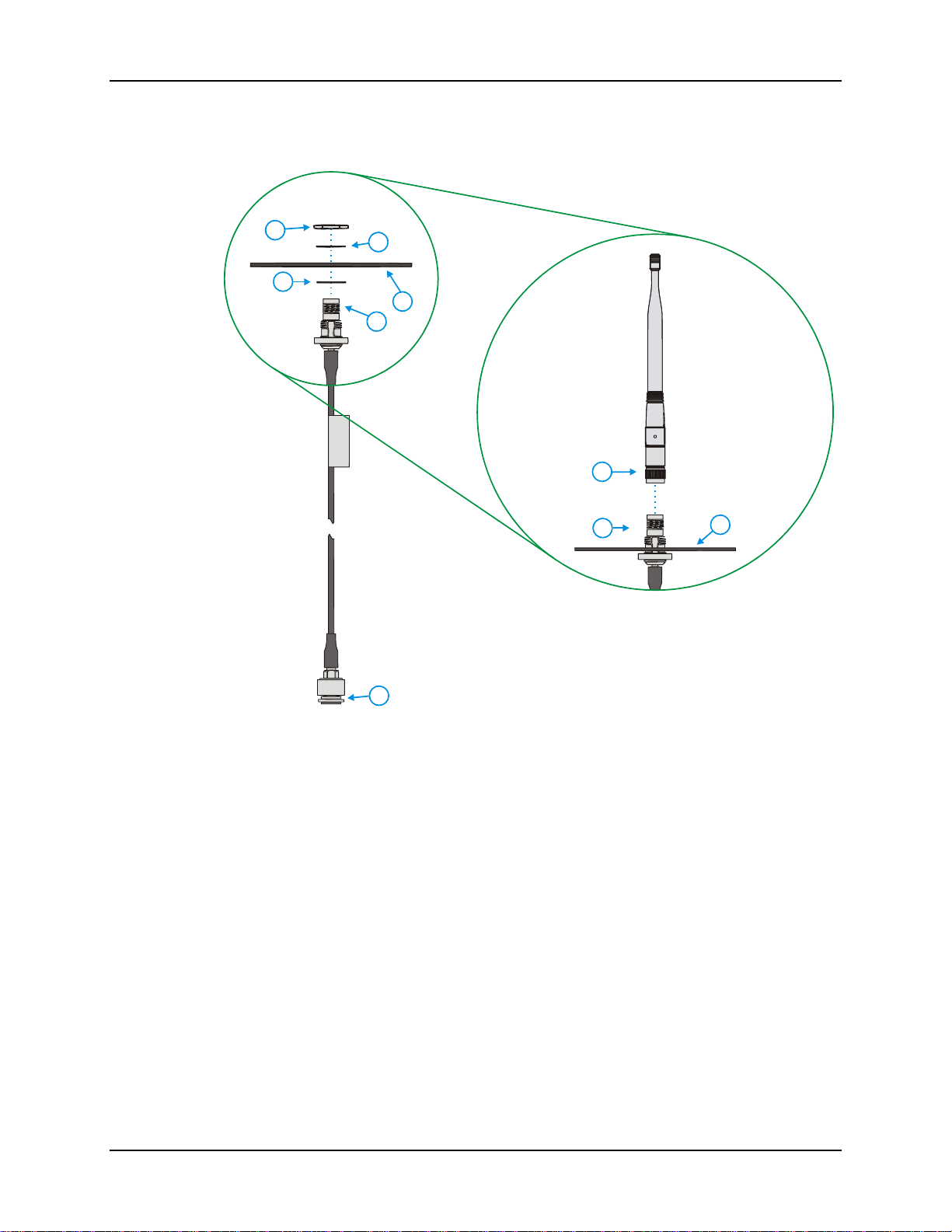
Components
1
3
2
4
5
7
5
4
6
1 Nut
2 Lock Washer
3 Rubber Washer
4 Mounting Plate
Figure 1 Remote Antenna Components
5 To Antenna
6 To Vehicle Mounted Computer’s
Antenna Connector
7 Antenna
E-INS-VEHREMANT-B Vehicle Remote Mount Antenna Installation Instructions
Page 4

Page 4 of 6 Installation Instruction Sheet
Mounting Instructions
1. Attach and secure the mounting plate to the highest point on the safety cage,
following these precautions
• The plate must be mounted so the antenna is not damaged while the vehicle or any of
its parts are moving.
• The mounting plate must be parallel to the floor.
• If the computer requires two antennas, they must be mounted at least 12 inches
(304.8mm) apart.
2. Attach the female connector of the coaxial cable to the antenna connector on the
vehicle mounted computer.
3. Insert the male connector on the coaxial cable though the hole in the mounting plate.
4. Secure the connector to the mounting plate with the washer and hex nut.
5. Use cable ties to secure the coaxial cable to the vehicle as necessary. Make sure the
cable is routed so it is not damaged by any moving parts of the vehicle.
6. Attach the antenna to the male connector on the end of the coaxial cable. The
antenna must be mounted in a vertical position.
7. If the computer is using dual antennas (diversity option), repeat steps for second
antenna.
Note Please refer to the reference guide for the computer to ensure the radio card
is properly configured to use antenna diversity.
21
3
4
5
1 Antenna
2 Mounting Plate
3 Vehicle Safety Cage
4 Coaxial Cable
5 Vehicle Mounted Computer
Figure 2 Typical Remote Antenna Installation
Vehicle Remote Mount Antenna Installation Instructions E-INS-VEHREMANT-B
Page 5

Installation Instruction Sheet Page 5 of 6
Contacting LXE
All LXE manuals are now available on one CD and they can also be viewed / downloaded from
the LXE ServicePass website on the ServicePass / Documentation page. Contact your LXE
representative to obtain the LXE Manuals CD or logon information for the ServicePass web
pages.
You can also get help from LXE by calling the telephone numbers listed on the LXE Manuals
CD, in the file titled “Contacting LXE”. This information is also available on the LXE website.
Notices
Copyright Notice:
This manual is copyrighted. All rights are reserved. This document may not, in whole or in part,
be copied, photocopied, reproduced, translated or reduced to any electronic medium or machinereadable form without prior consent, in writing, from LXE Inc.
Copyright © 2007 by LXE Inc., An EMS Technologies Company, 125 Technology Parkway,
Norcross, GA 30092 U.S.A. (770) 447-4224
LXE® is a registered trademark of LXE Inc. All other brand or product names are trademarks or
registered trademarks of their respective companies or organizations. When this manual is in PDF
format: “Acrobat ® Reader Copyright © 2007 Adobe Systems Incorporated. All rights reserved.
Adobe, the Adobe logo, Acrobat, and the Acrobat logo are trademarks of Adobe Systems
Incorporated.” applies.
Notice:
LXE Inc. reserves the right to make improvements or changes in the product described in this
document at any time without notice. While reasonable efforts have been made in the preparation
of this document to assure its accuracy, LXE assumes no liability resulting from any errors or
omissions in this document, or from the use of the information contained herein. Further, LXE
Incorporated, reserves the right to revise this document and to make changes to it from time to
time without any obligation to notify any person or organization of such revision or changes.
Revision Notice
Revision B release – February 2007, includes new kit part numbers and updated LXE computer references.
Revision A release – March 2004.
E-INS-VEHREMANT-B Vehicle Remote Mount Antenna Installation Instructions
Page 6

Page 6 of 6 Installation Instruction Sheet
Vehicle Remote Mount Antenna Installation Instructions E-INS-VEHREMANT-B
 Loading...