

Page 1

User Manual
MagniLink PRO - Mac
LVI Low Vision International
SE-352 46 Växjö Faks: +46 470-727725 www.lvi.se
Page 2

Page 3

MagniLink PRO - Mac
User Manual 7944079a | MagniLink PRO - Mac 3
Table of Contents
1 About LVI ......................................................................................... 5
2 Introducing MagniLink PRO ........................................................... 6
3 Safety information .......................................................................... 8
4 Unpacking ....................................................................................... 9
4.1 Packaging .................................................................................... 9
5 Accessories ................................................................................... 10
6 Installation ..................................................................................... 12
6.1 Unfolding ................................................................................... 12
6.2 Connection ................................................................................ 13
6.3 Installation of reading table ..................................................... 13
7 Use ................................................................................................. 14
7.1 Control box ............................................................................... 14
7.2 Menu .......................................................................................... 15
7.3 Reading table ............................................................................ 17
7.4 Camera ...................................................................................... 18
7.5 Battery ....................................................................................... 18
8 Mac software ................................................................................. 19
8.1 Minimum system requirements ............................................... 19
8.2 Recommended system requirements ..................................... 19
8.3 Installation of software ............................................................. 19
8.4 Using the software .................................................................... 21
8.5 Download voices ....................................................................... 33
9 Ergonomics ................................................................................... 34
10 Troubleshooting ........................................................................... 35
11 Technical information ................................................................... 36
12 Declaration of Conformity ........................................................... 38
Page 4

MagniLink PRO - Mac
4 User Manual 7944079a | MagniLink PRO - Mac
Page 5

MagniLink PRO - Mac
User Manual 7944079a | MagniLink PRO - Mac 5
1 About LVI
LVI Low Vision International AB was founded in 1978 and is one of the
world's leading manufacturers of equipment for persons with visual
impairments. Development of new products takes place in close
cooperation with users and professional staff within the low vision
rehabilitation industry. LVI is quality-certified in accordance with ISO 9001
and environmentally-certified in accordance with ISO 14001.
The information in this manual has been carefully checked and is
believed to be accurate. However, LVI assumes no responsibility for any
inaccuracies that may be contained in this manual. In no event will LVI be
liable for direct, indirect, special, exemplary, incidental, or consequential
damages resulting from any defect or omission in this manual. In the
interest of continued product development, LVI reserves the right to
make improvements in this manual and the products it describes at any
time, without notice or obligation.
Page 6
MagniLink PRO - Mac
6 User Manual 7944079a | MagniLink PRO - Mac
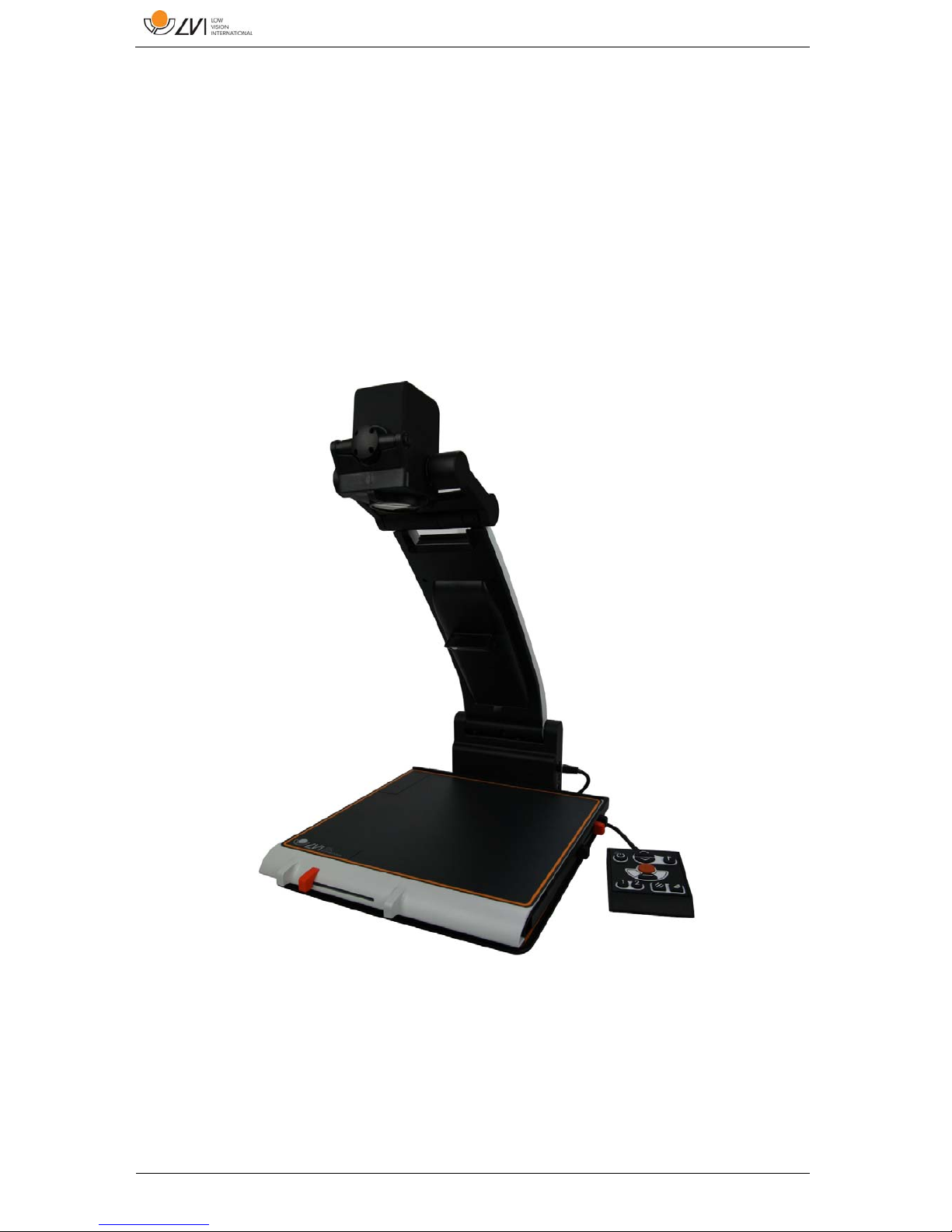
2 Introducing MagniLink PRO
Thank you for choosing this video magnifier. Our aim is for you to be
satisfied with your choice of supplier and reading aid.
MagniLink PRO is a video magnifier designed for people with visual
impairment. The video magnifier offers features including the potential to
set the magnification, autofocus, several artificial colours, the option of
switching the magnifier between reading mode, mirror mode and
distance mode and the option of adjusting the brightness. MagniLink
PRO can be connected to any monitor, a PC or a Mac. It is also possible
to collapse the system when it is not being used or for transportation.
MagniLink PRO offers genuine full-HD quality. Available accessories
comprise a dockable reading table, battery as well as software for OCRprocessing and reading text aloud.
Page 7

MagniLink PRO - Mac
User Manual 7944079a | MagniLink PRO - Mac 7
Table of additions to the product code MLPRO-FHD- depending on
which accessories have been ordered.
A Dockable reading table with friction brake X/Y
B Pre-installed battery
C Text To Speech for PC
D Text To Speech for Mac
MagniLink PRO meets all the requirements for CE marking of medical
devices in accordance with Directive 93/94/EEC. Our products comply
with MDD 93/94/EEC with additions from Directive 2007/47/EC.
Page 8
MagniLink PRO - Mac
8 User Manual 7944079a | MagniLink PRO - Mac
3 Safety information
Only use the power adaptor supplied with the product. Using an
incorrect type of power adapter may cause damage to the system.
Place the power cord in such a way that you can neither trip over it
or that crush damages can occur.
If the product is moved from the cold into a warm room,
condensation (moisture) can form inside the unit or on the camera
lens. To prevent problems with condensation, the apparatus should
be installed in the room at least 30 minutes prior to usage.
Never operate the product if it has been exposed to water or other
liquids. Damaged or wet product can cause electric shocks or fire.
Only use the battery supplied with the product. If the battery needs
to be changed, please contact LVI.
Be careful not to catch your fingers when collapsing your
MagniLink PRO.
When MagniLink PRO is to be moved, collapse it and lift from
beneath. If MagniLink Pro has a dockable reading table, this must
be anchored and locked before moving the system.
If the system requires cleaning, pull out all cables and use a slightly
damp (not wet) cloth. Use only water or a cleaning agent that is
intended for monitors and computers.
Make no further adjustments, even if the product does not function
normally after following the functional descriptions. Pull out the
power cable and contact service staff or the product distributor.
Only use spare parts that are specified by LVI.
Always switch off the power when the system is not being used.
If in doubt, contact your supplier.
Warning
The product is supplied packed in a plastic bag. To avoid risk of
suffocation, keep the bag out of the reach of children and infants.
Page 9

MagniLink PRO - Mac
User Manual 7944079a | MagniLink PRO - Mac 9
4 Unpacking
The system is supplied in a box with the following contents:
Reading camera
Power adaptor
Carrying case
User Guide
USB memory stick with software
USB cable
HDMI to DVI cable
HDMI to HDMI cable
Check first that the box has no external damage. In the event of damage,
contact the delivery company and file a notification of damage.
Open the box and take out the MagniLink PRO; remove the packaging.
For further information, please see Installation page 12.
4.1 Packaging
The packaging consists of the following packaging material (LVI
recommends that the packaging be kept in case you have to return the
system or you need to move it):
Packing material (EPEL E)
Box (corrugated cardboard)
Polyethylene (LDPE4)
For sorting and collection of packaging material, please call the
packaging collection customer service department for information on the
rules that apply in your municipality.
Note that the product and its accessories must be recycled as electronic
waste. A worn-out battery is recycled as electronic waste.
Page 10
MagniLink PRO - Mac
10 User Manual 7944079a | MagniLink PRO - Mac
5 Accessories
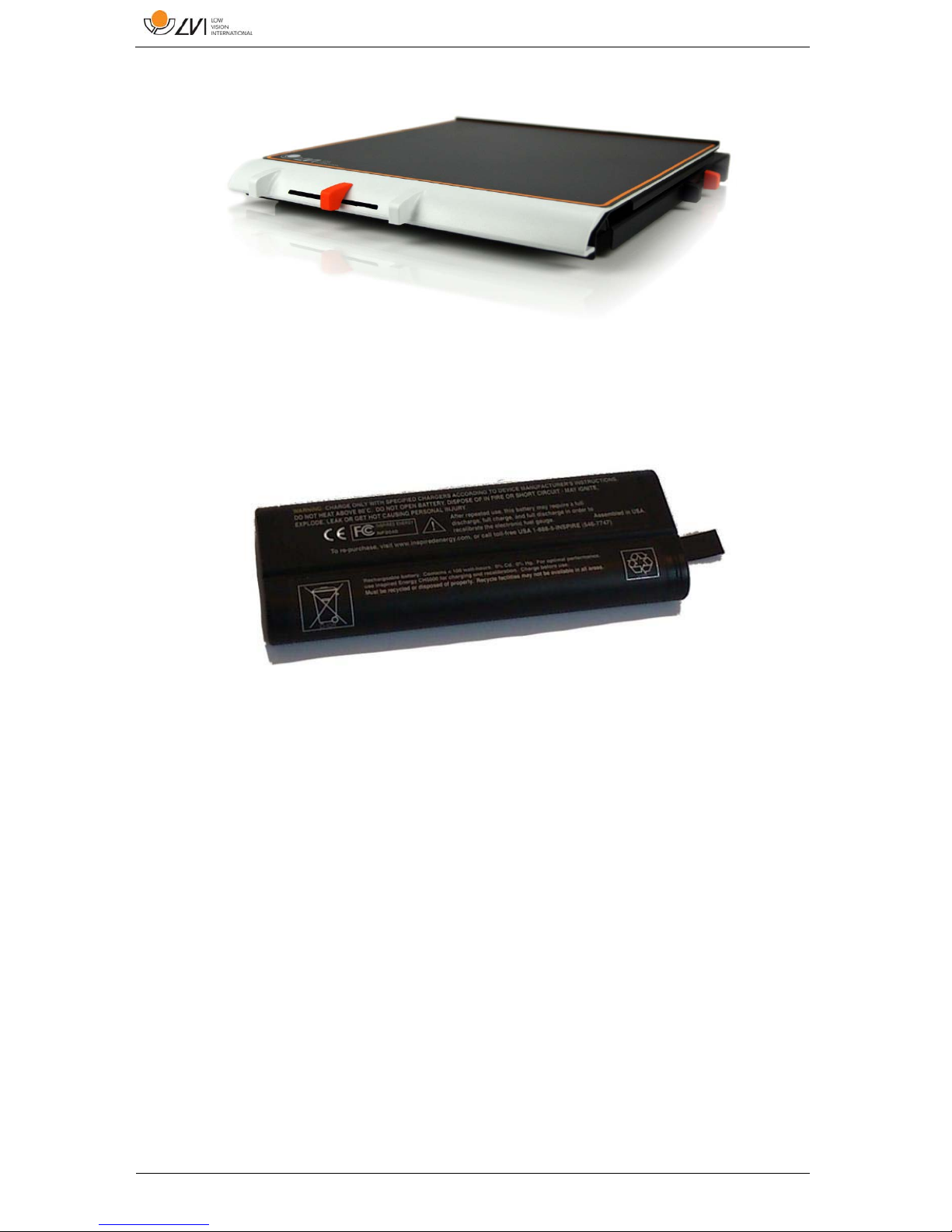
Dockable reading table with friction brake X/Y (MLRT-XY).
Battery (ML-BAT).
Page 11
MagniLink PRO - Mac
User Manual 7944079a | MagniLink PRO - Mac 11
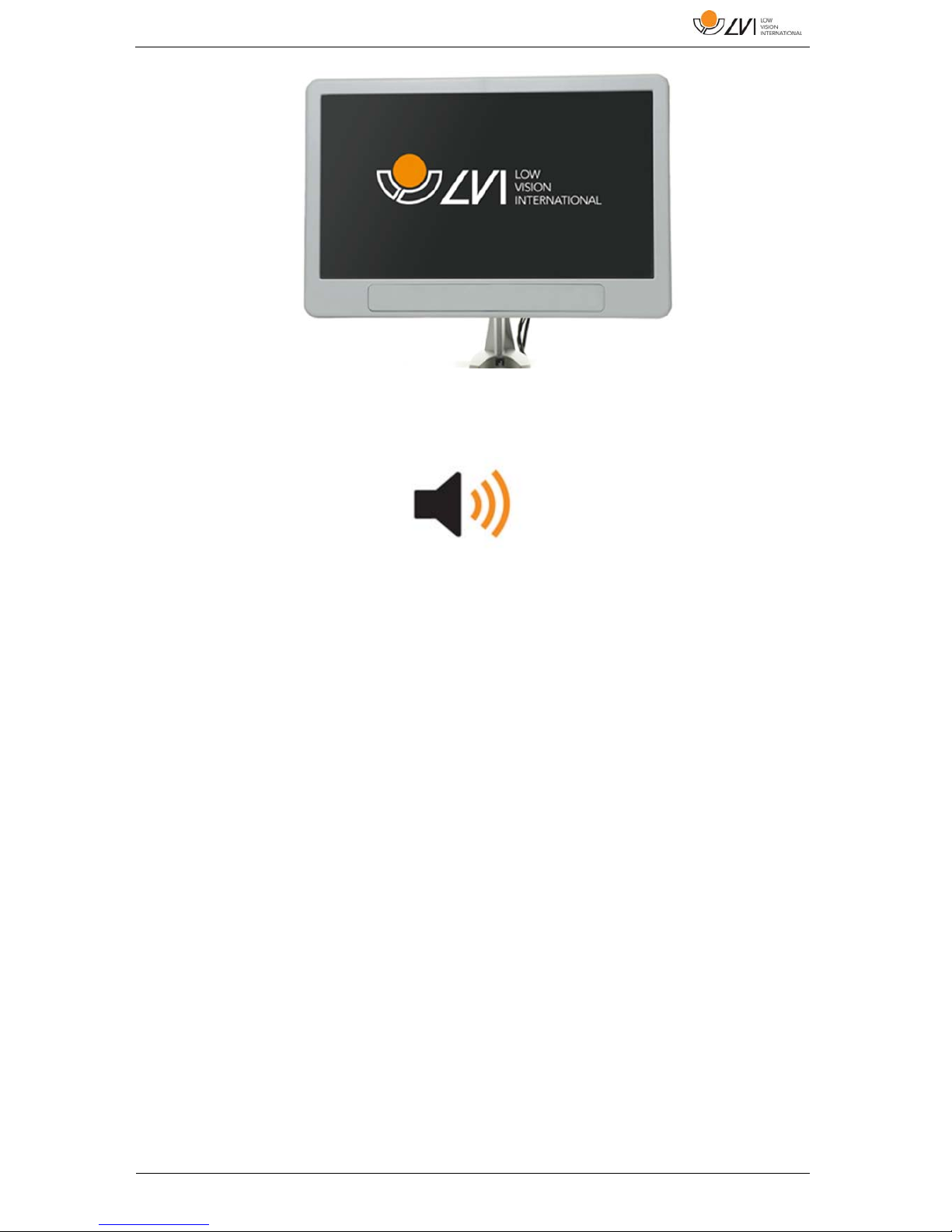
LVI Monitor 19" (MLV-A103) and 23" (MLV-A104).
Text To Speech for PC (MLS-A102) or Mac (MLS-A102-MAC).
Page 12
MagniLink PRO - Mac
12 User Manual 7944079a | MagniLink PRO - Mac
6 Installation
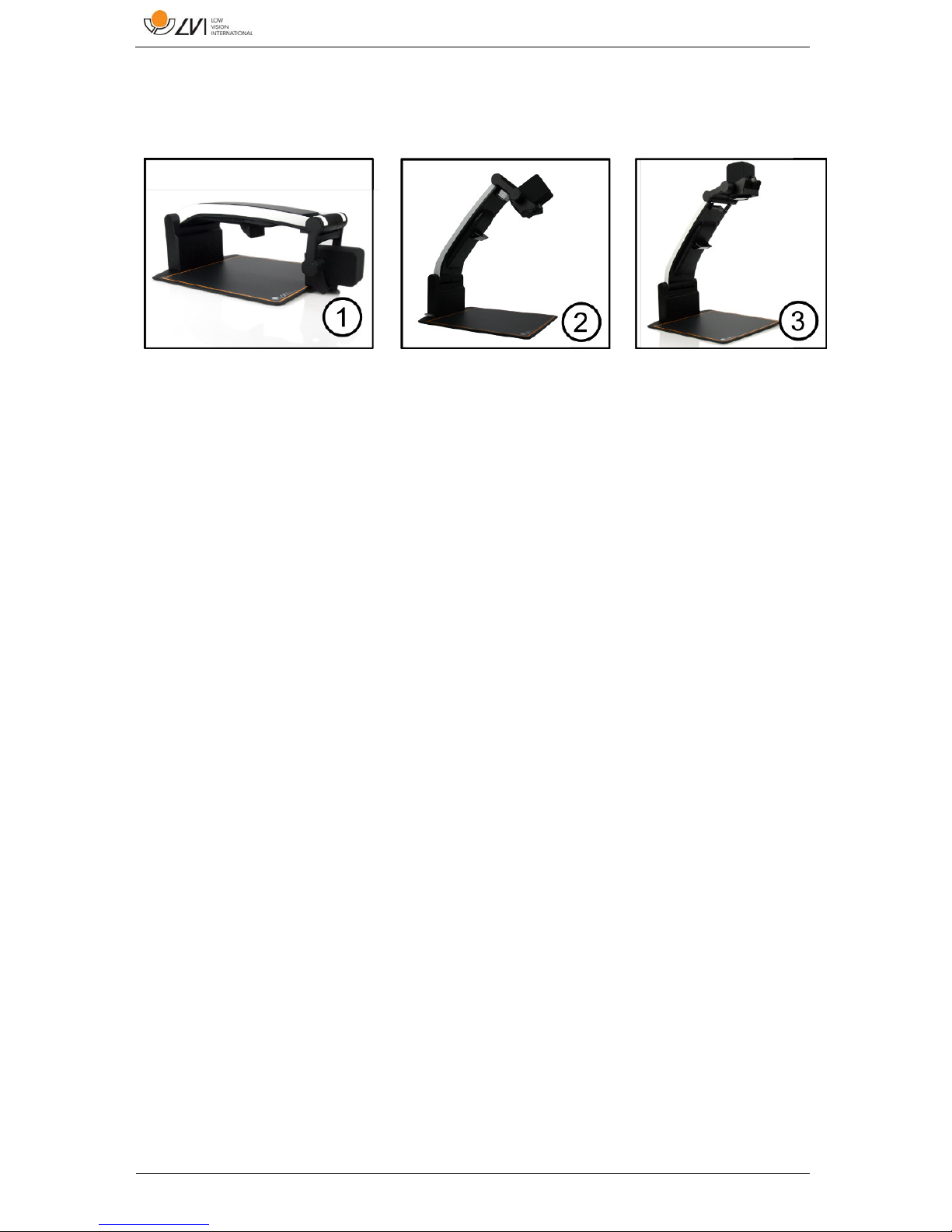
6.1 Unfolding
1. Place your MagniLink PRO on the table in front of your seat.
Remember that the reading table can be pulled out approximately
30 cm in three directions. MagniLink PRO has a low total weight.
Therefore, it is very important to place the system at least 10 cm
from the edge of the table, particularly when you are using the
reading table in its most extended position. Excessive load in this
position can cause the system to tip over.
2. Take hold of the unit's arm and turn it upwards to the upper end
point.
3. Turn up the camera arm until it clicks into place. In order to get
optimal focus range when a reading table is used with the system,
the camera arm must be turned up until it clicks into place once
more.
Page 13
MagniLink PRO - Mac
User Manual 7944079a | MagniLink PRO - Mac 13
6.2 Connection
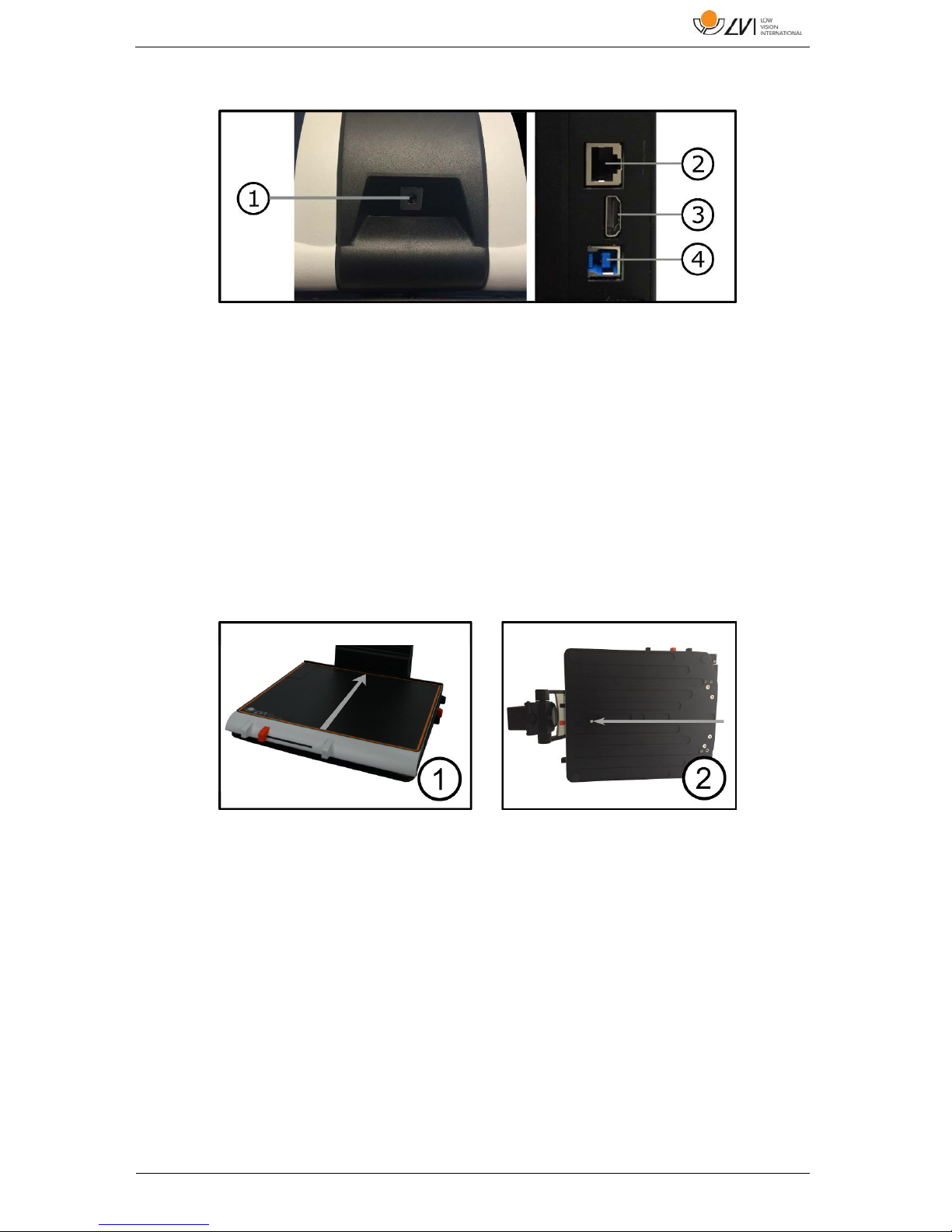
1. Power supply
Connect the mains adapter to the socket on the rear.
2. Connection for control box
Connect the control box to this socket.
3. HDMI connection
Here the unit can be connected to a monitor that supports HDMI
or DVI.
4. USB connection
Used to connect the unit to a computer.
6.3 Installation of reading table
1. Install the reading table by pushing it in towards the unit.
2. In order to permanently install the reading table. Fasten the
reading table securely with a screw on the underside.
Page 14
MagniLink PRO - Mac
14 User Manual 7944079a | MagniLink PRO - Mac
7 Use
7.1 Control box
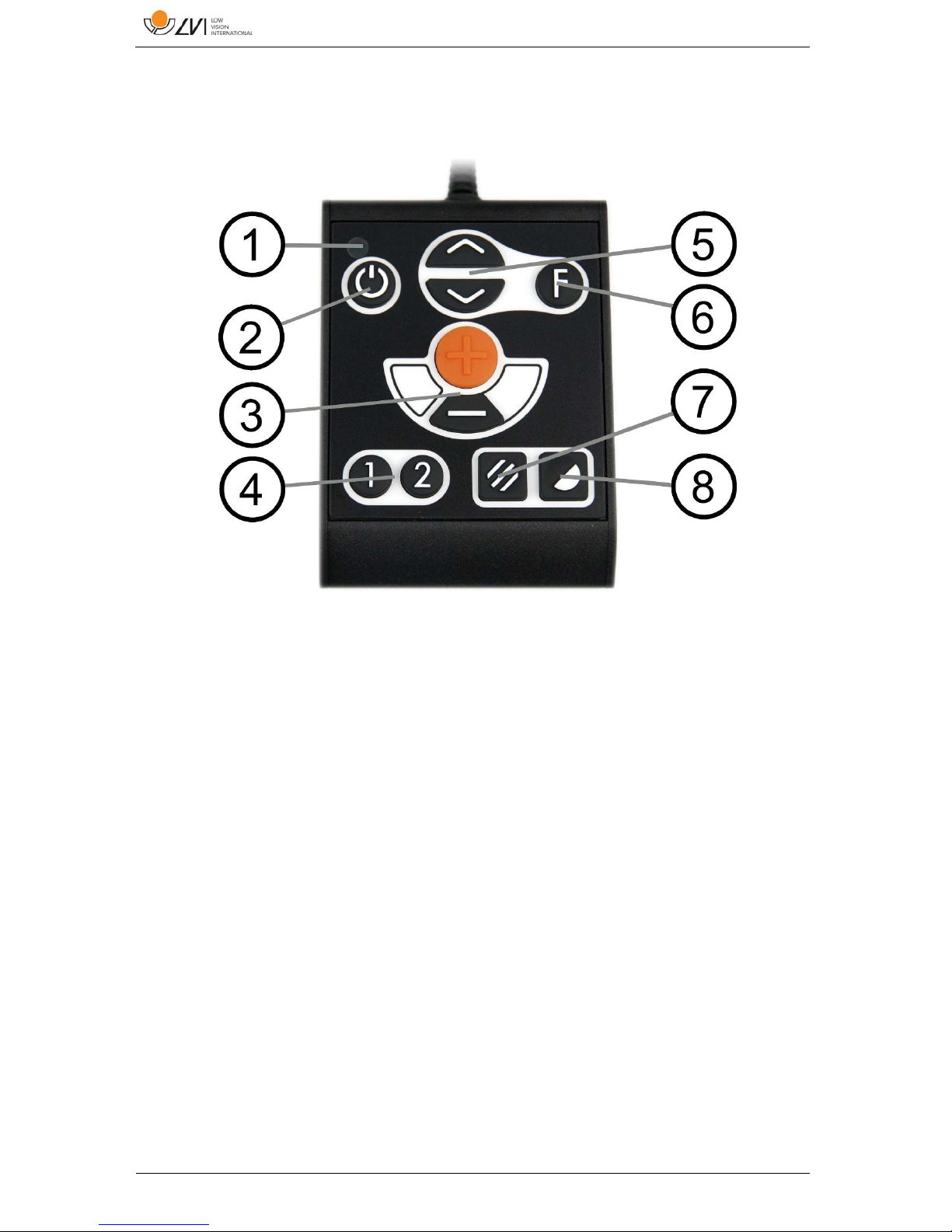
1. LED
A green light indicates that the unit is on. A flashing yellow light
means that autofocus is switched off. The light flashes green when
the system is starting. A red light for five seconds when the system
is starting indicates that the battery needs to be charged.
2. Power on/off
Press to start or shut down the system.
3. Magnification control
Used to set the magnification. To reduce the zoom, press the
lower key (minus) and to increase the zoom, pressure the upper
key (plus).
4. Programmable function buttons
When the system is delivered, button 1 switches between
automatic and manual focus and button 2 switches between
overview mode and normal mode. It is possible to change the
function of these buttons via the menu.
Page 15

MagniLink PRO - Mac
User Manual 7944079a | MagniLink PRO - Mac 15
5. Lighting configuration or navigation control
Used to configure the light intensity in order to optimise reading
conditions. Press the upper half to increase the light intensity and
the lower half to decrease it. Also used to navigate in the menu.
6. Function button
When this button is pressed, a menu appears in which further
settings can be made.
7. Picture mode
Press the button to switch the picture mode between natural
colours and grey scale.
8. High contrast mode with artificial colours
Press the button to switch between the various colour
combinations.
7.2 Menu
The menu is opened by pressing the function button. In order to navigate
in the menu, press the navigation control. There thirteen main modes in
the menu. The current mode is displayed on the screen. After 30 seconds
of inactivity, the system returns to normal mode.
If you use the menu at the same time as the system is showing USB video
on a computer. Press the short cut command to return to the program's
standard values (F11 on PC and Alt + F11 on Mac). This causes the
program to set the maximum window size and normal rotation, which is
necessary in order for the menu to be displayed correctly.
1. Autofocus ("AF-ON" or "AF-OFF" is displayed on the screen)
In this mode, you can press the function button to turn autofocus
on and off. Autofocus off can be used when you wish to write by
hand. In this way, focus is not affected by the pen or your hand.
2. Mirroring ("MIRROR" is displayed on the screen)
In this mode, you can press the function button to mirror the
image.
3. Overview ("VIEW" is displayed on the screen)
In this mode, you can press the function button to reduce the
magnification to overview mode Press the button again to restore
the magnification.
4. Focus ("FOCUS" is displayed on the screen)
In this mode, you can press the function button. When you do so,
"F-SET" is displayed on the screen and it is then possible to set
Page 16

MagniLink PRO - Mac
16 User Manual 7944079a | MagniLink PRO - Mac
the focus mode manually by pressing the navigation control.
Manual focus may, for example, be useful for inspection. When
this has been done, press the function button again to return to
the menu.
5. Reference line/Bar ("REFLINE" is displayed on the screen)
In this mode, you can press the function button. When you do so,
"R-SET" is displayed on the screen and it is then possible to set
the position of the reference line or the bar by pressing the
navigation control. When you are satisfied with the position, press
the function button again to save the position.
6. Lighting ("LAMP" is displayed on the screen)
Press the function button in this mode to access the settings for
the lamp's brightness. "L-SET" is displayed on the screen and it is
possible to reduce or increase the brightness by pressing the
navigation control. When you are satisfied with the brightness,
press the function button again to return to the menu.
7. Shut-off time for screen and lamp ("SLEEP" is displayed on the
screen)
In this mode, you can set whether and after what length of time
the system will turn off the lamp and the screen if the camera has
not detected any movement. Press the button. It is then possible
to select the time with the navigation control. When you are
satisfied with the setting, press the function button again. To turn
on the lamp and screen again, it is sufficient to move your hand
under the camera.
8. Shut-off time ("SH-OFF" is displayed on the screen)
It is possible to set whether and after what length of time the
system will be turned off if the camera has not detected any
movement. Press the button. It is then possible to select the time
with the navigation control. When you are satisfied with the
setting, press the function button again.
9. Programming of button 1 ("PRG-F1" is displayed on the screen)
In this mode, you can programme which function button 1 is to
have. Press the function button. It is then possible to select the
function with the navigation control. When you are satisfied with
your choice, press the function button again to save the setting.
10. Programming of button 2 ("PRG-F2" is displayed on the screen)
In this mode, you can programme which function button 2 is to
have. Press the function button. It is then possible to select the
Page 17
MagniLink PRO - Mac
User Manual 7944079a | MagniLink PRO - Mac 17
function with the navigation control. When you are satisfied with
your choice, press the function button again to save the setting.
11. Battery status (Battery symbol is displayed on the screen)
In this mode, the current battery status is displayed on the screen.
12. Language ("OSD" is displayed on the screen)
In this mode, you can set the language in the menu. Press the
function button. It is then possible to select the language with the
navigation control. There are four languages: English (ENG),
German (DEU), French (FRA) and Spanish (SPA). When the desired
language is displayed, press the function button again to save the
language setting.
13. Normal mode ("EXIT" is displayed on the screen)
If you press the function button in this mode, you exit the menu
and return to normal mode.
7.3 Reading table
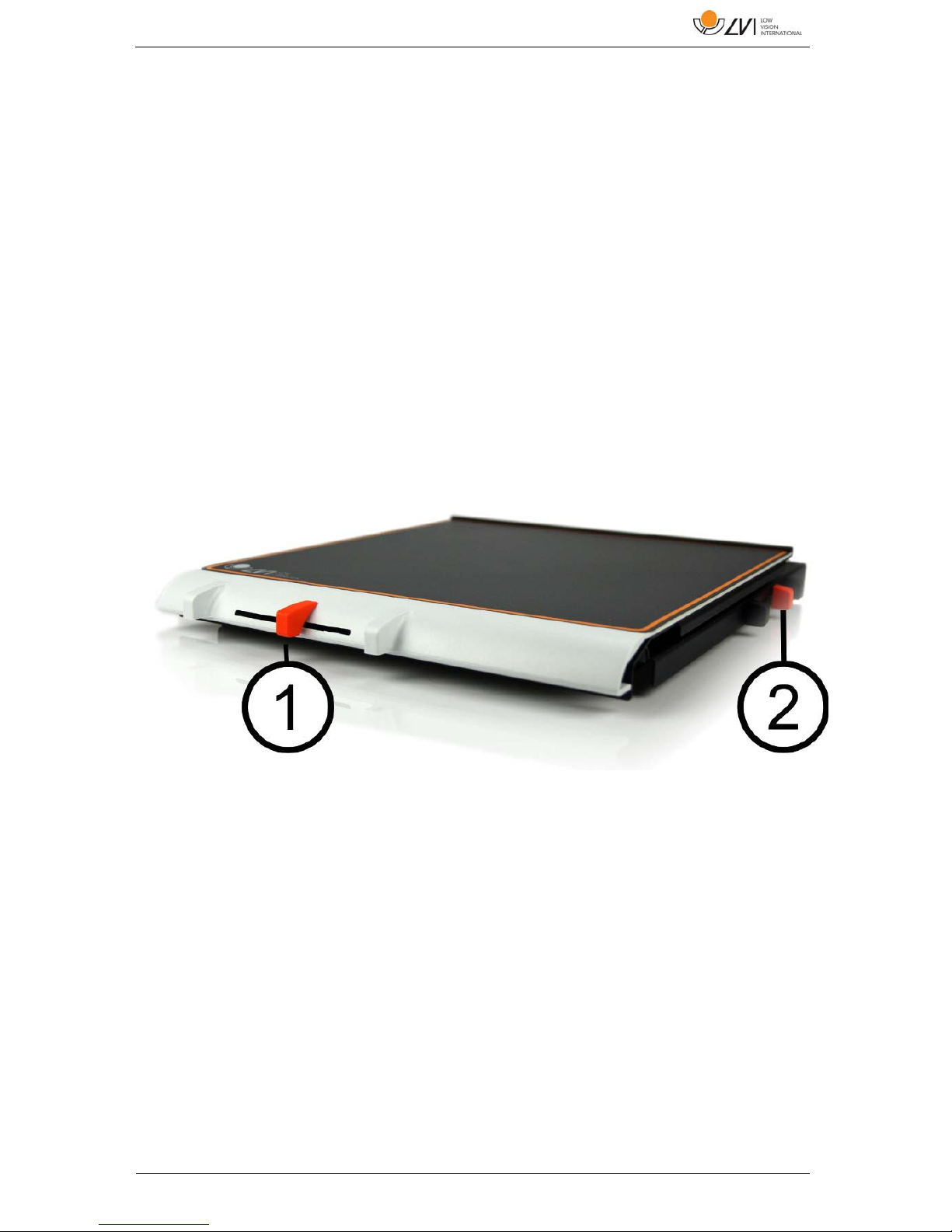
1. Side way direction friction adjustment
Set the side way friction by moving this handle. With the brake in
the left end position, the reading table is unlocked. To increase
friction, push the side way brake to the right (at the far right, the
brake clicks into locked mode).
2. Depth way direction friction adjustment
Set the depth way friction by moving this handle. With the brake
in the near end position, the reading table is unlocked. To
increase friction, push the depth way brake towards the back. Push
the brake in as far as possible to lock the reading table.
Page 18
MagniLink PRO - Mac
18 User Manual 7944079a | MagniLink PRO - Mac
7.4 Camera
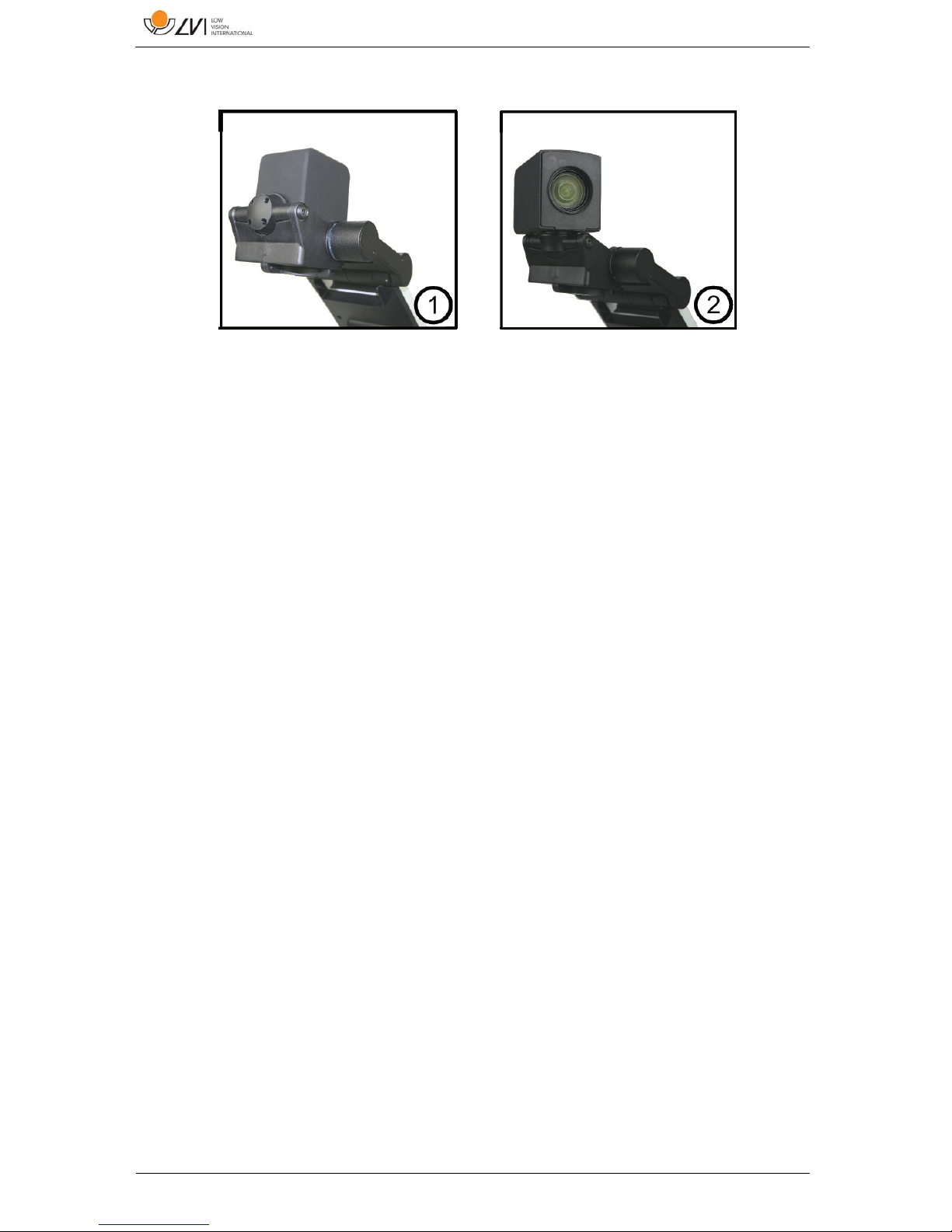
The camera has two modes. Reading mode and distance mode. Turn the
camera to switch it from reading mode (1) to distance mode (2). When
the camera is in distance mode, it can be angled laterally, depending on
what you want to look at. In distance mode, the camera can also be
turned to a mirror mode. The settings for both modes are automatically
saved when you switch from one to the other.
Settings that are automatically saved for these modes are:
Negative/Positive/Natural colours
Magnification level
Brightness/Contrast
Reference line/Bar
Mirroring of camera image
Focus settings
7.5 Battery
The following applies to the MagniLink PRO models that are equipped
with a battery. If the battery charge level falls below 10 or 5%, a red
battery symbol is displayed to indicate that it is time to connect the
mains adapter and charge the battery. To remove the symbol, press the
function control.
Maintenance charging
The MagniLink PRO models with a battery are also equipped with a smart
battery charger that uses maintenance charging to keep the battery in
good condition. To further extend battery life, we recommend that you
use your MagniLink PRO twice a year with just the battery (disconnect the
mains adapter) until the battery is completely discharged.
Page 19
MagniLink PRO - Mac
User Manual 7944079a | MagniLink PRO - Mac 19
8 Mac software
MagniLink PRO is supplied with the software MagniLink S. The following
pages describe the installation and use of MagniLink S for Mac.
8.1 Minimum system requirements
Mac OS X Version 10.6 Snow Leopard, or later
2 integrated USB 2.0 ports
To use the system in minimum resolution and picture frequency
you will need a computer with 2.53 Hz Intel Core 2 Duo processor,
4 GB RAM.
8.2 Recommended system requirements
Mac OS X Version 10.6 Snow Leopard, or later
1 integrated USB 3.0 port
To use the system in maximum resolution and picture frequency
you will need a computer with an i5 or i7 processor, 4 GB RAMmemory, external graphics card with at least 512 MB inbuilt
memory.
8.3 Installation of software
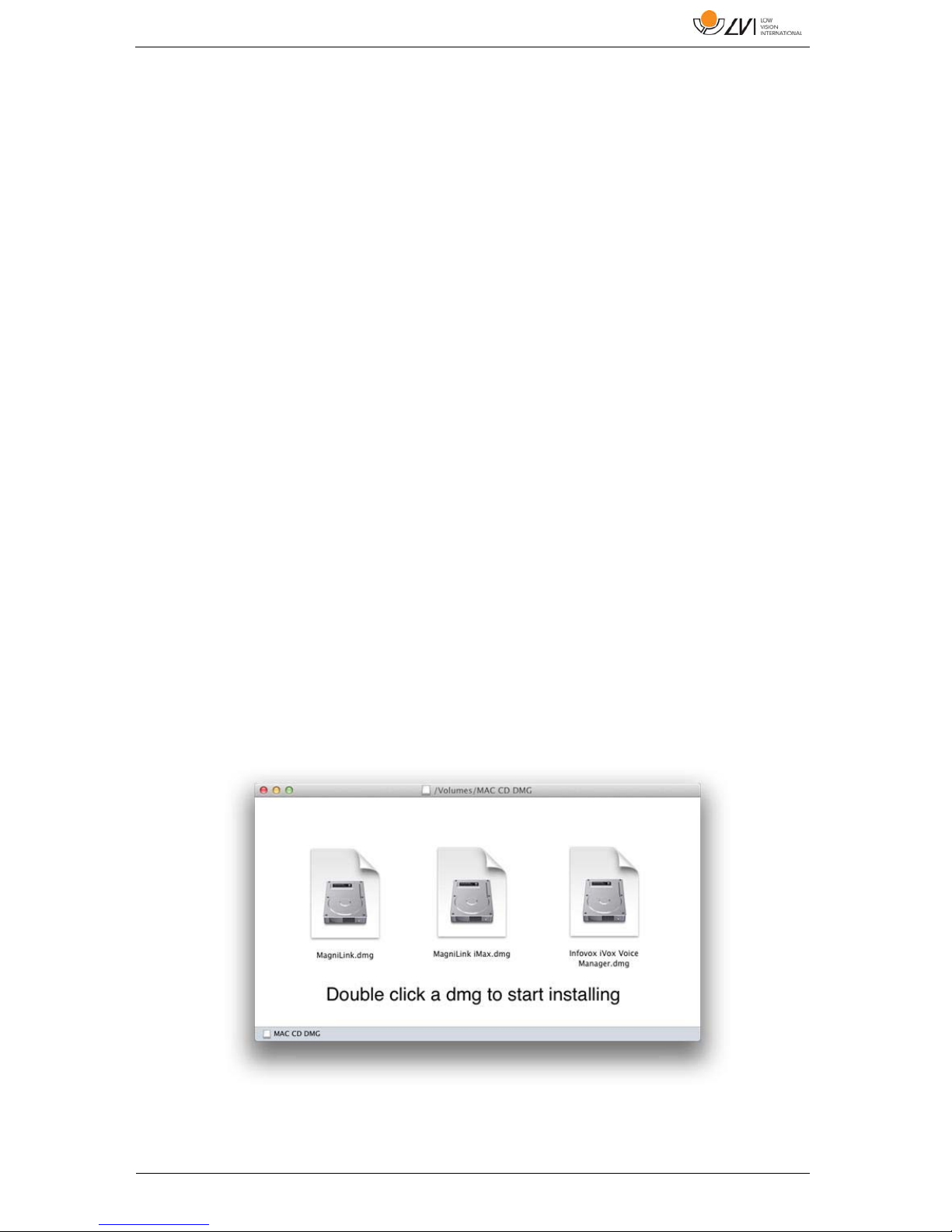
To install MagniLink S on your Mac, insert the USB stick containing the
software into one of the computer's USB ports. Begin the installation by
double clicking on the "Software Mac.dmg" file located in the "Software
Mac" folder. This will open the following window.
Page 20
MagniLink PRO - Mac
20 User Manual 7944079a | MagniLink PRO - Mac
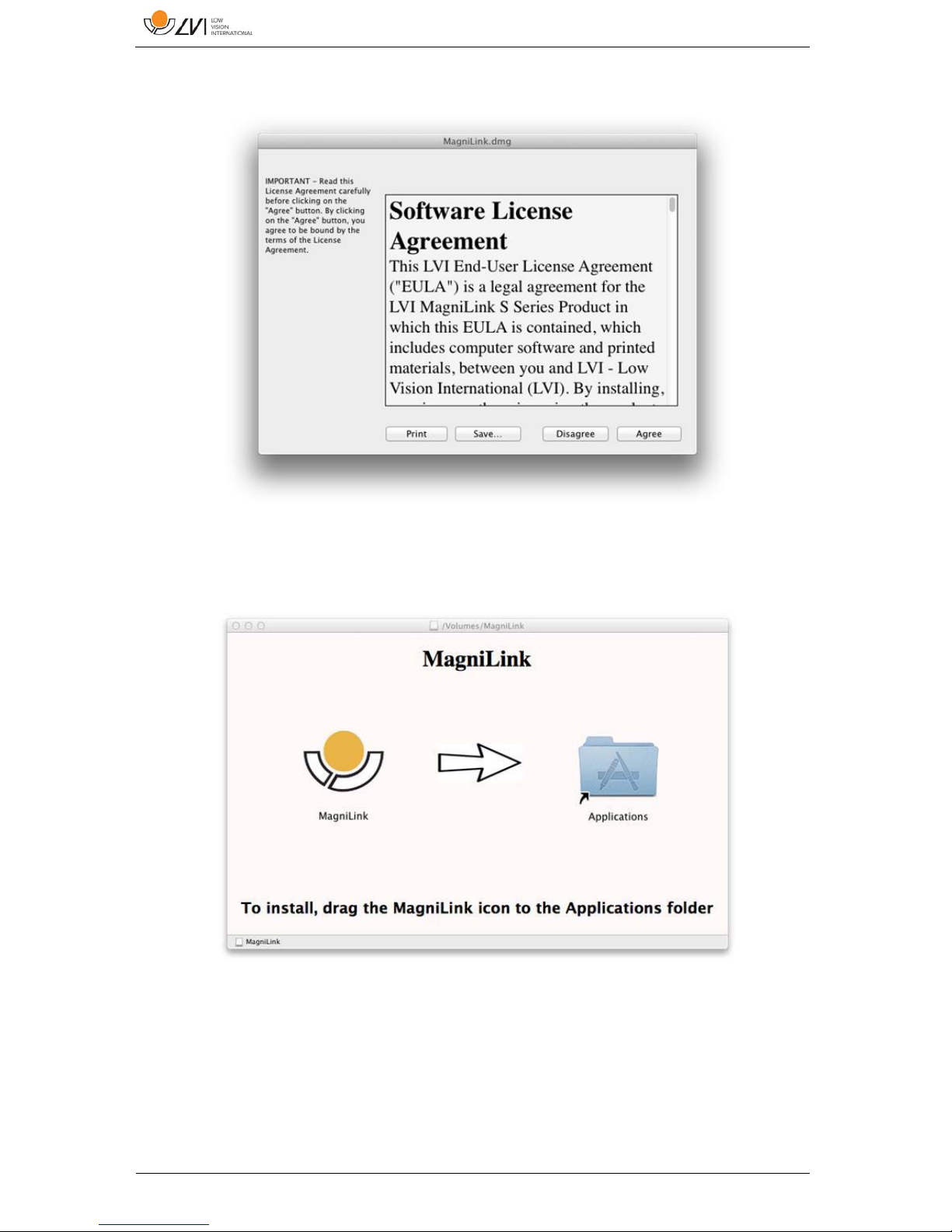
Continue the installation by double clicking the MagniLink.dmg file.
Read the text in the ”License Agreement” dialogue box, and accept the
license agreement by clicking the "Agree" button. After clicking
"Agree", the following window will open.
To install MagniLink, drag the MagniLink icon to the "Applications"
folder. This completes the installation.
Page 21

MagniLink PRO - Mac
User Manual 7944079a | MagniLink PRO - Mac 21
8.4 Using the software
8.4.1 Functions via the keyboard
MagniLink Student is presented in a Mac application and all features in
the system can be controlled from the keyboard.
If you want to use the standard F1, F2, etc. keys without pressing the (fn)
key. You can change the keyboard settings. This setting can be accessed
from the Apple menu -> System Preferences -> Hardware -> Keyboard.
Default hotkey settings from the computer keyboard.
fn + F1 Natural colours
fn + F2 Positive picture with increased contrast
Artificial colours; White/Black, Yellow/Black, Green/Black,
Red/Black, Yellow/Blue, White/Blue
Press F2 to toggle through the different colours. (Shift + fn
+ F2 toggles backwards.)
fn + F3 Negative picture with increased contrast
Artificial colours; Black/White, Black/Yellow, Black/Green,
Black/Red, Blue/Yellow, Blue/White
Press F3 to toggle through the different colours. (Shift + fn
+ F3 toggles backwards.)
fn + F5 Take snapshot
Press fn + F5 to open the Picture saving dialog box. A file
name (today’s date and time) and folder (MagniLink) is
automatically suggested. Just press Enter to save the
picture. If you want to save the picture somewhere else or
with another name or format (JPG is standard) you can
manually change this.
fn + Shift + F5 Take snapshot – fast
To save a snapshot picture fast without specifying file name
and folder, press fn + Shift + F5. This command will save
the snapshot to the MagniLink folder or to the last folder
that was selected with F5.
fn + Alt + F5 Start/Stop video recording
Press fn + Alt + F5 to open the Video recording dialog box.
A file name (today’s date and time) and folder (MagniLink) is
automatically suggested. Just press Enter to save the video.
If you want to save the video somewhere else or with
another name or format you can manually change this. Stop
the video recording by pressing fn + Alt + F5 once again.
Page 22

MagniLink PRO - Mac
22 User Manual 7944079a | MagniLink PRO - Mac
fn + Alt + Shift + F5 Start video recording – fast
Press fn + Alt + Shift + F5 to start video recording at once,
without specifying file name and folder. This command will
quick save the video to the MagniLink folder or to the last
folder that was used.
fn + F6 View stored snapshots
Press fn + F6 to view stored pictures. Mark the picture and
press Enter or choose open. The picture is normally opened
in the standard Mac picture-viewing program, where you
can, for example, magnify the picture.
fn + Shift + F6 View last stored snapshot – fast
Press fn + Shift + F6 to open the last saved snapshot. If no
snapshots have been saved during this program cycle, the
functionality will be the same as for fn + F6.
fn + Alt + F6 View stored videos
Press fn + Alt + F6 to view recorded video sequences. Mark
the video to view and press Enter or choose Open. The
video is opened in the standard video viewer.
fn + Alt + Shift + F6 View last stored video – fast
Press fn + Alt + Shift + F6 to open the last saved video
recording. If no video recording have been saved during
this program cycle, the functionality will be the same as for
fn + Alt + F6.
fn + F8 Preset split modes
Press fn + F8 to toggle among the preset split modes. If
multiple monitors are used, the split modes will toggle over
all monitors, starting with the primary monitor. The window
can also be controlled using the mouse or the standard
Mac OS X commands.
fn + Alt + F9 Information and settings window
Pressing fn + Alt + F9 opens up a window in which you can
adjust different settings and optimize your MLS. The
window contains different headings.
fn + Alt + F11 Return to default settings
Press fn + Alt + F11 to return to the default settings (normal
window, natural colours and normal brightness).
Arrow up Zoom in
Arrow down Zoom out
Alt + O Overview
Switches to an overview mode. The camera zooms out and
a sight is shown in the middle of the video window. To exit
Page 23

MagniLink PRO - Mac
User Manual 7944079a | MagniLink PRO - Mac 23
overview mode, press the key combination again.
Arrow left Decrease brightness
Arrow right Increase brightness
Alt + Arrow left Guiding line left/up
Alt + Arrow up Guiding line left/up
Alt + Arrow right Guiding line right/down
Alt + Arrow down Guiding line right/down
Alt + A Toggle “always on top”
This key combination will toggle “always on top” for the
application window. If this option is activated, the camera
application window will be placed above all other
application windows that are not set as “always on top”.
This will make the camera application window viewable
even if the application window does not have focus and
would otherwise have been covered by another application
window. This, for example, facilitates writing in Word, while
viewing the camera image
Cmd + M Minimizes the application
Alt + R Rotates the camera picture clockwise
Each time you press this key combination the picture
rotates 90° (90°, 180°, 270°, 0°).
Shift + Alt + R Rotates the camera picture counter clockwise
Each time you press this key combination the picture
rotates 90° counter clockwise (270°, 180°, 90°, 0°).
Alt + I Mirror camera image
By pressing Alt + I, you can mirror the camera image. This is
a useful feature if you for example would like to use the
camera as a magnifying makeup mirror.
Alt + F Freeze camera image
By pressing this key combination, the camera image is
frozen until the key combination is pressed again.
Alt + J Autofocus on/off
Press this key combination to lock the autofocus in the
present position. This could be used, for example, when
writing by hand without risk of disturbing the focusing
system with the hand or the pen. A subsequent press
reactivates the autofocus system.
Page 24

MagniLink PRO - Mac
24 User Manual 7944079a | MagniLink PRO - Mac
Cmd + , Open the preferences dialog
This key combination is the standard way to open the
preferences dialog in a Mac application.
Cmd + ? Open the manual
This key combination opens the manual pages in the
standard application for viewing pdf-files.
The following functions are only available for cameras that support OCR.
F4 OCR-process
This command takes a picture for OCR-processing. The
program then switches to text view and the OCRprocessed text is read aloud. If the text view already
contains text, this is replaced by the text from the OCR
conversion. It is possible to OCR-process a whole A4
page by turning the paper 90 degrees.
Alt + F4 Process with OCR and add text
Works like the previous command, but the text from the
OCR conversion is added to the existing text.
Alt + S Toggle column selector
Activates or deactivates the column selector. When the
column selector is active, only those columns that are
intersected by the column selector are OCR-processed.
Cmd + C Copy text
Copy all text in the text view to the Clipboard. It is then
possible to paste the content of the clipboard into
another program, such as Word.
Cmd + V Paste text
If the user has copied text from another program, this
text can be pasted into the text view. This command
replaces the existing text.
Cmd + Alt + V Paste and add text
Works like the previous command, but the text is added
to the existing text.
V Switch between camera view and text view
If a text has been OCR-processed, this command
switches between camera view and text view.
B Display mode
Switches to display mode for OCR-processed text. The
available display modes are: Side view, line view, word
view and a silent mode where the text moves sideways
Page 25

MagniLink PRO - Mac
User Manual 7944079a | MagniLink PRO - Mac 25
on the screen.
1 Start/Pause reading
If no reading is currently in progress, reading starts,
otherwise reading is paused.
2 Stop reading
This command stops the reading. The next reading will
begin from the start of the text.
3 Read previous
With this command, the user can go backwards through
the text. If the reading mode is sentence, you move
backwards through the text one sentence at a time. If
the reading mode is word, you move backwards through
the text word by word. If the reading mode is set to
character, one character is read for each keystroke.
4 Read next
With this command, the user can move forward in the
text. If the reading mode is sentence, you move forward
through the text one sentence at a time. If the reading
mode is word, you move forward through the text word
by word. If the reading mode is set as character, one
character is read for each keystroke.
5 Switch reading mode
This command selects the reading mode that is to be
employed when the "Read previous/next" command is
entered. There are three modes: sentence, word and
character.
6 Slower
Reduces the reading speed.
7 Faster
Increases the reading speed.
8 Reduce volume
Reduces the volume of the voice.
9 Increase volume
Increases the volume of the voice.
0 Next voice
Switches to the next installed voice. This command also
changes the OCR engine's language to the new voice's
language.
Page 26
MagniLink PRO - Mac
26 User Manual 7944079a | MagniLink PRO - Mac
8.4.2 Gestures
If the computer is equipped with a multi-touch pad, some functionality
can be controlled from the touchpad.
Zoom
Place two fingers on the touchpad; pinch to zoom out and expand to
zoom in.
Rotate camera image
Place two fingers on the touchpad and do a rotating motion to rotate the
camera image.
8.4.3 Information and settings window
The information and settings window consists of different headings that
all contain either application information or application settings options.
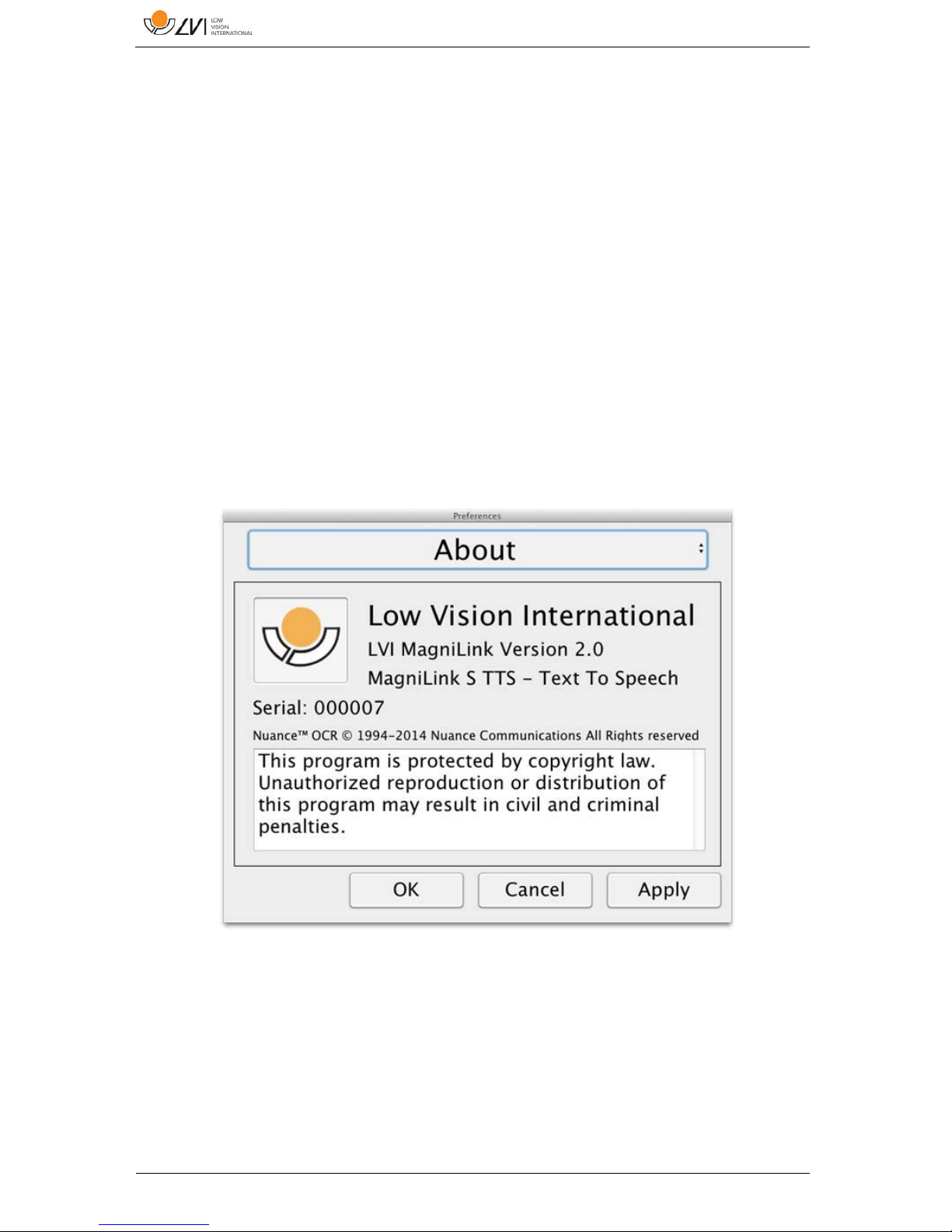
8.4.3.1 About the application
This heading contains the version number of your software and
information regarding copyright law. It is also possible to activate the
OCR-functionality here if there is no internet connection available. Press
“OCR Activation” and a dialog will appear where you can select the
license file located on the USB-stick.
Page 27
MagniLink PRO - Mac
User Manual 7944079a | MagniLink PRO - Mac 27
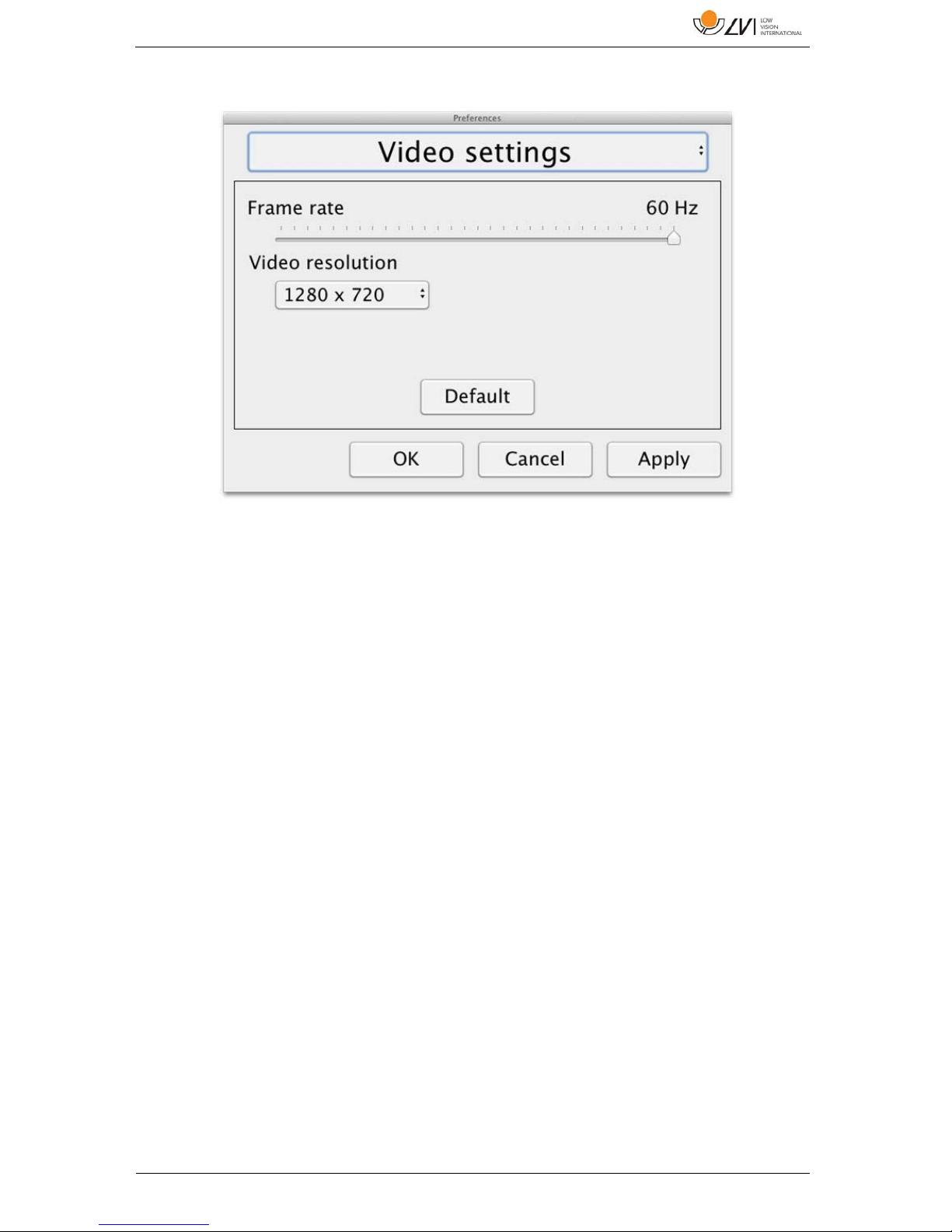
8.4.3.2 Video Settings
Frame rate
Allows you to limit the camera's frame rate.
Resolution
Allows you to set the camera's resolution. The number of possible
resolutions depends on the camera and whether it is connected to a
USB-3 or USB-2 port. Higher resolution means a clearer picture, but can
result in a lower frame rate.
Page 28
MagniLink PRO - Mac
28 User Manual 7944079a | MagniLink PRO - Mac
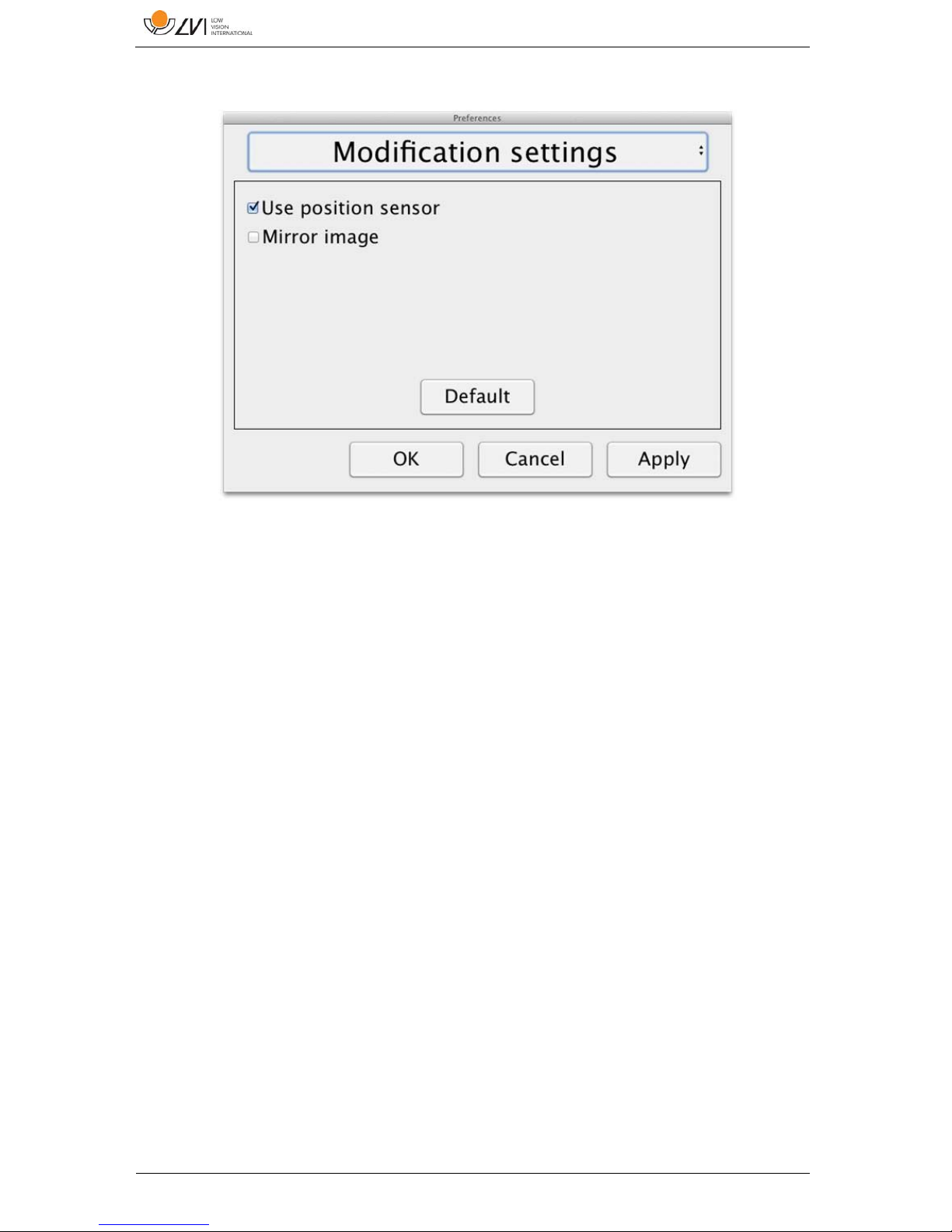
8.4.3.3 Modification Settings
Use positioning sensors
When this setting in activated, the application remembers the settings for
distance mode and reading mode. See the Position sensor section for
more information.
Mirrored image
When this setting is activated, the camera image is mirrored.
Page 29
MagniLink PRO - Mac
User Manual 7944079a | MagniLink PRO - Mac 29
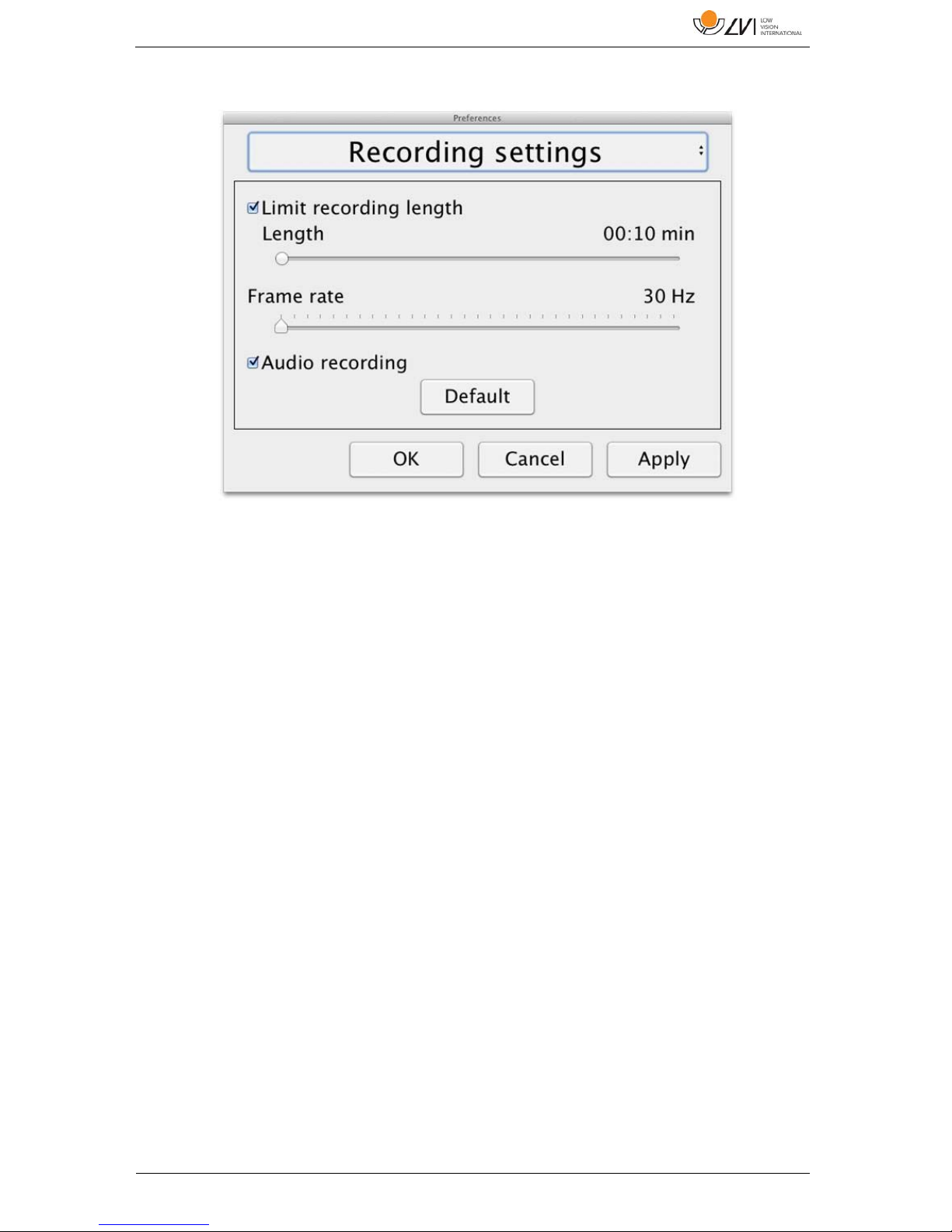
8.4.3.4 Recording Settings
Limit recording length
The video recording can be limited in steps of one second from 10
seconds up to 10 minutes. If “Limit recording length” is unchecked, then
the video recording length is unlimited, which means that the video
recording will continue until it runs out of disk space or is stopped
manually. Even if the video recording length is unlimited it will not be
possible to record more than 60 minutes per video file.
Frame rate
The recording frame rate can be set between 30 and 60 frames per
second. A lower frame rate provides lower quality video, but will take less
space on the hard disk.
Audio recording
If the computer is equipped with a microphone (internal or external)
sound can be added to the video recording by activating this setting.
Page 30
MagniLink PRO - Mac
30 User Manual 7944079a | MagniLink PRO - Mac
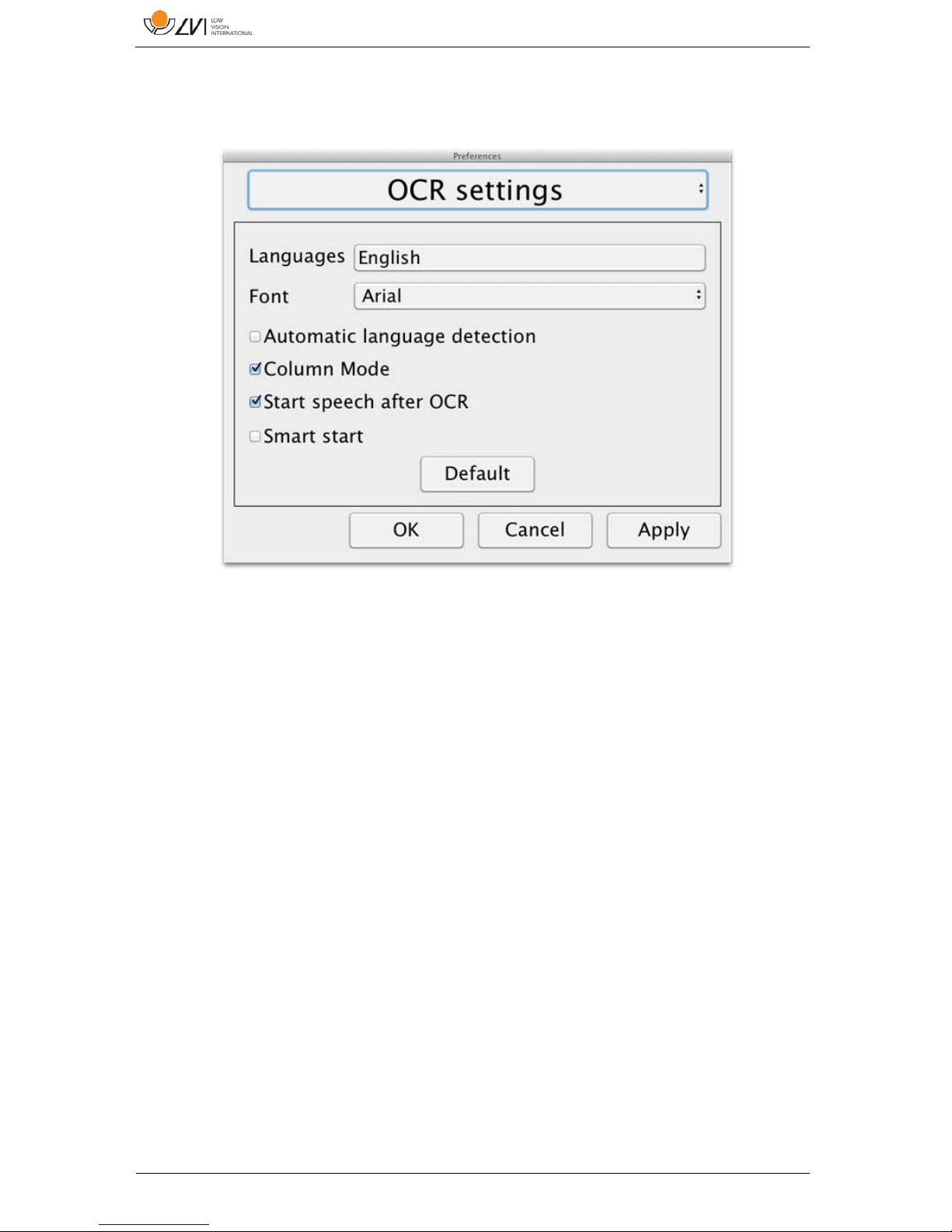
8.4.3.5 OCR settings
This heading is only available if the camera supports OCR.
Languages
Makes it possible to change the languages that the OCR engine is to
interpret. It is possible to select several languages. To achieve a good
result, it is important that the languages set is the same as that used in
the text.
Typeface
Here the user can set the typeface used for viewing text that has been
OCR-processed. The typeface in use has no effect on the OCRprocessing.
Automatic language detection
When this function is active, the application will try to detect the
language of the text and change the voice to the detected language. The
application will only attempt to identify among selected languages and
only wors for English, Swedish, Norwegian, German, Danish, Dutch,
Spanish, Finnish and French. If a text on a different language is to be
OCR-processed, then this function needs to be deactivated.
Page 31

MagniLink PRO - Mac
User Manual 7944079a | MagniLink PRO - Mac 31
Column mode
When this setting is active, the OCR engine processes the text in
columns, which is appropriate if it is a newspaper text that is to be
processed.
Start speech after OCR
If this box is ticked, text will automatically be read aloud after an image
has been OCR-processed.
Smart start
Smart start works as follows. If a text has already been read aloud and a
new OCR conversion is starting, the reading will start from the position
where the reading of the old text stopped.
8.4.3.5.1 Quality of OCR processing
In order to optimize the results of the OCR conversion, you should bear
in mind the following.
Ensure the magnification is sufficient. Very small text produces
poor results in the OCR software. A minimum of 12pt is
recommended for the lowest magnification on the reading camera.
Avoid glossy paper as this results in reflections in the image. This
impairs the results of the OCR conversion. If you intend to use
glossy paper, we recommend that the light on the unit is switched
off.
Certain fonts can be difficult for the OCR engine to interpret.
It is important that the text contrast is sufficient.
It is important that the OCR engine's language is the same as that
of the text.
The camera's resolution should be set to at least 1280x720, see
Video settings for more information.
Page 32
MagniLink PRO - Mac
32 User Manual 7944079a | MagniLink PRO - Mac
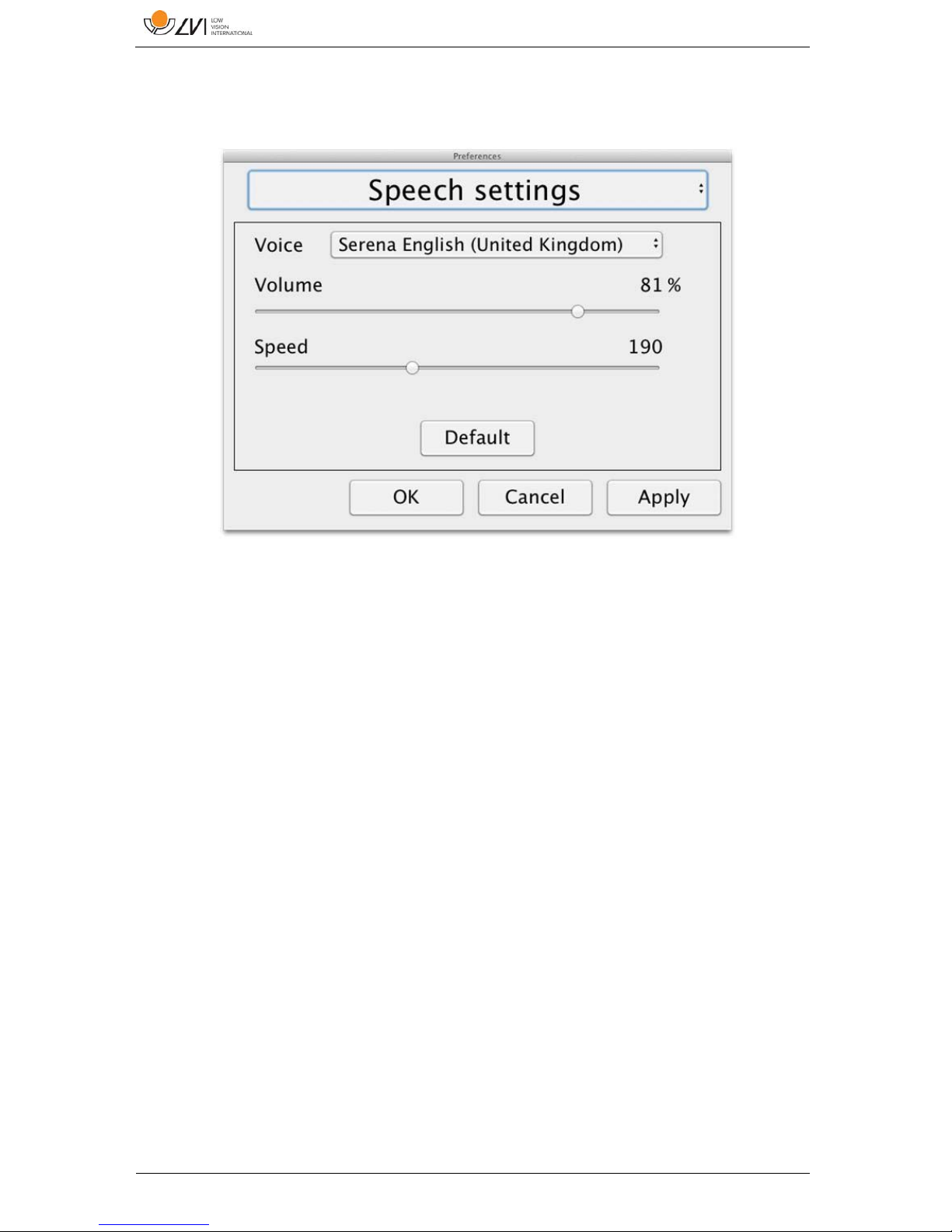
8.4.3.6 Speech Settings
This heading is only available if the camera supports OCR.
Voice
Here the user can select among all available voices.
Volume
Set the sound level for the voice.
Speed
Set the speed of the voice.
Page 33
MagniLink PRO - Mac
User Manual 7944079a | MagniLink PRO - Mac 33
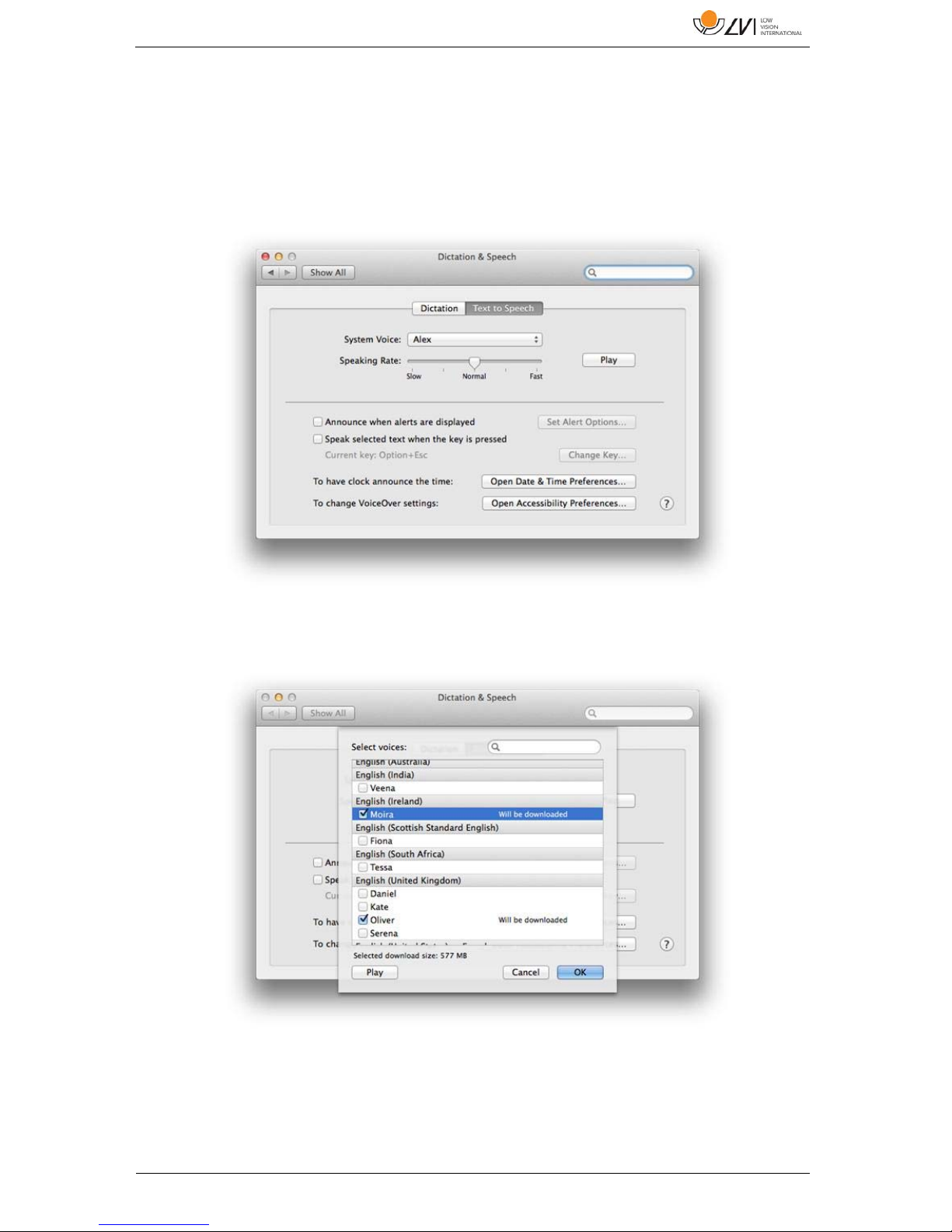
8.5 Download voices
In Mac OS X 10.7 or later, it is possible to download voices for different
languages. Go to "System Preferences" -> "Dictation and Speech" (The
exact name and look of the dialogs can vary some depending on the
version of Mac OS X).
Choose the tab "Text to Speech", click on "System voice" and select
"Customize".
Check to voices you wish to download and click OK.
Page 34

MagniLink PRO - Mac
34 User Manual 7944079a | MagniLink PRO - Mac
9 Ergonomics
Your reading camera is now ready to use. It is important that the
workplace around your MagniLink is comfortable, and that you sit
correctly. This is so that you can use the camera for as long as possible
without putting undue strain and stress on your neck and back.
You should bear the following in mind:
Your chair should be positioned close to the table on which the
equipment is located, and you should not sit in the chair for too
long. We recommend a good office chair with adjustable height.
The seat of the chair should be at a height that does not cause your
legs to become numb; legs should be at an angle of 90 degrees
and you should rest your feet on the floor.
The reading table should be at a height at which you can rest your
lower arm horizontally on it. It is important that the table is neither
too high nor too low for you. The ideal solution is if the screen is
slightly below eye level and in as straight a line in front of you as
possible.
Shield off daylight. Lights in the ceiling, table lamps and light from
windows can cause reflections on the monitor. For this reason,
avoid placing lights where they shine directly at the screen or at
yourself.
If you use the device for long periods of time, there is a risk of
repeated movements causing you pain in your neck, shoulders and
back. Your eyes can also get tired from looking at a screen for too
long.
Page 35

MagniLink PRO - Mac
User Manual 7944079a | MagniLink PRO - Mac 35
10 Troubleshooting
No image is displayed on the screen after you start the system:
Check that the power is on.
Check that all connectors are properly connected as explained in
the 'Installation' section.
The LED shines red for five seconds.
The battery needs to be charged. Connect the mains adapter to
the units to charge the battery.
It is not possible to start the system and the On/Off button flashes
(orange/red).
Press the On/Off button for more than six seconds to reset the
system.
Never remove any panels or the casing in order to attempt to repair the
system yourself. In the event of problems, contact your local dealer.
Page 36

MagniLink PRO - Mac
36 User Manual 7944079a | MagniLink PRO - Mac
11 Technical information
Magnification, reading camera 1.1-70x (23" screen)
Camera resolution Full HD (1920x1080)
Monitor, resolution 1366x768 (18.5") widescreen (16:9)
1920x1080 (23") widescreen (16:9)
Computer, resolution 1280x720, 60Hz
1920x1080 30 Hz
Battery, operating time 5-9 hours
Battery, charging 2.5 hours
Battery, warranty period 1 year
Dimensions, collapsed 33x47x17 cm (13x18.5x6,7 in)
Dimensions, opened up 33x38x52 cm (13x15x20,5 in)
Weight 4.2 kg (9 lb 15 oz)
Power source Battery or AC
Acceptable temperature ranges Transport and storage -20°C - +60°C
68°F - 140°F
Operation: +5°C – +35°C
41°F - 95°F
Page 37

MagniLink PRO - Mac
User Manual 7944079a | MagniLink PRO - Mac 37
Disposal of old electrical and electronic equipment (applies for EU countries and
all other European countries that have specific collection systems)
If the product or its packaging has this symbol on it, it is not to be handled as regular
domestic waste. It should instead be deposited at a suitable collection centre for the
recycling of electrical and electronic equipment. By ensuring that this product is
properly taken care of, you are helping to prevent the negative impact on health and
the environment that might otherwise result from inappropriate disposal of this
product. Recycling helps in the management of our natural resources. For more
detailed information regarding the recycling of this product, you can contact your
municipality, your waste management company or the store where you purchased the
product.
Page 38
MagniLink PRO - Mac
38 User Manual 7944079a | MagniLink PRO - Mac
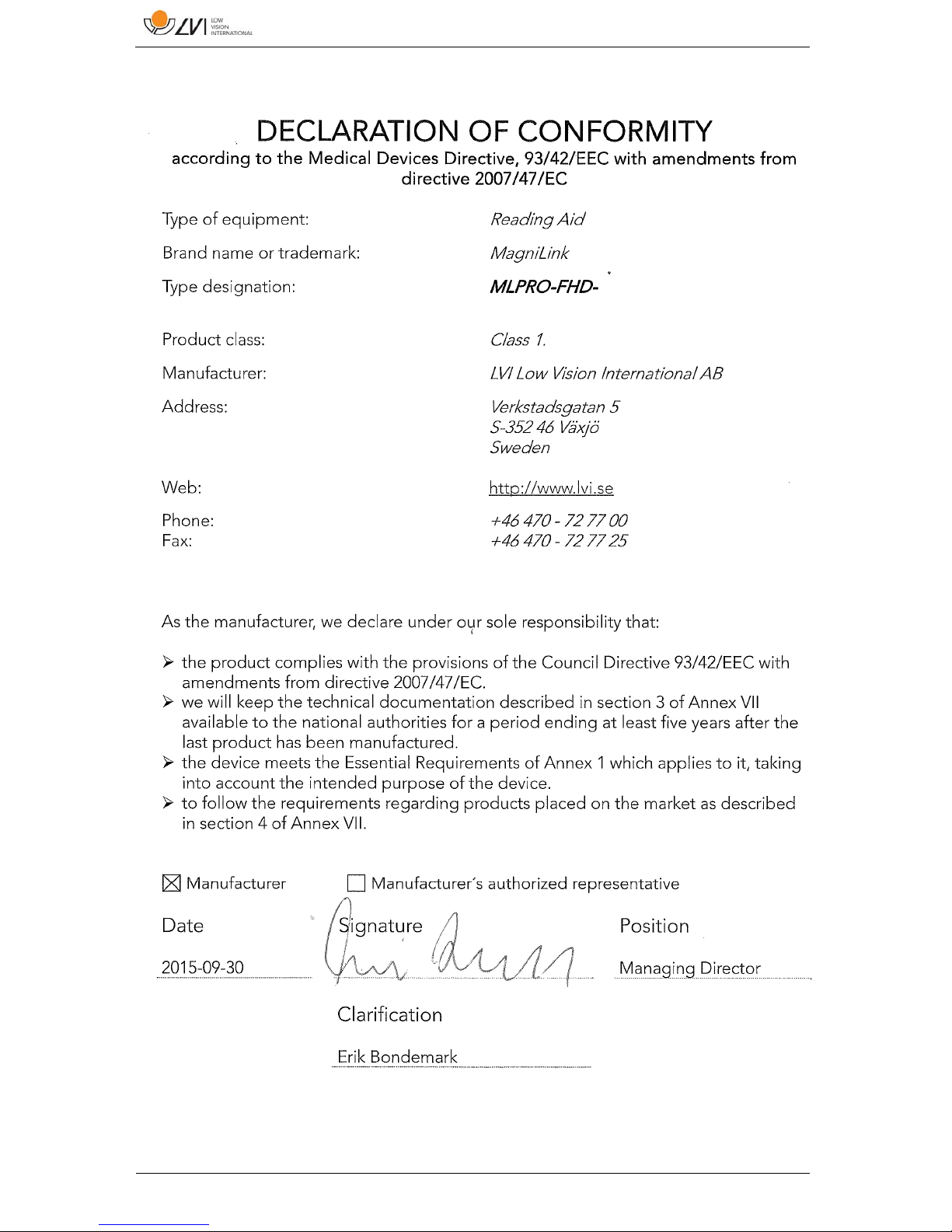
12 Declaration of Conformity
Page 39

MagniLink PRO - Mac
User Manual 7944079a | MagniLink PRO - Mac 39
Alphabetical index
About LVI ................................................................................................ 5
About the application .......................................................................... 26
Accessories ........................................................................................... 10
Battery ................................................................................................... 18
Camera .................................................................................................. 18
Connection ........................................................................................... 13
Control box ........................................................................................... 14
Declaration of Conformity ................................................................... 38
Download voices .................................................................................. 33
Ergonomics ........................................................................................... 34
Functions via the keyboard .................................................................. 21
Gestures ................................................................................................ 26
Information and settings window ........................................................ 26
Installation ............................................................................................. 12
Installation of reading table ................................................................. 13
Installation of software ......................................................................... 19
Introducing MagniLink PRO .................................................................. 6
Mac software ......................................................................................... 19
Menu ..................................................................................................... 15
Minimum system requirements ........................................................... 19
Modification Settings ........................................................................... 28
OCR settings ......................................................................................... 30
Packaging ................................................................................................ 9
Quality of OCR processing .................................................................. 31
Reading table ....................................................................................... 17
Recommended system requirements ................................................. 19
Recording Settings ............................................................................... 29
Safety information .................................................................................. 8
Speech Settings .................................................................................... 32
Technical information ........................................................................... 36
Troubleshooting ................................................................................... 35
Unfolding .............................................................................................. 12
Unpacking ............................................................................................... 9
Use ......................................................................................................... 14
Using the software ................................................................................ 21
Video Settings ...................................................................................... 27
 Loading...