

Page 1

Lunos Operation Manual
Knowing how to operate the Lunos e2 and eGO HRV systems will help you get the most out of
balanced, decentralized heat recovery ventilation. Your Lunos should already have been set up to be
operating continuously and providing healthy indoor air quality to your living spaces. However, you
may want to change the flow rates at night or in summer depending on your individual preferences.
This guide will help you determine the best ventilation strategy for your needs.
How Lunos works – an introduction
The basic Lunos unit is a through wall fan, with a ceramic regenerative heat exchanger behind it. But
the fan doesn't become a heat recovery ventilation
Each Lunos system provides heat recovery ventilation by synchronizing the direction and speed of air
flow through the ceramic cores. By reversing the air flow on regular intervals, the
ceramic cores capture and release heat to condition the interior space at optimal efficiency - while
maintaining balanced ventilation. Depending on your Lunos model, the reversal interval will be either
55 or 70 seconds.
With the Lunos e², fan pairs will be inside two different tubes that are generally on opposite ends of
your space. (For the Lunos eGO, both fans are in the same tube.) A maximum of 4 Lunos e2 fans can
be connected to one controller (a double rocker switch or rotary dial switch aka “Miceli”). Therefore, if
your dwelling unit has more than 4 fans, you will have more than one controller.
system
until two fan units are combined in pairs.
0817V2.1CT
Page 2
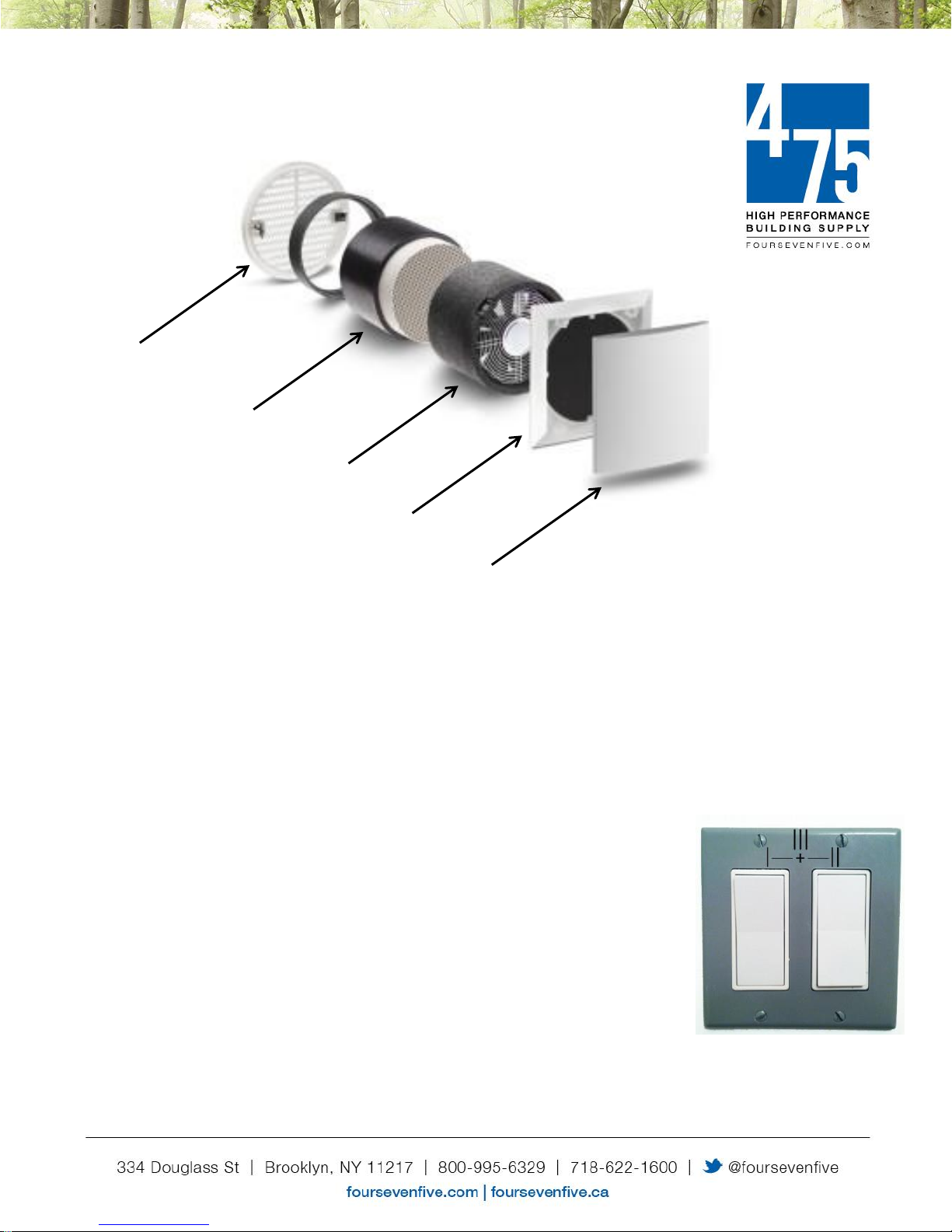
W1
W2
Outside cover
Heat exchange core
Fan
Interior cover
Filter
How to operate the Lunos
Lunos e² systems can be operated at different flow rates depending on your ventilation
needs. With normal setup, the switch has four positions: off, low, medium and high. This
corresponds to fan pairs set to OFF, 10, 15 and 20 CFM.
Important: note that the switches don't control each fan separately, but rather the rate of
ventilation for the
Position 1 = Left (W1) OFF*, Right (W2) OFF*: system is OFF
Position 2 = Left (W1) ON*, Right (W2) OFF*: system is LOW (fans at 10 CFM)
Position 3 = Left (W1) OFF*, Right (W2) ON*: system is MEDIUM (fans at 15 CFM)
Position 4 = Left (W1) ON*, Right (W2) ON*: system is HIGH (fans at 20 CFM)
whole
system. These are the switch positions:
* OFF = switch position down, ON = switch position up
0817V2.1CT
Page 3

Lunos systems are designed for continuous operation when the space is occupied.
Any of the settings will help to provide good indoor air quality. Many people like to
switch to the LOW (“sleep”) setting at night for the quietest operation, and return to
MEDIUM or higher during the day.
Reasons to leave your HRV system running continuously 24/7:
Continuous operation will help provide optimal indoor air quality
The e² is extremely efficient – each fan uses only 1.4W at 10 CFM
A Lunos HRV is an integral part of your home's high performance HVAC system.
How to turn the system off
While it is NOT recommended to turn the system off while the space is occupied, certain
conditions may warrant
If you choose to turn your Lunos system off (eg going on vacation), it is recommended that you close
the cover, as follows:
1. Turn system off (both rocker switches down)
2. Carefully remove the interior cover, rotate 180 degrees, and replace – the tabs will snap into
place
3. When you return home, rotate cover back to the normal operating position (leaves a 1/2″ gap
on all four sides for ventilation air to move freely), and turn the system on
lowering
the setting.
Summer Ventilation mode
In the hot summer season it may be desirable to use the Lunos fans to help passively cool the building
at night. “Summer Ventilation” mode runs each fan in one direction for 60
this mode, heat recovery is suspended and interior spaces are flushed with cool nighttime air. This
minutes
before reversing. In
helps to set a cooler baseline before returning to regular heat recovery mode for the daytime.
How is this better than opening a window? With a still night, opening a window won't necessarily
provide ventilation, but the Lunos in Summer Ventilation mode will provide a predictable and steady
flow of filtered fresh air.
0817V2.1CT
Page 4

How to set up Summer Ventilation mode:
Simply "rocker" the
within 3 seconds. To return to normal heat recovery mode manually, wait 10
seconds and again rocker the right switch.
If you sense that the Lunos heat recovery isn't working, or you're just not sure which mode you're in -
simply listen to one fan for up to 70 seconds. If you don't hear the fan reverse (get up close, it's quiet),
then you're in Summer Ventilation mode.
right
rocker switch once up and down (or down and up)
Extreme Cold
At very cold outdoor temperatures (ie below -10F), it is recommended to operate units at the LOW (10
CFM) setting and keep indoor relative humidity (RH) below 35% to prevent frost issues. If RH is 50%
or higher below -10F, and the RH cannot be lowered, a safer option is to turn the system off and close
the interior covers until temperatures and/or RH recover.
Filter Maintenance
Approximately every three months the LED filter indicator will light up - alerting you that it's a good time
to clean or replace the filters in your Lunos system. We recommend the following filter* maintenance
schedule:
Every 3 months: wash filters in warm water, squeeze dry, replace
Every 2 years: replace filters. These are available in 3-packs from the 475 High Performance
Building Supply online store at foursevenfive.com.
*Note: Pollen filters can only be cleaned with a vacuum or replaced
To turn off the filter indicator LED or to restart the cleaning interval, simply "rocker" the
switch once up then down (or down and up) within 3 seconds.
left
rocker
0817V2.1CT
Page 5

General Maintenance
It’s a good idea to clean the fans units at least once a year. To do this, remove the
interior cover, unplug the low voltage connector, and remove the fan units from the
wall tubes. Wipe the tube surfaces with a damp cloth. You can use a vacuum cleaner
to clean the heat exchanger and fan.
Installation Instructions
If you need more technical information, please refer to the installation instructions that came with your
Lunos system, or find them on foursevenfive.com.
Other questions?
Contact the experts at 475 High Performance Building Supply, and we'll be happy to assist.
0817V2.1CT
 Loading...