

Page 1
RDM Reference Guide
5-year limited warranty.
and Conditions of Sales.
H3K 1G6
www.lumenpulse.com
ves the right to make changes to this product at any time
without prior notice and such modication shall be effective immediately.
Client Project name
Order# Type Qty
DESCRIPTION
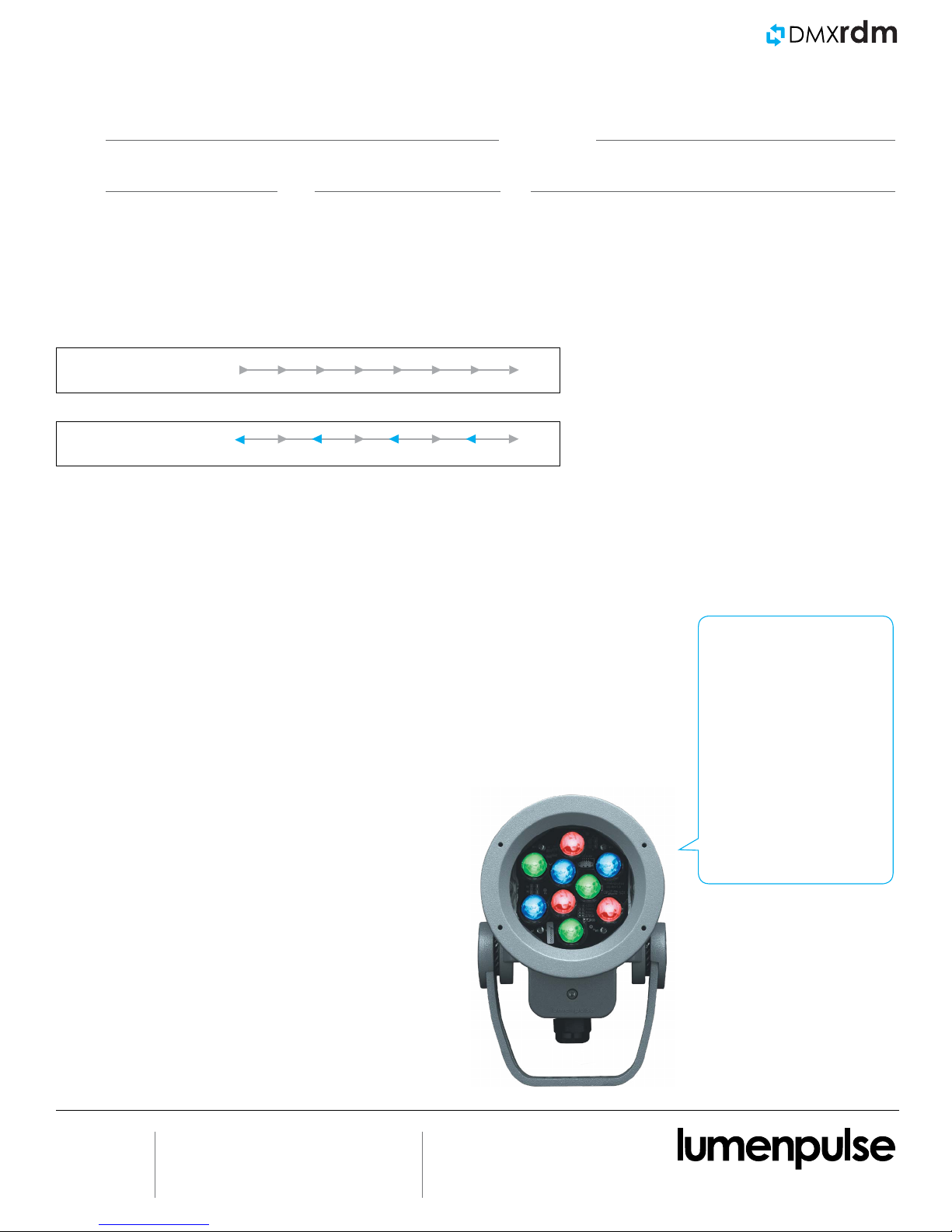
Remote Device Management (RDM) is an enhancement of
DMX that allows bi-directional control and feedback from
lighting xtures and devices.
DMX
DMX/RDM
FEATURES AND BENEFITS
DMX/RDM provides a number of benets for stakeholders
throughout the construction, commissioning and property
management stages.
• Simplify xture discovery: RDM controllers can discover
any RDM-enabled devices on the network.
• Improve error reporting: An alert system reports back
potential issues, including “Over Temperature” and “Over
Voltage”.
• Enable remote DMX addressing: With RDM,
technicians can remotely query and update the DMX
address and other parameters of the xture prole.
• Update rmware: Allows for easy discovery and
updating of the xture rmware via the new xture
rmware bootloader.
DMX/RDM PROTOCOL LIMITS
Data length: 1000’ between boosted devices
Number of devices connected to a CBX: 32 per output
Cascading CBX limit: 4
Your xture
has a lot to say.
› Hello my name is Lumenbeam™ Small
› My DMX address is 125
› My temperature is 32° C
› My personality is 16-bit
› Remaining hours till L70: 102,567
› My serial number is 06500005
1/3
23/OC/2015
E. Martin - Rev.1
© Copyright Lumenpulse 2015
1751 Richardson, Suite 1505
Montreal (Quebec) Canada
1.877.937.3003
P.514.937.3003
F. 514.937.6289
[email protected]
Consult www.lumenpulse.com
for our complete Standard Terms
Lumenpulse reser
Page 2
RDM Reference Guide
5-year limited warranty.
and Conditions of Sales.
H3K 1G6
www.lumenpulse.com
ves the right to make changes to this product at any time
without prior notice and such modication shall be effective immediately.
ADDITIONAL FEATURES
Key New RDM Parameters
• Fixture Name (Customizable)
• Manufacturer Label
• Device Model Description
• Serial Number
• DMX Address
• DMX Footprint
• Fixture Resolution
• Fixture Personality (Multiple Options)
• DMX Address Direction
• Dimming Curve
• Start-Up Color
• Firmware Version Number
On-Board Fixture Sensors
• Device Power
• LED Temperature
• PSU Temperature
Other Available Parameters for Both Lumenpulse and Third-Party Devices
• Device Hours
• Device Power Cycles
• Device Clock
• Device Slot Information (per channel)
• Display Invert (if applicable)
• Display Level (if applicable)
• Pan Invert (if applicable)
• Tilt Invert (if applicable)
• Pan/Tilt Swap (if applicable)
• Factory Default Reset
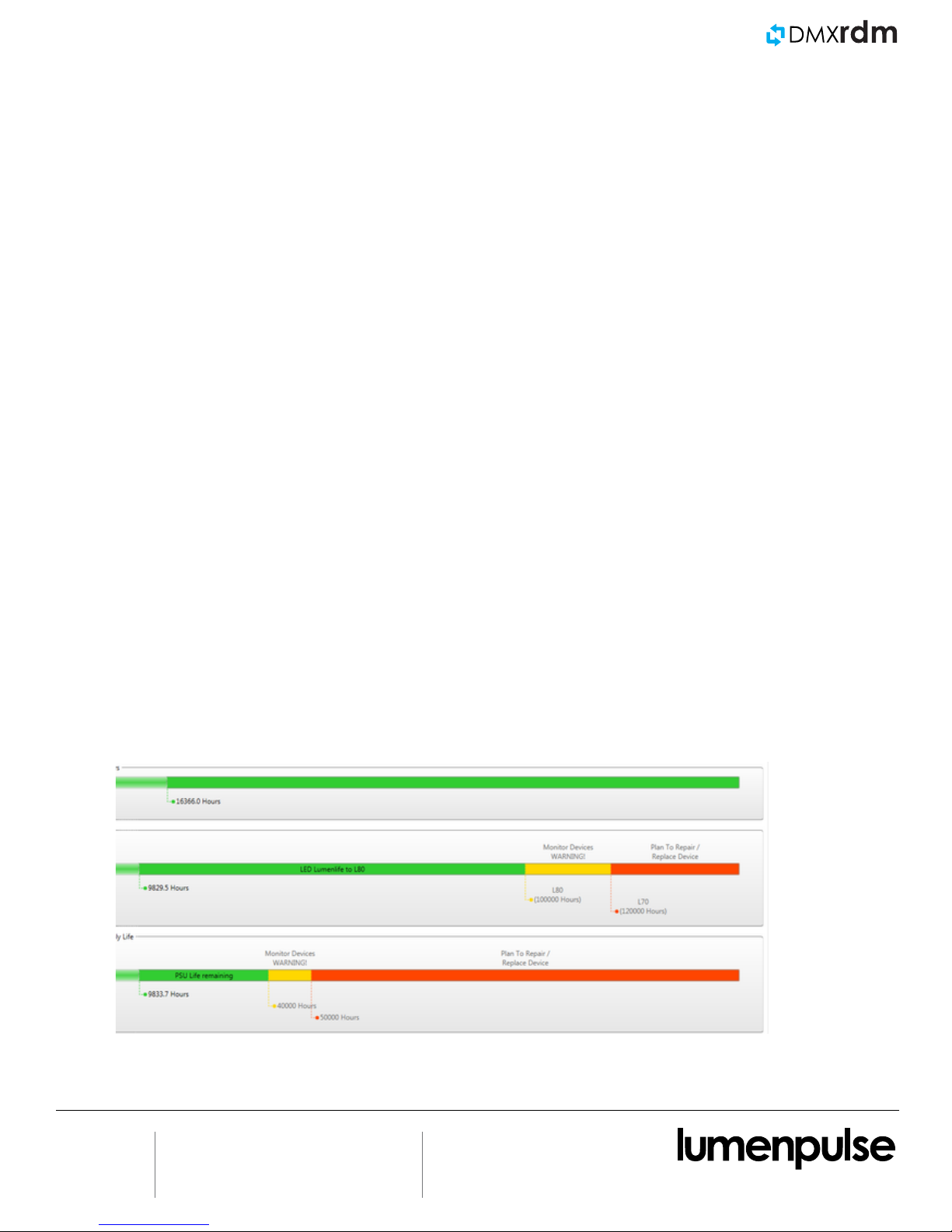
Lumenlife
™
Lumenlife™, featured in the xture monitoring section of the LumenID™ V3 software, is a patented method for estimating the life
expectancy of a xture, which takes into account environmental factors that inuence lifetime, rather than merely the past hours of
operation.
With Lumenlife, we can better estimate when a luminaire reaches L70 and issue alerts as the luminaire starts to approach the end of its
useful lifetime. For more information, please consult the Lumenpulse Terms and Conditions at http://www.lumenpulse.com/en/terms.
2/3
23/OC/2015
E. Martin - Rev.1
© Copyright Lumenpulse 2015
1751 Richardson, Suite 1505
Montreal (Quebec) Canada
1.877.937.3003
P.514.937.3003
F. 514.937.6289
[email protected]
Consult www.lumenpulse.com
for our complete Standard Terms
Lumenpulse reser
Page 3
RDM Reference Guide
5-year limited warranty.
and Conditions of Sales.
H3K 1G6
www.lumenpulse.com
ves the right to make changes to this product at any time
without prior notice and such modication shall be effective immediately.
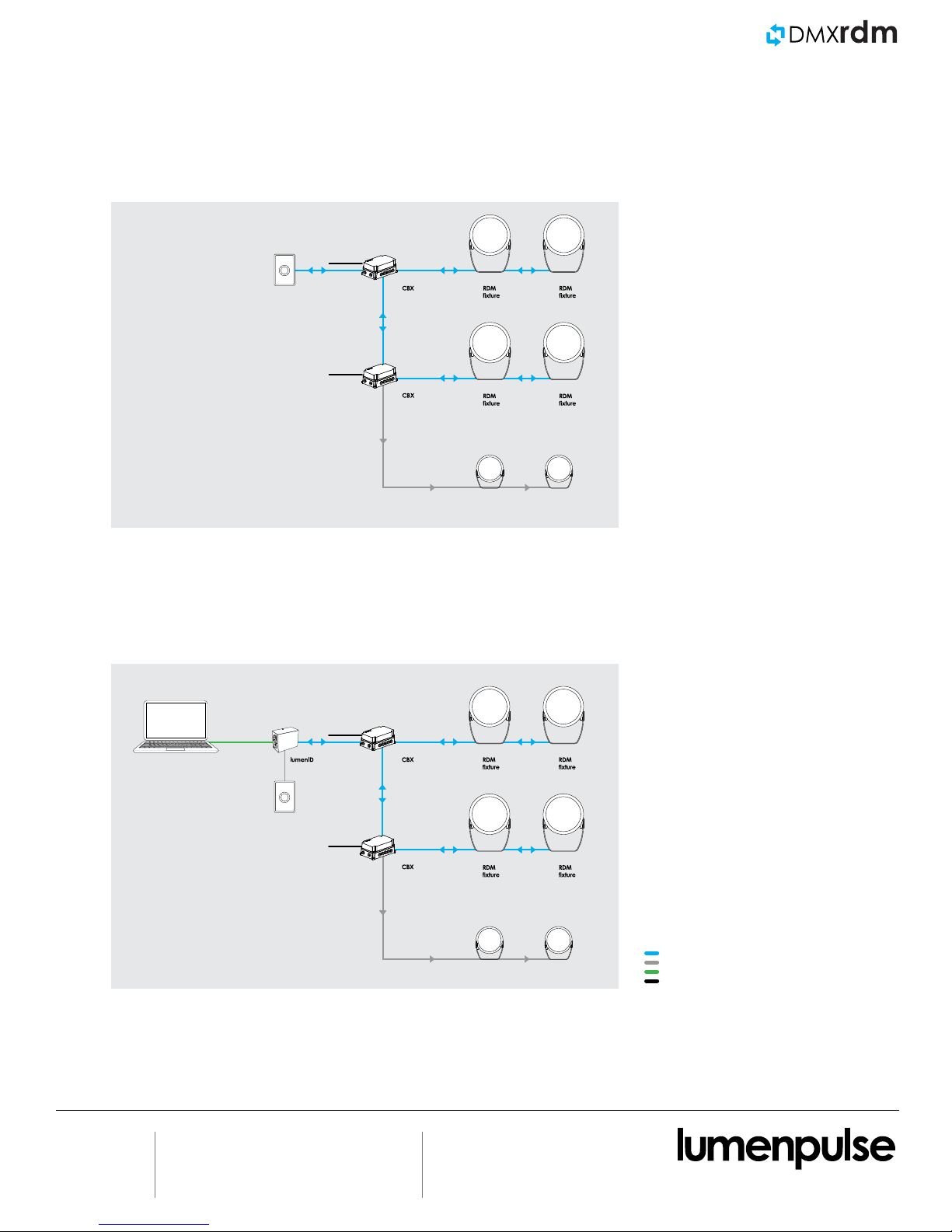
TYPICAL DMX/RDM LAYOUTS
During Operation
RDM-enabled
controller
100-277V
100-277V
During Commissioning or Monitoring
100-277V
RDM-enabled
controller
100-277V
Standard DMX
fixture
Standard DMX
fixture
3/3
© Copyright Lumenpulse 2015
1.877.937.3003
P.514.937.3003
23/OC/2015
1751 Richardson, Suite 1505
Montreal (Quebec) Canada
F. 514.937.6289
[email protected]
E. Martin - Rev.1
DMX/RDM
Standard DMX
fixture
Standard DMX
fixture
DMX
USB
100-277V
Consult www.lumenpulse.com
for our complete Standard Terms
Lumenpulse reser
 Loading...