

Page 1
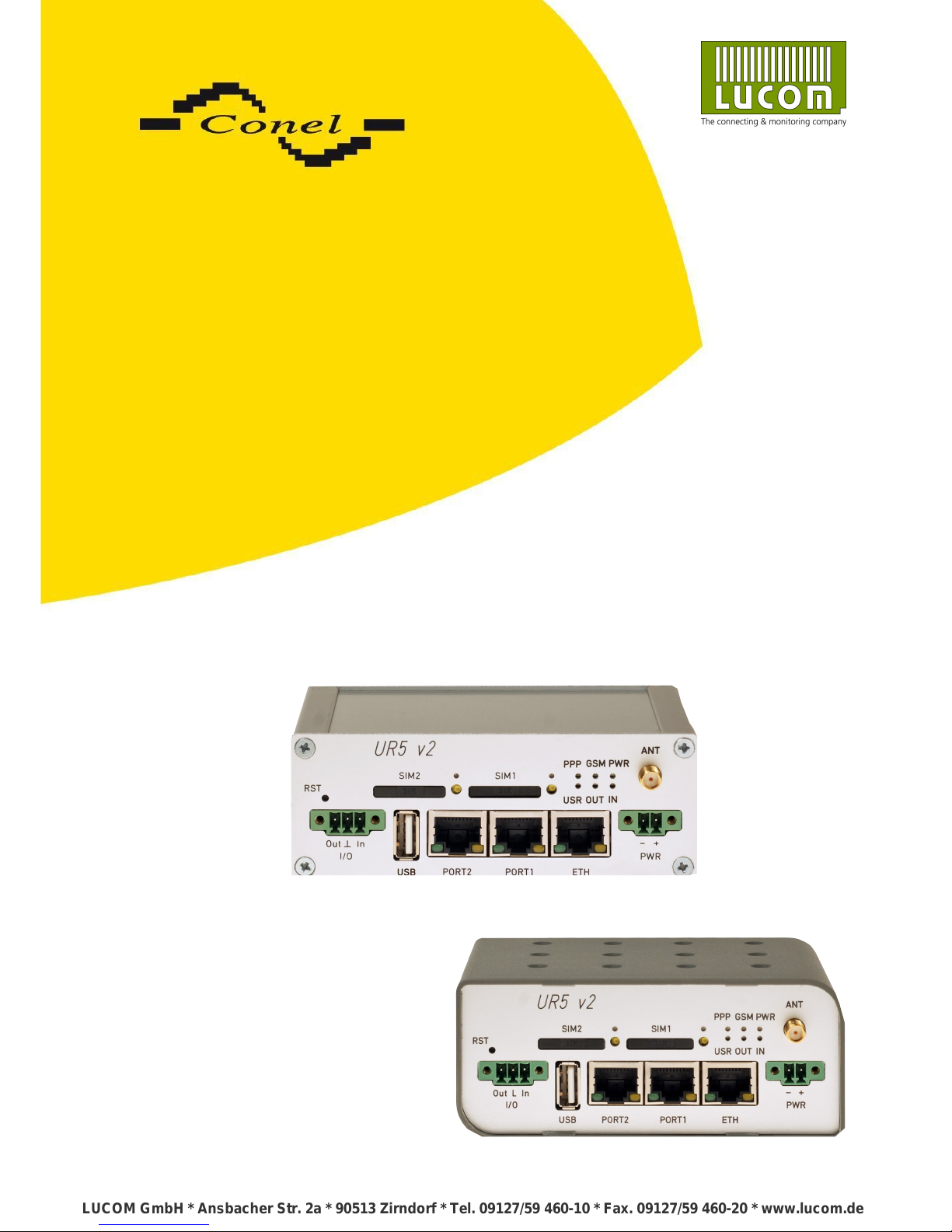
UMTS router UR5 v2
and UR5 v2 SL
USER’S GUIDE
LUCOM GmbH * Ansbacher Str. 2a * 90513 Zirndorf * Tel. 09127/59 460-10 * Fax. 09127/59 460-20 * www.lucom.de
Page 2
USED SYMBOLS
Used symbols
Danger – important notice, which may have an influence on the user’s safety or the function
of the device.
Attention – notice on possible problems, which can arise in specific cases.
Information, notice – information, which contains useful advice or special interest.
GPL license
Source codes under GPL license are available free of charge by sending an email
to [email protected].
Conel s.r.o., Sokolska 71, 562 04 Usti nad Orlici, Czech Republic
Manual issued in CZ, 2/19/2013
ii
Declared quality system
ISO 9001
LUCOM GmbH * Ansbacher Str. 2a * 90513 Zirndorf * Tel. 09127/59 460-10 * Fax. 09127/59 460-20 * www.lucom.de
LUCOM GmbH * Ansbacher Str. 2a * 90513 Zirndorf * Tel. 09127/59 460-10 * Fax. 09127/59 460-20 * www.lucom.de
LUCOM GmbH * Ansbacher Str. 2a * 90513 Zirndorf * Tel. 09127/59 460-10 * Fax. 09127/59 460-20 * www.lucom.de
LUCOM GmbH * Ansbacher Str. 2a * 90513 Zirndorf * Tel. 09127/59 460-10 * Fax. 09127/59 460-20 * www.lucom.de
Page 3

CONTENTS
Contents
1.Safety instruction 1
2.Product disposal instructions 2
3.Router description 3
4.Contents of package 4
5.Router design 5
5.1.Version 5
5.2.Delivery identification 5
5.3.Ordering code 6
5.3.1.Basic version 6
5.3.2.Full version 6
5.4.Basic dimensions plastic box 7
5.5.Basic dimensions metal box 7
5.6.Mechanical external dimensions and mounting recommendations 8
5.7.User interfaces (connectors) 10
5.7.1.Status indication 11
5.7.2.Power connector PWR 12
5.7.3.Antenna connector ANT 13
5.7.4.SIM card reader 14
5.7.5.Ethernet port 14
5.7.6.PORT1 16
5.7.7.PORT2 16
5.7.8.USB port 17
5.7.9.I/O port 18
5.7.10. Reset 19
6.First use 20
6.1.Connecting the router before first use 20
6.2.Start router 21
6.3.Router configuration 21
6.3.1.Configuration over web browser 21
6.3.2.Configuration over Telnet 21
7.Technical parameters 22
7.1.Technical parameters of router 22
7.2.Technical parameters of module 22
7.3.Technical parameters of processor 23
7.4.Technical parameters of I/O port 23
7.5.Technical parameters of expansion port 23
8.Recommended literature 24
9.Possible problems 24
10.FAQ 25
11.Customers support 27
iii
LUCOM GmbH * Ansbacher Str. 2a * 90513 Zirndorf * Tel. 09127/59 460-10 * Fax. 09127/59 460-20 * www.lucom.de
LUCOM GmbH * Ansbacher Str. 2a * 90513 Zirndorf * Tel. 09127/59 460-10 * Fax. 09127/59 460-20 * www.lucom.de
LUCOM GmbH * Ansbacher Str. 2a * 90513 Zirndorf * Tel. 09127/59 460-10 * Fax. 09127/59 460-20 * www.lucom.de
LUCOM GmbH * Ansbacher Str. 2a * 90513 Zirndorf * Tel. 09127/59 460-10 * Fax. 09127/59 460-20 * www.lucom.de
Page 4

IMAGE LIST
Image list
Fig. 1: Contents of package 4
Fig. 2: Front panel UR5 v2B 5
Fig. 3: Front panel UR5 v2B SL 5
Fig. 4: Front panel UR5 v2F SL 5
Fig. 5: Front panel UR5 v2F SL 5
Fig. 6: Label UR5 v2B 5
Fig. 7: Label UR5 v2F 5
Fig. 8: Basic dimensions plastic box 7
Fig. 9: Basic dimensions metal box 7
Fig. 10: Space around the antenna 8
Fig. 11: Space around antenna for SL version 8
Fig. 12: Cable routing 9
Fig. 13: Cable routing for SL version 9
Fig. 14: Space in front connectors 9
Fig. 15: Space in front connectors SL version 9
Fig. 16: Front panel UR5 v2F 10
Fig. 17: Front panel UR5 v2F SL 10
Fig. 18: Power connector 12
Fig. 19: Connection of power supply connector 12
Fig. 20: Connection of power supply 12
Fig. 21: External antenna 13
Fig. 22: Connecting the antenna 13
Fig. 23: Ejected the SIM card 14
Fig. 24: Ethernet connector 14
Fig. 25: Connection Ethernet cable 15
Fig. 26: Example of router connection 15
Fig. 27: Connection PORT1 cable 16
Fig. 28: Connection PORT2 cable 16
Fig. 29: USB connector 17
Fig. 30: Connection PLC to the router 17
Fig. 31: Connection flash memory to the router 17
Fig. 32: I/O connector 18
Fig. 33: Connection I/O cable 18
Fig. 34: Connection input and output of router 18
Fig. 35: Router reset 19
Fig. 36: Router connection 20
iv
LUCOM GmbH * Ansbacher Str. 2a * 90513 Zirndorf * Tel. 09127/59 460-10 * Fax. 09127/59 460-20 * www.lucom.de
LUCOM GmbH * Ansbacher Str. 2a * 90513 Zirndorf * Tel. 09127/59 460-10 * Fax. 09127/59 460-20 * www.lucom.de
LUCOM GmbH * Ansbacher Str. 2a * 90513 Zirndorf * Tel. 09127/59 460-10 * Fax. 09127/59 460-20 * www.lucom.de
LUCOM GmbH * Ansbacher Str. 2a * 90513 Zirndorf * Tel. 09127/59 460-10 * Fax. 09127/59 460-20 * www.lucom.de
Page 5

TABLE LIST
Table list
Table 1: Expansion port possibilities 4
Table 2: Router version 5
Table 3: Delivery identification 5
Table 4: Ordering code of basic version 6
Table 5: Ordering code of full version 6
Table 6: Front panel description 10
Table 7: Router status indication 11
Table 8: Connection of power connector 12
Table 9: Connection of Ethernet connector 14
Table 10: Connection of USB connector 17
Table 11: Connection of I/O port 18
Table 12: Description of reset and restart router 19
Table 13: Technical parameters of router 22
Table 14: Technical parameters of module 22
Table 15: Technical parameters of processor 23
Table 16: Technical parameters of I/O 23
v
LUCOM GmbH * Ansbacher Str. 2a * 90513 Zirndorf * Tel. 09127/59 460-10 * Fax. 09127/59 460-20 * www.lucom.de
LUCOM GmbH * Ansbacher Str. 2a * 90513 Zirndorf * Tel. 09127/59 460-10 * Fax. 09127/59 460-20 * www.lucom.de
LUCOM GmbH * Ansbacher Str. 2a * 90513 Zirndorf * Tel. 09127/59 460-10 * Fax. 09127/59 460-20 * www.lucom.de
LUCOM GmbH * Ansbacher Str. 2a * 90513 Zirndorf * Tel. 09127/59 460-10 * Fax. 09127/59 460-20 * www.lucom.de
Page 6
SAFETY INSTRUCTION
1. Safety instruction
Please, observe the following instructions:
• The router must be used in compliance with all applicable international and national laws and
in compliance with any special restrictions regulating the utilization of the router in
prescribed applications and environments.
• To prevent possible injury to health and damage to appliances and to ensure that all
the relevant provisions have been complied with, use only the original accessories.
Unauthorised modifications or utilization of accessories that have not been approved may
result in damage to the router and in a breach of applicable regulations. Unauthorized
modifications or utilization of accessories that have not been approved may result in the
termination of the validity of the guarantee.
• The router can not be opened.
• Caution! The SIM card could be swallowed by small children.
• It must not be exceeded by the maximum voltage 30V DC power connector on the router.
• Do not expose the router to extreme ambient conditions. Protect the router against dust,
moisture and high temperature.
• The router should not be used at petrol stations of flammable and explosive materials. We
remind the users of the duty to observe the restrictions concerning the utilization of radio
devices at petrol stations, in chemical plants, or in the course of blasting works in which
explosives are used.
• Switch off the router when travelling by plane. Utilization of the router in a plane may
endanger the operation of the plane or interfere with the mobile telephone network, and
may be unlawful. Failure to observe these instructions may result in the suspension or
cancellation of telephone services for the respective client, or, it may result in legal
sanctions; it may also result in both eventualities.
• When using the router in the close proximity of personal medical devices, such as cardiac
pacemakers or hearing aids, you must proceed with heightened caution.
• If it is in the proximity of TV sets, radio receivers and personal computers, the telephone may
cause interference.
• It is recommended that you should create an appropriate copy or backup of all the important
settings that are stored in the memory of the device.
1
LUCOM GmbH * Ansbacher Str. 2a * 90513 Zirndorf * Tel. 09127/59 460-10 * Fax. 09127/59 460-20 * www.lucom.de
LUCOM GmbH * Ansbacher Str. 2a * 90513 Zirndorf * Tel. 09127/59 460-10 * Fax. 09127/59 460-20 * www.lucom.de
LUCOM GmbH * Ansbacher Str. 2a * 90513 Zirndorf * Tel. 09127/59 460-10 * Fax. 09127/59 460-20 * www.lucom.de
LUCOM GmbH * Ansbacher Str. 2a * 90513 Zirndorf * Tel. 09127/59 460-10 * Fax. 09127/59 460-20 * www.lucom.de
Page 7

PRODUCT DISPOSAL INSTRUCTIONS
2. Product disposal instructions
The WEEE (Waste Electrical and Electronic Equipment: 2002/96/EC) directive has
been introduced to ensure that electrical/electronic products are recycled using the best
available recovery techniques to minimize the impact on the environment. This product
contains high quality materials and components which can be recycled. At the end of it’s life
this product MUST NOT be mixed with other commercial waste for disposal. Check the terms
and conditions of your supplier for disposal information.
2
LUCOM GmbH * Ansbacher Str. 2a * 90513 Zirndorf * Tel. 09127/59 460-10 * Fax. 09127/59 460-20 * www.lucom.de
LUCOM GmbH * Ansbacher Str. 2a * 90513 Zirndorf * Tel. 09127/59 460-10 * Fax. 09127/59 460-20 * www.lucom.de
LUCOM GmbH * Ansbacher Str. 2a * 90513 Zirndorf * Tel. 09127/59 460-10 * Fax. 09127/59 460-20 * www.lucom.de
LUCOM GmbH * Ansbacher Str. 2a * 90513 Zirndorf * Tel. 09127/59 460-10 * Fax. 09127/59 460-20 * www.lucom.de
Page 8

ROUTER DESCRIPTION
3. Router description
3G UMTS/HSDPA UR5 v2 router is used to wirelessly connect various equipments
and devices via Ethernet interface 10/100 to the Internet or intranet. Thanks to high data
transfer speed, up to 3.6 Mbit/s (download) and upload speed up to 384 Kbit/s it is an ideal
wireless solution for traffic and security camera systems, individual computers, LAN
networks, automatic teller machines (ATM) and other self-service terminals and machines.
As a standard, this 3G UR5 v2 wireless router is equipped with one Ethernet 10/100,
one USB Host port, one binary Input/output (I/O) port and one SIM card. To save and backup
communication data a version with 2 x SIM cards is available. The wide range of interface
options of the router further expands an optional PORT1 and PORT2 – selected by the
customer. There are Ethernet port 10/100, serial interface ports RS232/RS485/RS422/MBUS
or (I/O – CNT). PORT2 may be equipped with serial interfaces RS232/RS485/RS422/MBUS,
wireless interfaces WIFI/WMBUS or (I/O – CNT). Both of ports can be fitted with internal
switch XC-SW. This 3G wireless router is supplied either in a plastic or metal casing, based
on the requirements of the customer.
Configuration is done via web interface protected by password. The UMTS/HSDPA
router supports creation of VPN tunnels using technologies IPsec, OpenVPN, L2TP to
ensure safe communication. Web interface provides detail statistics about the 3G router
activities, signal strength, detailed log, etc. Cellular router supports functions: DHCP, NAT,
NAT-T, DynDNS, NTP, VRRP, control by SMS and many other functions.
Other diagnostic functions ensuring continuous communication include automatic
inspection of PPP connection offering an automatic restart feature – in case of connection
losses, or hardware watchdog which monitors the status of the router. With the help
of a special window (start up script window) you may insert Linux scripts for various actions.
For some applications the key option to create several different configurations for one 3G
wireless router, the so-called profiles (maximum of 4), and the option to switch between them
(for example via SMS, binary input status, etc.) is essential. Cellular wireless routers
may automatically upgrade configuration and firmware from server. This allows mass
reconfiguration of many routers in one time.
For easy use additional software may be used – communication VPN server
Digicluster and software for router monitoring R-SeeNet.
Examples of possible applications
• mobile office
• fleet management
• security system
• telematic
• telemetric
• remote monitoring
• vending and dispatcher machines
3
LUCOM GmbH * Ansbacher Str. 2a * 90513 Zirndorf * Tel. 09127/59 460-10 * Fax. 09127/59 460-20 * www.lucom.de
LUCOM GmbH * Ansbacher Str. 2a * 90513 Zirndorf * Tel. 09127/59 460-10 * Fax. 09127/59 460-20 * www.lucom.de
LUCOM GmbH * Ansbacher Str. 2a * 90513 Zirndorf * Tel. 09127/59 460-10 * Fax. 09127/59 460-20 * www.lucom.de
LUCOM GmbH * Ansbacher Str. 2a * 90513 Zirndorf * Tel. 09127/59 460-10 * Fax. 09127/59 460-20 * www.lucom.de
Page 9
ROUTER DESCRIPTION
4. Contents of package
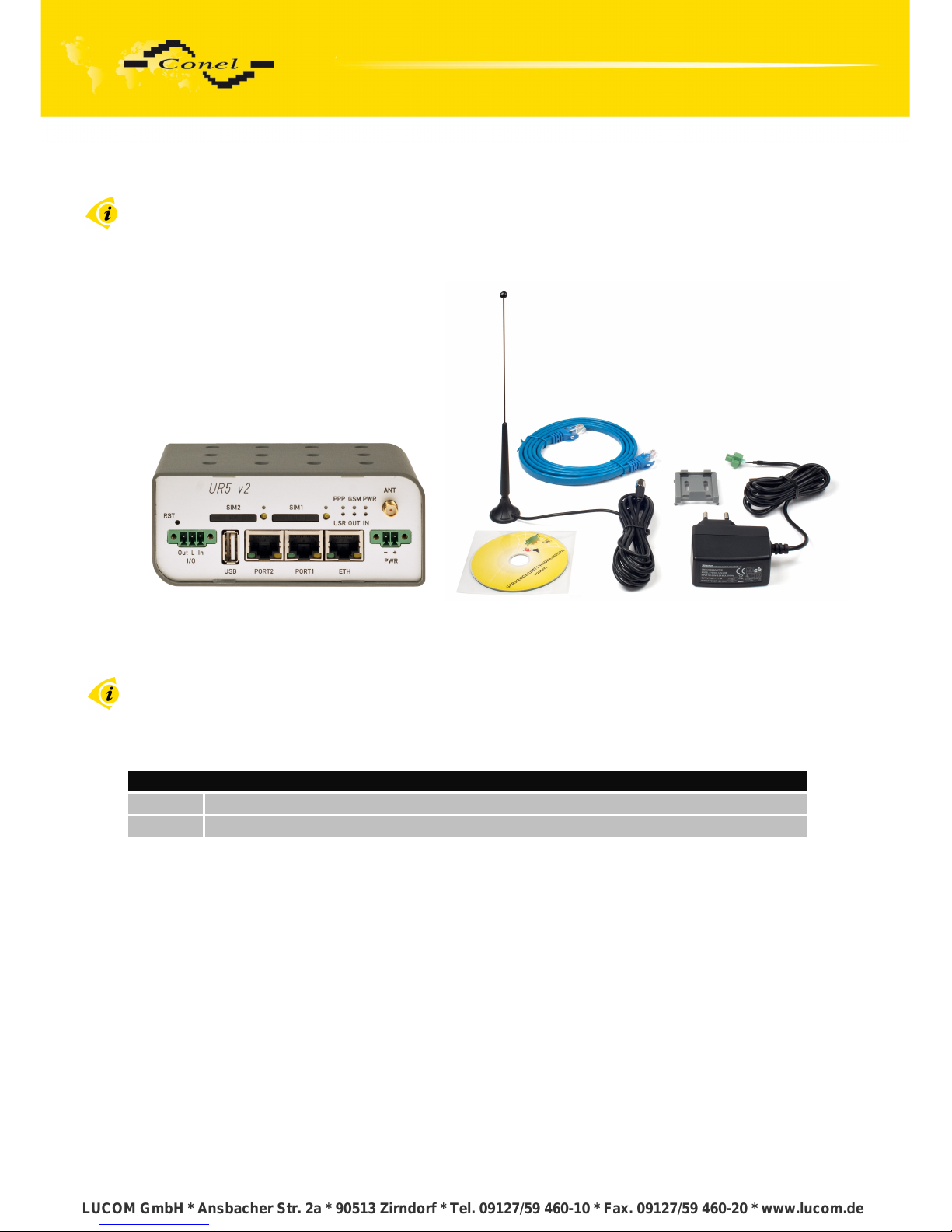
Basic delivered set of router includes:
• router,
• power supply,
• crossover UTP cable,
• external antenna,
• clips for the DIN rail,
• installation CD containing instructions,
• paper start guide.
Fig. 1: Contents of package
The router box and DIN mount are supplied in a metal case in the SL version of the router.
In addition to the basics it is possible to deliver:
• One or two expansion ports RS232, RS485/RS422, ETHERNET, M-BUS, CNT, XC-
SW, WIFI or WMBUS. Separation columns for mounting expansion boards are included.
Module can be connected only as follows.
PORT1 RS232, RS485/422, ETHERNET, M-BUS, CNT, XC-SW (together with PORT2)
PORT2 RS232, RS485/422, M-BUS, XC-SW (together with PORT1), WIFI, WMBUS
Table 1: Expansion port possibilities
4
LUCOM GmbH * Ansbacher Str. 2a * 90513 Zirndorf * Tel. 09127/59 460-10 * Fax. 09127/59 460-20 * www.lucom.de
LUCOM GmbH * Ansbacher Str. 2a * 90513 Zirndorf * Tel. 09127/59 460-10 * Fax. 09127/59 460-20 * www.lucom.de
LUCOM GmbH * Ansbacher Str. 2a * 90513 Zirndorf * Tel. 09127/59 460-10 * Fax. 09127/59 460-20 * www.lucom.de
LUCOM GmbH * Ansbacher Str. 2a * 90513 Zirndorf * Tel. 09127/59 460-10 * Fax. 09127/59 460-20 * www.lucom.de
Page 10
ROUTER DESCRIPTION
5. Router design
5.1. Version
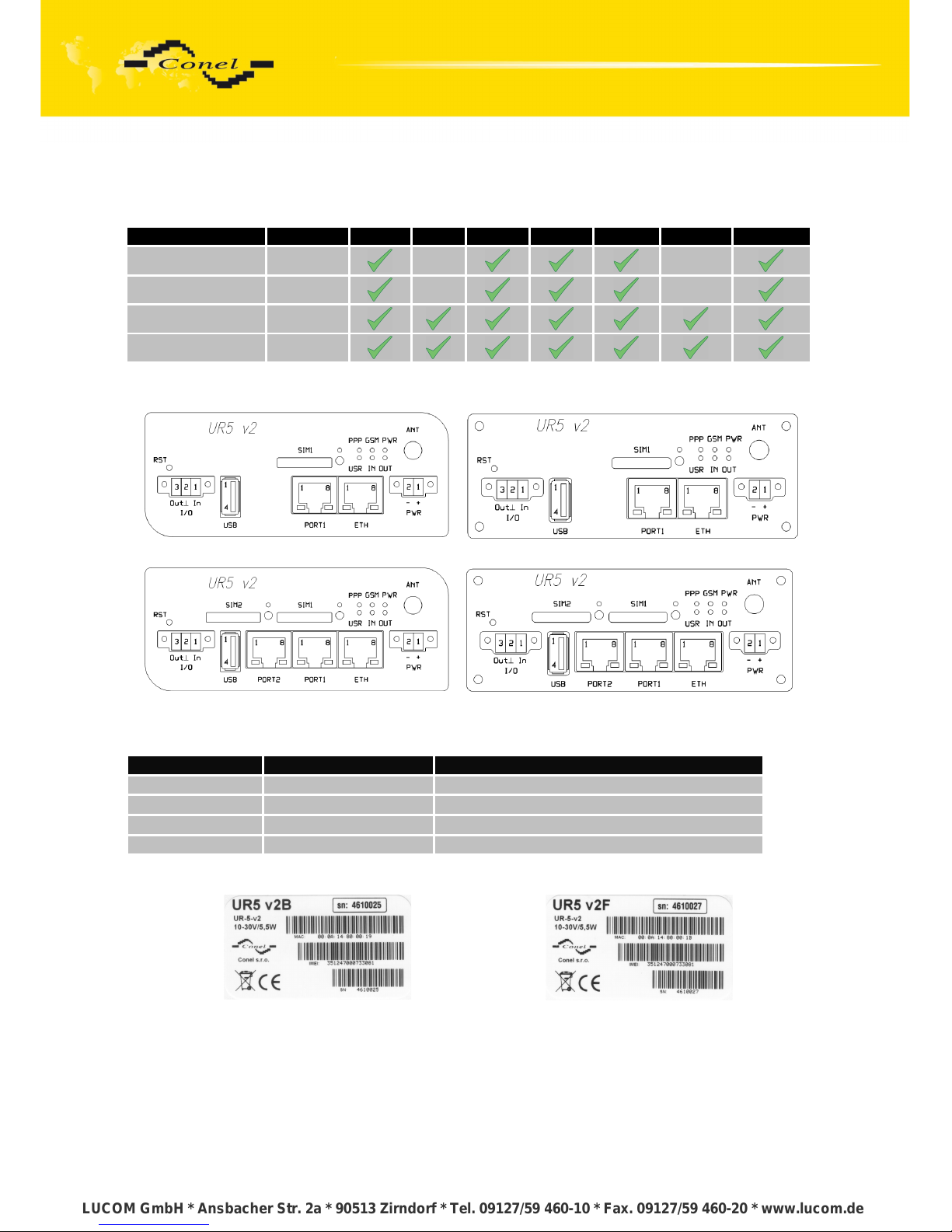
Box SIM1 SIM2 I/O USB PORT1 PORT2 ETH
UR5 v2B set Plastic
UR5 v2B SL set Metal
UR5 v2F set Plastic
UR5 v2F SL set Metal
Table 2: Router version
Fig. 2: Front panel UR5 v2B
Fig. 3: Front panel UR5 v2B SL
Fig. 4: Front panel UR5 v2F SL
Fig. 5: Front panel UR5 v2F SL
5.2. Delivery identification
Trade name Type name Other
UR5 v2B UR-5-v2 Basic version
UR5 v2B SL UR-5-v2 Basic version in the metal box
UR5 v2F UR-5-v2 Full version
UR5 v2F SL UR-5-v2 Full version in the metal box
Table 3: Delivery identification
Fig. 6: Label UR5 v2B Fig. 7: Label UR5 v2F
5
LUCOM GmbH * Ansbacher Str. 2a * 90513 Zirndorf * Tel. 09127/59 460-10 * Fax. 09127/59 460-20 * www.lucom.de
LUCOM GmbH * Ansbacher Str. 2a * 90513 Zirndorf * Tel. 09127/59 460-10 * Fax. 09127/59 460-20 * www.lucom.de
LUCOM GmbH * Ansbacher Str. 2a * 90513 Zirndorf * Tel. 09127/59 460-10 * Fax. 09127/59 460-20 * www.lucom.de
LUCOM GmbH * Ansbacher Str. 2a * 90513 Zirndorf * Tel. 09127/59 460-10 * Fax. 09127/59 460-20 * www.lucom.de
Page 11
ROUTER DESCRIPTION
5.3. Ordering code
5.3.1. Basic version
Optional port Ordering code
Version without optional port UR5 v2B set
Version with optional Ethernet port UR5 v2B ETH set
Version with optional RS232 port UR5 v2B RS232 set
Version with optional RS485 port UR5 v2B RS458 set
Version with optional MBUS port UR5 v2B MBUS set
Version with optional CNT port UR5 v2B CNT
Table 4: Ordering code of basic version
5.3.2. Full version
Optional port Possible participation Ordering code
Version without optional port UR5 v2F set
Version with optional Ethernet port PORT1 UR5 v2F ETH set
Version with optional RS232 port PORT1 a PORT2 UR5 v2F RS232 set
Version with optional RS485 port PORT1 a PORT2 UR5 v2F RS458 set
Version with optional MBUS port PORT1 a PORT2 UR5 v2F MBUS set
Version with optional CNT port PORT1 UR5 v2F CNT set
Version with optional XC-SW port PORT1 + PORT2 UR5 v2F SWITCH set
Version with optional WIFI port PORT2 UR5 v2F WIFI set
Version with optional WMBUS port PORT2 UR5 v2F WMBUS set
Table 5: Ordering code of full version
Second optional port is written after first optional port in the ordering code.
Example:
• Full version with Ethernet and RS232 port: UR5 v2F ETH RS232 set.
• Full version with Ethernet and RS232 port in metal box:
UR5 v2F SL ETH RS232 set.
6
LUCOM GmbH * Ansbacher Str. 2a * 90513 Zirndorf * Tel. 09127/59 460-10 * Fax. 09127/59 460-20 * www.lucom.de
LUCOM GmbH * Ansbacher Str. 2a * 90513 Zirndorf * Tel. 09127/59 460-10 * Fax. 09127/59 460-20 * www.lucom.de
LUCOM GmbH * Ansbacher Str. 2a * 90513 Zirndorf * Tel. 09127/59 460-10 * Fax. 09127/59 460-20 * www.lucom.de
LUCOM GmbH * Ansbacher Str. 2a * 90513 Zirndorf * Tel. 09127/59 460-10 * Fax. 09127/59 460-20 * www.lucom.de
Page 12
ROUTER DESCRIPTION
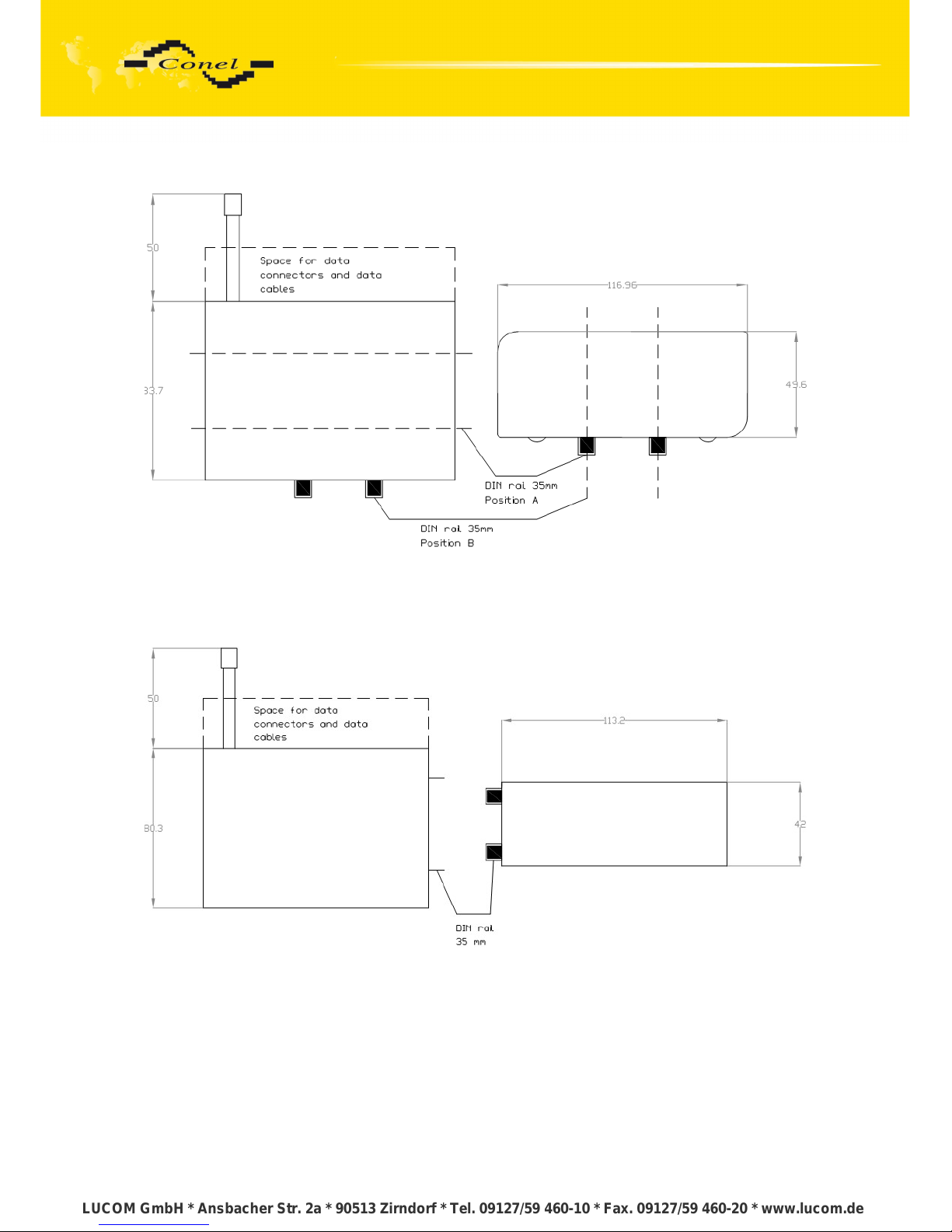
5.4. Basic dimensions plastic box
Fig. 8: Basic dimensions plastic box
5.5. Basic dimensions metal box
Fig. 9: Basic dimensions metal box
7
LUCOM GmbH * Ansbacher Str. 2a * 90513 Zirndorf * Tel. 09127/59 460-10 * Fax. 09127/59 460-20 * www.lucom.de
LUCOM GmbH * Ansbacher Str. 2a * 90513 Zirndorf * Tel. 09127/59 460-10 * Fax. 09127/59 460-20 * www.lucom.de
LUCOM GmbH * Ansbacher Str. 2a * 90513 Zirndorf * Tel. 09127/59 460-10 * Fax. 09127/59 460-20 * www.lucom.de
LUCOM GmbH * Ansbacher Str. 2a * 90513 Zirndorf * Tel. 09127/59 460-10 * Fax. 09127/59 460-20 * www.lucom.de
Page 13
ROUTER DESCRIPTION
5.6. Mechanical external dimensions and mounting recommendations
Mounting recommendations:
• possibility to be put on a work surface,
• DIN rail with clips CPD2 (ELPAC clip SL for SL version) are included.
For the most of applications with a built-in router in a switch board it is possible
to recognize two kinds of environments:
• no public and industry environment of low voltage with high interference,
• public environment of low voltage without high interference.
For both of these environments it is possible to mount router to a switch board,
the following there is no need to have examination immunity or issues in connection with
EMC according to EN 60439-1 ed.2:00 + A1:04.
For compliance of EN 60439-1 ed.2:00 + A1:04 specification it is necessary
to observe next assembly of the router to the switch - board:
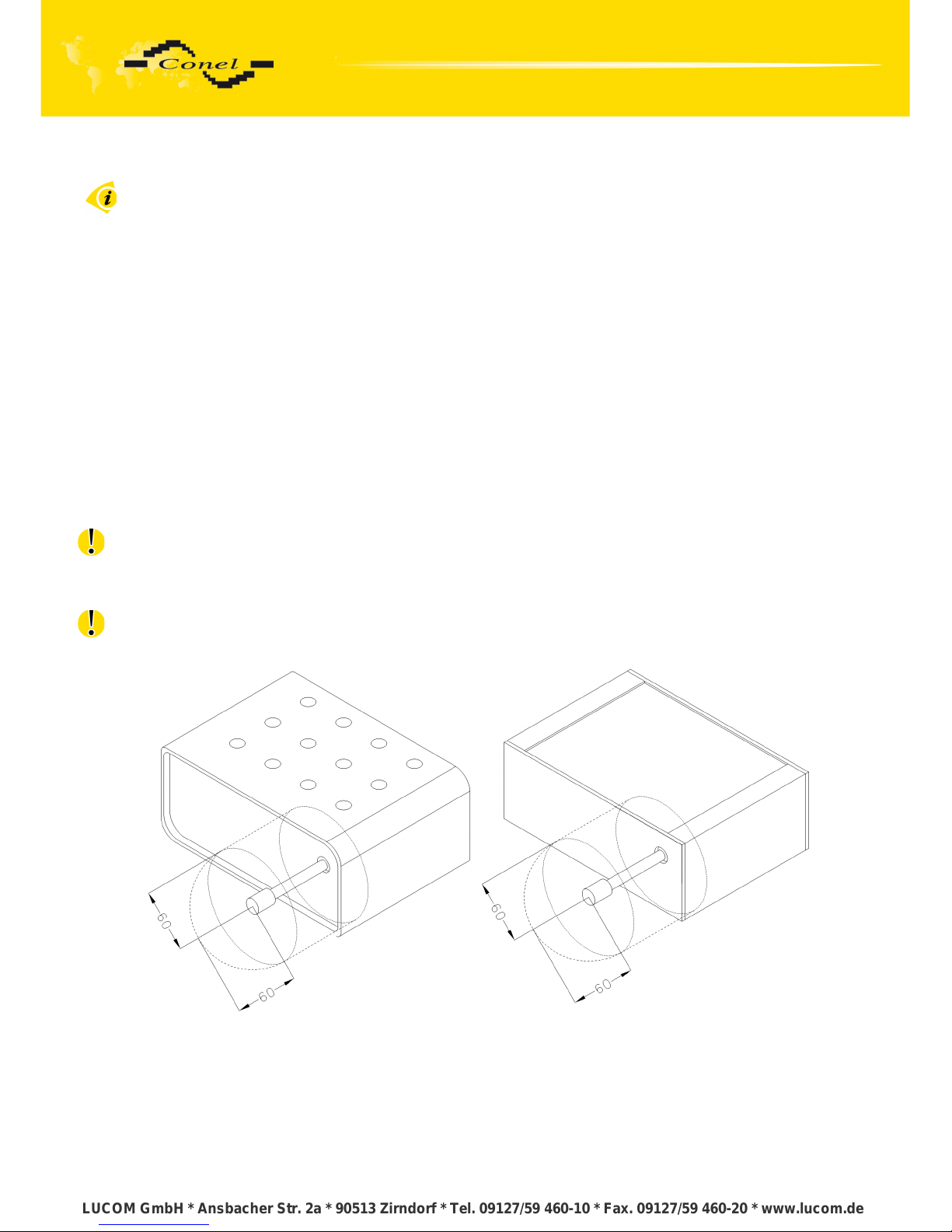
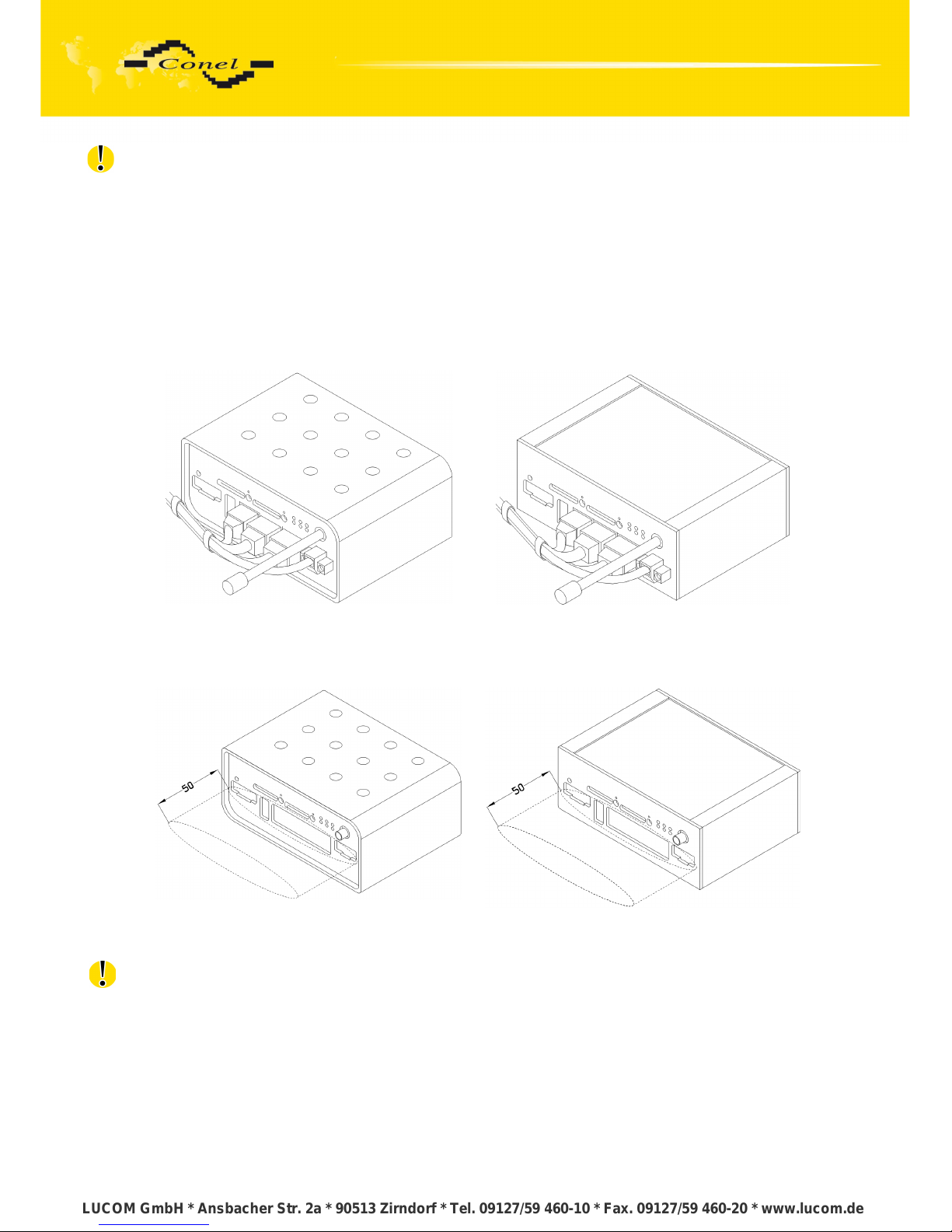
• for whip antennas we recommend to observe a distance of 6 cm from cables
and metal surfaces on every side according to the next picture due to the elimination
of interference, while using an external antenna except for the switch-board it is
necessary to fit a lightening conductor,
• before mounting a router on sheet-steel we recommend using an external antenna,
Fig. 10: Space around the antenna
Fig. 11: Space around antenna for SL version
8
LUCOM GmbH * Ansbacher Str. 2a * 90513 Zirndorf * Tel. 09127/59 460-10 * Fax. 09127/59 460-20 * www.lucom.de
LUCOM GmbH * Ansbacher Str. 2a * 90513 Zirndorf * Tel. 09127/59 460-10 * Fax. 09127/59 460-20 * www.lucom.de
LUCOM GmbH * Ansbacher Str. 2a * 90513 Zirndorf * Tel. 09127/59 460-10 * Fax. 09127/59 460-20 * www.lucom.de
LUCOM GmbH * Ansbacher Str. 2a * 90513 Zirndorf * Tel. 09127/59 460-10 * Fax. 09127/59 460-20 * www.lucom.de
Page 14
ROUTER DESCRIPTION
for every cables we recommend to bind the bunch according to the following picture, we
recommend for this use:
length of the bunch (combination of power supply and data cables) can
be maximum 1,5 m, if the length of data cables exceeds 1,5 m or in the
event of, the cable leads towards the switch – board, we recommend
installing over - voltage protectors (surge suppressors),
with data cables they mustn't carry cables with reticular tension
~ 230 V/50 Hz,
all signals to sensors must be twisted pairs
Fig. 12: Cable routing
Fig. 13: Cable routing for SL version
• sufficient space must be left before individual connectors for handling of cables
Fig. 14: Space in front connectors
Fig. 15: Space in front connectors SL version
• for correct function of the router we recommend to use in the switch-board earth-
bonding distribution frame for grounding of power supply of router, data cables and
antenna,
9
LUCOM GmbH * Ansbacher Str. 2a * 90513 Zirndorf * Tel. 09127/59 460-10 * Fax. 09127/59 460-20 * www.lucom.de
LUCOM GmbH * Ansbacher Str. 2a * 90513 Zirndorf * Tel. 09127/59 460-10 * Fax. 09127/59 460-20 * www.lucom.de
LUCOM GmbH * Ansbacher Str. 2a * 90513 Zirndorf * Tel. 09127/59 460-10 * Fax. 09127/59 460-20 * www.lucom.de
LUCOM GmbH * Ansbacher Str. 2a * 90513 Zirndorf * Tel. 09127/59 460-10 * Fax. 09127/59 460-20 * www.lucom.de
Page 15
ROUTER DESCRIPTION
5.7. User interfaces (connectors)
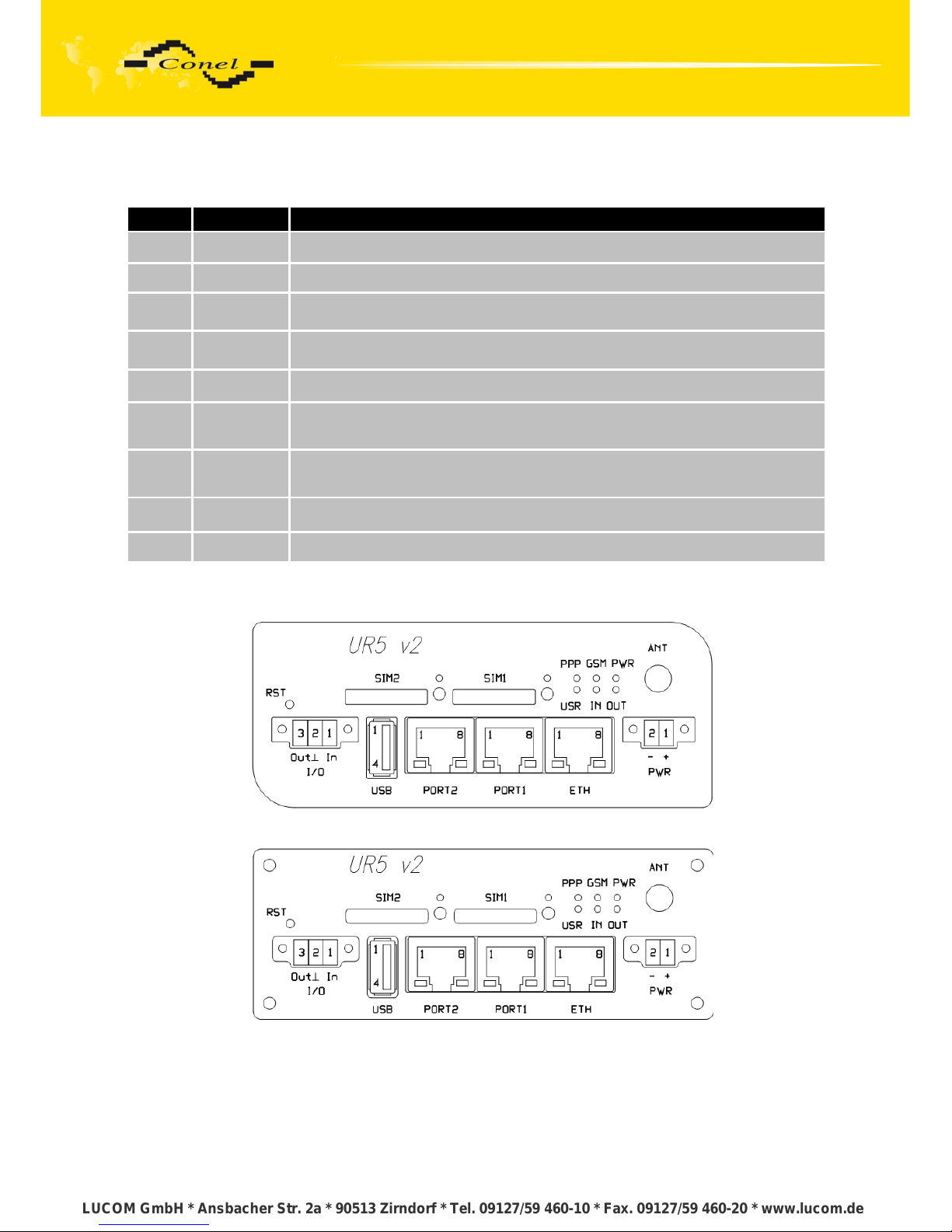
On the front panel is located:
Label Connector Description
PWR 2-pin Connector for connection the power supply adapter.
ETH RJ45 Connector for connection into the local computer network.
PORT1 RJ45
Connector for connection equipment over RS232, RS458/422,
ETHERNET, M-BUS, CNT or XC-SW.
PORT2 RJ45
Connector for connection equipment over RS232, RS485/422, M-BUS,
XC-SW, WIFI, WMBUS (only FULL version).
ANT SMA Connector for connection main antenna.
USB USB-A Host
Connector for connection the devices with the router, USB supports
equipments with PL-2303 and FTDI USB/RS232 converter.
I/O 3-pin Connector for connection of the binary input and output.
SIM1 - Holder for first SIM card.
SIM2 - Holder for second SIM card (only FULL version).
Table 6: Front panel description
Fig. 16: Front panel UR5 v2F
Fig. 17: Front panel UR5 v2F SL
10
LUCOM GmbH * Ansbacher Str. 2a * 90513 Zirndorf * Tel. 09127/59 460-10 * Fax. 09127/59 460-20 * www.lucom.de
LUCOM GmbH * Ansbacher Str. 2a * 90513 Zirndorf * Tel. 09127/59 460-10 * Fax. 09127/59 460-20 * www.lucom.de
LUCOM GmbH * Ansbacher Str. 2a * 90513 Zirndorf * Tel. 09127/59 460-10 * Fax. 09127/59 460-20 * www.lucom.de
LUCOM GmbH * Ansbacher Str. 2a * 90513 Zirndorf * Tel. 09127/59 460-10 * Fax. 09127/59 460-20 * www.lucom.de
Page 16
ROUTER DESCRIPTION
5.7.1. Status indication
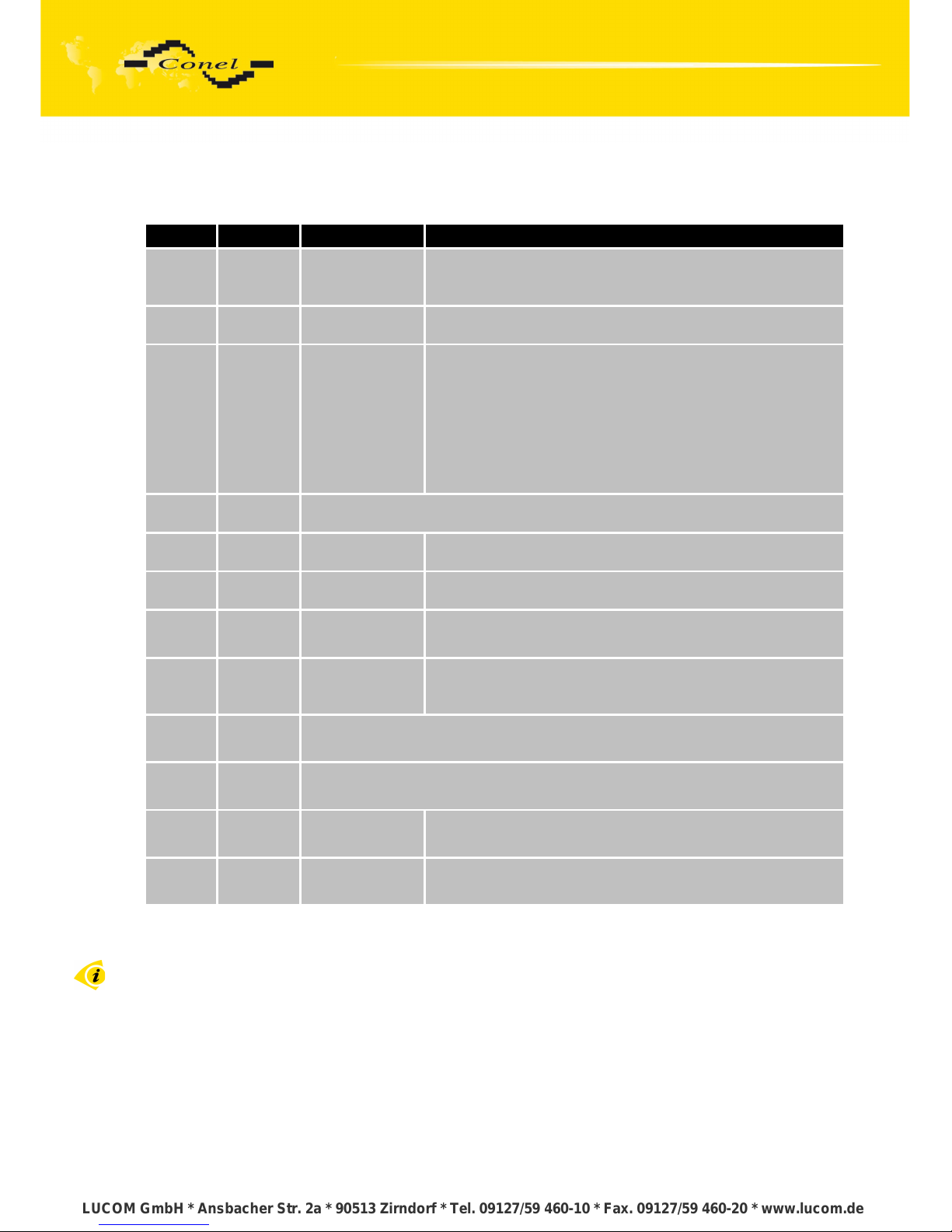
About router status inform eight led indicators on the front panel and on every port are
two LED indicators, which inform about port status.
Label Color State Description
PWR Green
Blinking
On
Fast blinking
Router is ready
Starting of the router
Updating firmware
GSM Red Blinking Communication in progress
PPP Yellow
1 x flash per
second
2 x flash per
second
3x flash per
second
Signal strength is from –50 dBm to –69 dBm
Signal strength is from –70 dBm to –89 dBm or difference
between neighbours cells is exactly 3 dBm
Signal strength is from –90 dBm to –113 dBm
or difference between neighbours cells is smaller than
3 dBm
USR Yellow Function selected by user
OUT Green On Binary output active
IN Green On Binary input active
ETH Green
On
Off
Selected 100 Mbit/s
Selected 10 Mbit/s
ETH YellowOnBlinking
Off
The network cable is connected
Data transmission
The network cable is not connected
PORT Green Description by port (viz. Technical specification of expansion port)
PORT Yellow Description by port (viz. Technical specification of expansion port)
SIM1 Yellow On SIM card 1 is active
SIM2 Yellow On SIM card 2 is active
Table 7: Router status indication
State indicate of PPP LED is updated every 10 seconds.
11
LUCOM GmbH * Ansbacher Str. 2a * 90513 Zirndorf * Tel. 09127/59 460-10 * Fax. 09127/59 460-20 * www.lucom.de
LUCOM GmbH * Ansbacher Str. 2a * 90513 Zirndorf * Tel. 09127/59 460-10 * Fax. 09127/59 460-20 * www.lucom.de
LUCOM GmbH * Ansbacher Str. 2a * 90513 Zirndorf * Tel. 09127/59 460-10 * Fax. 09127/59 460-20 * www.lucom.de
LUCOM GmbH * Ansbacher Str. 2a * 90513 Zirndorf * Tel. 09127/59 460-10 * Fax. 09127/59 460-20 * www.lucom.de
Page 17
ROUTER DESCRIPTION
5.7.2. Power connector PWR
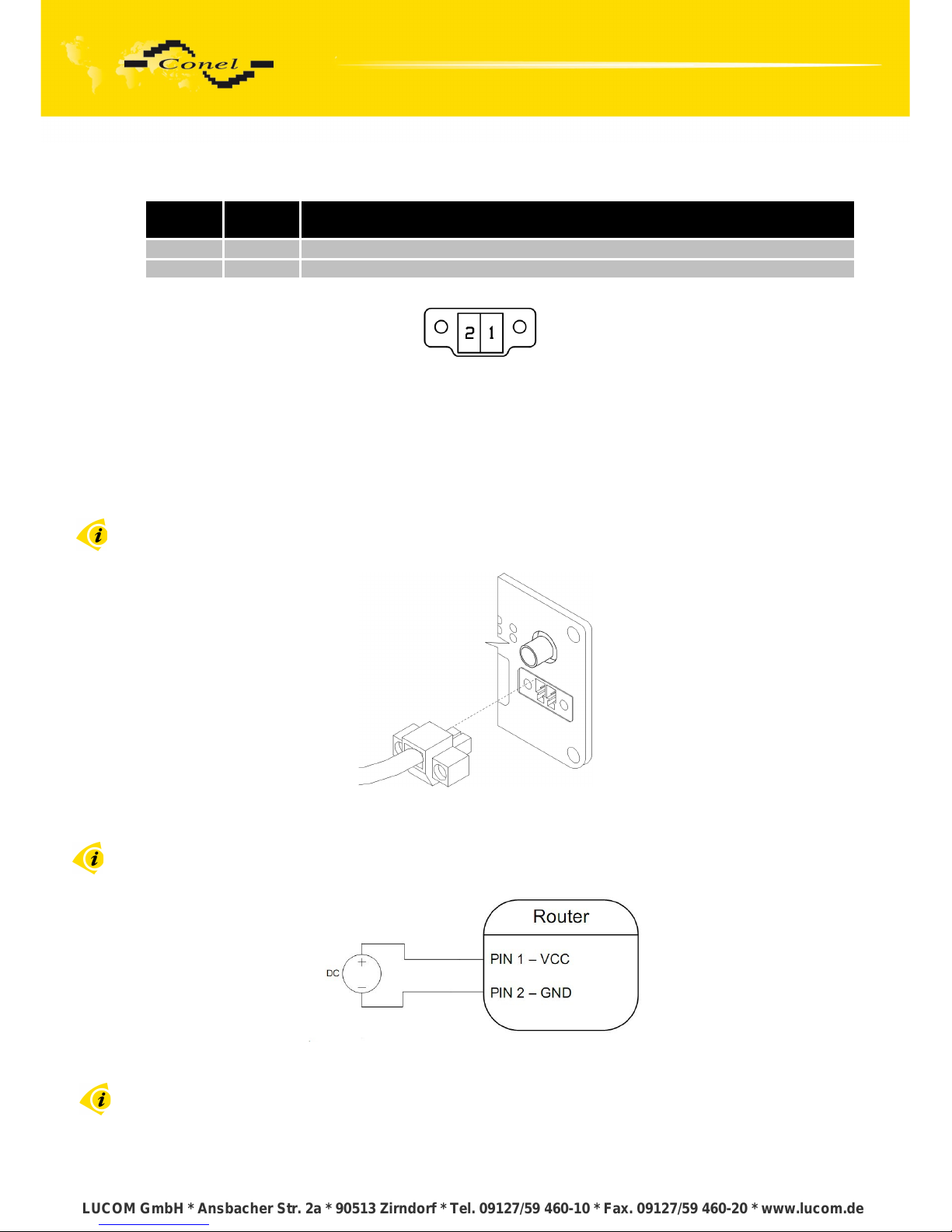
Panel socket 2-pin.
Pin
number
Signal
mark
Description
1 VCC (+) Positive pole of DC supply voltage (+10 to +30 VDC)
2 GND (-) Negative pole of DC supply voltage
Table 8: Connection of power connector
Fig. 18: Power connector
Power supply for router is required between +10 V to +30 V DC supply. Protection
against reversed polarity without signaling is built into the router.
The power consumption during receiving is 1W. The peak power consumption during
data sending is 5,5W. For correct operation it is necessary that the power source is able to
supply a peak current of 1 A.
Connector on the power cable connects into the power connector on the router head
and tightens locking screws (see figure bellow).
Fig. 19: Connection of power supply connector
Circuit example:
Fig. 20: Connection of power supply
The positive pole VCC is marked by a red socket on the power.
12
LUCOM GmbH * Ansbacher Str. 2a * 90513 Zirndorf * Tel. 09127/59 460-10 * Fax. 09127/59 460-20 * www.lucom.de
LUCOM GmbH * Ansbacher Str. 2a * 90513 Zirndorf * Tel. 09127/59 460-10 * Fax. 09127/59 460-20 * www.lucom.de
LUCOM GmbH * Ansbacher Str. 2a * 90513 Zirndorf * Tel. 09127/59 460-10 * Fax. 09127/59 460-20 * www.lucom.de
LUCOM GmbH * Ansbacher Str. 2a * 90513 Zirndorf * Tel. 09127/59 460-10 * Fax. 09127/59 460-20 * www.lucom.de
Page 18
ROUTER DESCRIPTION
5.7.3. Antenna connector ANT
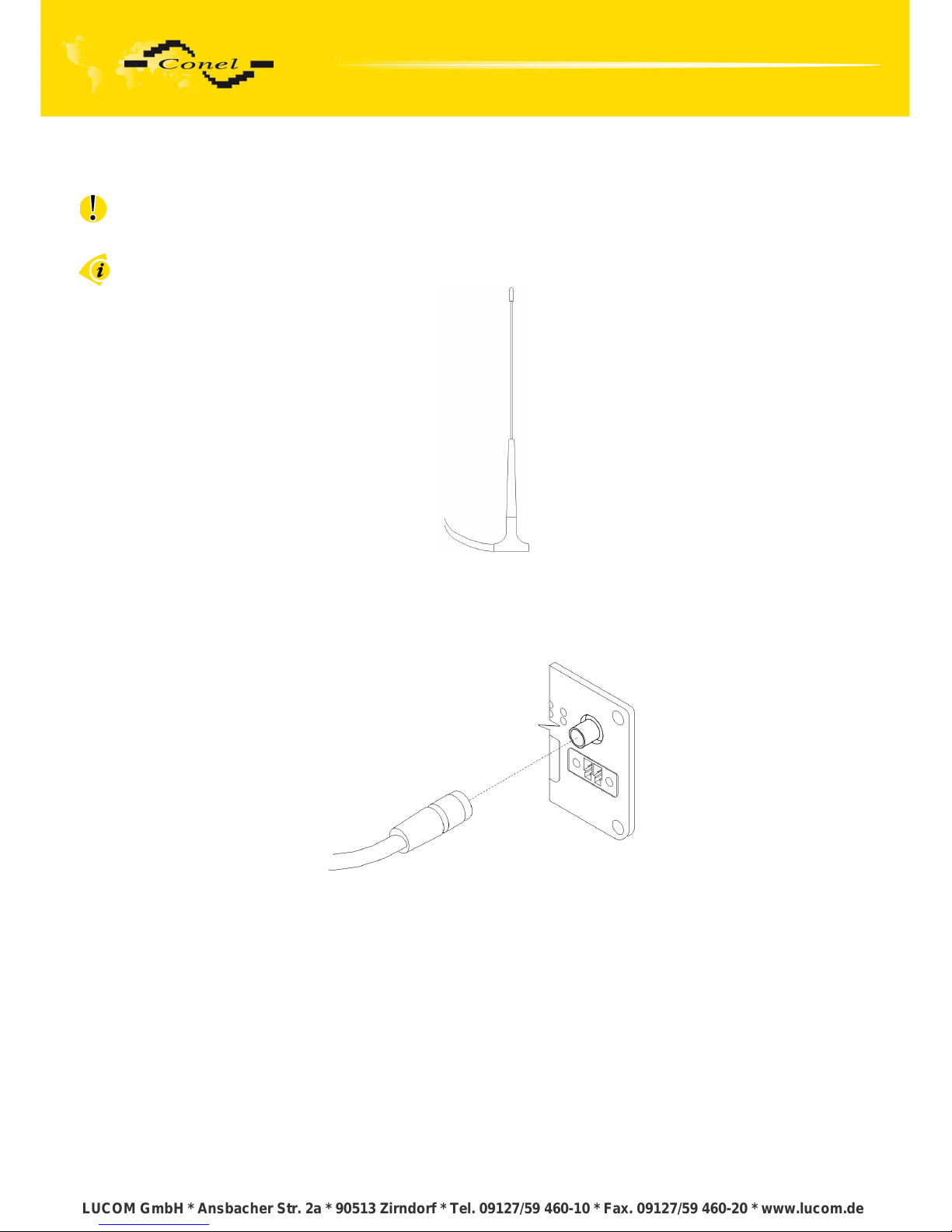
The antenna is connected to the router using the SMA connector on the front panel.
The router can not operate without the antenna connected labeled as ANT.
Example of antenna:
Fig. 21: External antenna
The antenna with SMA connector. The antenna is connected to screw the antenna
connector SMA to SMA connector on the router head (see figure below).
Fig. 22: Connecting the antenna
13
LUCOM GmbH * Ansbacher Str. 2a * 90513 Zirndorf * Tel. 09127/59 460-10 * Fax. 09127/59 460-20 * www.lucom.de
LUCOM GmbH * Ansbacher Str. 2a * 90513 Zirndorf * Tel. 09127/59 460-10 * Fax. 09127/59 460-20 * www.lucom.de
LUCOM GmbH * Ansbacher Str. 2a * 90513 Zirndorf * Tel. 09127/59 460-10 * Fax. 09127/59 460-20 * www.lucom.de
LUCOM GmbH * Ansbacher Str. 2a * 90513 Zirndorf * Tel. 09127/59 460-10 * Fax. 09127/59 460-20 * www.lucom.de
Page 19
ROUTER DESCRIPTION
5.7.4. SIM card reader
The SIM card reader for 3 V and 1.8 V SIM cards is located on the front panel
of the router. To initiate the router into operation it is necessary to insert an activated SIM card
with unblocked PIN in the reader. The SIM cards might be of different adjusted APN (Access
Point Name).
Changing the SIM card:
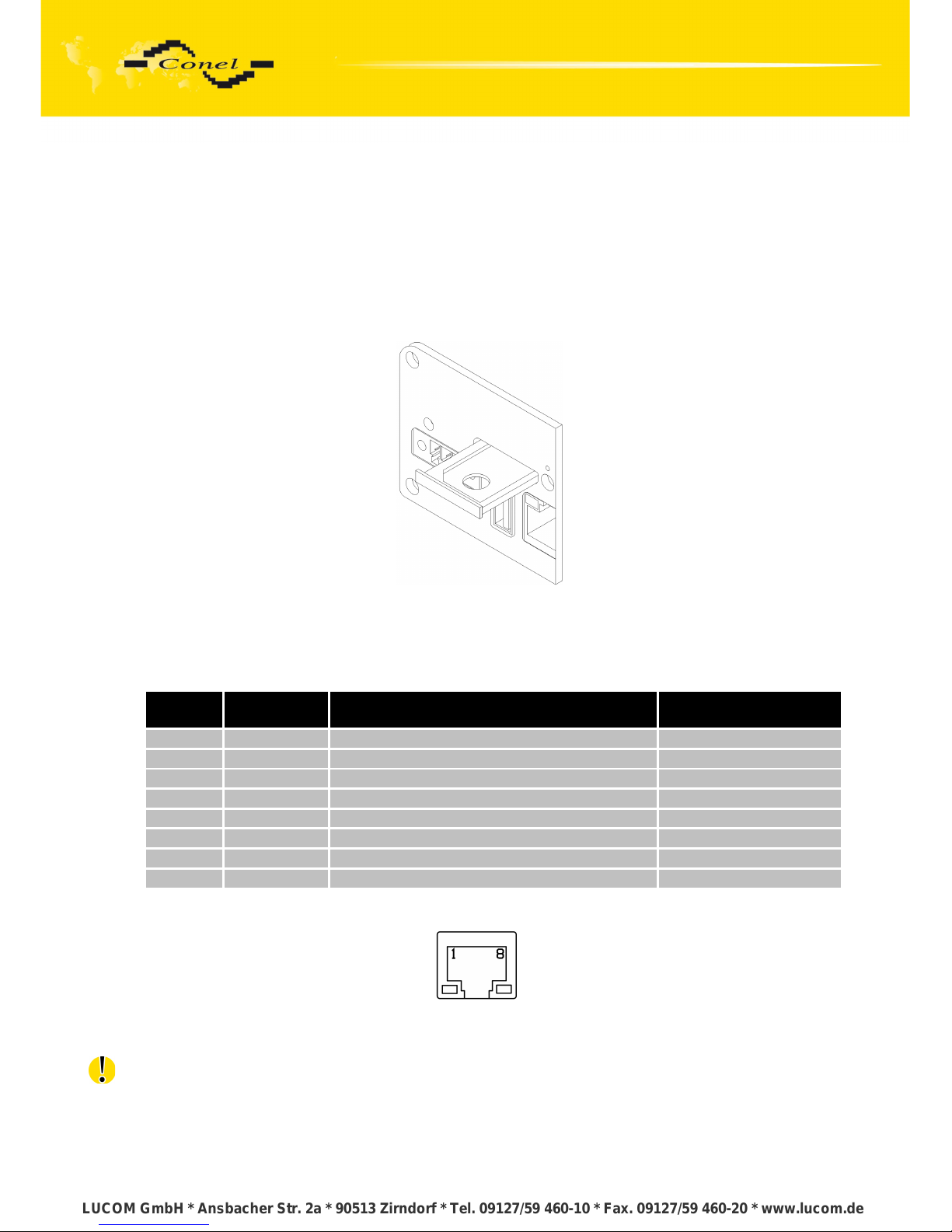
Press the small yellow button to eject the reader holder. Insert the SIM card into
the reader holder and slide it in the reader (see figure bellow).
Fig. 23: Ejected the SIM card
5.7.5. Ethernet port
Panel socket RJ45.
Pin
number
Signal mark Description Data flow direction
1 TXD+ Transmit Data – positive pole Input/Output
2 TXD- Transmit Data – negative pole Input/Output
3 RXD+ Receive Data – positive pole Input/Output
4 --- --5 --- --6 RXD- Receive Data – negative pole Input/Output
7 --- --8 --- ---
Table 9: Connection of Ethernet connector
Fig. 24: Ethernet connector
ATTENTION! Port ETH is not POE (Power Over Ethernet) compatible!
14
LUCOM GmbH * Ansbacher Str. 2a * 90513 Zirndorf * Tel. 09127/59 460-10 * Fax. 09127/59 460-20 * www.lucom.de
LUCOM GmbH * Ansbacher Str. 2a * 90513 Zirndorf * Tel. 09127/59 460-10 * Fax. 09127/59 460-20 * www.lucom.de
LUCOM GmbH * Ansbacher Str. 2a * 90513 Zirndorf * Tel. 09127/59 460-10 * Fax. 09127/59 460-20 * www.lucom.de
LUCOM GmbH * Ansbacher Str. 2a * 90513 Zirndorf * Tel. 09127/59 460-10 * Fax. 09127/59 460-20 * www.lucom.de
Page 20
ROUTER DESCRIPTION
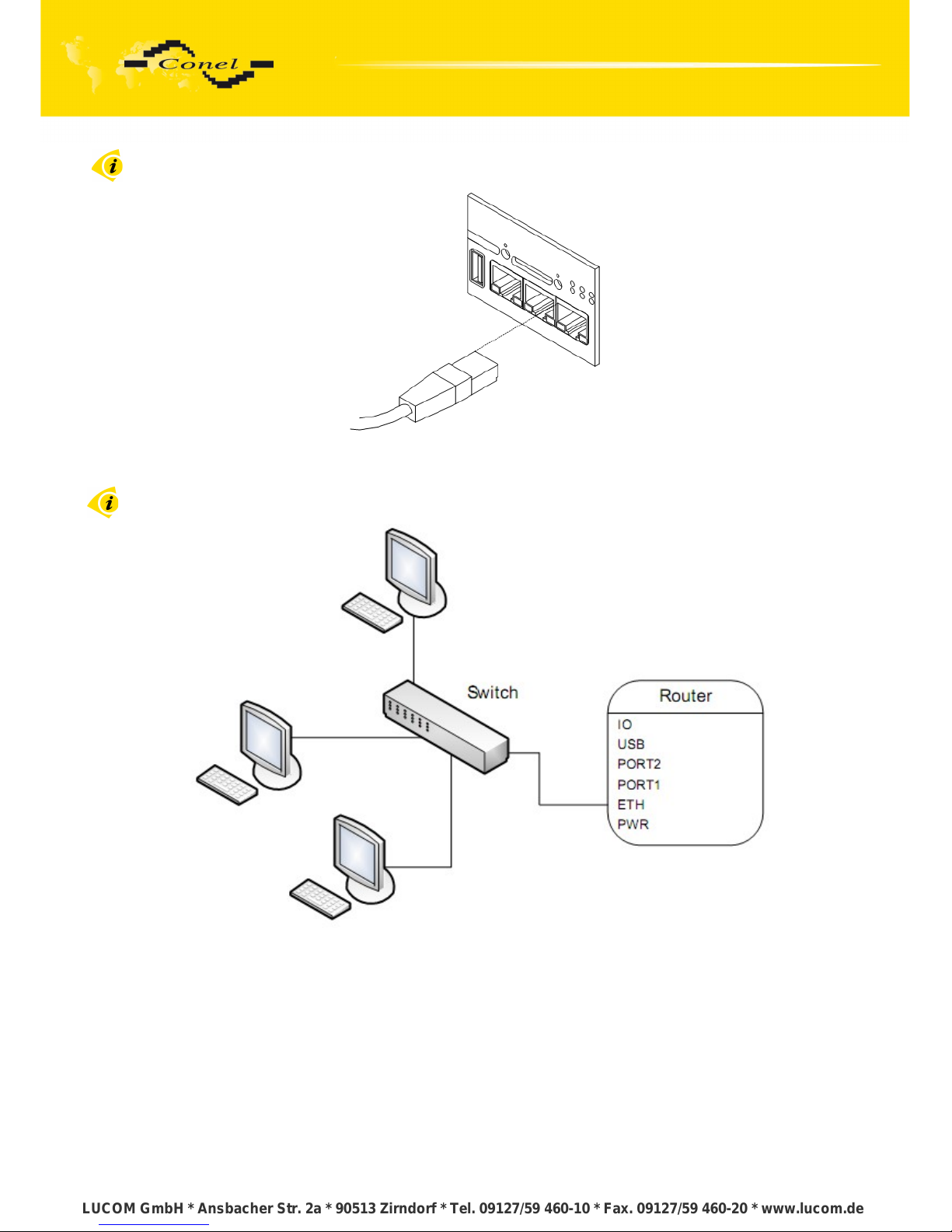
Ethernet cable plug into the RJ45 connector labeled as ETH. (See bellow picture)
Fig. 25: Connection Ethernet cable
The ETH router connection:
Fig. 26: Example of router connection
15
LUCOM GmbH * Ansbacher Str. 2a * 90513 Zirndorf * Tel. 09127/59 460-10 * Fax. 09127/59 460-20 * www.lucom.de
LUCOM GmbH * Ansbacher Str. 2a * 90513 Zirndorf * Tel. 09127/59 460-10 * Fax. 09127/59 460-20 * www.lucom.de
LUCOM GmbH * Ansbacher Str. 2a * 90513 Zirndorf * Tel. 09127/59 460-10 * Fax. 09127/59 460-20 * www.lucom.de
LUCOM GmbH * Ansbacher Str. 2a * 90513 Zirndorf * Tel. 09127/59 460-10 * Fax. 09127/59 460-20 * www.lucom.de
Page 21
ROUTER DESCRIPTION
5.7.6. PORT1
The PORT1 is equipped with one of the offered options ports. For PORT1 are
available on the interface.
PORT1 RS232, RS485/422, ETHERNET, M-BUS, CNT, XC-SW (together with PORT2)
Description, connection and examples of optional connection ports can be found
in separate manuals expansion ports.
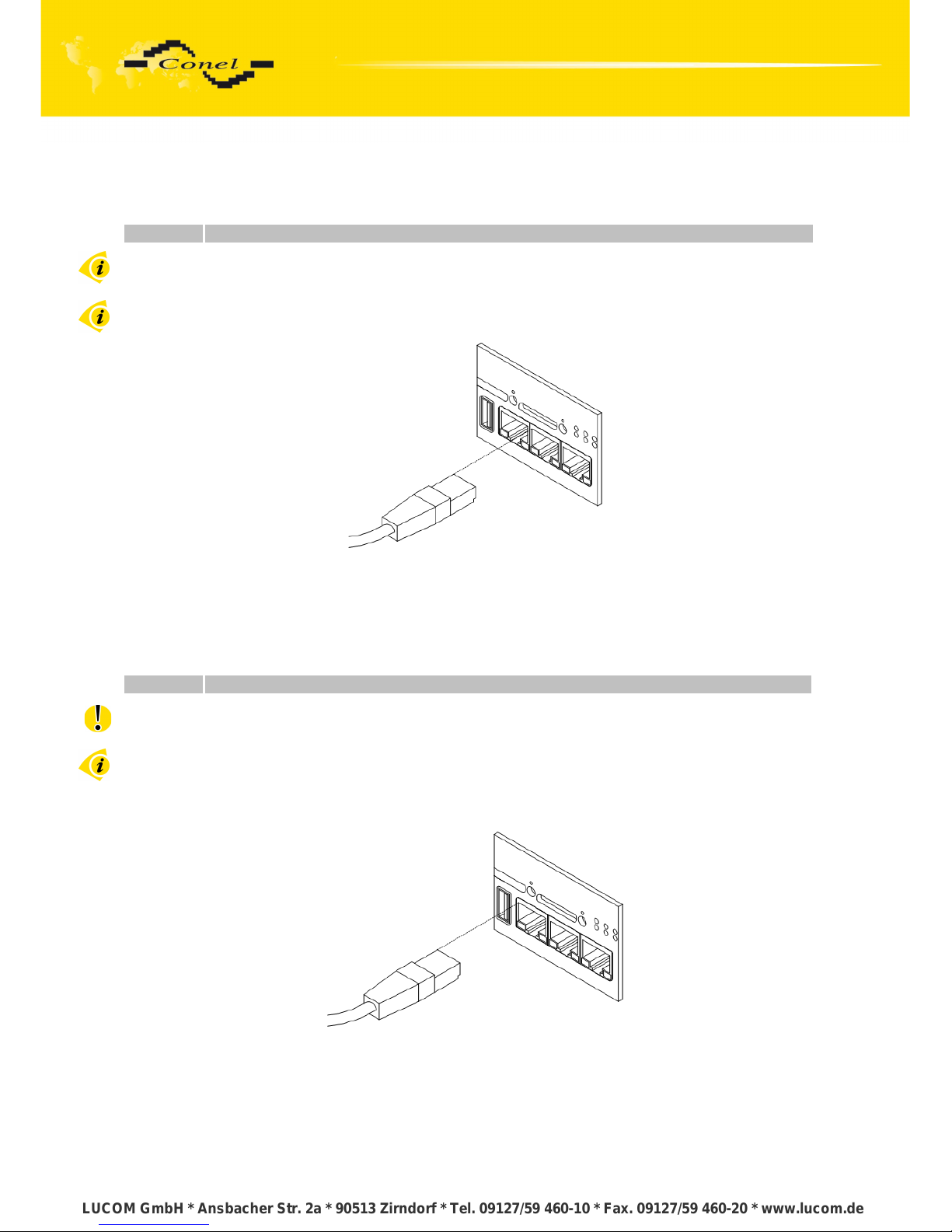
PORT1 cable plug into the RJ45 connector labeled as ETH (see figure bellow).
Fig. 27: Connection PORT1 cable
5.7.7. PORT2
The PORT2 is equipped with one of the offered options ports. For PORT2 are
available on the interface.
PORT2 RS232, RS485/422, M-BUS, XC-SW (together with PORT1), WIFI, WMBUS
PORT2 is fitted only in the FULL version of the router
Description, connection and examples of optional connection ports can be found
in separate manuals expansion ports.
PORT2 cable plug into the RJ45 connector labeled as ETH (see figure bellow).
Fig. 28: Connection PORT2 cable
16
LUCOM GmbH * Ansbacher Str. 2a * 90513 Zirndorf * Tel. 09127/59 460-10 * Fax. 09127/59 460-20 * www.lucom.de
LUCOM GmbH * Ansbacher Str. 2a * 90513 Zirndorf * Tel. 09127/59 460-10 * Fax. 09127/59 460-20 * www.lucom.de
LUCOM GmbH * Ansbacher Str. 2a * 90513 Zirndorf * Tel. 09127/59 460-10 * Fax. 09127/59 460-20 * www.lucom.de
LUCOM GmbH * Ansbacher Str. 2a * 90513 Zirndorf * Tel. 09127/59 460-10 * Fax. 09127/59 460-20 * www.lucom.de
Page 22
ROUTER DESCRIPTION
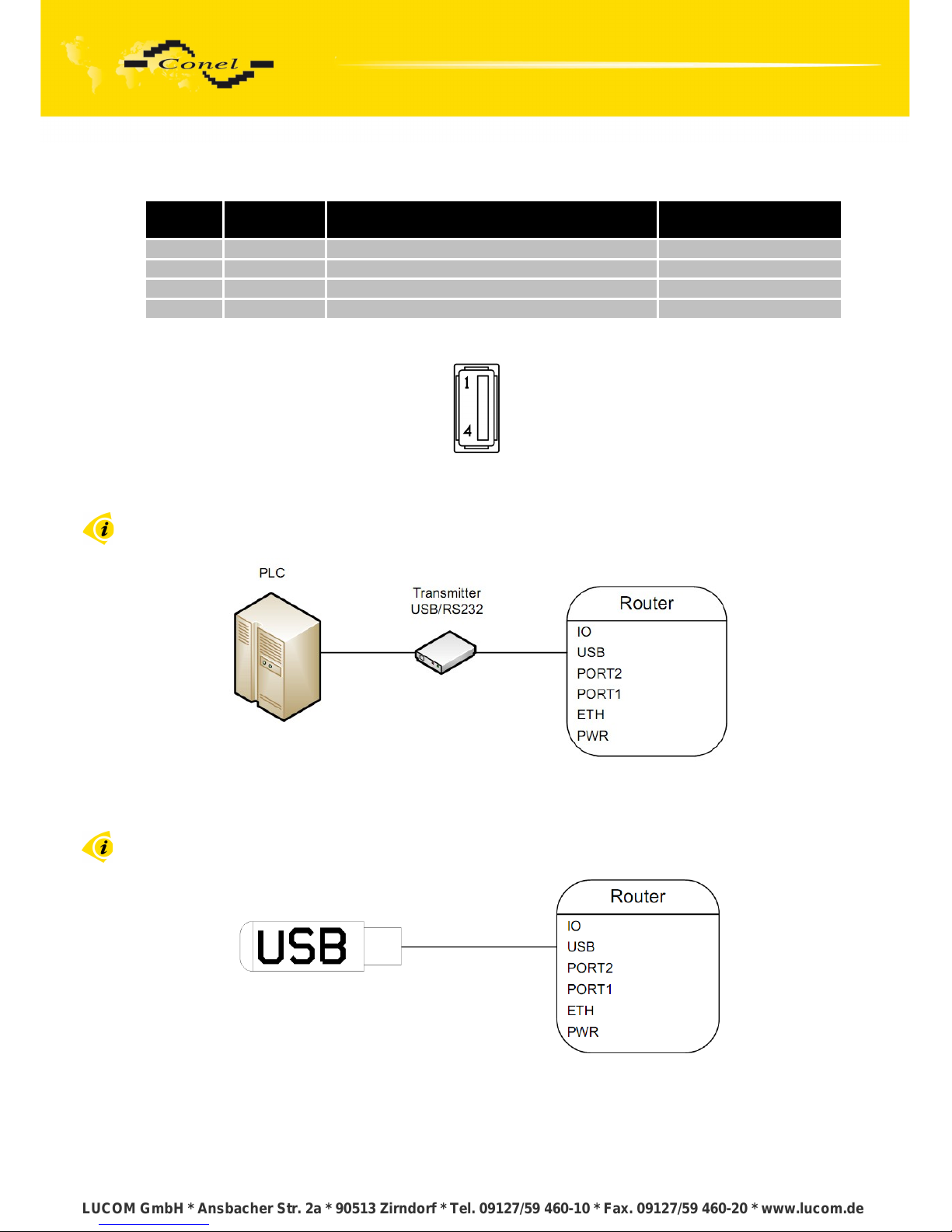
5.7.8. USB port
Panel socket USB-A.
Pin
number
Signal mark Description Data flow direction
1 +5V Positive pole of 5V DC supply voltage
2 USB data - USB data signal – negative pole Input/Output
3 USB data + USB data signal – positive pole Input/Output
4 GND Negative pole of DC supply voltage
Table 10: Connection of USB connector
Fig. 29: USB connector
Example of connecting devices with serial interface to the USB router:
Fig. 30: Connection PLC to the router
Example of connecting of USB flash disk to the USB router:
Fig. 31: Connection flash memory to the router
17
LUCOM GmbH * Ansbacher Str. 2a * 90513 Zirndorf * Tel. 09127/59 460-10 * Fax. 09127/59 460-20 * www.lucom.de
LUCOM GmbH * Ansbacher Str. 2a * 90513 Zirndorf * Tel. 09127/59 460-10 * Fax. 09127/59 460-20 * www.lucom.de
LUCOM GmbH * Ansbacher Str. 2a * 90513 Zirndorf * Tel. 09127/59 460-10 * Fax. 09127/59 460-20 * www.lucom.de
LUCOM GmbH * Ansbacher Str. 2a * 90513 Zirndorf * Tel. 09127/59 460-10 * Fax. 09127/59 460-20 * www.lucom.de
Page 23
ROUTER DESCRIPTION
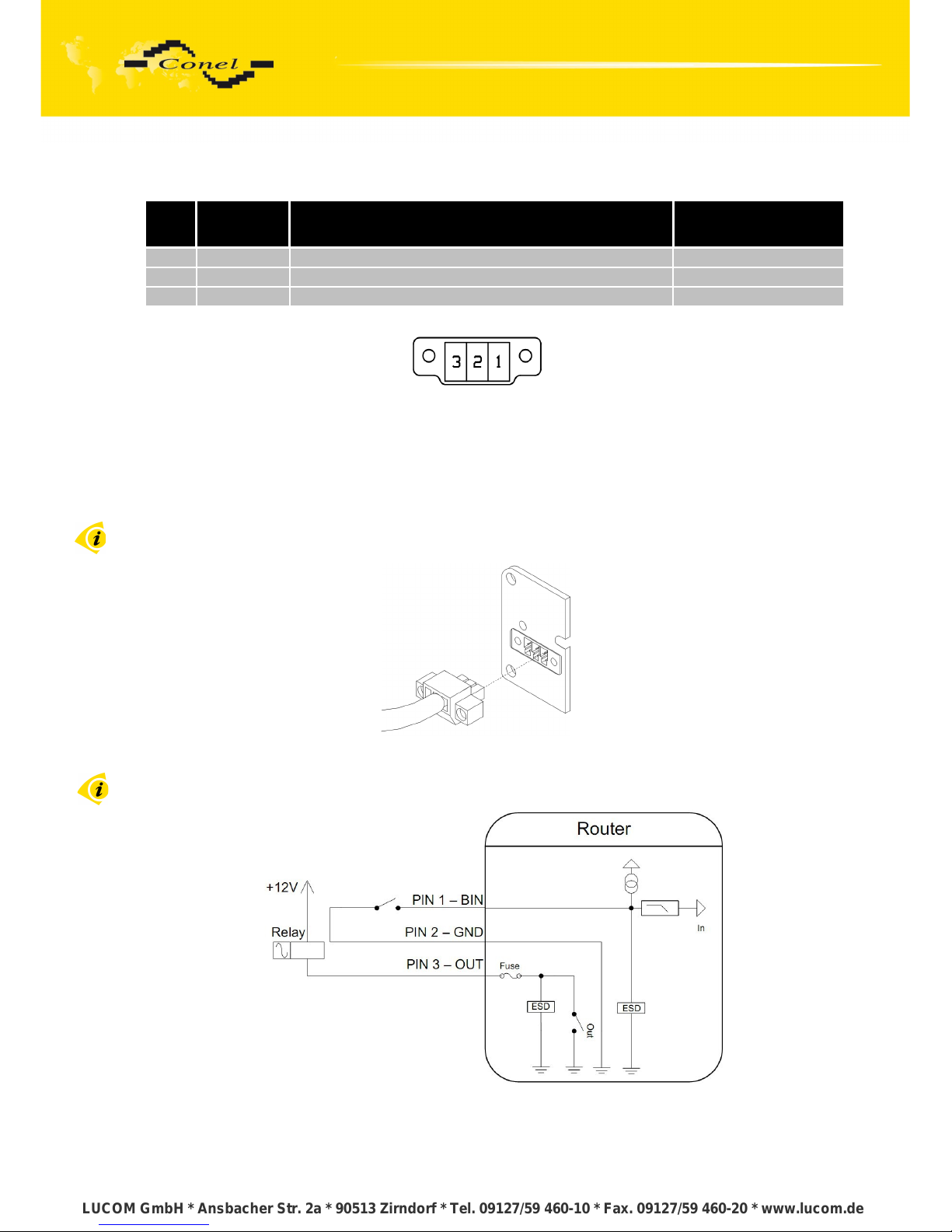
5.7.9. I/O port
Panel socket 3pin.
Pin
no.
Signal
mark
Description Data flow direction
1 BIN0 Binary input Input
2 GND Signal ground
3 OUT0 Binary output Output
Table 11: Connection of I/O port
Fig. 32: I/O connector
The user interface I/O is for processing of binary input signal and to control (settings)
of binary output signal. Binary output is not switched to ground in the default configuration.
Maximum load binary output is 30V / 100mA. The constant current supplied by the
binary input is 3 mA.
Connector I/O cable connect into the I/O connector on the router head and tighten
locking screws. (See bellow picture)
Fig. 33: Connection I/O cable
Circuit example of a binary input or output equipment with router:
Fig. 34: Connection input and output of router
18
LUCOM GmbH * Ansbacher Str. 2a * 90513 Zirndorf * Tel. 09127/59 460-10 * Fax. 09127/59 460-20 * www.lucom.de
LUCOM GmbH * Ansbacher Str. 2a * 90513 Zirndorf * Tel. 09127/59 460-10 * Fax. 09127/59 460-20 * www.lucom.de
LUCOM GmbH * Ansbacher Str. 2a * 90513 Zirndorf * Tel. 09127/59 460-10 * Fax. 09127/59 460-20 * www.lucom.de
LUCOM GmbH * Ansbacher Str. 2a * 90513 Zirndorf * Tel. 09127/59 460-10 * Fax. 09127/59 460-20 * www.lucom.de
Page 24
ROUTER DESCRIPTION
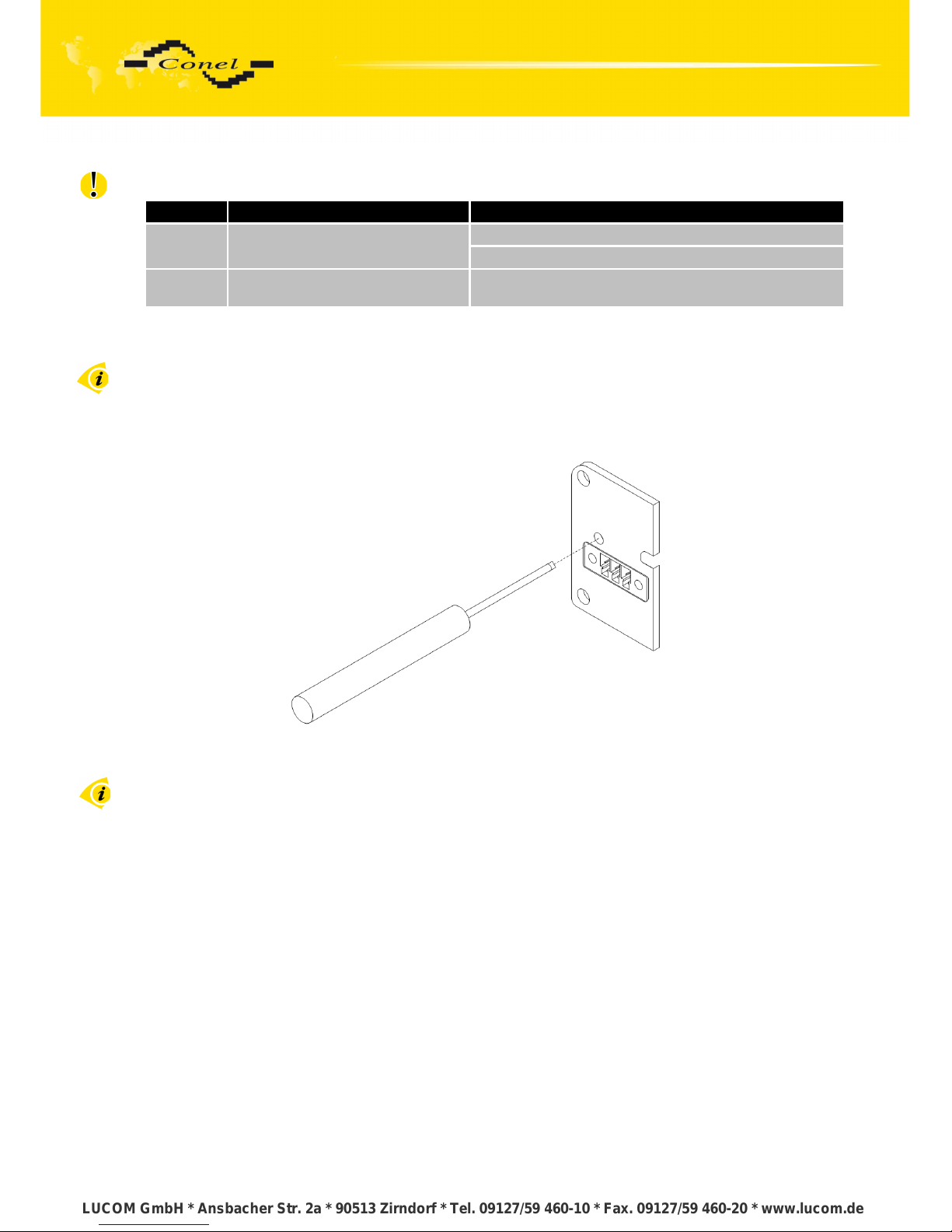
5.7.10. Reset
It is important to distinguish between reset and reboot the router.
Action Router behavior Invoking events
Reboot Turn off and then turn on router
Disconnect and connect the power.
Press the reboot button in the web configuration.
Reset
Restore default configuration
and to reboot the router.
Press RST button.
Table 12: Description of reset and restart router
After green LED starts to blink it is possible to restore initial settings of the router
by pressing button RST on front panel. After press button RST it is restoration of default
configuration and reboot (green LED will be on).
For pressing the RST button could be used a narrow screwdriver.
Fig. 35: Router reset
We recommend to backup your router configuration (see Configuration manual),
because after reset router set configuration to the initial state.
19
LUCOM GmbH * Ansbacher Str. 2a * 90513 Zirndorf * Tel. 09127/59 460-10 * Fax. 09127/59 460-20 * www.lucom.de
LUCOM GmbH * Ansbacher Str. 2a * 90513 Zirndorf * Tel. 09127/59 460-10 * Fax. 09127/59 460-20 * www.lucom.de
LUCOM GmbH * Ansbacher Str. 2a * 90513 Zirndorf * Tel. 09127/59 460-10 * Fax. 09127/59 460-20 * www.lucom.de
LUCOM GmbH * Ansbacher Str. 2a * 90513 Zirndorf * Tel. 09127/59 460-10 * Fax. 09127/59 460-20 * www.lucom.de
Page 25
ROUTER DESCRIPTION
6. First use
6.1. Connecting the router before first use
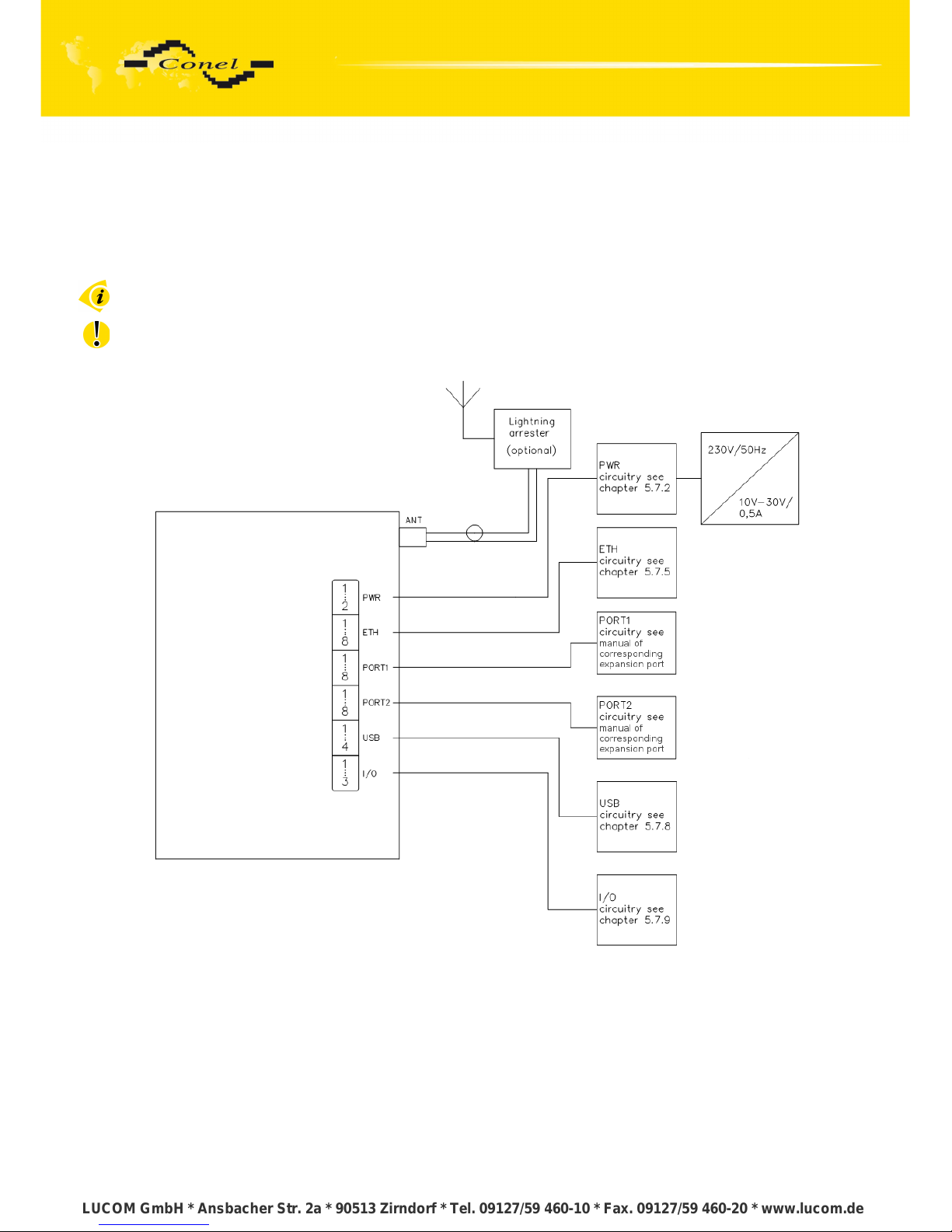
Before you give up the router, it is necessary to connect all components needed for
the operation of your applications and the SIM card must be inserted. (See bellow picture)
The router can not operate without connected antenna, SIM card and power supply.
In operation, the router must be connected to the antenna, otherwise damage to
the router.
Fig. 36: Router connection
20
LUCOM GmbH * Ansbacher Str. 2a * 90513 Zirndorf * Tel. 09127/59 460-10 * Fax. 09127/59 460-20 * www.lucom.de
LUCOM GmbH * Ansbacher Str. 2a * 90513 Zirndorf * Tel. 09127/59 460-10 * Fax. 09127/59 460-20 * www.lucom.de
LUCOM GmbH * Ansbacher Str. 2a * 90513 Zirndorf * Tel. 09127/59 460-10 * Fax. 09127/59 460-20 * www.lucom.de
LUCOM GmbH * Ansbacher Str. 2a * 90513 Zirndorf * Tel. 09127/59 460-10 * Fax. 09127/59 460-20 * www.lucom.de
Page 26
ROUTER DESCRIPTION
6.2. Start router
The router is set up connecting the power supply to the router. In the default setting
the router starts to login automatically to the preset APN. Device on the Ethernet port DHCP
server will assign addresses. The behavior of the router can be modified by means
of the web or Telnet interface, which is described in the configuration manual.
The power consumption during receiving is 1 W. The peak power consumption during
data sending is 5,5 W. For correct operation it is necessary that the power source is
able to supply a peak current of 1 A.
6.3. Router configuration
Attention! If the SIM card is not inserted in the router, then it is impossible to operate.
The inserted SIM card must have activated UMTS/EDGE/GPRS.
6.3.1. Configuration over web browser
Monitoring of the status, configuration and administration of the router can
be performed by means of the web interface, which is available after insertion of IP address
of the router into the web browser. The default IP address of the router is 192.168.1.1.
Configuration may be performed only by the user "root" with initial password "root".
A detailed description of the router settings via the Web interface can be found in
the configuration manual.
6.3.2. Configuration over Telnet
Monitoring of status, configuration and administration of the router can be performed
by means of the Telnet interface. After IP address entry to the Telnet interface it is possible
to configure the router by the help of commands. The default IP address of the router is
192.168.1.1. Configuration may be performed only by the user "root" with initial password
"root".
A detailed description of the router settings via the Telnet interface can be found
in the configuration manual.
21
LUCOM GmbH * Ansbacher Str. 2a * 90513 Zirndorf * Tel. 09127/59 460-10 * Fax. 09127/59 460-20 * www.lucom.de
LUCOM GmbH * Ansbacher Str. 2a * 90513 Zirndorf * Tel. 09127/59 460-10 * Fax. 09127/59 460-20 * www.lucom.de
LUCOM GmbH * Ansbacher Str. 2a * 90513 Zirndorf * Tel. 09127/59 460-10 * Fax. 09127/59 460-20 * www.lucom.de
LUCOM GmbH * Ansbacher Str. 2a * 90513 Zirndorf * Tel. 09127/59 460-10 * Fax. 09127/59 460-20 * www.lucom.de
Page 27
TECHNICAL PARAMETERS
7. Technical parameters
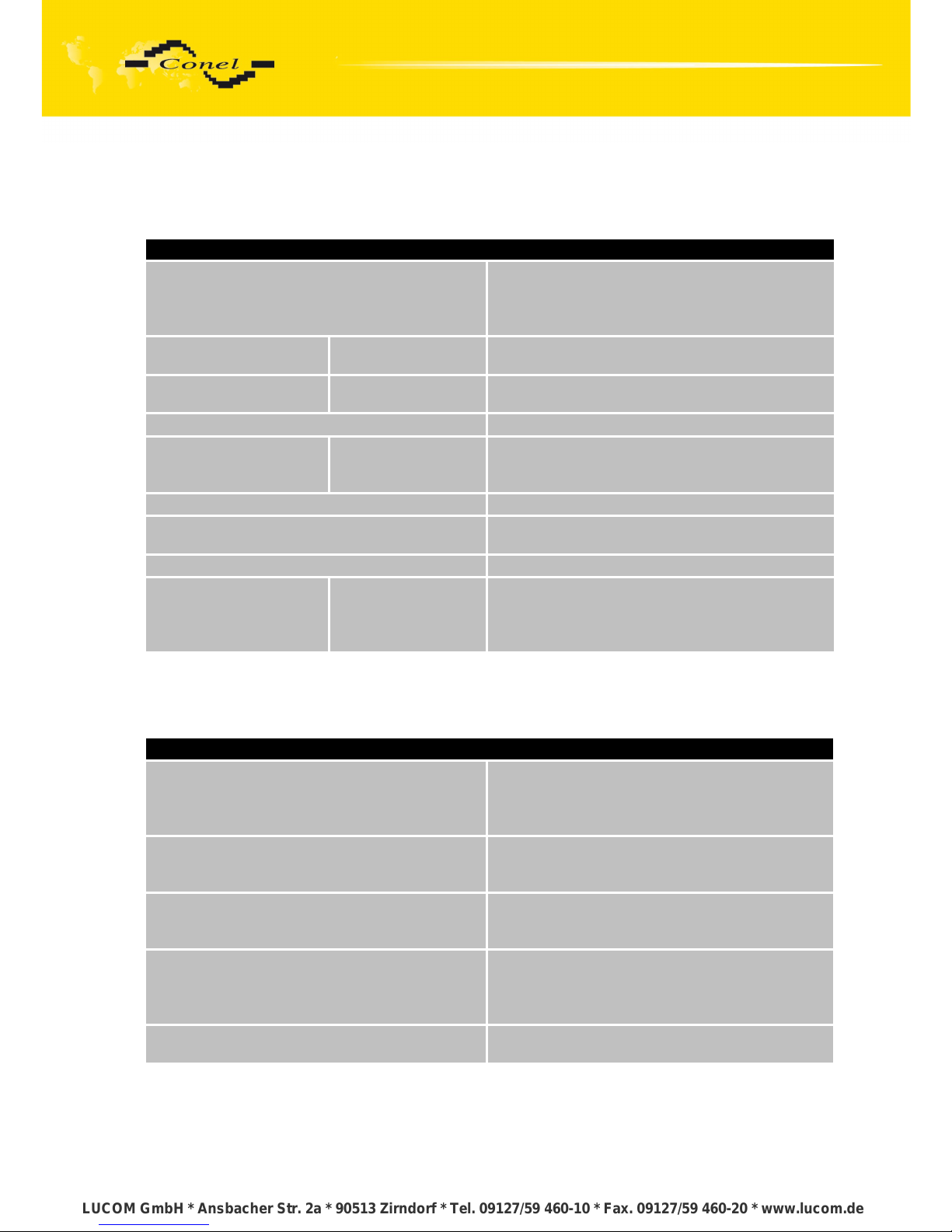
7.1. Technical parameters of router
UR5 v2
Complies with standards
EN 301 511, v9.0.2,
EN 301 908-1&2, v3.2.1,
ETSI EN 301 489-1 V1.8.1,
EN 60950-1:06 ed.2 + A11:09 + A1:10
Temperature range
Function
Storage
-30 oC to +60 oC
-40 oC to +85 oC
Protection
Freely
In switch board
IP20
IP56
Supply voltage 10 to 30 V DC
Consumption
Reception
GPRS
UMTS/HSDPA
300 mW
to 3,5 W (GPRS transmission)
to 5,5 W (UMTS/HSDPA transmission)
Dimensions 42x76x113 mm (DIN 35mm)
Weight
UR5 v2 – 150 g
UR5 v2 SL – 280 g
Antenna connector SMA– 50 Ohm
User interface
ETH
USB
PORT1
PORT2
Ethernet (10/100 Mbit/s)
USB 2.0 type A host
On customer's request
On customer's request
Table 13: Technical parameters of router
7.2. Technical parameters of module
UMTS module
HSDPA parameters
3GPP rel. 5 standard
bitrate 3.6 Mbps/384 kbps
UE CAT. 1 to 6, 11, 12
Data compress 3GPP TS25.212
UMTS parameters
W-CDMA FDD standard
PS bitrate – 384/384 kbps
CS bitrate – 64/64 kbps
GPRS parameters
GPRS multislot class 10, CS 1 to 4
EGPRS multislot class 10, CS 1 to 4,
MCS 1 to 9
Transmit power
GSM900: class 4
GSM1800: class 1
EDGE: class E2
UMTS/HSDPA: class 3
Supported band
GSM-GPRS-EGPRS (900+1800Mhz)
UMTS-HSDPA (900+2100Mhz)
Table 14: Technical parameters of module
22
LUCOM GmbH * Ansbacher Str. 2a * 90513 Zirndorf * Tel. 09127/59 460-10 * Fax. 09127/59 460-20 * www.lucom.de
LUCOM GmbH * Ansbacher Str. 2a * 90513 Zirndorf * Tel. 09127/59 460-10 * Fax. 09127/59 460-20 * www.lucom.de
LUCOM GmbH * Ansbacher Str. 2a * 90513 Zirndorf * Tel. 09127/59 460-10 * Fax. 09127/59 460-20 * www.lucom.de
LUCOM GmbH * Ansbacher Str. 2a * 90513 Zirndorf * Tel. 09127/59 460-10 * Fax. 09127/59 460-20 * www.lucom.de
Page 28
TECHNICAL PARAMETERS
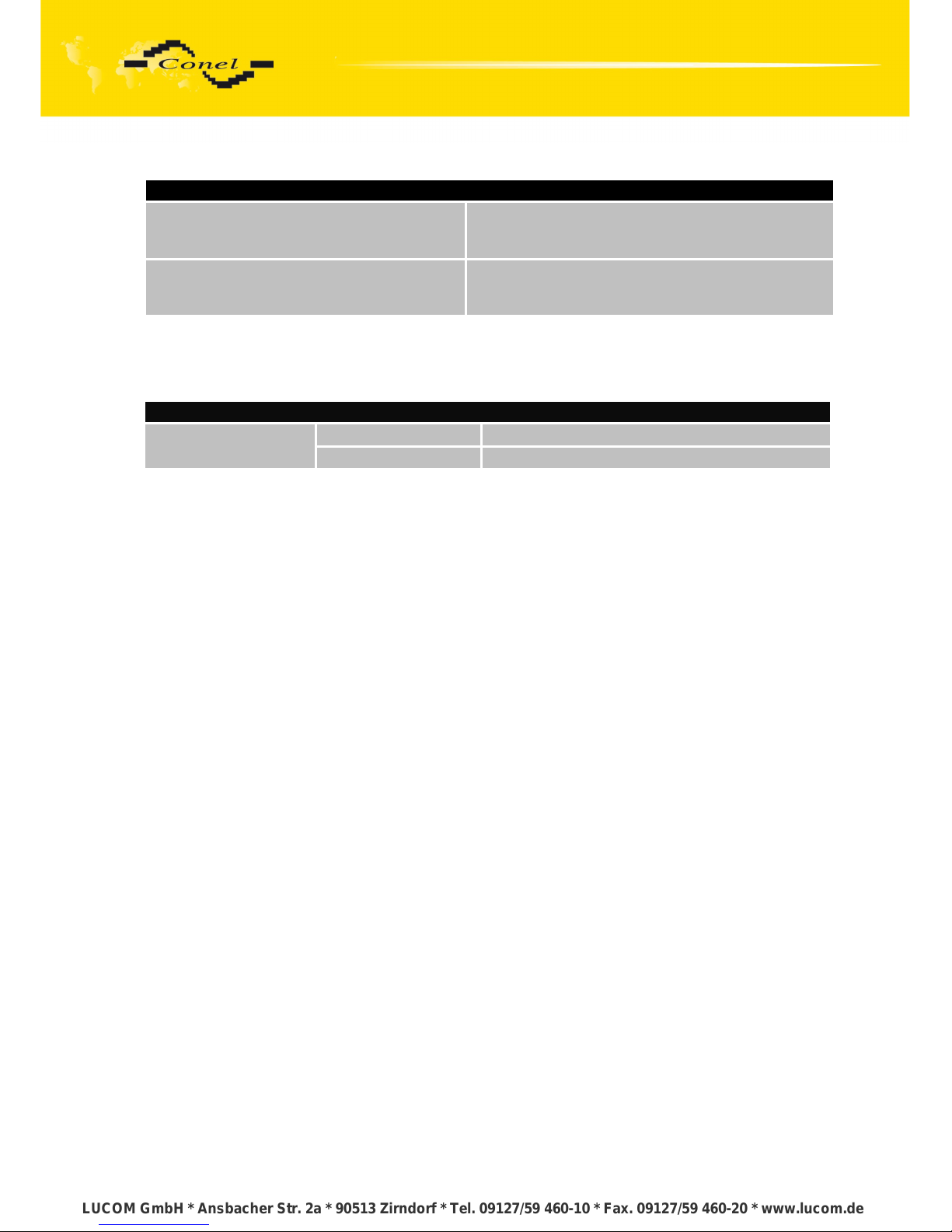
7.3. Technical parameters of processor
32b ARM microprocessor
Memory
512Mb DDR SDRAM
128Mb FLASH
1Mb MRAM
Interface
Serial interface RS232
Ethernet interface 10/100Mbit/s
USB 2.0 interface
Table 15: Technical parameters of processor
7.4. Technical parameters of I/O port
Port IO
Input/Output
Binary input reed contact with trigger level 1,3 up to 1,4 V
Binary output 120 mA/max. 30 V
Table 16: Technical parameters of I/O
7.5. Technical parameters of expansion port
Technical parameters of the expansion ports are to be found in separate manuals
for expansion ports.
23
LUCOM GmbH * Ansbacher Str. 2a * 90513 Zirndorf * Tel. 09127/59 460-10 * Fax. 09127/59 460-20 * www.lucom.de
LUCOM GmbH * Ansbacher Str. 2a * 90513 Zirndorf * Tel. 09127/59 460-10 * Fax. 09127/59 460-20 * www.lucom.de
LUCOM GmbH * Ansbacher Str. 2a * 90513 Zirndorf * Tel. 09127/59 460-10 * Fax. 09127/59 460-20 * www.lucom.de
LUCOM GmbH * Ansbacher Str. 2a * 90513 Zirndorf * Tel. 09127/59 460-10 * Fax. 09127/59 460-20 * www.lucom.de
Page 29

RECOMMENDED LITERATURE
8. Recommended literature
[1] Conel: Start guide,
[2] Conel: Configuration manual,
[3] Conel: User’s manual – Expansion port RS232,
[4] Conel: User’s manual – Expansion port RS485/RS422,
[5] Conel: User’s manual – Expansion port M-BUS,
[6] Conel: User’s manual – Expansion port CNT,
[7] Conel: User’s manual – Expansion port ETH,
[8] Conel: User’s manual – Expansion port XC-SW,
[9] Conel: User’s manual – Expansion port WIFI,
[10] Conel: User’s manual – Expansion port WMBUS,
[11] Conel: Application guide – Expansion port mounting,
[12] Conel: Application guide – Programmer guide.
9. Possible problems
Some network cards are able to be set in situation, when it is not possible to connect
the router. It is possible to solve this problem in the following steps:
hand by selection communication rates 10 MB/s in property network cards,
connect router over switch,
start computer only after finalizing the start of the router.
24
LUCOM GmbH * Ansbacher Str. 2a * 90513 Zirndorf * Tel. 09127/59 460-10 * Fax. 09127/59 460-20 * www.lucom.de
LUCOM GmbH * Ansbacher Str. 2a * 90513 Zirndorf * Tel. 09127/59 460-10 * Fax. 09127/59 460-20 * www.lucom.de
LUCOM GmbH * Ansbacher Str. 2a * 90513 Zirndorf * Tel. 09127/59 460-10 * Fax. 09127/59 460-20 * www.lucom.de
LUCOM GmbH * Ansbacher Str. 2a * 90513 Zirndorf * Tel. 09127/59 460-10 * Fax. 09127/59 460-20 * www.lucom.de
Page 30

FAQ
10. FAQ
I can’t get from internet on equipment, which is connected to router and I have NAT
enabled.
The device's gateway has to be configured as the router.
Router resets itself, connection on Ethernet fails.
It is necessary to use an antenna, which will be situated far from power supply.
I don’t get on web server at NAT.
The remote http access of the router has to be disabled, default server address
has to be your web server and the gateway of the web server has to be the IP
of router.
PPP connection fails.
Check signal power. If signal power is weak, you will have to use a better
antenna. If the environmental cells have a similar signal it will be necessary
to use a directive antenna. Signal levels have to be in the range -50dBm and 90dBm.
It is necessary to set ping, which will check the connection and, in the case of fail
ping, restart connection.
PPP connection won't be established.
Recheck GPRS settings - APN, name, password and IP address.
Try to enter PIN – verification if the SIM card hasn’t set PIN code.
In private APN it is appropriate to switch the DNS server send off.
Switch log system on and observe where the error turns up.
Connection fails on Ethernet or connection isn’t establishing.
On ethernet interface of the router it is possible to switch auto negotiation off and
set a rate and duplex by hand.
DynDNS not function.
In private APN not functional.
If the same IP address is recorded in your canonic name as dynamically assign
address, it means that the operator is using NAT or firewall.
NAT is possible to verify by the help of the ping on address of your server
with static IP address and by the help of the router address verify and address
in ping.
Firewall is possible to verify, for example by remote access on web interface.
The operator doesn’t give out address DNS servers and without DNS server’s it
is impossible to connect to server dyndns.org. In log system will be this
message:
DynDNS daemon started,
Error resolving hostname: no such file or directory,
Connect to DynDNS server failed.
IPSec tunnel is establishing but communication doesn’t function.
Probably it is badly set up route conditionals of connected equipment or it is bad
set up GW.
FTP doesn’t function.
Router doesn’t support the active FTP mode, supports the passive mode only.
25
LUCOM GmbH * Ansbacher Str. 2a * 90513 Zirndorf * Tel. 09127/59 460-10 * Fax. 09127/59 460-20 * www.lucom.de
LUCOM GmbH * Ansbacher Str. 2a * 90513 Zirndorf * Tel. 09127/59 460-10 * Fax. 09127/59 460-20 * www.lucom.de
LUCOM GmbH * Ansbacher Str. 2a * 90513 Zirndorf * Tel. 09127/59 460-10 * Fax. 09127/59 460-20 * www.lucom.de
LUCOM GmbH * Ansbacher Str. 2a * 90513 Zirndorf * Tel. 09127/59 460-10 * Fax. 09127/59 460-20 * www.lucom.de
Page 31

FAQ
RS232 doesn’t function.
It is necessary to verify present the expansion port RS232.
Verify present the expansion port RS232 in router configuration in menu
„external port“, or verify connection locally by the help Telnet-Hyper terminal.
L2TP or IPSec isn’t establishing.
Verify the reason in the log system.
I switched the router to offline mode by the SMS message, but the router is in online
mode after restart.
Control SMS message doesn’t change the router configuration. If the router
is switched to offline mode by the SMS message the router will be in this mode
up to next restart. This behaviour is the same for next all control SMS messages.
26
LUCOM GmbH * Ansbacher Str. 2a * 90513 Zirndorf * Tel. 09127/59 460-10 * Fax. 09127/59 460-20 * www.lucom.de
LUCOM GmbH * Ansbacher Str. 2a * 90513 Zirndorf * Tel. 09127/59 460-10 * Fax. 09127/59 460-20 * www.lucom.de
LUCOM GmbH * Ansbacher Str. 2a * 90513 Zirndorf * Tel. 09127/59 460-10 * Fax. 09127/59 460-20 * www.lucom.de
LUCOM GmbH * Ansbacher Str. 2a * 90513 Zirndorf * Tel. 09127/59 460-10 * Fax. 09127/59 460-20 * www.lucom.de
Page 32

CUSTOMERS SUPPORT
11. Customers support
Up to date information about the product is on website:
http://www.conel.cz/
Upkeep-advices:
The SIM-card must be handled carefully as with a credit card. Do not bend, do not
scratch on this and do not expose to static electricity.
During cleaning of the router do not use aggressive chemicals, solvents and abrasive
cleaners!
Conel Company hereby declares that the router narrated in this user’s guide fits all basic
demands of directive 1999/5/EC (R&TTE).
Router fits values of coefficient SAR defined by association ICNIRP and values of “About
protection of health before non-ionized radiation“.
Declaration about consistency was issued and is possible get it in accompanying
CD or at producer.
27
LUCOM GmbH * Ansbacher Str. 2a * 90513 Zirndorf * Tel. 09127/59 460-10 * Fax. 09127/59 460-20 * www.lucom.de
LUCOM GmbH * Ansbacher Str. 2a * 90513 Zirndorf * Tel. 09127/59 460-10 * Fax. 09127/59 460-20 * www.lucom.de
LUCOM GmbH * Ansbacher Str. 2a * 90513 Zirndorf * Tel. 09127/59 460-10 * Fax. 09127/59 460-20 * www.lucom.de
LUCOM GmbH * Ansbacher Str. 2a * 90513 Zirndorf * Tel. 09127/59 460-10 * Fax. 09127/59 460-20 * www.lucom.de
 Loading...