

Page 1

Espresso maker
Design Luca Trazzi
Instructions manual
Page 2

x4 IMPORTANT SAFEGUARDS
IMPORTANT SAFEGUARDS
When using electrical appliances, basic safety
precautions should always be followed, including
the following:
1 Read all instructions.
2 Do not touch hot surfaces. Use handles or knobs.
3 To protect against fire, electric shock and injury to
persons do not immerse cord, plugs or machine in
water or other liquid.
4 Close supervision is necessary when any appliance
is used by or near children.
5 Unplug from power socket when not in use and
before cleaning. Let cool before putting on or taking
off parts and before cleaning the appliance.
6 Do not operate any appliance with a damaged cord
or plug or after the appliance malfunctions, or has
been damaged in any manner. Return appliance to
the nearest authorised service facility for
examination, repair, or adjustment.
7 The use of accessory attachments not recommended
by the appliance manufacturer may result in fire,
electric shock, or injury to persons.
8 Do not use outdoors.
9 Do not let cord hang over edge of table or counter,
or touch hot surfaces.
10 Do not place on or near a hot gas or electric burner,
or in a heated oven.
11 Do not use appliance for anything other than its
intended use.
12 SAVE THESE INSTRUCTIONS
The X4 espresso machine uses the EASY
SERVING ESPRESSO (E.S.E) system: for best
results, we recommend using the E.S.E.
E.S.E. logo on the package. The E.S.E. system
guarantees several benefits: the quality of the espresso
coffee remains constant regardless of the user's
experience. The system is very easy to use, quick, and
extremely easy to clean. It is very important, however,
that you store E.S.E. servings in a closed, airtight
container so that they remain fresh.
NB: The X4 also uses pre-ground coffee, if you have the
ground coffee handle.
servings, which are easily recognisable by the
Page 3
x4 GENERAL INFORMATIONS
x4 SHORT INSTRUCTIONS
General information for using the unit
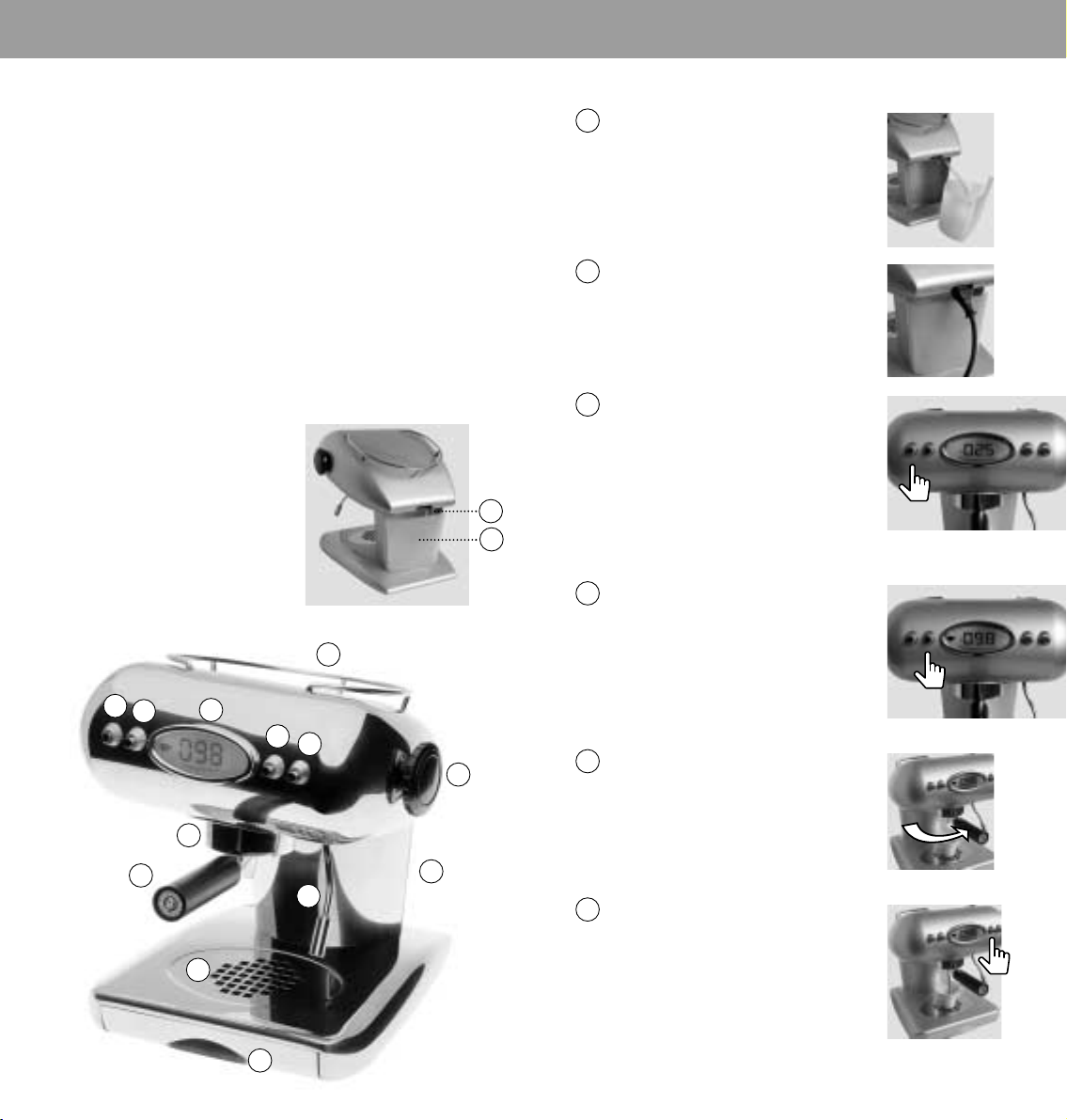
We recommend that the grill (9), the drip tray (7), the water
tank (11), the steam nozzle and air intake opening (8) are
cleaned regularly.
EXTREMELY IMPORTANT: never immerse the appliance in
water or clean in a dishwasher.
The contents of the water tank (11) should be changed
regularly.
After changing water, ensure that the suction hose (14)
reaches into the inside of the water tank (11).
It is recommended that the machine be decalcified
regularly (depending on the hardness of the water) using a
decalcification agent specifically developed for espresso
machines. (Use no vinegar!)
For perfect espresso enjoyment, it is recommended that
the cups are warmed in advance on the cup warmer (13).
1 On/Off switch
2 Temperature button
3 Button for coffee
4 Button for steam
5 Display
6 Filter-holder guide
7 Filter-holder
8 Steam nozzle for hot water
and cappuccino
9 Grill
10 Drip tray
11 Water tank
12 Steam knob
13 Cup storage (heated)
14 Water-intake tube
13
1
2
5
3
4
12
6
14
11
Short instructions
1 Fill the water tank (11).
2 Connect the plug to the electrical supply.
3 Press the On/Off button (1). The display will
illuminate. The X4 will carry out an
automatic check of the water level in the
heating tank: If there is insufficient water,
the machine will switch on the water pump.
The lettering H2O will appear in the display.
After the water filling process is complete,
the current water temperature in the
heating tank will be displayed.
4 Press the temperature button (2) to
activate the machine. Wait until the
machine has reached the required
temperature. After the cup symbol on the
display ceases to flash, the machine is
ready to make coffee. NB: the machine
will not make espresso if it is not in the
correct temperature range.
5 Place a single E.S.E. portion, with its logo
face down, into the filter-holder (7). Next,
twist the filter-holder holder firmly into
the infusion head (6). Place a cup onto
the perforated plate (9).
7
8
9
10
11
6 Now press the coffee button (3) once to
prepare an espresso. The programmed
preparation will take 15 seconds; if the coffee
button (3) is pressed twice in succession, the
programmed preparation will take 25
seconds and you will receive a long espresso.
Afterwards, you can enjoy your espresso.
Factory settings for the machine are:
temperature, 98 degrees C and extraction
time, 15 seconds and 25 seconds respectively.
2322
Page 4
x4 STEAM AND WATER
x4 CAPPUCCINO
Steam
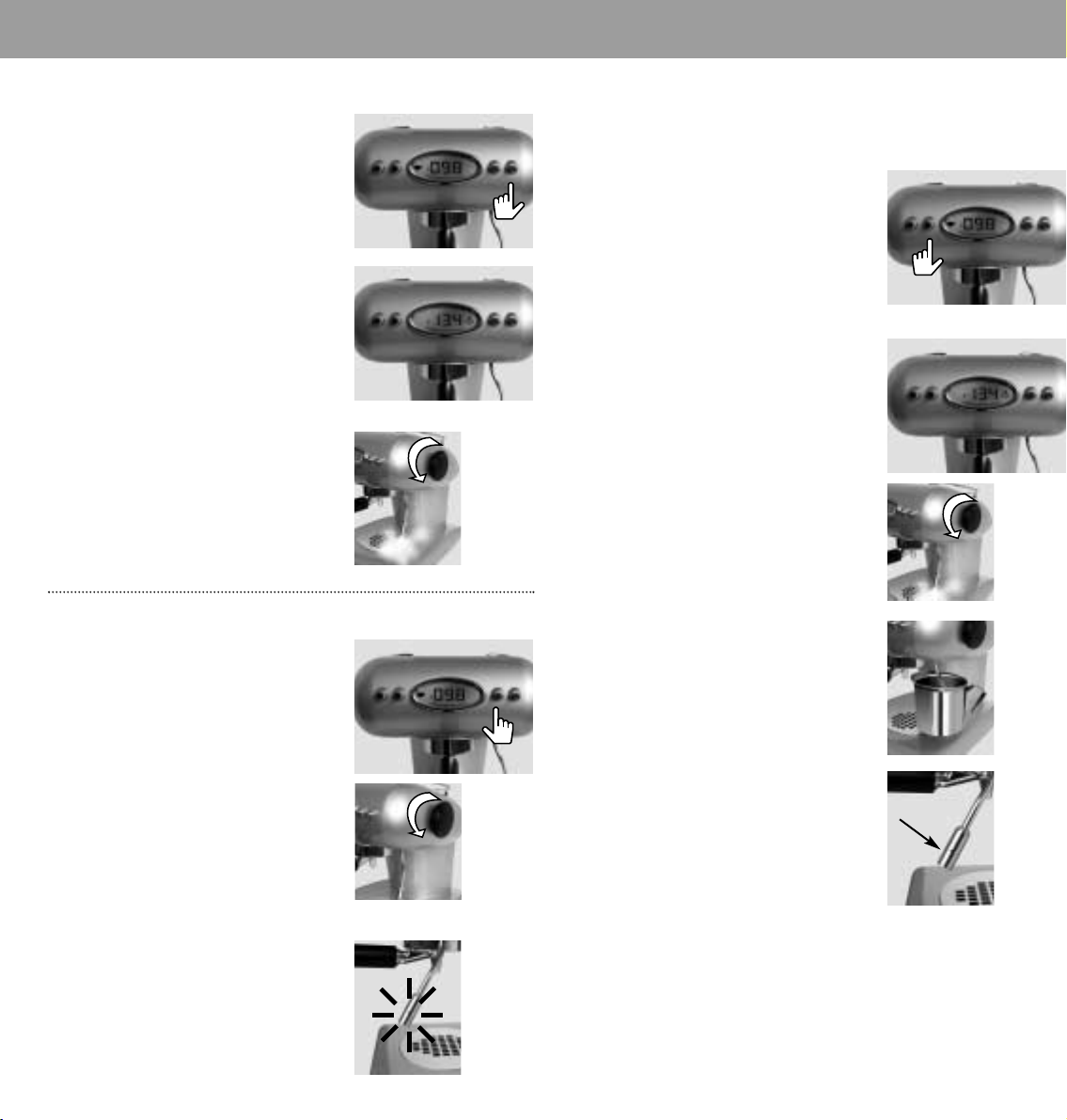
The X4 can generate steam or hot water for the
preparation of cappuccino or tea. In order to
generate steam, the TEMPERATURE must appear
on the display. Press the steam button (4).
The cup symbol will disappear from the
display and the steam symbol will appear.
The machine will now automatically increase
its operating temperature. The machine is
ready when the steam symbol ceases to flash.
Turn the steam knob (12) in an anti-clockwise
direction to regulate the exit of steam.
Press the steam button (4) once again to
switch off the STEAM function.
Hot water
To make hot water, the TEMPERATURE must
appear on the display. After the cup symbol
has ceased flashing, turn the steam knob in
an anti-clockwise direction while keeping
button (3) depressed. Hot water will now flow
out of the nozzle. Do not forget to close the
steam knob after you have released the
button (3).
CAUTION: the nozzle (8) is extremely hot
during steam exit.
Preparing one or several cappuccinos
IMPORTANT: PLEASE FOLLOW THE DESCRIBED INSTRUCTIONS AND
SEQUENCE EXACTLY!
Be sure to make the coffee for your
cappuccino first, before steaming the milk.
(After steaming, the machine will be too hot
and you’ll have to wait for the temperature to
return to the coffee range). Activate the
machine by pressing button (2). Once the
required operating temperature has been
reached you may prepare one or more coffees.
1 The machine can now be prepared for
steam by pressing the steam button (4).
Wait until the required temperature has
been reached. Turn the steam wheel (12)
slightly in an anti-clockwise direction and
allow any residual water to exit the nozzle
(8) until steam starts to exit. Now close the
steam knob (12).
2 Place a container of milk under the steam
exit nozzle (8) and immerse this slightly
into the milk. Now open the steam wheel
(12) to obtain the required steam.
A small opening above the nozzle enables a small
amount of air to be drawn in, which then mixes
with the milk causing the required frothiness for a
cappuccino. If this does not take place, lower the
position of the container so that the air intake
opening (8) is not covered by milk. We
recommend that very cold milk is used. If, after
the preparation of one or more cappuccinos, you
want to make another coffee, it will be necessary
to re-set the machine to coffee by pressing the
button (4), open the steam knob until the
temperature goes down to 100, and wait until the
cup symbol ceases to illuminate. Next, close the
steam wheel. The machine is now ready to
prepare the next coffee. NB: when the next coffee
is made, the water quantity may be slightly less
than that for the previously prepared coffee.
2524
Page 5
x4 TIME
x4 PROGRAMMING
Programming the X4
The X4 allows the following functions to be
programmed:
Clock time
Sleep/active modes
Temperature at which coffee is prepared
Duration of coffee preparation
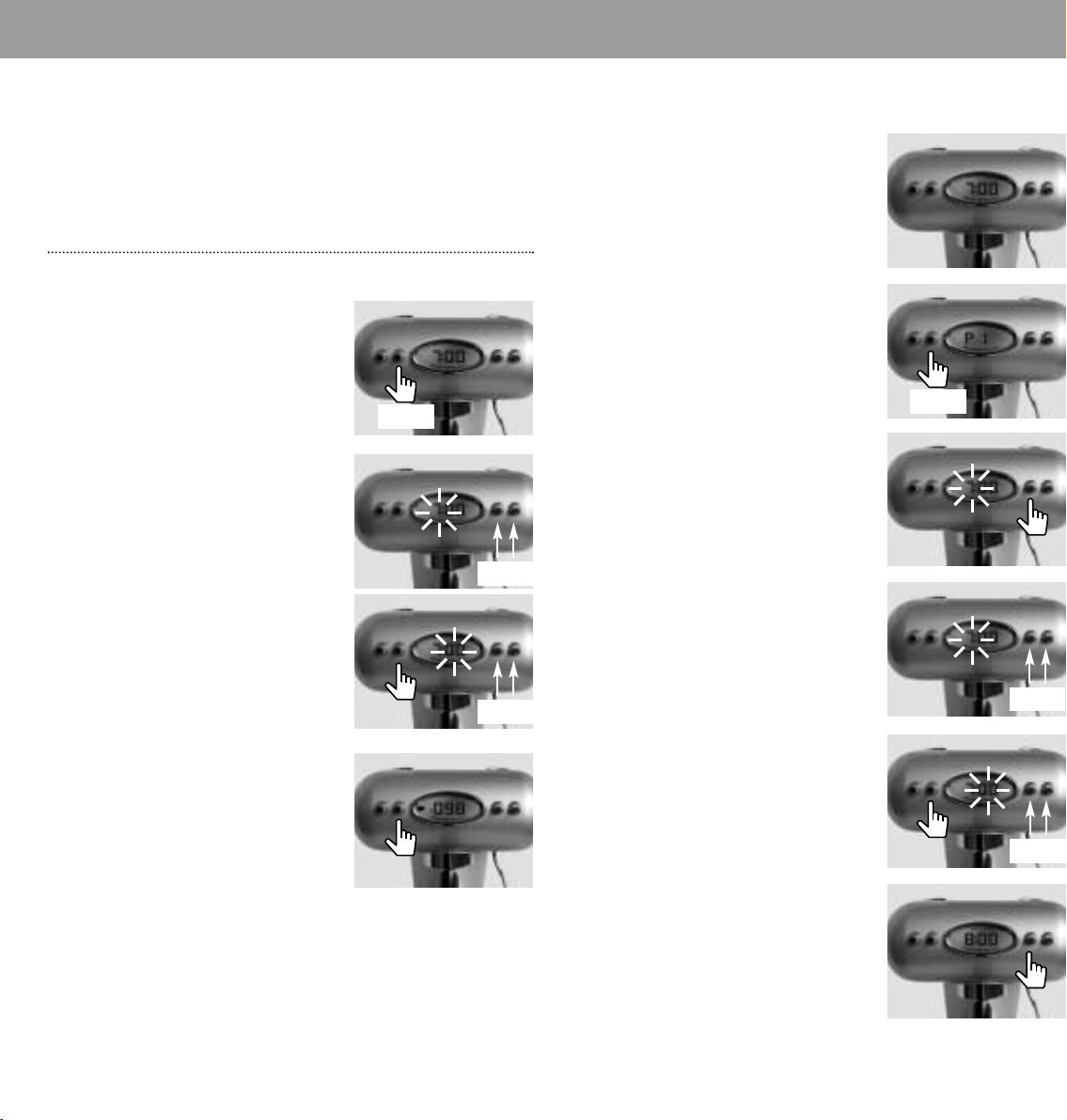
Programming the clock time
Depress the temperature button (2) for
approximately 3 seconds. The time display
will flash.
Use buttons (3) and (4), to set the hours.
Press button (2) again to set the minutes.
You have now set the clock time.
Press button (2), (or after a few seconds) this
time wil be displayed.
3 sec.
Programming the switch on /
switch off function (P1,P2,P3)
This function allows you to program three
active periods for the machine throughout the
day (P1, P2 and P3). On the display, you will
see “L’ORA” (TIME).
To program P1, proceed as follows:
Press button (2) for approximately 3 seconds.
Next, press the same button two more times.
P1 will now be displayed.
3 sec.
Now press button (3) or (4): the clock time for
the ACTIVE function will appear and flash.
+ -
Press buttons (3) and (4) to set the hours.
If the time is shown on the display, the X4 is in
sleep mode. This means that the machine is
in an energy-saving mode while retaining full
programmed functionality. If you want to use
the machine while it is in SLEEP mode, just
press button (2), the temperature will be
displayed and the machine will be in ACTIVE
mode. When the cup stops blinking, you will
be able to prepare an espresso.
NB: Unplugging the machine, or using the
on/off button (1) to turn it off will result in the
loss of any machine setting you have
programmed after about 8 hours. When the
machine is turned on again , the machine will
revert to the factory “default” settings.
+ -
+ -
Press button (2) once again to set the
minutes. Now, press button (2) a further time,
to change the clock time for the sleep
function.
+ -
Set the clock time as described above. Now,
wait a few seconds or press button (3). The
display will revert to showing the current clock
time and also show the word ‘PROGRAM’.
(This means that at least one of the three
programs is active).
2726
Page 6
x4 TEMPERATURE
x4 EXTRACTION TIME
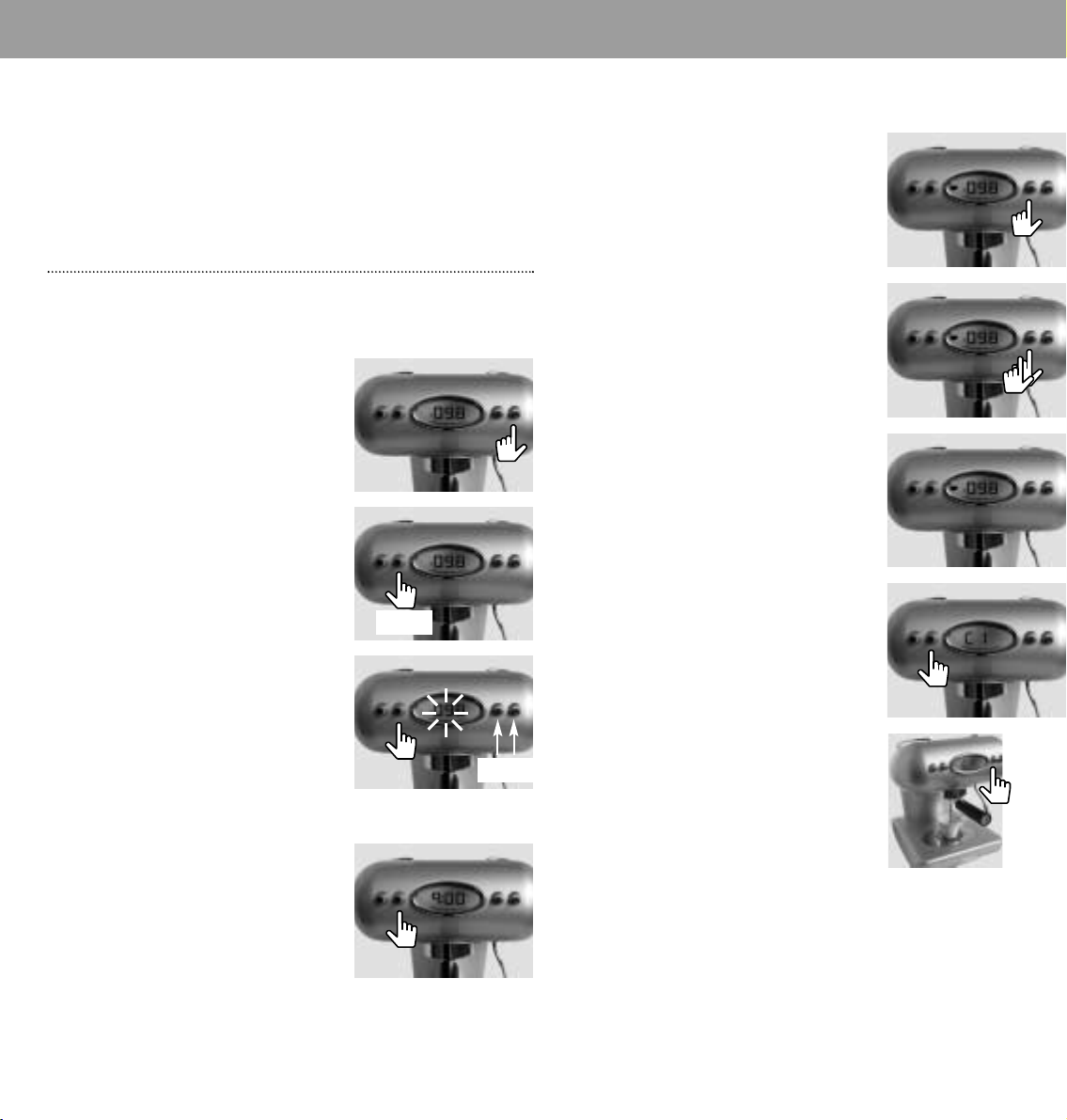
To program P2 and P3, press button (2) and
proceed in the same manner as described for
P1. In order to deactivate the programming,
the CLOCK TIME must be visible on the
display. Press button (3). Select the
programme that you wish to deactivate and
then press button (4). The display will now
show the programmed clock time. The word
‘PROGRAM’ will disappear.
Programming the temperature
for coffee preparation
The X4 has been set to a standard
temperature of 98° C for coffee preparation.
You can verify the set temperature by pressing
button (4).
You can also change the temperature for
coffee preparation to your own requirements.
To change the temperature, depress button
(2) for approximately 3 seconds.
3 sec.
Programming the extraction time
(C1,C2)
If you press button (3) once, you will obtain a
NORMAL espresso. Coffee preparation will
take approximately 15 seconds (C1).
If you press the same button twice in
succession, you will obtain a long espresso.
Coffee preparation will take approximately 25
seconds (C2).
You can also change the duration of coffee
extraction to suit your own requirements.
To be able to make this change, the
TEMPERATURE must be shown on the display.
If the temperature is not shown on the display,
press button (2). Put coffee in the filter-holder
as if you were going to make an espresso.
(You must have coffee in the filter-holder in
order to set the extraction time correctly).
Now, press button (2) until C1 is displayed.
Next, continue pressing the button until the
flashing temperature display for coffee
preparation appears. Now, press button (3) or
(4) to change the temperature.
The programmable temperature range is
between 80° and 103° Celsius.
Press button (2) to save this value.
3 sec.
+ -
Start the extraction of the coffee while holding
in button (3) until the desired amount of
coffee is in the cup, than release the button.
After preparation, the machine will save the
respective time duration.
You can also change the C2 time using the
same procedure.
2928
Page 7
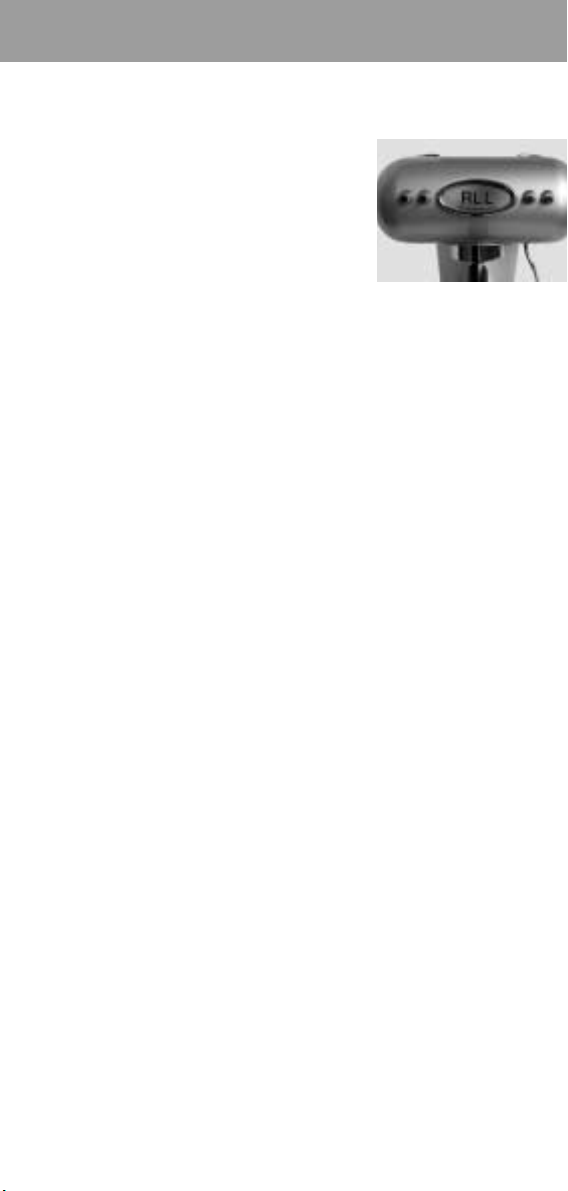
If ALL is displayed
If the internal temperature of the boiler will
exceed 138°C (i.e. before temperature safety
activation) and the flashing word ‘ALL’ will
appear on the display. No additional functions
can now be used. As soon as the temperature
falls to its normal level, the ‘ALL’ word will
disappear and the machine will once again
become operational.
Technical Data
IMPORTANT! Only connect your espresso machine to a standard
socket. Check whether the mains voltage accords with the
information on the rating plate of the unit.
Europe: Voltage: 230 V 50 Hz Output: 1050 W
USA: Voltage: 120 V 60 Hz Output: 1100 W
The manufacturer reserves the right to make changes and
improvements without giving prior notice.
 Loading...