

Page 1
CT
Pro duct Features
User -defin ed ligh ting mo de
Limi tless l ong-ra nge con trol
Spec ializ ed smar t home se tting
Inte llige nt light ing tim ing set
2 CT mod e selec tion
Pro duct Parameters
Produc t Name :
Model :
Input Volt age :
Out Contr ol:
Max Curre nt Load :
Max Outpu t Power :
Working Tempe rature :
Protoco l :
Dimens ion :
Packing:
Net Weight :
Gross Weig ht :
WiFi LED C ontrolle r
WiFi- 101-CT
12 ~ 24Vdc
CT LED Lig hts
6A x 2CH Max 12A
(0~72. ..144W)x2C H
-30℃ ~ +55℃
2.4GH z Wi-Fi, 802 .11b/g /n
L125 x W33 x H2 0(mm)
L127 x W35 x H2 4(mm)
52g
70g
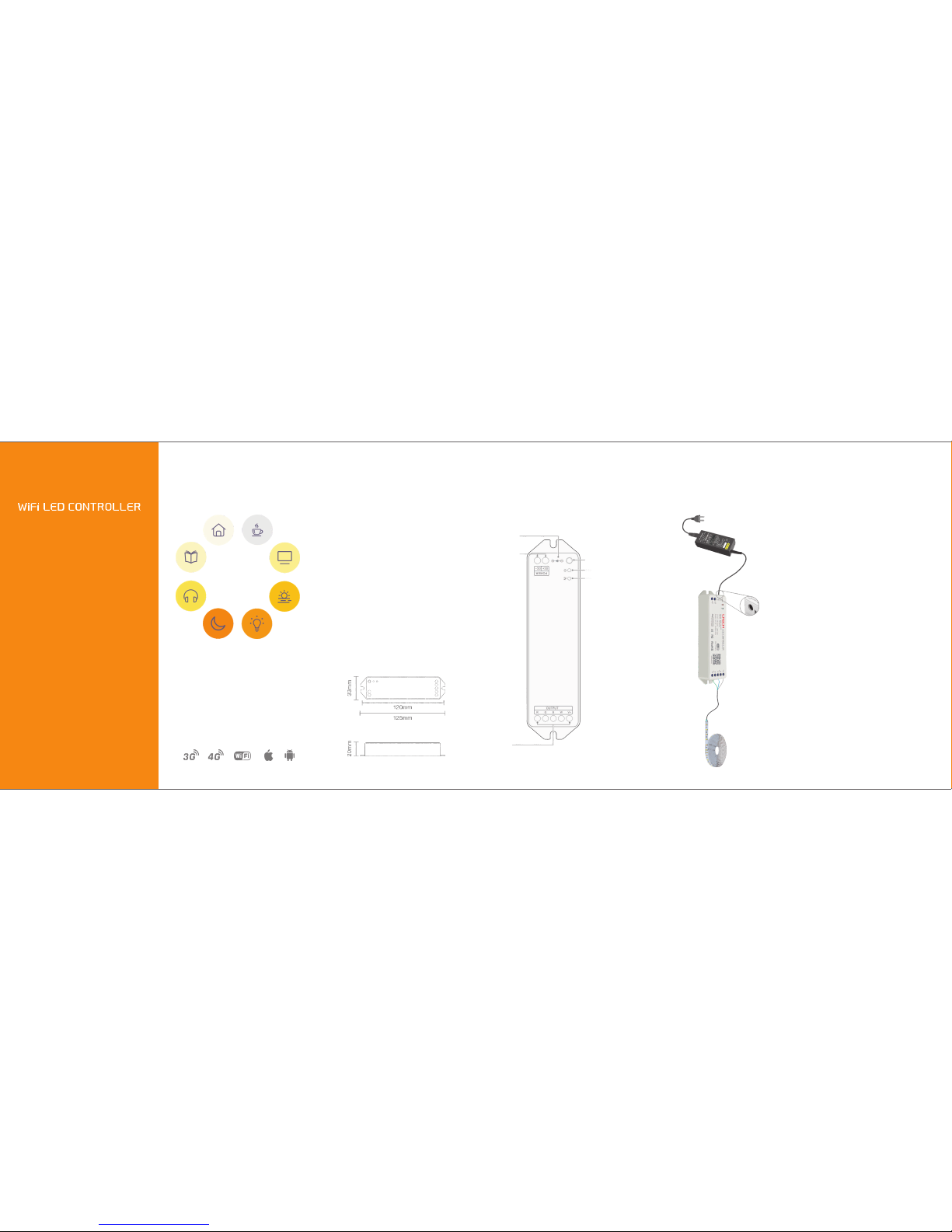
Pro duct Structure
Pro duct Installation
Attention
★
This manu al only applie s to this model. We
reserve the ri ght to ma ke changes without
prior not ice.
1.
by the quali fied person.
2.This produ ct is non-wa terproof. Pleas e avoid
the sun and rai n. When i nstalled ou tdoors,
please ensure it is m ounted in a water proof
enclosu re.
3.Goo d heat d issip ation w ill pro long th e
working li fe of the controll er. Pl ease ensure
good ventil ation.
4.Please check if the o utput voltage of the LED
power supply use d co mply with the working
voltage of th e product.
5. P lease ensure that a dequate sized cable is
used from the controller to the LED l ights to
carry the cur rent. Ple ase als o ensure that the
cable is sec ured tightly in t he connector.
6.Ensure a ll wire conn ections and p olarities
are corre ct before ap plying po wer to avoi d
any damages t o the LED lights .
7.If a fa ult occurs p lease retur n the produc t to
your supp lier. D o n ot a ttempt to fix this
product by yo urself.
The product shall be installe d an d ser viced
WiFi-101-CT
LED Strip
Power Adapter
220/110Vac
Load power be low 75W,
use this round adapte r
socket for conne ction.
DC Powe r suppl y socket
(φ5.5m m x φ2.5mm )
LED lamp
connection socket
The running light
Power indicator
12~24Vdc
power input
Setti ng key
Page 2
iOS / A ndroid
2
3
1
4 5
6
Ope rating Inst ruction
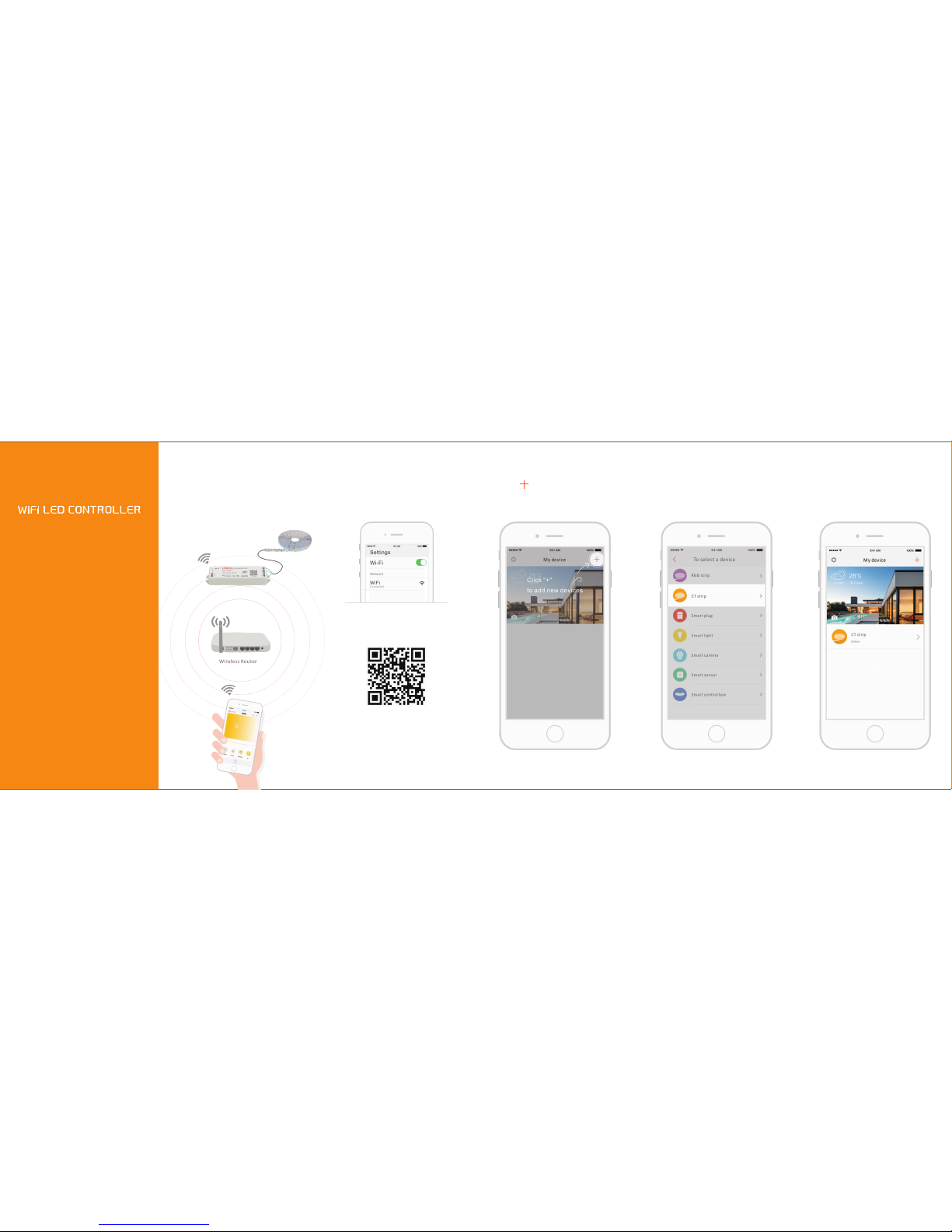
Operating Guidance
Operating Schematic
Scan QR Co de to downloa d the APP via
mobile ph one.
Open WLAN via m obile phone, connect
to the wirel ess router.
Enter the interface "To sele ct a device" ,
choose "C T strip" and fo llow the prompt s
to connect .
Once successfull y connec t to th e device
that will immediat ely open inte lligent
life a nd realize long-di stance con trol via
mobile ph one.
Turn on APP, enter "My Device "
click" "ic on.
interface ,
After installati on, the strip flashes within
30s w hen powe red on a nd then the
controlle r is re ady to t he config uration
status acco rdingly.
 Loading...